Absolutely wonderful, I've been waiting for the update for over a month now because it's no longer playable due to FPS problems. With great anticipation I realized that the update is finally here! What do I realize, exactly the same performance problems as before, it has done exactly 0! I am frustrated. If I hadn't already played over 80 hours, I would demand my money back.
#Performance problems
167 messages · Page 1 of 1 (latest)
 hasty crag
 torn egret
Hey! I'm so sorry to hear that. Can you drop me your specs for your PC + some information on what's happening so our team can take a look?
hasty crag
@torn egret I've already done all that in the last update, but I'll be happy to send it to you again.
torn egret
hasty crag
<@493625785140248586> I've already done all that in the last update, but I'll be...
would appreciate it if you sent again!
our testers all saw increased FPS, so this deff concerns me. and are you starting a new save or loading up the old one?
hasty crag
I have loaded my old savegame
torn egret
what happens when you try a new one?
hasty crag
It will probably go well, up to the point where I am currently at my savegame.
torn egret
would love to see your ave file! and tagging in <@&1171546467312341032>
hasty crag
Here are my PC specs:
Prozessor: AMD Ryzen 9 3950X 16x 3.50GHz So.AM4 WOF
Arbeitsspeicher: G.Skill Trident Z Neo 32GB DDR4-3600 DIMM CL16 Dual Kit (2x16)
Motherboard: ASUS ROG Strix X570-E Gaming
Grafikkarte: NVIDIA GeForce RTX 3090 Founders Edition
torn egret
since the last time you sent over a save, we now have in-house QA testing 🙂
hasty crag
Here you can see the performance of version v0.1.2a: https://www.youtube.com/watch?v=T2XG5pY_0B4
And here you can see the performance of version v0.2.0f: https://www.youtube.com/watch?v=vJ6uK-521Mk

 hasty crag
torn egret
would love to see your ave file! and tagging in <@&1171546467312341032>
hasty crag
torn egret
would love to see your ave file! and tagging in <@&1171546467312341032>
Where can I find the file?
torn egret
%UserProfile%\AppData\LocalLow\Fire Hose Games\Techtonica
and looking for player.log!
your save file will be there also
torn egret
oh!
so this is a known issue - try zooming around without a part out
just like scroll to a blank square
on your toolbar
hasty crag
makes no difference
torn egret
whats your FPS?
torn egret
oh, how does your PC fare when in other large scale factory games?
hasty crag
I have no problems in this game: Satisfactory
torn egret
hm, weird. when the tech team is in tomorrow they'll take a look!
i would definitely see what it's like opening a new save though! a lot of game stuff has changed
hasty crag
Will you pass this on or do I have to do something else?
torn egret
It already has been! Our QA team sees the tech support tag above
it's just after hours right now (im staying on late bc of launch!)
hasty crag
Ok great thanks a lot! Yes of course I will open a new savegame, but if the same problem occurs again after some time, then it makes no sense to create a new savegame again and again without ever getting into the "endgame" because the game is no longer playable due to the performance.
 covert osprey
We'll take a look at this tomorrow, thanks Rush!
hasty crag
Thank you very much! I love the game and it would be a shame not to be able to play it because of this problem. I'm not the kind of person to drop the game because of a few FPS drops, but 5-30 FPS is just awful to play.
torn egret
what are your graphics settings?
hasty crag


 torn egret
what happens if you bump things down a notch? like not having everything on max
hasty crag
It makes absolutely no difference whether the graphics settings are set to MAX or LOW.
torn egret
tbh that part makes no sense, will wait on the tech team to take a look tomorrow!
(i am not a tech person so they'd have a better idea than me!)
 deft oar
That’s about what I see on the Xbox too. Frame rate is terrible on places but my assumption is just that it’s pre release and will get more optimized
 fervent ore
I sometimes get frame drops near my factory(mostly after or during an expansion, or if I move around in a circle while thinking of what to do) or waterfalls or when I'm encumbered(this one's kind of weird, I know you're supposed to move slower when encumbered but I don't think your curser is supposed to move slower and stutter) on Steam deck but it's manageable most of the time.
I haven't been able to try the update yet so I'll cross my fingers for the promised performance improvements. 🤞
 marsh gyro
I get the same issues, when in built up areas, I get very low FPS down to around 10fps. settings make no difference at all. I would be great to get a fix to this. It has been here since V1.1
hasty crag
Do you already know more about the reasons why my FPS is so bad? @covert osprey
covert osprey
Hi, Rush. Our tech team is taking a look at the logs to see if anything jumps out at them.
hasty crag
Ok, cool 👍
deft oar
I think it’s almost certainly a leak. I get down to around 10fps on Xbox series x after playing any length of time. Then when it crashes, which it always does eventually, and I reload, the same areas that were giving me 10 fps are now 30-60, hard to be sure, but much smoother again from fresh load, until things slow down again after another couple of hours. Rinse and repeat.
 copper karma
since this issues been the same for me, i was assuming based on my setup ( Full AMD PC ) that the game have compatibility issue, but seen now even with Nvidia gpu i guess it can be narrowed down if Intel cpu will have the same problem with the performance, if not then its totally related to AMD cpus
 jolly thistle
i can +1 this, performance is definetely alot worse than other factory games, i dont think i see a difference to pre-build update. i havent said much about it yet, since the game is still very early alpha.
(my specs, amd ryzen 5 3600x, amd radeon 5700xt)
In areas where i havent build anything it is all fine, but once you start building factories, it really starts to take a hit. Often lower than 15 fps
copper karma
jolly thistle
i can +1 this, performance is definetely alot worse than other factory games, i ...
try using Radeon Super Resolution, im using it for this game and it helps a little
jolly thistle
didnt do much of a difference sadly, do you have 5700xt aswell? it might not work to well with those maybe?
copper karma
i have 5950x with 6900xt, based on my observation both CPU and GPU utilization are too low while running the game, i have been testing every possible scenario to pinpoint why the performance is low and yet not concrete answer.
marsh gyro
I run a ryzen 5 3600x and nvidia 3060 12gb, 32 gbs ram, when playing the game both cpu and gpu sit around 20 / 30% usage but I get huge drops in FPS. changes settings doesn't help either. I also haven't posted much about it as it is still early access. I am hoping this gets resolved as the game goes on.
marsh gyro

 glacial skiff
we are working on performance, and since 0.2 there is plenty of optimisation to do
 true yarrow
On my game, the highest framerate I get is 15 fps and sometimes as low as 5 fps. Barely can traverse my base lol.
Currently running rtx 3080
Using the mole now takes an eternity to dig
copper karma
can anyone test this if it improve the performance , right click on the game from steam then Properties, in launch option type -DX12 , then run the game
marsh gyro
I will give this ago over the next few days
So straight off the bat I get 15fps. double digits is good, doesn't feel to sketchy when above 10fps.
copper karma
on what resolution you play on?
 copper karma
the common thing i see from all players that CPU and GPU are not utilized fully
marsh gyro
Yes, mine maxes out at around 50% GPU but that is a spike, sits somewhere around 20 to 30%, CPU is the same sits around 20 - 30%.
Current graphic settings in game, i have turned on setting in Nvidia control panel to see if that would help. I can confirm that is helped the smallest amount but no big leap in FPS.


Even in places where the is little animation / production the best I can get is 20 FPS. I will continue some testing tomorrow.
 copper karma
do you have anything overclocked? CPU or GPU ?
marsh gyro
I have this save with 140 hours with a lot of production and my brother has a save that we are fairly new at, still upgrading victor and that has started to get low fps.
marsh gyro
copper karma
do you have anything overclocked? CPU or GPU ?
No, everything is stock with no over clock.
glacial skiff
there is also old known issue with some AMD Cpu
marsh gyro
marsh gyro
No, everything is stock with no over clock.
apologies seems my cpu is clocked to 2.8ghz from 2.6ghz.
copper karma
marsh gyro
apologies seems my cpu is clocked to 2.8ghz from 2.6ghz.
some games doesnt like overclocking, set everything to default and test
marsh gyro
This is not something I have set, I had a system failure only 6 weeks ago. Fresh W11 on an SSD, game is installed on an M2, I have now closed the game and the CPU is back to 3.6ghz. seems to be a performance boost when gaming
copper karma
if its a default setting then its fine, AMD auto boost doesnt effect
marsh gyro
I do have a bios update I have been holding back doing, I don't think it will change anything but will get that done tomorrow and see.
 glacial crater
One small thought, shrinking your FOV and lowering the Light Quality may help a bit, those two are pretty big factors for performance!
the first person FOV won't have any impact, but the main FOV should reduce how many things you're rendering on screen by a big margin
marsh gyro
I have tried the FOV and light quality prior to the update, it did not make a difference. I will try agin witht his update.
glacial crater
That said a 140 hour save is likely to see perf start to dip if you're in the thick of your factory. If you go somewhere away from your factory I'd expect it to go back up to 60 again though!
We're constantly working on more optimization work, so this should improve over time!
marsh gyro
glacial crater
We're constantly working on more optimization work, so this should improve over ...
When in the thick of it it drops to as low as 4, I have recently got to xray on that save and max fps is around 15. I understand, it is no problem. when it double digits it is playable. I am hoping the feedback will help optimise. I am willing send anything you need to help with that.
glacial crater
Yeah we always welcome folks sending us their saves! It takes a lot of time to make saves that big so the more examples we have when optimizing can be very useful!
copper karma
ill be happy to share my save to help the tech and dev team 👍
marsh gyro
Agreed, il get it dug out and sent over. Just had a quick peak at my bios, I have docp enabled for 2133mgz ram and resize bar enabled.
Is resize bar the issue? I know this has been problematic in the past
glacial skiff
it is something we could check only via experiments, it is hard to test all variable computer setups
glacial crater
If you ever try it with it off and see a boost let us know! I don't think I can speak to whether QA can try out that kind of thing easily or not, but I'll let them know!
marsh gyro
No worries I will try it tomorrow. See what happens.
glacial crater
Thank you!
marsh gyro
marsh gyro
changed lighting from max to low and FPS from 120 to 90, gone from 10FPS to 17/18FPS. Same location with the assemblers. Will try some more tomorrow 🙂

 median vortex
glacial crater
That said a 140 hour save is likely to see perf start to dip if you're in the th...
median vortex
glacial crater
That said a 140 hour save is likely to see perf start to dip if you're in the th...
Have around 40hrs on my save and with lowest settings getting around 10fps near my stuff and 20 to 30 max far away
marsh gyro
median vortex
Have around 40hrs on my save and with lowest settings getting around 10fps near ...
It is around that mark that I started getting low FPS. With resize var turned off I get 15fps in this location
 copper karma
resize bar should make games better not worse, i have tested it with other games and the difference is huge
marsh gyro
Yes that is correct, it is only the past year or 2 that it has been that way though. on launch it did not work very well and support was not present for it in games.
hasty crag
@covert osprey Will there be a performance update at some point or have you finally discovered the error or are you still at a loss?
torn egret
we are continuously working on it!
we think we have some leads, we've just only been in office a few days this year haha so i dont have answer for you at the moment
copper karma
Based on what i see from players, any AMD cpu setup face bad performance, maybe that will help
torn egret
there is a specific bug caused by AMD 6000 series cards, but yeah the AMD hardware itself might also be causing issues. but not everyone w/ an AMD card has issues, so it's harder to pinpoint!
what we're doing is improving perf/optimization across the board and seeing what works
covert osprey
To echo leftmost, we're in the process of doing another engineering deep dive on performance, and trying to continue to make improvements wherever we can.
 lean bane
copper karma
Based on what i see from players, any AMD cpu setup face bad performance, maybe ...
lean bane
copper karma
Based on what i see from players, any AMD cpu setup face bad performance, maybe ...
I have an AMD cpu and it is easily handling the game, however my RTX 3060 Ti was working at 90% with 12 GB of VRAM. TT is definitely GPU intensive.
copper karma
lean bane
I have an AMD cpu and it is easily handling the game, however my RTX 3060 Ti was...
What FPS you getting? and how big is your factory?
lean bane
copper karma
What FPS you getting? and how big is your factory?
It was dropping down to the mid-20's, granted my factory is pretty big. It stretches from Lima to Victor and includes the planter and smelter factories and both huge veins.
copper karma
lean bane
It was dropping down to the mid-20's, granted my factory is pretty big. It stret...
Yes mid 20’s is low performance, i bet if you use the mole near your factory it will kill the game fps
lean bane
copper karma
Yes mid 20’s is low performance, i bet if you use the mole near your factory it ...
I got some money for Christmas so I bought a RTX 4070 Ti, now I get in the mid 40's to high 50's which is fine, with me, for now
hasty crag
Yes, another eagerly awaited patch and once again nothing has improved in terms of performance!
Thanks for nothing 😄😤
torn egret
hasty crag
Yes, another eagerly awaited patch and once again nothing has improved in terms ...
this was not a patch that worked on performance! this was solely a content update
this is a gentle reminder that we're a small team working as hard as we can on Techtonica. please be polite!
hasty crag
@torn egret To put it mildly: what good are content updates if I can't even play the game because of the performance problems?
Then you have to communicate it better when you make the game better in terms of performance. I'm always hoping that I'll be able to play Techtonica again when an update is released.
torn egret
hasty crag
<@493625785140248586> To put it mildly: what good are content updates if I can't...
These Update Packs are made mostly with just art team time, not engineering! They are separate from our larger updates with performance improvements

Let’s get into what you can expect from v0.2.1, the first Update Pack bound for Techtonica.
If you scroll down in this blog, there's a more in depth explanation!
 stark coyote
hasty crag
<@493625785140248586> To put it mildly: what good are content updates if I can't...
stark coyote
hasty crag
<@493625785140248586> To put it mildly: what good are content updates if I can't...
Just curious, but what are your temps looking like when running Techtonica?
hasty crag
@stark coyote GPU: 56°C - 64°C
stark coyote
CPU?
hasty crag
@stark coyote ~67°C
 stark coyote
hasty crag
<@162550724331307017> ~67°C
stark coyote
hasty crag
<@162550724331307017> ~67°C
That's a bit high for your CPU, but not too bad. Im running your save now on my 3070ti and im getting 20-30 FPS in your base, 70-100 out in the wild. Is this about what you were getting?
hasty crag
@stark coyote You can find a video with my FPS from my base above.
stark coyote
yeah, I watched it. FRAPS doesn't really give the whole story though
hasty crag
But yes, my FPS is about what you describe.
stark coyote
better if it was MSI with rivatuner
hasty crag
I will be happy to try the programme if it helps.
stark coyote
https://i.imgur.com/5T4CmPI.jpeg thats the info (top right) that rivatuner gives (CPU/GPU Temps, wattage, fan speeds, memory, etc)
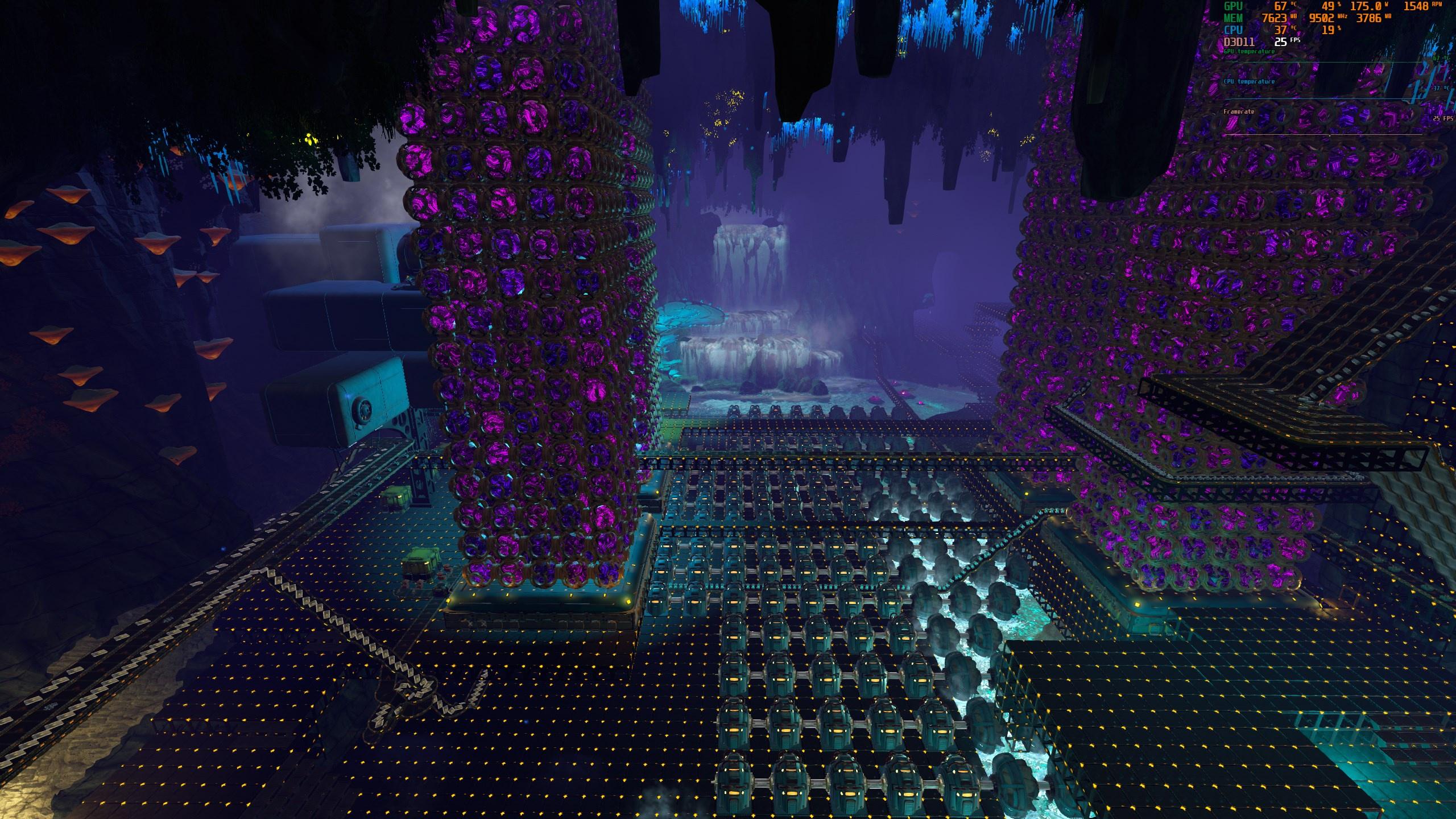

I mean I am getting about the same performance you are so I don't see the point in downloading new software
I thought maybe your CPU was bottlenecking the GPU or you were being throttled
hasty crag
That would have been really nice, I've tried so many things to get better performance in Techtonica. But when I see that you get about the same performance as me, then I don't think it can be me.
May I ask which CPU cooler you are using?
stark coyote
I was able to squeeze about 10-15 FPS by putting Terrain Texture Quality to low, Voxel Mesh Quality to low, disabling Antialiasing, Anisotropic textures, bloom, ambiant occlusion, and turning off image enhancement.
I am using a Corsair iCUE H100i for my CPU cooler
hasty crag
stark coyote
I was able to squeeze about 10-15 FPS by putting Terrain Texture Quality to low,...
Unfortunately, the changes to the graphics didn't do much for me.
stark coyote
oh, also put my frame rate limit to unlimited and turning off vsync -
yeah, not much on my end either, but an extra 10 FPS isnt nothing lol
hasty crag
stark coyote
I am using a Corsair iCUE H100i for my CPU cooler
It's amazing that your processor cooler is so much better than mine: ARCTIC Liquid Freezer II 360
stark coyote
The biggest change I found was going Borderless Windowed Fullscreen, that gave me like a 10 FPS bump over exclusive fullscreen
How old is your CPU (like when is the last time you reapplied thermal paste)?
and I have a full ATX tower, is yours a mid?
hasty crag
stark coyote
How old is your CPU (like when is the last time you reapplied thermal paste)?
Dec 2020

CORSAIR
If you’re building a high-performance full tower PC system, Obsidian Series™ 750D is a great start. It combines generous expansion flexibility, room for advanced cooling options, and an interior optimized for fast and easy builds and upgrades. The exterio
stark coyote
I mean, 4 years. Might be time to reapply some thermal paste. Probably wont help your performance, but certainly won't hurt it. I would also check your GPU hotspot temps (I use GPU-Z for this) as the 3090 has been known to have high temps on the memory boards.
Again, this probably has nothing to do with your ingame performance though as your temps are well within operating range for your CPU/GPU combo
hasty crag
Thanks for all the tips and your help!
stark coyote
no problem.
copper karma
i know game performance optimization isnt a simple thing like a switch to turn on or off, with pc gaming the devs have to deal with hundreds of variances of pc components and how they impact the game, the game wont just out of one patch going to simply running smoothly across any pc setup.
the game is still in early access and yet been going on amazing direction compared to other games, just need to be patient with the teething process of the game to reach to level that satisfy every player
 slim oasis
and it wouldn't hurt to be nicer about it too. as a fellow programmer, the idea of sitting in my IDE and doing nothing but trying to make the already existing code more efficient / apply more efficient patches to utilize hardware better, sounds incredibly boring
I would lose interest very quickly
but TT devs are taking it like champs
it'll take the time it takes, and it'll be worth it. don't let the pressure get to you, devs <3
hasty crag
The groundhog greets us daily... or every update.
<@&1171546467312341032> I was once again full of hope for this update! I was even able to motivate myself to start from scratch in the hope that everything would be better now! But after about 30 hours I'm stunned to realise that the FPS/performance drops drastically again. In other words, my FPS drops to ~ 30 FPS again. As a result, my initial enthusiasm has left me again.
Nothing has improved in terms of the game's performance.
copper karma
hasty crag
The groundhog greets us daily... or every update.
<@&1171546467312341032> I wa...
i have read from one of players that power floors can cause lower performance but im not sure about this information since i havent tested it myself
 clear prawn
copper karma
i have read from one of players that power floors can cause lower performance bu...
clear prawn
copper karma
i have read from one of players that power floors can cause lower performance bu...
I have tested those saves and can confirm this myself also, they provided two saves one with the power floors and one with them all replaced with calycite 5x5 platforms, the differences in terms of performance are massive for me.
How massive, well lets just say I was getting single digit fps in one save and now am averaging 60+ fps save with the 5x5 platforms
copper karma
clear prawn
I have tested those saves and can confirm this myself also, they provided two sa...
are you using any AMD parts on your PC?
clear prawn
copper karma
are you using any AMD parts on your PC?
Don't believe it would make up for the differences im seeing but no im not, intel cpu and nvidia gpu actually
copper karma
well i will try it anyway, remove all power floors from my factory
clear prawn
It made a massive difference in XenioS save anyways
 slim nacelle
not in any lategame stage in my own save so never had any fps issues but still wanted to see what xenios save does to my hardware lol
ryzen 7 7700x
rx 6750 XT
32 gb ram
and yea can also confirm powerfloors fucking destroy the games peformance
from left to right
current-minimum-maximum-average

ram usage is insane and without a big enough page file the game probably wouldve crashed
so if youre experiencing crashes that prevents you from deleting powerfloors maybe increasing your page file in windows can prevent that
just a wild guess though
hasty crag
I have now replaced all the power floors (about 6000 power floors) and the difference is hardly noticeable, about 3 FPS more. So that doesn't help either.
slim nacelle
that is absolutely weird and shouldnt be the case at all seriously
if you want you can upload your savegame in here and ill load it up and see if its also performing bad for me
first idea because i read that somewhere on this discord
if you still have a very old save of that savegame where you didnt place the powerfloors load that let it autosave once (should take 5 mins unless you have the mod to change the autosave time) and then load your current save where you replaced the powerfloors
apparently sometimes the savegames fix themselfs that way no clue how but it happens lol but thats a really wild guess it probably wont fix it
also i dont know how much you know about graphic settings and pc stuff and what the settings do so this is a very basic question not trying to offend you or anything
but do you know if vsync is on or off?
clear prawn
That seems to be correct at least in regards to power floors, removing a few thousand doesn't make a large difference, it's XenioS save that uses hundreds of thousands of power floors that the real performance impact of using them is shown, in other words if you plan of covering the whole map in anything, power floors is very much not what you want to use.
slim nacelle
oh i guess ignore what i said lol i completely forgot to realise how many powerfloors that actually are in xenios save compared to "only" 6000 fuck my brain
hasty crag
Of course 6000 is not much, I think it's more the whole machines when they are running. When I replaced the power floors, I noticed that when all the machines are at a standstill, the performance is better.
Whether vsync is on or off doesn't matter, I can even set the graphics settings to low and change the resolution to 1280x720 without any change in performance.
slim nacelle
that could be an indicator for a cpu bottleneck do you know your gpu usage for techtonica?