#No sound
70 messages · Page 1 of 1 (latest)
 atomic sparrow
 bold sentinel
Can you try adjust all sound settings to 0 and to max again?
atomic sparrow
yes i tryed
its not working
if you want we can hop in to a call and then i can show you
bold sentinel
can you start game and sent player.log
atomic sparrow
how do i do this ?
bold sentinel
C:\Users\ USER\AppData\LocalLow\Fire Hose Games
there should be player log file in this location
for Steam version
atomic sparrow
i deleted it on steam only have it now on the Xbox game pass i chargebacked the game on steam
bold sentinel
this folder most likely is still there
 atomic sparrow
ah kk xd
bold sentinel
Folder Users
atomic sparrow
i dont know how my C is named how can i check it ?
bold sentinel
ok, thank you!
sent it to our code team
SystemNotInitializedException: [FMOD] Initialization failed : Output forced to NO SOUND mode : ERR_OUTPUT_INIT : Error initializing output device.
FMOD is our sound engine
there is issue with Default sound output in windows
whatever you have as Default sound output have some issues seems to be
 bold sentinel

go to sound settings and check Sound control panel
and please screenshot what is there in sound output devices
atomic sparrow
 bold sentinel
and second, open Sound mixer options
run game and screenshot to what sound device game is assigned
it sohuld be something like this but also with Techtonica

 bold sentinel
there is droplist above with devices seems to be
can you check what other devices is there?
atomic sparrow
 bold sentinel
when you set it to Realtek is list of apps changes?
atomic sparrow
yes only discord shows up not the System Sound anymore
 atomic sparrow
nop
bold sentinel
Something is up with output device
I sent everything to team, if there will be any updates I'll ping
for now I can only ask to try any other sound device and set it as output and to default and try with it
maybe it is headset compatability issue
atomic sparrow
I just for a update thy
bold sentinel
ok I got responce from dev team
#🚩-known-issues message
it is one of the known issues
 cerulean kestrel
atomic sparrow
cerulean kestrel
atomic sparrow
Hey Scurgee! Can you try going back to this screen, right clicking on Realtek Digital Output, and selecting "Disable"? I'm very hopeful this would fix it both on Steam and Game Pass
atomic sparrow
I will try later, thy very mutch
 runic hound
I'm also having the same issue with no sound. I use the Arctis Nova Pro headset and have tried all of the steps listed here and in the know-issues with no luck.
atomic sparrow
It worked thy
runic hound


 cerulean kestrel
runic hound
I'm also having the same issue with no sound. I use the Arctis Nova Pro headset...
cerulean kestrel
runic hound
I'm also having the same issue with no sound. I use the Arctis Nova Pro headset...
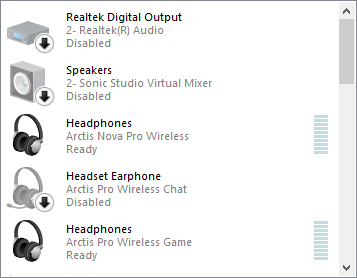
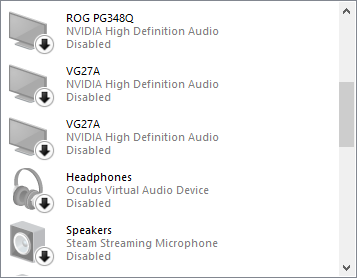
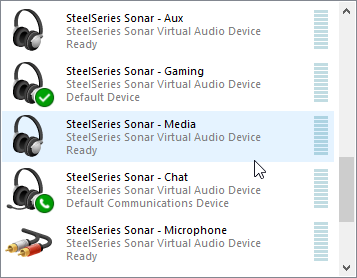
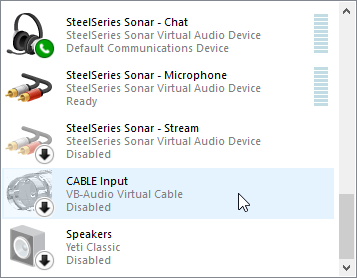
Can you try disabling ALL of your devices except "SteelSeries Sonar - Gaming"? It seems like the issue is happening when multiple audio devices are trying to grab onto the game's audio.
runic hound
the Steel series Aux, Gaming, Media, and Chat are all virtual devices managed by the SteelSeries GG engine which takes the audio from the physical device. the only physical device is the Headphones (Arctic Nova Pro Wireless) disabling all of those would result in no audio (when using the engine). I shut down the engine still no audio.
runic hound
ok, I ended up fixing it. I ended up disabling all audio rebooting enabling the headphones and testing with no luck rebooted a 2nd time with just the headphones enabled and it started to work and it even works with the GG engine running.