
#SurfaceAppearances fading at distance?
1 messages · Page 1 of 1 (latest)

 rigid wraith
 inland stump
Hey! So I am having an issue where I have made these tree models using surface a...
inland stump
Hey! So I am having an issue where I have made these tree models using surface a...
I think it might be a Roblox Engine Bug, there are some work-arounds in this post but I'm unsure if they'll apply to what you're trying to achieve since I'm not too experienced with SurfaceAppearances, my apologies.
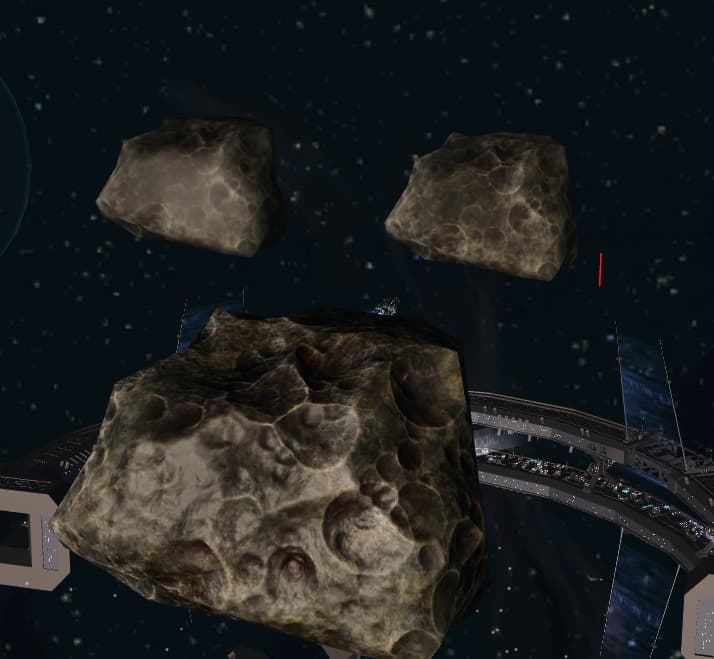
https://devforum.roblox.com/t/surfaceappearance-does-not-respect-base-material-specularity/2805864
Other than that, it personally isn't that noticeable to me, and I'm especially confident the average Roblox player won't care much for it either.
Sure the trees look flat in the 2nd image, but I think that's because of the angle of camera, the fact the trees are so far that they're pixelated & unable to capture detail like shadows for depth, and the blue atmosphere fade & tint making green leaves and shadows much harder to differentiate.
Developer Forum | Roblox
SurfaceAppearance does not respect base material specularity. This is an engine bug not just a studio bug. All three asteroids are set to Fabric material. Asteroid on the left, and the bottom both have a SurfaceAppearance. The one on the left and right is further away and is past clipping distance where the surface appearance falls off. The o...