#qb-inventory [NoPixel 4.0 Inspired]
390 messages · Page 1 of 1 (latest)

 edgy anchor
 charred herald
Does this work properly with all resolutions? Or just some?
charred herald
edgy anchor
Does this work properly with all resolutions? Or just some?
currently only 1920x1080
charred herald
 peak totem
let me know when you push it
peak totem
let me know when you push it
will do 👍 not sure when it is tbh im still just making some many changes haha
everyday i think of a new thing
you wouldnt belive me if i told 2 days ago it looked like this 🤣 

 winter linden
W
 radiant sand
i tired previous people who released similar lookin inventory based of ps....
since yours is qb-inventory based, does yours show the requirements for crafting when using a crafting station? cuz that was one of the main reasons i stopped using this style.
and item pricings in shops were not shown as well
 smoky folio
radiant sand
i tired previous people who released similar lookin inventory based of ps....
si...
smoky folio
radiant sand
i tired previous people who released similar lookin inventory based of ps....
si...
Exactly, I think the guys who made this style look 1:1, forgot these steps. But overall the ps version is not that great, there's lack of detail everywhere.
charred herald
radiant sand
i tired previous people who released similar lookin inventory based of ps....
si...
item prices is shown
radiant sand
Awesome 🍻
charred herald
 radiant sand
Only the crafting left to check 🍻🥳
Wait is this based ps or qb ?
Oh its ps just renamed to qb...nvm my question
 ancient lily
Is combining also working ?
radiant sand
ancient lily
Is combining also working ?
Oh yeaa that was another issue with previous ones....
ancient lily
Yep haha i hope they will fix it
charred herald
radiant sand
Only the crafting left to check 🍻🥳
ik the normal crafting works but as of right now attachment crafting doesnt
unsure why
charred herald
 jaunty echo
is this reloaded?
jaunty echo
is this reloaded?
Yes
charred herald
radiant sand
i tired previous people who released similar lookin inventory based of ps....
si...
i see what u mean about the requirement
charred herald
 plush wolf
Should I release mine
plush wolf
Should I release mine
if u want i guess i could use the code from urs
to help with mine
plush wolf
Mine have buttons
charred herald
wdym ?
plush wolf
 plush wolf
so you can take that from main repo
 keen anchor
plush wolf
keen anchor
plush wolf
Heybrother
 plush wolf
yeah
plush wolf
keen anchor
can u help me with rarity icon
its not rarity its just shows on weapon
keen anchor
plush wolf
its not rarity its just shows on weapon
can u teach me how to do tha
that
 plush wolf
keen anchor
can u teach me how to do tha
plush wolf
keen anchor
can u teach me how to do tha
i can but my inv not the same i dont know how to explain for you
 ancient lily
charred herald
in what way was it not working
ancient lily
charred herald
in what way was it not working
That whas in the other inventory np look that you not can conbine from ion but i see a screen that you have it 💪
keen anchor
plush wolf
i can but my inv not the same i dont know how to explain for you
i get it brother thank you brother thank you ❤️
keen anchor
plush wolf
i can but my inv not the same i dont know how to explain for you
can you please send me css
please brother
plush wolf
.item-colorsss {
    position: relative;
    overflow: hidden;
    background: radial-gradient(circle, rgba(0,255,149,0.4206057422969187) 0%, rgba(255,245,0,0) 0%, rgba(244,255,1,0.3596383426966292) 53%, rgba(255,245,0,0.7880091292134832) 100%)!important;
}


.item-colorsss::after {
    content: '';
    position: absolute;
    top: 0;
    left: -200%;
    width: 200%;
    height: 100%;
    background: rgba(255, 255, 255, 0.5);
    animation: none; /* Initially no animation */
}

.item-colorsss:hover::after {
    animation: linear-shine 2s linear infinite; /* Linear shine animation on hover */
}

@keyframes linear-shine {
    0% {
        left: -200%;
    }
    25% {
        left: -150%;
    }
    50% {
        left: -100%;
    }
    100% {
        left: 100%;
    }
}
thank you very muchh ❤️
radiant sand
Iondegen and Itzmuri had the good ones. But the crafting info was the main issue on theirs
plush wolf
radiant sand
Iondegen and Itzmuri had the good ones. But the crafting info was the main issue...
crafting looks like this

 dim escarp
plush wolf
```lua
.item-colorsss {
position: relative;
overflow: hidden;
backgr...
dim escarp
plush wolf
```lua
.item-colorsss {
position: relative;
overflow: hidden;
backgr...
can you send me js example please
plush wolf
 radiant sand
plush wolf
crafting looks like this
radiant sand
plush wolf
crafting looks like this
nice, but last you said you haven't published that... 😦
 summer crescent
plush wolf
summer crescent
plush wolf
Release yours bro, been waiting 😂🤭
plush wolf
done
charred herald
plush wolf
crafting looks like this
noticed u have my icons at the 👀
there good arent they
custom made from ps
plush wolf
yeah its yours
charred herald
If anyone wants to change the icons here is the original file

 late canopy
charred herald
If anyone wants to change the icons here is the original file
late canopy
charred herald
If anyone wants to change the icons here is the original file
can you check dm?
radiant sand
plush wolf
done
i just woke up...where ?! 😄
 viral crest
radiant sand
i just woke up...where ?! 😄
radiant sand
viral crest
radiant sand
i just woke up...where ?! 😄
radiant sand
im not wearing my glasses rn but couldn't find a link there ! 😄
 tiny steppe
nice item split, thanks for share

 woeful jungle
This is fire! Gj
charred herald
tiny steppe
nice item split, thanks for share
ty
plush wolf
radiant sand
i just woke up...where ?! 😄
i remove it people think i stole from reload or ibllstclrl
plush wolf
now working on damage part
ancient lily
plush wolf
now working on damage part
Niceeee 🙌🙏
plush wolf

 jaunty echo
charred herald
jaunty echo
charred herald
Stop stealing reloadeds inventory
jaunty echo
charred herald
sad to see someone else take credit for something that isnt theirs
charred herald
@jaunty echo I am reload
 wise egret
lol 🤣
 snow patio
tiny steppe
nice item split, thanks for share
snow patio
tiny steppe
nice item split, thanks for share
did anyone shared this version please ?
 fierce venture


 rapid glen
fierce venture
rapid glen
fierce venture
this reload inv??
snow patio
fierce venture
sorry for asking, will you share it with us ?
charred herald
👀
 radiant sand
damn its comin along pretty nice
peak totem
with the player and backpack be "connected" because with the other qb-inventory edit that had the same stuff if your player slots were full it wouldnt go into the backpack if a item was added to you
 worn abyss
is veh stash in there anywhere?
need to up the storage on some
we need an option to remove that 6th slot i hate it lol
charred herald
worn abyss
is veh stash in there anywhere?
in my new version im releasing soon

i have a config for trunk glovebox stash etc max weight & slots
worn abyss
charred herald
in my new version im releasing soon
how soon lol
 drowsy oracle
Images are not visible
 golden jungle
charred herald
in my new version im releasing soon
golden jungle
charred herald
in my new version im releasing soon
When will release be!? This looks amazing and looks like it fixed all the issues with the original
charred herald
hopefully by friday finishing of the context menu
drowsy oracle
charred herald
hopefully by friday finishing of the context menu
Images are not visible any help
peak totem
drowsy oracle
Images are not visible
The edit doesn’t come with images, you would need to get them from the original inventory
Better for uploading to GitHub
charred herald
i have not uploaded images as in my edit i had over 1000 images so it would take like a year to upload
drowsy oracle
peak totem
The edit doesn’t come with images, you would need to get them from the original ...
I added them in images folder but not showing
charred herald
New Updates
Just added bin searching all done through config u can disable it or enable it also working with qb-target or interact
peak totem
drowsy oracle
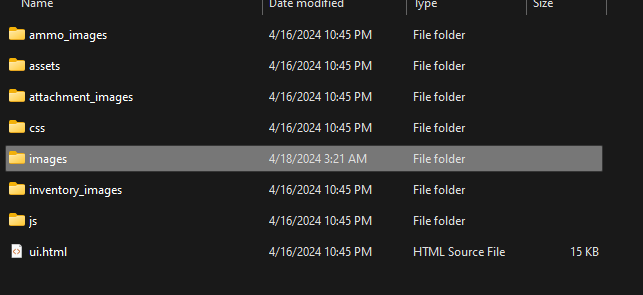
I added them in images folder but not showing
make sure you add them into the https://i.imgur.com/nM990vJ.png images folder, the highlighted one
 charred herald
Language File also added for easy changes
 wise egret
charred herald
**Language File also added for easy changes**
wise egret
charred herald
**Language File also added for easy changes**
Thank you bro
snow patio
where can I download it ?
charred herald
snow patio
where can I download it ?
not currently out hopefully to be done by Friday
snow patio
charred herald
not currently out hopefully to be done by Friday
Do you have any website? I want to donate you
charred herald
snow patio
Do you have any website? I want to donate you
no i dont have a website
snow patio
You are doing amazing job as much as I see
 zealous cypress
plush wolf
zealous cypress
plush wolf
from your old inventory
 past crater


 wise egret
past crater
<:S5_WAITING:1231028508696772608>
wise egret
past crater
<:S5_WAITING:1231028508696772608>
is this only use for your server bro
Nice work brother @past crater
past crater
wise egret
is this only use for your server bro
Yes bro
smoky folio
past crater
<:S5_WAITING:1231028508696772608>
The context is a bit off. But everything else seems fine. Have you made it functionable with multiple inventories?
charred herald
 tiny steppe
charred herald
tiny steppe
charred herald
nice work
golden jungle
charred herald
Out of curiosity have you fixed the issue with the original when robbing players they can’t see the “backpack” area?
charred herald
golden jungle
Out of curiosity have you fixed the issue with the original when robbing players...
yes it can be seen
golden jungle
charred herald
yes it can be seen
Awesome! I can’t wait for the release if you do release it!
worn abyss
Should remove the 6th slot
charred herald
worn abyss
Should remove the 6th slot
there isnt a 6 slot
worn abyss
I’m pretty sure it does have one… I’ll check again. I think it’s the bottom right corner.
charred herald
worn abyss
I’m pretty sure it does have one… I’ll check again. I think it’s the bottom righ...
ah in the old update yes
it does but in the new update its been removed
worn abyss
say less that is dope!!
 vivid nest

 outer flame
vivid nest
outer flame
vivid nest
Looking amazing!
 wet charm
vivid nest
wet charm
vivid nest
would you be willing to share??
vivid nest
wet charm
would you be willing to share??
i dont thing so this is for my server
wise egret
any update guys ❤️
 foggy swan
when is the update coming out?
woeful jungle
I assume she will post it when its ready, she is doing it for free so dont spam about it.
keen anchor
Hello guys
 jagged ledge
You guys manage to get this working with ox-inventory?
charred herald
New Inventory Update is out
https://github.com/Reload-X/qb-inventory download here


GitHub
Project-Sloth's FiveM Inventory System Redesigned to Look Like NoPixel 4.0 - Reload-X/qb-inventory
snow patio
@charred herald I really appreciate your work and your time thank you
charred herald
no worries
 ember breach
anyone have a working github for 0r-apartments
any reason the inventory is like this
 charred herald
ember breach
anyone have a working github for 0r-apartments
charred herald
ember breach
anyone have a working github for 0r-apartments
wdym
charred herald
ember breach
any reason the inventory is like this
did u change the name
ember breach
charred herald
did u change the name
i got it to work
 sullen ether
charred herald
did u change the name
sullen ether
charred herald
did u change the name
if i dont want to use 0r-apartment?
because i dont have this file
and its say no export
how can i fix this
 atomic python
same
charred herald
in my latest i pushed a config update
sullen ether
charred herald
in my latest i pushed a config update
ty
What about decay problem?


when i'm close and open again it's looks like %100 decay
but when I'm move the item so it's show the real decay

 fringe needle
charred herald
New Inventory Update is out
https://github.com/Reload-X/qb-inventory download h...
fringe needle
charred herald
New Inventory Update is out
https://github.com/Reload-X/qb-inventory download h...
this only supports 1080p no 2k or 4k please if you could fix that
charred herald
fringe needle
this only supports 1080p no 2k or 4k please if you could fix that
FiveM isnt meant for 2k i personally dont use it
feel free to edit
there is an option to force server UI to 1920x1080
 winged bison
People asking for more then 1080p just fix it urself. Creator of script used 1080p and dont prob have the time or the energy to fix it to 2k or 4k. Just fix it urself or make people force ui to 1080
edgy anchor
fringe needle
this only supports 1080p no 2k or 4k please if you could fix that
I am currently working on 2560 x 1080 if you use that reso I can send you what I have done
fringe needle
edgy anchor
I am currently working on 2560 x 1080 if you use that reso I can send you what I...
im using 4K but yes please send me and if you explain how you did it that will be great
 heady glade
charred herald
New Inventory Update is out
https://github.com/Reload-X/qb-inventory download h...
heady glade
charred herald
New Inventory Update is out
https://github.com/Reload-X/qb-inventory download h...
damage not reset?
edgy anchor
Yeah i realized that aswell the damage doesnt reset after being revived/treated
plush wolf
thanks for search option
 worn abyss
Anyway to add the shops prices on there? When opening shops it don’t say the price of each item?
 quartz tangle
plush wolf
thanks for search option
quartz tangle
plush wolf
thanks for search option
W INV
 ebon mango
@plush wolf Hey, Can I get the code for cash which you showing in inventory? I want to replace the Apartment Thing to Cash.
plush wolf
money = PlayerData.money['cash'],
bank = PlayerData.money['bank'],```I am getting a issue with this, I am using Wounding But it is not getting reset.
 plush wolf
i dont use that
ebon mango
plush wolf
thanks for search option
I mean I thought your's one is running
ebon mango
plush wolf
```
money = PlayerData.money['cash'],
bank = PlayerData.money['bank...
@plush wolf If you dont mind, Can I get the app.js line so I can set? It will be so helpful then.
Stat ID, Citizen ID and Cash.
 plush wolf
its not just js it css html too
ebon mango
plush wolf
its not just js it css html too
Yeah I did it, thanks
heady glade
ebon mango
I am getting a issue with this, I am using `Wounding` But it is not getting rese...
maybe
 ancient lily
i put the export from BC_wounding resetall in the qb-ambulance script part revive
 sullen ether
someone can share with us this inv with qb-ambualncejob? no need the tebex escrow one? and decay fixed
sullen ether
ancient lily
i put the export from BC_wounding resetall in the qb-ambulance script part reviv...
you did it work with qb ambulance?
ancient lily
sullen ether
you did it work with qb ambulance?
the revive yeah now trying to figure out what to do with the rest of the injuries that need to be updated if you lose blood or use bandages
ebon mango
ancient lily
i put the export from BC_wounding resetall in the qb-ambulance script part reviv...
can you copy paste this here?
ancient lily
yeah thats only the revive part
ebon mango
ancient lily
yeah thats only the revive part
I mean can you give me that revive part here?
Like This
sure
2 sec
qb-ambulancejob/client/main
Round line 588
    local player = PlayerPedId()

    if isDead or InLaststand then
        local pos = GetEntityCoords(player, true)
        NetworkResurrectLocalPlayer(pos.x, pos.y, pos.z, GetEntityHeading(player), true, false)
        isDead = false
        SetEntityInvincible(player, false)
        SetLaststand(false)
    end

    if isInHospitalBed then
        loadAnimDict(inBedDict)
        TaskPlayAnim(player, inBedDict , inBedAnim, 8.0, 1.0, -1, 1, 0, 0, 0, 0 )
        SetEntityInvincible(player, true)
        canLeaveBed = true
    end

    TriggerServerEvent("hospital:server:RestoreWeaponDamage")
    SetEntityMaxHealth(player, 200)
    SetEntityHealth(player, 200)
    ClearPedBloodDamage(player)
    SetPlayerSprint(PlayerId(), true)
    ResetAll()
    ResetPedMovementClipset(player, 0.0)
    TriggerServerEvent('hud:server:RelieveStress', 100)
    TriggerServerEvent("hospital:server:SetDeathStatus", false)
    TriggerServerEvent("hospital:server:SetLaststandStatus", false)
    emsNotified = false
    QBCore.Functions.Notify(Lang:t('info.healthy'))
    exports.BC_Wounding:ResetAll()
end)```

Roud line 688

```RegisterNetEvent('hospital:client:RespawnAtHospital', function()
    exports.BC_Wounding:ResetAll()
    TriggerServerEvent("hospital:server:RespawnAtHospital")
    if exports["qb-policejob"]:IsHandcuffed() then
        TriggerEvent("police:client:GetCuffed", -1)
    end
    TriggerEvent("police:client:DeEscort")
end)
```Thank you so much, I am also searching for the way if someone use bandage or anything it will reset. If you find it let me know, If I found it I will let you know
 high quail
ebon mango
Thank you so much, I am also searching for the way if someone use bandage or any...
high quail
ebon mango
Thank you so much, I am also searching for the way if someone use bandage or any...
exports.BC_Wounding:ResetAll()
charred herald
guys it should reset let me check
exports.BC_Wounding:ResetAll() place this export in the parts of using bandag/revive
ember breach
i updated inventory no more custom item drops?
 lucid notch
U mean like when something is dropped on the floor ?
ember breach
lucid notch
U mean like when something is dropped on the floor ?
yea
lucid notch
Just re add the client and server files
ember breach
getting this error with my phone
 sullen ether
ancient lily
the revive yeah now trying to figure out what to do with the rest of the injurie...
sullen ether
ancient lily
the revive yeah now trying to figure out what to do with the rest of the injurie...
If you got it working with qb-ambualncejob and not the bc wounding and you can share with me it will be great
because it's escrow and I don't want to use escrow things
ancient lily
playing around with the itembox containter love this inv thank you very much 🙏
 sullen ether
Guys someone can send version without this escrow file that we need to download from tebex?
peak totem
sullen ether
Guys someone can send version without this escrow file that we need to download ...
Why?
sullen ether
peak totem
Why?
why do I need to add more scripts (and screwow) to my server if I have the qb-ambulancejob?
it's better
lucid notch
sullen ether
why do I need to add more scripts (and screwow) to my server if I have the qb-am...
Because the inventory requires bc_wounding
Which the creator has chosen to escrow which is his choice
bc_wounding has nothing to do with the ambulance job
sullen ether
lucid notch
Because the inventory requires bc_wounding
this is why I said if someone can do it work with ambulance job it will be nice
and not bc wounding
ember breach
Any way to make the wounding register with actual health
lucid notch
ember breach
Any way to make the wounding register with actual health
Wym?
radiant sand
charred herald
New Inventory Update is out
https://github.com/Reload-X/qb-inventory download h...
yay its here  ... you got a discord for support?
 maiden sinew
sullen ether
this is why I said if someone can do it work with ambulance job it will be nice
maiden sinew
sullen ether
this is why I said if someone can do it work with ambulance job it will be nice
Thats what is great with Open source, DIY.
charred herald
radiant sand
yay its here <a:PartyBlob:691748187190329415> ... you got a discord for support...
unfortunately not
charred herald
If anyone finds the decay fix send it to me and ill push the update but I have suspicions it might be the css
charred herald
Made couple changes context menu now opens with left click and right click is quick move who wants this pushed?
ancient lily
Combine 🙏
 smoky bone
Looks even better, is there an option to remove the backpack so it looks like the previous version?
charred herald
smoky bone
Looks even better, is there an option to remove the backpack so it looks like th...
i will work on a version which is exactly like this version but single backpack
🙂
ebon mango
I am getting a Issue, If I drop something, I can see that in ground. Its just bag and Its not showing in ground or something. Why?
@charred herald
 high quail
ebon mango
I am getting a Issue, If I drop something, I can see that in ground. Its just ba...
high quail
ebon mango
I am getting a Issue, If I drop something, I can see that in ground. Its just ba...
Do you use qb-target or interact?
ebon mango
high quail
Do you use qb-target or interact?
interact
high quail
Use this version of interact: https://github.com/darktrovx/interact
GitHub
Contribute to darktrovx/interact development by creating an account on GitHub.
 charred herald

Single Inventory almost ready

bit sh1t but it works it can be changed back to the square easily tho
 grim nest
charred herald
grim nest
charred herald
Is there a way to make backpack slots accessible only for VIPs? For example, non-VIPs wouldn't be able to access those slots or they would be hidden from them.
 edgy vapor
any one solve this error
 lucid notch
edgy vapor
any one solve this error
lucid notch
edgy vapor
any one solve this error
It won’t be that simple as changing 0r-apartment to qb apartment that code is specifically working only for 0r apartment
Just remove the code if u don’t he it
Use it
 sick coral
all thats missing is decay! great inv tho looks amazing
grim nest
grim nest
Is there a way to make backpack slots accessible only for VIPs? For example, non...
@charred herald
charred herald
grim nest
<@759089505080311879>
no
high quail
Decay seems to be working for me?...
 cerulean sonnet
sick coral
all thats missing is decay! great inv tho looks amazing
cerulean sonnet
sick coral
all thats missing is decay! great inv tho looks amazing
IS that not i nPS alrady?
charred herald
high quail
Decay seems to be working for me?...
it should work
but people been getting errors for it
charred herald
Pushed a fix for the 0r-apartment redownload the client to fix the true/false config
ebon mango
charred herald
I am getting a issue actually then I try to add new case in html/app.js
charred herald
ebon mango
I am getting a issue actually then I try to add new case in html/app.js
wdym?
charred herald
ebon mango
I am getting a issue actually then I try to add new case in html/app.js
            return `<p><strong>CSN: </strong><span>${itemData.info.citizenid}</span></p>
              <p><strong>First Name: </strong><span>${itemData.info.firstname}</span></p>
              <p><strong>Last Name: </strong><span>${itemData.info.lastname}</span></p>
              <p><strong>Birth Date: </strong><span>${itemData.info.birthdate}</span></p>
              <p><strong>Gender: </strong><span>${getGender(itemData.info)}</span></p>
<p><strong>Nationality: </strong><span>${itemData.info.nationality}</span></p>`;```please follow this example
fixed client again redownload to fix error
 spiral ore
charred herald
fixed client again redownload to fix error
spiral ore
charred herald
fixed client again redownload to fix error
Just wondering on the "created" metadata .. do we have to set it somewhere, because I do not see it being created whenever I give myself an item which in turn, makes the item have no decay
charred herald
the decay is currently not working and im not sure why
my only belief is the context menu
f ing up
i might have to convert to an older context menu
for it this to work
spiral ore
["created"] = nil, ["decay"] = 30.0, ["delete"] = false
Shouldnt this be added in qb-core/shared/items.lua?
I see its asking for decay to work, you need "created" .. and the only place I think created should be is in the items.lua
I found this
AddItem(playerId, itemInfo["name"], fromAmount, toSlot, fromItemData.info, itemInfo["created"])
so not 100% sure if it should be in items.lua, because its not even said in the ps-inventory readme
charred herald
["created"] = nil, ["decay"] = 30.0, ["delete"] = false
u just add this
but in general i think decay is broken
im gonna look more into and place around with it
spiral ore
fixed it
Need this additem function
and not sure if oyu need this
["created"] = nil, ["decay"] = 30.0, ["delete"] = false
but my decay works now
charred herald
spiral ore
and not sure if oyu need this
```lua
["created"] = nil, ["decay"] = 30.0, ["dele...
you also need that aswell
ill will run a test and push it
spiral ore
Great work on the inventory by the way. Not sure if I said so earlier. Its very responsive and looks amazing
charred herald

charred herald
spiral ore
Great work on the inventory by the way. Not sure if I said so earlier. Its very ...
do u have a pic of decay going lower then 99%?
and when u move it around the quality bar dont change color moving from one slot to another
spiral ore
will send shortly
spiral ore
I set one of my items to 0.01
spiral ore
anything above 0 yea xD
charred herald
spiral ore
anything above 0 yea xD
so ur saying i can do this
["decay"] = 0.01,
spiral ore
yes xD
charred herald
lul make it ez to test now
spiral ore


[ script:qb-inventory] Kai Items - weaponring quality 97 Decay = 0.010000000000002
[ script:qb-inventory] 99 Percent Done
[ script:qb-inventory] racingdongle Convert Quality 99
[ script:qb-inventory] Kai Items - racingdongle quality 99 Decay = 12.5
[ script:qb-inventory] 98 Percent Done
[ script:qb-inventory] weaponring Convert Quality 98
[ script:qb-inventory] Kai Items - weaponring quality 0 Decay = 0.010000000000002
[ script:qb-inventory] 97 Percent Done
[ script:qb-inventory] weaponring Convert Quality 97
[ script:qb-inventory] Kai Items - weaponring quality 97 Decay = 0.010000000000002
[ script:qb-inventory] 99 Percent Done
[ script:qb-inventory] racingdongle Convert Quality 99
[ script:qb-inventory] Kai Items - racingdongle quality 99 Decay = 12.5
[ script:qb-inventory] 97 Percent Done
[ script:qb-inventory] weaponring Convert Quality 97
[ script:qb-inventory] Kai Items - weaponring quality 0 Decay = 0.010000000000002
The prints I made to ensure its going down
Only issue I jsut found is that when the item reaches 0, it still shows blue

 charred herald
so what its 100% its red ?
spiral ore
so I reconnected and my items was already 0 quality at that time
when reconnecting it shows like this .. and can still use item even though quality bar is red
Still says I can't use this item
so just css issue?
charred herald
so just to confim when the bar is red and 0% u cant use item
but when its red and 100% u can use item correct
spiral ore
no
So when its blue and in the descrioption still shows 100%, but when you move it and its supposed to be 0%, its red and shows 100%, and cannot use the item
but if there is quality, like 97% or whatever it is, oyu can use it
so basically, once the script itself decreases quality to 0%, the UI sees it as 100% and leaves it at that but still can't sue the item
charred herald
ok i think ik what it is
ah ok i get you
but thats weird
ye im actually unsure
might be somet to do with js
 proud hare
spiral ore
no
So when its blue and in the descrioption still shows 100%, but when you mov...
proud hare
spiral ore
no
So when its blue and in the descrioption still shows 100%, but when you mov...
what script is the ring from?
spiral ore
proud hare
what script is the ring from?
Made it myself
atomic python
i nee dsome help with making the inventory open when searching dumpsters
charred herald
would need to rewrite the entire dumpster
atomic python
daymn
tiny steppe
charred herald
for next update?
woeful jungle
Anyone had any luck fixing the inventory for 1440p and 4k resolutions?
spiral ore
charred herald
might be somet to do with js
Well this is the best I could do so far.. The 2 bars are when the items is broken.. it shows immediately when you open inventory, you don't need to move the item to see the full red bar.. so that part is sort of fixed? Just don't know where the blue is coming from .. don't know if its the "FormatItemInfo" thats creating the 100% and full blue bar
function FormatItemInfo(itemData, mouse) {
    if (itemData && itemData.info !== "") {
        const description = generateDescription(itemData);
        $('.item-uselessinfo-weight').html(`<i class="fa-solid fa-weight-hanging"></i> ${((itemData.weight * itemData.amount / 1000)).toFixed(2)}KG`)
        $('.item-uselessinfo-decay').html(`<i class="fa-solid fa-bolt"></i> ${(Math.floor(itemData.info?.quality || 100))}%`)
        setItemInfo(itemData.label, description, mouse);
    } else {
        setItemInfo(itemData.label, itemData.description || "", mouse);
    }
}
 spiral ore
Well this is the best I could do so far.. The 2 bars are when the items is broke...
spiral ore
spiral ore
Well this is the best I could do so far.. The 2 bars are when the items is broke...
The changes I made to ensure the red always shows as soon as oyu open inventory .. I searched the word "BROKEN" and edited all 8 of them with an additional css within .. heres an example of what I did
var QualityColor = "rgb(15, 255, 213)";
var NewQuality = 0
  if (newData.info.quality == undefined) {
    newData.info.quality = 100;
  }
  if (Array.isArray(newData.info.quality)) {
    NewQuality = newData.info.quality[0];
  } else {
    NewQuality = newData.info.quality;
  }
  if (NewQuality < 25) {
    QualityColor = "rgb(192, 57, 43)";
  } else if (NewQuality > 25 && NewQuality < 50) {
    QualityColor = "rgb(230, 126, 34)";
  } else if (NewQuality >= 50) {
    QualityColor = "rgb(15, 255, 213)";
  }
  if (NewQuality !== undefined) {
    qualityLabel = NewQuality;
  } else {
    qualityLabel = NewQuality;
  }
  if (NewQuality == 0) {
    QualityColor = "rgb(99, 35, 35, 0.5)";
    qualityLabel = "BROKEN";
    $toInv
      .find("[data-slot=" + newData.slot + "]")
      .find(".item-slot-quality-bar")
      .css({
        top: "100%",
        height: "100%",
        width: "100%",
        "z-index": "0",
        "background-color": QualityColor,
      })
      .find("p")
      .html(qualityLabel);
   }
  $toInv
    .find("[data-slot=" + $toSlot + "]")
    .find(".item-slot-quality-bar")
    .css({
      top: "100%",
      height: "100%",
      width: "100%",
      "z-index": "0",
      "background-color": QualityColor,
    })
    .find("p")
    .html(qualityLabel);
Basically looked at an inventory where the quality was working 100% that I've been using .. and adapted the code this this inventory
Its the best I could get so far .. cannot, for the life of me, find where its setting the blue 100% .. I feel like its the "FormatItemInfo" function .. I'm not familiar with CSS, but I can read the code, just not 100% sure how it works
 next shell
spiral ore
next shell
spiral ore
decay still not working for trunk items


 next shell
well now I figure it out why my decay system was broken for trunks xD
just need to update little things in the code
charred herald
spiral ore
Its broken btw .. but yea mine works
So main inventory it works in but the in the other-inventory it doesnt work ?
spiral ore
charred herald
So main inventory it works in but the in the other-inventory it doesnt work ?
works 100% in source and other .. the only issue is the when its 0% the UI shows as 100% and shows blue and red bar .. thats the best I could get it
spiral ore
Then this should work
 spiral ore
Then this should work
spiral ore
spiral ore
Then this should work
So I assume at the momnent how I have it set up .. the images I provided, the top bar is the thing I added (which is the red bar), but the blue bar is somewhere else entirely .. which I assume is this function
function FormatItemInfo(itemData, mouse) {
    if (itemData && itemData.info !== "") {
        const description = generateDescription(itemData);
        $('.item-uselessinfo-weight').html(`<i class="fa-solid fa-weight-hanging"></i> ${((itemData.weight * itemData.amount / 1000)).toFixed(2)}KG`)
        $('.item-uselessinfo-decay').html(`<i class="fa-solid fa-bolt"></i> ${(Math.floor(itemData.info?.quality || 100))}%`)
        setItemInfo(itemData.label, description, mouse);
    } else {
        setItemInfo(itemData.label, itemData.description || "", mouse);
    }
}
did u change this function at all
?
spiral ore
spiral ore
So I assume at the momnent how I have it set up .. the images I provided, the to...
Not this function no
The things I changed contained the word "BROKEN" which is 8 references if I'm not mistaken
charred herald
Updated the client for Config.OrApartment looks more cleaner and better optimisation thanks to @spiral ore
next shell
@charred herald is the attachment part in your inventory broken ?
charred herald
next shell
<@759089505080311879> is the attachment part in your inventory broken ?
Yes wasnt a planned thing
next shell
charred herald
Yes wasnt a planned thing
ahh I get it. are you going to implement it in future ?
 glacial iris
I get this error with the new update and cant open the inventory because of it

 ancient oriole
new qbcore build is bad dont update yet
ember breach
ancient oriole
new qbcore build is bad dont update yet
Wym
 fickle pier
Release section is not for support.
 south socket
Has anyone been able to put cash as item?
 narrow haven
south socket
Has anyone been able to put cash as item?
narrow haven
south socket
Has anyone been able to put cash as item?
SA-Money-v2 - makes it as easy as can be
Using it with this inventory
south socket
narrow haven
SA-Money-v2 - makes it as easy as can be
Thank you
atomic python
damn i cant find it either
 novel knoll
@charred herald please help us
atomic python
she might b eabout to drop a big update give her some time
charred herald
Sorry about that link updated https://github.com/Reload-X/qb-inventory
GitHub
Project-Sloth's FiveM Inventory System Redesigned to Look Like NoPixel 4.0 - Reload-X/qb-inventory

 novel knoll
@charred herald could you check dm please
charred herald
Pushed a fix for stash slots and added vehicle class for trunk redownload and let me know if it works 🙂
 umbral dock

 stable pivot
narrow haven
SA-Money-v2 - makes it as easy as can be
stable pivot
narrow haven
SA-Money-v2 - makes it as easy as can be
is a free script ?
 weak granite
stable pivot
is a free script ?
weak granite
stable pivot
is a free script ?
Mh-cashasitem is free
 real marlin
might just be a me issue but if anyone has experienced this and can provide some assistance.
 plush wolf
it will not work for new qb update
tiny steppe
real marlin
might just be a me issue but if anyone has experienced this and can provide some...
what's hud do u use?
real marlin
GitHub
Project-Sloth's FiveM Inventory System Redesigned to Look Like NoPixel 4.0 - Reload-X/qb-inventory
@tiny steppe
smoky folio
real marlin
https://github.com/Reload-X/qb-inventory
He meant the hud, health, armor etc.
drowsy oracle
'
