
#PS-Inventory Redesign [NP 4.0 Inspired]
652 messages · Page 1 of 1 (latest)
 bleak rock
 near lotus
This ui design is slightly growing on me the more I see it ngl lmao well done tho looks good
 fierce minnow
Looks amazing
 low pike
bleak rock
Still debating on the decision to release this, I thought i'd let you decide 🤣
low pike
bleak rock
Still debating on the decision to release this, I thought i'd let you decide 🤣
thats a really nice design great work, keep up!
bleak rock
Thank you!
bleak rock
near lotus
This ui design is slightly growing on me the more I see it ngl lmao well done th...
I felt the same way LMFAO, I'm sure others also feel the same way but I think its due to the designs getting more unique / different lookin. For years we had the same style of inventories like qb / ox, Even the old ESX inventories 😂
low pike
bleak rock
I felt the same way LMFAO, I'm sure others also feel the same way but I think it...
it does have the esx style indeed
bleak rock
For sure xD, I know it wouldn't be that hard to change it but I'm still pretty new to UI Development so i'm gonna take that excuse while I can
 upbeat thorn
bleak rock
Still debating on the decision to release this, I thought i'd let you decide 🤣
upbeat thorn
bleak rock
Still debating on the decision to release this, I thought i'd let you decide 🤣
For sure everyone will want it for free hah also very good work mate perfect 
low pike
bleak rock
For sure xD, I know it wouldn't be that hard to change it but I'm still pretty n...
its pretty good tbh, the esx style can be changed with some modern stuff and more (idk whats more)
bleak rock
 gilded coyote
<@516408791403855872>
gilded coyote
<@516408791403855872>
GitHub
Project-Sloth's FiveM Inventory System Redesigned to Look Like NoPixel 4.0 - GitHub - iONDegen/ps-inventory: Project-Sloth's FiveM Inventory System Redesigned to Look Like NoPixel 4.0
gilded coyote
bleak rock
https://github.com/iONDegen/ps-inventory
tnx brother
bleak rock
Its no problem! I know its probably not the most cleanest code out there but this should get the community rolling!
bleak rock
low pike
thank you bro one piece enjoyer ❤️
Its no problem! One piece is so good 😄
low pike
bleak rock
Its no problem! One piece is so good 😄
it is fr fr
 tribal frigate
does the skull thingy work and i want to ask where are the settings and stuff?
bleak rock
Currently the skeleton does not work, Its just an image but it can work with a bit more development! This was purely just the UI to get the community rolling. I removed the settings button but it can be easily added back in through the html / css
 hollow quartz
anyreason why when i open it then close my screen is blurry 😢
bleak rock
Lemme take a look, Usually when I was testing the blur would go away when the inventory closed. I can remove the blurring though
bleak rock
go into the app.js and find showblur: ref(true),
just replace the show blur to false and see if that helps
hollow quartz
okie
unfortunatly that not work cursor stuck on screen gonna reset server and try again
bleak rock
Alright, Let me know if anything changes i'm currently booting up my local host to see what I can do
hollow quartz
ok great thanks
tribal frigate
bleak rock
Currently the skeleton does not work, Its just an image but it can work with a b...
oh okay well done on the edit it's really nice btw
bleak rock
hollow quartz
ok great thanks
I gotchu on a quick fix, I removed the blur from the client-side so it won't enable any of the blur effects
hollow quartz
ok perfect
bleak rock
let me know if that helps! just revert anything you did in the js or html and it should be good to go
 quaint sandal
This Looks 10/10
quaint sandal
hollow quartz
got rid of the blur now cursor stuck on my screen 😆
lol
bleak rock
I'll take a look, There is some cursor stuff in the css that I can try and change
hollow quartz
no rush mate
hollow quartz
nope unfortunatly is it working for u on ur end
just to see if its just a me issue
bleak rock
Yeah I haven't had any issues, Even with the blur I didn't have any issues but since I'm still new to UI I thought maybe I made a mistake somewhere
hollow quartz
no worries ill keep my eyes peeled im no good with anything like this otherwise id have a crack
thanks verry much anyway for the support and keep up the good designs
bleak rock
Thank you, Hopefully you can figure it out and see what is causing the issue!
hollow quartz
yeah hopefully
hollow quartz
bleak rock
Thank you, Hopefully you can figure it out and see what is causing the issue!
only thing thats popping up in my server console is SCRIPT ERROR: error object is not a string
thats when closing the inv wich leaves the cursor stuck

 torpid isle
love it
 bleak rock
torpid isle
love it
bleak rock
torpid isle
love it
Thank you!
 hushed linden
🔥
bleak rock
hollow quartz
thats when closing the inv wich leaves the cursor stuck
I'd have to try and see if I can replicate that error, I currently don't get any errors when the inventory opens or closes. I have seen that error though but I don't remember what I did to fix it
 iron juniper
you have to make sure the file name is qb-inventory
hollow quartz
ahh ill give that a try
hollow quartz
iron juniper
you have to make sure the file name is qb-inventory
that worked great thanks verry much
bleak rock
🥳 Glad he was able to figure it out
iron juniper
np
hollow quartz
at least we got to bottom of it
bleak rock
Yeah I am lookin into the error rn cause I was honestly confused too
I tend to overlook the small stuff like that when I try and help xD
hollow quartz
no idea happy i got it working tho many thanks again
bleak rock
ooo thats another inventory that would be nice to have this on
iron juniper
bleak rock
Yeah I am lookin into the error rn cause I was honestly confused too
if you change the file name you have to change everything that says qb-inventory in the app.js to the new file name
bleak rock
Ah that makes sense
 tulip veldt
bleak rock
Still debating on the decision to release this, I thought i'd let you decide 🤣
tulip veldt
bleak rock
Still debating on the decision to release this, I thought i'd let you decide 🤣
This is by far the best color combination I have seen on this "NP inspired releases", good job
bleak rock
tulip veldt
This is by far the best color combination I have seen on this "NP inspired relea...
Thank you so much it means a lot to hear you say that! 🙏
 pine brook
inventory looking amazing, one thing i would love to see on a future push if possible is numbers on each of the slot in the hotbar. Amazing work
 thick crag
I'm having same issue with the blur and cursor 😢
 tall vector
app.js "qualitycolor"
greatttttttt work! just playing around with it in my server currently ❤️ looks amazing. how does the injury stuff work in the inventory? is that integrated with something specific?
bleak rock
thick crag
I'm having same issue with the blur and cursor 😢
are you still having this issue?
thick crag
bleak rock
are you still having this issue?
I fixed the blur with the above, removing from client side, but still got cursor issue
iron juniper
thick crag
I fixed the blur with the above, removing from client side, but still got cursor...
change the file name to qb-inventory
bleak rock
^^^
thick crag
Would I need to rename all instances of ps-inventory back to qb-inventory?
iron juniper
i would do a fresh install and keep the folder name qb-inventory
thick crag
iron juniper
i would do a fresh install and keep the folder name qb-inventory
That works! Thank you! Just one last thing, do I need to rename everything back to qb-inventory or leave as ps-inventory
 tall vector
how does the health system tie into it?
tulip veldt
Do not tag people.
tulip veldt
thick crag
That works! Thank you! Just one last thing, do I need to rename everything back ...
Read what it says.
 thick crag
tulip veldt
Read what it says.
thick crag
tulip veldt
Read what it says.
Its just the stock readme for ps-inventory, didnt know if renaming folders meant you need to change it back to qb-inventory
tulip veldt
thick crag
Its just the stock readme for ps-inventory, didnt know if renaming folders meant...
It does not say to do so, so why you even ask
thick crag
Because I was just curious 😂
 untold dagger
is this PS or QB Inventory cause there 2 diff file names inside
tall vector
i did notice the inventory doesnt show the weight numbers for either your pockets or the ground
bleak rock
untold dagger
is this PS or QB Inventory cause there 2 diff file names inside
This is ps inventory renamed to qb-inventory, Sorry for the confusion I'll be updating the github soon
bleak rock
tall vector
i did notice the inventory doesnt show the weight numbers for either your pocket...
Yeah I removed the weight numbers in favor of the progress bar but it can easily be added back
tall vector
where did you do that at?
bleak rock
I did that in the html / js
untold dagger
screen stays blurry when closed & gets stuck
nvm
Suggestion: probs change name of this to QB-Inventory redesign if its using qb exports
also does the health body work?
untold dagger
also cant reload guns
 scenic storm
bleak rock
I did that in the html / js
scenic storm
bleak rock
I did that in the html / js
Any idea how to fix this

 shut plaza
so im confused, which bar is quick access, are both bars quick access?
untold dagger
scenic storm
Any idea how to fix this
do u have the image?
 tall vector
Doesn’t look like the health works. Idk if that’s still a WIP or didn’t install properly
untold dagger
tall vector
Doesn’t look like the health works. Idk if that’s still a WIP or didn’t install ...
health system is still WIP
untold dagger
scenic storm
Any idea how to fix this
are you able to reload your weapon?
scenic storm
untold dagger
are you able to reload your weapon?
yeah
fierce minnow
use #💬︱support not this thread
 forest hearth
fierce minnow
use <#900180032935325707> not this thread
forest hearth
fierce minnow
use <#900180032935325707> not this thread
ty
hollow quartz
Would Be Great To See A Way U Could See Cash ID Name ETC Great Release Tho
 quiet glen
bleak rock
are you still having this issue?
quiet glen
bleak rock
are you still having this issue?
how is your id card info locks like ?
 jovial cedar
I see this is actually qb inventory and not ps inventory ?? so the file name should be qb-inventory for all the java to work correctly
quiet glen
you can change to ps
jovial cedar
yes but the java is all qb-inventory for example:
$.post("https://qb-inventory/CloseInventory", JSON.stringify({}));
so was original qb inventory ?
@bleak rock
quiet glen
jovial cedar
yes but the java is all qb-inventory for example:
```
$.post("https://qb-invento...
i am using ps but i rename to qb too much exports to change
near lotus
quiet glen
i am using ps but i rename to qb too much exports to change
Lmaooo cant rename files buddy
 lost thistle
bleak rock
I did that in the html / js
lost thistle
bleak rock
I did that in the html / js
hey bud i managed to change most colour but how do i do the rest lol https://gyazo.com/5b3bf7004ff28453ebdf1eb962317b70
 near lotus
lost thistle
hey bud i managed to change most colour but how do i do the rest lol https://gya...
near lotus
lost thistle
hey bud i managed to change most colour but how do i do the rest lol https://gya...
Look in the css and js
It shouldnt be that hard tbf
lost thistle
near lotus
Look in the css and js
tbf i didnt look in the css cheers lad
bleak rock
jovial cedar
so was original qb inventory ?
Nope, Everyone who's saying this was qb-inventory is wrong. This is 100% ps-inventory just renamed to qb-inventory for the sake of drag / drop in qbcore.
 thin rune
What does it look like when you rob a player does it show the character health skeleton?
 solemn carbon
 pale pond
1 thing that would be cool is when items are dropped it allows you make custom props when you drop that item
jovial cedar
bleak rock
Nope, Everyone who's saying this was qb-inventory is wrong. This is 100% ps-inve...
Understand
pale pond
anyone having a problem when trying to reload a weapon or is it just me?
 pulsar matrix
ok so question i have changed the colors on everything else but i cant find this in the main.css do you remember where its at by chance
 pale pond
pulsar matrix
ok so question i have changed the colors on everything else but i cant find this...
pale pond
pulsar matrix
ok so question i have changed the colors on everything else but i cant find this...
its inside the js
pulsar matrix
ahhhh ty and no as far as the reloading i havent had any issues with it
pale pond
pulsar matrix
ahhhh ty and no as far as the reloading i havent had any issues with it
have you tried it?
pale pond
pulsar matrix
do you have it named qb-inventory or ps?
pulsar matrix
qb
if you change it to ps you gotta go in and change every event from qb-inventory to ps-inventory
pale pond
pulsar matrix
if you change it to ps you gotta go in and change every event from qb-inventory ...
it sucks cause im getting no errors so i can't even look into the item
pale pond
pulsar matrix
<@210520309680308224>
figured it out my clown ass had pistol_clip and not pistol_ammo
pulsar matrix
ahhh lol it happens
 high tide
any chance i can make it litle bit more responsive ? after i press tab it's take me few time to open it
thin rune
Can you change so when it says used it comes up on the side of your screen instead of center?
quiet glen
thin rune
Can you change so when it says used it comes up on the side of your screen inste...
edite .itembox-container in css
lost thistle
https://gyazo.com/07c9af9988f841cb1ca6f5b4a6394390 how would i get the information to stay on the right and not go behind the whole inventory is this possible?
 near lotus
lost thistle
https://gyazo.com/07c9af9988f841cb1ca6f5b4a6394390 how would i get the informati...
near lotus
lost thistle
https://gyazo.com/07c9af9988f841cb1ca6f5b4a6394390 how would i get the informati...
find a place to put it and thn just place it there kinda thing
 shell patrol
Anyone know why this is happening?
shell patrol


 ebon tinsel
Not for support
 edgy beacon
pale pond
Look at the chats above
edgy beacon
pale pond
Look at the chats above
I read everything. Nothing tells me how to fix it.
The file name is correct.
pale pond
scenic storm
Any idea how to fix this
legit right here
 frank snow
edgy beacon
The file name is correct.
frank snow
edgy beacon
The file name is correct.
is it a png file?
 light halo
pale pond
its inside the js
light halo
pale pond
its inside the js
do you know what line it is please
edgy beacon
pale pond
^
He didn't get an answer.
edgy beacon
frank snow
is it a png file?
Yes.
quiet glen
edgy beacon
Yes.
Check fxmanifest if you just replaced ui
 zenith vector
scenic storm
Any idea how to fix this
zenith vector
scenic storm
Any idea how to fix this
on html change inventory location its wrong location
and add rename to the body png
 wintry anchor
why compress resource? why not just upload the raw files
 grand storm
does this work with the new weapon attachments and weapon skins?
 frigid hound
Looks good! Maybe an inventory option to remove clothes?
quiet glen
added cash and bank
 tulip veldt
This is not for support.
Stop asking for support.
 warped coral
nice ui design really love it @bleak rock
warped coral
 lost thistle
warped coral
lost thistle
warped coral
how did reactive the weight?
tribal frigate
hey can i just add the html and css? cus i got a lot of changes to my ps-inventory 🐸
tribal frigate
warped coral
btw what is the icon for the ground?
 distant crater
is the ,,Activate Windows'' part of it ?
iron juniper
Haha I know I need to activate it at some point
 balmy oyster
Oh wait nopixel added a new footer section crazy
warped coral
balmy oyster
Oh wait nopixel added a new footer section crazy
amazing nopixel inspired foot note
 charred lagoon
warped coral
charred lagoon
warped coral
how back wegiht ?
quiet glen
 charred lagoon
how you did it 😄
 charred lagoon
I hadn't thought of that, thanks 😄
iron juniper
 lost thistle
iron juniper
lost thistle
iron juniper
hey bud how did you get the item description to stay on the lower right?
iron juniper
it was like that when i downloaded it from here
https://github.com/iONDegen/ps-inventory

GitHub
Project-Sloth's FiveM Inventory System Redesigned to Look Like NoPixel 4.0 - GitHub - iONDegen/ps-inventory: Project-Sloth's FiveM Inventory System Redesigned to Look Like NoPixel 4.0
lost thistle
strange i got the same download but mine moves all over the place
quiet glen
Only issue had the main for id card other item description work fine
lost thistle
quiet glen
Only issue had the main for id card other item description work fine
when you hover over items does the info always show in lower right for you? or does it move around etc
lost thistle
ohh okay
lost thistle
iron juniper
it was like that when i downloaded it from here
https://github.com/iONDegen/ps-i...
is the cash and bank from using an older inventory code? or u did this yourself
iron juniper
i use a snippet i found in this discord
lost thistle
ill have alook thankyou
distant crater
this is not for support, pls use #💬︱support
other then that, u renamed the inventory so its not working anymore
fierce minnow
iron juniper
can I dm you?
iron juniper
fierce minnow
can I dm you?
yes
hollow quartz
iron juniper
i use a snippet i found in this discord
could u possibly send me the snippet thanks
lost thistle
hollow quartz
could u possibly send me the snippet thanks
search 'cash' in releases its first one
hollow quartz
lost thistle
search 'cash' in releases its first one
got it mate cheers
forest hearth
iron juniper
it was like that when i downloaded it from here
https://github.com/iONDegen/ps-i...
this is from ps-inventory or qb-inventory ?
iron juniper
it was from this https://github.com/iONDegen/ps-inventory
GitHub
Project-Sloth's FiveM Inventory System Redesigned to Look Like NoPixel 4.0 - GitHub - iONDegen/ps-inventory: Project-Sloth's FiveM Inventory System Redesigned to Look Like NoPixel 4.0
 humble cosmos
forest hearth
this is from ps-inventory or qb-inventory ?
humble cosmos
forest hearth
this is from ps-inventory or qb-inventory ?
ps-inventory
forest hearth
humble cosmos
ps-inventory
ah okey then . should i using new shared item for this inventory ?
forest hearth
iron juniper
it was from this https://github.com/iONDegen/ps-inventory
can i know preview for crafting ps inventory my friend ?
iron juniper
i don't use that so its just the default one
 patent forum
iron juniper
patent forum
iron juniper
That detail is great, it could also be that cash is an item to generate robbery roles between players
iron juniper
this is my final version of the edit
 quiet glen
personal info area looks clean
balmy oyster
Gg man looks clean
edgy beacon
iron juniper
this is my final version of the edit
Is this your personal Edit or the one linked here?
iron juniper
yes its a edit of this one
edgy beacon
iron juniper
yes its a edit of this one
Oh okay. Looks cool would love to have it!
quiet glen
 shell patrol
What is the export for remove item
quiet glen
No support here
 alpine turret
Does it have the right click to choose to give
tulip veldt
quiet glen
Nice job, I would only change this
It does not look flowing
 quiet glen
Thanks ❤️ Yeah i will find good spot for it

 sharp crystal
My edit 
 lost thistle
sharp crystal
My edit <:hehecat:977013152736759868>
lost thistle
sharp crystal
My edit <:hehecat:977013152736759868>
care to share the snippet lol 😉
sharp crystal
lost thistle
care to share the snippet lol 😉
Something I did for the server I'm devving for so sadly not 
lost thistle
sharp crystal
Something I did for the server I'm devving for so sadly not <:sadpepefinger:9997...
im trying to do the personal section but keep failing 😦
untold dagger
iron juniper
this is my final version of the edit
are you able to share snippet of personal info? if not all g
iron juniper
untold dagger
are you able to share snippet of personal info? if not all g
Sorry its something I did for my server so sadly not
quiet glen
sharp crystal
My edit <:hehecat:977013152736759868>
where is your attackment button locat ?
quiet glen

 broken heron
quiet glen
where is your attackment button locat ?
broken heron
quiet glen
where is your attackment button locat ?
Inventory wasn’t designed for that for our server, we use a bench for that. As well as crafting
 jade ocean
Minor edit, long long time for final, huft 😭, second slot deleted cause suck. i need snippet personal information, lol
 lost thistle
quiet glen
lost thistle
quiet glen
hey buddy how did u activate the weight values ?
quiet glen
Copy from original inventory
lost thistle
quiet glen
Copy from original inventory
 jade ocean
final update
 fierce minnow
jade ocean
final update
fierce minnow
jade ocean
final update
are you willing to share how you done the Personal Information boxes?
jade ocean
Play with CSS only using border-left-color and border, Example like this :
position: relative;
color: rgb(65, 199, 165);
font-size: 15px;
font-family: 'Oswald', sans-serif !important;
border-left: 5px solid;
border-left-color: rgb(119 183 43);
letter-spacing: 0.01vh;
left: -10%;
padding: 5px;
bottom: -55;
cursor: none;
``` Happy Exploring dark vigil
My update with right click menu instead of dragging to use / give, working on slider to split items

 scenic lake
dark vigil
My update with right click menu instead of dragging to use / give, working on sl...
scenic lake
dark vigil
My update with right click menu instead of dragging to use / give, working on sl...
share pleaseeee😂
jade ocean
Final Batch 1, with health info and stress info

 woeful lichen
jade ocean
Final Batch 1, with health info and stress info
woeful lichen
jade ocean
Final Batch 1, with health info and stress info
share pleaseeee😂
XD
jade ocean
not to be shared, only personal use, Maybe in the future I will release
It just provides motivation, that by learning all we can do. Nothing is impossible. The point is that there is a desire to learn
quiet glen
 gilded coyote
quiet glen
gilded coyote
quiet glen
Nice
lost thistle
quiet glen
I tried to do number and job and kept getting undefined
quiet glen
cant fix this issue 
 tight spear
@quiet glen can you share your version on the inventory ? I wanna use the item drops too 🙂
fierce minnow
quiet glen
cant fix this issue <a:4403sadgechatting:979179901452169226>
The phone shaking at the top makes me think its rining LMAO
quiet glen
haha
dark vigil
Here's my latest update, was able to get the split / slider working correctly
 fierce minnow
dark vigil
Here's my latest update, was able to get the split / slider working correctly
fierce minnow
dark vigil
Here's my latest update, was able to get the split / slider working correctly
thats sexy asf
think it would be nicer with a background
dark vigil
darker you think?
torpid isle
dark vigil
Here's my latest update, was able to get the split / slider working correctly
clean 👌
iron juniper
this is my final version
 edgy beacon
dark vigil
Here's my latest update, was able to get the split / slider working correctly
edgy beacon
dark vigil
Here's my latest update, was able to get the split / slider working correctly
Is your edit public? This is awesome!
fierce minnow
iron juniper
this is my final version
think you should change the icons a the top
but thats me wanting it to look spot on to NoPixel
iron juniper
what are the NoPixel one's?
dark vigil
edgy beacon
Is your edit public? This is awesome!
nah not public
pulsar matrix
jade ocean
final update
sorry for pinging you but your the only one ive seen sucessfully do it. can you point me in the rite direction of where you were editing to get the item info to be fixed in the bottom right ive been playinf with it for a week and cant get it lol
bleak rock
dark vigil
Here's my latest update, was able to get the split / slider working correctly
Now this is what I was hoping to see, Fuckin 🔥
quiet glen
bleak rock
Now this is what I was hoping to see, Fuckin 🔥
do you know how can i fix mine ^
 twilit wedge
This is my first time editing
 quiet glen
good job
fierce minnow
I still need to work out how to do the personal information bit
quiet glen
mine is not good if you want i can share
tight spear
quiet glen
mine is not good if you want i can share
yes please 😄
quiet glen
html lua <span class="namejs" id="player-inv-label">Player</span><br> $('.namejs').html(' <i class="fa-regular fa-mobile fa-bounce" style="color: #63E6BE;"></i> '+data.Phonenumber+' | State ID '+'<i class="fa-thin fa-group-arrows-rotate fa-spin-pulse" style="color: #63E6BE;" ></i>'+' '+data.CitizenID+' | Job '+'<i class="fa-solid fa-person-digging" style="color: #63E6BE;" ></i>'+' '+data.JobLabel+' | '+'<i class="fa-solid fa-hand-holding-dollar fa-flip" style="color: #63E6BE;" ></i>'+' '+data.money)
for client lua ```lua
local PlayerJob = QBCore.Functions.GetPlayerData()
SendNUIMessage({
action = 'open',
inventory = inventory,
slots = Config.MaxInventorySlots,
other = other,
maxweight = Config.MaxInventoryWeight,
Ammo = PlayerAmmo,
maxammo = Config.MaximumAmmoValues,
JobLabel = PlayerJob.job.name,
JobGrade = PlayerJob.job.grade.name,
Phonenumber = PlayerJob.charinfo.phone,
CitizenID = PlayerJob.citizenid,
money = PlayerData.money['cash'],
bank = PlayerData.money['bank'],
})
 fierce minnow
quiet glen
html ```lua
<span class="namejs" id="player-inv-label">Player</span><br>
``` ``...
fierce minnow
quiet glen
html ```lua
<span class="namejs" id="player-inv-label">Player</span><br>
``` ``...
what does this look like in game?
forest hearth
dark vigil
Here's my latest update, was able to get the split / slider working correctly
tbh i need this how to use and give item :/
forest hearth
bleak rock
https://github.com/iONDegen/ps-inventory
guys this is ps-inventory right
balmy oyster

 worn zinc
twilit wedge
This is my first time editing
worn zinc
twilit wedge
This is my first time editing
Fire 👏🏽👌🏽
quiet glen
fierce minnow
what does this look like in game?
like that photo from JZF
fierce minnow
ah okay
tribal frigate
my personal edit for the inventory (the inventory looks like done by a kid its because im new to css dont judge plz)
 forest hearth
tribal frigate
my personal edit for the inventory (the inventory looks like done by a kid its b...
forest hearth
tribal frigate
my personal edit for the inventory (the inventory looks like done by a kid its b...
please someone i need snipets jewelery stash
 crystal void
quiet glen
html ```lua
<span class="namejs" id="player-inv-label">Player</span><br>
``` ``...
crystal void
quiet glen
html ```lua
<span class="namejs" id="player-inv-label">Player</span><br>
``` ``...
dont think this works
it says undefined
quiet glen
i shared all the step
crystal void
i did it like 3 times and still didnt work i dont know if you have a newer version or a older version
quiet glen
sh0w me your client lua #💬︱support
 solar dagger
trying to find a way to make the health system works lol
 balmy oyster
solar dagger
trying to find a way to make the health system works lol
balmy oyster
solar dagger
trying to find a way to make the health system works lol
Can u share this or tell me how u change the icon and the background?
 vestal sleet
solar dagger
trying to find a way to make the health system works lol
vestal sleet
solar dagger
trying to find a way to make the health system works lol
bro this clean as fak
 bronze whale
dark vigil
Here's my latest update, was able to get the split / slider working correctly
bronze whale
dark vigil
Here's my latest update, was able to get the split / slider working correctly
Can u share this or tell me how u change the use and Give ?
balmy oyster

how to fix this?
im trying to drop an item and when i get it back i got that error
solar dagger
balmy oyster
Can u share this or tell me how u change the icon and the background?
u just need to edit the html and css like this and make sure to have the icon png

 fierce minnow
solar dagger
u just need to edit the html and css like this and make sure to have the icon pn...
fierce minnow
solar dagger
u just need to edit the html and css like this and make sure to have the icon pn...
Where did you get the icon.png
solar dagger
fierce minnow
Where did you get the icon.png
I just made my own icon
bronze whale
solar dagger
u just need to edit the html and css like this and make sure to have the icon pn...
Can u tell me how u add personal information like you
solar dagger
quiet glen
html ```lua
<span class="namejs" id="player-inv-label">Player</span><br>
``` ``...
@bronze whale you can use this
bronze whale
solar dagger
<@1092723078787780691> you can use this
ok thnx


 fierce minnow
solar dagger
you can also edit this and as base
fierce minnow
solar dagger
you can also edit this and as base
helpful thank you 🙂
forest hearth
solar dagger
how about split item and use / give ?
solar dagger
forest hearth
how about split item and use / give ?
I haven't try out the split functionality with the dropdown menus for "Use" and "Give" yet.
tight spear
@quiet glen hey bro , i used your snippets,any idea how to make the underscore _ to a | ?
 lost thistle
Replace the space with |
The underscore is there due to nothing being there in the gap between your new line
tight spear
$('.namejs').html(' <i class="fa-regular fa-mobile fa-bounce" style="color: #63E6BE;"></i> '+data.Phonenumber+' <i class="fa-solid fa-window-minimize"></i> State ID '+'<i class="fa-thin fa-group-arrows-rotate fa-spin-pulse" style="color: #63E6BE;" ></i>'+' '+data.CitizenID+' <i class="fa-solid fa-window-minimize"></i> Job '+'<i class="fa-solid fa-person-digging" style="color: #63E6BE;" ></i>'+' '+data.JobLabel+' <i class="fa-solid fa-window-minimize"></i> '+'<i class="fa-solid fa-hand-holding-dollar fa-flip" style="color: #63E6BE;" ></i>'+' '+data.money)
<span class="namejs" id="player-inv-label">Player</span><br>
thats the code i dont see where i can put the | lol
lost thistle
Where +data.phonenumber+ ends
balmy oyster
solar dagger
u just need to edit the html and css like this and make sure to have the icon pn...
ty but when make it and i open inventory image dont work
lost thistle
$('.namejs').html(' <i class="fa-regular fa-mobile fa-bounce" style="color: #63E6BE;"></i> '+data.Phonenumber+' | <i class="fa-solid fa-window-minimize"></i> State ID '+'<i class="fa-thin fa-group-arrows-rotate fa-spin-pulse" style="color: #63E6BE;" ></i>'+' '+data.CitizenID+' | <i class="fa-solid fa-window-minimize"></i> Job '+'<i class="fa-solid fa-person-digging" style="color: #63E6BE;" ></i>'+' '+data.JobLabel+' | <i class="fa-solid fa-window-minimize"></i> '+'<i class="fa-solid fa-hand-holding-dollar fa-flip" style="color: #63E6BE;" ></i>'+' '+data.money)
solar dagger
balmy oyster
ty but when make it and i open inventory image dont work
i just uploaded the images and put it inside your inventory_images folder
lost thistle
tight spear
thats the code i dont see where i can put the | lol
i did it for you
balmy oyster
solar dagger
i just uploaded the images and put it inside your inventory_images folder
yes make it and ddint work
quiet glen
$('.namejs').html(' <i class="fa-regular fa-mobile fa-bounce" style="color: #63E6BE;"></i> '+data.Phonenumber+' | State ID '+'<i class="fa-thin fa-group-arrows-rotate fa-spin-pulse" style="color: #63E6BE;" ></i>'+' '+data.CitizenID+' | Job '+'<i class="fa-solid fa-person-digging" style="color: #63E6BE;" ></i>'+' '+data.JobLabel+' | '+'<i class="fa-solid fa-hand-holding-dollar fa-flip" style="color: #63E6BE;" ></i>'+' '+data.money)
 grim smelt
quiet glen
html ```lua
<span class="namejs" id="player-inv-label">Player</span><br>
``` ``...
grim smelt
quiet glen
html ```lua
<span class="namejs" id="player-inv-label">Player</span><br>
``` ``...
work for ox inv?
quiet glen
No
solar dagger
solar dagger
u just need to edit the html and css like this and make sure to have the icon pn...
@balmy oyster did you edit the html?
balmy oyster
solar dagger
<@456226577798135808> did you edit the html?
yeah
tight spear
thank yall i appreciate yall
last thing i cant find the yellow color below the items im trying to change it to blue too haha

in main.css
tight spear
theres 45 options damn lol
lost thistle
only change the yellow if thats all u need
 lost thistle
tight spear
yall rock
lost thistle
tight spear
yall rock
https://gyazo.com/9d36f9370b009a0cf0f18aed32848f6b i went for a different blue
 lost thistle
tight spear
yall rock
lost thistle
tight spear
yall rock
you just need to edit the logo colours in your text to match overall colour
solar dagger
balmy oyster
yeah
also make sure to add the images in your fxmanifest sorry
solar dagger
balmy oyster
yeah
'html/inventory_images/*.png',
balmy oyster
solar dagger
also make sure to add the images in your fxmanifest sorry
@solar daggeraaa ok thanku broo
tight spear
lost thistle
https://gyazo.com/9d36f9370b009a0cf0f18aed32848f6b i went for a different blue
can u send me your css file bro?
lost thistle
tight spear
can u send me your css file bro?
balmy oyster
@solar dagger
 tight spear
lost thistle
tight spear
lost thistle
gg fam thank u
jade ocean
balmy oyster
<@811487015186202645>
put image in ./images/
and changes from ./inventory_image/ to ./images/
balmy oyster
jade ocean
put image in ./images/
and changes from ./inventory_image/ to ./images/
igot it thank u bro
dark vigil
more progress
 fierce minnow
dark vigil
more progress
fierce minnow
dark vigil
more progress
looks sick, I still need to the do personal information stuff
 native flicker
Something like can be added ?
 bleak rock
dark vigil
more progress
bleak rock
dark vigil
more progress
you are killin it, I've been trying to do the backpack for a little bit 🤣
tulip veldt
bleak rock
you are killin it, I've been trying to do the backpack for a little bit 🤣
Do the same as the inventory, duplicate it but change how it opens and save it as an inventory item like stashes but do backpack_
 winged lagoon
solar dagger
trying to find a way to make the health system works lol
winged lagoon
solar dagger
trying to find a way to make the health system works lol
how did u do that style
 dark vigil
Item Info on right click
 dark vigil
here's a little preview https://streamable.com/b7l8ej
 fierce minnow
dark vigil
here's a little preview https://streamable.com/b7l8ej
fierce minnow
dark vigil
here's a little preview https://streamable.com/b7l8ej
looks nice should add a thing where you can type how much cash you want to split though
dark vigil
Yea the amount is an input field so it does work like that ^
fierce minnow
ahh okay
 bleak rock
tulip veldt
Do the same as the inventory, duplicate it but change how it opens and save it a...
bleak rock
tulip veldt
Do the same as the inventory, duplicate it but change how it opens and save it a...
Bet 😄
Its fuckin crazy to see what ya'll are doing with this, Glad I was able to provide something that you could add onto
forest hearth
dark vigil
here's a little preview https://streamable.com/b7l8ej
dude how ? i need to know 😦
quiet glen
drop item
 warped coral
solar dagger
you can also edit this and as base
warped coral
solar dagger
you can also edit this and as base
thanks for share
torpid isle
quiet glen
drop item
👌 clean
 balmy oyster
winged lagoon
balmy oyster
winged lagoon
U can send it?
bleak rock
tryin to catch up to 4fib
 fierce minnow
bleak rock
tryin to catch up to 4fib
fierce minnow
bleak rock
tryin to catch up to 4fib
looks nice 🙂
I wish I new more about html and css really need to learn
warped coral
bleak rock
tryin to catch up to 4fib
nice
bleak rock
ima keep it a buck i have no fuckin clue what i'm doing either, I didn't expect the release to get this far so now i'm pushin myself 😄
bleak rock
 warped coral
bleak rock
warped coral
bleak rock
update on github?
bleak rock
When I'm done, FS then I'ma stop with the inventory and try to work on a HUD or somethin
warped coral
bleak rock
When I'm done, FS then I'ma stop with the inventory and try to work on a HUD or ...
nice ur best man
bleak rock
its np
quiet glen
Good job 👏
 fierce minnow
bleak rock
https://cdn.discordapp.com/attachments/1202967566310572072/1202979877746122812/i...
fierce minnow
bleak rock
https://cdn.discordapp.com/attachments/1202967566310572072/1202979877746122812/i...
agreed
bleak rock
I just fuckin hope that we can get close enough
quiet glen
bleak rock
https://cdn.discordapp.com/attachments/1202967566310572072/1202979877746122812/i...
suggestion add scrollbar for player and backpack for more slot
 jovial blade
bleak rock
https://cdn.discordapp.com/attachments/1202967566310572072/1202979877746122812/i...
jovial blade
bleak rock
https://cdn.discordapp.com/attachments/1202967566310572072/1202979877746122812/i...
try to set the body image transparency to screen
mix-blend-mode: screen;```But I'm not sure if it works in NUI
bleak rock
i'll have to check it out
bleak rock
quiet glen
***suggestion*** add scrollbar for player and backpack for more slot
Yeah I plan on it, I'm just currently having an issue with the use / give button. The code seems to be fine its just the buttons don't wanna work 😄
so i wanna fix that before goin any further
quiet glen
fixed my combine button
 bleak rock
very nice
shell patrol
quiet glen
fixed my combine button
Would you share that?
 ancient skiff
anyone got the latest fixes?
dark vigil
latest update, finished all item info passed through to the new style menu


 tall vector

fierce minnow
dark vigil
latest update, finished all item info passed through to the new style menu
sexy asf
torpid isle
balmy oyster
what are the background colors, i can't seem to find them
i want to use the same colors for other scripts
warped coral
dark vigil
latest update, finished all item info passed through to the new style menu
name the font?
 bleak rock
dark vigil
latest update, finished all item info passed through to the new style menu
bleak rock
dark vigil
latest update, finished all item info passed through to the new style menu
I fuckin knew I'd wake up to more updates from you 😄 I gotta keep up with this fuckin heat
dark vigil
warped coral
name the font?
not sure I don't think I set a font there because it doesn't look like the default oswald that was used
bleak rock
Easiest part of this so far was the personal information 😄
 bleak rock
Also added back the original lj-inventory hotbar, The NP hotbar is the first few slots of the actual inventory so I decided to do the same for more authenticity
 bleak rock
 warped coral
nice work
 tall vector
so whats the function of the two pockets columns since you moved the hotbar? and then does the backpack have its own weight vs the player packpack?
bleak rock
it can have its own weight if you put the effort and time into doing that, For the next update it will just be the player's weight. So technically only the "player backpack" weight
crystal void
dark vigil
Item Info on right click
this ox?
frigid hound
Is there also the 6th slot system? That the 6th slot is a secret slot? If so, where is this?
shell patrol
What is the open inventory stash server export for ps inventory
dark vigil
crystal void
this ox?
Nah it’s ps/qb-inventory
dark vigil
bleak rock
currently redoing the whole description part to match 4fibs 😄
Looking good! I decided to remove the hover description as I found it annoying when moving items around.
currently taking a break from inv to update qb-phone but I want to attempt a new / better give function
shell patrol
       TriggerServerEvent("inventory:server:OpenInventory", "stash", pendingOrders[index].stashId, nil, src)```
Anyone know why that doesnt workYou two work together is better I think
bleak rock
dark vigil
Looking good! I decided to remove the hover description as I found it annoying w...
I praise your effort! I will admit it is a bit annoying and as of right now I can't get the use button to even work with the new description stuff 💀.
I look foward to seeing what you can do with the phone and best of luck in the future!
bleak rock
frigid hound
Is there also the 6th slot system? That the 6th slot is a secret slot? If so, wh...
in the current version I released the 6th item slot wasn't even in my mind, It can easily be edited / tweaked tho. In the update i'm working on the 6th slot will be standard and not hidden / locked
vestal sleet
how to edit like this

 slate kelp
quiet glen
fixed my combine button
slate kelp
quiet glen
fixed my combine button
can u share the edit? i like position of give combine and all that
 worn copper
bleak rock
Also added back the original lj-inventory hotbar, The NP hotbar is the first few...
worn copper
bleak rock
Also added back the original lj-inventory hotbar, The NP hotbar is the first few...
Hey can i message you personally ?
alpine turret
When does the realise happen
 soft robin
Any thoughts to adding the props spawn on ground?
bleak rock
soft robin
Any thoughts to adding the props spawn on ground?
Its gonna be a feature, Thanks to root it was fairly simple to implement
bleak rock
worn copper
Hey can i message you personally ?
Send me a message request

 jovial blade
bleak rock
jovial blade
bleak rock
suggestion
1- use radial gradient for background from "lighter color" to "darker color"
2- use 2px solid "lighter color" border
3- expand the item name container width
4- use lighter font weight for "removed"
only if you want exact result
native flicker
can only one add body damage ?
bleak rock
jovial blade
suggestion
1- use radial gradient for background from "lighter color" to "darker...
last thing I need to do from the list is the gradient but thanks for the tips!
 jovial blade
bleak rock
last thing I need to do from the list is the gradient but thanks for the tips!
jovial blade
bleak rock
last thing I need to do from the list is the gradient but thanks for the tips!
i can give you the code
background: radial-gradient(circle, rgba(49,212,169,1) 0%, rgba(35,133,107,1) 100%);
background: radial-gradient(circle, rgba(49,212,169,1) 0%, rgba(44,186,149,1) 74%, rgba(35,133,107,1) 100%);
try both
bleak rock
Current preview of it, Until I can get the inventory options to work as buttons instead of draggable i'll update it but for now this is what it looks like.
 frail merlin
Will u release or?
bleak rock
 bleak rock
frail merlin
Will u release or?
bleak rock
frail merlin
Will u release or?
yeah i'll be releasing it soon
frail merlin
free or paid?
bleak rock
not today but one of these days
free 😄 its a free inventory script you shouldn't pay for something thats been free for years
frail merlin
🫡
Thats my opinion too but many people just take scripts and redesign/edit and put to be paid ;/
bleak rock
Yeah I just ignore those bums tbh, Most of the time they are selling stuff they didn't even make. Its already happened with the first version I released of this 😄
tall vector
Anyway you can tie at least overall health and stress into the body.png ? Just something basic instead of the full on limb damage
bleak rock
That is something I wanted to do before I released it to ya'll, I have had so much dm requests and so much requests in general for it 💀
but keep in mind it can probably be done better by someone else I'm just a noob trying to piece things together
fierce minnow
bleak rock
free 😄 its a free inventory script you shouldn't pay for something thats been f...
AND THIS IS SOMEONE I RESPECT ❤️
 fierce minnow
bleak rock
but keep in mind it can probably be done better by someone else I'm just a noob ...
fierce minnow
bleak rock
but keep in mind it can probably be done better by someone else I'm just a noob ...
your no noob you've done gods work and I'm sure if you released it someone can help with the health system
tall vector
bleak rock
but keep in mind it can probably be done better by someone else I'm just a noob ...
Yeah I think literally just showing health % and stress % is sufficient enough tbh. You’ve already spent enough effort on this free release!
That way the body img has some what of a use imo
bleak rock
Starting workin on the damage part, So far just getting the ui pieced together

 supple nebula
bleak rock
Starting workin on the damage part, So far just getting the ui pieced together
supple nebula
bleak rock
Starting workin on the damage part, So far just getting the ui pieced together
awesome!
tulip veldt
bleak rock
Starting workin on the damage part, So far just getting the ui pieced together

bleak rock
😄
tall vector
tulip veldt
bleak rock
Starting workin on the damage part, So far just getting the ui pieced together
This is a much nicer and simple approach
Damage: 60%
Compared to all the other colors red and all that
bleak rock
Thank you 🙏
If only I could get the fuckin use button to work like 4fibs 😄
The damage is already setup, It was pretty easy and i'm just gonna use the qb-hud code for the stress part. Then basic damage should be implemented 😄
 distant crater
Little Things u could add:
- make the damage Red and the Stress like Purple
- check ambulancejob i think they can check between left leg, right leg and so on, and could be added into the inventory ( https://github.com/qbcore-framework/qb-ambulancejob/blob/787d5787134be65f7456acffa9125b8f7321170c/client/main.lua#L32 )
GitHub
Ambulance Job, Hospital System & Death System For QB-Core :man_health_worker: :woman_health_worker: - qbcore-framework/qb-ambulancejob
bleak rock
Yeah you're onto something and it gives me some ideas on how to flesh this out a bit. I just need to figure out what i'm doing 😄
distant crater
😉
worn copper
bleak rock
The damage is already setup, It was pretty easy and i'm just gonna use the qb-hu...
Hey not letting me private message you
tulip veldt
worn copper
Hey not letting me private message you
Do not bother our members.
jovial blade
bleak rock
The damage is already setup, It was pretty easy and i'm just gonna use the qb-hu...
another suggestion!
the character details layout is kinda off
you can move the right column to the right
also you can move the line to the right too
 tulip veldt
jovial blade
tulip veldt
jovial blade
It is not "kinda off"
jovial blade
jovial blade
another suggestion!
the character details layout is kinda off
you can move the r...
and you can use you character details text style for your body damage info too
like stress on top and the 60% at the bottom
"just suggestions"
tulip veldt
They are perfectly aligned
 jovial blade
its the current layout
 tulip veldt
jovial blade
https://cdn.discordapp.com/attachments/1198023155130830869/1203759604438401144/i...
tulip veldt
jovial blade
https://cdn.discordapp.com/attachments/1198023155130830869/1203759604438401144/i...
jovial blade
jovial blade
thats what i suggested
worn copper
tulip veldt
Do not bother our members.
even tho he asked ?

i asked him if i can message you personally he respnd send me a message request
bleak rock
I sent you a request
bleak rock
Basic health implementation is done, I'm still looking into bones and all that but this works for right now I hope

 obsidian osprey
Thats insane - super nice job.
bleak rock
thanks I just gotta touch up some of the ui aspects and then i'll push this for the update
then continue to update it over time with more features as I figure them out
 maiden hamlet
Very nice iON. From what you were saying early in this thread to where you are now, great work!
Also thank you for releasing this for everyone 🙂
native flicker
Yes Great Work ❤️
bleak rock
The damage should now only show up when hovering over it like in NP
 light nebula
Bro how could u say your a noob, you my friend are a God.
native flicker
bleak rock
The damage should now only show up when hovering over it like in NP
I think you forget to add amount input box
bleak rock
light nebula
Bro how could u say your a noob, you my friend are a God.
I've mainly been a LUA dev this is my first big step into the UI side of things
bleak rock
worn copper
not sure if its been suggested
Its been suggested and I am 100% gonna be taking a look into it, I know its gonna get stale just looking at the blank colors
bleak rock
native flicker
I think you forget to add amount input box
I have it set to right click, Its still the slider that I showed previously just without the inventory buttons if that makes sense. Just think of the inventory buttons as placeholders they probably won't be there on the release of the update
native flicker
bleak rock
I have it set to right click, Its still the slider that I showed previously just...
✔️👑
light nebula
bleak rock
I've mainly been a LUA dev this is my first big step into the UI side of things
U insane cant say anything else
bleak rock
🙏
bleak rock
Fixed up the Itembox once more, It no longer should spam multiple itemboxes. It shall keep the 1 itembox and just update it to the action
quiet glen
good job
woeful lichen
bleak rock
The damage should now only show up when hovering over it like in NP
thank you very much brother
bleak rock
Its no problem
 gaunt ingot
bleak rock
Its no problem
gaunt ingot
bleak rock
Its no problem
you're actually insane man, very talented! honestly great work for your first ui project keep it up broski
bleak rock
Thanks 🙏
quiet glen
did you update github also ?
bleak rock
not yet i'll make sure to let ya'll know when I do
 woeful lichen
bleak rock
not yet i'll make sure to let ya'll know when I do
woeful lichen
bleak rock
not yet i'll make sure to let ya'll know when I do
okey brother ❤️
fierce minnow
bleak rock
https://cdn.discordapp.com/attachments/1199324828851765262/1203860842215374878/f...
is the progress bar part of the inventory?
bleak rock
Nah thats just my edited default progressbar that I use in my server
gilded coyote
bleak rock
https://cdn.discordapp.com/attachments/1199324828851765262/1203860842215374878/f...
Can it be released or not?
bleak rock
I'm currently doing some final touches and then we'll see about a release tonight
gilded coyote
bleak rock
I'm currently doing some final touches and then we'll see about a release tonigh...
tnx bro
quiet glen
bleak rock
I'm currently doing some final touches and then we'll see about a release tonigh...
do you know where can edit this ?
 bleak rock
The work that root did for the drops has been implemented 100% 🙂
bleak rock
quiet glen
Yeah 1 sec lemme go make sure
.item-slot-amount {
position: absolute;
top: 0.3%;
right: 0.15vw;
background-color: #41414b00;
padding-right: 4px;
padding-left: 4px;
}
.item-slot-amount > p {
color: #ffffff;
text-align: right;
font-size: 1.25vh;
font-weight: 400;
cursor: none;
font-family: "Oswald";
}
Thats where you should be able to edit that
quiet glen
ok thanks
i just want to remove it the cyan color is the amount but the right side i am not sure
found it its lua .item-slot-name > p { this one
bleak rock
ah okay thats mb I have them both the same color and transparent 💀
quiet glen
removed
 bleak rock
Yeah removing it makes the slots look a lot cleaner nice job on your edit
bleak rock
I can give ya'll that if you need
the way I have it setup is not hard, a little messy but pretty easy to setup
quiet glen
i will wait for update 
bleak rock
🙏
near lotus
bleak rock
The damage should now only show up when hovering over it like in NP
Ngl kinda loving this
woeful lichen
bleak rock
I'm currently doing some final touches and then we'll see about a release tonigh...
wow thank you so muuuuchh ❤️
jovial blade
bleak rock
The damage should now only show up when hovering over it like in NP
pretty clean
you can improve it by showing them when user hover on the body, not the text it self
if the body status is inside the body image div you can do it with css
native flicker
bleak rock
The work that root did for the drops has been implemented 100% 🙂
are adding something like this ??https://discord.com/channels/897744257237000222/1201114074788925521
then its possible add target on prop for pickup
 pearl rock
you can always find a design that is really close to .. here:
https://github.com/JonasDev17/np_inventory

GitHub
Recreation of the Nopixel 4.0 Inventory UI. Contribute to JonasDev17/np_inventory development by creating an account on GitHub.
bleak rock
Currently updating the Github, Update should be out soon 👍
 umbral crown
should be out i guess
bleak rock
^^^ It just went up

GitHub
Project-Sloth's FiveM Inventory System Redesigned to Look Like NoPixel 4.0 - GitHub - iONDegen/ps-inventory: Project-Sloth's FiveM Inventory System Redesigned to Look Like NoPixel 4.0
Update is out everyone! Keep in mind I removed the item images but just add your own images folder and the items should have their images
 mint nebula
Is the duping glitches fixed for ps-inventory?
Feel like that is a big part holding qb-inventories back
fierce minnow
bleak rock
https://github.com/iONDegen/ps-inventory
Downloading when I'm home 😉
bleak rock
mint nebula
Is the duping glitches fixed for ps-inventory?
This uses the most up to date version of ps-inventory from their github, All I did was edit the UI
fierce minnow
might even try adding a function when you drop an item it shows a sprite and u can interact with the sprite to pick it up
mint nebula
bleak rock
This uses the most up to date version of ps-inventory from their github, All I d...
Yeah you'v done a great job.. was just wondering
 umbral moat
Yes Working
 bleak rock
I can take a look and see if there's anything I can do about the duping glitches
bleak rock
umbral moat
Yes Working
Ahh the icons are off centered but for me they are centered
umbral moat
may be due to different resolution
bleak rock
Yeah what resolution do you use if you don't mind me asking?
I didn't touch any of the higher resolution stuff yet, I don't have a monitor thats higher than 1920 x 1080
umbral moat
2560 X 1440
bleak rock
oh yep that would do it 😄
I'll push for resolution support in the next patch I do, I still have a lot I wanna add to the inventory
umbral moat
Thanks Man
bleak rock
Its no problem, Bugs were bound to happen so i'm glad to have caught that right away
 tender vine
anyway to solve this ?
 bleak rock
tender vine
anyway to solve this ?
bleak rock
tender vine
anyway to solve this ?
Did you use "qb-inventory" or did you use "ps-inventory" before the update
tender vine
qb
bleak rock
go into the inventory and rename every "ps-inventory" to "qb-inventory" and the problem should be fixed
tender vine
It is qb already
bleak rock
Even in the inventory's JS, CSS, HTML, Client and Server?
tender vine
worked , Thank you
bleak rock
Its np, I'll push a branch with the inventory renamed to qb-inventory for convenience
balmy oyster
Do i miss something
 bleak rock
Nah, I'll have to take a look at that. I didn't notice it before
but I do get the same error
umbral moat
is calling undefined function GetDrops() , there is no such function in script
balmy oyster
Found it add this in the server\main.lua on top:
function GetDrops()
    return Drops
end
I'll take a look and quickly put it in the github for everyone
 bleak rock
did you use ox inventory before?
grand storm
yeah
bleak rock
thats why you need to wipe your inventory and give yourself fresh items
inventory not db thats mb
i'm still cooked from waking up
bleak rock
balmy oyster
Found it add this in the server\main.lua on top:
```lua
function GetDrops()
...
Pushed the fix to the github, Thanks for the quick fix!
grand storm
i hate asking on free stuff but could you point me in the right direction to make this not cut of for 1440p
 bleak rock
You'd need to look at the itembox-container and then try and fix it with the higher resolutions. You can do so in the css I'm pretty sure by adding the itembox-container stuff to @media (width: 2560px) and (height: 1440px) or @media (width: 3360px) and (height: 1440px)
and then just editing it to look as intended with the higher resolution
grand storm
thankyou
bleak rock
its np, as I said before I am gonna look into the higher resolution stuff in the next patch. I just currently don't have a higher resolution monitor so i'd need to find someone who'd be able to test it for me, I'm learning along with ya'll 😄
lost thistle
bleak rock
its np, as I said before I am gonna look into the higher resolution stuff in the...
hey mate so im guessing just rename everything from qb-inventory to now ps-inventory?
bleak rock
lost thistle
hey mate so im guessing just rename everything from qb-inventory to now ps-inven...
Or you can go into the inventory itself and change all "ps-inventory" to "qb-inventory" and it will be easier
lost thistle
gotcha cheers
bleak rock
🙏
bleak rock
jovial blade
pretty clean
you can improve it by showing them when user hover on the body, not...
Yeah I wanna do this instead of having it so you hover over the text, It seems pretty easy to do but for right now it's what I showed before
bleak rock
I just pushed a new branch called "qb-inventory" this is for ya'lls convenience so you don't have to sit there and rename the ps-inventory to qb inventory yourself!
umbral crown
can someone get me a better img of this so i can improve the css and put it here ?

this one is low quality
also in the name its missing a .. to space first name and second name
instead of John Doe its JohnDoe

 left echo
is there a way to add a drop feature when you right click to use /give or a way to split items ?
i can't drop a specific amount , it drops the whole stack
 jovial cedar
umbral crown
also in the name its missing a .. to space first name and second name
instead ...
jovial cedar
umbral crown
also in the name its missing a .. to space first name and second name
instead ...
Line 496 client/main.lua
lost thistle
 mellow drum
You have to add your own images folder
jovial cedar
bleak rock
https://github.com/iONDegen/ps-inventory
Amazing release man ..
Jujst wondering if its possible to see all slots when robbing a person or can you only see The backpacks slots?
bleak rock
jovial cedar
Amazing release man ..
Jujst wondering if its possible to see all slots when r...
You see the other person's complete inventory when robbing, You'll just have to scroll down in their inventory like in np
 tame eagle
hello dear, thanks for this amazing release, I see everyone is ok accept me I got this error HasItem
Do I have to change ps- to qb ?
jovial cedar
bleak rock
You see the other person's complete inventory when robbing, You'll just have to ...
So cannot see my "Pockets" items

 warped coral
nice one

 fluid token
repair kit is massive 🤣
 fierce minnow
 jade dove
how to make that diamond shape on css?
jade dove
how to make that diamond shape on css?
have to make it yourself and then call for it
This look great btw 🙂
alpine turret
fluid token
repair kit is massive 🤣
How did u drop items
balmy oyster
@bleak rock ihave problem
fluid token
it already on there when you download the lastest




 jovial cedar
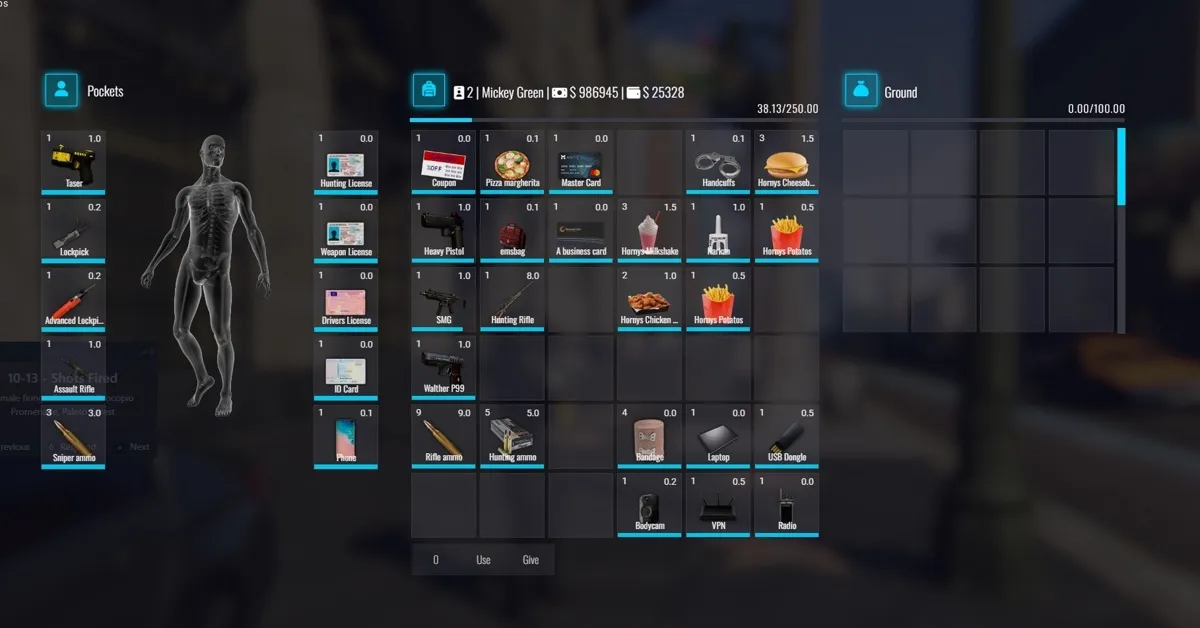
@bleak rock seems like I fixed the robbing issue .. Saw how many slots you made in the js and just made the otherplayer inventory slots the same


Looks like it still has empty slots and might break .. so technically not a fix .. I see you used different numbers for each of the player-inventory to get the spacing you need .. mega sadge
Is there a way to just call those slots in the lua code ?? when being robbed? I'm not familiar with NUI or whatever its called

RegisterCommand('robme', function()
    local ped = PlayerPedId()
    QBCore.Functions.Progressbar("robbingme", "Touching myself...", 1000, false, true, {
        disableMovement = true,
        disableCarMovement = true,
        disableMouse = false,
        disableCombat = true,
    }, {}, {}, {}, function() -- Done
        TriggerServerEvent("inventory:server:OpenInventory", "otherplayer", GetPlayerServerId(PlayerId()))
    end)
end, false)
"Made" this to test the robbing
alpine turret
tender vine
anyway to solve this ?
ive got this problem
i tried what u said but it doesnt work
tender vine
Download the new version
alpine turret
i just downloaded
tender vine
If u r using qb-inventory it should work
alpine turret
im using this one
tender vine
Is it the curser problem ?
alpine turret
but i renamed it all to qb-inventory
alpine turret
tender vine
Is it the curser problem ?
yh
tender vine
bleak rock
https://github.com/iONDegen/ps-inventory
This is the one I am using
alpine turret
im trying to use that one but the it stuck on screen when leaving inventoery
alpine turret
bleak rock
Its np, I'll push a branch with the inventory renamed to qb-inventory for conven...
when does this come out
tulip veldt
This thread is not for support. Stop talking about support here.
 ivory crater
Yeah when trying to go to a shop you can't buy anything
tulip veldt
ivory crater
Yeah when trying to go to a shop you can't buy anything
Do you not see the big bold text above?
ivory crater
I'm letting him no its not support if im saying there a bug