#Small modification por qb-police blips
144 messages · Page 1 of 1 (latest)


 surreal schooner
 daring vector
I think I got confused with something else
daring vector
I think I got confused with something else
Nop but you are right
It dont change blip to another, it updates position but get stuck to bike, i just added those things to the default qb-police one no extra modification didnt knew about that xD
Yep it dont change the blip if you are to far
daring vector
So I was right lol
surreal schooner
Yep xd
surreal schooner
I will try to see if i can do it :p
does the fivem natives work aswell from serverside and clientside?
daring vector
there's a different native I think
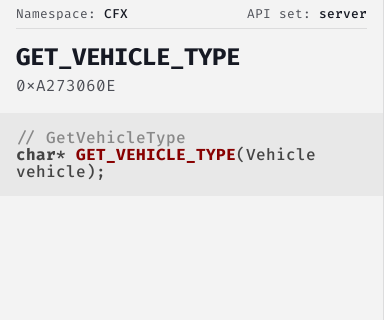
Cfx.re Native Reference
Returns the type of the passed vehicle.
Vehicle types
- automobile
- bike
- boat
- heli
- plane
- submarine
- trailer
- train
try this
they will error out if the native doesnt exist
surreal schooner
will delete it then until i have something working, haha lets see if its not to hard for me
daring vector
you are good
surreal schooner
oh wait
daring vector
keep it open.. or copy the natives info I put here
surreal schooner
Yeah but for example all the blip changes are on the client
i should just check the vehicle in server side
and i can set the blip on server? or i just need to pass a variable to a client event with like for example Servertype==helicopter?
daring vector
I think so yes
surreal schooner
Fixed the infite scope thing @daring vector Thanks to @restive thicket
 restive thicket

surreal schooner
Tomorrow Will the add the working Code
 pure crow
surreal schooner
Tomorrow Will the add the working Code
pure crow
surreal schooner
Tomorrow Will the add the working Code
Where is it?
surreal schooner
Will publish today irs working very well
 covert vault
surreal schooner
``` Pictures as preview ```
covert vault
surreal schooner
``` Pictures as preview ```
How do you make your minimap have no blur around it and the line?
surreal schooner
Is just qb-hud enable map border
surreal schooner
Un 6-8 hours im working at the momento
 surreal schooner
change UpdateBlips function on qb-policejob server/main.lua
local function UpdateBlips()
    local dutyPlayers = {}
    local players = QBCore.Functions.GetQBPlayers()
    for _, v in pairs(players) do
        if v and (v.PlayerData.job.name == "police" or v.PlayerData.job.name == "ambulance"  or v.PlayerData.job.name == "sheriff") and v.PlayerData.job.onduty then
            local coords = GetEntityCoords(GetPlayerPed(v.PlayerData.source))
            local heading = GetEntityHeading(GetPlayerPed(v.PlayerData.source))
            local ped = GetPlayerPed(v.PlayerData.source)
            local vehiculoPed = GetVehiclePedIsIn(ped, false)
            local vehicleType = GetVehicleType(vehiculoPed)
            -- BIKE
            if vehiculoPed ~= 0 and vehicleType == "bike" then
                  blipNum = 348
                  blipSize = 1.0
            -- HELICOPTER
            elseif vehiculoPed ~= 0 and vehicleType == "heli" then
                  blipNum = 43
                  blipSize = 1.0
            -- CAR
            elseif vehiculoPed ~= 0 and vehicleType == "automobile" then
                  blipNum = 225
                  blipSize = 0.7
            else
                  blipNum = 1
                  blipSize = 1.0
            end

            if v.PlayerData.job.name == "police" then
                blipColorNum = 3
            elseif v.PlayerData.job.name == "sheriff" then
                blipColorNum = 52
            elseif v.PlayerData.job.name == "ambulance" then
                blipColorNum = 76
            end

            dutyPlayers[#dutyPlayers+1] = {
                source = v.PlayerData.source,
                label = v.PlayerData.metadata["callsign"],
                job = v.PlayerData.job.name,
                blipNum = blipNum,
                blipSize = blipSize,
                blipColorNum= blipColorNum,
                location = {
                    x = coords.x,
                    y = coords.y,
                    z = coords.z,
                    w = heading
                }
            }
        end

    end
    TriggerClientEvent("sheriff:client:UpdateBlips", -1, dutyPlayers)
end
On qb-policejob client main.lua override createdutyblips
local function CreateDutyBlips(playerId, playerLabel, playerJob,blipNum,blipSize,blipColorNum,playerLocation)
    local ped = GetPlayerPed(playerId)
    local blip = GetBlipFromEntity(ped)
    local pedVehicle = GetVehiclePedIsIn( ped, false);
    if not DoesBlipExist(blip) then
        if NetworkIsPlayerActive(playerId) then
            blip = AddBlipForEntity(ped)
        else
            blip = AddBlipForCoord(playerLocation.x, playerLocation.y, playerLocation.z)
        end
            SetBlipScale(blip, blipSize)
            SetBlipSprite(blip, blipNum)
            ShowHeadingIndicatorOnBlip(blip, true)
            SetBlipRotation(blip, math.ceil(playerLocation.w))

        SetBlipColour(blip, blipColorNum)


        SetBlipAsShortRange(blip, true)
        BeginTextCommandSetBlipName('STRING')
        AddTextComponentString(playerLabel)
        EndTextCommandSetBlipName(blip)
        DutyBlips[#DutyBlips+1] = blip
    end

    if GetBlipFromEntity(PlayerPedId()) == blip then
        -- Ensure we remove our own blip.
        RemoveBlip(blip)
    end
end
and around line 131 override police:client:UpdateBlips function by:
RegisterNetEvent('police:client:UpdateBlips', function(players)
    if PlayerJob and (PlayerJob.name == 'police' or PlayerJob.name == 'ambulance' or PlayerJob.name == 'sheriff') and
        PlayerJob.onduty then
        if DutyBlips then
            for _, v in pairs(DutyBlips) do
                RemoveBlip(v)
            end
        end
        DutyBlips = {}
        if players then
            for _, data in pairs(players) do
                local id = GetPlayerFromServerId(data.source)
                CreateDutyBlips(id, data.label, data.job,data.blipNum, data.blipSize,data.location)

            end
        end
    end
end)
What this will make?
Will make, Police blips blue, sheriff blips green, and ems blips red.
- They will change between: car, helicopter, bike, and walking blip.
- You can customize each blip easy
- You can chance blip color for each job easy on server main.lua
To change colors and blips icon you have to go to qb-policejob/server/main.lua
and change:
- BlipNum: the id of the blip ( the icon)
- Blip Size= the size of the blip ( did that because car blip was to big on minimap)
- BlipColorNum = id of the color blip for each job (I decided red for ems, blue for police, green for sheriff)
if vehiculoPed ~= 0 and vehicleType == "bike" then
                  blipNum = 348
                  blipSize = 1.0
            -- HELICOPTER
            elseif vehiculoPed ~= 0 and vehicleType == "heli" then
                  blipNum = 43
                  blipSize = 1.0
            -- CAR
            elseif vehiculoPed ~= 0 and vehicleType == "automobile" then
                  blipNum = 225
                  blipSize = 0.7
            else
                  blipNum = 1
                  blipSize = 1.0
            end
            if v.PlayerData.job.name == "police" then
                blipColorNum = 3
            elseif v.PlayerData.job.name == "sheriff" then
                blipColorNum = 52
            elseif v.PlayerData.job.name == "ambulance" then
                blipColorNum = 76
            end
noice!
surreal schooner
Could made it using config file instead direct set on the if/elses
but didnt think about it
Great part is that it updates when players are out of the scope, all the blips "logic" is server side now.
daring vector
restive thicket
You can even make it recognize gender
and their clothes, shoes, hair bands, earings
Also make sure it shows the speed of the vehicle they are in
restive thicket
daring vector
also their hunger, thirst, stress
 surreal schooner
show their time on duty 😛
restive thicket
NP first did it like that
daring vector
a right click on it, you can teleport to their location or bring them
surreal schooner
rigth click: ammo and vest airdrop
restive thicket
daring vector
Anna anna anna
 novel lantern
surreal schooner
rigth click: ammo and vest airdrop
novel lantern
surreal schooner
rigth click: ammo and vest airdrop
I like your thinking
restive thicket
I didn't say add it, i said u can add it 
daring vector
its @surreal schooner 's decision
restive thicket

surreal schooner
Maybe and only maybe
add an afk extra colour if the player is afk on duty=?
xD
restive thicket
what i would want to make
if a cop is AFK they get off duty automatically
so they dont money farm
i'll need to make that eventually
 surreal schooner

GitHub
Contribute to i-kora/qb-sheriffjob development by creating an account on GitHub.

GitHub
Contribute to i-kora/qb-policejob development by creating an account on GitHub.
Should i create a new post for that? Same blip modification on both jobs.
 leaden star
I followed this to a T or so I believe lol and now none of the police blips are showing up for anyone. I was wondering if anyone else had this issue or got it working?
novel lantern
It seems like I'm having the same issue. I'll do some digging to see if I can find a fix though.
surreal schooner
If you had the job already on you you have ti delete It and set again
But its working for me
novel lantern
I'll do a quick check tomorrow morning to see if that helps (It should, I trust you)
surreal schooner
At Least what happened to me is that using ps-multijob i has to delete the job and set again. Also you only can set blips if there are 2 players as police or sheriff ( 1 police 1 sheriff is fine), or an ems
If dont work just tell me so i can check
novel lantern
👍 I'll check in the morning (Ping me if I forget?)
surreal schooner
novel lantern
👍 I'll check in the morning (Ping me if I forget?)
Tried It ?
novel lantern
I completely forgot. let me do that real quick
leaden star
surreal schooner
At Least what happened to me is that using ps-multijob i has to delete the job a...
We removed the jobs through ps-multijob then re-added and the blips still arent showing. Do you need onesync infinity for this to work? Were currently using legacy (64 slot)
surreal schooner
I have no clue but probably yes i just used policejob moved some parta of blips logic to server side
So shouldnt be making any issues
 surreal schooner
You all using legacy onesync?
surreal schooner
 glass snow
Use infinity
glass snow
Use infinity
Its working for you ?
glass snow
one sync works bruh
restive thicket
surreal schooner
Its working for you ?
dw apple is a bit special. he's slow
restive thicket
glass snow
one sync works bruh
they are asking about if the script is working not the onesync

glass snow
guy is asking if we are use shitter onesync so i told him not to use that
Anna also your the slowest i know so relax ite bruda
surreal schooner
Ok using one Sync and works idk if its because if thats that it fails for them
leaden star
surreal schooner
change UpdateBlips function on qb-policejob server/main.lua
```lua
local functio...
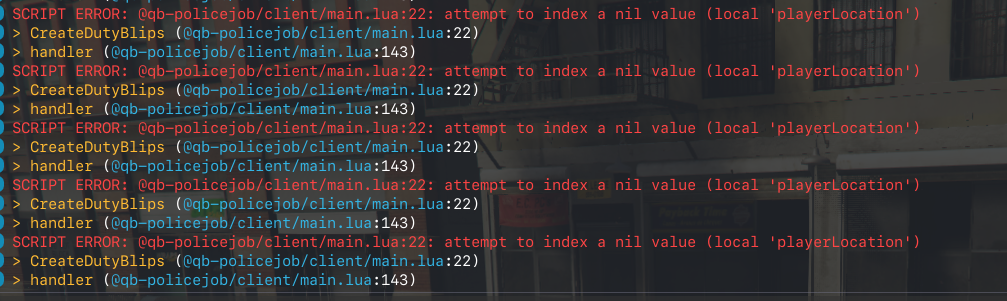
I figured out the issue in the first snippet the last event is calling
TriggerClientEvent("sheriff:client:UpdateBlips", -1, dutyPlayers)
Its suppose to be
TriggerClientEvent("police:client:UpdateBlips", -1, dutyPlayers)
Oh sorry...
In my case its working because i hace both Jobs
And when It calls that event It works anyways
I Will correct it


 surreal schooner
Ker me check the Code
you have serverside code
like this?
            dutyPlayers[#dutyPlayers+1] = {
                source = v.PlayerData.source,
                label = v.PlayerData.metadata["callsign"],
                job = v.PlayerData.job.name,
                blipNum = blipNum,
                blipSize = blipSize,
                blipColorNum= blipColorNum,
                location = {
                    x = coords.x,
                    y = coords.y,
                    z = coords.z,
                    w = heading
                }
            }
and update blips like this on client side?
found the issue
will push to qb-police
surreal schooner
leaden star
https://i.imgur.com/J78IG2Q.png
client side:
RegisterNetEvent('police:client:UpdateBlips', function(players)
    if PlayerJob and (PlayerJob.name == 'police' or PlayerJob.name == 'ambulance' or PlayerJob.name == 'sheriff') and
        PlayerJob.onduty then
        if DutyBlips then
            for _, v in pairs(DutyBlips) do
                RemoveBlip(v)
            end
        end
        DutyBlips = {}
        if players then
            for _, data in pairs(players) do
                local id = GetPlayerFromServerId(data.source)
                CreateDutyBlips(id, data.label, data.job,data.blipNum, data.blipSize, data.blipColorNum,data.location)

            end
        end
    end
end)
was not passing the correct values to create duty blips
 fast mortar
I managed to fix it but i had to change this since my policejob is older
    if PlayerJob and (PlayerJob.name == 'police' or PlayerJob.name == 'ambulance' or PlayerJob.name == 'sheriff') and
        PlayerJob.onduty then```

to this

```RegisterNetEvent('police:client:UpdateBlips', function(players)
    if PlayerJob and (PlayerJob.name == 'police' or PlayerJob.name == 'ambulance' or PlayerJob.name == 'sheriff') and
onDuty then```Anyone know how I would incorporate this export so that if there is a current blackout the blips would not display
### getBlackoutState
Returns if blackout is enabled or disabled
lua
-- LUA EXAMPLE
local state = exports["qb-weathersync"]:getBlackoutState();
idk if it will work
but maybe you can add an if therE:
RegisterNetEvent('police:client:UpdateBlips', function(players)
   if state == false then
    if PlayerJob and (PlayerJob.name == 'police' or PlayerJob.name == 'ambulance' or PlayerJob.name == 'sheriff') and
        PlayerJob.onduty then
        if DutyBlips then
            for _, v in pairs(DutyBlips) do
                RemoveBlip(v)
            end
        end
        DutyBlips = {}
        if players then
            for _, data in pairs(players) do
                local id = GetPlayerFromServerId(data.source)
                CreateDutyBlips(id, data.label, data.job,data.blipNum, data.blipSize, data.blipColorNum,data.location)

            end
        end
    end
  end
end)
something like that? if state == false, then i update the blips
if state == true i dont
idk if it will work never used blackout
leaden star
surreal schooner
```lua
RegisterNetEvent('police:client:UpdateBlips', function(players)
if sta...
Thanks got it figured out had to trigger it server side so now when ever the power plant gets hit it disables the police blips