
10 messages · Page 1 of 1 (latest)
 rancid belfry
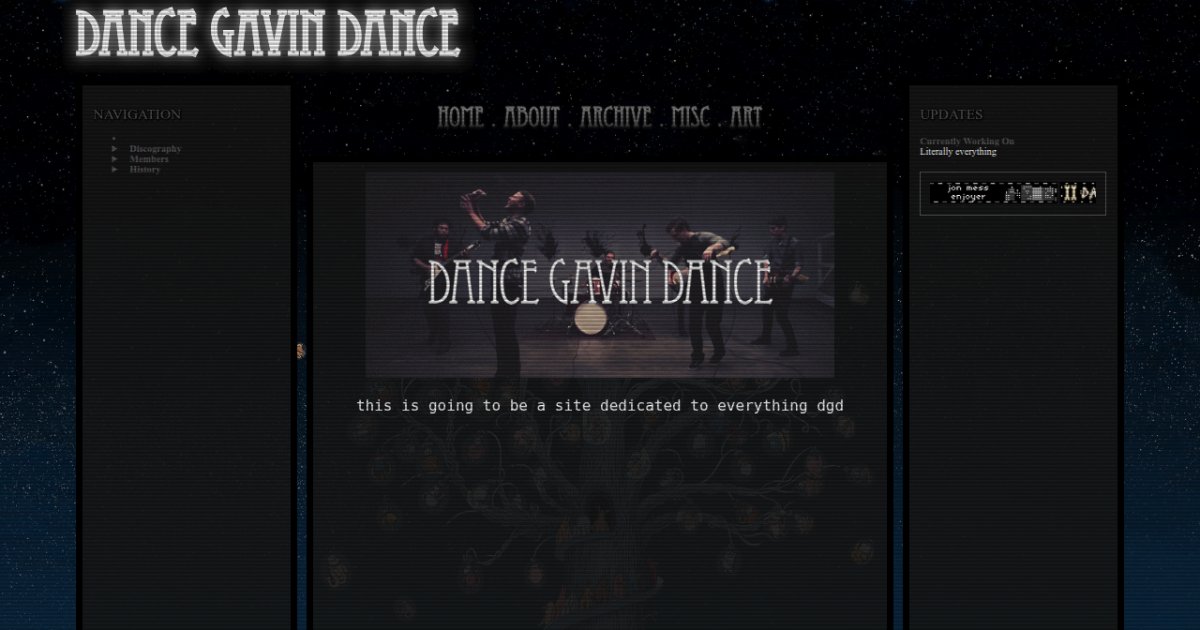
Helloo, I’m not sure if I am wording this correctly, I am still very much new to all of this, but I recently added a layout.js file to my site, and I’ve been unable to figure out how to then add stuff to the center box,
What I have so far is
` <!DOCTYPE html>
<html>
<head>
<meta charset="UTF-8">
<meta name="viewport" content="width=device-width, initial-scale=1.0">
<title>MULTIPLE STAB WOUNDS</title>
<!-- The style.css file allows you to change the look of your web pages.
If you include the next line in all your web pages, they will all share the same look.
This makes it easier to make new pages for your site. -->
<link href="../style.css" rel="stylesheet" type="text/css" media="all">
<link rel="shortcut icon" type="image/x-icon" href="favicon.png">
<script src="../layout.js"></script>
</head>
<body>
</body>
</html> `
and I’m unsure where to go from here.. I would like to be able to add different text on different pages, while keeping the same layout.. everything I have tried so far is only appearing underneath rather than inside the box
this is my website, if that also helps, https://dancegavindance.neocities.org/about
the main page (https://dancegavindance.neocities.org) is what I want the about tab to look like eventually, will all the text and images
thank you !
this is also what my js looks like
document.addEventListener("DOMContentLoaded", function () {
// The layout will be loaded on all pages that do NOT have the "no-layout" class in the <body> element.
if (document.body.classList.contains("no-layout")) return;
// Inserting your header and footer:
document.body.insertAdjacentHTML("afterbegin", headerEl);
document.body.insertAdjacentHTML("beforeend", footerEl);
// Other initializations:
initActiveLinks();
// your code here...
});
/* ********************************* */
/**
* F U N C T I O N S
*/
function initActiveLinks() {
// This function adds the class "active" to any link that links to the current page.
// This is helpful for styling the active menu item.
const pathname = window.location.pathname;
[...document.querySelectorAll("a")].forEach((el) => {
const elHref = el.getAttribute("href").replace(".html", "").replace("/public", "");
if (pathname == "/") {
// homepage
if (elHref == "/" || elHref == "/index.html") el.classList.add("active");
} else {
// other pages
if (window.location.href.includes(elHref)) el.classList.add("active");
}
});
}
function getNestingString() {
// This function prepares the "nesting" variable for your header and footer (see below).
// Only change this function if you know what you're doing.
const currentUrl = window.location.href.replace("http://", "").replace("https://", "").replace("/public/", "/");
const numberOfSlahes = currentUrl.split("/").length - 1;
if (numberOfSlahes == 1) return ".";
if (numberOfSlahes == 2) return "..";
return ".." + "/..".repeat(numberOfSlahes - 2);
}
/* ********************************* */
/**
* H T M L
*/
const nesting = getNestingString();
/**
Use ${nesting} to output a . or .. or ../.. etc according to the current page's folder depth.
Example:
<img src="${nesting}/images/example.jpg" />
will output
<img src="./images/example.jpg" /> on a page that isn't in any folder.
<img src="../images/example.jpg" /> on a page that is in a folder.
<img src="../../images/example.jpg" /> on a page that is in a sub-folder.
etc.
*/
// Insert your header HTML inside these ``. You can use HTML as usual.
// You don't need to use the <header> element, but I recommend it.
const headerEl = `
<div class="container flex">
<div id="header" class="headerbox">
<div class="headertext"> DANCE GAVIN DANCE </div> </div>
<div id="homenav" class="box border">
<div class="leftnav">
<div class="leftnav">
<br>
<div class="navheader">NAVIGATION</div>
<div id="float"><img src="dbmvin.png" width="200"></div>
<ul>
<li>
<a href="https://dancegavindance.neocities.org/"> Home </a>
</li>
<li>
<a href="https://dancegavindance.neocities.org/"> Home </a>
</li>
<li>
<a href="https://dancegavindance.neocities.org/"> Home </a>
</li>
</ul>
</div>
</div>
</div>
<div class="contentwrapper">
<div id="navigation" class="navigation">
<ul>
<li><a href="/">Home</a> <span class="navstar">.</span></li>
<li><a href="/about">About</a> <span class="navstar">.</span></li>
<li><a href="/">Archive</a> <span class="navstar">.</span></li>
<li><a href="/">Misc</a> <span class="navstar">.</span></li>
<li><a href="/">Etc</a></li>
</ul>
</div>
<!-- Actual content goes here -->
<div class="content">
</div>
</div>
<div id="rightbar" class="box border">
<br>
<div class="navheader">UPDATES</div>
<h4 style="margin-bottom:-5%;">Currently Working On</h4>
<p>Literally everything</p>
</div>
</div>
<div class="lines"></div>
`;
// Insert your footer HTML inside these ``. You can use HTML as usual.
// You don't need to use the <footer> element, but I recommend it.
const footerEl = `
`; ``` autumn jay
this looks like ai work, the comments.......
 split trail
autumn jay
this looks like ai work, the comments.......
split trail
autumn jay
this looks like ai work, the comments.......
yeah but it's okay
split trail
rancid belfry
Helloo, I’m not sure if I am wording this correctly, I am still very much new to...
you can use javascript for that. You can add a hash # to the main url and use javascript to get the text inside it. After getting the text you can dynamically change the text based on the hash. If there is no hash, the original page would be visible otherwise, your custom text.
example:
and if the url hash is invalid, it returns to the home. page.
rancid belfry
autumn jay
this looks like ai work, the comments.......
Oh man
I just used a tutorial off of someone’s neocities page I hope it’s not ai lol
rancid belfry
split trail
you can use javascript for that. You can add a hash # to the main url and use ja...
ooo thank you so much, I will try this