font-family: Spiderman;
    src: url(Spider-man.otf)
}

.menu {
    width: 100%;
    position: relative;
    background: linear-gradient(90deg, rgba(38,0,0,1) 0%, rgba(255,0,0,1) 100%);
    box-shadow: 0px 0.5px 2px;
    font-family: Spiderman;
    font-size: 42px;
}

.logo {
    float: none;
    padding: 15px;
}

img.logo {
    transition: transform 0.5s ease;
}

img.logo:hover {
    transform: scale(1.2,1.2);
}

ul {
    float: right;
    padding: 0;
    margin: 0;
}

li {
    list-style-type: none;
    display: inline-block;
    margin: 30px;
}

ul a {
    padding: 10px;
    display: block;
    transition: transform 0.3s ease;
}

ul a:link {
    color: black;
    text-decoration: none;
}

ul a:hover {
    color: aqua;
    border: 2px white solid;
    background-color: black; opacity:0.8;
    cursor: pointer;
    transform: scale(1.1, 1.1);
}


a.buy, a.community, a.gallery, a.contacts {
    border: 0px white solid;
}
#CENTERED LOGO AND BUTTONS (MENU) HTML & CSS
75 messages · Page 1 of 1 (latest)
 finite seal
 patent solstice
Well for starters your structure isn't condusive to much but forcing with absolutes in CSS. You want to ensure you have a more semantic layout, even with structure itself.
   undefined</head>undefined<body>
     <header>
       <div class="menu">
         <div class="menu-buttons menu-left">
           <a href="buy.html" class="buy">Buy now</a>
           <a href="community.html" class="community">Community</a>
         </div>
         <div class="logo">
           <a href="index.html">
             <img src="spidey.png" alt="Home" class="logo">
           </a>
         </div>
         <div class="menu-buttons menu-right">
           <a href="gallery.html" class="gallery">Gallery</a>
           <a href="contacts.html" class="contacts">Contacts</a>
         </div>
       </div>
     </header>
   </body>undefined</html>
.menu {
    display: flex;
    justify-content: space-between;
    align-items: center;
    width: 100%;
    background: linear-gradient(90deg, rgba(38,0,0,1) 0%, rgba(255,0,0,1) 100%);
    box-shadow: 0px 0.5px 2px;
    font-family: Spiderman;
    font-size: 42px;
    padding: 15px 30px;
}
I put part of the menu before and after so that it just loads that way, rather than trying to do some positioning hack. You can target either or both simply by giving each a class specific to the left and right side DIVs.
finite seal
patent solstice
https://codepen.io/thefacebiters/pen/XWwmJrY
Thank you so much! Can I ask for two more things? Is there any way I can move those buttons more to the center? I need them closer to the logo. And the second thing, when I hover on the buttons they like move the button that is next to them. Any tips?
patent solstice
You can start by adjusting your padding.
finite seal
I tried that, but the buttons on the right side move away.
patent solstice
Read the references I put in the codepen
Also, are you adjusting the padding on '.menu-buttons' or '.menu' you should be focusing on '.menu-buttons' if I understand your question correctly.
finite seal
I looked at the references and I got it, thanks. Last problem I have is that when I hover on the buttons they move.
patent solstice
Well, lets step through it
.something {
    left: 5vw;
}
.something:hover {
    left: 4vw;
}
What would you change here and why?
finite seal
If I want it to stay on the same place, I would remove hover's left, so it can't move when I hover on it. Sorry if I say something bad. I'm still learning.
patent solstice
No worries, so think about the hover as overwriting anything from it's non hover state

W3Schools offers free online tutorials, references and exercises in all the major languages of the web. Covering popular subjects like HTML, CSS, JavaScript, Python, SQL, Java, and many, many more.
In this you can see what is overridden is only what is written for each pseudo class.
So yes, if you remove an element that is overwritting say where something is positioned, removing that, makes it to default to what the parent of the pseudo class is.
That said if you add something to the pseudo class, it will only be changed it in it, if it's not present in the parent class.
finite seal
Honestly I don't know what to remove/add/change. I feel like the reason it's doing that is because of the padding, but I need that padding. xD
.menubuttons a {
    padding: 10px;
    text-decoration: none;
    color: black;
    transition: transform 0.3s ease;
}

.menubuttons a:hover {
    color: aqua;
    border: 2px white solid;
    background-color: black;
    opacity: 0.8;
    cursor: pointer;
    transform: scale(1.1, 1.1);
}
Hi, can I ask one more thing? I'm working on the project, everything except the hover thing is working but now I have another problem. The MARVEL logo is centered, but the Spider-Man head logo isn't. I know why. Buy now, Gallery, Community, Contacts it "uncenters" the logo, but I don't know how to fix it. Any tip?

                <div class="menubuttons">
                    <ul>
                        <li><a href="buy.html" class="buy">Buy now</a></li>
                        <li><a href="gallery.html" class="gallery">Gallery</a></li>
                    </ul>
                </div>
                <div class="logo">
                    <a href="index.html"><img src="spidey.png" alt="Home" class="logo"></a>
                </div>
                <div class="menubuttons">
                    <ul>
                        <li><a href="community.html" class="community">Community</a></li>
                        <li><a href="contacts.html" class="contacts">Contacts</a></li>
                    </ul>
</div>``` width: 100%;
display: flex;
justify-content: center;
align-items: center;
background: linear-gradient(90deg, rgba(38,0,0,1) 0%, rgba(255,0,0,1) 100%);
box-shadow: 0px 0.5px 2px;
font-family: Spiderman;
font-size: 42px;
padding: 15px 0px;
}```If you're asking why I have the buttons in ul, because my teacher wants it like that so.
patent solstice
That's no worries, but you changed this part to centered
 finite seal
patent solstice
That's no worries, but you changed this part to centered
finite seal
patent solstice
That's no worries, but you changed this part to centered
Yeah, because I need the buttons close to the logo. Anyways even if I change it back to space-between still the logo isn't centered.
patent solstice
You need to style the logo seperately
finite seal
Wdym? Because when I put it outside the menu div it puts the logo outside my “navbar”
 thorny thicket
Hello. I'm making a school project and I need to start with menu. I want menu with centered logo and 2 buttons on the left side and 2 buttons on the right side. (you can see it on the picture i sent) Sending some code. HTML & CSS. Honetsly I was trying to make it for like 6 hours maybe more, but I couldn't make it so I have logo on the left and buttons on the right, but still sending the code. If there's someone who could help me or just give me some hint/tip to make centered logo with 4 buttons like you can see in the picture, text me please. ❤️ Any help will be appreciated. (sorry for my english)
<html>
    <head>
        <meta charset="UTF-8">
        <link rel="stylesheet" href="style.css">
        <link rel="stylesheet" href="menu.css">
        <link rel="icon" type="image/x-icon" href="spideyfavicon.png">
        <title>Marvel's Spider-Man | Home</title>
    </head>
    <body>
        <header>
            <div class="menu">
                <div class="logo">
                    <a href="index.html"><img src="spidey.png" alt="Home" class="logo"></a>

                    <ul>
                        <li><a href="buy.html" class="buy">Buy now</a></li>
                        <li><a href="community.html" class="community">Community</a></li>
                        <li><a href="gallery.html" class="gallery">Gallery</a></li>
                        <li><a href="contacts.html" class="contacts">Contacts</a></li>
                    </ul>
                </div>
            </div>
        </header>
    </body>
</html>```?
patent solstice
thorny thicket
Hello. I'm making a school project and I need to start with menu. I want menu wi...
Please make your own thread and delete this
patent solstice
finite seal
Wdym? Because when I put it outside the menu div it puts the logo outside my “n...
Yes, did you make any progress?
finite seal
patent solstice
Yes, did you make any progress?
No, cuz I didn't have free time but now I do. All I need is fix the logo to make it centered and the hover thing on buttons. Wait I will send one screenshot that maybe explain my situation better (logo thing)
the buttons move the logo offset and idk how to fix that I need the logo to be centered and then buttons next to it
 patent solstice
Can you please put all your stuff into a codepen? It one will put us on the same page, I may not be understanding you correctly, and I'm afraid I might give you half the solution.
use https://imgbb.com/ or something for the image links
ImgBB
Free image hosting and sharing service, upload pictures, photo host. Offers integration solutions for uploading images to forums.
finite seal
patent solstice
Can you please put all your stuff into a codepen? It one will put us on the same...
 patent solstice
You can also upload it to your google drive and use this:
https://sites.google.com/site/gdocs2direct/home

About
This tool allows you to generate a direct download link to files you have stored in Google Drive. A direct link will immediately start downloading the file, rather than opening a preview of the file in Google Drive.
finite seal

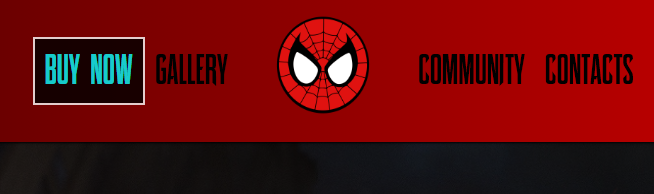
on one screen u can see how it is and on the second screen u can see that it moved to the left
yk when I hover on any button everything just move
patent solstice
Don't use <!DOCTYPE HTML>
<html> </html> in codepen btw
Update your codepen with your urls for the images and we'll continue
finite seal
patent solstice
Update your codepen with your urls for the images and we'll continue
wdym? u mean background, logo etc?
finite seal
https://codepen.io/kubi-the-styleful/pen/RwmWMMd#
I hope I did it right 😭
like ik it's not working but idk how to do it cuz I don't have the original websites I downloaded my background, logo etc. from so
patent solstice
almost, headed out now

<a href="https://ibb.co/NSD5BdR"><img src="https://i.ibb.co/Wt8ZJ4C/spidey.png" alt="spidey" border="0" /></a>
You want what is in the '<img src='
https://ibb.co/NSD5BdR"> is a dynamic link
while the one with spidey.png is static
okay leaving now bbs
finite seal
patent solstice
okay leaving now bbs
alright enjoy doge walk
and thank you for helping me I appreciate it sm
patent solstice
back
patent solstice
finite seal
and thank you for helping me I appreciate it sm
No worries at all
finite seal
patent solstice
back
alrightt
patent solstice
body should be below the header area to start
<body>
    <div class="background"></div>

    <header>
        <nav class="topmenu">
            <div class="menu">
                <div class="menubuttons">
                    <ul>
                        <li><a href="buy.html" class="buy">Buy now</a></li>
                        <li><a href="gallery.html" class="gallery">Gallery</a></li>
                    </ul>
                </div>
                <div class="logo">
                    <a href="index.html"><img src="https://i.ibb.co/Wt8ZJ4C/spidey.png" alt="Home" class="logo-img"></a>
                </div>
                <div class="menubuttons">
                    <ul>
                        <li><a href="community.html" class="community">Community</a></li>
                        <li><a href="contacts.html" class="contacts">Contacts</a></li>
                    </ul>
                </div>
            </div>
        </nav>
    </header>

    <main>
        <div class="spideylogo-container">
            <img src="https://i.ibb.co/D72Rchs/spidermanlogo.png" alt="Spider-Man Logo" class="spideylogo">
        </div>
        <div class="desc">
            <p>Marvel's Spider-Man is a 2018 action-adventure game developed by Insomniac Games and published by Sony Interactive Entertainment. Based on the Marvel Comics character Spider-Man, it tells an original narrative that is inspired by the long-running comic book mythology, while also drawing from various adaptations in other media. In the main story, the super-human crime lord Mister Negative orchestrates a plot to seize control of New York City's criminal underworld. When Mister Negative threatens to release a deadly virus, Spider-Man must confront him and protect the city while dealing with the personal problems of his civilian persona, Peter Parker.</p>
        </div>
    </main>
</body>```You had some syntax issues in your HTML
that's why things were operating as intended
Same thing for your CSS:
@font-face {
    font-family: Spiderman;
    src: url(Spider-man.otf);
}

body {
    background: rgba(0, 0, 0, 0.7);
    background-blend-mode: darken;
    background-image: url(https://i.ibb.co/CKfbnrt/test.jpg);
    background-size: cover;
    background-repeat: no-repeat;
    background-position: center;
    margin: 0;
    padding: 0;

}

.spideylogo {
    width: 40%;
    height: 40%;

}

.desc {
    font-family: Spiderman;
    text-align: center;
    font-size: 35px;
    color: white;
    text-shadow: 2px 2px black;
}

.menu {
    display: flex;
    justify-content: space-evenly;
    align-items: center;
    background: linear-gradient(90deg, rgba(38,0,0,1) 0%, rgba(255,0,0,1) 100%);
    box-shadow: 0px 0.5px 2px;
    font-family: Spiderman;
    font-size: 42px;
}

.menubuttons a {
    text-decoration: none;
    color: black;
    transition: color 0.3s ease, background-color 0.3s ease, border-color 0.3s ease;
    border: 3px solid transparent; /* Use Consistent border size */
    padding: 10px; /* Use Consistent padding */
    margin: 3px; /* Use Consistent margin */
    box-sizing: border-box; /* Always add for borders */
}

.menubuttons a:hover {
    color: aqua;
    border-color: aqua; /* Only change the border color */
    background-color: black;
    opacity: 0.8;
    cursor: pointer;
}

ul {
    margin: 0;
    padding: 0;
    list-style-type: none;
}

li {
    float: left;
}

.logo img {
    width: 170px;
    height: 100px;
    transition: transform 0.5s ease;
}

.logo img:hover {
    transform: scale(1.2, 1.2);
}

a.buy, a.community, a.gallery, a.contacts {
    border: 0px white solid;
}
Pay attention to my notes here:
.menubuttons a {
    text-decoration: none;
    color: black;
    transition: color 0.3s ease, background-color 0.3s ease, border-color 0.3s ease;
    border: 3px solid transparent; /* Use Consistent border size */
    padding: 10px; /* Use Consistent padding */
    margin: 3px; /* Use Consistent margin */
    box-sizing: border-box; /* Always add for borders */
}

.menubuttons a:hover {
    color: aqua;
    border-color: aqua; /* Only change the border color */
    background-color: black;
    opacity: 0.8;
    cursor: pointer;
}```Thank you! I fixed the logo thing it was cuz I had padding: 15px 0px in menu and all I needed was just padding: 15px 💀 That's all, thank you so much for helping me.