#Basic Pycord Help (Quick Questions Only)
1 messages · Page 20 of 1
 worn void
worn void
worn void
How do I avoid discord.errors.InteractionResponded: This interaction has already been responded to before when trying to update a button?
 fervent cradle
Using a While loop in a commands would block discord correct?
 rare ice
worn void
How do I avoid `discord.errors.InteractionResponded: This interaction has alread...
rare ice
worn void
How do I avoid `discord.errors.InteractionResponded: This interaction has alread...
Send your code
rare ice
Just send it how it is
worn void
class TicketClosedButtons(discord.ui.View):
    def __init__(self):
        super().__init__(timeout=None)
    @discord.ui.button(label="Delete", custom_id="delete_ticket", style=discord.ButtonStyle.danger, emoji="🔒")
    async def delete_button_callback(self, button, interaction):
        support = discord.utils.get(interaction.guild.roles, name="Staff")
        channel = client.get_channel(transchanid)
        embed=discord.Embed(color=0xff0000)
        embed.add_field(name="Ticket Deletion", value="Ticked will be deleted in a few seconds.", inline=False)
        embed.set_footer(text="Report bugs or suggestions with /bug or /suggest!")
        try:
            button.disabled = True
            await interaction.response.edit_message(view=self)
        except:
            pass
        await interaction.response.send_message(embed=embed)
        await asyncio.sleep(6)
        await interaction.channel.delete()

    @discord.ui.button(label="Transcript", custom_id="transcript_ticket", style=discord.ButtonStyle.danger, emoji="📜")
    async def trans_button_callback(self, button, interaction):
        embed2=discord.Embed(color=0xffff00)
        embed2.add_field(name="Transcript Created", value=f"Transcript has been created!", inline=False)
        embed2.set_footer(text="Report bugs or suggestions with /bug or /suggest!")
        await interaction.channel.send(embed=embed2)

        button.disabled = True
        await interaction.response.edit_message(view=self)

        try:
            await interaction.defer()#ephemeral=True)
        except:
            pass

        channel = client.get_channel(transchanid)
        transcript = await chat_exporter.export(interaction.channel)
        transcript_file = discord.File(io.BytesIO(transcript.encode()), filename=f"{interaction.channel.name}.html")


        embed=discord.Embed(color=0xffff00)
        embed.add_field(name="Transcript", value=f"Transcript for {interaction.channel.mention} has been created!", inline=False)
        embed.set_footer(text="Report bugs or suggestions with /bug or /suggest!")
        await channel.send(file=transcript_file, embed=embed)
        #await interaction.response.send_message(embed=embed)


        #await interaction.followup.send("Done")
        #except:
        #    await interaction.response.send_message("Please do a /bug report with the bug being, `Error Code: 30`")

class TicketCommandButtons(discord.ui.View):
    def __init__(self):
        super().__init__(timeout=None)
    @discord.ui.button(label="Close", custom_id="close_ticket", style=discord.ButtonStyle.danger, emoji="🔒") # the button has a custom_id set
    async def button_callback(self, button, interaction):
        support = discord.utils.get(interaction.guild.roles, name="Support Team")
        #role = discord.utils.get(interaction.guild.default_role)
        await interaction.channel.edit(overwrites={})
        #await asyncio.sleep(0.25)
        await interaction.channel.set_permissions(support, read_messages=True, send_messages=True)
        await interaction.channel.set_permissions(interaction.guild.default_role, read_messages=False, send_messages=False)
        embed=discord.Embed(color=0xffff00)
        embed.add_field(name="Ticket Closed", value="Ticket has been closed. Save a transcript and/or close the ticket.", inline=False)
        embed.set_footer(text="Report bugs or suggestions with /bug or /suggest!")
        await interaction.response.send_message(embed=embed, view=TicketClosedButtons())
Which button is the error occurring on?
fervent cradle
breuh
rare ice
worn void
```py
class TicketClosedButtons(discord.ui.View):
def __init__(self):
...
So for your Delete button, you’re using response.edit_message then doing response.send_message. If you’re going to edit the message then send a message, you’ll have to use .followup.send.
In your transcript button, you’re deferring the response way too late in the callback, as well as you edited the message before - thus counting as the response so there isn’t anything to defer.
rare ice
fervent cradle
Using a While loop in a commands would block discord correct?
Don’t cross-post. Continuing will result in a warn or further action.
 worn void
bro just shut up and listen to him 🤣
rare ice
Who said Trainee Moderators can’t warn?
fervent cradle
rare ice
Who said Trainee Moderators can’t warn?

fervent cradle
worn void
bro just shut up and listen to him 🤣
 gotta bully the shitters
rare ice
Bully??
worn void
I don't think thats how that works
fervent cradle

rare ice
1 day help block
worn void
thats TOUGH
anyways @rare ice is this better?
class TicketClosedButtons(discord.ui.View):
    def __init__(self):
        super().__init__(timeout=None)
    @discord.ui.button(label="Delete", custom_id="delete_ticket", style=discord.ButtonStyle.danger, emoji="🔒")
    async def delete_button_callback(self, button, interaction):
        support = discord.utils.get(interaction.guild.roles, name="Staff")
        channel = client.get_channel(transchanid)
        embed=discord.Embed(color=0xff0000)
        embed.add_field(name="Ticket Deletion", value="Ticked will be deleted in a few seconds.", inline=False)
        embed.set_footer(text="Report bugs or suggestions with /bug or /suggest!")
        try:
            button.disabled = True
            await interaction.response.edit_message(view=self)
        except:
            pass
        await interaction.followup.send(embed=embed)
        await asyncio.sleep(6)
        await interaction.channel.delete()

    @discord.ui.button(label="Transcript", custom_id="transcript_ticket", style=discord.ButtonStyle.danger, emoji="📜")
    async def trans_button_callback(self, button, interaction):
        embed2=discord.Embed(color=0xffff00)
        embed2.add_field(name="Transcript Created", value=f"Transcript has been created!", inline=False)
        embed2.set_footer(text="Report bugs or suggestions with /bug or /suggest!")
        await interaction.channel.send(embed=embed2)

        button.disabled = True
        await interaction.response.edit_message(view=self)

        channel = client.get_channel(transchanid)
        transcript = await chat_exporter.export(interaction.channel)
        transcript_file = discord.File(io.BytesIO(transcript.encode()), filename=f"{interaction.channel.name}.html")

        embed=discord.Embed(color=0xffff00)
        embed.add_field(name="Transcript", value=f"Transcript for {interaction.channel.mention} has been created!", inline=False)
        embed.set_footer(text="Report bugs or suggestions with /bug or /suggest!")
        await channel.send(file=transcript_file, embed=embed)
        # await interaction.response.send_message("Please do a /bug report with the bug being, `Error Code: 30`")
?tag tias
 obtuse juncoBOT
 worn void
lol
worn void
Hey Nziie
        try:
            await interaction.channel.delete()
        except:
            pass
Is this bad to do?
I got this error:
Ignoring exception in view <TicketClosedButtons timeout=None children=2> for item <Button style=<ButtonStyle.danger: 4> url=None disabled=True label='Delete' emoji=<PartialEmoji animated=False name='🔒' id=None> row=None>:
Traceback (most recent call last):
  File "C:\Users\Ryanh\AppData\Local\Programs\Python\Python38-32\lib\site-packages\discord\ui\view.py", line 396, in _scheduled_task
    await item.callback(interaction)
  File "F:\[bots]\MyChemicalCult Bot\bot.py", line 167, in delete_button_callback
    await interaction.channel.delete()
  File "C:\Users\Ryanh\AppData\Local\Programs\Python\Python38-32\lib\site-packages\discord\abc.py", line 769, in delete
    await self._state.http.delete_channel(self.id, reason=reason)
  File "C:\Users\Ryanh\AppData\Local\Programs\Python\Python38-32\lib\site-packages\discord\http.py", line 355, in request
    raise NotFound(response, data)
discord.errors.NotFound: 404 Not Found (error code: 10003): Unknown Channel
I'm not sure why I got the Unknown Channel error
rare ice
sorry just handling that other guy evading a mute with an alt - gonna go off that cliff with you
worn void
anyways
rare ice
try printing channel before you delete it
worn void
It deleted the channel tho
rare ice
it’s fine to delete it ofc but it’s not ideal that it’s returning none
worn void
class TicketClosedButtons(discord.ui.View):
    def __init__(self):
        super().__init__(timeout=None)
    @discord.ui.button(label="Delete", custom_id="delete_ticket", style=discord.ButtonStyle.danger, emoji="🔒")
    async def delete_button_callback(self, button, interaction):
        support = discord.utils.get(interaction.guild.roles, name="Staff")
        channel = client.get_channel(transchanid)
        embed=discord.Embed(color=0xff0000)
        embed.add_field(name="Ticket Deletion", value="Ticked will be deleted in a few seconds.", inline=False)
        embed.set_footer(text="Report bugs or suggestions with /bug or /suggest!")
        try:
            button.disabled = True
            await interaction.response.edit_message(view=self)
        except:
            pass
        await interaction.followup.send(embed=embed)
        await asyncio.sleep(6)
        try:
            await interaction.channel.delete()
        except:
pass```That's the full code
 silver moat
don't tickets usually get archived, not deleted?

 cold storm
the site used to host the replit guide is donw
silver moat
what replit guide
silver moat
cold storm
https://namantech.me/pycord/installation/#replit
How to install the Py-cord library - Pycord Guide

 rare ice
cold storm
rare ice
cold storm
Could you run pip freeze in your terminal and send the output?
silver moat
Before doing anything, please check other packages that use the discord namespace are uninstalled as shown here:
#998272089343668364 message
click show hidden files

set this to false under .replit

click on packages

search py-cord

click the plus sign

and if discord or discord.py are installed
cold storm
rare ice
Could you run `pip freeze` in your terminal and send the output?

pastehub.net
 silver moat
cold storm
thats rlly weird, the package manager isnt showing up
silver moat
cold storm
thats rlly weird, the package manager isnt showing up
make sure packageSearch is true in .replit
cold storm
silver moat
make sure `packageSearch` is `true` in `.replit`
like that?
 silver moat
cold storm
like that?
silver moat
cold storm
like that?
ic you're on an old repl
are you on an old repl? Do you have a replit.nix?
cold storm
no its a new one i just cleared the replit file
cold storm
silver moat
https://web.archive.org/web/20211128084858/https://namantech.me/pycord/installat...
how can i run this with the new .repl
silver moat
silver moat
Before doing anything, please check other packages that use the `discord` namesp...
.
 tranquil pivot
This warning keeps showing up in my logs. Any idea of how I can fix it? WARNING 2022-09-10 19:54:00,039 - Can't keep up, shard ID None websocket is 12.2s behind. It's causing my bot to disconnect then reconnect shortly after.
This debug warning is built into the library
silver moat
tranquil pivot
This warning keeps showing up in my logs. Any idea of how I can fix it? ```
WARN...
sounds like an internet issue.
cold storm
silver moat
.
Thank you so much bro, that was my fault there, i misread and put package search false instead of guess imports
silver moat
you're welcome
tranquil pivot
So you think it's caused by slow internet?
I'll try resetting my modem and see if it still show up
silver moat
tranquil pivot
So you think it's caused by slow internet?
could also be discord, but unlikely because at worse its like 3 seconds behind.
tranquil pivot
That's about how long it disconnects for
WARNING 2022-09-10 19:45:45,813 - Can't keep up, shard ID None websocket is 13.1s behind.
WARNING 2022-09-10 19:48:30,061 - Can't keep up, shard ID None websocket is 12.3s behind.
WARNING 2022-09-10 19:51:15,039 - Can't keep up, shard ID None websocket is 12.2s behind.
WARNING 2022-09-10 19:54:00,039 - Can't keep up, shard ID None websocket is 12.2s behind.
just 3 seconds or so and it's intermittent as well
silver moat
tranquil pivot
That's about how long it disconnects for
that's 3 minutes
fervent cradle
how do I make a perm only command?
silver moat
application command or text command?
fervent cradle
application
I have a poll comand
and require the user to have manage_messages perms
But I can't find a way around it
 errant craneBOT
Here's the slash perms example.
fervent cradle
ok thanks*
worn void
I'm trying to make a /meme command and I've narrowed this down to me getting a random json value... heres and example
{'name': 'Boardroom Meeting Suggestion', 'url': 'https://i.imgflip.com/m78d.jpg', 'id': '1035805'}
How can I just get the 'url' value?
nevermind lmfao
silver moat
worn void
I'm trying to make a /meme command and I've narrowed this down to me getting a r...
assuming stored in a variable called response:
response["url"]
yes
I got it
😂
    data = requests.get('https://api.imgflip.com/get_memes').json()['data']['memes']
    images = [{'name':image['name'],'url':image['url'],'id':image['id']} for image in data]

    ran_meme = random.choice(images)
    print(ran_meme['url'])
This API returns the 100 most popular memes
silver moat
your entire bot will stop when waiting for a response.
silver moat
so using like that same command 30 times or something, the results should be clear
worn void
Can you give me an example on how I would use aiohttp instead?
silver moat
cool. I'll leave that to you.
worn void
good idea
worn void
worn void
```py
data = requests.get('https://api.imgflip.com/get_memes').json()['data'...
Can someone help me figure out how to transfer this to AIOHTTP?
    session = aiohttp.ClientSession()
    params = [{'name':image['name'],'url':image['url'],'id':image['id']} for image in r]
    async with session.get('http://httpbin.org/get', params=params) as r:
        ran_meme = random.choice(r)
        ran_meme['url']
Tried moving it over but didn't go well because I reference r before assignment but I need params to call the async with session.get():
Also I'm trying to use it for this and it's not working either:
async def meme(ctx):
    session = aiohttp.ClientSession()
    async with session.get('https://yomomma-api.herokuapp.com/jokes') as r:
        joke = r['joke']
        print(joke)
        session.close()
Error:
Ignoring exception in command meme:
Traceback (most recent call last):
  File "C:\Users\Ryanh\AppData\Local\Programs\Python\Python38-32\lib\site-packages\discord\commands\core.py", line 127, in wrapped
    ret = await coro(arg)
  File "C:\Users\Ryanh\AppData\Local\Programs\Python\Python38-32\lib\site-packages\discord\commands\core.py", line 911, in _invoke
    await self.callback(ctx, **kwargs)
  File "F:\[bots]\MyChemicalCult Bot\bot.py", line 566, in meme
    joke = r['joke']
TypeError: 'ClientResponse' object is not subscriptable

The above exception was the direct cause of the following exception:

Traceback (most recent call last):
  File "C:\Users\Ryanh\AppData\Local\Programs\Python\Python38-32\lib\site-packages\discord\bot.py", line 1009, in invoke_application_command
    await ctx.command.invoke(ctx)
  File "C:\Users\Ryanh\AppData\Local\Programs\Python\Python38-32\lib\site-packages\discord\commands\core.py", line 359, in invoke
    await injected(ctx)
  File "C:\Users\Ryanh\AppData\Local\Programs\Python\Python38-32\lib\site-packages\discord\commands\core.py", line 135, in wrapped
    raise ApplicationCommandInvokeError(exc) from exc
discord.errors.ApplicationCommandInvokeError: Application Command raised an exception: TypeError: 'ClientResponse' object is not subscriptable
Unclosed client session
client_session: <aiohttp.client.ClientSession object at 0x053FA058>
Unclosed connector
connections: ['[(<aiohttp.client_proto.ResponseHandler object at 0x053F1C28>, 134545.796)]']
connector: <aiohttp.connector.TCPConnector object at 0x053FA130>
 copper dew
worn void
Also I'm trying to use it for this and it's not working either:
```py
async def ...
copper dew
worn void
Also I'm trying to use it for this and it's not working either:
```py
async def ...
TypeError: 'ClientResponse' object is not subscriptable
well that's the error right there. what you have to do is turn it into json and then subscript it from there on out. example:
async with aiohttp.ClientSession() as session:
    async with session.get("https://yomomma-api.herokuapp.com/jokes") as r:
        data = r.json()
        joke = data["joke"]
        print(joke)
It’s fine 😭 I sent the 2 APIs to the other dev and he knows how to do it 😭
copper dew
worn void
It’s fine 😭 I sent the 2 APIs to the other dev and he knows how to do it 😭
ah ok then
 vale prism
is there someone that would maybe take a quick look through the code of my bot and maybe remark things that make it so it gets ratelimited every day?
 prisma flicker
vale prism
is there someone that would maybe take a quick look through the code of my bot a...
prisma flicker
vale prism
is there someone that would maybe take a quick look through the code of my bot a...
Are you using a shared host?
copper dew
?tag help
obtuse juncoBOT
**Command:** ?tag delete
Description: Delete a tag
Cooldown: 5 seconds
Usage:
?tag delete (optional category) [tag name]
Example:
?tag delete how2invite
prisma flicker
vale prism
probably~
There's nothing you can do to avoid rate limits other than switching hosts
copper dew
cant remember the cmd for it, but replit tends to do some weird things with discord bots when it comes to hosting
vale prism
prisma flicker
There's nothing you can do to avoid rate limits other than switching hosts
okay, do you know any free python hosts?
prisma flicker
Any free hosts are going to be shared and have the same issue
cold storm
hi, how can i make a slash cmd only useable by owner, i dont think @discord.ext.commands.is_owner() makes the cmd hidden
copper dew
i would recommend if u can, dockerize your bot and host on something like Azure or AWS
copper dew
cold storm
hi, how can i make a slash cmd only useable by owner, i dont think @discord.ext....
u might instead want to look into something like @discord.ext.commands.has_guild_permissions() and check for if the user has the correct perms to use the commands instead
cold storm
thanks but i only want the cmd to be available to me/seeable by me
its going to be an updates/announcments/devlog cmd and i dont want it to clog up the / menu
prisma flicker
Yoe can check is_owner in the command but there's no way to hide them outside of specific permissions your user has in that particular guild
cold storm
can i do it so no one can see the cmd if they dont have a role in one guild, and they still cant see it in other servers?
prisma flicker
You can use guild_ids to limit it to one guild and then the permissions decorator to limit it to your role
cold storm
ahhh true true, didnt think of that
cold storm
prisma flicker
You can use guild_ids to limit it to one guild and then the permissions decorato...
is the ability to see if a use has a role priveleged? i have the role but its passing an error
 spice oyster
Ok, I've found why. How to bypass this block, besides not using debug_guilds at all?

 solemn portal
i realy don know what could be wrong it is litrealy the same as online
 spice oyster
Try bot = discord.Bot() (with capital B).
solemn portal
it asks me if i ment bot with "b"
spice oyster
Ignore it. 
solemn portal
i cant tho
spice oyster
How so? It has to be that way. Look at this example.
Link: https://guide.pycord.dev/getting-started/creating-your-first-bot#coding-the-basics
Excited to create your first bot? Once you install Pycord, you can start right
Are your imports fine?
spice oyster
Can you show your imports?
solemn portal
how do i do this?
spice oyster
Just send another screenshot of the first few lines of that file.
solemn portal
 solemn portal

i truly dont understand
i am trying this for 5 days now
maybe i need to install something idk
 pseudo vine
Hello, I want to make a function for the bot, with the help of a button I want to change certain information in Embed
But I couldn't find in the documentation how it could be done.
The video below showed an example of one bot
 loud holly
How many slash commands can you make total with sub Commands too etc?
spice oyster
solemn portal
maybe i need to install something idk
Do the installation again then, after removing other Discord libraries.
Link: https://guide.pycord.dev/installation
Before you can start using Pycord, you need to install the library.
spice oyster
pseudo vine
Hello, I want to make a function for the bot, with the help of a button I want t...
When the button is clicked, you need to: read the embed, edit it, and then edit the message by sending the new version of the embed.
spice oyster
loud holly
How many slash commands can you make total with sub Commands too etc?
A bot can have up to 100 global and 100 server-specific Slash Commands. I'm not sure if you can go higher by using groups and subcommands, and by how much.
 cyan quail
loud holly
How many slash commands can you make total with sub Commands too etc?
cyan quail
loud holly
How many slash commands can you make total with sub Commands too etc?
technically several thousand since discord only counts top level commands as commands, you don't really need to worry about the limit
loud holly
cyan quail
technically several thousand since discord only counts top level commands as com...
 , another question. I suppose a button can't be disabled in a listener per say right? Ik about the try and see it however I can't rlly figure it out if you can do it via a listener to do it
What I'm hoping is to make this feature where it'd archive a channel if there's no activity for 12 hours and then it'd archive the ticket and disable the Archive button
I hope what I'm asking makes sense?
cyan quail
you can
fetch the message, then you can generate a view from the message and edit over it
using discord.ui.View.from_message(message) lets you convert an existing message's view to an editable one
though if you're waiting 12 hours, it might be better to use a task
loud holly
cyan quail
though if you're waiting 12 hours, it might be better to use a task
so I'd use a listener and then call in a task? or make a task itself and then the settings in there?
cyan quail
what listener are you thinking of?
loud holly
cyan quail
what listener are you thinking of?
on message
cyan quail
ehh yeah task would be better
maybe have it run every few minutes or so,
- get the channel object
- check
channel.last_message_idand usediscord.utils.snowflake_timeto convert it to datetime https://docs.pycord.dev/en/master/api.html#discord.utils.snowflake_time - check if 12 hours have passed since this datetime (discord.utils.utcnow() - the above time ?)
- if true then archive
loud holly
thank you!
cyan quail
either that or use (await channel.history(limit=1).flatten())[0] for the last message
all good
loud holly
What I was hoping to do was check the len of message history (hopefully saved in the db) and then compare when the 12 hours has passed
cyan quail
i guess that could work, but it'd break if someone deletes an earlier message
loud holly
oh, true, right I'll go with urs and see if I'm able to replicate what u have written  , once again thank you!
fervent cradle
The bot get online but never responds
I also doesn't show the log in message in the console
 full basin
fervent cradle
The bot get online but never responds
full basin
fervent cradle
The bot get online but never responds
Prefixed commands?
fervent cradle
full basin
Prefixed commands?
Nvm it's fixed.. thanks for the reply though
 worldly schooner
What do I do if I want to hide a slash_command from a user, and only want to show to who is the bot owner?
 dry echo
is it possible to get two ephemeral responses when clicking a button?
 tulip bobcat
silver moat
worldly schooner
What do I do if I want to hide a slash_command from a user, and only want to sho...
tulip bobcat
silver moat
worldly schooner
What do I do if I want to hide a slash_command from a user, and only want to sho...
you can go to the integrations tab and edit the permissions there
worldly schooner
alright, thanks
worldly schooner
silver moat
you can go to the integrations tab and edit the permissions there
can I make it like that?
 silver moat
worldly schooner
can I make it like that?
silver moat
worldly schooner
can I make it like that?
yeah, but it wouldn't hide
worldly schooner
nvm, I think I wont implement owner commands as slash commands
 deep dew
how can I validate the input i get from a Modal's TextInput?
I need to check if the user inputted an integer and, if not, show an error message (and possibly not close the Modal)
 lime lichen
how are unknown interaction errors even possible when using respond...
silver moat
lime lichen
how are unknown interaction errors even possible when using respond...
when the interaction times out.
lime lichen
silver moat
when the interaction times out.
gotcha, thanks
 gleaming falcon
Newbie question about slash + interaction combos...
I have a slash command that when submitted, spits out an ephemeral confirmation message with Buttons.
Whichever button they press (confirm or cancel), I'd like to update the message. Currently focused on the Cancel button
Strangely, while interaction.message does indeed have my message, I cannot .edit() that message. Occasionally it will say Unknown Message, but now I'm getting Unknown Webhook.
class ConfirmationView(discord.ui.View):
  # ...

  @discord.ui.button(label='Cancel', style=discord.ButtonStyle.danger)
  async def caancel(self, button: discord.ui.Button, interaction: discord.Interaction):
    await interaction.message.edit(content='Action cancelled')
    self.stop()
What simple thing am I doing wrong?
cyan quail
use interaction.response.edit_original_message
gleaming falcon
cyan quail
use `interaction.response.edit_original_message`
Still spitting out 'Unknown Webhook' 😕
cyan quail
wait so
explain this again
your command sends ephemeral buttons
oh i meant interaction.response.edit_message
if that doesn't work, how about interaction.followup.edit_message?
gleaming falcon
There we go. That worked. Just have to clear out my embed and the buttons. (Any quick way to remove the buttons?)
cyan quail
you can do view=None
gleaming falcon
cyan quail
you can do view=None
There we go. Greatly appreciate your help!
cyan quail
allgood
deep dew
how can I create a View with dynamic number of Buttons and a callback that retrieves the clicked button?
I know how to use @ui.button() which links the function to the callback, but that doesn't work for me
cyan quail
assign custom_id to each button then try to get it from self.children
deep dew
The interaction seems to fail, it seems to me the callback never gets called.
class MyView(ui.View):
    def __init__(self, *args, **kwargs):
        super().__init__(*args,  **kwargs)

        for m in dynamic_number:
            self.add_item(
                ui.Button(
                    custom_id=m.name,
                    label=m.name,
                    style=ButtonStyle.green if m.allowed else ButtonStyle.red
                )
            )

    async def callback(self, button, interaction: Interaction):
        button.style = ButtonStyle.red if button.style == ButtonStyle.green else ButtonStyle.red
        await interaction.response.edit_message(view=self)
im guessing dynamic_number is defined elsewhere?
deep dew
definetly
cyan quail
oh the callback is wrong
without the decorator, callback doesn't contain button
are the buttons in a specific order?
deep dew
no, not needed
cyan quail
is there a max of 5 buttons?
deep dew
no, im using a view so i suppose the max is 25
cyan quail
i mean to say, in practice does your code go above 5 buttons
deep dew
yes, it already does
i could work around it with an intermediate step, but i'd like not to
cyan quail
hmm i thought you need to specify row number above 5 items but i guess it's done automatically
i'd say get dynamic_number.index(interaction.custom_id), which would get you the position of the button you pressed
deep dew
yes, in fact i see the view, but the interaction fails. clicking does nothing, not even print() because the callback isn't called
cyan quail
well yeah the callback is wrong at the moment
cyan quail
cyan quail
i'd say get `dynamic_number.index(interaction.custom_id)`, which would get you t...
then you take the position to calculate the row and finally get the actual object to edit
deep dew
but where, since the callback isn't working 😆
cyan quail
as i said above
the callback doesn't have a button argument when the decorator isn't used
it's just self, interaction
deep dew
unfortunately, it still doesn't get called
class MyView(ui.View):
    def __init__(self, *args, **kwargs):
        super().__init__(*args,  **kwargs)

        for m in dynamic_list:
            self.add_item(
                ui.Button(
                    custom_id=m.name,
                    label=m.name,
                    style=ButtonStyle.green if m.allowed else ButtonStyle.red
                )
            )

    async def callback(self, interaction: Interaction):
        print("hello world!")
oh i guess we completely missed this
you never assigned the callback to the buttons
views don't have a general callback function... unless you include interaction_check
deep dew
so in other words, no way around it atm? 😅
cyan quail
? no, you just need to assign them
you're just doing too much at once
item = ui.Button(...)
item.callback = self.callback
self.add_item(item)```alright, cool, the callback is getting called. now the last thing i don't get is how to determine which button was called, since we only have interaction as callback parameter
cyan quail
as i was explaining earlier, you can use interaction.custom_id and self.children to get the button object
if there are more than 5 buttons, self.children will be split into ActionRows you'd need to check as well
deep dew
Awesome, thanks a lot!
cyan quail
allgood
worn void
I'm trying to just make a simple giveaway system that stores all the entrees into a .txt (I'm aware this is inefficient but it will only handle 1 giveaway at a time and only be used in 1 small server so it wont matter) Here is my code so far:
class GiveawayButtons(discord.ui.View):
    def __init__(self):
        super().__init__(timeout=None) # timeout of the view must be set to None

    @discord.ui.button(label="Enter Giveaway", custom_id="giveaway_button", style=discord.ButtonStyle.primary, emoji="🎥")
    async def giveaway_button_callback(self, button, interaction):
        with open ('giveaway.txt', 'r') as rl:
            entree_list = list(rl.readlines())
            print("Loading List")
            print(entree_list)

        with open('giveaway.txt', 'w') as wl:
            if interaction.user.id in entree_list:
                await interaction.response.send_message("You are already entered into the giveaway.", ephemeral=True)
                print("Failed Entree Attempt")
            else:
                print("Appending New Entree")
                entree_list.append(interaction.user.id)
                print(entree_list)
                wl.write(str(entree_list)[1:-1])
This works without errors but I'm having an issue with the output. If I press the button multiple times it does weird things in the .txt (The userid is posted every time the button is clicked but it adds backslashes and quotes):
'\'"\\\'944821227334299689\\\', 944821227334299689", 944821227334299689\', 944821227334299689', 944821227334299689
It works the first time but bugs out otherwise.
cyan quail
well if you press the button multiple times, it's gonna open the file multiple times in different processes
which is bound to mess up
gleaming falcon
I don't suppose there's any way of getting custom emoji to show in dropdowns? I thought I had done it before but I may be misremembering.
cyan quail
you can
SelectOption's emoji argument allows both unicode and custom emotes
i reckon the most reliable way would be to use bot.get_emoji(id) and pass that in
gleaming falcon
Ah, I mis-spoke. Not dropdown. I'm actually looking for autocomplete, so OptionChoice, which does not have an emoji param. But I do appreciate that callout, that will be helpful for another part of the code. heh
worn void
cyan quail
well if you press the button multiple times, it's gonna open the file multiple t...
I made sure to close all of them and it still does it
class GiveawayButtons(discord.ui.View):
    def __init__(self):
        super().__init__(timeout=None) # timeout of the view must be set to None

    @discord.ui.button(label="Enter Giveaway", custom_id="giveaway_button", style=discord.ButtonStyle.primary, emoji="🎥")
    async def giveaway_button_callback(self, button, interaction):
        with open ('giveaway.txt', 'r') as rl:
            entree_list = list(rl.readlines())
            print("Loading List")
            print(entree_list)
            rl.close()

        with open('giveaway.txt', 'w') as wl:
            if interaction.user.id in entree_list:
                await interaction.response.send_message("You are already entered into the giveaway.", ephemeral=True)
                print("Failed Entree Attempt")
            else:
                print("Appending New Entree")
                entree_list.append(interaction.user.id)
                print(entree_list)
                wl.write(str(entree_list)[1:-1])
                wl.close()
yeah
worn void
is there a way to prevent that?
cyan quail
well you could build a cooldown but it's kind of a pain, but if anything you should probably just change how you're accessing the file
worn void
how should I access it then?
cyan quail
my general approach with this kind of stuff is to have the data loaded to a variable from the get go, then when modifying the data you modify the variable instead and save the entire variable back to the file
far more straightforward with json/dicts though
 cyan quail
 long latch
from json scraping
long latch
from json scraping
what code did you actually run
fervent cradle
I am trying to make a pycord bot on amazon aws but I get the error "ModuleNotFoundError: No module named 'discord.commands'" I have tried to fix it but I cant can somebody help?
long latch
cyan quail
what code did you actually run
 fervent cradle
Anyone know how to fix this?
 gleaming falcon
fervent cradle
Anyone know how to fix this?
gleaming falcon
fervent cradle
Anyone know how to fix this?
What version of python are you using?
fervent cradle
python3.6
silver moat
py-cord requires python 3.8 or higher
gleaming falcon
Isn't lowest supported 3.8 now? 👆
full basin
Paginator.add_item() takes a button, dropdown etc? or a view class
paginator = CustomPaginator(pages=embeds)
                    paginator.add_item(ExportStatsButton(rating))

                    await paginator.respond(ctx.interaction, ephemeral=True)```

Does not seem to add the button. Ignore Discords horrible indenting.
full basin
silver moat
<:ReadTheDocs:881521019481915422>
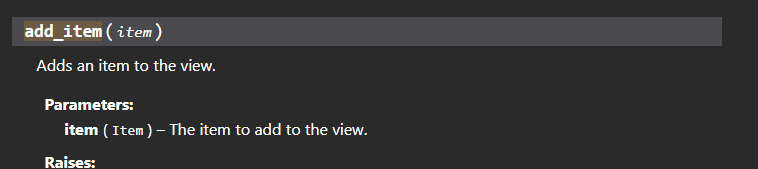
wait
i gotta subclass PaginatorButton?
lemme tias myself
cyan quail
full basin
i gotta subclass PaginatorButton?
not necessarily, Paginator inherits the default View class so it should accept any item
full basin
tried adding a Button but it just ignores it
cyan quail
do you have any custom_views set?
full basin
when creating the paginator instance? nope
full basin
This is what it looks like https://dark.is-dumb-as.rocks/i/iaBSPr.png
 cyan quail
so probably the default buttons
full basin
the default buttons?
cyan quail
like
page navigation
ok from the looks of it, inside CustomPaginator you should set custom_view= and provide your own view object
the items from this view will be added on below the default buttons
cyan quail
allgood
 proven mantle
How can i use the created_at in the Activities?
discord.Activity(type=discord.ActivityType.playing, name="Music", created_at="1970-01-01 00:00:00")
doesnt work
spice oyster
fervent cradle
I am trying to make a pycord bot on amazon aws but I get the error "ModuleNotFou...
from discord.ext import commands maybe?
 agile tartan
How do i do only you can see this message on pycord
spice oyster
agile tartan
How do i do only you can see this message on pycord
ephemeral=True
agile tartan
spice oyster
`ephemeral=True`
Thank you
 rigid sable
?rtfm interaction
Do buttons have unique ID's?
trying to make a reaction role creator
 near hollow
rigid sable
Do buttons have unique ID's?
near hollow
rigid sable
Do buttons have unique ID's?
By default no, you have to assign them one with custom_id="yourid"
 umbral island
Im having an issue with my close command (ticket system) it was working for a while, but now it cannot seem to get the message content when defining the value of the embed. Like I said it was working, but now shows this. (Yes message content is enabled properly as I can get msg content when printing) any ideas?
Pastebin
Pastebin.com is the number one paste tool since 2002. Pastebin is a website where you can store text online for a set period of time.
errant craneBOT
rare ice
umbral island
Im having an issue with my close command (ticket system) it was working for a wh...
What doesn’t work about it? Any errors?
umbral island
the error is at the bottom of the pastebin
ERROR:

discord.errors.HTTPException: 400 Bad Request (error code: 50035): Invalid Form Body
In embeds.0.fields.0.value: This field is required
In embeds.0.fields.1.value: This field is required
In embeds.0.fields.3.value: This field is required
In embeds.0.fields.4.value: This field is required```MY CODE:
for i in messages:
print(i.content)
print(i.author)
em.add_field(name = i.author, value = i.content)
em.set_author(name = i.author)```does this help
umbral island
rare ice
What doesn’t work about it? Any errors?
the embed does not send, the error being the "error code: 50035"
rare ice
umbral island
the embed does not send, the error being the "error code: 50035"
Send the full error
umbral island
rare ice
Send the full error
please look at the pastebin, the full error is at the bottom.
rare ice
Read the error
umbral island
umbral island
```py
ERROR:
discord.errors.HTTPException: 400 Bad Request (error code: 50035):...
Ignoring exception in view <Tickets timeout=180.0 children=3> for item <Button style=<ButtonStyle.success: 3> url=None disabled=False label='Close A Ticket' emoji=<PartialEmoji animated=False name=':small_blue_diamond:' id=None> row=None>:
Traceback (most recent call last):
  File "C:\Users\dmpor\AppData\Local\Programs\Python\Python39\lib\site-packages\discord\ui\view.py", line 375, in _scheduled_task
    await item.callback(interaction)
  File "c:\Users\dmpor\OneDrive\Desktop\Splintar\splintar.py", line 109, in close_button_callback
    await user2.send(embeds=[em])
  File "C:\Users\dmpor\AppData\Local\Programs\Python\Python39\lib\site-packages\discord\abc.py", line 1521, in send
    data = await state.http.send_message(
  File "C:\Users\dmpor\AppData\Local\Programs\Python\Python39\lib\site-packages\discord\http.py", line 360, in request
    raise HTTPException(response, data)
discord.errors.HTTPException: 400 Bad Request (error code: 50035): Invalid Form Body
In embeds.0.fields.0.value: This field is required
In embeds.0.fields.1.value: This field is required
In embeds.0.fields.3.value: This field is required
In embeds.0.fields.4.value: This field is required```The value for a field is required
rare ice
Then i.content is either None or ""
Make sure you have the message intent enabled in the code:
intents.messages = True
umbral island
OUTPUT:

221840898634285056

Dave Bot#6729

Dave Bot#6729
@DustinFoes#0001 Welcome, this is your ticket. Please explain your problem then wait for a support member to assist you.
Dave Bot#6729

Dave Bot#6729

Dave Bot#6729
@DustinFoes#0001 Welcome, this is your ticket. Please explain your problem then wait for a support member to assist you.
Dave Bot#6729
Ignoring exception in view <Tickets timeout=180.0 children=3> for item <Button style=<ButtonStyle.success: 3> url=None disabled=False label='Close A Ticket' emoji=<PartialEmoji animated=False name=':small_blue_diamond:' id=None> row=None>:
Traceback (most recent call last):
  File "C:\Users\dmpor\AppData\Local\Programs\Python\Python39\lib\site-packages\discord\ui\view.py", line 375, in _scheduled_task
    await item.callback(interaction)
  File "c:\Users\dmpor\OneDrive\Desktop\Splintar\splintar.py", line 109, in close_button_callback
    await user2.send(embeds=[em])
  File "C:\Users\dmpor\AppData\Local\Programs\Python\Python39\lib\site-packages\discord\abc.py", line 1521, in send
    data = await state.http.send_message(
  File "C:\Users\dmpor\AppData\Local\Programs\Python\Python39\lib\site-packages\discord\http.py", line 360, in request
    raise HTTPException(response, data)
discord.errors.HTTPException: 400 Bad Request (error code: 50035): Invalid Form Body
In embeds.0.fields.0.value: This field is required
In embeds.0.fields.1.value: This field is required
In embeds.0.fields.3.value: This field is required
In embeds.0.fields.4.value: This field is required```from the ouotput you can see that the i.content is not empty
rare ice
Could you run pip freeze and send me the output?
umbral island
not running in an env currently so there is a lot:
aiohttp==3.8.1
aiosignal==1.2.0
async-timeout==4.0.2
attrs==21.4.0
bleach==5.0.1
certifi==2022.6.15
charset-normalizer==2.1.0
click==8.1.3
colorama==0.4.5
commonmark==0.9.1
discord-py-slash-command==4.2.1
distlib==0.3.5
dnspython==2.2.1
docutils==0.19
filelock==3.8.0
Flask==2.1.3
Flask-SQLAlchemy==2.5.1
frozenlist==1.3.0
greenlet==1.1.2
httplib2==0.20.4
idna==3.3
importlib-metadata==4.12.0
itsdangerous==2.1.2
jaraco.classes==3.2.2
Jinja2==3.1.2
keyring==23.9.0
MarkupSafe==2.1.1
more-itertools==8.14.0
multidict==6.0.2
Pastebin==1.1.2
pkginfo==1.8.3
platformdirs==2.5.2
py-cord==2.0.0
PyDeepAI==0.2.0
Pygments==2.13.0
pymongo==4.2.0
pyparsing==3.0.9
pywin32-ctypes==0.2.0
readme-renderer==37.1
requests==2.28.1
requests-toolbelt==0.9.1
rfc3986==2.0.0
rich==12.5.1
six==1.16.0
SQLAlchemy==1.4.39
twine==4.0.1
urllib3==1.26.12
virtualenv==20.16.3
webencodings==0.5.1
Werkzeug==2.2.0
yarl==1.7.2
zipp==3.8.1```
umbral island
it is
can you please read the whole thing before responding with something that I have already done.
🙏
rare ice
You never said you tried it in the code. Do you want me to help you or not? I’m giving you troubleshooting options and it doesn’t look like you want help, looks like you’re here to argue with someone trying to help you
umbral island

im just asking that you take the time to fully read what ive said as to avoid you asking toubleshooting things ive already done
rare ice
You never said in the code, enabling it in the dev portal and in the code are different things
If you’re going to argue, you’re not going to receive help from me
umbral island
okay. its enable in both the dev portal and my code
you can tell because my print function works
rare ice
Ok good
Could you try setting i.content as the description of the embed once then send it?
umbral island
sure thing
rare ice
If that doesn’t work, try making i.content -> str(i.content)
umbral island
okay trying
umbral island
rare ice
If that doesn’t work, try making `i.content` -> `str(i.content)`
setting it to the description works
not sure why it randomly stopped working with no change...
rare ice
rare ice
If that doesn’t work, try making `i.content` -> `str(i.content)`
Could you try this for the fields?
umbral island
umbral island
oh ive tried that before, it gives the same results
yep, this
raises the same error
 young bone
umbral island
not running in an env currently so there is a lot:
```py
aiohttp==3.8.1
aiosign...
young bone
umbral island
not running in an env currently so there is a lot:
```py
aiohttp==3.8.1
aiosign...
discord-py-slash-command==4.2.1
umbral island
young bone
```discord-py-slash-command==4.2.1```
this is not in my version running on my host.
young bone
 umbral island
young bone
umbral island
young bone
reinstalling the modules to see if that was the issue, i found py-slash-command in my host version
gleaming falcon
Sorta unrelated to Pycord itself.. how would you personally structure the return from a call to an external service?
With or without the HTTP Status code?
If with, as a tuple (so you could just do status, result = await self.external_call(...), or more structured like return {'status': resp.status, 'result': await resp.json()}
cyan quail
gleaming falcon
Sorta unrelated to Pycord itself.. how would you personally structure the return...
typically services will always return a json object, and libraries like requests or aiohttp will wrap these in a model that can either have its attributes accessed directly or converted to a dict with .json() which is pretty common
response.status is usually something you can access for the exact status code
gleaming falcon
So you're suggesting I just return the response object itself? The fetching is done in a separate method, so I figured it would be better practice to convert that into some structure that I can use in other parts of the code
cyan quail
well it depends on your end goal
in my case i usually only care about the response body so i have my request function return response.json() where possible
gleaming falcon
That's what I was doing, but figures there's one function within the service I'm using that doesn't output a body, and the status code is your answer.
umbral island
umbral island
reinstalling the modules to see if that was the issue, i found py-slash-command ...
this worked. Thank you to both of you who helped.
cyan quail
if that's the case then yeah you'll ultimately have to change your approach for that service
or you could try-except it, but that may make it ambiguous py try: return response.json() except: return response
gleaming falcon
A bit dirty, as you mentioned, but it's personal code 😬
fervent cradle
Ignoring exception in on_guild_join
Traceback (most recent call last):
  File "C:\Users\casho\AppData\Local\Programs\Python\Python310\lib\site-packages\discord\client.py", line 382, in _run_event
    await coro(*args, **kwargs)
TypeError: on_guild_join() takes 0 positional arguments but 1 was given```
Why am I getting this error?
```py
@bot.event
async def on_guild_join():
    for guild in bot.guilds:
        id = guild.id
        findguild = await collection.find_one({"_id": id})
        if not findguild:
            await collection.insert_one({"_id": id, "prefix": "r!"})
        else:
pass```I haven't given any arguments
 empty tree
fervent cradle
```py
Ignoring exception in on_guild_join
Traceback (most recent call last):
F...
empty tree
fervent cradle
```py
Ignoring exception in on_guild_join
Traceback (most recent call last):
F...
it’s because you’re receiving a guild object with it
fervent cradle
so how do I fix this?
empty tree
put guild in the parenthesis in on_guild_join()
fervent cradle
ok
empty tree
fervent cradle
ok
also guild will be the guild you’re joining so you can just do collection.insert_one({“_id”: guild.id, “prefix”: “r!”}) without searching if it exists already
fervent cradle
ohk thanks a lot
empty tree
np
fervent cradle
@client.command(description="View member's avatar")
async def avatar(ctx,member:discord.Option(discord.SlashCommandOptionType.user,description="Target member")=None,hide:discord.ui.Select(placeholder="Select True or False", min_values=1, max_values=1,options=[discord.SelectOption(label="True",description="Hide respond"),discord.SelectOption(label="False",description="Send respond publicly")])=None):```

I am trying to make avatar slash
I need to display options like this I tried all methods but it is not working please help me to create options like this
 rotund current
Hi. I am trying to have a slash command post a message and then pin it.
This is what I have tried so far:
interaction = await ctx.respond(display_string)
msg = interaction.message()
But I am getting the interaction as a NoneType instead of an interaction object
spice oyster
fervent cradle
```py
@client.command(description="View member's avatar")
async def avatar(ctx,m...
You need to pass the choices parameter to the Option.
Link: https://docs.pycord.dev/en/stable/api.html?highlight=option#discord.Option.choices
spice oyster
rotund current
Hi. I am trying to have a slash command post a message and then pin it.
This is...
If the rest is working, you just need to msg.pin().
Link: https://docs.pycord.dev/en/stable/api.html?highlight=option#discord.Message.pin
 clever nova
hey guys, does anyone know what discord.ext.pages.Paginator().update_custom_view() do or how to use it?
i tought it would modify the view of my paginator, but, it did not do anything
fervent cradle
async def set(ctx,channel:Option(str,"Set the channel to send welcome messages!", choices=[])):```how do i get the list of channels
as choices
young bone
discord.TextChannel?
fervent cradle
ok
fervent cradle
young bone
discord.TextChannel?
like this?
async def set(ctx,channel:Option(str, "Set the channel to send welcome messages!",choices = [discord.TextChannel])):```Traceback (most recent call last):
File "c:\Users\casho\OneDrive\Desktop\Chores\VS Code\programs\discordpy bot\raeger.py", line 77, in <module>
async def set(ctx,channel:Option(str, "Set the channel to send welcome messages!",discord.TextChannel)):
TypeError: Option.__init__() takes from 1 to 3 positional arguments but 4 were given
PS C:\Users\casho\OneDrive\Desktop\Chores\VS Code\programs\discordpy bot>
(discord.TextChannel, description="")
fervent cradle
k
rotund current
spice oyster
If the rest is working, you just need to `msg.pin()`.
Link: https://docs.pycord....
Unfortunately it seems that the ctx.respond will not return a message data type, or at least I can't get it to
young bone
ctx.respond is returning an interaction
rotund current
I see that from the docs
But I can't seem to get the message from the interaction
The docs make it seem that I should be available to use interaction.messsge to get a message object, but it keeps returning a NoneType
spice oyster
rotund current
The docs make it seem that I should be available to use interaction.messsge to g...
Now I'm on mobile. Maybe I can help you later. I need to check my code because I don't remember.
rotund current
I appreciate it.
spice oyster
Try interaction.original_message().
rotund current
I will try it tomorrow. Thanks.
spice oyster
I have a weird problem. The autocomplete only works with some substrings. What did I do wrong? 
Could it be because the list is too long? It has 90 items.
Ok, I've fixed it. Now I need to ignore non alphanumeric characters somehow. Any ideas? 
async def get_heroes(
    self,
    context: discord.AutocompleteContext
):
    input = context.value.capitalize()
    return [hero for hero in self.heroes if "".join(item for item in hero if item.isalnum()).startswith(input)]
It works when I search for Gul'dan by writing guld but it doesn't work when searching for D.Va by writing dva.
 rugged lantern
.isalnum()?
spice oyster
Yeah, I'm trying with that. Maybe I need an alternative because I'm having issues. 😦
spice oyster
rugged lantern
.isalnum()?
Oh, I've found the problem. That part was fine. I need to handle some special cases better. 😅
young bone
spice oyster
Could it be because the list is too long? It has 90 items.
It can only show 25 items
spice oyster
young bone
It can only show 25 items
Yes, but it wasn't even considering them as part of the list. Now it does.
young bone
Oh
 sterile halo
If I wanted to check through every member in a server to see if they are playing x game, how can I do that?
fervent cradle
young bone
ctx.respond is returning an interaction
My on_member_join event doesn't work
@bot.event
async def on_member_join(member):
    await member.send(f"Hi welcome to {member.guild.name}")```
Just made it short for exampledo you have Intents enabled?
fervent cradle
Ya i have priviledged intents enabled in the discord dev portal
fervent cradle
young bone
do you have Intents enabled?
so what should I do
now..
I added these to the code py intents = discord.Intents.default() intents.members = True
rugged lantern
sterile halo
If I wanted to check through every member in a server to see if they are playing...
google it
young bone
fervent cradle
so what should I do
Do you get a error?
fervent cradle
young bone
Do you get a error?
uh btw the bot is in 3 servers
does that has something to do with this?
spice oyster
young bone
Oh
I'm still trying to figure out a way to ignore capital letters and punctuation at the same time. If I fix one, the other breaks. 
All of this while showing them capitalized and with punctuation in the interface.
young bone
spice oyster
I'm still trying to figure out a way to ignore capital letters and punctuation a...
.lower()?
sterile halo
rugged lantern
google it
I tried that first, if I got a good answer I wouldn't be here
fervent cradle
sterile halo
I tried that first, if I got a good answer I wouldn't be here
https://docs.pycord.dev/en/stable/intents.html check presence intent
spice oyster
young bone
.lower()?
I've made some attempts with that but I'm not sure where to put it and when not because it doesn't seem to work, so I was hoping for a different solution.
fervent cradle
maybe that will help
young bone
fervent cradle
maybe that will help
What is your py-cord version?
fervent cradle
py-cord==2.1.3
spice oyster
spice oyster
I've made some attempts with that but I'm not sure where to put it and when not ...
Done! As I hoped for, lower() should be used twice in the function and not while preparing the list itself.
async def get_heroes(
    self,
    context: discord.AutocompleteContext
):
    input = "".join(item for item in context.value if item.isalpha()).lower()
    return [hero for hero in self.heroes if "".join(item for item in hero if item.isalpha()).lower().startswith(input)]
congrats
fervent cradle
young bone
What is your py-cord version?
on_member_join() should work for every server the bot is in right?
fervent cradle
k
fervent cradle
young bone
Can you try intents=discord.Intents.all()?
Is it a bug or something?
Cause nothing is working not even the print statements
for on_member_join decorator only
rugged lantern
did you put intents in your bot instance??
fervent cradle
?
rugged lantern
u do need that
fervent cradle
ok lemme try once more
fervent cradle
rugged lantern
u do need that
Holy duck man
you don't know how happy I'm right now
Thanks genuinely
 olive viper
ImportError: cannot import name 'commands' from 'discord.ext' (unknown location)
what does this mean
rugged lantern
fervent cradle
Thanks genuinely
it happens for pretty much everyone when they have to enable intents for the first time
 sharp smelt
How can I create a simple link button without using any classes?
rugged lantern
why without a class
sharp smelt
rugged lantern
why without a class
Because I'm not using classes in my bot and don't really want to change everything
rugged lantern
sharp smelt
Because I'm not using classes in my bot and don't really want to change everythi...
button = discord.ui.View(Button(label="link", url="https://google.com"))
await ctx.send(view=button)
button = discord.ui.View()
button.add_item(Button(label="link", url="https://google.com"))
await ctx.send(view=button)
or this
sharp smelt
rugged lantern
```py
button = discord.ui.View(Button(label="link", url="https://google.com"))
a...
Thanks
worldly schooner
how can I make the user picker? As in the image:

slash_commands
oh I guess I can try with type member

Just got problems
how do I trasform members into OptionChoice?
Nvm, figured out that I should be using discord.User type and not discord.Member
spice oyster
How can I make an Option for a Slash Command with required and autocomplete at the same time?
When doing it this way, the required doesn't work.
@discord.slash_command(
    name = "spray",
    description = "..."
)
@discord.commands.option(
    name = "hero",
    description = "...",
    autocomplete = Hero.get_heroes,
    required = True  # This line doesn't work.
)
async def spray_use(
    self,
    context: discord.ApplicationContext,
    hero: str
):
    ...
I've also tried this way, but then the autocomplete doesn't work.
@discord.slash_command(
    name = "spray",
    description = "..."
)
async def draft_hero(
    self,
    context: discord.ApplicationContext,
    hero: discord.Option(
        discord.SlashCommandOptionType.string,
        name = "hero",
        description = "Select a Hero.",
        autocomplete = Hero.get_heroes,  # This line doesn't work.
        required = True
    )
):
    ...
The second version works, but only outside of Slash Command groups. 😦
worldly schooner
how do I get the author as default in slash_commands? Its giving application error when I execute
 fervent cradle
worldly schooner
how do I get the author as default in slash_commands? Its giving application err...
fervent cradle
worldly schooner
how do I get the author as default in slash_commands? Its giving application err...
.
worldly schooner
fervent cradle
.


the error im getting is _cached_property

i guess I will set as None, and in the logic I will set it as ctx.author if its none
worldly schooner
fervent cradle
```py
user : Option(discord.Member, description ="")```
thx for hint btw
full basin
That's what you should do
 finite flame
I feel kinda stoopid, why is this not working? the error says that there is no file or directory 'config/config.json'
 spice oyster
finite flame
I feel kinda stoopid, why is this not working? the error says that there is no f...
spice oyster
finite flame
I feel kinda stoopid, why is this not working? the error says that there is no f...
./config/config.json maybe?
finite flame
doesn't work either
fervent cradle
hey, anyone has an idea on how to create the http status where there is no status icon on the profile picture?
finite flame
fervent cradle
hey, anyone has an idea on how to create the http status where there is no statu...
you mean offline?
fervent cradle
well to make it show as online but with no like online icon
finite flame
do you have a screenshot of how it should look like
fervent cradle
finite flame
do you have a screenshot of how it should look like
yes
 finite flame
maybe a bug? I've never seen this before tbh
fervent cradle
i'd assume its something similar to making a mobile icon for a bot
finite flame
didn't know there was such a thing, how do you od that?
sterile halo
my bot is being completely unresponsive, is there a list of common causes for this?
fervent cradle
Hey I'm using discord.ext.pages and I do await ctx.defer(), and how do i use await paginator.respond(ctx.interaction) to send a followup
 woeful spindle
fervent cradle
well to make it show as online but with no like online icon
woeful spindle
fervent cradle
well to make it show as online but with no like online icon
that’s not a status
it’s not an option
dank Memer is basically a whole web server now
which was their big update
it runs on serverless functions
in short; discord uses POST requests to communicate with it
woeful spindle
finite flame
didn't know there was such a thing, how do you od that?
^
finite flame
you can check what value has changed and if it's not the one you're looking for return
finite flame
woeful spindle
dank Memer is basically a whole web server now
because it's so big?
 verbal gulch
Hello. how can i fix this error? i do not know how to fix it.
Traceback (most recent call last):
  File "c:\Users\danie\OneDrive\Documentos\Phython\Otros\Bots\Bots 1\UA advertising\UA utilities\Staff management - akai\Massban_rewrite\bot.py", line 11, in <module>
    bot = discord.Bot(activity=discord.Game(name='with dum cots | rewrited!'), intents=intents)
AttributeError: module 'discord' has no attribute 'Bot'
from http.client import HTTPException
from discord import bot
import pymongo
import discord
from pymongo import MongoClient
intents = discord.Intents.default()
intents.message_content = True
intents.presences = True
dbc = MongoClient()
bot = discord.Bot(activity=discord.Game(name='with dum cots | rewrited!'), intents=intents)
db = dbc.database
that’s partially the reason
full basin
verbal gulch
Hello. how can i fix this error? i do not know how to fix it.
You have an old version of Py-Cord or another library is conflicting.
verbal gulch
full basin
You have an old version of Py-Cord or another library is conflicting.
how can i update it?
verbal gulch
full basin
Send your pip freeze
wdym
verbal gulch
full basin
`pip install -U py-cord==2.1.3`
Collecting py-cord==2.1.3
Could not find a version that satisfies the requirement py-cord==2.1.3 (from versions: 1.7.3)
No matching distribution found for py-cord==2.1.3
full basin
verbal gulch
Collecting py-cord==2.1.3
Could not find a version that satisfies the requirem...
Your python version is probably too low
Py-cord requires 3.8 iirc?
verbal gulch
full basin
Py-cord requires 3.8 iirc?
i think i have a 3.8+ python
full basin
If you ain't sure
verbal gulch
full basin
If you ain't sure
mhm i'm not sure, i'm going to install a recent version of it.
 grizzled sentinel
Also make sure you don't have discord.py, discord-components, interactions.py, or any other discord bot lib installed
 topaz rune
Traceback (most recent call last):
  File "/srv/bot_lg/bot_lg.py", line 13, in <module>
    from discord import app_commands , ui
  File "/usr/local/lib/python3.9/dist-packages/discord/app_commands/__init__.py", line 12, in <module>
    from .commands import *
  File "/usr/local/lib/python3.9/dist-packages/discord/app_commands/commands.py", line 51, in <module>
    from ..enums import AppCommandOptionType, AppCommandType, ChannelType, Locale
ImportError: cannot import name 'AppCommandOptionType' from 'discord.enums' (/usr/local/lib/python3.9/dist-packages/discord/enums.py)
can someone help me with this pls
grizzled sentinel
I think it is SlashCommandOptionType
topaz rune
grizzled sentinel
I think it is SlashCommandOptionType
I remove app_command for SlashCommandOption?
young bone
topaz rune
I remove app_command for SlashCommandOption?
can you show the pip list?
grizzled sentinel
What are you trying to do?
topaz rune
root@raspberrypi:/srv/bot_lg# pip list
Package Version
aiohttp 3.7.4.post0
arandr 0.1.10
astroid 2.5.1
asttokens 2.0.4
async-timeout 3.0.1
attrs 21.4.0
automationhat 0.2.0
beautifulsoup4 4.9.3
blinker 1.4
blinkt 0.1.2
buttonshim 0.0.2
Cap1xxx 0.1.3
certifi 2020.6.20
chardet 4.0.0
click 7.1.2
colorama 0.4.4
colorzero 1.1
cryptography 3.3.2
cupshelpers 1.0
cycler 0.11.0
dbus-python 1.2.16
discord.py 2.0.1
distro 1.5.0
docutils 0.16
drumhat 0.1.0
envirophat 1.0.0
ExplorerHAT 0.4.2
Flask 1.1.2
fonttools 4.33.3
fourletterphat 0.1.0
gpiozero 1.6.2
gyp 0.1
html5lib 1.1
idna 2.10
isort 5.6.4
itsdangerous 1.1.0
jedi 0.18.0
Jinja2 2.11.3
kiwisolver 1.4.2
lazy-object-proxy 0.0.0
logilab-common 1.8.1
lxml 4.6.3
MarkupSafe 1.1.1
matplotlib 3.5.2
mccabe 0.6.1
microdotphat 0.2.1
mote 0.0.4
motephat 0.0.3
multidict 6.0.2
mypy 0.812
mypy-extensions 0.4.3
numpy 1.19.5
oauthlib 3.1.0
olefile 0.46
packaging 21.3
pantilthat 0.0.7
parso 0.8.1
pexpect 4.8.0
pgzero 1.2
phatbeat 0.1.1
pianohat 0.1.0
picamera 1.13
piglow 1.2.5
pigpio 1.78
Pillow 8.1.2
pip 20.3.4
psutil 5.8.0
py-cord 2.1.1
pycairo 1.16.2
pycups 2.0.1
pygame 1.9.6
Pygments 2.7.1
PyGObject 3.38.0
pyinotify 0.9.6
PyJWT 1.7.1
pylint 2.7.2
pyOpenSSL 20.0.1
pyparsing 3.0.9
pyserial 3.5b0
pysmbc 1.0.23
python-apt 2.2.1
python-dateutil 2.8.2
python-pm 0.0.4
rainbowhat 0.1.0
reportlab 3.5.59
requests 2.25.1
requests-oauthlib 1.0.0
responses 0.12.1
roman 2.0.0
RPi.GPIO 0.7.0
RTIMULib 7.2.1
scrollphat 0.0.7
scrollphathd 1.2.1
Send2Trash 1.6.0b1
sense-hat 2.2.0
setuptools 52.0.0
simplejson 3.17.2
six 1.16.0
skywriter 0.0.7
sn3218 1.2.7
soupsieve 2.2.1
spidev 3.5
ssh-import-id 5.10
termtables 0.2.4
thonny 3.3.14
toml 0.10.1
touchphat 0.0.1
twython 3.8.2
typed-ast 1.4.2
typing-extensions 3.7.4.3
unicornhathd 0.0.4
urllib3 1.26.5
webencodings 0.5.1
Werkzeug 1.0.1
wheel 0.34.2
wrapt 1.12.1
yarl 1.7.2
topaz rune
young bone
can you show the pip list?
here
prisma flicker
yeah that file doesn't exist in pycord
https://github.com/Pycord-Development/pycord/blob/master/examples/app_commands/commands.py
 topaz rune
young bone
topaz rune
young bone
I need to uninstall it?
young bone
yes
topaz rune
ok imma try
prisma flicker
?tag install
obtuse juncoBOT
- Uninstall discord.py or any other forks of discord.py you might have with the namespace
discord.
python -m pip uninstall discord.py discord -y
2a. Install py-cord
python -m pip install py-cord
2b. Update py-cord
python pip install -U py-cord
Installing other builds:
Note: You need to have git installed. Use !git to find out how to install git.
Updating the module to Alpha (unstable):
pip install -U git+https://github.com/Pycord-Development/pycord
topaz rune
but now my app commands doesnt work anymore
obtuse juncoBOT

The official guide for making bots and other Discord applications using the Pycord library.
topaz rune
ok ty mate
 serene spindle
How do you type a command so that when you click on it it auto types it for you?(like in #help-rules )
nvm I found out how
 versed fern
How do I add one of those apps or whatever they’re called to my bot? Is there somekinda guide or doc out there?

 gray peak
Can someone send me an example of OAuth2 with a redirection URL? I needed to understand if this could be done with pycord or if I would need some other libraries
spice oyster
versed fern
How do I add one of those apps or whatever they’re called to my bot? Is there so...
Do you mean this? If yes, they are Context Menus.
Link: https://guide.pycord.dev/interactions/application-commands/context-menus

Learn all about Context Menus (User Commands & Message Commands) and how to implement them into your Discord Bot with Pycord!
versed fern
Thx
worldly schooner
Everytime that I execute a command that contains a view twice, the views can interfere with each other, like 2 embeds with pages, if my first embed is on page 4 and my second embed is on page 1 and I click on the second embed to pass the page it jumps to page 5
how can I solve this?
embeds is the variable with the pages on it
\\\ code to fill embeds variable
view = MyView(ctx, embeds)
await ctx.respond(embed=embeds[0], view=view)
My view class:
def __init__(self, ctx, embeds):
super().__init__(timeout=40)
self.ctx = ctx
self.embeds = embeds
self.index = 0
@discord.ui.button(emoji="", custom_id="LeftButton")
async def left_button_callback(self, button, interaction):
if self.index > 0:
self.index -= 1
else:
self.index = len(self.embeds)-1
await interaction.response.edit_message(embed=self.embeds[self.index])
@discord.ui.button(emoji="", custom_id="RightButton")
async def right_button_callback(self, button, interaction):
try:
self.embeds[self.index + 1]
self.index += 1
except IndexError:
self.index=0
await interaction.response.edit_message(embed=self.embeds[self.index])
async def on_timeout(self):
self.disable_all_items()
await self.message.edit(view=self)
async def interaction_check(self, interaction) -> bool:
if interaction.user != self.ctx.author:
return False
else:
return True
For instance this is how im calling my views,
Ex: when I call the normal list and then imagelist right after, when I press the button to pass the page of the normal list it turns into the image list...
if images==0:
    embeds = self.normalList(auth_id, users)
    view = MyView(ctx, embeds)
    await ctx.respond(embed=embeds[0], view=view)
else:
    with open('data/images.json', 'r') as img:
         images = json.load(img)
    embeds = self.imageList(auth_id, users, images)
    view = MyView(ctx, embeds)
    await ctx.respond(embed=embeds[0], view=view)
It looks like the old view turns into the new view, Im trying to solve that
 silver moat
 simple canopy
questionable
simple canopy
questionable
update ty
silver moat

simple canopy
this is old af
 silver moat
like 3 weeks old?
near hollow
When is autocomplete in group commands in cogs going to be fixed?
silver moat
near hollow
When is autocomplete in group commands in cogs going to be fixed?

probably within a week
 stiff fiber
how do you edit messages from a followup from a discord.Interaction?
I've tried to do interaction.followup.edit_message, but I don't know how to provide the message id
fervent cradle
how would I make a custom check a part of my cog (I need to use a method in my bot subclass instance)

 prisma flicker
 spiral kelp
ctx.respond
sharp smelt
How can I run a command every day at a certain time. For example 8am
And if I can't run a command how can I just send a message
spice oyster
worldly schooner
For instance this is how im calling my views,
Ex: when I call the normal list a...
Try using a different variable for each View that should exist at the same time, so view1 = MyView(ctx, embeds) and view2 = MyView(ctx, embeds).
prisma flicker
sharp smelt
How can I run a command every day at a certain time. For example 8am
Using tasks
finite flame
I'm dieing over here:
I am making two folders with os.makedirs("gt_data/objectdetection"), but only the first folder gets created
if I execute the snipped two times in a row (like shown below) it even trows this error: [Errno 17] File exists: 'gt_data/objectdetection'
try:
    os.makedirs("gt_data/objectdetection")
    os.makedirs("gt_data/objectdetection")
except Exception as e:
    print(e)```

I even restarted my pc in the hope the file just doesn't show up, but it just isn't thereYou are trying to create the same folder twice. Did you forget to change the path in the second command?
worldly schooner
spice oyster
Try using a different variable for each View that should exist at the same time,...
not working either
worldly schooner
finite flame
I'm dieing over here:
I am making two folders with `os.makedirs("gt_data/objectd...
try this:
try:
    os.makedirs("gt_data/")
    os.makedirs("gt_data/objectdetection/")
except Exception as e:
    print(e)
I also already tried creating different Classes for Views
didnt work too
spice oyster
What could be the reason why the image decided to walk outside of the Embed?
 worldly schooner
maybe editing the content and not the embed
spice oyster
Editing, you say? I'll disable editing to test, although I only edit the embed.
Yes, it's related to that. Thanks! Now I need to find what's actually going on.
Maybe I'm passing a wrong parameter to that function somewhere. 
worldly schooner
if its outside the embed the only one thing that comes to my thoughts is content manipulation
like when sending: ctx.send(content="the image link smh", embed=embed)
spice oyster
Fixed! It was indeed a wrong parameter on my custom function messing up with the embed editing.
fervent cradle
hey guys so i hosted a working lavalink on my replit account, but whenever i try to connect to it via wavelink in py-cord i always seem to get this error:
Connection Failure: 400, message='Invalid response status', url=URL('ws://lavalink-replit.nostorian.repl.co:443
finally fixed this ####, the problem was on the buttons, the custom_id allows me to mess up with new views that have the same id, so I removed the custom_id parameter 👍
rare ice
fervent cradle
hey guys so i hosted a working lavalink on my replit account, but whenever i try...
?tag norepl
obtuse juncoBOT
Why NOT to use Repl as a hosting platform
You should not use Repl.it to host your bot.
It may be a nice option as its "free" but you should use something else considering the major flaws.
- The machines are super underpowered.
-
- This means your bot will lag a lot as it gets bigger.
- You'll need a web server alongside your bot to prevent it from being shut off.
-
- This isn't a trivial task, and eats more of the machines power.
- Repl.it uses an ephemeral file system.
-
- This means any file you saved via your bot will be overwritten when you next launch.
IMPORTATNT
- They use a shared IP for everything running on the service.
This one is important - if someone is running a user bot on their service and gets banned, everyone on that IP will be banned. Including you.
Please avoid using repl.it to host your bot. It's not worth the trouble.
If you're looking for free options, consider using AWS/Google Cloud Platform/Azure and its respective free tiers or just pay for an actual VPS.
rotund current
I have also found fly.io to be a fairly good host, with a very respectable free tier
fervent cradle
rare ice
?tag norepl
where else am i even supposed to host a lavalink, railway considers it against tos and heroku is shutting off its free tier
rare ice
I recommend getting a VPS
fervent cradle
rare ice
I recommend getting a VPS
arent there any free options? i am student and i cant really get my parents to use their card or smthing
full basin
You could use github's student pack
rare ice
Why would you use GitHub to host a discord bot?
 cinder pilot
rare ice
Why would you use GitHub to host a discord bot?
cinder pilot
rare ice
Why would you use GitHub to host a discord bot?
It's not hosting on GitHub
Anyway
fervent cradle
full basin
You could use github's student pack
i do have that
but idk any great hosts with that integration
cinder pilot
My bot runs fine on my laptop but I get unknown interaction error when I host on heroku
copper dew
what I do is I have all of my bots dockerized and I self host them. For others that's probably not possible
silver moat
fervent cradle
but idk any great hosts with that integration
azure?
silver moat
cinder pilot
My bot runs fine on my laptop but I get unknown interaction error when I host on...
don't run both at the same time
copper dew
On Github's student education pack, there is a deal where u could get $100 free credits to host stuff with
 proud cargo
I'm changing the OptionChoice for a slash command based on date. Will it automatically update the options presented in the command?
async def summary(ctx: discord.ApplicationContext,
week: Option(str, "Test", choices=[OptionChoice(name=f"Week beginning {date_to_string(get_mondays()[0])}",value=get_mondays()[0]),OptionChoice(name=f"Week beginning {date_to_string(get_mondays()[1])}",value=get_mondays()[1])])
):
  await ctx.send(week)
untidy code ik
agile tartan
what is discord.ApplicationContext?
rare ice
agile tartan
what is discord.ApplicationContext?
The context of an application command
agile tartan
ok
why do u need to do discord.ApplicationContext, ?
how do i get category in pycord
fervent cradle
I've got this error
Traceback (most recent call last):
  File "/Volumes/Danya disk/Coding/Py-cord/KeyBot/venv/lib/python3.10/site-packages/discord/commands/core.py", line 127, in wrapped
    ret = await coro(arg)
  File "/Volumes/Danya disk/Coding/Py-cord/KeyBot/venv/lib/python3.10/site-packages/discord/commands/core.py", line 878, in _invoke
    arg = await converter().convert(ctx, arg)
TypeError: Track.__init__() missing 2 required positional arguments: 'id' and 'info'```

How can i fix it?Are there any other functions in discord.ext.tasks other than the loop?
cyan quail
rotund current
Are there any other functions in discord.ext.tasks other than the loop?
https://docs.pycord.dev/en/master/ext/tasks the loop itself has its own functions
rotund current
I saw that, but I guess what I am wondering, is if there are other tasks, or is the loop the only one?
fervent cradle
silver moat
azure?
it asks for school email address which is registered by the school to microsoft and my school doesnt have its own school email address facility for students, i used my personal email for activating github student pack and its ironic how microsoft owns github but it doesnt ask for github student integration in the azure student signup process
cyan quail
rotund current
I saw that, but I guess what I am wondering, is if there are other tasks, or is ...
what other tasks would you be thinking of?
rotund current
cyan quail
what other tasks would you be thinking of?
I was hoping to attach a listener for a SQL database
prisma flicker
Sqlalchemy has events 🙂
rotund current
I know. But I am struggling to have pycord listen to the Sqlalchemy events
It's probably a limitation on my skills. I am a fairly competent python programmer, but at the end of the day, I am not a professional and there are definitely gaps in my knowledge and I didn't see anything in the docs about attaching outside events
cyan quail
uhhh what are you trying? i don't think you'd need to do anything special
fwiw, events in pycord are basically ```py
@commands.Cog.listener()
async def on_event_name(self, args):
...
somewhere else in the bot
bot.dispatch("event_name", args)```
 graceful mortar
Hey, can you add SelectMenu to a normal message as well?
cyan quail
graceful mortar
Hey, can you add SelectMenu to a normal message as well?
yeah
you just send it in a View
errant craneBOT
Here's the dropdown example.
graceful mortar
yes, but a random user send the message "hi", can i add to this message a view? or only from the message by the bot?
cyan quail
it'd have to be a message from the bot
graceful mortar
ah okay
prisma flicker
rotund current
I know. But I am struggling to have pycord listen to the Sqlalchemy events
yeah I wasn't able to get it to work either, but I only spent a few minutes on it
it was an issue with it not being async or something
serene spindle
is it possible to send multiple classes with view=?
 raven garden
serene spindle
is it possible to send multiple classes with `view=`?
raven garden
serene spindle
is it possible to send multiple classes with `view=`?

in the Interactions faq
serene spindle
oh ok, thanks
prisma flicker
serene spindle
is it possible to send multiple classes with `view=`?
You can have multiple embeds but only one view
 loud pier
Is there a way to get the url of an interaction send by a bot in response to a slash command?
cyan quail
loud pier
Is there a way to get the url of an interaction send by a bot in response to a s...
do you mean the sent message's URL?
loud pier
cyan quail
do you mean the sent message's URL?
Yes, I would like to be able to get the url that will bring me to the reply sent by the bot
cyan quail
if it's in a command context, perhaps ctx.message.jump_url would work
the other possibility would be (await ctx.interaction.original_message()).jump_url
loud pier
thanks will try the second one as the first one get me a Nonetype error
stiff fiber
stiff fiber
how do you edit messages from a followup from a `discord.Interaction`?
I've trie...
Anyone have an answer for this?
cyan quail
stiff fiber
Anyone have an answer for this?
followup messages are regular messages, so you edit them as if you used ctx.send or channel.send
i.e. py msg = await interaction.followup.send(...) await msg.edit(...)
stiff fiber
cyan quail
i.e. ```py
msg = await interaction.followup.send(...)
await msg.edit(...)```
This doesn't seem to work for my use case - I'm receiving the interaction in a button callback , so I don't want to create a new message inside it.
I just want to edit the message containing the view that received the callback, like with interaction.response.edit_message(...) , except I'm doing another response beforehand so I have to use followup.
cyan quail
uhhhhh
can you show what you mean
perhaps interaction.message.edit would work but i'd need more info
stiff fiber
cyan quail
can you show what you mean
class PinCode(discord.ui.View):

    def __init__(self, answer:str, reward: discord.Role):
        super().__init__(timeout=None)
        self.answer = answer
        self.reward = reward
        self.value = ""
        for i in range(1, 10):
            but = discord.ui.Button(style=discord.ButtonStyle.green, label=str(i), custom_id=str(i), row=(i-1)//3)
            but.callback = self.callback
            self.add_item(but)

    async def callback(self, interaction:discord.Interaction):
        id = interaction.custom_id
        self.value += id
        await interaction.response.edit_message(content=" ".join(self.value + "-" * (len(self.answer) - len(self.value))), view=self)
        if len(self.value) == len(self.answer):
            if self.value == self.answer:
                try:
                    await interaction.user.add_roles(self.reward)
                    await interaction.followup.send("A door slowly opens...", ephemeral=True)
                except discord.Forbidden:
                    await interaction.followup.send("Role assignment failed. Contact server administrator.", ephemeral=True)
            else:
                await interaction.followup.edit_message(content=" ".join("-" * len(self.answer)), view=self)
                self.value = ""
so you're trying to edit the response again?
stiff fiber
Yeah
stiff fiber
Works like a charm, thanks!
Although I'm not sure why I can send messages to a Webhook perfectly fine, but editing the message requires the message id...
wait
cyan quail
because interaction.followup is the webhook itself
young bone
Can I lock buttons only to the owner of the message?
 somber cloak
question about concurrency/race conditions in discord/pycord: suppose i have a bot with a variable counter, and a slash command that just does counter += 1. is it theoretically possible that two users could call the slash command at nearly the exact same time and cause a race condition? if so, is this something that can happen in practice and that i should try to prevent?
cyan quail
somber cloak
question about concurrency/race conditions in discord/pycord: suppose i have a b...
theoretically? Maybe, but in practice this is basically never gonna happen as far as accessing variables goes
like ```py
class SomeCog(commands.Cog):
def init(self, bot):
self.bot = bot
self.counter = 0
@discord.slash_command()
async def count(self, ctx):
    self.counter += 1
    await ctx.respond(str(self.counter))```assuming your variable is defined outside of the command, if it's something simple like this then you'd never run into a race condition
yeah, that's basically the situation (and maybe count does a little more after incrementing the counter)
cyan quail
but let's say your command is pretty long and makes changes to self.counter multiple times throughout its run time, in that scenario you'll probably end up with some unexpected results
somber cloak
ah okay
cyan quail
if there is a genuine worry, there's the max_concurrency decorator that could mitigate this issue
somber cloak
yeah the command i'm writing increments the counter, then does some other stuff (but doesn't touch counter again)
somber cloak
cyan quail
if there is a genuine worry, there's the `max_concurrency` decorator that could ...
ooh, thanks i'll check this out
worn void
How can I check if it its like 2pm every day? I want to make an automated QOTD? Also how can I create a thread from a message posted from a bot?
spice oyster
worn void
How can I check if it its like 2pm every day? I want to make an automated QOTD? ...
For the hour check, you probably need a task.
Link: https://guide.pycord.dev/extensions/tasks/
Concept
spice oyster
young bone
Can I lock buttons only to the owner of the message?
Yes, try with something like this or check docs.
if interaction.user == interaction.message.author:
I'm not sure if that way or this way.
message = interaction.original_message()
if interaction.user == message.author:
Link: https://docs.pycord.dev/en/stable/api.html?highlight=interaction#discord.Interaction
rotund current
So I have a cog that is disappearing from my available slash commands. The line is
    view.add_item(ConditionDropdown(bot_=bot, options=options_list))
    await ctx.respond(f"{character}", view=view)
The funny thing is that the function is in a function that is never called
Actually on further testing, its only the second line that disables the cog
Any idea why?
rotund current
I think it is was an async issue.
solemn portal
bro im stuck
 loud holly
Message_ID = discord.Message(Server_Info["Message"])
Message_Embed = discord.ui.View.from_message(Message_ID,timeout=None)
discord.Message takes one argument however it says that the init has 2?
The View.from_message takes 2 arugments, which is the discord message and the timeout
I'm confused on where the error is exactly coming from

 timber fable
solemn portal
bro im stuck
timber fable
solemn portal
bro im stuck
Check what name is your bot running on and use that variable name. You've most likely copied or rewrote the code from someone else and it's probably "client" for you or something else. You should check the line that has that function: client = discord.Bot(intents=intents) (it's from my code)
timber fable
loud holly
```py
Message_ID = discord.Message(Server_Info["Message"])
Message_Embed = disco...
Can you show the whole check_message?
loud holly
@tasks.loop(hours=2)
    async def check_message(message):
        MongoDB = Client["AvTech_Support"]
        Collection = MongoDB["Server Tickets"]
        Server_Info = await information.find_one(Collection,"Ticket",message.channel.id)

        try:
            Message_ID = discord.Message(1019537422427627560)
            Message_Embed = discord.ui.View.from_message(Message_ID,timeout=None)
            print(Message_Embed)
        except Exception as error: print(error)
I got the message ID my me coping the ID incase the message ID itself was wrong
timber fable
loud holly
```py
@tasks.loop(hours=2)
async def check_message(message):
MongoDB...
Because the execution stopped, it seems like problem is somewhere else in the function (if it's only the part of the function you've sent there) or somewhere before this function is executed. Because try-except wouldn't pause the execution, because you only print the message. It doesn't seem like any of those two lines that you've supplied in the code block before would throw a TypeError. And even if they did, still... no way it would pause it because it's in try-except
loud holly
timber fable
Because the execution stopped, it seems like problem is somewhere else in the fu...
Hmmmm, this is the event that calls in the function
MongoDB = Client["AvTech_Support"]

Ticket_Channel = Server_Collection.find({})
Ticket_Channel.sort("i",1)

async for Server in Ticket_Channel:

  if Server["Ticket"] == message.channel.id:
    await check_message(message)
in the on message event
and I used try and except in here and it works fine when it calls in the check_message(...) function
timber fable
Looking at the error again it kinda reminds me of what python likes to do when you call stuff the wrong way. Because it passes "self", you can't give it an argument, because self is the argument by itself just invisible to programmer's eye.
Do you have a whole error log?
loud holly
that's the full error, lemme get the error again
loud holly
timber fable
Looking at the error again it kinda reminds me of what python likes to do when y...

and this is what gets printed in the console from the exception

 cerulean drum
loud holly
cerulean drum
loud holly
you cannot create discord.Message
timber fable
seems like discord.Message() is the problem
@cerulean drum Damn it, you were faster by two seconds
solemn portal
timber fable
Check what name is your bot running on and use that variable name. You've most l...
so now i got another porblem
 cerulean drum
why dont you use message passed to your function
loud holly
cerulean drum
you cannot create discord.Message
oh?
loud holly
cerulean drum
why dont you use message passed to your function
bc I have to fetch the message to generate the view
and the message ID itself is saved in the DB
timber fable
loud holly
bc I have to fetch the message to generate the view
then fetch it with a method in api docs
by it's id
it will give you an object of a message
cerulean drum
loud holly
Hmmm, in the Params, it said discord.Message the class itself so I got confused on used discord.Message itself to get the full message
timber fable
solemn portal
so now i got another porblem
if msg: is not boolean. Check it with if msg is not None: instead and tell me if it worked, if not then supply me a code block with an error
Wait, wasn't wait_for_message turned into wait_for after 1.0?
loud holly
timber fable
Wait, wasn't `wait_for_message` turned into `wait_for` after 1.0?
yes
await bot.wait_for
timber fable
Aight, @solemn portal https://docs.pycord.dev/en/master/api.html#discord.Client.wait_for - this might help you too
Oh my bad
doing couple things at once, sorry @cerulean drum
loud holly
timber fable
it will give you an object of a message
hmmm, I'm getting None type right now, trying to fix if fetching the message would perhaps work so that's great
timber fable
loud holly
hmmm, I'm getting None type right now, trying to fix if fetching the message wou...
How are you trying to achieve that?
loud holly
timber fable
How are you trying to achieve that?
either fetching the message via an API call, that's at least my last option that ik of
timber fable
loud holly
either fetching the message via an API call, that's at least my last option that...
If you will ever want to grab that message from any guild you will have to go through every single one of the guilds and every single one of the text channels fetching that message with https://docs.pycord.dev/en/master/api.html#discord.TextChannel.fetch_message since guild doesn't have any global message fetching by itself 
But it would be better to save also the guild id and text channel id to save the time
¯_(ツ)_/¯
loud holly
timber fable
But it would be better to save also the guild id and text channel id to save the...
I do have the guild and channel id
timber fable
Lovely, so you are close to finding your solution!
[Reposting since the channel became more active]
Guys real question here. Let's say i have a slash command which accepts 2 required parameters and 1 optional. We all know what function overloading is (C++ is the best example of that). For those who don't know, function overloading means that there's a function that performs many tasks with the same name and different types of arguments. Alright, moving on. The python does not support function overloading, but i have a problem. I need the slash command to behave exactly like it was, but only accepting one required parameter and i don't want duplicates or another slash commands that will take space and look ugly along each other. So is it possible to do it? How would i achieve it? Can you show me a code example of it? Thank you guys so much and i wish you a nice day! (Don't forget to @ me, because i only see mentions)
loud holly
timber fable
If you will ever want to grab that message from any guild you will have to go th...
btw that's discord.py docs lol
timber fable
my brain turned off again, i will fix it
loud holly
timber fable
my brain turned off again, i will fix it
dw I found it on pycord
loud holly
timber fable
[Reposting since the channel became more active]
Guys real question here. Let's...
also can u explain what exactly u are planning with function overloading?
timber fable
loud holly
also can u explain what exactly u are planning with function overloading?
Well not exactly function overloading because it's not supported in python, but let's do some pseudo code below:
@client.slash_command(name="joe")
async def access(ctx, action):
  #first one

@client.slash_command(name="joe")
async def access(ctx, action, something_to_do):
  #second one
are you trying to group the command??? or am I misunderstanding?
timber fable
loud holly
are you trying to group the command??? or am I misunderstanding?
Kind of, but i want it to adapt to the parameters that i give it without misleading the user
loud holly
timber fable
Well not exactly function overloading because it's not supported in python, but ...
also no I don't that will work since the slash commands (if I'm correct) needs to be unique
I presume something_to_do is option arg?
timber fable
yeah, because i have a command that gives a temporary role which is being taken away, like a special access to channels, and i have action and user arguments which need to be required at all times, but i wanted to have a handy choice for me to revoke everyone who has their access at once without need to supply the user. On the other side if i changed user to not be required it would miss the whole point of the slash command
loud holly
if so maybe??? maybe I have a solution
iirm correctly, set the something_to_do None if nothing gets typed in, lemme see an example
timber fable
global userAccess
    rlr = ctx.guild.get_role(PRIVILEGED_ROLE)
    if rlr is not None:
      if action.lower() == "grant":
        if time.isnumeric():
          hrs = int(time)
          if usr is not None:
@loud holly I've got extra check for None's but still, it just cannot mislead and it looks uglier at some point
loud holly
how do u make ur slash option for the optional arg
timber fable
@loud holly
action: Option(str, name="action", description="", choices=accessOptions, required=True), usr: Option(discord.Member, name="user", required=False, description="")
you need something in the ""
The description is empty
loud holly
usr: Option(discord.Member, name="user", required=False, description="") = None
Try that see if when the user enters in nothing it comes in as None and if the user enters in something, it saves the input of the User
timber fable
young bone
you need something in the ""
i know, it's from private discord so i removed it because it was silly and not professional to put it there, the problem is somewhere else, but thank you
timber fable
loud holly
```py
usr: Option(discord.Member, name="user", required=False, description="") =...

timber fable
loud holly
```py
usr: Option(discord.Member, name="user", required=False, description="") =...
Actually there's a prettier way to do that: https://docs.pycord.dev/en/master/api.html#discord.Option.default
But i guess i will just do that and live with it being ugly
loud holly
Maybe if I knew bit more in depth on how the command was going to work, I'd be able to help, since I still half understand the command 
timber fable
@loud holly It's alright, i've been sitting there with IDE opened for 1,5 hour and only you tried to help me. Thank you!
loud holly
Np! If you do need additional help or so you can ping me (I'm in school so less likely to respond but yh)
fervent cradle
I've got this error
Traceback (most recent call last):
  File "/Volumes/Danya disk/Coding/Py-cord/KeyBot/venv/lib/python3.10/site-packages/discord/commands/core.py", line 127, in wrapped
    ret = await coro(arg)
  File "/Volumes/Danya disk/Coding/Py-cord/KeyBot/venv/lib/python3.10/site-packages/discord/commands/core.py", line 878, in _invoke
    arg = await converter().convert(ctx, arg)
TypeError: Track.__init__() missing 2 required positional arguments: 'id' and 'info'```

How can i fix it?Code?
fervent cradle
cyan quail
Code?
@discord.command(name='play', description='Play music')
    async def music(self, ctx, song: wavelink.YouTubeTrack):
        if not ctx.voice_client:
            vc: wavelink.Player = await ctx.author.voice.channel.connect(cls=wavelink.Player)
        elif not ctx.voice_client:
            await ctx.respond('First join the voice channel!', ephemeral=True)
        else:
            vc: wavelink.Player = ctx.voice_client
await vc.play(song)```no
cyan quail
you'll have to make the option a string and then convert it manually inside the command then
hmmm
cyan quail
fervent cradle
```py
@discord.command(name='play', description='Play music')
async def musi...
actually, does wavelink.SearchableTrack work?
ah it's the samething i suppose hmm
ah... now i see the issue
 cunning falcon
whats the 2.0.1/pre-2.1.0 method to disable_on_timeout for an ephemeral message? im trying to disable a set of buttons but i cant figure out what i should be doing, and the only examples ive found are for non-ephemeral ones.. currently i have this ```class MyView(discord.ui.View):
async def on_timeout(self):
for child in self.children:
child.disabled = True
await self.message.edit(content="You took too long! Disabled all the components.", view=self)
@discord.ui.button(label="Keep!", style=discord.ButtonStyle.success)
async def button_callback(self, button, interaction):
    await interaction.response.send_message("You kept your role!", ephemeral=True)

@discord.ui.button(label="Delete!", style=discord.ButtonStyle.danger)
async def second_button_callback(self, button, interaction):
    await interaction.response.send_message("You deleted your role!", ephemeral=True)
@bot.command(name = 'test', description = "Test.")
async def test(ctx: discord.ApplicationContext):
await ctx.respond("This is also a test, {}".format(ctx.author), view=MyView(timeout=5), ephemeral=True)```
fervent cradle
cyan quail
ah... now i see the issue
and how can i fix it?
 lucid violet
hi guys, i have bot built on old version of library and want to revive it, when i run it i have error
Traceback (most recent call last):
File "/home/enderdremurr/Documents/diona-discord-bot/Diona.Py", line 61, in <module>
async def _kick(ctx, user: discord.User):
File "/home/enderdremurr/.local/lib/python3.10/site-packages/discord_slash/client.py", line 762, in wrapper
obj = self.add_slash_command(
File "/home/enderdremurr/.local/lib/python3.10/site-packages/discord_slash/client.py", line 555, in add_slash_command
options = manage_commands.generate_options(cmd, description, connector)
File "/home/enderdremurr/.local/lib/python3.10/site-packages/discord_slash/utils/manage_commands.py", line 313, in generate_options
SlashCommandOptionType.from_type(param.annotation) or SlashCommandOptionType.STRING
File "/home/enderdremurr/.local/lib/python3.10/site-packages/discord_slash/model.py", line 475, in from_type
if issubclass(t, discord.abc.User):
File "/usr/lib/python3.10/abc.py", line 123, in subclasscheck
return _abc_subclasscheck(cls, subclass)
File "/usr/lib/python3.10/typing.py", line 1569, in _proto_hook
raise TypeError("Protocols with non-method members"
TypeError: Protocols with non-method members don't support issubclass()
and the line its refering to "channel = Bot.get_channel(862617789029282328)"
thats how bot is initialized
Bot = commands.Bot(command_prefix=None, intents=intents)
Slash = SlashCommand(Bot, sync_commands=True)
lucid violet
cyan quail
that's not how commands work
idk but it worked in the past
 round rivet
cunning falcon
whats the 2.0.1/pre-2.1.0 method to disable_on_timeout for an ephemeral message?...
round rivet
cunning falcon
whats the 2.0.1/pre-2.1.0 method to disable_on_timeout for an ephemeral message?...
store the interaction object and use edit_original_message
cyan quail
you made a SlashCommand out of a bot...?
lucid violet
@Slash.slash(name="kick", guild_ids=guild_ids, description="Kick user")
async def _kick(ctx, user: discord.User):
thats how i define command btw
lucid violet
cyan quail
you made a SlashCommand out of a bot...?
how i supposed to?
cyan quail
it's @bot.slash_command in 2.0
round rivet
lucid violet
hi guys, i have bot built on old version of library and want to revive it, when ...
this is not pycord
cyan quail
yeah that syntax doesn't look like this lib
lucid violet
round rivet
this is not pycord
oh thats probably the discord.py then
lucid violet
import discord, asyncio, random, datetime
from discord import mentions
from discord.ext import commands
from discord.utils import get
from discord_slash import SlashCommand
lucid violet
i dont think i have used something other than discord py
cyan quail
fervent cradle
and how can i fix it?
it's technically a lib issue, but if you make it a string you can convert it inside the command to get around it py async def music(self, ctx, song: str): try: song = await wavelink.YouTubeTrack.convert(ctx, song) except: ... # some logic if the conversion fails
cyan quail
lucid violet
i dont think i have used something other than discord py
discord_slash is part of an external library that acts as an extension to 1.7.3 libs. As libraries have upgraded to newer versions and have built in slash commands, they are no longer necessary
though people can still use them, but if so you should go to their support servers
since this is the pycord server, not dpy or dpy slash
lucid violet
cyan quail
`discord_slash` is part of an external library that acts as an extension to 1.7....
would commands work if i just define commands the new way?
cyan quail
well yeah
lucid violet
ok ty
fervent cradle
cyan quail
it's technically a lib issue, but if you make it a string you can convert it ins...
oh ok
Thanks
round rivet
lucid violet
discord-py-slash-command==2.3.1
discord.py==1.7.3
if you're gonna use discord.py at least use 2.0
lucid violet
round rivet
if you're gonna use discord.py at least use 2.0
i writed that bot a long ago, and now i think i want to move onto pycord
as i remember discord py has finished development or is it renewed now?
cyan quail
they did resume and recently did a 2.0 release, so you can check them out if you wish. There are quite a few differences between pycord 2.0 and dpy 2.0, and even moreso from 1.7.3, so do make sure you read the migration guides
lucid violet
i have checked,
i have lines (from 55 to 61) and it doesnt say anything about the first command, only the last one
@Slash.slash(name="ping", guild_ids=guild_ids, description="")
async def _ping(ctx):
await ctx.send(f"Pong! ({Bot.latency*1000}ms)", delete_after=5.0)
@Slash.slash(name="kick", guild_ids=guild_ids, description="Kick user")
async def _kick(ctx, user: discord.User):
channel = Bot.get_channel(862617789029285928)
but anyway i need to rewrite it
so yes, when i using @Bot.slash_command it works just fine
thank you all
im suprised that i dont need change anything in code but just one line
spice oyster
lucid violet
i writed that bot a long ago, and now i think i want to move onto pycord
I did the same kind of migration last week. I recommend using Pycord's guide and docs.
cunning falcon
round rivet
store the interaction object and use edit_original_message
thank you!!! i solved it finally 
fervent cradle
How can i fix it?
Ignoring exception in command play:
Traceback (most recent call last):
  File "/Volumes/Danya disk/Coding/Py-cord/KeyBot/venv/lib/python3.10/site-packages/discord/commands/core.py", line 127, in wrapped
    ret = await coro(arg)
  File "/Volumes/Danya disk/Coding/Py-cord/KeyBot/venv/lib/python3.10/site-packages/discord/commands/core.py", line 904, in _invoke
    await self.callback(self.cog, ctx, **kwargs)
  File "/Volumes/Danya disk/Coding/Py-cord/KeyBot/cogs/music.py", line 15, in music
    vc: wavelink.Player = await ctx.author.voice.channel.connect(cls=wavelink.Player)
AttributeError: 'NoneType' object has no attribute 'channel'```the author is not connected to a voice channel that your bot knows of
lucid violet
got one more trouble, when i send embed it works fine, but if i try to send it to channel it throws error
channel = Bot.get_channel(862617789029285928)
if role in user.roles:
await user.remove_roles(role)
await ctx.respond(embed=embed, delete_after=60.0)
await channel.send(embed = embed)
discord.errors.ApplicationCommandInvokeError: Application Command raised an exception: HTTPException: 400 Bad Request (error code: 50006): Cannot send an empty message
should i change "send" to something else? i had same error with ctx.send and changed it to ctx.respond in order to work
cyan quail
lucid violet
got one more trouble, when i send embed it works fine, but if i try to send it t...
this sounds like you're still mixing libraries and somehow one of them overrode the original channel.send method
lucid violet
oh could be
spice oyster
lucid violet
oh could be
You should probably use pip freeze and make sure to uninstall libraries you don't need anymore.
verbal gulch
Hello, so i reinstalled python, and installed pycord again, and pymongo. but they both don't load? i cannot use them, and i do not know why.
silver moat
verbal gulch
Hello, so i reinstalled python, and installed pycord again, and pymongo. but the...
Perhaps restarting your IDE/terminal may fix that
verbal gulch
silver moat
Perhaps restarting your IDE/terminal may fix that
i already tried that, it does not work
silver moat
are you on a mac?
verbal gulch
silver moat
are you on a mac?
windows
silver moat
what do you mean by "didn't load"
verbal gulch
reportMissingImports
silver moat
pycharm?
verbal gulch
silver moat
pycharm?
wdym?
silver moat
ig not. Do you have a virtual environment?
verbal gulch
silver moat
ig not. Do you have a virtual environment?
Nope
silver moat
how are you install it?
verbal gulch
pip install py-cord in cmd
silver moat
and that installs 2.1.3?
verbal gulch
silver moat
and that installs 2.1.3?
2.1.1
silver moat
what IDE are you using
verbal gulch
vscode
silver moat
is your visual studio code using the same python version as pip is?
verbal gulch
silver moat
is your visual studio code using the same python version as `pip` is?
how can i check pip's version?
nvm
let me check
silver moat
pip --version
verbal gulch
silver moat
`pip --version`
pip 22.2.2 python 3.10.7
silver moat
and visual studio code is also using python 3.10.7?
verbal gulch
silver moat
and visual studio code is also using python 3.10.7?
yup
silver moat
send pip list output.
verbal gulch
silver moat
send `pip list` output.
aiohttp 3.8.1
aiosignal 1.2.0
async-timeout 4.0.2
attrs 22.1.0
charset-normalizer 2.1.1
frozenlist 1.3.1
idna 3.3
multidict 6.0.2
py-cord 2.1.1
pymongo 4.2.0
yarl 1.8.1
silver moat
so import discord and import pymongo raises module not found error?
verbal gulch
no, they say all the requirements have been satisfied
silver moat
Are you sure you tried restarting visual studio code?
verbal gulch
silver moat
Are you sure you tried restarting visual studio code?
Yes
silver moat
do you have a file named discord.py?
verbal gulch
mhm
verbal gulch
silver moat
rename that file
done
silver moat
it should work
verbal gulch
lemme restart vsc
silver moat
restart iDE?
verbal gulch
silver moat
restart iDE?
wait a second
 somber remnant
hello
i make a command but when i tried it, it make something like that
The problem is this message doesnt delete, and don't say 'interaction error'
my bot sent me a 404 error when doing this command
i already patch the bug, but how to remove this message ? And why this happened ?
 full basin
somber remnant
hello
i make a command but when i tried it, it make something like that
The prob...
full basin
somber remnant
hello
i make a command but when i tried it, it make something like that
The prob...
Code? Full error?
 cold jetty
who is here
"C:\Users\Ahmad Kamil\AppData\Local\Programs\Python\Python37\python.exe" "C:/Users/Ahmad Kamil/Desktop/gloomy/main.py"
DEPRECATION: The OpenSSL being used by this python install (OpenSSL 1.1.0h 27 Mar 2018) does not meet the minimum supported version (>= OpenSSL 1.1.1) in order to support TLS 1.3 required by Cloudflare, You may encounter an unexpected Captcha or cloudflare 1020 blocks.
Traceback (most recent call last):
File "C:\Users\Ahmad Kamil\AppData\Local\Programs\Python\Python37\lib\site-packages\discord\ext\commands\bot.py", line 606, in _load_from_module_spec
spec.loader.exec_module(lib)
File "<frozen importlib._bootstrap_external>", line 728, in exec_module
File "<frozen importlib._bootstrap>", line 219, in _call_with_frames_removed
File "C:\Users\Ahmad Kamil\Desktop\gloomy\cogs\crash.py", line 8, in <module>
class crash(discord.Cog):
AttributeError: module 'discord' has no attribute 'Cog'
The above exception was the direct cause of the following exception:
Traceback (most recent call last):
File "C:/Users/Ahmad Kamil/Desktop/gloomy/main.py", line 11, in <module>
bot.load_extension('cogs.crash')
File "C:\Users\Ahmad Kamil\AppData\Local\Programs\Python\Python37\lib\site-packages\discord\ext\commands\bot.py", line 678, in load_extension
self._load_from_module_spec(spec, name)
File "C:\Users\Ahmad Kamil\AppData\Local\Programs\Python\Python37\lib\site-packages\discord\ext\commands\bot.py", line 609, in _load_from_module_spec
raise errors.ExtensionFailed(key, e) from e
discord.ext.commands.errors.ExtensionFailed: Extension 'cogs.crash' raised an error: AttributeError: module 'discord' has no attribute 'Cog'
Process finished with exit code 1
wtf is this shit
yo help me
somber remnant
full basin
Code? Full error?
Well i edited the code, i'll give you the error and try to found the code backup if you really need it
 umbral fox
How can i add a new value to an existing embedfield ?
cold jetty
how do i check
full basin
umbral fox
How can i add a new value to an existing embedfield ?
embed has a field attribute.
somber remnant
"Application Command raised an exception: NotFound: 404 Not Found (error code: 10062): Unknown interaction"
cold jetty
somber remnant
"Application Command raised an exception: NotFound: 404 Not Found (error code: 1...
ya applications sucks
its poop
mine isnt even starting
full basin
somber remnant
"Application Command raised an exception: NotFound: 404 Not Found (error code: 1...
Your code might be taking too long to execute.
somber remnant
well its only a dictionnary ;-;
full basin
That's why I said might. I need to see your code.
umbral fox
full basin
embed has a field attribute.
what i meant is after i added a field, is it possible to edit the field value ?
full basin
cold jetty
mine isnt even starting
I asked for your py-cord version and you didn't reply.
cold jetty
cold jetty
how do i check
sorry man
full basin
umbral fox
what i meant is after i added a field, is it possible to edit the field value ?
Yes why not
cold jetty
i dont know how to see pycord version
somber remnant
full basin
That's why I said might. I need to see your code.
    userD = db.recup_info(user)
    try :
      userMails = userD[0]['mail'].split(";").pop(-1)
      await ctx.respond(userMails)
    except :
      await ctx.respond("You don't have any mails !",ephemeral=True)```
This is the code before i patch it (i found the error on the pop)when i did it, mail was not empty
umbral fox
full basin
Yes why not
like i added a field with a value inside, and later on i want to add a new value inside the same field without modifying that line of code, how can i do that ? sorry if im bad at explaining my issue
cold jetty
"C:\Users\Ahmad Kamil\AppData\Local\Programs\Python\Python37\python.exe" "C:/Users/Ahmad Kamil/Desktop/gloomy/main.py"
DEPRECATION: The OpenSSL being used by this python install (OpenSSL 1.1.0h 27 Mar 2018) does not meet the minimum supported version (>= OpenSSL 1.1.1) in order to support TLS 1.3 required by Cloudflare, You may encounter an unexpected Captcha or cloudflare 1020 blocks.
Traceback (most recent call last):
File "C:\Users\Ahmad Kamil\AppData\Local\Programs\Python\Python37\lib\site-packages\discord\ext\commands\bot.py", line 606, in _load_from_module_spec
spec.loader.exec_module(lib)
File "<frozen importlib._bootstrap_external>", line 728, in exec_module
File "<frozen importlib._bootstrap>", line 219, in _call_with_frames_removed
File "C:\Users\Ahmad Kamil\Desktop\gloomy\cogs\crash.py", line 8, in <module>
class crash(discord.Cog):
AttributeError: module 'discord' has no attribute 'Cog'
The above exception was the direct cause of the following exception:
Traceback (most recent call last):
File "C:/Users/Ahmad Kamil/Desktop/gloomy/main.py", line 11, in <module>
bot.load_extension('cogs.crash')
File "C:\Users\Ahmad Kamil\AppData\Local\Programs\Python\Python37\lib\site-packages\discord\ext\commands\bot.py", line 678, in load_extension
self._load_from_module_spec(spec, name)
File "C:\Users\Ahmad Kamil\AppData\Local\Programs\Python\Python37\lib\site-packages\discord\ext\commands\bot.py", line 609, in _load_from_module_spec
raise errors.ExtensionFailed(key, e) from e
discord.ext.commands.errors.ExtensionFailed: Extension 'cogs.crash' raised an error: AttributeError: module 'discord' has no attribute 'Cog'
Process finished with exit code 1
anyone help
silver moat
cold jetty
"C:\Users\Ahmad Kamil\AppData\Local\Programs\Python\Python37\python.exe" "C:/Use...
update python to 3.8 or above
cold jetty
silver moat
update python to 3.8 or above
how
umbral fox
cold jetty
how
visit the Python downloads page and download the latest version
umbral fox
this what im trying to achieve, 2 values inside one embedfield. How can i do that ?
 rugged lantern
umbral fox
this what im trying to achieve, 2 values inside one embedfield. How can i do tha...
rugged lantern
umbral fox
this what im trying to achieve, 2 values inside one embedfield. How can i do tha...
by using two rows?
umbral fox
umbral fox
this what im trying to achieve, 2 values inside one embedfield. How can i do tha...
oops, fixed, figured out, very dumb question lol
rugged lantern
cope
 barren portal
i think it'd go here, is it possible to run a function on every message in a thread? retroactively
 cerulean ermine
If i am using message.content i only get a blank message
Does anyone knows what i could do?
silver moat
cerulean ermine
If i am using message.content i only get a blank message
Does anyone knows what ...
enable the message content intent on the discord developer portal or use slash commands
cerulean ermine
silver moat
enable the message content intent on the discord developer portal or use slash c...
Thank you
worn void
cold jetty
anyone help
Read #help-rules
cunning falcon
is it possible to send an ephemeral message to someone who pressed on a button in an interaction but wasnt the one who started it?
fervent cradle
cunning falcon
is it possible to send an ephemeral message to someone who pressed on a button i...
no i dont think so, ephemeral messages are only for the authors who triggered an interaction
cunning falcon
in that case, do you have any idea how i would avoid getting that "interaction failed" message when someone who isnt the intended party presses a button? it doesnt break the interaction at all but it seems messy
rugged lantern
you could respond to the person that is not supposed to click it with a message?
worldly schooner
is the guide broken for anyonelse? https://guide.pycord.dev
The official guide for making bots and other Discord applications using the Pycord library.
css messed up
spice oyster
worldly schooner
is the guide broken for anyonelse? https://guide.pycord.dev
No. Do you have a screenshot?
cunning falcon
rugged lantern
you could respond to the person that is not supposed to click it with a message?
thats what i was trying but it still shows a failed interaction, so far ive done:
- an attempt with an ephemeral message (itll send one, but to the original person, then say interaction failed)
- send an actual message/ctx.send
- send a response/ctx.respond
 cunning falcon
the guide looks fine to me 
 opera gx not working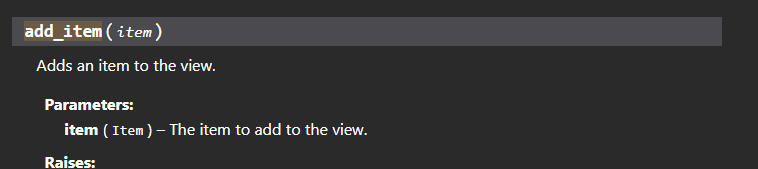
 rugged lantern
im using opera gx and have no issues
fervent cradle
worldly schooner
L internet connection
fervent cradle
worldly schooner
😭
do a factory reset on your browser
worldly schooner
now every website is messed up
rugged lantern
cunning falcon
thats what i was trying but it still shows a failed interaction, so far ive done...
i just did what you suggested and it properly works for me
cyan quail
cunning falcon
is it possible to send an ephemeral message to someone who pressed on a button i...
can you explain further? this just sounds like interaction.response.send_message
rugged lantern
cunning falcon
thats what i was trying but it still shows a failed interaction, so far ive done...
you can just defer it with no followup i suppose, if it's a button
 clear copper
Hey, quick one here. Is this the proper type annotation for slash command contexts? in Pycharm, I'm not getting very good completion with some methods...


 cyan quail
that looks normal yeah
clear copper
Asking this because I had to manually find that this has ephemeral instead of it just being an option from the suggestions
cyan quail
didn't even know people used send_response, everyone just uses respond normally
clear copper
it doesn't seem to have this in here neither
 cunning falcon
basically i have a command that pings a second person and waits for them to respond whether or not they want to be given a certain role, but i want to avoid having a third person press on the yes/no buttons because when they do, i get the "interaction failed"
                def check(subject):
                    return subject.user == user
                try:
                    result = await bot.wait_for('interaction', timeout=30, check=check)
                except asyncio.TimeoutError:
                    await m.edit_original_message(content="{}, you took too long.".format(user.mention), view=MyView().disable_all_items())``` then the buttons look like ```@discord.ui.button(label="No thanks.", style=discord.ButtonStyle.danger)
        async def second_button_callback(self, button, interaction):


            if interaction.user != user:
                await ctx.respond("don't touch!", ephemeral=True)
            else:
await m.edit_original_message(content="Sorry {}, they didn't want your role!".format(ctx.author.mention), view=MyView().disable_all_items())```i don't think i've had issues with pycharm missing kwargs but i don't really typehint either
hmm
cyan quail
cunning falcon
basically i have a command that pings a second person and waits for them to resp...
that should be interaction.response.send_message and interaction.response.edit_message respectively inside the callback
clear copper
It's probably not too big of a deal, but I feel like I'm missing something if I can't get suggestions in the IDE
cunning falcon
cyan quail
that should be `interaction.response.send_message` and `interaction.response.edi...
thank you very much!! it works now :D
worldly schooner
Where can I find an example of a main command and sub command usage?
errant craneBOT
Here's the slash groups example.
worldly schooner
thanks
worldly schooner
how can I manage to make the slashgroup be like a base command and the subcommands like options?
for example I have a help command and I want to have the normal help command and a help info:
/help
/help info
verbal gulch
worldly schooner
how can I manage to make the slashgroup be like a base command and the subcomman...
use the create_group method
graceful mortar
Hey, how can get the Command ID from Slash Commands?
worldly schooner
verbal gulch
use the create_group method
but do I call the normal help command as the same name of the group to it work like I said?
verbal gulch
<name_var> = bot.create_group('help', '<description>,') @worldly schooner