Best matches for guil.create_role in pyc
#General Help
1 messages · Page 11 of 1
 open bearBOT
 rose stratus
b!rtfm pyc on_guild_join
open bearBOT
rose stratus
b!rtfm pyc on_guild_join
I couldn't find a documentation with the name on_guild_join! Maybe you used to command wrong? Correct Usage: <prefix>rtfm <docs> [<term>] (eg. b!rtfm py cool)
List of Documentations you can search:
python
pycord
discord.py
yarsaw
nextcord
disnake
rose stratus
b!rtfm pyc on_guild_join
open bearBOT
rose stratus
b!rtfm pyc on_guild_join
Best matches for on_guild_join in pyc


 clever lava
ty
 potent rivet
can i make my bot check messages that have certain text in them then respond based on the text?
like if the message is a banned word it'll be deleted and maybe the bot will send a message
mightve gotten it
 sudden path
if "word" in message.content
 wet heartBOT
@open bear was the 4041st person to join Pycord
@wet heart was the 1124th person to join Pycord
 steady lotus

potent rivet
eee
 potent rivet
sudden path
if "word" in message.content
potent rivet
sudden path
if "word" in message.content
why does this not work?
 wet heartBOT
@potent rivet was the 6199th person to join Pycord
sudden path
on_message doesn't take ctx
potent rivet
ah
sudden path
Events dont have context
potent rivet
oh yeah
sudden path
You're looking for await message.channel.send()
potent rivet
ok thanks
potent rivet
sudden path
You're looking for `await message.channel.send()`
its being weird, It wont send the message if i say the message but if the bot sends it then it will respond
sudden path
Do you have messages intent
 slender lintel
Can someone help me pls?
 ebon spruce
How can I edit an interaction more then once?
async def approve(interaction):
await interaction.response.edit_message(
embed=embed, view=view.clear_items()
)
artists =await api.libary_artists(ctx, username)
await interaction.response.edit_message(
embed=discord.Embed(
description=f"rawr",
color=0x7289DA,
)
)
await interaction.response.edit_message(
embed=discord.Embed(
description=f"awr",
color=0x7289DA,
)
)```
**discord.errors.InteractionResponded: This interaction has already been responded to before** desert dagger
ebon spruce
How can I edit an interaction more then once?
```py
async def approve(interactio...
desert dagger
ebon spruce
How can I edit an interaction more then once?
```py
async def approve(interactio...
interaction.message.edit if you already responded to it
 rigid wave
Hi, How do I know the user who pressed a button is the same user who called the button?
desert dagger
hm
you'd grab the id of the person who called the interaction then compare it with the person that pressed it
rigid wave
desert dagger
you'd grab the id of the person who called the interaction then compare it with ...
I can get the one who pressed a button, but the one who called the button is no
 desert dagger
ah i see
can i see the code you used?
https://guide.pycord.dev/interactions/ui-components/buttons/
was going to point out if you used slash commands then getting the authors id of who sent the command wouldnt be hard
Learn all about implementing buttons in your Discord Bot using Pycord.
you probs could try message.author == ctx.author
rigid wave

 desert dagger
hm
rigid wave
@desert dagger
desert dagger
rigid wave
<@213713822307844097>
in the MyView class you could
    def __init__(self, author : discord.Member):
        self.author = author
What should I use instead
rigid wave
desert dagger
in the MyView class you could
```python
def __init__(self, author : discord...
oky
desert dagger
ebon spruce
What should I use instead
i did say interaction.message.edit if you already responded which it says u have
Have you tried await asyncio.sleep()?
rigid wave
desert dagger
in the MyView class you could
```python
def __init__(self, author : discord...
It work, Thank you
desert dagger
sweet
rigid wave
desert dagger
sweet
Can you help me here too? #980463476860403713
desert dagger
rigid wave
Can you help me here too? <#980463476860403713>
not really sure. but it seems like your code doesnt like you editing self
Maybe try explaining what the code does and show a bit more code in there and someone will help
rigid wave
desert dagger
not really sure. but it seems like your code doesnt like you editing self
From here add the message he is modifying
https://prnt.sc/WTkfm9SbTqzg
 ebon spruce
rigid wave
From here add the message he is modifying
https://prnt.sc/WTkfm9SbTqzg
ebon spruce
rigid wave
From here add the message he is modifying
https://prnt.sc/WTkfm9SbTqzg
What theme is that?
desert dagger
you could try interaction.message.edit idk
rigid wave
ebon spruce
What theme is that?
#980463476860403713
desert dagger
rigid wave
<#980463476860403713>
hes asking for ur theme in your IDE lol
 desert dagger
lmao
slender lintel
desert dagger
Have you tried await asyncio.sleep()?
I just want it to send message.content only when the ticket is open and the player has sent the second message
desert dagger
slender lintel
I just want it to send message.content only when the ticket is open and the play...
user sent a message or bot?
is your workflow:
- Create a category if it doesn't exist
- Create ticket
- Send welcome embed in ticket
- let user know ticket has been created
- send message.content after embed has been sent? @slender lintel
slender lintel
dss I have yes I have all only when a welcome message comes in the chat is sent again message.content.
desert dagger
so u want message.content to be sent in the ticket channel? too
slender lintel
He will yes I send later a screenshot what I mean
desert dagger

your code creates the channel, sends an embed and lets the person know their ticket has been created. but if channel already exists it just sends message.content in "channel" which is probs where the command was ran
rigid wave
Can I add buttons or a dropdown menu in Modal?
 frank moon
why does this say interaction failed everytime?
Video: https://streamable.com/ky19pi

 proven plume
discord.ext.commands.errors.CommandInvokeError: Command raised an exception: AttributeError: 'coroutine' object has no attribute 'purge'
someone know this pls?
desert dagger
frank moon
why does this say interaction failed everytime?
Video: https://streamable.com/ky...
No one would know if you dont show code. just saying
desert dagger
proven plume
discord.ext.commands.errors.CommandInvokeError: Command raised an exception: Att...
Code? what are you trying to do?
proven plume
@bot.command()
@commands.is_owner()
async def supp_tout(ctx: commands.Context):

    await salon_auto_role.purge(limit=20)
    await salon_esgi_role.purge(limit=20)
    await salon_dev_role.purge(limit=20)
    await salon_reglement.purge(limit=20)
    await salon_tutoriel.purge(limit=20)
what could be the cause?
proven plume
salon_auto_role = bot.fetch_channel(923316086483587085)
salon_esgi_role = bot.fetch_channel(974708754438303784)
salon_dev_role = bot.fetch_channel(975746758581846046)

salon_admin = bot.fetch_channel(923316087314067537)
salon_reglement = bot.fetch_channel(923316086483587083)
salon_tutoriel = bot.fetch_channel(976751453127454720)
?
desert dagger
frank moon
what could be the cause?
gimme a sec to rewatch
frank moon
oki
desert dagger
frank moon
oki
Does your console show any errors?
frank moon
no
desert dagger
when you get an interaction failed it means your code simply hasnt sent a response back or it errored somewhere
frank moon
it just say 'this interaction failed' but the whole things worked
have u watched the whole vid
desert dagger
yes?
desert dagger
hm
frank moon
discord bug?
 gilded widget
frank moon
discord bug?
gilded widget
frank moon
discord bug?
doubt, can you send some code pls
frank moon
no errors at all + everything works fine
desert dagger
try adding ctx.defer() ?
frank moon
ohh yes
desert dagger
or interaction.response.defer()
frank moon
aight
proven plume
desert dagger
https://docs.pycord.dev/en/master/api.html?highlight=purge#discord.TextChannel.p...
it not help me
desert dagger
you could also be needing to send it via interaction.response.send_message(message)
or ctx.respond
otherwise you get the failed thing even tho it worked
desert dagger
proven plume
it not help me
gimme a sec
proven plume
ty
gilded widget
proven plume
```py
salon_auto_role = bot.fetch_channel(923316086483587085)
salon_esgi_role = ...
fetch_channel is a coro
you need to await it
frank moon
desert dagger
gimme a sec
at the first of the callback?
like py async def callback(interaction): await interaction.response.defer()
desert dagger
mhm try
frank moon
oki
desert dagger
proven plume
```py
salon_auto_role = bot.fetch_channel(923316086483587085)
salon_esgi_role = ...
i think you need to await fetch
proven plume
desert dagger
i think you need to await fetch
so I need to place my fetch on a async def?
desert dagger
mhm
Example
test= await bot.fetch_channel(969580926885580801)
https://docs.pycord.dev/en/master/api.html?highlight=purge#discord.Client.fetch_channel
says here you needed to use await btw
proven plume
but my channels arn't on a def
frank moon
@desert dagger thx for telling me to try defer cuz it works :))
desert dagger
glad to see that worked 👍
desert dagger
proven plume
this is the problem
whats your bot work like?
cause maybe just put them in the function and call function?
proven plume
salon_auto_role = bot.fetch_channel(923316086483587085)
salon_esgi_role = bot.fetch_channel(974708754438303784)
salon_dev_role = bot.fetch_channel(975746758581846046)

salon_admin = bot.fetch_channel(923316087314067537)
salon_reglement = bot.fetch_channel(923316086483587083)
salon_tutoriel = bot.fetch_channel(976751453127454720)

@bot.command()
@commands.is_owner()
async def supp_tout(ctx: commands.Context):

    await salon_auto_role.purge(limit=20)
    await salon_esgi_role.purge(limit=20)
    await salon_dev_role.purge(limit=20)
    await salon_reglement.purge(limit=20)
    await salon_tutoriel.purge(limit=20)

@bot.command()
@commands.is_owner()
async def prepare(ctx: commands.Context):

    await salon_reglement.send(reglement1)
    await salon_reglement.send(reglement2, view=auto_role.bouton_rules())

    await salon_auto_role.send(embed=discord.Embed(title="Tu joues à quels jeux?", description="",color=0x00ff91), view=auto_role.bouton_jeu())
    await salon_auto_role.send(embed=discord.Embed(title="Tu veux avoir acces à quels channels?", description="",color=0x00ff91), view=auto_role.bouton_salon())
    await salon_auto_role.send(embed=discord.Embed(title="Es-tu à l'ESGI?", description="",color=0x00ff91), view=auto_role.bouton_esgi())

    await salon_dev_role.send(embed=discord.Embed(title="Tu utilise quels languages?", description="",color=0x00ff91), view=auto_role.bouton_dev())

    await salon_esgi_role.send(embed=discord.Embed(title="Tu es en Inital ou en Alternance?", description="⚠ Cette question ne concerne que les premières et deuxièmes années.",color=0x00ff91), view=auto_role.bouton_alt_ou_init())
    await salon_esgi_role.send(embed=discord.Embed(title="Tu es en quelle année?", description="",color=0x00ff91), view=auto_role.menu_annee())
    await salon_esgi_role.send(embed=discord.Embed(title="Tu es en quelle spé?", description="⚠ Cette question ne concerne que les troisièmes, quatrièmes et cinquièmes années.",color=0x00ff91), view=auto_role.menu_spe())
discord.errors.InteractionResponded: This interaction has already been responded to before
``` btw what could be the cause of this?response.edit_message(message) multiple times?
frank moon
seems like the error was caused by defer() when i add to my buttons callback lmao
ima remove it
desert dagger
mhm fair
frank moon
just added defer() to the select menu callback then it worked
desert dagger
did say to test. no clue about your code xd
desert dagger
that's interesting
 sick stirrup
Can't bots have custom activity?
{emoji} {name}
proven plume
sick stirrup
Can't bots have custom activity?
`{emoji} {name}`
no
desert dagger
proven plume
```py
salon_auto_role = bot.fetch_channel(923316086483587085)
salon_esgi_role = ...
Best thing i can say is global variables or create a function to process them and return
desert dagger
sick stirrup
Can't bots have custom activity?
`{emoji} {name}`
Bots dont have the custom activity we users have. At most is watching or streaming
I'm trying to setup group slash commands in a cog but all it does is this.
https://github.com/Pycord-Development/pycord/blob/v2.0.0-rc.1/examples/app_commands/slash_cog_groups.py
copy pasted this exactly

GitHub
Pycord, a maintained fork of discord.py, is a python wrapper for the Discord API - pycord/slash_cog_groups.py at v2.0.0-rc.1 · Pycord-Development/pycord
gilded widget
desert dagger
I'm trying to setup group slash commands in a cog but all it does is this.
https...
assuming you mean the slash_cog_groups example, i dont see the problem?
gilded widget
that version of the code probably doesn't function properly though due to the CommandPermission usage
gilded widget
the fixed version is on my pr
desert dagger
thankss
gilded widget
##1389
 supple ravineBOT
gilded widget
##1389
supple ravineBOT
gilded widget
##1389
GitHub
Summary
This PR does a lot of cleanup to the examples in the repository (as in syntax consistency, type hinting, grammar, line length, etc.). A few bug fixes are made to examples that were previous...
desert dagger
i feel very dum :D
gilded widget
lmao ur good
desert dagger
same with trying bridge in cogs too. why do i keep on being stupid 😭
gilded widget
if I remember correctly I don't think bridge works correctly in cogs
desert dagger
yeah
gilded widget
bridge is a bit flawed rn, hopefully it'll get cleaned up before full 2.0.0 release
gilded widget
idk, depends on your use purposes
desert dagger
I went from a discord.js user to Pycord and i last used Python for just an AI chatbot project
 stiff lotus
Hey all, does anybody know how to make a command that adds / removes roles from a user. I’ve looked far and wide & can’t find anything.
Any help would work,
Thanks
desert dagger
stiff lotus
Hey all, does anybody know how to make a command that adds / removes roles from ...
yeah one sec
stiff lotus
desert dagger
yeah one sec
Ah thanks
gilded widget
imo dpy's new syntax for slash commands is weird but to each their own, their shouldn't be any significant differences
stiff lotus
and also let me know the things I’ll need to import as well
desert dagger
stiff lotus
Ah thanks
any usage in specific
stiff lotus
desert dagger
any usage in specific
Ok
desert dagger
gilded widget
imo dpy's new syntax for slash commands is weird but to each their own, their sh...
I like how pycord looks and a lot of people i know cant be asked to go back to discord.py and ppl feel danny might dip again
desert dagger
stiff lotus
Ok
slash command to give and remove role right?
stiff lotus
desert dagger
slash command to give and remove role right?
Yep
gilded widget
stiff lotus
Hey all, does anybody know how to make a command that adds / removes roles from ...
GitHub
Pycord, a maintained fork of discord.py, is a python wrapper for the Discord API - pycord/button_roles.py at master · Pycord-Development/pycord
this is a button but it works similar
stiff lotus
Thanks
desert dagger
^^
desert dagger
one sec
desert dagger
await ctx.guild.create_role(name=role_name, color=color, reason=f'reason_here')
theres a good example somewhere on the docs
stiff lotus
So will this give out a role of your choice?
desert dagger
alright letme just explain a few things
desert dagger
code creates role
gives it a color and audit logs will have reason
stiff lotus
I’m talking about giving a user an existing role in the server already
desert dagger
do you want it to be any user or author
await member.add_roles(role) is all you really need to add role
stiff lotus
Alright thank you!
desert dagger
well at least i explained how to create/remove roles , add and remove roles 😂 even tho the first two was useless
stiff lotus
thanks
slender lintel
desert dagger
so u want message.content to be sent in the ticket channel? too
This is my problem

 delicate relic
Hello ppl, i have a question, when using slash_command to tag a role, although it gets the right role it doesn't ping the people with the role as shown in the image https://i.imgur.com/NvCp0FV.png
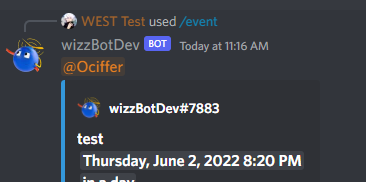
Anyone knows why?
desert dagger
delicate relic
Hello ppl, i have a question, when using slash_command to tag a role, although i...
does the bot has perms to ping people?
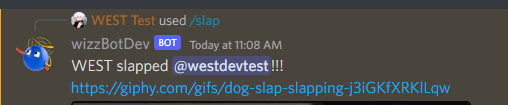 desert dagger
application command responses are based on permissions for @ everyone iirc?
delicate relic
desert dagger
application command responses are based on permissions for @ everyone iirc?
If i understand correctly, i did change the default permission to False for this command
delicate relic
desert dagger
application command responses are based on permissions for @ everyone iirc?
Managed to fix it, for some reason in cog discord.AllowedMentions(roles) was set to false, i changed it to True and now it can ping roles
desert dagger
nice
delicate relic
desert dagger
nice
Quick update, it suddenly stopped pinging roles again, i guess there's a limit to how many times the bot can ping a role?
desert dagger
there shouldnt be any
delicate relic
Weird then 
desert dagger
delicate relic
Weird then <:HmmGe:934588738951077889>
are u testing in a test server or production server?
delicate relic
test server
desert dagger
if its test server enable @ everyone to have perms to mention roles or have the role u want mentioned mentionable then try again
delicate relic
Ok, gonna test it
 icy sluice
desert dagger
I went from a discord.js user to Pycord and i last used Python for just an AI ch...
icy sluice
desert dagger
I went from a discord.js user to Pycord and i last used Python for just an AI ch...
same lmao
desert dagger
icy sluice
same lmao
very much fun ikr
icy sluice
well wasn’t for me, I gave up on js 😂
desert dagger
delicate relic
Quick update, it suddenly stopped pinging roles again, i guess there's a limit t...
btw in the bot bit try adding allowed_mentions=AllowedMentions.all()
then see if that works. i realised you might have not had that
delicate relic
desert dagger
btw in the bot bit try adding`` allowed_mentions=AllowedMentions.all()``
Didn't work, it's so weird because it was working with no problem and suddenly stop
desert dagger
delicate relic
Didn't work, it's so weird because it was working with no problem and suddenly s...
might be cause of the update
delicate relic
I reverted all code till when i added the allowedmentions
And it's working again
Im so confused
Well it's working fine and dunno why 
 sleek grove
help pls
 keen root
slash command name must always be in lowercase ("ping" not "Ping")
icy sluice
can i get a quick example of what an .env should look like exactly?
slender lintel
Can someone help me?..
frank moon
Is select in modal gonna be added soon?
sick stirrup
slender lintel
Can someone help me?..
I didn't get what you meant there
slender lintel
sick stirrup
I didn't get what you meant there
So my bot sends in the same twice, once once the channel is created to communicate with the player and then it sends in the reason for support again. But I want it to wait until the second message comes from the user means that it sends first only the confirmation and only after the second message sends message.content.
you know?
So here is my problem:
 sick stirrup
slender lintel
So my bot sends in the same twice, once once the channel is created to communica...
sick stirrup
slender lintel
So my bot sends in the same twice, once once the channel is created to communica...
You want that second message to be sent when requested by someone?
Or you want to get rid of the message.content after the embed?
slender lintel
sick stirrup
You want that second message to be sent when requested by someone?
Or you want ...
I don't know how to explain it, I'll just give it a try....
So the user sends once for example: Hi and after the Hi a ticket is created where the reason of the player is.
Then he sends for example: What's up and after the Whats up should first come message.content.
Do you understand?
sick stirrup
slender lintel
I don't know how to explain it, I'll just give it a try....
So the user sends o...
Ahhh, you want the bot to wait for a message from the user?
Check out: https://docs.pycord.dev/en/master/api.html#discord.Client.wait_for
slender lintel
No 
sick stirrup
oop-
slender lintel
message.content should only come after the second message from the user
sick stirrup
slender lintel
message.content should only come after the second message from the user
For the second message from the user, don't you want the bot to wait for the user to send the second message?
slender lintel
means first the welcome message comes and then when the user sends a second message only message.content should come
slender lintel
sick stirrup
For the second message from the user, don't you want the bot to wait for the use...
But then only message.content should come
sick stirrup
Yeah, the user sends second message, and then you get the message.content from the bot, correct?
slender lintel
yes 
sick stirrup
sick stirrup
Ahhh, you want the bot to wait for a message from the user?
Check out: https://...
This is it then.
Use wait_for()
slender lintel
what should he be waiting for?
sick stirrup
From the example in the documentation, use the one where the bot waits for a "message" from the user, and then you send the message.content
msg = await client.wait_for('message', check=check)
The first example in the link I gave here @slender lintel
slender lintel
sick stirrup
The first example in the link I gave here <@456226577798135808>
so?
        def check(m):
            return message.content

        await bot.wait_for('message', check=check(message))
        await channel.send(message.content)
just send the function, without calling it to check
in check, return m.author == message.author and m.channel == message.channel
slender lintel
Its working thanks! ❤️
slender lintel
sick stirrup
in check, `return m.author == message.author and m.channel == message.channel`
But it sends the old message as soon as the user sends a second message, only after the third message it sends the correct content
sick stirrup
Show me your code
slender lintel
sick stirrup
Show me your code
        def check(m):
            return m.author == message.author and m.channel == message.channel

        await bot.wait_for('message', check=check)
        content_embeds = discord.Embed(description=f":HeartCute:› {message.content}", colour=0x51ff89)
        content_embeds.set_author(name=f"{message.author.name}#{message.author.discriminator}",
                                  icon_url=message.author.avatar.url)
        await channel.send(embed=content_embeds)
This?
 pale crow
Is there any way to loop through all the options inside the application cmd(slash)?
sick stirrup
slender lintel
```Py
def check(m):
return m.author == message.author and m....
I didn't get what's wrong?
slender lintel
Wait i send a screen
slender lintel
sick stirrup
I didn't get what's wrong?

 pale crow
Is there any way to loop through all the options inside the application cmd(slas...
pale crow
pale crow
Is there any way to loop through all the options inside the application cmd(slas...
someone who can help me TwT
desert dagger
delicate relic
Well it's working fine and dunno why <:rooPopcorn:881521839694811156>
Welcome to coding
desert dagger
pale crow
Is there any way to loop through all the options inside the application cmd(slas...
Example code?
delicate relic

sleek grove
when i enable intents that error comes Traceback (most recent call last):
File "/Users/janikschunemann/Development/Python/in-progress/Discord/main.py", line 12, in <module>
bot = discord.Bot(intents=discord.intents.all())
AttributeError: module 'discord' has no attribute 'intents'
desert dagger
hm
sleek grove
my code is bot = discord.Bot(intents=discord.intents.all())
slender lintel
sick stirrup
I didn't get what's wrong?
You know?
 humble sigil
raise CommandInvokeError(exc) from exc
discord.ext.commands.errors.CommandInvokeError: Command raised an exception: AttributeError: 'Member' object has no attribute 'avatar_url'
sudden path
How could I get the original message in a view, to edit it, on the on_timeout event
desert dagger
humble sigil
raise CommandInvokeError(exc) from exc
discord.ext.commands.errors.CommandInvoke...
remove _url
desert dagger
sudden path
How could I get the original message in a view, to edit it, on the on_timeout ev...
i believe you cant really edit them after 15 minutes. You probably could fetch and edit them though
slender lintel
from discord.commands import SlashCommandGroup
ModuleNotFoundError: No module named 'discord.commands'
desert dagger
sudden path
desert dagger
i believe you cant really edit them after 15 minutes. You probably could fetch a...
im not talking about that
slender lintel
I installed py-cord using pycharm's python package installer
desert dagger
hm
humble sigil
desert dagger
https://docs.pycord.dev/en/master/api.html?highlight=add_roles#discord.Member.av...
asset = author.avatar_url_as(size=128)``` this in pycord?can you do pip list
and show me what py-cord version you're using
humble sigil
desert dagger
b!rtfm pyc User.avatar
and?
stiff lotus
could you somebody give me a full prewritten code on a slash command where you can give somebody roles
slender lintel
desert dagger
and show me what py-cord version you're using
its 1.7.3
stiff lotus
because i'm still really confused
desert dagger
humble sigil
```py
asset = author.avatar_url_as(size=128)``` this in pycord?
you want author.avatar.url
desert dagger
stiff lotus
because i'm still really confused
gimme 3 minis
stiff lotus
desert dagger
gimme 3 minis
alright thanks
desert dagger
slender lintel
its 1.7.3
you'd want the altest
humble sigil
desert dagger
you want author.avatar.url
i want the profilpicture for a image
humble sigil
desert dagger
do you want your own?
no, for a rank cmd
sudden path
in any way it is discord.Member.avatar.url
desert dagger
slender lintel
its 1.7.3
Update to the latest pycord
sudden path
author or targeted user
slender lintel
desert dagger
Update to the latest pycord
alr thanks
desert dagger
one sec yehe
desert dagger
slender lintel
alr thanks
pip install py-cord==2.0.0rc1
if top one fails
python -m pip install py-cord==2.0.0rc1
desert dagger
mhm
sick stirrup
slender lintel
language is so hard to get.
desert dagger
you'd need one to check if you mention anyone or not then blocki
humble sigil
@desert dagger dm
sick stirrup
Did you mean this screenshot where the message.content appears to be able the random message sent?
 sudden path
humble sigil
.rank or .rank <@213713822307844097>
sudden path
humble sigil
.rank or .rank <@213713822307844097>
user = ctx.author or user
assuming youre passing user on your function
async def command(ctx, user: discord.Member)
then you can simply do
user.avatar.url
humble sigil
ok
desert dagger
sudden path
user = ctx.author or user
assuming youre passing user on your function
async de...
What dark said
slender lintel
sick stirrup
Did you mean this screenshot where the `message.content` appears to be able the ...
I am from Germany therefore the language but these are only information in the embed
anyone has an idea for is_owner thing on slash commands
sick stirrup
slender lintel
Seems like the bot did send the message.content after you (message.author), sent a message
slender lintel
sick stirrup
Seems like the bot did send the message.content after you (message.author), sent...
How can I fix it that the first message remains removed?
sick stirrup
slender lintel
How can I fix it that the first message remains removed?
You want to remove the first message btw the bot or user?
slender lintel
sick stirrup
You want to remove the first message btw the bot or user?
I want the first message to be sent only once
sick stirrup
slender lintel
I want the first message to be sent only once
Ahh, you're saying the first message is sent twice
stiff lotus
desert dagger
gimme 3 minis
Hey
desert dagger
stiff lotus
Hey
oh lol
stiff lotus
Lol
slender lintel
sick stirrup
Ahh, you're saying the first message is sent twice
Yes
desert dagger
Its kinda just simple but alright
stiff lotus
Ok
sick stirrup
slender lintel
Yes
Can you show me the code from the part where you create the first embed till you send it?
slender lintel
sick stirrup
Can you show me the code from the part where you create the first embed till you...
Yes here
 stiff lotus
Just send the role cmd when your available
slender lintel
sick stirrup
Is this `on_message` event?? <@456226577798135808>
on_message
desert dagger
stiff lotus
Just send the role cmd when your available
@bot.slash_command(name='give', description='Gives a user a role ')
async def give(ctx, role: discord.Role):
    await ctx.author.add_roles(role,reason=f'{ctx.author}')
    await ctx.respond(f'Role given: {role}')
There you go
Command gives the user running the command a role
stiff lotus
Tysm
pale crow
self._underlying.emoji = PartialEmoji.from_str(value)
AttributeError: 'Choice' object has no attribute '_underlying'
How do I add 🇦 as emoji for buttons
I get above error
I tried emoji=":regional_indicator_a:" and also emoji= \🇦
 buoyant saddle
Question with Pycord, can we automatic sync?
stiff lotus
desert dagger
```
@bot.slash_command(name='give', description='Gives a user a role ')
async de...
not what im looking for
i want a moderator to use the command to give another user a role
so there is a list of members
you can pick from
& a list of roles you can pick from
@desert dagger
stiff lotus
sorry
i need a role command exactly like dynos one
wait
one sec

something like this @desert dagger
desert dagger
user: discord.Option(discord.Member, "Enter a Username")
desert dagger
stiff lotus
and you guys are proffesionals
 yes professional. Totally didnt start using Pycord 3 days ago 👍
stiff lotus
but you still know what you're doing lol

getting this error now
anybody know why?
desert dagger
whats said in your console?
stiff lotus
has no attribute "member"
desert dagger
show code
stiff lotus
hm
 ancient gazelle
How do I create a background task?

 desert dagger
stiff lotus
<@213713822307844097>
desert dagger
stiff lotus
<@213713822307844097>
await member.add_roles(role, reason=f'{ctx.author}')
icy sluice
import discord
from discord.ext import commands
import os # default module
from dotenv import load_dotenv

load_dotenv() # load all the variables from the env file
bot = discord.Bot(debug_guilds=[976234277123539017])
bot = commands.Bot(command_prefix="!")

@bot.command()
async def ping(ctx):
    await ctx.send("Pong!")

@bot.command()
async def announce(ctx, title, *, message):
    await ctx.send("**{}**\n{}".format(title, message))

@bot.event
async def on_command_error(ctx, error):
    if isinstance(error, commands.CommandNotFound):
        await ctx.send("Unknown command.")

@bot.event
async def on_ready():
    print(f"{bot.user} is ready and online!")

bot.run(os.getenv('TOKEN')) # run the bot with the token```

My bot isn’t responding to my ping or announce command?no one come at me for being dumb btw please, I know basically nothing about py 😵💫
desert dagger
icy sluice
no one come at me for being dumb btw please, I know basically nothing about py �...
enable message intents
desert dagger
icy sluice
no one come at me for being dumb btw please, I know basically nothing about py �...
bot = discord.Bot(debug_guilds=[976234277123539017],intents=discord.Intents.all())
make sure you go to your https://discord.com/developers and enable message intent there too
Discord Developer Portal
Integrate your service with Discord — whether it's a bot or a game or whatever your wildest imagination can come up with.
icy sluice
desert dagger
bot = discord.Bot(debug_guilds=[976234277123539017],intents=discord.Intents.all(...
still no response
I’m not sure but I’m assuming it’s something to do w the fact I’ve done bot = twice
icy sluice
idk what to change tho
icy sluice
desert dagger
why my friend why
I’m using the commands extension which is why I have bot = commands.Bot(command_prefix="!")
desert dagger
can you print all of your code?
pale crow
Traceback (most recent call last):
  File "C:\Users\Mridul Negi\AppData\Local\Packages\PythonSoftwareFoundation.Python.3.9_qbz5n2kfra8p0\LocalCache\local-packages\Python39\site-packages\discord\client.py", line 382, in _run_event
    await coro(*args, **kwargs)
  File "C:\Users\Mridul Negi\AppData\Local\Packages\PythonSoftwareFoundation.Python.3.9_qbz5n2kfra8p0\LocalCache\local-packages\Python39\site-packages\discord\bot.py", line 1038, in on_connect
    await self.sync_commands()
  File "C:\Users\Mridul Negi\AppData\Local\Packages\PythonSoftwareFoundation.Python.3.9_qbz5n2kfra8p0\LocalCache\local-packages\Python39\site-packages\discord\bot.py", line 685, in sync_commands
    await self.http.bulk_upsert_command_permissions(self.user.id, guild_id, guild_cmd_perms)
  File "C:\Users\Mridul Negi\AppData\Local\Packages\PythonSoftwareFoundation.Python.3.9_qbz5n2kfra8p0\LocalCache\local-packages\Python39\site-packages\discord\http.py", line 357, in request
    raise HTTPException(response, data)
discord.errors.HTTPException: 405 Method Not Allowed (error code: 0): 405: Method Not Allowed```anyone pls help
icy sluice
desert dagger
can you print all of your code?
import discord
from discord.ext import commands
import os # default module
from dotenv import load_dotenv

load_dotenv() # load all the variables from the env file
bot = discord.Bot(debug_guilds=[976234277123539017],intents=discord.Intents.all())
bot = commands.Bot(command_prefix="!")

@bot.command()
async def ping(ctx):
    await ctx.send("Pong!")

@bot.command()
async def announce(ctx, title, *, message):
    await ctx.send("**{}**\n{}".format(title, message))

@bot.event
async def on_command_error(ctx, error):
    if isinstance(error, commands.CommandNotFound):
        await ctx.send("Unknown command.")

@bot.event
async def on_ready():
    print(f"{bot.user} is ready and online!")

bot.run(os.getenv('TOKEN')) # run the bot with the token
bot = discord.Bot(debug_guilds=[976234277123539017],intents=discord.Intents.all(),command_prefix="!")
make it one line
desert dagger
icy sluice
```py
import discord
from discord.ext import commands
import os # default module...
also how many servers is the bot in?
icy sluice
1
desert dagger
remove the debug_guilds part for now
icy sluice
desert dagger
remove the debug_guilds part for now
followed all steps, still 0 response
desert dagger
icy sluice
followed all steps, still 0 response
have u went to https://discord.com/developers to enable it?
Discord Developer Portal
Integrate your service with Discord — whether it's a bot or a game or whatever your wildest imagination can come up with.
icy sluice
yep
desert dagger
hm
desert dagger
lmao what?
desert dagger
icy sluice
ty tho
Good job :)
icy sluice
ty
desert dagger
ohh
icy sluice
ty for the help though
pale crow
pale crow
```Ignoring exception in on_connect
Traceback (most recent call last):
File "C...
Anyone pls help
 fallen latch
one question
anybody can help me?
i want to make a easy bot just to clear messages
but i dont know how
 slender lintel
sick stirrup
Is this `on_message` event?? <@456226577798135808>
slender lintel
sick stirrup
Is this `on_message` event?? <@456226577798135808>
do you have any idea
sick stirrup
slender lintel
on_message
in that case, you don't need the bot.wait_for()
I thought it's a command
Maybe, you should add the channel to a db or something to show that it is not new and don't have to repost the embed
icy sluice
which function fetch’s the bots ping?
sick stirrup
icy sluice
which function fetch’s the bots ping?
it's the latency attribute
icy sluice
Could you give me an example of how to use it?
sick stirrup
fallen latch
a webhook can delete messages?
You mean, delete a webhook message? yes
fallen latch
sick stirrup
You mean, delete a webhook message? yes
i mean a webhook deleting a webhook message
like an "auto delete"
slender lintel
how do I send message to a specific channel using its Id?
 wide cloak
how to get the message the user replyed to?
keen root
wide cloak
how to get the message the user replyed to?
await ctx.channel.fetch_message(ctx.message.reference.message_id) if in command
 little isle
pycord.dev is down?
keen root
slender lintel
how do I send message to a specific channel using its Id?
channel = await ctx.guild.fetch_channel(your_channel_id) #getting channel by its id await channel.send("something") #sending message to channel
if in command
keen root
fallen latch
like an "auto delete"
You can delete it after some time with delete_after=seconds in await Webhook.send function
slender lintel
How would i allow my bot to work in every server for slash commands, Instead of adding ID every time?
 slow dome
make it global
slender lintel
    suggestion_group = SlashCommandGroup(name="suggestion", guild_ids=guilds, description="Suggestion commands, for suggesting")


    class suggestion_modal(Modal):
        def __init__(self, *args, **kwargs) -> None:
            super().__init__(*args, **kwargs)
            self.add_item(InputText(label="Suggestion Topic", placeholder="Enter topic"))
            self.add_item(
            InputText(
                label="Suggestion Content",
                placeholder="Enter suggestion",
                style=discord.InputTextStyle.long,
            )
        )
            async def callback(self, interaction: discord.Interaction):
                print("Hello")
                await interaction.response.send_message(content="Suggestion was submitted.")
                data = fetch_settings()
                ch_id = data['settings']['suggestion-channel']
                channel = self.bot.get_channel(ch_id)
                embed = discord.Embed(title=f"{self.children[0].value}", description=f"{self.children[1].value}", color = discord.Color.green())
                await channel.send(embed=embed)


    @suggestion_group.command()
    async def create(self, ctx):
        data = fetch_settings()
        ch_id = data['settings']['suggestion-channel']

        isFound = utils.get(ctx.guild.channels, id=ch_id)

        if isFound == None:
            return await ctx.respond("Suggestion channel has not been setup correctly.")

        modal = self.suggestion_modal(title="Suggestion Panel")
        await ctx.send_modal(modal)
callback never gets called
for some reason
slow dome
slender lintel
```py
suggestion_group = SlashCommandGroup(name="suggestion", guild_ids=guil...
your callback is not in-line with the modal constructor
icy sluice
Traceback (most recent call last):
  File "/home/container/.local/lib/python3.9/site-packages/discord/cog.py", line 715, in _load_from_module_spec
    spec.loader.exec_module(lib)  # type: ignore
  File "<frozen importlib._bootstrap_external>", line 846, in exec_module
  File "<frozen importlib._bootstrap_external>", line 983, in get_code
  File "<frozen importlib._bootstrap_external>", line 913, in source_to_code
  File "<frozen importlib._bootstrap>", line 228, in _call_with_frames_removed
  File "/home/container/cogs/moderation.py", line 9
    @commands.command() # create a command
IndentationError: unexpected indent
The above exception was the direct cause of the following exception:
Traceback (most recent call last):
  File "/home/container/main.py", line 27, in <module>
    bot.load_extension(f'cogs.{cog}')
  File "/home/container/.local/lib/python3.9/site-packages/discord/cog.py", line 787, in load_extension
    self._load_from_module_spec(spec, name)
  File "/home/container/.local/lib/python3.9/site-packages/discord/cog.py", line 718, in _load_from_module_spec
    raise errors.ExtensionFailed(key, e) from e
discord.errors.ExtensionFailed: Extension 'cogs.moderation' raised an error: IndentationError: unexpected indent (moderation.py, line 9)```

why am I getting this err?self explanatory
icy sluice
not for me
icy sluice
fixed it now, ty
 obsidian garnet
One message removed from a suspended account.
One message removed from a suspended account.
slow dome
obsidian garnet
One message removed from a suspended account.
you can convert a unix time into a datetime.datetime object
with something like from_timestamp()
or smt
obsidian garnet
slow dome
you can convert a unix time into a datetime.datetime object
One message removed from a suspended account.
slow dome
is it that bad if you make it an int
obsidian garnet
One message removed from a suspended account.
obsidian garnet
slow dome
is it that bad if you make it an int
One message removed from a suspended account.
slow dome
well, time.time() gives you the unix time
obsidian garnet
slow dome
well, time.time() gives you the unix time
One message removed from a suspended account.
One message removed from a suspended account.
potent rivet
i think so
obsidian garnet
One message removed from a suspended account.
potent rivet
uh
idk
i think either date or run_date is a float and thats no good
does anyone know why when I have something like this my bot only sends the message if the message is sent by the bot. Example, I send "test" and nothing happens, I make a command to make bot say "test" and it works

hmm might be because it doesnt have messages.read scope but I can't give it that
potent rivet
fixed it
potent rivet
Is there anyway to use an if state so that if the message is sent by my bot it won't send the message?
potent rivet
can anyone help, im trying to make an embed and keep getting this

 half marsh
potent rivet
can anyone help, im trying to make an embed and keep getting this
half marsh
potent rivet
can anyone help, im trying to make an embed and keep getting this
Embed fields only take, name, value, inline
half marsh
Sip
 late fjord
what would be the best way to get a member from thier id in a slash command?
i thought ctx.guild.get_member(id) would work but it seems not
ah fetch_member works.
rigid wave
Can I make this wait press a button?
await self.bot.wait_for(...)
Is select in modal gonna be added soon?
gilded widget
frank moon
Is select in modal gonna be added soon?
we don't know, up to discord devs
gilded widget
no?
select in modal doesnt exist yet
discord hasnt implemented it yet
it'll definitely be added once discord adds it
frank moon
its implemented...
gilded widget
where?
gilded widget
if you're talking about select menus inside of modals then no, it doesn't exist right now
frank moon
gilded widget
if you're talking about select menus inside of modals then no, it doesn't exist ...
 gilded widget
yeah that's 100% just photoshop
tried sending the link to the discord devs server but link got deleted, you can go ask in there and they'll tell you its not implemented yet
frank moon
????
frank moon
gilded widget
tried sending the link to the discord devs server but link got deleted, you can ...
u can go dpy server and see
how is this photoshop lmao
 gilded widget
just checked their latest docs and it doesnt exist there either
and i have no idea tbh
id be shocked if discord just rolled it out with zero announcements
frank moon
someone even made it
gilded widget
well shit if it does exist its the first im hearing of it and havent heard anything from discord abt it
maybe its on canary
frank moon
idk prob
gilded widget
yeah seems like discord pulling some weird shit again
looks like it is on regular discord but unannounced, undocumented and potentially buggy according to one of the devs
it'll probably be implemented in pycord once the feature is actually documented
 random kayak
Hi, are the VoiceChannel's class text methods for Voice Text Chat Channels? Like is the bot able to send messages in there too at the moment, or not yet?
 inland acorn
how to invoke a slash subcommand in other command
keen root
random kayak
Hi, are the VoiceChannel's class text methods for Voice Text Chat Channels? Like...
It has all methods of text channels except threads.
Like this: https://docs.pycord.dev/en/master/api.html#discord.VoiceChannel.send
 plush lintel
hello this is my error: Ipy mportError: cannot import name 'PartialMessageable' from 'discord.channel' (/Users/luke/PycharmProjects/bot/venv/lib/python3.10/site-packages/discord/channel.py)
how can i fix it?
thx
keen root
plush lintel
hello this is my error: I```py
mportError: cannot import name 'PartialMessageabl...
There is no PartialMessageable in discord.channel.
You should import PartialMessageable from discord
 cedar eagle
Quick question, is it possible to build a thread object by passing an ID of an existing thread? discord.Thread({id}) or do I need more information than that. The bot will already be in that thread and have the server permissions to see that thread, even if archived or private. just making sure I don't need anything other than the ID
plush lintel
keen root
There is no `PartialMessageable` in `discord.channel`.
You should import `Partia...
may i ask how?
keen root
plush lintel
may i ask how?
from discord import PartialMessageable
plush lintel
ok thx
plush lintel
keen root
`from discord import PartialMessageable`
where shall i put this line
keen root
plush lintel
ok thx
np
keen root
plush lintel
where shall i put this line
at the beginning of your code
plush lintel
but it still shows
ImportError: cannot import name 'PartialMessageable' from 'discord.channel' (/Users/luke/PycharmProjects/bot/venv/lib/python3.10/site-packages/discord/channel.py)
python3.10/site-packages/discord/channel.py
it's trying to import from discord not py-cord
plush lintel
ok
cedar eagle
wait. belay that. discord is still the package name. my bad
 ivory zenith
    @info_group.command(name='guilds', description = 'send a file with all the guild id\'s')
    async def show_guilds(self, ctx:ApplicationContext):

        if ctx.user.id not in dev_ids:
            await ctx.response.send_message("Sorry, only devs can do that!")
            return

        filee = open('guilds.txt', 'a+')

        for guild in self.bot.guilds:
            filee.write(f"{guild} - {guild.id} \n")
        await ctx.response.send_message("Here is the guilds list", file = discord.File(filee), ephemeral = True)
        filee.close()
Hi, i m trying to send a file, but it sends an empty file
ivory zenith
and my file is not empty
cedar eagle
plush lintel
```py
ImportError: cannot import name 'PartialMessageable' from 'discord.channel...
it looks like an error in your site package. try updating pycord, and make sure you don't have any conflicting packages such as discord.py
plush lintel
ok
plush lintel
cedar eagle
it looks like an error in your site package. try updating pycord, and make sure ...
so what now? ```py
ModuleNotFoundError: No module named 'discord.enums'
No error traceback?
plush lintel
Traceback (most recent call last):
  File "/Users/luke/PycharmProjects/pythonProject4/main.py", line 5, in <module>
    from discord.ui import Button, View, Select
  File "/Users/luke/PycharmProjects/bot/venv/lib/python3.10/site-packages/discord/ui/__init__.py", line 12, in <module>
    from .button import *
  File "/Users/luke/PycharmProjects/bot/venv/lib/python3.10/site-packages/discord/ui/button.py", line 32, in <module>
    from ..components import Button as ButtonComponent
  File "/Users/luke/PycharmProjects/bot/venv/lib/python3.10/site-packages/discord/components.py", line 41, in <module>
    from .enums import ButtonStyle, ComponentType, InputTextStyle, try_enum
ModuleNotFoundError: No module named 'discord.enums'
nope
but i just used the path instead of the file var
and it worked
cedar eagle
plush lintel
```py
Traceback (most recent call last):
File "/Users/luke/PycharmProjects/pyt...
¯_(ツ)_/¯ all I can tell is that your package is messed up somehow. If it's upset that there are missing modules it may be that you need to uninstall and reinstall pycord
plush lintel
ah ok sad sad sad
sick stirrup
yep
plush lintel
what module shall i use to import buttons and stuff?
rigid wave
Can I make this wait press a button?
await self.bot.wait_for(...)
discord.ui
plush lintel
couldnt y?
half marsh
rigid wave
Can I make this wait press a button?
```py
await self.bot.wait_for(...)
```
Everything on button done via callback
plush lintel
Traceback (most recent call last):
  File "/Users/luke/PycharmProjects/pythonProject4/main.py", line 5, in <module>
    from discord.ui import Button, View, Select
ModuleNotFoundError: No module named 'discord.ui'
what is happening?
rigid wave
half marsh
Everything on button done via callback
Can I add buttons or a dropdown menu in Modal ?
half marsh
rigid wave
Can I add buttons or a dropdown menu in ``Modal`` ?
I dont know, havent tried modal
plush lintel
Package            Version
------------------ -----------
aiohttp            3.7.4.post0
aiosignal          1.2.0
async-timeout      3.0.1
attrs              21.4.0
beautifulsoup4     4.11.1
certifi            2021.10.8
cffi               1.15.0
chardet            4.0.0
charset-normalizer 2.0.12
DateTime           4.4
ffmpeg             1.4
frozenlist         1.3.0
humanfriendly      10.0
idna               3.3
multidict          6.0.2
names              0.3.0
Pillow             9.1.1
pip                22.1.2
py-cord            1.7.3
pycparser          2.21
PyNaCl             1.5.0
pytz               2022.1
requests           2.27.1
setuptools         57.0.0
six                1.16.0
soupsieve          2.3.2
typing_extensions  4.1.1
urllib3            1.26.9
wheel              0.36.2
wikipedia          1.4.0
yarl               1.7.2
youtube-dl         2021.12.17
zope.interface     5.4.0
please tell me which of the packages are making confusion
half marsh
plush lintel
```py
Package Version
------------------ -----------
aiohttp ...
Update to rc
ui models are available in pycord 2.0
ivory zenith
how do i check how many bots are in a guild?
half marsh
ivory zenith
how do i check how many bots are in a guild?
Bots = [m for m in Guild.members if m.bot]
len(Bots)
ivory zenith
half marsh
Bots = [m for m in Guild.members if m.bot]
len(Bots)
thanks!
ivory zenith
half marsh
Bots = [m for m in Guild.members if m.bot]
len(Bots)
Do you know how can i create an invite link using a guild id?
half marsh
ivory zenith
Do you know how can i create an invite link using a guild id?
b!rtfm pyc guildchannel.create_invite
open bearBOT
half marsh
b!rtfm pyc guildchannel.create_invite
Best matches for guildchannel.create_invite in pyc
 jolly belfry

Stack Overflow
I have this bot written in replit and discord.py and i cant make the leaderboard work. Idk why. I followed CodeWithSwastik tutorial ep 4 link -> https://www.youtube.com/watch?v=dI3_DWhfT8U
What ...
can someone help?
pale crow
  File "C:\Users\Mridul Negi\AppData\Local\Packages\PythonSoftwareFoundation.Python.3.9_qbz5n2kfra8p0\LocalCache\local-packages\Python39\site-packages\discord\client.py", line 382, in _run_event
    await coro(*args, **kwargs)
  File "C:\Users\Mridul Negi\AppData\Local\Packages\PythonSoftwareFoundation.Python.3.9_qbz5n2kfra8p0\LocalCache\local-packages\Python39\site-packages\discord\bot.py", line 1038, in on_connect
    await self.sync_commands()
  File "C:\Users\Mridul Negi\AppData\Local\Packages\PythonSoftwareFoundation.Python.3.9_qbz5n2kfra8p0\LocalCache\local-packages\Python39\site-packages\discord\bot.py", line 685, in sync_commands
    await self.http.bulk_upsert_command_permissions(self.user.id, guild_id, guild_cmd_perms)
  File "C:\Users\Mridul Negi\AppData\Local\Packages\PythonSoftwareFoundation.Python.3.9_qbz5n2kfra8p0\LocalCache\local-packages\Python39\site-packages\discord\http.py", line 357, in request
    raise HTTPException(response, data)
discord.errors.HTTPException: 405 Method Not Allowed (error code: 0): 405: Method Not Allowed```

Somebody help, asking for 4th time TwTnope
thats first time my bot is logging in
as per the error it seems happens when syncing commands
ig
pale crow
 worthy basin
First check your version. Is 2.0rc1
worthy basin
First check your version. Is 2.0rc1
git+https://github.com/Pycord-Development/pycord I have this
GitHub
Pycord, a maintained fork of discord.py, is a python wrapper for the Discord API - GitHub - Pycord-Development/pycord: Pycord, a maintained fork of discord.py, is a python wrapper for the Discord API
worthy basin
Ok could you send your code. please
pale crow
sure
import discord
from discord.ext import commands
from discord.commands import permissions,Option
import psycopg2
intents = discord.Intents().all()
intents.members = True
intents.message_content=True
prefix = 'p!'
bot = commands.Bot(command_prefix=prefix,intents=intents,debug_guilds=[981533402429812746],activity=discord.Activity(type=discord.ActivityType.listening, name=f"voting"),status=discord.Status.dnd)
bot.remove_command("help")

con = psycopg2.connect('postgres://grunnwgnhjobes:441b8447e23c7b73b91140f7d6c5997a68da1ab6eb36016a7cbd5e6ef9101cae@ec2-35-169-188-58.compute-1.amazonaws.com:5432/d815dnp34od7j4', sslmode='require')
query = con.cursor()

@bot.event
async def on_ready():
    print('We have logged in as {0.user}'.format(bot))
bot.load_extension("cogs.voting")
oh wait
there is an unnecessary import
pale crow
pale crow
```py
import discord
from discord.ext import commands
from discord.commands impo...
@worthy basin here
worthy basin
Sorry you will have to wait 10-20 min I'm not on PC so I can't see the whole file.
pale crow
ok
btw will interaction just failed if around 100 people uses the button together
whenever someone clicks, the label on button changes to number of times clicked
worthy basin
A few things I can input. It make sure all of your command names are valid and also make sure you invited your bot with the slash commands permission.
Can't remember what is is called rn
pale crow
worthy basin
A few things I can input. It make sure all of your command names are valid and a...
applications.commands scope
?
worthy basin
pale crow
btw will interaction just failed if around 100 people uses the button together
Yeah
worthy basin
Oops responded to the wrong message
pale crow
lol
worthy basin
pale crow
applications.commands scope
I meant yeah to this
pale crow
pale crow
applications.commands scope
Already invited my bot with this scope
The error does no harm till now
code works just fine
worthy basin
pale crow
btw will interaction just failed if around 100 people uses the button together
No but yes, if you had a super computer it wouldn't but your bot is trying to process 100 requests at the same time. So it will queue them up and depending on how fast the callback is the ones that gete queued to the end might pass there 3 seconds.
pale crow
I am using defer, ig it shouldnt cause interaction error
worthy basin
pale crow
I am using defer, ig it shouldnt cause interaction error
Well if you think of it it might take over 3 seconds to receive the butten press and send defer (and wait for response from discord?) 100 times. But that is only if it was the same time. I would imagine that if its 100 people in a minute it would be able to handel it.
pale crow
worthy basin
Well if you think of it it might take over 3 seconds to receive the butten press...
my bot will surely crash then 💀
What specs for the server you prefer for that amount of traffic?
I always hosted free before for small projects 💀
pale crow
worthy basin
Try reinstalling pycord if you have not as well
worked lol
worthy basin
Ngl my bot is in 2 servers with like 5 people who have ever used cuz its in development. But there is some cheap hosing out there. I think the host I use charges $0.75 for the cheapest bot hosting.
cedar eagle
So I got another quick question, this one about Views. I'm seeing in the guide that you can update the view with something akin to await self.message.edit() but looking at the documentation, it doesn't look like a View has any property message. Is this the proper way to edit a View's message? the exact thing I'm trying to accomplish is a View that cleans itself via deletion upon timeout.
current implementation is
class MyView(discord.ui.View):
    def __init__(self):
        super().__init__(timeout=10)
    async def on_timeout(self):
        await self.clean_up()
    async def clean_up(self):
        await self.message.delete()
that's the basics anyway. theres other stuff there but this is the part I really need help with
worthy basin
So a view is attached to a message. You will need to edit the message that contains the View. In your example clearing it would be Message.edit(view=None) let me find how to get the message from the view
cedar eagle
hmm. I would love to be able to send the message to the view but the message hasn't been created by that point 😅
worthy basin
There is always a message when a view is sent even if there is no text
You could pass the message as an argument to MyView
cedar eagle
that's the thing. If I use ctx.respond then the message hasn't been created when I'm trying to inject it
worthy basin
Im not getting what you mean, sorry?
half marsh
cedar eagle
So I got another quick question, this one about Views. I'm seeing in the guide t...
define the message attr youurself
on your constructor
class MyView(discord.ui.View):
    def __init__(self, msg: discord.Message = None):
      self.message = msg
ctx.respond can take in a string and a views parameter. if I use it like that then the message hasn't been created by the time I'm trying to pass it into the view. theres no reference to it yet
worthy basin
Ah ok, i see it now
half marsh
cedar eagle
`ctx.respond` can take in a string and a `views` parameter. if I use it like tha...
store the respond to var
cedar eagle
thing = await ctx.respond('mymessage' views=MyVew(thing)) just wont work
half marsh
the set your message attr to that message var
cedar eagle
I'd like to send the view clean without having to edit it to attach the view
half marsh
rsp = ctx.respond(view=view)
SubView.message = resp
well, attaching the view isn't that bad actually. I could look into doing that
worthy basin
half marsh
```
rsp = ctx.respond(view=view)
SubView.message = resp
```
this would work as well
I will ask to see if there is a way to more easily get the message a view is attached to.
cedar eagle
there is the possibility of a race condition because more than one thing calls the clanup method. but it should be okay
the SubVew.message thing doesn't work because it's an instance variable I'd be changing. dangerous to make it and change a class variable. I'm going to have multiple of these views and if I pass it to ctx.respond(views=MyView) the view itself is an anonymous view. I guess I could instance it before hand
InstView = MyView()
resp = ctx.respond(views=InstView)
InstView.message = resp```Actually that's probably clean enough for what I need done
worthy basin
Great, sorry I was not more help.
cedar eagle
My only worry is the race condition, but with the way it's programmed it will persist if the instance doesn't have a message when clean_up is called
worthy basin
First one try re-installing py-cord with 2.0rc1
Second it is ephemeral not hidden
From the breaking change log
Attributes that returned Asset are renamed, e.g. attributes ending with _url (i.e. avatar_url) are changed to avatar.url. User.avatar returns None in case the default avatar is used.
ctx.defer() still works
ivory zenith
how can i add options in a slash command? like the user has to select from to values in the command
 craggy linden
How would I reload a file (Not a Cog)
Ex of what I've tried:
import randomFolder.FileName # Tried to reload it like this "reload(randomFolder.FileName)" and "reload(randomFolder)"

# Tried reloading the module thinking it would reload the folder in general or the file :/

@client.command()
async def reloadFile(ctx, ext: str):
  await reload(ext) # Tried using pythons reload function :/
  await ctx.send(f"Reload {ext}")
Didn't work, ofc.
What I'm trying to do:
Reload a file/ or folder without closing and reopening a new terminal.
craggy linden
ivory zenith
how can i add options in a slash command? like the user has to select from to va...
You can use dropdowns, emojis, buttons, etc... import discord.ui https://github.com/Pycord-Development/pycord/tree/master/examples/views
GitHub
Pycord, a maintained fork of discord.py, is a python wrapper for the Discord API - pycord/examples/views at master · Pycord-Development/pycord
jolly belfry
I have this bot written in replit and discord.py and i cant make the leaderboard work. Idk why. I followed CodeWithSwastik tutorial ep 4 link -> https://www.youtube.com/watch?v=dI3_DWhfT8U
What i want is to make a leaderboard which will show the top 5 people with the most money
I use json file as database (ik its not recomended but ik how to use it so i use it)
json example for one person ->
        "coins": 12253,
        "job": "none",
        "expirience": 0,
        "inventory": [],
        "bank": 10000
    }
The code for the leaderboard command ->
@bot.command(aliases=['lb'])
async def leaderboard(ctx, pepol_to_show = 5):
  data = await get_bank_data()

  lb = {}
  total = []

  for user in data:
    name = int(user)
    total_amount = data[user]["coins"] + data[user]["bank"]
    lb[total_amount] = name
    total.append(total_amount)

  total = sorted(total,reverse=True)

  em4 = discord.Embed(title = f"Top {pepol_to_show} Richest people", description = "Who has the most potatoes (Wallet + Bank)", color = discord.Colour.red())
  index = 1
  for amt in total:
    id_ = lb[amt]
    member = bot.get_usser(id_)
    name = member.name
    em4.add_field(name = f"{index}. {name}", value = f"{amt}", inline = False)
    if index == pepol_to_show:
      break
    else:
      index += 1

  await ctx.reply(embed=em4)


async def get_bank_data():
  with open("users.json", "r") as f:
    data = json.load(f)

  return data
When i run the lb command nothing is sent in discord and i get 0 errors. No idea why
Why doesnt this work? What do i need to do to fix it?
craggy linden
jolly belfry
I have this bot written in replit and discord.py and i cant make the leaderboard...
Is the cmd in a cog?
jolly belfry
no
craggy linden
If so could probably be miss indention
ivory zenith
craggy linden
You can use dropdowns, emojis, buttons, etc... `import discord.ui` https://gith...
i want something more like this ```py
async def set(self, interaction:discord.Interaction, channel:discord.TextChannel, type:Literal['Auction Log','Blacklist Log','Open Ticket']=None):
but this is d.py not pycordi'm getting no module named discord i tried everything its not working 😢 my other bots work fine aswell
with d.py
craggy linden
ivory zenith
i want something more like this ```py
async def set(self, interaction:discord.In...
GitHub
An API wrapper for Discord written in Python. Contribute to Rapptz/discord.py development by creating an account on GitHub.
ivory zenith
craggy linden
https://github.com/Rapptz/discord.py/tree/master/examples/views
i want it in pycord xD
do they work the same?
craggy linden
craggy linden
You can use dropdowns, emojis, buttons, etc... `import discord.ui` https://gith...
^
ivory zenith
oh oki
craggy linden
They look just alike so, I'm pretty sure they work the same.
slender lintel
ModuleNotFoundError: No module named 'discord'
craggy linden
slender lintel
ModuleNotFoundError: No module named 'discord'
instead of pip install pycord try py-cord @ git+https://github.com/Pycord-Development/pycord@a518aaa5c02d6d0e23685f148a293d4f11f0c33c
kinda the same thing with d.py
craggy linden
jolly belfry
I have this bot written in replit and discord.py and i cant make the leaderboard...
Do you have an oncommand error function in any of ur files?
if so remove it and see if the cmd returns an error
craggy linden
ivory zenith
i want it in pycord xD
import discord
from discord.ext import commands
from discord.ui import View
from discord.ui import Select


@client.slash_command(guild_ids = serverID)
async def test(self, ctx):

    view = discord.ui.View()

    TestButton = discord.ui.Button(
        label="Button",
        style=discord.ButtonStyle.red,
        emoji="❎"
    )

    async def se_callback(interation):
        await interation.send_message(view=view)

    TestButton.callback = se_callback
    view.add_item(TestButton)
    await ctx.interaction.response.send_message(view=view)
try sum like that.
could put an embed first if needed.
 craggy linden
I don't do slash commands so I wouldn't be much help :/ I prefer regular chat cmds 😭
slender lintel
craggy linden
instead of `pip install pycord` try `py-cord @ git+https://github.com/Pycord-Dev...
still get the error, im on python 3.7 but i tried 3.6-3.8 and none worked
ivory zenith
craggy linden
I don't do slash commands so I wouldn't be much help :/ I prefer regular chat cm...
it's fine, thanks for trying
craggy linden
np
craggy linden
ivory zenith
it's fine, thanks for trying
You could try look at this: https://github.com/Pycord-Development/pycord/blob/master/examples/app_commands/slash_options.py
GitHub
Pycord, a maintained fork of discord.py, is a python wrapper for the Discord API - pycord/slash_options.py at master · Pycord-Development/pycord
craggy linden
slender lintel
still get the error, im on python 3.7 but i tried 3.6-3.8 and none worked
well
ivory zenith
craggy linden
You could try look at this: https://github.com/Pycord-Development/pycord/blob/ma...
found it, i need Option, and OptionChoice
craggy linden
I had the error once but forgot how I fixed it.
craggy linden
slender lintel
but my bot uses d.py
well idk then, sorry mate. :/
slender lintel
i had it too
craggy linden
slender lintel
but my bot uses d.py
pip install discord
jolly belfry
craggy linden
if so remove it and see if the cmd returns an error
ok
craggy linden
slender lintel
i had it too
pip install discord==1.7.3 -- Make sure to put the latest version of discord.py
ivory zenith
@craggy linden
@info_group.command(name='blacklist', description = 'blacklist commands')
    async def blacklist(self, ctx:ApplicationContext, action:discord.Option(str, 'test', choices = [discord.OptionChoice(name="+", value="+"),discord.OptionChoice(name="-", value="-")])):
        await ctx.send('test')

this worked, in case you want to use something similar
craggy linden
Eh, Ima stick to chat commands.
Instead of slash cmds
since I can just do async(ctx, value1, value2, value3=None): etc...
jolly belfry
craggy linden
Do you have an oncommand error function in any of ur files?
this is the error
Ignoring exception in command leaderboard:
Traceback (most recent call last):
  File "/home/runner/DiscordPotatoBot/venv/lib/python3.8/site-packages/discord/ext/commands/core.py", line 85, in wrapped
    ret = await coro(*args, **kwargs)
  File "main.py", line 406, in leaderboard
    name = member.name
AttributeError: 'NoneType' object has no attribute 'name'

The above exception was the direct cause of the following exception:

Traceback (most recent call last):
  File "/home/runner/DiscordPotatoBot/venv/lib/python3.8/site-packages/discord/ext/commands/bot.py", line 939, in invoke
    await ctx.command.invoke(ctx)
  File "/home/runner/DiscordPotatoBot/venv/lib/python3.8/site-packages/discord/ext/commands/core.py", line 863, in invoke
    await injected(*ctx.args, **ctx.kwargs)
  File "/home/runner/DiscordPotatoBot/venv/lib/python3.8/site-packages/discord/ext/commands/core.py", line 94, in wrapped
    raise CommandInvokeError(exc) from exc
discord.ext.commands.errors.CommandInvokeError: Command raised an exception: AttributeError: 'NoneType' object has no attribute 'name'
member.name I'm guessing is the error
craggy linden
give me a min
craggy linden
jolly belfry
yeah
pycord? or d.py
craggy linden
Did you do pip install discord or pip install pycord
sudden path
This is pycord. Not discord.py
craggy linden
try member_name
jolly belfry
i did pip install discord.py
sudden path
craggy linden
try member_name
That's not how it works
jolly belfry
yeah
craggy linden
sudden path
That's not how it works
Eh just a suggestion.
sudden path
jolly belfry
i did pip install discord.py
Yeah OK. This is pycord.
sudden path
craggy linden
Eh just a suggestion.
A wrong suggestion.
jolly belfry
what do i need to do then?
jolly belfry
kk
craggy linden
This is pycord server, but this channel is for helping in "general".
So it doesn't matter what he uses he can still receive help, since pycord and discord.py are very similar.
craggy linden
jolly belfry
kk
try ctx.author.name or user.name
sudden path
You have no context on the command and you're telling him to use ctx.author.name?
craggy linden
Are your blind?
If I'm not mistaken async def leaderboard(ctx, pepol_to_show = 5): ctx does stand for Context
sudden path
What if he's getting users and then getting their name?... it is a leaderboard command
craggy linden
If so then he can simply get the names from the json file.
 bronze wedge
anyone has an idea why the git ignore file is in my commit list?
 sudden path
craggy linden
If so then he can simply get the names from the json file.
sudden path
craggy linden
If so then he can simply get the names from the json file.
There's no name stored. He's storing the ID'S and then getting the user. The user is not in the bot's cache so it returns None.
craggy linden
He could simply try and get the name from the ID or just start logging names.
He alr told me in dms he's gonna try logging usernames.
So problem solved.
sudden path
Logging names is completely inefficient.
craggy linden
I don't see how it's "inefficient"
sudden path
craggy linden
He could simply try and get the name from the ID or just start logging names.
He is getting the name from the ID, but he's looking in the bot's cache.
sudden path
craggy linden
I don't see how it's "inefficient"
What if the user changes their name? Users with the same name? It's completely inefficient storing a name when you have unique ID'S.
craggy linden
Well then, like I said he could just use the users ID to get the Username.
<@ID> Since it would be more "efficient"
sudden path
You realise mention ≠ username.
craggy linden
I don't think a person would get mentioned/pinged if it was placed in an embed.
Which he is doing.
 craggy rapids
bronze wedge
anyone has an idea why the git ignore file is in my commit list?
craggy rapids
bronze wedge
anyone has an idea why the git ignore file is in my commit list?
.gitignore is a file, but file in .gitignore is a file that need to be ignored
worthy basin
slender lintel
but my bot uses d.py
This is not the dpy support server. dpy and pycord work differently we cannot help you.
craggy linden
Not really, most features are compatible.
slender lintel
ModuleNotFoundError: No module named 'discord.utils'```@worthy basin this forces me to install pip install discord
worthy basin
No, if you have pycord installed it should not. You might have to restart your IDE for it to recognize it.
slender lintel
okk
worthy basin
craggy linden
Not really, most features are compatible.
2.0 is almost completely different
craggy linden
If you look at discord.py github and pycord github a lot of stuff is fairly the same.
half marsh
this guy smh
craggy linden
Take the examples section as an example.
# Pycord #
import asyncio

import discord


class MyClient(discord.Client):
    async def on_ready(self):
        print(f"Logged in as {self.user} (ID: {self.user.id})")
        print("------")

    async def on_message(self, message):
        if message.content.startswith("!editme"):
            msg = await message.channel.send("10")
            await asyncio.sleep(3.0)
            await msg.edit(content="40")

    async def on_message_edit(self, before, after):
        msg = f"**{before.author}** edited their message:\n{before.content} -> {after.content}"
        await before.channel.send(msg)


client = MyClient()
client.run("token")
# Discord.py #
# This example requires the 'message_content' privileged intent to function.

import discord
import asyncio


class MyClient(discord.Client):
    async def on_ready(self):
        print(f'Logged in as {self.user} (ID: {self.user.id})')
        print('------')

    async def on_message(self, message):
        if message.content.startswith('!editme'):
            msg = await message.channel.send('10')
            await asyncio.sleep(3.0)
            await msg.edit(content='40')

    async def on_message_edit(self, before, after):
        msg = f'**{before.author}** edited their message:\n{before.content} -> {after.content}'
        await before.channel.send(msg)


intents = discord.Intents.default()
intents.message_content = True

client = MyClient(intents=intents)
client.run('token')
Completely the same.
I mean, I know it's just a fork, but they could try making it like nextcord.
half marsh
not when you *going into pages
worthy basin
If its only kind of the same we won't be able to help. We also don't want to mislead pycord users if they see a dpy user getting help for a similar issue and copy it.
They have there own support server and you will get better help for dpy there anyway
 agile roost
How do a make a Server Roles list but with reaction pages?
worthy basin
agile roost
So I already know how to make pages but the problem is when I use ctx.guild.roles it sends the same embed 50 times instead of making pages
 steep verge
frank moon
how is this photoshop lmao
steep verge
frank moon
how is this photoshop lmao
Photoshop bud, it’s not released
frank moon
steep verge
Photoshop bud, it’s not released
bud how about going to dpy server and see it for urself lmao
steep verge
frank moon
bud how about going to dpy server and see it for urself lmao
They didn’t even announce it in the discord devs server, and they would
frank moon
steep verge
They didn’t even announce it in the discord devs server, and they would
i suggest you go dpy server and check it out urself instead of saying more here
frank moon
gilded widget
maybe its on canary
.
steep verge
frank moon
i suggest you go dpy server and check it out urself instead of saying more here
They aren’t "released" but in development, so the Pycord devs may not know about them but I don’t know what they know.

So they aren’t added to Pycord
Hope they add it soon tho
worthy basin
agile roost
So I already know how to make pages but the problem is when I use ctx.guild.role...
You might get better answers here


 steep verge
Yes I know jeez
slender lintel
Whenever i start my bot i get a ton of errors,
DEBUG:discord.client:Dispatching event member_update
DEBUG:discord.gateway:Keeping shard ID None websocket alive with sequence 8.
DEBUG:discord.gateway:For Shard ID None: WebSocket Event: {'t': None, 's': None, 'op': 11, 'd': None}
DEBUG:discord.gateway:Keeping shard ID None websocket alive with sequence 8.
DEBUG:discord.gateway:For Shard ID None: WebSocket Event: {'t': None, 's': None, 'op': 11, 'd': None}
``` then its got a ton if infomation about this one server above itlike guild id, role info all that its really weird
rigid wave
craggy linden

 lucid cove
why does import discord.ext not work?
cannot import name 'commands' from 'discord.ext'
I have pycord installed
slender lintel
slender lintel
Whenever i start my bot i get a ton of errors,
```DEBUG:discord.client:Dispatch...
Please help, urgent.
half marsh
slender lintel
Whenever i start my bot i get a ton of errors,
```DEBUG:discord.client:Dispatch...
you imported logging?
slender lintel
half marsh
you imported logging?
yeah
half marsh
slender lintel
yeah
thats normal
slender lintel
half marsh
thats normal
It isnt an error?
half marsh
slender lintel
It isnt an error?
nah its not
slender lintel
Oh okay, Thanks
lucid cove
lucid cove
I have pycord installed
any help?
slender lintel
half marsh
nah its not
Also, Is it possible to have owner only commands but also have it so it needs admin perms?
So i can have a command for myself only and admins
slender lintel
half marsh
nah its not
I keep getting these, Is this an error?
 half marsh
slender lintel
Also, Is it possible to have owner only commands but also have it so it needs ad...
half marsh
slender lintel
Also, Is it possible to have owner only commands but also have it so it needs ad...
as of perms 2, gues you cant use owner perms anymore, so you gotta write the statement under the command callback
slender lintel
alr
half marsh
slender lintel
I keep getting these, Is this an error?
seeing DEBUG: it is not an error
slender lintel
half marsh
seeing `DEBUG:` it is not an error
If its an error, Would i get like ERROR:
half marsh
do you even know about logging?
half marsh
slender lintel
If its an error, Would i get like ERROR:
yes i guess
slender lintel
okay
slender lintel
half marsh
do you even know about logging?
Lol i just added it because i thought it would be important for errors ect
lucid cove
god i fucking hate this
half marsh
lucid cove
cannot import name 'commands' from 'discord.ext'
try reinstall everything
!install
 robust nebulaBOT
Install pycord:
pip uninstall discord.py
pip install py-cord
Install pycord beta:
pip uninstall discord.py
pip install py-cord==2.0.0b7
Install pycord alpha from git:
pip uninstall discord.py
pip install git+https://github.com/Pycord-Development/pycord
    if ctx.content.startswith("?joke"):
AttributeError: 'Context' object has no attribute 'content'
how to fix th is
when i was using dpy i used to have message.content.startswith
do i just do message.startswith?
half marsh
lucid cove
```
if ctx.content.startswith("?joke"):
AttributeError: 'Context' object has...
ctx.message.content
b!rtfm pyc context
open bearBOT
half marsh
b!rtfm pyc context
Best matches for context in pyc
half marsh
b!rtfm pyc commands.context
open bearBOT
half marsh
b!rtfm pyc commands.context
Best matches for commands.context in pyc
discord.commands.context.ApplicationContext
discord.commands.context.AutocompleteContext
discord.ext.commands.Context
discord.ext.commands.Context.args
discord.ext.commands.Context.author
discord.ext.commands.Context.bot
discord.ext.commands.Context.can_send
discord.ext.commands.Context.channel
discord.ext.commands.Context.clean_prefix
discord.ext.commands.Context.cog
 jagged sand
how to do this (it is in dutch)
 half marsh
jagged sand
how to do this (it is in dutch)
half marsh
jagged sand
how to do this (it is in dutch)
remove str
and double quote
then add +
yourvar = var1 + var2
print(sys.version)
import discord
from discord.ui import Button
from discord.ext import commands
import logging

logging.basicConfig(level=logging.INFO)
logger = logging.getLogger('discord')
logger.setLevel(logging.DEBUG)
handler = logging.FileHandler(filename='discord.log', encoding='utf-8', mode='w')
handler.setFormatter(logging.Formatter('%(asctime)s:%(levelname)s:%(name)s: %(message)s'))
logger.addHandler(handler)

bot = discord.Bot(debug_guilds=[965533467557371944,933803468815204372,964126154774679582])
bot = discord.Bot()
bot = commands.Bot(command_prefix='!')
async def stats(ctx):
     ctx = ', '.join(ctx)
await ctx.send('My ping is {bot.latency}')```My !stats command isnt doing anything
jagged sand
the thing is that i have to do 1 - 2
half marsh
jagged sand
the thing is that i have to do 1 - 2
use f string then convert input var to int
slender lintel
slender lintel
```import sys
print(sys.version)
import discord
from discord.ui import Button
fr...
e
lucid cove
how can make slash command lol
i currently have bot.command() but its not showing up when i type /
half marsh
slender lintel
e
Remove this
ctx = ', '.join(ctx)
@bot.slash_command(name="(name)", description="e"
await def (name) (ctx)
ctx.respond('hi')
theres a basic one
slender lintel
half marsh
Remove this
```
ctx = ', '.join(ctx)
```
ty
jagged sand
half marsh
use f string then convert input var to int
ty but can you maybe give a example beacause i don't really understand it
lucid cove
slender lintel
@bot.slash_command(name="(name)", description="e"
await def (name) (ctx)
ctx.res...
should i use respond instead of send?
whats the difference
gilded widget
lucid cove
should i use respond instead of send?

GitHub
Pycord, a maintained fork of discord.py, is a python wrapper for the Discord API - pycord/slash_basic.py at master · Pycord-Development/pycord
look over this
half marsh
jagged sand
ty but can you maybe give a example beacause i don't really understand it
Sori sori
YourVar = int(inputvar1) - int(inputvar2)
Actually doesnt need f string lel
lucid cove
bruh just tell me
difference between respond and send
u dont need to link to the docs for a simple question
half marsh
lucid cove
difference between respond and send
Respond = reply
Send = just sending the message to channel
lucid cove
so respond is just send but with referenace = ctx.message
jagged sand
half marsh
Sori sori
```
YourVar = int(inputvar1) - int(inputvar2)
```
Actually doesnt need...
ty very much
lucid cove
ok
slender lintel
lucid cove
bruh just tell me
bit rude, he was jsut tryna help you
lucid cove
dont think its rudea
and lets be real linking the docs doesnt help much
i could have just searched
either way
why are embeds not the same in pycord
TypeError: Expected discord.Colour, int, or Embed.Empty but received NoneType instead.
i get this error
for this
embedvar = discord.Embed(
                    colour = ctx.message.author.accent_color
                )
still dosent send a message after !stats
slender lintel
lucid cove
and lets be real linking the docs doesnt help much
The docs were made to help
lucid cove
ok
slender lintel
lucid cove
for this
```
embedvar = discord.Embed(
colour = ctx.message...
Change it to Embed = discord.Embed(title="(Your Title)", Description="(Put your embed text here", Color=color=discord.Color.blue())
half marsh
slender lintel
still dosent send a message after !stats
Guess you'll have to enable message intent
slender lintel
half marsh
Guess you'll have to enable message intent
Im pretty sure it already is enabled
on discord dev portal right?
half marsh
slender lintel
on discord dev portal right?
Both
half marsh
I mean on what is it called? Bot class?
slender lintel
half marsh
I mean on what is it called? Bot class?
yeah
half marsh
bot.intents = discord.intents.default()
slender lintel
half marsh
bot.intents = discord.intents.default()
If i wanted all intents, Would i just change default to all
half marsh
Yes i guess
lucid cove
? AttributeError: 'Context' object has no attribute 'respond'?
half marsh
b!rtfm pyc intents
open bearBOT
half marsh
b!rtfm pyc intents
lucid cove
ctx.respond aint working lol
slender lintel
Thanks
slender lintel
lucid cove
ctx.respond aint working lol
Show the code bru
half marsh
lucid cove
? AttributeError: 'Context' object has no attribute 'respond'?
Only for app command
Use reply for prefix comand
lucid cove
yea reply is fine
gilded widget
lucid cove
? AttributeError: 'Context' object has no attribute 'respond'?
you're probably getting commands.Context which doesn't have respond
gilded widget
do you have application.commands permissions from the dev portal?
slender lintel
Make sure you invite your bot with the correct scopes as said above
It needs application.commands, once thats added re invite it
lucid cove
how do i enable application.commands?
slender lintel
half marsh
Guess you'll have to enable message intent
With all intent, It still wont work
slender lintel
lucid cove
how do i enable application.commands?
Go to discord dev portal and select your bot, Then go to oauth2 then its there
slender lintel
lucid cove
i mean i have the bot as admin either way
thats different
half marsh
slender lintel
With all intent, It still wont work
Ah wait, you defined bot var too much
Eh
It should not matter ig?
Try use either one from discord or commands 
slender lintel
half marsh
Try use either one from discord or commands <:thonk:881540657854971954>
wym?
half marsh
use either
bot = commands.bot(...)
or
bot = discord.bot(...)
is your code that exact line?
if so you havent set intents and you need those
slender lintel
gilded widget
is your code that exact line?
print(sys.version)
import discord
from discord.ui import Button
from discord.ext import commands
import logging

logging.basicConfig(level=logging.INFO)
logger = logging.getLogger('discord')
logger.setLevel(logging.DEBUG)
handler = logging.FileHandler(filename='discord.log', encoding='utf-8', mode='w')
handler.setFormatter(logging.Formatter('%(asctime)s:%(levelname)s:%(name)s: %(message)s'))
logger.addHandler(handler)

bot = discord.Bot(debug_guilds=[965533467557371944,933803468815204372,964126154774679582])
bot = discord.Bot()
bot = discord.Intents.all()
bot = commands.Bot(command_prefix='!')
@bot.event
async def on_ready():
    await bot.change_presence(activity=discord.Activity(type=discord.ActivityType.watching, name='Over The Felbcord'))

    print('Connected to bot: {}'.format(bot.user.name))
print('Bot ID: {}'.format(bot.user.id))```async def stats(ctx):
await ctx.respond('My ping is {bot.latency}')
remove all this:
bot = discord.Bot(debug_guilds=[965533467557371944,933803468815204372,964126154774679582])
bot = discord.Bot()
bot = discord.Intents.all()
bot = commands.Bot(command_prefix='!')
and replace with this
bot = commands.Bot(command_prefix='!', intents=discord.Intents.all(), debug_guilds=[965533467557371944,933803468815204372,964126154774679582])
or
intents = discord.Intents.default()
intents.message_content = True
bot = commands.Bot(command_prefix='!', debug_guilds=[965533467557371944,933803468815204372,964126154774679582], intents=intents)
I need to keep the debug guilds part for any slash commands ive got dont i?
gilded widget
yeah but you can define that inside of commands.Bot
slender lintel
okay
slender lintel
gilded widget
yeah but you can define that inside of commands.Bot
so i add debug guilds=[(guild ids)] right after the intents part
yeah i see
u edited
ty
desert dagger
Is there an event emitter? like a way to test an event
lucid cove
alright
gilded widget
desert dagger
Is there an event emitter? like a way to test an event
sort of but its not something that'd be very easy to do, it's probably better to just trigger the event manually instead of through code
lucid cove
is there a way to let the bot reply to the slash command with a reference
ie it is highlited in yellow as if it was replying
normally
desert dagger
gilded widget
sort of but its not something that'd be very easy to do, it's probably better to...
i guess i can just kick a bot to simulate a member joining
i found bot.Dispatch
sleek grove
can you make a menu in pycord slash commands? so that you make e.g. /role and there can say add or remove?
gilded widget
desert dagger
i found bot.Dispatch
you can try but i have no idea if you can simulate something like that through code
desert dagger
sleek grove
can you make a menu in pycord slash commands? so that you make e.g. /role and th...
you can just make it an option? to either add or remove
sleek grove
desert dagger
you can just make it an option? to either add or remove
but how can i do that you can choose between two options?
slender lintel
{bot.latency}, Where can i find all the infomation related to stuff related to bot latency ect, Its wrong but i dont know the right one
desert dagger
slender lintel
{bot.latency}, Where can i find all the infomation related to stuff related to b...
docs?
b!rtfm pyc latency
open bearBOT
desert dagger
b!rtfm pyc latency
slender lintel
desert dagger
docs?
Yeah i knew docs just didnt know what part lol
desert dagger
^^^
lucid cove
also why does this not work
color = ctx.message.author.accent_color
this is in an embed btw
slender lintel
lucid cove
also why does this not work
```
color = ctx.message.author.accent_color
```
I literally told you why
desert dagger
uhh
lucid cove
no u told me how to fix it not why
slender lintel
Change it to Embed = discord.Embed(title="(Your Title)", Description="(Put your embed text here", Color=color=discord.Color.blue())
lucid cove
bruh
gilded widget
lucid cove
also why does this not work
```
color = ctx.message.author.accent_color
```
because its optional
slender lintel
desert dagger
what are u trying to do?
Hes trying to change the color of his embed according to his code
gilded widget
it doesnt always return something
desert dagger
ah i see
gilded widget
plus you have to fetch the user first to get it if it even exists
desert dagger
background color of a user
lucid cove
i see