#need help with pavo 20 pro 2
1 messages · Page 1 of 1 (latest)
 ebon sigil
 ocean ridge
ebon sigil
need help with pavo 20 pro 2 for some reason i cant arm it i have a dji googles ...
ocean ridge
ebon sigil
need help with pavo 20 pro 2 for some reason i cant arm it i have a dji googles ...
Do you see the channel values in the Receiver tab of the Configurator react when you move the sticks and switches on the controller?
ebon sigil
ocean ridge
Do you see the channel values in the Receiver tab of the Configurator react when...
can you help me?
ocean ridge
What version of the Configurator are you using?
ebon sigil
what do you mean (im new sorry)
ebon sigil
ocean ridge
What version of the Configurator are you using?
can you just say to me what i need to turn on and off that it works
ocean ridge
ebon sigil
can you just say to me what i need to turn on and off that it works
That's impossible to say without knowing more
You can see the Configurator and Firmware version in the top left when connected
ebon sigil
wait i just saw something and its saying arming turned off
ebon sigil
ocean ridge
You can see the Configurator and Firmware version in the top left when connected
and version 2025.12.2 (a2d0f50)
ocean ridge
ebon sigil
and version 2025.12.2 (a2d0f50)
Okay, and what firmware version?
ebon sigil
ocean ridge
Okay, and what firmware version?
4.5.3 BTFL
ocean ridge
Okay, you may need to re-flash the firmware to get it working with SBUS
Just before we do that, get a support ID and send it here
!supportid
 barren atlasBOT
 Betaflight Support
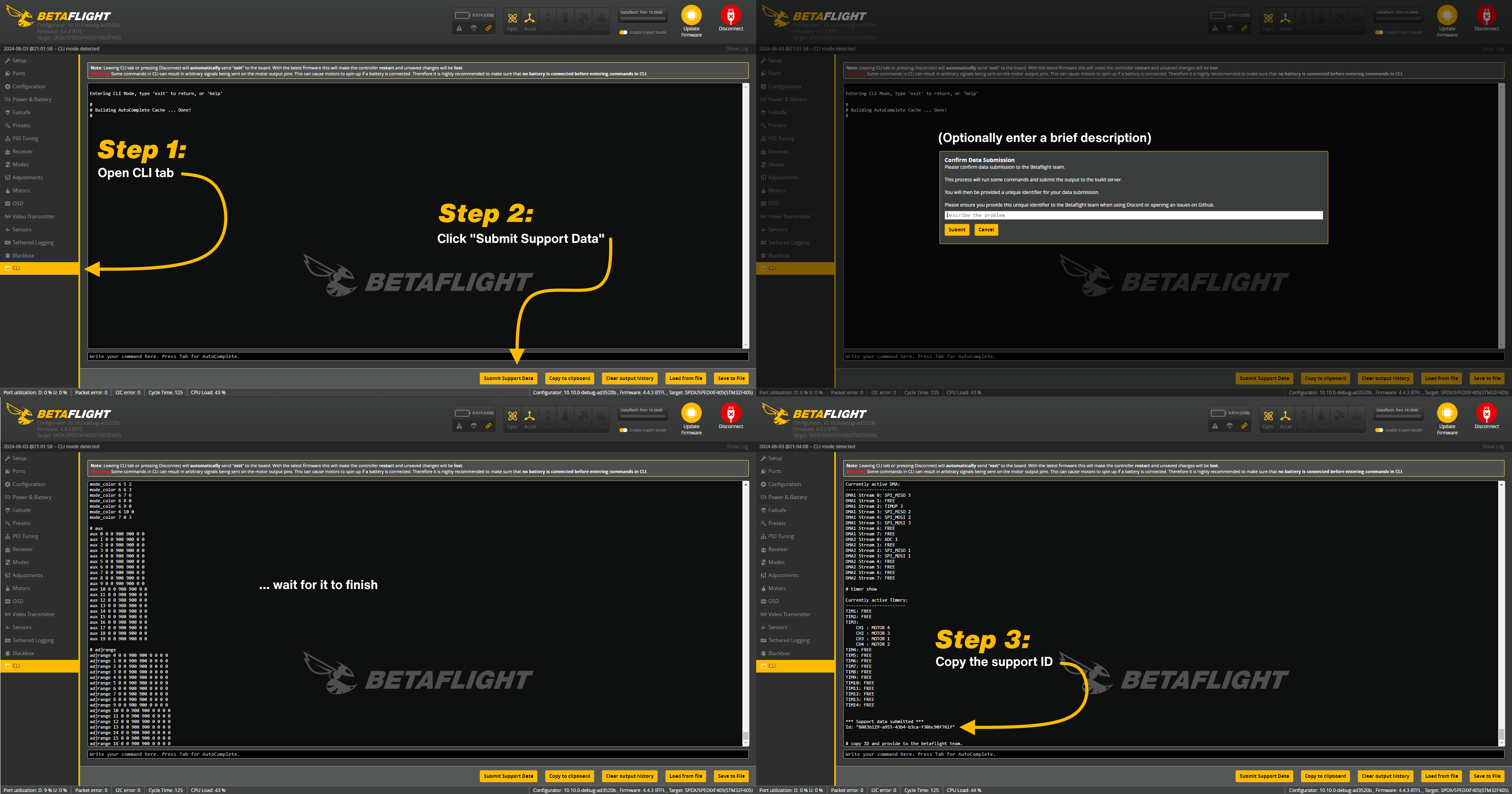
Submit Support Data
- Open the CLI tab
- Click the "Submit Support Data" button
- Optionally enter a brief description of the problem
- Wait for it to finish
- Copy the resulting support ID
Check the image below for visual steps:
 ebon sigil
9f947d2c-e7ac-4dcf-917e-6f30d751070e
ebon sigil
ocean ridge
Just before we do that, get a support ID and send it here
here the id
ocean ridge
Okay, yeah, we'll need to flash it
ebon sigil
how do i do that?
ocean ridge
Go to the Presets tab and make a backup first
ebon sigil
ocean ridge
Go to the Presets tab and make a backup first
ok then?
ocean ridge
Send a bl command in the CLI and see how your computer recognizes the flight controller in the Configurator. You may need to fix the drivers depending on what we get
ebon sigil
whats a bl command
ocean ridge
Literally just send "bl" in the CLI
ebon sigil
ok
ocean ridge
Check either using the "I can't find my DFU device" option in the port selection of the Configurator, or Device Manager on windows
ebon sigil
ocean ridge
Check either using the "I can't find my DFU device" option in the port selection...
wait slow down i did the bl thing and now
ocean ridge
Now see how (if) it gets recognized
ebon sigil
still nothing
ebon sigil
ocean ridge
Now see how (if) it gets recognized
the sbus is gray tho
ocean ridge
Well we haven't really done anything to change that yet, just doing some preparation first
If you're on Windows, download and run the ImpulseRC Driver Fixer
!driverfixer
barren atlasBOT
Betaflight Support
ImpulseRC Driver Fixer
When flashing/connecting for the first time, the default driver setup on your Windows machine may be incorrect. The ImpulseRC Driver Fixer tool can quickly and easily fix the drivers, and even automatically put your FC into DFU mode to flash directly if you're having issues.
It can be downloaded at the link below:
https://github.com/ImpulseRC/ImpulseRC_Driver_Fixer/releases/tag/v1_forever
ebon sigil
ocean ridge
If you're on Windows, download and run the ImpulseRC Driver Fixer
it says an error ocurred while entering bootloader acces to port COM3 was denied
ocean ridge
ebon sigil
it says an error ocurred while entering bootloader acces to port COM3 was denied
Make sure to close the Configurator and other apps that can take over USB communication. Some 3d printer slicers like to do that
ebon sigil
ocean ridge
Make sure to close the Configurator and other apps that can take over USB commun...
even beta flight close?
ocean ridge
ebon sigil
even beta flight close?
Yes
ebon sigil
ocean ridge
Make sure to close the Configurator and other apps that can take over USB commun...
now its saying unexpected number of devices detected
ocean ridge
Try disconnecting other USB devices other than your mouse and keyboard
ebon sigil
and also drone
ebon sigil
ocean ridge
Try disconnecting other USB devices other than your mouse and keyboard
and its still saying that
ocean ridge
ebon sigil
and also drone
You need the drone connected for it to be able to fix the drivers for it
ebon sigil
ocean ridge
You need the drone connected for it to be able to fix the drivers for it
drivers fixed saying
ocean ridge
Restart your PC and then see if it gets recognized as a DFU device with the process I described before
ebon sigil
done
ebon sigil
ocean ridge
Restart your PC and then see if it gets recognized as a DFU device with the proc...
whats a dfu devise
like controller?
ocean ridge
The flight controller has one main chip that runs the whole operation. It can either be in the normal running mode, or in a specific mode used for updating the firmware on it, DFU stands for "device firmware update", when in DFU mode, it should show up as a device with "DFU" or "bootloader" somewhere in the name. But sometimes the computer can't recognize it without installing new device drivers or fixing the existing ones.
Now you fixed the drivers, and we can check that it gets recognized correctly for updating the firmware.
ebon sigil
can i see with like a game?
ebon sigil
ocean ridge
The flight controller has one main chip that runs the whole operation. It can ei...
i have uncrashed on my pc i played it before the drone came and it was fine
ocean ridge
ebon sigil
can i see with like a game?
No, no, we're trying to change the firmware on the drone.
There are specific options that don't fit in the limited space that we have to work with on the flight controller chip. Receiver protocols can be some of them. The flight controller has firmware that only supports the CRSF receiver protocol from the factory, but you need to use SBUS. For that we need to build new firmware and flash it to the flight controller
ebon sigil
ocean ridge
No, no, we're trying to change the firmware on the drone.
There are specific op...
btw i have a dji controller 2 just letting you know
ocean ridge
Yeah, it talks to the DJI air unit inside the drone, which can only output the RC signals as SBUS to the drone's flight controller
ebon sigil
ocean ridge
Yeah, it talks to the DJI air unit inside the drone, which can only output the R...
ok tell me what to do
ocean ridge
Open the Configurator app again, put the flight controller into DFU mode again with the bl command and see if it gets recognized in the "I can't find my DFU device" pop-up
ocean ridge
Yeah, the Betaflight app
ebon sigil
and in the consol bl
ocean ridge
Yeah
ebon sigil
ok done
ocean ridge
Now select the "I can't find my DFU device" option in the top right, and get a screenshot of the pop-up that shows up
ebon sigil
it doesnt say that
ebon sigil
ocean ridge
Now select the "I can't find my DFU device" option in the top right, and get a s...
im back at the start
where you connect your drone
ebon sigil
ocean ridge
Now select the "I can't find my DFU device" option in the top right, and get a s...
i have like connect your drone and firware update
ocean ridge

 ocean ridge
ebon sigil
here
ocean ridge
ebon sigil
here
you can select your language at the bottom
 ebon sigil
ocean ridge
ebon sigil
ocean ridge
where is this
ocean ridge
It's an option in the selection input where yours says "Betaflight STM Electronics"
that likely means that it's in the regular working mode
ocean ridge
Yeah I know, that's how it should be recognized when it's not in DFU/bootloader mode.
You should be able to select the "I can't find my DFU device" option after putting it into bootloader/DFU from the CLI, and then see what shows up in the selection window
ebon sigil
how can put it into bootloader/dfu?
ocean ridge
ebon sigil
how can put it into bootloader/dfu?
by sending the bl command in the CLI
ebon sigil
now its like this
 ocean ridge
good, that's what we want to see
ebon sigil
now what
ebon sigil
ocean ridge
good, that's what we want to see
do i connect to my drone?
ocean ridge
give me a second, I'll write out some quick steps
ebon sigil
ok no problem
ocean ridge
- Disconnect USB now, and connect it again
- Go to the
Firmware Flashertab, and click theDetectbuton roughly in the middle of the screen - It should show the board as
BETAFPVF405, and select4.5.3as the firmware version. - To the right of where you chose the board and firmware version, you'll likely see the
Radio Protocoloption listed asCRSF, change it toSBUS - Make sure that the other firmware options are filled in, and that your OSD protocol is set to Digital. It should already be, just a double check
- Get a screenshot and send it here for confirmation. I'll quickly go over it and then you can continue to step 7
- Click
Load Firmware [Local]at the bottom right, wait for it to download, and then clickFlash Firmware. - It will likely disconnect and reconnect the drone, and ask you to select the DFU device instead, when you select it, it should begin to flash
ebon sigil
 ebon sigil
ocean ridge
1. Disconnect USB now, and connect it again
2. Go to the `Firmware Flasher` tab,...
ebon sigil
ocean ridge
1. Disconnect USB now, and connect it again
2. Go to the `Firmware Flasher` tab,...
here
ocean ridge
ebon sigil
here
Good, continue
ebon sigil
there is nothing dowloading bottom right
ocean ridge
ebon sigil
there is nothing dowloading bottom right
It'll take a while
ebon sigil
for me it opens up explorer
ocean ridge
ebon sigil
for me it opens up explorer
Oh yeah it wants you to make another backup
Do that, that's good
ebon sigil
to be sure you want to click the bottom right button
 ocean ridge
ebon sigil
to be sure you want to click the bottom right button
ocean ridge
ebon sigil
to be sure you want to click the bottom right button
Yes, then the "Flash Firmware" button will be active, you can click it, make a backup, and it should start flashing
ebon sigil
and the explorer says that i need to open up something
i dont understand it wants me to do something like open up explorer and to drag something in it
ebon sigil
ocean ridge
Yes, then the "Flash Firmware" button will be active, you can click it, make a b...
yo you there?
 ocean ridge
ebon sigil
still nothing
ocean ridge
ebon sigil
still nothing
I'm sorry for the confusion. You need to click the 2nd button from the right, the one that says ONLINE not LOCAL
ebon sigil
ocean ridge
I'm sorry for the confusion. You need to click the 2nd button from the right, th...
ok done
ocean ridge
ebon sigil
ok done
The flashing progress bar finished fully?
ocean ridge
ebon sigil
<@367656454087245825> you there
Yeah really sorry
Now go to the CLI tab, and load the backup file you made
ocean ridge
ebon sigil
the tab where is says presets or when load firware
Either one should work
ebon sigil
what command to i need to press
ocean ridge
ebon sigil
what command to i need to press
There should be a "load from file" button, or you can copy and paste the contents in manually. It will likely complain and show some errors, but they can be safely ignored
ebon sigil
how can i connect my controller to the beta flight app?
ocean ridge
ebon sigil
how can i connect my controller to the beta flight app?
The Betaflight Configurator app is just for the drone
ebon sigil
ok is it all done now?
ocean ridge
ebon sigil
ok is it all done now?
Did all of the settings load and get saved?
ebon sigil
yes
ocean ridge
ebon sigil
yes
In that case you should be good to set the receiver protocol to SBUS in the receiver tab if it isn't already
ebon sigil
k
but pls wait a second if something goes wrong
nope still nothing
maybe i did something wrong in the settings
i forgot about the mods
what aux is ledlow
ocean ridge
ebon sigil
nope still nothing
No values changing in the receiver tab?
ocean ridge
What do you mean?
ebon sigil
like there was nothing and now i need to add range and put it onto aux again
and i have other problem with sensors
im pointitng the drone forwards but it goes back

can you help me with this?
ocean ridge
ebon sigil
like there was nothing and now i need to add range and put it onto aux again
That sounds like the backup wasn't applied correctly. Manually copy the text, paste it into the CLI and send it. Then manually send the save command