#I need help: How to connect my EV800DM Goggles to my Drone?
102 messages · Page 1 of 1 (latest)
 cosmic forge
 rigid stratusBOT
cosmic forge
I accidentally reset my drone. I bought the Eachine Novice IV set at the time be...
rigid stratusBOT
cosmic forge
I accidentally reset my drone. I bought the Eachine Novice IV set at the time be...
Hey! We think our bot can help with your question; click the button below to generate an answer.
Please also give us a support ID
- Open the CLI tab
- Click the "Submit Support Data" button
- Optionally enter a brief description of the problem
- Wait for it to finish
- Copy the resulting support ID
- Paste it here
{'cause': 'thread creation'}
rigid stratusBOT
rigid stratus
Hey! We think our bot can help with your question; click the button below to gen...
✨AI-Generated response✨
You will need to set up the Video Transmitter (VTX) settings, see the guide on the VTX tab. Also, since you've reset the drone, you may also need to set up your channels again, which is done on the Receiver tab. For more assistance, please visit the help and support forum at #1052457584772255784.
-# {'cause': 'button press'}
 carmine pumice
cosmic forge
I accidentally reset my drone. I bought the Eachine Novice IV set at the time be...
carmine pumice
cosmic forge
I accidentally reset my drone. I bought the Eachine Novice IV set at the time be...
post a !supportid please
 thin grailBOT
 Betaflight Support
Submit Support Data
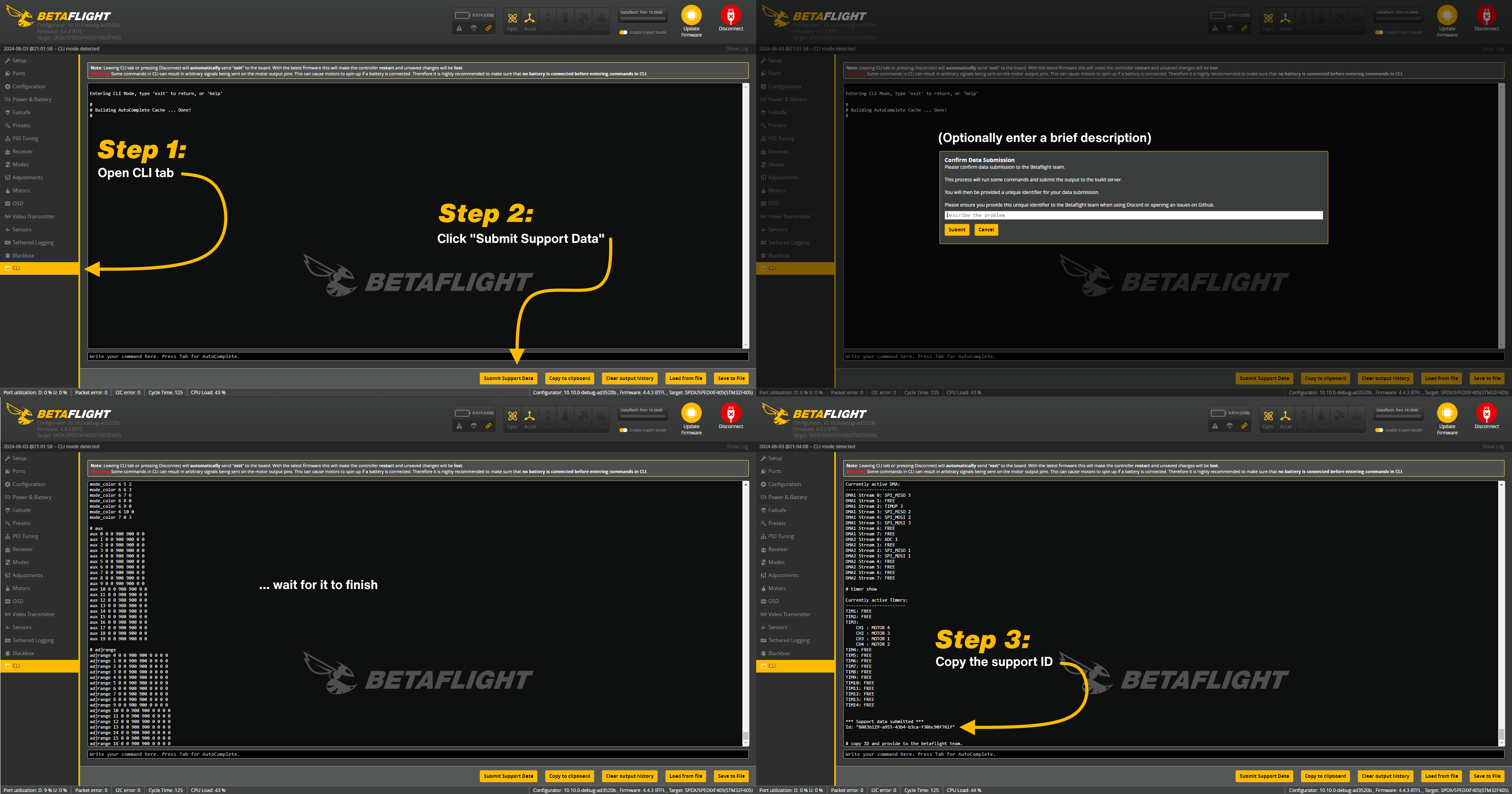
- Open the CLI tab
- Click the "Submit Support Data" button
- Optionally enter a brief description of the problem
- Wait for it to finish
- Copy the resulting support ID
Check the image below for visual steps:
 cosmic forge
4115d3d8-05d2-49e3-b613-75c48689a5e1
carmine pumice
cosmic forge
4115d3d8-05d2-49e3-b613-75c48689a5e1
which exact vtx do you have? do you know?
cosmic forge
Eachine OVX306
carmine pumice
and in case you don't have a copy, here's the manual:
http://myosuploads3.banggood.com/products/20210427/20210427213304Novice-IVManual1.pdf
go into the CLI and copy-paste these:
vtxtable bands 6
vtxtable channels 8
vtxtable band 1 BOSCAM_A A FACTORY 5865 5845 5825 5805 5785 5765 5745 5725
vtxtable band 2 BOSCAM_B B FACTORY 5733 5752 5771 5790 5809 5828 5847 5866
vtxtable band 3 BOSCAM_E E FACTORY 5705 5685 5665 0 5885 5905 0 0
vtxtable band 4 FATSHARK F FACTORY 5740 5760 5780 5800 5820 5840 5860 5880
vtxtable band 5 RACEBAND R FACTORY 5658 5695 5732 5769 5806 5843 5880 5917
vtxtable band 6 LOWRACE L FACTORY 5333 5373 5413 5453 5493 5533 5573 5613
vtxtable powerlevels 5
vtxtable powervalues 1 2 14 20 26
vtxtable powerlabels 0 RCE 25 100 400
save
cosmic forge
I did
carmine pumice
cosmic forge
I did
now, with the lipo still plugged in into the drone, go into the vtx tab in betaflight configurator, and post screenshot of the right-most section..
Device Ready: true (green)
cosmic forge
 carmine pumice
cosmic forge
carmine pumice
cosmic forge
now, on the left section of this tab, set it to a channel (band and channel)
preferably to one that's already set on your goggles
or set your goggles to the exact same channel
e.g. R8
(Race Band, Channel 8 = 5917MHz)
cosmic forge
Ok i did
carmine pumice
cosmic forge
Ok i did
are you seeing something in the goggles now?
cosmic forge
No
carmine pumice
cosmic forge
No
can you set the power in the VTX tab to something like 25mW
(25)
don't forget to save
cosmic forge
I see RF 8 below CH-A-4 and 5805M
carmine pumice
cosmic forge
I see RF 8 below CH-A-4 and 5805M
so your goggles is not on raceband 8
it's on A Band channel 4
cosmic forge
I can change it
carmine pumice
which I already asked earlier
cosmic forge
Oh haha sorry
carmine pumice
refer back to the user manual I have posted earlier on how to change channels if you don't know how to yet
cosmic forge
I know how to change them
carmine pumice
can you post another screenshot of the right-most section in the vtx tab please
cosmic forge
 carmine pumice
are you seeing something in the goggles now?
carmine pumice
cosmic forge
Yes damn
now, set up your OSD in the OSD tab
make sure at least Warning is active and it can easily be seen in the goggles..
e.g. set it either at the top center or bottom center.. so you can easily see what they say
cosmic forge
carmine pumice
now, set up your OSD in the OSD tab
Ok i did
carmine pumice
cosmic forge
Ok i did
now, still without props, go into the motor tab..
enable the "I understand the risk"
(read it and understand what it says)
cosmic forge
yes
carmine pumice
then use the master slider in the right side, drag it slowly up and see whether the motors spin
cosmic forge
they do
carmine pumice
cosmic forge
they do
then disable it..
unplug from usb, reboot the drone (unplug-replug the lipo)
and try to arm, with your goggles on your face so you can see what arming disabled flag will come up
this drone has a GPS
cosmic forge
I can see everything but it only beepswhen I want to arm the drone
cosmic forge
carmine pumice
this drone has a GPS
yes
carmine pumice
if it is enabled, then you need GPS satellite lock.. at least 8 satellites.. per the manual
cosmic forge
Yes i know
carmine pumice
cosmic forge
I can see everything but it only beepswhen I want to arm the drone
can you post a screenshot on how you've set up the OSD tab please
carmine pumice
cosmic forge
Yes i know
then it will not arm without 8 satellites..
take it outside and wait for those 8 satellites
 cosmic forge
cosmic forge
cosmic forge
I was not shown anything of what I had set
carmine pumice
cosmic forge
I was not shown anything of what I had set
then set this to NTSC

or you will have to reflash your flight controller so that OSD(Digital) is not selected in the options
before you reflash, save another config backup so you can reapply this later after flashing
use the Preset Tab this time..
(there's a Save Backup button in the Preset Tab)
cosmic forge
carmine pumice
or you will have to reflash your flight controller so that OSD(Digital) is not s...
Ok where can i do this
carmine pumice
 cosmic forge
Ok reflashed
carmine pumice
cosmic forge
Ok reflashed
reapply the backup you made via the same preset tab..
there's a Load Backup button
cosmic forge
I did now i can see everything
carmine pumice
cosmic forge
I did now i can see everything
now, unplug from usb if you haven't yet.
take it outside and wait for 8 satellite locks..
once it's got at least 8, try arming
carmine pumice
cosmic forge
i can't get a connection to satellites
how so? are you under a rock?
cosmic forge
I was outside on the balcony but in the glasses it said 0 satelitten all the time, the GPS works but about in Betaflight
carmine pumice
cosmic forge
I was outside on the balcony but in the glasses it said 0 satelitten all the tim...
on the top, in betaflight, in the row of sensors, is the GPS icon red?
carmine pumice
 cosmic forge
Oh this
carmine pumice
is the GPS icon red in this row?
cosmic forge
Yes GPS is red
carmine pumice
cosmic forge
Yes GPS is red
then this will be a temporary work around: you will need to set it back to how it was after testing:
go into the Failsafe tab
(in betaflight configurator)
cosmic forge
yes
carmine pumice
enable this
 cosmic forge
Ok
carmine pumice
cosmic forge
Ok
of course, save and reboot
unplug from usb
replug lipo
and try arming..
see what other flags would show up in the goggles if it still doesn't arm
cosmic forge
it worked
carmine pumice
cosmic forge
it worked
motors spin?
cosmic forge
yes and reacts to the throttles
carmine pumice
cosmic forge
yes and reacts to the throttles
now, disarm. unplug lipo.. put in the props, correctly..
and arm it and try to hover.. (slowly ramp the throttle up.. slowly)
if it doesn't spaz out, or it doesn't tumble and actually hovers, you're kinda set
feel free to disable the "Allow arming without fix"
cosmic forge
All right, I'll try it tomorrow, I have to go to football training now. But thank you so much for your detailed help and time, I would never have managed it like this!
carmine pumice
cosmic forge
All right, I'll try it tomorrow, I have to go to football training now. But than...
and thank you for being cooperative and not going into your own and actually following instructions
thank you for trusting in me
cosmic forge
carmine pumice
thank you for trusting in me
Hello, I have tested the drone. The problem with the satellites has been solved, so I can see enough now. However, it felt like I only raised the throttle a millimeter and the drone quickly turned upside down to the right.
carmine pumice
cosmic forge
Hello, I have tested the drone. The problem with the satellites has been solved,...
see how to fix an angry drone from this video