#US - Connecticut.
1 messages · Page 7 of 1
 tardy steeple
 hoary oxide
I've turned off MQTT downlinks for my main node at my house. Wanted to confirm that I did it right - the node is configured as per the instructions shared here, but I just turned off the downlink_enabled setting for the ConnNet and Primary channels. I left lora.ignore_mqtt as false for the node. Is there anything else I need to do?
 fierce moss
That’s totally fine.
I’m building out the new Torrington node now that should secure our Torrington - Bristol backhaul once it’s on the new tower.
After that, the only bandaided mqtt main channel traffic is south of us.
The main reason you may eventually want to accept MQTT traffic will be the Test bot/News Bot/AI chat bot.
But you’re good
tardy steeple
I had a few people ask me how I reset my rak using the reset switch without access to it
I have a switchbot
I will upload a video of how it works
In the video nothing is mounted or anything so it wouldn't exactly touch the reset button it's more of a demonstration
 void cape
 tardy steeple
Rather warm no?
 toxic shard
void cape
toxic shard
void cape
Saw a message about a new G2 on the public channel but didn’t get node info at the time. Was that you?
 void cape
Maybe?
void cape
toxic shard
Saw a message about a new G2 on the public channel but didn’t get node info at t...
Yes.
 toxic shard
@void cape just making your you saw this 👆🏻
void cape
it's a new radio
fierce moss
Or reuse a previously used short/long name on the new radio.
void cape
Neither, to my knowledge. I wiped it shortly after powering it on but I upgraded from 2.3 which was prior to the encryption keys
toxic shard
I was just able to send it a message so who knows.
void cape
toxic shard
I was just able to send it a message so who knows.
Tried sending a reply
toxic shard
Received, seems all good
@fierce moss ever try moving a key between devices? Any point to that? My guess is the key is associated with the device ID and the names don't matter. If I replace a node and configure it with the same name and key, would a friend that's seen my old node with that key treat the new node as valid? Would it even care that two nodes had the same key? Figured if anyone had seen that yet, it'd be you.
(among our group here)
toxic shard
Weird, I've got a new node (RAK 4631 based) that won't take LoRa settings. Wiped it, flashed it fresh, can't set the region.
 jolly ruin
kick it (the answer the everything that's broke)
toxic shard
I was able to set it using serial. Serial hadn't been working before so I had been trying BLE. Hrmmmf
tardy steeple
toxic shard
Weird, I've got a new node (RAK 4631 based) that won't take LoRa settings. Wiped...
I just got a kit from Rokland no matter what I do it’s not working .
toxic shard
What do you mean by "it's not working"? What are you seeing?
tardy steeple
toxic shard
What do you mean by "it's not working"? What are you seeing?
Tried 2 computers 5 cables . WiFi Bluetooth
Finally worked the second I plugged it into my Mac .
toxic shard
Got a new Muzi H2T today with their belt clip and I forgot how much I like this type of node. Still waiting on my replacement T114 from Heltec for my first H2T
tardy steeple
toxic shard
Got a new Muzi H2T today with their belt clip and I forgot how much I like this ...


I literally just built one yesterday
toxic shard
I ordered this one fully assembled and got the flex whip antenna
but my fisrt I assembled
Both were good experiences
tardy steeple
Getting that antenna wire down the channel and around was a fun thing
toxic shard
that was a little tricky, but not too bad. I've had harder times with other types of cases for other nodes
I wish the firmware took advantage of the color screen
toxic shard
that sounds.... odd
tardy steeple
I thought I saved a photo of it but basically he just had a black and the red wire hooked into the solar panel and the t1000 E was placed inside the solar housing
 fierce moss
toxic shard
<@223249966691385344> ever try moving a key between devices? Any point to that? ...
fierce moss
toxic shard
<@223249966691385344> ever try moving a key between devices? Any point to that? ...
It should work yes.
The main reason I feel would be sending remote admin commands to routers
as you can set a node to authorize 3 keys
so if you lose one or swap, you can swap that key to keep admining it
toxic shard
Charging up my new battery using my new DC-DC charger. This is for my overbuilt car node.

Was surprised the charger came with power poles already on the wires 😍
tardy steeple
toxic shard
Charging up my new battery using my new DC-DC charger. This is for my overbuilt ...
What’s the car node look like?
toxic shard
That’s all I’ve got so far lol. It’ll be an ammo box or something with the batt, charger, fuses and such, and a station g2. Antenna will be inside the car for now, but eventually I’ll mount the antenna externally.
Goal is for it to stay powered when the car is not running.
And to be something I can grab and temporarily deploy wherever. Honestly, it’s mostly an excuse to build it
toxic shard
@potent ravine you have some competition

 potent ravine
LOL may the best man win
tardy steeple
I was trying to test a drone node and “ caused panic “
 fierce moss
lol
tardy steeple
Lol
void cape
tardy steeple
I was trying to test a drone node and “ caused panic “
I’ve had success with this, but battery life of the drone means it has limited effect.
It allowed me to bridge Goshen to Bristol once.

 toxic shard
I want to understand this mystery still:

Something is causing this to appear to be zero hops with a signal report that really suggests it's in my house. But I turned JW+ downlink off and it's still happening.
toxic shard
Also, this weirdness:
12/14, 3:23 PM
Node 848867947 GFMS to JW+ TRACEROUTE_APP
JW+ -> GF00 -> GFR1 -> GFR2 -> JW -> GFMS
Probably need an SDR to untangle that.
fierce moss
Yea that’s weird
 steady solar
@toxic shard you've had issues with nodes randomly losing their names yeah? Just had my roof rak node do that, changed ID entirely too. All other settings are in tact
Bottom just disappeared and I couldn't traceroute so I got super worried something happened. Turns out there's no issue other than the name and ID just kicked
 toxic shard
I've had them lose their name but never change their ID. That should be based on the MAC address, very odd it'd change. Is it a RAK?
 toxic shard
Anyone know "nazrin", no default channel and old firmware
 tardy steeple
@toxic shard

Atlavox.com
The Atlavox Beacon is a solar-powered Meshtastic node that can increase the coverage and reliability of your Meshtastic network. This all-in-one unit combines the solar panel, enclosure, and antenna mounting rail into an integrated frame system that offers multiple mounting options. RAK WisBlock Included and preinstal
toxic shard
Nice
tardy steeple
Preorder date tho
48 days min
toxic shard
I'm so sick of this MQTT junk in my nodes 😡
fierce moss
You can de-link for now…
Or i can send you a node to Toss up to handle mqtt and you can just enable the ignore mqtt option on everything
toxic shard
I already delinked, I'm still getting tons
I haven't done ignore yet. Trying to understand what's going on
Like, these traces, whaaaa?

JW+ is poinetd at Liam's map broker, not the GF one right now
Has been for a day or so
so weird.
any ideas?
toxic shard
Turkey Hill in Berlin forgot its name again. Most recently Jeff had it named HFZ1
That's !ce68df4d
fierce moss
yea i dont get those traces....
if you are delinked, mqtt shouldnt be causing anything
toxic shard
I'm still seeing R2D2 at 9.25dB 🤯
On my T1000E CARD
JW+ is definitely pointed at Liam

Channels:
  Index 0: PRIMARY psk=default { "psk": "AQ==", "uplinkEnabled": true, "moduleSettings": { "positionPrecision": 17, "isClientMuted": false }, "channelNum": 0, "name": "", "id": 0, "downlinkEnabled": false }
  Index 1: SECONDARY psk=secret { "psk": ".....", "name": "ConnNet", "uplinkEnabled": true, "moduleSettings": { "positionPrecision": 17, "isClientMuted": false }, "channelNum": 0, "id": 0, "downlinkEnabled": false }
And I'm definitely not downlinking
fierce moss
lliam doesnt allow downlinking anyway
 tardy steeple
 toxic shard
On the plus side, this always makes me happy: JW+ -> GFR2

That dinky little antenna is all JW+'s got
tardy steeple
 toxic shard
At this point I feel like i need to packet sniff this traffic
 toxic shard
tardy steeple
toxic shard
tardy steeple

Not sure if I should be ashamed for that photo or not.
They’ll go to good homes soon! I’m just…fostering…yeah that’s it.
toxic shard
(added on more since i took the shot. Found an extra Seeed T1000-e card)
Like this I get, this was RF from me to Gary, then MQTT down to the shore. JW+ -> JW -> GFR2 -> GFR1 -> GF68 -> ICUP
When I saw GF68 I thought "wow Gary has a lot of nodes" then I looked it up and saw it was @tardy steeple
fierce moss
haha
fierce moss
toxic shard
My only fancy HT is an ft5d
everything else is a $30 beofeng or less lol
tardy steeple
Booofwang

The Atlavox Beacon is my latest Meshtastic product, now available for preorder. https://atlavox.com/products/atlavox-beacon-solar-meshtastic-node
This Meshtastic radio is designed to be deployed outdoors to improve coverage and redundancy of your local mesh network. In this video, I go over all the components, design decisions, mounting options...
toxic shard
fierce moss
everything else is a $30 beofeng or less lol
The VGC VR-N76 is my current ht to fiddle with. It’s got KISS TNC support over Bluetooth now.
toxic shard
(android apps work great with it directly, for iOS you need the B.B. Link Adapter to bridge between types of bluetooth apple nerfs)
tardy steeple
 steady solar
toxic shard
I've had them lose their name but never change their ID. That should be based on...
steady solar
toxic shard
I've had them lose their name but never change their ID. That should be based on...
Yep a RAK, never seen that before. Different Meshtastic ID and name, bluetooth MAC remained the same when reconnecting though hah.
magically changed from !23f4662b to !d1cc34d9
I also only have one node connected to liam's mqtt server and i still get all sorts of mqtt discovery
fierce moss
That has to be via lora. Liam’s has no egress data
toxic shard
So I'm at work having lunch, tell CARD to trace to JW+ which I can access via MeshSense in a browser. Looks odd.

Little hard to see so I'll copy and paste the meshsense part here: JW+ -> FILT -> GFR2 -> SOL -> CARD
Almost like MS got the ends backwards. CARD is near FILT and JW+ is near SOL
Here's the data MS shows for the trace: https://gist.github.com/jwarchol/3af4f71d116ab8241795c152ae0d8ccc

I suepect MeshSense is parsing the "from" and the "to" as if the node it's connected to had to be the sender. But in this case it's the target

GitHub
I sent a traceroute from CARD (1139140003) to JW+ (1129837892). MeshSense 1.0.18-beta shows the path with the ends transposed. Incorrect current output: JW+ -> FILT -> GFR2 -> SOL -> CA...
toxic shard
@fierce moss looks like chip lost its position
Last position update on liam's map was 25 days ago
fierce moss
Yea. You stopped downlink to long fast
About then
It was updating through that path
toxic shard
I still see it over RF, it's not sending positions
fierce moss
Oh. Hrmmm. I’ll look
toxic shard
If you need me to re-link so you can send configs I can maybe do that later tonight, busy right after work but after
fierce moss
I’ll need a path to it to update it eventually
Np. I’m down with pneumonia atm
Mostly sleeping
toxic shard
Oh no!
fierce moss
Ehh. I’ll be fine. I did it to myself.
Refused to go to doctor the last month as it’s hunting season and my wife would make me stop if i did lol
toxic shard
ANyone know what "No channel" means?

 craggy vigil
Does anyone know if Lilygo has already been selling this?
toxic shard
toxic shard
ANyone know what "No channel" means?
#apple message
(What "No Channel" means)
tardy steeple
craggy vigil
Does anyone know if Lilygo has already been selling this?
I was told 12/20
tardy steeple
toxic shard
(What "No Channel" means)
Keys are not hand shaking
toxic shard
Meshtastic isn't that sophisticated. Keys are just part of node info
tardy steeple
toxic shard
Meshtastic isn't that sophisticated. Keys are just part of node info
I’ve been trying to get people involved and all 7 of them ended up making “ repeaters “ and won’t listen smh
toxic shard
As in they set their mode to "repeater"?
tardy steeple
Yeah, they all ended up watching this guy on Instagram that I kind of recommended and they they’re just out there

Edit: I’m having trouble keeping up with sending you all the build list link 😂 I’ve added it to the FAQs in my DMs, so please head there to grab the build list… Comment “build list” if you want a link for this build! We had all sorts of DMs asking what it takes to build this device, so I’ve consolidated a list of materials you’ll need on our Ama...
Likes
15323
 Instagram
toxic shard
Instagram
toxic shard
Just send them this https://meshtastic.org/blog/choosing-the-right-device-role/

Learn how roles like Client, Router, Sensor, and Tracker affect mesh performance, and avoid common pitfalls for reliable and efficient mesh communication.
And if they don't listen, tell them to use frequency slot 55 "to match their antenna", then they'll be off on their own and not bothering people who read docs
toxic shard
toxic shard
Also, this weirdness:
```
12/14, 3:23 PM
Node 848867947 GFMS to JW+ TRACEROUTE_A...
@fierce moss I think this may be that same bug where the ends are transposed. I was confused because it makes it look like JW+ is talking to GF00, but if you swap the first and last node, it makes more sense. GFMS -> GF00 -> GFR1 -> GFR2 -> JW -> JW+ makes total sense.
tardy steeple
Anyone know if any place sells this local ?
 toxic shard
Nope, sorry.
fierce moss
I don’t. Always grab em online
tardy steeple
Trying to get this node up and going today .
tardy steeple

I wonder if a Seeed XIAO ESP32S3 & Wio-SX1262 Kit for Meshtastic would be a better or comparable to deploy a repeator POE BBS
Not using this housing it’s obviously way too big .
tardy steeple
toxic shard
ANyone know what "No channel" means?
Every single time I open my app this appears and I have to force close
 toxic shard
Never seen that. Probabl a question for #apple
tardy steeple
toxic shard
Never seen that. Probabl a question for <#874835141145542716>
Maybe it’s my beta iOS . The problem doesn’t replicate on regular iOS
toxic shard
Not a fan of emoji shortnames. Other than being cute on the map, they're less useful. Can't sort them, difficult to filter by them, hard to use them for concice communication.
It was one thing when people sort of came up with it on its own. It's another when the Meshtastic blog says it's a good idea.
🤦
void cape
tardy steeple
Maybe it’s my beta iOS . The problem doesn’t replicate on regular iOS
I get this all the time on regular iOS
toxic shard
I used to get more weirdness. Maybe I deleted the app and cleared the data at some point
Anyone hearing these messages from KC1OCA at Quabbin Reservoir?
 rare mulch
i received on mine in Bristol. must have been pretty high up!'
 errant minnow
tardy steeple
Anyone know if any place sells this local ?
errant minnow
tardy steeple
Anyone know if any place sells this local ?
I have one available.
tardy steeple

GitHub
Contribute to pdxlocations/MQTTc-for-Meshtastic development by creating an account on GitHub.
jolly ruin
anyone here have similar issues to this thread? https://meshtastic.discourse.group/t/heltec-v3-random-factory-resets/13769

Meshtastic
Hi everyone, I am just starting a thread here to see if anyone else is seeing an issue where their Heltec V3 node randomly factory resets? I have been making small portable nodes for people in my community, and a couple people have reached out to me about a problem they’ve seen with their device. In short, the device will randomly factory reset...
seen this a few times now when battery dies..
 steel steppe
Just a heads up we are placing two nodes, one in Enfield and one in Union. Both have just the stock antennas on them at the moment until we can get something better for them. Keep an eye out for them. They have short names HTEN and HTUN. I believe the Enfield one went up yesterday.
craggy vigil
RAKwireless Store
WisMesh Pocket Mini is a compact & ready-to-use Meshtastic device powered by nRF52840. Pre-flashed with firmware & enclosure, it’s ideal for Meshtastic nodes.

 toxic shard
How is this 10db?
 fierce moss
modified? lol
tardy steeple
Anyone use this ?
I just found this on AliExpress: $208.52 | Original Raspberry Pi LoRaWAN Module SX1302 SX1303 Mini PCIe 868M 915M Lora Gateway Hat Expansion Board in the stock
https://a.aliexpress.com/_mrp6qld
fierce moss
No. You can print your own from like a pcbway for way cheaper
That’s crazy expensive
 tardy steeple
@fierce moss You have this right ?
 tardy steeple
I’m looking at making a POE BBS set up
fierce moss
As a physical node?
That’s a lot of hardware for just a bbs. That could be a full base station. Then build your BBS as a virtual node.
Entirely up to you. But i really like my pi+e22 as a rock solid base station.
Solid networking and processing power.
tardy steeple
@fierce moss Did you just send a test message on the net ?
I got a notification and a app banner but it’s not showing in the actual app
tardy steeple

The notifications are going off on my phone about great acres farm however, I’m not seeing anything inside the app. I am so confused.

Then the app is empty
 tardy steeple
fierce moss
Which node?
tardy steeple
fierce moss
Which node?
I just got a t1000e .
I wanted the newer one that has a blacked out battery
 tardy steeple
 tardy steeple
This is what was on it when I received it
fierce moss
Oh
Yea. Absolutely upgrade. A
2.5 was a big upgrade. And though it’s supposed to be backwards compatible, it’s… kinda
Move everything to 2.5.3+
Major changes.
 severe quest
Been working on this board the last few weeks, 1W LoRa module, esp32 based (I'm going to switch over to the nrf52 for power reasons), GPS, current/voltage monitoring, and MPPT solar capable, along with a few environment sensors

Once I switch to the NRF52 I'll probably add an OLED and maybe a card keyboard port, and maybe a regular SX1262 instead of this one with the PA
severe quest
Yeah, I'll probably have the radio be on an M.2 style board so it can be swapped out for the SX1262 and vice versa, depending on the application
The environment sensors, i2c port, and gps are on their own LDO switched regulator so they can be powered completely off unless a reading is needed, for added power efficiency
tardy steeple
 tardy steeple
@fierce moss
I have my t beam supreme in an elevated position also running the mqtt in my area . Should I keep that on client or should I change it to
Router
Repeater
Router and Client
fierce moss
so, make sure it's on 2.5.15+
Router_Client no longer is a real option. its a dummy option.
But unless it's at some crazy elevation with miles and miles of line of sight, keep it on Client
itll still function perfectly.
You ONLY choose router for towers or special situations
it could prevent proper long range hops otherwise. damaging the mesh
as a client, itll still act as the gateway perfectly.
 radiant sequoia
Morning...
 surreal sable
Good morning
fierce moss
@tardy steeple are you bridging to PVMESH?
the mass people?
hrmm. why am i seeing these...
weird. i had random egress data leaking in from the default mqtt. should be fixed now....
lets test
steady solar
Resetting nodedb yee haw
my rak4631 solar roof node lost fixed position randomly, when i reapplied it, after the reboot the name got lost. hate how finnicky this firmware is.
radiant sequoia
the name losing thing seems to be a big issue and not always with the RAK...
even one recent firmware...
annoying when the device is remote
steady solar
Yeah, when you just want it to work and not check up on it every few days/weeks
I think when I have access to a big ol ladder again I'm going to swap out my 10dbi antenna on the roof to the 8.5 or 5.8dbi. Feel like I'm missing way too much by shooting too flat
10dbi - 12 degree vertical
8.5dbi - 14 degree vertical
5.8dbi - 35 degree vertical
@fierce moss any thoughts, particularly for my location?
steady solar
I just want to get maximum coverage over the area while still being able to reliably connect to you
I got a whisper of a 'mount tom pond' node that apparently has been around for at least 3 months, first time i saw it. feel like i should be able to cover that area too
fierce moss
yea. the mode wont change that. we dont come close at all to 7 hops away lol
youll always be 1 hop at client
hrmm. dunno. depends where they are
a lot of people just have a couple heltecs in their living room
so you get tiny errant packets
or, they just dont have the elevation to really get out
i feel thats why discord is nice. helps us to help them find optimal spots. or motivation to get a "real" base station mounted
The only difference with Router mode is that it grabs and relays things SOONER than a client. So other clients will see that a router grabbed it and then they wont hop it.
the bad thing about it is, if Johnny Q Newbie doesnt know that, and puts his living room heltec into router mode, it means things could stop there.... and not be relayed by a better situated client that actually needs to/can relay it.
steady solar
Top of mountain = router
Top of tall skyscraper = router
Everyone else = client(mute/hidden) 🙂
fierce moss
well, normal client
steady solar
There's still a router_client I see in manhattan when a plane flies over, thing probably can't get touched
fierce moss
Base Station and Car = Client.
the 90 other nodes in your drawer/table/shower, Client Mute
fierce moss
steady solar
There's still a router_client I see in manhattan when a plane flies over, thing ...
Router_Client is just another name for Client now.
it was left in there so firmware upgrades/config files still work
steady solar
fierce moss
Router_Client is just another name for Client now.
It's still on a really old firmware so it's still actually router_client 😬
fierce moss
oh.... lol
steady solar
Just reset my nodedb so i can't screenshot but yeah, it's been there for like a year
Was hoping they would update once 2.5 hit but i'm pretty sure it's just a set and forget node for someone
fierce moss
im resetting meshsense nodedb and my base station db now
and moving some VMs around
meshsense will be back in 10min
trying to figure out how its seeing those people in MASS over mqtt.
I dont want MQTT garbage in our mesh
toxic shard
 fierce moss
the only MQTT traffic should be temporarily bridged folk that are within our area. and are actively working to LoRa mesh in
toxic shard
I want to know how I'm getting it at 6.25dB, that means "in my house", but nothing here is downlinking MQTT
and even then, the only thing uplinking is JW+ and it's pointed at Liam
fierce moss
agreed.
toxic shard
is z2 @severe quest ?
fierce moss
i think so. i just deleted my db...
ghost, zu and you were the only people allowed to mqtt.
toxic shard
This is a nice RF route
 fierce moss
agreed. i wish it were reliable
toxic shard
Yeah, but it gives hope
fierce moss
correct
toxic shard
Those routes going off north are PVEC 😕
severe quest
z2 is not me
fierce moss
when DJ gets us on the torrington tower, itll be so nice
toxic shard
Thanks @severe quest for confirming
fierce moss
@zuu , you dont have any other mqtt configured right?
severe quest
Correct, just ZB1
fierce moss
ok. just making sure. that PV mesh in mass is somehow connected in. trying to see where it's propigating from
fierce moss
its probably ghost
some node around him linked
will need to find and block it
shouldnt be hard once he is around

 toxic shard
Another impossible one
 steady solar
toxic shard
Another impossible one
steady solar
toxic shard
Another impossible one
hes the one sending the SWA717 messages
toxic shard
Ahh, sorry, I hadn’t seen the node info when I saw the SWA message and didn’t notice the id match
Even if on a plane, I have a hard time buying that SNR. This was received on CARD, a t1000e with a crappy antenna. Indoors
steady solar
that line of sight is nuts! 🤣
tardy steeple
fierce moss
<@222208983014834187> are you bridging to PVMESH?
No idea . I just set it up and left it on my roof.
 tardy steeple
toxic shard
Ahh, sorry, I hadn’t seen the node info when I saw the SWA message and didn’t no...
tardy steeple
toxic shard
Ahh, sorry, I hadn’t seen the node info when I saw the SWA message and didn’t no...
It shows he’s connected mqtt on my end
 toxic shard
Hmm
My biggest problem is I can’t trigger this anomaly so testing via trial and error is nothing but ambiguous results.
@fierce moss Do you have a guide on your OTA rak update process? I want to try it with SOL. It’s still on a 2.4 release, maybe that’s contributing to the weirdness.
fierce moss
i have a shorthand list i wrote myself i can paste here
 fierce moss
steady solar
https://tenor.com/view/rage-angry-pissed-off-office-throw-gif-17229290
fierce moss
steady solar
https://tenor.com/view/rage-angry-pissed-off-office-throw-gif-17229290
Seriously...
radiant sequoia
😩
toxic shard
@radiant sequoia did you have a node forget its name / location besides turkey hill?
(Sort of annoying that one of the PVEC nodes is also called Turkey Hill, obviously I’m referring to the local one)
This anyone?
 tardy steeple
Ever since my iOS app updated ive been having issues
fierce moss
you know i can NEVER traceroute chipanee.... but random Traceroutes make it THROUGH chip lol
oooh
one came back

if only i hadnt deleted my nodedb lol
id have found the path
that TR found its way TO chip. which is good
failed lora back but found a path via mqtt
radiant sequoia
toxic shard
<@933885662388703263> did you have a node forget its name / location besides tur...
ya, station g2 at my house.... it was weird... but yes plus turkey
toxic shard
Super weird, very different hardware
toxic shard
fierce moss
failed lora back but found a path via mqtt
Holly Hill is on wifi in Rocky Hill. Turkey Hill is rak no wifi
I think maybe whatever that FFFF is is the prob. Maybe.
tardy steeple
toxic shard
I think maybe whatever that FFFF is is the prob. Maybe.
My node was FFFF I had to erase it 2x and update firm ware 2x
 fierce moss
when?
tardy steeple
Yesterday
fierce moss
FFFFF probably just means it was an overflow for the variable
my screenshot was 10min ago
tardy steeple
That was my t1000e and my rak is now being an asshole and won’t save a region
fierce moss
its not just you
tardy steeple
My wife said it’s the drones messing up my radios lol
fierce moss
ive had my region unset a few times too
 radiant sequoia
Anyone have any thoughts on this one, the gafnet entries....

seeing that a lot, not just on mine....
toxic shard
GAFnet means someone using Gary's MQTT
a416 is @hoary oxide
how are you seeing that screen @radiant sequoia ?
I don't recognize it
SOL is on 2.4.2, but it's below zero out and I don't want to be taking it down, taking it out of it's enclosure, etc. Thus wanting to OTA update it
It's in one of these but without the solar panel lid. The USB is not accessible and I can't even fit a 90° adapter in. Do not recommend. I'm replacing it with a more typical enclosure eventually. https://store.rokland.com/products/rak-wireless-solar-unify-enclosure-ip67-150x100x45mm-pre-mounted-m8-5-pin-rp-sma-connector-pid-910421

Rokland
Rokland is a Gold Level distributor for RAK Wireless. When comparing to price on RAK web site, RAK price is not inclusive of shipping to USA or 25% import tariffs. When buying from Rokland, items ship FREE from USA (to other US locations) so no additional shipping or tariffs apply.Unify Enclosure IP67 150x100x45mmWith
tardy steeple
toxic shard
It's in one of these but without the solar panel lid. The USB is not accessible ...
I have one of these and it’s on my dad’s house in milford and it’s completely dead . Entire panel is caked with dirt
toxic shard
My main issue is I don't get enough sun where I've got it mounted, so the lid panel didn't fit my application. Also I've found the waterproofing on these Unify enclosures is inadiquate, especially given their premium price. No USB, not waterproofed well, RP-SMA eww. I'm not buying more of them for sure.
radiant sequoia
toxic shard
how are you seeing that screen <@933885662388703263> ?
meshmap
toxic shard
.app or .net?
I see it now, meshmap.net. That map didn't used to have this detail

@fierce moss do you publish to the official meshtastic broker too?
radiant sequoia
net
fierce moss
I think so. Liam’s i know i do. I think i do the main too. I’ll look in a bit
toxic shard
So yeah, that just means that last time (27min ago in my screenshot), the Turkey Hill station was heard by the official broker via Gary's node. c986 is his base station
Before that it was a416, which is codefast's
radiant sequoia
I get that part, it's the root topic that was throwing me off....
toxic shard
When Gary opened up users on his broker that was the topic in the suggested config.
tardy steeple
Looks like I’ll be putting together something shortly
 toxic shard
Assuming your neighbor doesn't nip it
fierce moss
Yea. Gafnet is just my publishing topic
They all get scraped.
It’s best to use a unique one if you do internal mqtt stuff too.
toxic shard
good tip
fierce moss
Plus it’s a good way to see the ingress point on a map like that
Someone could be like “i don’t want to be published, but i need mqtt”
Then they could track down gafnet, talk to me, and i could block the node
toxic shard
I've moved SOL onto an atypical frequency slot to kind of take it out of the mesh and see if it's older firmware is part of the issue.
Unwin G2 should still make most of the same links
tardy steeple
toxic shard
Assuming your neighbor doesn't nip it
Funny you mention that ! I caught her red handed !
tardy steeple
Ooo joy the last one nothing but issues
radiant sequoia
heh
tardy steeple
 toxic shard
nice, thanks for the heads up
toxic shard
I’ve reached the DC load test stage of too deep lol
toxic shard
toxic shard
I’ve reached the DC load test stage of too deep lol
Nothing important going on, just validating the capacity of a battery I'm considering for my mobile G2 node.
radiant sequoia
are you trying to contact aliens with that thing....
toxic shard
If it'll help me reach East Berlin, whatever it takes
fierce moss
Speaking of batteries. These last few days will be the test case for charging in 0 degree weather
Need to check voltages
TFG at 99%
Looking good
toxic shard
I've disabled the ConnNet secondary channel on JW+ to simplify it's config while troubleshooting these PVEC oddities.
I don't think that will actually do anything, but gotta keep trying
short of turning off mqtt entirely, i dunno what else to do.
Interesting, I think I'm seeing @fierce moss's meshsense in my G2 traces in MeshTXT


MeshTXT shows the trace weird like MeshSense does
 solemn spear
Hm…
toxic shard
{
    "id": "6ba61a5c-848e-4ec6-b2a2-8df5eef9b34b",
    "packet_id": 997766395,
    "to": 2733365340, // Unwin Station G2
    "from": 848867947, // Great Acres Farm - MeshSense
    "channel": 0,
    "data": {
        "route": [
            1857092937, // Great Acres Farm - Base Station - WG4RY
            2807528815, // Great Acres Farm - TF&G Rtr - WG4RY
            2632343031  // Great Acres Farm - Chip Rtr - WG4RY
        ],
        "snrTowards": [
            0,
            25,
            -46,
            -20
        ],
        "routeBack": [],
        "snrBack": []
    },
    "timestamp": 1734996926871,
    "rx_timestamp": 1734996925000
}
Basically these clients get confused when they see a trace they didn't initiate.
fierce moss
Remote admin to it or connect to it over ble
Set to client mode
Make sure power saving is off!
DISCONNECT CLIENT-
Set node to NONE on android client!
Download new firmware from git
Open in "My Files" client
Extract Firmware-rak4631-xxx-ota.zip - from main zip.
leave this zip compressed.
use app "NRF CONNECT"
Redresh
Connect
Dfu- tiny curcle top right
select Zip file
Click OK
There will be ONE scarry/red line. Normal.
Another red at end. Normal.
Great success!
Check all settings.
Set back to router mode (will disable BLE)
toxic shard
fierce moss
Remote admin to it or connect to it over ble
Set to client mode
Make sure powe...
Thanks
fierce moss
np
toxic shard
Non-meshtastic related, but wanted to hype the VGC VR-N76 ham radio handheld again. The latest firmware allowed me to use RadioMail for iOS directly to do WinLink, and it even did the frequency selection
radiant sequoia
The best I may be able to do is get something on top of east berlin firehouse.... not super high, but would be something... I'd need to buy another self-contained solar one.... and put a decent antenna with it
I saw your email, just didn't get a chance to reply....
toxic shard
I can donate another solar one to the cause, let me see what the line of site is from there.
potent ravine
@radiant sequoia Well, well, well. Look who the wind blew in
radiant sequoia
oh boy....
been here for a while, just didn't realize there was a CT group embedded in the list...
tardy steeple
toxic shard
Non-meshtastic related, but wanted to hype the VGC VR-N76 ham radio handheld aga...
Check this out when you get a second

Here we take a look at the brilliant custom firmware from NicSure for the TIDRadio H3.
🔴 Want to contribute to the channel? You can purchase a gift here 🙏
https://www.amazon.co.uk/hz/wishlist/ls/60O0F3FA2JS6?ref_=wl_share
Get the H3 here:
https://s.click.aliexpress.com/e/_on2Ng5Z
Firmware & Forum:
https://nicsure.co.uk
Facebook Group:
https:...
potent ravine
radiant sequoia
been here for a while, just didn't realize there was a CT group embedded in the ...
I stop in from time to time. Nodes are dead. Forgot to charge them
tardy steeple
potent ravine
I stop in from time to time. Nodes are dead. Forgot to charge them
My phone will keep going off I can’t forget
 potent ravine
Yeah, I get enough notifications on my phone, if everything from my nodes pushed. I'd throw my phone out the window
radiant sequoia
potent ravine
I stop in from time to time. Nodes are dead. Forgot to charge them
just plug them in silly!
potent ravine
radiant sequoia
just plug them in silly!
Ill get to it
radiant sequoia

toxic shard
Hmm, still got a PVEC message from R2D2 bot:
Packet Detail
X
{
  "from": 3957910967,
  "to": 4294967295,
  "channel": 0,
  "decoded": {
    "portnum": "TEXT_MESSAGE_APP",
    "payload": "KDIvMikgbXBoLiBDaGFuY2Ugb2YgcHJlY2lwaXRhdGlvbiBpcyAxMDAlLiBOZXcgc25vdyBhY2N1bXVsYXRpb24gb2YgYXJvdW5kIG9uZSBpbmNoIHBvc3NpYmxlLg==",
    "wantResponse": false,
    "dest": 0,
    "source": 0,
    "requestId": 0,
    "replyId": 0,
    "emoji": 0
  },
  "id": 3709951762,
  "rxTime": 1735036270,
  "rxSnr": 5.75,
  "hopLimit": 0,
  "wantAck": false,
  "priority": "UNSET",
  "rxRssi": -81,
  "delayed": "NO_DELAY",
  "viaMqtt": false,
  "hopStart": 0,
  "publicKey": "",
  "pkiEncrypted": false,
  "message": {
    "id": 3709951762,
    "rxTime": "2024-12-24T10:31:10.000Z",
    "type": "broadcast",
    "from": 3957910967,
    "to": 4294967295,
    "channel": 0,
    "data": "(2/2) mph. Chance of precipitation is 100%. New snow accumulation of around one inch possible.",
    "show": true
  }
}
Trying to think of anything this could be other than "JW+, which is connected to Liam's broker, with downlink disabled, is receiving these messages via that connection"
My G2 has wifi disabled. My T-Echo has no wifi, my RAKs have no wifi. My Seeed CARD has no wifi.
CARD, which is paired to my phone, has MQTT disabled and has MQTT Client Proxy disabled.
 radiant sequoia
me too
toxic shard
when you long-press on the message from R2D2 does it give you an SNR in the message details?
tardy steeple
toxic shard
when you long-press on the message from R2D2 does it give you an SNR in the mess...
Negative
 radiant sequoia
does enabling serial output add anything in meshsense in terms of level of verbosity or detail?
mine was snr or .75 and 0 on rssi
toxic shard
radiant sequoia
does enabling serial output add anything in meshsense in terms of level of verbo...
Dunno, good question
tardy steeple


I had someone ask me to make them this set up and she couldn’t get any battery in it so I made it taller .

Not bad for a $28 set up
 toxic shard
fierce moss
np
toxic shard
fierce moss
np
OTA update worked. SOL is now on 2.5.15 and back on the mesh default frequency slot
fierce moss
Nice!
tardy steeple

Hopefully I can program this and get it up .
POE Repeater BBS
Rak wireless board 19007
Raspberry pi w2 with headers
Waveshare poe hat
Cavity filter
craggy vigil
Merry Christmas to All from Seeed Pod!
 fierce moss
Which cavity filter?
I was thinking of putting one in the new Torrington node if DJ says we have time
tardy steeple
fierce moss
Which cavity filter?
ACASOM
fierce moss
Do any testing on it?
tardy steeple
fierce moss
Do any testing on it?
Negative
jolly ruin
Excuse my ignorance and lack of google searching. What's cavity filter good for?
tardy steeple
cavity filter that provides low-loss filtering of 915 MHz LoRa signals between an antenna and a LoRa device. Increases signal SNR, reduces out of band harmonics, and allows for the weaker and distant nodes to be heard.
Provides a general SNR improvement.
toxic shard
There is a cost (besides $$), it atenuates the signal so the total received power is lower, and the transmitted power is lower. But often the trade off is worth it, especially if it's well tuned. If other signals are desensitizing your receiver, it can save the day.
This is more important if the node is sharing a mast with another transmitter, or if there is a lot of out of band sources to contend with. But it's not always a help and can make things worth if it's not needed, so better to test.
I think for most nodes it's not needed, but that the negatives and positives would moslty wash out.
 toxic shard
As long as it's "Client" mode, I don't see a problem
A non-penetrating roof mount like what @fierce moss used for Chippanee would be good. Or if Homer can screw into the structure somewhere, even better.
Even if he got it up 20ft AGL, it's nothing special. Could be a good general part of a mesh, but it's not going to be a core piece.

I've seen worse 🙂
toxic shard
I Goofed! The Waveshare hat has the CRC problem! Here's the story.
https://TWiT.tv/uls
https://hackaday.com/FLOSS
https://hackaday.com/series_of_posts/...
https://buymeacoffee.com/jbennett
fierce moss
tardy steeple
Compute summits visible from any location worldwide
oh, unwin did it lol
fierce moss
toxic shard
https://youtu.be/PND1GlMSrEM?si=3PzG5GdnlxOW_E_H
interesting. glad i never did a waveshare
tardy steeple
cults3d
tardy steeple
PSA: You should should stop using the Waveshare Hat for Raspberry Pi nodes (and probably any node that doesn't have a TCXO).
https://youtu.be/PND1GlMSrEM?si=7EG5uNCF4ofa_YoZ
I Goofed! The Waveshare hat has the CRC problem! Here's the story.
https://TWiT.tv/uls
https://hackaday.com/FLOSS
https://hackaday.com/series_of_posts/...
https://buymeacoffee.com/jbennett
toxic shard
I already shared that video
void cape
Does the station g2 have that issue?
tardy steeple
toxic shard
I already shared that video
Ahhh I see it . Too much “ egg nog “
toxic shard
void cape
Does the station g2 have that issue?
Pretty sure not but maybe Neil will be able to confirm
tardy steeple
tldr: waveshare hats for pi suffer from passive crystal issues, corrupting long packets, similar to the T114 v1
 sudden locust
void cape
Does the station g2 have that issue?
sudden locust
void cape
Does the station g2 have that issue?
https://wiki.uniteng.com/en/meshtastic/station-g2#reference-clock-tcxo-for-lora
This link should bring some confidence 🙂 The SG2 was designed with thermal design in mind.
Unit Engineering
The Station G2 features a 35dBm high power PA, specially designed ultra-low noise figure LNA and a Fast-Transient DC-DC. The Station Series aims to provide the best RF performance in all series with credit card size and rugged construction.
sudden locust
toxic shard
Pretty sure not but maybe Neil will be able to confirm
This should be easy to test, set up a network of two devices and send some long messages 🙂
Up to today, I have not seen or received reports of this problem with SG2, nano g2 ultra, etc.
Previous generation designs, such as Station G1 uses a 10ppm crystal, non-tcxo. However, I have not received any reports of long packet problems with Station G1.
void cape
I’ll take your word for sure; if you can write a test specification you know your stuff lol
tardy steeple
@toxic shard
Have you ever used these ?

I think you posted something looked like this
toxic shard
I have a bunch, haven’t built with them yet
tardy steeple
Oooo you posted the rak green I just looked back
What’s better I haven’t used either yet .
So we just don’t use any node that doesn't have a TCXO from here on out I assume ?
fierce moss
Yup
rare mulch
Someone is yanking my chain

 void cape
I’m convinced the 2.5 has a memory corruption issue on certain hardware
It seems like RAK nodes in particular have this issue
Just my casual observation
steady solar
rare mulch
Someone is yanking my chain
That's happened to me before, I was floating in the Atlantic for some time... just gps things. I usually set static even if it has a gps and the device doesn't move.
I was all over bristol today and was frequently attempting traceroutes to your base but couldn't get anything
steady solar
void cape
I’m convinced the 2.5 has a memory corruption issue on certain hardware
Are you on 2.5.15?
I have suspicions there are issues with multiple platforms when it comes to longevity...
void cape
I’m not having issues but just seeing other people’s nodes misbehaving
rare mulch
steady solar
That's happened to me before, I was floating in the Atlantic for some time... ju...
I always assumed floating in the ocean has more to do with default GPS coordinates before acquiri g a fix.
This person is only three hops away, but is in Canada? They showed up on my node map.
rare mulch
steady solar
I was all over bristol today and was frequently attempting traceroutes to your b...
ZP1 is that tbeam you gave me, i bet its glitched. ZP6 is my solar setup and should be pretty reliable.
steady solar
rare mulch
ZP1 is that tbeam you gave me, i bet its glitched. ZP6 is my solar setup and sho...
I tried pinging that too with no luck unfortunately
rare mulch
Weird.
steady solar
rare mulch
I always assumed floating in the ocean has more to do with default GPS coordinat...
Probably if a lock is lost too? I've had my GPS jump countries after being connected to satellites for weeks. Rare, but it happens

 rare mulch
I should take a trip to Bermuda. See if I can reach anyone from there. Purely scientific.
steady solar
Research 🕵️
rare mulch
 toxic shard
sudden locust
This should be easy to test, set up a network of two devices and send some long ...
toxic shard
sudden locust
This should be easy to test, set up a network of two devices and send some long ...
Thanks for the reply Neil 👍
 toxic shard
That isn't enough info for us to know what you're talking about
I can't get a reliable Meshtastic message to East Berlin yet, but I can freakin 10M FT8 to Christmas Island on 10 watts. RF, you are cruel
tardy steeple
toxic shard
That isn't enough info for us to know what you're talking about
The hat waveshare
void cape
tardy steeple
That device doesn’t appear to have LoRa on it; doesn’t apply.
Side note; those 3 USB ports are sharing a USB 2.0 with that Ethernet port. It’s probably unreliable for long term use.
There are much better options out there if you want Ethernet.
tardy steeple
void cape
There are much better options out there if you want Ethernet.
This was a build strictly from what this video included

This video goes over what's needed for an outdoor PoE powered Meshtastic BBS Node.
PoE Build Video - https://youtu.be/yTbt20A5JdY?si=92T9fzCrz-CmOy0n
WisPi Mount & Battery Sled Kit - https://youtu.be/hHs2FVoW_4c
WisPi Mount Kit - https://youtu.be/qypp2XtSQ6Q
Raspberry Pi Flash...
toxic shard
Plainville to Bristol to Berlin To Rocky Hill, and back

Funny part is what prompted me to send this trace was seeing HILL at 1 hop in my node list.
fierce moss
tardy steeple
This was a build strictly from what this video included
https://youtu.be/AFeyq...
I wasnt a fan of this build as it relies on power being uninturrupted
for the Rak side
thats too strong a failure point
he used a UPS or internal backup batery
i think the image above was just a pi zero w2 with a network hat on it
no lora involved yet
tardy steeple
toxic shard
Plainville to Bristol to Berlin To Rocky Hill, and back
I opened my app last night sorted by “ online “ and attempted to run trace routes on 10 nodes and not one worked
fierce moss
which app/which node? any did you try any in the same room?
or same house
on latest firmware?
tardy steeple
fierce moss
which app/which node? any did you try any in the same room?
Just went down the list of online
fierce moss
yea but what is your node/what app
tardy steeple
Tt96
Turbotaco
Meshtastic app iOS
tardy steeple
T1000e
tardy steeple
I have several
fierce moss
first thing is to always make sure that 2 nodes can talk across the room. and antennas are tight. (j thing that one has an internal though)
tardy steeple
 fierce moss
Direct Message ensures 2 way with an Ack
if on 2.5+
if that works, then a traceroute between those 2 should work.
tardy steeple
 fierce moss
thats a good start
have any known local nodes ? within a few miles?
or even GF00 over mqtt


 toxic shard
You can't trace super quickly, it takes time and the regular firmware has a timeout as well.
I don't think Mass is planes
I think mass is someone with an old firmware on mqtt
tardy steeple
fierce moss
I wasnt a fan of this build as it relies on power being uninturrupted
True . I just went with what I saw on YouTube and went with it .
fierce moss
toxic shard
I think mass is someone with an old firmware on mqtt
Ive been monitoring MQTT, at least on my server. no mass ones coming through
toxic shard
Well, I'm talking the PVEC guys, not just mass in general
Did you see the VSUN and other PVEC traffic this morning?
tardy steeple
That New Jersey one is one that made me start looking at traceroutes
toxic shard
 fierce moss
toxic shard
Did you see the VSUN and other PVEC traffic this morning?
fierce moss
toxic shard
Did you see the VSUN and other PVEC traffic this morning?
it was spotty but i saw it
didnt catch all packets
toxic shard
Traces get more unreliable the further nodes are and the more hops. It's tempting, but it's not usually useful. Try running MeshSense on a PC if you want to see paths
tardy steeple
 toxic shard
 tardy steeple
toxic shard
Traces get more unreliable the further nodes are and the more hops. It's temptin...
tardy steeple
toxic shard
Traces get more unreliable the further nodes are and the more hops. It's temptin...
Ok will do . Appreciate the advice
fierce moss
toxic shard
I didnt get ALL of that. i saw the 2/3. not the R2D2
toxic shard
I can't explain why these show as zero hops 6dB
fierce moss
yea those messages did not originate on my mqtt
they came in via lora
to me at least
toxic shard
MeshSense says if the packet reports itself as mqtt, but that requires newer firmware I'm guessing
 fierce moss
the packet can be tagged anywhere along the line as mqtt
and then hop lora again
so not sure where it's coming from
it could be MQTT within the PV network. and then hop LoRa on a plane
or whatever path its using
which would account for it being so spotty
toxic shard
I'm confused why my meshsense seems to show the mqtt links directly
toxic shard

Do we know any of these PV folks? Can we get them in here to try some stuff and see?
steady solar
fierce moss
freakin planes keep tossing in Mass lol
i was testing telemetry/discovery had to reset everthing **again **last night lol
fierce moss
i think it's meshsense

because i get the same kinda result
and thats def not the path
for those
toxic shard
Oh, I'm certain it is not, but it shows zero hops and 6dB snr, which is the part that drives me nuts
Their trace map might suggest paths https://pvmesh.org/network/map/
fierce moss
Great Acres Farm - Chip Rtr - WG4RY
ZingPopSolar-e69e
ZPMa230
toxic shard
@rare mulch what mqtt do you have going on?
Sent an email to PVEC Ted to ask him to join us here for some troubleshooting
fierce moss
i love seeing GFMS -> GF00 -> GFR1 -> GFR2 -> G2 -> JW+
the higland ave tower DJ is hooking us up with is going to squash these issues
toxic shard
I don't follow what you mean about the issues
Just removing hops? Or some other issue?
 devout plaza
What sort of troubleshooting do you want to do? I run the R2D2 node and pvmesh.org website.
toxic shard
Excellent!
First off, kudos, you've got some cool stuff
The "issue" is, for me at least, that the traffic is showing up looking local and implausible.
I've got a bunch of nodes, but the only one doing MQTT in my home is JW+ "Unwin Supreme". It is connected to Liam's mesh map mqtt broker, uplink only. So when I see PVEC traffic at zero hops and 6+ dB SNR, I'm wicked confused
If you scroll up a bit of today's chat you'll see me seeing the VSUN messages here in Plainville CT
toxic shard
toxic shard
This is an example of the unexplained
devout plaza
I've seen the mentions of this earlier in the text. I'm at a loss to explain it though. We have 4 nodes doing MQTT - uplink only to a private MQTT server. There could be some other node in our mesh that is connected to the public MQTT server or Liam's but I am not aware of any. Are you observing the packets directly or via some software? I've noticed that if the traffic passes through a node on pre 2.5 firmware the hop count is not present. I don't know how an application will present that to the end user.
toxic shard
Here’s more showing no sense. This is showing local on my t1000e

My guess is an old firmware node too, but it's just super weird.
Have you seen any CT nodes as a common path? Anything show up weird like this up there from our side?
devout plaza
Signal strength seems to be from the node you are getting your traffic from, not the actual station at least in my Android application. If you have a relay nearby it would be interesting to see the signal strength there. I've tried tracing to some of the CT nodes when they appear but never get a completed traceroute.
toxic shard
The signal strengths are off the chart, like "in the house" loud. Which is super weird.
This happens pretty regularly, I'd say most days
If you could try to message JW+ sometime maybe, see if it works
(if you'd even seen JW+, I guess)
ok I got your test
{
  "from": 3064954379,
  "to": 1129837892,
  "channel": 0,
  "decoded": {
    "portnum": "TEXT_MESSAGE_APP",
    "payload": "dGVzdA==",
    "wantResponse": false,
    "dest": 0,
    "source": 0,
    "requestId": 0,
    "replyId": 0,
    "emoji": 0,
    "bitfield": 0
  },
  "id": 464282305,
  "rxTime": 1735313671,
  "rxSnr": 6.5,
  "hopLimit": 1,
  "wantAck": true,
  "priority": "UNSET",
  "rxRssi": -18,
  "delayed": "NO_DELAY",
  "viaMqtt": false,
  "hopStart": 0,
  "publicKey": "v9ZTGbX4KBGbefBlstdHC2lS29kN5EmTHsk/+4wEbD0=",
  "pkiEncrypted": true,
  "message": {
    "id": 464282305,
    "rxTime": "2024-12-27T15:34:31.000Z",
    "type": "direct",
    "from": 3064954379,
    "to": 1129837892,
    "channel": 0,
    "data": "test",
    "show": true
  }
}
hop limit 1 is odd. SNR 6.5 is odd.
Sent a test back
devout plaza
I did not receive it. I'm going to have to get offline for a bit, but we can pick this back up via DM later if you like.
toxic shard
I wonder if it's someone commuting. Seem to mostly see those nodes in the morning, but it could just be that's when I'm noticing them. I don't have long enough logs to draw much of a conclusion.
 tardy steeple
toxic shard
Here’s more showing no sense. This is showing local on my t1000e
tardy steeple
toxic shard
Here’s more showing no sense. This is showing local on my t1000e
If a node is strictly transmitting Lora messages and it’s by a node that’s transmitting MQTT won’t that link up and bring it all together ?
toxic shard
I don't follow the question, sorry.
tardy steeple
My t1000e gets all the messages from up by you
tardy steeple
toxic shard
I don't follow the question, sorry.
I edited it
toxic shard
Still not sure what you're saying, sorry.
tardy steeple
toxic shard
If a node has MQTT enabled and is connected to an mqtt broker, and has downlink enabled (and the broker is passing data down, Liam's allegedly does not), then it will relay mqtt messages onto the RF mesh
You can see my nodes and I can see yours because one of your nodes is connected to Gary's broker via MQTT, and he is transmitting messages that I can hear over RF, via a few hops. And my nodes are heard by him on RF, and you're able to see them via MQTT and then your local RF from your wifi node.

That's a well behaved node report. It's labeled MQTT, and I can see how many hops (between where it left MQTT and myself, I imagine, as i think hops before MQTT are lost)
 toxic shard
toxic shard
toxic shard
If you compare this with the earlier screenshot showing the PVEC nodes, you'll see the difference I'm ultimately talking about.
fierce moss
yea. MQTT to you is acting properly.
You are the only remote MQTT area linked into us.
the other 2 are within 1 router/client hop of Unwin. Just blocked by mountains atm
everyone will come of mqtt as we fix the holes
im going to start trying to work my way south next with my routers. as soon as we get highland ave up
i have a spot in prospect I think ill be able to hit
all the way from torrington
toxic shard
Sweet
fierce moss
DJ may have other spots too... torrington is just the priority
tardy steeple
Do yall think this extended vertically above a flat roof would be a good idea ?
 fierce moss
id be skeptical ov it's use as a permenant solution without seeing reviews.
i would get the mount that we used at Chip. and a big aluminum pole
though if it has good reviews as a Perm mount, sure
 fierce moss
There’s plenty of telescoping poles like that. They are generally for temporary deployments
tardy steeple
Ya I’m aiming for a simple permanent deployment. Thought a telescoping pole would be decent .
I rent don’t own . However I was told I can use a “ weather station “ on the roof
toxic shard
radiant sequoia
toxic shard
😉 https://www.dxengineering.com/parts/dxe-tcfp-49
That's a little pricey...
toxic shard
radiant sequoia
That's a little pricey...
Yeah, caviar ham
toxic shard
radiant sequoia
That's a little pricey...
To be fair, it is 49ft long
radiant sequoia
 toxic shard
For unknown reasons, my meshsense is sane right now
 steady solar
@fierce moss Another day another antenna question... Do you think I'd still hit your base and/or tf&g if I switched from a 10dbi antenna to 5.8dbi? I'm noticing I'm missing a ton of local traffic because I'm shooting super flat. 12 degree vertical beamwidth vs 35
Right now I can trace you no problem every time. Just want to keep that up whilst not missing local things
 tardy steeple
This is what Rokland told me I need for POE
Here is what we would suggest regarding a RAKwireless Meshtastic PoE Build:
Ok so there are a few ways to go about setting up a RAKwireless PoE Meshtastic build.
No matter what you will need these 3 items:
1.) Meshtastic starter kit
https://store.rokland.com/products/rak-wireless-wisblock-meshtastic-starter-kit
2.) RAKwireless PoE Injector PID 910071
https://store.rokland.com/collections/power-over-ethernet-poe/products/rakwireless-poe-injector-pid-910071
3.) PoE compatible Ethernet cable of preferred length
[This is the max length we currently carry] https://store.rokland.com/collections/power-over-ethernet-poe/products/25-ft-ethernet-cable-cat7-26awg-outdoor-rated-shielded-w-pure-copper-wire-for-helium-poe-sftp-rj-45-lan
Next you will need to choose your splitter. You can with use standard PoE spitters or the RAKwireless ethernet modules.
***Regular Splitter options (Power only / may work with RAK13800 or [RAK19017 w/ RAK19010]):
1.) ALFA Network Pi4-PoE 5V 3A Gigabit PoE Splitter For Raspberry Pi 4 USB-C or Meshtastic Starter Kit
https://store.rokland.com/products/alfa-network-pi4-poe-5v-3a-gigabit-poe-splitter-for-raspberry-pi-4-usb-c
or
2.) RAKwireless PoE Splitter 5v USB 48v type-C Power Over Ethernet Active for Raspberry Pi
https://store.rokland.com/products/rakwireless-poe-splitter-5v-usb-type-c-power-over-ethernet-active-for-raspberry-pi
***RAK ethernet modules (Both are needed for power and data):
1.)RAK Wireless WisBlock Ethernet Module RAK13800 VC PID: 100076
https://store.rokland.com/collections/modules/products/rak-wireless-wisblock-ethernet-module-rak13800-pid-100076
2.) PoE Module Silvertel Ag9905MT for RAK13800 (RAK19018) PID: 100095
https://store.rokland.com/collections/modules/products/poe-module-silvertel-ag9905mt-for-rak13800-rak19018-pid-100095
Let us know if you have any additional questions and we will do our best to help.
Respectfully,
Rokland Support

Rokland
Meshtastic® is an off-grid messaging system using inexpensive hardware to create your personal mesh. Radios forward messages to the next node to distribute them over the network. Communicate kilometers/miles between nodes. Internet-connected relay nodes enable the conversation to move online too.RAKwireless WisBlock Me

Rokland
Rokland is a Gold Level distributor for RAK Wireless. Please note when comparing to price on RAK web site, RAK price is not inclusive of shipping to USA or 25% import tariffs. When buying from Rokland, items ship from USA so no additional shipping or tariffs apply. The RAK PoE injector, model R012-4800500 is a device t

Rokland
25 ft. Category 7 Ethernet Cable (Cat 7 Cable). Made of a shielded twisted pair LAN cable to offer speeds of up to 10,000 Mbit/s (significantly higher than that of Cat6 at 1,000 Mbit/s). Cat7 cables also operate at a frequency of 600 MHz (vs. 250 MHz on Cat6). Cat7 cables are designed to offer up to 10,000 Mbit/s at 10

Rokland
ALFA Network Pi4-PoE 5V 3A Gigabit PoE Splitter For Raspberry Pi 4 USB-C Can also be used to power a RAK Meshtastic Starter Kit. You will also need an adapter like ALFA APOE48v-1G for this use.Standards IEEE 802.3at/af Power input DC 44 ~ 57 V Power output DC 5V 3A Data + Power input interface Gigabit ethernet jack (RJ

Rokland
Rokland is a Gold Level distributor for RAK Wireless. Please note when comparing to price on RAK web site, RAK price is not inclusive of shipping to USA or 25% import tariffs. When buying from Rokland, items ship from USA so no additional shipping or tariffs apply. This POE splitter must be connected with POE Switch or
toxic shard
steady solar
<@223249966691385344> Another day another antenna question... Do you think I'd s...
How do you know you're missing local things?
steady solar
toxic shard
How do you know you're missing local things?
Can't trace from close local areas that I have los over. Missing nodes that exist within my los almost entirely
toxic shard
What type of node are you running on that antenna?
steady solar
toxic shard
What type of node are you running on that antenna?
Rak4631
Full solar roof build based off TCC
toxic shard
I think it's a fair guess that a more modest gain antenna will improve local and not harm contact with Gary's nodes, but I can't say for sure. That trace makes it look like he's not hearing you amazing, and being 5dB weaker might or might not matter. You'll hear him well either way given the other side of the trace's SNR
Worse case, just subtract the difference in gain of the two antennas from that hops SNR. But it's likely not worst case.
steady solar
Hmm. That makes me wonder if I'll actually have a more reliable connection given a lower dbi
fierce moss
steady solar
<@223249966691385344> Another day another antenna question... Do you think I'd s...
I think you’d be fine
toxic shard
If i was putting money on it, I'd put it on "fine" as well. But RF is cruel, testing is the answer
steady solar
Thanks guys, very helpful insight @toxic shard 😃
Hah yeah!
Looks like in the spring I'll be making changes
toxic shard
Sometimes I'd take 5 feet of height over 5db of gain
(definitely I'd take 5 meters of height)
steady solar
Yeahhhh, I made the decision on 10dbi very early on in the game heh
Oh well, a learning experience
toxic shard
try all the things, you'll learn from them all 🙂
fierce moss
It is. The 10dbi Rokland is VERY flat
 nimble vale
Time to buy an extension ladder @steady solar
fierce moss
I have one on the barn, but ONLY because TFG is 1 mile away
I wanted the barn to be the flat extension southwards
After looking at all the terrain
Otherwise I’d have gone 5.5 or 8
toxic shard
I think SOL has the Rokland 8.5
Unwin G2 has the ALFA 5db one
between them I figure the area is covered
steady solar
I had the 8.5 under consideration but the vertical beamwidth on the 8.5 is only 14 degrees vs the 10dbi 12 degrees
Meanwhile the 5.8 is 35 degrees, massive step up
toxic shard
Test and see. Record SNR and RSSI from some known locations before and after.
(record as in logs or just screenshot it, or jot it down, doesn't have to be fancy)
rare mulch
Zp6solar in Bristol uses the 5db alpha antenna. It is, however, in a window not outside. Very professionaly installed.
Its also on sale
ALFA Network AOA-915-5ACM 5 dbi Omni Outdoor 915MHz 802.11ah Mini Antenna for LoRa HaLow Application https://a.co/d/a1YxSxk

ALFA Tube in one image shown for demo purposes only, this is just for the antenna. This is a heavy duty outdoor 7 inch tall mini 5 dBi gain antenna for direct connection use to a N connector. This has N-male connector and is designed to be connected to a device or pigtail with N-female connector,...
fierce moss
@toxic shard i still think the PV stuff is when planes/cars bridge some nodes. probably just on the far side of their mqtt bridge
they fell off the meshsense map for me after 24 hours
all of them
tardy steeple
Never seen “ empty message “ before
 fierce moss
proabably a corrupt packet
toxic shard
Why we hear them at all seems to be a transient node connection. That's not my concern. My concern is why they are reported as zero hops and 6+dB SNR
tardy steeple
rare mulch
Zp6solar in Bristol uses the 5db alpha antenna. It is, however, in a window not...
I just ordered this and I’m trying to figure out what size hole I need to drill out .
fierce moss
toxic shard
Why we hear them at all seems to be a transient node connection. That's not my c...
yea i know. all the tracing is funky still.
toxic shard
My two waving replies were different actions in the iOS app. One was a "tapback" and one was a "reply"
both were of the waving emoji
fierce moss
tardy steeple
I just ordered this and I’m trying to figure out what size hole I need to drill ...
cheapy calipers from harbor freight 🙂
tardy steeple
Maybe the tracing is not accurate ?
toxic shard
we know it's not, because physics, we're trying to figure out why mostly in case one of our things is misconfigured or someone needs to update their firmware
Shaking my head at all the nodes without 2.5
toxic shard
(open lock icon snitches on them)
toxic shard
fierce moss
they fell off the meshsense map for me after 24 hours
mine fell off too
tardy steeple
How do I update a t beam again ? I forgot what buttons to press.
toxic shard
tardy steeple
How do I update a t beam again ? I forgot what buttons to press.

Rokland
Table of Contents Flashing Meshtastic Pairing to Android / iPhone (Initial Config) Adding a GPS Module Flashing Meshtastic to a T-Deck WARNING Do NOT proceed unless an antenna is connected to avoid possible damage to the device's radio. Plug the LilyGo T-Deck into your computer using a USB cord. ***If your comput
tardy steeple
T-beam sorry
fierce moss
All T-beam models (with the exception of the S3-Core) have an 18650 size battery holder on the rear of the device. This is designed to the original specification of the 18650 and only fits unprotected flat top 18650 cells. Button top and protected cells are typically longer than 65mm, often approaching 70mm.
the meshtastic github has flashing instructions for all hardware
boot is the one all the way at the bottom
tardy steeple
I’m holding boot and reset and letting go . Computer not responding
Prob doing it wrong
rare mulch
tardy steeple
I just ordered this and I’m trying to figure out what size hole I need to drill ...

About a 5/8" hole for the connector, sold separately
(Told you it was professional)
UF. L / IPX to N type female pigtail has an o-ring, lockwasher and nut.
fierce moss
tardy steeple
I’m holding boot and reset and letting go . Computer not responding
power it down.
then hold the boot button and plug it in to usb
helps if battery is out. not needed though
tardy steeple
fierce moss
power it down.
then hold the boot button and plug it in to usb
Don’t know what’s going on . Having all sorts of issues . I was trying to use my wife’s windows laptop .
I uninstalled drivers rebooted
Reinstalled drivers rebooted
Still wasn’t working
Booted my Mac went right thru
 void cape
It's really weird that you have so many nodes like that at your place.
 fervent sky


 steady solar
@fierce moss I just got an unsolicited message from meshbot?

Happened after I sent "mqtt messages 👀" to longfast
toxic shard
void cape
It's really weird that you have so many nodes like that at your place.
It is weird, and I think part of my focus on it is the obvious possibility that it's somehow my fault. But thus far I haven't found evidence of that other than a long history of being an idiot
tardy steeple
Have two Rak nodes completely unresponsive to both windows and Mac computers . Tried 3 different cords .
I can connect to them via the app on my iPhone
Can’t connect via serial ,flasher or dfu
I have access to roof and a bucket truck right now . FML
void cape
tardy steeple
Have two Rak nodes completely unresponsive to both windows and Mac computers . T...
When using the software, try pressing the reset button just after clicking upload. You might get the timing right and enter the correct mode.
tardy steeple
The drive isn’t even showing .
void cape
Oh, is this a RAK?
void cape
If it’s a USB-C to USB-C cable, try flipping one end, and then the other.
Some USB-C devices are not wired with both the D+ and D- leads connected like they should be, which means that they are polarized in a sense
Statistically unlikely, but then again, USB power only cables exist so perhaps not.

This device has been super useful for debugging cables
 void cape
Is it possible that drawing more power means that the USB port isn’t working? Maybe disconnect the peripherals and program it, then connect them again.
tardy steeple
Maybe if I strip it down to a bare board
void cape
Sounds like a safe bet.
tardy steeple
 void cape

GitHub
The issue https://meshtastic.org/docs/hardware/devices/rak-wireless/wisblock/core-module/?rakcore=RAK11200 There is an explicit mention of the RAK11200 device working only with the RAK5005. This is...
It looks like you may be able to kick it into DFU mode which will make the “flash drive” appear
To force the RAK11200 into download mode you need to connect the pin BOOT0 on the WisBlock Base RAK5005-O to GND and push the reset button.
Once you do that, it’ll probably accept the firmware on the computer
@tardy steeple ^
tardy steeple
Thank you . Appreciate it
void cape
If you can get it to do that, you will be able to flash the board if your USB cable is good. Just make sure you actually connect those pins and then push the reset; I’m used to the ESP32’s which only need reset for serial to work
DFU mode is a bit different since it makes the flash drive appear
You’re basically booting an alternative firmware by doing that.
void cape
toxic shard
New “so loud it’s in my head” node appeared. Anyone else see it?
Not from Harwinton
fierce moss
steady solar
<@223249966691385344> I just got an unsolicited message from meshbot?
hrmm. messages is one of the key words but it usually needs more
fierce moss
tardy steeple
Thank you . Appreciate it
pull power- any batteries/solar, plug in just usb. double tap the button to enter usb flash mode
drop the file in there and it will close/reset as soon as it copies
the Rak nodes dont do DFU
well, thats not true, but the primary method doesnt use a dfu serial flash
void cape
Is there a repeater somewhere in Harwinton? It seems to add an extra hop count in trace routes that is resulting in deterioration of message delivery.
Or, in the least, it seems to fight with dd_r_r1


Probably should ask for AE1B to put on client mute. That would also help since they’re just across the street and not really in an advantageous position enough to justify a hop.
That path is pretty wild though, it sends west to send east.
toxic shard
@fierce moss FYI i'm not seeing positions coming from GFR2 in the last 24hrs at least.
Seeing nodeinfo every hour and telemetry every 12 hours
but no positions.
tardy steeple
fierce moss
pull power- any batteries/solar, plug in just usb. double tap the button to ente...
That works on my rak5005 not the new one 19007
Everything works on the 5005 actually
jolly ruin
i've read the node db is supposed to cycle out older nodes once you hit 100.. but i'll get "new node" notifications for the same node multiple times in the same day. anyone else see that or am I special?
 rare mulch
Isn't that just a passive board that connects the things?
If you have another baseboard, can you put your module into it and program it over there?
tardy steeple
It’s the baseboard . I believe it’s defective . I put two other cores on it and same results.
I took the cores that were attached to this base and put on a different base and worked 100%
fierce moss
toxic shard
<@223249966691385344> FYI i'm not seeing positions coming from GFR2 in the last ...
Yea. Probably lost position.
tardy steeple
 steady solar
Oh this is interesting, new client mode incoming https://github.com/meshtastic/protobufs/commit/c55f120a9c1ce90c85e4826907a0b9bcb2d5f5a2
GitHub
Will always rebroadcast packets, but will do so after all other modes.
Intended for router nodes that are there to provide additional coverage
in areas not already covered by other routers, or to b...
toxic shard
I'd like to see more simulation of this working. It'd be nice for someone to do a series of simulations to show how things work among the modes because I think there a lot of misconception out there.
If I was feeling more ambitious I could do it, alas...
toxic shard

Repeater or something like it. So far we don't have contact with "mobi" in the channel, though I've reached out
Mobi I can hit direct, so they're likely in plainville or on a good sight line in southington. I think there's someone down that way who is doing meshtastic but not on the public channels, so maybe it's their node doing the repeating.

Obviously the locations aren't known and the trace line is just a guide not even a guess, but something not too far off is happening.
My guess is this node

Which is on the map but not the public channel
The dot below the selected one is 1c30
Based on some non-redacted positions in the past I think that's this fella, if anyone knows him https://www.linkedin.com/in/dennis-hwang-5a8a0ab/
void cape
I should set up my DF rig sometime and demystify some of these things. Maybe in the spring. I’ve got to upgrade to the pi5
tardy steeple
toxic shard
Based on some non-redacted positions in the past I think that's this fella, if a...
Kinda creepy
 graceful fox
lol, you found me
My reception for everything is pretty bad in this location, so I'm surprised anything is getting out.
toxic shard
The map says "Has Default Channel: No", is that accurate?
toxic shard
graceful fox
My reception for everything is pretty bad in this location, so I'm surprised any...
What nodes can you hear?
graceful fox
Those are the direct ones. Not sure the "last heard" dates are correct, because I've got Mulligan 2fd8 as of about half an hour ago.
 jolly ruin
tardy steeple
Check this out when you get a second
https://youtu.be/2QbwW1Sgy5o?si=1cR5vzeWQ...
jolly ruin
tardy steeple
Check this out when you get a second
https://youtu.be/2QbwW1Sgy5o?si=1cR5vzeWQ...
just received this and flashed the nicsure mod. i really like the features at such a cheap price point, not to mention it comes with 3 antennas. will be playing with for a bit.
graceful fox
I think I have the default channel? Haven't received any messages in weeks though.
toxic shard
There's been a fair bit of traffic on it, at least a message or two daily.
I'd check the channel settings, maybe post a screenshot so we can see if it's got something off
toxic shard
graceful fox
I think I have the default channel? Haven't received any messages in weeks thoug...
Do you have just the one node?
According to the map it's got a very old firmware. Should be easy to flash an update using the web tool at https://flasher.meshtastic.org/
(use a Chrome-based browser such as.. Chrome.. or Edge or something like that)
This is another mystery node. I only seen encrypted traffic from it.

dd_t_base_2 is up in the Harwinton area, so maybe related

@graceful fox sent a test message on the primary channel from Unwin G2. That node hasn't seen you recently enough for me to try a DM. Did some DMs from CARD but no acks.
graceful fox
I'll update the firmware this afternoon. Here's the primary channel config. MQTT is off.

Haven't seen any messages in primary
toxic shard
graceful fox
Haven't seen any messages in primary
Do you have a second node you could send a channel message from? That would confirm the config is ok. Nothing looks amiss in that screenshot.
toxic shard
toxic shard
dd_t_base_2 is up in the Harwinton area, so maybe related
@void cape do you know who dd up there is?
Curse of our growing mesh is me not being able to remember whose node is who in some areas. 😭
void cape
toxic shard
<@229045795440033808> do you know who dd up there is?
Yeah that’s @surreal sable
toxic shard
@surreal sable just wanted to check that you're intentionally only on that encrypted channel for dd_t_base_1 node. Asking because it looks odd from over here and trying to identify miconfigured nodes. Might be fine if this is how you're operating, no judgement, but if it's unintentional I wnated to let you know what I was seeing.
surreal sable
@toxic shard il have to check on it - its a node I have set up in bristol
 vague nimbus
toxic shard
This is another mystery node. I only seen encrypted traffic from it.
vague nimbus
toxic shard
This is another mystery node. I only seen encrypted traffic from it.
Why would someone else’s radio node matter to you ?
toxic shard
We've been troubleshooting odd message behavior so I'm trying to help ensure the public mesh is full of well configured nodes.
Checking the traffic on it? It's a public radio channel, the tools just show it.
surreal sable
But I do have encrypted channels on it - obviously the admin channel and another channel I use with work colleagues
toxic shard
That's cool. I wonder if that's your primary which is why it doesn't send nodeinfo
Apologies for sketching you out. Weird you saw it on your first day on this discord
tardy steeple
Stop take that crap to pm
toxic shard
I think this may be a ham culture thing, most of the people in this "US - Connecticut" topic are amature radio operators who found this space because of our awareeness of what was on the air in the mesh. No need to get uncivil. If @graceful fox is bothered by it I'll remove the message.
lol
tardy steeple
Go touch grass
toxic shard
The local mesh and this channel have been a positive and helpful place. Let's keep it that way.
Provided to YouTube by The Orchard Enterprises
Don't Feed the Trolls · Jonathan Coulton
Solid State
℗ 2017 Jonathan Coulton, SuperEgo Records
Released on: 2017-04-28
Music Publisher: 10 Print JOCO, Inc.
Auto-generated by YouTube.
tardy steeple
It was a joke @toxic shard is a good dude and he’s trying to improve things and be helpful
toxic shard
Hi @gilded mango haven't seen you in here before. I hear you on the ARES net regularly 🙂 73
tardy steeple
<@&871539460360269885> remove this troll please
 gilded mango
 In Trumbull but I'm using 434.9 MHz at the moment.
toxic shard
Very cool, haven't played with anything but the 33cm band yet myself for meshtastic
tardy steeple
Bye Felicia
toxic shard
I imagine you're not seeing a lot of other people on the lower UHF side of things. What hardware are you using to do that?
gilded mango
I think the 433 band will have greater range, better antennas and possibly power amp. But I'm still just experimenting with a 4 node mesh in the shack.
 proven stratus
gilded mango
proven stratus
gilded mango
I have two Heltec V3, One Heltec T114 and a lilygo t-beam
toxic shard
Those do 434?
gilded mango
and no, since I'm not at 433 precisely I don't expect to talk to anyone but myself.
toxic shard
good for experimenting though!
gilded mango
yes, they do. I want to put an open (Unencrypted ham mode) node up by our repeater in BPort. Then I'll give a few others some nodes to experiment with.
toxic shard
Neat. I'll need to look into that.
gilded mango
and yes, all are available for 433 though they are harder to find. I also have a waveshare 433 hat for a pi zero, but I haven't added the software yet.
tardy steeple
gilded mango
and yes, all are available for 433 though they are harder to find. I also have ...
I believe you can run LoRa up to 10w on 70cm. ?
toxic shard
there's some recent hubbub about the waveshare not working well without a tcxo, might want to check on that
gilded mango
👍 will do
Theoretically you can ron LoRa up to 1500W on 70cm if you are a licensed ham, but you would have to customize a ALC line. (and you would probably be crazy to do so.) The 2W amp I found so far does it internally.
ron=run
tardy steeple
gilded mango
and no, since I'm not at 433 precisely I don't expect to talk to anyone but myse...
I was going to say that I doubt any traffic would be on 433
gilded mango
I'm hoping to eventually write an emcom specific overlay for Meshtastic similar to the templates used in WinLink.
toxic shard
I bet you could get some longer distance stuff going though with the more power and lower freq. Classic ham experimenting stuff.
tardy steeple
@toxic shard do you think something like this would be beneficial to the network
Having 433 on one side and the 915 on the other ?

Printables.com
LoRa/Meshtastic case for 2 Heltec Wireless Paper transceivers. | Download free 3D printable STL models
toxic shard
You could go from 433 to 915 but i wouldn't go the other way
Relaying non-ham-generated messages down there would be a no-no.
gilded mango
Ha! I took one similar to Dayton last May. But I blew it up on Saturday when I plugged it into the wrong charger. Dumb me didn't put a buck converter in it for 12V
toxic shard
but 70cm to 33cm bridge, or even an HF JS8Call to Meshtastic bridge could be interesting
Just has to be 1-way or ham-only to be legit
APRS to Meshtastic would be cool
that wouldn't be that hard to do.
gilded mango
I think once I get MT working well enough, the first step will be to make a gateway to feed MT traffic to APRS.FI
I've already been discussing this with my coding partner.
toxic shard
Just gotta avoid people bogarting callsigns that aren't theirs and making APRS-IS mad
gilded mango
yeah, there is that danger
toxic shard
Not that there's any stopping that even on the regular ham side, nothing technical anyhow
gilded mango
IKR? That guy jamming the DMR net is a Good (er bad) example
toxic shard
Meshtastic, trying ot squeeze APRS into LORA since 2020 or so
(I don't actually know precisely when the project started. I got into it back in 2022 before i was a ham)
tardy steeple
Anyone watch Andy Kirby on YouTube ?
Turn it into a RNode
https://liamcottle.github.io/rnode-flasher/

Reticulum page at unsigned.io
toxic shard
Andy's just finding content, he's posted about alternative LoRa systems before, all good
radiant sequoia
Saw you on conn net...
toxic shard
Cool. Re-enabled it on JW+ for more testing. I also have it on CARD where I'd usually see stuff.
gilded mango
OK - I'm shamed. 😔 I ordered an outdoor antenna for 915. Need to update the node firmware, but should have it on the air in a couple of days. Is it safe to assume that no-one is running in ham mode?
I read the reticulum info and the use case. Overall my feeling is that it will be great for people who think crypto currency is good for buying stuff you don't want anyone to know you are buying. Like "Hey honey, that new ham radio appeared completely out of thin air..."
toxic shard
You'll see occational people running in ham mode, but not typically. It makes it so you can't really communicate with non-hams. If I was doing ham stuff on 915 I'd probably use a different ham-specific frequency slot, but so far nobody I've seen has established a convention. By default everyone's slot is set at zero, which means automagic mode where it's based on their primary channel name(?). The effect is that almost everyone in 915 is on slot 20 which is like 906.25MHz or there abouts. I could see hams using something like slot 33 (33cm) or 73 (obvi), but unless it was widely communicated I don't know how that'd take off.
If for some reason you wanted to have your primary channel be something other than the default one with the embedded shared "private" key (aka the LongFast channel as some android users refer to it), you can manually set your slot to 20 and then you'll be part of the mesh but you won't see traffic on your primary channel from the public. You could make a secondary channel with the default key and you'd be able to get messages there, but it would make it so some functions on your nodes go to your custom primary vs the public secondary (I think nodeinfo, telemetry, etc, but i'm not certain yet)
That's what I think Corey did with dd_t_base_1, maybe. Though on his traffic it says the channel is 11 (it's one louder), so not sure.
yup, though I'd delete that image since it has the secret key in it. Usually we've exchanged that in DMs just so it's not lingering out there
tardy steeple
toxic shard
yup, though I'd delete that image since it has the secret key in it. Usually we'...
Done.
toxic shard
That was a Secondary channel, yes?
tardy steeple
Thought everyone would have it tho .
toxic shard
Anyone in here who wants it should be given it
but we haven't like put it in topic pinned or something for non-participants to find
tardy steeple
toxic shard
That was a Secondary channel, yes?
 toxic shard
Good good
Eventually I'll experiment with non-default primary, but I haven't yet
Before the per-channel position setting, you had to do a non-default primary if you wanted to share your position privately
void cape
tardy steeple
I believe you can run LoRa up to 10w on 70cm. ?
Correct. Because it’s spread spectrum, I don’t think you can use the 1500W
tardy steeple
Just factory reset it by accident
fierce moss
Yea. Spread spectrum has its own restrictions
toxic shard
I keep the ConnNet key and all my node PSK secrets in my password manager
void cape
toxic shard
but 70cm to 33cm bridge, or even an HF JS8Call to Meshtastic bridge could be int...
Dude. I would totally use JS8 to talk with the mesh
toxic shard
The password for that is hunter2
toxic shard
void cape
Dude. I would totally use JS8 to talk with the mesh
Let's make it happen 🙂
toxic shard
toxic shard
The password for that is hunter2
This is a bad computer security joke, btw
tardy steeple
What’s JS8
toxic shard
It's a ham radio digital mode
sort of extends the techniques of FT8 for more general purpose chatting
tardy steeple
Ooo I’ll
Use that when I get properly licensed lol
toxic shard


JS8Call is popular, but not super actively developed right now
"popular" as a ham radio digital text chat mode can be
DOH, TCC beats us again https://www.youtube.com/watch?v=LTLnYqUScXM

GhostNet PDF
https://github.com/s2underground/GhostNet
S2 Underground GhostNet Playlist:
https://youtube.com/playlist?list=PL93ufUXbUR1rXnjw6QxueJXfVWxJSxkaX&si=Jda3r32nW9A3_Llu
S2 Underground JS8Call RX-Only Video:
https://youtu.be/P9sWFryImDo?si=ZSPtnZyRVxpLtdPA
void cape
If we made a JS8 to mesh connector, it would be super cool. Maybe on 10m so that we can use it locally.
toxic shard
That would be a good use of a secondary channel people could opt into. I wonder if there's a grey area where mesh could go into a BBS type thing and ham could retreive messages. So it's not the unlicensed person causing the transmission. So Ham JS8 -> meshbot ->. mesh would be essentially real-time but mesh -> meshbot would spool and ham could retreive it later. Obvi not encrypted then. Someone might know the rules better than I do.
I guess this BBS just does what we're talking about mostly.
tardy steeple
toxic shard
I guess this BBS just does what we're talking about mostly.
If you look at his POE BBS that’s what set up . I just am now waiting for Rokland they are shipping me a new board .( rak wireless )
toxic shard
you could do the receive side of it before you get your license. A cheap SDR can pick up JS8 and you can decode it. Just can't transmit on the ham bands until licensed. How well you'd receive JS8 with an apartment setup might be a little iffy. HF benefits from space.
Not saying it can't work, I just don't have experience to attest to it or advise how to get a small space receiver working.
BUT, as you'll see in other videos, you can just use a web SDR to get the JS8 audio signal from someone else's radio if you want to do receiving and don't exactly care where exactly the RF is getting heard
toxic shard
toxic shard
BUT, as you'll see in other videos, you can just use a web SDR to get the JS8 au...
I haven't done that myself, since I do have a wire antenna, but it sounded reasonable
Like with Meshtastic and APRS, most of the traffic on JS8Call is just automated heartbeats and beacons. It's nice when you see actual communication happening, but usually not so much.
tardy steeple
I’ll try to set that up this weekend . Have to go over to ny and back several times in the next few days
Hate the ferry
 toxic shard
@void cape how about a CW to Meshtastic bot 😉 "- . ... - .. -. --."
tardy steeple
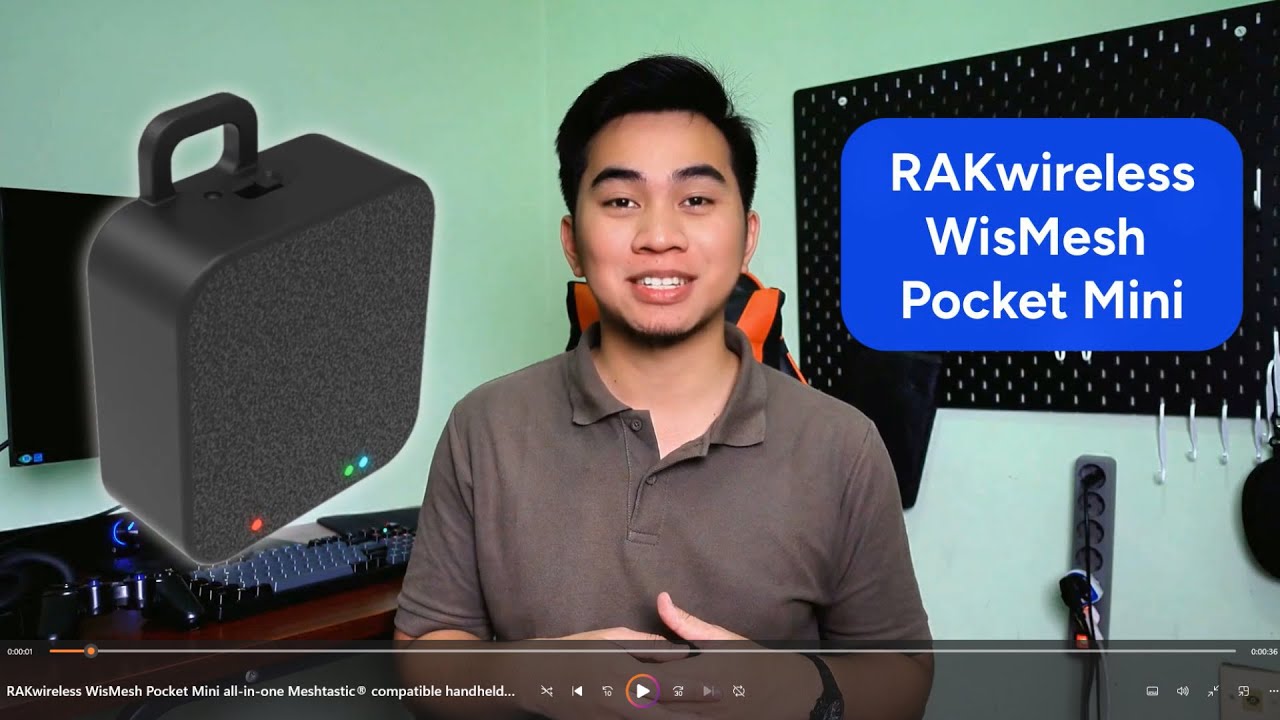
Introducing WisMesh Pocket Mini, a low-cost entry-level Meshtastic® compatible node.
WisMesh Pocket Mini is the perfect start to explore and use the Meshtastic® Mesh Network. Pre-flashed with the Meshtastic® firmware, it has a low profile size of 54x59x24 mm (w x h x d) which makes it small enough to fit into a pants or shirt pocket.
Compared ...
toxic shard
tardy steeple
I've resisted buying one so far. That won't last forever, but I've got to get at least one of my nodes deployed before I add more to the collection
steady solar
Only reason I've resisted that is because lack of an external antenna hah
Prob going to do my own rak19003 with slightly bigger battery, on/off switch and external antenna to bring when hiking
toxic shard
yup, if I was them I'd have called this the pocket micro and made a pocket mini with an antenna option like the muzi h2t
tardy steeple
steady solar
Only reason I've resisted that is because lack of an external antenna hah
fierce moss
toxic shard
I keep the ConnNet key and all my node PSK secrets in my password manager
Same.
As well as what nodes have what allowed as admin secrets.
toxic shard
fierce moss
Same.
As well as what nodes have what allowed as admin secrets.
that last bit is smart, I gotta do that
I've only used the one key so far, but inevitably i'll want to rotate them, use multiple, etc
fierce moss
Put in 3. If a node dies later on you can always reuse the old key and it’ll work to be an admin node.
I did my car, base station. And g2
toxic shard
I'm going to build an e22 pi node very soon and I think that'll be one of the keys I add to all my nodes
void cape
toxic shard
<@229045795440033808> how about a CW to Meshtastic bot 😉 "- . ... - .. -. --."
I’d need to practice my CW first unless you like the canned CW my radio can do.
toxic shard
void cape
I’d need to practice my CW first unless you like the canned CW my radio can do.
I'm beyond newb at CW. It was a goal for 2024... guess I'm not going to hit that.
tardy steeple
I sent “ test “ on Conn Net nothing replied
toxic shard
I joined the Long Island CW Club to try and learn, but didn't stick with it. Maybe 2025 is the year
void cape
There was a week where I spent some time trying to but it didn’t work out.
toxic shard
tardy steeple
I sent “ test “ on Conn Net nothing replied
Is anyone down there on ConnNet?
Also, was this from your MQTT node? I'm not sure if an MQTT node would show an ack or not on a secondary channel
tardy steeple
toxic shard
Is anyone down there on ConnNet?
Good point ! I was thinking it was MQTT
toxic shard
It probably went over MQTT too, but I don't know if it'd get an ack back
tardy steeple
No my MQTT node is only for the MQTT. It’s a base station
toxic shard
Does your MQTT node have ConnNet on it too, with the channel set to uplink?
For channel stuff it'd need to be configured at the channel level on the gateway device, the node that's connected to the internet mqtt broker
tardy steeple
 toxic shard
Then any node within RF range should bridge up MQTT as long as the RF node has 'Ok to MQTT' enabled. Meshtastic is so simple right? 😭
tardy steeple
toxic shard
Does your MQTT node have ConnNet on it too, with the channel set to uplink?
I believe so I’m not 100% I can check in a few
toxic shard
A good way to see what's on the far side is to look at Gary's MeshSense https://meshsense.wg4ry.com/
@fierce moss does your meshsense cover the ConnNet channel too?
I think from what I'm seeing the answer is yes, but not certain
tardy steeple

So my t1000e connects to the mqtt base station I have but I don’t see any other messages to or from except my own
steady solar
tardy steeple
https://www.etsy.com/listing/1302260756/
500mah battery case 🤮
$20+ship for something I'm printing myself 🤮
Just gonna print the tonyg case for it
toxic shard
tardy steeple
So my t1000e connects to the mqtt base station I have but I don’t see any other ...
 tardy steeple
steady solar
500mah battery case 🤮
$20+ship for something I'm printing myself 🤮
tardy steeple
steady solar
500mah battery case 🤮
$20+ship for something I'm printing myself 🤮
I read the battery after
toxic shard
toxic shard
@tardy steeple make sure on the mqtt node that the uplink and downlink are enabled at the channel level
It looks like you're making it, this is from Gary's
 tardy steeple
Ok 👍