#UK - Wales & West
1 messages · Page 2 of 1
 bleak kite
 worldly shadow
Yeah they're not discerning between tr request vs response
 past badge
ohh ok
bleak kite
worldly shadow
So is that from the store or did you do apk?
It's from the store, but the opted in Alpha tester bit.
bleak kite
worldly shadow
ah
Good idea. I did go back to the Beta's when it was playing up before, but wanted to try one of the new features (that I can't remember). The trouble is, once you opt for Alpha releases, it updates any Android device you have linked to the account. And I have all mine linked to the same account. I should separate them really, or put some of them to manual update only maybe.
worldly shadow
Oh yeah the GPS precision thing? Yeah I'm not sure the wonderful people at Google envisaged this use case
I'm using the one android device, switching between them isn't too bad although the IP detection / entry is broken
bleak kite
worldly shadow
Oh yeah the GPS precision thing? Yeah I'm not sure the wonderful people at Googl...
That was it. GPS precision. 👍
I still switch between a couple of nodes. I've got more nodes than phones 😁. It is annoying typing the IP addresses in when it forgets them. Surely a decimal point shouldn't require going into a sub page when entering a number with 3 of the bloody things.
worldly shadow
I would say they should switch it over to use numeric entry but guessing they want to be able to put hostname / fqdn in too
bleak kite
Was anyone wondering if the main mesh has started to sort itself out now?
Spoiler ---> It hasn't.
I reset nodeDB about 8pm yesterday so all received nodes on the map would be within the last 12 hours. Stats are from Midnight until 6.30 this morning. Look at the ChUtil 😰 . This is 6.30 in the morning.
Someone must have found a use for the NeighborInfo packets, as loads of people are sending them now 😕
To be fair, they are really good at keeping the figures low in the Text Message category 😉
I don't know if anyone can work out my mates node. Clue? He's p!ssed off with it as well. I can't get a link to him on our mesh currently. I also can't message him very well on the old mesh surprisingly.
Finally, although it looks like the top offender is sending less packets now. It's only because half of his don't appear to be getting through either. I still get NodeInfo packets every 60 seconds from him, just not consistently.


 gleaming trench
Is it worth spreading this info out in the discords and facebook groups?
I put my mobile node across for a few hours yesterday afternoon up Lansdown and couldnt get anythign out!
bleak kite
gleaming trench
Is it worth spreading this info out in the discords and facebook groups?
I put ...
I did try a couple of months ago, but never really got anywhere. Most people were saying that they will never be seen if they drop their values. It's all about being on the nodes list rather than actually using it for a lot of people. You can see this by the amount of dross on Discord, the "I can see 50 Nodes" posts. Yes, but you can't actually talk to them, can you????
Personally, I'm not really bothered. I just have a look every now and then at how messed up it is. I would have liked to have seen a few more involved with our mesh, but not having much joy with others I have contacted.
I think a controlled mesh is the only answer really, because you will never get everyone on board, and it only takes a handful to mess it all up. It is a shame, because these guys have obviously managed to create some really good links across the country, but they are unusable, because of the crap.
There appears to be two types of user on Meshtastic. Those, like us on here, who like the experimenting and the technology side of it, and interested in a quick chat, and those who like to count their nodes list every day and post it on Discord. Unfortunately, the latter are the one's with the high telemetry.
I don't do Facebook, but have you noticed anyone on there complaining about how useless it is?
gleaming trench
Put it in the Meshtastic UK Facebook page. See what happens. I will drop it on the varoius Discords as well.
past badge
bleak kite
Was anyone wondering if the main mesh has started to sort itself out now?
Spoil...
nice report! bloody nuts. just talked with a Hampshire node runner, setting up a large footprint with some chaps there. He was very keen to prevent the same issue happening with them!
''Most people were saying that they will never be seen if they drop their values." just shows the level of understanding. which is not meant to be derogatory, but comment on the popularity with people who are not as interested in the underlying tech.
 tired flame
@bleak kite The potential issue I see with the table is that you might have say a count of 10 for telemetry for a given node, however perhaps it only sent a telemetry packet out once in that time period which you copied direct, and then 9 others relayed it which you also copied. Not sure if that is how you are recording the data or if indeed how the mesh works tbh. Edit: quick squiz at the packets and there seems to be a unique packet id against a given node id, so I guess you are indexing on those?
gleaming trench
Node is a tree in Stockwood, Bristol. It's the one I had up Lansdown the other week.
 bleak kite
tired flame
<@1190595300931407936> The potential issue I see with the table is that you migh...
bleak kite
tired flame
<@1190595300931407936> The potential issue I see with the table is that you migh...
Like you said, each packet has a unique ID. I don't capture this, but each node will only repeat it once, and ignore the same packet if received again. The figures in the table are only packets that are transmitted from nodes direct to the mesh as a beacon. It doesn't include manual requests from the mesh like traceroots and position requests, and also ignores nodeInfo packets that are automatically sent when a new node is seen. This list is purely packets that are sent from the automated beacons that users can set how frequently they transmit, and Texts that are sent to the mesh. Obviously Texts are what it's meant for, but I've kept them in the list to show the percentage of crap vs texts. The NeighbourInfo packet has no use at all, unless you're capturing the info via MQTT for your own programme.
So, actually, the amount of data being rebroadcast will be a lot higher than the list suggests. But this is what the mesh is meant for, so not fair to include in the list.
Also, this is only what gets rebroadcast. If a packet has no hops left when it reaches the node, it's not included.
tired flame
Interesting @bleak kite
like for my node, in your list it shows 11 telem, in the time period. I have the following set for the node, and has been set like it for few weeks now:
nodeinfo : 10800 seconds
position broadcast : 43200
gps update : 86400
fixed pos, smart pos disabled
lora ignore MQTT enabled
hop limit 3
mqtt enabled, and map reporting : 900
uplink via mqtt on longfast only
all telemetry module stuff switched off, and the interval settings as default 900
... so where did those 11 you recorded come from? heh
bleak kite
tired flame
Interesting <@1190595300931407936>
like for my node, in your list it shows 11 ...
What's your name on the list?
tired flame
MAGr
bleak kite
tired flame
MAGr
This is what I have logged up until about 11 this morning. Only count the "to Mesh".
 tired flame
what are those, any data included?
 bleak kite
tired flame
what are those, any data included?
bleak kite
tired flame
what are those, any data included?
This comes under Telemetry in the options.
tired flame
module config _> telemetry?
bleak kite
tired flame
module config _> telemetry?
Yes
 bleak kite
tired flame
bleak kite
tired flame
Yes. Yours is set to send every 15 minutes. That's default, to be fair, but we still felt it was too much if you're only transmitting your battery level.
tired flame
firmware is : heltec-v3 2.3.3.8187fa7
ok, i could care less what the battery level is on it tbh, as it is directly power from the 13.8v via a LM2596 drop drop to 5v. I will increase the delay
cheers for the info 🙂
bleak kite
tired flame
ok, i could care less what the battery level is on it tbh, as it is directly pow...
To be honest though, it's the nodes in the top that are causing issues. Your 11 is not really a problem. In fact, everything would still work quite well if no one touched the default values, and everyone was as low as you.
tired flame
changed to 3600, hourly
perahps worth the config apps poping up a message to explain the implications of having lower than default delay
i do notice that when looking at debug, there is a bunch of telemetry and pos stuff coming down from my node, every few seonds, but is that just the data to the app and not going out via rf?
the top offender in the list, 77d0 (poa), can be contacted via email fwiw, his callsign is over on qrz
bleak kite
tired flame
perahps worth the config apps poping up a message to explain the implications of...
I think that would be a good idea. The Meshtastic developers have said that messing around with these beacons can bring the mesh to a halt, and that they cause a lot more harm than altering Hops.
When we were monitoring it all a couple of months ago, we found the NeighborInfo packet can be very large, and take a while to transmit. This is normally set to off, and has no use if you're not a programmer. But some have it sending very regularly.
Thankfully the Meshtastic developers have altered the firmware to ignore this packet and not re-transmit it if you have it off on your own node. They are obviously aware this was causing a problem.
tired flame
yeah, seems a bit of a broken implementation, if end user config can cause the mesg to die. Should be limits in place to prevent this surely?
I will have to read up on that neighbour info stuff. Not looked at it.
i have another node or 2 in the house here as well, i've set those to client_mute
bleak kite
tired flame
i do notice that when looking at debug, there is a bunch of telemetry and pos st...
The stuff in debug where it says Packet, is what you receive, and if the hops are above Zero, what you will then re-transmit (unless you're in Client_mute). So each packet with above zero hops will have taken two time slots on the mesh, the one you received, and one when you re-transmit. Then when your re-transmission hits someone else node, they do the same, and so on until hops hit zero. On a big mesh this can take a lot of airtime to propagate, so it makes no sense to tie this time up with crap.
We did a lot of experimenting a few weeks ago when we moved off the main mesh, and settings of NodeInfo 10600, Position 7200, Telemetry 7200 were perfectly fine, and made failed messages almost non-existent.
tired flame
something odd that is happening here, the two test nodes that are client_mute, have been requesting BLE pair endlessly with my s9+. They work for 5-10 mins, then pin code shows up again on the oled, and a phone dings and asks to enter the pin. No clue why that is happening. They are 2.3.4.ea61808, and app is 2.3.4 android.
reset the phone, unpaired via the phone. very odd
bleak kite
tired flame
something odd that is happening here, the two test nodes that are client_mute, h...
You're on the Alpha Android app then? It has a few quirks on it. I found traceroots to me show on my phone as well.
tired flame
yeah, just cycling pairing, happens when i disconnect from the node (select None). Very odd. Wasn't doing that with previous node firmware, though I see no changes in giuhub ralated to ble.
tired flame
@bleak kite what are you using to log the data? your own bespoke solution?
bleak kite
tired flame
<@1190595300931407936> what are you using to log the data? your own bespoke solu...
Yes. It's not pretty either.
tired flame
bleak kite
Yes. It's not pretty either.
doesnt have to be, if it works 🙂
pita thing for me atm, is that MAGr is outside up a pole, via wifi, and not found a way to update fw remote yet, other than perhaps having a pi up there as well with the node connected to it
bleak kite
tired flame
pita thing for me atm, is that MAGr is outside up a pole, via wifi, and not foun...
That's what I ended up doing. I added a Pi Zero 2W. It works quite well.
tired flame
ive got a 2w spare here, well my bro does 😄 might have to nab it
gleaming trench
I put that table on Facebook and a lot of people commenting on it.
People are asking for best settings to be on.
There is another node who gets it!
 bleak kite
gleaming trench
bleak kite
gleaming trench
That node actually belongs to a friend of mine that used to have his hidden. When we were chatting about how crap it's getting, he decided he was going to become visible, with a little message 😉
gleaming trench
Haha fair one!
bleak kite
gleaming trench
I put that table on Facebook and a lot of people commenting on it.
People are ...
I'm trying to get him and his family nodes on to our mesh, but he hops through a couple of original mesh nodes that we don't have the coverage yet.
Well done for getting people talking about it. I still don't think the original mesh is ever going to be as workable as ours. Newbies are coming online every day and they want to be SEEN.....
Example from yesterdays stats (24 hours).
This is @tired flame node stat. This includes the telemetry that he was unaware he was sending, and re-adjusted later in the day, so will actually be even lower today.
Compare this to the worst "offenders". It is total crazy (in the words on Andy Kirby).
The top one is sending 20 times as much crap.

 bleak kite
gleaming trench
Do you mind me chucking that latest table out there?
bleak kite
gleaming trench
Do you mind me chucking that latest table out there?
Yes no problem.
tired flame
basically, ive changed all my telemetry stuff to 7200, and it is all switched off. However, afaik, the device metrics update interval is always on. No enable/disable switch so I guess that is where the telemetry was coming from that I didn't know about.
gleaming trench
Crazy how many nodes are out there.
They 77d0 node is always at the top sending stuff!
 tired flame
@bleak kite I quickly put a post up on my blog about this 'noise'. Hopefully it is ok to make use of the short list that you posted earlier. I'll dm you the link.
bleak kite
tired flame
<@1190595300931407936> I quickly put a post up on my blog about this 'noise'. Ho...
You carry on. We're not trying to hide anything are we? Just make a better mesh.
bleak kite
tired flame
basically, ive changed all my telemetry stuff to 7200, and it is all switched of...
You're right, the metrics are always on. But kept low enough they're not a problem. Today, at the current time, you are number 58 on the list with 5 beacon broadcasts. Number 1 has broadcast 565 beacons.
tired flame
#1 still poa?
bleak kite
tired flame
#1 still poa?
What do you think 🤔
tired flame
hah, i'll drop him an email. I dont know him, but will send him link to my blog, rofl
you will know if things change 😉
bleak kite
tired flame
hah, i'll drop him an email. I dont know him, but will send him link to my blog,...
I've sent him DM's that have had received acks, but he may be away and not seen them?
tired flame
not sure. However, I set up a node for my bro, who never looks at the hardware. His phone dc's from it and doesnt reconnect for some reason so he never gets anything from me.
gleaming trench
Just had an actual conversation with someone on there! MaD1/Mad2 are the nodes .
He said that it was the most he had spoken to anyone on there!
gleaming trench
I'll chuck your blog post about as well
tired flame
this was it @gleaming trench https://ramdor.co.uk/2024/04/14/meshtastic-a-healthy-mesh/
more just a brain dump so I don't forget 😄
gleaming trench
If anyone is in the Andy Kirby discord, in the general chat bit people are talking about jacking it all in as no one can get hold of anyone/receive messages.
tired flame
the issue I find, is that there is no way to know if a node that is relaying (call it B), can actually get back to the node it is relaying the data for (call it A). If I then send out something to A, gets picked up by B, but B cant reach A so it all fails.
consequently, being able to trace route to the 100+ nodes I have rx'ed is seemingly impossible
 plush ridge
Hi. I'm new to Discord. I hate it already.

Trying to find whoever this is. Have been sent here from Facebook ☝️
If you're here then it would be great if you could explain to a new Mesh user what this means
 indigo imp
plush ridge
Hi. I'm new to Discord. I hate it already.
indigo imp
plush ridge
Hi. I'm new to Discord. I hate it already.
welcome,
https://ramdor.co.uk/2024/04/14/meshtastic-a-healthy-mesh/ covers it well
but in short, people have been setting their nodes to send telemetry (battery level, 'I am here' etc) every minute or so
which then gets repeated by every node in range
and as such there's no bandwidth left for any actual messages to get through
tired flame
I slapped a bit ly url on the end of the node's LongName 😄
tired flame
ive emailed poa via his addy that is on qrz, no reply as yet
indigo imp
Knock on the door “have you a moment to talk about our lord and saviour; rate limiting”
tired flame
yeah a couple more nodes have appeared in Magor which is cool, but of course they are getting poa spam, relaying it, and MAGr is getting hammered with it all. Tempted to add the poa NodeNum to essentially drop it at the lora level
gleaming trench
plush ridge
Hi. I'm new to Discord. I hate it already.
Hey and welcome!
plush ridge
indigo imp
https://ramdor.co.uk/2024/04/14/meshtastic-a-healthy-mesh/ covers it well
Great. I'll post this on the Facebook group for the area. Seems to be more users there. Thanks
gleaming trench
tired flame
ive emailed poa via his addy that is on qrz, no reply as yet
He is always at the top of my node list!
Look at that channel utilisation!
 worldly shadow
gleaming trench
He is always at the top of my node list!
worldly shadow
gleaming trench
He is always at the top of my node list!
20% of the packets I'm seeing on the default mesh are from him
gleaming trench
What a joke!
worldly shadow
That's out of the 58 sender's I've seen in the last 24 hours

Bear in mind this is probably just what @bleak kite is able to repeat, in reality it's probably much worse
Same view of the sensible mesh

Look at how well behaved we (mostly) are
plush ridge
I wonder if you guys should try and explain this to other users?
gleaming trench
plush ridge
I wonder if you guys should try and explain this to other users?
We have been trying to
gleaming trench
worldly shadow
Same view of the sensible mesh
I'll turn down the test node!
worldly shadow
Hah do what you want mate, I'm not the police. Just interested in the numbers really. The alt mesh is humming along nicely
Mesh police lol
worldly shadow
plush ridge
I wonder if you guys should try and explain this to other users?
Do you mean the stats?
indigo imp
worldly shadow
curious why I'm so high up
plush ridge
worldly shadow
Do you mean the stats?
Yeah. I'm not sure most people would have any idea about that
bleak kite
Good evening everyone. Nice to see a couple more people trying to understand why the mesh is a mess.
plush ridge
worldly shadow
Do you mean the stats?
But also... What to do about it. I'm a new user and have been picking up nodes talking about Telemetry but it's not clear what it means
bleak kite
indigo imp
curious why I'm so high up
Which node is yours?
bleak kite
plush ridge
But also... What to do about it. I'm a new user and have been picking up nodes t...
Have a read of this very well written blog by Ramdor.
https://ramdor.co.uk/2024/04/14/meshtastic-a-healthy-mesh/
EDIT: Sorry, just seen this posted to a reply above.
plush ridge
gleaming trench
We have been trying to
And it's a good thing. Again, as a new user it seems a little anarchic. Not a bad thing. But the mesh messages are cryptic. I don't use Discord normally and I've had to try and hunt this down. Why not try and message users on more common platforms?
gleaming trench
I've put the world out on Facebook, discord and on the mesh itself.
bleak kite
plush ridge
And it's a good thing. Again, as a new user it seems a little anarchic. Not a ba...
The users that don't understand how to change the parameters, and leave them alone, are not really the problem. It's those that DO change them and change them to stupid values.
We have found that even the default values are too high for a perfectly functional mesh, but it's a start.
plush ridge
gleaming trench
I've put the world out on Facebook, discord and on the mesh itself.
Good. Don't think I've seen it. But I've shared the blog post now to a few groups
indigo imp
bleak kite
Which node is yours?
Any Skj0 shortcode, home one is ‘BS30 - skjord’, turned telemetry down to every 2 trillion seconds
worldly shadow
Sorry got sidetracked, had to update the software
bleak kite
indigo imp
Any Skj0 shortcode, home one is ‘BS30 - skjord’, turned telemetry down to every ...
Far too high 🤣
I have you currently showing 35 Position, 35 Telemetry, and 0 NodeInfo. I think that's default. Except the NodeInfo.
bleak kite
indigo imp
Any Skj0 shortcode, home one is ‘BS30 - skjord’, turned telemetry down to every ...
Actually it's less than default. Default would have given 80 of each since midnight if my maths is correct. It just goes to show how many packets we transmit even on default settings. I guess it's 4*24 twice and 8 NodeInfos. 200 packets a day? Even default is bloody high.
gleaming trench
May have another person coming across to the mesh. They are Mad in the city centre. From location I reckon one of the highrises near redcliffe.
bleak kite
gleaming trench
May have another person coming across to the mesh. They are Mad in the city cent...
Yay, that will be good. Let's hope they can see our mesh.
gleaming trench
He is using IOS so had to send him a QR code. He said has worked. Lets see if we can get comms with him.
past badge
plush ridge
Good. Don't think I've seen it. But I've shared the blog post now to a few group...
This is the problem we've been having for a few months. The mesh was so jammed up that any messages never get seen. And with so many disparate groups it became an impossible task to educate. So we migrated! Not a decision we've been particularly happy about, but it has at least got us a working mesh by sharing access to people who understand a good config 🙂
plush ridge
past badge
This is the problem we've been having for a few months. The mesh was so jammed u...
So you set up your own channel?
past badge
Unfortunately, the problem caused with massive amount of lora packets being sent and every meshtastic node then repeating them means the frequency used by default is constantly getting spammed. Any other channels on the same frequency are also impacted. So Wales&West use a different frequency, but yes, also another channel.
since we also run some tall nodes, the foot print that this was happening also meant that any single node in view would instantly jam up every other node
 worldly shadow
Damn that is some coverage
past badge
Pontypool is a big ear! blessing and a curse when your routing policy is "every packet, every where, every time" lol
 empty marlin
plush ridge
Hi. I'm new to Discord. I hate it already.
empty marlin
plush ridge
Hi. I'm new to Discord. I hate it already.
Welcome, did my link get you here in the end?
plush ridge
empty marlin
Welcome, did my link get you here in the end?
Thanks. Not quite sadly. Had to search via the web platform in the end. Not sure why but the app doesn't have a way to search for a group or whatever. Thank you for trying though
plush ridge
past badge
Unfortunately, the problem caused with massive amount of lora packets being sent...
So, as a noob this sounds like a fundamental flaw in the technology?
past badge
I would characterise it as a feature of the flood routing method, which, without centralising and actual 'routing' methods I would imagine is quite a challenge. Not having any centralised infrastructure is the strength, the downside is in high density meshes, with all nodes being(generally) equal, they an all equally break the mesh with poor configs.
As we can see in the way we have the node's configured in our mesh, we have very good performance, and I haven't had any problems getting messages out or getting messages from anyone, so it works well, when there is a bit of understanding on the way the tech works.
 tacit edge
past badge
since we also run some tall nodes, the foot print that this was happening also m...
tacit edge
past badge
since we also run some tall nodes, the foot print that this was happening also m...
So what does W&W use ?
past badge
A different frequency, an encrypted channel, routers that only forward encryptions known to the router and Conservative broadcasts of telem, node info and location
tacit edge
I kind of feel the arse has been kicked out of all this now 😦
plush ridge
past badge
A different frequency, an encrypted channel, routers that only forward encryptio...
Useful. Thanks
past badge
plush ridge
Useful. Thanks
Are you local to the mesh? Have you got the details?
past badge
tacit edge
I kind of feel the arse has been kicked out of all this now 😦
What do you mean?
tacit edge
past badge
What do you mean?
well it was 'download this firmware turn it on link a phone and have a chat'. Now it's do all these settings, change this change that, get this bigger antenna etc.
past badge
ahh, i know what you mean, i guess i came at this a different angle, ive built iot devices for lora, and the extension and ease of entry to using meshtastic is an amazing technology. the integrations with MQTT, its sooooooo easy to use compared to other Lora radio based tech.
but yeh, i can see the frustrations, what we are seeing is the result of the crazy popularity from people who wanted to play too, and the negative affects of having too much configuration choice is what we see on the default channel
tacit edge
SPODS turned up 🙂
past badge
ahahahah, i think that maybe the project (meshtastic) might have not considered the popularity from different groups who, particularly in the uk, are very dense
lol i mean geographically
gleaming trench
@bleak kite and @worldly shadow someone is asking this.

They are asking about stats table
bleak kite
gleaming trench
<@1190595300931407936> and <@244463636200816640> someone is asking this.
I think @worldly shadow actually downloaded a programme to make his stats. Mine is just cobbled together using an MQTT broker, Node-Red, a MariaDB and a bit of very poorly written html.
past badge
#1199086413476540538 message this is what you want! 🙂
worldly shadow
past badge
https://discord.com/channels/867578229534359593/1199086413476540538/122700306992...
I can smell the github issues and emails already
past badge
Pr's incoming
worldly shadow
I think the disclaimer for my software is that it's turnkey if you know what docker is, but there's not really any documentation
I'm okay with PRs
It's "how do I install this", that will keep me up at night
worldly shadow
2.3.4 has been moved to beta
tired flame
i was looking at Dustify/mt-stats on github, but after getting Desktop Docker installed, and the mt-stat compiled/running, I realised the my MAGr node is on a different VLAN here, and I would have to spend too much time figuring out the network stuff in Desktop Docker, so just gave up and uninstalled everything 😄 cop out I know
worldly shadow
Eh I mean I wouldn't bother myself but having "iot" stuff separate is a good idea really
Hate to think what all my Chinese smart switches are up to 👀
indigo imp
worldly shadow
It's "how do I install this", that will keep me up at night
how do I download the exe?
worldly shadow
🤮
I have two other repos that have had a small amount of attention, I ended up turning issues off for them
worldly shadow
who needs em?
worldly shadow
Ah yes, devs vs sales and marketing, devs vs project managers, devs vs devs
groundskeeperwillie.gif
worldly shadow
Oh it was me
indigo imp
haha
indigo imp
woodworking sounds nice
worldly shadow
Youtube keeps showing me drain cleaning videos, that looks satisfying
indigo imp
and you get to shout "YOU LITTLE RIPPER" when it goes
worldly shadow
Hah we're clearly under the same yt algo atm
indigo imp
'nerd'
indigo imp
@worldly shadow does the mtstats-web have a provision for a static ip in the compose?
tried

but 'invalid compose object'
worldly shadow
'afraid I'm not versed in it
indigo imp
ah, is first time I've manually used docker
worldly shadow
so my understanding is that with containers you're not typically tying them to a "real" ip
indigo imp
yeah, most of mine are configured that way
but some of them I want a different IP
was just trying to run two instances of mt-stats
worldly shadow
do you have multiple IPs set up on the host?
I think the approach would be to bridge the docker network created by the compose to the desired ip
@past badge might have some ideas on this
indigo imp
yeah, think it might be where I'm using Unraid and a gui for compose rather than...knowing what I'm doing
past badge
You can use the 'host' network mode to expose the container directly to the hosts interface
Or setup a network within your docker environment, but I've only really used that in a swarm, where you'd run a multiple instances of your container in their own network
Typically for loadbalncing
indigo imp
yeah, have been using a mix of host and bridge with others, guess I need to learn how to use compose
or add a whole other docker host just to run a 2nd instance of mt-stats
that sounds much easier
worldly shadow
Why do you need it on another ip? 😂
You running out of ports or something? 😄
Oh mate are you wanting to send from more than one device? It supports that now
you can pick the device you want to see stats for
 indigo imp
worldly shadow
Oh mate are you wanting to send from more than one device? It supports that now
indigo imp
worldly shadow
Oh mate are you wanting to send from more than one device? It supports that now
oh sexy
well that solves all those issues
worldly shadow
Any issues or feature requests just let me know my dudes
Planning some significant UI updates soon™️
tired flame
looking good @worldly shadow . where is it available from? i'll look into this vlan shizz
ah ok, github Dustify/mt-stats .... brain fart
tired flame
@sssq ok, the mqtt settings, I tried blank user/pw and encryption disabled and seems to be working.. are those the correct settings?
 tired flame
nice, it is working 🙂 sweet !!
worldly shadow
Awesome, enjoy your stats
tired flame
very cool
tired flame
worldly shadow
Any issues or feature requests just let me know my dudes
you were assking about changes. Would be nice for an opption/swtich to make the date/time info like this
 tired flame
also be nice if you could keep all short and long names that were ever seen against given node id
drop down buttons appear or something, with the other values that have been recorded for that node ID. If only one value, then no drop down

clickable map link for position table to google maps
ok, i'll stop now 😄
tired flame
it is very cool to see all the info
 indigo imp
position had reverted to 900, telem is set to 0
tired flame
those are mine


 tired flame
@worldly shadow what are the (WR) tagged columns? and for senders/receivers what is channel / direct ?
tired flame
@worldly shadow it would be great to have a distance column in the positions table. A distance from selected gateway to the remote node
worldly shadow
tired flame
<@244463636200816640> what are the (WR) tagged columns? and for senders/receive...
WR means "want response". It's an optional flag on packets indicating that the sending node wants to receive something back
Channel / direct is referring to where the packet is sent or received. Either out to a global channel like longfast or direct to another node
past badge
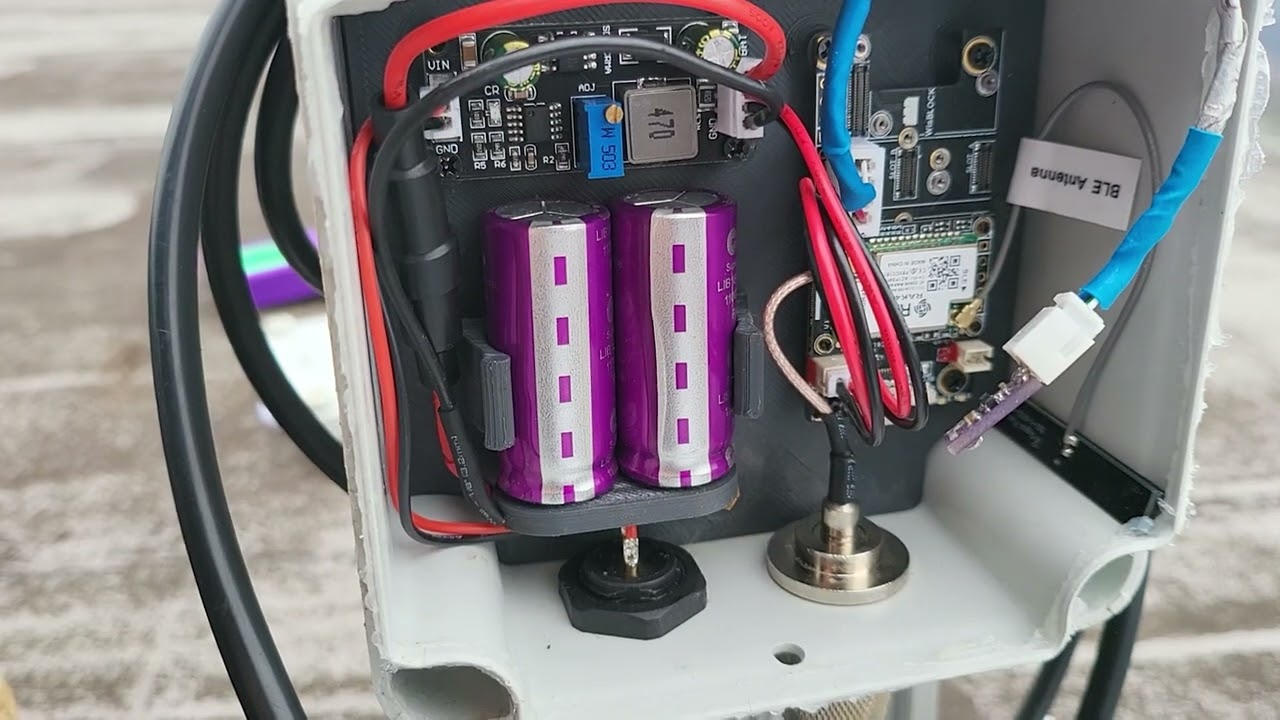
Short video - with really poor audio thanks to the wind - updating a meshtastic node in the wild at 300+ meters above sea level.
0/10 worst audio ever. literally unwatchable etc.
gleaming trench
Fair play. That location is amazing!
past badge
sure is, beautiful in the sun too, when we get some
plush ridge
past badge
Are you local to the mesh? Have you got the details?
Not quite sure where you all are but I'm Cardiff area
past badge
Nice, depending where in Cardiff, you might be able to get the pontypool node. Penarth to llanrumney has pretty good coverage
But north cardiff is in a bit of shadow

In reality I've got a connection from as far along the coast as sully
plush ridge
I think I might be in your shadow. I'm Tongwynlais. I can certainly see plenty of nodes from that area. Presumably indirectly
past badge
Have you got the settings for the wales and West mesh?
plush ridge
past badge
Have you got the settings for the wales and West mesh?
No. I'm only using the main channel in 868 at the minute. I'm interested though
gleaming trench
Did they get sent?
I'm up in Mitchedean near Ross on Wye this weekend. The mobile node will be coming with me to see if I can out from there.
bleak kite
gleaming trench
I'm up in Mitchedean near Ross on Wye this weekend. The mobile node will be comi...
Strangely enough, I'm in the Forest of Dean for the weekend. I'll take a node and keep an eye out.
past badge
gleaming trench
I'm up in Mitchedean near Ross on Wye this weekend. The mobile node will be comi...
According to heywahatsthat, its in Los, but height might be needed
gleaming trench
Couldn't get anything all weekend.
Started to pick up this mesh when coming down A40 from Monnouth
bleak kite
gleaming trench
Couldn't get anything all weekend.
Started to pick up this mesh when coming do...
I didn't receive anything where I was staying near Parkend, but to be fair, none of the mobile networks manage to break through the trees either.
I did get a good signal from Ponty node when in Cinderford. I think Cinderford is quite high, so probably direct LOS.
gleaming trench
Yeh I was in a huge dip and when we went to Ross on Wye nothing there!
indigo imp
talk the little man for a walk up on lansdown this morning, saw a few nodes including the FOD but couldn't send any messages
not had my home node up for a while but is the mesh back to being super congested?
bleak kite
indigo imp
not had my home node up for a while but is the mesh back to being super congeste...
There's still a couple of nodes sending stupid amounts of telemetry that are still causing congestion. GW0POA is sending over 1200 packets a day, 10 times the amount of the next worst.
gleaming trench
Hops away in android now.
 tacit edge
well bang goes my day of up the mountain doing radio stuff
 worldly shadow
Doesn't matter if it's amateur, cb or mesh... There's always going to be some drama
gleaming trench
Don't forget PMR! There is always drama on there as well! I heard people threatening each other this afternoon!
worldly shadow
At least on pmr they have 16 whole channels to pick from!
 gleaming trench
Have a listen on channel 8 most evenings. It's the same bloke always going off on one! You can tell when he has a drink as well!
 digital jasper
I often do night shifts in central Bristol office blocks and find the roof keys so I can take the handheld up and see what loons are shouting at the moon on pmr
gleaming trench
There used to be a bit of an 8 @ 8 PMR net in the Bristol area on Sunday but it died off when people started keying over each other and playing music.
digital jasper
beb....beb....beb
 gleaming trench
Just sent a DM to your node see if it makes it!
 past badge
I remember the van guy, he was frustrated he could never get a message sent out.
I'm guessing GW0POA is a ham, would have thought they would understand 'contention' a bit more.
 bleak kite
indigo imp
anyone have a qrz account and fancy emailing?
bleak kite
indigo imp
anyone have a qrz account and fancy emailing?
I think @gleaming trench has already tried emailing and DMing him. Like it was before, I think everytime you educate one person, two more pop up. It's never going away.
tacit edge
indigo imp
Oh no there isn't
gleaming trench
Yeh I emailed him and send him messages on the mesh. I think a few others have messaged him as well.
 hollow tiger
bleak kite
hollow tiger
bleak kite
Im last on the list
tacit edge
Mmmm I have spoken to him, He's into DMR and stuff
bleak kite
hollow tiger
Im last on the list
You need to try harder then 😆
hollow tiger
Yep! I’m leaving it online 24/7
past badge
tacit edge
Mmmm I have spoken to him, He's into DMR and stuff
Did he know what he's using neighbourhood info for?
What's dmr stand for? Destroying Mesh Resources? 😉
bleak kite
gleaming trench
Have a listen on channel 8 most evenings. It's the same bloke always going off o...
He's off on a good one tonight. Been arguing for hours. I can't believe the others carry on baiting him.
 radiant nexus
Morning all!
If anyone is in the mid/north Wales area today, then LRX2 is on LongFast and LRX3 is on VeryLongSlow, both up trees for the day.
There is no MQTT or "proxy to phone" or anything, so I was pleased to see loads of nodes have appeared over the last hour (on LongFast node).
I must be directly connected because that cluster is the only thing that appears on my map.
But I can't tracert ANY of them. Does this mean my transmitter is a bit cack?


Looks like I'm connected to others via a node 112km away, which isn't bad for a heltec with a £4.90 antenna strapped to a tree!
 past badge
Hey! Nice! The location you have might be able to receive, but getting back out again through the trees is probably why you aren't getting much joy. No doubt higher and with a clearer view of the horizon would give you success!
radiant nexus
I'm still not sure what's happening here - so I now have 2 stealth nodes in the open (LRX2 and LRX3), and I am directly connected (no MQTT) to one remote on each of my nodes (and then in turn back to base LLN1). You can see that these bridging nodes have opened up a huge cluster (at least 100) of nodes in the North-West, over 100Km from me. I am seeing conversations on LongFast, but absolutely no response to tests, direct messages, tracerts etc, EXCEPT between my nodes.
All nodes are set to "ignore mqtt" on LORA settings, but LLN1 is connected via MQTT (uplink only) only to enable map reporting.
So, to clarify: LLN1 can see LRX2, which in turn can see LRX3. I can tracert and message LRX3 from any node, and when not connected to anything else, LRX3 can see lots of these remote nodes. But I can't TR or msg any of these.
Just a thought - if all my nodes are on 2.3.8 and the first other node I can see is a ROUTER_CLIENT on a very old firmware, could that be the problem?

 bleak kite
radiant nexus
I'm still not sure what's happening here - so I now have 2 stealth nodes in the...
bleak kite
radiant nexus
I'm still not sure what's happening here - so I now have 2 stealth nodes in the...
I expect it's a congestion issue, like we were suffering in our area. It doesn't take much for traceroots to fail. You could try queuing them up by tracerooting multiple times in quick succession, and hope one gets through.
I'm not sure when the "Ignore MQTT" option was added, whether the header MQTT flag was already available or added at the same time. If so, an older node might not show packets as MQTT even though it is. I think that makes sense.
There's lots of people having issues sending messages in the Manchester area, according to Andy Kirby's discord, but no one wants to admit it's too much crap being transmitted, stopping messages getting through.
past badge
Yeh, with 100 nodes, if there's the bad configs like we saw down here then your experience is exactly what prompted the move here! Mqtt just compounds this by opening up (potentially) even more trash being bounced around
radiant nexus
Hmmm, maybe there could be a nudge towards getting people onto the latest firmware - difficult if you've got one high up, but if it's older than 2.3 it would be worth doing and help the whole mesh. Still seeing nodes, but no messages. Might need to get the paradar up on a hill and see if I can do better next weekend!
bleak kite
radiant nexus
Hmmm, maybe there could be a nudge towards getting people onto the latest firmwa...
Latest firmware and less telemetry. Works a treat. I wish the developers would make the lowest telemetry setting at least an hour. I know I bang on about it, but we have proved how well it works with very little telemetry.
Top of our mesh charts yesterday transmitted 20 telemetry packets in 24 hours.
Top of original mesh transmitted over 1500 telemetry packets in 24 hours.
Total for the 12 nodes on our mesh transmitted 117 packets in 24 hours total.
Top 12 nodes of original mesh transmitted 2556 packets in 24 hours (probably more because I expect a lot of collisions didn't register).
radiant nexus
This is frustrating - I tried "spamming" a few nodes on tracert to see if ANY replied.
I have the latest 2.3.7 app on Android and I didn't see a single response, but when I got home and looked on my "Meshtastic-MQTT-Connect" (MMC) display, I can see that all these look like they sent packets to me. (I am "Depeche Node" and "The LoRax" in this):
USN M/3/001-M2 --> Depeche Node [2.3.8] 🚗 --> The LoRaX [2.3.8] 🚗
Unknown User (!b1decaf) --> Depeche Node [2.3.8] 🚗 --> The LoRaX [2.3.8] 🚗
Wistaston Router_Client v2.3.7b G7OMN --> Depeche Node [2.3.8] 🚗 --> The LoRaX [2.3.8] 🚗
UKSN HQ --> Depeche Node [2.3.8] 🚗 --> The LoRaX [2.3.8] 🚗
G1RSW-Base --> Depeche Node [2.3.8] 🚗 --> The LoRaX [2.3.8] 🚗
Zero Dawn Base🗼 --> Depeche Node [2.3.8] 🚗 --> The LoRaX [2.3.8] 🚗
cqnorthwest (cq-nw.uk) --> Depeche Node [2.3.8] 🚗 --> The LoRaX [2.3.8] 🚗
Stockport Karl Rak4631 PA --> Depeche Node [2.3.8] 🚗 --> The LoRaX [2.3.8] 🚗
g6wgz_home --> Depeche Node [2.3.8] 🚗 --> The LoRaX [2.3.8] 🚗
Winsford Darnhall  --> Depeche Node [2.3.8] 🚗 --> The LoRaX [2.3.8] 🚗
Unknown User (!da6594c8) --> Depeche Node [2.3.8] 🚗 --> The LoRaX [2.3.8] 🚗
Zero Dawn Rho [2.3.7] --> Depeche Node [2.3.8] 🚗 --> The LoRaX [2.3.8] 🚗
Is there a bug in the app that's not showing TR replies, or am I not understanding what MMC is showing me above?
It's so frustrating because clearly data is getting across that 120km distance, but I can't get anything 2-way going.
bleak kite
radiant nexus
This is frustrating - I tried "spamming" a few nodes on tracert to see if ANY re...
I'm not that clear on what data you are looking at, but could these be broadcast packets you have received, rather than traceroot returns? Did you capture any info about the packets?
From what you said before, you were seeing these in your node list, so you must have been receiving their NodeInfo packets.
How are you picking up the data? Are you pushing it through the Meshtastic MQTT server?
 digital oxide
gleaming trench
Yeh I emailed him and send him messages on the mesh. I think a few others have m...
digital oxide
gleaming trench
Yeh I emailed him and send him messages on the mesh. I think a few others have m...
Didn't get an email from you - or spotted any messages on the mesh else would have responded. As it happens only found out last night about this via an email from a local ham - had no idea it was going on tbh - anyway have reflashed now and changed the settings as per the info sent to me on https://ramdor.co.uk/2024/04/14/meshtastic-a-healthy-mesh/ so hopefully that will help @bleak kite
digital oxide
past badge
I remember the van guy, he was frustrated he could never get a message sent out.
as far as I was aware I had set everything up ok following advice from other stations
digital oxide
tacit edge
Mmmm I have spoken to him, He's into DMR and stuff
spoken to who? - not me 🙂
bleak kite
digital oxide
Didn't get an email from you - or spotted any messages on the mesh else would ha...
Hi. I think there may be some crossed wires. I'm guessing you're PVan, going by your reply to Sparxcore?
digital oxide
bleak kite
Hi. I think there may be some crossed wires. I'm guessing you're PVan, going by ...
nope im the one at the top of the leaderboard lol - Just sent you a PM
the first I knew about this was an email yesterday from a local ham - it was at that point I spotted someone had created a spoof node at my location - "friendly suggestion" on that as gather its been done to others. Perhaps a link to a URL like the Radnor one that was emailed to me outlining the situation rather than a somewhat unhelpful message - I am sure that would resolve things a lot quicker.
gleaming trench
Ah!
Yeh I tried messaging on the mesh but couldn't get through and my emails bounced back.
digital oxide
gleaming trench
Ah!
Yeh I tried messaging on the mesh but couldn't get through and my emails b...
ah the joys of technology - think if the worst happens with the world, carrier pigeon might be the sensible option 😉
past badge
radiant nexus
This is frustrating - I tried "spamming" a few nodes on tracert to see if ANY re...
Yeh this is the exact drama! Annoying to see that the system works over several hundred km's gets hamstrung by the contention and all it ends up being a list of packets that are only good to see what you missing out on hah
past badge
digital oxide
the first I knew about this was an email yesterday from a local ham - it was at ...
Glad to hear we got to the bottom at last! Mopa, myself and a number of others were trying constantly for several months. Once it almost worked until a new list of nodes joined. The second time around we lost control because the mesh just ground to a haul. The messages I think I saw nodes named in the list tried to communicate a better config but limited in how much can be put in the names, so maybe not as useful.
Would be good to look at using longfast again, but for now, we moved frequency and channel encryption, which is made available to nodes who want to maintain good configs.
digital oxide
Yeah I very rarely used longfast. Group of us went own channel when first messing around. Other channels hit and miss. It was always interesting looking at the MQTT traffic, big difference when the US woke up
past badge
Yeh here is where I think there is misconception, not unjustifiably, while channels can be setup freely, everything is on the same frequency, and meshtastic does not handle airtime in a way that manages the massive traffic from things like mqtt and sending neighbour info. All that happens is all nodes (particularly tall ones) end up spending all the air time rebroadcasting every packet thrown out on the frequency. As you can appreciate now that then filters down to all other nodes in 100'skm around it, rinse repeat, rinse repeat
tacit edge
digital oxide
spoken to who? - not me 🙂
Did you not go on the Wales Rag Chew on a Saturday evening ?
digital oxide
tacit edge
Did you not go on the Wales Rag Chew on a Saturday evening ?
Nope not me
tacit edge
91 ?
digital oxide
tacit edge
91 ?
No idea on the 91 - DM me?
radiant nexus
I don't know if it's due to the hot weather, but I'm suddenly picking up nodes from a fair distance away here in mid-Wales. Got a TR to one which is also unusual. No positions yet but I recognise a few names from about 110km away.
UPDATE: Just saw this on LongFast: "Hi guys, there's a lift on the higher frequencies tonight. I'm getting a great signal from a amateur radio repeater in the Netherlands"
worldly shadow
Hah brilliant. I got into one of the Amsterdam repeaters back in Dec 2019... Was about 300 miles on 2m I think 😁
...and that was on a 3 element tape measure Yagi in my loft
gleaming trench
I am going camping this weekend. I don't think its worth taking a nide with me unless someone else is in the same valley!
 past badge
gleaming trench
I am going camping this weekend. I don't think its worth taking a nide with me u...
past badge
gleaming trench
I am going camping this weekend. I don't think its worth taking a nide with me u...
You'll have a great view of the aurora today/ tomorrow!
gleaming trench
Ah good shout! Those cornal ejections are strong! Hopefully get something down that far south.
The HF bands have been wiped out all day!
Coronal*
past badge
hey all! Im having a real problem setting up a node, maybe an app update ? - it seems that the encryption keys dont get accepted in my android app (doesnt seem to like "_" and "-" chars anymore!)
ive tried setting the keys on the channels in the webapp, and allows it to save but then checking the keys in the app, it looks like the '-' and '_' get re-written to '+' and '/' respectivley :S
worldly shadow
Are hyphens and underscores valid in base64? 👀
past badge
nope
but i guess its being enforced since some update
guess what channels used them 🤣
worldly shadow
Ah
Yes this is problematic
Also might explain why I've not received much on w+w since Fri evening
Think we need to gen a new key 🙄
past badge
annoying but thats the conclusion I came to too.
worldly shadow
@past badge and @bleak kite do you guys want to agree on new key and distribute?
Pita
bleak kite
worldly shadow
<@895041573845336155> and <@1190595300931407936> do you guys want to agree on ne...
Fine by me. I know IOS was giving problems entering our key as well. It had to have a plus where the minus was.
bleak kite
@past badge @worldly shadow What about changing the minus sign to a capital A? Saves copying and pasting a new key, just edit old one. I can't see any other characters in it that would cause a problem.
worldly shadow
Sounds good, I'll switch over 👍
past badge
Ok will swap over now also!
gleaming trench
Just changed it. Anyone receive it?
worldly shadow
I am not seeing anything with new key 🤔
bleak kite
A bit weird. Surely you can alter a key and not have to use one of the Meshtastic generated keys.
worldly shadow
So.... It looks like my main node may have gone deaf
It accepts the new key but just doesn't receive
Reset it to defaults, didn't pick up anything from default mesh either... Until I enabled TX on my other node
So something weird is going on
Going to leave it and see if the stats pick anything up
 gleaming trench
I can talk to my own nodes using the new key.
worldly shadow
Bad antenna connection 🤦♂️
 rustic cave
whats the key?
bleak kite
rustic cave
whats the key?
It's a private encryption key for our mesh channel in Wales & West. Are you local?
rustic cave
Is Swansea local enough? we have bridged west wales so trying to see if we can reach the rest of south wales
bleak kite
past badge
Ok will swap over now also!
Did you have a problem on switchover? I can't see your node at the moment.
past badge
I think so, my admin channel also had a - in it, so now I can't set a node to my old key to change pontypool 🤦🏻♂️
So I'll have to get up there and connect directly:(
bleak kite
past badge
So I'll have to get up there and connect directly:(
That's a pain. Back up that damn mountain again 😆
past badge
Yeh 😦 also having issues getting my mobile and bar noise swapped over thou, they don't seem to be able to talk to each other any more I might do a reset on them both but I'm away right now
worldly shadow
past badge
I think so, my admin channel also had a - in it, so now I can't set a node to my...
Try substituting - to + and _ to /
worldly shadow
Wut
Mate that's what I said isn't it!? You just changed the order
So having looked at it, seems they allowed web / URL safe base64 before and are now enforcing regular base64
But those substitutions should be equivalent
indigo imp
this sure was quicker and easier than just generating a new key :p
 bold atlas
Hi everyone. I’ve set up my Heltech v3, I’m using iOS, and I’m in St Mellons, external antenna. What are my chances? Been set up for about an hour now and nothing so far.
indigo imp
you should have pretty good LOS to the higher bristol nodes if you can't see sparx's high up one
either of those you?

 true sierra
you're a bunch of busy bees in here
amazing how there's a busy group for wales, a busy group for manchester, and then... silence for the west midlands/staffordshire
rustic cave
It has its challenges
 bold atlas
indigo imp
either of those you?
bold atlas
indigo imp
either of those you?
Hi, nope, I’m quite close to sandwich maker, I’m 21a4
bleak kite
bold atlas
Hi, nope, I’m quite close to sandwich maker, I’m 21a4
That looks OK to me, but probably an idea to delete the pic with the key on. Ponty node is down at the moment, so you won't get that. My Bristol node has patchy coverage near Cardiff, so you may receive it, if you're within the red zone.
You won't see a lot of automated activity on our mesh, so send a few messages and see if you get an ack returned is the best test.
 bold atlas
 bold atlas
bleak kite
That looks OK to me, but probably an idea to delete the pic with the key on. Pon...
bold atlas
bleak kite
That looks OK to me, but probably an idea to delete the pic with the key on. Pon...
Thanks…how do I delete it.
bleak kite
bold atlas
Thanks…how do I delete it.
Looks like you've done it. It's not really a secret key, but it's probably best not to have it listed on Discord.
bleak kite
true sierra
amazing how there's a busy group for wales, a busy group for manchester, and the...
There was a lot of activity your way a few months ago. We were getting loads from Birmingham and up.
bold atlas
Zero now. ☹️
true sierra
oh theres tons of nodes, but no chat here for the region
i shall be in bristol next week at uwe for exams
bleak kite
true sierra
oh theres tons of nodes, but no chat here for the region
Ah I see. I suppose Andy Kirby's is all Manchester based. You'll have to set one up.
bleak kite
bold atlas
Zero now. ☹️
Post your screencaps to a private message, and I'll have another look. I'll double check the key.
rustic cave
bleak kite
Ah I see. I suppose Andy Kirby's is all Manchester based. You'll have to set one...
Lewis Ringway is Manchester, Andy Kirby is Hertfordshire/Ware
Been out helping local club, some poor misinformed person was telling them the Longfast key was PSK not AQ== (well the placeholder) no wonder some people were seeing no nodes!
worldly shadow
@bold atlas Were you seeing anything with the default settings? That's probably a better litmus test until sparx' nodes are reconfigured
bold atlas
I’ve picked up 4 new nodes this evening, sent a test message but failed, max transmissions.
worldly shadow
What's your setup like? Location of node, type of antenna etc.
When I say location, I mean, in a window, the loft, outdoors etc 😄
Don't mean to be condescending with the questions, I've no idea how experienced you are with radio stuff
bleak kite
bold atlas
I’ve picked up 4 new nodes this evening, sent a test message but failed, max tra...
Are you trying to get on to our mesh, or on to the normal mesh? I assumed you were trying our mesh because you had all the details. Can you post a screencap of the nodes you are receiving?
 bold atlas
worldly shadow
When I say location, I mean, in a window, the loft, outdoors etc 😄
bold atlas
worldly shadow
When I say location, I mean, in a window, the loft, outdoors etc 😄
It’s a magmount, outside of an upstairs bedroom window.
gleaming trench
I've not picked you up from mine.
Send a message in the West and Wales channel and the long fast channel
bold atlas
gleaming trench
I've not picked you up from mine.
Send a message in the West and Wales channel...
I have, tried last night several times, just times out.
bleak kite
bold atlas
It’s a magmount, outside of an upstairs bedroom window.
Is it East facing? You'll get a lot better reception from this direction if you can get obsticals out of your way.
bold atlas
bleak kite
Is it East facing? You'll get a lot better reception from this direction if you ...
South easterly, best I can manage.
worldly shadow
bold atlas
It’s a magmount, outside of an upstairs bedroom window.
How long is the cable?
bold atlas
worldly shadow
How long is the cable?
In fairness, it’s quite long.
worldly shadow
That could be your problem, these lora devices are very good at receiving weak signals but the transmit power is also weak. It's possible you're losing too much in the cable.
Are you able to test with an antenna on the pigtail that came with your heltec?
past badge
I'm back in Wales! And I found out the route of my troubles was somehow, inexplicably my node had 'tx enabled' turned off!!!!?
I'll get pontypool reconfiged later today!
worldly shadow
Hurray, return of the chad node
bold atlas
worldly shadow
Are you able to test with an antenna on the pigtail that came with your heltec?
I’ll give it a go tonight.
gleaming trench
Back at Lansdown today and it had done a full factory reset by itself!
indigo imp
gleaming trench
Back at Lansdown today and it had done a full factory reset by itself!
bet you're glad it wasn't up that tower now!
gleaming trench
Haha. Yeh sod that!
bold atlas
I’m now back to short antenna, with the node up high, outside window. 7 nodes detected so far but failing on transmissions.
 worldly shadow
Try spamming me with a few messages
 worldly shadow
Didn't receive, try a few in succession. Are you seeing the channel messages?
 worldly shadow
Ah, while it says the signal is good, -14db snr is actually quite weak. Are you using the stub antenna?
Hopefully sparx will have his nodes back up soon - this might improve the situation for you
I'm quite reliant on his pontypool node, even though I'm in east Bristol!
bleak kite
The max transmission reached is a bit odd. This sounds like a settings issue. -14db SNR should still be enough to work OK.
worldly shadow
I mean you might expect something to get through but that is 30x weaker than the noise
bleak kite
Yeh but LoRa is mainly below the noise level. It can quite happily work to -20db.
I think there is a problem with settings. Post a copy of your settings again @bold atlas
worldly shadow
bleak kite
Yeh but LoRa is mainly below the noise level. It can quite happily work to -20db...
Admittedly the minimum decode snr I'm seeing is around the -20 mark for both nodes, but I haven't seen reliability below -10
bleak kite
worldly shadow
Admittedly the minimum decode snr I'm seeing is around the -20 mark for both nod...
It may not be 100% reliable that low, but we should have seen his nodeinfo by now on our node list. I've seen the Max Transmission error before, but can't remember what caused it. It's not just the TX limit I don't think.
I wouldn't trust the values too much that Meshtastic reports anyway, it says your RSSI is 0db to him. I don't even get that on nodes next to each other.
worldly shadow
I'm starting to second guess the whole thing honestly, I'm getting >-3 to you at the moment and yet:

Is it the app, firmware, node, pigtail, antenna....
bleak kite
This is what I received.
 bleak kite
worldly shadow
I'm starting to second guess the whole thing honestly, I'm getting >-3 to you at...
bleak kite
worldly shadow
I'm starting to second guess the whole thing honestly, I'm getting >-3 to you at...
So some of your failed messages got through, but not all ???
worldly shadow
Well I'm just not seeing confirmations for all of them
There's a breeze block wall / roof between me and you, assuming you've mounted your antennas outside
bleak kite
worldly shadow
Well I'm just not seeing confirmations for all of them
I've just put my nodes back to 2.2.24 which was by far the most reliable for me. I've also opted back out of the Meshtastic beta Android app. It's getting far too buggy for me. Traceroot doesn't work at all properly, and a bit of experimenting with the new "hops" feature has proved that doesn't work properly either.
worldly shadow
I need to get a pi in the loft so I can flash these bloody things remotely 😂
Might sort that tonight
bleak kite
worldly shadow
I need to get a pi in the loft so I can flash these bloody things remotely 😂
That's what I did with the two of mine that are up a pole. Pi zero 2w on each works great.
worldly shadow
I've got a 3 earmarked
bleak kite
@bold atlas I've just had a read about the "Max Re-transmission Reached" and it's the same as the cloud with a line through it on Android, ie no acknowledgment. Not what I thought it was. It is just no nodes replied.
bold atlas


 rustic cave
30dBm transmit looks bit high for me, i use 17 at home and 27 when im on my own up a big hill
bleak kite
bold atlas
The settings look fine. I thought they did when you posted them before, but thought it's worth another check. When Pontypool comes back on you may receive the mesh better, if not you may need to try and get your antenna a bit higher. You could try putting it on a fishing rod, or some other long pole, just to get a bit more height. It that works, you know what you need to do.
bold atlas
rustic cave
30dBm transmit looks bit high for me, i use 17 at home and 27 when im on my own ...
To be fair, I only just upped that, it wasn’t working before.
bleak kite
rustic cave
30dBm transmit looks bit high for me, i use 17 at home and 27 when im on my own ...
They max out at about 20db anyway the Heltec's. Anything above makes no difference.
rustic cave
not sure how accurate that power setting is anyway, others reported its bit out 17=20-22 and 27=25-26?
rustic cave
bleak kite
They max out at about 20db anyway the Heltec's. Anything above makes no differen...
ill take your word as i personally havnt tested this, my info is 3rd party
bleak kite
rustic cave
ill take your word as i personally havnt tested this, my info is 3rd party
I think it's in the specs for the Heltec. Not proved it myself.
Edit: Just read it can be up to 22db output.
bleak kite
bold atlas
To be fair, I only just upped that, it wasn’t working before.
I've just put my BRS2 node on "Long-Slow" if you want to try that on yours. It should gain a bit of SNR. This will show whether you're likely to connect if you get a better antenna etc. Should be equivalent to about 5.5db extra gain.
bold atlas
bleak kite
I've just put my BRS2 node on "Long-Slow" if you want to try that on yours. It s...
Done
Thank you
 bleak kite
bold atlas
bleak kite
bold atlas
That's a shame. What sort of signal are you seeing from mine?
bold atlas
 bleak kite
bold atlas
bleak kite
bold atlas
Still quite low 😕 . Hopefully Sparx will get Ponty back on again soon, and you might find that sorts it.
bold atlas
bleak kite
Still quite low 😕 . Hopefully Sparx will get Ponty back on again soon, and you ...
Thank you. Pontypool is quite a way from me, with a bit of terrain between, so we’ll watch this space I guess. Thank you to all trying to assist.
bleak kite
bold atlas
Thank you. Pontypool is quite a way from me, with a bit of terrain between, so w...
No problem. Sparx node is very high so you may be lucky.
bleak kite
bold atlas
Thank you. Pontypool is quite a way from me, with a bit of terrain between, so w...
Just had a quick look at LOS to you and it looks good from here, depending where you are in St Mellons. Nothing obvious in between, so you should be able to get a contact in the right place.
 indigo imp
Reddit
Explore this post and more from the meshtastic community
not that I expect the worse offenders to update their firmware
bleak kite
indigo imp
https://www.reddit.com/r/meshtastic/comments/1csxli9/in_the_katest_alpha_this_in...
No way. I thought, if anything, they would have started to cap it. 🤔
Edit: Read it wrong on my phone. The 3600 is the lowest it will go then? I thought it was lowered by default from 10800.
Quite a few moaning about it on Reddit.
past badge
worldly shadow
Hopefully sparx will have his nodes back up soon - this might improve the situat...
I think for sure, birthday dinner last night so I didn't get up to it sorry 😐
bleak kite
This guy want's you to know where he is 🙄 . A 10 minute grab of data in 1st pic, and the first 8 hours of today in second. And, I think I'm missing most of his packets.
An uncontrolled mesh will never be a success 😟


 bleak kite
gleaming trench
bleak kite
gleaming trench
Yes. Set at 2 hops to get local only.
rustic cave
ah its also broadcasting on mqtt - not necessarily this node, but someone who can see it
bleak kite
rustic cave
ah its also broadcasting on mqtt - not necessarily this node, but someone who ca...
There's people with MQTT turned on? In this already overcrowded mesh? Some people are mad. 😵💫
@past badge Would you rather keep this Discord channel a bit more private?
rustic cave
In swansea we have other issues. The meshcommanders have spawned another meshcommander node to make it 4x 😢
indigo imp
rustic cave
ah its also broadcasting on mqtt - not necessarily this node, but someone who ca...
that might be me, set up my 2nd node to do mqtt to mt-stats but it's never shown up
think it might need a solid kicking/reflash but it's on the roof
rustic cave
i have some notes on mosquitto config, if you want to build a private mqtt - how i do some of my testing. PM me and we can discuss there
indigo imp
was mostly just being lazy and trying to use the webui
looks to have saved it over CLI
worldly shadow
mqtt uplink is fine, it's the downlink that puts packets on the mesh
mt-stats uses mosquitto 👍
Does anyone else have a 433 node up?
rustic cave
only as tinygs not meshtastic
worldly shadow
Ah someone mentioned that before, looks pretty cool. Do you pick up much?
rustic cave
only a few satellites on nice days like today. its just out of curiosity. weather has been bit rubbish lately, and the 5-7db 433 antenna from ebay is probably fake or not tuned for 433, so back on the stubby antenna that came with it
worldly shadow
Think I'll give it a go, made up a 1/4 wave vertical yesterday so might work
rustic cave
my poor rak is suffering from crap on the airwaves, single 18650 used to last 2 weeks, now only lasts 2days
worldly shadow
Is that on the default 868 mesh?
rustic cave
yep
oh the radio mob just kicked off on our whats app group, as no one could send on longfast
looks like our mesh was flooded with bbcnews headlines, and gps rubbish
for example:
DM from 9a90 to Amig : Part_11/12
51.676595299999995,-3.9946226,2024_05_16_13:56:54,5978,da545978
51.675494,-3.9817072999999996,2024_05_16_13:57:46,5978,da545978
51.6759985,-3.9556015999999996,2024_05_16_13:58:38,5978,da545978
worldly shadow
Yeah that has to be a custom app sending data surely
rustic cave
the custom app is meshcommander https://www.youtube.com/watch?v=o7k-L0sD5p0
bit thats really annoying is the packet x of y ! 12 packets of crap, and then he sends another 12/14 straight after. Hop count was 7, he just turned his hop count to 4

This Video highlights the concerns of broadcasting GPS with Meshtastic Devices.
New version of MeshCommander Version 1.02 Updated to assist GPS logging (available for Raspberry PI unless requested for x86 linux or Windows)
For people who Donate (see ReadMe on google drive link below) to this project I will supply plug-in scripts for GPS Tracki...
worldly shadow
I'm not really sure what to say to that
If you don't want people to know your location, don't share it
As for the software, I think people are massively over-estimating meshtastic's capabilities... Building apps on top of it only seems workable if the bandwidth isn't compromised by "public" use
I've said it before but 10% duty and low-power limits mean you will hit limits at some point, regardless of how sensible the configuration is
rustic cave
totally agree, there are those that co-ordinate and try to make the best and fair use out of it. others ignorant abuse it
worldly shadow
I think someone said previously it's CB but in 2024 😄
rustic cave
he could collect gps via the telemetry, why through the text message app ??? i dont know
seeing some really odd things
we're debating a frequency change like you, at the moment, but we are worried this idiots will get hold of a key and and details and flood your mesh
indigo imp
worldly shadow
As for the software, I think people are massively over-estimating meshtastic's c...
I was always wonder this about the PAX count option
lora is not the protocol for that
worldly shadow
I think that just monitors wifi and bluetooth devices locally or something
indigo imp
ah
worldly shadow
Not 100% on that
worldly shadow
😄
worldly shadow
@rustic cave it's a risk for sure, I expect what will happen long-term is that people will lose interest because it doesn't work very well, and the people remaining will probably get to enjoy a somewhat reliable mesh 😄
Have tinygs running now, just waiting for a bird to fly-over
worldly shadow
indigo imp
(and my son's fish tank)
Interesting, what's the use-case?
indigo imp
water temp
I did think about PH & disolved co2/o2 sensors
but that turns a bodge into an expense
worldly shadow
Yeah fair enough
indigo imp
have gateway running anyway so it was the easiest way to get it into influxdb/grafana
luckily no one ever looks in my dev environments
worldly shadow
Oh cool, I think I looked at grafana briefly once
BI tools right?
...or whatever it's called these days, dashboards and visualisations
worldly shadow
@rustic cave managed 1 good and 1 bad decode on Norby, whoop!
rustic cave
worldly shadow
<@219918897480990721> managed 1 good and 1 bad decode on Norby, whoop!
better than me all misses today?
worldly shadow
It's obviously my super-professional antenna made out of an SMA connector and some twin and earth 😄
indigo imp
worldly shadow
It's obviously my super-professional antenna made out of an SMA connector and so...
still be better than what comes with the haltecs
worldly shadow
tbf I did tune it on the nanovna... SWR close to 1:1, bandwidth is a bit narrow though
rustic cave
i think due to dopler the 433 is easily 463 or something? but yes misses all day on the stock antenna that usually has hits?
worldly shadow
I've not really done much with sats so no idea what the shift would normally be, but according to the tinygs tracking the biggest prediction has been 10khz https://tinygs.com/station/DNTD@7077385941
As for why you've not had any decodes... ask the RF fairies
Radio, she's a harsh mistress
past badge
Ok, this morning I'm going on a trek up a mountain
worldly shadow
Does this mountain happen to have a node on it? 😁
past badge
Well.... it did have a node on it...


 worldly shadow
past badge
worldly shadow
past badge
Yeesh
past badge
Guess someone didn't want others to have fun
worldly shadow
Yeah. Land owner? Miffed mt user? Random vandalism?
I mean it's remote right, surely this isn't bored teenagers
past badge
It's very remote, but known locally, there's more rubbish up here than normal, maybe aurora watchers
I'd say random vandalism. Can't find the solar panel anywhere so it's possible it was knicked
 quartz oriole
You seem a lot calmer about it than I would be.
worldly shadow
'sake. This is one of those "this is why we can't have nice things" moments
past badge
Printed on a label on the panel was my email and a note to say that it was monitored and doing nothing malicious
quartz oriole
But then, not much point getting stressed, ehh?
Doesn't acheive anything.
... besides getting you stressed. 😛
worldly shadow
Yeah stoicism is really the only option here
past badge
Hahaha it was part of the risk of setting it up I guess. Annoying the antenna was destroyed like that it was the most expensive component
quartz oriole
We caught out some guy on IRC earlier, trying to distribute malware....
I couldn't even be mad, because it was such a dumb "effort".. It only revealed his low IQ.
The funny part was, he was trying to snag experienced Linux users with a C&C backdoor.
Quite amusing.
worldly shadow
Heh "know your audience"

 indigo imp
past badge
Printed on a label on the panel was my email and a note to say that it was monit...
indigo imp
past badge
Printed on a label on the panel was my email and a note to say that it was monit...
that's what the 5G NWO want you to think!
worldly shadow
past badge
Interested when anyone last caught a packet from it?
bear with
"2024-05-10 18:18:33+00"
It was a position packet 😢
snr was 0, went out like a champ
worldly shadow
Explains this:
 rustic cave
just back from pontrahydrfen - left at 12:30 and couldnt see anything new? other than the england nodes on longfast
past badge
worldly shadow
Explains this:
Yeh would seem to be 😦
past badge
rustic cave
just back from pontrahydrfen - left at 12:30 and couldnt see anything new? other...
If you were trying for the wales and West mesh and were seeing normal longfast traffic you must have the frequency set to 869.5xx instead of the walesandwest mesh of 869.85
For any with the eyes on the mesh, I'm going to take the new cardiff node to a spot that might be useful!
rustic cave
i changed the frequency, saw nothing. had a second radio on normal long fast, could see usually longfast nodes, and managed 80miles (maybe through hops) to a node 75B0 (Sherbourne area)
past badge
Ah cool, just checking
rustic cave
just need to get an ip67 box, move the rak from the 3d printed case, possibly look at panels? or maybe another 2x 18650's?
past badge
rustic cave
i changed the frequency, saw nothing. had a second radio on normal long fast, c...
You would normally, but just today discovered that some %#%#% destroyed the mesh tallest node 😦
Ya want one of these 😉
 rustic cave
yeah, im equally $%^& off as thats why i hiked up there to get some measurements, and think where to hide the node?
rustic cave
past badge
Ya want one of these 😉
too pricey for me
past badge
rustic cave
yeah, im equally $%^& off as thats why i hiked up there to get some measurements...
get it high enough from ground to make it invisible or at least too much hassel 😦
ill be no doubt placing another at that site, just much taller off the ground
past badge
So after returning home and testing, Pontypool node hardware is all good, must have given it quite a beating but all that happened was shorted the caps which blew the fuse, so the radio module might even have been saved from being destroyed from not having an antenna attached. with a new case, solar panel and antenna, it can be recomissioned! 🙂
true sierra
i shall be trekking down to bristol for exams tomorrow, interesting to see what i see on the drive down
although - did i just see that wales and west is on a different frequency? so i won't see anything?
past badge
true sierra
although - did i just see that wales and west is on a different frequency? so i ...
Yeh 869.85 mhz, there's a channel called Wales&West to join, but I think a few guys have a LongFast with open encryption setup:)
true sierra
how far west does one have to be to qualify
i live in stafford and work in birmingham, is that west enough
past badge
Hehehe, as long as you have 'sensible' telemetry and location broadcasts configured you are welcome! Our move was prompted by the default frequency and channel being bombarded by garbage traffic that destroyed the mesh to the point you couldn't get a message to anyone
true sierra
where would i find the channel details?
mine are default with smart location on
i don't know how often that will broadcast when i'm moving
so, looking at these settings a) i put this in the "override frequency" box? and b) you can't run multiple frequencies at once, so there's no point me having longfast as primary anymore, might as well set wales and west as primary?
past badge
true sierra
so, looking at these settings a) i put this in the "override frequency" box? and...
Unfortunately one freq at a time 😦 and yeh, in the overrode frequency box just add 869.85 and add a channel with the settings I gave you
true sierra
...i can't add decimals to the box
worldly shadow
Heh, good old web ui?
worldly shadow
MT team doesn't really do anything with the web interface, unfortunately
At least it seems that way
worldly shadow
past badge
So after returning home and testing, Pontypool node hardware is all good, must h...
See, I would have been screwed here, no way would I have put a fuse on it
I mean, it really should have a fuse, same for lithium...
Glad it's not a total loss mate 👍
past badge
Found a good spot overlooking the estuary coast view of the Bristol area but the new solar node didn't get a peep
I lie as I was moving I did get a beaconfrom you @worldly shadow
past badge
worldly shadow
See, I would have been screwed here, no way would I have put a fuse on it
Yeh my very first experiment with the super caps i was just treating them like a lipo, a little quick short is no big thing, but i shorted the + to the ipex connector and instantly melted the power wires and blew the heltec that it was connected to! only 4v but a whole heap of ímgonnafyouup
past badge
worldly shadow
Ah got the message from CDFE 15:40
nice ok... i remember that spot, good to knoew
true sierra
cannot get this bloody node to reenable bluetooth
past badge
 true sierra
now it's bootlooping. i give up, you're getting a reflash
past badge
ahh yeh, reflash fixes all lol
true sierra
actually it does mention there's a problem with deepsleep on this firmware. that might have been my issue
worldly shadow
past badge
Yeh my very first experiment with the super caps i was just treating them like a...
I remember watching something on YT once, some outfit in Europe that builds capacitor banks on a large scale. Guy said (something to the effect of) with lithium batteries you're dealing with Wh or kWh, with caps we're dealing with mega-Amp-seconds
past badge
yeh it goes south very quick hahah after that im really careful and fused!
true sierra
uuuuh. it's still bootlooping and i don't know why
past badge
did you do a full reflash and wipe?
true sierra
yep, three times
it stays on while flashing just fine, but then when finished it starts bootlooping after a couple of seconds
worldly shadow
Which firmware?
true sierra
logs seem to imply brownout? but... it was working fine on this power supply before.
latest alpha
worldly shadow
Try 2.3.6 I guess
past badge
true sierra
logs seem to imply brownout? but... it was working fine on this power supply bef...
hmmm cable?
worldly shadow
I thought the deepsleep issue was on one of the "revoked" fws
true sierra
"This release has known issues with deep-sleep on ESP32 devices that are resolved in 2.3.7."
worldly shadow
Oh wow
true sierra
but there is no 2.3.7 on the updater
worldly shadow
Thinking about it, I'm not sure deep sleep is used by default
Yeah looks like 2.3.7 was one of the revoked ones
I know it's a bit silly but I would fully disconnect it and reboot your PC, I don't fully trust the web firmware flasher, seen some odd behaviour with it
worldly shadow
past badge
hmmm cable?
...and yeah, always worth trying a different cable if you have one
true sierra
different cable - no success
worldly shadow
@past badge FYI best snr I received from CDFE was -9.75
@true sierra so it flashes fine but just bootloops?
true sierra
yep
worldly shadow
What kind of node is it? Anything else plugged into it? Other modules, battery?
true sierra
heltec v3
did have a battery and gps but i've unplugged those, made no difference though
worldly shadow
Just for the sake of trying, can you reboot your machine and have another go, or try a different pc?
To flash it, I mean
true sierra
i'm just about to do a command line flash instead of web based
but then yes, i can try that
worldly shadow
Yeah fair enough
A couple of days back I put a raspi up in the loft so I can flash my nodes without going up there - I was trying the web flasher over SSH with X, I saw exactly the same thing
Moved over to the python CLI and it fixed it
Also the backup and restore functionality is super-useful
past badge
maybe an ifs corruption, theres a way of wiping that too but im not able to find it right now
true sierra
there. flashing. had to have an argument with python first
worldly shadow
Yes I enjoy having to "source ~/python/bin/activate" every time
true sierra
nope. still bootlooping. dunno wtf is going on
worldly shadow
are you using the install or update script?
true sierra
install
worldly shadow
😦
true sierra
dunno what's going on there. i've set up my second node with Wales&West as a second channel
bit annoying, i wanted to leave that one in my car with gps etc
worldly shadow
Do you have a USB power meter? I'd be checking the current draw at this point
true sierra
dunno if i've got any chance of receiving a node here to check it's working before i leave
i do, but it was working fiftenn minutes ago
haven't changed anything since, i reflashed because the webui wasn't letting me turn bluetooth back on
worldly shadow
I'd be concerned something's physically wrong with it
Try flashing it with something else, see if the behaviour's the same
true sierra
i'll bookmark it and have a go when i get back from exams
really not something i wanted to faff with right now
i've got the other one set up. hopefully. we'll see when i get down to bristol
past badge
Pontypool rebuilt and ready to go back
 past badge
Pontypool should be back if any one is looking👀
worldly shadow
Already seeing a few lost nodes, good work mate!
past badge
so far, im able to get a solid connection inside my house now! better than before!
true sierra
In Bristol now. Shoved my Heltec on the hotel window. Not seen anything for the three hours it’s been there for though.
bleak kite
true sierra
In Bristol now. Shoved my Heltec on the hotel window. Not seen anything for the ...
If you're on our mesh, you quite often go hours without seeing anything. We've got everything set well low. Have you tried sending any messages?
Which hotel are you staying in? Bristol has hell of a lot of dead spots.
true sierra
Yeah. Sent a message. Max retransmissions thing.
bleak kite
past badge
so far, im able to get a solid connection inside my house now! better than befor...
RSSI -99 and SNR 4 on my node. It's low down at the moment as well.
true sierra
Holiday inn express filton
bleak kite
true sierra
Holiday inn express filton
You should get my node from there if you're facing the right way. I get good signal driving past there. My node is low down at the moment. The threat of lightning made me lower it. I'll shove it back up again in a bit. see if that helps.
true sierra
can't blame you for that. god i've lost so much stuff to lightning
window faces east
probably not helpful
bleak kite
true sierra
can't blame you for that. god i've lost so much stuff to lightning
Filton Holiday Inn is North West from me, so you should see it. I'll pop out and wind it back up.
bleak kite
true sierra
window faces east
Are you on LongFast or Wales & West?
true sierra
i have wales and west as primary and longfast as secondary
gleaming trench
past badge
 bleak kite
past badge
so far, im able to get a solid connection inside my house now! better than befor...
bleak kite
past badge
so far, im able to get a solid connection inside my house now! better than befor...
Wound node a bit higher. RSSI -89 and SNR 6.8. Never had it that high before. Amazing job 👍
bleak kite
true sierra
i have wales and west as primary and longfast as secondary
I've tried sending a text on Wales & West. Node is a bit higher so should be pretty lines of sight with you.
 bleak kite
true sierra
nuffin :(
bleak kite
true sierra
nuffin :(
Thought you would have done from there. You didn't send a message this afternoon about 14:50? There's a message from an unknown node.
bleak kite
true sierra
This is correct, right?
Looks OK. LongFast as well?
true sierra
yep
i sent the message on wales&west, but not that long ago i don't think
there's no way to check timestamp as far as i can tell
bleak kite
true sierra
yep
It said "Anyone Monitoring"
true sierra
nope, i said "this working?"
bleak kite
OK. No idea who that was then.
Surprised you can't get anything. I don't suppose the windows open in that hotel?
true sierra
they do, i've just moved it so that it's not by the window frame or anything
but it's running off a powerbank and i don't know if it draws enough power to keep it active
might just shut off
past badge
Check your frequency, modulation all that jazz
true sierra
frequency i just posted a picture of. modulation i assume you mean long range - fast?
bleak kite
true sierra
frequency i just posted a picture of. modulation i assume you mean long range - ...
Yes. Long range fast is correct. The only obstacle that might be in the way is the University building down the road from you. If that's higher, then it might have to fight through that.
past badge
Which one is it, the coil in heat shrink or the gluestick one?
true sierra
coil in heatshrink
bleak kite
true sierra
nope :(
I get a signal from Sainsburys car park across the way from you. That's probably lower down as well.
true sierra
well it's now dangling out the window, we'll see if i pick anything up
wales&west is 256 bit encryption right? that's the only way i could get it to take the key you gave me
bleak kite
true sierra
wales&west is 256 bit encryption right? that's the only way i could get it to ta...
You should see the nodes in your list anyway, even if your key was wrong. I've still got longFast set up on my nodes, so would see you on there.
true sierra
imma set the frequency back to default and see if i see anything
past badge
It's odd to see 'max transmission reached' when sending a message. Makes me think there's something amiss
true sierra
i've seen people comment on it before and i think on the ios app it just means there was no response
rustic cave
yep - means no ack and no implicit ack
so the message might have got through, but an ack reply failed
past badge
worldly shadow
Mate that's what I said isn't it!? You just changed the order
lol sorry mate i only just clocked. you did of course
so im guessing that the friday night that had the aurora, probably has some people up at the node camping based on the rubbish left behind too. Im betting at around that time in the evening they took a dislike to our node and decided to smash it up. shame i wasnt closer by at the time 😦
worldly shadow
past badge
lol sorry mate i only just clocked. you did of course
Finally I can stop questioning my sanity!
past badge
hahaha my bad, i wasnt paying attention for a couple of weeks been all over the shop!
worldly shadow
Hah no worries mate
worldly shadow
past badge
so im guessing that the friday night that had the aurora, probably has some peop...
If they're the type of people to leave litter about the node didn't stand a chance. Someone else's problem etc.
A lot of narcissism and sociopathy in this world
worldly shadow
in other lora news, quite impressed with tinygs

2.3 million metres -14.75 snr, pretty impressive
 quartz oriole
Orbit
past badge
quartz oriole
*Orbit*
I thought you were joking too I looked it up hhhh so cool
quartz oriole
past badge
I thought you were joking too I looked it up hhhh so cool
I was joking.... 😅
worldly shadow
past badge
That is pretty impressive what must the heights be!?
Looks like they're typically 500-700km
gleaming trench
So the Lansdown node is caput!
Bought it home to reflash and update. It's not even connecting via Bluetooth. It can't be seen at all.
All the lights are on but it's not connecting.
Anyone know how to reset back to factory?
I've got another rak that I will get up there though.
worldly shadow
I think python cli is best bet but a bit of a pain to set up if you're unfamiliar
Can you see what it's putting out over serial?
bleak kite
gleaming trench
So the Lansdown node is caput!
Bought it home to reflash and update. It's not ...
Does your PC/Mac see the USB port when you plug it in? It's quite easy to upgrade via the Python route, that's what I do to mine using a Raspberry Pi.
gleaming trench
Yeh Mac can see it and loads firmware fine.
bleak kite
gleaming trench
Yeh Mac can see it and loads firmware fine.
I guess you used the option to reset everything using the online flasher?
gleaming trench
No option to do that with a RAK
worldly shadow
@past badge may have some ideas
bleak kite
gleaming trench
No option to do that with a RAK
No, just spotted that. I wonder if the Python script won't let you do it for the Rak either?
gleaming trench
Just downloaded Python, never used it before I will give it a go
worldly shadow

Rokland
Plug your RAK4631 into your Mac and double tap the reset button on the RAK4631.A drive labeled RAK4631 will appear on your desktop *** If the drive is not appearing you may need to install the serial drivers, the instructions can be found HERE. ***Open the RAK4631 drive and there should be 3 files within. Next open the
gleaming trench
The Mac can see it
 worldly shadow
You'll need the firmware release zip if you don't already have it: https://github.com/meshtastic/firmware/releases
GitHub
Meshtastic device firmware. Contribute to meshtastic/firmware development by creating an account on GitHub.
bleak kite
gleaming trench
The Mac can see it
There's 2 commands in the Python Meshtastic script that might just reset it. As long as it can be seen by Python.

 gleaming trench
getting this:
ARNING file:stream_interface.py __reader line:187 Meshtastic serial port disconnected, disconnecting... read failed: [Errno 6] Device not configured
gleaming trench
worldly shadow
any use? https://store.rokland.com/pages/rak4631-factory-reset-using-mac#:~:text...
This seems to have worked!
worldly shadow
Out of interest where are you guys getting your rak nodes from? Considering getting one
gleaming trench
I got them from here- https://mpowered247.com/products/rak-wireless-meshtastic-starter-kit

mpowered247.com
Big order in progress including sensors etc! Are you interested to join the Meshtastic network? Meshtastic is an off-grid messaging system using inexpensive hardware to create your personal mesh. Radios forward messages to the next node to distribute them over the network. Communicate kilometers/miles between nodes. In
Sold out at the mo but got it for £34 including postage got two now
indigo imp
worldly shadow
Out of interest where are you guys getting your rak nodes from? Considering gett...
Ordered many £thousands and always used the RAK site, shipping is slooooooow though, as in nearly a month
Bits I missed off orders I’ve always got from AliExpress for cheaper shipping
worldly shadow
Hah, I'm caught between "done with aliexpress" and "don't want to pay UK prices". Can't have my cake and eat it I guess
@gleaming trench how's the node looking? were you able to reflash successfully?
FYI the python cli has some useful stuff in it for backup and restore
e.g.
meshtastic --port /dev/ttySSSQ --export-config > sssq.yaml
meshtastic --port /dev/ttySSSQ --configure sssq.yaml
gleaming trench
It's working so far at the moment!
Gonna leave it running a few days on 1 hop and I'll replace it another at Lansdown
worldly shadow
Good stuff 👍
rustic cave
ive always had a device shipped from rak wireless in about 5 days - 7 if it bridges a weekend

 gleaming trench
indigo imp
<@810132359289765949>
gleaming trench
indigo imp
<@810132359289765949>
It's working then. Nice one.
indigo imp
worldly shadow
I was happy until I saw the shipping 😂
hence the aliexpress for bits I miss off orders!
worldly shadow
You had a good experience with that seller?
worldly shadow
Cheers mate
rustic cave
worldly shadow
discount is welcomeback10 - might save $10, thats the one if you leaveit in your basket overnight, and you get email following day
rak wireless just had a production run, so delievery should be quick, only time ive seen a delay is when theyve been sold out, and friend had to might an extra week for the PR to complete
worldly shadow
Hmm, the price is getting close to the UK store... Think I'll revisit in the future. £30+ for a microcontroller + radio module isn't worth it for me.
rustic cave
also the battery and solar cables are extra in accessories - they come as bags of 5x
past badge
Any raks I bought from aliexpress seem to take a wierd route to the uk and take some time.
Was out in Porthcawl last night. No signal from there, but no surprise
 rustic cave
odd unless you didnt try swansea. i can reach swasnea default longfast from porthcawl
past badge
Oh I didn't try the default frequency, was only looking for Wales&West
rustic cave
if we cant get over the hill, i thought we could try going around them, but you just proved its unlikely
past badge
get one up PenYFan and we can get anywhere 🙂
 indigo imp
rustic cave
if we cant get over the hill, i thought we could try going around them, but you ...
indigo imp
rustic cave
if we cant get over the hill, i thought we could try going around them, but you ...
dunkery beacon would be a good spot but nowhere decent to hide it out of view
 rustic cave
write to the national trust with a plan, to replace the markers, as 'smart markers' with built in lora?
empty marlin
What heppened to the W&W? Nothing heard recently
worldly shadow
Nothing at all or no messages? I've got 13 nodes currently
We did change the key a while back
empty marlin
darn, gimme asec
nope, I allow them
I sent you a frend req
so it should iron that issue out
gleaming trench
Something def up with my RAK node that I had up at Lansdown. It's not holding it's BT connection.
Ive got it on the old mesh and it looks like people are communicating on it!
gleaming trench
Ita not staying connected with either of my RAK nodes. I wonder if its an android app problem. They are both staying connected to my Mac
past badge
Mopa has a node with VPN in it, that crazy cat running IPSec through Lora? 😛
past badge
empty marlin
can you pm me the new one please?
also tried to add you trunky, but it said you dont allow it either
😦
indigo imp
past badge
Mopa has a node with VPN in it, that crazy cat running IPSec through Lora? 😛
for that faithful BBS experience
empty marlin
past badge
also tried to add you trunky, but it said you dont allow it either
really odd, all settings are ok here 😦
gleaming trench
Has Valkyrie been told the change. Not seen his nodes on there for a while.
worldly shadow
Is anyone in contact with him? Is he on here, I can't remember
past badge
@cobalt crypt valk are you around?
past badge
empty marlin
really odd, all settings are ok here 😦
Did you get thr key after?
empty marlin
Yeah, all working again,thanks !
true sierra
past badge
also tried to add you trunky, but it said you dont allow it either
sounds like me when meeting new people
no friend.
refus.
no idea what happened with my nodes this one
one broke before i left, the other refused to pick up anything at all in bristol on either frequency.
and with the exams i really didn't have the time or energy to faff
worldly shadow
The eternal bliss of meshtastic m8
Surprised you didn't pick up anything on default settings though
empty marlin
I am just too effing busy to keep up with everything dunno how I managed to fit work in
rustic cave
lucky your not in swansea
the meshcommander brothers are spoiling it for everyone, their now flooding the network with %^^& telemetry and daft messages
bleak kite
It's getting saturated everywhere. I just had a look on the original mesh and at 7 in the morning, my node is already maxed out.

Far too busy

I've just noticed who's at the top @gleaming trench . 😂 You must have your telemetry set at the millisecond level to be able to get up that high 😜
rustic cave
morning, looking nice out, anyone planning any hikes?
Swansea is a mess lads... and ignore_nodes isnt working. The radio HAMs dont want to move freq, looks like we have no choice 2x individuals are spoiling it for everyone
quartz oriole
Seems like they are doing that on purpose... What's the reporting process for breach of regulations?
rustic cave
ofcom wont give a moneys, never known them to get involved and its ISM
quartz oriole
Ahh, ok.. requires manila envelopes in pockets.. I get ya.
rustic cave
It was all over this meshcommander shit in youtube. Ok we have been polite and fair, made suggestions, and these brothers ignored us. Our mesh degraded with high telemtry and excessive messages. again politely we tried to discus with the brothers. they denied everything and wanted evidence. I knocked up a shitty logg using mqtt, and reversed the compiled meshcommadner and presented the evidence....
im now a criminal, scum and a cyber bully... the evidence is all fake apprarantly. so go figure?
quartz oriole
Ahh, yes... Classic bully tactics.
How Trumpian.
rustic cave
Im thinking do i just blog it, or move on with my life. In a way its been interesting, and a challenge in an attempt to work around their nonsense?
Might try hiking up a hill later? not sure which one, Cefn bryn is ok in gower. Pentrahydrfen is taller, but not been having much luck up there recently
quartz oriole
Ohh, definitely drop as much detail about it as you can on any publicly-accessible media. 🙂
gleaming trench
bleak kite
I've just noticed who's at the top <@810132359289765949> . 😂 You must have your...
That's the node that keeps dropping out and resetting. I'll get in the loft and sort it.
bleak kite
gleaming trench
That's the node that keeps dropping out and resetting. I'll get in the loft and ...
I think you were just lucky
gleaming trench
What is it chucking out? Node info? Position?
bleak kite
gleaming trench
What is it chucking out? Node info? Position?
I haven't looked. I wouldn't worry about it. The mesh is so messed up anyway, it would be like empting a cup full of water out of a swimming pool.
gleaming trench
bleak kite
I think you were just lucky
Just looking at the settings, it's all 10800 for everything. Yeh must have sent out something at the right time!
bleak kite
gleaming trench
Just looking at the settings, it's all 10800 for everything. Yeh must have sent ...
You had better do the lottery tonight 😉
 bleak kite
Crazy, isn't it? Mine is just maxing out TX all the time.
 gleaming trench
Mental!
empty marlin
we're negotiating with Lilygo for a 144Mhz unit with a bandpass filter and +27dBm. Could be very interesting if it comes through.
gleaming trench
Chatting to a node in Bath! Actual two way conversation
worldly shadow
Do you have them direct?
worldly shadow
empty marlin
we're negotiating with Lilygo for a 144Mhz unit with a bandpass filter and +27d...
If a unit for 2m with usb and a 5-10w pa was released I would buy. I'd look at hacking one together myself but not aware of recent lora chips that support ~144
worldly shadow
gleaming trench
Now it's gone to 1 hop
Still... Good stuff
empty marlin
worldly shadow
If a unit for 2m with usb and a 5-10w pa was released I would buy. I'd look at h...
They are going to use the SX1278, they will have a prototype to test next week, all comms are looking positive so far.
worldly shadow
Ah cool, for some reason I thought those were being deprecated in favour of the 1262 etc
 regal prawn
gleaming trench
Now it's gone to 1 hop
regal prawn
gleaming trench
Now it's gone to 1 hop
I feel like it's cheating chatting on here! I'm the guy from Bath. I was chatting to the person who is sometimes my hop to Bristol and they're only visiting at the mo. They're camping on a hill in the mendips with a 130cm antenna! When they leave I may lose Bristol haha
gleaming trench
Hey!
That's a decent trip via the mendips!
Do you see many nodes in Bath?
regal prawn
I'm one of two! Myself and a mate set them up on Monday. I've got power in my attic and a reasonable antenna, he's still figuring out his setup!
I can see one in Midsomer Norton but there's nothing further south that's recent for me
gleaming trench
Cool.
I've usually got a node up at Lansdown but it's been playing up lately, it may pick you up from your location.
What's the node name in the mendips?
regal prawn
If the lansdown node works then you will probably get my friend on the north of the city when he's got his power sorted!
Vangelis 08c3 is the Mendips person. Their campsite looked to be not too far from the Mendip transmitter hence the bonkers range!
Plus I googled his a antenna and it was £££
gleaming trench
That's pretty decent! I get them direct in Hanham.
 gleaming trench
What model antenna do they have?
regal prawn
A RAK 8bBi 130cm. Which beats my 8bBi from amazon 😅
gleaming trench
That's a beast.
gleaming trench
See how you get on after he is gone. The antenna I was talking to you on is only one of these https://paradar.co.uk/products/868mhz-5dbi-indoor-whip

Paradar
We're on holiday between Thursday 9th May and Monday 28th May. Order cutoff for shipment prior is 3pm Wednesday 8th May. Orders after this time will ship when we return. Thank you! The smallest of our range, our 5dBi indoor antennas are an enhanced tuned dipole design from brass tube, producing an extremely efficient r
 brave lantern
Hi guys. Just dug mine out. Tried it all default and it’s not working. So is there a private network
 gleaming trench
What's your current location?
rustic cave
what just changed? seeing more bristol and gloucester and woecester nodes all of a sudden from swansea on default longfast ch and freq
rustic cave
? seeing demented fish 1 near pontypool, then 9040 portishead, think i'm slowly seeing others...
regal prawn
Last time I saw them was when there was someone on a hill in the mendips with a 1.3m antenna 😅
rustic cave
getting awesome range today 90miles on beacons, and telemetry about 35miles on comms
 rustic cave
yep, looks like few campers in exeter and dorset and somerset helping the mesh
gleaming trench
This is my current spread on default settings. It's still like talking to a brick wall though. Probably see 2/3 messages.come through a day!
 worldly shadow

Pretty similar, I've got a few in Swansea
Mopa probably has the best view
Default mesh essentially useless though, I get bits of conversations, like you say a few messages a day
115 senders seen in the last 24hrs, one quarter of all packets coming from one node 🙄
past badge
brave lantern
Hi guys. Just dug mine out. Tried it all default and it’s not working. So is the...
There is! To get away from the issues you and everyone else has though, we have suggested telem and broadcast settings that you need to use on the Wales&West mesh, its on a different frequency and encrypted channel 👍
tacit edge
for sale offers
 worldly shadow
2.3.10 just moved to beta, begin the firmware update ceremonies!
gleaming trench
Got a 433 heltec yesterday. Has anyone got one running meshtastic? Or shall I just get it on TinyGS?
radiant nexus


Keep a lookout for lrx2 and lrx3 on longfast and very long slow Which are in my backpack at the top of Cader Idris! Seen some nodes 94km away so far
radiant nexus

Heading back down. Saw one 141km away. Never got a node name. Message said delivered but no reply.
worldly shadow
radiant nexus
Hah curious fellows.
radiant nexus
worldly shadow
Hah curious fellows.
I think they were trying to fleece me but I didn't let them pull the wool over my eyes.
worldly shadow
I'm reminded of when I used to fly FPV quads on a common where I used to live, cows used to come over and surround me
worldly shadow
gleaming trench
Got a 433 heltec yesterday. Has anyone got one running meshtastic? Or shall I ju...
See if you get anything on mt with default settings mate, I'll switch my tinygs node over and see if I can get you - my loft raspi has fallen off the network though 🙄
gleaming trench
Maes knoll tump 199m ASL.

On the standard mesh as the secret squirrel one does not work up here
worldly shadow
Ah man looks nice up there
gleaming trench
The kids are at my mum's so it's just me and the wife
gleaming trench
Just got home. When I was up there I send a DM to each of my nodes. They all went through. It was hitting Stockwood, Hanham and Lansdown.
tacit edge
no one saw me 😦
bold atlas
Hi all, been on hols, returned to find much has happened. I recommissioned my node and now I’m picking up 10 nodes, a couple with a good signal but I’m still not able to send any messages???
gleaming trench
bold atlas
Hi all, been on hols, returned to find much has happened. I recommissioned my no...
What Mesh is it the standard longfast or the other one?
bold atlas
gleaming trench
What Mesh is it the standard longfast or the other one?
It’s the other one. W&W.
gleaming trench
What's your name on there? I will see if I have you on my node list.
bold atlas
21a4 mw6fpl
gleaming trench
bold atlas
21a4 mw6fpl
Not on mine.
worldly shadow
@bold atlas can you paste a screenshot of your node list?
bold atlas
worldly shadow
<@474146196248592385> can you paste a screenshot of your node list?
I’ve just reset the node, so nothing showing. I’ll see what happens next.
worldly shadow
@gleaming trench 433 node up and running btw
gleaming trench
worldly shadow
<@810132359289765949> 433 node up and running btw
I'll get mine changed over. I forgot!
bold atlas
worldly shadow
<@474146196248592385> can you paste a screenshot of your node list?
I’m now not seeing any!!
gleaming trench
worldly shadow
<@810132359289765949> 433 node up and running btw
Just set it up. The antenna is currently at ground level so may not pick anything up
worldly shadow
Not seeing you yet, can you see b433
gleaming trench
Nothing.
I'll leave it running overnight and see what is there in the morning.
I'll put it in the loft tomorrow day.
bold atlas
I see there’s new firmware, is it worth updating?
worldly shadow
It's all very incremental at the moment, I'm running 2.3.10 on my nodes, not noticed any problems
worldly shadow
bold atlas
I’m now not seeing any!!
Sorry mate, missed this. I think you're going to have to take it mobile and check default as well as w+w. I'm surprised you didn't see anything on default
Remind me what your antenna situation is
bold atlas
worldly shadow
Sorry mate, missed this. I think you're going to have to take it mobile and chec...
I’ve tried standard antenna and a little mag mount out of a bedroom window. I did a drive around a few weeks ago, over 50 miles and picked up nothing??
worldly shadow
Ah I remember. So if your std antennas the little nubby one it's basically just a coil and only good for outdoor direct line of sight. I remember the magmount has a long cable on it which won't be doing you any favours. I'd also be dubious as to whether or not it's tuned for the right frequency.
That being said, surprised to hear you've picked up nothing
When I first started I had better luck with a little sleeved dipole antenna, although it turns out it was for the wrong band. You can't really trust the literature on any of the cheap items
bold atlas
worldly shadow
When I first started I had better luck with a little sleeved dipole antenna, alt...
I guess you’re right, what I don’t want to do is end up going down a rabbit hole, spending money on something that ultimately doesn’t work for me. Certain YT channels lead you to believe it’s pretty straightforward to get a good working solution.
worldly shadow
Totally agree, I've spent more on this than I wanted to honestly.
Popular yt channels cashed in on the fad, and promptly went silent when it became apparent that mt can't handle congestion. At least at this scale
gleaming trench
433 node is on the loft with a rubber duck UV5R antenna that has an swr of 1.3 so may work!
indigo imp
Took a little man and a little node to pen y fan but he got tired before we got anywhere near having LOS with anywhere!
gleaming trench
indigo imp
Took a little man and a little node to pen y fan but he got tired before we got ...
Shame. That would have been good to see what you would have gotten from the top!
gleaming trench
gleaming trench
433 node is on the loft with a rubber duck UV5R antenna that has an swr of 1.3 s...
Not seen anything all day on the 433.
bleak kite
gleaming trench
Not seen anything all day on the 433.
What slot are you on? I think default is 4. Mine is on but not set up very well at the moment. I did get @worldly shadow on it last night.
gleaming trench
Just plugged in the 868 antenna and looked who popped up!
 gleaming trench
Now I've got
 worldly shadow
Welcome to 433, the SNRs are shite but we're connected
gleaming trench
I'll make up a 1/4 wave ground plane and get that set up for it I think.
bleak kite
@worldly shadow @gleaming trench Are either of you connected at the moment. I've just taken my node into the loft and connected direct to the antenna, and now I get nothing 😕

 bleak kite
The harder we try, the worse it gets 😵💫
worldly shadow
bleak kite
<@244463636200816640> <@810132359289765949> Are either of you connected at the m...
Nope can't tr you, my sixth sense is telling me you have a bad connection
Have fun sorting that 😂
bleak kite
My 433 node prefers the 10m of RG59 CCTV coax in line, rather than be attached direct to antenna. Not sure why, but that's radio 🙄
bold atlas
Can anyone explain what’s going on please? Last night I cleared the node db and went to bed with the node in position, this morning there were 5 nodes listed, when I filter to only online nodes there’s nothing.
gleaming trench
What is your set up?
Where is your node, what antenna, how long is the coax from the radio to the antenna, position of antenna, where is your location, do you know your height above sea level?
It took me ages to dial in to get the ideal settings.
Can you send a picture of the node list?
bold atlas
gleaming trench
What is your set up?
Where is your node, what antenna, how long is the coax fr...
Thanks for replying, I’ve posted the info loads so I keep forgetting, sorry. I’m currently using the supplied stubby antenna, I’ve used a little whip but same results. It’s hanging outside a bedroom window with views over the channel, on pretty high ground.
 gleaming trench
bold atlas
Thanks for replying, I’ve posted the info loads so I keep forgetting, sorry. I’m...
gleaming trench
bold atlas
Thanks for replying, I’ve posted the info loads so I keep forgetting, sorry. I’m...
Ok cool.
Yeh the little stubby one is not the best. As soon as I got a better antenna and put it as high as i could in my loft it brought in loads.
Height is might, along with a decent tuned antenna will get the best results. I don't know why you can't see more as Ponty and BRS1 should connect you to more.
bold atlas
Yup, I’m confused…I understand all the principals but as I said previously, I don’t want to keep spending money. Any recommendations (links) to an affordable antenna? Thanks.
worldly shadow
bold atlas
Can anyone explain what’s going on please? Last night I cleared the node db and ...
I think the criteria for connected / online is that you've received a packet from that node in the last 15 minutes, or thereabouts
As for antennas, can't speak for others but ended up making my own - I'm not sure good and cheap examples exist and like you don't want to spend to find out
A piece of solid core wire placed in the sma connector's hole, cut to expose 86mm when in place, will probably work better than a lot of the crap out there
This could be further improved by adding radials
...or I could just make you one
bold atlas
worldly shadow
A piece of solid core wire placed in the sma connector's hole, cut to expose 86m...
Thanks for the info and I appreciate the offer, if you’ve any pics I’d like to have a go myself but if I fail, how much & where are you?
gleaming trench
Just checked out the eBay listings on the antennas I've got and they have jumped up in price! I paid £15 for a 6.5 dBi paradar. It's over £30 in most listings now.
I've made 1/4 wave antennas and they work well. Cost a few quid in parts.
worldly shadow
bold atlas
Thanks for the info and I appreciate the offer, if you’ve any pics I’d like to h...
Will get in touch when I'm back in town and send an example. I wouldn't charge though, it's just a hobby to me and the parts are near enough zero cost
Check out the link jmrj sent 👍
bleak kite
bold atlas
Can anyone explain what’s going on please? Last night I cleared the node db and ...
The problem when you clear the node list is you have to wait until a node transmits it's NodeInfo broadcast packet again for it to appear in your list. Unfortunately, if you're on the W&W mesh, we transmit it very infrequently, like all our other telemetry.
Where are you located?
bold atlas
bleak kite
The problem when you clear the node list is you have to wait until a node transm...
I’m in St Mellons.
bleak kite
bold atlas
I’m in St Mellons.
Ah yes, I remember now. You had pretty much line of site to my node IIRC. It shouldn't take much of an antenna to get across the water. Line of site is a lot more important than anything, so extra height could make the difference.