#Chordchorder one, unable to type '('
1 messages · Page 1 of 1 (latest)
 left gust
 loud harbor
What OS keyboard layout? What have you tried?
left gust
Thanks a lot for helping me :). I am not sure what you mean with OS keyboard layout, but I tried it both on Mac and Windows. I also tried the standart US layout and german layout. I tried the key combinations listed in on the layout picture (https://pcper.com/wp-content/uploads/2022/01/quick-reference-guide1.jpg). When looking on chordmanager, there aren't any chords listed, could that be an issue? And if yes, do you know from where I can get a good library?

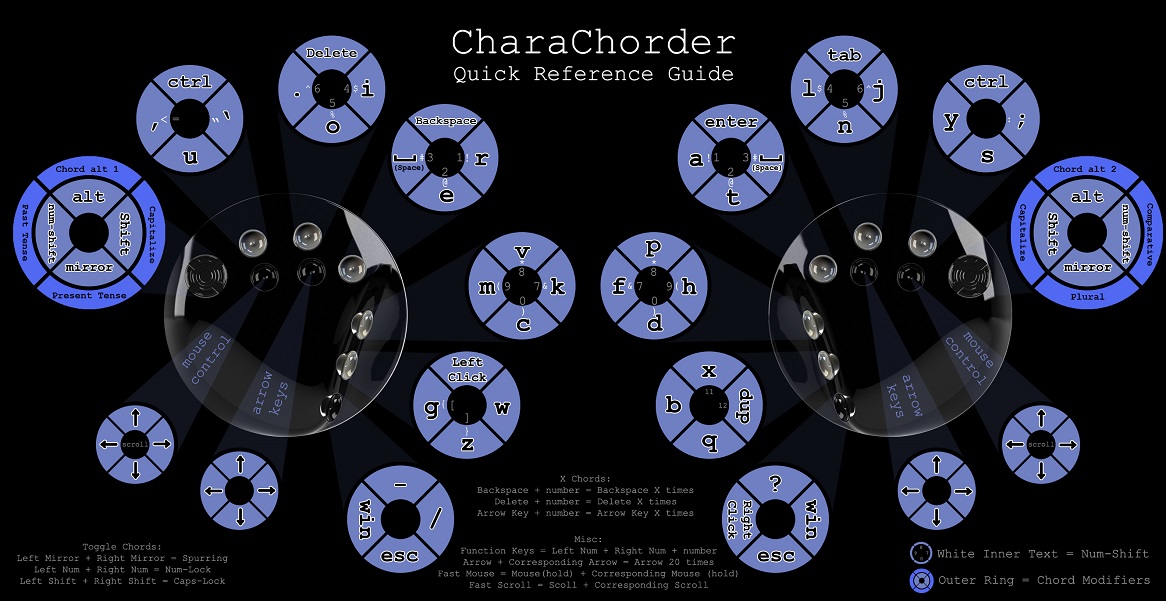 loud harbor
When did you receive your charachorder?
I assume recently, right?
Also, I just meant what keyboard the OS was set to
The charachorder works best if it's set to QWERTY OS layout
The symbols in the default layout on qwerty are very similar to where they are on a normal keyboard
Are you able to type, for example, the number 1?
Using numshift and r?
! Is then just shift and numshift and r
So ( is similar, it's shift and numshift and m
left gust
loud harbor
When did you receive your charachorder?
I assume recently, right?
Yup, today, and QWERT,
loud harbor
Okay, we can come back to the chord question momentarily
left gust
loud harbor
Using numshift and r?
yes
left gust
correct
oh, I feel so stupid right now, shift, numshit and c works xD
thanks a lot 🙂
loud harbor
🙂
No problem
Okay, so now
For the chord question
You are looking on what website?
I assume launchpad chordmanager?
left gust
yes
loud harbor
You will want to try it out on iq-eq.com
Unfortunately the docs haven't updated just yet
But you actually have the new CCOS
And it's not compatible with the old website just yet, so try to go to iq-eq.com, click connect in top right
And check out that chord manager page and see if you can get your chord list to populate
Make sure to use Google chrome
Or other browser that supports serial api
left gust
no worries 🙂
 mossy epochBOT
GG @left gust, you just advanced to level 1!
loud harbor
OH duh
Web site created using create-snowpack-app
.io
whoops 😄
under library just use the "populate table" after you have connected
you can then export it too, will download as a csv if you want to explore it that way
left gust
yes, this works thank you a lot 🙂