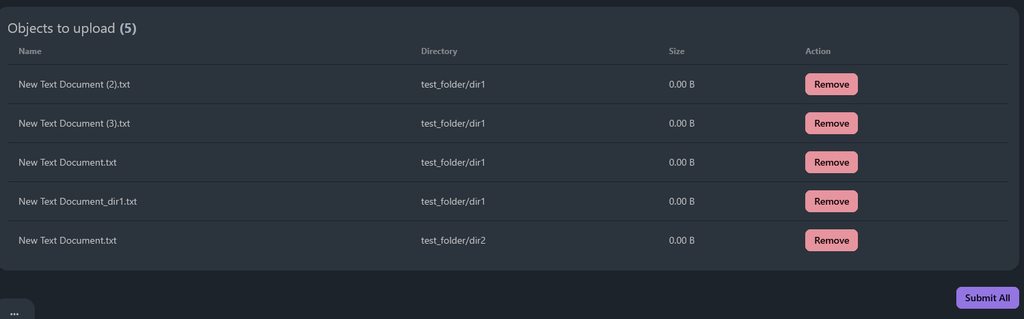
#Allow folder uploads

1 messages · Page 1 of 1 (latest)

outer gate
#

Hey! I’ve been trying to use FileField but I’ve just realised if there’s a path that’s being uploaded e.g /test/myfile.txt Django seems to auto strip this path and only store myfile.txt. Is there a way to let Django ignore the stripping and store in their own folders?

Everything I see online just talks about a dynamic upload_to, but I need even more than that, allowing the actual user to choose directories on top of that.

Thanks!

limber vault
#

Upload is uploading files, binary streams, it doesn't know about paths

#

You only see it in browser where it's local

outer gate
limber vault
#

If you want to control where file is stored on upload, add extra inputs

limber vault
#

It would be disturbing if it stored paths

outer gate
#

Ah great. I could of sworn it was just Django trimming the path

#

Okay well thanks. Providing that the temp obj was the issue, would Django also trim the path if somehow we let it through? Or would Django also only allow the file name to be stored and ignore the path

#

Cause I only want to enable it on this field, and I couldn’t find any arguments to toggle for this kind of functionality

limber vault
#

I'm not sure what you mean by "trim path" Django gets file and then stores it in MEDIA_ROOT with name constructed ny upload_to and storage backend

outer gate
#

Cool. So if the file has the name /myownfolder/myfile.txt in theory Django will store it in /mymediaroot/myownfolder/myfile.txt?

#

I don’t even know if temporary files allow for a path, probably not to be honest

#

Well thanks, I didn’t even consider that it was the uploaded file rather than Django. Really appreciate it.

I’ll do some debugging and I’ll look at the objects and see if there’s something I can do force the path to stay in the request.

Thanks!

limber vault
#

As I said I don't believe server knows anything about path

#

Only data and name is sent by form

outer gate
#

Yeah that's a pain

limber vault
#

Perhaps you can read path with JS. But again, it looks concerning to me, I don't want online services to read my folder structures without my consent

outer gate
#

Well the user is the one choosing to upload the folder (or single files), I thought that should be okay

limber vault
#

Folder upload usually means just uploading multiple files. Ok, passing name of target also sounds reasonable

#

I thought it was the topic about that initally

outer gate
#

aha in the request we do actually send

#
-----------------------------19531894977682541991718191796
Content-Disposition: form-data; name="files"; filename="test_folder/dir1/New Text Document (3).txt"
Content-Type: text/plain


-----------------------------19531894977682541991718191796
Content-Disposition: form-data; name="files"; filename="test_folder/dir1/New Text Document.txt"
Content-Type: text/plain


-----------------------------19531894977682541991718191796
Content-Disposition: form-data; name="files"; filename="test_folder/dir1/New Text Document_dir1.txt"
Content-Type: text/plain


-----------------------------19531894977682541991718191796
Content-Disposition: form-data; name="files"; filename="test_folder/dir2/New Text Document.txt"
Content-Type: text/plain
#

So now i'll see the temp file obj and see if that somehow catches it

limber vault
#

hm, what kind of relative path is that?

#

Are you using already a JS widget?

#

Ah, it seems you do, right

outer gate
#

just a script on the page

#

it builds its own form

limber vault
#

Yes, that's what I meant

outer gate
#

rather than the default one

outer gate
#

yeah

#

cause we want to allow folder uploading, and single file uploading, aswell as drag and drop

limber vault
#

So you drop a test_folder onto it?

outer gate
#

so it was simpler just using that (i think)

#

Yeah

limber vault
#

Then, yes, that's what I was thinking possible with JS

outer gate
#

So the local folder was:

- test_folder/
-- dir1/
--- New document.txt
-- dir2/
--- New document.txt
limber vault
#

Yes, that's look reasonable

#

So if it's sent you can use it in django. How exactly depends on how you handle in backend I guess

outer gate
#

Yeah, at the moment we just loop through all of the request.FILES and then create a django model for each

limber vault
#

Then I'd suppose I see what you mean by "trim" - django would probably use only file name

outer gate
#

Yeah, thats what i was hoping it wouldn't do

limber vault
#

SInce normally it doesn't get path to begin with

outer gate
#

Cause we maybe need to override something or change a config somewhere, but ideally we only want to do it for this 1 field, otherwise we could have security issues with other things or just unwanted behaviour

limber vault
#

Do you read the path in FILES ?

outer gate
#

Just trying to check, pycharm just froze so im rebooting

#

hmm no we dont do anything ourselves, we just loop through request.files and directly upload them to django

    for file in uploaded_files:
        file_object = FileStorageFile(file=file, owner=actor)

django_uploaded_files = FileStorageFile.objects.bulk_create(file_objects, batch_size=100)
#

I couldnt think of a better name for the model... yikes

limber vault
#

I mean what data would be in

for file in request.FILES:
    file
outer gate
#

Just trying to find that out, pycharm debugger is just not behaving at the moment

#

just keeps getting stuck on Collecting data

#

alr ill manually print

limber vault
#

I don't quite remember but I think filename with path would be there

outer gate
#

ah yeah... dang it just printing each file gives me

New Text Document (2).txt
New Text Document (3).txt
New Text Document.txt
New Text Document_dir1.txt
New Text Document.txt
#

But maybe there's like a .directory attribute on it

#

and print just gives name

limber vault
#

it stillshould have other attributes

#

or actually, just print request.FILES

#

since well, there should be bytes there too

outer gate
#
[<InMemoryUploadedFile: New Text Document (2).txt (text/plain)>, <InMemoryUploadedFile: New Text Document (3).txt (text/plain)>, <InMemoryUploadedFile: New Text Document.txt (text/plain)>, <InMemoryUploadedFile: New Text Document_dir1.txt (text/plain)>, <InMemoryUploadedFile: New Text Document.txt (text/plain)>]
<class 'django.core.files.uploadedfile.InMemoryUploadedFile'>
#

oh wait .file should have a path

limber vault
#
class InMemoryUploadedFile(UploadedFile):
    """
    A file uploaded into memory (i.e. stream-to-memory).
    """

    def __init__(
        self,
        file,
        field_name,
        name,
        content_type,
        size,
        charset,
        content_type_extra=None,
    ):
#

hm, not sure if keeps the path at this point

outer gate
#

ah .file is <class '_io.BytesIO'>

limber vault
#

yeah, here file would be the actual data

#

try .name

#

if it doesn't have path, probably have to dig deeper into upload handlers

outer gate
#

yup no directory New Text Document.txt

#

just the end

limber vault
#

Or maybe not, I don't see code operating on names here

outer gate
#

yeah me too

#

closest i could find was temp_location = self.file.temporary_file_path() but thats just self.file.name

#

hmmm

# in class TemporaryUploadedFile(UploadedFile):
def __init__(self, name, content_type, size, charset, content_type_extra=None):
        _, ext = os.path.splitext(name)
        file = tempfile.NamedTemporaryFile(
            suffix=".upload" + ext, dir=settings.FILE_UPLOAD_TEMP_DIR
        )
        super().__init__(file, name, content_type, size, charset, content_type_extra)

Could that be something to do with it?

limber vault
#

On other hand I see META used there

#

hm, but your filename is withing FILES though

outer gate
#

would be a lot easier if pycharm debugger just worked once

#

aha

#

nvm not as interesting as i thought

limber vault
#

this only validates though

outer gate
#

yeah

#

tbh we run no validation checks so ours bypasses all of that

#

it probably would fail it

limber vault
#

I'm just not seeing code where it extracts data

#

I guess I never dug that deep into files

#

I thought it would be somewhere closer

outer gate
#

Yeah

limber vault
#

If I'd do such feature, I'd first of all approached it differently I think

#

First of all you are sending all files at once? That might be quite heavy no?

outer gate
#

Hmm, how so

#

uhm, I suppose so

#

but better ux?

#

better than selecting 1 file at a time

limber vault
#

I'd probably have a JS that upload files in queue and only 1 or a few at time

outer gate
#

Hmm yeah that could DEFINITELY work, and they could have a status list of each file

limber vault
#

And send relative path of file explicitly in POST

outer gate
#

cause theres a max limit of i think 600 files, so that would be mad heavy

#

Yeah that's actually a lot smarter

limber vault
#

But that's need different JS )

outer gate
#

ik D:

#

my nightmare

#

I may need to just find a library that does it for me, there must be one out there

limber vault
#

Yeah, I don't like much fiddling with js

outer gate
#

yeah... i generated at least 70% of it with chatgpt

limber vault
#

Well, there should be a ton of uploader scripts

outer gate
#

The thing is thinking about it

limber vault
#

also if files are big you may also want chunking

#

I did that once

outer gate
#

We need to have separate actions for like create directory manually. Will that even be possible? Just creating an empty directory.. Cause a model FileField probably wont accept no file

limber vault
limber vault
outer gate
#

Nice, thank you! yeah that'll be a lot better than 1 big upload

outer gate
#

So i need some sort of blank file name just for it to create that initial directory

#

I did think maybe i've structured the whole "system" wrong, cause 1 row per "file", but I didn't know how i'd render it if i had like the parent be a separate charfield or any differently

limber vault
#

Anyway creating dirs locally is just python pathlib.Path.mkdir()

outer gate
#

But we need to do it via django for cases like django-storages, we dont only use local storage

#

e.g. s3

limber vault
#

ah, yeah

#

Haven't worked with S3

outer gate
#

A contributor suggested just using boto manually to do it, but then we have to do it all our selves, twice (s3 and local). So i liked the sound of letting django do it via FileField and then we dont handle anything apart from objects.create

limber vault
#

Then it's question to S3 storage for django. It's rather common so I'd hope it knows the stuff

outer gate
#

Generally we dont need to touch it, i've never had issues with it. Just in this case it's the issue of stopping django from slicing that dir. But yeah I think i'll go with your idea of chunking and doing 1 at a time

#

Tbh it's just this code that needs to be modified, i dont think it'll be that difficult. Just trying to know when it's started upload and when all are finished, no idea how that'll work

filesToUpload.forEach((file) => {
                const fileInput = document.createElement('input');
                fileInput.type = 'file';
                fileInput.name = 'files';
                const dt = new DataTransfer();  // DataTransfer to simulate file input
                dt.items.add(file);  // Add file to the DataTransfer object
                fileInput.files = dt.files;
                form.appendChild(fileInput);
            });

            document.body.appendChild(form);
            form.submit();
            form.remove();
limber vault
#

you need async submit and callback functions for success and failures

outer gate
#

Im trying to get my head around the chunked upload package you shared

#

Just dont quite get the backend side of it

limber vault
#

Well, probably put aside chuncking for now. That lib just worked for me with minimal effort, but my case was single file upload (just files 200-900MB)

outer gate
#

Oh i see, its not necessarily chunks of x files, but just 1 file into x chunks

#

makes more sense

limber vault
#

Yes, but if you have large files it still would be preferable

outer gate
#

I suppose i'll try without chunking files for the moment then. And just try to split up the list of files.

I assume i'll just need to store the statuses in the DB?

Like:

  • first request: create "ChunkedUpload" -> return uuid
  • second request: use returned ID to upload to the same batch
  • last request: use returned ID and send over to a new url that deletes the upload uuid
#

well i'll give it a shot, and just hope that no requests return a non 200

outer gate
#

Okay well i've got up to the point where batching works, and we now have a directory per item. But i have no idea how to tell django this new path

#

Aha just realised you can still use django storages, but manually store it

#

Woo it worked! I wasn't expecting that