#help with django and react
114 messages · Page 1 of 1 (latest)
 wicked pumice
 little jay
A common approach is to throw a reverse proxy in front of both, whereby one location (notably '/') forwards to frontend:port [react] and others forward to the backend:port (/admin or /api).
You can look into nginx for this. It will enable both "local" and "remote".
P.S. That's not to say that you can't make it work without, but the better practice and approach is the above.
wicked pumice
little jay
A common approach is to throw a reverse proxy in front of both, whereby one loca...
I followed a tutorial where it made me install cors on django and axios on react
In that tutorial they were able to get it working
But i still cant get it working even following it lol
little jay
What's not working for you ?
wicked pumice
The communication between the back end and front end
I dont know where to look
Like i dont know if the problem is the front end not properly connecting to back or that the backend is rejecting front end
How do i pinpoint where the problem is
What should i be looking at
little jay
Your browser's developer console should give you the information.
Here's an example if you use chrome.
You need to be checking the "Console" for javascript errors and the "Network" for request errors.
wicked pumice
i opened the console and saw 200 and 304 and 101 error code. so far no 404 or something error
little jay
Are you able to view your backend api directly without passing through frontend?
If so, when you call your api from your frontend do you see any log on your backend's terminal?
Please show the segment of your frontend code that calls your backend api.
You can #readme-1st for formatting.
wicked pumice
little jay
Are you able to view your backend api directly without passing through frontend?...
package.json
"proxy": "http://localhost:8000",
App.jsx
refreshList = () => {
axios.get("/api/todos/").then((res) => this.setState({ todoList: res.data })).catch((err) => console.log(err));
};
when you call your api from your frontend do you see any log on your backend's terminal?
Please can you show the entirety of your App.jsx
wicked pumice

Build a Django backend and a React frontend for a To-Do application.
go to the very end
wicked pumice
little jay
Please can you show the entirety of your `App.jsx`
go to near the end of conclusion section then just back up a little . thats my app.jsx code
little jay
what do you get when you call http://localhost:3000/api/todos/ directly from your browser?
wicked pumice
i change that to the machine ip since it wont work if i use localhost
http://192.xxx.xxx.xxx:5173/api/todos/ port is 5173 but i did change it to that in setting in the django cors
when i access that it just blank screen and is blank
the network tab in browser shows the same
little jay
is your django project located on the same server? if so then chances are you should change that proxy to
"proxy": "http://192.xxx.xxx.xxx:8000",
wicked pumice
my django and react is in the same dev server machine
i am accessing it from a different pc
does what im saying makes sense
little jay
yes, try the above please.
You currently have two endpoints: Frontend and Backend. The Frontend server is running your react app and your backend server is running the django app. The tutorial is using this proxy mechanism so that you don't have to call the api via the full host uri to the api. I'm assuming node will proxy these calls internally.
Or now that i think about it, localhost:8000 is probably correct.
little jay
wicked pumice
the network tab in browser shows the same
When you say "blank" in the network tab, do you not see any request done ?
wicked pumice
little jay
When you say "blank" in the network tab, do you not see any request done ?
no i mean blank on the screen. the network is the same as i mentioned earlier with 304 code 200
little jay
The impression I have is that the proxying is causing issues. Do you see any output in your node terminal / logs? (and consequently, any output in the django terminal / logs?
little jay
refreshList = () => {
    console.log('calling')
    axios.get("/api/todos/").then((res) => {
        console.log('success')
        this.setState({ todoList: res.data })
    }).catch((err) => console.log(err));
};
P.S. I'm assuming you've atleast made sure that you're reaching that point.
wicked pumice
yes
wicked pumice
little jay
P.S. I'm assuming you've atleast made sure that you're reaching that point.
i checked the stack trace it mentioned the refreshlist
little jay
There was an error?
wicked pumice
um not sure if you would call it an aerror
little jay
All this time you've been holding out on a stack trace ? 😦
little jay
There are two areas you have to check, the javascript console first, then the network tab.
little jay
little jay
You need to be checking the "Console" for javascript errors and the "Network" fo...
as mentioned here ^
wicked pumice
oh
ok THAT i didnt know
ill try and check the console
currently its giving me filter / map is not a function lol
i tried to console log and its giving object
little jay
Please check which line, location it's happening on.
wicked pumice
little jay
Please check which line, location it's happening on.
i found the line its the filter part. its saying its not a function but when i checked if its an array it says it is.
wicked pumice
little jay
Please check which line, location it's happening on.
the issue seems to really be the communication between django and react
i tried to like add a hard coded item and console log it and it seems fine . i can filter fine and output it in console log but its ust that when it does the filter i think it got from the refreshlist it turns itself to string thus making filter not a funtion
so the main issue is still the connection between django and react
does all what im saying makes sense lol or is it too confusing
little jay
Is the error occuring in refreshlist?
little jay
Please show the code here.
wicked pumice
because its not a array its a string
its the same one
i already linked it
Build a Django backend and a React frontend for a To-Do application.
the difference on my code is taht i just do some troubleshooting like adding console.log and a hardcoded data
aside from that nothing else has changed
i feel like if we can figure out the connection problem itll be ok
wicked pumice
yes but i need to expose the host
little jay
or you could try accessing it directly on the server instead via the shell (curl)
wicked pumice
<!DOCTYPE html>
<html lang="en">
<head>
  <meta http-equiv="content-type" content="text/html; charset=utf-8">
  <title>Page not found at /</title>
  <meta name="robots" content="NONE,NOARCHIVE">
</head>
<body>
  <div id="summary">
    <h1>Page not found <span>(404)</span></h1>

    <table class="meta">
      <tr>
        <th>Request Method:</th>
        <td>GET</td>
      </tr>
      <tr>
        <th>Request URL:</th>
        <td>http://localhost:8000/</td>
      </tr>

    </table>
  </div>
  <div id="info">

      <p>
      Using the URLconf defined in <code>backend.urls</code>,
      Django tried these URL patterns, in this order:
      </p>
      <ol>

          <li>

                admin/


          </li>

          <li>

                api/


          </li>

      </ol>
      <p>

          The empty path

        didn’t match any of these.
      </p>

  </div>

  <div id="explanation">
    <p>
      You’re seeing this error because you have <code>DEBUG = True</code> in
      your Django settings file. Change that to <code>False</code>, and Django
      will display a standard 404 page.
    </p>
  </div>
</body>
</html>
i used curl http://localhost:8000
little jay
My friend, curl http://localhost:8000/api/todos
wicked pumice
oh
[{"id":1,"title":"water","description":"cooler","completed":false}]
i told you its working
🙂
little jay
Let's eliminate the noise.
class App extends Component {
  constructor(props) {
    super(props);
    this.state = {
      todoList: [],
    };
  }

  componentDidMount() {
    this.refreshList();
  }

  refreshList = () => {
    axios
      .get("/api/todos/")
      .then((res) => {
            console.log('requesting')
            this.setState({ todoList: res.data })
      }).catch((err) => console.log(err));
  };

  render() {
    console.log('rendering', this.state.todoList)
    return (
      <main className="container">
        {this.state.todoList.map((item) => (
            <li key={item.id}>{item.title}</li>
        ))}
      </main>
    );
  }
}
- Use this code instead of what you have in App.jsx
- Open your frontend url
- Open your developer console.
- Check for javascript errors.
- Show any error you get here, either as text or as a screenshot you take (you can post using any public image host)
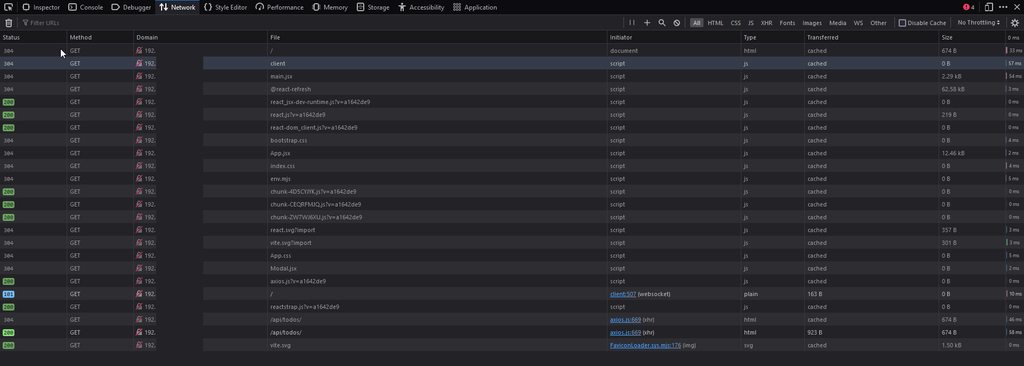
- Show the network tab as an image as well same as above
I'm not **too **versed in javascript, so a couple of points:
- Side Note: I think the world moved over from react component classes and into function based components with hooks and so on.
- Related note: fairly certain this is a proxy issue, so when we confirm that
http://remote_ip:port/api/todos/is actually forwarded internally tohttp://localhost:8000, then we can atleast be sure that your django api is being called.
wicked pumice
do i replace everything in my app.jsx with the one you pasted?
little jay
Yes, you can bring the other back once we figure out what's wrong.
I'd like you to test this again please.
wicked pumice
ok ill be right back need to just do some exercise
little jay
The same applies to this test, check developer console / network and show screenshots.
wicked pumice
https://imgur.com/a/FULAHTD
result of the 5173 curl
<!doctype html>
<html lang="en">
  <head>
    <script type="module">
import RefreshRuntime from "/@react-refresh"
RefreshRuntime.injectIntoGlobalHook(window)
window.$RefreshReg$ = () => {}
window.$RefreshSig$ = () => (type) => type
window.__vite_plugin_react_preamble_installed__ = true
</script>

    <script type="module" src="/@vite/client"></script>

    <meta charset="UTF-8" />
    <link rel="icon" type="image/svg+xml" href="/vite.svg" />
    <meta name="viewport" content="width=device-width, initial-scale=1.0" />
    <title>Vite + React</title>
  </head>
  <body>
    <div id="root"></div>
    <script type="module" src="/src/main.jsx"></script>
  </body>
</html>
 wicked pumice
little jay
The same applies to this test, check developer console / network and show screen...
wicked pumice
little jay
The same applies to this test, check developer console / network and show screen...
done
the imgur is an album
little jay
The proxy isn't working as expected.
wicked pumice
little jay
The proxy isn't working as expected.
may i ask where it says that its not working
little jay
The call to the server is returning reacts index html instead of proxying.
wicked pumice
so the proxy isnt working? the one in the package?
little jay
Yes, it's supposed to forward the incoming requests to your django server, instead its ignoring it.
There's quite a bit of "solutions" out there that are completely different from one another. I suggest you start by making aure that was you have in your package.json is the same as the tutorial. Then just dropping your node_modules and reinstalling again.
wicked pumice
i see
little jay
I'm giving it a quick test locally.
Frontend
import React, { useState, useEffect } from 'react';

function App() {
  var [todos, setTodos] = useState([]);
  useEffect(() => {
    fetch('/api/todos')
    .then(response => response.json())
    .then(data => {
      setTodos(data);
    })
  }, [])

  return (
  <ul>
    {todos.map(todo => (
      <li key={todo.id}>{todo.title}</li>
    ))}
  </ul>
  );
}

export default App;
Proxy
"proxy": "http://localhost:8000",
Backend
@api.get("/todos", response=List[Todo])
async def cards(request):
    return [
        { "title": "one" },
        { "title": "two" },
    ]
 wicked pumice
little jay
Works with axios just the same.
wicked pumice
little jay
Works with axios just the same.
Question. Did you use the version for axios and all the packages that was stated on the tutorial or did you install the latest?
The development and accessing is done on just one machine right?
little jay
Latest, i didnt follow the tutorial, but even when change the axios version, it works as expected.
Tested the access from the same machine and from a remote machine (you can see the IP access)
wicked pumice
little jay
Latest, i didnt follow the tutorial, but even when change the axios version, it ...
one more question not sure if it has any impact but did you use create react app or vite?
little jay
Create react app