#using fly.io to deploy but getting errors
23 messages · Page 1 of 1 (latest)
 split epoch
 static steeple
are your django project files in a subdirectory by any chance?
split epoch
static steeple
are your django project files in a subdirectory by any chance?
here are my project files
https://i.imgur.com/6Deyg29.png
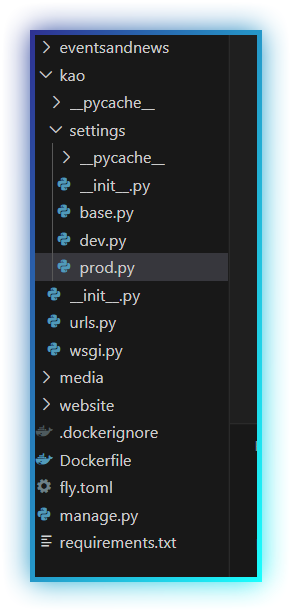
 static steeple
CMD gunicorn kao.wsgi
(leave the application, don't know if thats important, but my Dockerfiles don't have it)
split epoch
static steeple
CMD gunicorn kao.wsgi
(leave the application, don't know if thats important, but...
I can try and see
split epoch
static steeple
CMD gunicorn kao.wsgi
(leave the application, don't know if thats important, but...
I need gunicorn...otherwise doesnt load but still having same issues
static steeple
split epoch
I need gunicorn...otherwise doesnt load but still having same issues
FROM python:3.11.4-debian

ENV PYTHONDONTWRITEBYTECODE=1
ENV PYTHONUNBUFFERED=1
ENV PIP_ROOT_USER_ACTION=ignore
ENV PIP_DISABLE_PIP_VERSION_CHECK=1

ENV APP_HOME=/app
ENV SRC_HOME=$APP_HOME/src

WORKDIR $APP_HOME
# Install os packages
RUN apk add gettext

# Install dependencies
COPY requirements.txt $APP_HOME
RUN pip install -r requirements.txt

# Copy project files
COPY . $APP_HOME

# Collect staticfiles
RUN mkdir -p $APP_HOME/static
RUN python3 $SRC_HOME/manage.py collectstatic --noinput

# Compile translations
RUN python3 $SRC_HOME/manage.py compilemessages

# Mark entrypoint as executable
RUN chmod +x ./docker-entrypoint.sh

# Define entrypoint
ENTRYPOINT ["./docker-entrypoint.sh", "--"]

CMD ["gunicorn", "MyProject.wsgi", "--bind", "0.0.0.0:8000"]
Thats an example from one of my projects, i don't particularily see any problem with your dockerfile, however you could maybe also turn on debug mode for gunicorn, maybe it'll tell you exactly what path its trying to find
(You can turn on gunicorns debug mode by adding "--log-level", "DEBUG" to the CMD list
I also use an entrypoint for setting up the database and whatnot, but you don't need that yet, Maybe just leave that for now
split epoch
static steeple
I also use an entrypoint for setting up the database and whatnot, but you don't ...
My database is being hosted on aws idk if that changes the gunicorn file
 tulip pathBOT
GG @split epoch, you just advanced to level 1!
static steeple
split epoch
My database is being hosted on aws idk if that changes the gunicorn file
Shouldn't, your database is only a concern AFTER your application actually started, in your case however, it fails to even get that far
gunicorn is being executed, so far so good (that means the package is installed and accessible)
The problem is just that it fails to find the project's wsgi file
Maybe explicitly set the project path with --chdir /code
https://docs.gunicorn.org/en/stable/run.html
tulip pathBOT
GG @static steeple, you just advanced to level 2!
split epoch
static steeple
gunicorn is being executed, so far so good (that means the package is installed ...
well now its working but my wagtail + coderedcms looks all broken idk what is wrong
static steeple
split epoch
well now its working but my wagtail + coderedcms looks all broken idk what is wr...
Whats broken?
Did you run the database migrations?
split epoch
static steeple
Whats broken?
Did you run the database migrations?
css which is inbuilt in wagtail is not loading
static steeple
you have to do a collectstatic before running
otherwise your nginx or apache server isn't going to find those files and therefore can't give them out to anyone
Take a look at the dockerfile i sent, it collects the staticfiles, compiles the language translations (maybe not important in your case, but certainly doesn't hurt), and then pretty much runs
split epoch
static steeple
Take a look at the dockerfile i sent, it collects the staticfiles, compiles the ...
I never read there docs there is a special way to do it 😦 https://docs.coderedcorp.com/wagtail-crx/how_to/docker.html
static steeple
split epoch
I never read there docs there is a special way to do it 😦 https://docs.coderedc...
I've never used wagtail soooo thats interesting 🙂
split epoch
yeah well that never worked either idk if anyone knows pls help 🙂
split epoch
I used this https://fly.io/docs/django/getting-started/existing/
And then to create my docker file I used the one suggested by https://docs.coderedcorp.com/wagtail-crx/how_to/docker.html
Since I believe or guessed all I needed but I suppose not as the errors I get is with static files of coderedcms and my uplaoded images saying they aren’t found