
#Shadow casting different shadow lengths for different objects
41 messages · Page 1 of 1 (latest)
 real grove
 trim rune
You don't understand what you want. So nobody understands what you want. And that's the reason you can't find a solution. Because the goal is undefined
Wtf is that drawn red line
So... Figure out what you're trying to achieve and ask once again. Because the shadow length is a setting in Light component as well as "Quality" tab in project settings. And I'm sure that's not what you're looking for
real grove
@trim rune What do you mean? I want to cast shorter shadows for objects that are shorter. So a half wall is shorter than a tall wall. What's there not to understand?
The red line is an illustration of how the shadow could look for a half wall.
Currently shadows are cast the length of whatever the light can reach. So sorry, if you were not able to understand that, it seems clear to me
real grove
trim rune
So... Figure out what you're trying to achieve and ask once again. Because the s...
This is not true for 2D Shadows, not sure if you understood that this is about a 2D game, though I will double check. I am on Unity 2023.x version
Nope, no length control
 trim rune
I completely misunderstood the screen, yes
real grove
Though a fellow seems to have found a way around it https://zhuanlan.zhihu.com/p/439637997
知乎专栏
本文是一个学了10年医的菜鸡医学生转行做游戏一年半以来写的第四篇技术分享文章,水平有限,抛砖引玉,如有误人子弟贻笑大方之处,恳请各位大佬不吝指正。我目前使用的Unity版本是2019.4,URP版本是7.5.3,最新版…
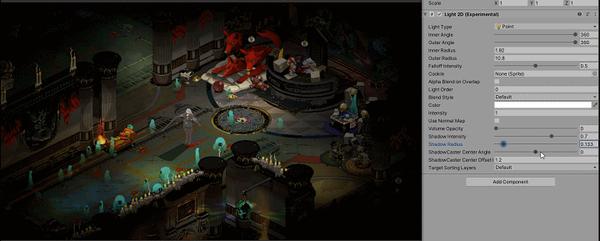
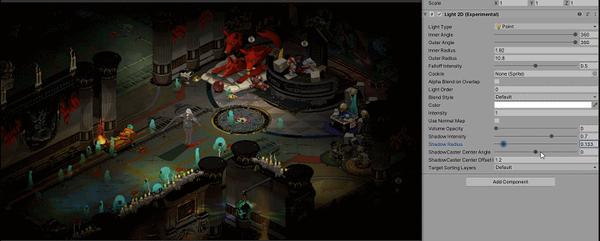
though it seems slightly overkill but seems like there are no good alternatives from my research
trim rune
I didn't use 2d lighting, but I doubt they have anything built-in for that, unity seems to never finish new features
So my approach would be:
- Research if there is any built-in feature for that (You've done that)
- Research the way built-in lighting works and see if there are any hacks/workarounds
- Research if there are any github packages created already for custom lighting in 2D games
- Make one yourself
~. Stick with 3D lighting with camera twisted by the right angle, so you work with 2d game in 3d space with 3d lighting. Like "enter the gungeon" does
 real grove
trim rune
real grove
trim rune
That could also be an option. I found this a few days ago https://github.com/Alx101/Unity2DShadows but judging by the last commits I decided to not bother

GitHub
2D dynamic shadows for the Unity engine. Contribute to Alx101/Unity2DShadows development by creating an account on GitHub.
real grove
trim rune
This is porbably what you also showcase https://medium.com/@tidyui/fast-beautiful-2d-lighting-in-unity-47b76b10447c
Medium
I posted a short tweet for #unitytips on how to create flashy 2D lighting effects with Unity and got some requests to clarify exactly how…
Thanks for the feedback @trim rune
 acoustic ploverBOT
spiderix thanked Дядя Женя
 turbid oriole
real grove
Hello. I am playing around with a 2D Top Down game and I would like to cast diff...
turbid oriole
real grove
Hello. I am playing around with a 2D Top Down game and I would like to cast diff...
I did that, but it's complex work.

So the big idea behind it, in my case:
A camera renders only the light colliders and you use that as a global texture in your shaders.
Your light sources use a specific shader that will raycast from their local center toward the exterior, using the obstacle texture to know if a occlusion occurs.
When they meet a colored pixel (an obstacle), they put their shadow intensity to 1, and for each pixel where there is no more obstacle, they reduce it.
("pixel" here actually means "raycast step", as you can't do that for every pixel, it would be too costy).
Those lights are rendered on a separate texture.
Then your actual game shader uses that light texture as an input and uses it to darken the shadowed areas.
It's very important that the obstacles are a single draw calls, so you use a special shaders for them (I actually only rendered them on a red channel as it's really a "collider / don't collide bitmask".
Then for the light sources, you don't have a lot of choices since you need to raycast from the center, it's 1 draw call per light source, and the raycast step will give you performance limitation. The more steps, the more precise the shadows, but also the poorer the performance.
If you have a single moving light source, then it's doable. Above 3-4, it becomes suicid. But, a funky trick: you can bake the lights and render the raycasting result only once if they don't move around.
At some point I added an "intensity" to the red channel of the obstacles, so pebbles would give small shadows, and large walls would block everything, that's just a bit of maths in the shader.
real grove
Alright, thanks for the input @turbid oriole currently I think I might either go with https://zhuanlan.zhihu.com/p/439637997 or the 2D world in a 3D world

知乎专栏
本文是一个学了10年医的菜鸡医学生转行做游戏一年半以来写的第四篇技术分享文章,水平有限,抛砖引玉,如有误人子弟贻笑大方之处,恳请各位大佬不吝指正。我目前使用的Unity版本是2019.4,URP版本是7.5.3,最新版…
acoustic ploverBOT
spiderix thanked xahellz
 eternal lichen
Enable Shadows in Unity:
Make sure that your Project Quality Settings have Shadows enabled. Go to "Edit" > "Project Settings" > "Quality" and ensure that the Shadow Type is set to at least "Hard Shadows" or "Soft Shadows."
Set Up Lights:
Ensure that the lights in your scene are set to cast shadows. Select the light source in the scene, and in the Inspector window, make sure "Cast Shadows" is enabled.
Set Up Shadow Distance:
Each GameObject that casts shadows has a "Shadow" component. You can set the shadow distance individually for each object. Adjust the shadow distance based on the desired length.
`using UnityEngine;
public class CustomShadowCasting : MonoBehaviour
{
public float shadowDistance = 10f;
void Start()
{
    // Set the shadow distance for this GameObject
    GetComponent<Renderer>().shadowCastingMode = UnityEngine.Rendering.ShadowCastingMode.On;
    GetComponent<Renderer>().receiveShadows = true;
    GetComponent<Renderer>().shadowDistance = shadowDistance;
}
}`
Attach this script to the GameObjects you want to customize, and you can adjust the shadowDistance parameter in the Inspector.
Dynamic Adjustments:
If you want to dynamically adjust shadow lengths during runtime, you can modify the shadow distance property in your script based on certain conditions.
`using UnityEngine;
public class DynamicShadowCasting : MonoBehaviour
{
void Update()
{
// Dynamically adjust shadow distance based on some conditions
float dynamicShadowDistance = CalculateDynamicShadowDistance();
GetComponent<Renderer>().shadowDistance = dynamicShadowDistance;
}
float CalculateDynamicShadowDistance()
{
    // Implement your logic to calculate the desired shadow distance dynamically
    return Mathf.Clamp(someDynamicValue, minShadowDistance, maxShadowDistance);
}
}`
 hidden tusk
eternal lichen
Enable Shadows in Unity:
Make sure that your Project Quality Settings have Shado...
hidden tusk
eternal lichen
Enable Shadows in Unity:
Make sure that your Project Quality Settings have Shado...
Would have been sick if true, but that is not what the shadowdistance property does unfortunately. See: https://docs.unity3d.com/Manual/shadow-distance.html

 real grove
Heya @hidden tusk and @eternal lichen I just ended up making a sprite in which I rotate around the nearest light sources. Got the idea from this:
https://www.gamedeveloper.com/programming/graveyard-keeper-how-the-graphics-effects-are-made

Game Developer
The summary of tips and tricks used in Graveyard Keeper to make different graphical effects and apply them on a pixel art picture.
turbid oriole
So you don't have the shadow width based on the object proximity, but it's one way to do it!