I am currently doing an isometric game. In most games, when the main character enters inside a building, the roof (and some other minor parts, if necessary) will fade off to let the player see his character position inside the room while keeping the camera outside. I feel like in most cases, the model of the building is divided into clear / distinct parts to exactly decide what parts become invisible and what parts stays visible when the player enters inside. But in my case, I need another solution, because my models are not divided as such. Is there an instance of a game or is there any clever solution that would allow me to stick a kind of a mask somewhere on the building and make it rub the meshes out when the player enters the building ?
#Make parts of a 3D building disappear using a mask ?
4 messages · Page 1 of 1 (latest)
 tame scroll
 slate python
tame scroll
I am currently doing an isometric game. In most games, when the main character e...
slate python
tame scroll
I am currently doing an isometric game. In most games, when the main character e...
Stencil mask is what I think,
then you can use some arbitrary mesh to write to the stencil buffer, and the house shader will then read the stencil mask and only render if a specific bit is set or not. and you can choose the zbuffer interaction too (depth test)
maybe you want to work with the stencil buffer but also only want to draw the wall if the wall has a depth further away than the stencil applicator thing, or the other way around
https://liu-if-else.github.io/stencil-buffer's-uses-in-unity3d/
https://www.youtube.com/watch?v=-NB2TR8IjE8
https://www.youtube.com/watch?v=AATjjduNUAU
https://docs.unity3d.com/Manual/SL-Stencil.html
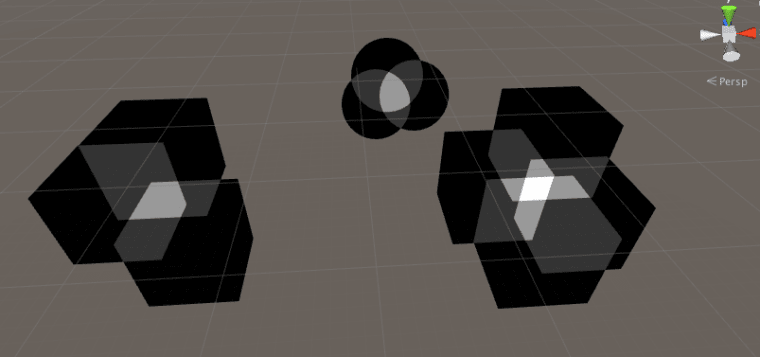
This article explains the stencil buffer and illustrates with outlining, polygon filling, mirror restricting and shadow volume.

Tutorial going over the core concepts and syntax for using the stencil buffer in Unity shaders.
Here is the full reference: https://docs.unity3d.com/Manual/SL-Stencil.html

A video from my Unity Shader course available on Udemy. Get the full course for a great discount by following this link http://niklever.com/courses .
The resources for the course including over 70 custom shaders are available at https://github.com/NikLever/UnityShaders .

worst case is when you don't manually make the mesh you want to use for the stencil cutout, you generate the mesh procedurally as the game plays, and then apply the stencil material
https://www.kodeco.com/3169311-runtime-mesh-manipulation-with-unity

One of the benefits of using Unity as your game development platform is its powerful 3D engine. In this tutorial, you’ll get an introduction to the world of 3D objects and mesh manipulation.
tame scroll
@slate python thank you so much ! I will try this solution and will come back with some results if I succeed to get any. I forgot to add that one of the major challenge is that the camera can be rotated from 0 to 180 degrees around the character, keeping the same height, a little bit like in Holstin, So I will need the stencil mask to move according to the camera position. But let's see how this goes 🙂 thank you again !