#Core Keeper University
1 messages · Page 3 of 1
 fallow hawk
Logged in after a long break. Look what color slime is still hanging out in the dirt biome 😄
Aww so far from home.

 remote thunder
What assortments of food would be the highest ranged dps
 cloud imp
fallow hawk
Logged in after a long break. Look what color slime is still hanging out in the ...
cloud imp
fallow hawk
Logged in after a long break. Look what color slime is still hanging out in the ...
KILL IT
my inner demons sorry
 warped parcel
i have this setup so far for drills at multiple ore boulders. is there anyway i can make the ore go past the first arm if it's kiln is full and go to the next empty kiln? or if that's not possible, chain them together so when the arm drops the ore next to a busy/full kiln and be picked up by another arm or converyor belt?

 gusty epoch
put the arm coming off the first kiln, if the kiln is full it'll drop on the tile instead of in the kiln and then the second arm will pick it up
warped parcel
won't that also pick up the bars?
warped parcel
gotcha, and i can put one more arm and a chest at the end of the line to recieve bars! thank you, that's very satisfying
gusty epoch
I'm not sure if it still works but some people did auto-sorting chests using drills that are pulsed for 1s or something
could look at those and see if that would work for you
I think the idea is the drill turns on and grabs the item, but the item still moves despite the drill being off, then have an arm behind the drill
warped parcel
this is working, thank you! i may look into the sorting thing for more complex ones back at base, but this is good for an ore factory. now if only there was a tin one in reach

 trim kestrel
remote thunder
What assortments of food would be the highest ranged dps
trim kestrel
remote thunder
What assortments of food would be the highest ranged dps
So, for absolutely optimal ranged damage food buffs, you'd want all cooked food to be epic for +50% buffs. Which means it would have to have 1 gold veg and also get the master chef proc (~5% of dishes, very inefficient).
And you'd want to have all the best ranged relevant offence foods:
• Glittering larva meat (crit chance)
• Silver dart (crit damage
• Pink coralotl (range damage)
• Teal Palace Fish (ranged attack speed)
• Golden puffungi (damage to bosses - presumably)
https://steamcommunity.com/sharedfiles/filedetails/?id=2797638499
 fallow hawk
anyone know what this is about?
 fallow hawk
cloud imp
where did you find that
fallow hawk
cloud imp
where did you find that
It popped up when trying to join a friends world. They were in fact online playing in that world. So not sure what causes the error.
cloud imp
fallow hawk
It popped up when trying to join a friends world. They were in fact online playi...
is his name
W I T H E R
fallow hawk
Yeah. That not part of the error code lol
cloud imp
hm
i had that aswell
its just an error which sometimes accures
nothing to do with you
 obtuse star
pretty cool
 gusty epoch
Would be cool if my tiny brain could figure out how to get that to show lol
trim kestrel
obtuse star
pretty cool
Pizza based map generation, eh?
Sorry, you'd already said "Voronoi" (noise) in Twitch chat, I'd not realised. 👍
Oh, and @inland compass - Max settled our debate on what get's generated first, scenes or terrain. David initially said terrain, but then Max interjected to say technically it's the scenes (although kinda both together). 😅
VOD of the twitch stream at that time index: https://www.twitch.tv/videos/1622179675?t=01h44m31s
Twitch
unitytech went live on Twitch. Catch up on their Software and Game Development VOD now.
This was pretty cool to see, too. The 3D world stretching out. When they were talking about dungeon generation:
 gusty epoch
I was hoping they’d get closer to our friend Ghorm but understand why they didn’t
Gave some good insight into how dungeons and paths are generated tho
I’ll have to rewatch it sometime later
trim kestrel
And Max showed off the player "stink" trails (green cross-hatched path) that raiding parties and follow (and collision resolution, I assume):

And the 3 camera angle rendering system, with reflections taken from looking diagonally up from below, and a flat angle for ambient lighting, was it (I didn't really get that part).

 inland compass
i'll have to watch it after work
 south sundial
trim kestrel
And Max showed off the player "stink" trails (green cross-hatched path) that rai...
south sundial
trim kestrel
And Max showed off the player "stink" trails (green cross-hatched path) that rai...
oh i thought that was enemy pathfinding lol
inland compass
any idea if the stink path is just the other layer contained in the map file?
trimmed to a specific timetstamp
south sundial
havent found it yet
they showed off the lighting thing i used for afraid of the dark in the unity scene though
so now i have more insight on that
trim kestrel
inland compass
any idea if the stink path is just the other layer contained in the map file?
I don't know, sorry. They didn't even seem to say there was a gradient of values, to set direction, etc... But I guess I there must be.
inland compass
well you see "gradients" in the png because the value is a timestamp
but if they just use current time - x for the path, it would make sense
trim kestrel
inland compass
well you see "gradients" in the png because the value is a timestamp
Right. Makes sense
 frigid hinge
trim kestrel
And the 3 camera angle rendering system, with reflections taken from looking dia...
frigid hinge
trim kestrel
And the 3 camera angle rendering system, with reflections taken from looking dia...
The flat one is for indirect lighting that just spreads in two directions 🙂
doesn't need to be angled since it does not render sprites
trim kestrel
frigid hinge
The flat one is for indirect lighting that just spreads in two directions 🙂
Was that camera what was being shown in this view?
 frigid hinge
Yap
Not sure if it is used as it was before when me and David implemented the system. We had help from Felix to optimize it just before we released EA.
And that changed some parts that I haven't had the time to look at thorougly yet
trim kestrel
frigid hinge
Not sure if it is used as it was before when me and David implemented the system...
Who is Felix (when they're not a cartoon cat)? 🙂 Unity team?
trim kestrel
 uncut remnant
whats the best tree farm design
uncut remnant
whats the best tree farm design
There is no tree farming... 😜 Close to best wood farm here: https://steamcommunity.com/sharedfiles/filedetails/?id=2802836829
Craigins ain't fussed about optimising these thing, tho. 😅

How to produce 10 times more wood per drill and 50% more wood per seed than conventional builds! Partially updated for 0.4.0....
inland compass
i'm a 4 drills per root wood farmer
 pine fiber
@trim kestrel can u share ur caveling/slime farm design pls? me and my friend have been wanting to build one but we dont rlly know how to make spawns optimal and a good killing system
trim kestrel
pine fiber
<@135482054912507904> can u share ur caveling/slime farm design pls? me and my f...
This one that farms everything, example 2: https://steamcommunity.com/sharedfiles/filedetails/?id=2846860078
There's a lot to take in with this guide. But it's all there in the info-graphics, essentially.

Spawn algorithm fully explained, optimised mob farm examples, based on months of in-game testing + new data mining. SPOILERS for game mechanics, biomes, mobs, bosses....
pine fiber
@trim kestrel i totally agree with this guy 😂

do u plan on making any videos?
also if i understood correctly with this image, u dont need conveyers on the tiles where mobs spawn?
 trim kestrel
pine fiber
do u plan on making any videos?
trim kestrel
pine fiber
do u plan on making any videos?
Sure. Planned a simple introduction a few weeks ago. When I had a good day. Then my energy crashed back down for like 20 straight days since, so... 🤷 Sorry.
pine fiber
pine fiber
also if i understood correctly with this image, u dont need conveyers on the til...
and what surprises me is that u only need this many spawning blocks O_O
pine fiber
trim kestrel
Sure. Planned a simple introduction a few weeks ago. When I had a good day. Then...
its alright you,ve been a life saver
trim kestrel
pine fiber
also if i understood correctly with this image, u dont need conveyers on the til...
The conveyors are removed purely so you can see what's underneath.
As the note says, it's "illustrative" (only).
pine fiber
oh ok
trim kestrel
Although. There doesn't need to be any more conveyor than shown in the Larva spawning area. Only in the middle part where mobs might fight each other. Because mobs will eventually walk themselves onto conveyors, but drops will get stuck where they land (if there's gaps in conveyor coverage).
pine fiber
right
pine fiber
@trim kestrel alright, i inspected your design to understand as much as i could, and i would like some confirmation: So cavelings, farmers/hunters and scholars all spawn in the same spot and fight, and the loot goes on the conveyers where the hands can pick them up at the end and excess mobs end up getting killed at the end in the kill loops by either an overflow of crabs or scholars which are farmed seperately
there is just one thing i dont quite understand, and its this "mirrored" part of the farm

do i have to mirror all of the purple square?
(also i really wish i was as smart as you are)
 lilac gale
inland compass
i'm a 4 drills per root wood farmer
lilac gale
inland compass
i'm a 4 drills per root wood farmer
My brother in arms, I salute you for taking the truly best path alongside me
trim kestrel
pine fiber
<@135482054912507904> alright, i inspected your design to understand as much as ...
Caveling sub-types don't fight each other. See the second info-graphic from the top of the guide, which shows the 4 mob alliances.
Grouping all the cavelings together, separate from the other mobs, is purely to avoid the caveling brutes breaking floor tiles (and walls) with their attacks. The whole farm is carefully designed around this.
Mirroring each mob grid of spawn surfaces allows for minimising the amount of space wasted with a 2 tile gap between cavelings and other mobs. Needed to stop the brutes attacking (over single walls).
trim kestrel
pine fiber
there is just one thing i dont quite understand, and its this "mirrored" part of...
An alternative way to do this would be to have the caveling spawn area and monster spawn areas entirely separate. E.g. one above the kill loops, and one below.
I'll probably show off a design like that, if I return to explaining a new farm at some point. Because this fully optimised layout is very confusing to understand and much more fiddly to build.
 winged cypress
just finished recording about my mobfarm, is that ok for me to post here? a lot of theory is come from/thanks to ZeroGravitas's guide
trim kestrel
winged cypress
just finished recording about my mobfarm, is that ok for me to post here? a lot ...
Yeah, post whatever you like here. If pics, etc, could use #📷-ck-media too (probably more people see that).
winged cypress
thanks 😄
https://www.youtube.com/watch?v=0hj4ZsZf-7k&t=5s&ab_channel=きず
the mobfarm I shared last time, just record a short video about it, maybe it will help someone building theirs.
complete layout is here.
https://imgur.com/a/QR2a60C

it seems steady enough to work for about 2 months without problem, so I share this one to you
complete layout is here
https://imgur.com/a/QR2a60C
 pine fiber
trim kestrel
An alternative way to do this would be to have the caveling spawn area and monst...
pine fiber
trim kestrel
An alternative way to do this would be to have the caveling spawn area and monst...
i think i still managed to understand it
 crisp goblet
@winged cypress How do you deal with Brutes?
winged cypress
the whole stone moss area is separately deal with at right side
crisp goblet
Ah I see, I was getting confused by the various shades of orange
winged cypress
it seems steady enough to work for about 2 months without problem, so I share this one to you
complete layout is here
https://imgur.com/a/QR2a60C
it's about here
trim kestrel
winged cypress
https://www.youtube.com/watch?v=0hj4ZsZf-7k&t=5s&ab_channel=%E3%81%8D%E3%81%9A
t...
How do you have so many urban moss spawns here (and in another spot)? Did you carefully position this to be at the corner of 4 spawn cells?
 trim kestrel
Can you show a show of this bit of map in Craigin's map tool, with "mob grid" on, please? 🙂
If you've not planned it deliberately, I think you must have gotten lucky. Because each spawn, within a cell, reduces the chance of another by a factor of 5. So, even AFKing for hundreds of hours, I don't think you'd see this many mobs unless it's split at least 2 ways.
 trim kestrel
winged cypress
trim kestrel
winged cypress
Cool, thanks! So all the urban moss spawn areas are at least split in half. Doubling their effective limits on spawns. Except for the area bottom middle. Which we don't see in the video, but I'd expect there's significantly fewer mobs there, compared to the others...?
 trim kestrel
Right, yeah. 👍 Cool. I just like to make sure I still fully understand what's going on. 🙂
winged cypress
and since jellyfish is too many after I afked for too long
it's becoming laggy and sometimes those scholars will trigger revenge mode on some mobs
and they just go through that gap and come into conveyers
so that's the reduced amount actually
trim kestrel
winged cypress
and since jellyfish is too many after I afked for too long
Jellyfish lag an interesting point. The devs reduced the number of fireflies, because of FPS slowdown. But I presume they've not addressed jellyfish...
It may be worth making a #1019964660214153326 post with a screenshot of lots of jellyfish, to make this point. 🙂
trim kestrel
Sounds like that's worth following up on, then. The devs may not catch every bug report. 🙂
trim kestrel
winged cypress
it's becoming laggy and sometimes those scholars will trigger revenge mode on so...
It's true that scholars can be plucked up for raiding parties. But, as I understand it, these only occur is there is a clear path to the player's current position. (From somewhere off-screen, that may require a spawn surface, or at least an existing mob.)
Core Sentries aren't picked up, and we can see there's only 1 on that strip, compared to 3 on a similar sized strip, to the left, which is split between 2 spawn cells.
There has been a more general mob teleportation bug. And I think you can see this with the drab you have in the middle of the water.
winged cypress
trim kestrel
Sounds like that's worth following up on, then. The devs may not catch every bug...
I'll do that later, it's gradually getting worse
winged cypress
trim kestrel
It's true that scholars can be plucked up for raiding parties. But, as I underst...
I think they just teleported while I using the portal
 somber saddle
can somebody make a super simple caveling farm?
trim kestrel
somber saddle
can somebody make a super simple caveling farm?
Put a bunch of moss on the ground then kill them by hand. about as simple as it gets. 😜
somber saddle
trim kestrel
Put a bunch of moss on the ground then kill them by hand. about as simple as it ...
automated version?
gusty epoch
Spikes
somber saddle
picture for refrence?
 somber saddle
i need a refrence
winged cypress

put it like this
and because this layout is simple, you can make as big as you want
pine fiber
winged cypress
are cave berries all over the conveyers the conveyers or are they placed in a certain way?
winged cypress
what do you mean?
pine fiber
hold on let me log on so i can show u what i mean
winged cypress
ok
pine fiber
in what way are they placed?
 winged cypress
it's all placed in right side
pine fiber
so all over the place or seperated like on the right side
 pine fiber
oo very cool thx
winged cypress
you're welcome
trim kestrel
somber saddle
automated version?
Next simplest is to stick all the spawn surfaces together, so the mobs kill each other. See example 1: https://steamcommunity.com/sharedfiles/filedetails/?id=2846860078
The problem with just spikes is that they won't kill some cavelings that are out of combat, self-healing.
It also greatly depends what drops you are after, as to how to lay out your spawn surfaces.
If you just want ancient gems and gears, then spread stone moss about as much as possible, just ~8 tiles of it per 16x16 spawn cell for lots of miners.
But if you want shaman and brute figurines, then you'll probably want more per cell, to increase their chance of spawning.
Spawn algorithm fully explained, optimised mob farm examples, based on months of in-game testing + new data mining. SPOILERS for game mechanics, biomes, mobs, bosses....
There's no simple (and efficient) one-size mob farm build, at the moment. But if i were forced to pick a single spawn surface type design, without having to think about the spawn mechanics and cells, I'd say just make a 1 tile wide strip, as long as possible. With spike traps covering it.
Then have parallel strips every 16 tiles.
pine fiber
@trim kestrel i made this small temporary farm and its not spawning a lot of mobs, do u think u could spot the problem if there is one?


i placed stone moss on every conveyer btw
i tried using the mob grids as well
trim kestrel
pine fiber
<@135482054912507904> i made this small temporary farm and its not spawning a lo...
So, that's good that it's split across spawn cells. 👍
But you're only ever going to get 1 spawn event every 15-22 minutes, per cell. Probably the high end at the core where you've explored all around it. Which won't feel like much (if you're watching it).
So that setup will probably be giving you 6 caveling miners every ~20 minutes. Plus a few shaman and the odd brute, because you have a lot of moss coverage.
With just 8 tiles of moss in each cell, you'd still get those 6 miners. And you could spread the rest around into more cells.
Your could also have urban moss and lush moss spread similarly, besides the stone moss.
I'd redesign the spike trap area, if I were you, to bring all the mobs down to the bottom, to one smaller kill area, surrounded by walls or void.
Try to get the number of poison slime tiles under 6 (so 5 at most) to avoid them spawning and having maybe a brute wreck things attacking it.
pine fiber
Thanks a lot, btw do lush moss and stone moss affect each others spawns?
Within a cell
trim kestrel
pine fiber
Thanks a lot, btw do lush moss and stone moss affect each others spawns?
Nope. 🙂
pine fiber
Also won’t the brutes fight the stone cavelings if they spawn together?
pine fiber
trim kestrel
Nope. 🙂
Oh awesome
trim kestrel
pine fiber
Also won’t the brutes fight the stone cavelings if they spawn together?
Cavelings are all friends (except mold infected). The 4 alliances are shown in the second infographic of the guide.
pine fiber
Thanks a lot for all of ur advice, you’ve really been a life saver 🙏
pine fiber
@trim kestrel last question for my small caveling farm, in what shape would you recommend me placing the different types of moss, and how many per cell?
trim kestrel
pine fiber
<@135482054912507904> last question for my small caveling farm, in what shape wo...
Pattern has no effect. And my inclination would be to have just 8 of each of the 3 moss types.
There's zero point having more than 10 lush moss (provided you clear the mobs off from that area within 15 minutes, or whatever).
You could add more urban moss for sentries, and stone moss for shaman and brutes. But only if you're aiming for trophies, really. Spreading to more cells means more spawns so more efficient for ancient gems and cogs.
 pine fiber
Perfect, thanks a lot. I guess ill make a long cell corridor with strips of 8 different moss types in each cell, that should do the trick!
winged cypress
winged cypress
I tried to build the same layout on one of my friend's hardmode world, and find out my picture is a tile off, so here's the update, and building time is about 3 hours
winged cypress
update, add conveyorbelt sign to make it more clear, and add a wooden framework design, which has to build first.


 feral ferry
It seems I'm not the only one that likes to use Excel for their design planning
winged cypress
it's convenient 😄
feral ferry
It really is
pine fiber
I just go with the flow :)
frigid hinge
winged cypress
update, add conveyorbelt sign to make it more clear, and add a wooden framework ...
Looks very nice! Great way of designing.
winged cypress
thanks 😄
it seems steady enough to work for about 2 months without problem, so I share this one to you
complete layout is here
wooden framework
https://imgur.com/a/50X0ds6
complete layout
https://imgur.com/a/YbYvinM
here's the short video of what it works like
somber saddle
winged cypress
here's the short video of what it works like
too much hard work
0/10
winged cypress
It can be far more easier design to use spikes and rails, but not automated as above design
fallow hawk
So what's the range on mobs not spawning anymore? As I've said before I tend to leave my game running for 10+ hours at a time.
So I just came to visit some old farm sites and the mold dungeons are uh... full


I'm starting to see the value in making my world a giant empty abyss.
trim kestrel
fallow hawk
So what's the range on mobs not spawning anymore? As I've said before I tend to ...
Mobs spawn beyond 6 tiles from player and in spawn cells within 208 tiles.
If you simply travel in a straight line out into unexplored map, then you'll having nothing around you, mostly. (Dynamic world generation.) Which will give faster spawn event too (15 minutes, vs 22 minutes in explored areas).
fallow hawk
trim kestrel
Mobs spawn beyond 6 tiles from player and in spawn cells within 208 tiles.
If y...
So if I afk at the core for 16 hours how does that affect spawn rate of the mold dungeons in the wilderness?
trim kestrel
fallow hawk
So if I afk at the core for 16 hours how does that affect spawn rate of the mold...
The wilderness is over 450 tiles from the core. That's well beyond 208 tile range. That boundary aligns roughly with Ghorm's ring.
fallow hawk
trim kestrel
The wilderness is over 450 tiles from the core. That's well beyond 208 tile rang...
I'm tired. So to be clear, you're saying they should not have been spawning in that area?
Cuz my problem, is that they are.
Nor just the mold bois either. I went to that same area to find a farmer from the wilds breaking one of my old beds. Apparently he had gotten inside the base, somehow.
crisp goblet
You must have spent at least some period of time near enough for mobs to spawn since you were last there. These would not have spawned during your 16 hours afk at the core.
trim kestrel
fallow hawk
I'm tired. So to be clear, you're saying they should not have been spawning in t...
As enlan says, I'd be pretty sure that your mass of mold mobs spawned there while you were within ~200 tiles of that dungeon.
Presuming you've had no other players in your world?
trim kestrel
fallow hawk
Nor just the mold bois either. I went to that same area to find a farmer from th...
With the odd stray mob, I expect this is the mob teleportation bug. Which is common and has been seen to affect e.g. caveling gardeners.
This tends to only affect one, or a small number of mobs at a time. And they seem to have to come from somewhere else in the world.
fallow hawk
crisp goblet
You must have spent at least *some* period of time near enough for mobs to spawn...
I didn't though, if you want I can stream it while I am away at work, and anyone who wants to pop in and see my avatar sleeping in the bed next to the wood farm can do so. It would be 8 hours opposed to the 16, but that should still be enough.
trim kestrel
fallow hawk
I didn't though, if you want I can stream it while I am away at work, and anyone...
Do you mean that you'll clear out the mold dungeon, then repeat this as a test? To see it refilled from afar. 🙂
fallow hawk
I do. If I have time to this weekend, if not it'll be next week. Im curious to see it repeat. If it does I may make an effort to find the save file of this seed, as it's the same seed that exhibits the map issues. I wonder if they may be connected.
crisp goblet
So, you had visited the mold dungeon prior to your 16 hours afk and emptied it out?
fallow hawk
crisp goblet
So, you had visited the mold dungeon prior to your 16 hours afk and emptied it o...
Empty? Not likely. But it didn't have the horde you see in the screen shots I shared. Ergo they spawned after I was away from the dungeon.
Which isn't normal. I'm also going to check the further dungeons before I run the next experiment. Come to think of it, this happened once before with a water dungeon. Lots of mages spawned, but only in one of the many dungeons I had uncovered.
Well I'll see if I can't get some friends together and go hunting.
crisp goblet
When is the last time you had visited the mold dungeon prior to your 16 hours afk?
fallow hawk
The most accurate answer I could give you is: at least an update ago, maybe longer.
So has the old trading thread actually been removed?
crisp goblet
So, in that time is it not possible that you you spent time within 200 tiles of the mold dungeon.. or has all that time been spent at the core? Cause it sounds like your 16 hour afk session is probably irrelevant
fallow hawk
crisp goblet
So, in that time is it not possible that you you spent time within 200 tiles of ...
I'm not sure how many other ways I can say this. So I'll try it in outline form.
-I logged on to Core Keeper.
- I did not leave the Core Area for 16 hours.
-(Repeat the above steps several times over the course of a few months)
-Recently I traveled to a portal that connects to a Mold dungeon. I found it over spawned (Which is not how I left it.)
That is all. I will let you know how tests to recreate these events go as I preform them.
crisp goblet
Yeah, sorry for my confusion.. it just breaks the known spawning mechanics.. and many people would presume they've been "far enough" away, when in fact they have not. I'm curious to hear the results of your test
trim kestrel
fallow hawk
I do. If I have time to this weekend, if not it'll be next week. Im curious to s...
Sounds good. Please make an archive backup of your saves (from main menu ctrl+alt+B), after you've cleared the dungeon(s) out.
Devs will be interested if they can reproduce the issue from this save. (It will have to be more than just the "seed", because it depends how a world's been explored, as to what is there, what mobs, etc.)
crisp goblet
Your outline still isn't clear however.
Obviously at some point before the months of repeated afking, you left the core... unless the last thing you did before these afk sessions was clear out the mold dungeon?
@trim kestrel , have you tested any kind of chunk loading effects? eg. with portals?
trim kestrel
There isn't any world/object/mob loading other than around players. 🤷
fallow hawk
crisp goblet
Your outline still isn't clear however.
Obviously at some point before the mont...
 crisp goblet
That much is understood.. but are you saying after leaving the mold dungeon you immediately started your afk sessions?
fallow hawk
I mean most likely. Since I do it every single time I play the game. Going afk is a daily routine if I'm actively playing Core Keeper.
Instead of logging out, I just leave it running.
crisp goblet
But when you "play" you leave the core, presumably? Because I'm guessing that without realizing you've spent more time than you think within 200 tiles of the mold dungeon. Unless, like I keep getting at, since you were last at the mold dungeon, you literally have not left the core (at least, never in the direction of the wilderness). If that's so, then it is indeed weird (and breaks known spawning mechanics)
fallow hawk
When I play I remain at the core farming Crops, or collecting from the auto Mob farms I do have. I have left recently to go the Morpha summoning circle to use the Slime King summoning items. This is in the opposite direction of the Mold Dungeon I took screen shots of and shared here. The Mold Dungeon I have not been to in months. (Hence the reason for taking the screen shots of them being full of mobs. Because of how abnormal that was.)
crisp goblet
Hmm!! Yes. Curious indeed.
Sorry for being nitpicky, just really trying to flesh out the details
fallow hawk
Do Cordyceps Cavelings also destroy Mold wall on their own?
fallow hawk
Okay nvm that last question even it's true I have a new one.
Is it normal for the Scarlet hoe to sometimes uproot a wall? I've had it happen three times tonight.
Once with a grass wall and twice with mold walls.
lilac gale
I've had it happen with larva walls, it's probably just caused by something being underneath the wall, like the ground decor or something of that nature.
fallow hawk
Also minor update on clearing that mold dungeon. I found a war zone.
 fallow hawk
lilac gale
I've had it happen with larva walls, it's probably just caused by something bei...
fallow hawk
lilac gale
I've had it happen with larva walls, it's probably just caused by something bei...
Maybe. But that would mean that the hoe broke the mold vines, which it normally doesn't on it's own. Odd interaction if so.
lilac gale
And if it isn't, I've got no clue. The AoE effect I have doubts causes the issue. My walls didn't have anything visually underneath them, but the fact it's happening in biomes like the mold and hive would lead me to believe that it would be caused by that.
It wouldn't mean the vines were broken either
Just that the game updated the wall post-generation because of the hoe checking if it could till the ground or not
Regardless, it's been a thing for awhile
And is pretty minor, so it likely won't get fixed anytime soon
fallow hawk
Just found an Easter egg. That has to be left over from a player death that happened here right?
 lilac gale
Player death meaning you or another player killed it?
Cause if so, no they could drop from mob v mob
fallow hawk
I mean the eggs don't drop anymore. So I'm assuming this was dropped by a player that died here when the event was live.
trim kestrel
fallow hawk
I mean the eggs don't drop anymore. So I'm assuming this was dropped by a player...
If it was dropped there during the Easter event, the simplest explanation is that it came directly from a mob. And quite probably from mob vs mob.
This is also kinda suggestive that you've had someone hanging out within 200 tiles of here, when you didn't realise.
It'd be interesting if there was additional mob spawning, at a very slow rate, beyond normal loading range. Which I don't think I've fully ruled out as a deliberate feature. But I've talked to the devs about this a little, they've seen my guide, and not said anything. So I expect not. 🤷
fallow hawk
trim kestrel
If it was dropped there during the Easter event, the simplest explanation is tha...
"This is also kinda suggestive that you've had someone hanging out within 200 tiles of here, when you didn't realize."
I knew this would come up so I'll reiterate that the last time I was here this area was clear. Which was long after the event was over.
The Easter event is the last time anyone other than me was on this world. Which is why I assumed the egg came from them.
As far as my personal theory on why mobs would spawn oddly in this specific area, if that's what's happening, I think it's tied to the same problem that distorts the map in this area when I use the cartography table. Something might just be wrong with this world seed. So I may have to make a new one and start over there.
trim kestrel
fallow hawk
"This is also kinda suggestive that you've had someone hanging out within 200 ti...
Now that's interesting. (Did you mention that above, sorry?)
Have you had this part of the map corrupted on multiple occasions?
Was another part of the world over-written on it?
Where is this bot of map? Can you give us a map tool png of your world, to see please? 🙂
If this problem is specific to this world spot, maybe it happens here on all worlds. Or, at least, is specific to the shape of world you've created through exploration. Maybe there could be some other type of world file corruption, but I doubt it's tied to seed, specifically... 🤔
fallow hawk
trim kestrel
Now that's interesting. (Did you mention that above, sorry?)
Have you had this ...
We aren't sure. Cragians (I think that's their name) helped me before when the map corruption was first identified. We went through all the steps and it still didn't fix.
I eventually sent in a bug report.
and yeah I can grab some screen shots next time. It's very easy to recreate.
trim kestrel
fallow hawk
We aren't sure. Cragians (I think that's their name) helped me before when the m...
Oh, ok, good job. 🙂
It might still be worth (re)emphasising, to one particular dev, that you have an easy reproduction case for the map corruption bug. (If that's what you're saying?) Because that might make worth it addressing sooner and easier.
fallow hawk
trim kestrel
Oh, ok, good job. 🙂
It might still be worth (re)emphasising, to one particula...
Okay so here is this, as a precursor. Can you tell me what's wrong?

Here is the top corner of my base.

This specific spot of the slime road.

This speck of the map.

And just cuz here is the dungeon that prompted all this. Granted I never noticed anything off about it before, we'll track it for now.

Oh and this.

And just in case the other side of the map.

Here we go.

Well the good news is that two of the locations have not reset. Though One of them is still half corrupted. The only noted difference is I placed Portals in the area because I was tired of having to walk back every time I had to recreate this anomaly.
Anyway here are the areas that did fully reset. (The corner of my base, as always apparently, and that speck of the slime road.) I'll be scanning the map for anything else out of place. If you'd like to see what was off prior to today's experiment I have older screen shots of other corruptions on the map.

I just noticed this spot on the map.


Sure enough it had a pre-dug path to an old mine. (Pre-dug as in player made, meaning I prolly dug it.)
Weird part is I don't ever recall this part acting up. So that's new... I guess.
 fallow hawk
trim kestrel
fallow hawk
Okay so here is this, as a precursor. Can you tell me what's wrong?
fallow hawk
trim kestrel
fallow hawk
Okay so here is this, as a precursor. Can you tell me what's wrong?
That interesting! But that's a lot of details that are very hard to piece together into an overview, for me.
Can you post a map tool png of the whole thing, with "chunk grid" turned on, please. 🙂
gusty epoch
I think Craigins shut their map tool down
They’ve left the server at least
Imo over something entirely inconsequential
Mods could just add the perm health items back so
I get the mentality for it but still disagree
It’s the way the devs want the vanilla game to be but
Idk I read it as vanilla game they want it to be challenging and hard but if you want to mod it for whatever difficulty (harder or easier) we have their blessing
Craigins seemed to take it as condemning making it easier and abandoning those who couldn’t adapt to the difficulty
obtuse star
i mean, you couldnt transfer 100 max health items to your world originally
because inventories were locked to the world
this endless max health stuff was never designed to be a thing
trim kestrel
gusty epoch
I think Craigins shut their map tool down
Right you are. Was working fully again when I went to bed last night, but now its diverting to the dev's home page.
obtuse star
im sure we can just make another mapping tool
trim kestrel
Are you volunteering? As Craigin's pointed out, it's open sourced.
gusty epoch
It’s open source, they just stopped hosting it
obtuse star
oh yeah its fine then
gusty epoch
Still kinda an L for the community
trim kestrel
Definitely.
gusty epoch
Craigins is a bright mind
 regal berry
trim kestrel
Are you volunteering? As Craigin's pointed out, it's open sourced.
regal berry
trim kestrel
Are you volunteering? As Craigin's pointed out, it's open sourced.
Already rehosted it :)
MIT license ftw
gusty epoch
Gief link plz
trim kestrel
regal berry
Already rehosted it :)
Wow, you didn't mess about...
gusty epoch
I must have for providing peoples
obtuse star
im sure they will come back when they have finished sulking
regal berry
gusty epoch
I dunno I feel like their issue is something they won’t overcome
Ty Cedric you’re awesome
obtuse star
noice
trim kestrel
Tends to be a wearing down of enthusiasm. Sraw that breaks the camel's back, situation.
gusty epoch
I’m tired of modding overall tbh
regal berry
Not 100% sure if it works or not, since I've just reuploaded their repo
obtuse star
seems like it works fine
trim kestrel
regal berry
https://maptool.ceschmitt.de/
Are you interested in continuing to develop it too, as your comittments allow?
regal berry
I definitely could. Not sure what's super needed though, since I've never really used it
gusty epoch
I’ll still do it as time allows but at this rate I won’t be able to till after winter lol
gusty epoch
regal berry
I definitely could. Not sure what's super needed though, since I've never really...
Next update lots of work
If that’s the uhhh new biome I guess
If it’s just Christmas update who cares
regal berry
And it looks like there's an issue with it not working, so I'mma have to investigate
gusty epoch
Oh
trim kestrel
There's always minor tweaks to enhance functionality and usability. But maintaining it against future game updates would be the main concern. 🙂
gusty epoch
Rip well if you need help with it after winter when I go to get my pc that runs windows I’ll gladly try
You may need to completely tell me my code is bad and I should feel bad but at least I provide an idea and base to work off 😛
I haven’t set anything up on Linux other than CK and BIE tbh
And the game runs like garbage but my pc only has a 780m behind Intel Optimus garbage
gusty epoch
If it’s not also Christmas
Also boss locations are ez
At least from mod perspective
They’re all pre-generated
trim kestrel
regal berry
And it looks like there's an issue with it not working, so I'mma have to investi...
It seems to work fine in Chrome. Automatic refresh never worked in Firefox. And @primal rapids may be someone who can help with certain behind the scenes technical issues, of course.
The "Mob grid" button seems to be missing. Is it commented out? (He said that's what he'd done with other features.)
gusty epoch
Except shaman
trim kestrel
gusty epoch
Except shaman
Malugaz location is pre-determined.
gusty epoch
Could we just couple logs with the map?
regal berry
Could be that their example map just isn't working correctly
getting errors in chrome with it, since I'm at work without a running ck install
gusty epoch
Hmm maybe it did show in logs and I’m misremembering
Definitely a high possibility
I’ve got a brain a cue ball would be jealous of
regal berry
trim kestrel
It seems to work fine in Chrome. Automatic refresh never worked in Firefox. And ...
I'll check. Commits are months old, so could be just not implemented in their repo version
trim kestrel
regal berry
Could be that their example map just isn't working correctly
The example map is just a png, though, not a map file... Right?
Oh.
regal berry
trim kestrel
The example map is just a png, though, not a map file... Right?
ah, I could just be in idiot. That's also an option xD
gusty epoch
Hmm
obtuse star
mine works in chrome
regal berry
okay, then it's just me being stupid
gusty epoch
I’ll have to take a look, but I bet it’s easy to read
Do you use any crazy extensions Cedric?
regal berry
gusty epoch
Do you use any crazy extensions Cedric?
Definitely. But it's probably me just using an image instead of a map file, since I'm tired and at work xD
regal berry
trim kestrel
Oh.
It's not implemented in the repo version. So I'll need infos on what the button did, so that I can redo it
trim kestrel
The mob grid (or "spawn cells" as I call them) were just a 16x16 grid with the same origin as the chunk grid. I imagine not too hard to re-add. Assuming Craigins doesn't provide it.
gusty epoch
Honestly I’d bet Craigins would not shun us if we asked them to at least push the latest to their GH
Awkward typos
Lmao
regal berry
trim kestrel
The mob grid (or "spawn cells" as I call them) were just a 16x16 grid with the s...
Is it different from the "Chunk Grid" Button?
regal berry
ah, ok. Then it should be super easy to redo
gusty epoch
Can’t be that hard honestly
trim kestrel
same idea.
gusty epoch
However
regal berry
If someone could dm me a map to test out, that would be amazing
gusty epoch
I still think we should just ask if they’d push the latest to prevent reinvention of the wheel
obtuse star
i mean, you can try if you want
regal berry
gusty epoch
I still think we should just ask if they’d push the latest to prevent reinventio...
Yeah, I'mma send them a dm
I'll still probably make it myself, since that's a good way to get comfy with their code
trim kestrel
It was laid out like this. But whatever: https://corekeeper.wikizet.com/english/images/7/75/Maptool_Maze_and_Temple_in_Wilderness.png?20220902201541
 gusty epoch
I need more help than anticipated lol
 trim kestrel
Wiki links will have to be changed now, I guess. (And I'm not really doing wikizet anymore. 😐 )
gusty epoch
Oh right words. Omega level issues between Linux and my laptop what the heck
regal berry
trim kestrel
It was laid out like this. But whatever: https://corekeeper.wikizet.com/english/...
Any specific on the Grid Size? The Chunk Grid is 64 btw
gusty epoch
Isn’t it like 260 tiles?
Idr exactly but that’s around the player so I assume near same
trim kestrel
regal berry
Any specific on the Grid Size? The Chunk Grid is 64 btw
16x16. I said above 😜 #977128133142659102 message
trim kestrel
But implementing that is less essential. Rehosting has been a massive help. So don't worry while you're at work or whatever else. 🙂
gusty epoch
regal berry
Oh, I'm smart
You and me both 🙂
regal berry
trim kestrel
But implementing that is less essential. Rehosting has been a massive help. So d...
I'm in between meetings right now, so I have some time to do other things :D
obtuse star
yeeessss, devote your off-time to core keeper
regal berry
gusty epoch
Or all time
Okay, I'll quit my job and from now on just play CK under a bridge somewhere
gusty epoch
🙃
We can be bridge pals
Just get used to hanging out upside down or you get all your stuff yoinked
regal berry
trim kestrel
But implementing that is less essential. Rehosting has been a massive help. So d...
I've readded the mob grid, but not sure if that's really what it's meant to be
fallow hawk
trim kestrel
That interesting! But that's a lot of details that are very hard to piece togeth...
What are your waking hours? It's 3:55am for me, I'm ending my lunch break. I'd like to stream it for you at least once so you can actually see what happens.
I'll be home in roughly 6 hours.
trim kestrel
fallow hawk
What are your waking hours? It's 3:55am for me, I'm ending my lunch break. I'd l...
My waking hours move... 😬 😆 But I *might be about in 6 hours time, today. If it only takes a few minutes to show, you could YouTube it, too...? (Easy to share with others then.)
I mostly wanted a quick look at that world map overview, see if any patterns jumped out. 🙂 But I guess I'm not appreciating fully what you've been explaining, either.
trim kestrel
regal berry
I've readded the mob grid, but not sure if that's really what it's meant to be
That looks correct to me! 👀 👍
regal berry
Ah perfect! Quick and dirty copy+paste+rename job
fallow hawk
trim kestrel
My waking hours move... 😬 😆 But I *might be about in 6 hours time, today. If ...
I can still put it in the map tool. I just think a visual will help.
regal berry
Would be cool if some of you could try out a tiny redesign and give feedback
trim kestrel
regal berry
Would be cool if some of you could try out a tiny redesign and give feedback
ht...
You been busy already... 😅
I think I'd prefer to have the legend and setting be able to stay up while scrolling the map.
regal berry
will do :D
trim kestrel
And if you're adding usability, it'd be great to have tool tips when hovering the buttons, to breifly explain their functions. Like "Sea POIs" I originally found very cryptic.
regal berry
That definitely sounds like a good idea!
trim kestrel
Have you deliberately dropped the example map link? Do you have something in mind for that?
obtuse star
cedric giveth and cedric taketh away
regal berry
I had to restructure everything, so I might have just missed it
 loud skiff
Another thing if you're willing to mess with functions. From a heathen that actually uses light modes, does that have to be tied to the map background? It's a little jarring to see the map light up white along with the menus.
trim kestrel
Long term, it might be cool to split up the rings by biome and/or boss vs poi. Say, with tick boxes, like for other stuff. And maybe an "all" pre-spawned locations button, for expedience and simplicity...
trim kestrel
loud skiff
Another thing if you're willing to mess with functions. From a heathen that actu...
So you'd like the option of light mode UI, but dark background map?
loud skiff
Yeah!
obtuse star
i think the map bg needs to be black, otherise it might look a bit strange
loud skiff
just to throw the idea out there. Honestly 90% of people are just going to leave it dark mode
trim kestrel
I think I'd have the show settings/legend buttons at the top, too. If they are going to be sidebars... Just me?
Less important if they can be locked open, of course.
regal berry
Didn't change the background thing, that's still craigins' behaviour
But I'll change it
regal berry
trim kestrel
I think I'd have the show settings/legend buttons at the top, too. If they are g...
Top and bottom? Or just top?
I've changed it btw. Legend is now a fly-out and sidebar is open by default and has to be manually closed
regal berry
loud skiff
Another thing if you're willing to mess with functions. From a heathen that actu...
No longer bound by it. It's now always black
And the legend is temporarily always white. Don't want to style it unless it actually stays :)
trim kestrel
regal berry
I've changed it btw. Legend is now a fly-out and sidebar is open by default and ...
Oh, there's a black cross on the dark background, that took some time to find! Legend is fine where it is (but the contents of it need some refinement and should preferably only appear when the relevant rings are shown).
Show settings button should be at the top, close to the close settings button.
Man. Sorry. I could probably throw out a dozen tweaks and augmentations I'd like, but I'm going to hold off for now. Leave you to it. 😜
loud skiff
UI design is quite the beast
2 hours of NPC watching later: Okay, maybe they don't move that much anymore when you're around 100 squares out. It's hard to tell in my samples, though, because the Fish Merchant got stuck in the same corner for 45 minutes.
regal berry
trim kestrel
Oh, there's a black cross on the dark background, that took some time to find! L...
Ok, it's on the top now and the close button has been recolored. Will definitely make the legend context aware
What do you mean with refinement exactly?
trim kestrel
Reordered by proximity to core. Maybe some renaming for clarity. Maybe add the distance ranges in numbers (maybe as a tooltip, if too cluttered, with any explanation necessary).
May make sense to just build the legend into the main menu, itself. If you're redesigning. Say, making all the sections collapsible.
So then, users could click the legend entry to turn them on (or highlight that one).
And have buttons at the top of that section to toggle "all" "bosses" "poi".
The rings could do with transparency slider, and/or slight tweak to make some more visible (eg. Azeos, I think).
fallow hawk
trim kestrel
You been busy already... 😅
I think I'd prefer to have the legend and setting...
I'm up.
trim kestrel
fallow hawk
I'm up.
Ok, but I'm at dinner for an hour or two. Sorry.
fallow hawk
No worries. Time is endless until we die. I'm sure we'll both be alive in the near future. I'll be up for a bit anyway since I decided to have caffeine this morning.
crisp goblet
I've been doing some AFK testing out some mob farm designs; this morning while running around my world I saw that Ghorm's ring had become completely overrun by slimes. How do people deal with this? Is the only real solution to go around and clean up as much of the slime ground as possible to prevent spawning?
trim kestrel
crisp goblet
I've been doing some AFK testing out some mob farm designs; this morning while r...
I was running my farm earlier, and one of my nearby spawn test sites possibly appears to be exceeding it's plausible spawn density. So I'm suspecting they messed up mob detection, when it comes to reducing chance for additional spawns.
Which may be about to create a major wave of "where's my fps" from players. As per your Ghorm ring. I'm afking it further now, to check.
crisp goblet
The entire ring was basically "shoulder-to-shoulder" slime, so to say, with plenty of spillover into surrounding caves. It definitely appears that whatever negative feedback loops should be in place to reduce spawning is not working.
That said, it was great to do some melee/vitality levelling, but certainly affected my performance while I was anywhere even remotely close to the ring.
loud skiff
Ooh! Ooh! My Slime Merchant is in position to potentially test if they actually solved the issue with NPCs lodging themselves into walls!

I'll have to see in like... another half hour.
regal berry
@trim kestrel The bosses list is hopefully ordered now, unless I made a big mistake (which is likely) and it's now also context based. So bosses need to be shown for that to appear
trim kestrel
crisp goblet
The entire ring was basically "shoulder-to-shoulder" slime, so to say, with plen...
Don't suppose you have some nice screen shot(s) of sea of slimes, dor illustrative purposes?
trim kestrel
regal berry
<@135482054912507904> The bosses list is hopefully ordered now, unless I made a ...
I'll take a look later. 🙂👍
fallow hawk
trim kestrel
I was running my farm earlier, and one of my nearby spawn test sites possibly ap...
someone else posted about the slime road problem while I was at work in Game discussion. You think this may also be related to the Mold dungeon problem I had?
crisp goblet
I cleared a few sections out, but there are still many more sections completely overrun, I can definitely grab a screenshot in a bit
trim kestrel
fallow hawk
someone else posted about the slime road problem while I was at work in Game dis...
Fair point. But didn't you have that before the Halloween update?
fallow hawk
I cleared my slime road a long time ago. I did notice some stone moss cavlings at a higher rate than normal.
fallow hawk
trim kestrel
Fair point. But didn't you have that before the Halloween update?
Fair point, it's always been an issue. That's why there is no more orange slime in the dirt biome and a stone brick wall around my home, just in case.
However I did find one Caveling Shaman in my garden just after the update. I didn't think anything of it, but maybe I should have paid closer attention to that.
(the shaman in the garden is odd, because I've never had them just appear on the inside of the wall.)
trim kestrel
Isolated mob teleportations seem the norm.
fallow hawk
Wait I lied. I did find one in a pass through room once. so I guess shamans have done it before, technically. Once.
 fallow hawk
Big mood. How long did you say your were on before this happened?
crisp goblet
~24H
pine fiber
Sloimes
regal berry
trim kestrel
I'll take a look later. 🙂👍
There's now also a "Ring Transparency" Slider :)
Craigins did it in a super weird way, so I'll probably do some refactoring tomorrow.
I don't really know why, but they used libs from 2012 that had 3 major releases since then... And the slider is completely custom, even though html has one built in
trim kestrel
Different dev environment...? I've no idea what you're using on the back end, there... Maybe it's just what he was familiar with?
regal berry
I'm using the exact same things Craigins was using, except I've just replaced a few files with their newer versions and it's still working
And the slider things has been available for over a decade now, so I'm really not sure why they made it custom
trim kestrel
Browser compatibility?
regal berry
If craigins wanted to support win xp, then maybe
or the old internet explorer, which is basically non existent
If the PC can play Core Keeper, then it most likely doesn't have the internet explorer anymore xD
trim kestrel
Heh. Fair. We may need to check in a few different browsers, to be sure.
regal berry
I'm always developing with Chrome and Firefox. There are some differences but it's working.
Every other major browser is either chromium based or builds on firefox, so there's really no need to test anything else
Ah, Safari... But I don't have a macbook
trim kestrel
Even Opera? (Not that anyone really uses that. Except me, on the side.)
Apple, fair point. Linux...?
regal berry
trim kestrel
Apple, fair point. Linux...?
Opera uses chromium, since version 15 i believe? And it's on 90 something right now :D
I think most linux browers are chromium based
I also use opera, but opera gx :) Ram limiting for gaming is awesome
obtuse star
just get more ram
regal berry
I have 64 gigs, how much more do I need?
obtuse star
if you arent running at least 256GB in 2022...
regal berry
OH
I'll just use a uni compute server... I think some of them have 512GB to 1TB of Ram
lilac gale
regal berry
I definitely could. Not sure what's super needed though, since I've never really...
Tbh all you'll need to do is add the new stuff as it comes. If someone else wants more features they can always add it themselves
I know I'm late to the party, just wanted to mention it lol
regal berry
Yeah, I'll mostly do just basic support of the new things and some quality of life things. My redesign is probably good enough for now :D
lilac gale
Not totally sure what triggered them removing it. I saw the message on the site, but don't know outside that why it was there in the first place.
Thank you for re-hosting it for those who choose to use it
lilac gale
obtuse star
if you arent running at least 256GB in 2022...
if you aren't using at least 256 PB of RAM in 2022 smh
regal berry
lilac gale
Not totally sure what triggered them removing it. I saw the message on the site,...
Message on the site?
Seems like the removal was due to leaving every CK related server after the health change
lilac gale
Oh, I didn't realize he had fully torn it down.
There was a message on it last night while it was still active, I'll re-send it.
I copied the wrong link lmao
Whatever it links you to it
regal berry
WOW. Just saw that it redirected to pugstorm's site... But damn, someones a bit salty
trim kestrel
lilac gale
There was a message on it last night while it was still active, I'll re-send it.
Yeah. He was talking about this again on this server, earlier today (and previously in Feedback): #🎮-game-discussion message
lilac gale
A lot of effort was put into it, I sorta understand it to an extent. I'd be frustrated if for months I worked on something and there were no issues and then something occurs that prompts me to stop it.
But I don't know the full deal with what happened
lilac gale
trim kestrel
Yeah. He was talking about this again on this server, earlier today (and previou...
Yea I ended up being a part of the discussion afterwards. I get it, but like was said in the end before I went off to bed it was a good move for the game, even if I think it was a bit extreme a change.
trim kestrel
From personal experience as an (undervalued) enthusiast player in the community: one gets gradually worn down by all the little things. The little game bugs that don't get fixed, or directions that don't make sense, and just burned out on the game in general.
With whatever happening in one's personal life. Or not happening.
regal berry
I've also defended the "infinite health" part of the game, since I felt like it was important to have. But I'd never just up and leave the game just because I don't get my way 
lilac gale
trim kestrel
From personal experience as an (undervalued) enthusiast player in the community:...
I can fully agree with this, and this is the primary reason I haven't been around as much lol
trim kestrel
Yeah. We're kinda freaks for staying so engage for so long, tbh. 😜
regal berry
True enough. I just stop playing the game for a while if that happens though. I would've understood if craigins said "I'll take a step back from the website for a while. If someone wants to take it over, feel free"
trim kestrel
Well, that's the effect of what he's done. If not the wording. And that's what's most important. 🙂 He'll be missed.
lilac gale
He will be yes
trim kestrel
(I mean, he left the repository up. And who knows if/when he'll come back to take another look.)
lilac gale
We can only wait at this point
fallow hawk
lilac gale
https://discord.com/channels/851842678340845600/851843901002219560/1034964916181...
Man he is so sour.
lilac gale
A bit yea, he did put a lot of work into it so I get it
Just a bit extreme a reaction
Back off to work for me, food break is done. Have a good rest of your days all ✌️
trim kestrel
regal berry
<@135482054912507904> The bosses list is hopefully ordered now, unless I made a ...
Oh, sorry, meant to comment on this: the ordering looks fine, but the contextual appearance is off (POIs always up) and the grouping doesn't track...
Personally, I think it should be either: "Bosses" and "POIs" as two buttons, with bosses covering all of them, at all ranges. And POIs, again all... Or, I dunno, split by inner and outer biomes...?
trim kestrel
fallow hawk
I'm up.
Oh, I messaged you, I'm around now... 🙂
obtuse star
man, the wiki people will go on strike because they added too many new things to the game next
fallow hawk
It just comes off as nonsensical and a bit hypocritical. "I want to honor the wishes of the devs by removing my tool and contributions that made one(1) aspect of the game easier."
My dude, they are still cool with modding which is about as pro accessibility as a Dev team could get.
It's like if I stopped playing Rimworld cuz I didn't want to DL the mod to carry a melee weapon and a sidearm, and instead demanded the Dev make it part of the base game.
fallow hawk
trim kestrel
Oh, I messaged you, I'm around now... 🙂
I'm here. You did? If you didn't ping me or DM me I missed it.
regal berry
trim kestrel
Oh, sorry, meant to comment on this: the ordering looks fine, but the contextual...
Are the POIs (Mold Dungeon etc.) even working? Not sure under which button they show up. They shouldn't be the Sea Pois, right?
fallow hawk
trim kestrel
Oh, I messaged you, I'm around now... 🙂
I'm in chat.
regal berry
Did the slider refactor already... So much simpler now
crisp goblet
"Seasonal events (currently Easter and Halloween) now start and end based on the date and time of the PC that the game is running on."
Does this mean we can change the system time to re-activate events?
trim kestrel
Ooh, Mz... 🙂
 primal rapids
yeah, I saw a ping 😅
I just wanted to say that it's great to see a new motivated dev 👌
it was already lucky to get craigins to do most of the work 😆
which I do appreciate a lot
trim kestrel
How are you doing Mz? Thinking of coming back to game with the dessert update?
trim kestrel
regal berry
Are the POIs (Mold Dungeon etc.) even working? Not sure under which button they ...
The mold dungeon ring turns on with the "show bosses" set (as it did before). Sea POIs has omoroth and morpha included... Which, as I say, might be better to have them regrouped in with bosses.
primal rapids
I'm good, but I "burned out" on the game sooner than I thought I would, I hope I'll get interested in it again at some point
trim kestrel
@regal berry - I've got the world and (data) map files for Craigins explored world example, that you could use for testing...
I'd suggest that you might make your tool (if possible) load the map data file into the browser, to be explored with the tool.
primal rapids
and yeah, I may be able to answer questions, as long as they're not "how does mazehunter work?"
trim kestrel
Oh, first bug - turning on (and off) "Find Maze Gaps" and then turning on the boss rings leaves up a spurious overlay (mask?) for the forgotten ruins area.
 primal rapids
by the way, while I haven't learned any new dirty tricks in-game, I learned a new dirty trick in discord: since the default thread sort order is by "activity", you can post and immediately delete a message to bump a thread invisibly
regal berry
primal rapids
by the way, while I haven't learned any new dirty tricks in-game, I learned a ne...
Someone did that excessively and got banned
trim kestrel
👀 😅
primal rapids
oh, oops
trim kestrel
I learned that you can shift click reaction emojis to add multiple more quickly without closing the selection pop-up...
regal berry
trim kestrel
The mold dungeon ring turns on with the "show bosses" set (as it did before). Se...
Will definitely change that. Honestly thought morpha was included in bosses
regal berry
trim kestrel
Oh, first bug - turning on (and off) "Find Maze Gaps" and then turning on the bo...
Will have to check it out. Didn't change anything related to it though, so might be a bug that got fixed from craigins already
trim kestrel
Not sure. Don't recall seeing it before. Maybe a fleeting issue back when. 🤷
Are you going to post a link to your newly hosted map tool, e.g. on the Reddits?
regal berry
trim kestrel
Are you going to post a link to your newly hosted map tool, e.g. on the Reddits?
I probably should. Never really reddit used it though
trim kestrel
I mean... I could do it on your behalf... And rake in some more internet points. Although I imagine the sub is sick of me by now. And you deserve the karma. 😉 😅
primal rapids
looks like the code is still accessible, if you need to check if there's some uncommitted fixes etc.
for example https://www.craiginsdev.com/js/page.js
regal berry
primal rapids
looks like the code is still accessible, if you need to check if there's some un...
Didn't even think of checking for the other files, thanks!
regal berry
trim kestrel
I mean... I *could* do it on your behalf... And rake in some more internet point...
I have like 3 normal karma and 200 or so from gifting the free awards
regal berry
I hope I posted it correctly, especially that crosspost thing
trim kestrel
Oh, you've got it up as a direct clone. So the version i've been mucking about with you consider the developement in progress branch? 🙂
(Main post looks fine. Have some up-doots.)
regal berry
trim kestrel
Oh, you've got it up as a direct clone. So the version i've been mucking about w...
Yup, that’s why there’s a dev in the url :D don’t want to release something unfinished to the broad public
trim kestrel
And here I was thinking you liked to live dangerously, pushing stright to live... (Like I probably would in this situation. 😅 )
How'd you get #0001 btw...?
regal berry
I did do that though :P at least for smaller stuff I sometimes do that (not at work though)
regal berry
trim kestrel
How'd you get #0001 btw...?
I’m paying discord good money for that
trim kestrel
Oh, i didn't know that was a thing. 😮
regal berry
It’s one of the "benefits" of nitro. Even though it’s mostly just bragging rights. Only real helpful thing is better streams and larger upload size
trim kestrel
And perks for supported server(s) of choice...?
I don't see a crosspost on r/CoreKeeper... https://www.reddit.com/r/CoreKeeper/

reddit
regal berry
trim kestrel
And perks for supported server(s) of choice...?
I don't see a crosspost on r/Co...
It was there. Seems like they deleted it

Oh it’s still in my posts… maybe it’s up for mod review?
trim kestrel
Maybe. I've not noticed that in the past. 🤷 I assume you didn't accidentally hide it...?
regal berry
Nope, don’t even know how to. My guess is they removed / hid it? Probs because it’s a crosspost to the other ck Reddit
trim kestrel
OK. I've updated all the links to the map tool on the wikizet, but left it as "Craigin's Map Tool" where it said that. Maybe it should be "The website formerly known as Craigin's Map Tool" or rather just "The Map Tool". Or "CK Map Tool"...? CoKeMaT?
regal berry
My redesign just has it as "Core Keeper Map Tool", which is probably more fair, since I’m now the fourth person who had something to do with it
trim kestrel
Core Keeper Community Map Tool...
regal berry
In that case maybe just Community map tool? Since if it’s in the core keeper Reddit and wiki, it’s probably core keeper related
trim kestrel
What do you think about making major redesigns to the layout of the UI and such? I mean, aside from I don't want to pressure you into any extra work at all (you masochist, you)!
Like, @rich belfry's tutorial may become outdated, for a start. Or maybe you might feel you can adapt it to be more self explanatory...?
regal berry
I’ll probably do one in the future. Problem is that I’m just "ok" when it comes to UI/UX, so I’m not too sure on how to make it more user friendly and just generally better
If there’s any specifics, feel free to tell me :D
trim kestrel
regal berry
If there’s any specifics, feel free to tell me :D
Oh, careful... You don't want to become my personal text to code human AI! 😜
I see many things to reposition and rework... I might even drag stuff about in affinity photo some time...
regal berry
trim kestrel
Oh, careful... You don't want to become my personal text to code human AI! 😜
...
That would definitely help. I’ll probably make a figma project before I’ll actually reprogram everything
trim kestrel
I'm not sure how you actually create the layout, there. Is it all code, or do you get some WIZIWYG with the objects laid out?
regal berry
All code. There are tools to do it visually, but if you want freedom, you’ll have to do it no hand.
The bootstrap thing that craigins had gives you some helpers though. So you can add "btn" as a class to a button and it’ll style it nicely
But I’ll probably remove it as well. Bootstrap is bloated for what the tool needs, so it just unnecessarily increases load times
 rich belfry
I've updated the link on my youtube video for the new maptool link
lilac gale
trim kestrel
Oh, i didn't know that was a thing. 😮
Nitro or its other options are available for showing on every server, you can flaunt the benefits to everyone lol
regal berry
trim kestrel
Oh, first bug - turning on (and off) "Find Maze Gaps" and then turning on the bo...
Bug fixed, even though it wasn't one.
That's the stone arc, which got displayed with the "Show Bosses" option. And the stone arc only got calculated with the maze gaps option
trim kestrel
regal berry
Bug fixed, even though it wasn't one.
That's the stone arc, which got displayed ...
You fixed a bug that wasn't even a bug? You are talented! 😜👍
trim kestrel
lilac gale
Nitro or its other options are available for showing on every server, you can fl...
I meant Boosts, I guess. Are those unlimited too, or not included in that and paid for separately?
regal berry
trim kestrel
You fixed a bug that wasn't even a bug? You are talented! 😜👍
I now also added the test map that you sent me as a default. That resulted in a few bugs / oversights, but they're now also fixed :)
trim kestrel
regal berry
I now also added the test map that you sent me as a default. That resulted in a ...
I guess that's impressive or whatever... But I too have been busy. I slept and had breakfast! 😅
Hmm, I forgot about the long tail on that map file. I guess that's why Craigins didn't include it like this. I wonder if we can cut it off...
A few other refinement suggestions on this (if we can sort the tail):
(1) Only load this map if clicking the Example map button.
(2) Don't open it as an image. It can be save as an image if wanted.
(3) Call it "Load Example Map (by Craigins)"...? Credit is important to me. Maybe as a tool tip, though.
regal berry
trim kestrel
A few other refinement suggestions on this (if we can sort the tail):
(1) Only ...
Done :)
Can't remove the tail though. Not sure how.. I think it's best to keep it for now, and make a new one with the new update, since it'll add the new biome
regal berry
trim kestrel
I meant Boosts, I guess. Are those unlimited too, or not included in that and pa...
You always have 2 boosts and one assigned to a server, it'll just continuously boost that server (until you change the boost target)
you can also get more boosts for "cheap"
trim kestrel
regal berry
Done :)
Can't remove the tail though. Not sure how.. I think it's best to keep ...
Jeebus! You implement things faster than I can type them out...
regal berry
Everything was already in place xD Just had to switch out the loading from "on page load" to "on button click", which is basically just a line of code :)
trim kestrel
So, Craigins used some custom modding to reveal the map like that. So whoever made a new one would need to be able to up their map reveal to max, while flying around... Or, there's potentially another avenue, depending.
I'd thought it'd be easier just to reveal more of this existing world. But actually, it would be better to remake the whole thing, in case of world gen changes.
Hmm, there's a slight lag (delay) on ticking highlight selections... Maybe just with the big example map. But it causes me to accidentally turn it off again, thinking it didn't click right. Perhaps nothing to be done about that.
regal berry
trim kestrel
Hmm, there's a slight lag (delay) on ticking highlight selections... Maybe just ...
It's a browser issue. It queues up the click, since the page is temporarily unresponsive. Once it responds again, the click gets executed and disabled it again.
BUT I found a workaround. I'm temporarily (10ms) disabling the button after the first click, so the second get's ignored :) Hope that helps
gusty epoch
trim kestrel
So, Craigins used some custom modding to reveal the map like that. So whoever ma...
Iirc it’s setting reveal big map or something on the playercontroller but I’m just going off the top of my head. I’d have to look at my code to be sure
I reckon I could just put that in ChatCommands when I get around to finishing my Linux setup but it’s such a headache lol
regal berry
gusty epoch
I reckon I could just put that in ChatCommands when I get around to finishing my...
does ChatCommands have no clip and speed?
regal berry
perfect. Then that's definitely what I'll need to redo the map :) I can probably figure the reveal thing out and just make a super small mod for it
But it's only really needed once the next update comes out
trim kestrel
gusty epoch
Use /noclip to turn it on, shift to go supersonic
Oh, I didn't realise that mod had shift speed modifier built in...
 gusty epoch
trim kestrel
Oh, I didn't realise that mod had shift speed modifier built in...
gusty epoch
trim kestrel
Oh, I didn't realise that mod had shift speed modifier built in...
It might just be default not sure
I’m pretty sure revealThreshold is not needed if you use revealLargeMap but I already had it there and never removed it
regal berry
I've now also "fixed" zooming. So it might feel a bit different, but at least it doesn't move the map anymore when zooming in / out
@trim kestrel Is there a list somewhere of all the things I should include in the rings? I'm currently beginning the refactor for all the POIs and stuff, and basically need a list of "categories" and what should be included in them (name, distance from core)
trim kestrel
regal berry
It's a browser issue. It queues up the click, since the page is temporarily unre...
Can you make it so that it ignores additional inputs on a tick box until it's refreshed? Double click still leaves it in an off-state without any sign anything happened.
But still allow multiple boxes to be ticked before refresh.
trim kestrel
regal berry
I've now also "fixed" zooming. So it might feel a bit different, but at least it...
I think i pestered to get zoom addressed previously, and @burnt lotus fixed something with it... 🤔
trim kestrel
regal berry
<@135482054912507904> Is there a list somewhere of all the things I should inclu...
With the boss rings, I'm not sure if we want to try to be less spoiler-ish...?
If that's not a concern, then I'd say 3 categories for rings:
• Bosses
• Optional Bosses
• Points of Interest
And I'd like them in-line with the main menu, like the tile highlight selectors, so you can tick just one option. But also have an "All" and "None" shortcut on each sub-section. Including all the tile selection sections.
Is that reasonable to ask for...? And is that desirable (other potential users)?
trim kestrel
Oh, @regal berry, are you setting up arcs to estimate (and label) where the world's biomes are? That's a bit clever! I'd say they should all be on a single button, ultimately. 🙂
Or are you thinking of cropping the rings by the relevant biome, even?! (That'll be a bit tricky with sparse map data.)
regal berry
trim kestrel
Or are you thinking of cropping the rings by the relevant biome, even?! (That'll...
Yup, that's exactly what I'm doing :) Problem is that we can only guess what the biome rotations are, since the files don't include any values for that
So I might add a "not enough data to compute" warning if the map file is too small
regal berry
trim kestrel
With the boss rings, I'm not sure if we want to try to be less spoiler-ish...?
...
Not sure if the tool should consider spoilers. Most I could do is hide all bosses for example behind the "bosses" title, so kinda like the dirt biome selector
I could potentially also guesstimate the progress of the player by map explored and hide some stuff, unless they enable "spoilers"
trim kestrel
regal berry
Yup, that's exactly what I'm doing :) Problem is that we can only guess what the...
It's kind of a machine learning level problem, at the most ambiguous end...
I mean, you can narrow it down with a very small number of revealed outter biome blocks, but to be precise, very hard. And never 100% accurate...
Maybe build in a fade on the ring cut-offs, to indicate uncertainty. And don't crop the rings at all, if there's no data to go on....
All sounds like a lot of work. But if you are excited to work on it, then good luck! 😅
regal berry
That's what I'm planning. If there's enough confidence based on the amount of data available (literally just amount of wilderness / sunken sea blocks), then I'll enable the arc button
And bosses and stuffs I'll probably only cut off if the arcs are enabled and visible
trim kestrel
regal berry
That's what I'm planning. If there's enough confidence based on the amount of da...
The uncertainty will be per-zone though, right. You're not going to have a separate arc on/off button for each, are you?
I'd have it on by default with a disable button.
And I guess it's not too complex, logically, to have the rings extend 175 degrees either side of found biome blocks, minus the angle between furthest clockwise and anti-clockwise...
Of course, if players start transplanting blocks, that makes statistically filtering that out trickier. And more dependant on correlating with neighbouring biomes.
regal berry
trim kestrel
The uncertainty will be per-zone though, right. You're not going to have a separ...
I was gonna do a "Show Arcs" button that's enabled when at least one arc is available. There are only two though (inner + outer)
trim kestrel
Dis a bot?
regal berry
not according to history but that's still a out of place message
trim kestrel
regal berry
I was gonna do a "Show Arcs" button that's enabled when _at least one_ arc is av...
OK. Sorry, I'll stop trying to backseat so much...
You don't know the order of the outer biomes, either. So a player might have revealed only one, leaving the other two uncertain over a greated than 2x120 degree range...
But once you have any data on each, you can narrow down the uncertain of each's position by correlating the ranges and uncertainty for each one. Right?
regal berry
The way it's been implemented from craigins is finding the transition between the biomes and putting the arc in the middle of that transition
So I'm currently just checking for the Wilderness <-> Sunken Sea transition and that'll also give me the Wilderness <-> Desert? and Desert? <-> Sunken Sea arc position, since they're all 120 degs
trim kestrel
So, it'll draw the border halfway between the opposed biome blocks that are (radially) closest?
regal berry
trim kestrel
So, it'll draw the border halfway between the opposed biome blocks that are (rad...
basically yes. But it goes along the border and more or less tries to find the best place
it should be working now (outer arcs at least)
trim kestrel
regal berry
it _should_ be working now (outer arcs at least)
You still in crunch mode from your app project? Heh.
It might work in theory, but the example map loading doesn't work for me and my own map locks up the main area too....
regal berry
trim kestrel
You still in crunch mode from your app project? Heh.
It might work in theory, b...
Kinda? But it's been fun though, so that helps as well :D
Example map button doesn't work for you? That's been the case for me once as well, and I just had to reload the page.
And what do you mean with "locks up the main area"?
Draw Arcs now combines both inner and outer and is "confidence based" (extremely stupid and basically just a count of blocks)
trim kestrel
regal berry
Kinda? But it's been fun though, so that helps as well :D
Example map button do...
I refreshed the page a couple of times in FF and Chrome. No good. Am off for dinner for a while now.
regal berry
Hmm 🤔 Can't really think of what the problem might be... Could you check the dev console for me?
F12 > "Console"
You might have to reload once, with the console open.
if there's an error (red text), send me a screenshot please (preferably dms, in case there's an ip address or something)
trim kestrel
regal berry
Hmm 🤔 Can't really think of what the problem might be... Could you check the de...
They seem ok now. Whatever it was.
regal berry
Might've just been some caching issue then
Glad that's it's working now though
fallow hawk
ahahhaha I forgot to check this the past few days.
 winged cypress
updating my extended automatic mobfarm, haven't tested this scale, it may cause crash within few hours, and center area only contents 14 big chests may not be enough.(I need a autoscrapper for this...)


 hoary osprey
winged cypress
updating my extended automatic mobfarm, haven't tested this scale, it may cause ...
hoary osprey
winged cypress
updating my extended automatic mobfarm, haven't tested this scale, it may cause ...
Sorry may i know how you make this farm figure?
winged cypress
figure?
trim kestrel
The graphic was made by colouring cells of a spreadsheet, I believe.
winged cypress
yes, by excel
hoary osprey
winged cypress
yes, by excel
Thank you... I think there is a useful tool to draw a map/ design
primal rapids
is it enough to change the server date to play events later?
trim kestrel
primal rapids
is it enough to change the server date to play events later?
I'm not sure if it will be server side (only). But changing the date is supposed to work, yeah.
fallow hawk
Alright. Anyone know what happened here?

Do traps dissolve on hard mode?
Current theory is minor De-sync error. Just wanted to know if anyone else had the same issue.
regal berry
@trim kestrel what do you think of the new ring selection in the bottom left?
(Should be working, so if it doesn't, you might have to do a hard refresh [Ctrl + Shift + R])
I'll probably add a toggle thing like with the dirt / boulder / etc. selection. So the items are hidden, unless you unfold the section
trim kestrel
regal berry
I'll probably add a toggle thing like with the dirt / boulder / etc. selection. ...
Right, I'd like that. So that this rings section would also then be above all the tile filters.
And I think should have it's transparency slider as part of that collapsible section, if possible.
You have buttons, currently, which are admittedly nicer to click. But could you do it in the same style as the tile filters? So that the colour key is effectively included with the toggle...?
It'd be cool (and more multi-lingual, maybe) to have boss images integrated, too. But that's more of a stretch goal...
Thanks for regrouping them as I suggested. It makes sense to me...
I think some of the rings could do with recolouring, so they don't match their biome colour (which can be hard to see).
Thinking of alternative colours that kinda match the bosses themselves....:
•Glurch to... orange? (instead of brown).
• Ghorm to... brown? (just a straight swap) or red or something.
• Malugaz to , say, blue or yellow...?
• Azeos to blue or yellow...?
trim kestrel
fallow hawk
Alright. Anyone know what happened here?
If you have a lot of traps, there's a render issue that will stop them all showing, but they'll still be there, functionally, I believe.
trim kestrel
trim kestrel
Thanks for regrouping them as I suggested. It makes sense to me...
I think some...
Oh, and User Defined Radius box should come within the end of that collapseable section.
And some incorporation of the distance numbers, for each ring. But hidden away as a tooltip or behind a toggle, to avoid visual clutter. 🙂
regal berry
Will do :) Already working on the colors :D
trim kestrel
regal berry
Will do :) Already working on the colors :D
Noice.
Oh wow, you got the arc code implemented then...? 👀

How long did that take? And would you like me to test it a little more?
regal berry
Friday evening :D Testing would be appreciated. I don't have too many maps where I actually explored a lot
regal berry
trim kestrel
Thanks for regrouping them as I suggested. It makes sense to me...
I think some...
Better?
trim kestrel
regal berry
Better?
Flippin 'eck, you don't waste time! Yeah. That's something I thought of suggesting be didn't realise you'd be able to do so easily...

Can you add tooltips on hover for the buttons, easily?
regal berry
I should be, gimme a sec
trim kestrel
I could write them, if you like, but I feel like you'd be 10 times faster, from what I'm seeing... Like:
"Glurch the Abominous Mass | Dirt Biome | 65 tiles from the Core"
That make sense, anything else to include...? 🤔 You could include a link to the bosses page of the wikizet... I'd say to each boss individually, but I can't think of a neat way to work that....
(And Malugaz button needs only his first name.)
You could use the Poison Sickle for the main mold dungeon location icon.

And the respective ingredients of the phantom spark for their respective sea locations:


 trim kestrel
Flippin 'eck, you don't waste time! Yeah. That's something I thought of suggesti...
trim kestrel
trim kestrel
Flippin 'eck, you don't waste time! Yeah. That's something I thought of suggesti...
You didn't pull that ghorm image from the other wiki, did you...? 😮 The wikizet one better?
 regal berry
trim kestrel
You didn't pull that ghorm image from the *other* wiki, did you...? 😮 The wiki...
regal berry
trim kestrel
You didn't pull that ghorm image from the *other* wiki, did you...? 😮 The wiki...
I got them off google images, so might've been the other wiki
trim kestrel
Traitor... 😜
trim kestrel
regal berry
Friday evening :D Testing would be appreciated. I don't have too many maps where...
So, you have it set to be pretty conservative, at the moment. No approximation, because you have no way to visually indicate uncertainty or just one of the (outer) biomes pinned down...?


Oh, you had tooltips for a bit there! 🙂 But buggy? 🙂
regal berry
trim kestrel
So, you have it set to be pretty conservative, at the moment. No approximation, ...
There's a number representing the available data and if it's larger than a value I set, it displays the arcs.
I've reduced it a bit, so you could try again, but I don't do any real approximation, so it could be totally wrong
regal berry
trim kestrel
Oh, you had tooltips for a bit there! 🙂 But buggy? 🙂
they currently only work on click. There's no included way to have them stay open in order to click the link, if it's just by hovering
trim kestrel
regal berry
There's a number representing the available data and if it's larger than a value...
Could you draw 2 strengths of arc? A stronger one for angles where there's definitely biome tiles. Then that could be subtracted from arcs of bosses that don't belong in that biome... Too complex?
trim kestrel
regal berry
they currently only work on click. There's no included way to have them stay ope...
Fair enough. Don't want wiki links to get in the way of basic functionality.
regal berry
Not too complex, but rather impossible due to performance. The algorithm only searches in a specific distance range, otherwise it'd be extremely laggy for larger maps / not so good computers
So I can never be 100% sure if there are biome tiles or not, since if they're outside the search range, then I don't know about them
trim kestrel
You mean you capped the range from core for the outer biomes, at the distance illustrated in my first screenshot...?
regal berry
No, I only look for wilderness / sunken sea tiles in the range 500 - 800 tiles from the core. So if the explored area widens at 1000 tiles then the algorithm doesn't know about it, so the arc where there are definitely tiles would never be accurate
trim kestrel
Hmm. I guess that it would sometimes fail to show the full arc of certainty, then, for some players. But would giving it within a limited range still be better than nothing?
And could you sample smaller ring slices at, say 100 tile radius intervals?
regal berry
trim kestrel
Hmm. I guess that it would sometimes fail to show the full arc of certainty, the...
I've reduced the needed number of tiles, so it should already show it with a bit more "uncertainty". I'll probably add a manual arc override for both the inner and outer arcs. That way the user can override it if it's not perfect :D
And I could theoretically sample it in intervals. Problem is that the amount to be sampled get's a lot bigger the further away you go from the core. So it's still extremely unperformant
I think the way it is now + manual override (which then also enables the arc, even if not enough data is present) is probably the best way to go, without some artifical intelligence that can do it based on the image itself on not the tiles in it
trim kestrel
Oh, would it do a lot of sampling of empty tiles with no data....?
regal berry
Maybe? Not too sure how it does the looping exactly. I just know that it loops 1440 (set "resolution") times around the circle. So basically 360/1440 degrees at a time.
Not sure if it also checks empty things or not, since I'm not too familiar with the way the "image" is saved from Core Keeper and how that data is basically structured.
But I'll take a look in the coming days. I've just "finished" the tooltips for the bosses. I'll fill in the rest of the data in the future, since my head is killing me right now 😬
pine fiber
trim kestrel
So, you have it set to be pretty conservative, at the moment. No approximation, ...
wait is this the new craigins thing?
can i have link pls :)
regal berry
pine fiber
can i have link pls :)
Rehosted clone of craigins' site: https://maptool.ceschmitt.de/
My current attempt at improvements: https://maptool-dev.ceschmitt.de/
(Layout of the sidebar is awful, since i've just added the bosses / pois section to test things out)
regal berry
It'll hopefully look a lot better once I'm done :D But messing with someone elses code makes it a lot harder
trim kestrel
regal berry
Maybe? Not too sure how it does the looping exactly. I just know that it loops 1...
Oh, ok. Absolutely rest yourself. Did you have a night out last night, or anything fun...? 🙂
regal berry
trim kestrel
Oh, ok. Absolutely rest yourself. Did you have a night out last night, or anythi...
Nope, just got a headache somehow. Probably because I forgot to drink while I worked on the code xD
trim kestrel
Thirst meter critical... 🚰 ☠️
Looks like that sensitivity setting is better.


It could theoretically still take chunks out of the inner biomes arcs, for where it knows there's opposed biome, but no big deal.
I think that's all gravy, to be honest.
If i can recommend a focus for your following work on this, I'd say ease of loading the file (a sticking point for new users). And maybe adding a refresh button (as well as neatening up what's there. 🙂
regal berry
trim kestrel
It could theoretically still take chunks out of the inner biomes arcs, for where...
Not sure how much easier I could make loading, since the user has to grab the file themselves, but I'll definitely give it a try :)
Refresh button is definitely a good idea. And maybe even somehow getting the monitoring to work on other browser...
south sundial
regal berry
It'll hopefully look a lot better once I'm done :D But messing with someone else...
just wondering, could you give a basic explanation of how your doing this from a single gzip
regal berry
But yeah, I wanna redo all the existing stuff to make them more visually appealing and more user friendly
trim kestrel
I'm told the map save files are just a collection 128x128 pngs.
south sundial
oh
regal berry
the mappart basically has all the tiles in a json array, it's not an image or anything. The boss and poi highlights are just circles that get drawn on top of an image. Grids are just grids.
Since the mappart is just a list of ids, the tile highlighting works by just generating that image with different opacities, based on what you want to see.
Arcs just loop through all the ids at a certain angle and calculates where the transition between the two is. Maze gaps I'm not really sure of, haven't looked into it too much
regal berry
trim kestrel
I'm told the map save files are just a collection 128x128 pngs.
the actual mapparts file inside the gzip is just json:

But the json is somehow a png
so not 100% sure
south sundial
does that mean you also do the loop for sections/biomes
thatd be really onoptimised
un*
trim kestrel
regal berry
But the json is somehow a png
I think this was a part that @primal rapids specifically figured out, wasn't it?
trim kestrel
regal berry
Not sure how much easier I could make loading, since the user has to grab the fi...
Something to visually indicate when the monitor map actually refreshes would be great, too.
And if that could somehow be just an extra toggle button, instead of a separate file select, that would be ace. Craigins said at the time he had difficulty with windows (file system) permissions and such.
regal berry
I'm just using craigins' code to do the arcs, but it loops through angles, counts the tiles that fit the biome it's looking for and calcs the transition point.
It probably is as optimized as it can get with that approach. Not really sure how to calculate the biome angles differently
regal berry
trim kestrel
I think this was a part that <@116606267337736195> specifically figured out, was...
yeah, map loader is by mz https://mzhub.github.io/ckmap/
regal berry
trim kestrel
Something to visually indicate when the monitor map actually refreshes would be ...
Not even sure why there is a second file input... All that's actually needed is that checkbox. But yeah, I'll add something about the refresh (if I can)
south sundial
wait so these arcs are iterated by that loop you said?

or did you use the degree from core fill
less chesks and more optimised
regal berry
south sundial
or did you use the degree from core fill
not exactly sure what you mean by that.
arcs are just generated by counting the tiles and calculating (guessing) a transition point. More data means more accurate. That's how craigins did it and I didn't really take the time yet to look into better ways. Arcs aren't that important of a feature
south sundial
also for the biome specific bosses you dont need the entire ring (if show biome is off)
south sundial
regal berry
not exactly sure what you mean by that.
arcs are just generated by counting the...
like just get one transition then increment 2pi/3
regal berry
south sundial
also for the biome specific bosses you dont need the entire ring (if show biome ...
Yup, will rework the circle thing to include the biomes. Was on my todo list for next week
regal berry
south sundial
like just get one transition then increment 2pi/3
Oh, that I'm totally doing for the outer once
Currently just checking the wilderness / sunken sea transition and getting the two others just by adding 120 degs
south sundial
if you want a bit more acurate and keep the gaps like you did between inner and outer theres a 5 deg gap at the end of each

so just biome 115 and gap 5
regal berry
yeah, I've included that once but it looked kinda weird, so I undid it again. Game "ignores" the 5 deg gap as well, because of blending
south sundial
oh
regal berry
Otherwise stuff like that wouldn't happen
 regal berry
Kinda weird if there's just blank space in-between them, so I just left it like that. It's theoretically still correct since their noise puts the biomes into those 5 degs of nothing
south sundial
also could you synchronise show bosses with the individual boss finder
they overlap
regal berry
Oh, that show bosses is just the existing functionality from craigins. The stuff on the bottom is me pulling them out into individual objects, since I don't like code duplication with just a few vars of difference
And the new way looks better (imo)
I've basically turned the first image into the second. So if I want to add new bosses, I literally just have to write 1 new line. And it's also a lot cleaner to manage

 south sundial
regal berry
I've basically turned the first image into the second. So if I want to add new b...
south sundial
regal berry
I've basically turned the first image into the second. So if I want to add new b...
yeah OOP is nice
trim kestrel
regal berry
Kinda weird if there's just blank space in-between them, so I just left it like ...
I mean, on the mini-map, standing in those 5 degree transitions show neutral (i.e. dirt) biome. Regardless of the tiles type underfoot.
So I'd assume boss spawns can't generate there.
regal berry
trim kestrel
I mean, on the mini-map, standing in those 5 degree transitions show neutral (i....
That is actually a good point. I've readded the offset. But I've done 4.5 degs since the real arc will never be perfect
Manual rotation will hopefully come tomorrow and the rest we've talked about in the coming days
trim kestrel
regal berry
Manual rotation will hopefully come tomorrow and the rest we've talked about in ...
Good work. 👍 Don't sweat it, of course. (And be mentally prepared in case of any major changes in 0.5, which I doubt.)
primal rapids
if you didn't already figure the json png thing, I think it was something like they store the actual bytes of the PNG in an array of 0-255 in the json
so I read it like so: JSON.parse -> new Uint8Array() out of the png-array -> new Blob() out of the UInt8Array -> URL.createObjectURL to turn it into a data-uri for use in <img src="">
my pet peeve at some point was the categories for tile highlight 😄 they might be better now, but I even ended up yak shaving a card sort tool so I could suggest better categories https://github.com/indigane/cardsort I didn't get too many people to participate though
regal berry
First "major" redesign is complete :)

The missing features will probably remain missing, until I've recoded them
gusty epoch
It’s beautiful
trim kestrel
regal berry
First "major" redesign is complete :)
Looking CLEAN dude! Thanks for managing to incorporate so much of my input already. I've Got more for you (that you probably already have in mind)...
Can you bring all the relevant settings and functions together? So the load section might look something like this:

Nice touch giving a warning tooltip for why the auto-refresh won't work (in Firefox). 👍
I think that "Auto Refresh" would be more informative than "Monitor Map", right?
And if you could build the manual refresh into that line, it'll be more explanatory, too.
I think it would be neat to have the "How to" (instead of "directions") expandable within the load map bubble. But if maybe the layout will work better with it above/below...?
Maybe have the Darkon video link as part of a separate "how to use the tool" section...? (Too?)
trim kestrel
And this is roughly what I had in mind for grouping "advanced settings" together with the location toggles:

The labels could be atop the sliders or whatever works better for you.
Oh, I don't see a reason for the "(s)" in "Distance(s)"...?
And maybe make the boss icons slightly bigger again...? 🤔
trim kestrel
The "How to find your map file" dialogue could have a link at the bottom to the wikizet's save file location guide (for non-windows users?): https://corekeeper.wikizet.com/en/Save_data
trim kestrel
trim kestrel
And this is roughly what I had in mind for grouping "advanced settings" together...
There should be a "Custom Ring" section in this section too. Below POIs and above Advanced settings, I think. Ideally it would have a slider for setting the distance, too.
I think Craigins made the inner biome arc area(s) extend too far; there should be a bigger gap of neutral biome between inner and outer biomes (50 tiles).
The inner biomes stop at 450 450 tiles from core (the white ring in pic). I've not seen any scenes spawn into the outer area of his maze finder disk. I think it's overly generous. Outer biomes start at 520. (Shaders cover more of the gap, though.)
 south sundial
trim kestrel
I think Craigins made the inner biome arc area(s) extend too far; there should b...
south sundial
trim kestrel
I think Craigins made the inner biome arc area(s) extend too far; there should b...
btw dont send those asset files its near impossible to open without the project itself
just screenshot in unity lmao
trim kestrel
south sundial
btw dont send those asset files its near impossible to open without the project ...
It opens as a plain text file for me, in TED Notepad (I don't use Unity). But yeah, strictly speaking I shouldn't upload such things. This bit of it has the relevant numbers:
 regal berry
trim kestrel
Nice touch giving a warning tooltip for why the auto-refresh won't work (in Fire...
regal berry
trim kestrel
Nice touch giving a warning tooltip for why the auto-refresh won't work (in Fire...
Done. But I put the "how to find your map file" below the selection, since I think it looks nicer and there doesn't get in the way if you know what you're doing.
Dakon got his own little section. I think it's good to have it really visible for new people.
regal berry
trim kestrel
And this is roughly what I had in mind for grouping "advanced settings" together...
Also done. But moved the Biomes into their own section, since they're basically their own feature. I've added a non-working button for "Crop Rings to Biome". I think that way, it's more intuitive and still allows the people to know that they're separate features, but can work together
regal berry
trim kestrel
Oh, I don't see a reason for the "(s)" in "Distance(s)"...?
Was due to Craigins. Their code had two distances for the mold dungeon. But I'm not totally sure if it's really needed for now. Current system i built allows multiple rings for each poi though
south sundial
trim kestrel
It opens as a plain text file for me, in TED Notepad (I don't use Unity). But ye...
ah. I would if i were datamining tbf
its very clean to use if oyu have any unity experience
regal berry
trim kestrel
There should be a "Custom Ring" section in this section too. Below POIs and abov...
Added it as a non-working placeholder :)
trim kestrel
regal berry
Also done. But moved the Biomes into their own section, since they're basically ...
OK, I wasn't sure if you'd want it to do stuff with that besides cropping the rings. 🙂
But that will be good, to generally show the "Biome Areas" I think it might be called. Because players searching often fail to explore right out to the edges (e.g. in sunken sea).
regal berry
trim kestrel
I think Craigins made the inner biome arc area(s) extend too far; there should b...
Should be fixed (even in the old version), so feel free to test :)
(That is, if I found the right constant)
regal berry
trim kestrel
OK, I wasn't sure if you'd want it to do stuff with that besides cropping the ri...
Not sure if there's going to be anything more to them xD I just feel that hiding them away in the advanced settings is kinda bad, since I wouldn't open it, if I was just looking for a POI
trim kestrel
regal berry
Should be fixed (even in the old version), so feel free to test :)
(That is, if ...
There should be a big gap between inner and outer biomes (50 70 tiles). Also, broken UI for some reason (in Chrome):
 south sundial
trim kestrel
There should be a big gap between inner and outer biomes (~~50~~ 70 tiles). Also...
south sundial
trim kestrel
There should be a big gap between inner and outer biomes (~~50~~ 70 tiles). Also...
do 30 cuz of voroni
trim kestrel
Why?
regal berry
trim kestrel
There should be a big gap between inner and outer biomes (~~50~~ 70 tiles). Also...
Not really broken, just a big too big for the width. I'll just remove the checkbox if the auto refresh isn't working
trim kestrel
Biomes are defined by strict simple geometry.
trim kestrel
The convoluted edges are terrain tiles only. Doesn't apply to scene spawning, I don't thinik.
regal berry
trim kestrel
There should be a big gap between inner and outer biomes (~~50~~ 70 tiles). Also...
Oh and 50 as in 0 - 450 only? or end at 475 and the outer begin at 525
trim kestrel
470 450 to 520 is neutral biome gap.
According to the asset's definition I screenshot.
And matching with my in-game testing of what the map states.
 trim kestrel
south sundial
its actually 450 520
trim kestrel
south sundial
its actually 450 520
Yes. Right. I miss-typed, sorry. That range is for "biome 6" in the middle of my text file screenshot.
regal berry
Ok, fixed. Makes a bit more sense. Now no emptiness is inside the inner biomes
south sundial
oh wait thats prob the map shader they use
regal berry
south sundial
still have no idea wot that means
probably background shader? for holes and such
south sundial
no
trim kestrel
shader means shader, lol. Yeah, lighting bias, right?
regal berry
south sundial
if oyu remember in their stream
didn't watch it 😬
regal berry
oh, is there a vod?
obtuse star
well its made with noise
trim kestrel
on twitch, yeah. I linked it in here at the time.
regal berry
trim kestrel
on twitch, yeah. I linked it in here at the time.
Found it, thanks!
trim kestrel
regal berry
Ok, fixed. Makes a bit more sense. Now no emptiness is inside the inner biomes
Is that a 70 tile gap now? 🙂
regal berry
yep. At exactly the 450 - 520 tiles
south sundial
trim kestrel
Is that a 70 tile gap now? 🙂
biome spreading + voroni makes it seem like 20
but thats for scenes im pretty sure
trim kestrel
regal berry
yep. At exactly the 450 - 520 tiles
Cool. Oh, strickly you should crop out the dirt biome from the middle of the central biome segments. (BTW, the dev's officially term it "The Underground" I believe.)
south sundial
all of it is "The Underground" lmao
also i just realised you could theoretically beat the game without ever exiting dirt biome
lmao
just gotta get very lucky with scenes
ye 5 degree for inner too
 trim kestrel
south sundial
all of it is "The Underground" lmao
trim kestrel
south sundial
all of it is "The Underground" lmao
Yeah, I'm not so sure. @fallow briar said otherwise, elsewhere.

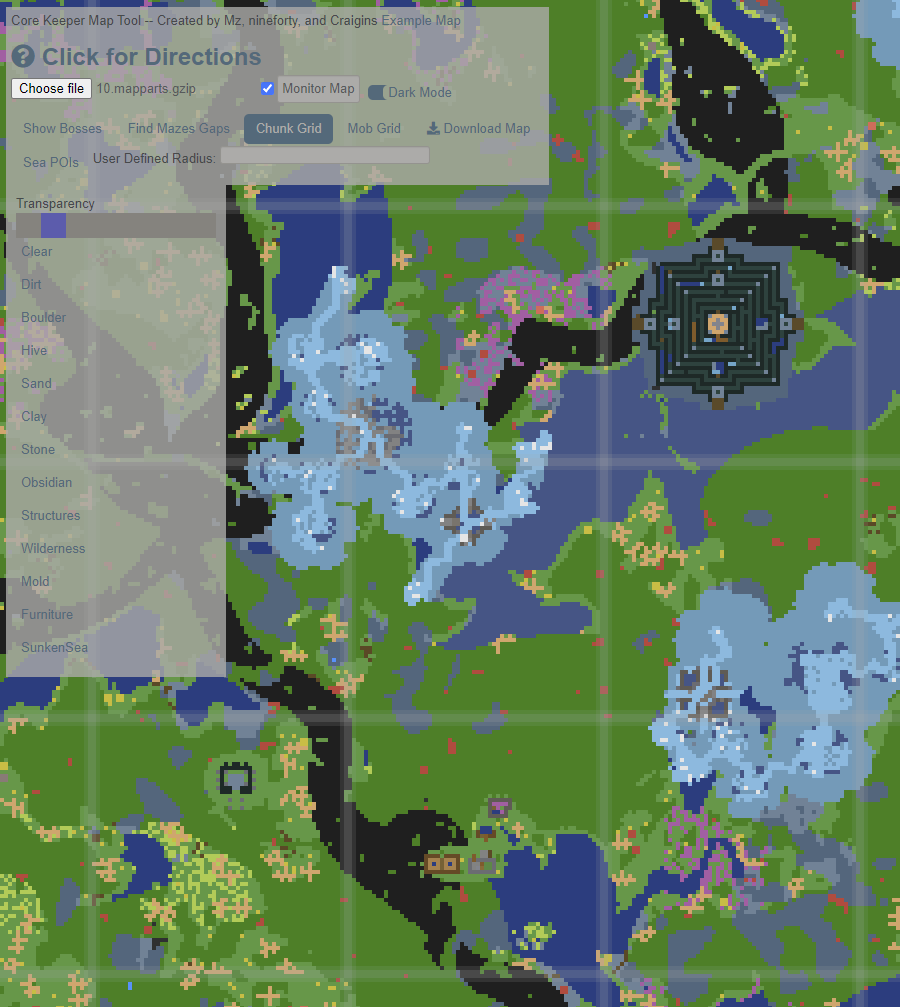 trim kestrel
Is that implying it's called "slime"?
trim kestrel
The code dark and full of errors...
regal berry
trim kestrel
Cool. Oh, strickly you should crop out the dirt biome from the middle of the cen...
Added it, but I probably won't add the inner inner biome, since that basically has no real benefit
trim kestrel
regal berry
Added it, but I probably won't add the inner inner biome, since that basically h...
Cool. And the 5 degree separation between clay and stone...? 🙂
The point would be to show players very clearly where biomes are and aren't. Mostly for being clear about where to fish, I guess...? And for crab/tentacle spawning...
(This is part of my old biome map illustration I reddited and such.)

I don't think there's any other biome effects...? (Since I eventually ruled that out with spawn rates and such.) 🤔
regal berry
trim kestrel
Cool. And the 5 degree separation between clay and stone...? 🙂
The point woul...
Done :D Hope that's correct
trim kestrel
regal berry
Done :D Hope that's correct
Looks good to me. 👍 Interesting that the inner upper 5% gap also looks a little offset on craigins map in the tool, like me doing it by eye, in an image editor. Heh.
 trim kestrel
What'd you think of something like this as an emblem for the tool (to go top left)...?

Or this (but whitespace, meh)...

And what size should tab page icons be (in pixels)...?
 gusty epoch
I like the small icon and the top logo
hoary osprey
trim kestrel
And what size should tab page icons be (in pixels)...?
It should be CK but not MT
You already showing map tool as page heading so you only need CK for to clarify Core Keeper
Also if you will design map tool for other game in future, then the same icon will just cause confusion
hoary osprey
trim kestrel
What'd you think of something like this as an emblem for the tool (to go top lef...
How about put the icon under the Core keeper Icon with map tool in one row?
trim kestrel
hoary osprey
How about put the icon under the Core keeper Icon with map tool in one row?
I have a "Core Keeper" logo I made into a single line to potentially do that. It might be a bit slimmer and wider, if that's going to be preferable.
hoary osprey
I mean "map tool" in one row while core keeper icon still remain the same
just like the icon the wikizet is using
replacing "wiki" to "map tool"
lilac gale
They look good Zero, prefer the MT. I also prefer the first over the second option for the core keeper map tool icon
trim kestrel
hoary osprey
replacing "wiki" to "map tool"
Yeah. The thing is, I've been trying to make it slimmer, so it doesn't take up too much real estate at the top left of the sidebar. So didn't want to stack it vertically (unless that fits around some other page element).
I also couldn't find a fit I was fully happy with, with the regular layout CK logo:


Ultra slim would be like this:

Semi-slim like this (only a mock-up, need to refactor it to avoid anti-aliased pixels):

Urrgh, one last variant... 😐
 trim kestrel
And what size should tab page icons be (in pixels)...?
trim kestrel
trim kestrel
And what size should tab page icons be (in pixels)...?
Google tells me "fav icons" should be 32x32 px, which is fairly restrictive... So, something like these?:


The map symbol alone might be quite nice, but it's 24px tall, so fits very poorly into 32px format.

 unborn summit
The logo is awesome
trim kestrel
You may need to be more specific... 😜
unborn summit
Specific?
unborn summit
trim kestrel
Urrgh, one last variant... 😐
I like this one
trim kestrel
These might be options for a page icon, too, if the other don't look right. (Core's map icon upsize by a factor of 3, and the ping icon button when selected on the map screen.)

 regal berry
trim kestrel
Urrgh, one last variant... 😐
regal berry
trim kestrel
Urrgh, one last variant... 😐
I really like that one
regal berry
trim kestrel
Google tells me "fav icons" should be 32x32 px, which is fairly restrictive... S...
and that one
implemented both
regal berry
Everything except the tile highlighting is added and working again
I think it turned out fairly well
 crisp goblet
Looking really good
trim kestrel
regal berry
I think it turned out fairly well
You been as busy as these here game devs! Fitting this in around full time work, too? Either way, I feel like you deserve a break..! 🙂
lilac gale
regal berry
I think it turned out fairly well
It looks quite professional 👌
trim kestrel
regal berry
and that one
Yeah, I think the diagonal lettering looks more pleasing. But, to be honest, I couldn't make it out at all (during daylight hours) on either Chrome or Firefox...
So, maybe see if the horizontal lettering version would work well enough, instead, or try these with inverted black/white:

 trim kestrel
regal berry
I really like that one
trim kestrel
regal berry
I really like that one
Excellent choice Sir! I'm kinda glad I kept iterating on combinations. 😅
I've made a slight tweak on that one, slightly adjusting the alignments and flipping the orientation of the map scroll such that it matches the page icon with horizontal letters.
I made a light-mode version that you could swap in, too. If that's viable. But I think it would probably be better if the light mode colour scheme had a light grey background, instead of white. Say, the same shade as Chrome's top window/tab bar.


Then, if you can made the section bubbles of the side bar a slightly different colour, in both modes...? Like, dark grey in dark mode, slightly less light grey in light mode...? So their borders are clear. 🙂
regal berry
trim kestrel
Yeah, I think the diagonal lettering looks more pleasing. But, to be honest, I c...
Made the favicon switch out between the old and that one, based on the dark mode toggle. Same with the logo. Thanks for that btw :)
regal berry
trim kestrel
Then, if you can made the section bubbles of the side bar a slightly different c...
But what exactly do you mean with the section bubbles? Like the one in the image?
 trim kestrel
I mean, I can't currently see the boundary of the load map section, in dark mode, yeah.
trim kestrel
regal berry
Made the favicon switch out between the old and that one, based on the dark mode...
Wait... I just understood what you did! Lol. I was trying to refresh the page to get the icon to update... But you can switch it with the dark mode toggle! I didn't realise that was possible!
regal berry
trim kestrel
Wait... I just understood what you did! Lol. I was trying to refresh the page to...
there was even a game made inside of a favicon: https://www.youtube.com/watch?v=fpjM5myls7I

Defender created in a favicon that you can play. I did not create the favicon, just trying to play the 16x16 pixel game. You can learn more about the favicon here: http://www.p01.org/releases/DHTML_contests/files/DEFENDER_of_the_favicon/
Hard to play a 16x16 pixel game. Pretty creative use of a favicon though.
Sadly not working anymore, so my dark mode favicon has to do
I'll probably mess around with the tile highlighting tomorrow. If you (or anyone else) have any wishes on how it should work, feel free to let me know. For the first iteration, I'll either keep it close to the original, or just switch it out to the POI system. So round buttons instead of checkmarks.
That should be able to save some space and make it look a lot nicer
trim kestrel
To be clear, I meant something like this. Which would be similar to how the wikizet colours its tables/frames.
 regal berry
trim kestrel
To be clear, I meant something like this. Which would be similar to how the wiki...
regal berry
trim kestrel
To be clear, I meant something like this. Which would be similar to how the wiki...
done. had to find the right color combinations, but I think it works
trim kestrel
Noice. I'd make the light mode contrast a little stronger...
But then I'd make the white background non-white too. 🤷 Do people ever complain that light modes aren't white enough...? 🤔
Maybe it's just my eyes/screen.
Probably fine as is.
I may have just been looking at the dark mode too long and burned the anit-image into my retinas.. lol. The difficulties.
regal berry
Might also be a screen issue. Subtle differences with gray / white are often not properly displayed. That's why I bought a color calibration tool and calibrated all of mine.
But I still might it a bit darker. Any more and the contents look weird, so I'd have to recolor all of them as well
trim kestrel
Nice. I have to have my screen down to minimum brightness & contrast, in sRGB mode with F.lux permanetly dialed half way up, because my eyes/brain is just too sensitive. 😑
I have to turn off Dark Reader to check this, too. Because I generally find that even most dark modes are too high contrast. Needing more of a grey, for comfort. 😵💫
So, I'll take your word on colour calibration!
Other things (for tomorrow, or some later date, no rush!):
(1) Comment out Legend box now, right?
(2) "Toggle all" can be turned into buttons that show the state of toggle? (Flipping to off state if any rings are individually toggled off...)
(3) Move Download map button to under "How to find your map file"...
(4) Maybe rename it "Download Map Image", or just "Download"?. With Tooltip: "Save a PNG image file of the currently displayed map including all overlays."
(5) Recolour the bow part rings (currently all orange). Either to match the main colour of their item icons. Or the Broken Core ones to be a spectrum of dark greeny grey like the sea dungeons...?
(6) Rename "Other POIs" to "Points of Interest".
(7) Rename that bubble to something else (I guess you didn't like my suggestion before?). E.g: "Pre-Spawned Locations"... Or: "Distance Rings" with a blurb (or tooltip) to explain that these locations are determined at world creation. In contrast to the scenes (inc mazes) that are dynamically spawned.
I think it's important the tool emphasises the difference between those two types of location. And I felt titling the boxes for the ways to find them should directly communicate this. I am flexible on wording and can brainstorm some more about it.
south sundial
trim kestrel
Other things (for tomorrow, or some later date, no rush!):
(1) Comment out Lege...
sorry but this is like the most nit picky thing ive heard in this channel lmao
regal berry
trim kestrel
Other things (for tomorrow, or some later date, no rush!):
(1) Comment out Lege...
- 1, 2, 3, 4 I'll definitely do tomorrow. But the legend box will maybe return with the tile highlighting
- 5 as well, but probably main color, not dark green. I'm not too big of a fan of those colors xD And not sure if they're super visible. More vibrant colors are probably for the best.
- 6, 7: Done :)
regal berry
south sundial
sorry but this is like the most nit picky thing ive heard in this channel lmao
Nitpicky is good though. Otherwise I wouldn't really improve the tool
trim kestrel
(8) Crop Maze Holes are to that of the biome arc (end at 450 tiles)..?
(9) Tooltip for Chunk Grid button, or would you like to put (?) symbols beside them to expand blurb?:
"64x64 grid used by dynamic world generation to spawn set-piece scenes and fill in procedurally generated terrain as players explore within range for the first time."
(10) Tooltip for Mob Grid:
"16x16 grid of cells used by the mob spawning algorithm. Each cell receives one spawn event every 15 to 22 minutes, staggered in time from other cells. Each spawn surface tile gives a chance to spawn a mob. See this guide: https://steamcommunity.com/sharedfiles/filedetails/?id=2846860078"
Do you think....? 🤔
regal berry
Well. 1, 3 and 4 are also done now
trim kestrel
Dude... Bro. Your energy and efficiency makes me tired... Lol.
regal berry
trim kestrel
(8) Crop Maze Holes are to that of the biome arc (end at 450 tiles)..?
(9) Tool...
8: Now ending at 450
9: On my todo. Might be best. Will probably add them for most stuff that you can hover over
10: Now also on my todo
But as previously said: Tooltips can't really have links. So I might add a expandable section that can show more info, if someone enables the mob grid
trim kestrel
Yeah. That's what I was thinking... There won't be as much in that bubble, as it is, compared to the "Pre-Spawned Locations" (🙂 ) bubble... So I guess some blurb balances that...? 😅
(11) Call that section "Grids".... No. "Dynamicly Spawned"... locations/mobs. Or "Maze Holes" to it's own bubble...? Meh. I'm kinda tired.
regal berry
I could put the maze holes in with the biomes, since that's kinda related. And then it could be a "Grids" section where more info wouldn't be out of place
trim kestrel
Yeah. Maybe. I guess you can always move stuff about later. Seems like that doesn't take you too long. 🙂 😅
Looking good though.
regal berry
Nah, CTRL+X & CTRL+V is the best when it comes to web design
trim kestrel
You/we'll have host a relaunch party for this, or something... Heh. I feel like it might be anti-climatic when it's all done... But then I always got that with publishing all my videos and guides, so.
regal berry
I'll have to get Dakon to remake the video once it's officially done xD The old design has basically no similarities anymore with the new version
trim kestrel
Oh... (12) I think Craigin's name should go first, on the second line. He'd put himself last to be modest, I guess. But I'd go with primary author first. 😉 (Now there's a nit-pick! 😜 )
(13) Maybe a whole (expandable) extended credits ("About"?) section...? At the bottom? Could include a breakdown of what type of things each person contributed and/or links to old repositories. Am I getting too bloated? Porbably.
(14) I'll write a rough description of what the tool is used for. And/or maybe an FAQ that collapses once you load a map...?
(15) I could make an illustration of the game loading screens labelled with the folder numbers and map file number by slot, to add as a pop-up for how to find your map file...?
(16) If someone could figure out a way to read the world infos and character files to be able to select map by name, that would be the Holy Grail... But I'm assuming that's a very hard problem. Heh.
regal berry
trim kestrel
Oh... (12) I think Craigin's name should go first, on the second line. He'd put ...
12 done
About / FAQ is probably a good idea. Can definitely add them way to the bottom and they'll probably be collapsed by default
15 sounds like a good idea. Can definitely add it. And also save it as "already seen", so it doesn't show up again on a new page load
I've looked into 16, but it's probably not going to happen without some source code / reverse engineering and the latter is way too time consuming for no real benefit (at least right now). Most stuff can be done with mods
@trim kestrel Do you know what nineforty did?
and what socials would you like in the credits?
@primal rapids any specific socials you want to have in the credits? Only know your GitHub
trim kestrel
regal berry
<@135482054912507904> Do you know what nineforty did?
I'm not sure if he contributed any code or not. I remember he told me he barely did anything, that Craigins was being generous with the credit. Don't know how modest that is. But it looks like nineforty deleted his Discord account. Maybe Mz knows.
trim kestrel
regal berry
and what socials would you like in the credits?
I don't even know... I've got no repo's on my Github and my community contributions are all over the darn place... Either YouTube or Steam guides, I guess (if either is relevant here)...?
https://www.youtube.com/c/ZeroGravitas
https://steamcommunity.com/profiles/76561197971318812/myworkshopfiles/?section=guides&appid=1621690
lilac gale
Nineforty talked a lot of theory crafting back in the day when they were making it, idk what all they contributed though
regal berry
trim kestrel
I don't even know... I've got no repo's on my Github and my community contributi...
I'll just add both, once I have some time
regal berry
lilac gale
Nineforty talked a lot of theory crafting back in the day when they were making ...
That's good to know, thanks!
In that case I'll probably make a "honorable mentions" section, where I'll put nineforty
primal rapids
regal berry
<@116606267337736195> any specific socials you want to have in the credits? Only...
that's fine
I haven't contributed that much either, I mostly just kept complaining that I'm too lazy to make the map tool until someone else did it 😄
trim kestrel
Mz the muse. Without whom none of this would have ever happened... 😜 🙂
primal rapids
woo! lava is making a comeback (I hope that's ok to say now)
trim kestrel
Had you seen it in an earlier version of CK?
primal rapids
no, but I saw it in the tiles when we were theory crafting the map tool
gusty epoch
I've known for a little, tried to add the tileset to a mod test world but the logs just complain that I shouldn't have done that and insinuate I'm a dummy for doing so 😛
Also I can't remove them so RIP that world
trim kestrel
primal rapids
no, but I saw it in the tiles when we were theory crafting the map tool
Oh, but those will probably have been assets imported from Radical Rabbit Stew, which had larva already, I believe.
primal rapids
hey, while we're throwing ideas, the File System Access API (that only Chrome supports) has these functionalities for startIn which maaaaybe could be useful for the map tool, showDirectoryPicker which could be used to get a handle to the whole map directory with all saves, and stored file and directory handles that could be used to remember the directory/file that the user last chose (all mentioned here https://web.dev/file-system-access/)
I was once imagining that the map tool could load a directory, and then show thumbnails of the maps for easier selection
gusty epoch
I was wondering about that, figured there had to be a way but would also understand there not being
trim kestrel
primal rapids
hey, while we're throwing ideas, the File System Access API (that only Chrome su...
You mean, it can do all that without the site storing any cookies of its own? 🙂
primal rapids
primal rapids
I was once imagining that the map tool could load a directory, and then show thu...
or allow nicknaming them
 fallow briar
trim kestrel
Oh, but those will probably have been assets imported from Radical Rabbit Stew, ...
fallow briar
trim kestrel
Oh, but those will probably have been assets imported from Radical Rabbit Stew, ...
This is correct 🙂
trim kestrel
primal rapids
I was once imagining that the map tool could load a directory, and then show thu...
That's actually a pretty smart work-around idea! For selecting the right world map, at least. Would still need to pick the right character.
trim kestrel
fallow briar
This is correct 🙂
Hey Julian, I guess you maybe missed my above tag yesterday. That's right, isn't it, that you officially refer to the Dirt biome (only!) as "The Underground(s)"...?: #977128133142659102 message
fallow briar
Dirt biome which also encapsulated the slime areas , so the first inner circle, is The Undergrounds 🙂
trim kestrel
fallow briar
Dirt biome which also encapsulated the slime areas , so the first inner circle, ...
Cool. There you go, @south sundial (I was sceptical too). 😉
But that doesn't mean the rest of the world is not also under ground, right..? 🤔
fallow briar
Yeah, everything is underground but we tried to find a name for the first area that is as basic as possible
trim kestrel
fallow briar
Yeah, everything is underground but we tried to find a name for the first area t...
Do you think it shuold come up with that name on the in-game map, like the other biomes...?
fallow briar
I am kinda confused that we don't have it show up honestly. Never paid attention really 😅
So maybe it should, could be added to feedback and suggestions
regal berry
I took one day off of pc stuff and they went ahead and dropped the trailer ._.
regal berry
primal rapids
hey, while we're throwing ideas, the File System Access API (that only Chrome su...
startIn won't really help. It has to be either a well known folder ("desktop", "photos", "videos", etc.) or an existing file handle.
But the directory thing might be useful. ~~ It's serializable, so I could just save it to local storage. So when the person reopens the page I can just load up the overview of all maps again.~~
Can't be converted to a string (which is needed for localstorage), so not really possible...
regal berry
trim kestrel
You mean, it can do all that without the site storing any cookies of its own? 🙂
JavaScript (the language which makes the site function. HTML is just scaffolding and CSS gives it good looks) is completely client side. So nothing gets sent to the server, which is important for me. Main point is security but also storage. I don't wanna pay for more storage space xD
regal berry
Oh and since you mentioned cookies: Some things will get saved in the browser, specifically local storage.
local storage is website based and literally just a key value store. So no tracking will be happening :)
@primal rapids You would probably know more about this:
Is there a way to easily render just 160x90 pixels centered at the core? If I add a map file selection then I don't really want to render ALL maps
trim kestrel
regal berry
JavaScript (the language which makes the site function. HTML is just scaffolding...
Right. I've been meaning to write a blub for MT to explain that no data is uploaded or stored by the site...
Are you currently paying any additional fees for the privilege of hosting this? (As if all the work wasn't value enough. Your time far, far, more valuable, of course.)
trim kestrel
regal berry
Oh and since you mentioned cookies: Some things _will_ get saved in the browser,...
"Key values" any use for added MT functionality?
trim kestrel
regal berry
<@116606267337736195> You would probably know more about this:
Is there a way to...
Thumbnails are difficult, the most immediately recognisable map feature, in my opinion, is the extent and shape of exploration of a map.
But yeah, parsing all the map data to make full (wide cropped) thumbnails of each, will presumably be too slow...?
trim kestrel
fallow briar
So maybe it should, could be added to feedback and suggestions
"So be it...!" 😉 (I made the suggestion post.) https://discord.com/channels/851842678340845600/1037438279513030746
regal berry
trim kestrel
Right. I've been meaning to write a blub for MT to explain that no data is uploa...
Nope, nothing extra. I pay for a server, so I manage hosting and everything by myself. That makes it a lot cheaper and I can even run my mc server on it :)
regal berry
trim kestrel
"Key values" any use for added MT functionality?
The key–value store is basically just a table with two columns (one is key, the other is the value). So i can save text with a given key.
Only real usage would be if we do the introductory "tutorial" popup. I would then use it to save if the user already went through the popup
regal berry
trim kestrel
Thumbnails are difficult, the most immediately recognisable map feature, in my o...
Probably, yes. You're basically opening all the files after one another. So in the end it would load the map you choose twice, and every other map once as well... That can't be too good
So I think the folder selecting is kinda a bad idea for now. Another thing is the browser popup that comes with it. It's completely harmless, but looks super suspicious
 trim kestrel
Yeah. Not ideal.
trim kestrel
regal berry
The key–value store is basically just a table with two columns (one is key, the ...
So you could save a whole series of interface settings? And e.g. the file directory?
Without being obliged to say the site uses cookies?
regal berry
trim kestrel
So you could save a whole series of interface settings? And e.g. the file direct...
Interface settings yes, file directory no. Since browsers are operating system independent, there's no way to open the file dialog at a specific folder. The new thing that Mz talked about allows special folders like photos and desktop though (since they basically exist everywhere)
regal berry
trim kestrel
Without being obliged to say the site uses cookies?
Yup. Local storage is different from cookies, so I think no warning is needed. The cookie info is because of tracking cookies that track you across multiple pages. Local storage, as I said before, is just for that one specific page
trim kestrel
regal berry
Interface settings yes, file directory no. Since browsers are operating system i...
Sorry, right. The weak link is not being able to pass a directory string to the file select dialogue (or such).
regal berry
Yup. That's why I hoped that the thing Mz mentioned might be able to help, but it's not possible unless i save it in some kind of database instead of in local storage. It's theoretically ok, since even if someone get's someone elses directoryhandle (the thing I could save, which is basically a pointer to the directory), it doesn't do anything, since it just points to a local folder
But it still doesn't feel quite right. And I think if I save some stuff, I'd need a privacy policy, at least in europe... And I don't really want to deal with it
obtuse star
could have information in it though
regal berry
Exactly. Even just getting a real name from the file path would be too much, so I'd really rather not save anything
regal berry
If someone has questions that they think would be good for the map tool FAQ feel free to send them to me :)
I currently wrote:
- Does my map get uploaded somewhere?
- What information do you have access to?
trim kestrel
- How do I load my map?
- I don't get it...
- PLEASE HALP! PLXXXX!!!!
- Where is the Clear Gemstone/Chipped blade?
warped parcel
-What are the Sea POIs?
(I didnt know about the special cities and vaults until i joined here)
loud skiff
- What does 'Show Maze Holes' mean?
Maybe lump it in with the Clear Gemstone/Chipped Blade question. I spent forever not knowing what that was for with the original map tool.
regal berry
@trim kestrel @warped parcel @loud skiff
Hope these answers are ok. I've also marked the questions as including spoilers if they actually do

The map tool now also contains a visual guide on how to find the map files
 primal rapids
Regarding storing file handles and localStorage, I think the web.dev article mentioned that you can store them in IndexedDB. Never used it myself, but as far as I know it should be pretty much same as localStorage
https://developer.mozilla.org/en-US/docs/Web/API/IndexedDB_API
Is there a way to easily render just 160x90 pixels centered at the core?
The map is broken into indexed tiles that start from 0, 0 (the core), so I think you could just stop reading the map at some specific index. If I understood what you're trying.
I think this part figures out the minimum and maximum index https://github.com/Ceddini/CoreKeeperMapTool/blob/main/src/js/canvastools.js#L308-L318
so you could limit that afterwards to only a couple of tiles
primal rapids
primal rapids
Regarding storing file handles and localStorage, I think the web.dev article men...
okay looks like IndexedDB might require a library if you want to simply use it as a key-value store
the idb-keyval used in the web.dev article seems like the simplest one
trim kestrel
primal rapids
> Is there a way to easily render just 160x90 pixels centered at the core?
The ...
Oh, maybe there should be an FAQ item:
Question: how are map files loaded?
Each ".mapparts.gzip" file contains a series of 256x256 pixel PNG images and a set of coordinates for how they are placed. The game only saves new mapping data to a character's map file when the in-game map screen is opened [or is it when closed?] and when exiting the world. [when world auto-saves too?]
regal berry
primal rapids
I think this part figures out the minimum and maximum index <https://github.com/...
Will definitely take a look. Not sure if I'm even gonna implement it. The only real benefit the directory handle would have is the map icon.
Once you select the folder even from the normal dialog, the browser saves it... So the first time finding the map is really the only problem
But I think the little guide I added helps out with thaf
I hope
regal berry
trim kestrel
Oh, maybe there should be an FAQ item:
**Question:** how are map files loaded?
...
I'll probably add it tomorrow. And maybe also "how does the map tool work?". So stuff like: map is a list of pixels where the pixel color represents a block in-game (unique color)
trim kestrel
Good one.
trim kestrel
regal berry
The map tool now also contains a visual guide on how to find the map files
Ok so (brace for critique) my initial impression of this was a bit of a struggle:
(1) I clicked away from the popup and it disappeared, with no idea how to get it back.
(2) Because you can't open the file selection dialogue without closing the popup, It relies too heavily on working memory. Especially with 6 separate screens of information to take in.
(3) The fairly slow scrolling animation is cool but visually distracting; I'd forgotten when the previous slide had said, by the time I got to the next one.
(4) I totally missed the "Copy Path" button in the second slide and was going to ask if you'd removed it, until I took a third look through. It was kinda greyed out. And it's hard to tell where the illustrative image ends and the UI around it begins (in dark mode).
(5) The example images of file directories are useful.
.
Personally. I'd prefer a single screen, with all the info laid out there.
Maybe the one you had before is default, pre-opened and highlighted. With integrated links to open expanded information, for each stage. Or scroll to the relevant part, if they are all integrated vertically, more like a regular web page?
Maybe this could be embedded into the space the map normally occupies, initially? So it stays up behind the file open dialogue?
With the FAQ, I'd suggest having the top entry be this, and have it pre-opened and visible (e.g. RonEmpire cited data security as a reason they wouldn't use a site like this):
"Privacy - is my data uploaded?
No. Map Tool worked entirely client side, in your browser tab. No files are uploaded and no tracking cookies are stored on your machine. The web site sees only basic ip address and stores no identifying information."
[I don't understand what user-agent ngix logs are. This sentence may sound suspicious to some]
trim kestrel
trim kestrel
.
Personally. I'd prefer a single screen, with all the info laid out there.
Ma...
If there were a "clear map" button (with confirmation pop-up!) then the blank space could always contain the loading instructions, and be easy to get back to. 🙂 (Hide instructions setting then too, of course.)
regal berry
trim kestrel
.
Personally. I'd prefer a single screen, with all the info laid out there.
Ma...
How about a sidebar (like the current one), but on the right side that has everything just laid out from top to bottom? Kinda like a written guide. That was I can also add more text and be more descriptive
And I've currently replaced the (?) text below the choose file button to reopen the guide
trim kestrel
regal berry
How about a sidebar (like the current one), but on the right side that has every...
Yeah, might work. 🙂
regal berry
trim kestrel
Yeah, might work. 🙂
Reworked. Should hopefully be easier now
regal berry
trim kestrel
With the FAQ, I'd suggest having the top entry be this, and have it pre-opened a...
added that. Also changed the older question "What information do you have access to?" to be the tiny bit more technical explanation and referred to it from the privacy question
trim kestrel
Sorry, I meant to say, good job!
trim kestrel
regal berry
Reworked. Should hopefully be easier now
This works so much better than the previous versions, I think! To be able to see the instructions with the window open, and scroll them, too! 👍
I could maybe pick a couple of bits with the fine details of the presentation, some time, if you like. But I think it's functionally sound.🙂
trim kestrel
Also, I've been experimenting with subreddit customisations. Could some of you check out https://www.reddit.com/r/Z3R0gravitas and screenshot what it looks like on your phone (in the app)? (Particularly if you have a higher res screen.)
Like this?:

 fading nebula
yeah i read some of it and cant believe were getting our hero back and refreshed
i type it like that so no spoilers for most people like 99%
fading nebula
Thanks from serroh!
trim kestrel
fading nebula
Thanks from serroh!
Lol. He too busy to pop in himself...? 😅 I shared it elsewhere he should have seen too. 😉
fading nebula
trim kestrel
Lol. He too busy to pop in himself...? 😅 I shared it elsewhere he should have ...
yeah hes busy but i tagged him and shared it there to also i love that youre still this active even after so long
trim kestrel
👴 It's been 8... long.... months.... 😅
Took me about 2 years to fully burn out on each of Terraria and TerraTech.
fading nebula
trim kestrel
👴 It's been 8... long.... months.... 😅
man youre great if you and @gusty epoch werent here this dc we wouldnt know as much and of course lever(no ping hes busy) and @plush flax thanks to all of you we know so much more
fading nebula
trim kestrel
Took me about 2 years to fully burn out on each of Terraria and TerraTech.
terraria wont stop for me cause of the great mods
even mc cant compare
gusty epoch
I’ve barely done anything but thanks I guess lol
fading nebula
gusty epoch
I’ve barely done anything but thanks I guess lol
nah man youve always been there to help and you know more of the mechanics then most people in this dc youve done a lot
lilac gale
Interesting that they were not only given access, but also allowed to spoil it given how the deal goes here lmao
lilac gale
gusty epoch
I’ve barely done anything but thanks I guess lol
You got me to 100k 🙂
fading nebula
lilac gale
Interesting that they were not only given access, but also allowed to spoil it g...
to who is that meant
and
you did a lot for the cc to peace
i forgot you but lets not talk about that
and weve gotten the old traders
wich boss is still banned
bummer
lilac gale
The fact that Tech got access to the content early and could post a spoiler
the server is pretty anti-spoiler regarding content releases, so it takes me back a bit that this happened
lilac gale
fading nebula
i forgot you but lets not talk about that
doesn't make a difference to me that you forgot, I didn't do what I did for recognition after all
fading nebula
lilac gale
doesn't make a difference to me that you forgot, I didn't do what I did for reco...
got to 100K youre still here and most peeps know you
fading nebula
lilac gale
ngl not a lot of people do anymore lol
yeah but less people know jack and you know how big of a trader he was
and pyro and boss are gone to
boss got banned again
and pyro is just inactive
most of the older people are
older meaning being here longer
fading nebula
yeah ive got a testweek starting tuesday
lilac gale
jack did basically solely trading though. I had dabbled in everything, and still have probably the highest message count in the server lmao
fading nebula
so i love serroh cause he said he will get some stuff for me
lilac gale
nice
fading nebula
lilac gale
jack did basically solely trading though. I had dabbled in everything, and still...
true but still every1 knew jack every1 that traded at least
youve been inactive but youve got like 1M messages
i still dont understand the game
but its my number one game in like 3 years
V rising is close tough since it has more content
its longer
lilac gale
The game doesn't take a lot of knowledge to get through, just if you want to maximize your effectiveness with what you do like a lot of games
CK that is
fading nebula
lilac gale
The game doesn't take a lot of knowledge to get through, just if you want to max...
i dont its more fun to grind imo
i love auto sorting and stuff
but no auto mob for me
not really
after glitched farms where patched
lilac gale
I haven't ever built the auto farms, probably never will
gusty epoch
lilac gale
You got me to 100k 🙂
You got there I just helped check how far it was 🙂