#nadiya-keys
1 messages · Page 1 of 1 (latest)
 modest forge
Hi there, I was wondering what system are you using? e.g. if you are using AWS, something such as the KMS might make sense.
Alternatively, for a lot of our code references, we use the .env file to store these keys (remember to include in .gitignore to avoid exposing to public git), these can then be easily referenced from the client and server.
 vivid perch
its like a marketing CMS, in which the users of this site can make a landing website and sell their products online and make payments.
so there can be multiple users and each of them having multiple landing site with may be different stripe account for each, so we can't store them in .env file i assume
i was checking stripe connect, but not sure if that can be applied to our scenario
and we're not using KMS, its just storing in the regular db table
modest forge
To confirm your use case, you are the platform providing your users to build a landing website on your site and sell products online.
Similar to Lyft?
vivid perch
yes right
modest forge
There is a destination charge model you might be interested in [0][1].
The idea is having your platform account to manage your users' Express or Custom accounts (Express is the type with lower integration effort, for information on the difference between accounts, please refer to [2]).
The idea is to have your account receiving the payment, then transferring the relative amount you would like to provide to your users.
[0] https://stripe.com/docs/connect/charges
[1] https://stripe.com/docs/connect/destination-charges
[2] https://stripe.com/docs/connect/accounts
This is one example diagram of how it works, in this case, even if your users have multiple Express/Custom accounts, as the payment is settled in your account, you have the ability to provide the amount to the different accounts, without having to worry about switching keys within the implementation, i.e. users can simply have one service for one account (with the account's unique keys).

Here's another example of how Destination charge can occur:
 vivid perch
in our case, the platform account and connected account users have the website-owner => users relationship, so if the user billed an item for $10, and if other customer bought that item for $10, then the user will only get $8.77?
if the amount was charged directly, they could have get $9.41?
modest forge
As you are providing the website platform for your users to sell their items, I would definitely suggest the consideration of Connected accounts, as that would provide your platform with the control of how the money flows 🙂
vivid perch
the destination charge like you shared earlier?
modest forge
Yes 🙂
vivid perch
so, do you think storing keys on db and charge accordingly is not a good idea?
modest forge
It is also achievable, but you would have to maintain the business logic and the complexity in handling the keys for your users.
Also as you mentioned you are concerned about security, depending on how you are handling the DB reads and writes, extra implementations such as encryption might be required.
With the Connect model, instead of the keys, you only need to handle the relative account ids of the Connected accounts to allow for the flow of payment into the correct account.
vivid perch
from the connect- destination charge logic, if my stripe account is registered as the platform account, i'll get $0.64 for every product sales by the customer?
modest forge
Correct, for the automatic charge path 🙂
You can always manually specify the application_fee_amount or transfer_data[amount] to determine how much you would like to charge as application fee or the amount to provide the user.
vivid perch
oh nice, is it possible to send the full amount to the destination? (including the $0.64)
modest forge
Yes, in fact, if you just define the transfer_data[destination] without the transfer_data[amount], the entire amount is transferred to the Connected account: https://stripe.com/docs/api/payment_intents/create#create_payment_intent-transfer_data-amount
vivid perch
understood, thank you so much
modest forge
Please feel free to let me or my team know if you any other questions, we would be more than happy to assist 🙂
vivid perch
sure, thank you
vivid perch
i'm sorry, another question!
we need to store the clients account id from a form or
from some oauth or similar integration ?
 slender venture
You have two options for Custom or Express: Connect Onboarding or OAuth
Onboarding would be recommended, basically you send your user a link to a Stripe hosted site that takes their information. https://stripe.com/docs/connect/express-accounts
And in that case, you will use the connected account ID to make calls as them https://stripe.com/docs/api/connected_accounts
Does that answer your followup question?
vivid perch
sorry, may i know how this is different from directly storing the account id into database?
slender venture
That was only different from the OAuth part, you still can/should store the account IDs in your database
It would very much make sense to store it in your DB for the related user
vivid perch
i tried oAuth and onboarding, but i really couldn't understand the need for it
does this create new connected account?
if we create a form and let the user fill their corresponding account id requires to have an existing account?
slender venture
Onboarding is to fill out the account info
You create the account, create the onboarding links, the user navigates to the link and fills out their account info there
vivid perch
so, what if the user already has an existing stripe account with all this account info?
slender venture
No, you are creating the account
Let me see if I can find the doc.
Do you want to onboard existing Stripe accounts?
vivid perch
yes, if the user has an existing stripe account
slender venture
So that is a pretty different flow. You cannot use Express or Custom at all for that
Express and Custom are for accounts that you create and manage. For example a rideshare would create an account for each driver.
An existing account outside of your platform will likely be a "Standard" account in Stripe lingo
You can still onboard and connect to them but there are caveats https://stripe.com/docs/connect/standard-accounts
The biggest one is that when an account connects to you, if it is already connected to another platform, a copy of that account is made and your platform connects to the copy
For that flow we actually recommend always creating a new standard account for them anyways. Though if it uses the same email I think they will be able to access either from their dashboard.
That was a lot, let me know any questions/comments/concerns
vivid perch
slender venture
For that flow we actually recommend always creating a new standard account for t...
then , can we use destination charges?
slender venture
Unfortunately not. Good catch
vivid perch
so, we need to let them create new account without considering their old account?
slender venture
So for this it sounds like your requirements conflict a bit. You can't connect to a pre-existing Custom or Express account from another platform and Standard accounts cannot do destination charges.
That would probably be best, yes
vivid perch
sorry, let me grasp the info's for sometime. i've a lot of questions on my head, i've been troubling to get this work for the past week
slender venture
Of course! Happy to help. Our support may be very helpful in selecting the broad strokes of your connect plan as well https://support.stripe.com/?contact=true
It is important to get your connect plan right so it is great you are working this out properly
vivid perch
sorry, can you elaborate? what are the plans available for connect?
slender venture
By "plan" here I mean your overall design of how you are using connect
So even just here you choosing between account and charge types
vivid perch
i see, understood
creating account means adding a new account in step 1 or 2?
https://i.imgur.com/8uoAedI.png
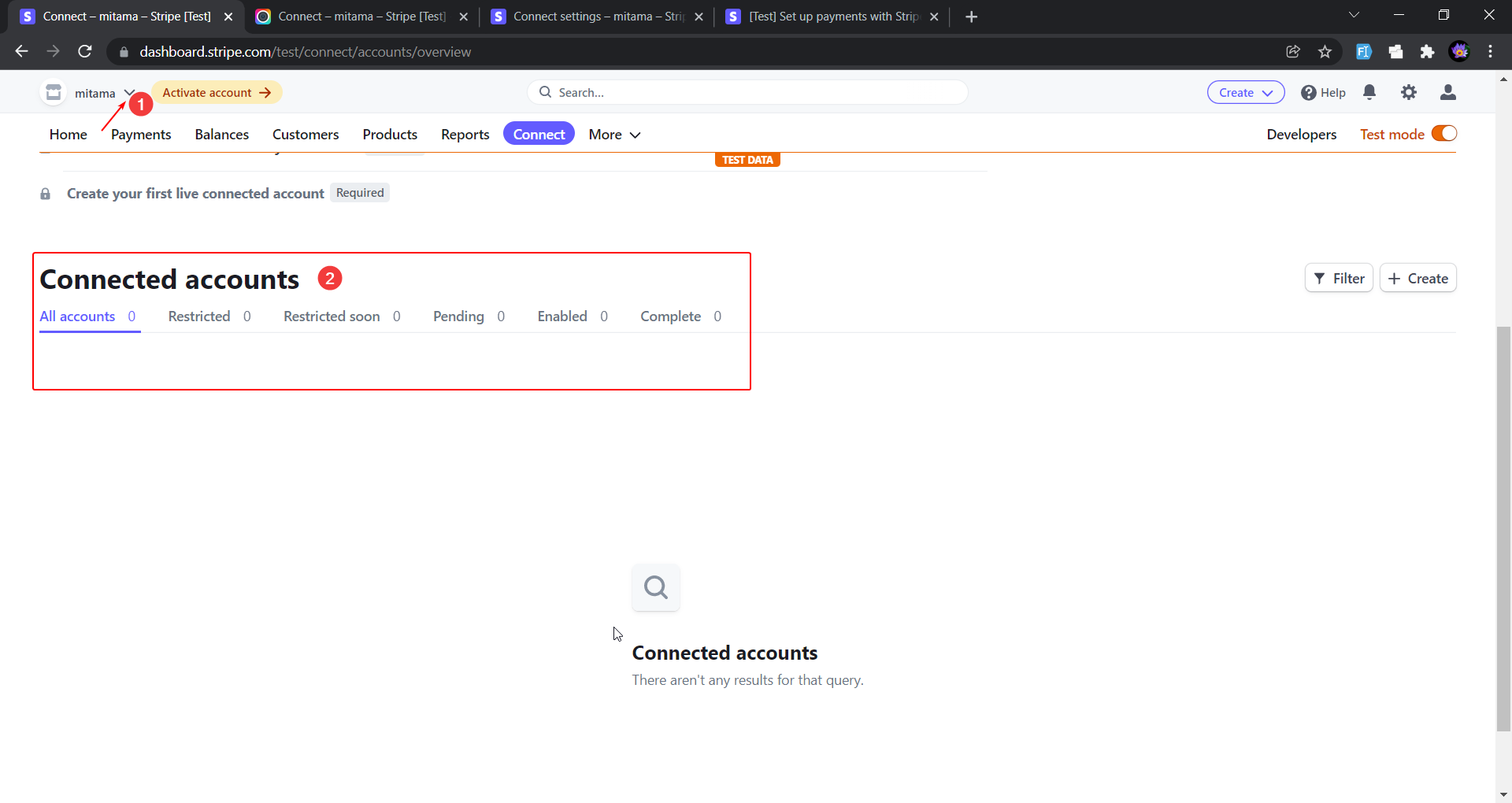 slender venture
Yes, step 2 in the doc I linked https://stripe.com/docs/connect/express-accounts#create-account
Oh, you meant in your picture
One moment as I test
vivid perch
yes sure
slender venture
Yes the account will show up on that page after you create it
You can test this in test mode to see that yourself
vivid perch
slender venture
Yes the account will show up on that page after you create it
sorry, step 1 (in the top left pulldown) or the connected account list?
vivid perch
slender venture
You can test this in test mode to see that yourself
yes, i did try, but could not get past this Corporate number in test mode
https://i.imgur.com/PUxna1v.png
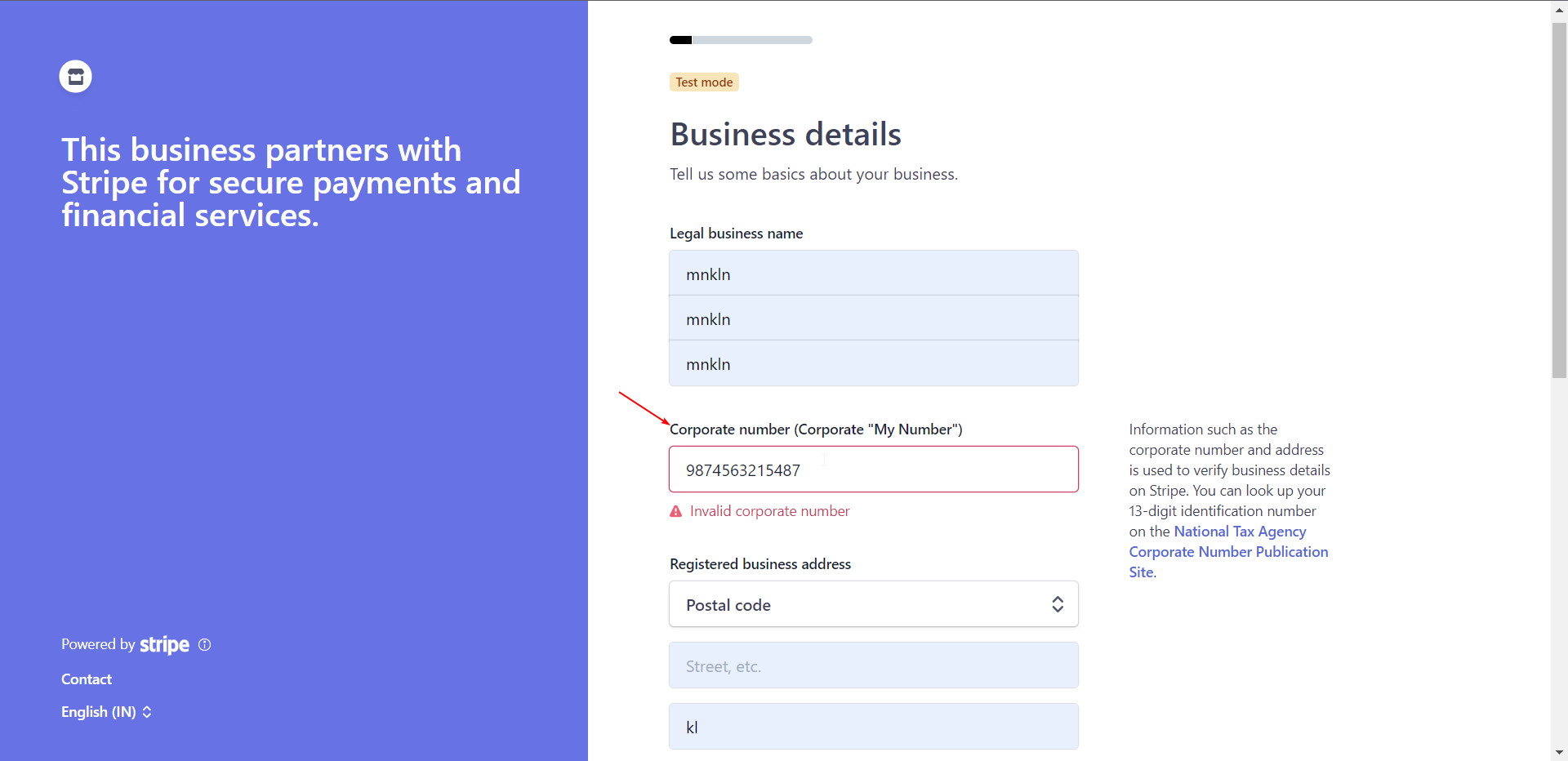

 vivid perch
ok please
slender venture
I'm seeing this as a tax number in our docs PL1234567890 https://stripe.com/docs/billing/customer/tax-ids
Learn how to store, validate, and render customer tax ID numbers with Stripe Billing.
vivid perch
wow, nice! thank you so much!
slender venture
Okay maybe not a tax number, just an example. So maybe try that and add a number if it complains about being 13 chars long
vivid perch
slender venture
Yes, step 2 in the doc I linked https://stripe.com/docs/connect/express-accounts...
this is the link that i need to follow right?
slender venture
Yes, are you running in to an issue with that process?
vivid perch
i'm able to create the connected account via the create button from the stripe dashboard
btw, i used 9 0's for the corporate number, it let me pass the validation
now, i'm planning to make all this programmatically. but i've this following doubt
this connected account (from the attached image ) shouldn't be done from the user side?
we've only the platform stripe keys
 vivid perch
actually not much, just heard about that couple of days ago, still trying to catch up by reading the docs
 idle patrol
yeah there is A LOT to Connect
recommend going through all the docs in detail
figuring out which fund flow to use
and try out lots of test mode API calls to create and onboard Connect accounts
and see how it all works
vivid perch
yes, sure will do that
vivid perch
vivid perch
now, i'm planning to make all this programmatically. but i've this following dou...
but can you please explain this one??
idle patrol
the answer is in the docs
can you rephrase your question though, not sure I'm answering the right thing
vivid perch
the above method will create the account in the stripe key provided right?
idle patrol
yes
vivid perch
i would like to create the account in the users individual stripe account, not in the platform account