#ludvig-paymentelement-appearance
1 messages · Page 1 of 1 (latest)
 wild current
 unreal cove
<@!580132589843775498> can you share a simple repro on jsfiddle?
unreal cove
<@!580132589843775498> can you share a simple repro on jsfiddle?
I noticed something strange.
If I hard refresh when my page theme is set to light, and I then change the theme to dark, the <PaymentElement> appearance works as expected when switching themes.
If I hard refresh when my page theme is set to dark, the background of <PaymentElement> is consistently white, both initially and when I switch themes, except for the buttons/inputs which work as they should.
What do you think it could be?
I'm guessing it's some hydration mismatch or similar on my side, I'll scan my code to see if there is something I've done bad.
I'll post a reproduction if I can't figure it out
unreal cove
yeah I'm not sure we've seen people do this switch often but if you have a repro we can narrow it down!
wild current
Here is a repro I made to show the issue I'm having, I hope the repro is good enough.
When you enter the codesandbox, fill out the .env file with your env variables.
If you are forking the codesandbox, it will not have the same url anymore I believe, therefore;
Change the url to your own url that is inside the fetch request to the api/serverless function, otherwise you're sending a fetch request to my codesandbox.
After that, disregard the yarn terminal window and open a new terminal and run npm run dev
https://codesandbox.io/s/nifty-moon-33706?file=/.env
Open up the other window which uses port 3001 instead.
Again - Try updating the website when on dark mode, then switch themes.
Then try updating the website when on light mode, then switch themes.
See that it doesn't behave as it should with the iframe background when loading the UI on dark mode, but it does when loading it on light mode?
 marsh yacht
Thanks for sharing the reproduction. I'll take a look soon
wild current
Thanks a lot!
unreal cove
@wild current I don't want to be a pain but do you have an easier repro? 😅
I never use codesandbox and it's painful to work with when you can just hardcode one client_secret in the client to render UPE right?
we really should only need a simple client-side code to render exactly what you see
I can't really play with your exmaple, it requires an account which in turn requires a login with my google or github account which I'd never do
yeah 2 other people on my team looked and we're a bit stuck. I would usually figure out how to repro but it's React with SCSS too and I'm lost to be honest
wild current
Alrighty, I'll see if I can make it even simpler
But is it a problem that it is on codesandbox?
What do you mean with UPE?
what if I get you some login credentials so you can access the repro and play around with it? What is it that you're stuck on exactly?
unreal cove
yes codesandbox is a problem is we need to make any change to view the problem. Just loading it crashes for us and making any modifications requires a codesandbox account which we won't have
UPE == PaymentElement sorry
this is the problem

it just crashes entirely on load and we can't do anything with it.
wild current
Well did you try what I wrote initially?
aah well
If I supply you with login credentials will you login to use codesandbox? because then you can fork it
unreal cove
I'd rather avoid this if possible
You should be able to hardcode the publishable key + a client_secret right? You don't need any backend or custom thing
wild current
Hmm that's actually true
But I want to use next.js because the theme package i'm using is specifically for nextjs I believe
therefore I chose to set it up the way I have it myself
just in case that's the problem
unreal cove
yeah that's fair. Though I have never touched Next.js at all
unreal cove
which I strongly dislike :p
wild current
it's just to render out static sites easily
unreal cove
I was really hoping you'd make the simplest vanilla JS repro to demonstrate a bug in PaymentElement itself
but maybe the bug does only happen with your exact setup
But step 1: if you can make it so that it just renders on codesandbox, we can look at the result and the styles applied to understand the issue
unreal cove
of course, thanks for yours, I know it can take a while to reproduce those things outside of your own environment 😦
I have someone on my team who is a wizard at CSS debugging so I'm hoping that once I get a real live repro we can pair and they'll know what's up
wild current
Yeah 😛 Is there no react guy on your team as well?
Since there is @stripe/react-stripe-js which I'm using
unreal cove
there are a few but it's unlikely to be a React issue, since it's a wrapper over the normal element
wild current
Okay. I'm not able to deal with this straight away (maybe in an hour), but I'll write here as soon as I have done something. At what hours are you available to help here, will I have to wait the whole weekend?
unreal cove
my team is here until ~5pm PST roughly and then back on Monday (we don't staff week ends)
wild current
It seems as if I can't hardcode a client secret?
The above error occurred in the <PaymentElement> component:


    at ClientElement (webpack-internal:///./node_modules/@stripe/react-stripe-js/dist/react-stripe.umd.js:506:20)

    at div

    at fieldset

    at form

    at div

    at div

    at eval (webpack-internal:///./node_modules/react-bootstrap/esm/Col.js:65:8)

    at StripePaymentElement (webpack-internal:///./pages/index.js:371:84)

    at Elements (webpack-internal:///./node_modules/@stripe/react-stripe-js/dist/react-stripe.umd.js:349:29)

    at div

    at div

    at eval (webpack-internal:///./node_modules/react-bootstrap/esm/Col.js:65:8)

    at div

    at eval (webpack-internal:///./node_modules/react-bootstrap/esm/Row.js:15:3)

    at div

    at eval (webpack-internal:///./node_modules/react-bootstrap/esm/Container.js:17:3)

    at HomePage (webpack-internal:///./pages/index.js:57:62)

    at h (webpack-internal:///./node_modules/next-themes/dist/index.modern.js:10:217)

    at MyApp (webpack-internal:///./pages/_app.js:42:27)

    at StyleRegistry (webpack-internal:///./node_modules/styled-jsx/dist/stylesheet-registry.js:231:34)

    at ErrorBoundary (webpack-internal:///./node_modules/@next/react-dev-overlay/lib/internal/ErrorBoundary.js:26:47)

    at ReactDevOverlay (webpack-internal:///./node_modules/@next/react-dev-overlay/lib/internal/ReactDevOverlay.js:90:23)

    at Container (webpack-internal:///./node_modules/next/dist/client/index.js:331:9)

    at AppContainer (webpack-internal:///./node_modules/next/dist/client/index.js:770:26)

    at Root (webpack-internal:///./node_modules/next/dist/client/index.js:891:27)


React will try to recreate this component tree from scratch using the error boundary you provided, ErrorBoundary.
 lean island
Hey @wild current just wanted to follow up on this
I work with @unreal cove
I tried to reproduce the same behavior on my end and it seems like the issue maybe with how you're wrapping the payment element component because it by default doesn’t have a white background.

my config for the element
 wild current
lean island
Hey <@!580132589843775498> just wanted to follow up on this
I work with <@!84511...
wild current
lean island
Hey <@!580132589843775498> just wanted to follow up on this
I work with <@!84511...
wrapping the payment element as in a js/react issue or a css/scss issue?
        <form onSubmit={handleSubmit}>
          <fieldset>
            <div className="FormRow">
              <PaymentElement
                onChange={(e) => {
                  if (e.error) {
                    setPayment({ status: "error" });
                    setErrorMessage(
                      e.error.message ?? "An unknown error occurred"
                    );
                  }
                }}
              />
            </div>
          </fieldset>
          <Button
            className="d-flex mx-auto my-3"
            type="submit"
            disabled={
              !["initial", "succeeded", "error"].includes(payment.status) ||
              !stripe
            }
          >
            Pay {formatAmountForDisplay(50, "eur")}
          </Button>
        </form>
It is definitely a CSS one if you're able to make test payments
wild current
This is my scss..
// Dark-theme
[data-theme="dark"] {
  body {
    color: white;
    background: #0b1524;
  }
}

// Light-theme
[data-theme="light"] {
  body {
    background: white;
  }
}

// Theme-independent
body {
  .bg-gray {
    background: rgba(160, 160, 160, 0.4);
  }
}
I'd start by changing background-color for <div className="FormRow"> and see if it triggers any change and move upwards from there
wild current
Well it does work, but the issue persists, when loading dark mode it is still an issue as it uses white
Is there an easy way for me to stream this or show this in video for you?
or maybe a gif or similar
lean island
sure feel free to attach a video/gif or something
also if you can show me your element hierarchy using inspect element, that'd help as well
wild current
I don't have discord nitro so my limit is 8mb per file
i'm trying to find a good tool for this job
I'll try gyazo
wild current
Alright the gifs are rather short but let's see if you understand. This is when you refresh/load the page when light mode has been selected. This is how it should always work, this is how I want it to work.
https://gyazo.com/75d975a54154aa048b4f015578a7eccb

This is how it looks like when you refresh/load the page when dark mode has been selected. This is where you see the issue. During dark mode, it's also white.
https://gyazo.com/bb42dc0c9c7ace4ad228d212d900623d

Here I have bootstrap enabled, but I have tried without it (really minimal css applied, the one I showed you), and it still works the same way
I can continue simplifying the repro so you can try for yourself, but as I said it seems that I can't hardcode a client secret?
lean island
I see what you mean. Yeah It is as I suspected earlier.
Your PaymentElement is deeply nested into few other elements and one of them is not transparent.
wild current
Well I thought so too
But in dev tools I have tried every layer
to change the appearance
and it works as expected in light mode
but not in dark mode
I want to give you a repro where you can dig around yourself
but again, I can't hardcode a client secret?
I get an error
I tried to console.log one and reuse it
but the paymentelement wont render
lean island
it works in light mode because that white matches the white background!
if you change light mode color to grey, you may see the same behavior there
wild current
Nope
I'll show you
I'll set light mode to have the background color pink
or maybe green is even clearer
wait I'll do a new gif
lean island
sure
make sure to hard refresh the page to get rid of caching (cmd + shift + R in Mac)
ctrl + shift + r in windows
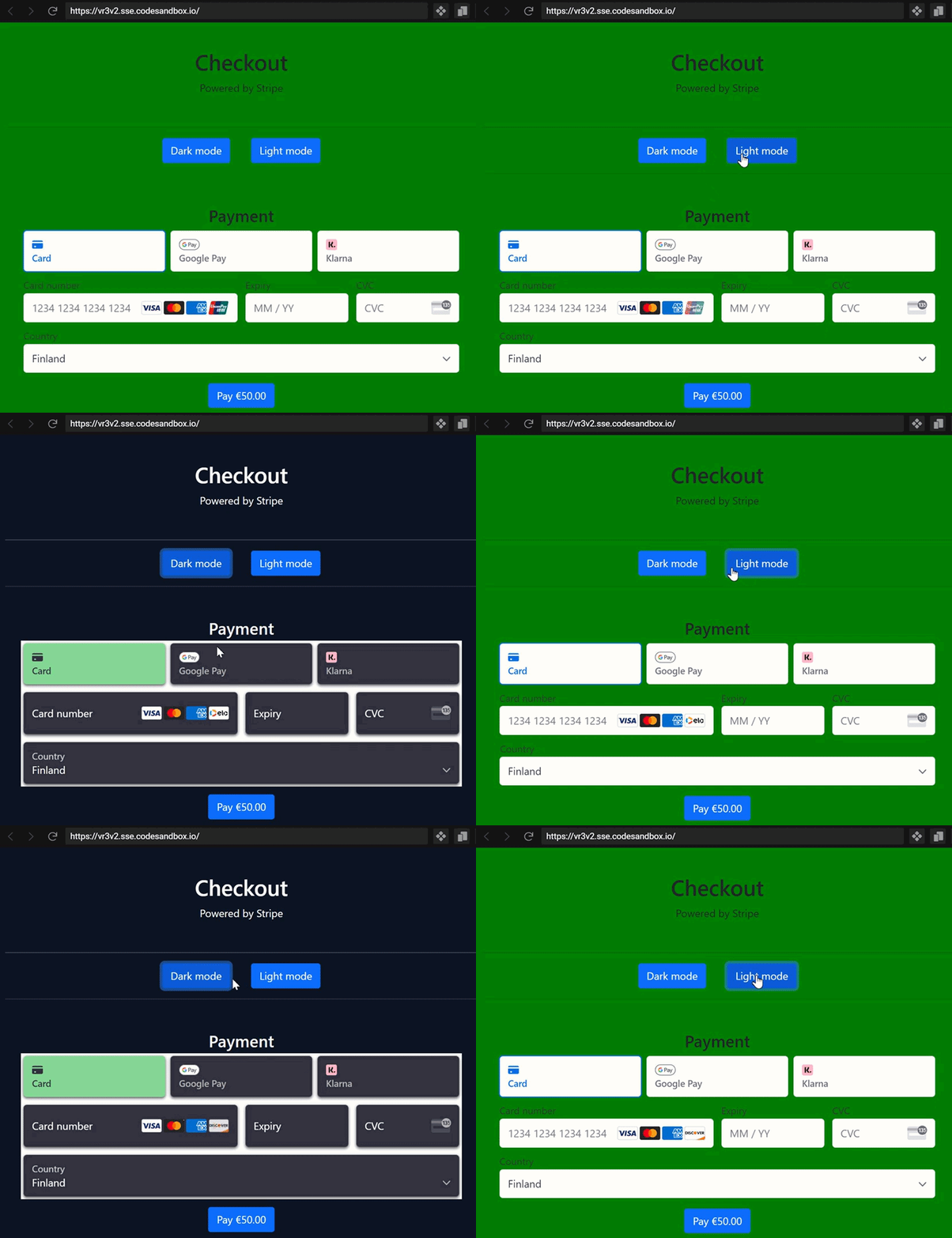 lean island
ah I see.
I'm assuming you're changing class names for the containers on button click?
wild current
Yup, even have hard refreshing it's like that
lean island
is this link to your code the latest one? https://codesandbox.io/s/nifty-moon-33706?file=/pages/_app.js

nextjs-stripe-paymentElement by LB22 using @stripe/react-stripe-js, @stripe/stripe-js, bootstrap, next, next-themes, react, react-bootstrap, react-dom, sass
wild current
Yes
But you need to edit the .env and provide public/secret key
And if you fork it, you'll have to edit the fetch links
to match your new url
I believe I'm not changing the classNames on button click
It's done by the next-theme package i'm using
I believe it changes something in the <html>
wait I'll double check
lean island
one thing I observed is that when you switch themes, it also makes the label floating
I'm not sure if that's an intended behavior
 lean island
ah okay cool
wild current
 const appearance = {
    theme: `${resolvedTheme === "dark" ? "night" : "stripe"}`,
    labels: `${resolvedTheme === "dark" ? "floating" : ""}`,
    variables: {},
    rules: {}
  };
If you check the gyazo I just sent you'll see the only thing that happens on theme switch afaik
And this is the scss for it:
// Dark-theme
[data-theme="dark"] {
  body {
    color: white;
    background: #0b1524;
  }
}

// Light-theme
[data-theme="light"] {
  body {
    background: green;
  }
}
Are you able to try out the repro I sent? Can I provide anything else for you?
lean island
I know that color: white should only affect the text but do you wanna take it out and see if that changes anything?
wild current
Sure thing
I did a hard refresh (ctrl+shift+r) prior to this screenshot, after I had commented out the color: white rule

As you see, only the text changes
The exact problem persists
lean island
hmm. looking at your code the only other thing that I can think of is either the theme-switcher OR bootstrap may have prebuilt classes / styling with white background.
wild current
Yeah, I've tried not including bootstrap in my css
lean island
or it could also be a border
wild current
I can show you that too

There is without bootstrap, which means it's only this css applied:
// Dark-theme
[data-theme="dark"] {
  body {
    // color: white;
    background: #0b1524;
  }
}

// Light-theme
[data-theme="light"] {
  body {
    background: green;
  }
}

// Theme-independent
body {
  .bg-gray {
    background: rgba(160, 160, 160, 0.4);
  }
}
the bg-gray could be deleted too, it doesn't do anything
it's for some area below this
lean island
okay lets try elimination theory
your component is nested under these parents
      <div className="page-container">
        <form onSubmit={handleSubmit}>
          <fieldset className="">
<div className="FormRow" ```I'll delete them
wild current
I'm gonna have to use react fragments, I'm guessing this is fine?
<> </>
it's like an empty div except it's not a div
wild current
I literally deleted everything except the paymentelement
return <PaymentElement />;
Still the same
I'll continue making the repro smaller for you
lean island
alright. wondering why is it working for me and not for you 🤔 must be something minor we're not paying attention to
wild current
I've got it down to this:
  return (
    <div>
      <h1>Checkout</h1>
      <p>Powered by Stripe</p>
      <hr />
      <Button onClick={() => setTheme("dark")}>Dark mode</Button>
      <Button onClick={() => setTheme("light")}>Light mode</Button>
      <hr />
      {clientSecret && (
        <Elements options={options} stripe={stripePromise}>
          <PaymentElement />
        </Elements>
      )}
    </div>
  );
So is there some way I can hardcode a client secret? I'll give up my public test key to use
I'm guessing I shouldn't provide my secret test key? Although I could do that too
lean island
The thing is I don't think it is needed as functionality wise the element is working fine. Just having issues cosmetically
wild current
Well I want to provide you with a repro
wild current
But then you'd have to download/install the projects dependancies right? that's why a codesandbox is nice because it's already made for you
But I can provide a git repo for you
lean island
git repo is fine thanks
wild current
Alright, I'll put one together for you
lean island
I wanna keep it as bare-bone as possible
wild current
I'll try my best
lean island
all good! 🙂
wild current
Are you fine with me doing this to initialize my project
npx create-next-app stripe-repro-payment-element --use-npm
as I'm using next.js?
it's still all react
Or do you want the repro in another way?
wild current
Awesome
npm install stripe @stripe/stripe-js @stripe/react-stripe-js next-themes
So 4 packages installed
lean island
cool
just to make sure you may not need stripe in npm install stripe npm install --save @stripe/react-stripe-js @stripe/stripe-js
wild current
Alright, so I'll do exactly that which you sent me instead
npx create-next-app stripe-repro-payment-element --use-npm
npm install --save @stripe/react-stripe-js @stripe/stripe-js
npm install next-themes
https://github.com/pacocoursey/next-themes
Again, how can I give a hardcoded client secret? If there is no other way, I will need to use the stripe package to build the api/node server to where I send a request for the client secret
lean island
Don't worry about that as I have one built on my end.
wild current
Really?
lean island
ThemeProvider wrapper puts the white background
yup
if you try switching the colors without next-theme it works
wild current
How should I switch colors without it?
Is there any way to use it and still have it work?
Is there something I can write as an issue to https://github.com/pacocoursey/next-themes ?
lean island
taking a look to see if there's anything we can do
this is with ThemeProvider

this is without it
 wild current
Hmm...
Well how do you create and switch between two themes without it?
And what might be the underlying issue causing this? Can we speak to the owners of the package on github issues to try and solve this? Or is there something I can do?
lean island
it is possible that they have some classes that are using the same name as PaymentElement child elements.
wild current
What do you suggest that I do? I kinda want this package as I believe it's great otherwise
lean island
Okay so seems like the classes that are being overridden are p-PaymentElement-container, p-p-HeightObserver and probably at some point p-PaymentElement is-animatable
wild current
that's weird, why would they get overridden?
Should I send them my repro and ask them if they know what's going on?
Did you try out my very minimal repro? I made a few new commits
to make it even smaller
lean island
Have you tried using your app in a diff browser?
wild current
i'll try edge
wild current
It's not working
Are you doing it the right way to get the issue?
select dark mode, then refresh the page
it will work as it should if you select light mode and then refresh the page
lean island
safari vs firefox vs chrome

edge is built on chromium
so it may show you similar bugs
wild current
Hmm
That is weird
and you did like this?
https://gyazo.com/a97b8160cfa0a48c7240a1fb8bc7e0d5
 lean island
yup
wild current
Interesting
Very interesting
Just putting this one out here as well

Updating when light mode is selected makes it work as it should
So what can we say about this to the chromium developers then?
If it works on safari
lean island
possible that some built in styling parameters are causing this.
I'd highly recommend testing it in a diff browser & if you can host the app somewhere other than codesandbox, I can forward the link to one of my colleagues and they can take a look at it
wild current
Thanks a lot for your help! I'll have a go at this tomorrow. When does this thread auto-close, thinking if I should bump it in intervalls just so I can keep posting here while you're off during weekend?
lean island
hey @wild current we don't actively monitor discord during weekend. But feel free to create a new thread whenever you wanna follow up. Thanks!
I'm going to archive this thread for now 🙂 have a good weekend
lean island
Just to follow up on this, We confirmed that it is indeed a chrome/chromium bug. So there's very little we can do on our end. However, I will still pass on this information to our team that handles Web Payments.