#ryon-reactnative-savedcards
1 messages · Page 1 of 1 (latest)
 golden fox
ryon-reactnative-savedcards
Looking @celest cobalt
for #1 are you properly using Customer and EphemeralKeys as documented here https://stripe.com/docs/payments/accept-a-payment-deferred?platform=react-native&type=payment#ios-enable-saved-cards
 celest cobalt
Yes. I create a customer the moment they sign up and save both customer id and ephermalkey to my database. I then use those in the payment sheet. I think the saved cards feature needs that to work and that part works.
Here is my init payment sheet code https://pastebin.com/LQrNmyXN
 proud wolf
Hi 👋
I'm stepping in to offer some advice.
- Ephemeral keys are meant to be, well, ephemeral. You should not save them to a DB but re-create them for each time you present the payment sheet
- Looking at the code now
celest cobalt
hmmm yah name says it. So It's because I am using an old key each time that the payment methods don't show?
The flow would be
- Generate new key server side.
- Then show payment sheet (init) using new key
proud wolf
Yes that would be the recommended flow.
celest cobalt
OK. Here is my server-side create intent code. The intent is passed back to the payment sheet so that could be apart of it. You can check if I do the correct things
https://pastebin.com/qvcWqYLu
proud wolf
Instead of the code, can you share an API request ID for this? It will start with req_
Here's how you can find a request ID: https://support.stripe.com/questions/finding-the-id-for-an-api-request
Or just the payment intent ID?
celest cobalt
Ahh. Let me get that going for you. But first, let me implement the ephkey change.
proud wolf
Sounds good.
celest cobalt
To confirm. The eph key is for the customer right? I saw another variation of it for a card
const ephemeralKey = await stripe.ephemeralKeys.create(
{customer: customer.id},
{apiVersion: '2023-10-16'}
);
proud wolf
Correct, you use the customer ID to create them unique for each Customer
 willow irisBOT
celest cobalt
willow irisBOT
celest cobalt
Holy shhh..... The saved cards pop up now. I can't believe it. Its been about 3 months since I have been trying]
I can even remove some
and i can add a new one. This feels like magic
 wild carbon
Glad to hear it is working!
celest cobalt
Whew!. Ok. number 1 is solved. Any idea on the Google Pay situation. The enabled payment methods don't show up. I have not tested Apple yet, but Google Pay does not show.
wild carbon
Are you using Expo here?
celest cobalt
wild carbon
Glad to hear it is working!
😬 yeeah. I checked the manifest.xml, and it has the relevant deets for enabling the wallet.
wild carbon
Expo Go?
celest cobalt
No. I am using dev client. I have lots of native stuff so expo go does not work for me
This is in manifest: <meta-data android:name="com.google.android.gms.wallet.api.enabled" android:value="true"/>
wild carbon
Okay so you aren't using Expo at all, correct?
celest cobalt
Yeah I am using expo but with dev client or you may call it eas build. Which allows you to use native code through config plugins. So I do "expo prebuild" to generate native directories
It's like ejecting expo, but not ejecting.
wild carbon
Okay have you configured the plugin setup: https://docs.expo.dev/versions/latest/sdk/stripe/#config-plugin-setup-optional
celest cobalt
Yeah. Added this to app.json
[
"@stripe/stripe-react-native",
{
"merchantIdentifier": "merchant.com.myapp.more.app",
"enableGooglePay": true
}
],
After I prebuild, it added this to manifest <meta-data android:name="com.google.android.gms.wallet.api.enabled" android:value="true"/>
wild carbon
If you go to https://stripe.com/docs/stripe-js/elements/payment-request-button on your device in Chrome do you see Google Pay at the top of the page and can you successfully complete the payment (it is in test mode, it won't charge you)
celest cobalt
oooohhh. see Pay with Link https://i.is.cc/2OqXYxmX.jpg
Super simple and lightning fast image sharing. Upload clipboard images with Copy & Paste and image files with Drag & Drop
wild carbon
If you go to link.com are you already signed in?
Otherwise, that is likely the issue.
Do you have a real card in your Google Wallet?
celest cobalt
I dont think I even have a link account
wild carbon
Gotcha then yeah sounds like an issue with not having a live card in your wallet on the device that you are testing with.
Google Pay only shows if there is a live card present on the device.
celest cobalt
This is what I get when I open payment in another app
https://i.is.cc/2OrarVpi.jpg
Super simple and lightning fast image sharing. Upload clipboard images with Copy & Paste and image files with Drag & Drop
Is that different from stripe google pay?
celest cobalt
Hmm. So.... I have an older samsung. Google Pay popped up on it with the link you sent. I tested on the samsung s23 first.
This is my older samsung s9+ https://i.is.cc/2OrmB5YV.jpg
It shows Google Pay. But only link shows on the s23 ultra
Super simple and lightning fast image sharing. Upload clipboard images with Copy & Paste and image files with Drag & Drop
wild carbon
Okay and do you see Google Pay on your app on that device?
celest cobalt
I am installing now. Give me a moment.
wild carbon
👍
celest cobalt
I have a conditional google pay button that is only rendered if Google pay is supported setPlatformPaySupported(await isPlatformPaySupported());
The buttons showed up which means stripe detects it on the samsung s9+. Problem is I dont know how to take a payment with it. The option is not on the payment sheet. Just the saved cards
Maybe the new android version have new api or something
Super simple and lightning fast image sharing. Upload clipboard images with Copy & Paste and image files with Drag & Drop
 spare rivet
Hi there 👋 jumping in as my teammate needed to step away. Please bear with me a moment while I catch up on the context here.
Before we go too far, I want to poke on that Expo piece a bit more. I'm not familiar with the flow you described as being "like ejecting expo", but I know Expo can be finicky if the version of our library that is used doesn't match the version that Expo is using.
Do you have an Expo SDK version that you're using? and can you share which version of our react native library you're working with?
celest cobalt
Yeah. I am not using the expo version. I am using the latest version but everything works, and it has been user error with everything up to this point. So I am inclined to think I either didn't do it correctly or google pay is finicky on my newer s23+ since it appears on my s9+
spare rivet
Hm, interesting, taking a second to recap and make sure I'm understanding.
- You have Google Pay added to a React Native mobile app you're working on.
- When you go through that flow on your s9+, you see Google Play displayed as expected.
- When you go through that flow on your S23+, Google Pay is not displayed?
celest cobalt
Yes.
Yes, stripe detects it with - isPlatformPaySupported() - not implememted yet and does not appear on payment sheet
Not displayed - isPlatformPaySupported() returns false.
However this may not be a stripe issue. Because when I cliked the link https://stripe.com/docs/stripe-js/elements/payment-request-button google pay did not show up on the s23+ either. It only showed up on the s9+
Or maybe it's a stripe issue and the libraries used need to be updated to support newer android version or devices
spare rivet
If you didn't see the Google Pay button displayed on that page when using the S23+, but did with the S9+, then it sounds like only one of those devices may be set up for Google Pay.
On the s23+, do you have Google Pay installed, are signed into Google Pay, and have a card included in your Google Pay wallet?
celest cobalt
This is weird. I do not have google pay app installed on the s9+ but I have it installed on the s23+
On the s23 ultra I can make in app payment with my google account. Example from another app on my s23 ultra (not plus sorry) https://i.is.cc/2OrarVpi.jpg
Super simple and lightning fast image sharing. Upload clipboard images with Copy & Paste and image files with Drag & Drop
spare rivet
When you say "another app", what is that? Is that another RN app built on Stripe libraries, or an app that has directly integrated with Google Pay?
willow irisBOT
celest cobalt
Ahhh. Yeah they probably integrate directly with Google. Alright, lets clear the table a bit.
**1 question: **should this payment sheet have Google Pay option if Google Pay was detected on the device and added to the init code? https://i.is.cc/2OvkP8NR.jpg
Init code here: https://pastebin.com/LQrNmyXN
spare rivet
Taking a look
That looks right
If you're seeing it displayed on one device, but not on another, when running the same app, then you're most likely looking for a setup issue on the device that isn't seeing Google Pay offered. The most common reasons I see for that are:
- The related app isn't installed
- Google Pay is installed but not set up
- A card has not been added to the Google Pay wallet (this is a Stripe-added requirement, above and beyond what Google alone requires)
- India is involved, where Google Pay is more restricted
celest cobalt
Hmm.. So, Google Pay is not shown on any of the payment sheets. It was only detected as supported on one device.
So taking from what you are saying now can I conclude that:
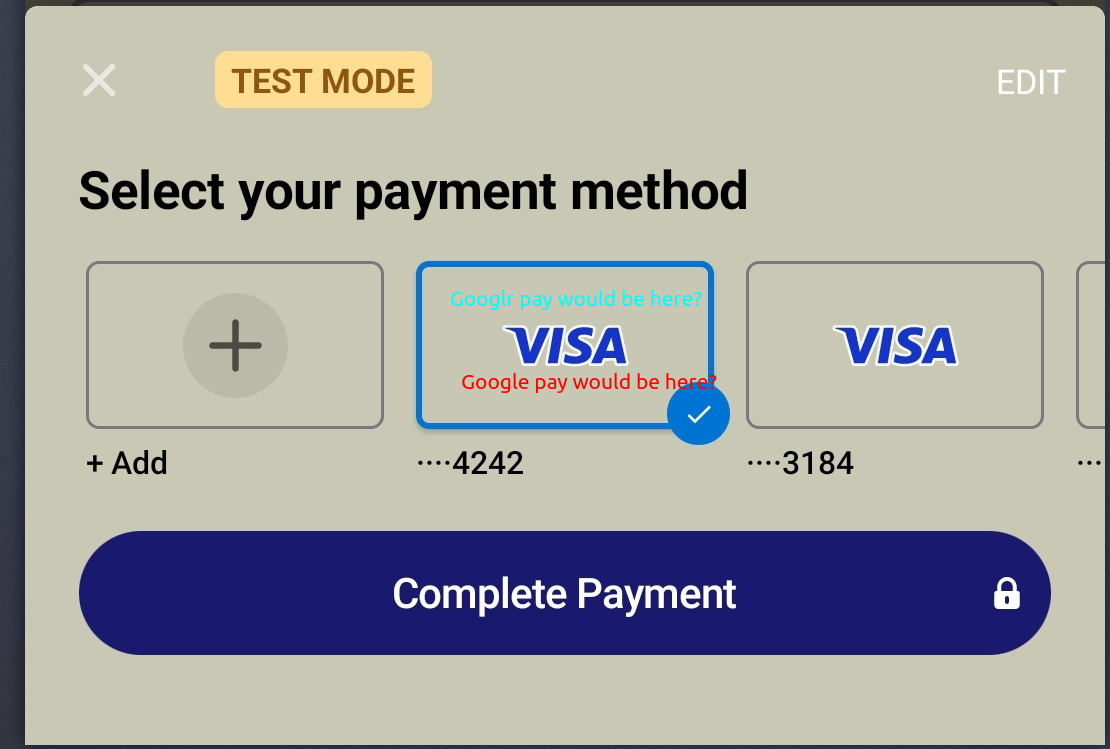
If Google Pay is supported and setup correctly on the device then the Google Pay option should be in the saved card section beside my 4242 saved cards like this screenshot? https://i.imgur.com/bETtj0e.png


 hushed wyvern
Hello! I'm taking over and catching up...
Yeah, it should show up there if there's a valid Google Pay card in the wallet on the device and the transaction supports Google Pay.
celest cobalt
Hmm. The transaction needs to also support Google Pay. Can you point to a documentation so I can ensure my transaction is Google Pay compatible?
hushed wyvern
I don't think we have a single doc that has that info. This is our primary Google Pay page: https://stripe.com/docs/google-pay?platform=react-native
You would also need to look at whatever documentation Google has, like supported countries and currencies.
celest cobalt
I think my transaction qualifies. I am going to try initiating platform pay even though it's not shown in the sheet and see what happens. I will update here after I test. I feel like it could still work
hushed wyvern
Okay.
hushed wyvern
Any luck?
celest cobalt
Not yet. Ia m setting up google pay on my girlfriends s23ultra. Adding bank account. Wanm tot see if that makes a difference
I added bank account to mine and my bank transactions showed up in the app. So it must be correctly setup right now. Moving to test
hushed wyvern
How's it going?
celest cobalt
It works
I added a bank account, then a added a card in google wallet. So both apps need ot installed both google pay and google wallet it seems
hushed wyvern
Sounds good! Is there anything else I can help you with?
willow irisBOT
celest cobalt
Is it possible to preselect google pay in the in the payment sheet. That way I can have more than one button and one that says "Google Pay". Maube it passes param or something so the payment sheet uses google pay
 outer summit
👋 hopping in here since rubeus has to head out
Currently I don't think that's something we support. You'd have to implement the Google Pay button separately (not with Paymetn Sheet) https://stripe.com/docs/google-pay
celest cobalt
Oooh. That's problematic. I don't think I can have the same params in platform pay. I will look into it
outer summit
Can you clarify what you mean about not having the same params in platform pay?
celest cobalt
I am currently looking into this. i think it might work. Do I need to given special access to use the customerSheet? I see it is in beta?
outer summit
Yup, it should still be in beta - I'd recommend talking to support (https://support.stripe.com/contact) if that's something you're interested in