#Ivan Boostly
1 messages · Page 1 of 1 (latest)
 hot tendon
 tacit river
Which elements (Card or Payment Element) are you using? And what field is that and what is your expected behaviour?
 fathom badger
This one "Card Element" https://stripe.com/docs/payments/accept-card-payments?platform=web&ui=elements
It's a wordpress build website and we are using favethemes/homey
and conflict to Elementor Pro plugin upon debugging, also we compared it to other site but it's weird that only this site encountered this issue
tacit river
Do you implement Card Element on your own or use third party plugin for Stripe payment?
fathom badger
tacit river
Do you implement Card Element on your own or use third party plugin for Stripe p...
we used 3rd party plugin
tacit river
It's likely that your CSS code or third party plugin overrides the visibility to hidden
If it's overriden by another plugin, I'd recommend checking with the plugins to disable the CSS visibility
fathom badger
tacit river
If it's overriden by another plugin, I'd recommend checking with the plugins to ...
but the form was from iframe isn't possible to override.
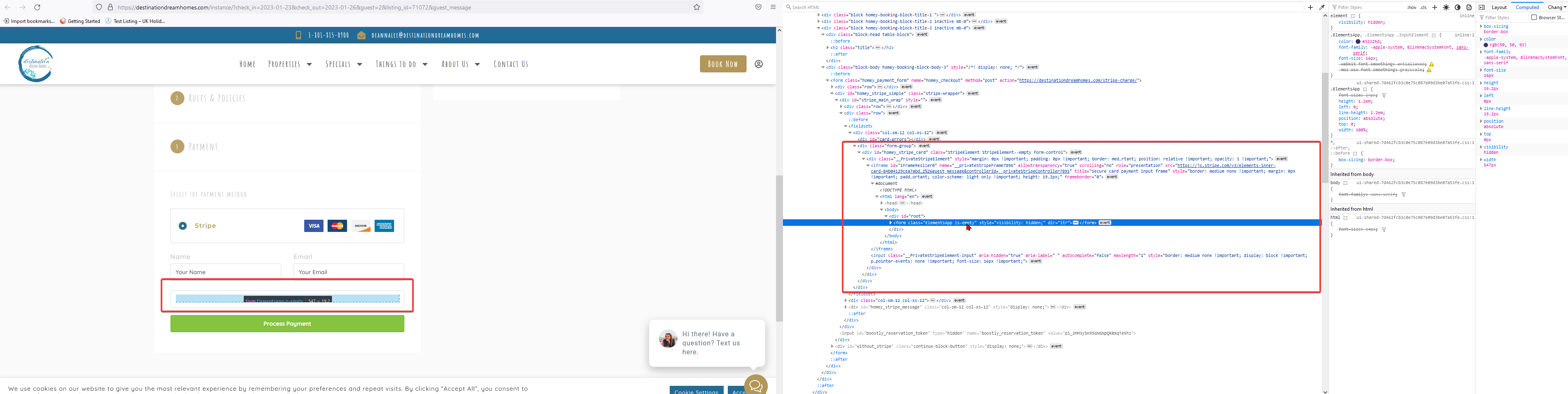
 tacit river
If you use third party plugin to integrate with Stripe instead of direct integration, we don't have visibility how it is implemented. I'd recommend checking with the plugin
fathom badger
tacit river
If you use third party plugin to integrate with Stripe instead of direct integra...
but do you have an theory or exp about the same issue? of having CSS on Card Element from widget of stripe?
tacit river
This channel is only for direct integration with Stripe. We don't have much experience with third party plugins or widget
fathom badger
I see Thank you.
tacit river
No problem 😄