#raphael1807 - Express onboarding
1 messages · Page 1 of 1 (latest)
 rapid schooner
 warm bronze
When user drops the stripe connect banking process, it displays us the following UI which we're not able to do payout to

The expected UI should be the following:

My friend @covert zinc who is our developer explained the situation here:

 tidal mason
Can you clarify exactly what you mean by "When user drops the stripe connect banking process"
 tidal mason
Thanks, give me a moment to look
Interesting
Can you provide the Account ID that you used in that video?

 warm bronze
Okay thanks
tidal mason
Wait wait, sorry I missed the last part of the video. So what you are expecting here is that the Connected Account user is redirected to their Express Dashboard from the Connect Onboarding flow (where they add their bank account), after they add the bank account?
Like when I look at the Connected Account the bank account is being added
Sorry, I have to step away but @wise vigil is here to help further.
 wise vigil
@warm bronze hello, can you answer the above?
warm bronze
sorry
yes
I do not get the last part of the communication
Right now
If you check my video @wise vigil
You can see the difference of UIs between the 2
When user drops the bank account process
It brings him to a user interface that seems completed
But in reality it's not
That's the issue we are encountering
wise vigil
ok looking one sec
warm bronze
no worries
wise vigil
ok so there might be an issue with your frontend integration then
just to clarify - your concern is that you do enter a bank account on the Stripe hosted page, then back on your page, it still shows "enter a bank account"? right?
warm bronze
My issue is the fact that even if I enter all the proper informations that are required to have a stripe connect account created
it seems like once I add everything
We're still not able to have a stripe connect account even if no error appears in the stripe dashboard
And as @covert zinc explains
 wise vigil
can you share an example Account ID?
I still think it might be that your account is not looking at the right info or making a brand new HTTP request to fetch the Connect account (possibly)
warm bronze
usr_MQ7gqCZmA3aXTA
acct_1LhHR7PwcJXl4Oqt
wise vigil
hmm what is bank_account.details_submitted , i.e. where do you get it from ?
AFAIK details_submitted is on the Account object, not the bank account
warm bronze
@covert zinc
I'm asking our developer
I think that's exactly it @wise vigil
We get an error on the Account object
but if you look at our user interface on stripe
it doesn't require us to send anymore details
wise vigil
yeah so let's take a step back
there's the full Account object that your application is fetching (at some point)
that object has details which tell you that a bank account was added to the Account or not
so I think it is a matter of where you are looking on the Account object JSON
warm bronze
Okay
But from what I've sent you
Even if I add a bank account on my account in the user interface I showed you
it still doesn't allow me to get payout
payouts
 covert zinc
Yeah for bank_account.details_submitted , bank_account is an account object
wise vigil
in the user interface I showed you
which user interface, yours or Stripes?
it still doesn't allow me to get payout
in Stripe's interface? You only see Payouts sent to your account in that Stripe interface. No Payouts were sent. So nothing shows
warm bronze
@covert zinc , maybe you can show @wise vigil the json brought back
@wise vigil , this would be the user interface I should get once Stripe connect has been successfulty connected
 wise vigil
is that through the LoginLink too?
I think you get to that page after you fully create the account, is that right? (like you provide all the right info needed to onboard the account?)
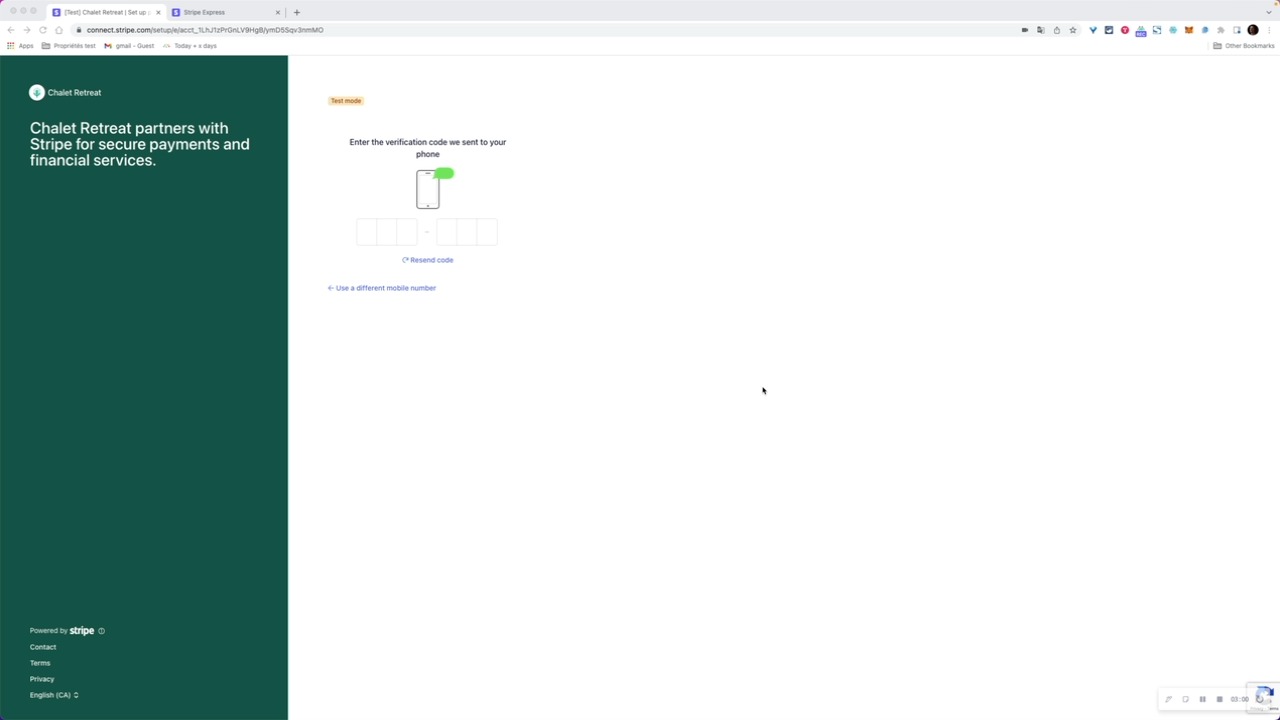
 warm bronze
If I drop my bank connection process here, I am not able to create an account if I drop from here and I add my banking informations

Is there a reason details_submitted is false even though when the user enter stripe connect, everything is in order ?
wise vigil
let's do this
(the screenshots/videos are clear but what is not clear is what the Account objects look like when you update them with Stripe's hosted onboarding, vs when you fetch them)
so let's do this
1/ onboard an account, note the timestamp when you entered the bank account info (test mode one)
2/ note the account ID of the account
3/ after 1 and 2, when your app fetches the Account object, share the full Account object JSON with us
share all details from 1/ 2/ and 3/ above, that will help clarify things for us on what is happening in the different operations
warm bronze
(doing it)
@wise vigil here is the full json

And @wise vigil , on my side, this is the User interface I get, where it seems to tell me that no additional infos are needed
 warm bronze
much appreciated @real frigate
 real frigate
I see the bank account information was saved; note the details of external_accounts
I see the Express account was created without requesting additional capabilities: https://stripe.com/docs/connect/account-capabilities
Capabilities are not required but should be added if you want to collect more information up front to satisfy that capability
covert zinc
Make sense ! But shouldn't details_submitted be true ?
Since they seems there's no details missing
real frigate
Hm, that's a good point
The account details show charges_enabled is true even though details_submitted is false: https://stripe.com/docs/connect/express-accounts#handle-users-not-completed-onboarding
I think that still points to missing capabilities (card_payments and transfers specifically if you want connected accounts to process card payments directly)
covert zinc
Yeah we will add capabilities into our code so we can make sure transfers are available. Is there a way to force the complete UI (#1018948060769959966 message) into the stripe connect account ?
real frigate
I'm not sure what you mean by "complete UI". You won't see balance details until there's data to display for a given account
covert zinc
Sure but sometimes stripe connect login link goes here (UI #1):
and sometimes here (UI #2):
#1018948060769959966 message
What's the reason for the UI difference, seems like UI #1 is there because there's some informations (details) missing but there's no warning and even when there's a warning, if I click on Update, nothing happen.

There's the account in the new photo
real frigate
for that latest screenshot, you'll see the account has inactive capabilities:
capabilities": {
"card_payments": "inactive",
"transfers": "inactive"
}
covert zinc
Sure but the UI #1 don't offer me the possibility to complete those capabilities
real frigate
That's where the details under requirements come into play. These are the items that need to be completed: https://stripe.com/docs/connect/update-verified-information
covert zinc
Like when the warning More information is required to process payments. appear, how do the user knows which "More information" is needed, there's no warning elsewhere and when he click on Update, nothing changes
@warm bronze Found something, if the user stop the onboarding on this question, he can never finish his account

Since that question is not asked in the UI #1 like mentionned before
Unless this is something that need verification (like 7 days) or something on your side and the user will have access after that. I think this is a bug since user can't finish their account since that question (#1018948060769959966 message)
If the user don't answer this question #1018948060769959966 message it seems like when he re-enter his account, he can never go after this:

@real frigate sorry for all the infos, let me know if you need something else from me
real frigate
There have been a lot of screenshots and references to "right" and "wrong" UIs, so it's hard to follow your question
covert zinc
Yeah, let me numbered that up
real frigate
If a user clicks "Update", they should be prompted to provide the missing information, based on whatever capabilities were requested when creating their account
covert zinc
If I click on it, nothing happen
Here's a video
Here's the two UI


The one with the green bar on the side (UI #1)
UI #1 seems like the "not-completed" version but the user is blocked there
real frigate
For the account link you're using to access UI #1, can you be sure to test in Incognito or private browsing mode and let me know if you see anything different?
covert zinc
Give me 1min
When I click on Update, this Ajax call fail

status 400
Here's a copy as fetch js
Not sure if this is related, but maybe
Even on private/incognito mode
real frigate
Okay, this helps. It looks like the account was deleted (acct_1LhK9wQ6kSqXMSZm). I recommend continuing your testing using the information here: https://stripe.com/docs/connect/testing
This includes test dates of birth, addresses, ID numbers, etc that you can use to simulate different outcomes instead of using real details
covert zinc
The account ID i'm testing now is "acct_1LhKOHQ9FPzlms5r"
I test with multiple one to check where the bug is
real frigate
I recommend testing with a brand-new Express account, and be sure to use the test data from the Connect Testing page above
covert zinc
Sure, but if I stop the onboarding here #1018948060769959966 message this account is "ruined" since I cannot finish it
This shouldn't be the case
Since login link goes to UI #1 and the user is blocked there
I think this is a real bug from your side
real frigate
Can you try to reproduce this with the test data and using incognito/private browsing?
covert zinc
Sure
Here's a video in incognito mode
Like mentionned, if the user stop the onboarding, this account can never be done
id: "acct_1LhKrZQ82zP0qkQy"
real frigate
raphael1807 - Express onboarding
Going to try to reproduce this with the test data + test phone number
 real frigate
I see acct_1LhKrZQ82zP0qkQy was created with both transfers and card_payments
covert zinc
Yeah, I try adding card payment too. Before we didnt have capabilities, we added it now.
both transfers only OR transfers and card_payments create the bug
real frigate
No, I'm not able to reproduce this. If I exit out of Express onboarding before answering the "Tell us about your business" question, I'm prompted to answer this question the next time I use a new account link
real frigate
It's not a new account, correct. I created a new account link with the same account ID
covert zinc
We use that

LoginLink
For us, if the user exit out of Express onboarding before answering the "Tell us about your business" question, and come back into our platform, we redirect him to loginlink
real frigate
I also used the test phone number and code details:
"Auto-fill 000 000 0000 as the test phone number and 000-000 as the SMS code when prompted (Express)"
covert zinc
I will try
Bug still happen using 000 phone number
id: "acct_1LhLAWQ7yne8qQHq"
Also, we are in Canada
Maybe the error ajax call response, multi_region_routing_target_not_found have something to do with it, since multi region routing sounds like a Load Balancer failing to me. Maybe
tidal mason
Hello again
warm bronze
hello @tidal mason 💪
covert zinc
Hello !
tidal mason
Where are we at 😅
covert zinc
May ask @real frigate for that
In resume, we think there's a issue with the onboarding process in stripe connect express, if the user stop onboarding at a specific point (here #1018948060769959966 message) the user can't complete his account ever. You may check the video provided above in the conversation. Thanks
Discord
Discord is the easiest way to communicate over voice, video, and text. Chat, hang out, and stay close with your friends and communities.
warm bronze
I think we're a tough one @tidal mason
tidal mason
So was the bank account issue resolved? And this is about a separate step?
covert zinc
It's the same, but we think the root cause is this
tidal mason
So you are stating that if the Express Connected Account user does not select a business type and instead exits onboarding, when you send them back through onboarding with a new Account Link they can never see that page?
covert zinc
Yes! But we send them to their account login link since their account are actually created/started
And the user is blocked there
Actually we send them back with there login link.
tidal mason
Okay let me test it on my end real quick
covert zinc
Sure !
warm bronze
do you want to test it through our platform @tidal mason ?
tidal mason
No that's okay. Can you give me an Account Id though that you did test with. Just want to check how you are creating the account initially
covert zinc
id: "acct_1LhLAWQ7yne8qQHq"
This account is blocked for us
We can't finish his onboarding using his login link
tidal mason
Hmm I return to that same page when I test it.
covert zinc
Which page ? This one #1018948060769959966 message
tidal mason
Oh you are using a login link
Why are you using a login link and not an Account Link?
covert zinc
Because the user has already created the account
tidal mason
They haven't completed onboarding though
Can you try with an account_onboarding type Account Link?
Complete reference documentation for the Stripe API. Includes code snippets and examples for our Python, Java, PHP, Node.js, Go, Ruby, and .NET libraries.
covert zinc
So:
- The user in our platform click on a Button
- We create the account in our backend
- Send the user to the onboarding process
- The user stop at the specific point metionned
- The user re-enter our platform
- For us, we have an account ID so we send him the login link
- The user go to the login link and get blocked there
I will try
Which values in Account object should I check to send him the login link vs the account onboarding link ?
If the user has not finished the onboarding process, the login link should still provide the user to finish his account right ?
tidal mason
You should be looking at details_submitted for whether they have completed the initial onboarding: https://stripe.com/docs/api/accounts/object#account_object-details_submitted
Complete reference documentation for the Stripe API. Includes code snippets and examples for our Python, Java, PHP, Node.js, Go, Ruby, and .NET libraries.
covert zinc
Ok give me 5 min
tidal mason
So yeah, I see what you are saying. We do allow you to use a login link after you have submitted your email/phone since the account has technically been created and connected. However, this is not what they are designed for. They are for accessing the Express Dashboard after onboarding has been completed. Notice that they don't prompt for any of the uncollected info via the Onboarding form... they just ask for ToS acceptance (since that is required) and then pop the user into the Express Dashboard. Where, as you noted, the user can't select a business type (since that isn't editable via the Express Dashboard at any point).
So mostly you need to ensure you are using Account Links for onboarding until the Connect Onboarding form has been completed (see details_submitted).
Then you use login links to direct them to their Express account Dashboard
covert zinc
Ok this is working, we are doing a check now. Is this specified in the Doc API ?

Using this, the user can now finish his account
But I'm pretty sure, this "bug" is there in other website, and that may cause customer to get stuck
tidal mason
Yes this is in our docs: https://stripe.com/docs/connect/express-accounts#handle-users-not-completed-onboarding
tidal mason
covert zinc
But I'm pretty sure, this "bug" is there in other website, and that may cause cu...
Sorry not following this
covert zinc
I'm pretty sure there's other website like us that give the login link by default when we got an account Id, so that may cause customer to get stuck
tidal mason
I mean, it is possible. But that's not really a bug imo. That is a mis-use of our product. You specifically aren't supposed to provide login links until onboarding is completed. There is no reason to view the Express Dashboard prior to that.
I don't disagree that it is perhaps a rough edge
covert zinc
I understand
tidal mason
Like it is somewhat confusing
And I sympathize with that
But overall I don't really think it is a bug
covert zinc
Yeah we got lost trying to figure it out ahah Thanks for the answer, atleast we got this working.
tidal mason
Yeah sorry you went down the rabbit hole here 😦
covert zinc
Is there a reason login link provide a link if the user onboarding is not finished ? Is there a use case for this "not finished" url ? If not, maybe login link should trow an error stating that the user onboard was not finish
covert zinc
tidal mason
Yeah sorry you went down the rabbit hole here 😦
No problem, we didnt read enough I think.
tidal mason
It is mostly just historical... with our original OAuth flow the Connected Account wouldn't be connected to the platform until Onboarding was completed.
So a login link would error in that flow
But then we moved to Connect Onboarding, which is way better because so many users got stuck in a bad place with only completing half of OAuth and the platform having no insight into the account since it wasn't connected yet.
But that means the account is connected as soon as created
So the login link is functional here as soon as email/phone
And I'm guessing there was just never further validation added to handle both scenarios. Other things were just prioritized
covert zinc
Make sense with such a complex system
Maybe a warning here will be enough https://stripe.com/docs/api/account/login_link
warm bronze
thanks a lot @tidal mason for your help
we were down down down
in the rabbit hole
We found Alice in Wonderland on the way
tidal mason
lol
covert zinc
Thanks! Atleast we got it working now.
tidal mason
Yes all the folks you spoke to are my teammates
warm bronze
wondering just how your structure is working
tidal mason
My team monitors this channel 24/5
warm bronze
you have first level support engineers?
and when we're about to meet alice in wonderland, you bring the second levels? special team?
tidal mason
haha
We are the general dev support. Then we would work with our internal Engineers if we needed to go more in depth or report a bug, etc.
But we work over email as well
tidal mason
❤️
 tidal mason
😂
warm bronze
okay will leave you with other customers!
tidal mason
Good luck! Come back through if we can help further
warm bronze
maybe I would have a last one for you
we won't go as deep
since it's not first priority
tidal mason
Sure
warm bronze
by doing tests of delete and reading stripe connect bank accounts, I ended up creating many bank accounts under my stripe connect account

Like this
Is there a way for us to close banks accounts when user delete his bank account with us or no?
tidal mason
So you don't control external accounts for Express users. The Connected Account user controls this themselves...
What exactly do you mean by "delete his bank account with us"
tidal mason
Ah I see. No you can't control this from the platform. Only the Express account user can control this from their Dashboard. I don't believe we allow for them to remove all of their external accounts so that they don't have any external account set...
But I'm much more familiar with the API than I am the Dashboard
So I would need to test that to know 100%
I think at that point though you would delete their account, which would "disconnect" the bank account

 tidal mason
Nah that will actually just reject it, which is more to mark fraudulent accounts. You want to delete via the API: https://stripe.com/docs/api/accounts/delete
warm bronze
I see