
#help on setting up my new drone
1 messages · Page 1 of 1 (latest)
 autumn jolt
 mystic cloud
oki
autumn jolt
Where should we start xD
mystic cloud
ELRS, let's get it bound to your radio
autumn jolt
Should I tighten the screws too?
autumn jolt
mystic cloud
ELRS, let's get it bound to your radio
Alright
mystic cloud
autumn jolt
Should I tighten the screws too?
sure
always good to check
let the receiver go into wifi mode and connect to the access point and go to 10.0.0.1
https://www.expresslrs.org/quick-start/webui/#how-to-get-to-the-web-ui if you need more info on how to do that
check device target and version
if it's on 3.x simply enter your binding phrase
 autumn jolt
mystic cloud
let the receiver go into wifi mode and connect to the access point and go to 10....
autumn jolt
mystic cloud
let the receiver go into wifi mode and connect to the access point and go to 10....
do I have to connect my drone to my computer or how am I able to go wifi mode on my receiver
mystic cloud
see if the receiver turns on by connecting just the usb cable
autumn jolt
will it overheat?
if i plug it in for too long
the usb plug on the drone is where the fc is or?
mystic cloud
yes
mystic cloud
autumn jolt
will it overheat?
on usb only that's very unlikely
autumn jolt
it did on my whoop
aight its on there are two light ones red and one blinks blue
nvm
two big lights
and the receiver has a fast blinking blue light
mystic cloud
no
Apple Support
Learn how to use Wi-Fi, Personal Hotspot, and Ethernet to connect to the internet.
autumn jolt
oh lol
mystic cloud
 mystic cloud
yes
 mystic cloud
password is expresslrs
mystic cloud
go to your web browser and go to 10.0.0.1
autumn jolt
Done
mystic cloud
what version does it say it's on

 mystic cloud
k, enter your binding phrase
mystic cloud
enter it in the webui you dummy
mystic cloud
then press save
autumn jolt
I enetered and then it just disappeared bruh what
Oh i got reconnected to my old wlan connection lol
mystic cloud
oh wait the rest of your stuff is on LBT firmware right ?
autumn jolt
Idk
mystic cloud
on your radio go to the ELRS lua script
autumn jolt
I cant reconnect to express lr rx wifi
mystic cloud
scroll down to the bottom and send a picture
autumn jolt
mystic cloud
on your radio go to the ELRS lua script
Where do I find it,
mystic cloud
the thing with which you change output power and such
press SYS
and then ExpressLRS
autumn jolt

 mystic cloud
yes
mystic cloud
no we'll do it with bf passthrough

 autumn jolt
 mystic cloud
ok select the betaflight on and press build n flash
mystic cloud
cool
autumn jolt
This was on my drone
mystic cloud
unplug drone, turn on transmitter, plug drone back in
mystic cloud
check with betaflight configurator that it connects and that you get stick movement in the receiver tab
autumn jolt
Tried turning off my controller warned me that receiver is still connected
autumn jolt
mystic cloud
check with betaflight configurator that it connects and that you get stick movem...
Ok
OHH
CAN we make a custom plug in sound :3?
autumn jolt
Ok so
Betaflight recognizes drone movement
And also it sees that i move the sticks on my controller
mystic cloud
well you can setup your osd and modes then
autumn jolt
Ok
Is there a turtle mode?
Lets go for osd first
I heard of an arrow
Which points in your direction
And what parameters do I need for long range
Aaaand i can set this to hd, right?
 mystic cloud
arrow is here
 autumn jolt
Yes
Strange
When I setup my osd for the whoop
I could set the image to hd, and the resolution got to hd
It looks like like this is analog
mystic cloud
probably on an older bf version where hd osd isn't a thing yet
autumn jolt
Should I upgrade it?
autumn jolt
Its 10.9.0
mystic cloud
that's the configurator
mystic cloud
aight, go to cli tab, enter diff all, click save to file
autumn jolt
Saved
mystic cloud
click disconnect and go to the firmware flasher tab
autumn jolt
Done
autumn jolt
Done
autumn jolt
Ok its flashing
Do you know what osd elements you need for long range?
Maybe the distance from your quad
Also the flash was successful
mystic cloud
go to the cli and click load from file
and select the previously saved file
if on the first connection it prompts you with "apply custom defaults" click yes
 mystic cloud
yes
autumn jolt
Nothng happened
mystic cloud
wdym nothing happened
 mystic cloud
close that
you can also just open the file
then copy paste everything into the cli
autumn jolt
The only thing to copy is „#“
mystic cloud
THEN PRESS ENTER
autumn jolt
Then I saved the pop up file on my desktop
mystic cloud
do I have to tell you each key you gotta press 😭
mystic cloud
trying to find the diff all from flywoe but it seems they don't have one for 4.3 and that exact stack
send flywoo an email
ask them for the cli diff all for your quad
autumn jolt
cant we redo it?
autumn jolt
mystic cloud
ask them for the cli diff all for your quad
So ask them for the file with the information you get if you type "diff all" in the cli tab from betaflight for the flywoo explorer long range drone, walksnai version
ok, i sent an email asking for the file...
what now?
autumn jolt
mystic cloud
ask them for the cli diff all for your quad
what if they dont have it
@mystic cloud
Also now I see the hd tab

I just get kicked out everytime i click on a new tab
mystic cloud
autumn jolt
what if they dont have it
then you'll have to setup betaflight from scratch
autumn jolt
Is it hard?
Like what is wrong at the moment
I dint understand what the tab really does
autumn jolt
mystic cloud
then you'll have to setup betaflight from scratch
What if I just download the new version from the internet
mystic cloud
what "new version" ?
autumn jolt

GitHub
Open Source Flight Controller Firmware. Contribute to betaflight/betaflight development by creating an account on GitHub.
Delete my current version and download this newer version
mystic cloud
no ...
you are on the latest betaflight version
you just didn't save the configuration the drone came with
so you either have to get that configuration again from flywoo
or set it up yourself
autumn jolt
How long would the manual conf take
Is it also with pid tuning?
Cant we just reset everything so i get the file back..
Also, the drone cant do nothing atm since it has no configuration
mystic cloud
no shit
 mystic cloud
maybe
it's the closest there is to your quad
so rn unless flywoe answers it's your best option
autumn jolt
mystic cloud
so rn unless flywoe answers it's your best option
Should we try? (Sprry for delayed answer, was eating)
hmm

will this reset everything?
also the setup ui doesnt work anymore
i would usetbs/elrs

this is the file
im not sure since i have the walksnail version,,
mystic cloud
yeah follow what the article says
autumn jolt
but both have the same fc AND esc
autumn jolt
mystic cloud
yeah follow what the article says
ok
oh one thing before I forget it
i used the same binding phrase for my lr drone as for my whoop
mystic cloud
yes, as you should
autumn jolt
ok
autumn jolt
autumn jolt
i would usetbs/elrs
so im just gonna use the elrs file and put it in cli tab?
after that the drone should have everything restored
mystic cloud
I would follow what the article says
autumn jolt
mystic cloud
I would follow what the article says
the article has a whole manual lol
dont need to do some things
I should follow everything from here or?

 autumn jolt
autumn jolt
autumn jolt
@mystic cloud hmm seems odd to me
should I really follow this
this isnt what weve done
llike ticking on the 1st and the 3rd sliding bar
- selecting the pro version
we already did this right, I just need to execute this file
autumn jolt
autumn jolt
https://cdn.shopify.com/s/files/1/0010/7410/2324/files/Explorer_lr4_DJI_O3_DJI_T...
this
mystic cloud
you can try yeah
autumn jolt
are there any backup plans
if it doesnt work
i dont want to destroy my drones software lol
mystic cloud
don't worry it can't get much worse than it currently is
mystic cloud
I told you multiple times what you did
autumn jolt
the configuration of the drone is gona, yeah
does that mean it cannot fly?
anyways, i will try to execute the file now
just copy and paste?
mystic cloud
yes
mystic cloud
insert in the command box
autumn jolt
ok
mystic cloud
then PRESS ENTER
autumn jolt
on my keyboard?
or is there a button
ok keyboard, common sense
there are many errors
i got kicked
dayum
and i cant connect....
nvm im in
soo, the setup ui doesnt works
and I sometimes get kicked out when pressing some tabs
(you can see in the end)
wtf man
why am I getting kicked out
also the ui on setup worked perfectly
fuckfuckfuck
mystic cloud
it kicks you out because you opened the cli tab and then exited it
mystic cloud
honestly
autumn jolt
even if the 3d ui doesnt work
mystic cloud
do this
 autumn jolt
will this fix it?
mystic cloud
maybe
autumn jolt
and what is fc enters dfu mode?
mystic cloud
that's fine you can ignore that
mystic cloud

 mystic cloud
sure
autumn jolt
then load firmwarme online?
mystic cloud
yeah
autumn jolt
and then flash firmwareß
mystic cloud
ye4
autumn jolt
 mystic cloud
unplug replug try again
mystic cloud
do you wanna do this over call
autumn jolt
yeah sure
mystic cloud
autumn jolt
oh right
I donthave a mic
i will jus chat
ok
alright, i held the button and plugged in the usbc cable
one sec
can you see the configurator?
worked now?
 autumn jolt
yes
before that the receiver worked
thanks ingraland!
i want like
a arm/disarm/mode just like for my whoop
and maybe a turtle mode
- a rth button
wait a sec i will sow you a pictur
one sec

I would like to have the modes like this
aux 1 = my current settn?=<
mystic cloud
@jovial zealot
 jovial zealot
autumn jolt
jovial zealot
autumn jolt
go on da radio
jovial zealot
ARM switch must be AUX1
autumn jolt
yellow = beeper
jovial zealot


set osd_warn_bitmask = 24575
set osd_link_quality_pos = 3669
set osd_link_tx_power_pos = 3605
set osd_rssi_dbm_pos = 3637
set osd_throttle_pos = 2530
set osd_current_pos = 2624
set osd_mah_drawn_pos = 2657
set osd_gps_speed_pos = 2563
set osd_gps_lon_pos = 2704
set osd_gps_lat_pos = 3712
set osd_gps_sats_pos = 2083
set osd_home_dir_pos = 2142
set osd_home_dist_pos = 2114
set osd_altitude_pos = 2146
set osd_warnings_pos = 14841
set osd_avg_cell_voltage_pos = 2593
set osd_efficiency_pos = 2497
set osd_stat_bitmask = 10755708
set osd_gps_sats_show_hdop = ON
save
jovial zealot
https://www.youtube.com/watch?v=IquVteIvXnA @autumn jolt

This demo is showing a Mode 2 radio that the vast majority of pilots use to fly. If your radio isn't mode 1 then you will have to use your controls wherever they are on your radio to navigate..
You can see more R/C related videos on the channel - https://www.youtube.com/user/Painless360
Please consider subscribing and supporting the channel b...
autumn jolt
yo @mystic cloud , ingraland helped me with everything
the only thing left now is a firmare update of my goggles and my drones vtx
can you help me with this?
i think it will be easier than the stuff before
mystic cloud
autumn jolt
can you help me with this?
I've never dealt with walksnail so i won't know much more than you will by looking stuff up
autumn jolt
Oh alright
https://www.youtube.com/watch?v=kpj41PesD_A i think this is perfect since it deals with the latest firmware
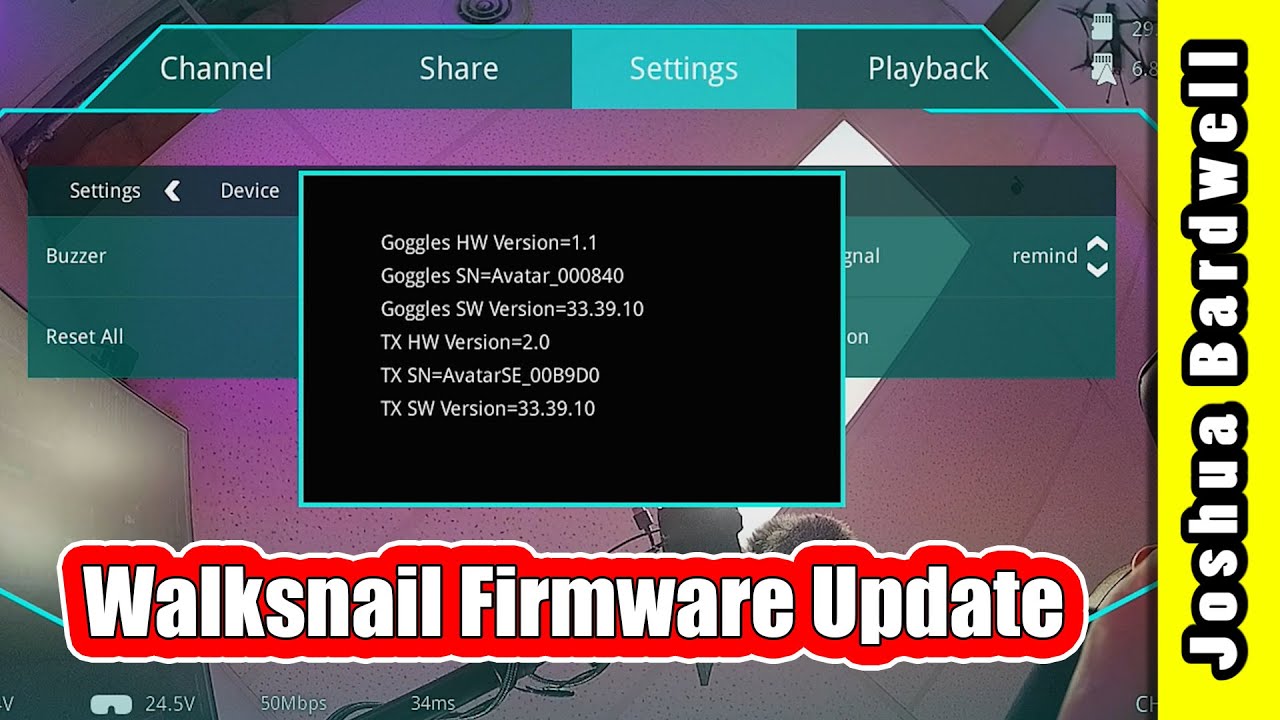
Uncertain about what to buy? Check out THE ULTIMATE FPV SHOPPING LIST: https://www.fpvknowitall.com/ultimate-fpv-shopping-list
SUPPORT ME ON PATREON at: http://bit.ly/2Ep5Sia
THIS IS MY FULL TIME JOB. Here are other ways that you can support me: https://www.fpvknowitall.com/support-me/
The d3vl site where I get the firmware is: https://a...
mystic cloud
seems pretty straight forward
just drag the firmware onto the vtx storage
then unplug, then hold the bind button for 8 seconds or so
until the led turns off
then let it do its thing
autumn jolt
But I gotta do it for the vtx + my goggle
There are 2 new firmwares availible, ill just choose the latest for both my goggle and vtx
autumn jolt
mystic cloud
just drag the firmware onto the vtx storage
So I have to connect my vtx per adapter and usbc cable, go to storage, remove old firmware and drag in the new one?
mystic cloud
pretty much

This video will walk you through the process of downloading the firmware, finding the bind button and the steps involved in updating/flashing the firmware on your Walksnail VTX (Video Transmitter).
Check out our store: https://volaertus.com/
Interested in getting your very own smoke stopper: https://volaertus.com/shop/accessories/short-saver-2...
this is the video i found
Google Docs
autumn jolt
mystic cloud
https://www.youtube.com/watch?v=5wQuL3_uWQM
Damn, I dont have a fan
Are there any ways to cool down your vtx?
mystic cloud
hair dryer that does cold air ? vacuum cleaner ?
autumn jolt
Aight, thank you
Hair dryer loud, but good
Oh also
Idk why this happens, but it happened after I set the radio dynamic = dyn
mystic cloud
try moving it further away
autumn jolt
autumn jolt
This video isnt the best example, but when its bound to drone and on it constantly warns me
autumn jolt
mystic cloud
try moving it further away
Will try but this didnt happen before
mystic cloud
what's your telem ratio ?
autumn jolt
 autumn jolt
mystic cloud
go to MDL
autumn jolt
mystic cloud
go to MDL
Where?
mystic cloud
hold RTN
press RTN
press MDL
press PAGE>
scroll down to baud rate
autumn jolt
Its not there
autumn jolt
Is it in telemetry?
mystic cloud
no. in model setup
 autumn jolt
This one?
 autumn jolt
autumn jolt
autumn jolt
And this setting is fine too?
mystic cloud
autumn jolt
This one?
turn that up to 5.25
mystic cloud
it's the communication speed between the radio and the ELRS module, it might fix the intermittent telemetry warnings
autumn jolt
Ok
Just wanted to make sure I have the perfect settings so I get good range + not too much battery life loss
Things I really want to achieve today is firmware update and good osd fonts
Ima start with the firmware now
Hope nothing overheats xd
Oh noooo screwing of the too plate 😖
@mystic cloud wait , I dont have to unscrew the bottom plate if I get access to the vtx or?
mystic cloud
I don't have the quad in front of me
as long as you can reach the bind button and the usb, you're fine
autumn jolt
Ok, i can do that
Woild you recommend charging the battery?
Its just at storage voltage rn
autumn jolt
mystic cloud
seems pretty straight forward
Alright, so I will charge both ( the goggle + the drones) battery to 4.2v, then I will do the firmware update. Should I just get the files from the website joshua bardwell linked in his video? The video you sent is basically the same, but only for the vtx
mystic cloud

Caddx FPV
CADDX Is A Leading Global Provider Of Digital HD FPV Camera System Technology, Focus On FPV Drone Racing Business Line. CADDX VISTA FPV Transmission technology delivers a minimum end-to-end latency within 28 ms and a stunning HD view.
the download is right here
autumn jolt
This right here?
 mystic cloud
yes
autumn jolt
And this is the cable I need for the drone vtx
 mystic cloud
I don't have the vtx in front of me
autumn jolt
Sorry
 mystic cloud
did it come with it? does it fit ? then it's probably for the vtx
autumn jolt
ok
bruh
the download gets check of viruses by google, is to big to be check tho lmao
 mystic cloud
Trotzdem herunterladen ..
autumn jolt
...
the newest firmware also has the perks of the second newest firmware?
im 2 firmwares away from the newest one
mystic cloud
autumn jolt
the newest firmware also has the perks of the second newest firmware?
yes it'd be very annoying if you had do every update to be up to date
 mystic cloud
yes
 autumn jolt
I tried connecting vtx and goggles and it didnt work
I did everything right…
Turning on drone, then goggles. Waiting for vtx to blink green and for goggles home screen. Then pressed vtx button and red button on my goggles
It immediately bound, I also saw „standby mode“
Even if they connected the screen just stayed pitch black…
@mystic cloud do you what could cause this?
Im 100% sure the firmware update for the goggles worked properly, for the drone im not sure since I pressed the bind nutton a bit to early and didnt notice that the vtx rebooted, it just started blinking red and after a minute it got green
mystic cloud
lens cap still on ?
autumn jolt
Sadly no :((
This isnt a lens cap anymore or?

Maybe something went wrong in firmware update
autumn jolt
mystic cloud
lens cap still on ?
Also i think it didnt come with any lens cap which is strange
mystic cloud
🤷♂️
autumn jolt
Hmm
There was a second .txt file in the drones vtx
Maybe i shouldve deleted it?
(First point)

OHH
THE SECOND POINT
it didnt turn off
It just kept blinking red and then just green
I think I will try again, firstly deleted the second file and then waiting a bit
Is it ok to upgrade to the same firmware again?
mystic cloud
no idea
autumn jolt
Im just gonna attempt a second time
ok wai
the one text file is showing me the current firmware
and its the new one

33.39.10
now im nervous
wow # IT WORKED NOW WOHOOOOO
also @mystic cloud i noticed the osd from betaflight wasnt there
i remember it was the same for my whoop
isnt there a button where you have to tick betalfiht osd to true?
mystic cloud
well you need MSP enabled for the right port and stuff
I don't really know tbf
I don't deal with hd that much
autumn jolt
mystic cloud
well you need MSP enabled for the right port and stuff
hmm
is it in betaflight, maybe its disablef
jovial zealot
autumn jolt
also <@404333024302596116> i noticed the osd from betaflight wasnt there
Uart3 is vtx uart bte