
#Config problems after latest release.
1 messages · Page 1 of 1 (latest)
 rugged gazelle
 rigid snowBOT
Would you like more information on how to provide a log file?
YAML checked and is NOT valid. Error message:
while scanning a block scalar
in "<unicode string>", line 3, column 1:
| 836 | Plex Error: No Items f ...
^
expected a comment or a line break, but found '8'
in "<unicode string>", line 3, column 5:
| 836 | Plex Error: No Items found ...
^
 vagrant aspenBOT
Plex Error: No Items found in Plex
The criteria defined by a search/filter returned 0 results.
This is often expected - for example, if you try to apply a 1080P overlay to a 4K library then no items will get the overlay since no items have a 1080P resolution.
It is worth noting that search and filters are case-sensitive, so "1080P" and "1080p" are treated as two separate things.
rigid snowBOT
Welcome @rugged gazelle!
Someone from <@&938443185347244033> will assist when they're available.
Including the meta.log from the beginning is a huge help, type !logs for more information.
You can press the "Close Post" button above or type /close at any time to close this post.
rigid snowBOT
rigid snow
You can press the "Close Post" button above or type `/close` at any time to clos...
rugged gazelle
rigid snowBOT
📝 If you want to review this again, quafley:
:one: Right-click (or long press with phone) on the message that contains the log
:two: Select: Copy Message Link
:three: Use the command: /logscan <message_link> or !logscan <message_link> and paste the value copied from the previous step where you see <message_link> 📝

Providing Log Files
1: Go to your config folder
2: Go into the logs folder
3: Look for meta.log (not meta.1.log etc)
4: Drag it in the Discord thread - the whole thing, DO NOT EDIT IT
5: Still confused? ¯_(ツ)_/¯
Log file too big? USE PASTEBIN or ZIP THE FILE

 Thanks for using Plex Meta Manager!

**Rec 03** - ⚠️ **[WARNING]**
⚠️ [WARNING]
Warning messages found in your attached log.
This is a PMM warning and usually does not require any immediate action. Most [WARNING] lines can be ignored.
For more information on handling these, [https://www.metamanager.wiki/en/latest/pmm/logs/?h=[warning]#warning]
1942 line(s) with [WARNING] messages. Line number(s): 707-708, 1050, 1199, 1203, 1207, 1211, 1215, 1219, 1223, 1227, 1231, 1235, 1239, 1245, 1251, 1255, 1261, 1265, 1271, 1278, 1282, 1286, 1296, 1302, 1306, 1310, 1315, 1319, 1323, 1327, 1333, 1337, 1341, 1345, 1351, 1357, 1361, 1365, 1369, 1373, 1377, 1381, 1388, 1392, 1400, 1404, 1408, 1412, 1416, 1420, 1424, 1430, 1434, 1438, 1442, 1446, 1450, 1454, 1458, 1466, 1470, 1474, 1480, 1484, 1488, 1494, 1498, 1502, 1506, 1510, 1514, 1518, 1522, 1526, 1530, 1534, 1538, 1542, 1546, 1550, 1554, 1559, 1563, 1567, 1573, 1577, 1581, 1585, 1594, 1600, 1606, 1613, 1617, 1621, 1625, 1629, 1633, 1637, 1641, 1645, 1649, 1653, 1657, 1661, 1669, 1673, 1677, 1681, 1685, 1691, 1695, 1699, 1703, 1710, 1714, 1718, 1722, 1726, 1732, 1736, 1740, 1746, 1751, 1755, 1761, 1767, 1773, 1777, 1781, 1785, 1792, 1796, 1802, 1806, 1810, 1814, 1818, 1822, 1826, 1830, 1834, 1838, 1845, 1849, 1853, 1857, 1861, 1865, 1869, 1876, 1884, 1888, 1892, 1896, 1900, 1904, 1908, 1915, 1919, 1923, 1929, 1936, 1940, 1944, 1948, 1952, 1956, 1960, 1964, 1968, 1972, 1978, 1982, 1988, 1996, 2001, 2005, 2009, 2013, 2017, 2021, 2025, 2029, 2033, 2037, 2043, 2049, 2054, 2058, 2062, 2066, 2070, 2074, 2078, 2085, 2089, 2093, 2097, 2101, 2105, 2109, 2113, 2117, 2121, 2125, 2132, 2136, 2140, 2144, 2148, 2152, 2156, 2160, 2164, 2170, 2176, 2180, 2186, 2190, 2194, 2198, 2202, 2206, 2213, 2217, 2221, 2225, 2229, 2233, 2237, 2241, 7065-7066, 7170-7171, 7270-7271, 7319-7320, 7368-7369, 7418-7419, 7467-7468, 7516-7517, 7565-7566, 7765-7766, 7866-7867, 7967-7968, 8016-8017, 8116-8117, 8265-8266, 8364-8365, 8614-8615, 8664-8665, 8713-8714, 8763-8764, 8812-8813, 8862-8863, 9011-9012, 9110-9111, 9461-9462, 9510-9511, 9712-9713, 9761-9762, 9810-9811, 9911-9912, 9960-9961, 10009-10010, 10058-10059, 10109-10110, 10208-10209, 10358-10359, 10408-10409, 10507-10508, 10607-10608, 10807-10808, 11006-11007, 11155-11156, 11204-11205, 11354-11355, 11403-11404, 11552-11553, 11601-11602, 11751-11752, 11850-11851, 11951-11952, 12051-12052, 12100-12101, 12150-12151, 12249-12250, 12298-12299, 12397-12398, 12446-12447, 12545-12546, 12594-12595, 12694-12695, 12743-12744, 12945-12946, 13197-13198, 13497-13498, 13697-13698, 13746-13747, 13845-13846, 13894-13895, 13943-13944, 14042-14043, 14191-14192, 14240-14241, 14289-14290, 14338-14339, 14387-14388, 14838-14839, 14887-14888, 15036-15037, 15185-15186, 15234-15235, 15283-15284, 15432-15433, 15481-15482, 15631-15632, 15730-15731, 15779-15780, 15828-15829, 15877-15878, 15928-15929, 15977-15978, 16026-16027, 16075-16076, 16124-16125, 16173-16174, 16222-16223, 16271-16272, 16320-16321, 16369-16370, 16418-16419, 16467-16468, 16516-16517, 16565-16566, 16614-16615, 16663-16664, 16713-16714, 16763-16764, 16812-16813, 16861-16862, 16910-16911, 16959-16960, 17008-17009, 17057-17058, 17106-17107, 17155-17156, 17204-17205, 17253-17254, 17302-17303, 17351-17352, 17400-17401, 17449-17450, 17501-17502, 17550-17551, 17649-17650, 17698-17699, 17747-17748, 17797-17798, 17846-17847, 17895-17896, 17944-17945, 17993-17994, 18042-18043, 18091-18092, 18140-18141, 18189-18190, 18238-18239, 18287-18288, 18336-18337, 18385-18386, 18434-18435, 18484-18485, 18533-18534, 18582-18583, 18631-18632, 18680-18681, 18729-18730, 18778-18779, 18827-18828, 18876-18877, 18925-18926, 18974-18975, 19023-19024, 19072-19073, 19121-19122, 19171-19172, 19220-19221, 19269-19270, 19318-19319, 19367-19368, 19416-19417, 19467-19468, 19516-19517, 19565-19566, 19614-19615, 19663-19664, 19716-19717, 19765-19766, 19814-19815, 19863-19864, 19912-19913, 19961-19962, 20010-20011, 20059-20060, 20108-20109, 20157-20158, 20206-20207, 20255-20256, 20304-20305, 20353-20354, 20402-20403, 20451-20452, 20500-20501, 20549-20550, 20598-20599, 20647-20648, 20696-20697, 20745-20746, 20794-2...
Page 14/19
rugged gazelle
How do I fix this:
                                                                 | 86: Eighty Six Season 1                                                                                                                                                                                |
[2024-01-12 10:34:56,351] [overlays.py:368]           [ERROR]    |     Overlay Error: This item's poster already has an Overlay. There is no PMM setting to change; manual attention required.                                                                            |
                                                                 |   Overlays Attempted on 86: Eighty Six Season 1: Overlay File (2) Dual
That bot is really handy at going through your config.
yea I don't get this last one.
rigid snowBOT
📝 If you want to review this again, quafley:
:one: Right-click (or long press with phone) on the message that contains the log
:two: Select: Copy Message Link
:three: Use the command: /logscan <message_link> or !logscan <message_link> and paste the value copied from the previous step where you see <message_link> 📝
**Rec 03** - ⚠️ **[WARNING]**
⚠️ [WARNING]
Warning messages found in your attached log.
This is a PMM warning and usually does not require any immediate action. Most [WARNING] lines can be ignored.
For more information on handling these, [https://www.metamanager.wiki/en/latest/pmm/logs/?h=[warning]#warning]
1951 line(s) with [WARNING] messages. Line number(s): 445, 1196, 1200, 1204, 1208, 1212, 1216, 1220, 1224, 1228, 1232, 1236, 1242, 1248, 1252, 1258, 1262, 1268, 1275, 1279, 1283, 1293, 1299, 1303, 1307, 1312, 1316, 1320, 1324, 1330, 1334, 1338, 1342, 1348, 1354, 1358, 1362, 1366, 1370, 1374, 1378, 1385, 1389, 1397, 1401, 1405, 1409, 1413, 1417, 1421, 1427, 1431, 1435, 1439, 1443, 1447, 1451, 1455, 1463, 1467, 1471, 1477, 1481, 1485, 1491, 1495, 1499, 1503, 1507, 1511, 1515, 1519, 1523, 1527, 1531, 1535, 1539, 1543, 1547, 1551, 1556, 1560, 1564, 1570, 1574, 1578, 1582, 1591, 1597, 1603, 1610, 1614, 1618, 1622, 1626, 1630, 1634, 1638, 1642, 1646, 1650, 1654, 1658, 1666, 1670, 1674, 1678, 1682, 1688, 1692, 1696, 1700, 1707, 1711, 1715, 1719, 1723, 1729, 1733, 1737, 1743, 1748, 1752, 1758, 1764, 1770, 1774, 1778, 1782, 1789, 1793, 1799, 1803, 1807, 1811, 1815, 1819, 1823, 1827, 1831, 1835, 1842, 1846, 1850, 1854, 1858, 1862, 1866, 1873, 1881, 1885, 1889, 1893, 1897, 1901, 1905, 1912, 1916, 1920, 1926, 1933, 1937, 1941, 1945, 1949, 1953, 1957, 1961, 1965, 1969, 1975, 1979, 1985, 1993, 1998, 2002, 2006, 2010, 2014, 2018, 2022, 2026, 2030, 2034, 2040, 2046, 2051, 2055, 2059, 2063, 2067, 2071, 2075, 2082, 2086, 2090, 2094, 2098, 2102, 2106, 2110, 2114, 2118, 2122, 2129, 2133, 2137, 2141, 2145, 2149, 2153, 2157, 2161, 2167, 2173, 2177, 2183, 2187, 2191, 2195, 2199, 2203, 2210, 2214, 2218, 2222, 2226, 2230, 2234, 2238, 11546-11547, 11651-11652, 11751-11752, 11800-11801, 11849-11850, 11899-11900, 11948-11949, 11997-11998, 12046-12047, 12246-12247, 12347-12348, 12448-12449, 12497-12498, 12597-12598, 12746-12747, 12845-12846, 13095-13096, 13145-13146, 13194-13195, 13244-13245, 13293-13294, 13343-13344, 13492-13493, 13591-13592, 13942-13943, 13991-13992, 14193-14194, 14242-14243, 14291-14292, 14392-14393, 14441-14442, 14490-14491, 14539-14540, 14590-14591, 14689-14690, 14839-14840, 14889-14890, 14988-14989, 15088-15089, 15288-15289, 15487-15488, 15636-15637, 15685-15686, 15835-15836, 15884-15885, 16033-16034, 16082-16083, 16232-16233, 16331-16332, 16432-16433, 16532-16533, 16581-16582, 16631-16632, 16730-16731, 16779-16780, 16878-16879, 16927-16928, 17026-17027, 17075-17076, 17175-17176, 17224-17225, 17426-17427, 17678-17679, 17978-17979, 18178-18179, 18227-18228, 18326-18327, 18375-18376, 18424-18425, 18523-18524, 18672-18673, 18721-18722, 18770-18771, 18819-18820, 18868-18869, 19319-19320, 19368-19369, 19517-19518, 19666-19667, 19715-19716, 19764-19765, 19913-19914, 19962-19963, 20112-20113, 20211-20212, 20260-20261, 20309-20310, 20358-20359, 20409-20410, 20458-20459, 20507-20508, 20556-20557, 20605-20606, 20654-20655, 20703-20704, 20752-20753, 20801-20802, 20850-20851, 20899-20900, 20948-20949, 20997-20998, 21046-21047, 21095-21096, 21144-21145, 21194-21195, 21244-21245, 21293-21294, 21342-21343, 21391-21392, 21440-21441, 21489-21490, 21538-21539, 21587-21588, 21636-21637, 21685-21686, 21734-21735, 21783-21784, 21832-21833, 21881-21882, 21930-21931, 21982-21983, 22031-22032, 22130-22131, 22179-22180, 22228-22229, 22278-22279, 22327-22328, 22376-22377, 22425-22426, 22474-22475, 22523-22524, 22572-22573, 22621-22622, 22670-22671, 22719-22720, 22768-22769, 22817-22818, 22866-22867, 22915-22916, 22965-22966, 23014-23015, 23063-23064, 23112-23113, 23161-23162, 23210-23211, 23259-23260, 23308-23309, 23357-23358, 23406-23407, 23455-23456, 23504-23505, 23553-23554, 23602-23603, 23652-23653, 23701-23702, 23750-23751, 23799-23800, 23848-23849, 23897-23898, 23948-23949, 23997-23998, 24046-24047, 24095-24096, 24144-24145, 24197-24198, 24246-24247, 24295-24296, 24344-24345, 24393-24394, 24442-24443, 24491-24492, 24540-24541, 24589-24590, 24638-24639, 24687-24688, 24736-24737, 24785-24786, 24834-24835, 24883-24884, 24932-24933, 24981-24982, 25030-25031, 25079-2...
Page 14/17
rugged gazelle
Alright to summarize the things I have not figured out yet and could use help with are:
- Overlay errors which state:
Overlay Error: This item's poster already has an Overlay. There is no PMM setting to change; manual attention required.(happens many times) - page 12 - Asset warnings which state:
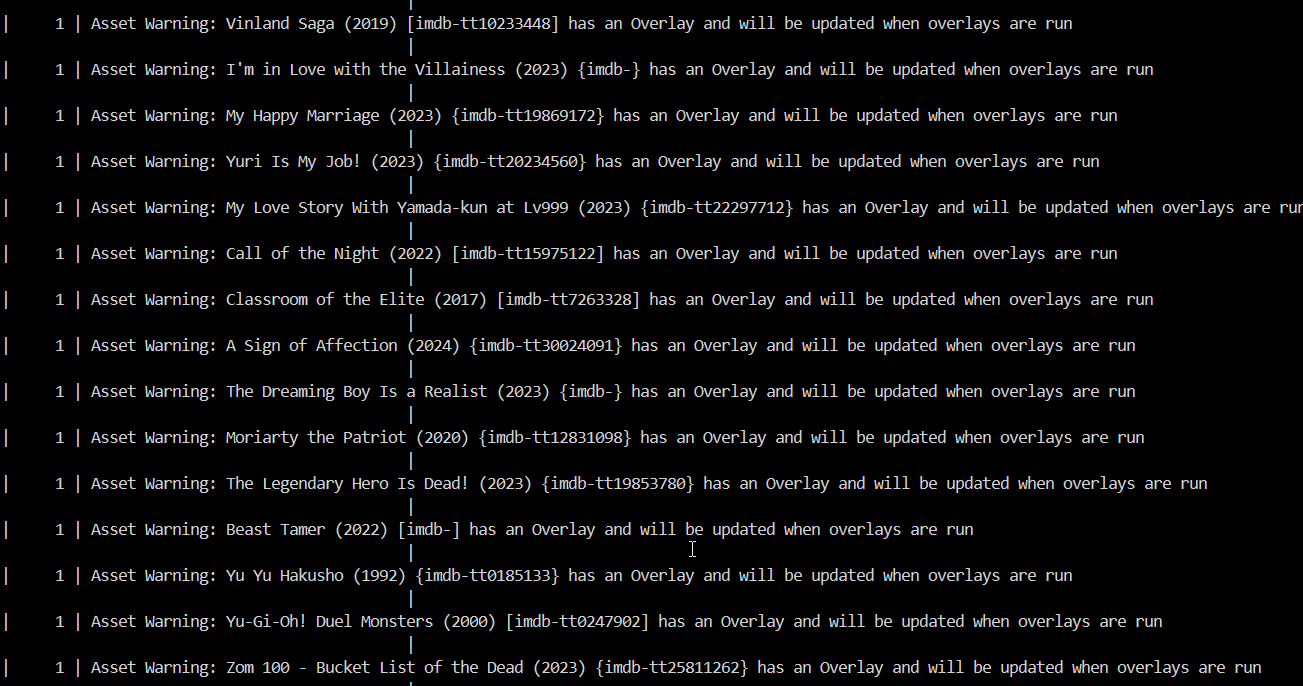
Asset Warning: 86 - Eighty Six (2021) [imdb-tt13718450] has an Overlay and will be updated when overlays are run(happens many times) - page 14 - No items founds error which happened 836 times, which I don't understand at all.
I changed legacy schema's and DB dache to 2048
Thanks in advance!
 silver delta
1- Generally speaking, here is the issue... if Plex cannot get an image for a season poster, then it takes a copy of your show poster. Now, your show poster likely has overlays on it. When that copy ends up being part of the season poster, and PMM wants to apply an overlay to it, it stops because it detects that an overlay is already applied. The fix is to go and add the season posters on tmdb so that Plex can use those instead of taking a copy.
2-informational warning that overlays will change when the time comes to apply overlays. You can have runs that exclude overlay run, but still have changes that would be applied.
3-What is not clear from the bot? Imagine PMM is looking for movies that are 360p in resolution to apply the 360p resolution overlay. And imagine that the library you pointed PMM is a 4K movies library. PMM won't find the 360p items so it reports that nothing was found.
 raven stratus
rugged gazelle
Alright to summarize the things I have not figured out yet and could use help wi...
raven stratus
rugged gazelle
Alright to summarize the things I have not figured out yet and could use help wi...
3: You are attempting to apply overlays for a huge list of studios, and 837 of those studios don't appear in your Plex library.
Each of those errors is something like this:
[2024-01-12 11:09:50,402] [overlays.py:412]           [WARNING]  | Plex Error: No Items found in Plex
[2024-01-12 11:09:50,402] [overlays.py:429]           [WARNING]  | No Items found for Overlay File (5) Acca effe
The entire list is just above the error in the log:
2:
PMM is about to update the artwork for an item based on an asset image, but while doing so it finds that the item in Plex has overlays, so it is letting you know that instead of updating the image now it's going to do so later, when it applies overlays.
1:
As bull describes. Here's an example:
           | Yamada-kun to Lv999 no Koi wo Suru
[INFO]     |   Overlay Update Not Needed
[INFO]     |
           | Yamada-kun to Lv999 no Koi wo Suru Season 1
           |
[ERROR]    |     Overlay Error: This item's poster already has an Overlay. There is no PMM setting to change; manual attention required.
           |   Overlays Attempted on Yamada-kun to Lv999 no Koi wo Suru Season 1: Overlay File (2) Dual
Season 1 of that show has no poster of its own. If you go look at that show in Plex, you will find that the season is displaying the same artwork as the show, including the overlays. Plex did that since the season has no artwork available.
So, when PMM asks Plex for the artwork for that season in order to draw overlays on it, Plex returns the artwork for the show.
PMM looks at that image and sees that it already has overlays. PMM will not apply a second set of overlays to the same image, which would generate doubled overlays or other such nonsense, so it stops there and alerts you of this.
The solution to this is for you to go into Plex and assign artwork to all the items which show this error in the log.
Here's an example. If I attempted to apply season-level overlays to this show, season 3 would give me that error:

 deft forum
You will get this error for almost every show with only 1 season (so most animes)
silver delta
rugged gazelle
Alright to summarize the things I have not figured out yet and could use help wi...
Anything else needed here? If not, feel free to type /close and hit enter.