#I set up a server for my nieces and nephews to play together...

1 messages · Page 1 of 1 (latest)

random silo
#

Everything worked great when I was testing it myself. But I'm thinking we are running into child account problems when trying to get them to join. We went through both the Microsoft family app and Xbox family app and are pretty sure we found every setting that might be getting in the way.

Is there anything we likely missed, or anything else I can do on the server end to help?

They are all on either Quest 3 or Quest 3s. We have gotten it to where they can all play single player, they can't connect to my server or the public server already on the list. We can connect to the server from each of their houses on adult accounts, so at least the networking stuff is set up right. I have been testing it on the Quest 3 myself, but will be switching to PCVR once everything is working and I know enough about the Quest version to help them dial-in their settings.

I originally was directed to host a purpur server, but that ended up not feeling like the right way to go after working on it for a bit, so I switched to a fabric server instead today. The purpur server is mostly what I have tested against so far though. So if changing to a fabric server will be the solution, then disregard this post I guess. Just waiting til tomorrow now when I can go back over and test their clients again. Figured I would build a longer list of things to test.

There is also the chance that the family settings just haven't propagated yet... but same deal, just want a list of things to try in-case it is still broken when I get there.

ebon lichenBOT
#

To help others find answers, you can mark your question as solved via Right click solution message -> Apps -> ✅ Mark Solution

random silo
#

Ah, some details I forgot to add yesterday. They are above 10 years old, and their accounts are set to allow up to 16 year old content rated games to be played, and anything above that is supposed to ask their parents. I have seen around that 16 should be high enough for Minecraft, but I don't know if that changes from region to region. We would hesitate to set them to 18 right now, but if it's necessary, we can think about it.

All their multi-player stuff is set to friends, which was enough to get bedrock to work with our previous private server when they all played the switch version of Minecraft and I changed their DNS to point one of the public servers to my ip. They could also play on those public servers fine.

Maybe Java version needs it set to more than just friends?

I don't know, either way I'll be there in a couple hours to see if it works this time. Hopefully, cuz I'm headed to a different country in 2 days, and ideally I'd like the kids in this country to have it working before I go set it up for the other kids.

random silo
#

Ok, none of that worked. They are still unable to connect, the server sees them, but disconnects them instantly. So guessing there is just something more lenient needed in the Microsoft family app or the Xbox family app. Any hints or guesses?

limber citrus
#

If you can send a log

#

Also: does it say anything on their end when they try to connect?

random silo
#

The server says... "*theirname* (*their ip address*) lost connection: Disconnected" as the first and only message it outputs when they try to connect. Instantly, no timeout or anything.

#

I can't recall the exact wording on their end when they try to connect, but it is similar, and also instant.

#

Unfortunately I have run out of opportunity to test it here before leaving the country. So I will have to try to get it to work for the other kids first and let the dad here know what ended up working. Hopefully.

limber citrus
random silo
#

I do think it's most likely child account stuff, since all the adults can connect fine. From any house. And none of the kids can connect.

I just don't know what Java needs different from bedrock, specifically bedrock on Switch. Since it was intended to be a closed system, it might have had lower requirements for playing online. Despite the fact that we made it connect to a private server anyway. It probably didn't know it was doing that.

lost magnet
#

you need 18+ accounts to play IIRC

random silo
#

Ah ok, saw a few people saying 16 was enough for them. But I did suspect that might depend on region. It could definitely be 18 here.

#

There is a big difference between allowing them to play age 16 rated content and age 18 rated content. Gonna have to talk about it. The apps do allow pretty comprehensive monitoring, but that is reactive, they still have to go through whatever they shouldn't have gone through before we see it on the app.

Though, currently, they don't really use Microsoft stuff much.

limber citrus
#

Checked again and yeah you mentioned it, my bad 😭

#

Since you manage to play at all it is not the usual issue we have a lot regarding age, since that would have caused it to crash when trying to play at all

I Will look through other guidelines they have got, also releasing what you have tried

But: @random silo

Could you send a log when you try on the quest when able to?

Also: Have you tried to connect to the server on a pc on one of the kids account? Just to see if it happens there too or only on the quest when connecting

@lost magnet worth to note: If in a microsoft family with a guardian being 18+ you can play

Would otherwise crash when pressing play - they can authorize and play

Their issue is connecting to server and could be different

waxen islandBOT
#
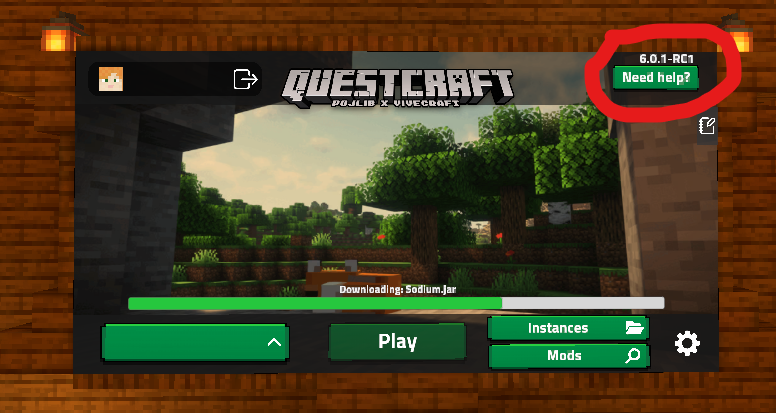
**Getting logs on Quest Guide**

Sending logs from Quest:

Restart your game, press on need help on the top right, then share the log link inside of support, or ticket where the person is asking for logs.

limber citrus
#

After trying to connect

random silo
#

Ok, will be a couple days now, gotta fly to a new country and set it all up on new ones.

limber citrus
random silo
#

If I can find enough time tomorrow, I will try to go to their house and get the log. But I have alot to do still to prepare for the trip.

random silo
#

Actually just realized I can test that from here. Don't need to go to their house, I know their account info. So it's much easier to squeeze in a test tomorrow. Heading to bed now, but I wrote it down on my "things to remember tomorrow" list. I have terrible memory, so basically anything I don't write down is gone after sleeping.

#

More accurately, poor willful recall. Memories that are triggered are nearly flawless.

random silo
#

Gonna try them on my headset to see if I can get that log file to you.

#

But, it's gonna be about 45 mins before I can try.

random silo
#

Ok, their account worked on my headset. So heading to their house quickly now to either see if it works there now or get that log for you.

#

Hopefully it was just a case of the family settings taking more than 24 hours to propagate.

random silo
#

Hmm. Yep worked on their headset at their house now. We'll, one so far. Gonna check the other one before I leave to cover all my bases.

#

Ok, both work. Well I'm glad it all ended up working before I left. Just gotta do it 2 more times while I'm 8000 km away from my server. But it should be fine, server likely doesn't need any more set up other than enabling white list once they have all connected once and I can add them to the list.

And I should still be able to Virtual Desktop into it.

#

Must have really just been the slow propagation of the family app changes. Waited the 24 hours they recommended, but guess it took longer.

#

Sorry to have wasted your time, though I suppose it's still somewhat useful data.

#

Now I really gotta get back to getting ready for the trip, wheels up in about 16 hours, lol.

limber citrus
ebon lichenBOT