


95 messages · Page 1 of 1 (latest)
 warm magnet
missing parts of the venator exterior and the 2 juggernauts as they are prefabs. fairly easer to add but i am busy so it'll have to be later. otherwise the rest of the map is all there along with the terrain. texturing efforts are being made but for now its just the meshes.
hide visibility of Asset_pool its just the instanced meshes
download: https://drive.google.com/file/d/1gGe6nXSx344XlhiTTAWcue1FyUzZhnIH/view?usp=sharing
big thanks to everyone at groinkick! forums and massive thanks to BadHorse#6184 for making this method of extracting possible.
 somber kraken
"What I remember about the rise of the Battlefront 2 2017 map ripping tool... was how quiet it was."
Here's to hopping you plan to finish this because this is sick
warm magnet
haha yeah it’s been a long time coming
i’m planning on doing textures and publishing it but only in unreal engine. for blender users meat at groinkick! discord is working on a script that automatically applies all textures and it’s coming along really well.
 worthy linden
Following
worthy linden
warm magnet
i’m planning on doing textures and publishing it but only in unreal engine. for ...
Also are you going to release the UE project?
warm magnet
yes
we already have an unreal engine project with a bunch of swbf2 and jfo characters, weapons and vehicles but maps are only just becoming a thing now.
worthy linden
Nice I’m working on a game mod for Operation Harsh Door stop running on 4.27 would love to integrate your work into it
warm magnet
funny enough i used to work with the previous OHD star wars mod devs. we stopped due to lack of support to the game. but the assets are all there and allowed to be used.
worthy linden
Ahh I see yeah it’s in early access now and my mod though extremely basic still is pretty high up on the list, I’m still just a novice when it comes to UE though
warm magnet
well stay tuned and we can get some swbf2 maps going
worthy linden
Sickkk if your charecters are rigged to the UE mannequin I’d love to take a look at those as well , mine are set up but I’m garbage at weight painting
So their stretch in weird parts a little
warm magnet
unfortunately they are rigged to the swbf2 walrus skeleton but Fredly#5073 found a way to get the skeleton to work with the basic ue4 mannequin. hit him up and ask him how he did it or if hes willing to share his work.
worthy linden
Thanks I’ll hit him up!
warm magnet


 viral thorn
@warm magnet Is there accessible tools to rip from jfo and bf2?
Bipeds and weapons, I mean
warm magnet
yes
most characters, weapons and vehicles have already been ripped and ported with materials set up
from both swbf2 and jfo
sw:js now in the works too
all tools are there
with map tools just now becoming available for swbf2 and jedi fallen order/survivor right at the same time funny enough
viral thorn
warm magnet
most characters, weapons and vehicles have already been ripped and ported with m...
Is it possible to rip modded content? I feel like that's honestly where most of that game's meat is. Mods to fix weird dice designs, eu characters, etc.
warm magnet
viral thorn
Is it possible to rip modded content? I feel like that's honestly where most of ...
unfortunately it is possible to learn this power but not from a jedi of course.
it’s very frowned upon especially when most the people who work on these extraction tools are also one ones who make mod content. a lot of the time mod content creators will allow you to use their stuff if you ask their permissions and they might even send you models themselves. but if you rip then it’s without their permission which is not the jedi way 😔
viral thorn
warm magnet
unfortunately it is possible to learn this power but not from a jedi of course. ...
Hmmmmmm
somber kraken
warm magnet
with map tools just now becoming available for swbf2 and jedi fallen order/survi...
Jedi survivor has map extraction too?!
somber kraken
warm magnet
its in progress
Battlefront 2 2017 Custom Maps coming by chance?
somber kraken
warm magnet
wdym
Making new Maps by importing the model of them
warm magnet
oh in the actual swbf2 game
yes, its already been possible but they tools arent fully public yet
you'll start seeing them soon
somber kraken
warm magnet
you'll start seeing them soon
Excellent! Hopefully we get a coruscant map lol
warm magnet
somber kraken
Excellent! Hopefully we get a coruscant map lol
we got the cancelled swbf3 Coruscant map

replaces Kashyyyk with Coruscant, DO NOT USE THIS MOD ONLINE. Credit to FegeeWaters, Y wingpilot2, and dunno for helping create this mod. Known issues: AT-RT doesn't work, you sometimes spawn in
warm magnet
 hushed sleet
how???
hushed sleet
how???
the force is a pathway to many abilities some consider to be un natural
hushed sleet
warm magnet
the force is a pathway to many abilities some consider to be un natural
can u teach?
warm magnet
hushed sleet
can u get kamino???
 warm magnet
hushed sleet
can u teach?
warm magnet
hushed sleet
can u teach?
yes
hushed sleet
THANK UUUU
worthy linden
warm magnet
https://www.mediafire.com/file/q9cmickvfcto4a3/Kamino_01_03.rar/file
Also Not textured atm right?
warm magnet
yep
hushed sleet
warm magnet
yes
ah this isnt the entire map with the platforms
somber kraken
Now all we need to do is kitbash every version of Kashyyyk so that we can make the ultimate map.
warm magnet
hushed sleet
ah this isnt the entire map with the platforms
oh, last i checked this one should be the full map. kamino was exported by badhorse so if it’s not the fill one i’ll do an export myself
hushed sleet
yeah its not
 hushed dock
👏
 vestal sage
good morning everybody. I apologize for the inconvenience, but could someone send me the hangar of the venator (biggest ship on the map), from the kashyyyk map? It's just that my computer is very slow when I open it and it doesn't allow me to select a specific part with that map, since it's too heavy.
Thank you for your attention
warm magnet
vestal sage
good morning everybody. I apologize for the inconvenience, but could someone sen...
ok
one small thing though. everything red in this image is a prefab. meaning it did not get exported and i cannot add them until a later date. it has the majority of props but you are going to have to do a bit of set dressing yourself

 vestal sage
No problem. What I need is just the hangar space, with its elements. such as tubes and beams. Elements such as containers and ships you can leave, as they are not necessary. Thank you for your attention.
warm magnet
here, i deleted most of it. should be enough to open now.
download: https://drive.google.com/file/d/1sElclw5AujqKzK5IjQZzWgoENJPIAivF/view?usp=sharing

 vestal sage
Thanks
somber kraken
warm magnet
one small thing though. everything red in this image is a prefab. meaning it did...
Will it ever export "everything"?
warm magnet
somber kraken
Will it ever export "everything"?
maybe. we can export everything, it just takes a little more time.
somber kraken
warm magnet
maybe. we can export everything, it just takes a little more time.
Incredible what this could mean for UE5.
warm magnet
the maps that have been exported with all prefabs so far is:
-Kamino
-Tatooine
-Dreadnaught
-Venator
 fringe lotus
any chance of a textured version or will that be hard to do??
warm magnet
its being worked on
but only for ue5 atm
no blender version
there is a script being worked on that auto applies all materials in blender, but that might be a while away. sorry
fringe lotus
That perfectly fine figure I asked
somber kraken
Someone needs to combine this remaster with the BFII2017 map lol

SUPPORT THE CHANNEL!
Patreon: https://www.patreon.com/loacher_films
COME HANG OUT ON DISCORD!
Discord: https://discord.gg/yw37eUC
FOR BUSINESS INQUIRIES:
[email protected]
More soon...
-----Music Credit-----
Whitesand
https://soundcloud.com/martynaslau/inspi...
hushed sleet
warm magnet
oh, last i checked this one should be the full map. kamino was exported by badho...
Hey did you get kamino ever? With textures?
Like the full map with the battlefield
Cuz remember it wasn’t last time
warm magnet
@echo ocean @wanton tendon have both worked very hard on porting kamino to ue5 with the textures. ill dm you
 hushed sleet
warm magnet
<@396093328828923904> <@476489624160829461> have both worked very hard on portin...
hushed sleet
warm magnet
<@396093328828923904> <@476489624160829461> have both worked very hard on portin...
Thank you so fucking much!!
somber kraken
warm magnet
<@396093328828923904> <@476489624160829461> have both worked very hard on portin...
YOOOO
I don't know if that's private but I'd like to also get that if possible.
 static siren
warm magnet
<@396093328828923904> <@476489624160829461> have both worked very hard on portin...
static siren
warm magnet
<@396093328828923904> <@476489624160829461> have both worked very hard on portin...
Beautiful
warm magnet
somber kraken
YOOOO
not private, all that's asked is relevant people are credited when used. kamino is also still incomplete. only about 80% done and still in progress. i dont know if we can post server links here which is why i dm'd as the installation is kind of difficult and the others in the server can help. but ill try to write up a guide here for anyone else who stumbles across this. one sec
warm magnet
The star wars virtual production project has far more than just kamino on it so it is a very large file. It is a UE5 project for creators to make stuff without having to worry about a good chunk of the technical stuff. Its actually posted in the upload and download area, but since kamino is a work in progress it hasn't been properly announced.
Method one: Google drive
This method allows you to always have the project files auto update, as soon as a change is saved, it will come through on your end too. It will also save you hundreds of gigabytes of storage. I made a video on how to get this working. https://www.youtube.com/watch?v=md5ru4h8KwQ
Method two: Download entire project
This one sucks as its like 150GB's large and will take a very long time to download, but its often more consistent than the google drive method. A lot of people have trouble getting method one to work (even me). You wont get auto updates but it will at least work. Go here, https://drive.google.com/drive/folders/1r6ipkzln1OGpl9dnajPlmZItrvn6ycyn. Then hold control to select and click on:
Config
DerivedDataCache
Plugins
Intermediate
Saved
Script
StarWarsPackage.uproject (important)
and hell chuck the png in there for style.
Download all of that, put in in its own project folder.
Now open the project, enable dev content in unreal engine and navigate to the dev folder and you'll find the Kamino level.
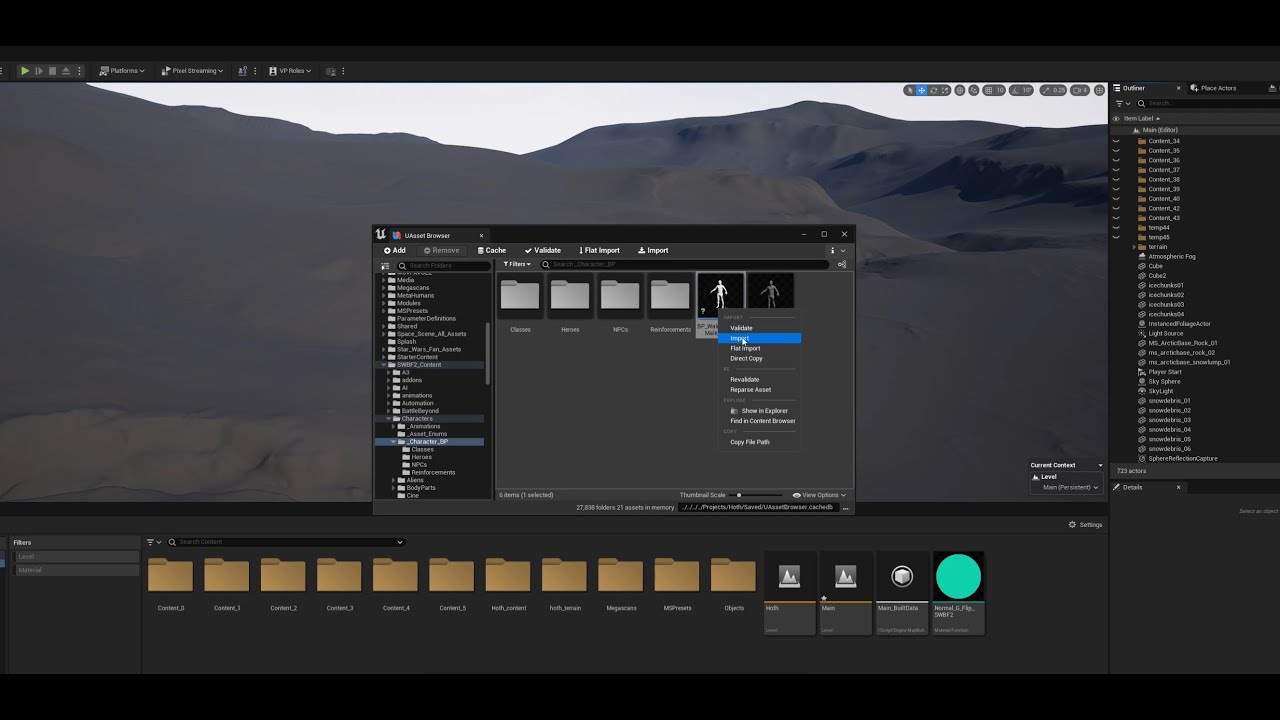
Please install google drive on a hard drive with lots of storage space.
Google Drive App: https://www.google.com/intl/en_au/drive/download/
Star Wars Virtual Production Project: https://drive.google.com/drive/folders/1r6ipkzln1OGpl9dnajPlmZItrvn6ycyn?usp=sharing
Discord: https://discord.gg/UjBFe3nkPM
somber kraken
warm magnet
The star wars virtual production project has far more than just kamino on it so ...
Incredible work, I really hope they figure out that blender stuff as well. And to see Kashyyyk in UE5 would be excellent.
warm magnet
one day. terrain texture is very hard to reverse engineer. but maps that don’t include complex terrain like kamino are much more possible. did how ever get a good looking hoth since its just snow which you can make your own materials for that
fringe lotus
hey i know this is a long shot but has there been any updates on this?, for blender that is
hushed sleet
warm magnet
<@396093328828923904> <@476489624160829461> have both worked very hard on portin...
could u send me the one with the texutres? i been waiting for so long lol
somber kraken
Would love to know if this is still alive. Idc if it's done.
 echo ocean
somber kraken
Would love to know if this is still alive. Idc if it's done.
echo ocean
somber kraken
Would love to know if this is still alive. Idc if it's done.
idk what the status is on Kashyyyk specifically i'm afraid. afaik it might still be untextured. The StarWarsPackage project is still technically alive though, it's just currently a bit annoying to install because of Google Drive streaming issues 😅
e.g if you use the Google Drive app and UAssetBrowser plugin for UE5 to keep your project synchronised with the latest updates, then GD sometimes won't sync/show/download certain files and it might corrupt other files.
We're working on writing tools to workaround this but atm still very WIP i'm afraid
somber kraken
echo ocean
idk what the status is on Kashyyyk specifically i'm afraid. afaik it might still...
This is great! I'm stoked it's still alive, I'll do some digging myself and see how it is nowadays.
echo ocean
somber kraken
This is great! I'm stoked it's still alive, I'll do some digging myself and see ...
sweet 🙂 i'm at work atm and idk if the "SWVP Installation Tutorial" above by Sketch is up-to-date and still works, but hopefully it works 🙂 If you need any help getting it setup just lmk and I will be happy to help.
Some stuff might be outdated so here's some stuff :
Up-to-date link to the my StarWarsPackage archive root : https://drive.google.com/open?id=1r6ipkzln1OGpl9dnajPlmZItrvn6ycyn&usp=drive_fs
Link to the FBTools and FBToolsDependencies C++ plugin, add these to your UE project and enable them. Mostly contains editor utility tools, vfx assets and default textures so that the game's master materials compile. : https://drive.google.com/open?id=1SEPKttnjE3LXU0rmII5jU_UWglDxAge0&usp=drive_fs
General reminder to avoid pain :
Don't download the !Source folder, it's like 2TB+ and contains the source .fbx (meshes/anims), .tga (textures), etc for people who use other apps like Blender. For the UE project, you just need to sync the following folders.
You mostly just need to download the green folders, except "Plugins" which is currently outdated bc I combined all the modules into one single C++ plugin anyway (FBToolsDependencies).
Colour codes :
Red = You don't need them.
Green = You generally would need them for UE5. E.g Configs could be useful, Content, etc.
Orange = WIP, will need them soon™️ but the PAK files and installer tools are not ready yet so you can ignore for now.
Blue = Optional stuff for other DCCs, usually for animation pipelines. E.g the !Maya folder contains animation ctrl rigs and tools for anim/motion capture. !Blender would contain rigs sometime soon too if/when I (or someone else : P ? ) can get around to them. You don't need these files but they should work well for those who are used to the External DCC ---> Unreal pipeline.

i'll clean it all up sometime but hopefully the tutorial still works well, if not just lmk
somber kraken
Now THIS is where the fun begins