#Support minerovylp
1 messages · Page 1 of 1 (latest)
 shut sandalBOT
<@&872407642302197760>
@serene root
Windows: Hit Windows Key + R and type in %appdata%. Open the .minecraft folder.
Mac: On the bar at the top of your screen in Finder, click Go, then click Go to Folder and type ~/Library/Application Support/Minecraft, then hit enter.
Linux: .minecraft is located in your home folder. ~/.minecraft
Open your Minecraft folder and send the file called latest or latest.log from .minecraft/logs.
https://cdn.discordapp.com/attachments/787643281147822080/873564351729127484/2021-08-07_14-51-18.mp4
 midnight glen
k wait
 hollow pythonBOT
@midnight glen uploaded a log,
midnight glen
it doesnt crash though idk if the log will be useful still
it just gets stuck on a white screen
 blissful shell
Doesn't seem to be doing much of anything
shut sandalBOT
Please send a screenshot of your mod folder so we can help find the problem
midnight glen
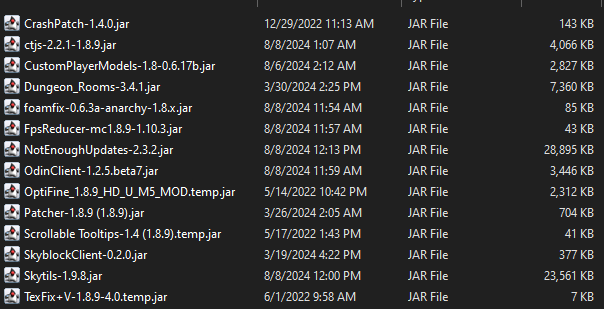
 blissful shell
You can try
put this in your modfolder: https://modrinth.com/mod/essential/version/Ux5qmVNL

Modrinth
Download Essential Mod 1.3.2.8 on Modrinth. Supports 1.8.9 Forge. Published on Jul 4, 2024. 13671 downloads.
hollow pythonBOT
@midnight glen uploaded a log,
- OpenJDK 64-Bit Server VM, version 1.8.0_372
- Forge 11.15.1.2318 on 1.8.9 with 8 mods
- OptiFine M5
Possible Solutions:
- Change your DNS provider to Cloudflare's 1.1.1.1 or Google's 8.8.8.8
Recommendations:
- Unless you know what you're doing, modifying your JVM args could have unintended side effects. It's best to use the defaults.
- Update Essential from 1.3.2.2 to 1.3.2.8

✌️✌️ Browse a faster, more private internet.
midnight glen
blissful shell
put this in your modfolder: https://modrinth.com/mod/essential/version/Ux5qmVNL
okay i have essential installed though
ill try
okay that worked