#Support fatmar69
1 messages · Page 1 of 1 (latest)
 tacit heathBOT
<@&872407642302197760>
@void plinth Win key + R and then type %appdata%\.minecraft\crash-reports
mac: ~/Library/Application Support/minecraft
Linux: You should know this if your using linux
https://cdn.discordapp.com/attachments/807302782432051230/845361400288772126/2021-04-29T13-29-47.mp4
 teal larkBOT
@void plinth uploaded a log,
- Forge 11.15.1.2318 on 1.8.9
- OptiFine M6_pre2
 frank egret
🥶
 void plinth
 stiff hill
Skyhanni crash
stiff hill
Skyhanni crash
Oh ok you know what feature
void plinth
stiff hill
Try using their beta
I'm not on the dc
 granite star
fix neu repo
void plinth
But somehow my St and Neu reset after game crashed once
granite star
How to fix NEU repo
Step 1: Download the repo at - https://github.com/NotEnoughUpdates/NotEnoughUpdates-REPO/archive/refs/heads/master.zip
Step 2: Extract the repo and copy its content - https://i.imgur.com/xsQkqum.png
Step 3: Navigate to .minecraft/config/notenoughupdates/
Step 4: Create a repo folder if there are none.
Step 5 : Paste the content you just previously copied
Step 6 : The final results should look like this - https://i.imgur.com/sLN9x5J.png
Do NOT run /neuresetrepo after doing this. It will reset all steps you just did.
If your repo folder resets after doing these steps run @ me
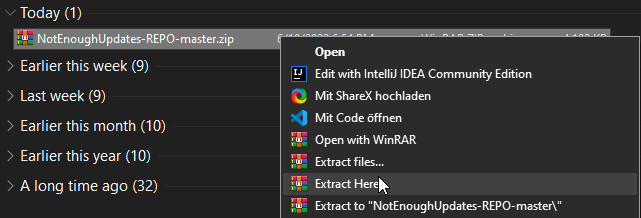
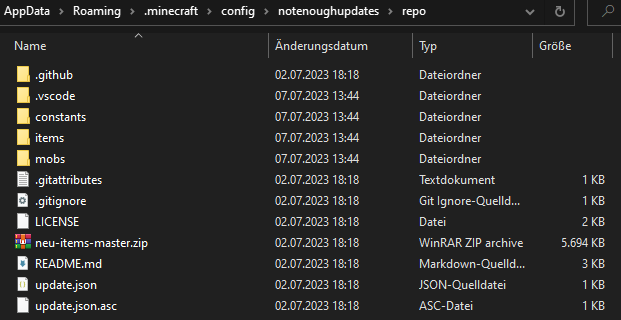
the beta of skyhanni will fix the crash but will still have features not working
void plinth
granite star
the beta of skyhanni will fix the crash but will still have features not working
Do they have a dc?
Where I can get the newest version?
granite star
it should be on the github, and the discord is linked on github as well
void plinth
thx
granite star
but as i said, you will still have problems unles you fix your neu item repo
void plinth
Doing that rn
void plinth
granite star
but as i said, you will still have problems unles you fix your neu item repo
Is that the right form to put it into the neu folder

Or do I paste it into the folder?
granite star
you should put everything in that folder inside the exisiting repo folder
void plinth
Ok thx
granite star
so that the file path looks like the image above


 granite star
thats not correct
if you open the notenoughupdates-repo-master zip and copy all the items, then delete everything in the folder you are in right now and then paste what you just copied
frank egret
<@&872407642302197760>
granite star
nice one