#Support Dexter
1 messages · Page 1 of 1 (latest)
 sand pumice
 wintry helm
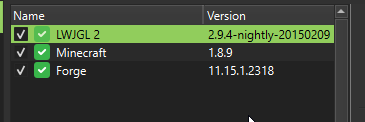
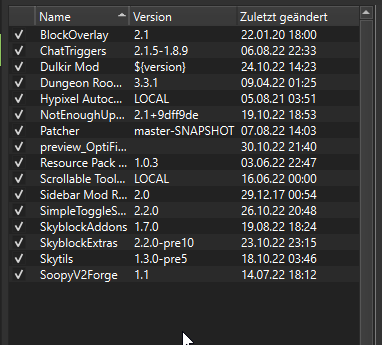
ive tryed without config, with old configs and so on
 deft brook
Just press close🤔

 wintry helm
the problem is im a streamer, and every time i launch the game it captures the error msg instad of the game
i have same problem on multiMC and primsMC
i have friends using same launcher with same "setup" of the instance not having the problem.
 mortal hare
Can you try putting -Dskytils.skipStartChecks in the launch arguments?
wintry helm
also ive send my mods + config folder to a friend. worked fine for him. he set up the instance same as me
mortal hare
wintry helm
also ive send my mods + config folder to a friend. worked fine for him. he set u...
Might be using a different version of MultiMC maybe?
wintry helm
nope we just downloaded prism from same webpage like 20 minutes ago
also @unreal walrus told me to get it
mortal hare
ig the only thing I can think of, is that the Forge Version check fails
But idk how you would fix that if it is the case
mortal hare
java shouldn't have anything to do with this tbh
 sacred owl
¯_(ツ)_/¯
mortal hare
val isModded by lazy {
ClientBrandRetriever.getClientModName()?.startsWith("fml,forge") != true || ClientBrandRetriever.getClientModName() != FMLCommonHandler.instance().modName || Loader.isModLoaded("feather") || ForgeVersion.getStatus().ordinal > 3 || (!Skytils.deobfEnvironment && Loader.instance().activeModList.filter { it.modId == "Forge" || it.modId == "FML" } .any {
it.signingCertificate == null
}) }
these are all the checks
Oh right github got no spacing when copying on phone
It checks:
- If the name is fml,forge
- If the brand name from mc and forge are the same
- if feather client is loaded
- if the forge version returned a idk what status
- if Forge or FML got modified
the first 3 and last one can't fail assuming the setup is the exact same
ForgeVersion.getStatus().ordinal > 3
So only this could fail
wintry helm
tell me how to troubleshoot and ill try 😦
mortal hare
I sadly can't open pc to look at code for it or troubleshoot it myself, so I can't come up with anything :/