#bots
1 messages · Page 11 of 1
 twin sigil
Lizzy ~, you just advanced to level 1
twin sigil
Thicc Tater-Tot, you just advanced to level 1
twin sigil
Canlaf, you just advanced to level 1
twin sigil
ralouph, you just advanced to level 1
Raffy, you just advanced to level 1
Luka81804, you just advanced to level 1
Sprinkles, you just advanced to level 1
Raffy, you just advanced to level 2
twin sigil
Sprinkles, you just advanced to level 2
Kyojin, you just advanced to level 3
.aurora, you just advanced to level 1
twin sigil
Capin, you just advanced to level 6
yugen2, you just advanced to level 3
Hemlock, you just advanced to level 2
justinlamy1, you just advanced to level 3
iamalwaysbebetterthanyou, you just advanced to level 1
Sprinkles, you just advanced to level 3
Raffy, you just advanced to level 3
-𝖌𝖆𝖇𝖊-, you just advanced to level 2
yugen2, you just advanced to level 4
StMaxi, you just advanced to level 1
twin sigil
Hive, you just advanced to level 1
Sprinkles, you just advanced to level 4
Froxyreps.com, you just advanced to level 2
Neo., you just advanced to level 2
twin sigil
Josiah Trelawny, you just advanced to level 1
G0D_EaTer_xx, you just advanced to level 1
twin sigil
Turnip, you just advanced to level 1
twin sigil
Turnip, you just advanced to level 2
 quartz charm
!help
twin sigil
 Luna Pixel Studios Plugins Commands
**Commands**
!help commands
**PLUGIN_CREDITS**
!help credits
**Giveaways**
!help giveaways
**Levels**
!help levels
**Moderator**
!help moderator
 twin sigil
Commands Plugin
Create your own text commands and commands that give specific roles
!alc_cleanup (optional text)
An awesome command!
!alternates (optional text)
An awesome command!
!cf (optional text)
An awesome command!
!cracked (optional text)
!curseforge (optional text)
!data (optional text)
An awesome command!
!define (optional text)
An awesome command!
!devs (optional text)
An awesome command!
!discord (optional text)
!faq (optional text)
An awesome command!
!forge (optional text)
!fps (optional text)
An awesome command!
!gdlauncher (optional text)
!general (optional text)
General chat command.
!hosting (optional text)
Page 1/3
quartz charm
!hosting
twin sigil
We suggest renting a server from Bisect Hosting:
Approx. $10 - $25 a month depending on what plan you choose. You can also get 25% off with Code LunaPixel.
Go to https://www.bisecthosting.com/LunaPixel and order a plan which fits you. We suggest 1GB per player but nothing lower than 4GB as the server needs at least 3GB to run.
Go to #server-hosting for more Info!
quartz charm
!server
twin sigil
We suggest renting a server from Bisect Hosting:
Approx. $10 - $25 a month depending on what plan you choose. You can also get 25% off with Code LunaPixel.
Go to https://www.bisecthosting.com/LunaPixel and order a plan which fits you. We suggest 1GB per player but nothing lower than 4GB as the server needs at least 3GB to run.
Go to #server-hosting for more Info!
Free Method: (This is hosting on your own PC and it can come with issues that's why we suggest Bisect Hosting)
- Download the serverpack from Curseforge's website
- Right click the start.ps1 file and click Run with Powershell
To join your own server, typelocalhostinto Direct Connect.
This video explains the process https://www.youtube.com/watch?v=wuGUbVbLsDc
The server IP address is your Public IP Address, which can be found by googling my ip address
If other players are unable to join, find a portforwarding guide online.
Timothy (Veadeo), you just advanced to level 1
twin sigil
Clara the Christmas Gae, you just advanced to level 1
twin sigil
Imagine, you just advanced to level 7
Clara the Christmas Gae, you just advanced to level 2
 grim glade
i need help
twin sigil
G0D_EaTer_xx, you just advanced to level 2
LemonSquares, you just advanced to level 5
 outer ledge
!rank
twin sigil

 twin sigil
Luna Pixel Studios Plugins Commands
twin sigil
Luna Pixel Studios Plugins Commands
**Commands**
!help commands
**PLUGIN_CREDITS**
!help credits
**Giveaways**
!help giveaways
**Levels**
!help levels
**Moderator**
!help moderator
twin sigil
Here you go! 🧙♂️
twin sigil
Hive, you just advanced to level 2
Frontear, you just advanced to level 20
Jack Skellington, you just advanced to level 2
twin sigil
Mr.Moose, you just advanced to level 2
twin sigil
Jack Skellington, you just advanced to level 3
twin sigil
Gold_Coin, you just advanced to level 1
twin sigil
-𝖌𝖆𝖇𝖊-, you just advanced to level 3
twin sigil
ZhaoE, you just advanced to level 1
twin sigil
TestCap, you just advanced to level 2
twin sigil
Baemax., you just advanced to level 1
Clara the Christmas Gae, you just advanced to level 3
Oranlei |オレンレイ, you just advanced to level 1
Not Your Baker, you just advanced to level 1
Cicero, you just advanced to level 5
twin sigil
death the kid, you just advanced to level 1
josh., you just advanced to level 1
death the kid, you just advanced to level 2
twin sigil
josh., you just advanced to level 2
twin sigil
Desdelon, you just advanced to level 1
twin sigil
MGTro, you just advanced to level 3
twin sigil
chorb, you just advanced to level 63
twin sigil
Ahmsef, you just advanced to level 5
twin sigil
Käyttäjä, you just advanced to level 1
twin sigil
Andy29k, you just advanced to level 3
twin sigil
LoL_is_annoying, you just advanced to level 4
iamalwaysbebetterthanyou, you just advanced to level 2
twin sigil
thienny, you just advanced to level 4
twin sigil
KOtter, you just advanced to level 1
biggie cheese, you just advanced to level 2
Astraye, you just advanced to level 2
twin sigil
Turnip, you just advanced to level 3
twin sigil
Turnip, you just advanced to level 4
suygetsu, you just advanced to level 5
G0D_EaTer_xx, you just advanced to level 3
twin sigil
d3Ad (6.90), you just advanced to level 1
twin sigil
Juakco_, you just advanced to level 15
Sample, you just advanced to level 3
d3Ad (6.90), you just advanced to level 2
DayzingPl, you just advanced to level 1
twin sigil
Y4, you just advanced to level 16
MrMoon, you just advanced to level 1
OverlordDom, you just advanced to level 1
twin sigil
MrMoon, you just advanced to level 2
Eh Paperbag, you just advanced to level 1
.♡Yoshi, you just advanced to level 2
DirtyDG◎D, you just advanced to level 5
iInfinityWinner, you just advanced to level 1
FaultyAce, you just advanced to level 1
twin sigil
Stark Rifle, you just advanced to level 1
twin sigil
Raffy, you just advanced to level 4
Jack Skellington, you just advanced to level 4
𝓐𝓷𝓰𝓮𝓵, you just advanced to level 4
OmikronOverload, you just advanced to level 5
twin sigil
Midnight, you just advanced to level 2
twin sigil
PrinceAmir, you just advanced to level 1
twin sigil
DADDGAMR, you just advanced to level 3
liam is insane, you just advanced to level 1
GGk Spiritz, you just advanced to level 1
DayzingPl, you just advanced to level 2
liam is insane, you just advanced to level 2
twin sigil
Turnip, you just advanced to level 5
twin sigil
DrCheeseFiend, you just advanced to level 2
twin sigil
Khoa, you just advanced to level 2
twin sigil
PlutoOtaku, you just advanced to level 1
CrispyK, you just advanced to level 1
Shelly, you just advanced to level 2
twin sigil
krispi2, you just advanced to level 4
 zinc silo
!rank
twin sigil

 twin sigil
 twin sigil
Marco, you just advanced to level 51
Seb_gamer, you just advanced to level 10
rhea, you just advanced to level 11
dagmdxmrr, you just advanced to level 1
 old plover
 lethal pelican
i'm catching up
lethal pelican
i'm catching up
50-63 still gonna take ages probably
old plover
i'm interested to say the least then
twin sigil
Foxer, you just advanced to level 3
twin sigil
Jiweily, you just advanced to level 1
twin sigil
Anarchy, you just advanced to level 7
Numus19, you just advanced to level 1
Ywinel, you just advanced to level 2
DayzingPl, you just advanced to level 3
 bleak latch
!java
twin sigil
lekds, you just advanced to level 4
twin sigil
fictics530, you just advanced to level 1
twin sigil
ToasterLag, you just advanced to level 1
twin sigil
Pepo, you just advanced to level 2
Eric_Cartman, you just advanced to level 2
qFinals, you just advanced to level 1
qFinals, you just advanced to level 2
ToasterLag, you just advanced to level 2
 dim canopy
!rank

 twin sigil
yugen2, you just advanced to level 5
𝓐𝓷𝓰𝓮𝓵, you just advanced to level 5
Juakco_, you just advanced to level 16
zae, you just advanced to level 1
𝐶𝐻𝐴𝑅𝐿𝐸𝑆, you just advanced to level 1
Sir Doggy Jvla, you just advanced to level 15
twin sigil
FitzhughKSCS, you just advanced to level 3
twin sigil
Ombearon, you just advanced to level 2
twin sigil
Dev 💫, you just advanced to level 1
zinc silo
!openjdk @bleak latch
twin sigil
- Download an adoptium release for Java (recommended but not required):
- Java 11 for versions 1.16.5 and below (can also use 8 if its not working)
- Java 18 for any versions newer (or 17 if 18 doesn't work)
- Consider installing the JRE instead of the JDK for a smaller file size
-
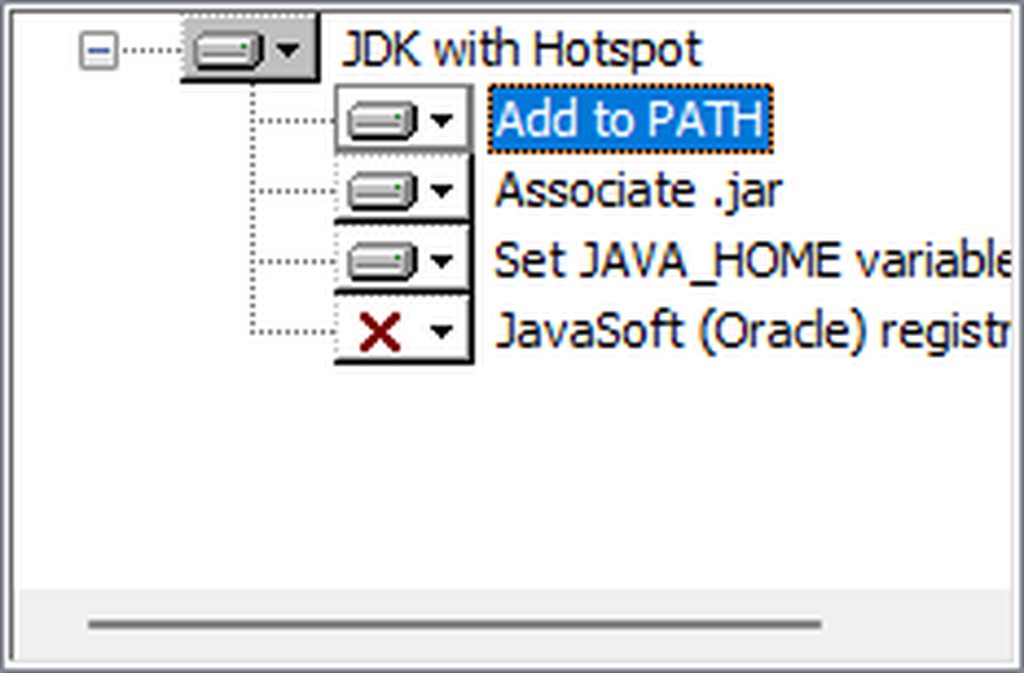
When installing through adoptium, make sure that Add to PATH and Set JAVA_HOME variable are both set to be installed (please see https://imgur.com/a/jPu1h7h for how that would look)
-
Check if java has been correctly installed by running java --version (or java -version on older versions), and seeing if the output is correct (see https://imgur.com/a/OWcoq4p for an example of the output)
- NOTE: 64 bit versions of java ALWAYS have '64-bit Server VM' in the version output. If that is not there, you have installed a 32-BIT version!! If you're getting Out of Memory errors or any other errors, PLEASE install 64-bit
- If the output isn't as intended, you have 2 options.
i) Delete ALL other java versions from your PC (ONLY recommended if you don't need them)
ii) Redirect your launcher/server to use your new installation of Java
Method i
- Uninstall any other java program listed in your programs list (differs by OS, please find a guide for your own OS if you don't know)
- Attempt to re-use the command mentioned above (if the output is now correct, which it should be, you are ready to go)
Method ii
- For a server, please modify the $Java/JAVA variable (found in your startup script depending on ps1/sh) to the path of your java installation. For windows, this path is usually found in "Program Files/Eclipse Adoptium/version_of_java/bin"
- For a client, depending on whether you use CurseForge, GD, or AT, the process is slightly different. Please see a guide for each respective launcher on how to change the java version.
 zinc silo
!openjdk
twin sigil
- Download an adoptium release for Java (recommended but not required):
- Java 11 for versions 1.16.5 and below (can also use 8 if its not working)
- Java 18 for any versions newer (or 17 if 18 doesn't work)
- Consider installing the JRE instead of the JDK for a smaller file size
-
When installing through adoptium, make sure that Add to PATH and Set JAVA_HOME variable are both set to be installed (please see https://imgur.com/a/jPu1h7h for how that would look)
-
Check if java has been correctly installed by running java --version (or java -version on older versions), and seeing if the output is correct (see https://imgur.com/a/OWcoq4p for an example of the output)
- NOTE: 64 bit versions of java ALWAYS have '64-bit Server VM' in the version output. If that is not there, you have installed a 32-BIT version!! If you're getting Out of Memory errors or any other errors, PLEASE install 64-bit
- If the output isn't as intended, you have 2 options.
i) Delete ALL other java versions from your PC (ONLY recommended if you don't need them)
ii) Redirect your launcher/server to use your new installation of Java
Method i
- Uninstall any other java program listed in your programs list (differs by OS, please find a guide for your own OS if you don't know)
- Attempt to re-use the command mentioned above (if the output is now correct, which it should be, you are ready to go)
Method ii
- For a server, please modify the $Java/JAVA variable (found in your startup script depending on ps1/sh) to the path of your java installation. For windows, this path is usually found in "Program Files/Eclipse Adoptium/version_of_java/bin"
- For a client, depending on whether you use CurseForge, GD, or AT, the process is slightly different. Please see a guide for each respective launcher on how to change the java version.
bleak latch
zinc silo
!openjdk <@560832301739802624>
woo it works
lethal pelican
finally
i can spam that when someone asks something about modifying the server java args and stuff

twin sigil
MineBoomGaming, you just advanced to level 1
twin sigil
SlappyJones, you just advanced to level 1
twin sigil
TheoVasi, you just advanced to level 11
SlappyJones, you just advanced to level 2
Rat🐀, you just advanced to level 24
twin sigil
aadumaaduMC, you just advanced to level 3

memyselfandmc.immortal, you just advanced to level 1
twin sigil
alta, you just advanced to level 1

one, you just advanced to level 1
F'lhir, you just advanced to level 1
Chasty, you just advanced to level 1
twin sigil
Tavo1012, you just advanced to level 1
twin sigil
Ziggza, you just advanced to level 1
twin sigil
F'lhir, you just advanced to level 2
LilSauce, you just advanced to level 1
[ VOiDWALKER. ], you just advanced to level 4
twin sigil
ZoReee, you just advanced to level 1
twin sigil
sadgasm, you just advanced to level 3
twin sigil
Klimcio990, you just advanced to level 1
twin sigil
Daiko, you just advanced to level 1
twin sigil
Marwinekk, you just advanced to level 5
twin sigil
Zhenfai, you just advanced to level 1
twin sigil
JeanAbdel, you just advanced to level 1
twin sigil
Jozelito, you just advanced to level 2
twin sigil
GoldenFlent, you just advanced to level 1
twin sigil
GoldenFlent, you just advanced to level 2
twin sigil
Crimes, you just advanced to level 3
twin sigil
Susskind, you just advanced to level 1
twin sigil
DayzingPl, you just advanced to level 5
Garlic, you just advanced to level 3
alta, you just advanced to level 2
twin sigil
7MODE, you just advanced to level 7
lethal pelican
!rank
twin sigil

Leo's Cel, you just advanced to level 1
Snowy, you just advanced to level 1
Snowy, you just advanced to level 2
twin sigil
Pigonini, you just advanced to level 4
Glinny | Felicitas, you just advanced to level 1
Error[401], you just advanced to level 1
AYAYA, you just advanced to level 1
Sprinkles, you just advanced to level 5
twin sigil
Glinny | Felicitas, you just advanced to level 2
dim canopy
!rank
 twin sigil
GoldenFlent, you just advanced to level 3
ᛟ⁺₊⋆ ☾ ⋆⁺₊ Eir ⁺₊⋆ ☾ ⋆⁺₊ᛟ, you just advanced to level 1
Glinny | Felicitas, you just advanced to level 3
twin sigil
igor eloq, you just advanced to level 2

GoldenFlent, you just advanced to level 4
Not Your Baker, you just advanced to level 2
twin sigil
DinoBlz, you just advanced to level 1
Rados, you just advanced to level 1
yugen2, you just advanced to level 6
XoD998, you just advanced to level 7
bleak latch
!windows11
twin sigil
New Windows 11 22H2 Update causes the PowerShell not to work. I suggest these Videos for Manual Installation:
FORGE 1.16.5: https://www.youtube.com/watch?v=bIjisWyxU-8
FORGE 1.18.2: https://www.youtube.com/watch?v=R610M102X0U
FORGE 1.19.2: https://www.youtube.com/watch?v=3HD0ibIpO-A
FABRIC: https://www.youtube.com/watch?v=b2W1Xb7nLKo
Make sure to Install the Server in our ServerPacks so it can use the correct files.
Ken, you just advanced to level 1
zinc silo
!windows11 @bleak latch
twin sigil
An update to windows introduced a new security feature that prevents powershell files from running on your PC. This is great for your security, but not so great for our server start scripts, which require powershell to run them. Fortunately there is a quick fix for this!
Run powershell as administrator, then run Set-ExecutionPolicy RemoteSigned. Read the prompt and press accept. This will allow us to run scripts.
Next, navigate to your server directory using cd path/to/directory (for example: cd C:\Users\Username\Documents\Minecraft\Server)
You can now run the server by double-clicking the start.ps1 file, or typing .\start.ps1 into the command line while in the directory.
IF THE ABOVE DOES NOT WORK, TRY THIS
Run the command Unblock-File -Path .\start.ps1 in the same powershell window. This will allow the start script to not be blocked by windows, and run freely.
a good replacement for the windows11 command.
If all else fails, a manual installation should work:
FORGE 1.16.5: https://www.youtube.com/watch?v=bIjisWyxU-8
FORGE 1.18.2: https://www.youtube.com/watch?v=R610M102X0U
FORGE 1.19.2: https://www.youtube.com/watch?v=3HD0ibIpO-A
FABRIC: https://www.youtube.com/watch?v=b2W1Xb7nLKo
Make sure to Install the Server in our ServerPacks so it can use the correct files.
bleak latch
^^
that's perfect
wait hang on, you copied the 'a good replacement' bit
@zinc silo ;p
twin sigil
An update to windows introduced a new security feature that prevents powershell files from running on your PC. This is great for your security, but not so great for our server start scripts, which require powershell to run them. Fortunately there is a quick fix for this!
Run powershell as administrator, then run Set-ExecutionPolicy RemoteSigned. Read the prompt and press accept. This will allow us to run scripts.
Next, navigate to your server directory using cd path/to/directory (for example: cd C:\Users\Username\Documents\Minecraft\Server)
You can now run the server by double-clicking the start.ps1 file, or typing .\start.ps1 into the command line while in the directory.
IF THE ABOVE DOES NOT WORK, TRY THIS
Run the command Unblock-File -Path .\start.ps1 in the same powershell window. This will allow the start script to not be blocked by windows, and run freely.
If all else fails, a manual installation should work:
FORGE 1.16.5: https://www.youtube.com/watch?v=bIjisWyxU-8
FORGE 1.18.2: https://www.youtube.com/watch?v=R610M102X0U
FORGE 1.19.2: https://www.youtube.com/watch?v=3HD0ibIpO-A
FABRIC: https://www.youtube.com/watch?v=b2W1Xb7nLKo
Make sure to Install the Server in our ServerPacks so it can use the correct files.
zinc silo
fixed
bleak latch
looks good ty
twin sigil
toji✰, you just advanced to level 1
twin sigil
GoldenFlent, you just advanced to level 5
 twin sigil
STICK-E-J0, you just advanced to level 2
twin sigil
alta, you just advanced to level 3
NAME4YOU, you just advanced to level 1
00sandwich, you just advanced to level 1
errist, you just advanced to level 1
KreationsK, you just advanced to level 1
NAME4YOU, you just advanced to level 2
KreationsK, you just advanced to level 2
twin sigil
Aberman1234, you just advanced to level 1
OL Kapopa, you just advanced to level 3
FrostyKiddo, you just advanced to level 5
twin sigil
one, you just advanced to level 2
twin sigil
Jefferss, you just advanced to level 1
twin sigil
GoldenFlent, you just advanced to level 6
 quasi vigil
!rank
twin sigil
 quasi vigil
!levels
twin sigil
Here you go! 🧙♂️
 jagged dune
!levels
twin sigil
Here you go! 🧙♂️
twin sigil
Sindusk, you just advanced to level 1
twin sigil
Susskind, you just advanced to level 2
twin sigil
Seb_gamer, you just advanced to level 11
twin sigil
Glinny | Felicitas, you just advanced to level 4
Frozen_Gear, you just advanced to level 2
brothers_trouble, you just advanced to level 1
SomeoneYoHiHello, you just advanced to level 1
igor eloq, you just advanced to level 3
lethal pelican
!rank
 twin sigil
 twin sigil
NiXiN, you just advanced to level 1
twin sigil
Kyojin, you just advanced to level 4
twin sigil
rizzussy, you just advanced to level 7
twin sigil
Wikol, you just advanced to level 3
twin sigil
carlos52, you just advanced to level 1
twin sigil
Discord Discordian, you just advanced to level 5
GoldenFlent, you just advanced to level 7
twin sigil
SlappyJones, you just advanced to level 3
twin sigil
Xirai, you just advanced to level 6
NiXiN, you just advanced to level 3
Paulius, you just advanced to level 1
MrFurbulous, you just advanced to level 11
Andrius Teitas, you just advanced to level 1
twin sigil
Encrypted, you just advanced to level 1
twin sigil
Andrius Teitas, you just advanced to level 2
Prof. Something Attorney at Law, you just advanced to level 2
twin sigil
Encrypted, you just advanced to level 2
twin sigil
biggie cheese, you just advanced to level 3
Masquerade, you just advanced to level 1
Nekuroarc, you just advanced to level 1
twin sigil
LemonSquares, you just advanced to level 6
twin sigil
/Amber/, you just advanced to level 1
twin sigil
Sigoord, you just advanced to level 1
twin sigil
Granola_bars, you just advanced to level 2
twin sigil
Andrezy51, you just advanced to level 1
twin sigil
.Odin., you just advanced to level 1
twin sigil
John_Slayer94, you just advanced to level 1
twin sigil
Legorobo4, you just advanced to level 7
twin sigil
Oranlei |オレンレイ, you just advanced to level 2
Not Your Baker, you just advanced to level 3
twin sigil
 dim canopy
!levels
twin sigil
Andrezy51, you just advanced to level 2
twin sigil
Exu, you just advanced to level 1
twin sigil
okebruder, you just advanced to level 2
 heavy garnet
!fps
twin sigil
kingerick, you just advanced to level 1
canigetsumsleep, you just advanced to level 1
 olive escarp
!rank
twin sigil
 olive escarp
!levels
twin sigil
Here you go! 🧙♂️
olive escarp
!rank
twin sigil
 olive escarp
!rank
twin sigil
 olive escarp
uwu
lethal pelican
!help
twin sigil
Luna Pixel Studios Plugins Commands
**Commands**
!help commands
**PLUGIN_CREDITS**
!help credits
**Giveaways**
!help giveaways
**Levels**
!help levels
**Moderator**
!help moderator
twin sigil
Nr Monster, you just advanced to level 3
 golden fable
!help
twin sigil
Commands Plugin
Create your own text commands and commands that give specific roles
!alc_cleanup (optional text)
An awesome command!
!alternates (optional text)
An awesome command!
!cf (optional text)
An awesome command!
!cracked (optional text)
!curseforge (optional text)
!data (optional text)
An awesome command!
!define (optional text)
An awesome command!
!devs (optional text)
An awesome command!
!discord (optional text)
!faq (optional text)
An awesome command!
!forge (optional text)
!fps (optional text)
An awesome command!
!gdlauncher (optional text)
!general (optional text)
General chat command.
!hosting (optional text)
Page 1/3
golden fable
!faq
olive escarp
!faq
twin sigil
Please read it :sob:
olive escarp
!help
twin sigil
Commands Plugin
Create your own text commands and commands that give specific roles
!alc_cleanup (optional text)
An awesome command!
!alternates (optional text)
An awesome command!
!cf (optional text)
An awesome command!
!cracked (optional text)
!curseforge (optional text)
!data (optional text)
An awesome command!
!define (optional text)
An awesome command!
!devs (optional text)
An awesome command!
!discord (optional text)
!faq (optional text)
An awesome command!
!forge (optional text)
!fps (optional text)
An awesome command!
!gdlauncher (optional text)
!general (optional text)
General chat command.
!hosting (optional text)
Page 1/3
Lerim, you just advanced to level 20
twin sigil
Xirai, you just advanced to level 8
 keen sand
!rank
 twin sigil
WilliamTFB, you just advanced to level 2
Foxer, you just advanced to level 4
iInfinityWinner, you just advanced to level 2
twin sigil
-Dunksoul, you just advanced to level 1
manu/author, you just advanced to level 1
kingerick, you just advanced to level 3
MrTaco, you just advanced to level 1
twin sigil
DDominik, you just advanced to level 1
twin sigil
Drazzhar, you just advanced to level 1
DDominik, you just advanced to level 2
brothers_trouble, you just advanced to level 2
twin sigil
SpaceGear, you just advanced to level 1
twin sigil
grique, you just advanced to level 1
Shadow61433, you just advanced to level 1
Masquerade, you just advanced to level 2
uselessSABOTAGE, you just advanced to level 1
d.avid, you just advanced to level 1
twin sigil
im yourdad, you just advanced to level 1
Juakco_, you just advanced to level 17
Pukka_Me_Ukka, you just advanced to level 1
DDominik, you just advanced to level 3
grique, you just advanced to level 2
taylorsmx, you just advanced to level 1
GamingFishy727, you just advanced to level 1
twin sigil
RoundEED, you just advanced to level 1
DinoEater, you just advanced to level 2
Fred The Spider, you just advanced to level 3
 unreal glade
!rank
 twin sigil
LunarMoon🌸✨, you just advanced to level 2
twin sigil
<3hotbabe12<3, you just advanced to level 1
LunarMoon🌸✨, you just advanced to level 3
twin sigil
John_Slayer94, you just advanced to level 2
AlexanderGR34T, you just advanced to level 1
<3hotbabe12<3, you just advanced to level 2
bleak latch
!openjdk
twin sigil
- Download an adoptium release for Java (recommended but not required):
- Java 11 for versions 1.16.5 and below (can also use 8 if its not working)
- Java 18 for any versions newer (or 17 if 18 doesn't work)
- Consider installing the JRE instead of the JDK for a smaller file size
-
When installing through adoptium, make sure that Add to PATH and Set JAVA_HOME variable are both set to be installed (please see https://imgur.com/a/jPu1h7h for how that would look)
-
Check if java has been correctly installed by running java --version (or java -version on older versions), and seeing if the output is correct (see https://imgur.com/a/OWcoq4p for an example of the output)
- NOTE: 64 bit versions of java ALWAYS have '64-bit Server VM' in the version output. If that is not there, you have installed a 32-BIT version!! If you're getting Out of Memory errors or any other errors, PLEASE install 64-bit
- If the output isn't as intended, you have 2 options.
i) Delete ALL other java versions from your PC (ONLY recommended if you don't need them)
ii) Redirect your launcher/server to use your new installation of Java
Method i
- Uninstall any other java program listed in your programs list (differs by OS, please find a guide for your own OS if you don't know)
- Attempt to re-use the command mentioned above (if the output is now correct, which it should be, you are ready to go)
Method ii
- For a server, please modify the $Java/JAVA variable (found in your startup script depending on ps1/sh) to the path of your java installation. For windows, this path is usually found in "Program Files/Eclipse Adoptium/version_of_java/bin"
- For a client, depending on whether you use CurseForge, GD, or AT, the process is slightly different. Please see a guide for each respective launcher on how to change the java version.
bleak latch
:p
twin sigil
Froxty, you just advanced to level 3
<3hotbabe12<3, you just advanced to level 3
AlexanderGR34T, you just advanced to level 3
Cornflakes, you just advanced to level 1
twin sigil
Piro, you just advanced to level 1
twin sigil
Lenz, you just advanced to level 1
TOOTYCAPPY, you just advanced to level 1
จอมมารกาลเวลา, you just advanced to level 2
AlexanderGR34T, you just advanced to level 4
Nzae, you just advanced to level 1
twin sigil
Mia, you just advanced to level 2
Vaild, you just advanced to level 1
Cornflakes, you just advanced to level 2
จอมมารกาลเวลา, you just advanced to level 3
twin sigil
RobBobCornOnTheCob, you just advanced to level 1
ZelPie, you just advanced to level 1
Lemonlee, you just advanced to level 1
Mia, you just advanced to level 3
Jaden☯, you just advanced to level 5
headhunter115, you just advanced to level 1
twin sigil
Flash, you just advanced to level 1
twin sigil
FleetFireGaming, you just advanced to level 4
Akuma, you just advanced to level 3
Tatsu, you just advanced to level 6
olive escarp
!RANK
 twin sigil
fzan, you just advanced to level 2
twin sigil
Zippythezigzag, you just advanced to level 1
emailmygmail, you just advanced to level 1
twin sigil
NightFueyyy 🐉, you just advanced to level 1
twin sigil
RaVEN, you just advanced to level 3
twin sigil
Carrot69, you just advanced to level 1
 umbral echo
!server
twin sigil
We suggest renting a server from Bisect Hosting:
Approx. $10 - $25 a month depending on what plan you choose. You can also get 25% off with Code LunaPixel.
Go to https://www.bisecthosting.com/LunaPixel and order a plan which fits you. We suggest 1GB per player but nothing lower than 4GB as the server needs at least 3GB to run.
Go to #server-hosting for more Info!
Free Method: (This is hosting on your own PC and it can come with issues that's why we suggest Bisect Hosting)
- Download the serverpack from Curseforge's website
- Right click the start.ps1 file and click Run with Powershell
To join your own server, typelocalhostinto Direct Connect.
This video explains the process https://www.youtube.com/watch?v=wuGUbVbLsDc
The server IP address is your Public IP Address, which can be found by googling my ip address
If other players are unable to join, find a portforwarding guide online.
twin sigil
DarkBrandon, you just advanced to level 3
twin sigil
FleetFireGaming, you just advanced to level 5
Lesaonar, you just advanced to level 3
Noc, you just advanced to level 1
Enderbuizel, you just advanced to level 1
twin sigil
CyanideX, you just advanced to level 4
twin sigil
Enderbuizel, you just advanced to level 2
twin sigil
Lerri, you just advanced to level 1
twin sigil
Precise, you just advanced to level 20
twin sigil
biznesman, you just advanced to level 2
carlos52, you just advanced to level 2
T.Winters, you just advanced to level 1
twin sigil
Kelanasiakas, you just advanced to level 2
twin sigil
Levels Plugin
Give your members XP and Levels when they send messages and rank them by activity in a leaderboard
!levels
Get a link to the leaderboard
!rank (optional member)
Get your rank or another member's rank
Here you go! 🧙♂️
kuro, you just advanced to level 1
twin sigil
Malkalam, you just advanced to level 1
twin sigil
Mr Skelly Bones, you just advanced to level 3
OrAlex, you just advanced to level 2
1stseal, you just advanced to level 1
FleetFireGaming, you just advanced to level 6
veladaze, you just advanced to level 1
Midnight, you just advanced to level 4
timtrq, you just advanced to level 1
sano tagger ultra, you just advanced to level 7
twin sigil
veladaze, you just advanced to level 2
Baemax., you just advanced to level 2
Cpt. Scott Miller, you just advanced to level 1
Demek, you just advanced to level 1
lethal pelican
!server
twin sigil
We suggest renting a server from Bisect Hosting:
Approx. $10 - $25 a month depending on what plan you choose. You can also get 25% off with Code LunaPixel.
Go to https://www.bisecthosting.com/LunaPixel and order a plan which fits you. We suggest 1GB per player but nothing lower than 4GB as the server needs at least 3GB to run.
Go to #server-hosting for more Info!
Free Method: (This is hosting on your own PC and it can come with issues that's why we suggest Bisect Hosting)
- Download the serverpack from Curseforge's website
- Right click the start.ps1 file and click Run with Powershell
To join your own server, typelocalhostinto Direct Connect.
This video explains the process https://www.youtube.com/watch?v=wuGUbVbLsDc
The server IP address is your Public IP Address, which can be found by googling my ip address
If other players are unable to join, find a portforwarding guide online.
twin sigil
Mini Rez, you just advanced to level 4
lozerboi, you just advanced to level 1
Cpt. Scott Miller, you just advanced to level 2
Bacon, you just advanced to level 1
veladaze, you just advanced to level 3
twin sigil
Sunrage, you just advanced to level 1
Cpt. Scott Miller, you just advanced to level 3
twin sigil
Zhenfai, you just advanced to level 2
twin sigil
EpicSOB, you just advanced to level 1
Cpt. Scott Miller, you just advanced to level 4
swug🐉, you just advanced to level 1
outer ledge
!rank

 twin sigil
carlos52, you just advanced to level 3
Spare.exe, you just advanced to level 1
Spare.exe, you just advanced to level 2
deniamska, you just advanced to level 2
biznesman, you just advanced to level 4
Spare.exe, you just advanced to level 3
twin sigil
carlos52, you just advanced to level 4
Y4, you just advanced to level 17
Rat🐀, you just advanced to level 25
Spare.exe, you just advanced to level 4
twin sigil
Daone, you just advanced to level 1
Cornflakes, you just advanced to level 3
Spare.exe, you just advanced to level 5
WhyCantPigsFly, you just advanced to level 1
carlos52, you just advanced to level 5
VENTZU, you just advanced to level 1
twin sigil
Froxty, you just advanced to level 4
fictics530, you just advanced to level 3
dndkeg, you just advanced to level 1
twin sigil
Tyrone, you just advanced to level 1
twin sigil
𝑀𝒾𝓏𝓊𝓀𝒾~𝓈𝒶𝓂𝒶, you just advanced to level 2
booliemaud, you just advanced to level 1
ZeTlo, you just advanced to level 1
dndkeg, you just advanced to level 2
จอมมารกาลเวลา, you just advanced to level 4
ELSHEPE613, you just advanced to level 4
twin sigil
HAZZADUDE, you just advanced to level 3
Mr Skelly Bones, you just advanced to level 4
twin sigil
Drop, you just advanced to level 1
twin sigil
TKSupper, you just advanced to level 1
twin sigil
Snem, you just advanced to level 1
zere, you just advanced to level 27
-ᴋ-, you just advanced to level 1
Ken, you just advanced to level 2
twin sigil
Andrezy51, you just advanced to level 3
dim canopy
!rank
twin sigil
 twin sigil
Enderbuizel, you just advanced to level 3
twin sigil
JannisCreep1, you just advanced to level 7
twin sigil
toniemajeex, you just advanced to level 1
twin sigil
Young Thomas, you just advanced to level 2
twin sigil
Glinny | Felicitas, you just advanced to level 6
ghostly, you just advanced to level 1
Entitaneo70, you just advanced to level 1
Jaden☯, you just advanced to level 6
twin sigil
Error[401], you just advanced to level 2
twin sigil
carlos52, you just advanced to level 6
Seb_gamer, you just advanced to level 13
KingSwaddle, you just advanced to level 1
twin sigil
Haych, you just advanced to level 3
twin sigil
Comply, you just advanced to level 3
Fede, you just advanced to level 1
Hota, you just advanced to level 1
CaptainJack, you just advanced to level 1
twin sigil
Peanut_Buddy, you just advanced to level 1
twin sigil
UmberCinders✨🌙⛄, you just advanced to level 2
Xae, you just advanced to level 1
YL ● Salt, you just advanced to level 3
Breadheade, you just advanced to level 2
twin sigil
Emislom, you just advanced to level 1
twin sigil
Zqdsdffg, you just advanced to level 1
twin sigil
Møøn, you just advanced to level 3
twin sigil
Omni, you just advanced to level 1
RK_01, you just advanced to level 1
𝑀𝒾𝓏𝓊𝓀𝒾~𝓈𝒶𝓂𝒶, you just advanced to level 4
Juakco_, you just advanced to level 18
T.Winters, you just advanced to level 2
RK_01, you just advanced to level 2
Muffin, you just advanced to level 1
EduBilada, you just advanced to level 3
Zqdsdffg, you just advanced to level 2
twin sigil
𝑀𝒾𝓏𝓊𝓀𝒾~𝓈𝒶𝓂𝒶, you just advanced to level 5
twin sigil
Binx, you just advanced to level 2
DADDGAMR, you just advanced to level 4
Lumin, you just advanced to level 4
twin sigil
fictics530, you just advanced to level 4
twin sigil
Scooby-Doo, you just advanced to level 2
twin sigil
Cyanide, you just advanced to level 1
twin sigil
elmo160, you just advanced to level 1
twin sigil
จอมมารกาลเวลา, you just advanced to level 5
twin sigil
Dylan_, you just advanced to level 1
 willow edge
!tps
twin sigil
https://github.com/etil2jz/etil-minecraft-flags
If lag persists, do the following command ingame:
/spark profiler --interval 100
Then, send the link in this channel.
twin sigil
Krissh, you just advanced to level 2
twin sigil
Hota, you just advanced to level 2
twin sigil
Zqdsdffg, you just advanced to level 3
twin sigil
Evoal91, you just advanced to level 1
Cpt. Scott Miller, you just advanced to level 5
twin sigil
✪soMe_1_Else, you just advanced to level 1
twin sigil
ailuwu, you just advanced to level 1
lethal pelican
!server
twin sigil
We suggest renting a server from Bisect Hosting:
Approx. $10 - $25 a month depending on what plan you choose. You can also get 25% off with Code LunaPixel.
Go to https://www.bisecthosting.com/LunaPixel and order a plan which fits you. We suggest 1GB per player but nothing lower than 4GB as the server needs at least 3GB to run.
Go to #server-hosting for more Info!
Free Method: (This is hosting on your own PC and it can come with issues that's why we suggest Bisect Hosting)
- Download the serverpack from Curseforge's website
- Right click the start.ps1 file and click Run with Powershell
To join your own server, typelocalhostinto Direct Connect.
This video explains the process https://www.youtube.com/watch?v=wuGUbVbLsDc
The server IP address is your Public IP Address, which can be found by googling my ip address
If other players are unable to join, find a portforwarding guide online.
twin sigil
Krypnaught, you just advanced to level 1
twin sigil
Cinek, you just advanced to level 1
twin sigil
Gravy, you just advanced to level 1
Idkk.Mp4, you just advanced to level 1
MasterKairi, you just advanced to level 1
twin sigil
Dutchie, you just advanced to level 4
Evoal91, you just advanced to level 2
JamesYZFR1, you just advanced to level 1
Malkalam, you just advanced to level 2
Hellobot998, you just advanced to level 1
kinlexz, you just advanced to level 1
twin sigil
Y4, you just advanced to level 18
twin sigil
Sideralis Music ☀, you just advanced to level 48
twin sigil
MYDADLEFT, you just advanced to level 1
twin sigil
Dan, you just advanced to level 2
twin sigil
Doctor_Nova, you just advanced to level 1
Ruins, you just advanced to level 1
Lilit Xul, you just advanced to level 17
RoundEED, you just advanced to level 2
Spare.exe, you just advanced to level 8
twin sigil
จอมมารกาลเวลา, you just advanced to level 6
twin sigil
Royal, you just advanced to level 1
unreal glade
!rank
twin sigil
 twin sigil
Reicter, you just advanced to level 2
twin sigil
A L F A, you just advanced to level 1
twin sigil
Coldchaos, you just advanced to level 3
twin sigil
Imagine, you just advanced to level 8
twin sigil
Fede, you just advanced to level 2
ailuwu, you just advanced to level 2
Ct, you just advanced to level 1
twin sigil
🚫 You aren't ranked yet. Send some messages first, then try again.
keen sand
!help
twin sigil
Luna Pixel Studios Plugins Commands
**Commands**
!help commands
**PLUGIN_CREDITS**
!help credits
**Giveaways**
!help giveaways
**Levels**
!help levels
**Moderator**
!help moderator
keen sand
!help commands
twin sigil
Commands Plugin
Create your own text commands and commands that give specific roles
!server (optional text)
!shader (optional text)
!storage (optional text)
An awesome command!
!support (optional text)
!switch (optional text)
An awesome command!
!tps (optional text)
An awesome command!
!twitter (optional text)
!updatemodpack (optional text)
An awesome command!
!updateserver (optional text)
An awesome command!
!windows11 (optional text)
An awesome command!
Page 3/3
keen sand
!performance
twin sigil
Make sure you have allocated the correct RAM amount. Overall, you can allocate 8gb if you have at least 12gb of ram total. The #faq has guides on how to allocate ram. You can remove the mods dynamicSurroundings / ImmseriveFX and SimpleRPC. In addition, you can try a more lightweight launcher like GDLauncher or MultiMC, guides are in the #faq on how to use them.
keen sand
!server
twin sigil
We suggest renting a server from Bisect Hosting:
Approx. $10 - $25 a month depending on what plan you choose. You can also get 25% off with Code LunaPixel.
Go to https://www.bisecthosting.com/LunaPixel and order a plan which fits you. We suggest 1GB per player but nothing lower than 4GB as the server needs at least 3GB to run.
Go to #server-hosting for more Info!
Free Method: (This is hosting on your own PC and it can come with issues that's why we suggest Bisect Hosting)
- Download the serverpack from Curseforge's website
- Right click the start.ps1 file and click Run with Powershell
To join your own server, typelocalhostinto Direct Connect.
This video explains the process https://www.youtube.com/watch?v=wuGUbVbLsDc
The server IP address is your Public IP Address, which can be found by googling my ip address
If other players are unable to join, find a portforwarding guide online.
Sir Doggy Jvla, you just advanced to level 16
Roo, you just advanced to level 1
twin sigil
Burnt Black Ranger, you just advanced to level 1
twin sigil
dev, you just advanced to level 2
twin sigil
manslayer momiji, you just advanced to level 1
LxrdJxker, you just advanced to level 2
twin sigil
JeffryIsCool, you just advanced to level 1
twin sigil
Proseff, you just advanced to level 1
RobBobCornOnTheCob, you just advanced to level 2
twin sigil
dev, you just advanced to level 3
Albasloth, you just advanced to level 1
Luxitam, you just advanced to level 1
twin sigil
Evoal91, you just advanced to level 3
Paranoid Schizophrenic, you just advanced to level 1
umbral echo
!storage
twin sigil
Simple Storage Networks allow for infinitely expandable storage that can be accessed from any dimension, at any distance. To set one up, you'll first need a Network Root and Request Table. Try to keep this all in one chunk (viewed by pressing F3 + G) and do it somewhere with a good bit of vertical space. Place the Request Table above the Network Root. Generally, the simplest way to gets lots of storage is to make a tower of double chests from bedrock and then a tower of Link Cables which attach to the Network Root. When you run out of space, you will need to make more Link Cables, as one cable can only attach to one double chest. If you're playing a modpack with the Sophisticated Backpacks mod, you can use maxed backpacks instead of chests to conserve space. To access the Network from anywhere with a Crafting Remote, click the map icon at the top left of your inventory then click the next map icon in the same area. Here, you can click to claim a chunk (disabling creeper explosion damage) and then shift click to "Force Load" it. You can tell it's loaded when there's red lines going across the chunk. You can also put the Crafting Remote in a Curio slot (accessed by clicking the ring icon in your inventory) and then bind "Open Remote Curio" to a key of your choice for easier access.
twin sigil
Player_Profile, you just advanced to level 5
Ozaki, you just advanced to level 10
Thomas_, you just advanced to level 4
King rogers, you just advanced to level 11
XaweryYoka, you just advanced to level 4
Gamerboi, you just advanced to level 5
annnnaaaaa, you just advanced to level 4
CaneBoi, you just advanced to level 4
twin sigil
S., you just advanced to level 1
twin sigil
BinaryWaffle343, you just advanced to level 2
Luxitam, you just advanced to level 2
potzkar, you just advanced to level 7
cos00, you just advanced to level 2
TheTastyPastry, you just advanced to level 1
HeyThisGuyVapes, you just advanced to level 1
BinaryWaffle343, you just advanced to level 3
twin sigil
Rebonair, you just advanced to level 1
twin sigil
KЯΛKΣП, you just advanced to level 1
twin sigil
Rubizco, you just advanced to level 7
twin sigil
picture, you just advanced to level 1
twin sigil
Gentles_Guy, you just advanced to level 1
twin sigil
Omni, you just advanced to level 3
twin sigil
Umbra-Spirit, you just advanced to level 3
chorb, you just advanced to level 64
WumuWumu, you just advanced to level 1
Talunan, you just advanced to level 4
Rubizco, you just advanced to level 8
zinc silo
!help
twin sigil
Luna Pixel Studios Plugins Commands
**Commands**
!help commands
**PLUGIN_CREDITS**
!help credits
**Giveaways**
!help giveaways
**Levels**
!help levels
**Moderator**
!help moderator
MW_Shadow, you just advanced to level 1
LoL_is_annoying, you just advanced to level 5
twin sigil
Rat🐀, you just advanced to level 26
Omni, you just advanced to level 4
Surge, you just advanced to level 1
Dionos07, you just advanced to level 3
twin sigil
Payder, you just advanced to level 1
Lgnd, you just advanced to level 1
ϟ - knight_2798, you just advanced to level 3
twin sigil
VolanDeVovan, you just advanced to level 1
twin sigil
DaddyJay, you just advanced to level 1
twin sigil
GuldTasken, you just advanced to level 6
twin sigil
Onslaught, you just advanced to level 4
twin sigil
µ⁻, you just advanced to level 13
Pansarbandvagn 301, you just advanced to level 1
AxoFit, you just advanced to level 5
MW_Shadow, you just advanced to level 2
twin sigil
Red*Dawn, you just advanced to level 1
twin sigil
Red*Dawn, you just advanced to level 2
Hellobot998, you just advanced to level 2
Th3Run3Mag3, you just advanced to level 1
twin sigil
Red*Dawn, you just advanced to level 3
twin sigil
iSolazze?, you just advanced to level 1
twin sigil
gaddi21, you just advanced to level 2
twin sigil
Th3Run3Mag3, you just advanced to level 2
twin sigil
Th3Run3Mag3, you just advanced to level 3
twin sigil
ailuwu, you just advanced to level 3
twin sigil
Th3Run3Mag3, you just advanced to level 4
Defend, you just advanced to level 4
iSolazze?, you just advanced to level 2
Tlactl, you just advanced to level 1
Stock, you just advanced to level 1
twin sigil
iSolazze?, you just advanced to level 3
twin sigil
Breaker, you just advanced to level 2
twin sigil
Flash, you just advanced to level 2
twin sigil
OverlordDom, you just advanced to level 3
twin sigil
Kaean, you just advanced to level 1
twin sigil
TensaZangetsu, you just advanced to level 2
twin sigil
LemonSquares, you just advanced to level 8
twin sigil
gotitim, you just advanced to level 1
twin sigil
Slappy, you just advanced to level 2
twin sigil
123dkcika123, you just advanced to level 1
Glinny | Felicitas, you just advanced to level 7
Skellykenz, you just advanced to level 1
twin sigil
CrystalSpider, you just advanced to level 1
twin sigil
Ylerian, you just advanced to level 3
twin sigil
VolanDeVovan, you just advanced to level 2
twin sigil
misticks, you just advanced to level 6
twin sigil
felshot, you just advanced to level 2
twin sigil
GigaChad, you just advanced to level 1
Clayaxe, you just advanced to level 1
Cody Lifebringer, you just advanced to level 1
GigaChad, you just advanced to level 2
twin sigil
Cody Lifebringer, you just advanced to level 2
GigaChad, you just advanced to level 3
twin sigil
Proseff, you just advanced to level 2
twin sigil
Omni, you just advanced to level 5
Kevinj305, you just advanced to level 1
GigaChad, you just advanced to level 4
twin sigil
lekds, you just advanced to level 5
mdokusV, you just advanced to level 1
Wolfie, you just advanced to level 1
twin sigil
Monish, you just advanced to level 1
Ct, you just advanced to level 2
[REDACTED], you just advanced to level 1
VolanDeVovan, you just advanced to level 3
Andrius Teitas, you just advanced to level 3
twin sigil
[REDACTED], you just advanced to level 2
twin sigil
ManuNuma, you just advanced to level 1
twin sigil
Andrius Teitas, you just advanced to level 4
ManuNuma, you just advanced to level 2
xRogueDragonx, you just advanced to level 7
Evoal91, you just advanced to level 4
KingGengar, you just advanced to level 1
Frostic, you just advanced to level 1
Frostic, you just advanced to level 2
bleak latch
!tps
twin sigil
https://github.com/etil2jz/etil-minecraft-flags
If lag persists, do the following command ingame:
/spark profiler --interval 100
Then, send the link in this channel.
twin sigil
PhysicsDude_117, you just advanced to level 1
twin sigil
PhysicsDude_117, you just advanced to level 2
twin sigil
Firer, you just advanced to level 1
twin sigil
Storm, you just advanced to level 1
zBaskz, you just advanced to level 1
DaddyJay, you just advanced to level 3
twin sigil
X-Games Mode, you just advanced to level 1
twin sigil
Pan, you just advanced to level 2
-𝖌𝖆𝖇𝖊-, you just advanced to level 4
Chai, you just advanced to level 1
twin sigil
Spaghettio-005, you just advanced to level 1
twin sigil
drownzz, you just advanced to level 1
twin sigil
bonked, you just advanced to level 2
twin sigil
Darjeeling hot moms, you just advanced to level 1
twin sigil
Error[401], you just advanced to level 3
twin sigil
Polska, you just advanced to level 1
twin sigil
LeReverse, you just advanced to level 1
Mfevifr, you just advanced to level 1
Y4, you just advanced to level 19
LeReverse, you just advanced to level 2
hannibi, you just advanced to level 1
twin sigil
Jefferss, you just advanced to level 2
twin sigil
ioverslept, you just advanced to level 2
DDominik, you just advanced to level 5
Evoal91, you just advanced to level 6
RoguesCold, you just advanced to level 1
Cpt. Scott Miller, you just advanced to level 6
Ian', you just advanced to level 2
A.Guimarães, you just advanced to level 10
twin sigil
Valentin, you just advanced to level 1
twin sigil
Royal, you just advanced to level 2
twin sigil
DaddyJay, you just advanced to level 4
KiBA, you just advanced to level 1
Beanieboibop, you just advanced to level 1
twin sigil
Frigideira Carlos Santos Abacate, you just advanced to level 1
twin sigil
Madalin, you just advanced to level 1
twin sigil
mdokusV, you just advanced to level 2
twin sigil
Aurelj | WDA, you just advanced to level 33
twin sigil
vanilla10110, you just advanced to level 3
twin sigil
MarieDaisy, you just advanced to level 15
twin sigil
Craziest Frog, you just advanced to level 1
 devout remnantBOT
explain why Terdox sucks at Valorant - @zinc silo
explain why Terdox sucks at Valorant
Terdox is not a professional Valorant player, so he doesn't have the same level of skill and knowledge of the game as the professional players. He has not had the same amount of practice or experience as the professional players, so he is not able to perform at the same level as them. Furthermore, Terdox does not have access to the same resources or strategies as the professional players, so he is at a disadvantage when competing against them.
explain why Revolution Row sucks at Valorant - @zinc silo
explain why Revolution Row sucks at Valorant
Revolution Row sucks at Valorant because it is one of the smallest maps in the game, making it difficult to navigate and providing players with limited cover and angles to work with. It also has a lot of choke points, which can be easily exploited by the enemy team. Finally, the map does not have enough unique elements to make it stand out from the other maps, making it a less desirable choice for competitive play.
twin sigil
bringbackaether, you just advanced to level 1
devout remnantBOT
explain why Faithy is bad at Reyna - @zinc silo
explain why Faithy is bad at Reyna
Faithy is bad at Reyna because she lacks the experience and knowledge of the game. She has not been playing Reyna for very long and does not have a good understanding of the game's rules and strategies. She needs to spend more time studying and practicing the game in order to improve her skills and become better at Reyna.
explain why murder isn't that big of a deal - @zinc silo
explain why murder isn't that big of a deal
Murder is a serious crime and is punishable by law, but it is not necessarily a big deal in the sense that it is not considered to be the most serious offense. Murder is a crime of violence, but there are many other crimes, such as robbery or fraud, that are considered more serious and are more likely to result in harsher punishments. Additionally, despite the seriousness of the crime, the justice system recognizes that in some cases, mitigating factors, such as self-defense or mental illness, might be taken into consideration when determining the severity of a punishment.
explain why rob shouldn't be kind - @zinc silo
explain why rob shouldn't be kind
Rob shouldn't be kind because it could put him in danger. Being kind can make people take advantage of him, or put him in a vulnerable position. It is important to be aware of one's surroundings and not be too trusting of people who are unknown or untrustworthy.
explain why Gorblet should uninstall Valorant - @zinc silo
explain why Gorblet should uninstall Valorant
Gorblet should uninstall Valorant because it is a highly competitive game that can be very stressful. Playing too much can lead to burnout, which can affect physical and mental health. Additionally, Valorant is a paid game and it can be expensive to keep up with the latest content. Finally, Valorant is known for having a toxic community, which can be a negative experience for players.
explain why Defer is a bad valorant player - @zinc silo
explain why Defer is a bad valorant player
Defer is a bad Valorant player because he lacks the mechanical skill, game knowledge, and team coordination skills required to be a successful player in the game. He often makes mistakes and is unable to react quickly enough to enemy movements, resulting in him getting outplayed and killed. Additionally, he does not have the ability to read the map and enemy intentions well, which is essential for success in the game. Overall, Defer lacks the necessary skills to be a good Valorant player.
explain why we should forfeit in Valorant - @zinc silo
explain why we should forfeit in Valorant
We should forfeit in Valorant if we are in a situation where the game is no longer able to be won. This could be due to a player disconnecting, an unbalanced team composition, or if the game is simply too one-sided. Forfeiting is the most courteous way to end the game and allows the remaining players to continue with their match in a fair and enjoyable manner.
explain why we should press the F5 key - @zinc silo
explain why we should press the F5 key
The F5 key is used to refresh a page. This is often used when a web page isn't loading properly or if the content of the page appears to be out of date. By pressing the F5 key, the page will reload and the most up-to-date content will be displayed. This can be especially helpful when troubleshooting a website or if there have been recent updates to a page that have not yet been reflected.
explain why we should all press the F5 key - @zinc silo
explain why we should all press the F5 key
The F5 key is an important key to have memorized. It is used to refresh the current window or page on your computer. This is useful for when a website isn't loading or when a page is not displaying correctly. Pressing the F5 key will refresh the page and usually solve the issue.
devout remnantBOT
explain why Chorb is smartt - @zinc silo
explain why Chorb is smartt
Chorb is smart because it uses artificial intelligence to learn from its environment and adapt to it. It uses a combination of machine learning algorithms, natural language processing, and computer vision to process data and make decisions. It can detect patterns, recognize objects, and interact with users. Additionally, it is designed to be able to learn from its mistakes and improve its performance over time.
explain why DryWallEater is smart - @zinc silo
explain why DryWallEater is smart
DryWallEater is smart because it uses advanced robotic technology and artificial intelligence to automate the process of cutting, grinding, and polishing drywall. It also features a powerful suction system that helps keep dust out of the air. DryWallEater is also able to detect obstacles and adjust its speed accordingly, making it an efficient and safe tool for drywall work. Additionally, its sensors are able to detect any changes in the wall's texture or surface, which allows it to adjust its tools accordingly. This makes it a great tool for any job, from small repairs to large construction projects.
twin sigil
Asapp, you just advanced to level 1
twin sigil
Paragon, you just advanced to level 2
twin sigil
PhysicsDude_117, you just advanced to level 4
twin sigil
LeReverse, you just advanced to level 3
twin sigil
freekLTU, you just advanced to level 1
twin sigil
Danith, you just advanced to level 1
twin sigil
Criminale, you just advanced to level 1
wellyandi winata, you just advanced to level 1
twin sigil
Luna Pixel Studios Plugins Commands
**Commands**
!help commands
**PLUGIN_CREDITS**
!help credits
**Giveaways**
!help giveaways
**Levels**
!help levels
**Moderator**
!help moderator
 warm hazel
!help levels
twin sigil
Levels Plugin
Give your members XP and Levels when they send messages and rank them by activity in a leaderboard
!levels
Get a link to the leaderboard
!rank (optional member)
Get your rank or another member's rank
warm hazel
!rank
twin sigil

 pale aurora
!levels
twin sigil
Th3Run3Mag3, you just advanced to level 5
carlos52, you just advanced to level 7
Bonechain, you just advanced to level 1
RedBender, you just advanced to level 1
Y4, you just advanced to level 20
twin sigil
Onslaught, you just advanced to level 5
Daffy Mother Fuckin Duck, you just advanced to level 1
Th3Run3Mag3, you just advanced to level 6
twin sigil
Blfes, you just advanced to level 1
twin sigil
DaddyJay, you just advanced to level 5
TheoVasi, you just advanced to level 12
Pinapole, you just advanced to level 1
Evoal91, you just advanced to level 7
twin sigil
Vinsmoke, you just advanced to level 1
twin sigil
dwa tysiące pesos, you just advanced to level 1
twin sigil
carlos52, you just advanced to level 8
twin sigil
cal, you just advanced to level 1
jayofvt, you just advanced to level 1
Spare.exe, you just advanced to level 9
Frontear, you just advanced to level 25
twin sigil
Lilit Xul, you just advanced to level 18
Cat, you just advanced to level 1
carlos52, you just advanced to level 9
 ashen granite
!optifine
twin sigil
It is highly advised to not use Optifine, as it is very glitchy, will increase loading times to upwards of 10 minutes, and will decrease your FPS substantially. All Luna Pixel Studios modpacks come with shader support without Optifine via Oculus on Forge and Iris on Fabric. Optifine is also incompatible with all of our modpacks. The game will not launch with Optifine installed.
If you are interested in Optifine alternatives for your own gameplay, you can find a list here https://github.com/LambdAurora/optifine_alternatives
Note that a majority of these mods are already included in our modpacks.
https://cdn.discordapp.com/attachments/1046333354259259422/1046337216609271858/unknown.png


Spare.exe, you just advanced to level 10
Zeo, you just advanced to level 1
ashen granite
/optifine
twin sigil
D.d., you just advanced to level 3
Maidenless, you just advanced to level 1
Candeth Martine, you just advanced to level 1
RoundEED, you just advanced to level 3
twin sigil
DaddyJay, you just advanced to level 6