#better-mc-fabric
1 messages · Page 116 of 1
 blissful stump
blissful stump
blissful stump
for those who play on an 8gb device, whats ur video settings? Im curious bc i think theres a way to optimize my game
 tropic scroll
blissful stump
for those who play on an 8gb device, whats ur video settings? Im curious bc i th...
tropic scroll
blissful stump
for those who play on an 8gb device, whats ur video settings? Im curious bc i th...
!fps
 undone latchBOT

 dapper saffron
anyone kind that can help?
 mystic badge
could i put geyser to this and play on bedrock?
 pearl flume
mystic badge
could i put geyser to this and play on bedrock?
pearl flume
mystic badge
could i put geyser to this and play on bedrock?
No this is Java only
tropic scroll
mystic badge
could i put geyser to this and play on bedrock?
geyser only does server side stuff
this modpack is both of those
server and client
 restive kettle
just installed Better MC [FABRIC] 1.20.1
i keep getting this error
I can't find the 'Fabric Loader' mod, and I used the Fabric Installer to get the Fabric 0.15.6 version for minecraft 1.20.1. Do i need to update the API?

 daring galleon
why not just use cursed forge
restive kettle
i use modrinth
pearl flume
restive kettle
just installed **Better MC [FABRIC] 1.20.1**
i keep getting this error
I can't f...
Did you update the mods?
or add any?
pearl flume
daring galleon
why not just use cursed forge
curse is heavily known for jacking up downloads
daring galleon
word
 undone nimbus
Hi, anyone know how to fix the seasonal compendium not opening?
restive kettle
pearl flume
Did you update the mods?
i tried unpairing the pack and updating, but that caused another whole list of issues
pearl flume
I'm asking as you shouldn't update any mods unless someone here tells you
restive kettle
i figured it out, I had to go into the modpack Options and change the mod loader version there
I wasn't here when I first started troubleshooting  so I tried many things, including updating the mods
 misty salmon
before anyone says anything, im not reporting anything, and I have a backup of the world.
Just interesting things i've found when I updated from the 1.19.2 version of the pack, to the current most recent one.
first finding, my first base/entire forest is gone...
second finding, somethins fuckin with me slabs!
At least the majority of what I have is still here. Nicenice!
Such a fun Modpack tho, despite haveing not touched it in a small bit...


 dense summit
I will try this again since there was no reaction. My friend is playing on an M1 macbook with us, he suddenly started getting crashes. Restarting the pc fixed it for our last session, but that does not work anymore now. Is this modpack not compatible with M1s or might there be another reason? performance wise, he is okay. He only has 8 gig, but I checked, when he played, his allocated memory never went above 60% before crashes.
- No modification to the modpack was made
- Curseforge
- Minecraft version 1.20.1
- v24
- Launching the game, connecting to the game server. After a few seconds to minutes, the game will always crash.
- He restarted his macbook yesterday, which eliminated the error. Now it keeps coming back though.
- attached
- We did not follow the performance guide so far, checking right now
dense summit
Error Code 6 btw
undone latchBOT
 For Mac devices using Apple Silicon/arm (M1/M2/etc.) CPUs
There is an issue with Java 17.0.8 and newer where you may experience "A fatal error has been detected by the Java Runtime Environment", which can cause the Java runtime to crash under a variety of circumstances. To resolve this:
- Install the
Zulu JDK 17.0.1+12 arm64build of Java:
Direct download: https://www.azul.com/core-post-download/?endpoint=zulu&uuid=7eb8ee44-ab7f-4afb-9e42-32bd76416400 - Download/Install ATLauncher or Prism Launcher (CurseForge Launcher is known to cause issues)
- In Instance settings > Java, manually specify the following Java path:
/Library/Java/JavaVirtualMachines/zulu-17.jdk/Contents/Home - If using ATLauncher, Disable "Use Minecraft-bundled JDK"
- Launch the game
 dense summit
 sudden bay
try
sudden bay
try
thx
tropic scroll
no
 grave skiff
Hello everyone, Is it possible to use shaders with bmc2 fabric and if so what do you guys reccomend
tropic scroll
grave skiff
Hello everyone, Is it possible to use shaders with bmc2 fabric and if so what do...
shaders are in there on default
video settings top right
 desert fossil
Hey guys, what other dimensions other than Nether, End and Bumblezone is there on fabric bmc2? I can't seem to figure it out and every video where the "portals" are shown how to be made, that doesn't work in my world.
 covert swift
may anyone help me with my server ? i am trying to make a 1.20.1 BetterMC server though it comes with some errors, Thank you.
This is the error I get, thank you.
 tropic scroll
covert swift
This is the error I get, thank you.
tropic scroll
covert swift
This is the error I get, thank you.
use fabric loader version 0.15.0
not .15.6
tropic scroll
check if ur server host has a guide
covert swift
I don't have a server host, i am hosting it on my own computer
covert swift
yea
covert swift
o
tropic scroll
are you using that?
covert swift
im trying to make it work
i did that command in power shell but all it does is open notepad
tropic scroll
!server
undone latchBOT
We suggest renting a server from Bisect Hosting:
Approx. $10 - $25 a month depending on what plan you choose. You can also get 25% off with Code LunaPixel.
Go to https://www.bisecthosting.com/LunaPixel and order a plan which fits you. We suggest 1GB per player but nothing lower than 4GB as the server needs at least 3GB to run.
Go to #server-hosting for more Info!
Free Method: (This is hosting on your own PC, which is harder to do so we suggest getting a server via Bisect Hosting)
- Download the serverpack from Curseforge's website
- Right click the start.ps1 file and click Run with Powershell
To join your own server, typelocalhostinto Direct Connect.
This video explains the process https://www.youtube.com/watch?v=wuGUbVbLsDc
The server IP address is your Public IP Address, which can be found by googling my ip address
If other players are unable to join, find a portforwarding guide online.
undone latchBOT
An update to windows introduced a new security feature that prevents powershell files from running on your PC. This is great for your security, but not so great for our server start scripts, which require powershell to run them. Fortunately there is a quick fix for this!
Run powershell as administrator, then run Set-ExecutionPolicy RemoteSigned. Read the prompt and press accept. This will allow us to run scripts.
Next, navigate to your server directory using cd path/to/directory (for example: cd C:\Users\Username\Documents\Minecraft\Server)
You can now run the server by double-clicking the start.ps1 file, or typing .\start.ps1 into the command line while in the directory.
IF THE ABOVE DOES NOT WORK, TRY THIS
Run the command Unblock-File -Path .\start.ps1 in the same powershell window. This will allow the start script to not be blocked by windows, and run freely.
If all else fails, a manual installation should work:
FORGE 1.16.5: https://www.youtube.com/watch?v=bIjisWyxU-8
FORGE 1.18.2: https://www.youtube.com/watch?v=R610M102X0U
FORGE 1.19.2: https://www.youtube.com/watch?v=3HD0ibIpO-A
FABRIC: https://www.youtube.com/watch?v=b2W1Xb7nLKo
Make sure to Install the Server in our ServerPacks so it can use the correct files.
tropic scroll
if powershell refuses to open correctly ^
tropic scroll
noice
tropic scroll
covert swift
do you know any server wrappers that support sh files?
linux ones
covert swift
windows moment
tropic scroll
yep
 civic rivet
can someone help me?
 tropic scroll
civic rivet
can someone help me?
tropic scroll
civic rivet
can someone help me?
!moreinfo
undone latchBOT
Hello! For us to help you with your issue, you will need to answer all 8 questions below. Post the answers in this channel:
1. Have you modified the modpack in any way? If so, what did you do? (Updating/adding/removing mods, changing configs)
2. What launcher, or program, are you using to launch the game? (CurseForge, ATLauncher, etc)
3. What Minecraft version are you playing? (1.18.2, 1.16.5, 1.19.2)
4. What version of the modpack are you playing? (v11, v9, etc)
5. What steps are necessary to reproduce the crash? (Launching the game, exploring the world, etc)
6. Have you ever gotten past the point where the crash happens?
7. Send the crash report file into this channel. Right click the modpack, Open Folder, and navigate to the Crash Reports folder. Drag the newest one here. If there is no crash reports folder, do the same thing with the latest.log file in the logs folder.
8. Did you follow the Performance guide linked in #faq?
 stone trench
what do i do with the obsidian alter?
 twilit rampart
I am currently AFK.
tropic scroll
it shouldnt
tropic scroll
twilit rampart
I am currently AFK.
how does this matter to their question?
 prisma stream
!moreinfo
 thorny birch
!moreinfo
undone latchBOT
Hello! For us to help you with your issue, you will need to answer all 8 questions below. Post the answers in this channel:
1. Have you modified the modpack in any way? If so, what did you do? (Updating/adding/removing mods, changing configs)
2. What launcher, or program, are you using to launch the game? (CurseForge, ATLauncher, etc)
3. What Minecraft version are you playing? (1.18.2, 1.16.5, 1.19.2)
4. What version of the modpack are you playing? (v11, v9, etc)
5. What steps are necessary to reproduce the crash? (Launching the game, exploring the world, etc)
6. Have you ever gotten past the point where the crash happens?
7. Send the crash report file into this channel. Right click the modpack, Open Folder, and navigate to the Crash Reports folder. Drag the newest one here. If there is no crash reports folder, do the same thing with the latest.log file in the logs folder.
8. Did you follow the Performance guide linked in #faq?
thorny birch
undone latch
Hello! For us to help you with your issue, you will need to answer **all 8 quest...
ok
tropic scroll
thorny birch
ok
remove serverbrowser mod
thorny birch
oh ok thx
srry i got confused how to answer the bot's question because i was trying to jump to the next line
thorny birch
no
its when i got my minecraft account
oh bruh i dont have to use curseforge
it was only not working bc of server browser mod
tropic scroll
yeah just told you remove the mod
tropic scroll
thorny birch
oh bruh i dont have to use curseforge
what are you gonna use?
 dusk echo
thorny birch
its when i got my minecraft account
dusk echo
thorny birch
its when i got my minecraft account
what edition did you get in 2011?
 glacial delta
Is there anyway to ore double?
dusk echo
glacial delta
Is there anyway to ore double?
what
glacial delta
Refine an ore to get two from one
Like powdering or pulverizing
Like in other modpacks
dusk echo
I don't think you can, just try searching in JEI
glacial delta
Okie dokie ty ^v^
 kindred brook
anyone else having problems where you infinitly fall through the void and cant do anything when joining friends through the singleplayer hosting mod?
tried it with multiple friends, its not only me but my friends aswell
dusk echo
kindred brook
anyone else having problems where you infinitly fall through the void and cant d...
connection problem
dusk echo
what are you using for hosting?
kindred brook
the preinstalled mod that alows you to "open to lan" but hosts a temp server type thing
pearl flume
It’s possible the friend hosting doesn’t have good connection.
kindred brook
so thats the weird part
dusk echo
yeah
kindred brook
that would make all 3 of us have bad connection
dusk echo
or it's your internet
pearl flume
It’s based on the host’s if it’s everyone.
kindred brook
we tried other hosts tho
dusk echo
is the host overseas?
kindred brook
nope same country
pearl flume
!server
undone latchBOT
We suggest renting a server from Bisect Hosting:
Approx. $10 - $25 a month depending on what plan you choose. You can also get 25% off with Code LunaPixel.
Go to https://www.bisecthosting.com/LunaPixel and order a plan which fits you. We suggest 1GB per player but nothing lower than 4GB as the server needs at least 3GB to run.
Go to #server-hosting for more Info!
Free Method: (This is hosting on your own PC, which is harder to do so we suggest getting a server via Bisect Hosting)
- Download the serverpack from Curseforge's website
- Right click the start.ps1 file and click Run with Powershell
To join your own server, typelocalhostinto Direct Connect.
This video explains the process https://www.youtube.com/watch?v=wuGUbVbLsDc
The server IP address is your Public IP Address, which can be found by googling my ip address
If other players are unable to join, find a portforwarding guide online.
kindred brook
yea that might be what i end up having to do
pearl flume
The world sharing is meant to be temporary like a 1-3 sessions sort of deal, not long term
kindred brook
yea but this was our 2nd lol
but ok ill try to figure something out, thanks for the help
pearl flume
It’s a heads up if you all continue playing together you may just wanna make a server.
pearl flume
Bmc doesn’t have origins mod
tropic scroll
^
blissful stump
is there something that can remove the enchant off an item and put it onto a book?
sudden bay
blissful stump
is there something that can remove the enchant off an item and put it onto a boo...
only ask in the channel of the Modpack you are playing in
its different for every pack
 slow jolt
I cannot for the life of me find anywhere to fight the ender dragon it just takes me to a random island with no end crystals 😭
 fiery nova
Hey there, i just have a little question, i cant find where im supossed to allocate more gb for my modded serveer, does anyone knows where exactly im supposed to put the arg in the ps1 start thing_
 sudden bay
fiery nova
Hey there, i just have a little question, i cant find where im supossed to alloc...
sudden bay
fiery nova
Hey there, i just have a little question, i cant find where im supossed to alloc...
go to variables.txt
 woeful frigate
I have a problem, Im able to play Better MC fabric normally, but when I added essentials 1.20.1, it crashes. And in the essentials folder it has it already comes with 1.20.1. When I try to replace it, delete it then replace it, or anything, it wont work. So I can only play solo but not with friends. And when I try to play better mc forge 1.20.1, it crashes instantly. plz help
sudden bay
woeful frigate
I have a problem, Im able to play Better MC fabric normally, but when I added es...
!WS
undone latchBOT
Luna Pixel's World Sharing
Our modpacks don't support any mods that add singleplayer hosting / world sharing because we already provide free world sharing. The "Essential" mod is therefore incompatible.
To share your world using our own world hosting, click the "Open to Lan" or "Share World" button in the game menu when in a singleplayer world, and share the world.
It will give you an address, like magma-cube.mc.lunapixel.gg, which your friends can use to connect directly to your world as if it were a server!
We still highly suggest not to play through LAN as LAN is untested and unreliable. Using it will cause longterm damage to your world.
There is no reason to use LAN, as we support both paid and free methods of hosting a server the normal way.

 eternal granite
hi i'm having trouble runnig shader's in better mc 1.20.1, each time i eanable a shader the game just crashes
pls can you give me a fix
here is the error message: java.lang.NoSuchFieldError: VERTEX_DATA
tropic scroll
eternal granite
here is the error message: java.lang.NoSuchFieldError: VERTEX_DATA
!moreinfo
undone latchBOT
Hello! For us to help you with your issue, you will need to answer all 8 questions below. Post the answers in this channel:
1. Have you modified the modpack in any way? If so, what did you do? (Updating/adding/removing mods, changing configs)
2. What launcher, or program, are you using to launch the game? (CurseForge, ATLauncher, etc)
3. What Minecraft version are you playing? (1.18.2, 1.16.5, 1.19.2)
4. What version of the modpack are you playing? (v11, v9, etc)
5. What steps are necessary to reproduce the crash? (Launching the game, exploring the world, etc)
6. Have you ever gotten past the point where the crash happens?
7. Send the crash report file into this channel. Right click the modpack, Open Folder, and navigate to the Crash Reports folder. Drag the newest one here. If there is no crash reports folder, do the same thing with the latest.log file in the logs folder.
8. Did you follow the Performance guide linked in #faq?
eternal granite
Yeah my bad sorry 😅
tropic scroll
it’s ok
 uncut portal
what are the differences between the bmc1 and bmc4 fabric modpacks?
 cinder hearthBOT
uncut portal
what are the differences between the bmc1 and bmc4 fabric modpacks?
cinder hearthBOT
uncut portal
what are the differences between the bmc1 and bmc4 fabric modpacks?
Please read #faq to see the modpack diferences.
 surreal cradle
Hi, im trying to start a betterMC server, any idea what this error could mean?
 surreal cradle
@tropic scroll
 maiden spire
how did you setup this server
surreal cradle
maiden spire
how did you setup this server
just downloaded the server pack, uploaded it to the server provider im using, extracted it. And then tried to start it.
went to server.properties put in the correct server port and changed the world type to amplified
tropic scroll
surreal cradle
went to server.properties put in the correct server port and changed the world t...
that doesn’t work
you need to use betterx
surreal cradle
curseforge website
@tropic scroll Nevermind, I found a fix.
Downloaded the latest version of BetterEnd & replaced the old one in the modpack.
Server starts.
tropic scroll
alrighty
tropic scroll
ht tree chop i think
 meager yacht
or fallingtree
 spark sailBOT
reanukeeves1337 has been timed out for 2m 

 Reason: Similar-Messages Spam
reanukeeves1337 | 266304585734422538
 ancient dune
BMC mod links
sudden bay
BMC mod links
 cold gorge
Could someone help me with map teleporting on BMC2_FABRIC_1.20.1_Server_Pack_v24? Teleport is working only for OP but not for normal players
 brazen mortar
Found a problem: The sleeping bag and the sheet have the same recipe. When crafting the sleeping bag gets preffered by the game and makes the sheet uncraftable.


there are three pics
slow jolt
Anyone know how to locate an ender dragon, I beat it once then my world got corrupted and now anytime I go to the end it takes me to this same island that has pillars but no portal home, do I just try respawning with end crystals?
 last holly
yo am i the only one here to get exit code -1 when placing eternal crystals to light an eternal portal? if not, how to fix it?
meager yacht
 hasty zinc
hello, what's the mod name that can open crafting table on inventory ?
hasty zinc
hello, what's the mod name that can open crafting table on inventory ?
charm
meager yacht
last holly
yo am i the only one here to get exit code -1 when placing eternal crystals to l...
!moreinfo
undone latchBOT
Hello! For us to help you with your issue, you will need to answer all 8 questions below. Post the answers in this channel:
1. Have you modified the modpack in any way? If so, what did you do? (Updating/adding/removing mods, changing configs)
2. What launcher, or program, are you using to launch the game? (CurseForge, ATLauncher, etc)
3. What Minecraft version are you playing? (1.18.2, 1.16.5, 1.19.2)
4. What version of the modpack are you playing? (v11, v9, etc)
5. What steps are necessary to reproduce the crash? (Launching the game, exploring the world, etc)
6. Have you ever gotten past the point where the crash happens?
7. Send the crash report file into this channel. Right click the modpack, Open Folder, and navigate to the Crash Reports folder. Drag the newest one here. If there is no crash reports folder, do the same thing with the latest.log file in the logs folder.
8. Did you follow the Performance guide linked in #faq?
meager yacht
ancient dune
BMC mod links
what?
meager yacht
cold gorge
Could someone help me with map teleporting on BMC2_FABRIC_1.20.1_Server_Pack_v24...
yes, you need to be opped to run the /tp command
you can also add & configure luckperms
 olive fern
huh, is it normal for the modpack to lag like crazy (5-6 TPS) with just 2 players in a 3 day world, we just played 3 days
It's a machine with an i7-4790 fully dedicated and 16gb of ram

 ancient bison
The PC may have 16GB of ram, but maybe you only have like 4gb assigned in the config?
olive fern
yeah, I think it only has 4GB assigned but it never went past 3.2GB of usage
when i ran /spark healthreport
meager yacht
olive fern
huh, is it normal for the modpack to lag like crazy (5-6 TPS) with just 2 player...
!tps
undone latchBOT
Please click this link and follow the guide. If you are using a server host such as Bisect, you may be limited in your options and instead have a checkbox to use Aikar's Flags, which will also work:
https://github.com/Mukul1127/Minecraft-Performance-Flags-Benchmarks
If you can not launch your server/game after using these flags, then remove the word java from the start. Also, make sure you are using Java 18 on 1.18.2 / 1.19.2 and Java 11 on 1.16.5. These should be downloaded from Adoptium's website.
If lag persists, install Spark to your server do the following command ingame:
/spark profiler start --only-ticks-over 50
Then, send the link in this channel.
olive fern
now its empty, ill try whenever we start playing again, tysm
 limpid grove
So, me and my friends have been playing a better mc fabric 1.19.2 server for a long time.
We have a big storage system on the spawn with the wireless terminal and the lvl 4 beacon for world access but I'm having issues when searching on the terminal. Whenever I search there are items missing
There is an error for this on the Toms storage mod page, saying "Items appearing in item list, but not capable of being searched for, when used with a mod that implements lazy language loading#305" So I tried fixing removing local Language Reloaded
but it still is persisting
limpid grove
Imma try repairing and trying again but if anyone knows if there is another lazy language loading mod I can delete
Is there any more lazy language loading mods apart from Language Reloaded? Or has anyone experienced the same Issue?
limpid grove
k, Ill do
Im trying repairing modpack on curseforge, if not working will report
ty
limpid grove
I'm hosting a server with the modpack on a website, that's how I play with friends, there is a sponsor server hoster I think with a LunaPixel code.
I'm using a free hoster and runs somewhat bad, but runs when we are 2 or 3 on the server and not exploring a lot
tropic scroll
blissful stump
im tryna play with my friend but idk how to do it
!ws
undone latchBOT
Luna Pixel's World Sharing
Our modpacks don't support any mods that add singleplayer hosting / world sharing because we already provide free world sharing. The "Essential" mod is therefore incompatible.
To share your world using our own world hosting, click the "Open to Lan" or "Share World" button in the game menu when in a singleplayer world, and share the world.
It will give you an address, like magma-cube.mc.lunapixel.gg, which your friends can use to connect directly to your world as if it were a server!
We still highly suggest not to play through LAN as LAN is untested and unreliable. Using it will cause longterm damage to your world.
There is no reason to use LAN, as we support both paid and free methods of hosting a server the normal way.
tropic scroll
!server
undone latchBOT
We suggest renting a server from Bisect Hosting:
Approx. $10 - $25 a month depending on what plan you choose. You can also get 25% off with Code LunaPixel.
Go to https://www.bisecthosting.com/LunaPixel and order a plan which fits you. We suggest 1GB per player but nothing lower than 4GB as the server needs at least 3GB to run.
Go to #server-hosting for more Info!
Free Method: (This is hosting on your own PC, which is harder to do so we suggest getting a server via Bisect Hosting)
- Download the serverpack from Curseforge's website
- Right click the start.ps1 file and click Run with Powershell
To join your own server, typelocalhostinto Direct Connect.
This video explains the process https://www.youtube.com/watch?v=wuGUbVbLsDc
The server IP address is your Public IP Address, which can be found by googling my ip address
If other players are unable to join, find a portforwarding guide online.
undone latchBOT
Luna Pixel's World Sharing
Our modpacks don't support any mods that add singleplayer hosting / world sharing because we already provide free world sharing. The "Essential" mod is therefore incompatible.
To share your world using our own world hosting, click the "Open to Lan" or "Share World" button in the game menu when in a singleplayer world, and share the world.
It will give you an address, like magma-cube.mc.lunapixel.gg, which your friends can use to connect directly to your world as if it were a server!
We still highly suggest not to play through LAN as LAN is untested and unreliable. Using it will cause longterm damage to your world.
There is no reason to use LAN, as we support both paid and free methods of hosting a server the normal way.
 crystal swift
I'm trying to host a minecraft server on my computer for a few friends but I have recently began experiencing a lot of lag. I followed the same download guide to host and I'm not sure if its an error on my computer, version mismatch, router issues, or what. Any asstance would be appreciated.
sudden bay
crystal swift
I'm trying to host a minecraft server on my computer for a few friends but I hav...
!tps
undone latchBOT
Please click this link and follow the guide. If you are using a server host such as Bisect, you may be limited in your options and instead have a checkbox to use Aikar's Flags, which will also work:
https://github.com/Mukul1127/Minecraft-Performance-Flags-Benchmarks
If you can not launch your server/game after using these flags, then remove the word java from the start. Also, make sure you are using Java 18 on 1.18.2 / 1.19.2 and Java 11 on 1.16.5. These should be downloaded from Adoptium's website.
If lag persists, install Spark to your server do the following command ingame:
/spark profiler start --only-ticks-over 50
Then, send the link in this channel.
 echo linden
can i move my world from 1.19 to the new version
sudden bay
echo linden
can i move my world from 1.19 to the new version
unlikely
 scarlet nacelle
i like breaking stuff

 tepid imp

 green bridge
when i load bettermc 1.20.1 fabric it says i need a different version of fabric loader
pearl flume
green bridge
when i load bettermc 1.20.1 fabric it says i need a different version of fabric ...
What launcher you using?
green bridge
modrinth
pearl flume
hm are you on the latest version?
green bridge
yeah
pearl flume
Server or single player?
green bridge
server
pearl flume
Did you check to make sure they're running the same version of the modpack?
green bridge
yeah
pearl flume
modpack version correct? not just MC version?
green bridge
?
pearl flume
!define
undone latchBOT
Curseforge - Refers to both the Curseforge website and Curseforge Launcher. The Curseforge Launcher is a modded launcher used to play & install modpacks. ATLauncher is a better alternative. All modded launchers can be used to install & play both Fabric and Forge modpacks.
Modpack - A collection of mods. "Better MC 1.19.2 Forge", for example, is a modpack.
Modpack Version - The version of the modpack you are playing. v5, v6, v7, etc.
Minecraft Version - The version of Minecraft which the modpack you are playing runs on. 1.16.5, 1.18.2, 1.19.2, etc.
Mod - A .jar file which modifies the game in some way. "BetterEnd", for example, is a mod.
Forge - A mod loader which allows you to use Forge mods.
Fabric - A mod loader which allows you to use Fabric mods.
green bridge
the server and the modpack are both 1.20.1 v3.5
pearl flume
green bridge
the server and the modpack are both 1.20.1 v3.5
that's waaaay outdated. They need to update to v26
green bridge
ok
pearl flume
 hasty zinc
meager yacht
charm
hasty zinc
meager yacht
charm
ty, but i saw the latest version is 1.19.2 for fabric ...
 modest harness
guys how do i make soap
 magic iris
does better mc still have a virus?
i hope not because this is the coolest modpack ive seen
sudden bay
magic iris
does better mc still have a virus?
it does not have virus
magic iris
ok thanks
dusk echo
unless you use TLauncher
tropic scroll
wym put in server files
tropic scroll
 normal vapor
can someone maybe help ?
normal vapor
can someone maybe help ?
i still dont get what you need help with
what server host do you have?
tropic scroll
you put into ur server
normal vapor
tropic scroll
we arent your server host 🙂
lol
tropic scroll
and then launch server with the jar
normal vapor
tropic scroll
you put into ur server
just drag everything without thinking and click to swap existing files ?
tropic scroll
normal vapor
just drag everything without thinking and click to swap existing files ?
delete the old files
then transfer
 merry seal
How can I use JEI as the recipe book thing? Like show only craftable things
Nvm found it
 cunning agate
Hello I've been scratching my head running into an issue by trying to run my own port forwarded server of better mc, but it seems like I'm either missing something or may have done something incorrectly. I run the powershell script (After following all of the steps in allowing unauthorised scripts to run) but it can't download the fabric launcher .jar file, nor find it if it's manually put into the modpack's main hub folder. I'm just very confused and would appreciate the help if anyone knows how to fix this!
[Also attaching the image of what the error seems to be]

More information if needed

And this is what my folder currently looks like. If there's anything I need to do to fix this error, I'd greatly appreciate the help <3 (If there is also anywhere else I should move this issue to, please let me know and I'll promptly delete the messages and move to the appropriate channel)
 pearl flume
cunning agate
And this is what my folder currently looks like. If there's anything I need to d...
pearl flume
cunning agate
And this is what my folder currently looks like. If there's anything I need to d...
Did you use the mdopack or the serverpack to make the server?
cunning agate
I downloaded the modpack from curseforge, and then the serverpack once I realized that only me and my friend will be playing on it
pearl flume
modpack main file is for client side, server pack is for running the server.
cunning agate
so do I uninstall and freshly re-install just the server pack from curseforge?
pearl flume
yes.
cunning agate
Thank you 😭 I'm not very good at this dfjngmh
pearl flume
It's super confusing to start up no worries.
!sever if you need a video or written instructions
cunning agate
Thank you!
pearl flume
!server
undone latchBOT
We suggest renting a server from Bisect Hosting:
Approx. $10 - $25 a month depending on what plan you choose. You can also get 25% off with Code LunaPixel.
Go to https://www.bisecthosting.com/LunaPixel and order a plan which fits you. We suggest 1GB per player but nothing lower than 4GB as the server needs at least 3GB to run.
Go to #server-hosting for more Info!
Free Method: (This is hosting on your own PC, which is harder to do so we suggest getting a server via Bisect Hosting)
- Download the serverpack from Curseforge's website
- Right click the start.ps1 file and click Run with Powershell
To join your own server, typelocalhostinto Direct Connect.
This video explains the process https://www.youtube.com/watch?v=wuGUbVbLsDc
The server IP address is your Public IP Address, which can be found by googling my ip address
If other players are unable to join, find a portforwarding guide online.
pearl flume
ya know, it'd be nice if this keyboard worked xD
cunning agate
Again just to double check!! (I am REALLY not good at this ajndmgh) I ONLY download the server pack without installing the curseforge pack, correct?
(DISREGARD, I CANT READ HFGJHJ)
undone latchBOT
- Download an adoptium release for Java (recommended but not required):
- Java 11 (https://adoptium.net/temurin/releases/?version=11) for versions 1.16.5 and below (can also use 8 if its not working)
- Java 18 (https://adoptium.net/temurin/releases/?version=18) for any versions newer (or 17 if 18 doesn't work)
- Consider installing the JRE instead of the JDK for a smaller file size
-
When installing through adoptium, make sure that Add to PATH and Set JAVA_HOME variable are both set to be installed (please see https://imgur.com/a/jPu1h7h for how that would look)
-
Check if java has been correctly installed by running java --version (or java -version on older versions), and seeing if the output is correct (see https://imgur.com/a/OWcoq4p for an example of the output)
- NOTE: 64 bit versions of java ALWAYS have '64-bit Server VM' in the version output. If that is not there, you have installed a 32-BIT version!! If you're getting Out of Memory errors or any other errors, PLEASE install 64-bit
- If the output isn't as intended, you have 2 options.
i) Delete ALL other java versions from your PC (ONLY recommended if you don't need them)
ii) Redirect your launcher/server to use your new installation of Java
Method i
- Uninstall any other java program listed in your programs list (differs by OS, please find a guide for your own OS if you don't know)
- Attempt to re-use the command mentioned above (if the output is now correct, which it should be, you are ready to go)
Method ii
- For a server, please modify the $Java/JAVA variable (found in your startup script depending on ps1/sh) to the path of your java installation. For windows, this path is usually found in "Program Files/Eclipse Adoptium/version_of_java/bin"
- For a client, depending on whether you use CurseForge, GD, or AT, the process is slightly different. Please see a guide for each respective launcher on how to change the java version.
tropic scroll
pearl flume
Did you use the mdopack or the serverpack to make the server?
just so yk
 cunning agate
Thank you 😭 🙏 Installing java 18 now as we speak
pearl flume
oof couldn't see that on my screen for some reason
It's so nuts how far out of date everyone java is
tropic scroll
its small
tropic scroll
pearl flume
It's so nuts how far out of date everyone java is
thats the java on their pc 
pearl flume
yeah, you'd think that when they bought their pc or downloaded windows it didn't install java 17 at the least
tropic scroll
no windows doesnt install java at all
pearl flume
At least quite a few pcs and laptops I've had were like that
tropic scroll
java always needs to manually be added
pearl flume
A lot of mine had it preinstalled
pearl flume
maybe.
cunning agate
do i need to get adoptium as well for the java18 install
 timid wing
is there a server download on modrinth? I downloaded the client pack from modrinth but could only find the server files on curse forge, and it seems the latest client on modrinth is incompatible with the latest server on curseforge
pearl flume
timid wing
is there a server download on modrinth? I downloaded the client pack from modrin...
It should be compatible if they are the same version of modpack
the serverpacks are only on curse
timid wing
pearl flume
It should be compatible if they are the same version of modpack
well the curseforge one goes all the way up to v24 and modrinth only v3.5...
I guess i will just do both from curseforge to make it simpler
pearl flume
modrinth is way behind on versions then.
if you have atlauncher you can use it for client instead. that way it's not hogging all your resources
timid wing
curseforge doesn't even have a v3.5 client, could the v23.5 on curseforge be the modrinth v3.5?
 lyric basalt
Any ideas how a backpack could disappear from a players backpack slot?
timid wing
pearl flume
if you have atlauncher you can use it for client instead. that way it's not hogg...
yeah i use prism launcher already
pearl flume
I'm not sure that's really confusing honestly. it says it was updated 2 months ago. This may be due to some limitations but I'm not sure?
pearl flume
timid wing
yeah i use prism launcher already
alternative would be to use prism launcher, or if you want, use serverpack creator for the modrinth version
cunning agate
Thank you again for the reminder but I managed to get the server to work!
cunning agate
Thank you anyway! :D
timid wing
pearl flume
alternative would be to use prism launcher, or if you want, use serverpack creat...
I can use prism launcher to create the server instance?
pearl flume
timid wing
I can use prism launcher to create the server instance?
with prism you should be able to use the CF serverpack, if not use server pack creator pinned in the prominence channels
timid wing
ah I see okay, I'm not sure how to access the server packs through prism launcher but thanks I've got it working
lyric basalt
How do people see their quiver icon on the hud?
See I am not the only one that crafted a backpack shelf 🫤 had to eat the bugger i was wearing and not the one I was trying to place... so kiss ma shyt good bye 😔
So if you wear a back pack from inmis and click that shelf with anything it deletes the backpack you are wearing. Perfect
merry seal
Hey guys, I have encountered a bug? I'm levitating and can't reset my players movement. I'm stuck like this, any ideas?

 meager yacht
lyric basalt
So if you wear a back pack from inmis and click that shelf with anything it dele...
meager yacht
lyric basalt
So if you wear a back pack from inmis and click that shelf with anything it dele...
report it to the inmi devs
 desert hemlock
Just move duh
lyric basalt
Ok. Doing that on backpacked too
 obsidian quartz
merry seal
Hey guys, I have encountered a bug? I'm levitating and can't reset my players mo...
obsidian quartz
merry seal
Hey guys, I have encountered a bug? I'm levitating and can't reset my players mo...
turn your game on and off
or more like off and on
merry seal
obsidian quartz
turn your game on and off
The solution was to die, mythic charms is bugged it’s one of the charms that caused it
If you have the weightless charm and ds from a server you get it
meager yacht
merry seal
If you have the weightless charm and ds from a server you get it
please report it to the mod developers
 raw meteor
Hello everyone, i have quite a strange issue with self hosting this modpack, Running the server and all is fine, i myself can join just fine, the problem lies that my friend can join but doesnt load into the world (fake underground spawning) it sounds like lag to me, but everything server side has been optimized to heck and back, also the modpack runs fine for her in singleplayer, so im quite out of options here unless someone knows anything i can do about it.
something extra to note, her ping is also fine
meager yacht
raw meteor
Hello everyone, i have quite a strange issue with self hosting this modpack, Run...
did you portforward?
raw meteor
meager yacht
did you portforward?
yeah otherwise they arent able to join (they are able to join, just not do anything because eternally in the void)
 meager yacht
send your server.properties file
raw meteor
and this is only on the server, not on singleplayer
Only thing i changed was setting a seed, but i dont see how that could be an issue
meager yacht
raw meteor
yeah otherwise they arent able to join (they are able to join, just not do anyth...
try #faq performance guide
raw meteor
meager yacht
try <#815503531611783179> performance guide
that doesnt do anything for server side tho, and as stated before, her singleplayer runs fine
meager yacht
raw meteor
that doesnt do anything for server side tho, and as stated before, her singlepla...
it can still help her with connecting to the server
you can also send her latest.log, that may help
blissful stump
yeah it's an incompatibility with better end and autoslabs unfortunately
yes, it's just not something that's fixed even in the base modpack because it's pretty minor and extremely tedious
and neither mod dev has wanted to do anything about it either lol
just vertical slabs from betterend/nether have missing textures, yeah
 fallen fog
has anybody found a way to automate cow/sheep/pig farming with the feeding trough?
currently struggling with design :/
 cyan kraken
I wanna know if anyone can tell me the difference between the different better mcs ( BMC1, BMC2 ,BMC3, etc.) and if each of them are better based on some ones preference so I can decide which to play
dusk echo
cyan kraken
I wanna know if anyone can tell me the difference between the different better m...
cyan kraken
it doesn't specify that in the faq
cyan kraken
I'm new to modding so just tell me what you reccomend
dusk echo
oh
I personally play 1.19 more, but you can always try out 1.20 if you're new; you'll also need to choose between forge and fabric, in which the main difference is forge usually has a lot more content and fabric performs better
cinder hearthBOT
dusk echo
I personally play 1.19 more, but you can always try out 1.20 if you're new; you'...
Please read #faq to see the modpack diferences.
dusk echo
bruh John
cyan kraken
dusk echo
I personally play 1.19 more, but you can always try out 1.20 if you're new; you'...
yeah I already decided fabric
glacial delta
Does the charm of weightless flow basically give you flight?
meager yacht
 spare otter
For 1.20
glacial delta
spare otter
For 1.20
glacial delta
Does anyone know why weightless flow charm isn’t working? Is it disabled?
Is charm of weightless flow disabled or is it bugged?
I have it in my charm slot, do it i need to turn it on or something?
Anyone…
 slate fossil
i found a witch spawner and it turned into vexs after a couple spawns
i just found a zombie spawner but do they all do this or just certain spawners
sudden bay
spare otter
Im promoting???
This is not the channel for promoting your server, read #community-servers-info
spare otter
Omg
 gritty grail
if i change my server level type to default will it still generate promendate and geophilic stuff?
tropic scroll
gritty grail
if i change my server level type to default will it still generate promendate an...
it should
sudden bay
!server
undone latchBOT
We suggest renting a server from Bisect Hosting:
Approx. $10 - $25 a month depending on what plan you choose. You can also get 25% off with Code LunaPixel.
Go to https://www.bisecthosting.com/LunaPixel and order a plan which fits you. We suggest 1GB per player but nothing lower than 4GB as the server needs at least 3GB to run.
Go to #server-hosting for more Info!
Free Method: (This is hosting on your own PC, which is harder to do so we suggest getting a server via Bisect Hosting)
- Download the serverpack from Curseforge's website
- Right click the start.ps1 file and click Run with Powershell
To join your own server, typelocalhostinto Direct Connect.
This video explains the process https://www.youtube.com/watch?v=wuGUbVbLsDc
The server IP address is your Public IP Address, which can be found by googling my ip address
If other players are unable to join, find a portforwarding guide online.
 autumn turret
@blissful stump ping pong
Wait a Damm minute
Why is it saying something about winrar?
Ok so first guess
You are using the Linux version of Java
On windows
That’s a big no no
Damm, fr?
I can tell
What?


Fabric literally told me nothing with that
Like the section that would show what’s wrong is just empty
That will NOT fix it
I promise
Why do I not believe you
Ye I know that part
That just says nothing
Essentially
One sec
Here is a gift
Try installing and using that
😐
I think I am going to have an aneurism trying to help
tropic scroll
autumn turret
I think I am going to have an aneurism trying to help
you don’t need to
autumn turret
Drink it
No balls
I am not going to pay someone to drink air freshener
Fair enough
 meager yacht
gritty grail
if i change my server level type to default will it still generate promendate an...
meager yacht
gritty grail
if i change my server level type to default will it still generate promendate an...
keep the level type on betterx
ancient bison
which mod is causing C to do zoom in (not map, just visual, like binoculars)
 low wind
this is what happens when i have reimagined resource pack installed. does anyone have a fix for this?
 meager yacht
ancient bison
which mod is causing C to do zoom in (not map, just visual, like binoculars)
meager yacht
ancient bison
which mod is causing C to do zoom in (not map, just visual, like binoculars)
zoomify probably
meager yacht
low wind
this is what happens when i have reimagined resource pack installed. does anyone...
if its a resourcepack you added yourself then theres nothing we can do about it
pls report it to the resourcepack's creator
 dire herald
how to transport villager to my base?
 sullen heron
Did someone know how to play with a friends on better mc ?
tropic scroll
sullen heron
Did someone know how to play with a friends on better mc ?
!ws
undone latchBOT
Luna Pixel's World Sharing
Our modpacks don't support any mods that add singleplayer hosting / world sharing because we already provide free world sharing. The "Essential" mod is therefore incompatible.
To share your world using our own world hosting, click the "Open to Lan" or "Share World" button in the game menu when in a singleplayer world, and share the world.
It will give you an address, like magma-cube.mc.lunapixel.gg, which your friends can use to connect directly to your world as if it were a server!
We still highly suggest not to play through LAN as LAN is untested and unreliable. Using it will cause longterm damage to your world.
There is no reason to use LAN, as we support both paid and free methods of hosting a server the normal way.
tropic scroll
!server
undone latchBOT
We suggest renting a server from Bisect Hosting:
Approx. $10 - $25 a month depending on what plan you choose. You can also get 25% off with Code LunaPixel.
Go to https://www.bisecthosting.com/LunaPixel and order a plan which fits you. We suggest 1GB per player but nothing lower than 4GB as the server needs at least 3GB to run.
Go to #server-hosting for more Info!
Free Method: (This is hosting on your own PC, which is harder to do so we suggest getting a server via Bisect Hosting)
- Download the serverpack from Curseforge's website
- Right click the start.ps1 file and click Run with Powershell
To join your own server, typelocalhostinto Direct Connect.
This video explains the process https://www.youtube.com/watch?v=wuGUbVbLsDc
The server IP address is your Public IP Address, which can be found by googling my ip address
If other players are unable to join, find a portforwarding guide online.
 steep apex
where is the 1.20.1 fabric download
pearl flume
steep apex
where is the 1.20.1 fabric download
if you open the link for 1.19.2 in the channel description above, there should be a link at the very top mentioning 1.20.1
 strong badger
hey whenever i try to craft the backpack from backpacked it doesnt work
how do I fix it
pearl flume
strong badger
hey whenever i try to craft the backpack from backpacked it doesnt work
are you checking that you're using the right recipe?
strong badger
Yep
 pseudo drum
did the new update of the modpack remove mods?
a lot of the biomes around my house have changed to plains when they were all different modded ones, and everything to do with wysteria trees has disappeared
i went from v19-v24
pearl flume
pseudo drum
did the new update of the modpack remove mods?
check the changelogs.
pseudo drum
yea looks like natures spirit was removed, sucks that ive traveled like 1000 blocks of new chunks and havent found a modded biome, ig there isnt any in the new version
lyric basalt
pseudo drum
yea looks like natures spirit was removed, sucks that ive traveled like 1000 blo...
Natures spirit can be re added, just have to get it from modrinth. It was removed from curse forge so it was removed from the pack
Dunno how that will affect since you played. Unless you have a back up that you could reload after install
 brazen crescent
can someone send me vid on setting
tropic scroll
brazen crescent
can someone send me vid on setting
?
brazen crescent
tropic scroll
?
i just download better mc fabric
so is there any mods for more fps
and i want a vid on how to setup settings for max preformanc
tropic scroll
!fps
undone latchBOT
brazen crescent
tropic scroll
!fps
is there any mods i can instal? for more boost
brazen crescent
is there vid for ing setting
tropic scroll
no
brazen crescent
is 1k fps good?
and is the mod for shadrs aler installed or do i neeed to download
 echo harness
i have a question
is there a guide were i can find like crystal or like termit like this?
 thin hemlock
brazen crescent
how to add shadeers
thin hemlock
brazen crescent
how to add shadeers
How did you do it please ?
brazen crescent
thin hemlock
How did you do it please ?
do what
thin hemlock
Added shaders
brazen crescent
go to setting and vid setting yo well see shadders up top
thin hemlock
Thank you !
 desert obsidian
hi
 jagged sedge
Hey, I have been playing on a server and the white septum sanctum in the bumble zone is impossible because of a mod called neura or smt
Doesn’t anyone know how to fix it the game crashes without the mod
meager yacht
jagged sedge
Doesn’t anyone know how to fix it the game crashes without the mod
send your log file
echo harness
what can i make with this
 meager yacht
check rei
echo harness
what is this
echo harness
there is nothing
 paper walrus
Hello sorry to disturb you but I would like to know how many different dimensions it has. And what are they, thank you very much. (on Better mc1 1.19.2
meager yacht
paper walrus
Hello sorry to disturb you but I would like to know how many different dimension...
read the quest book
 restive plinth
Anyone know what mod pack changes the trees I need to remove it I don’t like the way it looks
I prefer the vanilla trees
jagged sedge
meager yacht
send your log file
I don’t have access to it
restive plinth
Can someone please tell me which mod alters the trees
sudden bay
restive plinth
Can someone please tell me which mod alters the trees
can you send a screenshot of what your talking about
I dont think any mod in the modpack alters the trees
lyric basalt
Bushy leaves?
sudden bay
lyric basalt
Bushy leaves?
oh thats the stay true resourcepack
you can get rid of it with this resourcepack https://www.curseforge.com/minecraft/mc-addons/staytrue-nobushyleaves

CurseForge
Removes the bushy leaves from Stay True Resourse Pack.
61.7K Downloads | Addons
jagged sedge
meager yacht
why not
Cuz I don’t own the server
meager yacht
jagged sedge
Cuz I don’t own the server
then we can't help
tropic scroll
jagged sedge
Cuz I don’t own the server
if you are asking for help because something is Crashing and you dont Own it how in the world do we help?
 atomic thorn
Hello. I'm playing on a Better MC server, and I'm wondering if there's a mod in this pack that's allowing for quick blockplacement. It's causing an issue in that placing one block isn't possible, it just spams the block everywhere. I'm not sure what's causing the issue, and didn't know if anyone with better knowledge of all the mods can point me in the direction as to what's going on?
 quiet crescent
Are there any good shaders for 1.20.1 bmc fabric?
tropic scroll
there is already some installed
meager yacht
atomic thorn
Hello. I'm playing on a Better MC server, and I'm wondering if there's a mod in...
thats not a thing in the modpack..
atomic thorn
meager yacht
thats not a thing in the modpack..
I'm thinking it's something client-side. Others aren't having the issue I am having. Thank You for the response, that helps me narrow things down in my head.
pseudo drum
anyone know if theres a way to activate tping but no other cheats?
meager yacht
pseudo drum
anyone know if theres a way to activate tping but no other cheats?
luckperms
undone latchBOT
Hello! For us to help you with your issue, you will need to answer all 8 questions below. Post the answers in this channel:
1. Have you modified the modpack in any way? If so, what did you do? (Updating/adding/removing mods, changing configs)
2. What launcher, or program, are you using to launch the game? (CurseForge, ATLauncher, etc)
3. What Minecraft version are you playing? (1.18.2, 1.16.5, 1.19.2)
4. What version of the modpack are you playing? (v11, v9, etc)
5. What steps are necessary to reproduce the crash? (Launching the game, exploring the world, etc)
6. Have you ever gotten past the point where the crash happens?
7. Send the crash report file into this channel. Right click the modpack, Open Folder, and navigate to the Crash Reports folder. Drag the newest one here. If there is no crash reports folder, do the same thing with the latest.log file in the logs folder.
8. Did you follow the Performance guide linked in #faq?
tropic scroll
!cracked
undone latchBOT
If you are using a cracked Minecraft launcher, we can not assist with your issue. In order to receive help, you need to switch to an approved launcher and provide proof you have purchased Minecraft. This is due to the terms of service and guideline agreements of both Mojang and Discord.
tropic scroll
.ban 435186869492252672 ?r Only Appeal with proof you own Minecraft. T Launcher is not safe and is malware.
 trim pilot
spark sailBOT
trim pilot
spark sailBOT
Ban result:
 Reason: Only Appeal with proof you own Minecraft. T Launcher is not safe and is malware.
 Moderator: @tropic scroll

 Details:
 Duration:
Soft Ban:
Hack Ban:
DM-Members: 
<:success:660789936651370497> Successful bans

sr.hub
<:cancel:660789591900684329> Unsuccessful bans
All users were banned!
tropic scroll
it’s always the cracked users pinging people
 brave raft
Better mc fabric have server?
 west glen
i keep getting this error: https://mclo.gs/kQWL1i8 we added Ad Astra and ESSENTIAL Mod and upped the loader to 0.15.0 as per the error now i just get this error and no other info
There's an incompatible mod installed, please remove all extra added mods.
!ws
undone latchBOT
Luna Pixel's World Sharing
Our modpacks don't support any mods that add singleplayer hosting / world sharing because we already provide free world sharing. The "Essential" mod is therefore incompatible.
To share your world using our own world hosting, click the "Open to Lan" or "Share World" button in the game menu when in a singleplayer world, and share the world.
It will give you an address, like magma-cube.mc.lunapixel.gg, which your friends can use to connect directly to your world as if it were a server!
We still highly suggest not to play through LAN as LAN is untested and unreliable. Using it will cause longterm damage to your world.
There is no reason to use LAN, as we support both paid and free methods of hosting a server the normal way.
west glen
yeah tring that now, crashed after breaking a grave
 dusk trail
So apparently BMC2 doesn't even have eden ring in it, and the quest for it is still there...
meager yacht
west glen
yeah tring that now, crashed after breaking a grave
!moreinfo
undone latchBOT
Hello! For us to help you with your issue, you will need to answer all 8 questions below. Post the answers in this channel:
1. Have you modified the modpack in any way? If so, what did you do? (Updating/adding/removing mods, changing configs)
2. What launcher, or program, are you using to launch the game? (CurseForge, ATLauncher, etc)
3. What Minecraft version are you playing? (1.18.2, 1.16.5, 1.19.2)
4. What version of the modpack are you playing? (v11, v9, etc)
5. What steps are necessary to reproduce the crash? (Launching the game, exploring the world, etc)
6. Have you ever gotten past the point where the crash happens?
7. Send the crash report file into this channel. Right click the modpack, Open Folder, and navigate to the Crash Reports folder. Drag the newest one here. If there is no crash reports folder, do the same thing with the latest.log file in the logs folder.
8. Did you follow the Performance guide linked in #faq?
west glen
i just disabled the mod, fixed our issue, we use keep inv anyway
 brazen adder
Hy , can someone help me? i can put villager in the nether, they do not enter just stay there in the portal, i need to transport them to some place, can someone help me please
tropic scroll
are they in a boat?
brazen adder
no
brazen adder
tropic scroll
i think carryon is in bmc?
there is but i can not pick up villagers, i need some kind of tool? or they need do be in a boat
tropic scroll
brazen adder
there is but i can not pick up villagers, i need some kind of tool? or they need...
might be a config change you need to do to pick them up? possibly
 tropic scroll
ggs
west glen
wait are you seriously not ment to allacate more than 8gb ram for better mc? ive been doing 12 and hosting lan [as modranth has no way to get the server] would that be the cause of the lag?
west glen
welp server log said
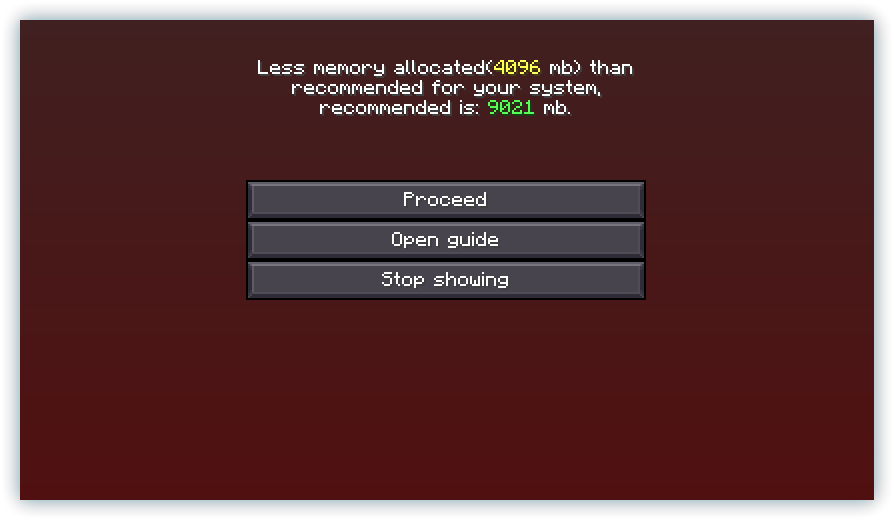
[22:12:26] [main/WARN]: You have less more memory allocated than recommended for your system, the recommended amount for your system is: 9021 mb. so ig not
well...

they should be the same, i downloaded the latest version on modranth for client and the latest server on CF
is 3.5 on Modranth 23.5 on CF or soething?
@tough pikeany ideas?
 tough pike
west glen
wait are you seriously not ment to allacate more than 8gb ram for better mc? ive...
tough pike
west glen
wait are you seriously not ment to allacate more than 8gb ram for better mc? ive...
#faq performance guide. But yes unless you use shaders don't give too much ram
west glen
i more ment on the server issue, but ty
tough pike
I think modrinth does have a different version naming system uh
west glen
i tried v24 nad v23.5 same error on both
tough pike
You can try atlauncher it should just have a button to create server
west glen
can i migrate my modranth saves and settigns to it?
tough pike
You can move your world yeah it's just the world folder etc
You mean game options?
west glen
i mean configs and everyything so we dont need to do everything again
also ist at launcher that thing people use for cracked mc
west glen
ah okay as long as it isnt adding CF garbage im alright
tropic scroll
west glen
<@124701738572840960>any ideas?
i get they are helpers but please dont ping them, we all have lives. we see the messages
west glen
tough pike
As backup
ty ill do that {also sorry for the ping, yes i know you all have lives as do i on my support server just a force of habbit sorry}
 true glade
what the version?
tropic scroll
?
true glade
oops i mean the server ip
 frail carbon
how do you enabale cheats in better mc
west glen
okay so using at launcher and now i get this error https://mclo.gs/tQXsYiA
also it needs a fabric update on a fresh server copy
tropic scroll
frail carbon
how do you enabale cheats in better mc
you press share world or open to lan
tropic scroll
west glen
also it needs a fabric update on a fresh server copy
use fabric loader 0.15.0 not 0.14.25
west glen
tropic scroll
use fabric loader 0.15.0 not 0.14.25
all i did was download the server via atlauncher, there is no option to update the version
tropic scroll
inside the server variables text change the fabric loader to 0.15.0
tropic scroll
[23:36:28] [Server thread/WARN]: **** FAILED TO BIND TO PORT!
[23:36:28] [Server thread/WARN]: The exception was: java.net.BindException: Address already in use: bind
[23:36:28] [Server thread/WARN]: Perhaps a server is already running on that port?
[23:36:28] [Server thread/ERROR]: Encountered an unexpected exception
west glen
there is nothing running on 25565 to my knowledge
west glen
apperntly java.exe was, nuked it seems to have fixed, assuming it starts i just need to move our world from modranth, get wife to get at launcher {because ffs ofc we have to use yet another launcher} and profit
tropic scroll
ggs lol
west glen
https://i.imgur.com/QAdUIsF.png oops forgot to up the ram
 meager yacht
west glen
well...
meager yacht
west glen
well...
read #faq for modpack installation
west glen
meager yacht
read <#815503531611783179> for modpack installation
we fixed it, had to use atlauncher and ontop of that CF [last time im touching that cancer] hopefully you guys get the server files on modranth and fix the fabric version
meager yacht
west glen
we fixed it, had to use atlauncher and ontop of that CF [last time im touching t...
nothing is broken
and modrinth doesnt really support server files
the modrinth & cf versions of the modpack are separate because modrinth doesnt have enough mods available
west glen
meager yacht
nothing is broken
it litterly yells at you to update fabric whe you launch it >.>
meager yacht
i'm paying someone to help with this and make the modrinth packs have 1:1 parity
meager yacht
west glen
it litterly yells at you to update fabric whe you launch it >.>
that doesnt mean anything
west glen
it means unless you go change it to 0.15.0 it wont srt
meager yacht
and you didnt show that in any of your screenshots or whatever
meager yacht
west glen
it means unless you go change it to 0.15.0 it wont srt
what is "it"
what won't start
west glen
west glen
also it needs a fabric update on a fresh server copy
the log is right here
     - Replace mod 'Fabric Loader' (fabricloader) 0.14.25 with version 0.15.0 or later.
More details:
     - Mod 'Quartz Elevator' (quartzelv) 2.2.6+1.20 requires version 0.15.0 or later of mod 'Fabric Loader' (fabricloader), but only the wrong version is present: 0.14.25!
whats the context of this
is this the modrinth version
the cf version
is this a server
west glen
server and client both give that error on a fresh install of the pack
west glen
west glen
server and client both give that error on a fresh install of the pack
i just did 🙃
Both the server and client versions give the error on fresh installs using the latest version
 west glen
all 3 of them yes
meager yacht
thats simply not true lol
west glen
would you like a video
meager yacht
im going to do a fresh install of both modpacks
both versions launch fine
you probably modified the modpack in some way or updated mods
west glen
all i did was click install, ill goahead and record a vid now
i stand corrected, CF is fine its just Modranth
i presume i installed the modranth one on AT launcher not the CF one orginally and that was the cause of me thinking it was both
west glen
meager yacht
both versions launch fine
I do apologize for thinking that CF was also faulty. It appears that only Modranth is experiencing issues. Please refer to the above video of a fresh install crashing.
west glen
also the modpacks not being the same explains why i couldn't get the server to work for ages, as we try to only use Modranth as the 3rd party but had to get the server from CF
 runic shale
What is the first step to get stronger in better MC? I'm coming up against 50 heart enemies with iron gear
pearl flume
runic shale
What is the first step to get stronger in better MC? I'm coming up against 50 he...
Pssst check quests
 radiant garnet
hello can someone help me ? i want to join a server in BMC 1 but an error says that my client is imcompatible ( required 1.20.1 even thought the modpack is on 1.19.2 ??? )
 wind thunder
Why is better mc skyblock freezing every 5 seconds?
 hazy apex
jagged sedge
Hey, I have been playing on a server and the white septum sanctum in the bumble ...
hazy apex
jagged sedge
Hey, I have been playing on a server and the white septum sanctum in the bumble ...
If you can get me the latest.log file from server after nerunia or whatever is spamming about it, I’ll finally have some info and can investigate what is happening.
If the game hard crashes with the neruia mod, give me latest.log file from the hard crash would be even better for me
tropic scroll
wind thunder
Why is better mc skyblock freezing every 5 seconds?
we no longer have / support said modpack
!fps
undone latchBOT
 limpid tusk
can someone tell me why my game keeps crashing after i install essential
tropic scroll
limpid tusk
can someone tell me why my game keeps crashing after i install essential
!ws
undone latchBOT
Luna Pixel's World Sharing
Our modpacks don't support any mods that add singleplayer hosting / world sharing because we already provide free world sharing. The "Essential" mod is therefore incompatible.
To share your world using our own world hosting, click the "Open to Lan" or "Share World" button in the game menu when in a singleplayer world, and share the world.
It will give you an address, like magma-cube.mc.lunapixel.gg, which your friends can use to connect directly to your world as if it were a server!
We still highly suggest not to play through LAN as LAN is untested and unreliable. Using it will cause longterm damage to your world.
There is no reason to use LAN, as we support both paid and free methods of hosting a server the normal way.
tropic scroll
essentials causes world corruption
limpid tusk
ok
 viral vale
Can someone help me I wanna play better mincraft so bad but I'm on android and I tried so many things but it doesn't work
 viral vale
So u mean I need a computer
viral vale
Hmph so it's bad luck I can't play it then
Bc I don't have a computer
Is there an other way?
sudden bay
no
viral vale
so u mean I need a computer js to play better mincraft
tropic scroll
as said, its minecraft Java that has mods. not Bedrock
viral vale
But how come can we then install the normal mincraft on android phone?
Bro
I joined this group for nothing
viral vale
Fine
sudden bay
viral vale
I joined this group for nothing
Thats not our fault ?
viral vale
Bye
tropic scroll
we support linux, mac, windows, etc not phones.
spark sailBOT
.shweedy has been timed out for 2m
Reason: Similar-Messages Spam
.shweedy | 499740534743629836
frail carbon
yo, how do i do quest?
tropic scroll
frail carbon
yo, how do i do quest?
top left inventory
 plain harbor
Hi, we just installed better mc fabric on our server and its fine with 3-4 people but after 6 or 7 people join the game starts to lag and we can't even break blocks, we checked how much ram the server uses and its 3-4gbs of ram while we dedicated 9gbs of ram and we keep getting "adding tickets to:0 chunks" log over and over in the console

Can it be related to this or is something wrong with our service provider
jagged sedge
plain harbor
Hi, we just installed better mc fabric on our server and its fine with 3-4 peopl...
Idk but Jelayd sure was blown up by a Creeper
 glossy compass
Hello, Just wondering how to put on shaders, and how to find enderman
tropic scroll
shaders is video settings top right, and enderman is normal
glossy compass
Thanks!
Is there a biome i can find Enderman In Nether or Overworld?
Just lookin to get easy pearls
tropic scroll
 no idea ngl
glossy compass
Im new to Java and Shaders. Can You advize me on how to improve my performance? There a bit of lag.
Thanks again
tropic scroll
!fps
undone latchBOT
glossy compass
Thank Very Much again!
 storm temple
fresh install of better mc fabric 1.20.1 v3.5 installed with mrpack https://cdn.modrinth.com/data/shFhR8Vx/versions/lWrorZjI/Better MC [FABRIC] 1.20.1 v3.5.mrpack has some fabric loader version issues [16:35:30] [main/INFO]: Fix: add [], remove [], replace [[fabricloader 0.14.25] -> add:fabricloader 0.15.0 ([[0.15.0,∞)])] [16:35:30] [main/ERROR]: Incompatible mods found! net.fabricmc.loader.impl.FormattedException: Some of your mods are incompatible with the game or each other! A potential solution has been determined, this may resolve your problem: - Replace mod 'Fabric Loader' (fabricloader) 0.14.25 with version 0.15.0 or later. More details: - Mod 'Quartz Elevator' (quartzelv) 2.2.6+1.20 requires version 0.15.0 or later of mod 'Fabric Loader' (fabricloader), but only the wrong version is present: 0.14.25! at net.fabricmc.loader.impl.FormattedException.ofLocalized(FormattedException.java:51) ~[fabric-loader-0.14.25.jar:?] at net.fabricmc.loader.impl.FabricLoaderImpl.load(FabricLoaderImpl.java:194) ~[fabric-loader-0.14.25.jar:?] at net.fabricmc.loader.impl.launch.knot.Knot.init(Knot.java:146) ~[fabric-loader-0.14.25.jar:?] at net.fabricmc.loader.impl.launch.knot.Knot.launch(Knot.java:68) ~[fabric-loader-0.14.25.jar:?] at net.fabricmc.loader.impl.launch.knot.KnotServer.main(KnotServer.java:23) ~[fabric-loader-0.14.25.jar:?] at net.fabricmc.loader.impl.launch.server.FabricServerLauncher.main(FabricServerLauncher.java:69) ~[fabric-loader-0.14.25.jar:?] at net.fabricmc.installer.ServerLauncher.main(ServerLauncher.java:69) ~[fabric-server-mc.1.20.1-loader.0.14.25-launcher.1.0.0.jar:1.0.0]
i tried downloading fabric 0.15.6 for 1.20.1 and it has different errors now
java.lang.RuntimeException: Could not execute entrypoint stage 'main' due to errors, provided by 'bclib'!
    at net.fabricmc.loader.impl.FabricLoaderImpl.lambda$invokeEntrypoints$2(FabricLoaderImpl.java:388) ~[fabric-loader-0.15.6.jar:?]
    at net.fabricmc.loader.impl.util.ExceptionUtil.gatherExceptions(ExceptionUtil.java:33) ~[fabric-loader-0.15.6.jar:?]
    at net.fabricmc.loader.impl.FabricLoaderImpl.invokeEntrypoints(FabricLoaderImpl.java:386) ~[fabric-loader-0.15.6.jar:?]
    at net.fabricmc.loader.impl.game.minecraft.Hooks.startServer(Hooks.java:63) ~[fabric-loader-0.15.6.jar:?]
    at net.minecraft.server.Main.main(Main.java:112) ~[server-intermediary.jar:?]
    at net.fabricmc.loader.impl.game.minecraft.MinecraftGameProvider.launch(MinecraftGameProvider.java:470) ~[fabric-loader-0.15.6.jar:?]
    at net.fabricmc.loader.impl.launch.knot.Knot.launch(Knot.java:74) ~[fabric-loader-0.15.6.jar:?]
    at net.fabricmc.loader.impl.launch.knot.KnotServer.main(KnotServer.java:23) ~[fabric-loader-0.15.6.jar:?]
    at net.fabricmc.loader.impl.launch.server.FabricServerLauncher.main(FabricServerLauncher.java:69) ~[fabric-loader-0.15.6.jar:?]
    at net.fabricmc.installer.ServerLauncher.main(ServerLauncher.java:69) ~[fabric-server-mc.1.20.1-loader.0.15.6-launcher.1.0.0.jar:1.0.0]
Suppressed: java.lang.NoSuchFieldError: CLENT_CONFIG```use fabric loader 0.15.0
storm temple
tropic scroll
use fabric loader 0.15.0
im getting the same error as with 1.15.6 even after another fresh install
[16:51:01] [main/ERROR]: Failed to start the minecraft server
java.lang.RuntimeException: Could not execute entrypoint stage 'main' due to errors, provided by 'bclib'!
tropic scroll
storm temple
im getting the same error as with 1.15.6 even after another fresh install
[16:51...
...
0.15.0
not 0.15.6
🙂
storm temple
tropic scroll
not 0.15.6
ik. originally i used whatever it came with. then tried 1.15.6 that had a different error too 1.14, then you said to use 1.15.0 and i was still having the same error so i did a fresh install and im still getting the same error
meager yacht
radiant garnet
hello can someone help me ? i want to join a server in BMC 1 but an error says t...
read #faq for modpack installation
meager yacht
plain harbor
Hi, we just installed better mc fabric on our server and its fine with 3-4 peopl...
!tps
undone latchBOT
Please click this link and follow the guide. If you are using a server host such as Bisect, you may be limited in your options and instead have a checkbox to use Aikar's Flags, which will also work:
https://github.com/Mukul1127/Minecraft-Performance-Flags-Benchmarks
If you can not launch your server/game after using these flags, then remove the word java from the start. Also, make sure you are using Java 18 on 1.18.2 / 1.19.2 and Java 11 on 1.16.5. These should be downloaded from Adoptium's website.
If lag persists, run the following command ingame:
/spark profiler start --only-ticks-over 50
Then, send the link in this channel. If the profiler command doesn't work, put this mod in your servers mod folder
tropic scroll
storm temple
ik. originally i used whatever it came with. then tried 1.15.6 that had a differ...
reinstall the modpack, dont launch it, and use fabric 0.15.0
if it doesnt work
!alternates
undone latchBOT
If this command was run in response to your question/issue, it is likely because switching away from the launcher you are currently using would fix your problem.
From our experience, the most stable launcher by far is ATLauncher, also known as ATL.
To install ATLauncher, do the following:
1. Go to https://atlauncher.com/download
2. Install and run the setup, then open the program.
3. Login to your Microsoft account that owns the Java Edition of Minecraft from the Accounts tab on the right. This process is 100% safe, as it goes directly through Microsoft. ATLauncher does not see your account credentials.
4. Go to the Packs tab on the right, then click "Curseforge" on the left.
5. Search the modpack you wish to download.
6. Click "New Instance". Click "Ok" on the opted out mods warning, then click "Open All" on the manual download screen.
7. Let the mods download, ATLauncher will grab them from your Downloads folder and automatically add them to the modpack.
8. Go to the Instances tab, and click "Play" on the modpack you downloaded. If you ever see an "Update" button on the instance, click it.
To transfer your Curseforge world to ATLauncher, simply right click the modpack on Curseforge, or click the 3 dots, then click "Open Folder". Copy the Saves folder, then click "Open Folder" on ATLauncher and paste the Saves folder there.
Because ATLauncher downloads the exact same files as Curseforge does, your world will be the exact same and you will be able to join the same servers. ATLauncher also works without an internet connection (after you've installed the modpack, of course), and does not have any bloat from Overwolf. You are free to uninstall both Overwolf and Curseforge with ATLauncher installed.
storm temple
tropic scroll
reinstall the modpack, dont launch it, and use fabric 0.15.0
still getting the same errors even with atlauncher
tropic scroll
send a log
storm temple
ive sent 3 logs so far but heres this one
tropic scroll
wait hold up
is this bmc1 or bmc2
bmc2
i legit just launched it on 0.15.0 and it worked fine
so strange
@meager yacht any ideas
meager yacht
storm temple
ive sent 3 logs so far but heres this one
are you installing the cf version
or the modrinth
tropic scroll
modrinth
 low stirrup
hello, i'm trying to selfhost a fabric bettermc server on 1.20.1
the server boots up fine, but when i try to connect, it shows this: (see image)
server:
debian 11, kernel 5.10.0-28-amd64
java 17 - may be the issue, working on upgrading
mc server has default amount of ram allocated (4gb)
client:
minecraft 1.20.1
fabric loader 0.15.6
resourcepacks: vanillatweaks (nothing changes if disabled)
mods: iris, sodium & modmenu
 meager yacht
low stirrup
hello, i'm trying to selfhost a fabric bettermc server on 1.20.1
the server boo...
meager yacht
low stirrup
hello, i'm trying to selfhost a fabric bettermc server on 1.20.1
the server boo...
this isnt how you install a modpack
cinder hearthBOT
meager yacht
this isnt how you install a modpack
Please read #faq for modpack installation.
meager yacht
^^
you need the modpack installed clientside
you cant just add sodium and call it a day lol
you need all of the same mods
please read #faq for how to install a modpack
low stirrup
meager yacht
you need the modpack installed clientside
i'm going to be hosting a server with multiple people, and have the bmc2 server pack installed, so should i instead run a vanilla 1.20.1 server and have everyone download the mod pack clientside?
sorry i dont think i read your message properly
so i need the mods both on the client and the server?
meager yacht
low stirrup
i'm going to be hosting a server with multiple people, and have the bmc2 server ...
no
you need the modpack installed both client and serverside
the full modpack - not just the mods
a modpack is more than just mods; its also configs, datapacks, resourcepacks, etc
low stirrup
okay, thank you
low stirrup
low stirrup
okay, thank you
everything is working now, thanks again
meager yacht
👍
 fickle ibex
how can a I host a server with the Better MC Modpack?
meager yacht
fickle ibex
how can a I host a server with the Better MC Modpack?
!server
undone latchBOT
We suggest renting a server from Bisect Hosting:
Approx. $10 - $25 a month depending on what plan you choose. You can also get 25% off with Code LunaPixel.
Go to https://www.bisecthosting.com/LunaPixel and order a plan which fits you. We suggest 1GB per player but nothing lower than 4GB as the server needs at least 3GB to run.
Go to #server-hosting for more Info!
Free Method: (This is hosting on your own PC, which is harder to do so we suggest getting a server via Bisect Hosting)
- Download the serverpack from Curseforge's website
- Right click the start.ps1 file and click Run with Powershell
To join your own server, typelocalhostinto Direct Connect.
This video explains the process https://www.youtube.com/watch?v=wuGUbVbLsDc
The server IP address is your Public IP Address, which can be found by googling my ip address
If other players are unable to join, find a portforwarding guide online.
fickle ibex
meager yacht
!server
thanks!
jagged sedge
hazy apex
If you can get me the latest.log file from server after nerunia or whatever is s...
The server owner is gonna add you his name is Divu
radiant garnet
meager yacht
read <#815503531611783179> for modpack installation
no i meant there is a server that i could always join but suddenly i cant join it and an error message pops out and says i have an incompatible client and i need to be in 1.20.1 even thought the modpack is on 1.19.2 . I have tried everything changing versions , restarting it and it stills doesnt let me join this specific server
undone latchBOT
pearl flume
radiant garnet
no i meant there is a server that i could always join but suddenly i cant join i...
Sounds like they updated their own version of it.
radiant garnet
pearl flume
Sounds like they updated their own version of it.
Do you have an idea of how did they do it ? I tried once putting the modpack on 1.20.1 and it all of the mods just didnt work
sudden bay
radiant garnet
no i meant there is a server that i could always join but suddenly i cant join i...
u installed the wrong modpack
pearl flume
Ah, they switched to forge.
radiant garnet
sudden bay
u installed the wrong modpack
So instead of fabric version i switch to the forge one ?
sudden bay
depends on what modpack the server is running
meager yacht
radiant garnet
no i meant there is a server that i could always join but suddenly i cant join i...
please read #faq for modpack installation.
west glen
is it just me or dose vein mining just not work?
tropic scroll
you need the enchant
west glen
i have it
tropic scroll
make sure you are holding the key aswell
west glen
ah its ~ for soe reason, not crouch like every other vein miner ty
tropic scroll
west glen
ah its ~ for soe reason, not crouch like every other vein miner ty
also not every other vein miner is crouch :p
most are on key only
west glen
fair, just most ive used ig, btw know if ae2 would work in the pack? its the sotrage mod i know and love
tropic scroll
tropic scroll
you might be interested in #1101995173430448208 then
west glen
we will look into it, so far we are just adding kibe, ad astra and AE2
tropic scroll

west glen
 tropic scroll
if it doesnt crash, it doesnt matter 
west glen
non optimal, but yes
tropic scroll
west glen
hmm https://uploads.nfld99.com/WindowTop_YiL95OcBO9.png
silly little mods inside the folder @meager yacht
meager yacht
tropic scroll
silly little mods inside the folder <@726509826557083680>
it doesnt do anything
meager yacht
fabric prevents older versions of a mod from loading
it happens bc
one version of modmenu is on cf
thats the v2
and then the newer versions are on modrinth
thats the v7
tropic scroll
gotcha
meager yacht
so when a mod depends on modmenu it ends up installing the old version
tropic scroll
gotcha
 little flower
Anyone have luck binding the advanced wireless terminal (Toms Simple Storage)? I am trying to and when I shift-right-click all that happens is opening the storage via the terminal, when walking away, pressing B does nothing.
tropic scroll
little flower
Anyone have luck binding the advanced wireless terminal (Toms Simple Storage)? I...
pretty sure its because B is also bound to a backpack open
check your keybinds for conflicts
little flower
already removed that
tropic scroll

little flower
I have more information as well, when I am in the terminal, I see a note that a level 4 beacon is active and can be accessed anywhere with a wireless terminal, so I know the beacon part is setup right....atleast I thats what it is telling me.
 tropic scroll
mind hovering over your terminal and saying what it says?
little flower
I think I was one step ahead of you, that picture is what I am seeing
tropic scroll
not that part,
when you hover over your item in the inventory screen
it should say if its bound to a button to open?
little flower
Ah, I tried chaging the keybind, hence why it is on X instead of B,
 tropic scroll
is anything bound to X?
little flower
no
tropic scroll
mind setting X to a key you can use to be sure it works?
little flower
whatcha mean? changing the bind to something else?
tropic scroll
nono as in binding they key X to like Jump for a test
tropic scroll
ok so it does work
 toms why are you asshole today
where are you holding your terminal while you are trying to press the button
little flower
to note, I submitted an issue on their github page as well, no response yet so decided to come here and see if anyone is able to get it to wokr
little flower
tropic scroll
where are you holding your terminal while you are trying to press the button
I've tried both in my hand and in the belt slot
tropic scroll
tried just in the inventory?
tropic scroll
did you report this to the toms github/discord if they got one
little flower
yup submitted an issue on their github page
little flower
no worries, if you want to track it as well, here is a link to the issue: https://github.com/tom5454/Toms-Storage/issues/329

GitHub
Trying to shift-right-click to bind the advanced wireless terminal to a terminal and nothing happens and B does nothing to open. Is anything supposed to happen when I shift right click? I see nothi...
little flower
Thanks!
 thick carbon
Is there a way to make ores underground light up a bit? 
Quite hard to find them from a somewhat long distance 
meager yacht
add an emissive ores resourcepack/shaderpack
thick carbon
do u know where i can get that? i ain't that knowledgeable when it comes to minecraft mods n stuff 🙂
 undone lark
undone latchBOT
undone lark
undone latchBOT
We suggest renting a server from Bisect Hosting:
Approx. $10 - $25 a month depending on what plan you choose. You can also get 25% off with Code LunaPixel.
Go to https://www.bisecthosting.com/LunaPixel and order a plan which fits you. We suggest 1GB per player but nothing lower than 4GB as the server needs at least 3GB to run.
Go to #server-hosting for more Info!
Free Method: (This is hosting on your own PC, which is harder to do so we suggest getting a server via Bisect Hosting)
- Download the serverpack from Curseforge's website
- Right click the start.ps1 file and click Run with Powershell
To join your own server, typelocalhostinto Direct Connect.
This video explains the process https://www.youtube.com/watch?v=wuGUbVbLsDc
The server IP address is your Public IP Address, which can be found by googling my ip address
If other players are unable to join, find a portforwarding guide online.
 tired jewel
thick carbon
do u know where i can get that? i ain't that knowledgeable when it comes to mine...
tired jewel
thick carbon
do u know where i can get that? i ain't that knowledgeable when it comes to mine...
complementary shaders have that feature. but if you dont like shaders there are resourcepacks on curseforge, just search up emissive ores resource packs then select your version. im pretty sure there's a good selection
thick carbon
is there a way to enable it, so it always shows?
i meant, so the ores are always highlighted 😄
 weary root
trying to figure out how to edit dropped iteams despawn time, they are staying arround for hours and i cant for the life of me find the file loction, does anyone know the root file loction to edit this option!
spark sailBOT
axeldont has been timed out for 2m
Reason: Similar-Messages Spam
axeldont | 726670013427220531
glossy compass
Hello, Good day!
Just need some help.
I cant seem to read End guide (doesnt work)
Also, I cant get Soul star to work
Im new to Java
Ok, I used Soul star but didnt see the effect
I figured out soul star. Now just need to learn how to read End guide and if i cant get more than 1 copy
 quasi narwhal
Hello everyone, I got a question
How in BetterMC2 modpack there is "shaders" button if "Iris Shaders" is not installed?
I'm having problem with creating my modpack to play with friends. When creating it, I used the BetterMC2 mod pack as a basis and downloaded the same versions that are used in BetterMC2 for "Sodium", "Sodium Extra", "Indium", "Geckolib", "Iris/Oculus & GeckoLib Compat". I did this because when I was installing new versions of Sodium and Geckolib they came out not compatible with each other, so I copied versions from BetterMC2 modpack.
But there is a new problem. I cant install "Iris shaders" to see my "shaders" button in game, as this old version of "Sodium" that is compatible with "Geckolib" is not compatible with "Iris Shaders". So what do I need to do to make it appear, can someone help me please
(Minecraft version 1.20.1, fabric)
cinder hearthBOT
quasi narwhal
Hello everyone, I got a question
How in BetterMC2 modpack there is "shaders" bu...
Please read #faq for modpack installation.
glossy compass
Ok, Im very new w mods, hopefully its beginner friendly. would i have to start fresh?
Sorry, thought u were talking to me
 candid pawn
is this one or the forge one better for newbies
 celest agate
wdym? Turn it off?
 fading sigil
Hi do u know why my friend is from poland and me too, but always when someone of us make new server the place of it is in dallas 😦
???
or maybe u know how to change it
tropic scroll
fading sigil
or maybe u know how to change it
you cant change it
the world sharing servers are NA only
if you wanna host youd rather port forward for your friend
!server
undone latchBOT
We suggest renting a server from Bisect Hosting:
Approx. $10 - $25 a month depending on what plan you choose. You can also get 25% off with Code LunaPixel.
Go to https://www.bisecthosting.com/LunaPixel and order a plan which fits you. We suggest 1GB per player but nothing lower than 4GB as the server needs at least 3GB to run.
Go to #server-hosting for more Info!
Free Method: (This is hosting on your own PC, which is harder to do so we suggest getting a server via Bisect Hosting)
- Download the serverpack from Curseforge's website
- Right click the start.ps1 file and click Run with Powershell
To join your own server, typelocalhostinto Direct Connect.
This video explains the process https://www.youtube.com/watch?v=wuGUbVbLsDc
The server IP address is your Public IP Address, which can be found by googling my ip address
If other players are unable to join, find a portforwarding guide online.
tropic scroll
second half
tropic scroll

 cerulean thicket
Hi all, just checking to see if BMC2 Fabric is still being maintained and if an update is expected to come
Don't need an ETA
tropic scroll
it is
so it is maintained, there is no update planned (that i know of) but it isnt dead
 stray grove
@everyone im really lost in the modpack what can i do or what do i do
stray grove
i dont know
tropic scroll
please just dont :p
stray grove
ok
cerulean thicket
I have built a creeper farm above the ocean, however, for some reason, squids keep spawning and dying instantly on top of my farm, leaving slime balls and messing with the mob count, possibly reducing the efficiency of my farm.
quasi narwhal
quasi narwhal
Hello everyone, I got a question
How in BetterMC2 modpack there is "shaders" bu...
any feedback? Maybe someone knows?
tropic scroll
quasi narwhal
Hello everyone, I got a question
How in BetterMC2 modpack there is "shaders" bu...
what launcher?
 turbid crystal
does anybody have a cool seed with this modpack that i can try?
tropic scroll
apple
quasi narwhal
tropic scroll
what launcher?
curseforge
tropic scroll
!alternates
undone latchBOT
If this command was run in response to your question/issue, it is likely because switching away from the launcher you are currently using would fix your problem.
From our experience, the most stable launcher by far is ATLauncher, also known as ATL.
To install ATLauncher, do the following:
1. Go to https://atlauncher.com/download
2. Install and run the setup, then open the program.
3. Login to your Microsoft account that owns the Java Edition of Minecraft from the Accounts tab on the right. This process is 100% safe, as it goes directly through Microsoft. ATLauncher does not see your account credentials.
4. Go to the Packs tab on the right, then click "Curseforge" on the left.
5. Search the modpack you wish to download.
6. Click "New Instance". Click "Ok" on the opted out mods warning, then click "Open All" on the manual download screen.
7. Let the mods download, ATLauncher will grab them from your Downloads folder and automatically add them to the modpack.
8. Go to the Instances tab, and click "Play" on the modpack you downloaded. If you ever see an "Update" button on the instance, click it.
To transfer your Curseforge world to ATLauncher, simply right click the modpack on Curseforge, or click the 3 dots, then click "Open Folder". Copy the Saves folder, then click "Open Folder" on ATLauncher and paste the Saves folder there.
Because ATLauncher downloads the exact same files as Curseforge does, your world will be the exact same and you will be able to join the same servers. ATLauncher also works without an internet connection (after you've installed the modpack, of course), and does not have any bloat from Overwolf. You are free to uninstall both Overwolf and Curseforge with ATLauncher installed.
echo harness
im in the nether but how can i find elytra?
echo harness
i found this but there is no eleytra
 little flower
Need to find an end city that also has a boat, typically they are above the city.
meager yacht
quasi narwhal
Hello everyone, I got a question
How in BetterMC2 modpack there is "shaders" bu...
and iris is installed
 glad hollow
Which is the best version of bmc?
pearl flume
glad hollow
Which is the best version of bmc?
no best, they each are good in their own ways
quasi narwhal
meager yacht
and iris is installed
if you mean "Iris/Oculus & GeckoLib Compat", I have it installed in my pack. I cant see another Iris
If you mean another mod, can you tell me which one is it, please?
 meager yacht
quasi narwhal
if you mean "Iris/Oculus & GeckoLib Compat", I have it installed in my pack. I c...
meager yacht
quasi narwhal
if you mean "Iris/Oculus & GeckoLib Compat", I have it installed in my pack. I c...
Iris is included in the overrides folder
it is not installed or recognized by curseforge
newer versions of iris can only be downloaded from modrinth
quasi narwhal
meager yacht
newer versions of iris can only be downloaded from modrinth
I did it, everything works, thank you so much!
spark sailBOT
serpmount__ has been timed out for 2m
Reason: Similar-Messages Spam
serpmount__ | 1165060849258467410
echo harness
little flower
Need to find an end city that also has a boat, typically they are above the city...
i didnt can find a end city

i have a map but i dont know how to read it

i gave it

there is no boad
 alpine edge
i cant connect to the server, shows that weird error in game and the following error in console-
com.mojang.authlib.GameProfile@1a3d6c20[id=8789fb99-16a0-472c-b00b-5501b52196cc,name=SwastikGoomber,properties={textures=[com.mojang.authlib.properties.Property@6eebdfa2]},legacy=false] (/<redacted>) lost connection: Missing profile public key.
 limpid grove
Does anyone know how incubus core items work? I have found absolultely 0 info on it
 ocean cape
how do I make a server of better minecraft fabric from modrinth?
spark sailBOT
romegon has been timed out for 2m
Reason: Similar-Messages Spam
romegon | 263429259823939595
spark sailBOT
protzy2go has been timed out for 2m
Reason: Similar-Messages Spam
protzy2go | 860200593355571220
 copper plinth
Hi - I need help. I have a BMC1 world on a Gportal server. The BMC1 modpack is no longer being updated. Is it possible to move my BMC1 world to a BMC2 modpack? The gportal support said to download and upload my world files within gportal but it keeps freezing because its too big. Does anyone know of any other possible way to be able to use my world in BMC2?
tropic scroll
bmc1 -> bmc2 doesnt work
copper plinth
tropic scroll
bmc1 -> bmc2 doesnt work



 tropic scroll
yeah

but the bmc1 does get updated
its just not planned anything atm
its not abandoned
copper plinth
tropic scroll
but the bmc1 does get updated
I really want the 1.20 update for it.
tropic scroll
you can try to transfer some world stuff with world eidt, keep the same seed and transfer the playerdata but about that, thats about it ngl
copper plinth
I'm really new to this... Can you move builds with that?
tropic scroll
world edit
yes
you can copy the area
make it into a schematic
then paste it anywhere you wish
copper plinth
wow I'll have to look into that. Thank you
meager yacht
alpine edge
i cant connect to the server, shows that weird error in game and the following e...
you dont have the same modpack installed as the server.
read #faq for modpack installation please
meager yacht
 mental valley
any wanna play with? gonna use radmin and ill open lan world
mental valley
any wanna play with? gonna use radmin and ill open lan world
do not use LAN
!server
undone latchBOT
We suggest renting a server from Bisect Hosting:
Approx. $10 - $25 a month depending on what plan you choose. You can also get 25% off with Code LunaPixel.
Go to https://www.bisecthosting.com/LunaPixel and order a plan which fits you. We suggest 1GB per player but nothing lower than 4GB as the server needs at least 3GB to run.
Go to #server-hosting for more Info!
Free Method: (This is hosting on your own PC, which is harder to do so we suggest getting a server via Bisect Hosting)
- Download the serverpack from Curseforge's website
- Right click the start.ps1 file and click Run with Powershell
To join your own server, typelocalhostinto Direct Connect.
This video explains the process https://www.youtube.com/watch?v=wuGUbVbLsDc
The server IP address is your Public IP Address, which can be found by googling my ip address
If other players are unable to join, find a portforwarding guide online.
 frank owl
When I enter the Void Dimension to kill the Void Shadow, I instantly start to fall, cant use my elytra and i will die in the void. Any tip what am i doing wrong?
copper plinth
In Better Minecraft 2 (Fabric) I'm unable to view the vanilla recipe book. In REI settings I told it to show the recipe book and it still does not show.
tropic scroll
thats normal
the recipe book causes lag
but if you really want it back you need to remove the not enough recipe books mod or NERB
copper plinth
tropic scroll
thats normal
ok thanks
 timid sorrel
Can i post videos here?
meager yacht
yeah
timid sorrel
meager yacht
yeah
ok ty
copper plinth
tropic scroll
but if you really want it back you need to remove the not enough recipe books mo...
Every time I click on the crafting table it takes at least 8 seconds to load and sometimes freezes the game all together. I do not have the recipe book enabled. How do I fix this?
meager yacht
copper plinth
Every time I click on the crafting table it takes at least 8 seconds to load and...
#faq performance guide
copper plinth
meager yacht
<#815503531611783179> performance guide
This is the only world I have this issue with. I have more than enough RAM allocated and all of my drivers are up to date.
meager yacht
please follow the full performance guide.
copper plinth
meager yacht
please follow the full performance guide.
My PC settings are fully optimized. I play several MC games as well as others with no problem. This new crafting/recipe format is causing problems. How do I disable it in my server?
meager yacht
there is not a new "crafting/recipe format"
run the /sparkc profiler start command and reproduce the laggy behavior for 30~ seconds
then run the stop command
spark sailBOT
ppondd has been timed out for 2m
Reason: Similar-Messages Spam
ppondd | 258927647063670785
 stiff crest
is this a modpack for mod beginners?
never played with mods before and i tried some modpack before and they all scare me with how big and complex and techy they are
and ppl said i should try this as a noob
i guess not then
stiff crest
?????
 daring vector
How to decrease ram consumption? Even 10gb seems to be not enough
sudden bay
stiff crest
is this a modpack for mod beginners?
yeah
sudden bay
daring vector
How to decrease ram consumption? Even 10gb seems to be not enough
#faq performance guide
lyric basalt
So is there a way to spawn proof an ocean? I am building something and I would like to stop the ocean skeletons from spawning will slabbing the ocean floor stop them?
copper plinth
meager yacht
then run the stop command
https://spark.lucko.me/GMjR2VVP6I
@meager yacht

spark is a performance profiler for Minecraft clients, servers, and proxies.
copper plinth
copper plinth
https://spark.lucko.me/GMjR2VVP6I
<@726509826557083680>
BTW this is happening to everyone on my gportal server and in my local BMC2 world. It only happens when we right click the crafting table. At one point it took 18 seconds to load.
copper plinth
Also where is the recipe book if we dont want to use REI to craft?
 tropic scroll
disabled to not cause fps issues
copper plinth
tropic scroll
disabled to not cause fps issues
I'm having MAJOR crash/lag issues - please see above
copper plinth
tropic scroll
are you giving your player spark?
What does that mean? There are spark results above. I dont know what it means though
tropic scroll
copper plinth
What does that mean? There are spark results above. I dont know what it means th...
whats lagging
your server
or game
copper plinth
tropic scroll
whats lagging
Both - whenever a player right clicks on the crafting table the game lags and it also says not responding for a few seconds. Also - we have several different modpack/minecraft servers that we play. This is the only one giving us trouble.
undone latchBOT
Please click this link and follow the guide. If you are using a server host such as Bisect, you may be limited in your options and instead have a checkbox to use Aikar's Flags, which will also work:
https://github.com/Mukul1127/Minecraft-Performance-Flags-Benchmarks
If you can not launch your server/game after using these flags, then remove the word java from the start. Also, make sure you are using Java 18 on 1.18.2 / 1.19.2 and Java 11 on 1.16.5. These should be downloaded from Adoptium's website.
If lag persists, run the following command ingame:
/spark profiler start --only-ticks-over 50
Then, send the link in this channel. If the profiler command doesn't work, put this mod in your servers mod folder
copper plinth
undone latch
Please click this link and follow the guide. If you are using a server host such...

spark is a performance profiler for Minecraft clients, servers, and proxies.
copper plinth
undone latch
Please click this link and follow the guide. If you are using a server host such...
This is way too complicated for me. I'm just a mom who is trying to enjoy the game with her kid & friends. We never had this issue with BMC1 and other Luna Pixel modpacks. The lag while crafting is making the game unplayable. Is there anyway to remove whatever change you implemented in this modpack (on my end) and have the same crafting tool as in the other modpacks?
pearl flume
Hm it's showing there's like 63 promenade sunken skellies showing up. which is quite a lot.

Also if you can when you're running spark, run it for around 15-20 minutes as that can give more information over a longer period of time
copper plinth
pearl flume
Hm it's showing there's like 63 promenade sunken skellies showing up. which is q...
I thought there were an awful lot on the coast LOL - The crafting lag also happens to other players in other areas of the world.
pearl flume
Ah I see, you're running java 19 on it.
It's best to stick to java 18 as that is the most stable for minecraft currently.
!openjdk
undone latchBOT
- Download an adoptium release for Java (recommended but not required):
- Java 11 (https://adoptium.net/temurin/releases/?version=11) for versions 1.16.5 and below (can also use 8 if its not working)
- Java 18 (https://adoptium.net/temurin/releases/?version=18) for any versions newer (or 17 if 18 doesn't work)
- Consider installing the JRE instead of the JDK for a smaller file size
-
When installing through adoptium, make sure that Add to PATH and Set JAVA_HOME variable are both set to be installed (please see https://imgur.com/a/jPu1h7h for how that would look)
-
Check if java has been correctly installed by running java --version (or java -version on older versions), and seeing if the output is correct (see https://imgur.com/a/OWcoq4p for an example of the output)
- NOTE: 64 bit versions of java ALWAYS have '64-bit Server VM' in the version output. If that is not there, you have installed a 32-BIT version!! If you're getting Out of Memory errors or any other errors, PLEASE install 64-bit
- If the output isn't as intended, you have 2 options.
i) Delete ALL other java versions from your PC (ONLY recommended if you don't need them)
ii) Redirect your launcher/server to use your new installation of Java
Method i
- Uninstall any other java program listed in your programs list (differs by OS, please find a guide for your own OS if you don't know)
- Attempt to re-use the command mentioned above (if the output is now correct, which it should be, you are ready to go)
Method ii
- For a server, please modify the $Java/JAVA variable (found in your startup script depending on ps1/sh) to the path of your java installation. For windows, this path is usually found in "Program Files/Eclipse Adoptium/version_of_java/bin"
- For a client, depending on whether you use CurseForge, GD, or AT, the process is slightly different. Please see a guide for each respective launcher on how to change the java version.
copper plinth
pearl flume
Ah I see, you're running java 19 on it.
My Java says V8 update 401.
I was prompted to update 2 days ago in order to be compatible with another multiplayer we play through win10
pearl flume
copper plinth
My Java says V8 update 401.
I was prompted to update 2 days ago in order to be c...
where does it say that? can you grab a screenshot?
copper plinth
pearl flume
where does it say that? can you grab a screenshot?
Java
 pearl flume
oh that's way out of date. follow the java 18 link above for sure
You need 17 or 18 for minecraft, but you can dedicate certain java versions for games and servers to run
copper plinth
pearl flume
oh that's way out of date. follow the java 18 link above for sure
That's crazy - that's what comes up directly through the automatic updates and on their site.
So, I have to tell all my players to update as well?
pearl flume
I wouldn't do the autoupdates from java as some stuff is really funky.
It wouldn't hurt to let them know if they haven't done so already, but you'll definitely wanna do it for your server and client side as well.
copper plinth
pearl flume
It wouldn't hurt to let them know if they haven't done so already, but you'll de...
Wow - this is an educational experience... How do I change the java on the server side? Its on gportal.
pearl flume
copper plinth
Wow - this is an educational experience... How do I change the java on the serve...
best suggestion is see if you can find a tutorial on youtube.
copper plinth
pearl flume
best suggestion is see if you can find a tutorial on youtube.
My apologies - this doesn't make much sense to me. Java says the most recent version is 8 released on 1/16/24. Version 18 was released in 2022. So how is 18 a newer version?
Also - the installation instructions provided above are way too technical. All I'm trying to do is fix the lag with a crafting table.
I'm incredibly hesitant to make any additional changes to my system. I run several different mods/programs/games and never experienced this kind of hassle before.