#better-mc-fabric
1 messages · Page 112 of 1
 maiden spire
wrap it in quotation marks
 lyric cairn
i did that in variables.txt
it gives me java path in ps1 but not the run command for server
maiden spire
the run command is in the ps1 file itself
lyric cairn
yeah
the command that doesnt work is the run command as well as the java args
here the modified thing
wait some odd reason it dosent say java path
maiden spire
$Java = $ExternalVariables['JAVA']
line 55
shouldn't you change this to not use the external variables?
lyric cairn
i did magic
lyric cairn
maiden spire
> $Java = $ExternalVariables['JAVA']
line 55
i directly changed that line so its $Java = "C:\Program Files\Java\jdk-18.0.2.1\bin\java.exe"
now it works
tysm
lyric cairn
the console is gone?
what happen to the weird java console thing
you know when you launch from .jar it just shows you a graph of ram usage a console and players
it technically launched from the jar because thats what the script does?
maiden spire
it doesnt show it by default
in the ps1 theres a arg called 'nogui'
it removes that screen
lyric cairn
ah ok
 spring tusk
how can i host 3.5 from modrinth on my pc?
 tropic scroll
server pack creator
spring tusk
like, i should have a server modpack version, or smth like
 spring tusk
in modrinth it's caused error
and asked for 0.15+
how can i switch fabric loader on server?
i mean, should i re-make it with server pack creator
or change 1 file

with 0.15.3 it started
and it's causing from clearly installed bettermc
and fixing by changing to 0.15 fabric loader
tropic scroll
did it launch
spring tusk
no
tropic scroll

spring tusk
it says exit at ending
tropic scroll
try installing 0.15 fabric then
spring tusk
0.15.0?
tropic scroll
yes
tropic scroll

spring tusk
also
i use it with java 17
bcs java 18 isn't running
Failed to start the minecraft server java.lang.RuntimeException: Could not execute entrypoint stage 'main' due to errors, provided by 'bclib'!
 warped cosmos
Anyone know if BMC1 ever gonna be updated to 1.20 or is BMC2 gonna take over from now on?
tropic scroll
warped cosmos
Anyone know if BMC1 ever gonna be updated to 1.20 or is BMC2 gonna take over fro...
bmc2 is 1.20
bmc1 is 1.19
tropic scroll
spring tusk
`Failed to start the minecraft server
java.lang.RuntimeException: Could not exec...
try to downgrade the mods that said 0.14.25 doesn’t work
 glossy harbor
how can i install better mc - bmc2 for fabric
 cinder hearthBOT
glossy harbor
how can i install better mc - bmc2 for fabric
cinder hearthBOT
glossy harbor
how can i install better mc - bmc2 for fabric
Please read #faq for modpack installation.
tropic scroll
glossy harbor
without any extern apps/launchers
just do it with a launcher
ur wasting ur time without one
!alternates
 undone latchBOT
If this command was run in response to your question/issue, it is likely because switching away from the launcher you are currently using would fix your problem.
From our experience, the most stable launcher by far is ATLauncher, also known as ATL.
To install ATLauncher, do the following:
1. Go to https://atlauncher.com/download
2. Install and run the setup, then open the program.
3. Login to your Microsoft account that owns the Java Edition of Minecraft from the Accounts tab on the right. This process is 100% safe, as it goes directly through Microsoft. ATLauncher does not see your account credentials.
4. Go to the Packs tab on the right, then click "Curseforge" on the left.
5. Search the modpack you wish to download.
6. Click "New Instance". Click "Ok" on the opted out mods warning, then click "Open All" on the manual download screen.
7. Let the mods download, ATLauncher will grab them from your Downloads folder and automatically add them to the modpack.
8. Go to the Instances tab, and click "Play" on the modpack you downloaded. If you ever see an "Update" button on the instance, click it.
To transfer your Curseforge world to ATLauncher, simply right click the modpack on Curseforge, or click the 3 dots, then click "Open Folder". Copy the Saves folder, then click "Open Folder" on ATLauncher and paste the Saves folder there.
Because ATLauncher downloads the exact same files as Curseforge does, your world will be the exact same and you will be able to join the same servers. ATLauncher also works without an internet connection (after you've installed the modpack, of course), and does not have any bloat from Overwolf. You are free to uninstall both Overwolf and Curseforge with ATLauncher installed.
glossy harbor
tropic scroll
ur wasting ur time without one
I want it without any launchers
glossy harbor
tropic scroll
ur gonna be here for 40 minutes trying to do that
why it is so complicated ?
tropic scroll
glossy harbor
why it is so complicated ?
that’s because it’s outdated as fuck and no one does that anymore
yes you can do it
but it’s a lengthy time consuming process
this is why there is launchers to remove that time figuring out what went wrong
what installed wrong
what isn’t working
why isn’t it working
etc
just use ATL
or PRISM and save yourself the trouble
glossy harbor
does bmc support playing with friends?
undone latchBOT
Luna Pixel's World Sharing
Our modpacks don't support any mods that add singleplayer hosting / world sharing because we already provide free world sharing. The "Essential" mod is therefore incompatible.
To share your world using our own world hosting, click the "Open to Lan" or "Share World" button in the game menu when in a singleplayer world, and share the world.
It will give you an address, like magma-cube.mc.lunapixel.gg, which your friends can use to connect directly to your world as if it were a server!
We still highly suggest not to play through LAN as LAN is untested and unreliable. Using it will cause longterm damage to your world.
There is no reason to use LAN, as we support both paid and free methods of hosting a server the normal way.

 warm rampart
hi
tropic scroll
glossy harbor
but not worked
could be full
warm rampart
Is there a mod pack I can play that's similar to better mc plus, cause I can't find it in files anymore
warm rampart
tropic scroll
prominence
does it have ice and fire
warm rampart
tropic scroll
cuz fire and ice is ass
💔
tropic scroll
that’s my personal take
warm rampart
this prominence thing is ass and boring I need some sorta excitement 😭
warm rampart
tropic scroll
story and stuff
do you play it
tropic scroll
yes
warm rampart
ill assume you enjoy it but anywhere there's no way to locate the files for bmc so I atleast know the mods
tropic scroll
older versions of prom 2 is bmc+ files
tropic scroll

warm rampart
tropic scroll
<a:SCdanceblack:751511606504194059>
one more thing where would I find 1.16.5
tropic scroll
exactly where i said it would be
warm rampart
tropic scroll
exactly where i said it would be
okay
 lapis bloom
BetterMC Fabric 1.20.1 - The Spawn Rate of friendly Mobs is very low, can i increase it?
 wet ocean
what happened to the mod that had legendary weapons and mobs, it also had a cursed ring where any mob that was nuetrual would attack you
 celest agate
wet ocean
what happened to the mod that had legendary weapons and mobs, it also had a curs...
celest agate
wet ocean
what happened to the mod that had legendary weapons and mobs, it also had a curs...
That mod is not fit for vanilla+ modpack
So it got removed
 sour trout
can someone help me i cant play multiplayer
 night birch
sour trout
can someone help me i cant play multiplayer
night birch
sour trout
can someone help me i cant play multiplayer
need more details than that
sour trout
multiplayer button just dont shows
night birch
sour trout
multiplayer button just dont shows
how did you install the modpack?
sour trout
night birch
how did you install the modpack?
from curse forge
tropic scroll
you using curseforge launcher?
sour trout
yes
tropic scroll
you have like 40 roles
 night birch
sour trout
from curse forge
night birch
sour trout
from curse forge
are you using essential?
tropic scroll

sour trout
i just clicked everything
tropic scroll
^
sour trout
essential?
 night birch
sour trout
night birch
sour trout
you have not migrated your account to microsoft have you?
sour trout
i did
tropic scroll
it shouldnt show that...
night birch
there are two reasons this pops up: you didn't migrate your account, or, you are using a cracked pirated launcher
sour trout
i just downloaded it from curse forge it cant be cracked
tropic scroll
!alternates
undone latchBOT
If this command was run in response to your question/issue, it is likely because switching away from the launcher you are currently using would fix your problem.
From our experience, the most stable launcher by far is ATLauncher, also known as ATL.
To install ATLauncher, do the following:
1. Go to https://atlauncher.com/download
2. Install and run the setup, then open the program.
3. Login to your Microsoft account that owns the Java Edition of Minecraft from the Accounts tab on the right. This process is 100% safe, as it goes directly through Microsoft. ATLauncher does not see your account credentials.
4. Go to the Packs tab on the right, then click "Curseforge" on the left.
5. Search the modpack you wish to download.
6. Click "New Instance". Click "Ok" on the opted out mods warning, then click "Open All" on the manual download screen.
7. Let the mods download, ATLauncher will grab them from your Downloads folder and automatically add them to the modpack.
8. Go to the Instances tab, and click "Play" on the modpack you downloaded. If you ever see an "Update" button on the instance, click it.
To transfer your Curseforge world to ATLauncher, simply right click the modpack on Curseforge, or click the 3 dots, then click "Open Folder". Copy the Saves folder, then click "Open Folder" on ATLauncher and paste the Saves folder there.
Because ATLauncher downloads the exact same files as Curseforge does, your world will be the exact same and you will be able to join the same servers. ATLauncher also works without an internet connection (after you've installed the modpack, of course), and does not have any bloat from Overwolf. You are free to uninstall both Overwolf and Curseforge with ATLauncher installed.
sour trout
and i just bought the acc after the migration
night birch
wait, how did you buy after the migration?
you have to have the account before migration, because you have to have an account...
tropic scroll
you just purchase mc after migration
sour trout
on minecraft website
sour trout
night birch
you have to have the account before migration, because you have to have an accou...
i bought it after the migration
tropic scroll
mc account or just mc
sour trout
mc
tropic scroll
kk
tropic scroll
undone latch
If this command was run in response to your question/issue, it is likely because...
do this
 pearl flume
sour trout
i just downloaded it from curse forge it cant be cracked
pearl flume
sour trout
i just downloaded it from curse forge it cant be cracked
Your minecraft itself.
 elder abyss
wet ocean
celest agate
That mod is not fit for vanilla+ modpack
elder abyss
wet ocean
celest agate
That mod is not fit for vanilla+ modpack
do we know what the mod was called?
 sudden bay
 safe oyster
Are those the only structures that are removed?
safe oyster
Are those the only structures that are removed?
yes
sudden bay
wet ocean
do we know what the mod was called?
It was never even in bmc
that mod isnt even on Fabric
 autumn inlet
Hello I have a question. Does newer versions of better mc have just more content or have more content and removes some of it from previous versions? If they remove some the what is the best better mc version? ( BMC1 BMC2 BMC3 BMC4)
 lyric crystal
Hello i have a question because when i start the better minecraft version then the minecraft launcher is not starting its for every curseforge pack can you guys help me?
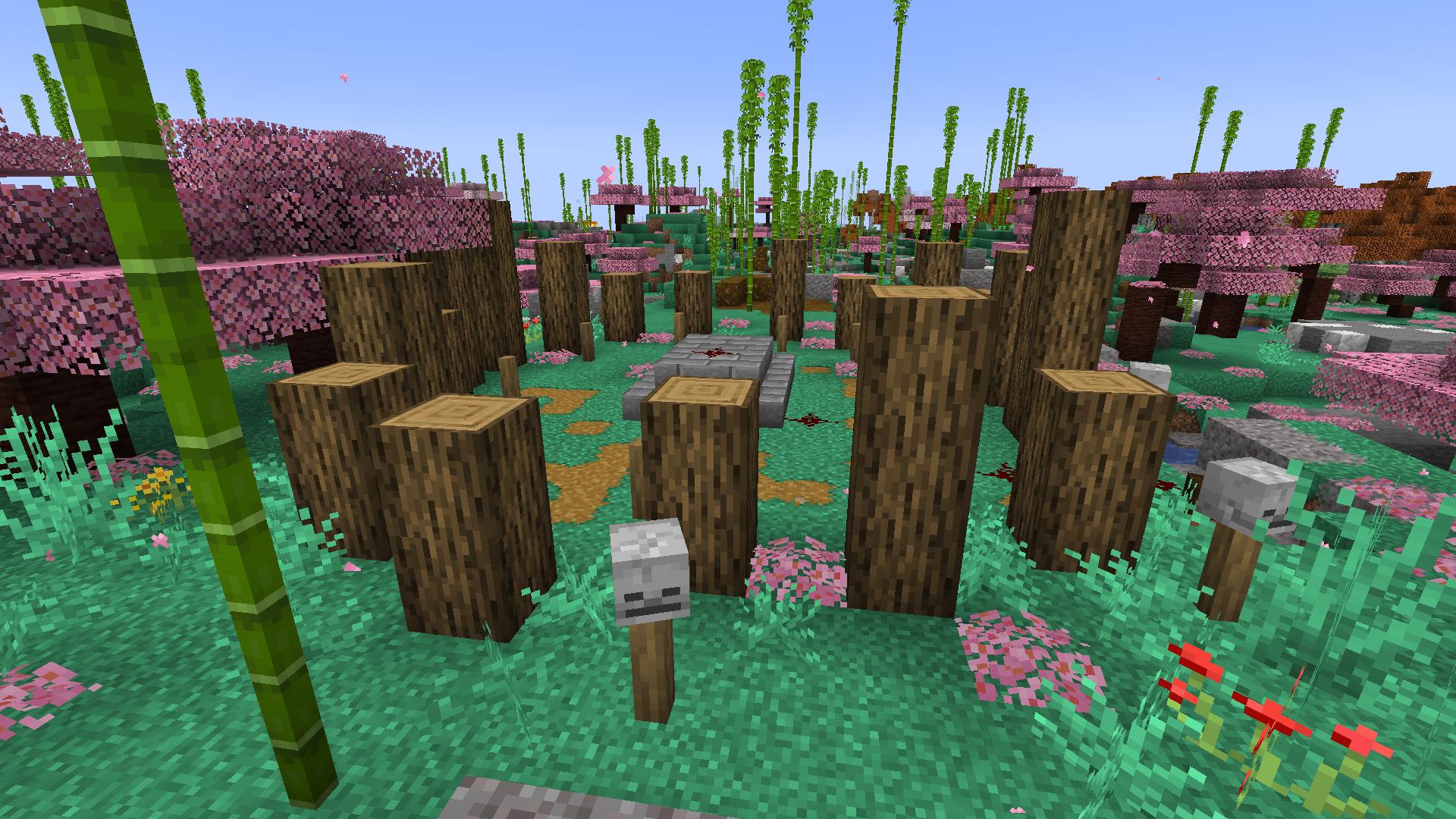
 granite torrent
Ritual circle
 spark sailBOT
green_boy420 has been timed out for 2m 

 Reason: Similar-Messages Spam
green_boy420 | 763732861605904385
tropic scroll
autumn inlet
Hello I have a question. Does newer versions of better mc have just more content...
tropic scroll
lyric crystal
Hello i have a question because when i start the better minecraft version then t...
!moreinfo
undone latchBOT
Hello! For us to help you with your issue, you will need to answer all 8 questions below. Post the answers in this channel:
1. Have you modified the modpack in any way? If so, what did you do? (Updating/adding/removing mods, changing configs)
2. What launcher, or program, are you using to launch the game? (CurseForge, ATLauncher, etc)
3. What Minecraft version are you playing? (1.18.2, 1.16.5, 1.19.2)
4. What version of the modpack are you playing? (v11, v9, etc)
5. What steps are necessary to reproduce the crash? (Launching the game, exploring the world, etc)
6. Have you ever gotten past the point where the crash happens?
7. Send the crash report file into this channel. Right click the modpack, Open Folder, and navigate to the Crash Reports folder. Drag the newest one here. If there is no crash reports folder, do the same thing with the latest.log file in the logs folder.
8. Did you follow the Performance guide linked in #faq?
 agile glade
granite torrent
Ritual circle
agile glade
granite torrent
Ritual circle
what does it do?
granite torrent
Idk
Just a guess
I find them around but with restore and skulls in the center so
lyric crystal
1 no
2 curseforge
3 i thing 1.18.2 its everytime a other version
4 v0.8.0
5launching the launcher
6?
tropic scroll
lyric crystal
**1** no
**2** curseforge
**3** i thing 1.18.2 its everytime a other version
**...
solution
!alternates
undone latchBOT
If this command was run in response to your question/issue, it is likely because switching away from the launcher you are currently using would fix your problem.
From our experience, the most stable launcher by far is ATLauncher, also known as ATL.
To install ATLauncher, do the following:
1. Go to https://atlauncher.com/download
2. Install and run the setup, then open the program.
3. Login to your Microsoft account that owns the Java Edition of Minecraft from the Accounts tab on the right. This process is 100% safe, as it goes directly through Microsoft. ATLauncher does not see your account credentials.
4. Go to the Packs tab on the right, then click "Curseforge" on the left.
5. Search the modpack you wish to download.
6. Click "New Instance". Click "Ok" on the opted out mods warning, then click "Open All" on the manual download screen.
7. Let the mods download, ATLauncher will grab them from your Downloads folder and automatically add them to the modpack.
8. Go to the Instances tab, and click "Play" on the modpack you downloaded. If you ever see an "Update" button on the instance, click it.
To transfer your Curseforge world to ATLauncher, simply right click the modpack on Curseforge, or click the 3 dots, then click "Open Folder". Copy the Saves folder, then click "Open Folder" on ATLauncher and paste the Saves folder there.
Because ATLauncher downloads the exact same files as Curseforge does, your world will be the exact same and you will be able to join the same servers. ATLauncher also works without an internet connection (after you've installed the modpack, of course), and does not have any bloat from Overwolf. You are free to uninstall both Overwolf and Curseforge with ATLauncher installed.
undone latchBOT
CurseForge Launcher: https://youtu.be/P3hd9MKWvXw?t=130
GD Launcher: https://youtu.be/P3hd9MKWvXw?t=383
MultiMC: https://youtu.be/P3hd9MKWvXw?t=452
 tropic scroll
!define
undone latchBOT
Curseforge - Refers to both the Curseforge website and Curseforge Launcher. The Curseforge Launcher is a modded launcher used to play & install modpacks. ATLauncher is a better alternative. All modded launchers can be used to install & play both Fabric and Forge modpacks.
Modpack - A collection of mods. "Better MC 1.19.2 Forge", for example, is a modpack.
Modpack Version - The version of the modpack you are playing. v5, v6, v7, etc.
Minecraft Version - The version of Minecraft which the modpack you are playing runs on. 1.16.5, 1.18.2, 1.19.2, etc.
Mod - A .jar file which modifies the game in some way. "BetterEnd", for example, is a mod.
Forge - A mod loader which allows you to use Forge mods.
Fabric - A mod loader which allows you to use Fabric mods.
lyric crystal
what is this
 wary gull
Hello, i changed the ram in curseforge app and i still getting this, also tried other methods how can i doit correctly?
 tropic scroll
wary gull
Hello, i changed the ram in curseforge app and i still getting this, also tried ...
tropic scroll
wary gull
Hello, i changed the ram in curseforge app and i still getting this, also tried ...
just set it to 5000+
maybe 5164 or something
and itll work
lyric crystal
@tropic scroll did i need to delete curseforge for atlauncher
tropic scroll
you can if you want
wary gull
ok ty
lyric crystal
still not working
tropic scroll
lyric crystal
still not working
ok mind answering all the questions rq then
!moreinfo
undone latchBOT
Hello! For us to help you with your issue, you will need to answer all 8 questions below. Post the answers in this channel:
1. Have you modified the modpack in any way? If so, what did you do? (Updating/adding/removing mods, changing configs)
2. What launcher, or program, are you using to launch the game? (CurseForge, ATLauncher, etc)
3. What Minecraft version are you playing? (1.18.2, 1.16.5, 1.19.2)
4. What version of the modpack are you playing? (v11, v9, etc)
5. What steps are necessary to reproduce the crash? (Launching the game, exploring the world, etc)
6. Have you ever gotten past the point where the crash happens?
7. Send the crash report file into this channel. Right click the modpack, Open Folder, and navigate to the Crash Reports folder. Drag the newest one here. If there is no crash reports folder, do the same thing with the latest.log file in the logs folder.
8. Did you follow the Performance guide linked in #faq?
lyric crystal
no i cant open the atlauncher
lyric crystal
lyric crystal
this message is coming
 undone latchBOT
- Download an adoptium release for Java (recommended but not required):
- Java 11 (https://adoptium.net/temurin/releases/?version=11) for versions 1.16.5 and below (can also use 8 if its not working)
- Java 18 (https://adoptium.net/temurin/releases/?version=18) for any versions newer (or 17 if 18 doesn't work)
- Consider installing the JRE instead of the JDK for a smaller file size
-
When installing through adoptium, make sure that Add to PATH and Set JAVA_HOME variable are both set to be installed (please see https://imgur.com/a/jPu1h7h for how that would look)
-
Check if java has been correctly installed by running java --version (or java -version on older versions), and seeing if the output is correct (see https://imgur.com/a/OWcoq4p for an example of the output)
- NOTE: 64 bit versions of java ALWAYS have '64-bit Server VM' in the version output. If that is not there, you have installed a 32-BIT version!! If you're getting Out of Memory errors or any other errors, PLEASE install 64-bit
- If the output isn't as intended, you have 2 options.
i) Delete ALL other java versions from your PC (ONLY recommended if you don't need them)
ii) Redirect your launcher/server to use your new installation of Java
Method i
- Uninstall any other java program listed in your programs list (differs by OS, please find a guide for your own OS if you don't know)
- Attempt to re-use the command mentioned above (if the output is now correct, which it should be, you are ready to go)
Method ii
- For a server, please modify the $Java/JAVA variable (found in your startup script depending on ps1/sh) to the path of your java installation. For windows, this path is usually found in "Program Files/Eclipse Adoptium/version_of_java/bin"
- For a client, depending on whether you use CurseForge, GD, or AT, the process is slightly different. Please see a guide for each respective launcher on how to change the java version.
tropic scroll
64x 18 msi
 thorny python
anyone know how to make the spawner silencer work?
 lament rover
Hello does anyone know how to permanently edit mob health? trying to lower health on some types of mobs.
 vocal lynx
I'm having a problem where, when trying to zombify a villager the villager literally isn't taking damage. the zombie is clearly attacking him from the animations and yet the villager will not take damage in order to become a zombie and idfk whats going on anymore. I've found this to be a server only issue, but either way I just dont know how to resolve it as there's nothing on the internet about it as far as I've searched, im going to bed now but ill try to respond to anything once I'm up. I'd also like to mention that I'm playing on the 1.20.1 version of minecraft, the zombie isnt tracking me and the villager is on the same Y level as the zombie, the villager just isn't taking damage.
lament rover
vocal lynx
I'm having a problem where, when trying to zombify a villager the villager liter...
Do you have a video?
vocal lynx
lament rover
Do you have a video?
sorry for taking so long, here is the video: https://drive.google.com/file/d/1vHqeWdDLUhSJjlag7db1FMnVz8suz-jC/view?usp=drive_link
idk why the resolution turned out like that
pearl flume
vocal lynx
I'm having a problem where, when trying to zombify a villager the villager liter...
Is the server set to normal or hard?
lapis bloom
Is there way/mod within bmc2 to increase mob-spawn rates?
 proven wraith
hi chat my modpack seems to have a problem
 pearl flume
proven wraith
hi chat my modpack seems to have a problem
pearl flume
proven wraith
hi chat my modpack seems to have a problem
What launcher you using?
proven wraith
curseforge
pearl flume
proven wraith
curseforge
try redownloading the pack, I'd start a new save too, but if that doesn't work try Modrinth or Atlauncher
proven wraith
alright thank you!
 marble kernel
anyone knows which mod adds this?

 ripe shadow
!faq
undone latchBOT
Please read it :sob:
sudden bay
marble kernel
anyone knows which mod adds this?
yungs better end islan
marble kernel
ty
 dry tulip
what's the mod that has the chest sorting buttons?
lapis bloom
Is there way/mod within bmc2 to increase mob-spawn rates?
vocal lynx
pearl flume
Is the server set to normal or hard?
hard
sorry for not replyng, I went to bed soon after sending that video
 charred oriole
wouldd there be issues if i pregen my world although i already started playing on it?
 scenic furnace
charred oriole
wouldd there be issues if i pregen my world although i already started playing o...
scenic furnace
charred oriole
wouldd there be issues if i pregen my world although i already started playing o...
well i dont think so but just to be safe make a backup before
scenic furnace
lapis bloom
Is there way/mod within bmc2 to increase mob-spawn rates?
well you can certainly increase the mob spawn rates im not aware of the vanilla mobs but any other mob added by some mod should be configureable from the mod config
safe oyster
Is there any reason regions-unexplored isnt in bmc?
 past linden
am i able to tame coconut crabs and alligators/crocodiles
 mental hollow
Guys what's better? Fabric or Forge?
safe oyster
mental hollow
Guys what's better? Fabric or Forge?
Definitely fabric
mental hollow
safe oyster
Definitely fabric
Can i ask why?
 daring swan
is there a way i can join others servers here? i just hate playing alone
daring swan
ty ty
lapis bloom
scenic furnace
well you can certainly increase the mob spawn rates im not aware of the vanilla ...
yeah. the are very few vanilla mobs on the map at day 😦
 idle anchor
does anyone know where the you shall not spawn mod support is at
i joined this server through their discord link below in the mod
idle anchor
thank you
 glossy halo
im having an issue with the glowstone portal for better mc 1.19.2
tropic scroll
glossy halo
im having an issue with the glowstone portal for better mc 1.19.2
pinned messages
 glossy halo
thank you ❤️
glossy halo
tropic scroll
pinned messages
if im running a server, do i need to have everyone do this or just the server
tropic scroll
pretty sure everyone
tropic scroll
yea
 obsidian fiber
is there any plan to add Better F3 mod to BMC2-Fabric?
 worldly sequoia
Hello guys, idk if it is just me but am i the only one who doesn't see the "when dungeons arise" structures anywhere? They are basically gone on my world... For example: I went in creative mode and tried to locate an end aviary but nearest was like 10000 blocks away from the middle island. I found way more of them in the older versions of the modpack (around the middle end island!). Does someone know why that happens? Did Shxrkie change how often they spawn?
I also tried doing the same on a new seed but still...
Ohh yeah, i play on the 1.19 Modpack
pearl flume
Just unlucky on some seeds probably
worldly sequoia
pearl flume
Just unlucky on some seeds probably
i tried to make a new world on an older version and then it worked. But you are right, maybe i was just unlucky
past linden
how do you tame maulers
 burnt vessel
How do I turn on the complementary shaders?
I'm not sure how

it's downloaded
nevermind I figured it out
tropic scroll
burnt vessel
nevermind I figured it out
yeah you do in game 
burnt vessel
Yeah I am new to mods
tropic scroll
welcome
safe oyster
Is it possible that the loot tables for wither skeletons were nerfed? in bmc-1, 1.19? the skulls are so rare even though i have a farm
 winter panther
guys everytime i go in the aether dimeonsion its just the bed rock place above the nether
how do i fix it
tropic scroll
winter panther
guys everytime i go in the aether dimeonsion its just the bed rock place above t...
pinned messages
 timber shell
is there anyone that could help me with some questions with my server?
scenic furnace
timber shell
is there anyone that could help me with some questions with my server?
Yeah sure
 rough crescent
How do i install this?
rough crescent
Fabric
 rough crescent
I'm launching through the default mc launcher......
rough crescent
Ok i'll tri atl
tropic scroll
!alternates
undone latchBOT
If this command was run in response to your question/issue, it is likely because switching away from the launcher you are currently using would fix your problem.
From our experience, the most stable launcher by far is ATLauncher, also known as ATL.
To install ATLauncher, do the following:
1. Go to https://atlauncher.com/download
2. Install and run the setup, then open the program.
3. Login to your Microsoft account that owns the Java Edition of Minecraft from the Accounts tab on the right. This process is 100% safe, as it goes directly through Microsoft. ATLauncher does not see your account credentials.
4. Go to the Packs tab on the right, then click "Curseforge" on the left.
5. Search the modpack you wish to download.
6. Click "New Instance". Click "Ok" on the opted out mods warning, then click "Open All" on the manual download screen.
7. Let the mods download, ATLauncher will grab them from your Downloads folder and automatically add them to the modpack.
8. Go to the Instances tab, and click "Play" on the modpack you downloaded. If you ever see an "Update" button on the instance, click it.
To transfer your Curseforge world to ATLauncher, simply right click the modpack on Curseforge, or click the 3 dots, then click "Open Folder". Copy the Saves folder, then click "Open Folder" on ATLauncher and paste the Saves folder there.
Because ATLauncher downloads the exact same files as Curseforge does, your world will be the exact same and you will be able to join the same servers. ATLauncher also works without an internet connection (after you've installed the modpack, of course), and does not have any bloat from Overwolf. You are free to uninstall both Overwolf and Curseforge with ATLauncher installed.
rough crescent
I'm just reading the one on their website rn
I'll tell you if i have any other problems
tropic scroll
uh make sure its not Tlauncher
and its ATLauncher
as Tlauncher is malware and cracked and a lot of bad shit
rough crescent
It is ATlauncher
tropic scroll
ok good
rough crescent
Idk why but i've always preferred fabric pretty sure its because of sodium
tropic scroll
there is sodium like stuff on forge 
rough crescent
I know i just like the original feels better for some reason
tropic scroll
yeah the ports arent as best as og
rough crescent
I got it set up just gotta see if the mod works
rough crescent
bruh
tropic scroll
!define
undone latchBOT
Curseforge - Refers to both the Curseforge website and Curseforge Launcher. The Curseforge Launcher is a modded launcher used to play & install modpacks. ATLauncher is a better alternative. All modded launchers can be used to install & play both Fabric and Forge modpacks.
Modpack - A collection of mods. "Better MC 1.19.2 Forge", for example, is a modpack.
Modpack Version - The version of the modpack you are playing. v5, v6, v7, etc.
Minecraft Version - The version of Minecraft which the modpack you are playing runs on. 1.16.5, 1.18.2, 1.19.2, etc.
Mod - A .jar file which modifies the game in some way. "BetterEnd", for example, is a mod.
Forge - A mod loader which allows you to use Forge mods.
Fabric - A mod loader which allows you to use Fabric mods.
tropic scroll
rough crescent
bruh
in here you gotta be pretty correct with stuff
even if its a small thing like mods and modpacks
rough crescent
You have so many roles......
tropic scroll
yeah uh blame Qwek :3
he removed my roles and added it back lol
and just gave me everything he could
rough crescent
tropic scroll
and just gave me everything he could
I can tell that much
tropic scroll
yep
rough crescent
It didnt work is there anything i'm meant to do other than put the zip in the mod folder?
tropic scroll
no...?
there is a modpack browser
and you can just download the modpack from there
#faq covers that
rough crescent
I cant find it in there tho
if i search it in the packs section i can but i'm trying to add it to the already existing instance
nvrm
tropic scroll
settings -> top left java/minecraft -> top setting once you change just press save
timber shell
anyone know if there is a mod/plugin that will load chunks on a server. say to clear out the map within reason?
pearl flume
timber shell
anyone know if there is a mod/plugin that will load chunks on a server. say to c...
can't use plugins with modpacks. As for loading chunks you can do pregenning, just can't play on your game for a day or so as it generates it
timber shell
can you do pregenning on a map already made? or just for a new map?
pearl flume
yeah you can pregen your world even if you started it.
timber shell
How do you do that?
pearl flume
!pregen
undone latchBOT

Noob explains how to Pre Generate your Minecraft World.
▬▬▬▬▬▬▬▬▬▬▬▬▬▬▬▬▬▬▬▬▬▬▬▬▬▬▬▬▬▬
➔ Modpack: https://www.curseforge.com/minecraft/modpacks/better-minecraft-modpack
➔ Discord: https://discord.com/invite/9S5tfrY4Fr
▬▬▬▬▬▬▬▬▬▬▬▬▬▬▬▬▬▬▬▬▬▬▬▬▬▬▬▬▬▬
➔ Want a Server?
BisectHosting: https://www.bisecthosting.com/LunaPixel
Use the code "LunaPixel" t...
timber shell
wow thank you!
pearl flume
no problem, if you ever need it again just throw that command in chat
timber shell
sweet thank you!
timber shell
pearl flume
no problem, if you ever need it again just throw that command in chat
Will pregenning the map clear out xaeroplus map? Or is that completely diferent?
I know pregenning will help with lag in the long run
pearl flume
no it just generating the land in general, it doesn't mess with your map
Just means the server will be out of commission for a bit as it generates the chunks.
timber shell
ahhh ok thank you!
 sacred onyx
DUDE
HOW DO I GET OFF A BOAT IN BETTER MC 1.19.2
I ALWAYS SNEAK INSIDE THE BOAT
nvm kings
!
🙂
a
sacred onyx
any1 got some build suggestions
for my house
im gnna make it big
i want it to last the whole playthrough
 blazing sonnet
me and my friend is trying to play better mc but he keep geting this message
 sudden bay
blazing sonnet
me and my friend is trying to play better mc but he keep geting this message
sudden bay
blazing sonnet
me and my friend is trying to play better mc but he keep geting this message
he needs to update his game
blazing sonnet
sudden bay
he needs to update his game
o
 round basin
i have a question
 remote flower
Hey guys, what mod does give the unique weapons such as whisperwind etc, the weapons that have a special right click attach and all, and what mod gives the new enchants?
sudden bay
round basin
i have a question
what is it
sudden bay
remote flower
Hey guys, what mod does give the unique weapons such as whisperwind etc, the wea...
simply swords
tropic scroll
 dark ferry
E4mc
dark ferry
E4mc
yes
 slate cosmos
why is there a quest about straw golem but no straw golem mod?
tropic scroll
round basin
i have a question
never go you just have a question just say the thing for an answer
 leaden stream
I want to play better mc with my friends but I keep getting this message. This only happends for better mc I am able to join vanilla hypixel just fine.
 sudden bay
leaden stream
I want to play better mc with my friends but I keep getting this message. This o...
sudden bay
leaden stream
I want to play better mc with my friends but I keep getting this message. This o...
what launcher
leaden stream
Curse forge
sudden bay
!alternates
undone latchBOT
If this command was run in response to your question/issue, it is likely because switching away from the launcher you are currently using would fix your problem.
From our experience, the most stable launcher by far is ATLauncher, also known as ATL.
To install ATLauncher, do the following:
1. Go to https://atlauncher.com/download
2. Install and run the setup, then open the program.
3. Login to your Microsoft account that owns the Java Edition of Minecraft from the Accounts tab on the right. This process is 100% safe, as it goes directly through Microsoft. ATLauncher does not see your account credentials.
4. Go to the Packs tab on the right, then click "Curseforge" on the left.
5. Search the modpack you wish to download.
6. Click "New Instance". Click "Ok" on the opted out mods warning, then click "Open All" on the manual download screen.
7. Let the mods download, ATLauncher will grab them from your Downloads folder and automatically add them to the modpack.
8. Go to the Instances tab, and click "Play" on the modpack you downloaded. If you ever see an "Update" button on the instance, click it.
To transfer your Curseforge world to ATLauncher, simply right click the modpack on Curseforge, or click the 3 dots, then click "Open Folder". Copy the Saves folder, then click "Open Folder" on ATLauncher and paste the Saves folder there.
Because ATLauncher downloads the exact same files as Curseforge does, your world will be the exact same and you will be able to join the same servers. ATLauncher also works without an internet connection (after you've installed the modpack, of course), and does not have any bloat from Overwolf. You are free to uninstall both Overwolf and Curseforge with ATLauncher installed.
leaden stream
But my friend who is from the same location can join just fine. My skin also doesnt load in in this version of better minecraft but it does work in the older versions.
yeah its only happening on BMC4 1.20.1
sacred onyx
what typa house design should i go for
 flint crane
sacred onyx
what typa house design should i go for
flint crane
sacred onyx
what typa house design should i go for
Frog theme ofc
sacred onyx
frog theme what 😭
 simple bloom
hi! so, my friend and i are trying to set up a BMC server. the problem is that the loading time is seemingly infinite. ive played BMC before, and know that the loading times can be quite long; but this is taking forever. ay idea as to what is wrong?
simple bloom
tropic scroll
show ur console
how do i do that?
simple bloom
aternos
simple bloom
ah!
tropic scroll
yeah
it doesnt have the hardware for it
best bet just download ur world and host locally with port fowarding
or try this
!ws
undone latchBOT
Luna Pixel's World Sharing
Our modpacks don't support any mods that add singleplayer hosting / world sharing because we already provide free world sharing. The "Essential" mod is therefore incompatible.
To share your world using our own world hosting, click the "Open to Lan" or "Share World" button in the game menu when in a singleplayer world, and share the world.
It will give you an address, like magma-cube.mc.lunapixel.gg, which your friends can use to connect directly to your world as if it were a server!
We still highly suggest not to play through LAN as LAN is untested and unreliable. Using it will cause longterm damage to your world.
There is no reason to use LAN, as we support both paid and free methods of hosting a server the normal way.
tropic scroll
!server
undone latchBOT
We suggest renting a server from Bisect Hosting:
Approx. $10 - $25 a month depending on what plan you choose. You can also get 25% off with Code LunaPixel.
Go to https://www.bisecthosting.com/LunaPixel and order a plan which fits you. We suggest 1GB per player but nothing lower than 4GB as the server needs at least 3GB to run.
Go to #server-hosting for more Info!
Free Method: (This is hosting on your own PC, which is harder to do so we suggest getting a server via Bisect Hosting)
- Download the serverpack from Curseforge's website
- Right click the start.ps1 file and click Run with Powershell
To join your own server, typelocalhostinto Direct Connect.
This video explains the process https://www.youtube.com/watch?v=wuGUbVbLsDc
The server IP address is your Public IP Address, which can be found by googling my ip address
If other players are unable to join, find a portforwarding guide online.
sacred onyx
someone give me a house suggestiong pls no frogs
pearl flume
sacred onyx
someone give me a house suggestiong pls no frogs
Frog house 
ty for the idea now though.
sacred onyx

 lusty cradle
is there any way for me to edit the config to allow people to interact with certain blocks and graves in claimed area? I posted in #suggestions but I would like to know how to implement this for my own server. I have found the openpac config file I'm just not sure what to add to it.
 median canopy
!server
undone latchBOT
We suggest renting a server from Bisect Hosting:
Approx. $10 - $25 a month depending on what plan you choose. You can also get 25% off with Code LunaPixel.
Go to https://www.bisecthosting.com/LunaPixel and order a plan which fits you. We suggest 1GB per player but nothing lower than 4GB as the server needs at least 3GB to run.
Go to #server-hosting for more Info!
Free Method: (This is hosting on your own PC, which is harder to do so we suggest getting a server via Bisect Hosting)
- Download the serverpack from Curseforge's website
- Right click the start.ps1 file and click Run with Powershell
To join your own server, typelocalhostinto Direct Connect.
This video explains the process https://www.youtube.com/watch?v=wuGUbVbLsDc
The server IP address is your Public IP Address, which can be found by googling my ip address
If other players are unable to join, find a portforwarding guide online.
remote flower
sudden bay
simply swords
Thanks!
 echo linden
do the little goblin things you find in your mine despawn?? i captured one and a nether one and they are both gone now
echo linden
👍
 fading dew
One message removed from a suspended account.
pearl flume
fading dew
One message removed from a suspended account.
there is a serverpack on the curseforge page under versions in the app, files on the webpage
 opal brook
hey I have been to around 5 bastions and still couldnt find any smithing templates
is there anything im doing wrong?
pearl flume
just unlucky. they aren't common iirc
opal brook
but do ruby smithing templates also spawn in bastions?
pearl flume
what mod is it from?
opal brook
better nether im pr sure
opal brook
o alright thanks a lot for the help
pearl flume
Reddit
Explore this post and more from the betterminecraft community
fading dew
One message removed from a suspended account.
One message removed from a suspended account.
tropic scroll
get rid of set config
fading dew
One message removed from a suspended account.
One message removed from a suspended account.
One message removed from a suspended account.
leaden stream
are you running Better minecraft trough the vanilla launcher? if so make sure that you have the same forge or fabric version as the modpack cause otherwise it wil just crash.
 blissful stump
Ok but my sugar cane
fading dew
leaden stream
are you running Better minecraft trough the vanilla launcher? if so make sure ...
One message removed from a suspended account.
One message removed from a suspended account.
leaden stream
fading dew
One message removed from a suspended account.
Alrighty!
blissful stump
Wow
 harsh plinth
blissful stump
I waited and tried bonemeal
harsh plinth
blissful stump
I waited and tried bonemeal
bonemeal doesnt work on sugarcane in java, never has
blissful stump
I am shocked
 silver fog
hello is there an item that can push mobs like something that makes wind
agile glade
BMC2 can your fight the dragon again
 eternal dove
Hello, everyone, what is the optimal RAM value for this modpak server? (1.20.1)
sudden bay
eternal dove
Hello, everyone, what is the optimal RAM value for this modpak server? (1.20.1)
how many players
sudden bay
agile glade
BMC2 can your fight the dragon again
yes
eternal dove
sudden bay
how many players
2-3
sudden bay
eternal dove
2-3
6gb
eternal dove
Thanks
 hallow lodge
just downloaded the newest version, theres no recipe book? the REI settings have an option to remove the vailla recipe book, but its off by default and doesnt actually change anything. and the REI "craftable" option basically makes the game unplayable due to extreme lag
id really like to know how to get the vanilla recipe book back as the REI one is useless
 rare moon
@hallow lodge wdym
echo linden
how important are quests do you think?
tropic scroll
hallow lodge
id really like to know how to get the vanilla recipe book back as the REI one is...
you’d need to remove the not enough recipe book mod and enable via rei
it’s removed due to performance issues with the normal recipe book
 granite carbon
why doesnt ESSENTIAL work with this pack
sudden bay
granite carbon
why doesnt ESSENTIAL work with this pack
!ws
undone latchBOT
Luna Pixel's World Sharing
Our modpacks don't support any mods that add singleplayer hosting / world sharing because we already provide free world sharing. The "Essential" mod is therefore incompatible.
To share your world using our own world hosting, click the "Open to Lan" or "Share World" button in the game menu when in a singleplayer world, and share the world.
It will give you an address, like magma-cube.mc.lunapixel.gg, which your friends can use to connect directly to your world as if it were a server!
We still highly suggest not to play through LAN as LAN is untested and unreliable. Using it will cause longterm damage to your world.
There is no reason to use LAN, as we support both paid and free methods of hosting a server the normal way.
granite carbon
oh thats nice
how does that work?
do you host yourself or is it like a ICE TURN STUN thing
tropic scroll
granite carbon
do you host yourself or is it like a ICE TURN STUN thing
nah it’s not that ice turn stun shit
it connects you to a private bisect server to use as a domain which the mod says in chat that you can use to allow others to join ur world
 proper iron
Hello i want to add simple voice chat to my server with friend but when i start the server the server crash
anyone know how to fix it ?
tropic scroll
!moreinfo
undone latchBOT
Hello! For us to help you with your issue, you will need to answer all 8 questions below. Post the answers in this channel:
1. Have you modified the modpack in any way? If so, what did you do? (Updating/adding/removing mods, changing configs)
2. What launcher, or program, are you using to launch the game? (CurseForge, ATLauncher, etc)
3. What Minecraft version are you playing? (1.18.2, 1.16.5, 1.19.2)
4. What version of the modpack are you playing? (v11, v9, etc)
5. What steps are necessary to reproduce the crash? (Launching the game, exploring the world, etc)
6. Have you ever gotten past the point where the crash happens?
7. Send the crash report file into this channel. Right click the modpack, Open Folder, and navigate to the Crash Reports folder. Drag the newest one here. If there is no crash reports folder, do the same thing with the latest.log file in the logs folder.
8. Did you follow the Performance guide linked in #faq?
proper iron
- No just added simple voice chat
- Curse forge
- 1.19.2
- V19.5
- launching the server
- No
- here
- There is no guide for that
proper iron
@tropic scroll
tropic scroll
i can’t open gz files atm
either export the log and get the log inside
or find a latest.log
proper iron
oh ok
tropic scroll
proper iron
oh ok
20:49:49] [VoiceChatServerThread/ERROR]: [voicechat] Failed to run voice chat at UDP port 24454, make sure no other application is running at that port
[20:49:49] [VoiceChatServerThread/ERROR]: [voicechat] Voice chat server error
java.net.BindException: Adresse déjà utilisée
at sun.nio.ch.Net.bind0(Native Method) ~[?:?]
at sun.nio.ch.Net.bind(Net.java:555) ~[?:?]
at
ur server has the wrong port
#fear-nightfall pinned messages voice chat guide
proper iron
oh ok ok thanks you
tropic scroll
yep
fading dew
One message removed from a suspended account.
tropic scroll
fading dew
One message removed from a suspended account.
12-16gb ram
agile glade
Can you spawn the dragon without the dragon egg cause im playing with my friends and we all want to have it as a pet or a mount
 chrome urchin
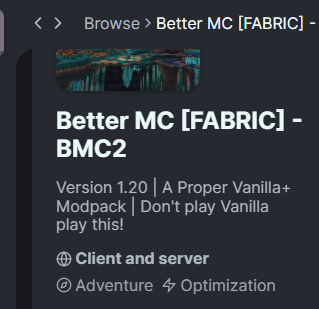
Hey y'all, sorry if this is obvious, but I'm trying to move away from Curseforge and onto Modrinth. When I download BMC2 (if fabric is still ok?) I can run the client no problem, but I can't seem to find the server files even though Modrinth says it has both client and server files. Is it the same folder?
tropic scroll
pretty sure modrinth doesnt do server files
ima check rq
nope they dont do server packs
chrome urchin
Ahh no wonder I was confused, they baited me
https://i.imgur.com/rpujQhz.png
 tropic scroll
strange
chrome urchin
I'll just grab it off curseforge, thanks
 ivory zephyr
Hi, not sure if this belongs here, but i just saw that the "Quit Game" button in BMC2 is lower than the other buttons and now it's kinda bothering me.
tropic scroll
can you screenshot what you mean?
 ivory zephyr
ohhh good it's not intentional
chrome urchin
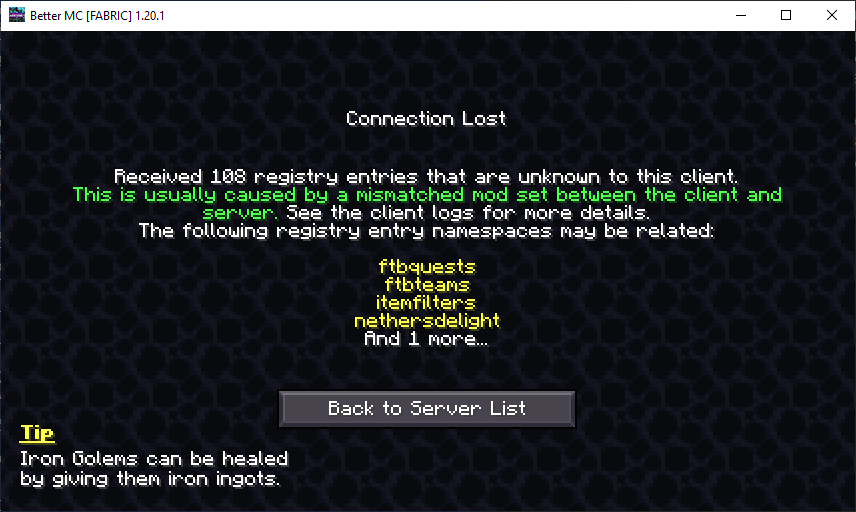
Alright, so I downloaded fresh server files from Curseforge for 1.20.1, and downloaded BMC2 via Modrinth and I get this:
 tropic scroll
chrome urchin
Alright, so I downloaded fresh server files from Curseforge for 1.20.1, and down...
tropic scroll
chrome urchin
Alright, so I downloaded fresh server files from Curseforge for 1.20.1, and down...
yep seems about right
curseforge is for well
chrome urchin
Modrinth won't let me launch BetterMC on 14.25, forces me to use 15.0+ later
tropic scroll
curseforge
chrome urchin
oh I see what you mean
tropic scroll
its ment for curseforge
to get the server pack for modrinth youd need to make it urself
BUT
prety easy
#1107942536737193994 pinned messages for a serverpackcreator guide
chrome urchin
So many mods have moved off Curseforge that I've lost interest in using it
alright I'll take a look! thanks
tropic scroll

tropic scroll
chrome urchin
So many mods have moved off Curseforge that I've lost interest in using it
modrinth doesnt have all the mods cf does sadly
as cf has exclusive shit
pearl flume
some creators seems to have signed contracts with CF for exclusivity. Others moved away as they're sick of CF's bullcrap and messing up the downloads.
 tropic scroll
you probs dont have java installed for the right version
get java18 64x msi jre or jdk either one
!openjdk
undone latchBOT
- Download an adoptium release for Java (recommended but not required):
- Java 11 (https://adoptium.net/temurin/releases/?version=11) for versions 1.16.5 and below (can also use 8 if its not working)
- Java 18 (https://adoptium.net/temurin/releases/?version=18) for any versions newer (or 17 if 18 doesn't work)
- Consider installing the JRE instead of the JDK for a smaller file size
-
When installing through adoptium, make sure that Add to PATH and Set JAVA_HOME variable are both set to be installed (please see https://imgur.com/a/jPu1h7h for how that would look)
-
Check if java has been correctly installed by running java --version (or java -version on older versions), and seeing if the output is correct (see https://imgur.com/a/OWcoq4p for an example of the output)
- NOTE: 64 bit versions of java ALWAYS have '64-bit Server VM' in the version output. If that is not there, you have installed a 32-BIT version!! If you're getting Out of Memory errors or any other errors, PLEASE install 64-bit
- If the output isn't as intended, you have 2 options.
i) Delete ALL other java versions from your PC (ONLY recommended if you don't need them)
ii) Redirect your launcher/server to use your new installation of Java
Method i
- Uninstall any other java program listed in your programs list (differs by OS, please find a guide for your own OS if you don't know)
- Attempt to re-use the command mentioned above (if the output is now correct, which it should be, you are ready to go)
Method ii
- For a server, please modify the $Java/JAVA variable (found in your startup script depending on ps1/sh) to the path of your java installation. For windows, this path is usually found in "Program Files/Eclipse Adoptium/version_of_java/bin"
- For a client, depending on whether you use CurseForge, GD, or AT, the process is slightly different. Please see a guide for each respective launcher on how to change the java version.
chrome urchin
tropic scroll
you probs dont have java installed for the right version
I should, I got java incorrect version errors and fixed those up, but I'll try your specific suggestion
tropic scroll
 hollow idol
its been a longgg time since ive played and i keep getting an owo-ui error when running is that bad? is it because im playing bmc1? it says to check my logs but im so losttt
tropic scroll
hollow idol
its been a longgg time since ive played and i keep getting an owo-ui error when ...
!moreinfo
undone latchBOT
Hello! For us to help you with your issue, you will need to answer all 8 questions below. Post the answers in this channel:
1. Have you modified the modpack in any way? If so, what did you do? (Updating/adding/removing mods, changing configs)
2. What launcher, or program, are you using to launch the game? (CurseForge, ATLauncher, etc)
3. What Minecraft version are you playing? (1.18.2, 1.16.5, 1.19.2)
4. What version of the modpack are you playing? (v11, v9, etc)
5. What steps are necessary to reproduce the crash? (Launching the game, exploring the world, etc)
6. Have you ever gotten past the point where the crash happens?
7. Send the crash report file into this channel. Right click the modpack, Open Folder, and navigate to the Crash Reports folder. Drag the newest one here. If there is no crash reports folder, do the same thing with the latest.log file in the logs folder.
8. Did you follow the Performance guide linked in #faq?
hollow idol
- last time i messed with it was back and may and i cant remember what i did
- curse forge
- honestly no clue bottom left says v.2.15.23-17.2 (not sure if thats what im looking for)
- v20
- launching the game
- yes
- there
- i dont think this applies
sorry for being so clueless!!! i had a friend do all the work back then so i have no idea what im doing
pearl flume
Did it work fine before for you or is this first time booting it up?
hollow idol
it worked fine back in may but this is the first time in months ive used it i even had issues with the launcher and had to do a clean and restart on my computer
pearl flume
3 is the version of minecraft so it'd be 1.19.2
I'd give atlauncher or modrinth a shot as CF has the tendency to do dumb things.
pearl flume
hollow idol
do either of those have better mc?
both do
hollow idol
thank you so much
 worthy dock
how to I install bettermc v23.5 with multimc? On modrinth the newest version is 3.5...
cinder hearthBOT
worthy dock
how to I install bettermc v23.5 with multimc? On modrinth the newest version is ...
Please read #faq for modpack installation.
tropic scroll
^
tropic scroll
worthy dock
how to I install bettermc v23.5 with multimc? On modrinth the newest version is ...
23.5 is cf
3.5 is modrinth
2 different modpacks
2 different versions
worthy dock
I realise that, I ran into this because the server im hosting is 23.5 and I couldnt figure out a way to install 23.5 client on multimc. Ill try atlauncher
tropic scroll
!alternates
undone latchBOT
If this command was run in response to your question/issue, it is likely because switching away from the launcher you are currently using would fix your problem.
From our experience, the most stable launcher by far is ATLauncher, also known as ATL.
To install ATLauncher, do the following:
1. Go to https://atlauncher.com/download
2. Install and run the setup, then open the program.
3. Login to your Microsoft account that owns the Java Edition of Minecraft from the Accounts tab on the right. This process is 100% safe, as it goes directly through Microsoft. ATLauncher does not see your account credentials.
4. Go to the Packs tab on the right, then click "Curseforge" on the left.
5. Search the modpack you wish to download.
6. Click "New Instance". Click "Ok" on the opted out mods warning, then click "Open All" on the manual download screen.
7. Let the mods download, ATLauncher will grab them from your Downloads folder and automatically add them to the modpack.
8. Go to the Instances tab, and click "Play" on the modpack you downloaded. If you ever see an "Update" button on the instance, click it.
To transfer your Curseforge world to ATLauncher, simply right click the modpack on Curseforge, or click the 3 dots, then click "Open Folder". Copy the Saves folder, then click "Open Folder" on ATLauncher and paste the Saves folder there.
Because ATLauncher downloads the exact same files as Curseforge does, your world will be the exact same and you will be able to join the same servers. ATLauncher also works without an internet connection (after you've installed the modpack, of course), and does not have any bloat from Overwolf. You are free to uninstall both Overwolf and Curseforge with ATLauncher installed.
tropic scroll
here ya are
worthy dock
alright I got it, thanks so much
tropic scroll
nps
 zinc forge
my chunks are loading really slow
how could i fix this problem? @pearl flume or @polar pasture
pearl flume
please dont ping staff
zinc forge
oh sorry
pearl flume
Follow performance guide, and if you want you can pregen your world but you will not be able to play it while it does so
zinc forge
didnt know that
undone latchBOT
Noob explains how to Pre Generate your Minecraft World.
▬▬▬▬▬▬▬▬▬▬▬▬▬▬▬▬▬▬▬▬▬▬▬▬▬▬▬▬▬▬
➔ Modpack: https://www.curseforge.com/minecraft/modpacks/better-minecraft-modpack
➔ Discord: https://discord.com/invite/9S5tfrY4Fr
▬▬▬▬▬▬▬▬▬▬▬▬▬▬▬▬▬▬▬▬▬▬▬▬▬▬▬▬▬▬
➔ Want a Server?
BisectHosting: https://www.bisecthosting.com/LunaPixel
Use the code "LunaPixel" t...
zinc forge
what java should i run?
pearl flume
18
zinc forge
ok
tropic scroll
zinc forge
how could i fix this problem? <@169556941180239872> or <@299747390888345600>
we might be staff but that doesn’t mean you should ping us for everyday questions for more serious things like a bad person or a bot that’s fine but for this stuff just ask away and a answer will come you’re way
hallow lodge
tropic scroll
you’d need to remove the not enough recipe book mod and enable via rei
gotcha ill try that
tropic scroll
yerp
hallow lodge
tropic scroll
yerp
cant find it, its not listed in my mods list
tropic scroll
try enabling from REI itself then
hallow lodge
like from within the game? ive tried that from within the REI menu in game and the menu item doesnt actually do anything, the icon is still missing even if i have it disabled
the craftables option seems to nearly crash the game as i suppose its filtering throughout the entire item directory every time i acccess the inventory
im not running on a low-end PC either lol
lusty cradle
lusty cradle
is there any way for me to edit the config to allow people to interact with cert...
Anyone know?
hallow lodge
hallow lodge
like from within the game? ive tried that from within the REI menu in game and t...
my issue doesnt seem to be solved by rolling back the version either, went through the entire mods list and nothing
 vivid dagger
is there any support here?
lusty cradle
vivid dagger
is there any support here?
facts
pearl flume
There is, but do realize it's really late for some of us and have other things to attend to IRL. This is not our full time job and we don't get paid for this.
pearl flume
vivid dagger
is there any support here?
Kinda helps if you explain what's going on
vivid dagger
pearl flume
Kinda helps if you explain what's going on
ahh
i have a bit of issue
how do i find the fabric loader to this?
pearl flume
It's part of it? What're you trying to do?
vivid dagger
pearl flume
It's part of it? What're you trying to do?

i tried running it but somewhat it doesnt
cause of the fabric
pearl flume
single or server?
vivid dagger
single
pearl flume
what launcher you using?
vivid dagger
paid version of minecraft
pearl flume
You need a modded launcher to play modpacks. like Curseforge, atlauncher, or modrinth
pearl flume
Try redownloading on modrinth.
vivid dagger
pearl flume
Try redownloading on modrinth.
i downloaded it once and when i tried running it just doesnt seemed to be working
also i did that few times and even running a copy instance of it
none of them worked
pearl flume
vivid dagger
none of them worked
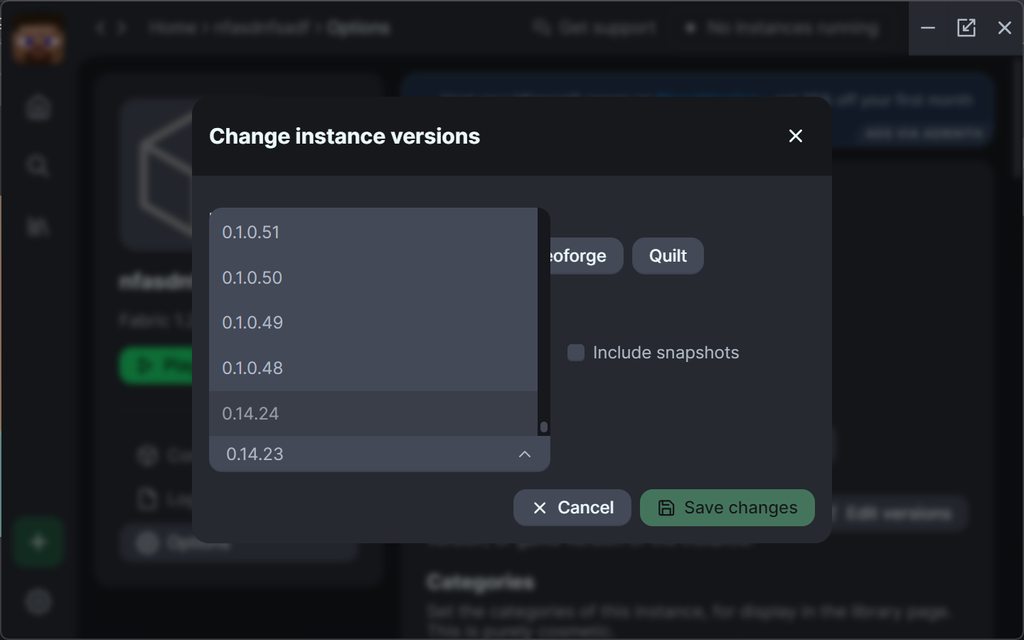
follow that, change it to fabric loader version 0.15.0
vivid dagger
pearl flume
follow that, change it to fabric loader version 0.15.0
it worked this time with no error
cheers mate thanks!
pearl flume
idk why modrinth was forcing the older version interesting
vivid dagger
pearl flume
idk why modrinth was forcing the older version interesting
isn't that because i kind of have the other one in my minecraft directory?
i had that one because i have the shaders pack running
pearl flume
An older version of the modpack or?
vivid dagger
might've caused it on the first place and oh its the actual version that is using
vivid dagger
pearl flume
An older version of the modpack or?
pretty much around 1.20.4 somewhere ish
it still works
vivid dagger
yeah i can see that
 somber edge
Hi everyone! I hope everyone is fine. After a long time I'm trying to back to resume and record Better MC. Are the modes safe now? Should I continue with Atlauncher?
sudden bay
somber edge
Hi everyone! I hope everyone is fine. After a long time I'm trying to back to re...
yes
 vestal pulsar
hi folks
wanted to ask what u think of the new aether update
also why was Paradise Lost chosen instead of the official Aether
sudden bay
vestal pulsar
also why was Paradise Lost chosen instead of the official Aether
Aether is not on Fabric
vestal pulsar
oh :(
tropic scroll
update to?
vestal pulsar
i think i saw that there was an update somewhere
tropic scroll
just the modpack?
vestal pulsar
yeah
undone latchBOT

Discord ➔ https://discord.gg/8ZmhaPPbjE
Twitter ➔ https://twitter.com/SharkieTV
Use CODE: LunaPixel for 25% off ➔ https://www.bisecthosting.com/LunaPixel
vestal pulsar
what if i update to the latest version (for BMC and minecraft)
1.20.1
can i still bring over my world into that
tropic scroll
won’t work
vestal pulsar
ok ty
can't find anything 1.19.2 related on modrinth or curseforge
oh nvm found it
tropic scroll

 hot spruce
does anyone know what mod retextures the vanilla animals (dogs, cows, etc) in the 1.19.2 bmc modpack? I'm trying to use the better dogs resourcepack but it won't correctly load with the other resources
 nova breach
What server package would you recommend for this modpack to run with 3 people?
sudden bay
nova breach
What server package would you recommend for this modpack to run with 3 people?
6gb ram
nova breach
sudden bay
6gb ram
Does it run smoothly with 6gb rather than 5?
vestal pulsar
yeeeeeah so one final question i updated to the latest 1.19.2 version of the modpack and uh
the world is fine but i dont have any waypoints
sudden bay
nova breach
Does it run smoothly with 6gb rather than 5?
its better with 6
sudden bay
vestal pulsar
the world is fine but i dont have any waypoints
your files from the old version didnt save properly
vestal pulsar
they have tho?
sudden bay
your waypoints are seperated from your world file
nova breach
sudden bay
its better with 6
Ok thank you I will get that. I've seen some minecraft youtubers with 25% discount code for bisect servers if you remember any or i will go find on e
vestal pulsar
yeah so how do i have it used again
sudden bay
nova breach
Ok thank you I will get that. I've seen some minecraft youtubers with 25% discou...
qwek
:3
vestal pulsar
because i only took the world folder
sudden bay
vestal pulsar
yeah so how do i have it used again
do you still have the old version
sudden bay
bring over the xaero worldmap files
vestal pulsar
from the older modpack folder right
ok
do i have to restart the game or just rejoin the world once i put the files in
sudden bay
yes
nova breach
sudden bay
qwek
Will do haha
 sudden bay

vestal pulsar
vestal pulsar
do i have to restart the game or just rejoin the world once i put the files in
^ 
sudden bay
sudden bay
yes
^
vestal pulsar
which one of those is a yes
sudden bay
restart
sudden bay
 vestal pulsar
thmanks :)
 sudden portal
Hello what is the RAM requirements for the 1.20.1 version ?
scenic furnace
sudden portal
Hello what is the RAM requirements for the 1.20.1 version ?
well since its fabric you dont need a lot of ram
smth above 4gigs will easily be enough
scenic furnace
sudden portal
i have a very low perf pc
what specs?
sudden portal
i have a pentium gold 7505 and 8gigs of ram
scenic furnace
bro you gonna have a rough time
so id say give your game 5 gigs of ram and close everything while playing
sudden portal
ok thanks for the tips
tropic scroll
sudden portal
i have a pentium gold 7505 and 8gigs of ram
PENTIUM?
oh lawd
!performance
undone latchBOT
tropic scroll
search all you can
undone latchBOT

 elfin cobalt
ight bet
tropic scroll
#better-mc-forge pinned@messages on how to swap java for ATL
get the java18 64x msi and launch msi to install the java
elfin cobalt
i think my java oudated
elfin cobalt
i need java 18 ?
tropic scroll
more fps + more nicer on ur ram
elfin cobalt
bet
tropic scroll
java 18 has better coding so it uses ram more efficiently and little as possible
tried to at least
and ATL is just cf but uses fucking nothing of ur system to run better
vivid dagger
so that is why my better mc keep having lagspike
elfin cobalt
vivid dagger
so that is why my better mc keep having lagspike
check ur ram
allocate
vivid dagger
i have like 16gb of ram and i3 and it should be okay
tropic scroll
which i3
undone latchBOT
tropic scroll
follow along too
vivid dagger
its literally
like 10+ years old
and also was unused for several years until 2018
tropic scroll
yeah i’m surprised it’s still alive
 agile glade
Any fix for the broken Quests in BMC2 Fabric 1.20.1?
sudden bay
agile glade
Any fix for the broken Quests in BMC2 Fabric 1.20.1?
what broken quest


 thorny python
any idea why squids don't spawn?
thorny python
agile glade
some quests show missing items
also to hop on this chain
issue: is not crafted, is a drop; recipe is not provided nonetheless

all three have invalid crafting connections to jei


and some quests just aren't in the game yet
like straw golem and eden ring
thorny python
thorny python
all three have invalid crafting connections to jei
also none of these quests are completable due to task being invalid
most things work tho and quests are kinda irrelv
blissful stump
hello
I suspect that this issue is GPU related, my friend has an Nvidia GPU (GTX 1060) and I have an AMD one (RX 580)
his plants and vegetation keep on shimmering
whenever he's moving
on BMC 1.20.1 Fabric
we we're trying to play on his server and he's facing weird graphical issues for whatever reason
 soft brook
The server is crashing, what should I do?
tropic scroll
soft brook
The server is crashing, what should I do?
set fabric to 0.14.25
tropic scroll
blissful stump
we we're trying to play on his server and he's facing weird graphical issues for...
make him update his drivers
soft brook
tropic scroll
set fabric to 0.14.25

tropic scroll
 errant lichen
how do i add more ram to the better mc fabric 1.20 server?
 errant lichen
bless you
tropic scroll
nps
agile glade
thorny python
also none of these quests are completable due to task being invalid
Makes sense thx for the information
Was really looking forward to the straw golem thou XD
hot spruce
does anyone know what mod retextures the vanilla animals (dogs, cows, etc) in the 1.19.2 bmc modpack?
 humble obsidian
anybody know where better minecraft is on curseforge?
sudden bay
humble obsidian
anybody know where better minecraft is on curseforge?
in the modpack section
agile glade
how does inactive spawner work?
soft brook
When my friend tries to log into the server with Better Minecraft, he gets an error, how can I fix it?
Other friends are fine, only one has such a problem
 sudden bay
soft brook
When my friend tries to log into the server with Better Minecraft, he gets an er...
sudden bay
soft brook
When my friend tries to log into the server with Better Minecraft, he gets an er...
his modpack is not installed properly
lapis bloom
How can i reset the End completely? When i delete the DIM1 Directory and do a Restart the Dragon is not Spawning.
sudden bay
lapis bloom
How can i reset the End completely? When i delete the DIM1 Directory and do a Re...
you can do /end_island reset
lapis bloom
sudden bay
you can do /end_island reset
you saved the day, thx man.
tropic scroll
sudden bay
you can do /end_island reset
lyric cairn
im not sure if this is normal but when i launch the bmc2 server it says bclib patching everytime i launch it with .ps1 i tried deleting the config for bclib and generating another but that didnt seem to fix it any ideas?
tropic scroll
!logs
undone latchBOT
To better assist with fixing an issue, we will need some logs: Curseforge/GDLauncher-> Right click the modpack instance -> Open Folder. For MultiMC -> Click 'Instance Folder' on the right.
Find the file 'Latest' in the 'Logs' folder. If there is a folder called 'Crash Reports' then find the newest file from today. Upload these as requested.
lyric cairn
here is the most recent log
 lyric cairn
yeah
i started it
near lines 657 are the bclib thing it keeps saying patching every time i launch server
lyric cairn
is that normal?
tropic scroll
see bclib does a check of the Regionfiles time to time to make sure nothing got corrupted
ive seen that happen for over 25k lines
ur fine
 lyric cairn
goofy bing
tropic scroll
as ur world is comprised of 10's of hundreds of region files (other servers have 100k to a million) and it takes MINUTES to launch the servers
bclib is a annoying shit
but god is it good
cuz ive seen it catch bad region files and fix them so many times
lyric cairn
thats good ig
tropic scroll
ye
lyric cairn
it takes way longer to load the server so thats a price to pay
tropic scroll
yes
very true
the offical promine-nce server takes like 5-10 minutes to launch
mfing 250gb world folder

lyric cairn
damnn
my server has 8gb ram and it still has minor lag problems lol
it is on old software
undone latchBOT
 shut fjord
where can i find the questbook? the faq says top left of my inventory but its not there
tropic scroll
shut fjord
where can i find the questbook? the faq says top left of my inventory but its no...
what launcher you using
shut fjord
modrinth
pearl flume
shut fjord
modrinth
Are you looking at the top left corner of your screen or your inventory pop up section?
pearl flume
Weird it should be, you're in the latest version?
pearl flume
mind sharing a screenshot of the pack and your inv?
shut fjord
yeah one sec

and just a default profile

release vr 3.5
even reloaded the entire pack and everything
 pearl flume
shut fjord
even reloaded the entire pack and everything
pearl flume
shut fjord
even reloaded the entire pack and everything
Did you add or modify anything?
pearl flume
The place it's usually at is where the star is in the top left.
shut fjord
Could EMI be conflicting somehow?
pearl flume
EMI is conflicting yeah.
shut fjord
What to do about that?
pearl flume
I saw this once before lemme see if I can find how we fixed it
wait nvm  sadly FTB quests is curseforge only
shut fjord
I see I see
Shame the game runs at 47 frames a second on curse forge but 356 on fabric 
pearl flume
Yeah CF is getting worse and worse honestly. You could try the performance guide to help you out too, but atm I don't think they have any alternate to FTB for non-CF versions
shut fjord
CF has just gone downhill, I gave up on it a while back, sodium is just too OP
night birch
it's just that ftb mods are only on cf
pearl flume
they don't allow rehosting specifically
night birch
imo, just use at launcher, therefore you don't have to use curse launcher to play packs that are on curse
shut fjord
Last time I really had success with CF was the golden age of 1.7.xx mods
glossy halo
are the end ships bugged or is there supposed t obe no loot on them
i feel like the pedestals are supposed to have elytra on them
night birch
the crashed ones, aka the ones on the ground, won't
glossy halo
are there supposed to be ones around the end cities?
i ahvent seen a single one
cause there's ones on the ground that arent crashed but they dont ahve any loot in them and i dont think its supposed to do that
night birch
glossy halo
are there supposed to be ones around the end cities?
yes, but not every end city, it's just like vanilla
night birch
glossy halo
cause there's ones on the ground that arent crashed but they dont ahve any loot ...
if it's on the ground, it's crashed
because they're usually in the sky
and they no longer have their blimp, so yeah lol
glossy halo

glossy halo
night birch
and they no longer have their blimp, so yeah lol
but it says they're supposed to be in the loot pool for end shipwrecks
night birch
glossy halo
but it says they're supposed to be in the loot pool for end shipwrecks
if they are, it's really rare and not worth looking in all of them tbh
night birch
very rarely I think, and I mean very rarely, can you find an elytra on one of the pedestals
glossy halo
but i mean there's absolutley zero in the chests as well
night birch
well, they aren't gonna be in there
I have a ton of experience with this, your best bet is to find an end city with the normal ship in the sky lol
 brittle frost
I downloaded the latest version of fabric but my main world is on 1.19 , is there any way to move my world over to this one from the 1.19 version
night birch
No
brittle frost
dang that sucks, thanks.
 drowsy escarp
looking to start an smp with some friends, what version would be the best
pearl flume
drowsy escarp
looking to start an smp with some friends, what version would be the best
Just depends on what you are wanting to go for, whichever 1 you go with though make sure it’s the latest version of it.
 unkempt tartan
 undone latchBOT
- Download an adoptium release for Java (recommended but not required):
- Java 11 (https://adoptium.net/temurin/releases/?version=11) for versions 1.16.5 and below (can also use 8 if its not working)
- Java 18 (https://adoptium.net/temurin/releases/?version=18) for any versions newer (or 17 if 18 doesn't work)
- Consider installing the JRE instead of the JDK for a smaller file size
-
When installing through adoptium, make sure that Add to PATH and Set JAVA_HOME variable are both set to be installed (please see https://imgur.com/a/jPu1h7h for how that would look)
-
Check if java has been correctly installed by running java --version (or java -version on older versions), and seeing if the output is correct (see https://imgur.com/a/OWcoq4p for an example of the output)
- NOTE: 64 bit versions of java ALWAYS have '64-bit Server VM' in the version output. If that is not there, you have installed a 32-BIT version!! If you're getting Out of Memory errors or any other errors, PLEASE install 64-bit
- If the output isn't as intended, you have 2 options.
i) Delete ALL other java versions from your PC (ONLY recommended if you don't need them)
ii) Redirect your launcher/server to use your new installation of Java
Method i
- Uninstall any other java program listed in your programs list (differs by OS, please find a guide for your own OS if you don't know)
- Attempt to re-use the command mentioned above (if the output is now correct, which it should be, you are ready to go)
Method ii
- For a server, please modify the $Java/JAVA variable (found in your startup script depending on ps1/sh) to the path of your java installation. For windows, this path is usually found in "Program Files/Eclipse Adoptium/version_of_java/bin"
- For a client, depending on whether you use CurseForge, GD, or AT, the process is slightly different. Please see a guide for each respective launcher on how to change the java version.
hallow lodge
hey yall, how do i turn off the nether skybox change in 1.19.2 v20?
its so bright and makes it very hard to see what im doing
 errant rover
Hi, does anyone know what mod makes you freeze in Better MC 1.19.2? When it turns night if ur not next to a heat source you start freezing and it kills you
agile glade
any series on BMC2 1.20.1 Fabric?
tropic scroll
agile glade
any series on BMC2 1.20.1 Fabric?
wym
lapis bloom
Did you fixed it?
lusty cradle
nope
lapis bloom
lusty cradle
nope
damn
lusty cradle
I've actually probably spent 15 hours tryna fix it at this point
ohh
wrong server
no I did it
lapis bloom
lusty cradle
no I did it
I tested all Interact Options in opac config, nothing worked
 hot pawn
did you go throw it?
 hot pawn
is it the aether?
 hot pawn
wait what
 proven plaza
I have very little knowledge about it
i just dowloaded the game 4 days ago
how can i fix it ?
hot pawn
did you build the glow stone frame and then light it with a bucket of water


 tropic scroll
proven plaza
the nether
tropic scroll
proven plaza
the nether
pinned messages
errant rover
proven plaza
the nether
is it the eather mod u have installed?
proven plaza
errant rover
is it the eather mod u have installed?
it's paradise lost or st
errant rover
this is the pinned msg
Also does anyone know what mod makes you freeze in Better MC 1.19.2? When it turns night if ur not next to a heat source you start freezing and it kills you, I typed it in a few hours ago but got no response
agile glade
how to move enchantement from a equipment to a book?
tropic scroll
 warped oasis
Can anyone help me where I can find aether dragon egg in BMC4?
warped oasis
Can anyone help me where I can find aether dragon egg in BMC4?
ur inside fabric chat
go to #better-mc-forge
warped oasis
K
 bright steeple
anyone any idea what the problem might be?

 maiden cedar
italian?
maiden cedar
PEOPLE
i actually need italian people cause i have some difficulties to interract in other languages
not racist btw
maiden spire
bright steeple
anyone any idea what the problem might be?
what server are you connecting to?
vestal pulsar
hi wanted to ask is it possible to have more quests
There seems to be very little quests in BMC1
Is there a compatible that adds more quests?
sudden bay
vestal pulsar
hi wanted to ask is it possible to have more quests
you can add it yourself
by enabling editing mode and making it on your own
vestal pulsar
sudden bay
you can add it yourself
oh really! thanks!
 haughty robin
Is everything accessible in paradise lost in survival? trying to get the Valkyrie lance but cant seem to find it anywhere?
 slim radish
hi, can someone help me, just installed the bigchadguys modpack and im lagging, i have a great pc, so its no the problem, is there any setting i should change or something, maybe the java version?
tropic scroll
friend
this is the bmc fabric channel 🙂 #1171712318879580191 #1176385487745863721
!performance
undone latchBOT
slim radish
im sorry
somber edge
When I try to enter my world, the game closes immediately, what should I do? I just updated the game from BMC1 v17.5 (1.19.2) to BMC2 v3 (1.20.1)
somber edge
uhmm. there no any way? I need to resume with the old version?