#medieval-mc-forge
1 messages · Page 303 of 1
 west tinsel
 main minnow
no, it didn't have a name as I walked up to it. I am saying it displayed for a brief instant as I killed it. I could be trippin, but I swear it was there...
west tinsel
lol anyways you wouldnt happen to have a takeoff spell book from ars would you?
main minnow
nope
 hidden wraith
You should be able to look that up in jei as it's a specific item
west tinsel
hidden wraith
You should be able to look that up in jei as it's a specific item
its an item called casters tome and its given a spell
hidden wraith
Ah that's cleverly made but also unfortunate.
west tinsel
yeah so if i know the spells contents and have a casters tome i can make my own
 uncut dragon
Gonna be real honest boss, Tome of Blood with a fully functioning well of suffering makes Ars casting moderately overtuned XD
Very thematic for a demon boi though
hidden wraith
uncut dragon
Gonna be real honest boss, Tome of Blood with a fully functioning well of suffer...
Regular Mages Spellbook is already enough to completely invalidate every vanilla mob and basically anything not a dragon in the overworld. Mana regen and discount items are incredibly easy and cheap to make so you never really have to worry about mana running out either.
Ars is not for you if you want a challenge.
At least all the "+x% damage" stuff from mods like player exp doesn't also work on it
uncut dragon
Fair
west tinsel
hey ive been noticing a fair bit of lag anytime i access the simple storage network is there anything i can do to minimize it?
 glossy crane
I did a quick search and did not see it mentioned before, but any thoughts on Astikor Carts being added to the pack?
west tinsel
for this pack which is more useful smite or bane of illigers?
i ask because i find illigers more annoying but unsure if smite will work on the modded undead
hidden wraith
I doubt either will come up as the mobs you really need strong weapons for aren't these. Though smite wins out just in case it works on mutant zombies / skeletons
 elder forge
i usually have 2 weapons just for those 2
 sour reef
When installing shaders, do I need to remove all magnesium content? Like Magnesium, Magnesium dynamic lights and magnesium extras?
Dynamic Lights Reforged also I can't find anywhere, is it maybe the magnesium dynamic lights?
 dawn void
for the new 49.5v update, ive updated my cursedforge launching app. and have moved the new server folders into my world. But when I try and join the server I have made, I get an error of a mismatched mod channel list
west tinsel
hidden wraith
I doubt either will come up as the mobs you really need strong weapons for aren'...
yeah mutant skellies are so annoying
do you know how to tell if a food is good for saturation?
i tend to prefer stuff that has higher saturation filling than actual hunger
 atomic adder
sour reef
Dynamic Lights Reforged also I can't find anywhere, is it maybe the magnesium dy...
atomic adder
sour reef
Dynamic Lights Reforged also I can't find anywhere, is it maybe the magnesium dy...
All the magnesium stuff, and indeed magnesium dynamic lights (dynamic lights reforged is the file name)
sour reef
Thanks again 🙂 Really appreciate the mod and the help.
atomic adder
No problem
 brisk aspen
Why are back packs disabled for me in the 1.16 version?
 foggy nimbus
brisk aspen
Why are back packs disabled for me in the 1.16 version?
foggy nimbus
brisk aspen
Why are back packs disabled for me in the 1.16 version?
theyre not disabled
screenshot?
brisk aspen
I can’t right now but it says I’m missing like a mod or something
Which I don’t understand because I downloaded the official modpack
atomic adder
Only quark backpacks should say that, because oddities isn't included
You should be able to use the ones from traveler's backpacks just fine
brisk aspen
atomic adder
Only quark backpacks should say that, because oddities isn't included
Ok, do you know the name of the enabled back pack because only one result came up
atomic adder
Also 1.16.5 right?
brisk aspen
atomic adder
You should be able to use the ones from traveler's backpacks just fine
Are those like the mob back packs?
brisk aspen
atomic adder
Also 1.16.5 right?
Yes
atomic adder
Let me load up to see the actual name
brisk aspen
Thank you.
atomic adder
brisk aspen
Thank you.
Pretty much searching up backpack gets these options, the ones circled in red work:
 foggy nimbus
not even gonna ask
atomic adder
Yeah, traveler's backpack is a bit weird with some of their variants

 atomic adder
Spider and villager themed back packs
dawn void
congrats on the promotion switch
 tender fern
 marsh quest
if I'm getting a server for about 6 people, how much RAM does the server need?
west tinsel
when looking at food what does the hearty meal and filling meal stuff mean im guessing its saturation? but like what is the best?
what on earth are with these chests in the castle in the sky???? i just got a full set of fully enchanted netherite
armor
 proud path
west tinsel
what on earth are with these chests in the castle in the sky???? i just got a fu...
proud path
west tinsel
what on earth are with these chests in the castle in the sky???? i just got a fu...
the terraria ones?
west tinsel
terreria? its a mod called castle in the sky
proud path
oh oh... sorry... that mod is called sky islands. I wondered if it got added to the pack
i havent been to the castle yet... but it is end game and very far away
west tinsel
would have been nice to know it was endgame geez that armor is so op
@hidden wraith i believe you mentioned something about me getting blindness and invisibility is caused by something is there a way to turn it off those two dont go away no matter what i drank milk and they just come back unless i save and quit
 strong bone
On the GD launcher I see a few mods that have updates is it ok to update them?
west tinsel
strong bone
On the GD launcher I see a few mods that have updates is it ok to update them?
id say backup your stuff first
strong bone
west tinsel
id say backup your stuff first
Yep already got a back up :p had to redownload my modpack cause GDL was being weird and then I noticed on the new version of medieval it didn’t update some mods. So just wanted to make sure.
atomic adder
strong bone
Yep already got a back up :p had to redownload my modpack cause GDL was being we...
Some mods are deliberately kept at a certain version, keep that in mind when manually updating mods
strong bone
Ah I see
Are there any mods you recommend I keep updated or just wait until the announcements say anything otherwise.
 pure bay
Is there any difference between the different kinds of traveler backpacks?
west tinsel
pure bay
Is there any difference between the different kinds of traveler backpacks?
im not sure in the new version but in an older one they did have unique effects
pure bay
west tinsel
im not sure in the new version but in an older one they did have unique effects
There’s not a lot of info out there on a lot of mods unfortunately
west tinsel
pure bay
There’s not a lot of info out there on a lot of mods unfortunately
basically if you get the pig one and you hear random oinks then they still work the spider was best as it let you climb walls
pure bay
I’m moth so that’s not needed
atomic adder
strong bone
Are there any mods you recommend I keep updated or just wait until the announcem...
I only know of one that we keep at an older version and that's Snow! Real Magic! on 1.16.5 since the later ones have render issues with magnesium. For most part, updating mods aren't too bad but like Fairlady said, keep a backup ready.
strong bone
atomic adder
I only know of one that we keep at an older version and that's Snow! Real Magic!...
Alright thank you :p
 midnight pilot
@atomic adder is there video on how to make a resource pack cause i would like to make one with old school runescape music when i travel my world ;p
hidden wraith
west tinsel
<@!434047846644449291> i believe you mentioned something about me getting blindn...
I was just joking that it's a bug that could also be a feature. Haven't encountered that myself though
west tinsel
hidden wraith
I was just joking that it's a bug that could also be a feature. Haven't encounte...
if you figure it out let me know it’s frustrating that it keeps happening
atomic adder
midnight pilot
<@!243077008332947467> is there video on how to make a resource pack cause i wou...
Yeah, there's a few videos online on how to make a sound pack. I haven't actually looked at any however so I don't have a specific one to recommend
 restive radish
is there something wrong with kousa trees? whenever i try to grow the saplings its never a full tree it just grows one or two logs.
 slate estuary
Is there any way to remove the quest order?
pure bay
i went through a nether portal and im stuck in a loop, it keeps teleporting me in and out of it
how do i fix it
i can't move, it keeps sending me into and out of the nether
 gritty fiber
Hey I have a question, I see a bunch of things in my resource packs that is not being used, is there a reason for this? Can I add them all in?
 worn plover
how do i resummon end dragon on this pack? i use end crystal like in vanilla way but when i place one, its not showing but it deducted the amount of end crystal i have
brisk aspen
What is the best early game setup for increasing inventory space.
brisk aspen
gritty fiber
Hey I have a question, I see a bunch of things in my resource packs that is not ...
I would probably say that you shouldn’t do that
They are probably removed for a reason
 neon cloud
Anyone having an issue with the splitting table recipe in obscuria's essentials?
 broken pecan
Hello I have question. Can I pick up items automatically? Without clicking or holding shift? Im looked for mod which add this but i dont know how to change that.
 tranquil solstice
broken pecan
Hello I have question. Can I pick up items automatically? Without clicking or ho...
tranquil solstice
broken pecan
Hello I have question. Can I pick up items automatically? Without clicking or ho...
You can set "CustomPickup" to false in the itemphysic.json config file inside your \config folder.
broken pecan
tranquil solstice
You can set "CustomPickup" to false in the itemphysic.json config file inside yo...
Thank you very much! I wish you a nice day 🙂
tranquil solstice
Thank you, same to you!
 manic ivy
where can I lfg because I want to play in a small fresh server with some ppl
 dim wagon
manic ivy
where can I lfg because I want to play in a small fresh server with some ppl
dim wagon
manic ivy
where can I lfg because I want to play in a small fresh server with some ppl
Can I yoin your server?
tranquil solstice
The 1.18 version has about 120 mods less than the 1.16 version.
tranquil solstice
Because the authors haven't updated yet.
Also congratz on your promotion, Switch! ❤️
tranquil solstice
Bad people are those who can't appreciate the free work of others who have a life, too.
atomic adder
1.18.1 forge is unstable plus some things aren't the same as in 1.16.5
Which requires some modifications to code
The main issue is how many changes forge has been doing lately to their 1.18 version, been quite a few updates that broke some mods
hidden wraith
atomic adder
1.18.1 forge is unstable plus some things aren't the same as in 1.16.5
"some" things is an understatement.
As far is a I understand you can basically rewrite anything that has any generation or placement of anything really
atomic adder
Yeah, those mods had to change quite a bit
tranquil solstice
And for those changes they have to come up with an alternative method. It may take time to get it to work under the new circumstances.
Also don't forget that nobody writes a perfect code first try. Mod authors have to debug and test their new, updated version, and the more time they can invest into testing the less bugs it'll probably have when they release it.
atomic adder
 stray lily
ayo guys, i want to use some shaders but my game will always crash
stray lily
ayo guys, i want to use some shaders but my game will always crash
Remove magnesium and dynamic lights reforged if on 1.16.5
stray lily
thanks
hidden wraith
What is it that dresses up the caves and gives them different "biomes" based on the world above?
I wanna see the difference when you replace it with worleys or yungs better caves or better yet, combine them.
tranquil solstice
The modpack uses a cave-API, which can be used by other mods to implement cave-biomes.
The CavesAndCliffs backport and DarkerDepths are some of the mods that make use of this API, not sure about worleys and yungs.
hidden wraith
Fairly certain worleys doesn't, cause it just changes the way the "holes" are generated
tranquil solstice
I guess it depends on how the API and stuff works. If the API only "categorizes" underground-regions and allows mods to specify the "surface block" etc for example, then it should not depend on the shape of the caves and still work with worleys. But I really don't know the details about these mods, sorry.
 river cape
What mod makes it to where I have to right click to pick up items? I can't pick up items in water so I just want to vanilla pickup
atomic adder
river cape
What mod makes it to where I have to right click to pick up items? I can't pick ...
There's a mod called Item Physics, in their config itemphysics.json in the config folder, there will be a section at the end. Edit the "customPickup" to be false instead of true. Do not edit anything else.
How it should look afterwards:
"pickup": {
"customPickup": false,
"pickupWhenSneaking": true,
"maximumPickupRange": 5.0
}
river cape
Can I edit it while ingame ?
atomic adder
It may have an in game option to edit it, but best to just edit it directly and relog
 whole summit
what mod includes the energy bar that if you dont sleep you die to being over worked?
tranquil solstice
Survive.
atomic adder
whole summit
is there a way to only turn off the stamina bar?
Yep, just set "Boolean: Enable Stamina" to false in the survive.common.toml file in the config folder
whole summit
awesome thank you!
main minnow
Holy crap, the hole this legendary creeper left in the world... It is basically a 4 chunk crater.

And yeah, that is a corpse waypoint in the middle.
hidden wraith
Survive Config is editable via the ingame menue so that saves one restart
dawn void
@atomic adder sorry to ping, but ever since the recent update, applying the mod pack to my server and through cursed forge it says i have a mismatched mods list
 orchid gale
Is there origins in this mod?
tranquil solstice
In the 1.16.5 version, yes.
orchid gale
Ok Ty
tranquil solstice
@dawn void It says [immersivefx:immersivefx] rejected their client side version number, so please take a look at this mod both in your server's directory and your client mod-folder.
dawn void
tranquil solstice
<@!273637980378365952> It says `[immersivefx:immersivefx] rejected their client ...
seems that my client side folder does not have immersivefx but the server does. strange.
should i remove it from the server, or should i copy the .jar from server folder into client side
tranquil solstice
The announcement for v49.5 says:

So I would say: make sure that Dynamic Surroundings indeed exists, and if it does remove ImmersiveFX from your server.
dawn void
i see ok. I think i see what I did wrong. I just replaced the files for the mods folder instead of deleting and only moving the needed ones from the new update
tranquil solstice
Let us know if there are further issues :)
dawn void
tranquil solstice
Let us know if there are further issues :)
is dynamic surroindings a new mod that should be attatched to the server mods download
tranquil solstice
Dynamic Surroundings used to be part of this modpack until a few weeks ago.
It was replaced with ImmersiveFX recently and now (temporarily) changed back to Dynamic Surroundings.
Not sure if that really answers your question, lol. In this particular update (from v49 to v49.5) the mod Dynamic Surroundings needs to be newly added to client and server, which should've happened automatically when you updated - if you managed to do so properly.
Either way you should be able to connect to your server after removing ImmersiveFX (unless there are other, additional discrepancies).
brisk aspen
the modpack was running fine yester day. now this is popping up and i cant play it. what does this mean???
 tranquil solstice
Please make sure you don't have any keybinds set to external keys on your mouse.
You can use left/right mouse button but no other mouse-keys.
To fix this please edit your options.txt and delete all other mouse-keybinds.
brisk aspen
tranquil solstice
To fix this please edit your options.txt and delete all other mouse-keybinds.
is this directed towards me?
tranquil solstice
Uhm, yes.
brisk aspen
oh
brisk aspen
tranquil solstice
Uhm, yes.
my keybinds on my mouse were working yester day tho
is it like a problem with the key binds messing it up when it loads?
tranquil solstice
They work when you set them ingame but you cannot launch the game with them set. So you'd have to re-bind the keys every time you launch the game.
brisk aspen
oof. that sucks. how do i get to options.txt
 tranquil solstice
%appdata%
 tranquil solstice
You should be able to scroll down quite some way and there should be lines that look like this:

Some of your keys are set to "mouse" instead of "keyboard", and those lines need to be deleted.
(Except left/right click).
brisk aspen
ok thanks
tranquil solstice
If you press Ctrl+F you can open the search-function inside the file. It might help you to find the "mouse"-lines.
tranquil solstice
Please delete the entire line, not just "mouse". It will unbind the entire key and you can re-bind it ingame later.
 tranquil solstice
Then please delete the entire file (so that there is no options.txt in your folder) and launch the game again.
tranquil solstice
Fine. Please place this file into your main folder (after deleting the re-created options.txt) and try again.
brisk aspen
is there a special options folder just for the modpack?
am i messing with the wrong options folder?
oh wait i just found it
main minnow
To find the modpack's files, right click the profile in curse forge, then select fromt he drop down "open folder" all the files for each respective modpack are located in their own self contained file ecosystems
brisk aspen
i was doing the wrong folder lmao. im so dumb
main minnow
Not going to lie, watching this exchange, I am only lucky that I am not you. I very easily could have bound some functions, as many as there are, to other buttons on mouse.
dawn void
so my friend who i have been playing on a server I made can no longer join. getting this error
 brisk aspen
its working now. thank you guys for your help
tranquil solstice
brisk aspen
i was doing the wrong folder lmao. im so dumb
Oh dear, lol. Perhaps I should've asked if you got multiple installations XD
brisk aspen
its fine, i figured it out eventually lmao
tranquil solstice
I'm glad it works now. 🙂
tranquil solstice
dawn void
so my friend who i have been playing on a server I made can no longer join. gett...
After updating to v49.5 only?
dawn void
tranquil solstice
After updating to v49.5 only?
yup
tranquil solstice
Perhaps some server-settings changed back to default. You could try it by lowering the server's view range in the server.properties.
main minnow
I hope you backed up the config files you altered originally, or else that particular installation will have issues(I suspect it is the vanilla installation of the game)
dawn void
tranquil solstice
Perhaps some server-settings changed back to default. You could try it by loweri...
yeah something went wrong. Ive been trying to join my own server for like 5 minutes and im stuck on joinning world
dawn void
tranquil solstice
Perhaps some server-settings changed back to default. You could try it by loweri...
in the server properties, the serverport is different form the original minecraft port
west tinsel
has anyone found a fix for the simple storage system lag? its getting worse and worse
dawn void
main minnow
I hope you backed up the config files you altered originally, or else that parti...
no i did not back up the config, just the world itsself. didnt think i needed to back that part up too
tranquil solstice
dawn void
in the server properties, the serverport is different form the original minecraf...
If you host the server at home then the port in your server.properties must be the same port you forwarded in your PC's firewall and your router's interface.
main minnow
west tinsel
has anyone found a fix for the simple storage system lag? its getting worse and ...
This doesn't sound like a problem that can be fixed by anyone here, more like a problem that has to be fixed on the mod creator's end. If it can be fixed at all.
main minnow
dawn void
no i did not back up the config, just the world itsself. didnt think i needed to...
Sorry, that was not meant for you, my bad, I should have replied to the person I was talking to.
I didn't think it was important enough to tag them.
 strong tulip
How do we find Loran? Is there Loran Ore in the overworld??
dawn void
tranquil solstice
If you host the server at home then the port in your server.properties must be t...
so there is a server port, a query port and a rcon port. the server and query port are the same but the rcon port is different
tranquil solstice
Uhh. Sorry, that exceeds my knowledge. I've only ever worked with 1 port in Minecraft servers.
dawn void
ok, i dont even know if thats the issue. from what the properties say, it doenst seem like it
tranquil solstice
strong tulip
How do we find Loran? Is there Loran Ore in the overworld??
There is no Loran in the Overworld. You will have to complete the Void Wyrm Quest to get the portal blocks and the activator staff.
strong tulip
dawn void
so there is a server port, a query port and a rcon port. the server and query po...
Query and RCON are optional, the only one you need to be able to conect is the server port
dawn void
strong tulip
Query and RCON are optional, the only one you need to be able to conect is the s...
hmm then i dont see why im having an issue connecting and also my friend
west tinsel
main minnow
This doesn't sound like a problem that can be fixed by anyone here, more like a ...
i was more aksing if there is something i can do in game to lessen the effect or if i should look for a different storage mod that wont cause as much lag even if it doesnt fit the mod pack
strong tulip
dawn void
hmm then i dont see why im having an issue connecting and also my friend
Anything in the server logs?
dawn void
strong tulip
Anything in the server logs?
nope, my friend trying to connect doesnt even show up. which is interesting. Ill try rebuilding the server from scratch and just moving my world and seeing if that fixes the problem
strong tulip
If you're friend trying to connect doesn't show up, you probably have a networking issue
Did your IP change in the mean time?
dawn void
thats strange as nothing has changed besides updating to the new version
nope same ip he is trying to connect to and my ports are forwarded
reset up a different server, he is still unable to join. Guess its a networking issue?
strong tulip
Can he ping your server?
dawn void
i think i figured it out
dawn void
strong tulip
Can he ping your server?
nvm i didnt. no he cant. he gets "unknown host"
we got it
strong tulip
Is he connecting by IP or via a DNS ?
dawn void
for some reason my computer changed my ipv address and shut down my forwarded ports because it wasent connected anymore
west tinsel
hey for the mutants mod is it compound z or formula y that i use to turn mobs into the mutant version?
got a crash upon trying to spawn spider pig
dawn void
ok now for some reason im not having to sleep on my server to skip the night, but when my friend sleeps it gives him like no energy
strong tulip
What's with the end portals with a chest and a "troll face .png" glass pane?
main minnow
This one is pretty self explanatory.
strong tulip
Non-functional end portals?
strong tulip
You put the pearls in and nothing happens because the frame blocks don't have the right orientation?
main minnow
Don't put any eyes in the portal frames. That would be an epic waste of an eye(s)
 raw harbor
Hey there having a pretty bad cave fog problem: Cave fog is thicker than a block of swiss cheese. Haha. Optifine allows you to turn off Custom Sky which removes this issue but was hoping to fix this another way. Is there a way to decrease the intensity/opacity of the cave fog?
Using
- Medieval Craft [Forge] v3
- Forge 39.0.59
- OptiFine 1.18.1_HD_U_H5_pre4
- Complementary Shaders v4.3.3
Let me post a screen shot and vid here...
raw harbor
raw harbor
Hey there having a pretty bad cave fog problem: Cave fog is thicker than a block...
 west tinsel
how am i supposed to spawn a spider pig if i cant make chemical x?
foggy nimbus
raw harbor
Hey there having a pretty bad cave fog problem: Cave fog is thicker than a block...
Shaders should have fog options
raw harbor
foggy nimbus
Shaders should have fog options
You say that because, a feature about fog density like that just make things too complex?
foggy nimbus
?
My guess is that the shaders are causing it
And shaders have shader options
And usually have something about fog
raw harbor
Hmm seems like it was the Optifine Version and Shader. Looks like when I use OptiFine 1.18.1_HD_U_H4 Problem is gone, and I can use the Custom Sky . Guess I should just stable versions of Optifine, durr.
Thanks for answer tho Dino!
foggy nimbus
np
dawn void
strange for some reason on my server when anyone sleeps it skips time for everyone
we cant rest to get out energy back either. it just skips to fast
pure bay
Does 1.18 fabric really have 120 less mods than forge 1.16?
foggy nimbus
dawn void
strange for some reason on my server when anyone sleeps it skips time for everyo...
Theres a command you can run to stop this
I blanked on it tho :/
 rigid jungle
why can't i carry passive mobs like pigs with the carry mod?
works with spawners and chests
 fresh cedar
Yo any of you guys missing textures in 49.5?
west tinsel
rigid jungle
why can't i carry passive mobs like pigs with the carry mod?
it should work it does on 48.5
brisk aspen
Does anyone know how I get the mob souls for the spawners
I want to make a spawner based mob farm
west tinsel
also not sure if it works in the update but in 48.5 the create and kill a mutant snow golem doesnt register it ive killed 3 and none of them counted
also there is no way to get the chemical x needed to make one without cheating it in
 exotic monolith
is there something in the config preventing glowing?
west tinsel
west tinsel
also there is no way to get the chemical x needed to make one without cheating i...
found out the recipe is just not in jei
 quasi shadow
Anyone know why my map and waypoints have both reset? I havnt updated or anything....
Im lost now lol xD
 heavy orbit
brisk aspen
Does anyone know how I get the mob souls for the spawners
heavy orbit
brisk aspen
Does anyone know how I get the mob souls for the spawners
Ghosts drop souls which can be made into mob souls you’ll need a necromancy table tho, I think there’s also and enchant called “soul siphon that allows mobs to drop souls.
exotic monolith
heavy orbit
Ghosts drop souls which can be made into mob souls you’ll need a necromancy tabl...
reaping
heavy orbit
exotic monolith
reaping
Dat one .
 fleet apex
fleet apex
fleet apex
Can anyone help me please??
The server was working fine the last time I opened it
dawn void
foggy nimbus
Theres a command you can run to stop this
did you manage to remember
west tinsel
hey isnt there a way to upgrade enchantiing books?
 golden oyster
for some reason a weird menu pops up, and it looks like a book and a couple options say "how to enter" and "how to leave". But when that happens it crashes my game, can anybody help me figure out why?
 molten plover
I need to kill a ticking cyclops in an unloaded chunk, but I noticed this doesn't have COFH -- is there anything in the pack that can help? Or something I can do?
(The server can run, I just have 1 player that cant log in because it loads the cyclops)
strong tulip
golden oyster
for some reason a weird menu pops up, and it looks like a book and a couple opti...
Check your keybinds
golden oyster
when i load in i dont think i hit any keys and it just pops up but let me try loading in again and see if it happens when i dont press anything at all
 primal anchor
having an issue with 1.16.5 medieval forge. it is running super bad for me and my friends. whether its on our server or we try to play single player, it is unplayable. anyone know of a common issue causing that?
 full ginkgo
hi is there a mod that makes the mobs invisible or is it just a bug
golden oyster
well my game worked this time, because the last time i tried it, i moved away from the spot i was standing and crashing at, and i also changed the difficulty from easy to peaceful, so no clue what caused it
strong bone
full ginkgo
hi is there a mod that makes the mobs invisible or is it just a bug
Is it the one with the bow?
full ginkgo
yea
strong bone
Yeah I wanna say that’s intended since I get it too sometimes In a forest
strong bone
primal anchor
having an issue with 1.16.5 medieval forge. it is running super bad for me and m...
How many gb of ram did you put into the server?
primal anchor
we have 5 on the server, and i got a sweat dog pc and cant even run the 1.16.5 at all it just freezes bad. i can run the 1.18 just fine though on 4gb
strong bone
Try putting 8gb and see if there is a change
primal anchor
but the issue is that it runs just as bad in single player, so im not sure its a allocated ram issue on the server
strong bone
Hmm hopefully someone with better knowledge can help you soon. All I can think of is ram or if you have optifine going then it needs two mods taken out
primal anchor
yeah i wanted to add optifine but was just trying to get the game runnin before i started that
golden oyster
crap it happened again, the weird menu popped up and just crashed my game
molten plover
I have a cyclops in a certain area of my server causing the entire thing to crash if that chunk gets loaded. Does anyone have a solution? It is an Ice And Fire Cyclops.
in a cave.
 idle trench
sour reef
idle trench
sour reef
Any way on server to redistribute attributes in Medieval 1.16.5?
west tinsel
full ginkgo
hi is there a mod that makes the mobs invisible or is it just a bug
its from a structure it has invisible skeletons in it
west tinsel
strong bone
Hmm hopefully someone with better knowledge can help you soon. All I can think o...
its from a structure it has loot and a bunch of invisible skeletons in it
strong bone
west tinsel
its from a structure it has loot and a bunch of invisible skeletons in it
Ah yeah I never thought it was a bug can’t remember if there was an achievement for it tho
west tinsel
does anyone know how to find a cretan minotaur? its my last optional quest for the overworld
well minus the bugged mutant snow golem
west tinsel
yeah the quest for killing a mutant snow golem is definetly bugged i spawned in 5 and nothing
atomic adder
golden oyster
Try removing the kobolds mod
atomic adder
molten plover
I need to kill a ticking cyclops in an unloaded chunk, but I noticed this doesn'...
Forge itself has an option to get rid of ticking entities, it'll be in the world\serverconfig folder. Look for the forge-server.toml file, change "removeErroringEntities = false" to true, and restart the server if it's running. After that, have the player try to load in, should get it loaded. You can revert the change after they load.
 marsh void
Hi guys, i have this problem when im trying to connect in the server, does anyone know how to fix it? the version is 1.16.5
 atomic adder
marsh void
Hi guys, i have this problem when im trying to connect in the server, does anyon...
atomic adder
marsh void
Hi guys, i have this problem when im trying to connect in the server, does anyon...
Make sure modpack versions match
atomic adder
fleet apex
Revert your java to 1.8.0_312 or below
marsh void
atomic adder
Make sure modpack versions match
i'll check. ty 🙂
i'm still getting the error :/
atomic adder
Which modpack version?
Also please send your latest.log and the server's latest.log
They're both in their respective 'logs' folder, yours on your client's folder and the server's in its folder

 atomic adder
Ight, is it your own server?
marsh void
yes
atomic adder
Alright, please upload the two files I mentioned above
marsh void
atomic adder
Well theres why, the server isn't running forge
So no mods are loaded on the server
marsh void
😮
atomic adder
Is it a self hosted server on your pc or is it on a server provider like bisect and such?
marsh void
the hosted server is HumbleServers
i've changed the jar file minecraft_server.1.16.5.jar to forge-1.16.5-36.2.22.jar
atomic adder
Ignore that, I thought you renamed it :P
I don't quite know how to use their service but I found this guide on their site for installing forge: https://billing.humbleservers.com/index.php?rp=/knowledgebase/18/Installing-Mods-and-Forge.html
Worst case, just ask their support team for how to setup a modded server
marsh void
it work's 😄
atomic adder
Sweet
marsh void
thanks a lot @atomic adder
atomic adder
No problem, enjoy the pack
 gaunt dune
Maybe this question has been written before..sorry.. But is there any way to make 1 player sleeps in Medieval Minecraft [FORGE] - 1.16.5, instead of all player, on a server…i have gone through all the config files..and can’t find it anywhere..
 silent ether
so im trying to break my runic anvil and it just gets deleted when i break it with a pickaxe
 ornate spoke
how can i learn about my race i picked random
main minnow
ornate spoke
how can i learn about my race i picked random
Hit "o" on your keyboard
ornate spoke
it opened a hud tab
main minnow
You must've changed your default keybinds. I suggest, then, you check in your controls settings in your menu and create a new keybind for your origin sheet, one that better suits you.
ornate spoke
oh thanks
main minnow
Wait, hold on
Okay, so using the o key does, in fact, not open the origin tab. Which is very strange because it used to. However, the keybind is definitely set to o, and with no conflicts. I changed mine to shift+", as an example.
Sorry for misleading you there, my information was apparently out of date.
ornate spoke
thanks bro i fixed it now!
 broken terrace
I've been struggling all the morning with Medieval Minecraft V2. I've played a lot of hours in a playthrough, last night I've exited as per usual with no issues. This morning I've alt-tabbed during the first seconds of the world loading screen and it crashed. Now I can't get past "Reading World Data" as JDK stops working altogether. Though Minecraft corrupted someway, reinstalled it. I've tried repairing the Profile. Nothing. Than I've tried creating a world with another Profile, Valhelsia, and it worked. Take note that in V2 it was so corrupted I couldn't even Re create the world because the game crashed after few seconds, preventing me to get the world seed. (I was trying to uncorrupt the save as the first thought was that the save was the problem).
Now I think it's the installation of the modpack that is causing issues. Have you ever had this problem?
atomic adder
broken terrace
I've been struggling all the morning with Medieval Minecraft V2. I've played a l...
Did a fresh install have the same reaction? Also upload your latest.log from the 'logs' folder from your v2 profile, it may say something on there
orchid gale
Exception in thread "main" [12:50:06] [main/INFO] [STDERR/]: [java.lang.ThreadGroup:uncaughtException:1052]: java.lang.NoSuchMethodError: sun.security.util.ManifestEntryVerifier.<init>(Ljava/util/jar/Manifest;)
atomic adder
orchid gale
Exception in thread "main" [12:50:06] [main/INFO] [STDERR/]: [java.lang.ThreadGr...
Downgrade java
orchid gale
orchid gale
Exception in thread "main" [12:50:06] [main/INFO] [STDERR/]: [java.lang.ThreadGr...
having this problem when trying to run the server
did that
atomic adder
I'm guessing 1.16.5?
orchid gale
yup
orchid gale
https://adoptium.net/?variant=openjdk8&jvmVariant=hotspot used the link included

Eclipse Adoptium provides prebuilt OpenJDK binaries from a fully open source set of build scripts and infrastructure. Supported platforms include Linux, macOS, Windows, ARM, Solaris, and AIX.
right
the 312
broken terrace
atomic adder
Did a fresh install have the same reaction? Also upload your latest.log from the...
A new V2 installation let me create a world, which was impossible before. I made a backup of saves, mod configs and few other things I thought should be saved to recover my world and the options I had checked, but now it doesn't work anymore again lol
broken terrace
atomic adder
Did a fresh install have the same reaction? Also upload your latest.log from the...
atomic adder
broken terrace
Judging from that, it seems the configs got messed up, probably from crashing mid load. Navigate to the serverconfig folder located in \saves\worldnamehere and delete it
Then try loading the world
If it crashes once more after that, upload the latest.log
broken terrace
atomic adder
Judging from that, it seems the configs got messed up, probably from crashing mi...
Crap, I was really trying to avoid deleting them ahahahahah
atomic adder
Yeah, sometimes this happens where they just corrupt and can't be read properly so it never loads
main minnow
The Magma Walker (curio)boots are both fun and terrifying. Like, if I have +speed on my shield and bow and have the Scarab talisman equipped and am sprinting across magma through a desert biome, will the block placement be able to keep up with that speed? And, should I take the Magma Walkers off and wear a different set, like the Out Runner pair, and forget that I don't have the Magma Walkers on, and then try to walk over lava...
atomic adder
Even better is the ice skates + scarab combo, since ice gives you that speed boost
 golden canopy
is there a command to disable stamina/exhaustion?
main minnow
I am more a fan of Out Runner, because it is universal. And I don't like to swap out equipment too much. I can really only change between 2 items, maximum. I will also add that OUt Runner has an additional ability that is not listed in its tooltip, it has outrunner when the speed boost is active.
main minnow
golden canopy
is there a command to disable stamina/exhaustion?
You can disable the stamina in the survive config right in game, from the mods option in your menu, just search for "survive" in the mods list. The rest should be pretty straight forward.
golden canopy
ty ^^
orchid gale
any way to turn down the extra foliage details?
is it a mod thing?
feels like my fps dying
 obtuse seal
Hey guys, do you know how i can tun on the automatic pick up for items/blocks? cause i need to right click every single one or press shift but thats annoying..?
atomic adder
obtuse seal
Hey guys, do you know how i can tun on the automatic pick up for items/blocks? c...
There's a mod called Item Physics, in their config itemphysics.json in the config folder, there will be a section at the end. Edit the "customPickup" to be false instead of true. Do not edit anything else.
How it should look afterwards:
"pickup": {
"customPickup": false,
"pickupWhenSneaking": true,
"maximumPickupRange": 5.0
}
 main minnow
Beds... Is this a mod-reload?
stray lily
I was tweaking some setting for better fps and i get this
It also happens when i open the mod
And what’s a mod-reload?
main minnow
That would be a no. I had an answer if it was a yes. But since the answer is no, then I got nothing.
orchid gale
orchid gale
any way to turn down the extra foliage details?
any help with this issue?
it adds these extra things above and below foliage
main minnow
I get a hang at beds, followed by a crash, when I reload my mods mid-game, caused by dwarven blacksmiths and pixies, from the FeyWild mod, when they are present and loaded. Killing them stops the crashing, allowing me to reload my mods. But that is not what is going on with you. So that isn't going to help you.
whole summit
5 gigs of ram enough for forge 1.16.5?
As soon as we get our server open its lags and stutters like crazy
Also reading back to find othersl users issues and fixes
atomic adder
whole summit
5 gigs of ram enough for forge 1.16.5?
As soon as we get our server open its l...
5gb for what? Server or client?
whole summit
atomic adder
5gb for what? Server or client?
Server, also being told my friends updated to 8gb and still choopy
atomic adder
Well, for the server if it's just a few of you 5gb should be fine with a pregen (just going based off of others, haven't actually tested it personally)
As for the client, 8gb is indeed needed
whole summit
atomic adder
Well, for the server if it's just a few of you 5gb should be fine with a pregen ...
Just three of us playing all clients accessing server have either 16gb or 32gb.
How do we go about pre generating? We are currently using the Bisect platform.
Was considering trying 1.18 fabric since it has more mods than the 1.18 forge but fewer that 1.16 forge
(To be clear our issue are currentky with 1.16.5 forge modpack)
atomic adder
You'll need to add in a pregen mod on the server and use it to pregen
whole summit
atomic adder
You'll need to add in a pregen mod on the server and use it to pregen
Gotcha ill just have to youtube it
marsh quest
Just in general, anyone got a useful tip or advice for this modpack? There's so much content that I feel like I'm missing or not noticing something
midnight pilot
@hidden wraith so i reset my world and found a lovely mountain to build on
 hidden wraith
Damn you are busy
I have been temporarily distracted by trying out the vault hunters pack...
midnight pilot
Oo nice
midnight pilot
i hope the pack was good :p
tranquil solstice
If the issue persists in a re-launch please download a new file for the untamedwilds mod.
hidden wraith
Oh interesting. I did not know that there is something changed to how origins work in Medieval minecraft, that allows for size changes. And also apparently something that makes it so visual changes only affect the inner layer of the character skin
 forest marsh
Hello all, I'm running into issues setting up my own server for the 1.16.5 medieval modpack. I'm at the "run the forge-1.16.5-36.2.23" step, but it doesn't bring up the Eula. I do have the Java 8 jdk from the website listed in the readme file and don't have java 16. Should i be asking here or elsewhere?
ornate spoke
tranquil solstice
If the issue persists in a re-launch please download a new file for the untamedw...
still cant open the server
tranquil solstice
ornate spoke
still cant open the server
Did you replace the file in the server's \mods folder and then re-start the server?
atomic adder
forest marsh
Hello all, I'm running into issues setting up my own server for the 1.16.5 medie...
What java 8 version?
forest marsh
Eclipse Adoptium provides prebuilt OpenJDK binaries from a fully open source set of build scripts and infrastructure. Supported platforms include Linux, macOS, Windows, ARM, Solaris, and AIX.
temurin 8
forest marsh
yes
atomic adder
322 breaks forge atm
ornate spoke
tranquil solstice
Did you replace the file in the server's \mods folder and then re-start the serv...
yeah
tranquil solstice
Please send the new crash report.
ornate spoke
whole summit
atomic adder
You'll need to add in a pregen mod on the server and use it to pregen
How many blocks do you recommend pre generating 10k?
forest marsh
atomic adder
322 breaks forge atm
the 312 is for x86 architecture, not for x64.
how do i install it?
 tranquil solstice
@ornate spoke Hmm, not sure what's going wrong there. Did you just set up the server or did it work before and stopped working now?
ornate spoke
tranquil solstice
<@!123144182775676928> Hmm, not sure what's going wrong there. Did you just set ...
it just didnt work
i watched the tutorials and done same things but still didn't work
tranquil solstice
Okay, please remove UntamedWilds from your server and make sure it can start properly without the file. This way we can verify that it's the mod itself and not the whole installation.
ornate spoke
okay let me test
forest marsh
atomic adder
many thanks. One follow up question, what do I need to tell the other players to install to play on the server? Just the modpack in question?
atomic adder
forest marsh
many thanks. One follow up question, what do I need to tell the other players to...
Just the modpack, same version as the one you are running on the server
ornate spoke
tranquil solstice
Okay, please remove UntamedWilds from your server and make sure it can start pro...
tranquil solstice
Ah alright. So it's an installation issue.
ornate spoke
so should i download again
tranquil solstice
Did you install the server on your PC or on a website?
ornate spoke
on my pc
tranquil solstice
Then please download a fresh server-pack.zip and set up a new server. Something must've gone wrong along the way last time.
midnight pilot
hey how do i get rid mod that show me what inventory item I have currently
 foggy nimbus
midnight pilot
hey how do i get rid mod that show me what inventory item I have currently
foggy nimbus
midnight pilot
hey how do i get rid mod that show me what inventory item I have currently
press o I believe
atomic adder
Or 'I'
tranquil solstice
@atomic adder Hi Switch, sorry for bugging you. Have you heard of an issue with Forge 36.2.23 mixing up characters? Like, turning an i into an ı for example.
There is this guy who can't run a 1.16.5 server for this modpack and he keeps getting "invalid character" errors for certain mods.
Non [a-z0-9/._-] character in path of location: untamedwilds:egg_tarantula_black_and_whıte
tranquil solstice
 tiny magnet
i dont know ho i didnt see it
ty
do i need to be whitelisted or something cause i cant enter
tranquil solstice
You shouldn't need to be whitelisted. Did you make sure you client runs on the same modpack version as the server?
tiny magnet
v49 yes
tranquil solstice
v49.5 is the latest, so you didn't just install the latest?
Me hoping that Light didn't secretly update to v49.5 and that's the issue.
tranquil solstice
Ah alrighty.
tiny magnet
mmmmm, how can i get it to v49?
atomic adder
Hmm, never seen that issue, I'll try the latest server pack on my local server
tranquil solstice
atomic adder
Hmm, never seen that issue, I'll try the latest server pack on my local server
Sorry Switch, I've dug deeper into it and it seems to be an issue with the system language being turkish. It only happens to people who have that setting. Really weird though, I would've never guessed that.
tranquil solstice
tiny magnet
mmmmm, how can i get it to v49?
You can right click your current profile and click "change version" to select v49 there.
atomic adder
Weird indeed
tiny magnet
tranquil solstice
You can right click your current profile and click "change version" to select v4...
i went to thw website and manually downloaded the version cause i couldn't see more versions when i clicked there. anyways it solved so thx
 humble bobcat
does anyone know how I might fix this error?
 tranquil solstice
Please don't have any mouse-buttons used in your keybinds (except left/right mouse button).
You can go to your main folder (where your \saves folder is, too) and open the options.txt file. Delete every line that has a mouse-bind.
tranquil solstice
I cannot tell you that, sorry. I only know what this error means x)
humble bobcat
ok thanks for the help
golden oyster
for some reason my game is lagging so much, like entities and when mining blocks, and its just a solo world im playing on. any ideas on how to fix that? it wasnt like that before and i didnt make any changes during the time it worked without lag to now
tranquil solstice
How much RAM does your PC have and how much of it did you allocate to the game?
golden oyster
pretty sure it has a good amount and i allocated a large amount
tranquil solstice
XD
atomic adder
How much is that "good" amount?
golden oyster
10528MB
tranquil solstice
Since you said "good" in connection to total RAM, "large" in connection with the allocated amount and Switch asked for the "good" part I would have to assume that this is your total amount of RAM.
golden oyster
im not sure, im trying to look cause i cant remember my pc's ram amount of the top of my head
atomic adder
Settings > system > about > look for the installed ram line
golden oyster
16 GB
tranquil solstice
That's a fine amount. Thank you for looking it up.
golden oyster
yea of course, if im asking for help im gonna find the info being asked for
tranquil solstice
If you are currently ingame please take a screenshot of your F3, perhaps there is another setting we need to look at.
 midnight pilot
foggy nimbus
press o I believe
midnight pilot
foggy nimbus
press o I believe
ty
tranquil solstice
Does your device have a graphics card?
golden oyster
think so, let me look to see what it is
where can i see that in settings or something? im not sure what it's under
tranquil solstice
I'd check the device manager for that. Just type "device" into your PC's search bar and the device manager should pop up.
 tranquil solstice
Yep, that.
I'm struggling a bit because my OS-language is not English and the order is different XD
golden oyster
ah i see, take your time to figure it out lol
tranquil solstice
What does it list under "Display Adapters"? That's the icon at least.
atomic adder
Yeah, that's the one for GPUs
golden oyster
 tranquil solstice
Why so complicated, Switch. In my language it's "graphic cards" XD
atomic adder
Ay, fellow 2060 user, just not the super :P
golden oyster
really??
 golden oyster
yes, sadly
tranquil solstice
Your screenshot says it uses the integrated ones.
golden oyster
how do i switch it to the preffered graphics card then?
tranquil solstice
It's a bit of a process. We'll do it step by step, lol.
golden oyster
alrighty
tranquil solstice
First of all please go to this window.

I always forget what it's called in English. System Settings or something.
golden oyster
gotcha, im there
tranquil solstice
Alright, then click on "System".
golden oyster
alrighty
tranquil solstice
Scroll down, at the very bottom it says "graphics settings".
golden oyster
ok im in graphics settings
tranquil solstice
Now, what you want it to look like in the end is this:

You want to have the Java SE binary there.
So please click on "Browse".
golden oyster
 tranquil solstice
Ya we will add the Java now.
golden oyster
alrighty, so im at the right spot, clicking browse to find java now
golden oyster
think so, might take a minute to find tho
tranquil solstice
No hurry. If you can't find it let me know.
golden oyster
found the folder with java, do i select the .exe file?
 tranquil solstice
Yeeees, but when I look at your bar at the top then I see 1.8.0_321, which doesn't work with Minecraft 1.16.5.
Are you sure your game uses this version?
tranquil solstice
No, dear, 17 is for minecraft 1.18.
golden oyster
hmm
tranquil solstice
Well let's try this one then.
golden oyster
tranquil solstice
Mark the file as on your screenshot and press "Add"
added, and i will still check curseforge for info on java it uses
tranquil solstice
I just checked mine, I actually use the one from CurseForge directly:
 golden oyster
this is what curseforge says
 tranquil solstice
I suspect your game to actually use the 1.8.0_51.
It is up to you to either just launch the game with this one added and see, or directly add the _51 version as used by the graphics card.
golden oyster
ok is that java in curseforge's folder somewhere?
tranquil solstice
Yes, please right click your profile in the CurseForge launcher and press "Open Folder".
golden oyster
ok
tranquil solstice
You should get to a folder that looks somehow like this:
 golden oyster
 tranquil solstice
Very nice.
At the top bar please press on "Instances".
And then on ".curseforge".
(Aka going backwards in the directory).
golden oyster

 golden oyster
this?
 tranquil solstice
The "runtime"
golden oyster
 golden oyster
there
golden oyster
is this the end goal?
 tranquil solstice
Yep!
golden oyster
sweet!
tranquil solstice
That "javaw.exe" needs to be added in the "graphics settings" where you clicked "Browse".
golden oyster
also, does adding the .exe of a game also make it use the graphics card and make that game run better? also will do
tranquil solstice
Then you can select the graphics card that is used when executing this program.
 tranquil solstice
The .exe of a game makes it use the graphics card but Minecraft is an exception. Because Minecraft is not a stand-alone .exe game. In other words, you will always start Java before starting Minecraft, and if java doesn't run on the graphics card then minecraft cannot either.
Click on "Options" and select your RTX 2060 please.
golden oyster
gotcha, so java is what minecraft would need added but like say for Skyrim, would that just be the .exe from steam folders? and alrighty will do
tranquil solstice
If you let windows decide you never know what they give you 😉
golden oyster
lol
tranquil solstice
golden oyster
gotcha, so java is what minecraft would need added but like say for Skyrim, woul...
Yeah, for most other games (including skyrim) it is enough to add the .exe there.
golden oyster
sweet, good info to know for optimal performance while gaming!
tranquil solstice
:D
golden oyster
thank you so much! you are very appreciated
tranquil solstice
My pleasure :)
golden oyster
let me get in game now and see how it runs now
tranquil solstice
Yes, that's helpful. It should run a lot better now, let's see.
humble bobcat
would it be better to play medieval Minecraft on 1.18 or 1.16 and forge or fabric
golden oyster
itll take a minute to load so ill let you know once im in my world
tranquil solstice
Take your time. I expected it to take like 10 minutes to load.
golden oyster
it is a big modpack lol
atomic adder
humble bobcat
would it be better to play medieval Minecraft on 1.18 or 1.16 and forge or fabri...
If you got the ram for it (at least 12gb), I'd say 1.16.5 forge
tranquil solstice
Usually it's like this: 1.18 has less content than 1.16, and Fabric has better performance than Forge.
So you can kinda sort the modpacks into a diagram there.
atomic adder
Currently, 1.18.1 has the additional bonus of instability due to forge :P
tranquil solstice
Lovely XD
atomic adder
They keep changing stuff that breaks the mods we have in the pack
tranquil solstice
Is there not the possibility to stay on the current Forge version for now?
Or are they like, fixing one thing while breaking another?
golden oyster
the mobs are still lagging and blocks have lag when breaking 😦
humble bobcat
so in terms of content 1.16
tranquil solstice
golden oyster
the mobs are still lagging and blocks have lag when breaking 😦
Please send another screenshot of your F3.
atomic adder
They're just changing stuff internally, while it is a possibility to stay on the earlier forge versions that didn't have the major changes, some of the updates for mods require the later versions
 tranquil solstice
Ah I see. That's a big oof, Switch.
tranquil solstice
golden oyster
Indeed using the correct graphics card now. Render distance is fine. Particles and entities are fine. Allocated memory is good.
Not much you can do sadly, but I would try to set the max FPS to 60 instead of Unlimited. You might prevent your PC from putting too many resources into maxing those out.
golden oyster
alrighty, ill try that
hidden wraith
You also have the "old java version" issue that leads to instability while playing
Manually install java 311 (not 312!) and force Minecraft to use that.
golden oyster
how do you install java 311 specifically?
tranquil solstice
No no, you don't need to do that. You are using the _51 version which works perfectly.
hidden wraith
The trick is to make that setting in the Minecraft launcher, not curseforge. Cause you can set whatever you want there, Minecraft will ignore it unless you point towards it via MC launcher (hidden somewhere in the settings)
hidden wraith
tranquil solstice
No no, you don't need to do that. You are using the _51 version which works perf...
Eh I had quite a lot of problems with crashes before I updated to 311. Not a single one since then
So it might help alleviate issues
golden oyster
yea my game likes to "not responding" every now and then
tranquil solstice
I personally use 301 and don't get any issues.
atomic adder
personally haven't had issues on curseforge's old _51 version
tranquil solstice
golden oyster
yea my game likes to "not responding" every now and then
Perhaps you should keep an eye on your task manager. When the game goes into "Not Responding" it can indicate that your PC is running short on memory (because your background processes also take a bunch). Perhaps when you have your browser or Spotify or even Discord open while playing it's too much for your PC to handle.
You can right click your task bar and select "Taks Manager" (3rd from the botttom), go to the tab "Performance" and watch the usage of your memory.
golden oyster
hm ok
it did the not responding thing while loading up and just uses a ton of memory it looks like

 tranquil solstice
Oh. Well, while loading up it's normal to not respond :) Especially when you get to "Freezing Data" it can stop responding for multiple minutes.
It will recover by itself though, just don't click around.
golden oyster
yea, thats what i normally do
tranquil solstice
The numbers in the task manager can look even scarier later when you're ingame for a while. You see, the amount you allocated to Minecraft is the amount Java is allowed to use to run Minecraft, but Java also needs additional RAM to run itself (basically, when you play minecraft you always run 2 programs: java and minecraft). In the task manager those amounts are added together under "Java Platform SE binary" and can therefore reach like 10GB or more (since you allocated 9GB to minecraft and java needs like 1GB itself).
Hence it can happen when you have too many other processes running at the same time that your PC gets in trouble.
tranquil solstice
Unfortunately I am starting to run out of ideas what else you could do, lol. I play on a laptop with 16GB total RAM that has the same CPU as yours (i7-10750H) and I haven't had any performance issues.
golden oyster
weird, but anyways thank you for all the help you have given and the effort, lol
tranquil solstice
Np :)
golden oyster
do you think using V-sync might help?
tranquil solstice
Feel free to try it, but I've only made bad experiences with it :/
golden oyster
ok
tranquil solstice
You can play around with graphics settings overall (like lowering particles or turning off clouds). Who knows, maybe something makes a noticable difference.
golden oyster
thats what im looking at and messing with right now lol
orchid gale
for forge do i have to install optifine myself? is it stable on the pack?
tranquil solstice
You'll have to add Optifine yourself (after removing Magnesium and DynamicLights). Optifine is kind of stable, but it has known issues with the Twilight Forest. So it's advised to remove Optifine when you want to enter that dimension.
orchid gale
where located because i cant find in the mods folder?
humble bobcat
can you get optifine with this mod pack
 rustic turtle
hey folks, everytime i try and start a world up, it crashes about 5 seconds after loading in. any ideas? ive given it 6gb of RAM and it's always error code 0 bc i have to manually close it
humble bobcat
what mod makes it so u have to click to pick up items and can you trun it off
orchid gale
humble bobcat
can you get optifine with this mod pack
yes
orchid gale
 uncut crater
which version of optifine do i need for shaders?
uncut crater
which version of optifine do i need for shaders?
the newest for 1.18.1
orchid gale
rustic turtle
hey folks, everytime i try and start a world up, it crashes about 5 seconds afte...
try reinstall honestly
anyone ever get lag when looking a certain direction?
uncut crater
orchid gale
the newest for 1.18.1
no it should be 1.16.5
uncut crater
whats the recommended ram for this modpack
strong tulip
Is there anything in this mod to automate crop farming?
I know there's the hay golem, by he requires a lot of maintenance
orchid gale
uncut crater
whats the recommended ram for this modpack
8gb rec, u could probably use 6 fine though
orchid gale
shaders run off your gpu vram not your actual ram so yeah you probably could
uncut crater
mmm interesting
uncut crater
yea server is 5gb
orchid gale
if u run 1 ill hop on
uncut crater
i cant just be disclosing my ip like that vro 💀
orchid gale
😔
main minnow
Your IP is public knowledge, literally anyone can get your IP address. A lot like driving down the street, with your house numbers being on display. That is what a whitelist is for.
orchid gale
uncut crater
think i cud host a server and also run it with shaders
have u tried allocating 8? does it run good?
for me, even though i allocate 8 gigs it always uses 10
or 6 then uses 8
 flint stump
My friend is hosting a server with this modpack and I constantly lag on it for some reason
My other friend joined and he was fine but I seem to be the only one lagging
does anyone know why?
uncut crater
u probably need more ram
orchid gale
flint stump
My other friend joined and he was fine but I seem to be the only one lagging
are u using shaders?
flint stump
nope
tho it does have a lot of resource packs
idk if that has something to do with it
flint stump
rtx 2060 i7-7700
orchid gale
ok so its not that
 naive light
gpu dose not matter that much for modpacks
it does make a difference
but mostly cpu based
orchid gale
yeah i just kinda asked on imulse lol
naive light
4core cpu should be enough
orchid gale
you could have a problem with internet
flint stump
im trying that rn
naive light
idk
orchid gale
are you good in single player?
naive light
me?
flint stump
yeah
orchid gale
i mean shinu
naive light
well i dont play this
orchid gale
flint stump
yeah
ok its internet probably
naive light
i play better minecraft plus
 flint stump
lmfao bro
and you probably wouldnt even have this problem too
im starting to think its the server itself not having enough ram
but it doesnt make sense if the othe guy was able to join and play with no lag
alongside the server hoster
main minnow
Download speeds are irrelevant in determining ping. That is all about distance. How far are you located from the server, where is it in relation to you. For instance, I am in the US, and while I can connect to European servers, I always have about a 3 second lag. And I have a 1gigabit service, which is, again, irrelevant.
flint stump
orchid gale
bro you have insane internet?
clearly not insane enough lmfao
orchid gale
flint stump
but it doesnt make sense if the othe guy was able to join and play with no lag
its not your internet than
and it couldnt be your ram
flint stump
main minnow
Download speeds are irrelevant in determining ping. That is all about distance....
the server is in NA
orchid gale
where are you?
flint stump
na lmfao
orchid gale
it could be graphics
is there a lot of stuff in one area?
when u walk around
and is it low fps or stuttering
flint stump
no when I walk its fine my fps is high and the only stuttering i get is from lag
orchid gale
low fps is lag, if your stuttering every couple seconds or it kinda jumpy its ram or internet
main minnow
Okay then. This is easy. You have the correct amount of RAM allocated(I am assuming you have at least 2-4GB left over for your OS, and assuming the rest of your PC is adequate). So its not that. You are relatively close to the server, so its not that either. Others seem to connect just fine without issue. So its not the server either. The only thing that remains is your ISP. It is possible you just have a poor a connection somewhere between you and the server in question.
orchid gale
^also when it starters is it a long pause or every couple seconds its just there to annoy you
flint stump
I literally have no clue
orchid gale
usually if i get stuttering its a ram isue
flint stump
well shiz
orchid gale
if your fine in single player try doing the good old unplug internet for 30 seconds
orchid gale
r u using an adapter or ethernet?
flint stump
ethernet
flint stump
funny enough I tried that
orchid gale
if im good with my 10mb download speed then no reason for u to fail lol
orchid gale
flint stump
ima dm you the ip
ok bet, also lookin to play wit some people too if yall wanna hop in a discord
or not it cool
main minnow
Once upon a time, not too long ago, when I was still using broadband, I was dropping packets, like, a lot of packets. When just 1 dropped packet is enough to break connection. This went on for about two months, before I was able to get someone out here to take a look. Turns out, there were some microfractures in the overhead lines. The guy had to run a test to see how far down the line the breaks were, and then he went out with a heating blanket and heated up the lines which caused the metal to seal back up again, restoring stable connection.
And that is just one example of the infinite number of problems the Internet can have.
naive light
flint stump
the server host that we're using is shockbyte
u should make ur own server the normally way especially for modpacks
shockbyte is pretty good
but try making a server the normal way
flint stump
how you do that
naive light
flint stump
how you do that
i think sharkie has a video on that
naive light
oh ok nice
orchid gale
So I have been experiencing this issue for about 3 hours now. I've reinstalled Minecraft, reinstalled the modpack, checked my drivers, rebooted my pc and I can't find a conclusion
 naive light
orchid gale
So I have been experiencing this issue for about 3 hours now. I've reinstalled M...
naive light
orchid gale
So I have been experiencing this issue for about 3 hours now. I've reinstalled M...
https://www.drivereasy.com/knowledge/solved-the-driver-does-not-appear-to-support-opengl/#:~:text=The GLFW Error 65542 error,if it fixes the problem.&text=Driver Easy will automatically recognize,the correct drivers for it. i found this maybe it will help
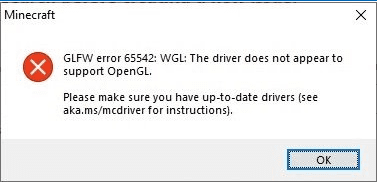
Here is a list of fixes that have helped other users resolve The driver does not appear to support OpenGL.
waitt
its different
still try it though
orchid gale
I can try
orchid gale
Still giving off the same message
 dusty sleet
What mod is the energy bar from
strong bone
Is there a way to reload the Audio? For example switching from speakers to headset.
strong bone
dusty sleet
What mod is the energy bar from
Survive
 keen stag
How do I remove JEI and the thing which opens the inventory when i press 'I'?
atomic adder
orchid gale
So I have been experiencing this issue for about 3 hours now. I've reinstalled M...
Did you keybind anything to your mouse buttons (besides left/right click)?
 mortal plank
does anyone know the best y level for mining stellarite?
atomic adder
Most say the lower Y levels, like around 12y I believe, it generates from 0y to 50y
With up two 3 ore per vein and up to two veins per chunk
atomic adder
keen stag
How do I remove JEI and the thing which opens the inventory when i press 'I'?
Well, I'm guessing by the latter one you refer to the HUD overlay that pops up, that is from inventory hud I believe, as for JEI, I suggest keeping it around as it will save you a bunch of time. It is your best friend in modpacks
tiny magnet
hey, if someone has free time to help me, im trying to get a servver up and runing to play with some friends and i dont know why it wont work. Folowed all instructions and when i run the .bat it wont open the server (i already downloaded java 8 instead of new versions, dm if u want)
orchid gale
atomic adder
Did you keybind anything to your mouse buttons (besides left/right click)?
So I’m guessing that my key that I put crashes it?
atomic adder
If you did, then yes
You can either edit the options.txt file or just delete it and redo all your settings
But those keys need to be unbound from your extra mouse buttons
orchid gale
Alright that makes a lot of sense. Thank you
broken terrace
Do you know which mod/mods in V2 regulate auto collect/right click pick up and auto jump on single blocks?
mortal plank
is this mana?

 weary arch
No, this is a "soul gauge" from the mod Dungeons Gear, some weapons/enchantments from the mod use it either as ammo or as a stat modifier
You can gain them by killing mobs with items with Soul Gathering on them, and you can increase the total amount you can hold with armor enchanted with Bag of Souls
tiny magnet
anyone can tell me if i can change something to pick items from the ground normaly? not having to shift or right click?
atomic adder
There's a mod called Item Physics that alters the way you pick up items. If you wish to disable their custom pickup, in the file itemphysics.json in the config folder, there will be a section at the end. Edit the "customPickup" to be false instead of true. Do not edit anything else.
How it should look afterwards:
    "customPickup": false,
    "pickupWhenSneaking": true,
    "maximumPickupRange": 5.0
}```That was a long time coming.
tiny magnet
atomic adder
There's a mod called Item Physics that alters the way you pick up items. If you ...
that would be in the client or the server im playing in?
atomic adder
Client for singe player. Server needs it on their side if I remember right
tiny magnet
okay
 deep birch
how do i use the torment quiver?
 woven epoch
bruh? @deep birch
 reef hazel
Is doing every quest in order a must?
weary arch
You cannot validate a quest if you haven't done its dependencies first, so in a sense you have do to them in order (at least per dimension I think)
reef hazel
ah ok, just starting this up with some friends and we are a tad bit confused on where to start tbh @weary arch
tranquil solstice
strong bone
Is there a way to reload the Audio? For example switching from speakers to heads...
Yes. Go to your video settings and change the mipmap level. It will reload your audio and apply speaker/headphone changes.
main minnow
It all begins with punching trees. In truth, this game, with this modpack, progresses just like vanilla minecraft. Wood,>Stone>Iron>Diamond etc. Nothing has really changed, there is just a bunch of new stuff. None of the old stuff is broken, it is all there still.
reef hazel
we kinda just started exploring, but we'll start doing that, thanks @main minnow
just seemed like a lot all at once, especially for someone like me, who is new to this
main minnow
I was no different. I was completely overwhelmed initially. I found that just focusing on the basics of vanilla Minecraft cleared it all up. In time I started adding in all the new stuff, one thing at a time.
atomic adder
I just pretty much did vanilla at first, and organized all the mod items into their own chests until I knew what I was doing
 feral mauve
is the abyss mod in the 1.16.5 version?
atomic adder
Yes it is
strong bone
tranquil solstice
Yes. Go to your video settings and change the mipmap level. It will reload your ...
Thank you the days of closing the game and opening it again is now over. :p
dawn void
so for simple storage network, does the place where the storage in have to be rendered in? for some reason on my server if i go outside of render distance it doesnt work anymnore
atomic adder
It needs to be force loaded via FTB Chunks
dawn void
how do i do that
atomic adder
Top left of your inventory will be a map icon, click it, then top left of that is the same map icon, click it once more. On that screen, it'll show a small map of the chunks around you, left click the ones your storage system is on to claim them, after that shift-left click the same ones to force load. If you click the wrong one, you can unclaim/load with right click.
dawn void
ok sweet thanks
hidden wraith
Which you should do. Try to have as few not in sight chunks be loaded as possible
dawn void
atomic adder
Top left of your inventory will be a map icon, click it, then top left of that i...
can someone who is also on my server do the same thing? we have the same base
hidden wraith
They should when they are on the same team as you
atomic adder
^
dawn void
how do i check if they are on the same team
hidden wraith
Have you added them to your team?
dawn void
i assume no
hidden wraith
Then they aren't
Team menue is top left of the screen, when you have the inventory open
dawn void
got it thanks!
dawn void
hidden wraith
Team menue is top left of the screen, when you have the inventory open
so ive invited my friend into my team and he cant join. there isnt any apparent join option or command
hidden wraith
Has he checked the same menue? I think when you have an invite it should show up in the team menue?
But it could also be he hast to join via /command
dawn void
looking at his team menu it doesnt seem to have anything
hidden wraith
Not entirely sure on that part. Not playing MP often.
dawn void
hidden wraith
But it could also be he hast to join via /command
whats the command
hidden wraith
Wrong teams
Uh someone else has to answer that question. Can't find it right now and the kid needs attention
dawn void
i figured it out. /ftbteams party invite
doing it from the my teams list from the menu doesnt actually send an inv
hidden wraith
Jeah I remember having similar issues when I last played with my sister. That's why I immediately thought of the commands. Though even if it doesn't send a visible invite it should still be there, so accepting via command should still work
dawn void
well one problem for me is fixed. thank you
 edgy bridge
hey so the spectral eye in forbidden arcanus is not working for me doesnt anyone know how to fix it?
 wintry lagoon
does anyone know why I can't craft a honey wand from Buzzier Bees?
main minnow
According to my JEI they only way it is obtainable is through villager trade.
Specifically, the apiarist villager.
foggy nimbus
main minnow
Specifically, the apiarist villager.
I looked at this and read "therapist villager" xd
atomic adder
After some of the horrors people do to get the best prices, they definitely need one
main minnow
Speaking of villagers... The hunter villager sells blaze rods, slime balls, ghast tears and magma cream, at varying degrees of mastery, and not in that order. That is completely insane.
After zombification and curing one time, they all go for 1 emerald a piece. That is such a steal.
foggy nimbus
atomic adder
After some of the horrors people do to get the best prices, they definitely need...
Don't make me feel depressed for the rest of the day
 white minnow
hello, I want to play with a friend through LAN via radmin vpn

but after it connects me, screen turns gray and I get disconnected
 delicate wedge
Is 1.17 or 1.16.5 better. Like do they have the same mod list. Me and my friends are looking for a nice mix of magic rp and medieval
foggy nimbus
delicate wedge
Is 1.17 or 1.16.5 better. Like do they have the same mod list. Me and my friends...
1.16 has many more mods
delicate wedge
Gotcha
delicate wedge
foggy nimbus
1.16 has many more mods
Would you suggest this pack or the better mknecraft series?
foggy nimbus
From the prefrences youve stated Id reccomend this pack (forge version)
delicate wedge
Thats what I was thinking. Thank you just wanna make sure I'm gonna be using the right pack. I hopped in earlier and was blown away
white minnow
@foggy nimbus
dawn void
so for some reason in my server when someone sleeps it skips nights. does anyone know how to stop that
white minnow
imagine sleeping and waking up to the same day
strong tulip
Is it just me or is the Network Collector Remote broken?
I pick up items and they just poof out of existence
 royal lake
Hello all! Can anyone tell me what mod makes it so i dont pick up items immediately?
tranquil solstice
royal lake
Hello all! Can anyone tell me what mod makes it so i dont pick up items immediat...
The mod is called ItemPhysics. You can set "CustomPickup" to false in the itemphysic.json config file inside your \config folder.
royal lake
thank you!!
atomic adder
tranquil solstice
The mod is called ItemPhysics. You can set "CustomPickup" to false in the itemph...
I pinned it now btw, so you can just tell them first message in the pins
tranquil solstice
Thank you, Switch :)
orchid gale
any free server hosts that will host this?
tranquil solstice
atomic adder
As in no, outside of being your own host :P
orchid gale
tranquil solstice
<#894108382783479838> and <#838975161772277800>.
i didnt see this, thanks
strong tulip
If you’re tech-savvy you can host on Oracle cloud for free
dusty sleet
any mods you guys recommend to force render the map
strong tulip
https://www.curseforge.com/minecraft/mc-mods/chunkpregenerator
Works well enough
 sly harness
Does anyone know how to make spawners with undead expansion? I know I have to get the souls and change their essence and you get souls with the reaping enchant. But I put reaping 6 on a sword and haven't gotten a single soul yet
 humble bobcat
i keep "overworking" myself to death does anyone know how not to do that
 pearl steppe
has anyone been able to add immersive portals to this pack?
 high flare
Ok so I'm trying to create a server with portforwarding and everything. I type "localhost" as the IP address and I leave the run.bat window running. I try to join the server and it doesn't work. Any reason why this is the case?
strong tulip
humble bobcat
i keep "overworking" myself to death does anyone know how not to do that
Eat melons. Bring a bed roll with you. Watch the yellow lightning bolts and don't let them empty out.
strong tulip
high flare
Ok so I'm trying to create a server with portforwarding and everything. I type "...
Port forwarding... localhost... you lost me
high flare
strong tulip
Port forwarding... localhost... you lost me
It's the way you can manually setup a server yourself
strong tulip
I know, but if you're portforwarding, why are you testing with localhost?
high flare
im watching a video that tested it with that and it worked

I didn't want to make this lmao
Want a Server: Use Code: LunaPixel for 25% off your first Month
https://www.bisecthosting.com/LunaPixel
▬▬▬▬▬▬▬▬▬▬▬▬▬▬▬▬▬▬▬▬▬▬▬▬▬▬▬▬▬▬
➔ Better Minecraft Modpack: https://www.curseforge.com/minecraft/modpacks/better-minecraft-modpack
➔ Medieval Minecraft Modpack: https://www.curseforge.com/minecraft/modpacks/medi...
dawn void
whats the game rule change to stop night skipping in mp
 sudden night
Does anyone know why the Skulk o' Finder wont work in the deep dark?
 violet kayak
Is there any public servers for 1.18.1?
 brisk trellis
Um so my game won’t load for some reason. For single player, it’s sits on joining world (Verision 1.16.5)
sudden night
brisk trellis
Um so my game won’t load for some reason. For single player, it’s sits on joinin...
mine did that a few times too, are you using CurseForge to launch it?
 prisma flint
Not sure where to put this, but 1.18 v3 have some complications with SimpleStorageNetwork. Upon placing down a root block the game crash with "Exception ticking world" and the error being "java.lang.NoSuchMethodError" The problem seems to be the newest forge update removing the BlockEntity#save(CompoundTag) method. So, before SSN updates and fix their method call maybe don't use SSN or downgrade forge. Who do I @ for this?
brisk trellis
sudden night
mine did that a few times too, are you using CurseForge to launch it?
Yes
sudden night
brisk trellis
Yes
i just fiddled with how memory i allocated and ended up getting it to work
brisk trellis
What does that mean 🙃
sudden night
brisk trellis
What does that mean 🙃
do you wanna call and ill screen share to you?
prisma flint
 sudden night
nvm they got it
delicate wedge
Noob question what are the lightning bolts above my water?
prisma flint
@delicate wedge It's the energy bar from Survive. There is full explanation on curse forge but basically it goes down if you click a lot and do stuff. Stay still or sleep to refill.
delicate wedge
ty
dawn void
how do i change game rules on a server? ive looked throught the commands, do I need to put my game in creative for a bit in order to do that?
 sly junco
I put the eyes in the end portal and it just aint workin
is there something im missin
there was an item named troll face on the chest on the portal
 quaint mist
sly junco
there was an item named troll face on the chest on the portal
quaint mist
sly junco
there was an item named troll face on the chest on the portal
Fake portal room. Refer to the pinned for the eyes you need when you find the real portal.
 onyx hollow
Anyone know how to change your class on a server? I picked the one with elytra and it’s annoying to get slowness and weakness inside my base
quaint mist
Maybe you can take them back out?
sly junco
I cant
is finding the real portal with the eyes disabled by default?
the mod eyes not normal ender eyes that is
 gloomy torrent
Hey all so I have been searching forever with 5x5 mining clearing everything out and cant seem to find the dark crystals from the undead expansion mod. Anything I might be missing or any tips would be much appreciated 🙂
 woven hull
dawn void
whats the game rule change to stop night skipping in mp
woven hull
dawn void
whats the game rule change to stop night skipping in mp
I don't think saomthing like that is a thing
 bitter kettle
anyone knows how to fix the error code 1 in gd launcher for medieval minecraft 1.18 (i tried downloading the forge and fabric version none of them work)
sly junco
so the actual end portal was a cool 150000 blocks away... that seems a tad far
heavy orbit
onyx hollow
Anyone know how to change your class on a server? I picked the one with elytra a...
Orb of origin.
 meager gyro
is there a way to tell if you ranked up as a demon
bitter kettle
onyx hollow
Anyone know how to change your class on a server? I picked the one with elytra a...
i think theres a command for it
strong bone
bitter kettle
anyone knows how to fix the error code 1 in gd launcher for medieval minecraft 1...
I know GD Launcher has been having issues with curseforge API lately. You should join their discord and read the announcements. The fix it’s being worked on but it will take a while longer.
 covert compass
does this work well with optifine?
struggling to play anything without shaders, and really want to try a good modpack with minecolonies and shaders.
 fiery bolt
Any servers for me and buddy's to try?
atomic adder
dawn void
how do i change game rules on a server? ive looked throught the commands, do I n...
On server, you either need to run the command through the server console or OP yourself
atomic adder
covert compass
struggling to play anything without shaders, and really want to try a good modpa...
Sorta, there's issues as there will be in most modpacks cause Optifine really aint great with mods, remove magnesium and dynamic lights reforged if on 1.16.5
 drowsy dune
after upgrading my server to 49.5 from 48.5 i am getting several errors on startup.
Failure message: Darker Depths (darkerdepths) encountered an error during the common_setup event phase
java.lang.ArrayIndexOutOfBoundsException: Index -1 out of bounds for length 129,
Failure message: Blue Skies (blue_skies) encountered an error during the common_setup event phase
java.lang.ArrayIndexOutOfBoundsException: Index -1 out of bounds for length 257,
Failure message: Project: Vibrant Journeys (projectvibrantjourneys) encountered an error during the common_setup event phase
java.lang.ArrayIndexOutOfBoundsException: Index -1 out of bounds for length 257,
Failure message: Frozen Up (frozenup) encountered an error during the common_setup event phase
java.lang.ArrayIndexOutOfBoundsException: Index -1 out of bounds for length 257
is there something I missed during upgrade? I renamed the existing dirs and copied the new ones from the mod pack
atomic adder
drowsy dune
after upgrading my server to 49.5 from 48.5 i am getting several errors on start...
That happens sometimes, if it's recurring, replace those mods with fresh installs of them
drowsy dune
is there a reason dragons are no longer dropping scales in 49.5?
 novel bronze
atomic adder
Sorta, there's issues as there will be in most modpacks cause Optifine really ai...
novel bronze
atomic adder
Sorta, there's issues as there will be in most modpacks cause Optifine really ai...
You gotta remove magnesium extras or just magnesium?
atomic adder
Magnesium for sure, might as well remove extras too since it's useless without magnesium
 tight sluice
so i've killed 31 blaze exactly, none dropped a blaze rod. do blaze not drop rods in this modpack?
 leaden anchor
Is there a way to play with friends on local host? Or, is there any server available?
tranquil solstice
tight sluice
so i've killed 31 blaze exactly, none dropped a blaze rod. do blaze not drop rod...
Which weapon were you using, and is it enchanted?
tight sluice
tranquil solstice
Which weapon were you using, and is it enchanted?
I tried with the Ars book with harming spells, tried with a normal axe, and tried with just my fists.
tranquil solstice
Unlucky. I just killed a single blaze and got a rod.
atomic adder
leaden anchor
Is there a way to play with friends on local host? Or, is there any server avail...
If they're on the same network, you can setup a local server, there's a guide video in the #faq, otherwise there's servers in #894108382783479838 and #838975161772277800
tight sluice
tranquil solstice
Unlucky. I just killed a single blaze and got a rod.
unlucky... I guess its more of a statistical anomaly to not get a single drop from the 31 blaze.
atomic adder
Well, RNG aint always friendly
tranquil solstice
Just make sure they don't die in water.
strong bone
If you pray to the RNG gods hard enough they MIGHT be nice to you
uncut dragon
meager gyro
is there a way to tell if you ranked up as a demon
If you look on your bottom right above your food/thirst you'll see a little blood droplet and a bar, that's your 'demon progression'. It should be right under your bar that's used when you demon dash.
Note you lose progress when you die
uncut dragon
gloomy torrent
Hey all so I have been searching forever with 5x5 mining clearing everything out...
I've always found mine by spelunking. They tend to be in little like 'meteors' where you'll get a bunch from harvesting.
tight sluice
atomic adder
Well, RNG aint always friendly
that's a 0.0000000466% of actually happening. The perfect minecraft speed run is more than likely to happen than this
uncut dragon
For the blazes, it's possible that using the Harm spell doesn't count as a 'player kill' like a sword or bow does, but that wouldn't explain why the axe and fists didn't work
I put an Eternal Stella on a relic, and said relic got Indestructible trait. Unfortunately after tussling with a dragon I walked away with a very broken relic. Do they just not work right, or did I do a dumb?
atomic adder
tight sluice
that's a 0.0000000466% of actually happening. The perfect minecraft speed run is...
You realize no matter how much the probability of that occurring is, in reality it's always the same RNG roll each time right?
That can always end up with the same result?
tranquil solstice
uncut dragon
I put an Eternal Stella on a relic, and said relic got Indestructible trait. Unf...
Relics ignore Indestructible sadly. I suppose the "Durability" is coded differently.
uncut dragon
For something with only 200 durability that's kinda lame.