#better-mc-forge
1 messages · Page 463 of 1
 sweet spade
 agile cradle
Stop using modrinth. that is the answer
 queen citrus
Is there a good way to prevent all the configs from changing so I don't have to change my controls, shaders, configs, etc for v49?
sweet spade
its only reset if neccesary the way to prevent it is note it down
agile cradle
You don't prevent the config changes.. Save your options.txt to the side prior to updates

 queen citrus
agile cradle
You don't prevent the config changes.. Save your options.txt to the side prior t...
queen citrus
agile cradle
You don't prevent the config changes.. Save your options.txt to the side prior t...
Is that just a single file? I had this problem in RLCraft too. It reset all settings in all mods, even control binds, shaders, and client side mods I added myself. I never add any mods to modpacks that aren't client side, so I've been trying to solve this for a while. If options.txt is just one file I need to copy over to the next update, then ty
agile cradle
queen citrus
Is that just a single file? I had this problem in RLCraft too. It reset all sett...
read the screenshots plz.
Are you using curse?
queen citrus
I used to use curse but recently switched to Prism
I was told Prism is better
Curse is laggy or something
So the screenshots imply that there is nothing I can do about having to change shader settings, keybinds, xaero's map settings, etc? Or is options.txt the answer? I can always use a text comparator to see what changed between the two if that's all I need to do
agile cradle
There's a list of things you should be saving to the side when updating servers
 wary hinge
is it just modrinth that has the licensing problem where you have to manually download the mods
sweet spade
all third party launchers have it but modrinth has a shit ton more
agile cradle
wary hinge
is it just modrinth that has the licensing problem where you have to manually do...
Yes. It's the licensing but also they made it super convoluted for the average human to use their platform properly
queen citrus
agile cradle
There's a list of things you should be saving to the side when updating servers
Ah okay, is that pinned somewhere?
sweet spade
sweet spade
all third party launchers have it but modrinth has a shit ton more
atl/prism cf installs deal w it bc some authors turn third party downloads off, while modrinth deals w it because some things just arent on the modrinth platform
agile cradle
queen citrus
Ah okay, is that pinned somewhere?
Was trying to find it, but basically save back settings you specifically changed or added.
sweet spade
sweet spade
atl/prism cf installs deal w it bc some authors turn third party downloads off, ...
lot less things to deal w manually installing on atl/prism then on modrinth and easier since it doesn't have you do it in game but right when installing
queen citrus
agile cradle
Was trying to find it, but basically save back settings you specifically changed...
Wdym save back? Is this related to copying configs for each mod I edit, or options.txt?
agile cradle
specific configs and mods you changed. Along with your options.txt This is just an example but it's how we have it set for another server
 queen citrus
Like for example Xaero's map has a setting that lets you load entity names if they have no icons, and I have to turn that back on every time
Or I remap crawl to CAPS
agile cradle
Yeah, cause you have to save the options, configs, and certain mods that you have added extra.
queen citrus
agile cradle
Yeah, cause you have to save the options, configs, and certain mods that you hav...
Okay so say for Xaero's I have this setting in xaerominimap_entities.json. I just copy that to the side in a folder on my desktop and drag it back in for v49? Is options.txt just for keybinds or what does that do specifically?

When a modpack updates, does it have a changelog for any configs that got modified?
Just so I don't overwrite a new one
agile cradle
there should be vids on this on yt at this point. try checking there
queen citrus
I found this mod that seems to do exactly what I want, but sadly for 1.8.9
https://modrinth.com/mod/easyconfigs
But I did find this mod that will hopefully do the same thing, and back up configs for each update
https://www.curseforge.com/minecraft/mc-mods/simple-config
They're both apparently mods designed to help modpack devs easily update modpacks without overwriting people's custom settings

Modrinth
Easy Configs easily save and change between different configs—and export and import to your configs to share with friends.

CurseForge
Provides configuration menus and commands for other mods
241.3K Downloads | Mods
Idk if there is a better mod for this situation tho since idk what to search for tbh

Modrinth
A Minecraft mod that stores your settings outside of your minecraft instances and lets you restore the settings with the click of a button to any instance
THIS
THIS IS THE PERFECT MOD
All it does is export any changes to configs and imports them for any modpack updates or other modpacks using the same mods
Why is this not installed by default in modpacks? 😭
At least the video and description say it does what I need. I just have to try it now
wary hinge
hi guys i switched from modrinth to curse and everything got transfered
do we know how to attack with the dragon
queen citrus
queen citrus
https://modrinth.com/mod/profiler
bruh this mod literally doesn't do anything 😭
I exported settings, edited keys and xaeros settings, imported settings, and nothing changed... well that sucks
so much for that
agile cradle
queen citrus
I found this mod that seems to do exactly what I want, but sadly for 1.8.9
https...
the issue is that the mod is built for the modpack dev to update, not the server owners and players
wary hinge
wary hinge
do we know how to attack with the dragon
or is it not available on this version the keybind doesn't work
 mortal timber
no, again, there is some mod that gives me a notification every 30 or so minutes that chunks are being loaded in the background, last time i saw that notification it was at 80.000 chunks or something and said something like 5 hours remaining. I am currently only walking around explored chunks and once there are like 20+ mobs nearby it becomes unplayable
sweet spade
mortal timber
no, again, there is some mod that gives me a notification every 30 or so minutes...
you have chunky installed. it is pregenning chunks
mortal timber
yep i followed to full guide, still no change, what now
sweet spade
chunky isnt even apart of the pack by default so idk how u managed to run it w out knowing
mortal timber
sweet spade
chunky isnt even apart of the pack by default so idk how u managed to run it w o...
i installed it after initially playing on the server and it running really really bad, chunky is listed in the optimal java args and performance mods list
sweet spade
yes as its a mod to pregenerate chunks
which will help improve chunk exploration in the long run
it's not meant to actively be playing while pregenning
mortal timber
so what else could it be? i mean the server ran arguably worse before i even installed chunky and some of the other performance mods from that list, we played with 2 people and for every minute we played the server would lag out for 30 seconds, now its more like 5 minutes of playing 30 seconds of lagging, unless there is many mobs nearby then its worse again
sweet spade
ok well i first recommend turning off chunky's pregenning as thats the notifcation you're getting
and then sending another spark profile for chloe to look at while chunky is not actively pregenning
queen citrus
Okay THIS mod might actually be what I need. This one claims to backup all configs for settings, mods, and shaders, when the game launches, and can backup up to 10 backups. Fingers crossed I guess? It isn't super clear in the video how to use it. I'm running out of mods that backup configs for modpacks tho so one of these gotta work I hope
https://www.curseforge.com/minecraft/mc-mods/configbackuper

CurseForge
A simple mod for backing up all configurations at the start of Minecraft
2.9K Downloads | Mods
Also if this one works, it is open source and has permission to add to any modpacks if Chloe wants to include it
 rancid ice
Oo ok good to know tysm!
queen citrus
queen citrus
Okay THIS mod might actually be what I need. This one claims to backup all confi...
Great news, guys! This mod does exactly what you need it to do! It simply copies options.txt, configs, and shaderpacks, then makes up to 10 backup zip folders with time and date stamps, every time you launch the game. You can unzip any backup to restore previous settings, or extract settings from the specific config you wanted backed up. This mod does exactly what we all needed. No more manually backing up all configs every time you change them or a modpack updates!

I will post this in #suggestions and start asking devs for any future modpacks I play to include it
 desert shard
ty for the answer 
 near egret
 mystic cedar
or pee maybe
mystic cedar
or pee maybe
definitely poop
 sacred narwhal
These are not modifications, I have a problem with regular iron or coal, sorry that I'm only replying now
 celest oriole
looking for better mc 1.20.1 seeds
 fierce nexus
Better MC 4 - v48 crashed. The logs have been uploaded to mclo.gs:
- 1.20.1 [FORGE]
- What launcher did you run Minecraft with? (e.g. CurseForge, ATLauncher, MultiMC, ...) CurseForge
- Have you changed the modpack in any way except mods? Yes, the option, update all was available so I clicked it but now I dont understand why it doesnt work (the betterend forge i mean)
- v48
- Have you ever gotten past the crash condition without crashing, or does the game always crash? It always crashes
- What steps cause the crash? Updating all mods
latest.log | crash-2025-09-01_05.51.02-fml.txt | CurseForge: launcher_log.txt | crash_assistant_app.log | modlist.txt
Found [2;34m1[0m log analysis results:
[2;34mMissingUnsupportedDependencies[0m in: latest.log
Mod list changes beyond the modpack:
[2;32m2[0m added, [2;31m0[0m removed, [2;34m14[0m updated.
can anyone help as ive already checked and it is the version its asking for
 mighty moss
can someone help me im stuck on the loading screen..
queen citrus
Was Corundum removed from the game in BMC4? It doesn't appear in JEI. Only Biomes O Plenty Nether Corundum appears. I cannot seem to find Quark Corundum of any color anywhere at all. I need it to duplicate this enchantment color changing smithing table item, but I think Corundum might not be generating if JEI can't find it and tell me the generation height

If Quark Corundum WAS removed for any particular reason, please add Biomes O Plenty Nether Corundum to the crafting recipe instead
I read that in v36 and earlier it was disabled by default, but I do not know if it was ever reenabled. I play on a public server so I'll ask them too if they ever disabled it

GitHub
Describe the Bug No corundum from quark mod spawns and i cant find it in the JEI menu Reproduction Steps make a new world look for corundum not able to search for corundum in jei dont find :( ... S...
I see Chloe commented on this over a year ago, so idk if it was turned on by default after this bug report
 mighty hare
Better MC 5 - v35 crashed without a crash report. The logs have been uploaded to mclo.gs:
- 1.21.1 [NEOFORGE]
- What launcher did you run Minecraft with? (e.g. CurseForge, ATLauncher, MultiMC, ...)
CurseForge - Have you changed the modpack in any way except mods?
No - v35
- Have you ever gotten past the crash condition without crashing, or does the game always crash?
Worked fine before I updated the mods. - What steps cause the crash?
latest.log | CurseForge: launcher_log.txt | crash_assistant_app.log | modlist.txt
Found [2;34m1[0m log analysis results:
[2;34mDuplicatedMods[0m in: latest.log
Mod list changes beyond the modpack:
[2;32m6[0m added, [2;31m2[0m removed, [2;34m82[0m updated.
 stone mountain
mighty hare
Better MC 5 - v35 crashed without a crash report. The logs have been uploaded to...
stone mountain
mighty hare
Better MC 5 - v35 crashed without a crash report. The logs have been uploaded to...
!updatemods
 versed mountainBOT
Do NOT Update Mods Manually!
Modpacks use specific versions of certain mods to prevent various issues, such as crashes or major game-breaking bugs. Mods will be updated by the modpack developer when they see fit. Please do not update the mods in a modpack manually, unless specifically told to do so.
To be clear; this is separate from updating the modpack (such as Better MC / Medieval MC) itself. You should always stay up to date with the latest version of the modpack.
stone mountain
!outdated
versed mountainBOT
You seem to be using an older version of the modpack! Updates often fix issues, and yours might already be fixed, so please try again with the latest version of the modpack to see if the issue persists or not.
stone mountain
Those two
stone mountain
queen citrus
Was Corundum removed from the game in BMC4? It doesn't appear in JEI. Only Biome...
Have you tried to make a new world and fly in Spectactor to see if it's not generating in any caves?
Might not show up on JEI 
mighty hare
versed mountain
## Do NOT Update Mods Manually!
Modpacks use specific versions of certain mods ...
oh dear, is there a way i can fix this?
 red valley
help
 indigo idol
is there way to change a max tree amount to chop because max its 100 and i want to increase it
BMC4 Modpack
stone mountain
red valley
help
!alternates
versed mountainBOT
If this command was run in response to your question/issue, it is likely because switching away from the launcher you are currently using would fix your problem.
From our experience, the most stable launcher by far is ATLauncher, also known as ATL. Keep in mind that ATL is NOT related to TLauncher in any way, and is not a cracked launcher.
To install ATL, do the following:
1. Go to https://atlauncher.com/download. If you are on MacOS, then choose the "Jar" version under the "Other" tab.
2. Install and run the setup, then open the program.
3. Login to your Microsoft account that owns the Java Edition of Minecraft from the Accounts tab on the right. This process is 100% safe, as it goes directly through Microsoft. ATL doesn't see your account credentials.
4. Go to the Packs tab on the right, then click "Curseforge" on the left.
5. Search the modpack you wish to download.
6. Click "Install". Then, follow the on-screen directions.
7. Go to the Instances tab, and click "Play" on the modpack you downloaded. If you ever see an "Update" button on the instance, click it.
This video explains the process: https://youtu.be/xMYW1wMbmkM
To transfer your Curseforge world to ATL, simply right click the modpack on Curseforge, or click the 3 dots, then click "Open Folder". Copy the Saves folder, then click "Open Folder" on ATL and paste the Saves folder there. Do the same with the XaerosMinimap folder, or the Journeymap folder, to transfer over any waypoints you've created.
Because ATL downloads the exact same files as Curseforge does, your world will be the exact same and you will be able to join the same servers. ATL also works without an internet connection (after you've installed the modpack, of course), and does not have any bloat from Overwolf. You are free to uninstall both Overwolf and Curseforge with ATL installed.
stone mountain
Using vanilla launcher is not a good idea
stone mountain
mighty hare
oh dear, is there a way i can fix this?
Make backup of your saves, and then reinstall
mighty hare
stone mountain
Make backup of your saves, and then reinstall
i'm not to sure on how to do that sorry
mighty hare
stone mountain
This might help
okay thank you
sacred narwhal
sacred narwhal
These are not modifications, I have a problem with regular iron or coal, sorry t...
when I dig coal I get these things in the console but I'm not sure if it's related

 wispy fiber
Hi, can some one help me please,
My server can't stop crashing
When we started playing in the first hours, he had no problem, but from the next day he started to crash when we try to get in
Today i tried 5 times to join, and every single time it crashes and restart and retry again.
Can some one please help me it would be so nice 🫶
 wispy trailBOT
wispy fiber
Hi, can some one help me please,
My server can't stop crashing
When we started p...
wispy trailBOT
wispy fiber
Hi, can some one help me please,
My server can't stop crashing
When we started p...
Uploaded crash-2025-09-01_14.41.01-server.txt from @wispy fiber to mclogs: https://mclo.gs/dL3wdi2
 steep spoke
Better MC 4 - v48 crashed without a crash report. The logs have been uploaded to mclo.gs:
- 1.20.1 [FORGE]
- What launcher did you run Minecraft with? (e.g. CurseForge, ATLauncher, MultiMC, ...)
- Have you changed the modpack in any way except mods?
- v48
- Have you ever gotten past the crash condition without crashing, or does the game always crash?
- What steps cause the crash?
latest.log | CurseForge: launcher_log.txt | crash_assistant_app.log | modlist.txt
Mod list changes beyond the modpack:
[2;34mMod list wasn't modified.[0m
launcher curseforge i havnt changed the modpack and the game doesnt even load and crash i just press play it loads for a bit and crashes
near egret
steep spoke
Better MC 4 - v48 crashed without a crash report. The logs have been uploaded to...
!alternates
versed mountainBOT
If this command was run in response to your question/issue, it is likely because switching away from the launcher you are currently using would fix your problem.
From our experience, the most stable launcher by far is ATLauncher, also known as ATL. Keep in mind that ATL is NOT related to TLauncher in any way, and is not a cracked launcher.
To install ATL, do the following:
1. Go to https://atlauncher.com/download. If you are on MacOS, then choose the "Jar" version under the "Other" tab.
2. Install and run the setup, then open the program.
3. Login to your Microsoft account that owns the Java Edition of Minecraft from the Accounts tab on the right. This process is 100% safe, as it goes directly through Microsoft. ATL doesn't see your account credentials.
4. Go to the Packs tab on the right, then click "Curseforge" on the left.
5. Search the modpack you wish to download.
6. Click "Install". Then, follow the on-screen directions.
7. Go to the Instances tab, and click "Play" on the modpack you downloaded. If you ever see an "Update" button on the instance, click it.
This video explains the process: https://youtu.be/xMYW1wMbmkM
To transfer your Curseforge world to ATL, simply right click the modpack on Curseforge, or click the 3 dots, then click "Open Folder". Copy the Saves folder, then click "Open Folder" on ATL and paste the Saves folder there. Do the same with the XaerosMinimap folder, or the Journeymap folder, to transfer over any waypoints you've created.
Because ATL downloads the exact same files as Curseforge does, your world will be the exact same and you will be able to join the same servers. ATL also works without an internet connection (after you've installed the modpack, of course), and does not have any bloat from Overwolf. You are free to uninstall both Overwolf and Curseforge with ATL installed.
sweet spade
why ate you replying to someone elses crash
wispy fiber
I thought it was for me sorry
 upbeat swan
i can't play with my friends who can help? we are using radmin vpn please help me

 patent sand
When I rejoin my friends world I lose all waypoints and map progress
upbeat swan
- Forge 1.20.1
- Modrinth
- i added ice and fire mod
- v43
- not crashing
- not crashing
my problem is i can't join my friends and my friends can join me so can someone help me? when i am joining my friend it happening plssss
 upbeat swan
1. Forge 1.20.1
2. Modrinth
3. i added ice and fire mod
4. v43
5. not crashing
6...
upbeat swan
upbeat swan
1. Forge 1.20.1
2. Modrinth
3. i added ice and fire mod
4. v43
5. not crashing
6...
also i use lunapixel server share same problem
 pure bolt
Better MC 4 - v48 crashed without a crash report. The logs have been uploaded to mclo.gs:
- 1.20.1 [FORGE]
- What launcher did you run Minecraft with? (e.g. CurseForge, ATLauncher, MultiMC, ...) CurseForge
- Have you changed the modpack in any way except mods?
- v48
- Have you ever gotten past the crash condition without crashing, or does the game always crash? Always crashes
- What steps cause the crash? Not sure, it happens at random
latest.log | CurseForge: launcher_log.txt | crash_assistant_app.log | modlist.txt | win_event1756742420145.txt
Mod list changes beyond the modpack:
Updated mods:
[2;34mfastasyncworldsave[0m ([2;31m1.20.1-2.4[0m > [2;32m1.20.1-2.6[0m)
I attempted to update fastasyncworldsave but it's still crashing. Will revert back, but unsure what to do
upbeat swan
- Forge 1.20.1
- Modrinth
- i added ice and fire mod
- v43
- not crashing
- not crashing
my problem is i can't join my friends and my friends can join me so can someone help me? when i am joining my friend it happening plssss
 indigo idol
is there way to change a max tree amount to chop because max its 100 and i want ...
indigo idol
indigo idol
is there way to change a max tree amount to chop because max its 100 and i want ...
anyone?
 flint barn
Anyone else having the issue of double storage chests not being able to auto sort on bmc4 latest version ?
Single chests and player inventory and barrels all work still
 fading tree
if i will do village farm yk (trap them into house and keep them snd grow them) will they despawn?
in better mc forge
 lost moss
is there a built in way to ban certain items/change crafting or do I gotta add the mods myself
 worn fable
what is this thing i found in a cave, it screamed and now its some long necked creature that is violating me, and it is really persistent.
all i could get
 sweet spade
upbeat swan
1. Forge 1.20.1
2. Modrinth
3. i added ice and fire mod
4. v43
5. not crashing
6...
sweet spade
upbeat swan
1. Forge 1.20.1
2. Modrinth
3. i added ice and fire mod
4. v43
5. not crashing
6...
!modrinth
versed mountainBOT
Currently LPS packs are not being updated on the Modrinth site, and as such are outdated. This is while the devs figure out a way to automate uploads of the pack properly.
Until the packs can be properly updated, we recommend using ATL (use !alternates in #bots for further info on the installation process ) or Prism launcher. You can download the CurseForge version of our packs on these launchers while still being able to make instances from Modrinth versions of other packs not owned by us.
Please note this does not apply to individual mod projects of developers at LPS.
 vagrant fractal
BMC5 server
Hi, I’m having trouble connecting to the server. Could you please advise me on how to fix this?

And I didn’t touch anything about mod file
server file was download from curseforge
 grand gate
Dev pls add Taneesha Hogan's video to bmc4's description!
sweet spade
it would help to link the video too
and explain why you think it'd be good rep of the pack
upbeat swan
sweet spade
!modrinth
what?
sweet spade
read the command i ran
indigo idol
where can i increase the max tree size to chop
 near egret
config for fallingtree
indigo idol
near egret
config for fallingtree
there are no config for fallingtree in config folder
sweet spade
see if its in in game configs then
there still should be in the folder itself but still
near egret
indigo idol
there are no config for fallingtree in config folder
fallingtree is in all bmc forges
 upbeat swan
sweet spade
!modrinth
upbeat swan
sweet spade
!modrinth
bro what i should do
sweet spade
versed mountain
Currently LPS packs are not being updated on the Modrinth site, and as such are ...
read
that is what you should do
you read
 mystic verge
Better MC 5 - v37 crashed. The logs have been uploaded to mclo.gs:
- 1.21.1 [NEOFORGE]
- What launcher did you run Minecraft with? CurseForge
- Have you changed the modpack in any way except mods? No
- v37 yes
- Have you ever gotten past the crash condition without crashing, or does the game always crash? always crashes
- What steps cause the crash?
latest.log | debug.log | hs_err_pid4260.log | CurseForge: launcher_log.txt | crash_assistant_app.log | win_event1756751402624.txt | modlist.txt | i7-14700k can be reason of crash
# Problematic frame:
# V  [jvm.dll+0x1445fd]
Found [2;34m1[0m log analysis results:
[2;34mJvm[0m in: hs_err_pid4260.log
Mod list changes beyond the modpack:
[2;34mMod list wasn't modified.[0m
!openjdk
versed mountainBOT
If the issue you're experiencing is clientside, and is not related to a server, then follow the "Java" section in our performance guide for how to switch to a newer, more stable version of Java.
If the issue you're experiencing is serverside, then follow the Java section of our server installation guide.
 daring walrus
Better MC 4 - v48 crashed. The logs have been uploaded to mclo.gs:
- 1.20.1 [FORGE]
- What launcher did you run Minecraft with? (e.g. CurseForge, ATLauncher, MultiMC, ...) Curse Forge
- Have you changed the modpack in any way except mods? No
- v48
- Have you ever gotten past the crash condition without crashing, or does the game always crash? First time crashing
- What steps cause the crash? I am not sure
latest.log | crash-2025-09-01_13.49.38-fml.txt | CurseForge: launcher_log.txt | crash_assistant_app.log | modlist.txt
Found [2;34m1[0m log analysis results:
[2;34mMissingUnsupportedDependencies[0m in: latest.log
Mod list changes beyond the modpack:
[2;34mMod list wasn't modified.[0m
The crash happened while opening the game. I do have the game bought, and I have tested other modpacks. Ive tried to delete the modpack as I can not play it, but it tells me the files are locked. I am confused as it is my first time playing in a laptop, I am used to consoles
versed mountainBOT
If this command was run in response to your question/issue, it is likely because switching away from the launcher you are currently using would fix your problem.
From our experience, the most stable launcher by far is ATLauncher, also known as ATL. Keep in mind that ATL is NOT related to TLauncher in any way, and is not a cracked launcher.
To install ATL, do the following:
1. Go to https://atlauncher.com/download. If you are on MacOS, then choose the "Jar" version under the "Other" tab.
2. Install and run the setup, then open the program.
3. Login to your Microsoft account that owns the Java Edition of Minecraft from the Accounts tab on the right. This process is 100% safe, as it goes directly through Microsoft. ATL doesn't see your account credentials.
4. Go to the Packs tab on the right, then click "Curseforge" on the left.
5. Search the modpack you wish to download.
6. Click "Install". Then, follow the on-screen directions.
7. Go to the Instances tab, and click "Play" on the modpack you downloaded. If you ever see an "Update" button on the instance, click it.
This video explains the process: https://youtu.be/xMYW1wMbmkM
To transfer your Curseforge world to ATL, simply right click the modpack on Curseforge, or click the 3 dots, then click "Open Folder". Copy the Saves folder, then click "Open Folder" on ATL and paste the Saves folder there. Do the same with the XaerosMinimap folder, or the Journeymap folder, to transfer over any waypoints you've created.
Because ATL downloads the exact same files as Curseforge does, your world will be the exact same and you will be able to join the same servers. ATL also works without an internet connection (after you've installed the modpack, of course), and does not have any bloat from Overwolf. You are free to uninstall both Overwolf and Curseforge with ATL installed.
 rain smelt
anyone know of a way to reset the server policy for the Client Sort mod? wont let me sort double chests for some reason
single player, no other mods added
and i get a error in the script that says something about it
sweet spade
can you send the log w the error in it? its been reported a few times now double chests arent being able to be sorted the log will help the dev look into it
rain smelt
im not sure how to send a log? is it the line of code that states the issue on the curseforge dashboard?
sweet spade
i think thats probably the curseforge app log then hang on
rain smelt
[15:04:50] [Netty Local Client IO #0/ERROR]:[ClientSort]: Received failure warning 'clientsort:collect_result_s2c': Server policy does not allow this operation for class 'net.minecraft.world.CompoundContainer'!
thats the line that it says
daring walrus
sweet spade
!alternates
I would like to know how to delete the modpack in forge
sweet spade
i do not know how i don't use the curseforge launcher
sweet spade
rain smelt
[15:04:50] [Netty Local Client IO #0/ERROR]:[ClientSort]: Received failure warni...
yeah thats just from the latest log then
!logs
versed mountainBOT
To better assist with fixing your issue, we will need some logs:
- Curseforge -> Right click the modpack instance -> „Open Folder”.
- ATLauncher -> Click „Open Folder” on the modpack instance.
- MultiMC -> Select your instance and click „Instance Folder” on the right.
- PrismLauncher -> Select your instance and click „Folder” on the right.
- For servers -> Open the folder containing your server files.
To find the „latest.log” file, navigate to the 'logs' folder.
To find the „hs_err_pid.log” file, simply look for the file name after opening the instance folder.
To find a crash report, navigate to the „crash-reports” folder and find the most recent file after your crash occurred.
Once located, please upload the requested file here. If it fails, upload to https://mclo.gs/ and share the link here.
sweet spade
just the latest log in this case
rain smelt
and do i just put that file in this chat?
sweet spade
yeah
 high juniper
hello do nether fortresses still spawn in the nether or is there a different way to get blaze rods?
sweet spade
they do still spawn yes
rain smelt
wispy trailBOT
rain smelt
Uploaded latest.log from @rain smelt to mclogs: https://mclo.gs/tHmrUcv
high juniper
sweet spade
they do still spawn yes
ok cuz ive been looking for a while and havent seen a single one
 delicate lion
Hi, I've tried to boot better MC for the first time but it crashed and wont run
Better MC 4 - v48 crashed without a crash report. The logs have been uploaded to mclo.gs:
- 1.20.1 [FORGE]
- What launcher did you run Minecraft with? (e.g. CurseForge, ATLauncher, MultiMC, ...)
- Have you changed the modpack in any way except mods?
- v48
- Have you ever gotten past the crash condition without crashing, or does the game always crash?
- What steps cause the crash?
latest.log | CurseForge: launcher_log.txt | crash_assistant_app.log | modlist.txt
Mod list changes beyond the modpack:
[2;34mMod list wasn't modified.[0m
Better MC 5 - v37 crashed. The logs have been uploaded to mclo.gs:
- 1.21.1 [NEOFORGE]
- What launcher did you run Minecraft with? ATLauncher
- Have you changed the modpack in any way except mods? No
- v37 yes
- Have you ever gotten past the crash condition without crashing, or does the game always crash?
- What steps cause the crash?
latest.log | debug.log | crash-2025-09-01_20.33.29-server.txt | atlauncher.log | crash_assistant_app.log | modlist.txt | i7-14700k can be reason of crash
Mod list changes beyond the modpack:
[2;34mMod list wasn't modified.[0m
!alternates
versed mountainBOT
If this command was run in response to your question/issue, it is likely because switching away from the launcher you are currently using would fix your problem.
From our experience, the most stable launcher by far is ATLauncher, also known as ATL. Keep in mind that ATL is NOT related to TLauncher in any way, and is not a cracked launcher.
To install ATL, do the following:
1. Go to https://atlauncher.com/download. If you are on MacOS, then choose the "Jar" version under the "Other" tab.
2. Install and run the setup, then open the program.
3. Login to your Microsoft account that owns the Java Edition of Minecraft from the Accounts tab on the right. This process is 100% safe, as it goes directly through Microsoft. ATL doesn't see your account credentials.
4. Go to the Packs tab on the right, then click "Curseforge" on the left.
5. Search the modpack you wish to download.
6. Click "Install". Then, follow the on-screen directions.
7. Go to the Instances tab, and click "Play" on the modpack you downloaded. If you ever see an "Update" button on the instance, click it.
This video explains the process: https://youtu.be/xMYW1wMbmkM
To transfer your Curseforge world to ATL, simply right click the modpack on Curseforge, or click the 3 dots, then click "Open Folder". Copy the Saves folder, then click "Open Folder" on ATL and paste the Saves folder there. Do the same with the XaerosMinimap folder, or the Journeymap folder, to transfer over any waypoints you've created.
Because ATL downloads the exact same files as Curseforge does, your world will be the exact same and you will be able to join the same servers. ATL also works without an internet connection (after you've installed the modpack, of course), and does not have any bloat from Overwolf. You are free to uninstall both Overwolf and Curseforge with ATL installed.
mystic verge
i updated my java and followed all the steps and it still crashed, lasted around 10 mins in game
sweet spade
yeah im not sure this is a dif crash ur experiencing now
not knowledged enough to know what the crash means
sweet spade
mystic verge
Better MC 5 - v37 crashed. The logs have been uploaded to `mclo.gs`:
1. 1.21.1 [...
@near egret u can read logs better help me
delicate lion
sweet spade
!alternates
Annoying thing is, there are like 15 mods i need to then manually download
sweet spade
yes that happens with 3rd party launchers
you can click open missing and it'll start the download process of them
agile cradle
the devs of those mods have automatic downloads from 3rd party launchers turned off.
delicate lion
very annoying
agile cradle
yes, quite.
sweet spade
annoying but not much can be done abt it and they make the process as smooth as they can
agile cradle
ATL's system for downloading it so much simpler in how they do it considering you can open up as few or much you want at a time. While with modrinth you're forced to open all of them at once.
sweet spade
modrinths system for it is awful esp bc it does it in game and people report the buttons just not working
and report it just disappers after relaunching to get the resource packs
haven't even used it and it kills me
near egret
i doubt chloe and the devs had any other choice though
unless modrinth adds innate support to that like atl
near egret
mystic verge
Better MC 5 - v37 crashed. The logs have been uploaded to `mclo.gs`:
1. 1.21.1 [...
is this the first time the server was openned
sweet spade
yeah i just hate how modrinth does it not anyones fault
mystic verge
near egret
is this the first time the server was openned
no
sweet spade
the crash looked readable eough i thought youd be able to figure it out i just had no clue what it meant
near egret
first time seeing it
i think they have a corrupted chunk ill try to learn which region file it is and delete those
mystic verge
this is a test world i have, as i didn't want it to corrupt my main
(file is from the same world that crashed)
 real dove
Some things show that they can be enchanted with mending and unbreaking, but don't function when enchanted with these enchantments. Including the Sentry shield and the warp stone. Why is this? Mending books are hard to come by for now and I've burned two on things that don't work.
EDIT: The sentry shield did get mended. I don't know if it was a visual glitch from the first time or if it actually took the several minutes it took for me to notice.
 teal marten
whats the ip adress
sweet spade
we don't host any offical servers
teal marten
oh
queen citrus
stone mountain
Have you tried to make a new world and fly in Spectactor to see if it's not gene...
I mean I could offline, sure, but I play on a public server that I don't have that ability to check configs of. If it was disabled in the pack over a year ago, and enabled now, then perhaps the chunks already loaded in the server will not have them, but farther out chunks will. I just am wondering if since Chloe posted in the bug report that the generation was probably turned off and to turn it on, if it was officially turned off for any reason at some update after v37 a year ago, or if it was just off by default in quark. Idk if Chloe turned it off manually or just never turned it on
It is off in world gen for some reason

But still on for all recipes that use it

I would love to have rainbow lamps and customize my armor shine color... idk why Chloe would turn it off, if they intentionally did, so I'm hoping it's just off in quark, because it is 100% turned on in RLCraft and I love that crystal
That's why I want to know specifically if Chloe turned it off manually for any particular reason, or if they just never turned it on and it was off by default
If there is a logical reason it was done, that's understandable, otherwise I would love to have my RGB lamps and custom armor enchantment shine color
We already have crystal caverns, amethyst clusters, and salt mines, so idk why Corundum generation is off, if not accidentally
 outer grail
My friend and I bought a server yesterday and played, had zero issues. Today, I am unable to connect to the server. We have the same version, I have a stable connection, everything. I am unsure of what to do
near egret
outer grail
My friend and I bought a server yesterday and played, had zero issues. Today, I...
what does it say whennyou try to join
versed mountainBOT
Free Method
To host a server on your own computer, read the selfhosting guide.
This guide goes over how to install, create, and launch a free Minecraft server on all operating systems (MacOS, Linux and Windows). The guide also guides you through installing Java and optimizing your server for better performance.
If you are installing one of our older modpacks, ignore the "README" file that is included in the serverpack files, as they have outdated information.
Paid Method
We suggest renting a server from Bisect Hosting:
Approx. $10 - $25 a month depending on what plan you choose. You can also get 25% off with Code LunaPixel.
Go here and order a plan which fits you. We suggest 1GB per player but nothing lower than 4GB as the server needs at least 3GB to run.
Go to #server-hosting for more Info!
The following advice works for both the Free and Paid methods:
Transferring Your World
If you're playing Singleplayer and want to transfer your world to your server, simply go to your modpack files and navigate to the saves folder. Inside of this folder, you will see your world saves. Rename your desired world save to world. You can then transfer this folder to your server files. If your world was hosted via world sharing, this process has to be done by the person who would click "Share World".
Fixing Lag
To resolve lag issues, simply run the !tps command in #bots and follow the directions provided.
sweet spade
proffesion is killing me
 dawn pilot
Hey guys, can anyone help me? I just equipped my iron gloves. They look equipped, but when I open my artifact inventory, they don't appear.

 wet ginkgo
I am having issues with a gold farm that utilizes turtle eggs to aggro the zombified pigmen but the mobs wotn target the tutle eggs thus teh fgarm isnt working correctly. Any tips or mod packs I can alter to fix this?
near egret
!best
versed mountainBOT
There is no best, it's based on preference. What's best is to try it out yourself as what you like may be something someone else dislikes.
 lavish knot
So I was able to join my friend yesterday but now Im trying to join, and it will sometimes let me but it will eventually lag me out after like 20 seconds, during that time I couldnt chat or do anything anyways, then it says this afterwards (in the pic). I have an exact copy of the modpack through curseforge sharing so I'm not sure what the issue is

 trim moth
yeah thats been happening to me as well :(
dawn pilot
Hey guys, can anyone help me? I just equipped my iron gloves. They look equipped, but when I open my artifact inventory, they don't appear.

 haughty valve
dawn pilot
Hey guys, can anyone help me? I just equipped my iron gloves. They look equipped...
haughty valve
dawn pilot
Hey guys, can anyone help me? I just equipped my iron gloves. They look equipped...
Leave the normal accessories section and click the little cloud in the bottom left
 dawn pilot
haughty valve
Leave the normal accessories section and click the little cloud in the bottom le...
dawn pilot
haughty valve
Leave the normal accessories section and click the little cloud in the bottom le...
ok thx a lot
haughty valve
Aether Mod has it's own little accessory area, and that's usually where aether accessories, like the gloves, will end up
dawn pilot
ohh ok
 stuck sparrow
How do I create a server to play with the modpack?
sweet spade
!server
versed mountainBOT
Free Method
To host a server on your own computer, read the selfhosting guide.
This guide goes over how to install, create, and launch a free Minecraft server on all operating systems (MacOS, Linux and Windows). The guide also guides you through installing Java and optimizing your server for better performance.
If you are installing one of our older modpacks, ignore the "README" file that is included in the serverpack files, as they have outdated information.
Paid Method
We suggest renting a server from Bisect Hosting:
Approx. $10 - $25 a month depending on what plan you choose. You can also get 25% off with Code LunaPixel.
Go here and order a plan which fits you. We suggest 1GB per player but nothing lower than 4GB as the server needs at least 3GB to run.
Go to #server-hosting for more Info!
The following advice works for both the Free and Paid methods:
Transferring Your World
If you're playing Singleplayer and want to transfer your world to your server, simply go to your modpack files and navigate to the saves folder. Inside of this folder, you will see your world saves. Rename your desired world save to world. You can then transfer this folder to your server files. If your world was hosted via world sharing, this process has to be done by the person who would click "Share World".
Fixing Lag
To resolve lag issues, simply run the !tps command in #bots and follow the directions provided.
 grave current
Hi, I'm setting up a self-hosted BMC4 server but it's crashing during mod loading before the server fully starts. The crash appears to be related to the Kiwi library.
wispy trailBOT
grave current
Hi, I'm setting up a self-hosted BMC4 server but it's crashing during mod loadin...
Uploaded crash-2025-09-02_03.03.55-fml.txt from @grave current to mclogs: https://mclo.gs/C7cVH1k
 rocky tartan
 earnest bramble
guys, i feel of teh map how do i get my loot there after beating the shadow void monster
 sweet spade
graves spawn at y 0
earnest bramble
i cant get down there, it doesnt let me build down
water doesnt seem to work
can anyone help?
 upper geode
Is there any reason why Supplements doesn't have it's own little tab? I feel like it covers a lot
 viral garden
sacred narwhal
These are not modifications, I have a problem with regular iron or coal, sorry t...
viral garden
sacred narwhal
These are not modifications, I have a problem with regular iron or coal, sorry t...
then you didn't install correctly
!alternates
versed mountainBOT
If this command was run in response to your question/issue, it is likely because switching away from the launcher you are currently using would fix your problem.
From our experience, the most stable launcher by far is ATLauncher, also known as ATL. Keep in mind that ATL is NOT related to TLauncher in any way, and is not a cracked launcher.
To install ATL, do the following:
1. Go to https://atlauncher.com/download. If you are on MacOS, then choose the "Jar" version under the "Other" tab.
2. Install and run the setup, then open the program.
3. Login to your Microsoft account that owns the Java Edition of Minecraft from the Accounts tab on the right. This process is 100% safe, as it goes directly through Microsoft. ATL doesn't see your account credentials.
4. Go to the Packs tab on the right, then click "Curseforge" on the left.
5. Search the modpack you wish to download.
6. Click "Install". Then, follow the on-screen directions.
7. Go to the Instances tab, and click "Play" on the modpack you downloaded. If you ever see an "Update" button on the instance, click it.
This video explains the process: https://youtu.be/xMYW1wMbmkM
To transfer your Curseforge world to ATL, simply right click the modpack on Curseforge, or click the 3 dots, then click "Open Folder". Copy the Saves folder, then click "Open Folder" on ATL and paste the Saves folder there. Do the same with the XaerosMinimap folder, or the Journeymap folder, to transfer over any waypoints you've created.
Because ATL downloads the exact same files as Curseforge does, your world will be the exact same and you will be able to join the same servers. ATL also works without an internet connection (after you've installed the modpack, of course), and does not have any bloat from Overwolf. You are free to uninstall both Overwolf and Curseforge with ATL installed.
viral garden
fierce nexus
Better MC 4 - v48 crashed. The logs have been uploaded to `mclo.gs`:
1. 1.20.1 [...
it's because of the modifications you made
viral garden
mighty moss
can someone help me im stuck on the loading screen..
Please follow the performance guide to improve your game performance, as this is likely to resolve your issue. If your lag is unresolved, send a screenshot with F3 open ingame.
viral garden
queen citrus
Was Corundum removed from the game in BMC4? It doesn't appear in JEI. Only Biome...
it's removed because it spawns too often and doesn't look very good
viral garden
mighty hare
oh dear, is there a way i can fix this?
do a fresh install
viral garden
upbeat swan
i can't play with my friends who can help? we are using radmin vpn please help m...
you don't have the same modpack installed as the server
viral garden
patent sand
When I rejoin my friends world I lose all waypoints and map progress
!server
versed mountainBOT
Free Method
To host a server on your own computer, read the selfhosting guide.
This guide goes over how to install, create, and launch a free Minecraft server on all operating systems (MacOS, Linux and Windows). The guide also guides you through installing Java and optimizing your server for better performance.
If you are installing one of our older modpacks, ignore the "README" file that is included in the serverpack files, as they have outdated information.
Paid Method
We suggest renting a server from Bisect Hosting:
Approx. $10 - $25 a month depending on what plan you choose. You can also get 25% off with Code LunaPixel.
Go here and order a plan which fits you. We suggest 1GB per player but nothing lower than 4GB as the server needs at least 3GB to run.
Go to #server-hosting for more Info!
The following advice works for both the Free and Paid methods:
Transferring Your World
If you're playing Singleplayer and want to transfer your world to your server, simply go to your modpack files and navigate to the saves folder. Inside of this folder, you will see your world saves. Rename your desired world save to world. You can then transfer this folder to your server files. If your world was hosted via world sharing, this process has to be done by the person who would click "Share World".
Fixing Lag
To resolve lag issues, simply run the !tps command in #bots and follow the directions provided.
viral garden
upbeat swan
1. Forge 1.20.1
2. Modrinth
3. i added ice and fire mod
4. v43
5. not crashing
6...
!modrinth
versed mountainBOT
Currently LPS packs are not being updated on the Modrinth site, and as such are outdated. This is while the devs figure out a way to automate uploads of the pack properly.
Until the packs can be properly updated, we recommend using ATL (use !alternates in #bots for further info on the installation process ) or Prism launcher. You can download the CurseForge version of our packs on these launchers while still being able to make instances from Modrinth versions of other packs not owned by us.
Please note this does not apply to individual mod projects of developers at LPS.
viral garden
pure bolt
I attempted to update fastasyncworldsave but it's still crashing. Will revert ba...
please stop updating mods randomly
viral garden
flint barn
Anyone else having the issue of double storage chests not being able to auto sor...
record a video of the issue
viral garden
lost moss
is there a built in way to ban certain items/change crafting or do I gotta add t...
forgery mod has a yeet_recipes file
viral garden
vagrant fractal
BMC5 server
Hi, I’m having trouble connecting to the server. Could you please ad...
you don't have the same modpack installed as the server
viral garden
rain smelt
[15:04:50] [Netty Local Client IO #0/ERROR]:[ClientSort]: Received failure warni...
update the client sort mod client and serverside
viral garden
delicate lion
Hi, I've tried to boot better MC for the first time but it crashed and wont run ...
!alternates
versed mountainBOT
If this command was run in response to your question/issue, it is likely because switching away from the launcher you are currently using would fix your problem.
From our experience, the most stable launcher by far is ATLauncher, also known as ATL. Keep in mind that ATL is NOT related to TLauncher in any way, and is not a cracked launcher.
To install ATL, do the following:
1. Go to https://atlauncher.com/download. If you are on MacOS, then choose the "Jar" version under the "Other" tab.
2. Install and run the setup, then open the program.
3. Login to your Microsoft account that owns the Java Edition of Minecraft from the Accounts tab on the right. This process is 100% safe, as it goes directly through Microsoft. ATL doesn't see your account credentials.
4. Go to the Packs tab on the right, then click "Curseforge" on the left.
5. Search the modpack you wish to download.
6. Click "Install". Then, follow the on-screen directions.
7. Go to the Instances tab, and click "Play" on the modpack you downloaded. If you ever see an "Update" button on the instance, click it.
This video explains the process: https://youtu.be/xMYW1wMbmkM
To transfer your Curseforge world to ATL, simply right click the modpack on Curseforge, or click the 3 dots, then click "Open Folder". Copy the Saves folder, then click "Open Folder" on ATL and paste the Saves folder there. Do the same with the XaerosMinimap folder, or the Journeymap folder, to transfer over any waypoints you've created.
Because ATL downloads the exact same files as Curseforge does, your world will be the exact same and you will be able to join the same servers. ATL also works without an internet connection (after you've installed the modpack, of course), and does not have any bloat from Overwolf. You are free to uninstall both Overwolf and Curseforge with ATL installed.
viral garden
queen citrus
But still on for all recipes that use it
this config option didn't work as intended last time I checked but I'll take a second look
viral garden
near egret
!best
thanks
viral garden
lavish knot
So I was able to join my friend yesterday but now Im trying to join, and it will...
you need to get the new IP
viral garden
trim moth
yeah thats been happening to me as well :(
please be more specific
viral garden
upper geode
Is there any reason why Supplements doesn't have it's own little tab? I feel lik...
that's what most of the stuff under the misc chapter is
upper geode
viral garden
that's what most of the stuff under the misc chapter is
Misc chapter?
queen citrus
viral garden
this config option didn't work as intended last time I checked but I'll take a s...
If reducing the spawn rate doesn't do what you'd like, Corundum used to only spawn in Crystal Caves biome, but since that doesn't exist anymore, you can set the blacklist settings to make Corrundum crystals ONLY generate in Crystal Caverns with the Galosphere crystals! That would make the most logical sense, and fit in well. Crystals only spawn in the Crystal Caverns biome.
                "Is Blacklist" = false
                Dimensions = ["minecraft:overworld"]

            [world.corundum.generation_settings.biomes]

                #Biome tags for which this should spawn in. Must match both this and 'biomes' to spawn.
                [world.corundum.generation_settings.biomes.tags]
                    "Biome Tags" = ["minecraft:is_ocean"]
                    "Is Blacklist" = true

                #Biome names this should spawn in. Must match both this and 'types' to spawn.
                [world.corundum.generation_settings.biomes.biomes]
                    Biomes = []
                    "Is Blacklist" = true```
I found out that you originally turned them off since you said they spawn too often, so you could either reduce the rarity or blacklist them to only spawn in Crystal Caverns, and maybe also the Mystic Grove Biome where magic trees grow
 fervent sand
Yooooo anyone know how to fix bettermc crashing in creative?
As soon as I open inventory in creative it crashes https://mclo.gs/1CZU5aT
mortal timber
Hello, I am currently running a private server (max 3 player) with this modpack. My friends and I really wanna add mods like Tectonic, Terralith and Distant Horizons. Does anyone know how to properly set it up, configure and then preferably preload all of this so that when we play, a lot of chunks are already preloaded and the server isnt lagging like crazy?
near egret
fervent sand
As soon as I open inventory in creative it crashes https://mclo.gs/1CZU5aT
did you add a mod called "dawnoftime"
near egret
mortal timber
Hello, I am currently running a private server (max 3 player) with this modpack....
the modpack already has a few world gen mods like biomes o plenty and galosphere so tectonic and terralith might need more altering to do but distant horizons has a pregen option afaik so you should be able to use that
if not follow this guide
!pregen
versed mountainBOT

Noob explains how to Pre Generate your Minecraft World.
▬▬▬▬▬▬▬▬▬▬▬▬▬▬▬▬▬▬▬▬▬▬▬▬▬▬▬▬▬▬
➔ Modpack: https://www.curseforge.com/minecraft/modpacks/better-minecraft-modpack
➔ Discord: https://discord.com/invite/9S5tfrY4Fr
▬▬▬▬▬▬▬▬▬▬▬▬▬▬▬▬▬▬▬▬▬...
fervent sand
near egret
did you add a mod called "dawnoftime"
I had a few that I added on but I've disabled them
stone mountain
fervent sand
I had a few that I added on but I've disabled them
!ca
versed mountainBOT
stone mountain
Can you provide the crash report in this form?
That should make it easier to understand
near egret
idk what dawnoftime is but its not in the default modpack and is causing it
fervent sand
neither do I but I've deleted it now and I'm gonna see if it crashes thanks
fervent sand
near egret
idk what dawnoftime is but its not in the default modpack and is causing it
Appreciate that u the goat
 gleaming garden
How can i upgrade the modpack to v38 cuz on Android i can't run curseforge modpacks just modrith modpacks (by converting them from mrpack to zip)
-
My version is 1.21.1
-
My launcher i run with is Zalith launcher
-
I didn't change anything in this modpack, just put some optimization mods or upgrade them
-
Bm5 neoforge v26
-
I was having but i fix it
-
Some duplicate mods ig
near egret
gleaming garden
How can i upgrade the modpack to v38 cuz on Android i can't run curseforge modpa...
we dont give out support for android
not zalith nor any other mobile to java launcher
near egret
!updatemodpack
versed mountainBOT
To properly update the modpack you're playing, it depends on the launcher you are using. This video can explains it on CurseForge launcher, and the same method can be used on other launchers as well, but it's not necessary to use this method on others.
-
CurseForge - See above video
-
PrismLauncher -> Select your instance, and click "Edit" on the right. the 3rd tab down will say "CurseForge", click on it, and there will be a dropdown menu, if not already selected, the latest version of the pack will be at the top of it. click "Update Pack". Sometimes there will be new mods to manually download due to liscensing issues, click "Open Missing" and it will automatically download and checked, and copied to the instance folder. It's safe to delete these mods in your downloads folder once done. Once all are detected, the "Open Missing" will be grayed out. You can click 'Continue" at this point, and it will finish the update process and tell you when its successful.
-
ATLauncher - Under the "Instances" tab, find the pack you would like to update. there will be an "Update" button. There will be a dropdown menu, and if not already selected, the latest version of the pack will be at the top of it to select. Click "Update" once selected. Sometimes there will be new mods to manually download due to licensing issues, click "Open Missing" and it will automatically download and checked, and copied to the instance folder. It's safe to delete these mods in your downloads folder once done. Once all are detected, You can click "OK ", and it will finish the update process.
 buoyant ivy
i have a question.
is there supposed to be 2 bmc 4 server files

 brisk totem
how to get more memory usage? wile playing better minecraft whit my friends, a massage appeard telling me i used 90% of the memory usage. is that a issue whit my pc or whit the mod?
near egret
buoyant ivy
i have a question.
is there supposed to be 2 bmc 4 server files
you downloaded it twice
buoyant ivy
near egret
you downloaded it twice
what?
near egret
brisk totem
how to get more memory usage? wile playing better minecraft whit my friends, a m...
what message do you mean
buoyant ivy
buoyant ivy
what?
can i remove it
near egret
buoyant ivy
what?
the (1) only appears when you download a file with the same name twice
buoyant ivy
polease
near egret
yea you can remove one of them
gleaming garden
near egret
we dont give out support for android
Why?
Pojav and zalith launchers are legal and have the same way edit/put mods/put reasorce packs/use schematic of pc's way, just the difference that Android users can't access to .dat files
near egret
gleaming garden
Why?
Pojav and zalith launchers are legal and have the same way edit/put mods/pu...
they are legal but they are just not meant to be used on modpacks made for pc players
it has a ton of incompatible mods alongside the fact that different platforms bring in different problems we just dont deal with anywhere else
https://github.com/PojavLauncherTeam/pojavlauncherteam.github.io/blob/main/markdown/about/MODS-UNSUPPORTED.md some of the mods mentioned here are incredibly essential for any modpack in lps
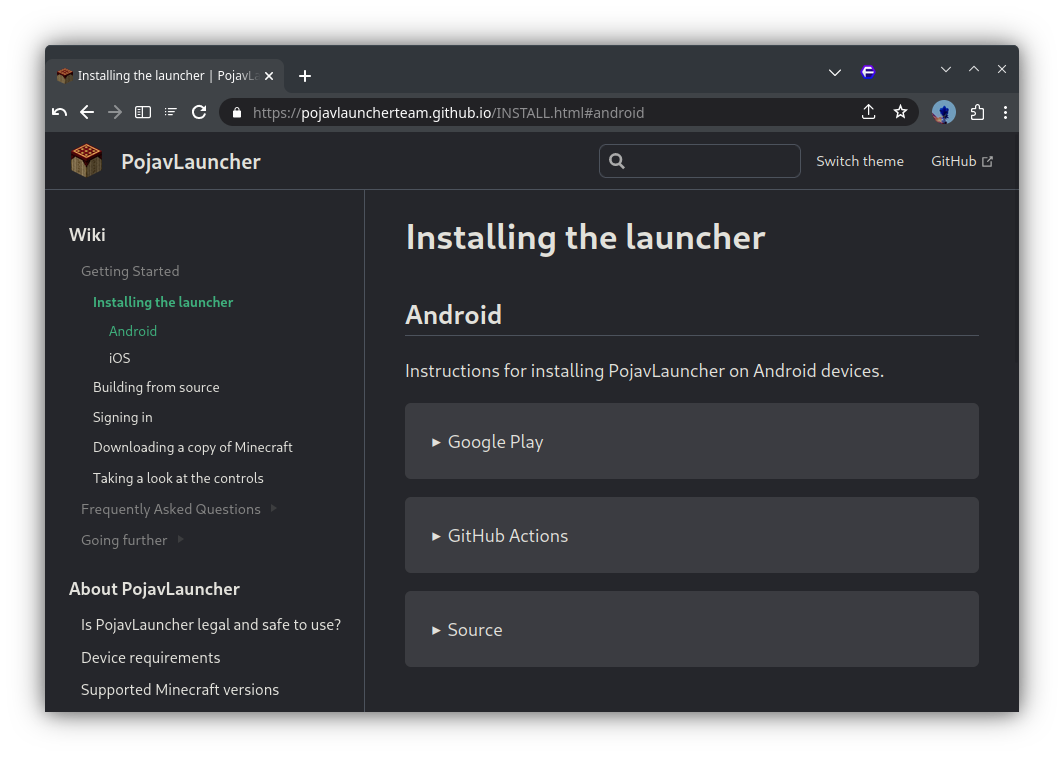
GitHub
The PojavLauncher wiki, written in VuePress. Contribute to PojavLauncherTeam/pojavlauncherteam.github.io development by creating an account on GitHub.
gleaming garden
near egret
they are legal but they are just not meant to be used on modpacks made for pc pl...
Bruh, anyways the modpack already works well with me, i just wanted to ask how can i upgrade the modpack from v26 to v38
Cuz of course curseforge launcher isn't for Android
That's the latest version on modrith
 gleaming garden
That's the latest version on modrith
gleaming garden
gleaming garden
That's the latest version on modrith
At least there's a huge difference between v31 and v38?
 versed sequoia
I think nobody is responding because what you're asking is against the server rules. :x #rules message
 plucky geodeBOT
Quarantine Result:
 Reason: tlauncher
 Staff: @stone mountain

<:success:660789936651370497> Successful Quarantines

birol34 
<:cancel:660789591900684329> Unsuccessful Quarantines
All users were quarantined!
stone mountain
!alternates
versed mountainBOT
If this command was run in response to your question/issue, it is likely because switching away from the launcher you are currently using would fix your problem.
From our experience, the most stable launcher by far is ATLauncher, also known as ATL. Keep in mind that ATL is NOT related to TLauncher in any way, and is not a cracked launcher.
To install ATL, do the following:
1. Go to https://atlauncher.com/download. If you are on MacOS, then choose the "Jar" version under the "Other" tab.
2. Install and run the setup, then open the program.
3. Login to your Microsoft account that owns the Java Edition of Minecraft from the Accounts tab on the right. This process is 100% safe, as it goes directly through Microsoft. ATL doesn't see your account credentials.
4. Go to the Packs tab on the right, then click "Curseforge" on the left.
5. Search the modpack you wish to download.
6. Click "Install". Then, follow the on-screen directions.
7. Go to the Instances tab, and click "Play" on the modpack you downloaded. If you ever see an "Update" button on the instance, click it.
This video explains the process: https://youtu.be/xMYW1wMbmkM
To transfer your Curseforge world to ATL, simply right click the modpack on Curseforge, or click the 3 dots, then click "Open Folder". Copy the Saves folder, then click "Open Folder" on ATL and paste the Saves folder there. Do the same with the XaerosMinimap folder, or the Journeymap folder, to transfer over any waypoints you've created.
Because ATL downloads the exact same files as Curseforge does, your world will be the exact same and you will be able to join the same servers. ATL also works without an internet connection (after you've installed the modpack, of course), and does not have any bloat from Overwolf. You are free to uninstall both Overwolf and Curseforge with ATL installed.
stone mountain
Seems like Curseforge didn't install the pack properly, missing some key mods
near egret
 dire heron
atlaucnher is virus isnt?
dire heron
atlaucnher is virus isnt?
tlauncher is the problematic one
 gloomy smelt
near egret
tlauncher is the problematic one
gloomy smelt
near egret
tlauncher is the problematic one
prism is the goat
 left patrol
!server
versed mountainBOT
Free Method
To host a server on your own computer, read the selfhosting guide.
This guide goes over how to install, create, and launch a free Minecraft server on all operating systems (MacOS, Linux and Windows). The guide also guides you through installing Java and optimizing your server for better performance.
If you are installing one of our older modpacks, ignore the "README" file that is included in the serverpack files, as they have outdated information.
Paid Method
We suggest renting a server from Bisect Hosting:
Approx. $10 - $25 a month depending on what plan you choose. You can also get 25% off with Code LunaPixel.
Go here and order a plan which fits you. We suggest 1GB per player but nothing lower than 4GB as the server needs at least 3GB to run.
Go to #server-hosting for more Info!
The following advice works for both the Free and Paid methods:
Transferring Your World
If you're playing Singleplayer and want to transfer your world to your server, simply go to your modpack files and navigate to the saves folder. Inside of this folder, you will see your world saves. Rename your desired world save to world. You can then transfer this folder to your server files. If your world was hosted via world sharing, this process has to be done by the person who would click "Share World".
Fixing Lag
To resolve lag issues, simply run the !tps command in #bots and follow the directions provided.
sweet spade
left patrol
!server
as i said in mmc chat we dont host any official servers here
mortal timber
near egret
the modpack already has a few world gen mods like biomes o plenty and galosphere...
im doing 1000x1000 chunks right now which takes an estimated 40 hours with distant horizons pregen. Is this an expected speed for this many chunks or are there faster options?
 wind knoll
hello I'm trying to install the mod pack and the game crash and send my Error code -1 any tip?
near egret
mortal timber
im doing 1000x1000 chunks right now which takes an estimated 40 hours with dista...
chunky or fabridc pregenerator might be faster
that seems like a reasonable eta but dedicated pregen mods are prob better
 stone meadow
hi im downloaded better MC 5 and i want to create a server with my friends and im spanish, how can i tranlate the quests?
sweet spade
wind knoll
hello I'm trying to install the mod pack and the game crash and send my Error co...
error codes mean nothing
!ca
versed mountainBOT
sweet spade
stone meadow
hi im downloaded better MC 5 and i want to create a server with my friends and i...
theyre not translatable unfortunately
wind knoll
Better MC 4 - v48 crashed. The logs have been uploaded to mclo.gs:
- 1.20.1 [FORGE]
- What launcher did you run Minecraft with? (e.g. CurseForge, ATLauncher, MultiMC, ...) CurseForge 1.20.1
- Have you changed the modpack in any way except mods? no
- v48
- Have you ever gotten past the crash condition without crashing, or does the game always crash? I never got past it
- What steps cause the crash? initializing the game
latest.log | debug.log | crash-2025-09-02_16.36.24-client.txt | crash_assistant_app.log | modlist.txt
Mod list changes beyond the modpack:
[2;32m0[0m added, [2;31m43[0m removed, [2;34m1[0m updated.
read #faq on how to install modpacks using atlauncher
instead of using the serverpack on clientside
gleaming garden
@near egret
Ahem see i updated the modpack bm5 from v26 to v31 and now im stuck on bootstrapping loading screen
near egret
im sorry man i really would rather not try and debug an android launcher
viral garden
upper geode
Misc chapter?
its probably called Oddities or Curiosites
near egret
i have no experience with the platform and its just not tested anywhere
you can try to make a thread in #1061339968691257466 cuz i doubt anyone here knows either
gleaming garden
near egret
im sorry man i really would rather not try and debug an android launcher
Mm ydk what should mod i delete to run the modpack normally at least?
near egret
last time i tried it any sodium and its forks were a no go
idk if that has changed since but
 potent moon
Hello, I've been having a backpack bug, where when I die and get my grave. I get my backpack but then after a couple seconds of it equiped it disapears
It might be also related to dying back to back and having the backpack for a couple minutes only in between deaths
 lean saffron
how can i play multiplayer i cant
sweet spade
!ws
versed mountainBOT
Luna Pixel's World Sharing
Our modpacks don't support any mods that add singleplayer hosting / world sharing because we already provide free world sharing. The 'Essential' mod is therefore incompatible.
To share your world using our own world hosting, click the 'Open to Lan' or 'Share World' button in the game menu when in a singleplayer world, and share the world.
It will give you an address, like magma-cube.mc.lunapixel.gg, which your friends can use to connect directly to your world as if it were a server!
We still highly suggest not to play through LAN as LAN is untested and unreliable. Using it will cause longterm damage to your world.
There is no reason to use LAN, as we support both paid and free methods of hosting a server the normal way.

 woven kayak
Hey, i've ran into an issue i can't find anything of in the message history from previous users
When i try to worldshare, instead of giving me a ''server'' adress, it gives me a LAN(?) port number
Anyone got any ideas?
sweet spade
woven kayak
Hey, i've ran into an issue i can't find anything of in the message history from...
what pack and v of it are you playing
does it tell you an error occured in luna or just the lan port
woven kayak
sweet spade
what pack and v of it are you playing
does it tell you an error occured in luna...
BMC4 1.20.1
No error just the lan port
sweet spade
what ver of the pack are u on like v27, v40
sweet spade
you are very outdated
woven kayak
i had a hunch, shame
i guess there's no saving this world then
thanks!
woven kayak
i tried, but it didn't work
but i also wasn't as technically literate back then (i'm still not)
i will try now though, thanks
sweet spade
if you need help just ask
 rocky furnace
Hey!
2 things.
1.Cant find channel for bmc on neoforge so ill write there (if is tag it pls and ill move my question there)
2.I made a tom's simple storage setup,works fine but when using adv wireless transmitter i cant access my storage when im not in 64 block radius. Did lvl 4 beacon in the chunk where my setup is. Claimed chunks via xearos worldmap (forceloaded them).Still cant access them. im playing on selfhosted server with friends
Version: Neoforge 1.21.1 BMC5 v37
Thanks in advance for helping me
stone mountain
rocky furnace
Hey!
2 things.
1.Cant find channel for bmc on neoforge so ill write there (if is...
It's the correct channel. Does it work if you are around a 100 blocks away (so the storage area is still loaded)?
stone mountain
rocky furnace
Just says terminal out of range
Then the issue must be with the beacon setup being done incorrectly
Maybe look for a video on how to do it, cause I won't be able to explain
I'm also Tom's hater
rocky furnace
stone mountain
Maybe look for a video on how to do it, cause I won't be able to explain
Well beacon is bulid correctly.
Will look for video if this wont help ill update server version to v38. Tysm 
 stiff terrace
I'm experiencing an issue where playing music discs in a jukebox doesn't produce any sound. The issue was present before the recent update, and still persists. I have tried relaunching the game and of course double checked my audio settings. This shows up in the log when I plop the music disc in (see photo). I don't know if it's helpful but I assume the red text means bad... I really don't know anything about modding, except that mods go in the mods folder, so any help would be greatly appreciated!
 near egret
!alternates try this
versed mountainBOT
If this command was run in response to your question/issue, it is likely because switching away from the launcher you are currently using would fix your problem.
From our experience, the most stable launcher by far is ATLauncher, also known as ATL. Keep in mind that ATL is NOT related to TLauncher in any way, and is not a cracked launcher.
To install ATL, do the following:
1. Go to https://atlauncher.com/download. If you are on MacOS, then choose the "Jar" version under the "Other" tab.
2. Install and run the setup, then open the program.
3. Login to your Microsoft account that owns the Java Edition of Minecraft from the Accounts tab on the right. This process is 100% safe, as it goes directly through Microsoft. ATL doesn't see your account credentials.
4. Go to the Packs tab on the right, then click "Curseforge" on the left.
5. Search the modpack you wish to download.
6. Click "Install". Then, follow the on-screen directions.
7. Go to the Instances tab, and click "Play" on the modpack you downloaded. If you ever see an "Update" button on the instance, click it.
This video explains the process: https://youtu.be/xMYW1wMbmkM
To transfer your Curseforge world to ATL, simply right click the modpack on Curseforge, or click the 3 dots, then click "Open Folder". Copy the Saves folder, then click "Open Folder" on ATL and paste the Saves folder there. Do the same with the XaerosMinimap folder, or the Journeymap folder, to transfer over any waypoints you've created.
Because ATL downloads the exact same files as Curseforge does, your world will be the exact same and you will be able to join the same servers. ATL also works without an internet connection (after you've installed the modpack, of course), and does not have any bloat from Overwolf. You are free to uninstall both Overwolf and Curseforge with ATL installed.
 chilly yarrow
Better MC 4 - v47 crashed. The logs have been uploaded to mclo.gs:
- 1.20.1 [FORGE]
- What launcher did you run Minecraft with? (e.g. CurseForge, ATLauncher, MultiMC, ...) CurseForge
- Have you changed the modpack in any way except mods? I added a backpack mod that I prefer but nothing else
- v47
- Have you ever gotten past the crash condition without crashing, or does the game always crash? it has loaded fine until today
- What steps cause the crash? opening the game
latest.log | crash-2025-09-02_13.40.17-fml.txt | CurseForge: launcher_log.txt | crash_assistant_app.log | win_event1756834856552.txt | modlist.txt
Found [2;34m1[0m log analysis results:
[2;34mMissingUnsupportedDependencies[0m in: latest.log
Mod list changes beyond the modpack:
[2;32m4[0m added, [2;31m0[0m removed, [2;34m31[0m updated.
!updatemods
versed mountainBOT
Do NOT Update Mods Manually!
Modpacks use specific versions of certain mods to prevent various issues, such as crashes or major game-breaking bugs. Mods will be updated by the modpack developer when they see fit. Please do not update the mods in a modpack manually, unless specifically told to do so. This includes hitting the "update all" feature on CurseForge launcher it likes to bother users with.
To be clear; this is separate from updating the modpack (such as Better MC / Medieval MC) itself. You should always stay up to date with the latest version of the modpack. To update the pack correctly, you can follow the command!updatemodpack
The easiest way to downgrade mod versions to their original versions in the pack, is to reinstall the pack itself. Before you uninstall, back up both any singleplayer world files you have, and your map folder. LPS packs usually use JourneyMap or Xareos, the map folder will be named accordingly.
- Curseforge -> Right click the modpack instance -> „Open Folder”.
- ATLauncher -> Click „Open Folder” on the modpack instance.
- PrismLauncher -> Select your instance and click „Folder” on the right.
Navigate to the "minecraft" folder, and within that will be "saves" and "journeymap"/"xareos" depending on which the pack has. Copy/Move these folders to a safe location, and you can move them right back to the fresh copy of the pack when reinstalled.
chilly yarrow
Do I need to save the waypoints backup folder as well as the main Xaero folder?
sweet spade
i would just to be safe as im not sure if it matters
 final storm
Are the blimp looking ships in the end broken atm? None of them got elytras inside them and the dragonhead is deattached from the ship
steep spoke
versed mountain
If this command was run in response to your question/issue, it is likely because...
i cant see the play button

@near egret could you help me
Thanks
steep spoke
oh wait what launcher
steep spoke
oh but where is it? could you tell me
near egret
open the launcher and there should be a few buttons on the right side
i think it was the "Packs" button but im not quite sure rn
i dont have it installed
steep spoke
 near egret
Click instances
 oblique nebula
what do i feed the nether dragon to heal
lavish knot
So after I leave my friends shared world my mini map data just gets wiped, loaded chunks and waypoints and all. Is there a fix for it?
near egret
lavish knot
So after I leave my friends shared world my mini map data just gets wiped, loade...
the fix is to either host a server (you can find out how to by typing !server in #bots ) or manually changing folder names around everytime before you join the share world server
 fathom turret
Better MC 4 - v48 crashed. The logs have been uploaded to mclo.gs:
- 1.20.1 [FORGE]
- What launcher did you run Minecraft with? (e.g. CurseForge, ATLauncher, MultiMC, ...)
- Have you changed the modpack in any way except mods?
- v48
- Have you ever gotten past the crash condition without crashing, or does the game always crash?
- What steps cause the crash?
latest.log | hs_err_pid16968.log | CurseForge: launcher_log.txt | crash_assistant_app.log | modlist.txt
# Problematic frame:
# J 15938 c2 org.spongepowered.asm.util.Annotations.get(Ljava/util/List;Ljava/lang/String;)Lorg/objectweb/asm/tree/AnnotationNode; org.spongepowered.mixin (50 bytes) @ 0x0000014cba3ea6d7 [0x0000014cba3ea3a0+0x0000000000000337]
Mod list changes beyond the modpack:
[2;34mMod list wasn't modified.[0m
What folders would I need to change before joining the server?
near egret
lavish knot
What folders would I need to change before joining the server?
minecraft modpack folder > xaero > worldmap/minimap
inside it are the folders that have server ips at the end of their name
also in the same modpack folder there is xaerowaypoints
that also has a folder like the one inside xaero
 sand schooner
Better MC 4 - v48 crashed without a crash report. The logs have been uploaded to mclo.gs:
- 1.20.1 [FORGE]
- What launcher did you run Minecraft with? (e.g. CurseForge, ATLauncher, MultiMC, ...)
- Have you changed the modpack in any way except mods?
- v48
- Have you ever gotten past the crash condition without crashing, or does the game always crash?
- What steps cause the crash?
latest.log | crash_assistant_app.log | modlist.txt | CurseForge: skip launcher
Mod list changes beyond the modpack:
[2;34mMod list wasn't modified.[0m
What's these items do?

 weary patrol
Better MC 5 v38 NeoForge, I killed 2 Ur-Ghasts and Quest doesn't work, what should I do?
 mossy edge
anyone. please help
wispy trailBOT
mossy edge
anyone. please help
Uploaded crash-2025-09-02_22.25.58-client.txt from @mossy edge to mclogs: https://mclo.gs/nZC2blR
haughty valve
gleaming garden
What's these items do?
Which? You 've got like 20 items there
haughty valve
gleaming garden
What's these items do?
also, just highlight them and press "U" on your keyboard
sand schooner
can someone help me ?
haughty valve
it'll tell you the uses of an item.
weary patrol
weary patrol
Better MC 5 v38 NeoForge, I killed 2 Ur-Ghasts and Quest doesn't work, what shou...
Can someone help with that? Want to end twigliht forrest quest line but this quest doesn't marks as done
haughty valve
weary patrol
Can someone help with that? Want to end twigliht forrest quest line but this que...
Single player?
weary patrol
haughty valve
Single player?
Yes
haughty valve
Enable cheats, open quests, turn on edit mode, right click - instant complete
gleaming garden
haughty valve
Which? You 've got like 20 items there
That in the chest
haughty valve
gleaming garden
That in the chest
Ones a nugget of the ingot type you got in there, ones an egg, ones an ingot, and the other is rope
haughty valve
gleaming garden
That in the chest
Press "U" while hovering over the ingot to see what it's used in
weary patrol
haughty valve
Enable cheats, open quests, turn on edit mode, right click - instant complete
thx it works, didn't know there is such option
gleaming garden
haughty valve
Ones a nugget of the ingot type you got in there, ones an egg, ones an ingot, an...
Okay what just these do


 gleaming garden
haughty valve
Press "U" while hovering over the ingot to see what it's used in
gleaming garden
haughty valve
Press "U" while hovering over the ingot to see what it's used in
Ok
haughty valve
gleaming garden
Ok
Dragon egg you hatch, read the quest book dragons section to find out more
haughty valve
weary patrol
thx it works, didn't know there is such option
Generally, it's not one most people should have to use, but it's usually how you gotta pass some quests.. other than refighting the guys over and over (unless you missed a dependency)
 tribal grotto
Hello I've a question ^^ how are you first?
I have add 2 mods to better mc 4 in 1.20.1 And i have a crash now
Better MC 4 - v45.5 crashed. The logs have been uploaded to mclo.gs:
- 1.20.1 [FORGE]
- What launcher did you run Minecraft with? (e.g. CurseForge, ATLauncher, MultiMC, ...)
- Have you changed the modpack in any way except mods?
- v45.5
- Have you ever gotten past the crash condition without crashing, or does the game always crash?
- What steps cause the crash?
latest.log | crash-2025-09-02_21.48.31-client.txt | CurseForge: launcher_log.txt | crash_assistant_app.log | modlist.txt
Mod list changes beyond the modpack:
Added mods:
[2;32mcreate-1.20.1-6.0.6.jar[0m
[2;32msophisticatedbackpacks-1.20.1-3.23.23.1289.jar[0m
[2;32msophisticatedcore-1.20.1-1.2.84.1117.jar[0m
help me i cant run better mc 4 Better MC 4 - v48 crashed without a crash report. The logs have been uploaded to mclo.gs:
- 1.20.1 [FORGE]
- What launcher did you run Minecraft with? (e.g. CurseForge, ATLauncher, MultiMC, ...)
- Have you changed the modpack in any way except mods?
- v48
- Have you ever gotten past the crash condition without crashing, or does the game always crash?
- What steps cause the crash?
latest.log | crash_assistant_app.log | modlist.txt | CurseForge: skip launcher
Mod list changes beyond the modpack:
[2;34mMod list wasn't modified.[0m
update to v48
sweet spade
sand schooner
help me i cant run better mc 4 Better MC 4 - v48 crashed without a crash report....
try disabling cf's skip launcher feature
sand schooner
how i can do that ?
sweet spade
probably somewhere under minecraft settings in the cf launcher
i haven't used the launcher idk where it is exactly
sweet spade
mossy edge
it crashes at the creat world screen
!ca
versed mountainBOT
sand schooner
ok, i change that, now v48 version we will see soon
Better MC 4 - v48 crashed without a crash report. The logs have been uploaded to mclo.gs:
- 1.20.1 [FORGE]
- What launcher did you run Minecraft with? (e.g. CurseForge, ATLauncher, MultiMC, ...)
- Have you changed the modpack in any way except mods?
- v48
- Have you ever gotten past the crash condition without crashing, or does the game always crash?
- What steps cause the crash?
latest.log | CurseForge: launcher_log.txt head / tail (~27k lines) | crash_assistant_app.log | modlist.txt
Mod list changes beyond the modpack:
[2;34mMod list wasn't modified.[0m
and the same problem
don`t know what i can do
sweet spade
!alternates
versed mountainBOT
If this command was run in response to your question/issue, it is likely because switching away from the launcher you are currently using would fix your problem.
From our experience, the most stable launcher by far is ATLauncher, also known as ATL. Keep in mind that ATL is NOT related to TLauncher in any way, and is not a cracked launcher.
To install ATL, do the following:
1. Go to https://atlauncher.com/download. If you are on MacOS, then choose the "Jar" version under the "Other" tab.
2. Install and run the setup, then open the program.
3. Login to your Microsoft account that owns the Java Edition of Minecraft from the Accounts tab on the right. This process is 100% safe, as it goes directly through Microsoft. ATL doesn't see your account credentials.
4. Go to the Packs tab on the right, then click "Curseforge" on the left.
5. Search the modpack you wish to download.
6. Click "Install". Then, follow the on-screen directions.
7. Go to the Instances tab, and click "Play" on the modpack you downloaded. If you ever see an "Update" button on the instance, click it.
This video explains the process: https://youtu.be/xMYW1wMbmkM
To transfer your Curseforge world to ATL, simply right click the modpack on Curseforge, or click the 3 dots, then click "Open Folder". Copy the Saves folder, then click "Open Folder" on ATL and paste the Saves folder there. Do the same with the XaerosMinimap folder, or the Journeymap folder, to transfer over any waypoints you've created.
Because ATL downloads the exact same files as Curseforge does, your world will be the exact same and you will be able to join the same servers. ATL also works without an internet connection (after you've installed the modpack, of course), and does not have any bloat from Overwolf. You are free to uninstall both Overwolf and Curseforge with ATL installed.
sand schooner
naaah i will run btmc 3 then don`t wanna use alt when i have normal paid mc
sweet spade
sand schooner
naaah i will run btmc 3 then don`t wanna use alt when i have normal paid mc
????
its just a dif launcher
its still paid mc 😭😭
sand schooner
im like 12iq now it`s late i just want to click instal and play xd
sweet spade
curseforge just sucks n broke ur install and with no crash report theres not anything else i can rlly do
sand schooner
ok ok i understand and Thanks a lot for effort ❤️
sand schooner
lol the launcher don`t open
 jaunty quiver
pls help me out
agile cradle
jaunty quiver
pls help me out
gonna need more info to help
sand schooner
ok i rather give up i try with atlauncher
now i have popups with graphic card
like i change settings and still i have problems
 small gazelle
quick question, will this mod pack be updating to 1.21+?
sweet spade
small gazelle
quick question, will this mod pack be updating to 1.21+?
each bmc has its own new pack for each major modding ver
there is a bmc for 1.21.1 for neoforge
agile cradle
neo and fabric
small gazelle
yeah just neoforge doesnt have the different end biomes and some building functions that forge has
agile cradle
try the fabric option
small gazelle
like vertical slabs and being able to auto drop items into a chest from the inventory, or access to shulkers in inventory
agile cradle
we won't be using forge as of 1.21 and on anymore neoforge will be replacing it
small gazelle
oh okay
sweet spade
small gazelle
like vertical slabs and being able to auto drop items into a chest from the inve...
then that would be bc mods that r on 1.20 pack arent on 1.21
agile cradle
Stinky dev not friendly, very rude and disrespectful
sweet spade
the end biimes is because betterend is abandoned
small gazelle
oh thats unfortunate
agile cradle
I was kinda shocked that they got abandoned
small gazelle
🙁 that is big sad, it was such a beautiful mod too
agile cradle
Could check to see if you can use enderscape
small gazelle
is there anytell on the inventory mods and vertical slabs making it to 1.21?
sweet spade
that would be up to the devs of the mods themselves you mention
agile cradle
That is reliant on the devs of those mods to port over
small gazelle
oh okay okay
agile cradle
could ask the devs of those mods if they plan to make it on 21.1 for neoforge, or check to see if there is such options already and suggest them in #suggestions (make sure to read the pinned comment for format, 1 mod per post)
sweet spade
vertical slabs looks like it's in bmc thru quark which isnt updated for 1.21 yet no youd have to go to their discord for any news on that
idk what inv mods specifically did that in bmc but you could probably find a simliar one to add to your own pack that supports 1.21 since its a simple thing
small gazelle
big bet, unfortunately im not great with the adding mods thing, thats why i just download the pre-made packs and just hope XD, thank you both for the help
agile cradle
I've been using enderscape in my own pack, most end mods are still pretty bare, but it's better than vanilla
 gilded sequoia
anyone got any idea why nothing can be interacted with, broken, or placed in a world share? i can as im the one hosting by my friend cant do anything, no matter what gamemode he's in
agile cradle
nah, it's usually cause they got logged out or the session got funky when trying to connect.
agile cradle
gilded sequoia
anyone got any idea why nothing can be interacted with, broken, or placed in a w...
is the area claimed, or in the spawn chunks?
gilded sequoia
no literally nowhere on the map he can do anything
agile cradle
what launcher they using?
There's only 1 real copy of minecraft. they need to own official minecraft to play
!cracked
versed mountainBOT
If you are using a cracked Minecraft launcher, we can not assist with your issue. In order to receive help, you need to switch to an approved launcher and provide proof you have purchased Minecraft. This is due to the terms of service and guideline agreements of both Mojang and Discord.
gilded sequoia
curseforge same as me
agile cradle
Then what do you mean don't have og mine
cause they can't play unless they own and sign into minecraft to play
No game, no modpack
plucky geodeBOT
Quarantine Result:
Reason: cracked
Moderator: @agile cradle
Quarantined:

 guimeb [
233356778467753994]
 rapid sphinx
hey I wanted to know why I can't use the uncrafting table in bmc? (this is neoforge btw)
 sweet spade
it's disabled by default due to being overpowered
rapid sphinx
Oh so it doesn't break minecraft right?
sweet spade
it doesn't break it no
rapid sphinx
Good to know thank you!
 solemn gale
When i launch ther game it says a mod needs to be between 16.5 and 1.17 or something, i tried to updeat and all
sweet spade
solemn gale
When i launch ther game it says a mod needs to be between 16.5 and 1.17 or somet...
you updated mods
!updatemods
versed mountainBOT
Do NOT Update Mods Manually!
Modpacks use specific versions of certain mods to prevent various issues, such as crashes or major game-breaking bugs. Mods will be updated by the modpack developer when they see fit. Please do not update the mods in a modpack manually, unless specifically told to do so. This includes hitting the "update all" feature on CurseForge launcher it likes to bother users with.
To be clear; this is separate from updating the modpack (such as Better MC / Medieval MC) itself. You should always stay up to date with the latest version of the modpack. To update the pack correctly, you can follow the command!updatemodpack
The easiest way to downgrade mod versions to their original versions in the pack, is to reinstall the pack itself. Before you uninstall, back up both any singleplayer world files you have, and your map folder. LPS packs usually use JourneyMap or Xareos, the map folder will be named accordingly.
- Curseforge -> Right click the modpack instance -> „Open Folder”.
- ATLauncher -> Click „Open Folder” on the modpack instance.
- PrismLauncher -> Select your instance and click „Folder” on the right.
Navigate to the "minecraft" folder, and within that will be "saves" and "journeymap"/"xareos" depending on which the pack has. Copy/Move these folders to a safe location, and you can move them right back to the fresh copy of the pack when reinstalled.
 simple mural
is better MC on modrinth or is it like medieval where some mods i have to put into the file manually?
sweet spade
!modrinth
versed mountainBOT
Currently LPS packs are not being updated on the Modrinth site, and as such are outdated. This is while the devs figure out a way to automate uploads of the pack properly.
Until the packs can be properly updated, we recommend using ATL (use !alternates in #bots for further info on the installation process ) or Prism launcher. You can download the CurseForge version of our packs on these launchers while still being able to make instances from Modrinth versions of other packs not owned by us.
Please note this does not apply to individual mod projects of developers at LPS.
 wheat yew
someone know how to correct this error when i try to login in this server, BMC

1.20.1 [FORGE]
Curseforge
no mods changed, just the modpack from curseforge
no crashes
sweet spade
a. server just doesnt have the pack on it, b. servers install of pack is messed up or c. client side install is messed up
 gritty hawk
i used to be able to see my tool durability in % but now on v48 i cannot see durability remaining in % is there any way to turn this on? bmc4 TIA
 tacit dagger
how do I open LAN in single player world, cant find the button
gritty hawk
Hit ESC to menu than second from bottom right “share world” allow cheats if u teleport using xaero and open to lan
@tacit dagger
 agile spoke
Add better mc to the latest version
sweet spade
bmc is only on major versions, it is on the latest major ver being 1.21.1 already
viral garden
queen citrus
If reducing the spawn rate doesn't do what you'd like, Corundum used to only spa...
pretty cool idea, will look into adding
viral garden
fathom turret
Better MC 4 - v48 crashed. The logs have been uploaded to `mclo.gs`:
1. 1.20.1 [...
please answer the questions present in the message you posted
viral garden
sand schooner
Better MC 4 - v48 crashed without a crash report. The logs have been uploaded to...
!alternates
versed mountainBOT
If this command was run in response to your question/issue, it is likely because switching away from the launcher you are currently using would fix your problem.
From our experience, the most stable launcher by far is ATLauncher, also known as ATL. Keep in mind that ATL is NOT related to TLauncher in any way, and is not a cracked launcher.
To install ATL, do the following:
1. Go to https://atlauncher.com/download. If you are on MacOS, then choose the "Jar" version under the "Other" tab.
2. Install and run the setup, then open the program.
3. Login to your Microsoft account that owns the Java Edition of Minecraft from the Accounts tab on the right. This process is 100% safe, as it goes directly through Microsoft. ATL doesn't see your account credentials.
4. Go to the Packs tab on the right, then click "Curseforge" on the left.
5. Search the modpack you wish to download.
6. Click "Install". Then, follow the on-screen directions.
7. Go to the Instances tab, and click "Play" on the modpack you downloaded. If you ever see an "Update" button on the instance, click it.
This video explains the process: https://youtu.be/xMYW1wMbmkM
To transfer your Curseforge world to ATL, simply right click the modpack on Curseforge, or click the 3 dots, then click "Open Folder". Copy the Saves folder, then click "Open Folder" on ATL and paste the Saves folder there. Do the same with the XaerosMinimap folder, or the Journeymap folder, to transfer over any waypoints you've created.
Because ATL downloads the exact same files as Curseforge does, your world will be the exact same and you will be able to join the same servers. ATL also works without an internet connection (after you've installed the modpack, of course), and does not have any bloat from Overwolf. You are free to uninstall both Overwolf and Curseforge with ATL installed.
viral garden
gleaming garden
What's these items do?
you did not install the modpack correctly at all
!alternates please follow the install guide
versed mountainBOT
If this command was run in response to your question/issue, it is likely because switching away from the launcher you are currently using would fix your problem.
From our experience, the most stable launcher by far is ATLauncher, also known as ATL. Keep in mind that ATL is NOT related to TLauncher in any way, and is not a cracked launcher.
To install ATL, do the following:
1. Go to https://atlauncher.com/download. If you are on MacOS, then choose the "Jar" version under the "Other" tab.
2. Install and run the setup, then open the program.
3. Login to your Microsoft account that owns the Java Edition of Minecraft from the Accounts tab on the right. This process is 100% safe, as it goes directly through Microsoft. ATL doesn't see your account credentials.
4. Go to the Packs tab on the right, then click "Curseforge" on the left.
5. Search the modpack you wish to download.
6. Click "Install". Then, follow the on-screen directions.
7. Go to the Instances tab, and click "Play" on the modpack you downloaded. If you ever see an "Update" button on the instance, click it.
This video explains the process: https://youtu.be/xMYW1wMbmkM
To transfer your Curseforge world to ATL, simply right click the modpack on Curseforge, or click the 3 dots, then click "Open Folder". Copy the Saves folder, then click "Open Folder" on ATL and paste the Saves folder there. Do the same with the XaerosMinimap folder, or the Journeymap folder, to transfer over any waypoints you've created.
Because ATL downloads the exact same files as Curseforge does, your world will be the exact same and you will be able to join the same servers. ATL also works without an internet connection (after you've installed the modpack, of course), and does not have any bloat from Overwolf. You are free to uninstall both Overwolf and Curseforge with ATL installed.
viral garden
weary patrol
Better MC 5 v38 NeoForge, I killed 2 Ur-Ghasts and Quest doesn't work, what shou...
send a screenshot of the questbook
viral garden
mossy edge
anyone. please help
!ca
versed mountainBOT
queen citrus
viral garden
pretty cool idea, will look into adding
Nice! That's great to hear. Happy to help! Would you like me to post it in #suggestions as a reminder, or do you have a personal trello to-do list site or something you use for changelogs and tracking future updates?
fathom turret
I just restarted the my pc uninstalled and reinstalled. It’s working fine.
gleaming garden
viral garden
you did not install the modpack correctly at all
I copied the files in the modpack to the game files . Minecraft
agile cradle
gleaming garden
I copied the files in the modpack to the game files . Minecraft
that's not how you install modpacks
sweet spade
gleaming garden
I copied the files in the modpack to the game files . Minecraft
!vanilla
versed mountainBOT
It seems as you are trying to use the standard Minecraft launcher!
To run our packs properly, you will need to have a modded launcher, as it will install the pack for you, making it so you don't have a ton of mods/configs removed & end up crashing due to such.
Our most recommended launcher is ATLauncher, which you can find step by step instructions on by running the command !alternates in #bots . If you prefer a more modern interface, Prism comes recommended as well. Any other launchers we can't guarantee any issues won't arise, so it's best to save the trouble and use ATL/Prism.
agile cradle
You need a modded launcher, like curseforge, atlauncher, prism.
oh sweet new command!
gleaming garden
agile cradle
You need a modded launcher, like curseforge, atlauncher, prism.
I use zalith launcher
viral garden
queen citrus
Nice! That's great to hear. Happy to help! Would you like me to post it in <#875...
its on the trello
agile cradle
gleaming garden
I use zalith launcher
is that a cracked launcher?
viral garden
gleaming garden
I use zalith launcher
zalith does not work
sweet spade
oh ur the guy on andorid lmao
agile cradle
never heard of that one before
gleaming garden
agile cradle
is that a cracked launcher?
Nope , launcher for android
sweet spade
mimi alr went thru this w them earlier
agile cradle
ugh. we don't support mobiles
gleaming garden
viral garden
zalith does not work
It works v26 bm5..
sweet spade
cant even run cf packs theyre on modrinth ver
viral garden
gleaming garden
It works v26 bm5..
no it clearly doesnt
sweet spade
ok well when u play on an actual pc you can ask for no support role to be removed then
agile cradle
Phones cannot run modpacks properly. end of story
 agile cradle
do we need a command in regards to trying to run on phones and steamdeck 
viral garden
steamdecks usually work fine
sweet spade
i've never seen someone try to run it on andorid before
viral garden
bc its just running on linux
sweet spade
not enough to warrant a command
maybe if we somehow get 5 million more after i jinx it lmao
agile cradle
we can't really do full support for them right? There was some sort of issue mentioned in the past that we couldn't help with players on steamdeck
agile cradle
is the performance pack fully usable on it, like with downloading java 21
Don't wanna accidently recommend something if it's a different process
viral garden
a lot of it is probably possible
 lean marten
Hello, so im running better mc forge v48 on 1.20.1 and im trying to do the world share with friends on the same wifi, but everytime one of them joins, they get booted off after a few seconds and then the chat says something wrong happend with luna. Is this something I can fix, or is it really just on the Luna side?
grand gate
there is like way too many mobs spawning at night on my server and its kinda killing the tps does anyone know how to fix
viral garden
lean marten
Hello, so im running better mc forge v48 on 1.20.1 and im trying to do the world...
!server
versed mountainBOT
Free Method
To host a server on your own computer, read the selfhosting guide.
This guide goes over how to install, create, and launch a free Minecraft server on all operating systems (MacOS, Linux and Windows). The guide also guides you through installing Java and optimizing your server for better performance.
If you are installing one of our older modpacks, ignore the "README" file that is included in the serverpack files, as they have outdated information.
Paid Method
We suggest renting a server from Bisect Hosting:
Approx. $10 - $25 a month depending on what plan you choose. You can also get 25% off with Code LunaPixel.
Go here and order a plan which fits you. We suggest 1GB per player but nothing lower than 4GB as the server needs at least 3GB to run.
Go to #server-hosting for more Info!
The following advice works for both the Free and Paid methods:
Transferring Your World
If you're playing Singleplayer and want to transfer your world to your server, simply go to your modpack files and navigate to the saves folder. Inside of this folder, you will see your world saves. Rename your desired world save to world. You can then transfer this folder to your server files. If your world was hosted via world sharing, this process has to be done by the person who would click "Share World".
Fixing Lag
To resolve lag issues, simply run the !tps command in #bots and follow the directions provided.
viral garden
grand gate
there is like way too many mobs spawning at night on my server and its kinda kil...
mob spawn rates are the same as vanilla
gritty hawk
i used to be able to see my tool durability in % but now on v48 i cannot see durability remaining in % is there any way to turn this on? bmc4 TIA
agile cradle
gritty hawk
i used to be able to see my tool durability in % but now on v48 i cannot see dur...
it was removed. Inventory HUD+ was removed like 20 updates ago
 scenic pendant
- What Minecraft version are you using? 1.20.1
- What launcher did you run Minecraft with? CurseForge
- Have you changed the modpack in any way? Added mods and removed the backpack, and biomes mod, and yungs better strongholds
- What version of the modpack are you using? v48
- Have you ever gotten past the crash condition without crashing, or does the game always crash? always
- What steps cause the crash? opening the game.
sweet spade
!ca
versed mountainBOT
scenic pendant
Better MC 4 - v48 crashed. The logs have been uploaded to mclo.gs:
- 1.20.1 [FORGE]
- What launcher did you run Minecraft with? (e.g. CurseForge, ATLauncher, MultiMC, ...)
- Have you changed the modpack in any way except mods?
- v48
- Have you ever gotten past the crash condition without crashing, or does the game always crash?
- What steps cause the crash?
latest.log | crash-2025-09-03_01.10.17-client.txt | CurseForge: launcher_log.txt | crash_assistant_app.log | modlist.txt
Mod list changes beyond the modpack:
[2;32m53[0m added, [2;31m2[0m removed, [2;34m0[0m updated.
That's a lot of mods you add.
You have to test them 1 at a time to make sure they work.
sweet spade
!modified
versed mountainBOT
You are using a modified version of the modpack! This channel is only for unmodified versions that we provide. We cannot guarantee that the modpack works after you do modifications, so please go to #1061339968691257466 if you need help with an issue.
If this is a bug, please make sure to test it in an unmodified version before trying to report it.
sweet spade
def test them in small batches
agile cradle
at least curse makes it easy to enable and disable them temporarily
Ya'll don't wanna deal with modding for sims franchise, you have to do it manually in your folders 💀
scenic pendant
they are mostly just item decor mods so i didnt think it would break lol
at least my boyfriend said they were mostly item/decor lol. maybe he tried downloading smth crazy idk
sweet spade
agile cradle
Ya'll don't wanna deal with modding for sims franchise, you have to do it manual...
sims modding is awful
agile cradle
sweet spade
sims modding is awful
creators are really cool, but the time it takes to test and update all your mods to the newest version, new update drops that breaks everything again. And there's way too many mods that are just to fix EA's bullcrap that they break and don't fix
sweet spade
yeah thats mainly why i stopped trying to play sims
 wind stream
Hi Im having some issues trying to host through share world option with friends. When it gives the link and other plays copy it then try direct connection, itll load for a little bit then say failed to connect to server. unkown server.
viral garden
wind stream
Hi Im having some issues trying to host through share world option with friends....
!ws
versed mountainBOT
Luna Pixel's World Sharing
Our modpacks don't support any mods that add singleplayer hosting / world sharing because we already provide free world sharing. The 'Essential' mod is therefore incompatible.
To share your world using our own world hosting, click the 'Open to Lan' or 'Share World' button in the game menu when in a singleplayer world, and share the world.
It will give you an address, like magma-cube.mc.lunapixel.gg, which your friends can use to connect directly to your world as if it were a server!
We still highly suggest not to play through LAN as LAN is untested and unreliable. Using it will cause longterm damage to your world.
There is no reason to use LAN, as we support both paid and free methods of hosting a server the normal way.
wind stream
So other than that share method, you would have to pay for a bisect server, yes?
gritty hawk
how to find suspicisous sand
tribal grotto
sweet spade
update to v48
But my serv is on 45.5
stone mountain
tribal grotto
But my serv is on 45.5
Then update that too
tacit dagger
any way for me to get my stuff back if i die in lava? dont see the last death ping
tribal grotto
I've make the update on the serv and same error
Better MC 4 - v48 crashed. The logs have been uploaded to mclo.gs:
- 1.20.1 [FORGE]
- What launcher did you run Minecraft with? (e.g. CurseForge, ATLauncher, MultiMC, ...)
- Have you changed the modpack in any way except mods?
- v48
- Have you ever gotten past the crash condition without crashing, or does the game always crash?
- What steps cause the crash?
latest.log | crash-2025-09-03_09.57.41-client.txt | CurseForge: launcher_log.txt | crash_assistant_app.log | modlist.txt
Mod list changes beyond the modpack:
Added mods:
[2;32mcreate-1.20.1-6.0.6.jar[0m
[2;32msophisticatedbackpacks-1.20.1-3.23.23.1289.jar[0m
[2;32msophisticatedcore-1.20.1-1.2.84.1117.jar[0m
Remove the mods you added, and see if it works
 restive leaf
I've downloaded the version bmc4 1.20.1 why doesn't it include lush caves
There's a guy named Suev on yt uploaded a video on the same exact version his included lush cave I'm kinda confused
near egret
restive leaf
I've downloaded the version bmc4 1.20.1 why doesn't it include lush caves
it does
its a vanilla thing
and i have never heard it being removed
restive leaf
near egret
it does
It doesn't even show the item when I search it on the bar

And this the game version
stone mountain
restive leaf
It doesn't even show the item when I search it on the bar
Which item? And what's the modpack version you're playing
 full leaf
Hi guys, does anyone know any texture packs compatible with BMC5?
restive leaf
stone mountain
Which item? And what's the modpack version you're playing
Nvm I'm so f dumb
Wish i could use the dragon mounts remastered on BMC4 the legacy one is a bit clumsy
There's no whistle drag armour nor the new dragon types
vagrant fractal
viral garden
you don't have the same modpack installed as the server
Is it normal that the MOD versions between the BMC5 server I downloaded from CurseForge and the client are different?
Since the server side is newer, I have to check them one by one, but I’m worried that by the time I finish checking, the whole BMC might be broken.
 real crane

stuck here after restart
what to do
also how can i change console time from utc to current system time
brisk totem
near egret
what message do you mean
it says, you reached 90% memory usage, showing leaking objects so far
 timber valve
hello
i need help why my friend cant open my sever on share world
See sever but cant join


@tepid swan
sweet spade
timber valve
<@158407101931061248>
dont ping staff thank you mekkas literally never played this pack they cannot help

what launcher are you using
sweet spade
vagrant fractal
Is it normal that the MOD versions between the BMC5 server I downloaded from Cur...
i have no clue what youre talking abt since all mod vers are the same for the server pack and the client side
sweet spade
full leaf
Hi guys, does anyone know any texture packs compatible with BMC5?
theres not really any specific ones that aren't, just disable stay true in the resource pack menu if you dowbload any and theyll work find
sweet spade
restive leaf
Wish i could use the dragon mounts remastered on BMC4 the legacy one is a bit cl...
i fear theres no dragon mounts remastered fot 1.20.1
plucky geodeBOT
Quarantine Result:
Reason: sklauncher
Moderator: @sweet spade
Quarantined:
h0j_ [584771075225812998]
viral garden
wind stream
So other than that share method, you would have to pay for a bisect server, yes?
!server you can host on your own pc too
versed mountainBOT
Free Method
To host a server on your own computer, read the selfhosting guide.
This guide goes over how to install, create, and launch a free Minecraft server on all operating systems (MacOS, Linux and Windows). The guide also guides you through installing Java and optimizing your server for better performance.
If you are installing one of our older modpacks, ignore the "README" file that is included in the serverpack files, as they have outdated information.
Paid Method
We suggest renting a server from Bisect Hosting:
Approx. $10 - $25 a month depending on what plan you choose. You can also get 25% off with Code LunaPixel.
Go here and order a plan which fits you. We suggest 1GB per player but nothing lower than 4GB as the server needs at least 3GB to run.
Go to #server-hosting for more Info!
The following advice works for both the Free and Paid methods:
Transferring Your World
If you're playing Singleplayer and want to transfer your world to your server, simply go to your modpack files and navigate to the saves folder. Inside of this folder, you will see your world saves. Rename your desired world save to world. You can then transfer this folder to your server files. If your world was hosted via world sharing, this process has to be done by the person who would click "Share World".
Fixing Lag
To resolve lag issues, simply run the !tps command in #bots and follow the directions provided.
viral garden
full leaf
Hi guys, does anyone know any texture packs compatible with BMC5?
the modpack has like 40 texture packs enabled by default dude
viral garden
vagrant fractal
Is it normal that the MOD versions between the BMC5 server I downloaded from Cur...
you need to install the latest version both client and serverside
 hexed kayak
why my rendering world is so slow ?
vagrant fractal
viral garden
you need to install the latest version both client and serverside
thank you im so dumb
woven kayak
Hey y'all, i've been getting frequent game crashes. Could it be because i added other mods into the modpack, or they incompatible to the point where they can crash my game? It's not been an issue before

 sweet spade
hit upload all and paste it here
just the modlist chasnges doesnt tell us if one of them is crashing your game the logs would
woven kayak
My bad. I thought that might be marked as spam. I lost it, though and i didn't have clipboard history turned on. Does this help?
It'll probably crash again soon anyway, give me a sec
sweet spade
!moreinfo
versed mountainBOT
- What Minecraft version are you using? (1.19.2, 1.20.1, ...)
- What launcher did you run Minecraft with? (e.g. CurseForge, ATLauncher, MultiMC, ...)
- Have you changed the modpack in any way? (e.g. changing mod versions, adding/removing mods)
- What version of the modpack are you using? (v11, v9, etc)
- Have you ever gotten past the crash condition without crashing, or does the game always crash?
- What steps cause the crash?
Required:
Open the game directory (right click pack -> open folder), navigate to the "crash-reports" folder and upload the latest available crash report.
If there is no crash report, navigate to the logs folder and upload "latest.log."
If there is no log, navigate to the base pack directory and upload the hs_err_pid file, if there is one.
woven kayak
- 1.20.1
- Curseforge
- I added some, see the image
- v48
- I thought i had a few times. I removed a few mods i thought might've caused the issue, because they were mentioned in one of the crash reports.
- Anytime i select an item in my inventory or chest. No matter if it's a vanilla item or not.
woven kayak
woven kayak
My bad. I thought that might be marked as spam. I lost it, though and i didn't h...
Better MC 4 - v48 crashed. The logs have been uploaded to mclo.gs:
- 1.20.1 [FORGE]
- What launcher did you run Minecraft with? (e.g. CurseForge, ATLauncher, MultiMC, ...)
- Have you changed the modpack in any way except mods?
- v48
- Have you ever gotten past the crash condition without crashing, or does the game always crash?
- What steps cause the crash?
latest.log | crash-2025-09-03_17.53.09-client.txt | CurseForge: launcher_log.txt head / tail (~29k lines) | crash_assistant_app.log | modlist.txt
Mod list changes beyond the modpack:
Added mods:
[2;32mEnigmaticLegacy-2.30.1.jar[0m
[2;32mmutil-1.20.1-6.2.0.jar[0m
[2;32msimplyswords-forge-1.56.0-1.20.1.jar[0m
[2;32msophisticatedbackpacks-1.20.1-3.23.14.1233.jar[0m
[2;32msophisticatedcore-1.20.1-1.2.52.967.jar[0m
[2;32mtetra-1.20.1-6.9.0.jar[0m
[2;32mThe_Undergarden-1.20.1-0.8.14.jar[0m
Here's the actual thing
 outer bluff
Does anyone play on the Better MC Server? I just joined today and nobody has been online all day
outer bluff
ok
viral garden
hexed kayak
why my rendering world is so slow ?
Please follow the performance guide to improve your game performance, as this is likely to resolve your issue.
viral garden
woven kayak
Better MC 4 - v48 crashed. The logs have been uploaded to `mclo.gs`:
1. 1.20.1 [...
its something you added
no idea what
log has basically 0 info
woven kayak
Shame, thanks for the help anyway
 swift dagger
Better MC 5 - v38 crashed. The logs have been uploaded to mclo.gs:
- 1.21.1 [NEOFORGE]
- What launcher did you run Minecraft with?
Curseforge - Have you changed the modpack in any way except mods?
No - v38
- Have you ever gotten past the crash condition without crashing, or does the game always crash?
Sometimes crashes on launch, sometimes lets me in - What steps cause the crash?
Just launching the modpack
latest.log | debug.log | hs_err_pid21068.log | crash_assistant_app.log | modlist.txt | CurseForge: skip launcher
# Problematic frame:
# C  [nvwgf2umx.dll+0x112ad3]
Mod list changes beyond the modpack:
[2;34mMod list wasn't modified.[0m
 proven mural
hi i need someom for help for the thing "share a world"
stone mountain
swift dagger
Better MC 5 - v38 crashed. The logs have been uploaded to `mclo.gs`:
1. 1.21.1 [...
nvwgf2umx.dll is an Nvidia driver - so update (or rollback) the drivers. Also, try disabling « skip launcher » in Curseforge
stone mountain
proven mural
hi i need someom for help for the thing "share a world"
!ws
versed mountainBOT
Luna Pixel's World Sharing
Our modpacks don't support any mods that add singleplayer hosting / world sharing because we already provide free world sharing. The 'Essential' mod is therefore incompatible.
To share your world using our own world hosting, click the 'Open to Lan' or 'Share World' button in the game menu when in a singleplayer world, and share the world.
It will give you an address, like magma-cube.mc.lunapixel.gg, which your friends can use to connect directly to your world as if it were a server!
We still highly suggest not to play through LAN as LAN is untested and unreliable. Using it will cause longterm damage to your world.
There is no reason to use LAN, as we support both paid and free methods of hosting a server the normal way.
stone mountain
Should be as simple as that
swift dagger
thanks will try now!
proven mural
stone mountain
Should be as simple as that
but imagine a friend join the server and the hoster quit does it close the thing ?
stone mountain
proven mural
but imagine a friend join the server and the hoster quit does it close the thing...
Yes. If you want persistent - you need to setup a server (can be done on your PC too)
!server
versed mountainBOT
Free Method
To host a server on your own computer, read the selfhosting guide.
This guide goes over how to install, create, and launch a free Minecraft server on all operating systems (MacOS, Linux and Windows). The guide also guides you through installing Java and optimizing your server for better performance.
If you are installing one of our older modpacks, ignore the "README" file that is included in the serverpack files, as they have outdated information.
Paid Method
We suggest renting a server from Bisect Hosting:
Approx. $10 - $25 a month depending on what plan you choose. You can also get 25% off with Code LunaPixel.
Go here and order a plan which fits you. We suggest 1GB per player but nothing lower than 4GB as the server needs at least 3GB to run.
Go to #server-hosting for more Info!
The following advice works for both the Free and Paid methods:
Transferring Your World
If you're playing Singleplayer and want to transfer your world to your server, simply go to your modpack files and navigate to the saves folder. Inside of this folder, you will see your world saves. Rename your desired world save to world. You can then transfer this folder to your server files. If your world was hosted via world sharing, this process has to be done by the person who would click "Share World".
Fixing Lag
To resolve lag issues, simply run the !tps command in #bots and follow the directions provided.
proven mural
stone mountain
Yes. If you want persistent - you need to setup a server (can be done on your PC...
if i do this on my pc does its free N
stone mountain
proven mural
if i do this on my pc does its free N
Yes, you’ll just have to keep the console window running in the background
 vivid lily
when i take a screenshot in minecraft where would find the file? this does follow up with another question I just need the screenshot to ask it 😅
proven mural
stone mountain
Yes, you’ll just have to keep the console window running in the background
do you have a video or like tuto i need help
sweet spade
proven mural
do you have a video or like tuto i need help
the free method in the command syntheer read has a link to a guide
ran*
proven mural
sweet spade
the free method in the command syntheer read has a link to a guide
oh yes sorry
 rare egret
Why i cant break any block in my server the server freezed, mobs not moving. I tried restaling still doesnt work.
viral garden
vivid lily
when i take a screenshot in minecraft where would find the file? this does follo...
the screenshots folder
viral garden
rare egret
Why i cant break any block in my server the server freezed, mobs not moving. I t...
an area around spawn is protected from block breaking
this is a vanilla feature
rare egret
viral garden
an area around spawn is protected from block breaking
I had already played on my server without any problems, but when I updated to the new version, my server started to freeze.
vivid lily
viral garden
the screenshots folder
thank you
viral garden
rare egret
I had already played on my server without any problems, but when I updated to th...
free up storage space
vivid lily
is there a way to move this to the top middle?
 sweet spade
ya in the jade config
rare egret
viral garden
free up storage space
theres a lot of space in my storage
 sharp lantern
What is the best tool and armor set to get?
viral garden
check jei
viral garden
rare egret
it shows that my server is deadlocked how do i fix that
"it shows that my server is deadlocked" tells us nothing at all
!tps please follow the guide
versed mountainBOT
Please follow the guide here for changing the Java version your server uses. This will improve performance dramatically. If you are on a third party server host, you likely can not change the Java version your server uses. Bisect Hosting and a few VPS providers do allow changing Java version, though, which can usually be done through your server dashboard.
The method on Bisect is to simply go to the main dashboard page, and select "GraalVM 22" as the Java distribution. If it crashes, use 21 instead.
For further performance improvements, you can also follow this guide.
Reducing server render distance in the server.properties file is also a very good way of reducing lag. Most of our modpacks include mods like Bobby and Farsight, which make it so reducing server render distance will not affect players.
If lag persists, run the following command ingame:
/spark profiler start --only-ticks-over 50
Then, send the link in this channel.
viral garden
dire heron
like better weapon? and how spawn boss bmc4
read the questbook ingame
dire heron
viral garden
read the questbook ingame
alr alos there other method than village enchate ?
like i need mending but im too lazy make village
 fleet leaf
Does any one know how to reset Signy, The Valkyrie Queen
It gave me and entity error last night and it gave a couple of options but it wouldnt let me select any of them shes just stuck sitting there and you cant do any damage to her
rare egret
Better MC 5 - v38 crashed without a crash report. The logs have been uploaded to mclo.gs:
- 1.21.1 [NEOFORGE]
- What launcher did you run Minecraft with? (e.g. CurseForge,, ...)
- Have you changed the modpack in any way except mods?
- v38
- Have you ever gotten past the crash condition without crashing, or does the game always crash? it started to crash after update
- What steps cause the crash? simply joining in
latest.log | debug.log head / tail (~29k lines) | CurseForge: launcher_log.txt head / tail (~13MB & ~148k lines) | crash_assistant_app.log | modlist.txt | win_event1756924493533.txt
Found [2;34m2[0m log analysis results:
[2;34mWasClosedByWindows[0m in: win_event1756924493533.txt
[2;34mModernFixWatchDog[0m in: latest.log
Mod list changes beyond the modpack:
[2;34mMod list wasn't modified.[0m
Please follow the performance guide to improve your game performance, as this is likely to resolve your issue.
 oak narwhal
Hello people, ive done about 10 summoner dungeon fights in the everbright now and the highest rarity ethereal arc i've gotten is 'rare'. is that the highest or am I just getting really unlucky? ive always used the 'rare' arc to re-summon the boss
 waxen rivet
Better MC 4 - v48 crashed. The logs have been uploaded to mclo.gs:
- 1.20.1 [FORGE]
- What launcher did you run Minecraft with? CurseForge,
- Have you changed the modpack in any way except mods? no
- v48
- Have you ever gotten past the crash condition without crashing, or does the game always crash? yes
- What steps cause the crash? building?
latest.log | crash-2025-09-03_15.13.43-client.txt | CurseForge: launcher_log.txt | crash_assistant_app.log | modlist.txt
Mod list changes beyond the modpack:
[2;34mMod list wasn't modified.[0m
 kind scaffold
does anyone add mods to BMC my server is crashing when i do
Better MC 4 - v47 crashed. The logs have been uploaded to mclo.gs:
- 1.20.1 [FORGE]
- What launcher did you run Minecraft with? (e.g. CurseForge, ATLauncher, MultiMC, ...)
- Have you changed the modpack in any way except mods?
- v47
- Have you ever gotten past the crash condition without crashing, or does the game always crash?
- What steps cause the crash?
latest.log | crash-2025-09-03_21.14.21-client.txt | CurseForge: launcher_log.txt | crash_assistant_app.log | modlist.txt
Mod list changes beyond the modpack:
Added mods:
[2;32mAttributeFix-Forge-1.20.1-21.0.4.jar[0m
[2;32mmythicmounts-20.1-7.4.2-forge.jar[0m
[2;32mprojectile_damage-forge-3.2.2+1.20.1.jar[0m
[2;32msoulslike-weaponry-1.2.4-1.20.1-forge.jar[0m
 split sun
is there any way to keep map information eveyrtime we host with a friend?
 glossy pond
Hi, I’m experiencing several FPS drops. I’m playing with shaders and usually get around 140 FPS, but sometimes it drops down to 10–14 FPS. I have 8GB of RAM allocated to Minecraft, I’m on version 1.20.1, and I’m not sure what could be causing it.
split sun
glossy pond
Hi, I’m experiencing several FPS drops. I’m playing with shaders and usually get...
did u try not using shaders and seeing how much fps you get right now?
agile cradle
glossy pond
Hi, I’m experiencing several FPS drops. I’m playing with shaders and usually get...
!fps
versed mountainBOT
 glossy pond
Yes, I get around 300-400 but the game suddenly drops to 120fps for no reason
sweet spade
kind scaffold
Better MC 4 - v47 crashed. The logs have been uploaded to `mclo.gs`:
1. 1.20.1 [...
its an error with the soulslike weaponry mod you added
also update to v48
kind scaffold
sweet spade
its an error with the soulslike weaponry mod you added
okay because i can make a solo world and no crash only on my server
sweet spade
i dont really know what makes it crash just that the error is related to that
for further help make a modded disucssion post
!modified
versed mountainBOT
You are using a modified version of the modpack! This channel is only for unmodified versions that we provide. We cannot guarantee that the modpack works after you do modifications, so please go to #1061339968691257466 if you need help with an issue.
If this is a bug, please make sure to test it in an unmodified version before trying to report it.
glossy pond
versed mountain
https://wiki.lunapixel.gg/performance-guide
I already did that
sweet spade
everything on the guide?
kind scaffold
how do we update to V48 on bisect server
sweet spade
!updateserver
versed mountainBOT

00:00 Update Server Locally
01:19 Update on Server Host/Bisect Hosting Premium
01:39 Update on Server Host/Bisect Hosting Premium
Discord ➔ https://discord.gg/8ZmhaPPbjE
Twitter ➔ https://twitter.com/SharkieTV
Use CODE: LunaPixel for 25% off ➔ https://www.bisecthosting.com/LunaPixel
kind scaffold
thank you
 lilac swift
Anyone know why V48 wont start?
Get this error
20:31:06] [main/ERROR] [minecraft/Main]: Failed to start the minecraft server
net.minecraftforge.fml.LoadingFailedException: Loading errors encountered: [
Kiwi Library (kiwi) encountered an error during the common_setup event phase
 fallen cove
does this pack use a custom resource pack for the connected textures?
 agile brook
Does anyone know why world sharing is constantly giving errors? I can't get my friend to join my game because every time it generates a link, share it, and they join with it, it kicks them back out and says "An error occurred in Luna".
 stray blaze
please help says i have installed an extra mod thats incompatible but ive plyed on my friends server using the same mods
viral garden
kind scaffold
Better MC 4 - v47 crashed. The logs have been uploaded to `mclo.gs`:
1. 1.20.1 [...
update to v48
viral garden
stray blaze
please help says i have installed an extra mod thats incompatible but ive plyed ...
!ea
versed mountainBOT
The Essential mod is completely incompatible with all of our modpacks, and there's no reason to use it. All of our modpacks already come with built-in, free world hosting, by clicking the "Share World' button in the Open to LAN menu. You can learn more by typing !ws in the #bots channel. You can also run type !server in the same channel to learn how to properly host a server for better performance and more flexibility. In modpacks that aren't owned by us, you can use mods such as e4mc or WorldHost to host a server completely for free without Essential's many issues and crashes and the microtransactions that they constantly bother users with. To learn more about alternatives to the Essential mod, check out this website.
viral garden
fallen cove
does this pack use a custom resource pack for the connected textures?
mhm Stay True
viral garden
agile brook
Does anyone know why world sharing is constantly giving errors? I can't get my f...
what modpack version are you on
viral garden
lilac swift
Anyone know why V48 wont start?
Get this error
20:31:06] [main/ERROR] [minecra...
!ca
versed mountainBOT
viral garden
split sun
is there any way to keep map information eveyrtime we host with a friend?
!server selfhost instead
versed mountainBOT
Free Method
To host a server on your own computer, read the selfhosting guide.
This guide goes over how to install, create, and launch a free Minecraft server on all operating systems (MacOS, Linux and Windows). The guide also guides you through installing Java and optimizing your server for better performance.
If you are installing one of our older modpacks, ignore the "README" file that is included in the serverpack files, as they have outdated information.
Paid Method
We suggest renting a server from Bisect Hosting:
Approx. $10 - $25 a month depending on what plan you choose. You can also get 25% off with Code LunaPixel.
Go here and order a plan which fits you. We suggest 1GB per player but nothing lower than 4GB as the server needs at least 3GB to run.
Go to #server-hosting for more Info!
The following advice works for both the Free and Paid methods:
Transferring Your World
If you're playing Singleplayer and want to transfer your world to your server, simply go to your modpack files and navigate to the saves folder. Inside of this folder, you will see your world saves. Rename your desired world save to world. You can then transfer this folder to your server files. If your world was hosted via world sharing, this process has to be done by the person who would click "Share World".
Fixing Lag
To resolve lag issues, simply run the !tps command in #bots and follow the directions provided.
split sun
viral garden
!server selfhost instead
unlucky ig
plucky geodeBOT
Quarantine Result:
Reason: tlauncher
Moderator: @sweet spade
Quarantined:
kauzx [936379277644009494]
sweet spade
wtv that means
 rough elm
guys how do i move my world from modrinth better mc5 to curseforge
lilac swift
Where cn i upload crash logs?
sweet spade
you upload them here if bmc forge/neoforge is what ur playing
sweet spade
rough elm
guys how do i move my world from modrinth better mc5 to curseforge
find your saves folder on modrinth and just move it from modrinth to the cf folder
lilac swift
Like this?
wispy trailBOT
lilac swift
Like this?
Uploaded crash-2025-09-03_21.12.18-fml.txt from @lilac swift to mclogs: https://mclo.gs/yUKoMac
sweet spade
yes
split sun
what is the building that is green giving me poison? im looking for hte binding dungeon on the surgace but i thought that was it?
 lilac swift
Anyone can help me with my error?
sweet spade
lilac swift
Anyone can help me with my error?

 solid epoch
is this normal for the buried treasure map to not have an X ?

 main hollow
hello everyone i have a question and will probably never talk again
sweet spade
what is ur question
main hollow
was watching a playthrough where the dude jumped into the void in the end, and got sent to some weird dimension where mini boss mobs had crazy loot but when i tried
i ate the poo poo and lost all my stuff 🙂
what happened
sharp lantern
Question, Im new to BetterMC and just got my first netherite ingots, is it smart to just make netherite armor or what is the smartest thing to do with it?>
sweet spade
main hollow
was watching a playthrough where the dude jumped into the void in the end, and g...
can u link the vid its likely a dif varation of bmc than than one u played
or the dimension mod of it was removed
bc i havent heard of that before
main hollow
ok one sec let me find where he jumped in
 sacred timber
Hey, ever figured this out? getting the same issue and I can't seem to find a fix
sweet spade
seems to be something w the mod messing up yeah chloe will look into it
sacred timber
glad im not going crazy
also, unrelated, has anyone else noticed ghast projectiles no longer do anything? they don't explode at all, they never break blocks, cant even fly them back towards the ghast to kill it
kind scaffold
i updated to v48 and getting mod loading error when starting my server
stone mountain
sacred timber
also, unrelated, has anyone else noticed ghast projectiles no longer do anything...
Claimed chunk maybe?
stone mountain
kind scaffold
i updated to v48 and getting mod loading error when starting my server
!logs
versed mountainBOT
To better assist with fixing your issue, we will need some logs:
- Curseforge -> Right click the modpack instance -> „Open Folder”.
- ATLauncher -> Click „Open Folder” on the modpack instance.
- MultiMC -> Select your instance and click „Instance Folder” on the right.
- PrismLauncher -> Select your instance and click „Folder” on the right.
- For servers -> Open the folder containing your server files.
To find the „latest.log” file, navigate to the 'logs' folder.
To find the „hs_err_pid.log” file, simply look for the file name after opening the instance folder.
To find a crash report, navigate to the „crash-reports” folder and find the most recent file after your crash occurred.
Once located, please upload the requested file here. If it fails, upload to https://mclo.gs/ and share the link here.
main hollow
oh crap
it may have been because he had a balloon?
https://youtu.be/-NIZAaAil2c?si=5MdoP_pPyPjQTW-G skip to around 56 mins in
I Beat EVERY Boss in Hardcore Better Minecraft
💥Download War Thunder for FREE and get your bonus!
► Use my link — https://wtplay.link/ragetrain
Modpack Download ➤ https://www.curseforge.com/minecraft/modpacks/better-mc-plus
Discord ➤ https://discord.gg/ragetrain
Twitch ➤ https://www.twitch.tv/ragetrain
Animations By ➤ ...
sacred timber
stone mountain
Claimed chunk maybe?
nah unlikely, tested it all across the nether, and our only claimed chunks are on the overworld (not to mention we disabled chunk protection)
sweet spade
main hollow
https://youtu.be/-NIZAaAil2c?si=5MdoP_pPyPjQTW-G skip to around 56 mins in
yeah so this is a completely dif pack than bmc he's playing
that is prominence 2
which is no longer here
!prommove
versed mountainBOT
Elocin projects have moved!
Nicole/Elocin, the dev of Prominence 1/2 modpacks, YSNS mod, and much more has gone independent to her own studio for her projects. She is no longer affiliated with Luna Pixel Studios in any way.
You can find the invite link inside the CurseForge Prominence project page.
sweet spade
but its also a 2 year old video
main hollow
AAAAA
sweet spade
which is probably where the confusion lies since prominecne started out as better mc plus
main hollow
Luckily my morale compass doesn’t acknowledge cheating stuff in because of stupidity
sweet spade
better mc+ is no longer updated, or even obtainable w/o digging thru old ver files so yeah theres not really anything elocin or lps can help w u since
the pack just ceasts to exist
 fresh sentinel
how do the quests work, i did the tutorial and now its asking for any log, and it isnt letting me submit. I have an oak and a dark oak log and it won't complete the quest. the submit button is greyed out and says "items will be auto-detected"
viral garden
lilac swift
Like this?
!ca
versed mountainBOT
viral garden
kind scaffold
https://mclo.gs/t26ummN
!ca
versed mountainBOT
viral garden
fresh sentinel
how do the quests work, i did the tutorial and now its asking for any log, and i...
send a screenshot of the questbook
fresh sentinel

 viral garden
fresh sentinel
viral garden
fresh sentinel
you didnt install the modpack correctly at all
!alternates please follow the installation guide
versed mountainBOT
If this command was run in response to your question/issue, it is likely because switching away from the launcher you are currently using would fix your problem.
From our experience, the most stable launcher by far is ATLauncher, also known as ATL. Keep in mind that ATL is NOT related to TLauncher in any way, and is not a cracked launcher.
To install ATL, do the following:
1. Go to https://atlauncher.com/download. If you are on MacOS, then choose the "Jar" version under the "Other" tab.
2. Install and run the setup, then open the program.
3. Login to your Microsoft account that owns the Java Edition of Minecraft from the Accounts tab on the right. This process is 100% safe, as it goes directly through Microsoft. ATL doesn't see your account credentials.
4. Go to the Packs tab on the right, then click "Curseforge" on the left.
5. Search the modpack you wish to download.
6. Click "Install". Then, follow the on-screen directions.
7. Go to the Instances tab, and click "Play" on the modpack you downloaded. If you ever see an "Update" button on the instance, click it.
This video explains the process: https://youtu.be/xMYW1wMbmkM
To transfer your Curseforge world to ATL, simply right click the modpack on Curseforge, or click the 3 dots, then click "Open Folder". Copy the Saves folder, then click "Open Folder" on ATL and paste the Saves folder there. Do the same with the XaerosMinimap folder, or the Journeymap folder, to transfer over any waypoints you've created.
Because ATL downloads the exact same files as Curseforge does, your world will be the exact same and you will be able to join the same servers. ATL also works without an internet connection (after you've installed the modpack, of course), and does not have any bloat from Overwolf. You are free to uninstall both Overwolf and Curseforge with ATL installed.
main hollow
sweet spade
better mc+ is no longer updated, or even obtainable w/o digging thru old ver fil...
So is that dimension/those bosses not even there anymore?
sweet spade
main hollow
So is that dimension/those bosses not even there anymore?
in the better mc versions available, no
in prominence, no clue
 vital pasture
Better MC 4 - v48 crashed. The logs have been uploaded to mclo.gs:
- 1.20.1 [FORGE]
- What launcher did you run Minecraft with? (e.g. CurseForge, ATLauncher, MultiMC, ...)
- Have you changed the modpack in any way except mods?
- v48
- Have you ever gotten past the crash condition without crashing, or does the game always crash?
- What steps cause the crash?
latest.log | hs_err_pid29532.log | CurseForge: launcher_log.txt | crash_assistant_app.log | modlist.txt | i9-14900k can be reason of crash
# Problematic frame:
# V  [jvm.dll+0x31683f]
Found [2;34m1[0m log analysis results:
[2;34mJvm[0m in: hs_err_pid29532.log
Mod list changes beyond the modpack:
[2;34mMod list wasn't modified.[0m
!openjdk
versed mountainBOT
If the issue you're experiencing is clientside, and is not related to a server, then follow the "Java" section in our performance guide for how to switch to a newer, more stable version of Java.
If the issue you're experiencing is serverside, then follow the Java section of our server installation guide.
sweet spade
sweet spade
in prominence, no clue
friend said no
 glacial chasm
main hollow
So is that dimension/those bosses not even there anymore?
glacial chasm
main hollow
So is that dimension/those bosses not even there anymore?
youre playing a insanely outdated version of a pack that underwent at least 3 major updates since then
not a lot of what youre seeing is in the pack anymore im pretty sure
or has been changed
sweet spade
glacial chasm
youre playing a insanely outdated version of a pack that underwent at least 3 ma...
idt theyre even playingt hat ver since they tried and died
glacial chasm
considering that version isnt even on cf anymore is kinda crazy

im gonna fatshame you when they dodge the queue one more time @sweet spade
sweet spade
glacial chasm
im gonna fatshame you when they dodge the queue one more time <@2145855545435750...
?%#
glacial chasm
ive been queueing for 5 minutes and someone always leaves
sweet spade
ijbol
sweet spade
🎊
main hollow
glacial chasm
youre playing a insanely outdated version of a pack that underwent at least 3 ma...
Oof
glacial chasm
like 3 updates that have changed the game in ways you will not recognize it anymore
glacial chasm
if you wanna play bmc+ then i guess no?
im not sure what it was before
id say give it a go
main hollow
there’s no plus in this one, it’s just better MC
main hollow
Thanks for the help y’all
sweet spade
glacial chasm
im probably asleep then
hopefully u dont wake up
glacial chasm
sweet spade
hopefully u dont wake up
fatshame
sweet spade
main hollow
Used to joining these modded servers and they’re either dead af, or I get ignored 🙂
 vagrant viper
i need help please, i am trying to host a local server on my ip but i port forwarded and allowed java into my firewall but my friend still gets the error "getsockopt". I can join through localhost but from my ip its useless
agile brook
viral garden
what modpack version are you on
Sorry, just saw this. I'm on V48
glacial chasm
vagrant viper
i need help please, i am trying to host a local server on my ip but i port forwa...
whats ur internet provider
vagrant viper
att
 split basin
whenever i play (BMC5) after some time i hear a locking sound (it sounds similar to the XP sound) and after that i cant interact with anything. the only thing i can do is punch, and eat. i cant break any blocks, nor open chests or doors.
does anyone know how to fix it?
vagrant viper
im genuinely confused i havent had this problem before with my modpacks and servers
split basin
vagrant viper
im genuinely confused i havent had this problem before with my modpacks and serv...
have you tried adding essential?
small gazelle
anyone know why the inventory sort buttons are not appearing? the client sort mod is installed and the buttons say they are enabled but they dont show up in the inventory or chest menu
small gazelle
vagrant viper
because it said luna had a join feature already
it does
vagrant viper
so i tried to use that, and boom that doesn't work either
it keeps erroring
so i am trying a server
small gazelle
if you open your world to share / lan you send your friend the website link, they input the link as the server address
vagrant viper
and it still doesnt work
small gazelle
if there are issues its likely due to network
vagrant viper
small gazelle
if you open your world to share / lan you send your friend the website link, the...
yes, however the luna mod keeps crashing
or saying it had an error
split basin
vagrant viper
because it said luna had a join feature already
to it with essential
i think your friend might be able to join from the website though
vagrant viper
will essentrial work with the modpack?
split basin
it should
vagrant viper
hmm okay
split basin
but you can open the world and he can join through the website i think
vagrant viper
i will try next time i get on, we had given up already and headed for the sacks
the website?
small gazelle
anyone know why the inventory sort buttons are not appearing? the client sort mod is installed and the buttons say they are enabled but they dont show up in the inventory or chest menu
split basin
vagrant viper
i will try next time i get on, we had given up already and headed for the sacks
alright alright
split basin
vagrant viper
the website?
yes. when you click open world a website pops up in the chat.
i think
split basin
small gazelle
anyone know why the inventory sort buttons are not appearing? the client sort mo...
try clicking mouse wheel
vagrant viper
ummm i get an ip to put into the server address
small gazelle
split basin
try clicking mouse wheel
i know of that, but im trying transfer matching items to chest, and the buttons on screen made it easy
i just want the buttons back, they say they are enabled but dont show up
vagrant viper
 split basin
vagrant viper
split basin
vagrant viper
yes, thats the one im talking about
split basin
small gazelle
i just want the buttons back, they say they are enabled but dont show up
yeah im sorry idk then
vagrant viper
yeah we tried that and it WORKS
they do connect, but they dont get past the getsockopt error
split basin
ive never heard about that error. is it when connecting?
vagrant viper
yes
split basin
so he cant fully connect?
vagrant viper
nope
small gazelle
okay i figured it out, you have to go to each possible inventory menu (chest, backpack, shulkers, etc and individually enable all of the buttons
split basin
small gazelle
okay i figured it out, you have to go to each possible inventory menu (chest, ba...
ahhh okay okay thats nice
vagrant viper
i have a better pc so if possible i do want to host it on my pc
split basin
is it BMC5?
split basin
vagrant viper
i have a better pc so if possible i do want to host it on my pc
but the world gets hosted on a server, no?
maybe not
idk
vagrant viper
no, it gets opened to lan
versed mountainBOT
The Essential mod is completely incompatible with all of our modpacks, and there's no reason to use it. All of our modpacks already come with built-in, free world hosting, by clicking the "Share World' button in the Open to LAN menu. You can learn more by typing !ws in the #bots channel. You can also run type !server in the same channel to learn how to properly host a server for better performance and more flexibility. In modpacks that aren't owned by us, you can use mods such as e4mc or WorldHost to host a server completely for free without Essential's many issues and crashes and the microtransactions that they constantly bother users with. To learn more about alternatives to the Essential mod, check out this website.
sweet spade
@vagrant viper they gaveu shitty advice
chloe will probably help u w the server issue later idont have experience in it
vagrant viper
mm im alive
split basin
oops, yeah thats my bad. i thought essential works on all modpacks
vagrant viper
should i try e4mc worldhost or would that affect anything with gameplay?
sweet spade
luna is a fork of e4mc
self hosting a dedicated server is better than any kind of world share mod and chloe will help with your issue when she can i just dont have exeprience in it
split basin
hazel, i have a problem with my BMC5. idk if its supposed to be like that or if its a bug/glitch. do you have any experience with such things?
vagrant viper
sweet spade
self hosting a dedicated server is better than any kind of world share mod and c...
okay thank you!!!
sweet spade
split basin
hazel, i have a problem with my BMC5. idk if its supposed to be like that or if ...
i do not know cause of your issue no
split basin
ah okay okay.

 sweet spade
 cerulean grove
hello!
cerulean grove
hello!
this is still not what i told you to do but ok
so a.
!modrinth
versed mountainBOT
Currently LPS packs are not being updated on the Modrinth site, and as such are outdated. This is while the devs figure out a way to automate uploads of the pack properly.
Until the packs can be properly updated, we recommend using ATL (use !alternates in #bots for further info on the installation process ) or Prism launcher. You can download the CurseForge version of our packs on these launchers while still being able to make instances from Modrinth versions of other packs not owned by us.
Please note this does not apply to individual mod projects of developers at LPS.
cerulean grove
oh sorry BAHAH copy message with links, right?
i closed the crash assistant, hold on let me open it again and send it to you
wait, i got to open the modpack fine, though it's telling me this now
 sweet spade
versed mountain
Currently LPS packs are not being updated on the Modrinth site, and as such are ...
sweet spade
versed mountain
Currently LPS packs are not being updated on the Modrinth site, and as such are ...
read
cerulean grove
ahh okay
swift dagger
Better MC 5 - v38 crashed. The logs have been uploaded to mclo.gs:
- 1.21.1 [NEOFORGE]
- What launcher did you run Minecraft with? (e.g. CurseForge, ATLauncher, MultiMC, ...)
Curseforge - Have you changed the modpack in any way except mods?
No - v38
- Have you ever gotten past the crash condition without crashing, or does the game always crash?
Sometimes get past sometimes dont - mostly dont - What steps cause the crash?
just launching
latest.log | debug.log | hs_err_pid25236.log | crash_assistant_app.log | modlist.txt | CurseForge: skip launcher
# Problematic frame:
# C  [nvwgf2umx.dll+0x111c23]
Mod list changes beyond the modpack:
[2;34mMod list wasn't modified.[0m
!drivers
versed mountainBOT
You (likely) need to update your graphics drivers in order to resolve the crash. Here's how to go about doing that!
1. Identify your graphics card
if you already know skip to the next step
- Open task manager
- Navigate to the "Performance" tab (on Windows 11 this is the button that looks like a heart pulse)
- Press the GPU 0 graph and read your GPU from the top right
Note:
In some cases you may see a GPU 0 and GPU 1. This means your CPU has its own GPU, as well as a dedicated one. You probably want GPU 1 (which is usually the better one), but you can ask staff to clarify if necessary.
2. Download your drivers from the manufacturers site
Depending on what you read before, you likely need drivers from either AMD, Intel, or NVIDIA
AMD: https://www.amd.com/en/support
Intel: https://www.intel.com/content/www/us/en/download-center/home.html
NVIDIA: https://www.nvidia.com/Download/index.aspx?lang=en-us
Note:
- For NVIDIA you want to select "Game Ready Driver (GRD)" (this is the default option) for the best performance. Once installing you'd probably prefer downloading GeForce Experience, which will notify you when there's an available drivers update.
- For Intel, you probably want to press "Get Started" under the "Automatically update your drivers and software", which will simplify the process and update everything automatically
- For AMD you probably want to just press "Download Windows Drivers", which will download something called AMD Adrenaline, which will update your drivers automatically.
3. Run the installation, restart your computer, and try playing MC again
- At this point, hopefully your Minecraft is running. If it still does not work, please post any new logs and staff will help assist you with finding the right solution.
swift dagger
Already updated my drivers posted earlier :/
agile brook
So, when my friend tries to join my world with the World Sharing feature it keeps kicking them out shortly after joining with 'An error occurred in Luna', which then self-closes the world. We've tried countless times and they can't seem to stay in the world for some reason. I will say that we're in the same house and on the same network, idk if that would cause any problems. Running on v48 of Better MC on 1.20.1
 empty sundial
I'm having the same issue as GooseChode. My friend and I have the exact same mod pack, yet we can't connect to each other
vagrant viper
sweet spade
chloe will probably help u w the server issue later idont have experience in it
do you think she will ping me? or will i have to bring it up again
sweet spade
she still ping
 sudden spade
Hi I'm playing BMC4(forge 1.21.1 v48). I wanna try my world(BMC4) at BMC5 too. So Is it possible to transfer my 'Forge save File' to Neoforge?
sweet spade
sudden spade
Hi I'm playing BMC4(forge 1.21.1 v48). I wanna try my world(BMC4) at BMC5 too. S...
its not possible no
 normal coral

 shut niche
Better MC 5 - v38 crashed without a crash report. The logs have been uploaded to mclo.gs:
- 1.21.1 [NEOFORGE]
- What launcher did you run Minecraft with? (e.g. CurseForge, ATLauncher, MultiMC, ...)
- Have you changed the modpack in any way except mods?
- v38
- Have you ever gotten past the crash condition without crashing, or does the game always crash?
- What steps cause the crash?
latest.log | debug.log | crash_assistant_app.log | modlist.txt | CurseForge: skip launcher | i7-14700k can be reason of crash
Mod list changes beyond the modpack:
[2;34mMod list wasn't modified.[0m
!port
versed mountainBOT
If you're having issues with your friends joining your server, your port for Minecraft may be closed.
-
Check with https://portchecker.co/ with your IP and Minecraft's port (drop down menu) to see if it's open.
-
If it's closed you will need to search online "How to open Minecraft port for server with (ISP Name)
Important note: a lot will allow port forwarding, but there may be some ISPs that will not allow any port forwarding. Please check online if this is the case for yours.
viral garden
agile brook
Sorry, just saw this. I'm on V48
please reproduce the issue and send your latest.log file
viral garden
split basin
whenever i play (BMC5) after some time i hear a locking sound (it sounds similar...
please send a video
viral garden
split basin
have you tried adding essential?
!ea
versed mountainBOT
The Essential mod is completely incompatible with all of our modpacks, and there's no reason to use it. All of our modpacks already come with built-in, free world hosting, by clicking the "Share World' button in the Open to LAN menu. You can learn more by typing !ws in the #bots channel. You can also run type !server in the same channel to learn how to properly host a server for better performance and more flexibility. In modpacks that aren't owned by us, you can use mods such as e4mc or WorldHost to host a server completely for free without Essential's many issues and crashes and the microtransactions that they constantly bother users with. To learn more about alternatives to the Essential mod, check out this website.
viral garden
empty sundial
I'm having the same issue as GooseChode. My friend and I have the exact same mod...
please reproduce the issue and send your latest.log file
viral garden
shut niche
Better MC 5 - v38 crashed without a crash report. The logs have been uploaded to...
!alternates
versed mountainBOT
If this command was run in response to your question/issue, it is likely because switching away from the launcher you are currently using would fix your problem.
From our experience, the most stable launcher by far is ATLauncher, also known as ATL. Keep in mind that ATL is NOT related to TLauncher in any way, and is not a cracked launcher.
To install ATL, do the following:
1. Go to https://atlauncher.com/download. If you are on MacOS, then choose the "Jar" version under the "Other" tab.
2. Install and run the setup, then open the program.
3. Login to your Microsoft account that owns the Java Edition of Minecraft from the Accounts tab on the right. This process is 100% safe, as it goes directly through Microsoft. ATL doesn't see your account credentials.
4. Go to the Packs tab on the right, then click "Curseforge" on the left.
5. Search the modpack you wish to download.
6. Click "Install". Then, follow the on-screen directions.
7. Go to the Instances tab, and click "Play" on the modpack you downloaded. If you ever see an "Update" button on the instance, click it.
This video explains the process: https://youtu.be/xMYW1wMbmkM
To transfer your Curseforge world to ATL, simply right click the modpack on Curseforge, or click the 3 dots, then click "Open Folder". Copy the Saves folder, then click "Open Folder" on ATL and paste the Saves folder there. Do the same with the XaerosMinimap folder, or the Journeymap folder, to transfer over any waypoints you've created.
Because ATL downloads the exact same files as Curseforge does, your world will be the exact same and you will be able to join the same servers. ATL also works without an internet connection (after you've installed the modpack, of course), and does not have any bloat from Overwolf. You are free to uninstall both Overwolf and Curseforge with ATL installed.
viral garden
Please follow the performance guide to improve your game performance, as this is likely to resolve your issue.
agile brook
viral garden
please send a video
It’ll be a little bit before I can but I definitely will, where do I send it to?
viral garden
here
agile brook
Gotcha, thanks
 ornate marsh
I'm using Better MC [FORGE] BMC4 on version 48 launched on Curseforge. The modpack has not been changed in any way.
I've created a server using this guide https://www.youtube.com/watch?v=tLTC6wYcWVM
I'm running into a problem where an error occurs and my friends are unable to join the server or are kicked out once the error takes place. I receive the message "An error has occured on Luna" in the chat right after and cannot figure out the problem. The first time I launched the server and played with my friends a couple of days ago there was absolutely no problem until today. Sometimes it works then the error is suddenly back for no apparent reason and kicks my friends out.

➔➔➔ You can use the start.bat now instead of the start.ps1 on Windows
How to Create a Server for Minecraft Modpacks from Curseforge & ATLauncher
➔ Graal/Java: https://github.com/chorbintime/download-graal/releases
➔ Bisect Hosting: https://www.bisecthosting.com/p/lunapixel
Explaining: 00:00
Download Server Pack: 00:55
Set up Server: ...
rancid ice
Is there a way to disable snow entirely
sweet spade
serene seasons config
viral garden
ornate marsh
I'm using Better MC [FORGE] BMC4 on version 48 launched on Curseforge. The modpa...
!server
versed mountainBOT
Free Method
To host a server on your own computer, read the selfhosting guide.
This guide goes over how to install, create, and launch a free Minecraft server on all operating systems (MacOS, Linux and Windows). The guide also guides you through installing Java and optimizing your server for better performance.
If you are installing one of our older modpacks, ignore the "README" file that is included in the serverpack files, as they have outdated information.
Paid Method
We suggest renting a server from Bisect Hosting:
Approx. $10 - $25 a month depending on what plan you choose. You can also get 25% off with Code LunaPixel.
Go here and order a plan which fits you. We suggest 1GB per player but nothing lower than 4GB as the server needs at least 3GB to run.
Go to #server-hosting for more Info!
The following advice works for both the Free and Paid methods:
Transferring Your World
If you're playing Singleplayer and want to transfer your world to your server, simply go to your modpack files and navigate to the saves folder. Inside of this folder, you will see your world saves. Rename your desired world save to world. You can then transfer this folder to your server files. If your world was hosted via world sharing, this process has to be done by the person who would click "Share World".
Fixing Lag
To resolve lag issues, simply run the !tps command in #bots and follow the directions provided.
 near nimbus
game crashed
Better MC 4 - v48 crashed without a crash report. The logs have been uploaded to mclo.gs:
- 1.20.1 [FORGE]
- What launcher did you run Minecraft with? (e.g. CurseForge, ATLauncher, MultiMC, ...)
- Have you changed the modpack in any way except mods?
- v48
- Have you ever gotten past the crash condition without crashing, or does the game always crash?
- What steps cause the crash?
latest.log | win_event1756956813238.txt | crash_assistant_app.log | modlist.txt | CurseForge: skip launcher
Mod list changes beyond the modpack:
[2;34mMod list wasn't modified.[0m
!alternates
versed mountainBOT
If this command was run in response to your question/issue, it is likely because switching away from the launcher you are currently using would fix your problem.
From our experience, the most stable launcher by far is ATLauncher, also known as ATL. Keep in mind that ATL is NOT related to TLauncher in any way, and is not a cracked launcher.
To install ATL, do the following:
1. Go to https://atlauncher.com/download. If you are on MacOS, then choose the "Jar" version under the "Other" tab.
2. Install and run the setup, then open the program.
3. Login to your Microsoft account that owns the Java Edition of Minecraft from the Accounts tab on the right. This process is 100% safe, as it goes directly through Microsoft. ATL doesn't see your account credentials.
4. Go to the Packs tab on the right, then click "Curseforge" on the left.
5. Search the modpack you wish to download.
6. Click "Install". Then, follow the on-screen directions.
7. Go to the Instances tab, and click "Play" on the modpack you downloaded. If you ever see an "Update" button on the instance, click it.
This video explains the process: https://youtu.be/xMYW1wMbmkM
To transfer your Curseforge world to ATL, simply right click the modpack on Curseforge, or click the 3 dots, then click "Open Folder". Copy the Saves folder, then click "Open Folder" on ATL and paste the Saves folder there. Do the same with the XaerosMinimap folder, or the Journeymap folder, to transfer over any waypoints you've created.
Because ATL downloads the exact same files as Curseforge does, your world will be the exact same and you will be able to join the same servers. ATL also works without an internet connection (after you've installed the modpack, of course), and does not have any bloat from Overwolf. You are free to uninstall both Overwolf and Curseforge with ATL installed.
 rancid ice
Better MC 4 - v48 crashed. The logs have been uploaded to mclo.gs:
- 1.20.1 [FORGE]
- What launcher did you run Minecraft with? CurseForge
- Have you changed the modpack in any way except mods? I accidentally updated all of the mods, but attempted to revert the mods back.
- v48
- Have you ever gotten past the crash condition without crashing, or does the game always crash? Yes
- What steps cause the crash? I actually don't know what I did exactly
latest.log | debug.log head / tail (~28k lines) | crash-2025-09-04_00.31.26-client.txt | CurseForge: launcher_log.txt | crash_assistant_app.log | modlist.txt
Mod list changes beyond the modpack:
[2;32m27[0m added, [2;31m0[0m removed, [2;34m1[0m updated.
!alternates
versed mountainBOT
If this command was run in response to your question/issue, it is likely because switching away from the launcher you are currently using would fix your problem.
From our experience, the most stable launcher by far is ATLauncher, also known as ATL. Keep in mind that ATL is NOT related to TLauncher in any way, and is not a cracked launcher.
To install ATL, do the following:
1. Go to https://atlauncher.com/download. If you are on MacOS, then choose the "Jar" version under the "Other" tab.
2. Install and run the setup, then open the program.
3. Login to your Microsoft account that owns the Java Edition of Minecraft from the Accounts tab on the right. This process is 100% safe, as it goes directly through Microsoft. ATL doesn't see your account credentials.
4. Go to the Packs tab on the right, then click "Curseforge" on the left.
5. Search the modpack you wish to download.
6. Click "Install". Then, follow the on-screen directions.
7. Go to the Instances tab, and click "Play" on the modpack you downloaded. If you ever see an "Update" button on the instance, click it.
This video explains the process: https://youtu.be/xMYW1wMbmkM
To transfer your Curseforge world to ATL, simply right click the modpack on Curseforge, or click the 3 dots, then click "Open Folder". Copy the Saves folder, then click "Open Folder" on ATL and paste the Saves folder there. Do the same with the XaerosMinimap folder, or the Journeymap folder, to transfer over any waypoints you've created.
Because ATL downloads the exact same files as Curseforge does, your world will be the exact same and you will be able to join the same servers. ATL also works without an internet connection (after you've installed the modpack, of course), and does not have any bloat from Overwolf. You are free to uninstall both Overwolf and Curseforge with ATL installed.
tacit dagger
is there a way to move enchantments on gear to books?
 stable nymph
i play bmc1 forge and i wanted to add essential but it crashes and say 3 mods detected and one is removed and the one is undetected (mod loader) what should i do
glossy pond
glossy pond
Yes, I get around 300-400 but the game suddenly drops to 120fps for no reason
i found the problem, i deleted the config file for xaeros minimap and now i have stable fps
 pallid pendant
I have been trying to join my friends server and it connects for a second but then kicks me out and says the server address is wrong. Anyone have an idea of whats going on? the server address is correct
pallid pendant
Better MC 4 - v46 crashed. The logs have been uploaded to mclo.gs:
- 1.20.1 [FORGE]
- What launcher did you run Minecraft with? (e.g. CurseForge, ATLauncher, MultiMC, ...)
- Have you changed the modpack in any way except mods?
- v46
- Have you ever gotten past the crash condition without crashing, or does the game always crash?
- What steps cause the crash?
latest.log | debug.log | crash-2025-09-03_22.57.47-client.txt | PrismLauncher-0.log | crash_assistant_app.log | modlist.txt
Mod list changes beyond the modpack:
[2;32m0[0m added, [2;31m0[0m removed, [2;34m36[0m updated.
!updated
!updatemods
versed mountainBOT
Do NOT Update Mods Manually!
Modpacks use specific versions of certain mods to prevent various issues, such as crashes or major game-breaking bugs. Mods will be updated by the modpack developer when they see fit. Please do not update the mods in a modpack manually, unless specifically told to do so. This includes hitting the "update all" feature on CurseForge launcher it likes to bother users with.
To be clear; this is separate from updating the modpack (such as Better MC / Medieval MC) itself. You should always stay up to date with the latest version of the modpack. To update the pack correctly, you can follow the command!updatemodpack
The easiest way to downgrade mod versions to their original versions in the pack, is to reinstall the pack itself. Before you uninstall, back up both any singleplayer world files you have, and your map folder. LPS packs usually use JourneyMap or Xareos, the map folder will be named accordingly.
- Curseforge -> Right click the modpack instance -> „Open Folder”.
- ATLauncher -> Click „Open Folder” on the modpack instance.
- PrismLauncher -> Select your instance and click „Folder” on the right.
Navigate to the "minecraft" folder, and within that will be "saves" and "journeymap"/"xareos" depending on which the pack has. Copy/Move these folders to a safe location, and you can move them right back to the fresh copy of the pack when reinstalled.
 leaden sable
Better MC 4 - v48 crashed. The logs have been uploaded to mclo.gs:
- 1.20.1 [FORGE]
- What launcher did you run Minecraft with? (CurseForge)
- Have you changed the modpack in any way except mods? - I updated some mods
- v48
- Have you ever gotten past the crash condition without crashing, or does the game always crash? - The game crashes.
- What steps cause the crash? - After updating some mods, it crashed.
latest.log | crash-2025-09-04_14.07.16-client.txt | crash_assistant_app.log | modlist.txt | CurseForge: skip launcher
Mod list changes beyond the modpack:
[2;32m45[0m added, [2;31m0[0m removed, [2;34m15[0m updated.
read the questbook ingame
viral garden
stable nymph
i play bmc1 forge and i wanted to add essential but it crashes and say 3 mods de...
!ea
versed mountainBOT
The Essential mod is completely incompatible with all of our modpacks, and there's no reason to use it. All of our modpacks already come with built-in, free world hosting, by clicking the "Share World' button in the Open to LAN menu. You can learn more by typing !ws in the #bots channel. You can also run type !server in the same channel to learn how to properly host a server for better performance and more flexibility. In modpacks that aren't owned by us, you can use mods such as e4mc or WorldHost to host a server completely for free without Essential's many issues and crashes and the microtransactions that they constantly bother users with. To learn more about alternatives to the Essential mod, check out this website.
viral garden
leaden sable
Better MC 4 - v48 crashed. The logs have been uploaded to `mclo.gs`:
1. 1.20.1 [...
if you updated mods
then the game started crashing
its crashing because you updated mods
so dont update mods
crazy i know
leaden sable
zamn thats crazy, i'll go and downgrade the mods i updated
Alright, i downgraded them now the game can run till title screen. will now open the world.
 pure citrus
my friend is having trouble getting onto the world, as it just says when she tries to join “An Error occurred on luna” and it never shows she joined.
main hollow
@glacial chasm
 lilac swift
Anyone who can help me?
wispy trailBOT
lilac swift
Anyone who can help me?
Uploaded crash-2025-09-04_07.03.44-server.txt from @lilac swift to mclogs: https://mclo.gs/Z3fcvC2
lilac swift
What i found is that something worng with aether-redux-2.0.19-1.20.1-neoforge.jar. i deleted it and downloaded it again, still same error. Something about grass