#better-mc-forge
1 messages · Page 184 of 1
 modest rune
 random pelican
been trying to get more diamonds with my friend on our world in BMC4, but been having trouble cus of the constant skulk. any tips?
 stiff stirrup
move away from skulk
random pelican
bro, its everywhere, the whole caves are infested
 sour bay
hey is anyone else’s Xal’arath Realm still crashed?
stiff stirrup
sour bay
hey is anyone else’s Xal’arath Realm still crashed?
first you arent in the porminence channel second #1157446023921270955
its being fixed
sour bay
awww k thanks
stiff stirrup
 random pelican
been trying to get more diamonds with my friend on our world in BMC4, but been h...
random pelican
random pelican
been trying to get more diamonds with my friend on our world in BMC4, but been h...
also friend reported being unable to spawn chickens with eggs
stiff stirrup
that idk tbh
 glacial saffron
What mod is the arc menu beside the crafting slots for? I cannot figure it out
stiff stirrup
i think its blue skies
glacial saffron
okay, thanks
 thin sigil
what shaders are recommended for better mc 1.20.1
thin sigil
thx
 still sentinelBOT
https://www.curseforge.com/minecraft/customization/complementary-shaders
Alternatively,
https://www.curseforge.com/minecraft/customization/complementary-reimagined

CurseForge
Exceptional quality, detail and performance; while pushing the limits of Minecraft.
15.2M Downloads | Shaders
CurseForge
Exceptional quality, detail and performance; while preserving the unique visuals of Minecraft.
7.3M Downloads | Shaders
thin sigil
stiff stirrup
AGH
Are you ok 💀
stiff stirrup
i have like 40 commands memorized
still cant type them right
for the life of me lol
but im alr
 ripe iron
I'm sorry if this a question that's already been asked a hundred times but I'm having a hard time figuring it out
To join a server with the better mc modpack do I dowload the entire profile on forge or just the client side mods? Because I'm getting a mod compatibility error when I try to join (I checked that the versions were the same and everything)
 agile cradle
ripe iron
I'm sorry if this a question that's already been asked a hundred times but I'm h...
agile cradle
ripe iron
I'm sorry if this a question that's already been asked a hundred times but I'm h...
To make a server you'll need to download the serverpack from curseforge.
ripe iron
I have the server up and running
It works fine
I can't join it because of mod incompatibility because the server file and the client file have different mods (server has 213, profile has 273 or something like that)
I downloaded the same version for both the profile and server pack on curseforge
 teal compass
@ripe iron help
ripe iron
👍 Kk, sorry
ripe iron
Ohhh
teal compass
@ripe iron did you find out how to fix it
ripe iron
Not yet 😔
agile cradle
It's not life/death situation, patience
teal compass
me and my friend salty need help
ripe iron
You don't understand, there is not life without minecraft /j /sar (genuinely grateful for you help, don't feel any rush)
teal compass
becuase your mod pack is cucking me
agile cradle
ripe iron
I have the server up and running
It works fine
I can't join it because of mod ...
Can you send a screenshot of what incompatibilities it's giving?
teal compass
 agile cradle
teal compass
becuase your mod pack is cucking me
agile cradle
teal compass
becuase your mod pack is cucking me
We're all volunteers, this is a free pack, you can learn to wait and follow our rules. Point blank
Did you add essential?
still sentinelBOT
Luna Pixel's World Sharing
Our modpacks don't support any mods that add singleplayer hosting / world sharing because we already provide free world sharing. The "Essential" mod is therefore incompatible.
To share your world using our own world hosting, click the "Open to Lan" or "Share World" button in the game menu when in a singleplayer world, and share the world.
It will give you an address, like magma-cube.mc.lunapixel.gg, which your friends can use to connect directly to your world as if it were a server!
We still highly suggest not to play through LAN as LAN is untested and unreliable. Using it will cause longterm damage to your world.
There is no reason to use LAN, as we support both paid and free methods of hosting a server the normal way.
 teal compass
mwah
agile cradle
We've got a mod already inside for local hosting like LAN, but better
ripe iron

 teal compass
thank you my friend have blessed day
 hallow berry
Is there any particular reason why someone would wanna play BMC1-3 over BMC4?
agile cradle
ripe iron
Did you download it from the same line? What version are you using/playing with?
ripe iron
V24 for 1.20.1
agile cradle
hallow berry
Is there any particular reason why someone would wanna play BMC1-3 over BMC4?
Some prefer older versions that aren't updated anymore as it's considered "more complete" in their eyes or because they don't want certain changes Mojang added
hallow berry
Would BMC1 ever get updated to 1.20?
agile cradle
not up to me, That is the dev's decisions
agile cradle
ripe iron
V24 for 1.20.1
V24 or v24HF ?
ripe iron
v24HF
agile cradle
How are you hosting the server?
ripe iron
My own PC using the windows powershell script
agile cradle
Let's try from the top with redownloading the server pack and a new profile and see if it happens again.
ripe iron
I did try redownloading both a couple times, do you want me to try it again?
teal compass
do you have a pen and paper
agile cradle
ripe iron
I did try redownloading both a couple times, do you want me to try it again?
!Powershell
still sentinelBOT
An update to windows introduced a new security feature that prevents powershell files from running on your PC. This is great for your security, but not so great for our server start scripts, which require powershell to run them. Fortunately there is a quick fix for this!
Run powershell as administrator, then run Set-ExecutionPolicy RemoteSigned. Read the prompt and press accept. This will allow us to run scripts.
Next, navigate to your server directory using cd path/to/directory (for example: cd C:\Users\Username\Documents\Minecraft\Server)
You can now run the server by double-clicking the start.ps1 file, or typing .\start.ps1 into the command line while in the directory.
IF THE ABOVE DOES NOT WORK, TRY THIS
Run the command Unblock-File -Path .\start.ps1 in the same powershell window. This will allow the start script to not be blocked by windows, and run freely.
If all else fails, a manual installation should work:
FORGE 1.16.5: https://www.youtube.com/watch?v=bIjisWyxU-8
FORGE 1.18.2: https://www.youtube.com/watch?v=R610M102X0U
FORGE 1.19.2: https://www.youtube.com/watch?v=3HD0ibIpO-A
FABRIC: https://www.youtube.com/watch?v=b2W1Xb7nLKo
Make sure to Install the Server in our ServerPacks so it can use the correct files.
agile cradle
Did you make sure the server is actually up and running?
ripe iron
Yeah, it lets me connect just not get into the game
It shows my username in the powershell terminal
agile cradle
Try running your game through atlauncher instead, CF might be having fits
client side
!alternate
!alternates I swear I can type when I don't have mold in my face
still sentinelBOT
If this command was run in response to your question/issue, it is likely because switching away from the launcher you are currently using would fix your problem.
From our experience, the most stable launcher by far is ATLauncher, also known as ATL.
To install ATLauncher, do the following:
1. Go to https://atlauncher.com/download
2. Install and run the setup, then open the program.
3. Login to your Microsoft account that owns the Java Edition of Minecraft from the Accounts tab on the right. This process is 100% safe, as it goes directly through Microsoft. ATLauncher does not see your account credentials.
4. Go to the Packs tab on the right, then click "Curseforge" on the left.
5. Search the modpack you wish to download.
6. Click "New Instance". Click "Ok" on the opted out mods warning, then click "Open All" on the manual download screen.
7. Let the mods download, ATLauncher will grab them from your Downloads folder and automatically add them to the modpack.
8. Go to the Instances tab, and click "Play" on the modpack you downloaded. If you ever see an "Update" button on the instance, click it.
To transfer your Curseforge world to ATLauncher, simply right click the modpack on Curseforge, or click the 3 dots, then click "Open Folder". Copy the Saves folder, then click "Open Folder" on ATLauncher and paste the Saves folder there.
Because ATLauncher downloads the exact same files as Curseforge does, your world will be the exact same and you will be able to join the same servers. ATLauncher also works without an internet connection (after you've installed the modpack, of course), and does not have any bloat from Overwolf. You are free to uninstall both Overwolf and Curseforge with ATLauncher installed.
ripe iron
I'll give that a try, thanks so much
 agile cradle
teal compass
agile cradle
teal compass
Likely the servers are full, I'd suggest starting a server on your pc or getting a host site like bisect
!server
still sentinelBOT
We suggest renting a server from Bisect Hosting:
Approx. $10 - $25 a month depending on what plan you choose. You can also get 25% off with Code LunaPixel.
Go to https://www.bisecthosting.com/LunaPixel and order a plan which fits you. We suggest 1GB per player but nothing lower than 4GB as the server needs at least 3GB to run.
Go to #server-hosting for more Info!
Free Method: (This is hosting on your own PC, which is harder to do so we suggest getting a server via Bisect Hosting)
- Download the serverpack from Curseforge's website
- Right click the start.ps1 file and click Run with Powershell
To join your own server, typelocalhostinto Direct Connect.
This video explains the process https://www.youtube.com/watch?v=wuGUbVbLsDc
The server IP address is your Public IP Address, which can be found by googling my ip address
If other players are unable to join, find a portforwarding guide online.
agile cradle
Powershell method is free
stiff stirrup
teal compass
bc it dont work
it works when it isn’t full
what were you gonna replace it with
 clear spire
how do i hatch the dragon egg
ripe iron
still sentinel
If this command was run in response to your question/issue, it is likely because...
I just set up the server with atl and now everything seems to work
Thank you again, I really appreciate it

 sterile breach
anyway to play multiplayer without making a server or joining one?
 atomic narwhal
!ws
still sentinelBOT
Luna Pixel's World Sharing
Our modpacks don't support any mods that add singleplayer hosting / world sharing because we already provide free world sharing. The "Essential" mod is therefore incompatible.
To share your world using our own world hosting, click the "Open to Lan" or "Share World" button in the game menu when in a singleplayer world, and share the world.
It will give you an address, like magma-cube.mc.lunapixel.gg, which your friends can use to connect directly to your world as if it were a server!
We still highly suggest not to play through LAN as LAN is untested and unreliable. Using it will cause longterm damage to your world.
There is no reason to use LAN, as we support both paid and free methods of hosting a server the normal way.
sterile breach
is there a reason it says no further information when trying to join?
atomic narwhal
sterile breach
is there a reason it says no further information when trying to join?
servers are full
sterile breach
Like the one im trying to join or like in general?
atomic narwhal
in general, which yeah, you wouldn't be able to join yet
atomic narwhal
nope
 floral spire
there is a large portion of this area that is completely poof
floral spire
floral spire
there is a large portion of this area that is completely poof
Does anyone know why this is happening? Pls and ty 🙏
atomic narwhal
floral spire
Does anyone know why this is happening? Pls and ty 🙏
corrupted chunk possibly
hard to tell though
floral spire
atomic narwhal
corrupted chunk possibly
uh is that really bad for the world? or is it just the chunk?
atomic narwhal
floral spire
uh is that really bad for the world? or is it just the chunk?
well, if you can play the world just fine everywhere else, then you should hopefully be good
floral spire
Anyone know where to find any dragon eggs on BMC3 1.19.2?
 fleet oxide
Quick q anyone know the max enchantment power on the enchanting table in bmc?
Mine reaches 110
 old stratus
Does anyone here know how to get Clear Glass (connected) into Better MC Forge - BMC4?
 final grove
Hi, I noticed that there is a conflict between the better end island and dragon mounts process regarding the cause of the problem with the dragon eggs not coming back. Do you have an update on this?


 spare minnow
hi does anyone know how to repair this?

 civic ginkgo
hi hii im using better mc bmc4 v6 n i want to know which mod puts my inventory list in the middle of my screen

 red swan
Hello, how do i toggle this tree excavation on and off?
i destoryed my tree house.. yes it was a dumb idea i know now.
 icy estuary
spare minnow
hi does anyone know how to repair this?
icy estuary
spare minnow
hi does anyone know how to repair this?
mending
icy estuary
civic ginkgo
hi hii im using better mc bmc4 v6 n i want to know which mod puts my inventory l...
press i
icy estuary
red swan
Hello, how do i toggle this tree excavation on and off?
crouch
 mystic saffron
Hello I have a question. Does newer versions of better mc have just more content or have more content and removes some of it from previous versions? If they remove some the what is the best better mc version? ( BMC1 BMC2 BMC3 BMC4)
icy estuary
mystic saffron
Hello I have a question. Does newer versions of better mc have just more content...
they all have different experiences
no better all different
mystic saffron
icy estuary
they all have different experiences
maybe not best but wich pne you like more?
icy estuary
I like all of them the same
fleet oxide
icy estuary
no better all different
Wait so does that mean there’s a forge version of bmc that already has alex caves 😳😳 not fabric (sorry to be asking— maybe devs still get flak over it)
icy estuary
fleet oxide
Wait so does that mean there’s a forge version of bmc that already has alex cave...
I dont see what Alex Caves has to do with anything
and that mod will never get added to BMC
fleet oxide
Oh i see and understand cries
 olive karma
Does anyone know what are the fps boost mods that the bmc usse
 cloud river
hello
did you have a russian translation better mine
 north acorn
is there is anyway to move spawners without breaking them
the spawners plus mod is nice but I want other mob spawners
 warm spire
how do I use the infusion table
I tried to make eternal crystals and it doesn't work
nvm
I figured it out
 oblique shadow
is there anything like instamine the tree or smth?
 umbral olive
hey i wanted to play with a friend but it seems that the only multi player option is to pay to host a server(i do not have the funds to) and i was wondering if there was a way to play multiplayer without
still sentinelBOT
icy estuary
cloud river
hello
did you have a russian translation better mine
!cracked
still sentinelBOT
If you are using a cracked Minecraft launcher, we can not assist with your issue. In order to receive help, you need to switch to an approved launcher and provide proof you have purchased Minecraft. This is due to the terms of service and guideline agreements of both Mojang and Discord.
icy estuary
oblique shadow
is there anything like instamine the tree or smth?
what?
icy estuary
umbral olive
hey i wanted to play with a friend but it seems that the only multi player optio...
!ws
still sentinelBOT
Luna Pixel's World Sharing
Our modpacks don't support any mods that add singleplayer hosting / world sharing because we already provide free world sharing. The "Essential" mod is therefore incompatible.
To share your world using our own world hosting, click the "Open to Lan" or "Share World" button in the game menu when in a singleplayer world, and share the world.
It will give you an address, like magma-cube.mc.lunapixel.gg, which your friends can use to connect directly to your world as if it were a server!
We still highly suggest not to play through LAN as LAN is untested and unreliable. Using it will cause longterm damage to your world.
There is no reason to use LAN, as we support both paid and free methods of hosting a server the normal way.
 grand gate
Heyyy I forgot to come back and say! Yes my ISP was able to fix it they had some sort of issue and had to do a ‘super reset’, no idea what they had to do but it took about 2 hours. My internet was up the whole time but it started working. Maybe from the ISP side, it glitched
icy estuary
 arctic pilot
can i add mods
arctic pilot
can i add mods
You can add mods
 stiff scroll
Needs dependencies @arctic pilot
 fresh pagoda
Hey guys quick question, for better minecraft plus edition, is it discontinued or full or still in the works?
fresh pagoda
Cool, i just came across it and it looked fun. Thank you
icy estuary
fresh pagoda
Hey guys quick question, for better minecraft plus edition, is it discontinued o...
replaced by Prominence
icy estuary
stiff scroll
Needs dependencies <@545790157081673759>
Pixelmon has no dependencies
fresh pagoda
ah that explains why the youtube links send you to prominence 2. Thank you
modest rune
how do i find the portal in blue skies if i get lost?
stiff stirrup
grand gate
Heyyy I forgot to come back and say! Yes my ISP was able to fix it they had some...
glad it works
 past perch
Noob here. I have built a spider xp farm on Forge and it does not work. Spiders suffocate in water. Do you know any design that work?
 terse spruce
hello, so i am trying to open my better mc right it will load till it gets to the red forge loading screen then it will come up with "The game crashed whilst rendering overlay
Error: java.lang.ExceptionInInitializerError: null" anyone know why??
stiff stirrup
terse spruce
hello, so i am trying to open my better mc right it will load till it gets to th...
!moreinfo
still sentinelBOT
Hello! For us to help you with your issue, you will need to answer all 8 questions below. Post the answers in this channel:
1. Have you modified the modpack in any way? If so, what did you do? (Updating/adding/removing mods, changing configs)
2. What launcher, or program, are you using to launch the game? (CurseForge, ATLauncher, etc)
3. What Minecraft version are you playing? (1.18.2, 1.16.5, 1.19.2)
4. What version of the modpack are you playing? (v11, v9, etc)
5. What steps are necessary to reproduce the crash? (Launching the game, exploring the world, etc)
6. Have you ever gotten past the point where the crash happens?
7. Send the crash report file into this channel. Right click the modpack, Open Folder, and navigate to the Crash Reports folder. Drag the newest one here. If there is no crash reports folder, do the same thing with the latest.log file in the logs folder.
8. Did you follow the Performance guide linked in #faq?

 terse temple
i have traded 400 gold to piglins and only 4 ender pearls
am i doing something wrong
stiff stirrup
 frozen cave
hi when I want to play in lan with my friend this happen:
frozen cave
hi when I want to play in lan with my friend this happen:
!moreinfo
still sentinelBOT
Hello! For us to help you with your issue, you will need to answer all 8 questions below. Post the answers in this channel:
1. Have you modified the modpack in any way? If so, what did you do? (Updating/adding/removing mods, changing configs)
2. What launcher, or program, are you using to launch the game? (CurseForge, ATLauncher, etc)
3. What Minecraft version are you playing? (1.18.2, 1.16.5, 1.19.2)
4. What version of the modpack are you playing? (v11, v9, etc)
5. What steps are necessary to reproduce the crash? (Launching the game, exploring the world, etc)
6. Have you ever gotten past the point where the crash happens?
7. Send the crash report file into this channel. Right click the modpack, Open Folder, and navigate to the Crash Reports folder. Drag the newest one here. If there is no crash reports folder, do the same thing with the latest.log file in the logs folder.
8. Did you follow the Performance guide linked in #faq?
frozen cave
stiff stirrup
!moreinfo
I didnt edited anything, curseforge, 1.20.1, v24, trying to join a LAN word, never, and I didnt follow the guide
lemme send the crash report file
it s supose to be one of those files?

this one I guess?
stiff stirrup
frozen cave
it s supose to be one of those files?
!drivers
still sentinelBOT
You (likely) need to update your graphics drivers in order to resolve the crash. Here's how to go about doing that!
1. Identify your graphics card
if you already know skip to the next step
- Open task manager
- Navigate to the "Performance" tab (on Windows 11 this is the button that looks like a heart pulse)
- Press the GPU 0 graph and read your GPU from the top right
Note:
In some cases you may see a GPU 0 and GPU 1. This means your CPU has its own GPU, as well as an external one. You probably want GPU 1 (which is usually the external), but you can ask staff to clarify if necessary.
2. Download your drivers from the manufacturers site
Depending on what you read before, you likely need drivers from either AMD, Intel, or NVIDIA
AMD: https://www.amd.com/en/support
Intel: https://www.intel.com/content/www/us/en/download-center/home.html
NVIDIA: https://www.nvidia.com/Download/index.aspx?lang=en-us
Note:
- For NVIDIA you want to select "Game Ready Driver (GRD)" (this is the default option) for the best performance. Once installing you'd probably prefer downloading GeForce Experience, which will notify you when there's an available drivers update.
- For Intel, you probably want to press "Get Started" under the "Automatically update your drivers and software", which will simplify the process and update everything automatically
- For AMD you probably want to just press "Download Windows Drivers", which will download something called AMD Adrenaline, which will update your drivers automatically.
3. Run the installation, restart your computer, and try playing MC again
- At this point, hopefully your Minecraft is running. If it still does not work, please post any new logs and staff will help assist you with finding the right solution.
frozen cave
stiff stirrup
!drivers
thx u
stiff stirrup

 little cliff
guys, i´ve been trying to play BMC1 cus suev´s videos looked pretty interesting, but I couldn´t acces the deep dark below Y0 like in his videos. Can someone help me?
 vocal dome
does any1 know how much bosses are in better mc forge 1.20
little cliff
little cliff
guys, i´ve been trying to play BMC1 cus suev´s videos looked pretty interesting,...
in his videos he mines some special bedrock and gets sent into the deep dark. I can´t find that special bedrock in my world
 narrow flint
hello i have a small problem everytime i try to join my server game suddenly freezes and i have to force close mc it works just fine on surivival just everytime i join the server it worked fine on my old pc but since ive switched it just freezes
little cliff
little cliff
guys, i´ve been trying to play BMC1 cus suev´s videos looked pretty interesting,...
?
icy estuary
little cliff
guys, i´ve been trying to play BMC1 cus suev´s videos looked pretty interesting,...
you most likely installed the wrong bmc1
icy estuary
vocal dome
does any1 know how much bosses are in better mc forge 1.20
check the questbook
icy estuary
narrow flint
hello i have a small problem everytime i try to join my server game suddenly fre...
#faq performance guide
 icy estuary
 nova sinew
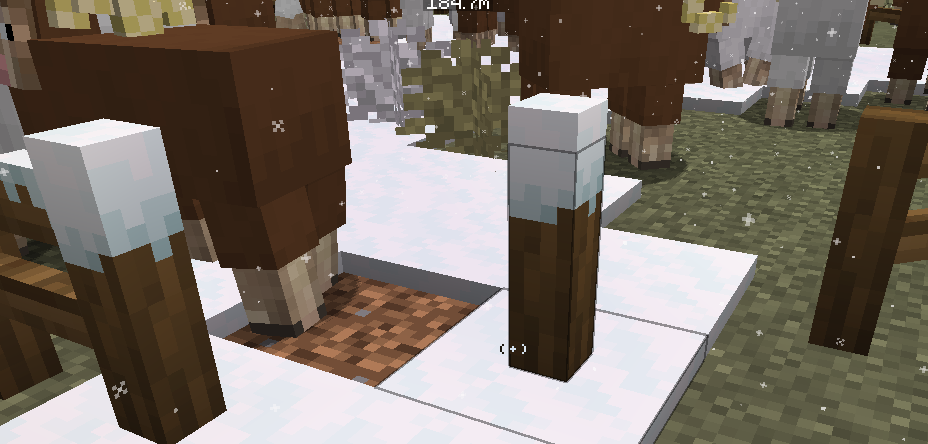
Does anyone know what mod puts snow on my fences like this?
nova sinew
Does anyone know what mod puts snow on my fences like this?
snow real magic
nova sinew
it ruins my diagonal fences
is there a way to stop it from happening?
like make it just not go on my fences
little cliff
icy estuary
you most likely installed the wrong bmc1
I installed BMC1 from SHXRKIE on curseforge
 stiff stirrup
the video you saw was most likely a older version or bmc+
little cliff
and where can I get those
but on the description of BMC1 it says "Now able to go below y 0 into the Deep Dark Dimension", which I can do
 olive granite
@stiff stirrup Are you by chance experienced in mac? i was waiting for help the other day and got told to ask you for help with a macbook issue of the game crashing
stiff stirrup
olive granite
<@460610775887773737> Are you by chance experienced in mac? i was waiting for he...
make sure you have java21 and ATL and itll work
!openjdk
still sentinelBOT
- Download an adoptium release for Java (recommended but not required):
- Java 11 (https://adoptium.net/temurin/releases/?version=11) for versions 1.16.5 and below (can also use 8 if its not working)
- Java 18 (https://adoptium.net/temurin/releases/?version=18) for any versions newer (or 17 if 18 doesn't work)
- Consider installing the JRE instead of the JDK for a smaller file size
-
When installing through adoptium, make sure that Add to PATH and Set JAVA_HOME variable are both set to be installed (please see https://imgur.com/a/jPu1h7h for how that would look)
-
Check if java has been correctly installed by running java --version (or java -version on older versions), and seeing if the output is correct (see https://imgur.com/a/OWcoq4p for an example of the output)
- NOTE: 64 bit versions of java ALWAYS have '64-bit Server VM' in the version output. If that is not there, you have installed a 32-BIT version!! If you're getting Out of Memory errors or any other errors, PLEASE install 64-bit
- If the output isn't as intended, you have 2 options.
i) Delete ALL other java versions from your PC (ONLY recommended if you don't need them)
ii) Redirect your launcher/server to use your new installation of Java
Method i
- Uninstall any other java program listed in your programs list (differs by OS, please find a guide for your own OS if you don't know)
- Attempt to re-use the command mentioned above (if the output is now correct, which it should be, you are ready to go)
Method ii
- For a server, please modify the $Java/JAVA variable (found in your startup script depending on ps1/sh) to the path of your java installation. For windows, this path is usually found in "Program Files/Eclipse Adoptium/version_of_java/bin"
- For a client, depending on whether you use CurseForge, GD, or AT, the process is slightly different. Please see a guide for each respective launcher on how to change the java version.
stiff stirrup
!alternates
still sentinelBOT
If this command was run in response to your question/issue, it is likely because switching away from the launcher you are currently using would fix your problem.
From our experience, the most stable launcher by far is ATLauncher, also known as ATL.
To install ATLauncher, do the following:
1. Go to https://atlauncher.com/download
2. Install and run the setup, then open the program.
3. Login to your Microsoft account that owns the Java Edition of Minecraft from the Accounts tab on the right. This process is 100% safe, as it goes directly through Microsoft. ATLauncher does not see your account credentials.
4. Go to the Packs tab on the right, then click "Curseforge" on the left.
5. Search the modpack you wish to download.
6. Click "New Instance". Click "Ok" on the opted out mods warning, then click "Open All" on the manual download screen.
7. Let the mods download, ATLauncher will grab them from your Downloads folder and automatically add them to the modpack.
8. Go to the Instances tab, and click "Play" on the modpack you downloaded. If you ever see an "Update" button on the instance, click it.
To transfer your Curseforge world to ATLauncher, simply right click the modpack on Curseforge, or click the 3 dots, then click "Open Folder". Copy the Saves folder, then click "Open Folder" on ATLauncher and paste the Saves folder there.
Because ATLauncher downloads the exact same files as Curseforge does, your world will be the exact same and you will be able to join the same servers. ATLauncher also works without an internet connection (after you've installed the modpack, of course), and does not have any bloat from Overwolf. You are free to uninstall both Overwolf and Curseforge with ATLauncher installed.
olive granite
stiff stirrup
make sure you have java21 and ATL and itll work
i have the otehr version of java21 which isnt adoptium
do i NEED the adoptium one?
stiff stirrup
not really
olive granite
and do i NEED at launcher instead of prism?
stiff stirrup
not rlly
olive granite
then theres still the issue lmao
stiff stirrup
ATL is just there cuz cf sucks ass
olive granite
im using prism launcher and java 21
stiff stirrup
did you download the 64x for java21
olive granite
olive granite
aarch64
macbook m2^
stiff stirrup
should just use normal 64x

Eclipse Adoptium provides prebuilt OpenJDK binaries ...
olive granite
the other guy said to use aarch64
stiff stirrup
not sure why
olive granite
give me a sec to install this
 teal urchin
i told him to use aarch64 because M1/M2 are not standard x64 cpus
they natively use arm technology, which is what aarch64 means
x64 will work but only because macs have a transpiler called Rosyln or something that converts the x64 instructions to arm
stiff stirrup
ah
stiff stirrup
m1 and m2
teal urchin
mhm
teal urchin
pssh
you may notice reduced performance and thatll mostly be because of the rosetta translation
but otherwise i guess works is better than nothing
 digital horizon
Hi I just joined. could anyone help me with the BMC4 I keep getting error code 1
still sentinelBOT
Hello! For us to help you with your issue, you will need to answer all 8 questions below. Post the answers in this channel:
1. Have you modified the modpack in any way? If so, what did you do? (Updating/adding/removing mods, changing configs)
2. What launcher, or program, are you using to launch the game? (CurseForge, ATLauncher, etc)
3. What Minecraft version are you playing? (1.18.2, 1.16.5, 1.19.2)
4. What version of the modpack are you playing? (v11, v9, etc)
5. What steps are necessary to reproduce the crash? (Launching the game, exploring the world, etc)
6. Have you ever gotten past the point where the crash happens?
7. Send the crash report file into this channel. Right click the modpack, Open Folder, and navigate to the Crash Reports folder. Drag the newest one here. If there is no crash reports folder, do the same thing with the latest.log file in the logs folder.
8. Did you follow the Performance guide linked in #faq?
vocal dome
how to check how many bosses there are in the mod
digital horizon
@teal urchin how do i find the crashlog?
teal urchin
its in your logs folder in the minecraft folder
Right click the modpack, Open Folder, and navigate to the Crash Reports folder. Drag the newest one here. If there is no crash reports folder, do the same thing with the latest.log file in the logs folder.
its part of the instructions
stiff stirrup
digital horizon
<@560832301739802624> how do i find the crashlog?
!logs
still sentinelBOT
To better assist with fixing an issue, we will need some logs: Curseforge/GDLauncher-> Right click the modpack instance -> Open Folder. For MultiMC -> Click 'Instance Folder' on the right.
Find the file 'Latest' in the 'Logs' folder. If there is a folder called 'Crash Reports' then find the newest file from today. Upload these as requested.
 dense atlas
What should I do if I spawned without a quest book?
stiff stirrup
inventory top left
stiff stirrup
digital horizon
<@560832301739802624> how do i find the crashlog?
please read the entire comman
it guides you on everything you need to find and do
stiff stirrup
!drivers
still sentinelBOT
You (likely) need to update your graphics drivers in order to resolve the crash. Here's how to go about doing that!
1. Identify your graphics card
if you already know skip to the next step
- Open task manager
- Navigate to the "Performance" tab (on Windows 11 this is the button that looks like a heart pulse)
- Press the GPU 0 graph and read your GPU from the top right
Note:
In some cases you may see a GPU 0 and GPU 1. This means your CPU has its own GPU, as well as an external one. You probably want GPU 1 (which is usually the external), but you can ask staff to clarify if necessary.
2. Download your drivers from the manufacturers site
Depending on what you read before, you likely need drivers from either AMD, Intel, or NVIDIA
AMD: https://www.amd.com/en/support
Intel: https://www.intel.com/content/www/us/en/download-center/home.html
NVIDIA: https://www.nvidia.com/Download/index.aspx?lang=en-us
Note:
- For NVIDIA you want to select "Game Ready Driver (GRD)" (this is the default option) for the best performance. Once installing you'd probably prefer downloading GeForce Experience, which will notify you when there's an available drivers update.
- For Intel, you probably want to press "Get Started" under the "Automatically update your drivers and software", which will simplify the process and update everything automatically
- For AMD you probably want to just press "Download Windows Drivers", which will download something called AMD Adrenaline, which will update your drivers automatically.
3. Run the installation, restart your computer, and try playing MC again
- At this point, hopefully your Minecraft is running. If it still does not work, please post any new logs and staff will help assist you with finding the right solution.
spare minnow
does anyone know how to make my aether dragon breathe fire!! nothing is workingg!!
vocal dome
how to check how many bosses there are in the mod
dense atlas
I spawned without a quest book and if I take one from creative mode it is blank, what's the problem?
stiff stirrup
Inventory Top Left
digital horizon
stiff stirrup
did you do the drivers thing
nova sinew
My minecraft crashes when it gets to Scanning Mod Candidates and returns error code 1.
I tried looking at the crash log but it doens't make any sense to me
stiff stirrup
update drivers too
olive granite
teal urchin
you may notice reduced performance and thatll mostly be because of the rosetta t...
decided to try the normal 21 again as the performance is a littly sucky on x64 and it crashed but a little later than the last few times lmao
not idea what exit code 6 is but it is a much shorter log this time
stiff stirrup
mac is no happy
digital horizon
i updated them using the geoforce experience thing. then i restarted my pc
still no luck
stiff stirrup
laptop?
olive granite
stiff stirrup
mac is no happy
mac hates bmc
stiff stirrup
no mac just hates modpacks
digital horizon
laptop
olive granite
stiff stirrup
no mac just hates modpacks
others work fine
rlcraft seems to crash on launch
but all the mods 9 works flawlessly
stiff stirrup
digital horizon
laptop
 olive granite
rotn also works flawlessly
olive granite
is there anyway to make it work with normal 21 or am i just stuck using x64
spare minnow
does anyone know how to make my aether dragon breathe fire!! nothing is workingg!!
dense atlas
I can't see any quests.
stiff stirrup
olive granite
is there anyway to make it work with normal 21 or am i just stuck using x64
most likely stuf with 64x
stuck
stiff stirrup
dense atlas
I can't see any quests.
you downloaded the modrinth edition then
dense atlas
https://www.curseforge.com/minecraft/modpacks/better-mc-forge-bmc4 so this one is not the right version?
 digital horizon
@stiff stirrup it worked!! thanks a ton. love ya homie
dense atlas
so what should I do then?
still sentinelBOT
If this command was run in response to your question/issue, it is likely because switching away from the launcher you are currently using would fix your problem.
From our experience, the most stable launcher by far is ATLauncher, also known as ATL.
To install ATLauncher, do the following:
1. Go to https://atlauncher.com/download
2. Install and run the setup, then open the program.
3. Login to your Microsoft account that owns the Java Edition of Minecraft from the Accounts tab on the right. This process is 100% safe, as it goes directly through Microsoft. ATLauncher does not see your account credentials.
4. Go to the Packs tab on the right, then click "Curseforge" on the left.
5. Search the modpack you wish to download.
6. Click "New Instance". Click "Ok" on the opted out mods warning, then click "Open All" on the manual download screen.
7. Let the mods download, ATLauncher will grab them from your Downloads folder and automatically add them to the modpack.
8. Go to the Instances tab, and click "Play" on the modpack you downloaded. If you ever see an "Update" button on the instance, click it.
To transfer your Curseforge world to ATLauncher, simply right click the modpack on Curseforge, or click the 3 dots, then click "Open Folder". Copy the Saves folder, then click "Open Folder" on ATLauncher and paste the Saves folder there.
Because ATLauncher downloads the exact same files as Curseforge does, your world will be the exact same and you will be able to join the same servers. ATLauncher also works without an internet connection (after you've installed the modpack, of course), and does not have any bloat from Overwolf. You are free to uninstall both Overwolf and Curseforge with ATLauncher installed.
 pearl badge
Does anyone know what the black and white underwater mobs are that spawn when travelling in the ocean, similar to a smaller version of an enderman pls?
vocal dome
how to check how many bosses there are in the mod
icy estuary
vocal dome
how to check how many bosses there are in the mod
you have asked
4 times
and I have replied
4 times
stiff stirrup
icy estuary
4 times
 nova sinew
Everything I have in my simple storage network's quantity is multiplied by 3
it only goes for some items
nvm i foudn out the issue
 knotty kraken
does anyone know what might be causing this issue?
 teal urchin
!moreinfo
still sentinelBOT
Hello! For us to help you with your issue, you will need to answer all 8 questions below. Post the answers in this channel:
1. Have you modified the modpack in any way? If so, what did you do? (Updating/adding/removing mods, changing configs)
2. What launcher, or program, are you using to launch the game? (CurseForge, ATLauncher, etc)
3. What Minecraft version are you playing? (1.18.2, 1.16.5, 1.19.2)
4. What version of the modpack are you playing? (v11, v9, etc)
5. What steps are necessary to reproduce the crash? (Launching the game, exploring the world, etc)
6. Have you ever gotten past the point where the crash happens?
7. Send the crash report file into this channel. Right click the modpack, Open Folder, and navigate to the Crash Reports folder. Drag the newest one here. If there is no crash reports folder, do the same thing with the latest.log file in the logs folder.
8. Did you follow the Performance guide linked in #faq?
 lucid estuary
Hey, for some reason in Better MC 1.20 I can't access the recipe book in the creafting table, is it some mod that eliminates it or am I doing something wrong?
stiff stirrup
lucid estuary
Hey, for some reason in Better MC 1.20 I can't access the recipe book in the cre...
its removed due to performance issues
lucid estuary
stiff stirrup
its removed due to performance issues
That's good to know, thank you.
stiff stirrup
lucid estuary
Another thing related to that, the traditional shield craft was also removed, right?
grand gate
how do I enable seamless textures (glass etc?)
 forest rose
Hi how are you doing? I wanted to know if anyone's world rendering is also a bit bad, it takes me too long to load
lucid estuary
forest rose
Hi how are you doing? I wanted to know if anyone's world rendering is also a bit...
Personally no, in fact I feel that the modpack is satisfactorily optimized.
It could be the specs of your PC.
nova sinew
A moobloom just crashed my game
💀
My friend was telling me about a golden cow and I was confused then they said it was right in front of me
then they picked it up and my game crashed
forest rose
lucid estuary
It could be the specs of your PC.
its a lapton with an i5 11th RTX3050 and 16gb RAM
i think is good to play
lucid estuary
forest rose
its a lapton with an i5 11th RTX3050 and 16gb RAM
Wow, my PC has a 1660 and an i3 10th with 16 GB RAM
And the modpack works great to me
lucid estuary
Well, consider that my world is quite light because I started it a few days ago.
It may be a factor.
 rare swan
nova sinew
My friend was telling me about a golden cow and I was confused then they said it...
rare swan
nova sinew
My friend was telling me about a golden cow and I was confused then they said it...
your able to play with friedns without lagf?
sorry terrible typing i adjusted my setup getting used to it
nova sinew
rare swan
your able to play with friedns without lagf?
yea i got a server
stiff stirrup
forest rose
Hi how are you doing? I wanted to know if anyone's world rendering is also a bit...
!performance
still sentinelBOT
stiff stirrup
 forest rose
yes, i have that active
stiff stirrup
that’s good
lucid estuary
Do you know where I can find the new villagers?
In this village I couldn't find any of them.

 stiff stirrup
 meager echo
i
meager echo
i accidently pressed something and its showing the contents inside my inventory even though its off
stiff stirrup
press i
lucid estuary
What the hell is that thing?

 dusty topaz
Whats the difference of fabric and forge guys
 supple geyserBOT
dusty topaz
Whats the difference of fabric and forge guys
supple geyserBOT
dusty topaz
Whats the difference of fabric and forge guys
Please read #faq to see the modpack diferences.
dusty topaz
Whoops
meager echo
lucid estuary
What the hell is that thing?
its a water thing
it spawns in this dungeon for the cataclysm mod
can someone help me
everytime i try to go into the end my server crashes
its a free server (aternos) but i havent had any issues prior to this
meager echo
real?
meager echo
zamn
still sentinelBOT
We suggest renting a server from Bisect Hosting:
Approx. $10 - $25 a month depending on what plan you choose. You can also get 25% off with Code LunaPixel.
Go to https://www.bisecthosting.com/LunaPixel and order a plan which fits you. We suggest 1GB per player but nothing lower than 4GB as the server needs at least 3GB to run.
Go to #server-hosting for more Info!
Free Method: (This is hosting on your own PC, which is harder to do so we suggest getting a server via Bisect Hosting)
- Download the serverpack from Curseforge's website
- Right click the start.ps1 file and click Run with Powershell
To join your own server, typelocalhostinto Direct Connect.
This video explains the process https://www.youtube.com/watch?v=wuGUbVbLsDc
The server IP address is your Public IP Address, which can be found by googling my ip address
If other players are unable to join, find a portforwarding guide online.
still sentinelBOT
Luna Pixel's World Sharing
Our modpacks don't support any mods that add singleplayer hosting / world sharing because we already provide free world sharing. The "Essential" mod is therefore incompatible.
To share your world using our own world hosting, click the "Open to Lan" or "Share World" button in the game menu when in a singleplayer world, and share the world.
It will give you an address, like magma-cube.mc.lunapixel.gg, which your friends can use to connect directly to your world as if it were a server!
We still highly suggest not to play through LAN as LAN is untested and unreliable. Using it will cause longterm damage to your world.
There is no reason to use LAN, as we support both paid and free methods of hosting a server the normal way.
lucid estuary
meager echo
it spawns in this dungeon for the cataclysm mod
He looks like the warden's malnourished cousin.
meager echo
lucid estuary
He looks like the warden's malnourished cousin.
LMAO
theyre pretty annoying theyre hitboxes are weird
stiff stirrup
meager echo
essential
wont work
meager echo
world sharing?
stiff stirrup
causes world corruption + we have one alr
meager echo
stiff stirrup
causes world corruption + we have one alr
oh that one above
stiff stirrup
yep
meager echo
sorry i saw essential and didnt read anything else lol
i can just download the world i alr have and use that right?
stiff stirrup
yep
meager echo
thanks man
nova sinew
BetteMC still returns error code 1 even when i updated my drivers
stiff stirrup
give latest.log again
lucid estuary
meager echo
theyre pretty annoying theyre hitboxes are weird
I think i've found their house. 💀
 meager echo
yeah yeah yeah
i cleaned that area out with a friend and we are planning to make it our base
it looks sick
nova sinew
stiff stirrup
nova sinew
laptop?
nova sinew
no pc
still sentinelBOT
If this command was run in response to your question/issue, it is likely because switching away from the launcher you are currently using would fix your problem.
From our experience, the most stable launcher by far is ATLauncher, also known as ATL.
To install ATLauncher, do the following:
1. Go to https://atlauncher.com/download
2. Install and run the setup, then open the program.
3. Login to your Microsoft account that owns the Java Edition of Minecraft from the Accounts tab on the right. This process is 100% safe, as it goes directly through Microsoft. ATLauncher does not see your account credentials.
4. Go to the Packs tab on the right, then click "Curseforge" on the left.
5. Search the modpack you wish to download.
6. Click "New Instance". Click "Ok" on the opted out mods warning, then click "Open All" on the manual download screen.
7. Let the mods download, ATLauncher will grab them from your Downloads folder and automatically add them to the modpack.
8. Go to the Instances tab, and click "Play" on the modpack you downloaded. If you ever see an "Update" button on the instance, click it.
To transfer your Curseforge world to ATLauncher, simply right click the modpack on Curseforge, or click the 3 dots, then click "Open Folder". Copy the Saves folder, then click "Open Folder" on ATLauncher and paste the Saves folder there.
Because ATLauncher downloads the exact same files as Curseforge does, your world will be the exact same and you will be able to join the same servers. ATLauncher also works without an internet connection (after you've installed the modpack, of course), and does not have any bloat from Overwolf. You are free to uninstall both Overwolf and Curseforge with ATLauncher installed.
nova sinew
ok ill try atlauncher
lucid estuary
meager echo
i cleaned that area out with a friend and we are planning to make it our base
Man, they are terrifying, they chase you and make a lot of damage.💀
meager echo
ong
lucid estuary
Would you recommend I go back until I have full diamond protection IV?
atomic narwhal
yup
meager echo
stiff stirrup
yeah
hey
stiff stirrup
hi
meager echo
im trying to run a server using my pc
meager echo
yeah
stiff stirrup
!powershell
still sentinelBOT
An update to windows introduced a new security feature that prevents powershell files from running on your PC. This is great for your security, but not so great for our server start scripts, which require powershell to run them. Fortunately there is a quick fix for this!
Run powershell as administrator, then run Set-ExecutionPolicy RemoteSigned. Read the prompt and press accept. This will allow us to run scripts.
Next, navigate to your server directory using cd path/to/directory (for example: cd C:\Users\Username\Documents\Minecraft\Server)
You can now run the server by double-clicking the start.ps1 file, or typing .\start.ps1 into the command line while in the directory.
IF THE ABOVE DOES NOT WORK, TRY THIS
Run the command Unblock-File -Path .\start.ps1 in the same powershell window. This will allow the start script to not be blocked by windows, and run freely.
If all else fails, a manual installation should work:
FORGE 1.16.5: https://www.youtube.com/watch?v=bIjisWyxU-8
FORGE 1.18.2: https://www.youtube.com/watch?v=R610M102X0U
FORGE 1.19.2: https://www.youtube.com/watch?v=3HD0ibIpO-A
FABRIC: https://www.youtube.com/watch?v=b2W1Xb7nLKo
Make sure to Install the Server in our ServerPacks so it can use the correct files.

 blissful flume
since bmc plus can't be downloaded in curseforge what other launchers you can download it? huh ATLauncher etc. idk?
stiff stirrup
blissful flume
since bmc plus can't be downloaded in curseforge what other launchers you can do...
you cant
stiff stirrup
blissful flume
since bmc plus can't be downloaded in curseforge what other launchers you can do...
its been taken off curseforge entirely
you can no longer get bmc+
blissful flume
stiff stirrup
you can no longer get bmc+
does anyone know of a launcher that still has bmc plus in the modpack selection
stiff stirrup
friend
every launcher gets their modpacks from curseforge
if it aint there
it aint on the launcher
blissful flume
stiff stirrup
it aint on the launcher
THIS is BullShit why??????? WHERE IS IT I NEED IT COME ON!!!!!
stiff stirrup
blissful flume
THIS is BullShit why??????? WHERE IS IT I NEED IT COME ON!!!!!
1 don’t talk in caps 2 it’s no longer supported for the 5th fucking time 3 you really don’t need that modpack and 4 fix the attitude
blissful flume
stiff stirrup
1 don’t talk in caps 2 it’s no longer supported for the 5th fucking time 3 you r...
I fuck this fucking bitch this fucking shit ass i fkn quit i fkn quit what's the next game?
meager echo
stiff stirrup
silly idiot
sorry for asking a lot of questions
but
do you know how to add my previous world to my local server?
i have the world file and the servers running
nvm
stiff stirrup
niceo
 vernal bison
!optifine
still sentinelBOT
It is highly advised to not use Optifine, as it is very glitchy, will increase loading times to upwards of 10 minutes, and will decrease your FPS substantially. All Luna Pixel Studios modpacks come with shader support without Optifine via Oculus on Forge and Iris on Fabric. Optifine is also incompatible with all of our modpacks. The game will not launch with Optifine installed.
If you are interested in Optifine alternatives for your own gameplay, you can find a list here https://github.com/LambdAurora/optifine_alternatives
Note that a majority of these mods are already included in our modpacks.
https://cdn.discordapp.com/attachments/1046333354259259422/1046337216609271858/unknown.png

 nova drift
Does anyone know a mod similar to "Beacon Overhaul" but in the Forge+ version that will work in BMC4
spare minnow
how can i make my dragon breathe fire!!!!!!!!!!
 wheat talon
what’s the difference between BMC 1,2,3,4
icy estuary
wheat talon
what’s the difference between BMC 1,2,3,4
!faq
still sentinelBOT
Please read it :sob:
 steady ember
lucid estuary
I think i've found their house. 💀
steady ember
lucid estuary
I think i've found their house. 💀
when i first saw that structure myself i thought i way playing elden ring💀
 devout valley
do I have any ways to solve farmers problems?
they take all seeds to compost, and don't harvest or plant even breed. Just look each other stand there. I'm big head now.
version 1.20.1 v24_HF server

btw the string duplicate farm doens't work. does it affect by mods?
though it is not in demand.
 sick rivet
 hollow carbon
When trying to host a server with the BMC4 1.24 hf version server pack, I get a misalligned mod error, saying the client has cuisinedelight 1.1.11, Delightful 3.4.2 and L2 Library 2.4.16 whilst the server does not. Installing the corresponding .jar files to the mods folder on the server results in a crash when trying to boot up the server. When trying to delete the mods on the clients side, I have only found the first two and am unable to uninstall L2 Library. Any suggestions?
 onyx leaf
For some reason whenever i log into the world, the bottom half of "large ferns" are invis?
Can anyone help?
(in Better MC 24)
 fleet kernel
have a question i want to load this pack on to a server to play with friends how much i need for this to work fine?
 novel sable
Yooo can someone tell me what the best armor is in this modpack?
grand gate
Any tips to improve chunk loading speed? It's being quite an issue when flying in a straight line

 trail thunder
 delicate bronze
just installed bmc4 and when i run it just crasesh
delicate bronze
just installed bmc4 and when i run it just crasesh
!moreinfo
still sentinelBOT
Hello! For us to help you with your issue, you will need to answer all 8 questions below. Post the answers in this channel:
1. Have you modified the modpack in any way? If so, what did you do? (Updating/adding/removing mods, changing configs)
2. What launcher, or program, are you using to launch the game? (CurseForge, ATLauncher, etc)
3. What Minecraft version are you playing? (1.18.2, 1.16.5, 1.19.2)
4. What version of the modpack are you playing? (v11, v9, etc)
5. What steps are necessary to reproduce the crash? (Launching the game, exploring the world, etc)
6. Have you ever gotten past the point where the crash happens?
7. Send the crash report file into this channel. Right click the modpack, Open Folder, and navigate to the Crash Reports folder. Drag the newest one here. If there is no crash reports folder, do the same thing with the latest.log file in the logs folder.
8. Did you follow the Performance guide linked in #faq?
 lost anvil
Does anyone know if Knightmetal or Diamond has more durability in BetterMC?
delicate bronze
still sentinel
Hello! For us to help you with your issue, you will need to answer **all 8 quest...
no just installed
curseforge
1.20.1
v24 HF
i click play, then crash without even opening the game
no yet
cant find a folder crash reports
noo...
 frosty orchid
hello do anyone have the list of the bosses and dimensions of the modpack pleaseeeee
fleet oxide
frosty orchid
hello do anyone have the list of the bosses and dimensions of the modpack please...
I’ll just help you with the number of bosses from the bigger mods since I can’t name them all
4 from the aether
6-8 from cataclysm
4 from blue skies
1 from the clown pillager mod (forgot name)
3 from some mod i also forgot— (2 bosses in nether, 1 in end) —the one where the end boss is the giant box
1 super pillager mage from another mod i forgot (the boss in mansions) for the imbuing table
And the 3 from vanilla
Glhf
frosty orchid
fleet oxide
I’ll just help you with the number of bosses from the bigger mods since I can’t ...
don't need the names take you so much bro
and which dimensions are in the modpack ?
u know ?
icy estuary
frosty orchid
hello do anyone have the list of the bosses and dimensions of the modpack please...
check the questbook
each version is different.
icy estuary
delicate bronze
no just installed
curseforge
1.20.1
v24 HF
i click play, then crash without even...
read #7 slowly
frosty orchid
icy estuary
check the questbook
okty
stiff stirrup
delicate bronze
no just installed
curseforge
1.20.1
v24 HF
i click play, then crash without even...
there is a crash report
go find both files
 crude thunder
yo i need help with probs with better mc
long story short been playing for a few days and had been running fine and now since this morning my games unplayable cuz of frames
pc is beefy mc is no issue to run what could have caused that out of the blue
@stiff stirrup
stiff stirrup
!moreinfo
still sentinelBOT
Hello! For us to help you with your issue, you will need to answer all 8 questions below. Post the answers in this channel:
1. Have you modified the modpack in any way? If so, what did you do? (Updating/adding/removing mods, changing configs)
2. What launcher, or program, are you using to launch the game? (CurseForge, ATLauncher, etc)
3. What Minecraft version are you playing? (1.18.2, 1.16.5, 1.19.2)
4. What version of the modpack are you playing? (v11, v9, etc)
5. What steps are necessary to reproduce the crash? (Launching the game, exploring the world, etc)
6. Have you ever gotten past the point where the crash happens?
7. Send the crash report file into this channel. Right click the modpack, Open Folder, and navigate to the Crash Reports folder. Drag the newest one here. If there is no crash reports folder, do the same thing with the latest.log file in the logs folder.
8. Did you follow the Performance guide linked in #faq?
 lucid mason
Hey, I downloaded the modpack through Curseforge but the game always crashes, when I run it
Can someone help?
Tried to play the newest version of the modpack
stiff stirrup
lucid mason
Tried to play the newest version of the modpack
look up and answer the questions
stiff stirrup
crude thunder
<@460610775887773737>
waiting for you to answer questions
crude thunder
@stiff stirrup so 1 - no I have not 2 Curseforge 3 1.20.1 4 v24 HF 5 the game doesn’t crash I just get like 3 fps at any given time when that was never happening my first few days playing the mod pack
I’ve changed no settings from the time I started playing when in ran perfect to today when it’s unplayable
stiff stirrup
laptop?
 vale salmon
how do i put my backpack that have things in it on the shelf?
trail thunder
vale salmon
how do i put my backpack that have things in it on the shelf?
ig shift right click
steady ember
is there are way to transfer enchantments from items to books in bmc 1.20?
nova drift
steady ember
is there are way to transfer enchantments from items to books in bmc 1.20?

CurseForge
Move enchantments from item to book using an anvil, on Fabric or Forge!
633.6K Downloads | Mods
stiff stirrup
crude thunder
I’ve changed no settings from the time I started playing when in ran perfect to ...
are you a laptop....
crude thunder
No
Not at home rn on mobile at work but pc is i9 3060 32 gbs ram
Just to be short
still sentinelBOT
 fickle ibex
Sup so i been playing BMC for a while now but all the sudden my fps just started to drop. I tried making new worlds to see if to much mobs or items were the issue but it wasn't
Anyone can help?
stiff stirrup
look 1 message above
fickle ibex
i already allocated more ram tho.. first it was running 50-60 fps with 4 gb ram and now i put it up to 6 it gives 10-25 :/
stiff stirrup
curseforge launcher?
fickle ibex
Yup
 cursive raptor
yo guys, i just started playing bmc and you know the top left corner it says what block/item whatever your looking at displays on the top left corner?
icy estuary
cursive raptor
yo guys, i just started playing bmc and you know the top left corner it says wha...
yes
cursive raptor
is there anyway i can change the positioning of it to the middle?
icy estuary
jade config
cursive raptor
thanks
 gilded pasture
does anyone know of a mod that gives thief when opening villager chests?
fickle ibex
stiff stirrup
use atl launcher
using atl launcher still 0 difference lol
random pelican
any tips yall guys woulda wanted to know starting the game that yall can help with?
stiff stirrup
fickle ibex
using atl launcher still 0 difference lol
it should
just follow the
!performance
still sentinelBOT
 buoyant linden
random pelican
any tips yall guys woulda wanted to know starting the game that yall can help wi...
buoyant linden
random pelican
any tips yall guys woulda wanted to know starting the game that yall can help wi...
Yeah! You can reroll enchants on items by taking an unenchanted item in and out of the table until you see a good enchant. Ohh and definitely explore the different food options cause some are kind of similar to golden apples.
random pelican
buoyant linden
Yeah! You can reroll enchants on items by taking an unenchanted item in and out ...
the first thing kinda confused me, mind elaborating on what you mean? (Im on BMC4)
And what item was the easiest/most useful in your opinion to make?
buoyant linden
random pelican
the first thing kinda confused me, mind elaborating on what you mean? (Im on BMC...
Yeah Sure! So normally when you enchant an item in Minecraft, you have to take the enchants they give you and remove it if you don't like it, but in BMC4 you can just "reroll" the enchants by clicking on the little symbol in the enchant table. Im not that good at explaining, but this is the Mod that does it. https://www.curseforge.com/minecraft/mc-mods/easy-magic/screenshots. And for the food I would say make squid Ink pasta, as it fills up your hunger bar and saturation, and isn't that hard to make.

CurseForge
Enchanting tables as they always should have been! Items stay after closing, and easy re-rolls.
19.7M Downloads | Mods
 proper ember
Okay so, just delete the mods Connector-1.0.0-beta.32+1.20.1 and ConnectorExtras-1.8.0+1.20.1, i just using Mohist libraries, and delete YSNS mods, Mohist already can disable mobs and items, now the server can support plugins. Don't use free Github server executable in the future, or, add documentations.
Have a good day, and thanks for helping me 👍
stiff stirrup
deleting the mods in connector removes some mods from being at play
so 
pretty pointless running mohist when you can just use mod versions of the plugins you want
 vital wagon
Hello! does some1 know how to make a server on docker? im strugglin with an error and dont know how to fix it
stiff stirrup
show the error
icy estuary
proper ember
Okay so, just delete the mods Connector-1.0.0-beta.32+1.20.1 and ConnectorExtras...
your server is gna break lol
stiff stirrup
yep
icy estuary
js use modded alternatives of plugins
proper ember
i will do some test
it's only server-side mods, the player don't have modifications to do
 stiff stirrup
did you try using the server pack
vital wagon
this is the docker-compose i use
 icy estuary
proper ember
it's only server-side mods, the player don't have modifications to do
icy estuary
proper ember
it's only server-side mods, the player don't have modifications to do
that changes nothing
stiff stirrup
proper ember
it's only server-side mods, the player don't have modifications to do
it isnt a only server side mod, its a server and client mod
vital wagon
stiff stirrup
did you try using the server pack
yes using a data and modpacks folder but got no luck
stiff stirrup
which mbc you playing
icy estuary
The issue is Mohist and other plugin loaders js being unstable
stiff stirrup
1-4
icy estuary
but you do you
stiff stirrup

CurseForge
Version 1.20.1 | A Proper Vanilla+ Modpack | Don't play Vanilla play this!
1.2M Downloads | Modpacks
so this right?
vital wagon
ye
stiff stirrup
you downloaded this server pack
proper ember
stiff stirrup
it isnt a only server side mod, its a server and client mod
i upload a backup to my actual world (execute with the powershell), if i have corruption, i will see it
 stiff stirrup
proper ember
i upload a backup to my actual world (execute with the powershell), if i have co...
stiff stirrup
proper ember
i upload a backup to my actual world (execute with the powershell), if i have co...
well go have fun with it
if it breaks we cant fix it as its beyond the normal modifications
icy estuary
I really dont care what you do with the pack, but just as a warning.
Anything that happens we cannot help
proper ember
i will see if i hab a problem
 icy estuary
also can you please stop flooding this channel with this \
you can move to #1061339968691257466 if you want
proper ember
oh, sorry
vital wagon
stiff stirrup
remove these 2 mods
im re trying hold a sec pls
seems its working its generating the world rn
im kind of new on rpi servers so xd
im pretty new on docker too xd
stiff stirrup
all good
vital wagon
ok it worked thanks! now i have other problem but has nothing to do with the modpack and its that the port wont open xd
stiff stirrup
yeah thats something idk
vital wagon
thanks a lot bro! u gave me and my friends a nice modpack to play xd
stiff stirrup

 cold plover
 finite nexus
anyone know why i get this warning when i join a friend

then when i delete them it just crashes
stiff stirrup
server isnt installed right
finite nexus
what do you mean isnt installed right is there a special way?
because one of my friends can join it but i cant
agile cradle
Wait, didn't the list have a column on what the server is running atm?
agile cradle
finite nexus
Did you check to make sure both of you are using the same version of the modpack?
still sentinelBOT
Curseforge - Refers to both the Curseforge website and Curseforge Launcher. The Curseforge Launcher is a modded launcher used to play & install modpacks. ATLauncher is a better alternative. All modded launchers can be used to install & play both Fabric and Forge modpacks.
Modpack - A collection of mods. "Better MC 1.19.2 Forge", for example, is a modpack.
Modpack Version - The version of the modpack you are playing. v5, v6, v7, etc.
Minecraft Version - The version of Minecraft which the modpack you are playing runs on. 1.16.5, 1.18.2, 1.19.2, etc.
Mod - A .jar file which modifies the game in some way. "BetterEnd", for example, is a mod.
Forge - A mod loader which allows you to use Forge mods.
Fabric - A mod loader which allows you to use Fabric mods.
finite nexus
1.20.1 forge-47.2.0
agile cradle
What launchers are you all using?
finite nexus
curseforge
vital wagon
stiff stirrup
<:ducksalute:853082472852750376>
well after trying all i could try seems its the modpack that wont bind the port 😉
😭
stiff stirrup
well uhm
agile cradle
Everyone is using CF?
stiff stirrup
dk how to do that one lol
finite nexus
agile cradle
Everyone is using CF?
yes
agile cradle
How is the server hosted?
finite nexus
through worldshare in LAN options
vital wagon
i mean theres 3 options u host it on windows, on lan or on a nat/nas/rpi
im on rpi with docker
but im strugglin with some problems xd
 vital wagon
agile cradle
vital wagon
agile cradle
this is a server + client? or what
agile cradle
vital wagon
this is a server + client? or what
If you click on it it should give 1 as a client, 1 as a serverpack, you two need the client
vital wagon
i mean i already have that modpack xd
agile cradle
Serverpack is if you're making a server
delicate bronze
Why do i get this crash when opening a freshly installed modpack (curseforge)
agile cradle
delicate bronze
Why do i get this crash when opening a freshly installed modpack (curseforge)
windows or mac?
delicate bronze
win
 supple grove
hello, i have a problem and i am looking for solutuion or tips (obviously heh) anyway my problem is that i have 7gb ram server and it getting laggy so i have a an idea it is some mod that keep saving or loaded chunk, can anyone help me to confing or find that mod what make this?
delicate bronze
11
still sentinelBOT
- Download an adoptium release for Java (recommended but not required):
- Java 11 (https://adoptium.net/temurin/releases/?version=11) for versions 1.16.5 and below (can also use 8 if its not working)
- Java 18 (https://adoptium.net/temurin/releases/?version=18) for any versions newer (or 17 if 18 doesn't work)
- Consider installing the JRE instead of the JDK for a smaller file size
-
When installing through adoptium, make sure that Add to PATH and Set JAVA_HOME variable are both set to be installed (please see https://imgur.com/a/jPu1h7h for how that would look)
-
Check if java has been correctly installed by running java --version (or java -version on older versions), and seeing if the output is correct (see https://imgur.com/a/OWcoq4p for an example of the output)
- NOTE: 64 bit versions of java ALWAYS have '64-bit Server VM' in the version output. If that is not there, you have installed a 32-BIT version!! If you're getting Out of Memory errors or any other errors, PLEASE install 64-bit
- If the output isn't as intended, you have 2 options.
i) Delete ALL other java versions from your PC (ONLY recommended if you don't need them)
ii) Redirect your launcher/server to use your new installation of Java
Method i
- Uninstall any other java program listed in your programs list (differs by OS, please find a guide for your own OS if you don't know)
- Attempt to re-use the command mentioned above (if the output is now correct, which it should be, you are ready to go)
Method ii
- For a server, please modify the $Java/JAVA variable (found in your startup script depending on ps1/sh) to the path of your java installation. For windows, this path is usually found in "Program Files/Eclipse Adoptium/version_of_java/bin"
- For a client, depending on whether you use CurseForge, GD, or AT, the process is slightly different. Please see a guide for each respective launcher on how to change the java version.
 agile cradle
supple grove
hello, i have a problem and i am looking for solutuion or tips (obviously heh) a...
agile cradle
supple grove
hello, i have a problem and i am looking for solutuion or tips (obviously heh) a...
How many players are there?
supple grove
agile cradle
How many players are there?
3 players
vital wagon
agile cradle
Serverpack is if you're making a server
got any idea on docker compose? im having a little problem with it
agile cradle
delicate bronze
Did you follow the rest of the command on how to get it to run on your game?
agile cradle
vital wagon
got any idea on docker compose? im having a little problem with it
I've never used docker personally. What's the prob?
icy estuary
delicate bronze
Why do i get this crash when opening a freshly installed modpack (curseforge)
!drivers
agile cradle
supple grove
3 players
bump up to 8, how are you hosting the server?
still sentinelBOT
You (likely) need to update your graphics drivers in order to resolve the crash. Here's how to go about doing that!
1. Identify your graphics card
if you already know skip to the next step
- Open task manager
- Navigate to the "Performance" tab (on Windows 11 this is the button that looks like a heart pulse)
- Press the GPU 0 graph and read your GPU from the top right
Note:
In some cases you may see a GPU 0 and GPU 1. This means your CPU has its own GPU, as well as an external one. You probably want GPU 1 (which is usually the external), but you can ask staff to clarify if necessary.
2. Download your drivers from the manufacturers site
Depending on what you read before, you likely need drivers from either AMD, Intel, or NVIDIA
AMD: https://www.amd.com/en/support
Intel: https://www.intel.com/content/www/us/en/download-center/home.html
NVIDIA: https://www.nvidia.com/Download/index.aspx?lang=en-us
Note:
- For NVIDIA you want to select "Game Ready Driver (GRD)" (this is the default option) for the best performance. Once installing you'd probably prefer downloading GeForce Experience, which will notify you when there's an available drivers update.
- For Intel, you probably want to press "Get Started" under the "Automatically update your drivers and software", which will simplify the process and update everything automatically
- For AMD you probably want to just press "Download Windows Drivers", which will download something called AMD Adrenaline, which will update your drivers automatically.
3. Run the installation, restart your computer, and try playing MC again
- At this point, hopefully your Minecraft is running. If it still does not work, please post any new logs and staff will help assist you with finding the right solution.
delicate bronze
agile cradle
Did you follow the rest of the command on how to get it to run on your game?
no wait let me do i havent seen that
icy estuary
delicate bronze
no wait let me do i havent seen that
update ur drivers
icy estuary
finite nexus
what do you mean isnt installed right is there a special way?
!alternates
still sentinelBOT
If this command was run in response to your question/issue, it is likely because switching away from the launcher you are currently using would fix your problem.
From our experience, the most stable launcher by far is ATLauncher, also known as ATL.
To install ATLauncher, do the following:
1. Go to https://atlauncher.com/download
2. Install and run the setup, then open the program.
3. Login to your Microsoft account that owns the Java Edition of Minecraft from the Accounts tab on the right. This process is 100% safe, as it goes directly through Microsoft. ATLauncher does not see your account credentials.
4. Go to the Packs tab on the right, then click "Curseforge" on the left.
5. Search the modpack you wish to download.
6. Click "New Instance". Click "Ok" on the opted out mods warning, then click "Open All" on the manual download screen.
7. Let the mods download, ATLauncher will grab them from your Downloads folder and automatically add them to the modpack.
8. Go to the Instances tab, and click "Play" on the modpack you downloaded. If you ever see an "Update" button on the instance, click it.
To transfer your Curseforge world to ATLauncher, simply right click the modpack on Curseforge, or click the 3 dots, then click "Open Folder". Copy the Saves folder, then click "Open Folder" on ATLauncher and paste the Saves folder there.
Because ATLauncher downloads the exact same files as Curseforge does, your world will be the exact same and you will be able to join the same servers. ATLauncher also works without an internet connection (after you've installed the modpack, of course), and does not have any bloat from Overwolf. You are free to uninstall both Overwolf and Curseforge with ATLauncher installed.
vital wagon
agile cradle
I've never used docker personally. What's the prob?
i cant make it work. let me explain i open the server and all of that. but port wont open. I have tried other modpacks on the same port and they work but idk why this doesnt xd
supple grove
agile cradle
bump up to 8, how are you hosting the server?
some site hosting, yeah maybe the 8gb of ram can do it smoother i will upgrade it, is there any option around configuration?
agile cradle
vital wagon
i cant make it work. let me explain i open the server and all of that. but port ...
Have you checked through port checker that it's open?
vital wagon
agile cradle
Have you checked through port checker that it's open?
yeah it isnt
agile cradle
supple grove
some site hosting, yeah maybe the 8gb of ram can do it smoother i will upgrade i...
The name of the site host you're using?
icy estuary
supple grove
hello, i have a problem and i am looking for solutuion or tips (obviously heh) a...
!tps
still sentinelBOT
Please click this link and follow the guide. If you are using a server host such as Bisect, you may be limited in your options and instead have a checkbox to use Aikar's Flags, which will also work:
https://github.com/brucethemoose/Minecraft-Performance-Flags-Benchmarks
If you can not launch your server/game after using these flags, then remove the word java from the start. Also, make sure you are using Java 18 on 1.18.2 / 1.19.2 and Java 11 on 1.16.5. These should be downloaded from Adoptium's website.
If lag persists, install Spark to your server do the following command ingame:
/spark profiler start --only-ticks-over 50
Then, send the link in this channel.

CurseForge
spark is a performance profiler for Minecraft clients, servers and proxies.
58.9M Downloads | Mods
agile cradle
vital wagon
yeah it isnt
Then that's your problem if the port isn't open then it won't let you port forward.
Can't walk through closed doors right? same thing about ports
vital wagon
agile cradle
Then that's your problem if the port isn't open then it won't let you port forwa...
ik. xd i tried other docker files with other modpacks same config and they work but idk why this doesnt
icy estuary
delicate bronze
Why do i get this crash when opening a freshly installed modpack (curseforge)
@agile cradle if you see a crash with hs_err_pid that mentions atio6axx.dll+0x196280 its a driver issue most of the time, or it could be integrated graphics being used
it could be another reason but most of the time its just that
if a latest.log cuts off with OpenGL version 3.1 its also a driver issue

agile cradle
icy estuary
<@169556941180239872> if you see a crash with `hs_err_pid` that mentions `atio6a...
Does it show the same or something different for mac outdated drivers?
 agile cradle
Alright, thought I'd at least ask
wheat talon
does BMC have any sort of feature or mod where i can transfer enchaments from one thing to another
 delicate bronze
icy estuary
<@169556941180239872> if you see a crash with `hs_err_pid` that mentions `atio6a...
delicate bronze
icy estuary
<@169556941180239872> if you see a crash with `hs_err_pid` that mentions `atio6a...
thanks, a driver update did it
icy estuary
wheat talon
does BMC have any sort of feature or mod where i can transfer enchaments from on...
no
icy estuary
vital wagon
is there any solution for this?
!moreinfo
still sentinelBOT
Hello! For us to help you with your issue, you will need to answer all 8 questions below. Post the answers in this channel:
1. Have you modified the modpack in any way? If so, what did you do? (Updating/adding/removing mods, changing configs)
2. What launcher, or program, are you using to launch the game? (CurseForge, ATLauncher, etc)
3. What Minecraft version are you playing? (1.18.2, 1.16.5, 1.19.2)
4. What version of the modpack are you playing? (v11, v9, etc)
5. What steps are necessary to reproduce the crash? (Launching the game, exploring the world, etc)
6. Have you ever gotten past the point where the crash happens?
7. Send the crash report file into this channel. Right click the modpack, Open Folder, and navigate to the Crash Reports folder. Drag the newest one here. If there is no crash reports folder, do the same thing with the latest.log file in the logs folder.
8. Did you follow the Performance guide linked in #faq?
stiff stirrup
bmc + is no longer supported
omar
you left and came back
you know you can’t just post it here

atomic narwhal
Well, anywhere really
stiff stirrup
 muted tendon
I'm trying to do a server and it's saying "Error: Could not find or load main class @user_jvm_args.txt" how do I fix this I'm on windows and everything else seems to be right
stiff stirrup
muted tendon
I'm trying to do a server and it's saying "Error: Could not find or load main cl...
use java18 64x msi
!openjdk
still sentinelBOT
- Download an adoptium release for Java (recommended but not required):
- Java 11 (https://adoptium.net/temurin/releases/?version=11) for versions 1.16.5 and below (can also use 8 if its not working)
- Java 18 (https://adoptium.net/temurin/releases/?version=18) for any versions newer (or 17 if 18 doesn't work)
- Consider installing the JRE instead of the JDK for a smaller file size
-
When installing through adoptium, make sure that Add to PATH and Set JAVA_HOME variable are both set to be installed (please see https://imgur.com/a/jPu1h7h for how that would look)
-
Check if java has been correctly installed by running java --version (or java -version on older versions), and seeing if the output is correct (see https://imgur.com/a/OWcoq4p for an example of the output)
- NOTE: 64 bit versions of java ALWAYS have '64-bit Server VM' in the version output. If that is not there, you have installed a 32-BIT version!! If you're getting Out of Memory errors or any other errors, PLEASE install 64-bit
- If the output isn't as intended, you have 2 options.
i) Delete ALL other java versions from your PC (ONLY recommended if you don't need them)
ii) Redirect your launcher/server to use your new installation of Java
Method i
- Uninstall any other java program listed in your programs list (differs by OS, please find a guide for your own OS if you don't know)
- Attempt to re-use the command mentioned above (if the output is now correct, which it should be, you are ready to go)
Method ii
- For a server, please modify the $Java/JAVA variable (found in your startup script depending on ps1/sh) to the path of your java installation. For windows, this path is usually found in "Program Files/Eclipse Adoptium/version_of_java/bin"
- For a client, depending on whether you use CurseForge, GD, or AT, the process is slightly different. Please see a guide for each respective launcher on how to change the java version.
muted tendon
stiff stirrup
use java18 64x msi
Okay, thank you, I'll try it
stiff stirrup
np

 wheat talon
what does sunken city have?
delicate bronze
will i be able to join v23.5 servers with v24 game version?
icy estuary
wheat talon
what does sunken city have?
a boss iirc
delicate bronze
i have to downgrade then
icy estuary
js update the server
delicate bronze
icy estuary
js update the server
im using aternos build in mod pack servers, it says latest update 23.5

 still sentinelBOT
Luna Pixel's World Sharing
Our modpacks don't support any mods that add singleplayer hosting / world sharing because we already provide free world sharing. The "Essential" mod is therefore incompatible.
To share your world using our own world hosting, click the "Open to Lan" or "Share World" button in the game menu when in a singleplayer world, and share the world.
It will give you an address, like magma-cube.mc.lunapixel.gg, which your friends can use to connect directly to your world as if it were a server!
We still highly suggest not to play through LAN as LAN is untested and unreliable. Using it will cause longterm damage to your world.
There is no reason to use LAN, as we support both paid and free methods of hosting a server the normal way.
stiff stirrup
!server
still sentinelBOT
We suggest renting a server from Bisect Hosting:
Approx. $10 - $25 a month depending on what plan you choose. You can also get 25% off with Code LunaPixel.
Go to https://www.bisecthosting.com/LunaPixel and order a plan which fits you. We suggest 1GB per player but nothing lower than 4GB as the server needs at least 3GB to run.
Go to #server-hosting for more Info!
Free Method: (This is hosting on your own PC, which is harder to do so we suggest getting a server via Bisect Hosting)
- Download the serverpack from Curseforge's website
- Right click the start.ps1 file and click Run with Powershell
To join your own server, typelocalhostinto Direct Connect.
This video explains the process https://www.youtube.com/watch?v=wuGUbVbLsDc
The server IP address is your Public IP Address, which can be found by googling my ip address
If other players are unable to join, find a portforwarding guide online.
delicate bronze

stiff stirrup
yeah
icy estuary
js search tree in the modlist
delicate bronze
is it on bmc4?
icy estuary
i dont know
 coral parrot
does anyone know what mod is adding seasons to the game in the 1.20.1 version of the modpack
nevermind i figured it out
wheat talon
are there cherst padlocks or invisible chests?
 tender nacelle
damn is it just me or do I have to eat every 2 seconds on normal difficulty
has the hunger been touched by this modpack in any way? OR have I not played minecraft in so long that things changed
wheat talon
I killed the naga but it didn't drop any scales? is this a bug>?
rare swan
okay when my girlfriend download it says some files have not downloaded then make her download the files manually and when she tries to do that her mac doesnt detect uit
rare swan
any work arounds as of rn
stiff stirrup
rare swan
any work arounds as of rn
just download all the stuff click skip remaning and add it in later once it installs
stiff stirrup
whats the mods names
rare swan
1 sec
rare swan
stiff stirrup
whats the mods names
mandals gui dark mode
it appears as a folder on her device
rare swan
so without this she can join my game or whatever
stiff stirrup
ye
well
not rlly
its just a client side only thing
you can join without client side only
agile cradle
it's not needed, but if you want it that's up to you, it's for your prefrence really
Kinda like shaders, they aren't required to enter servers, you can choose to have them, on or not, etc
stiff stirrup
rare swan
sooo is that a yes or no lol
its not needed
if i make a entire modpack made of CLIENT side only aka #fresh-n-cozy i can join a pure vanilla server
a forge server with no mods, a fabric server with no mods and quilt server with no mods
as long as that mod that doesnt install right is a CLIENT SIDE ONLY or CLIENT SIDE OPTIONAL you are 1000% fine
agile cradle
Same with mods like litematica too
rare swan
perfect thank u sm
stiff stirrup
rare swan

agile cradle
The only way I knew litematica was client side was because of hermitcraft, some players use it, lot of them dont
agile cradle
When she opens her mac back up, check for a crash log and drop it here
if not, latest.log
rare swan
wait nvm we fixed it
wheat talon
if i rightclick anvil witrh iron ingot it repair? (saw it in a yt video)
agile cradle
wheat talon
if i rightclick anvil witrh iron ingot it repair? (saw it in a yt video)
yeah that's a vanilla feature I think.
I know it works with iron golems, not sure of anvils
wheat talon
If i summon a leviathan and i die, i can't resummon it in the same sunken city?
 brazen sequoia
Is there a way to chunk load in better mc forge or no?
fleet oxide
wheat talon
I killed the naga but it didn't drop any scales? is this a bug>?
Twilight forest bosses don’t usually drop items, they come from the loot chest which spawns after you kill the bosses
agile cradle
brazen sequoia
Is there a way to chunk load in better mc forge or no?
Yup, open map, right click and drag the chunks you wanna load, claim the chunks, right click drag again, then press force load. You can do up to 10
fleet oxide
frosty orchid
and which dimensions are in the modpack ?
Oh and add like 5-6 more bosses from twilight forest
1-2 from the otherside (warden dimension)
The dimensions are overworld, nether, end, blue skies, twilight forest, aether, otherside afaik
fleet oxide
wheat talon
are there cherst padlocks or invisible chests?
Supplementaries mod has a vault block that has a netherite key you can bind to it
Ender chests technically fulfill the same purpose
brazen sequoia
agile cradle
Yup, open map, right click and drag the chunks you wanna load, claim the chunks,...
Thank you so much
 main spindle
can i put immersive portal mod into this modpack??
atomic narwhal
main spindle
can i put immersive portal mod into this modpack??
iirc, that breaks a lot of mods
you can try
probably won't work
 potent peak
where can i post a report ?
atomic narwhal
here
atomic narwhal
!moreinfo
still sentinelBOT
Hello! For us to help you with your issue, you will need to answer all 8 questions below. Post the answers in this channel:
1. Have you modified the modpack in any way? If so, what did you do? (Updating/adding/removing mods, changing configs)
2. What launcher, or program, are you using to launch the game? (CurseForge, ATLauncher, etc)
3. What Minecraft version are you playing? (1.18.2, 1.16.5, 1.19.2)
4. What version of the modpack are you playing? (v11, v9, etc)
5. What steps are necessary to reproduce the crash? (Launching the game, exploring the world, etc)
6. Have you ever gotten past the point where the crash happens?
7. Send the crash report file into this channel. Right click the modpack, Open Folder, and navigate to the Crash Reports folder. Drag the newest one here. If there is no crash reports folder, do the same thing with the latest.log file in the logs folder.
8. Did you follow the Performance guide linked in #faq?
potent peak
there
i play on Curse Forge
@atomic narwhal
🥲
do u also know why people get disconnected while fighting aether bosses ?
atomic narwhal
@stiff stirrup can you help out with this when you see it?
main spindle
atomic narwhal
iirc, that breaks a lot of mods
what is iirc?
atomic narwhal
main spindle
what is iirc?
if i recall correctly
nova drift
when I mark chunks as server chunks, I can't use teleportation stones even though I mark that I want to use everything (I can use chests and other things), does anyone know what to do about this?
agile cradle
The way stones?
I think if it’s on someone else’s claims it won’t let you use their stuff on their claims including waystones,
nova drift
agile cradle
The way stones?
Is there no way to change this? recently I visited the bmc server and I was able to open a stone normally on a busy chunk. on mine it doesn't work like that anymore, even though I set it in the settings (in the game) so that I can open everything, but I don't catch these teleportation stones
agile cradle
Is it on your chunk or someone else’s?
nova drift
i make server chunk
agile cradle
Is it the official server or a friends?
nova drift
currently singleplayer with essential mod but I would like to make a regular server
agile cradle
We don’t support essential no need for it with the Luna mod
agile cradle
nova drift
currently singleplayer with essential mod but I would like to make a regular ser...
!server
still sentinelBOT
We suggest renting a server from Bisect Hosting:
Approx. $10 - $25 a month depending on what plan you choose. You can also get 25% off with Code LunaPixel.
Go to https://www.bisecthosting.com/LunaPixel and order a plan which fits you. We suggest 1GB per player but nothing lower than 4GB as the server needs at least 3GB to run.
Go to #server-hosting for more Info!
Free Method: (This is hosting on your own PC, which is harder to do so we suggest getting a server via Bisect Hosting)
- Download the serverpack from Curseforge's website
- Right click the start.ps1 file and click Run with Powershell
To join your own server, typelocalhostinto Direct Connect.
This video explains the process https://www.youtube.com/watch?v=wuGUbVbLsDc
The server IP address is your Public IP Address, which can be found by googling my ip address
If other players are unable to join, find a portforwarding guide online.
nova drift
ok, but I guess there's no difference and it just doesn't work anyway?
agile cradle
It does work, it was just full because everyone is on holiday break
Essential is not the same and causes world corruption.
!ws
still sentinelBOT
Luna Pixel's World Sharing
Our modpacks don't support any mods that add singleplayer hosting / world sharing because we already provide free world sharing. The "Essential" mod is therefore incompatible.
To share your world using our own world hosting, click the "Open to Lan" or "Share World" button in the game menu when in a singleplayer world, and share the world.
It will give you an address, like magma-cube.mc.lunapixel.gg, which your friends can use to connect directly to your world as if it were a server!
We still highly suggest not to play through LAN as LAN is untested and unreliable. Using it will cause longterm damage to your world.
There is no reason to use LAN, as we support both paid and free methods of hosting a server the normal way.
agile cradle
You can use it if you wish, but we don’t offer support for it. The waystones and stuff on other people’s claims, that would need to be edited in configs
nova drift
k thanks
 round relic
is it possible to remove an enchantment from one item and put it on another? Like a disenchantment table that puts it on a book, or any way that's available
grand gate
How can I get rid of these waystone markers?
 frosty orchid
fleet oxide
Oh and add like 5-6 more bosses from twilight forest
1-2 from the otherside (war...
frosty orchid
fleet oxide
Oh and add like 5-6 more bosses from twilight forest
1-2 from the otherside (war...
Tysm
stiff stirrup
potent peak
i play on Curse Forge
curse didn’t install something right
!alternates
still sentinelBOT
If this command was run in response to your question/issue, it is likely because switching away from the launcher you are currently using would fix your problem.
From our experience, the most stable launcher by far is ATLauncher, also known as ATL.
To install ATLauncher, do the following:
1. Go to https://atlauncher.com/download
2. Install and run the setup, then open the program.
3. Login to your Microsoft account that owns the Java Edition of Minecraft from the Accounts tab on the right. This process is 100% safe, as it goes directly through Microsoft. ATLauncher does not see your account credentials.
4. Go to the Packs tab on the right, then click "Curseforge" on the left.
5. Search the modpack you wish to download.
6. Click "New Instance". Click "Ok" on the opted out mods warning, then click "Open All" on the manual download screen.
7. Let the mods download, ATLauncher will grab them from your Downloads folder and automatically add them to the modpack.
8. Go to the Instances tab, and click "Play" on the modpack you downloaded. If you ever see an "Update" button on the instance, click it.
To transfer your Curseforge world to ATLauncher, simply right click the modpack on Curseforge, or click the 3 dots, then click "Open Folder". Copy the Saves folder, then click "Open Folder" on ATLauncher and paste the Saves folder there.
Because ATLauncher downloads the exact same files as Curseforge does, your world will be the exact same and you will be able to join the same servers. ATLauncher also works without an internet connection (after you've installed the modpack, of course), and does not have any bloat from Overwolf. You are free to uninstall both Overwolf and Curseforge with ATLauncher installed.
 tender osprey
is there any better mc server?
 rich summit
if someones finds please lmk too
 terse palm
Anybody have any cool builds you made? I'd love to see what the better minecraft community made with all the new furniture and block choices!
 kindred linden
is there any useful redstone contraptions that utilizes mods in bettermc?
 craggy sierra
Anyway to get connected glass mod to work with Better MC 1.20.1? Just seems to crash the game on launch.
 sand glacier
bgc
 primal yacht
yall can someone redirect me to betterMC forge newest version cuz i forgot where iti s
 balmy cobalt
do you have a prior 1.20.1 profile?
primal yacht
i think so
balmy cobalt
open curseforge, go to the browse tab and you can search for "BMC4". that should give you the 1.20.1 forge version. from there click donwload and it should give you the option to select which modpack version you wish to play. V24 is the latest
rich summit
is there a diff between forge and fabric versions
icy estuary
round relic
is it possible to remove an enchantment from one item and put it on another? Lik...
no
icy estuary
grand gate
How can I get rid of these waystone markers?
you could open the waypoint menu and remove it manually there
icy estuary
main spindle
what is the best flying mount in this modpack? except the dragon
the dragon is the best flying mount
icy estuary
 tribal scaffold
where is better mc plus?
tribal scaffold
where is better mc plus?
It was replaced by Prominence
icy estuary
primal yacht
yall can someone redirect me to betterMC forge newest version cuz i forgot where...
We have 4 versions of BMC Forge
lucid estuary
Guys, why isn't Yung's Better Desert Temples in the modpack?
icy estuary
lucid estuary
Guys, why isn't Yung's Better Desert Temples in the modpack?
does not fit in
or causes lag or i forgot
lucid estuary

 dusky oak
did you get a fix for this? it's happening to me and a friend too
stiff stirrup
dusky oak
did you get a fix for this? it's happening to me and a friend too
!moreinfo
still sentinelBOT
Hello! For us to help you with your issue, you will need to answer all 8 questions below. Post the answers in this channel:
1. Have you modified the modpack in any way? If so, what did you do? (Updating/adding/removing mods, changing configs)
2. What launcher, or program, are you using to launch the game? (CurseForge, ATLauncher, etc)
3. What Minecraft version are you playing? (1.18.2, 1.16.5, 1.19.2)
4. What version of the modpack are you playing? (v11, v9, etc)
5. What steps are necessary to reproduce the crash? (Launching the game, exploring the world, etc)
6. Have you ever gotten past the point where the crash happens?
7. Send the crash report file into this channel. Right click the modpack, Open Folder, and navigate to the Crash Reports folder. Drag the newest one here. If there is no crash reports folder, do the same thing with the latest.log file in the logs folder.
8. Did you follow the Performance guide linked in #faq?
dusky oak
they were told to report it to a dev by an admin
 feral jolt
does anyone know what mod is used in the bcg modpack for the /home commands
cuz were tryna make it so u can have multiple
stiff stirrup
bcg is #1171712318879580191
stiff stirrup
np
 pearl cloak
so I might be an idiot and have looked past it a hundred times but is there a way to toggle waypoints in the overworld?
make it so they are only visible in the map or minimap
it's just annoying when I want to take screenshots of my progress and I constantly have to go in and disable them manually and then turn them back on later

I feel like I've hit every button in the options but if anyone knows how to hide them universally outside of the maps then that would be great
 echo robin
what's the best way to reduce vilager trade cost
stiff stirrup
?
cursive raptor
ive ran 5000 blocks twice to the litch tower after i died to the king flinging me up and all the way down
the goons keep coming
im so done
 obtuse oxide
Hello all. If I rent a server on Bisect is there a way to get my Singleplayer game onto their server so I can continue what i've been working on with my family? We've been playing it on LAN but it doesn't work well. Thanks in advance!
stiff stirrup
obtuse oxide
Hello all. If I rent a server on Bisect is there a way to get my Singleplayer g...
yeah you can! here let me give you their guide
How to upload a custom world to a Minecraft server
 wet wolf
i was playing the mod and pressed c for optifine and my mouse got stuck in the optifine zoom sensitivity is there anyway to fix this? i am also playing with essentials
stiff stirrup
!ws
still sentinelBOT
Luna Pixel's World Sharing
Our modpacks don't support any mods that add singleplayer hosting / world sharing because we already provide free world sharing. The "Essential" mod is therefore incompatible.
To share your world using our own world hosting, click the "Open to Lan" or "Share World" button in the game menu when in a singleplayer world, and share the world.
It will give you an address, like magma-cube.mc.lunapixel.gg, which your friends can use to connect directly to your world as if it were a server!
We still highly suggest not to play through LAN as LAN is untested and unreliable. Using it will cause longterm damage to your world.
There is no reason to use LAN, as we support both paid and free methods of hosting a server the normal way.
agile cradle
!optifine
still sentinelBOT
It is highly advised to not use Optifine, as it is very glitchy, will increase loading times to upwards of 10 minutes, and will decrease your FPS substantially. All Luna Pixel Studios modpacks come with shader support without Optifine via Oculus on Forge and Iris on Fabric. Optifine is also incompatible with all of our modpacks. The game will not launch with Optifine installed.
If you are interested in Optifine alternatives for your own gameplay, you can find a list here https://github.com/LambdAurora/optifine_alternatives
Note that a majority of these mods are already included in our modpacks.
https://cdn.discordapp.com/attachments/1046333354259259422/1046337216609271858/unknown.png
 odd hawk
in better minecraft, which mod do i have to configure to move the waila widget to the middlle?
stiff stirrup
jade
odd hawk
jade thanks
obtuse oxide
stiff stirrup
yeah you can! here let me give you their guide
Thanks! I got the server up and running with my LAN game that we had going!
stiff stirrup
obtuse oxide
Anyone have tips for default performance settings that could be disable to have the game run smoother from a laptop?
still sentinelBOT
 obtuse oxide
Drivers are all good to go. The laptop will freeze sometimes and the game will crash.
It's not often though and I just adjusted the RAM usage for what it recommends so maybe we are good to go
wheat talon
how to use pickaxe with vein mining enchant on it
stiff stirrup
wheat talon
how to use pickaxe with vein mining enchant on it
keybind
wheat talon
stiff stirrup
keybind
oh alright
if i die fighting the leviathan i can use the same sunken city to spawn him?
 timber marsh
Anyone know if twilight forest is still good for dimonds and if so wear to find them?
 stoic bramble
Hello, update. I have followed the steps and am now using ATLauncher and using the Java 21 you gave to me. However, I have a new problem. My game is running and not crashing but it is stuck on a 0% Screen. What should I do?
@stiff stirrup
stiff stirrup
mate
what modpack are you playing
you were in #1107942536737193994 then #1101995173430448208 now #better-mc-forge
what modpack are you playing
stiff stirrup
did
 vast pawn
I tried using the server pack to make a little server for me and my friends and when I used the start powershell, it gives me this error. The problem is when I try to change the values is user_jvm_args it resets them back to the old values

 radiant lava
do you have to buy a server to play with friends
vast pawn
No, you can host a server of your own. Its just got a lot of hoops to go through
stiff stirrup
radiant lava
do you have to buy a server to play with friends
nop
stiff stirrup
vast pawn
I tried using the server pack to make a little server for me and my friends and ...
make sure that java18 is 64X and not 86X
stiff stirrup
radiant lava
do you have to buy a server to play with friends
!server
still sentinelBOT
We suggest renting a server from Bisect Hosting:
Approx. $10 - $25 a month depending on what plan you choose. You can also get 25% off with Code LunaPixel.
Go to https://www.bisecthosting.com/LunaPixel and order a plan which fits you. We suggest 1GB per player but nothing lower than 4GB as the server needs at least 3GB to run.
Go to #server-hosting for more Info!
Free Method: (This is hosting on your own PC, which is harder to do so we suggest getting a server via Bisect Hosting)
- Download the serverpack from Curseforge's website
- Right click the start.ps1 file and click Run with Powershell
To join your own server, typelocalhostinto Direct Connect.
This video explains the process https://www.youtube.com/watch?v=wuGUbVbLsDc
The server IP address is your Public IP Address, which can be found by googling my ip address
If other players are unable to join, find a portforwarding guide online.
radiant lava
ty
stiff stirrup
vast pawn
I tried using the server pack to make a little server for me and my friends and ...
this is def some sort of Java18 86x funkie buissness
as minecraft cant run 86x it just gives that error
64x will work tho
here
!openjdk
still sentinelBOT
- Download an adoptium release for Java (recommended but not required):
- Java 11 (https://adoptium.net/temurin/releases/?version=11) for versions 1.16.5 and below (can also use 8 if its not working)
- Java 18 (https://adoptium.net/temurin/releases/?version=18) for any versions newer (or 17 if 18 doesn't work)
- Consider installing the JRE instead of the JDK for a smaller file size
-
When installing through adoptium, make sure that Add to PATH and Set JAVA_HOME variable are both set to be installed (please see https://imgur.com/a/jPu1h7h for how that would look)
-
Check if java has been correctly installed by running java --version (or java -version on older versions), and seeing if the output is correct (see https://imgur.com/a/OWcoq4p for an example of the output)
- NOTE: 64 bit versions of java ALWAYS have '64-bit Server VM' in the version output. If that is not there, you have installed a 32-BIT version!! If you're getting Out of Memory errors or any other errors, PLEASE install 64-bit
- If the output isn't as intended, you have 2 options.
i) Delete ALL other java versions from your PC (ONLY recommended if you don't need them)
ii) Redirect your launcher/server to use your new installation of Java
Method i
- Uninstall any other java program listed in your programs list (differs by OS, please find a guide for your own OS if you don't know)
- Attempt to re-use the command mentioned above (if the output is now correct, which it should be, you are ready to go)
Method ii
- For a server, please modify the $Java/JAVA variable (found in your startup script depending on ps1/sh) to the path of your java installation. For windows, this path is usually found in "Program Files/Eclipse Adoptium/version_of_java/bin"
- For a client, depending on whether you use CurseForge, GD, or AT, the process is slightly different. Please see a guide for each respective launcher on how to change the java version.
vast pawn
Thanks, I did download the x86 version off the site it sent me to


 vast pawn
alright
stiff stirrup
vast pawn
Thanks, I did download the x86 version off the site it sent me to
sadge but yeah 86x no worko
vast pawn
it seems to have worked, thank you
stiff stirrup
np
fleet oxide
timber marsh
Anyone know if twilight forest is still good for dimonds and if so wear to find ...
It’s nearly the same rate as the overworld. Vanilla ores still appear there underground but it’s nothing special
timber marsh
fleet oxide
It’s nearly the same rate as the overworld. Vanilla ores still appear there unde...
Oh ok thanks
fleet oxide
echo robin
what's the best way to reduce vilager trade cost
Hero of the village-defeat a pillager raid. Also, level them up to masters but both are only temporary.
Saving them from “emergency situations” also work but there’s a risk of them dying
fleet oxide
pearl cloak
I feel like I've hit every button in the options but if anyone knows how to hide...
Press m, right hand side waypoint menu, disable waypoints
pearl cloak
fleet oxide
Press m, right hand side waypoint menu, disable waypoints
last time I did that it disabled them everywhere unless they changed it
I want them on the map but not anywhere else
fleet oxide
pearl cloak
I want them on the map but not anywhere else
You don’t delete the waypoints, there’s an option there that just hides it and you can select which ones you want their beacons to remain visible.
I have i think 200 waypoints on my world so I have them all hidden to prevent the lag.
stiff stirrup
pearl cloak
I want them on the map but not anywhere else
there is a specific setting you need to change in the map settings itself
its like "show in game" = off
but he aint wrong
if you hide the waypoint it wont show up
in game
but it will on map
pearl cloak
naw I've done that and it totally disables them, I'll try to find the show in game option
stiff stirrup
strange ok
grand gate
I've been playing BMC4 for a while, and it seems the game crashes after reaching the world border for some reasons.
There are some friends playing on our server (~6 players), and my friends have experienced this bug as well, not to mention some users have reported this bug already on this Discord server.
Here are my information:
- I have not modified the modpack at all.
- I am using Prism Launcher, but my friends use CurseForge and had the same problem as well.
- 1.20.1
- BMC4 v24 HF
- Reaching the world border causes the problem. However, it DOES NOT always crash. The method of travel does not seem to matter at all. If you can't reproduce the problem, you can place a share stone at the world border and going there a few time to increase possibility of reproducing the bug.
- (read 5)
- As the game freezes and does not crash, no crash reports were generated.
- I followed performance guide to some extent. I increased heap size to 8GB and used near-latest GPU driver.
stiff stirrup
grand gate
I've been playing BMC4 for a while, and it seems the game crashes after reaching...
[01Jan2024 13:45:40.439] [Render thread/WARN] [net.minecraft.client.sounds.SoundEngine/SOUNDS]: Unable to play empty soundEvent: minecraft:entity.salmon.ambient
maybe this the reason for crash
maybe not
but uh
a salmon sound is crashing you
grand gate
I've checked other logs and found the same exact messages, but in that case the game didn't crash.
 stiff stirrup
weird
ur latest.log doesnt show tht
that8
AGH
THAT*
it just cuts off at the salmon part
grand gate
yes, because i said i checked other logs