#better-mc-forge
1 messages · Page 165 of 1
 steady swallow
 wind sequoia
"i think" always gives me a vibe of doubt
steady swallow
yeah cause its like a maybe
anyways
what is the best weapon and armour in the game?
modpack
wind sequoia
emm
havent seen any better than netherite that is craftable
but there is one from aether
steady swallow
from what i know rn is tungsten or whatever
steady swallow
wind sequoia
but there is one from aether
valkrie
i have it, same stats as netherite i think
wind sequoia
that has chestplate with 9 armor 3 toughness 2 kocnback res
wind sequoia
steady swallow
how many posses are there in the aether?
u have it in questbook
steady swallow
oh ok
wind sequoia
all the quests about a dimension should tell u what to do step by step ngl
steady swallow
ive fought some flying whales in the towers, valikrie queen and some mad pumking sliding thing
steady swallow
wind sequoia
all the quests about a dimension should tell u what to do step by step ngl
ok
wind sequoia
steady swallow
ive fought some flying whales in the towers, valikrie queen and some mad pumking...
bro i play that modpack for 2 days dont spoil 💀
steady swallow
bruh sorry
wind sequoia
nah just screwing with ya
wind sequoia
bro its like i'd say "afton is that guy who gave jobs at the beggining" to u before u watched a fnaf movie because u'd see that anyways
XD
steady swallow
bro... i was just about to watch the movie
wind sequoia
XDD
steady swallow
nah
wind sequoia
like 2hrs after the movie came out
wind sequoia
i took my gf for it on the premiere
steady swallow
or 26th when it was released
steady swallow
wind sequoia
i took my gf for it on the premiere
no way bro, u have a gf
wind sequoia
sure do
steady swallow
wow
wind sequoia
and here is the big one
steady swallow
thats imposible for 99.9% of people who use discord
wind sequoia
she plays video games with me
steady swallow
Brooo
steady swallow
gg
steady swallow
I only use discord for this server and to talk with my friends while playing mc
can i send ss here
ill show u the servers im in
wind sequoia
i have like 30 servers which i use none
XD
literally i use this one to ask abt modpack cuz its cool
steady swallow
 wind sequoia
 steady swallow
also im appearing offline cause i was watching a movie and didnt want my friends to text me and ask me to play
wind sequoia
i go offline when i see some of lil bi*hes ping online players on one of servers
steady swallow
tbh if i tried i think i would be able to get a gf since im not a discord mod and i actualy go outside
but still no luck
steady swallow
also there was one girl who i spoke too but nah she basically rejected me indirectly
steady swallow
thats impossible
steady swallow
wind sequoia
im still in school so..
same bro
plus i have exams this year and tbh i dont realy like most of the girls from my school
 icy estuary
steady swallow
tbh if i tried i think i would be able to get a gf since im not a discord mod an...
icy estuary
steady swallow
tbh if i tried i think i would be able to get a gf since im not a discord mod an...

steady swallow
😂
steady swallow
steady swallow
You might doubt me but if i try i could
another reason why i dont pull is cause i dont even have snapchat
and i really dislike that app
icy estuary
okay I dont want to do this but it might be better to move to either direct messages or #off-topic
steady swallow
when
icy estuary
steady swallow
when

icy estuary
have fun
steady swallow
join my server
steady swallow
or actualy nah i dont think my friends what other people in
wind sequoia
lets end it for now
steady swallow
ok nice talking to u
wind sequoia
u2

 stiff stirrup
wind sequoia
jkjk
stiff stirrup
wind sequoia
jkjk
it goes 2 ways actually :3
wind sequoia
sorry
stiff stirrup
.kick @wind sequoia
 plucky geodeBOT
Action cancelled! [Timeout]
stiff stirrup

wind sequoia
-_-
icy estuary
stiff stirrup
.kick <@363667566515978240>
you can ban people now iirc
wind sequoia
they have an army
stiff stirrup
icy estuary
you can ban people now iirc
.ban
plucky geodeBOT
You can't use this command!
 You need certain Wick Permissions to use this command!

 You need one of these permissions:
Ban Command
plucky geodeBOT
Action cancelled!
wind sequoia
same 😆
 agile cradle
I mean we can bump you to quarantine. 
icy estuary
its just full of scam bots
steady swallow
thats the most discord mod thing ever
wind sequoia
covid vibes
icy estuary
its a pretty nice place
stiff stirrup
just move over to #off-topic
agile cradle
scams and porn promo
steady swallow
its fine cause we stoped talking
wind sequoia
stiff stirrup
just move over to <#878170474746617916>
u havent noticed we ended the conv like 10min ago 💀
stiff stirrup
still going on as far as i see.
icy estuary
actually 6 
agile cradle
I'm in post food sesh and trying to figure out what the rest of the day ends up being, BMC, Prom server, or art
 autumn python


 agile sun
Y’all know what to do if my nether portal is linking to a nether portal that doesn’t exist anymore ?
autumn python
stiff stirrup
diff slot
where?
stiff stirrup
autumn python
where?
try the 4 corners of ur player character thing

 fleet oxide
agile sun
Y’all know what to do if my nether portal is linking to a nether portal that doe...
fleet oxide
agile sun
Y’all know what to do if my nether portal is linking to a nether portal that doe...
Break both and build the new one a few hundred blocks away that worked for me
Anyone can help? Like even how to find it using commands i.e. /locate or /structureessentials cuz I can’t find the structure code for it. Just to test if the structure naturally spawns
 supple geyserBOT
fleet oxide
Anyone can help? Like even how to find it using commands i.e. /locate or /struct...
supple geyserBOT
fleet oxide
Anyone can help? Like even how to find it using commands i.e. /locate or /struct...
Our modpacks don't support essential, please use e4mc instead or host a local server using the serverpack.
agile sun
fleet oxide
Break both and build the new one a few hundred blocks away that worked for me
So i can’t just relink them?
fleet oxide
agile sun
So i can’t just relink them?
Everytime you use the functioning portal it rebuilds the one you broke on the other side. So, the workaround is to build it a lil further away.
 indigo dew
is the aether broken?
i just tried to go there and then it like kicked me off my server

this is all it says now when i join
fleet oxide
indigo dew
Yes. I was asked to update the aether redux mod and it worked for me
indigo dew
itll let me connect back to the server when I do?
stiff stirrup
update on server and client
fleet oxide
indigo dew
itll let me connect back to the server when I do?
Yup, we updated the server and my copy of aether redux and it worked. There may be some incompat on it
stiff stirrup
and itll work
fleet oxide
fleet oxide
Anyone can help? Like even how to find it using commands i.e. /locate or /struct...
Shameless bump 😢
indigo dew
fleet oxide
Yup, we updated the server and my copy of aether redux and it worked. There may ...
ahh oki

top one?
stiff stirrup
yea
indigo dew
fleet oxide
Shameless bump 😢
i wish i could help but unfortunately i like traveling everywwhere on foot
now i just wait until my homie gets home
 stiff stirrup
yep
 stiff stirrup
did ur friend swap the server?
indigo dew
no
he's at work and doesnt have console access rn, i also didnt get the console stuff from him yet so i cant even check it out
now im scared the worlds gonna be ruined
stiff stirrup
silly glitch than
stiff stirrup
indigo dew
now im scared the worlds gonna be ruined
itll be fine
indigo dew
oki i hope so
not that i care about the player limit, but we playing BMC not whatever ATM9 is
alright thank you
agile cradle
all the mods 9, dif modpack
agile cradle
it's literally a kitchen sink modpack, got basically anything and everything xD
stiff stirrup
lmao
indigo dew
maybe it just did that cause i updated the aether thing
im thinking thats what it is

cause when i join its only the aether thing so as tamz said has to be a glitch
stiff stirrup
could just be a visual bug
indigo dew
^
agile cradle
restarting your game may fix it.
 digital furnace
3 players on my server have entered the aether, crashed the server and now they cannot connect
any ideas on what to do? or do i need to roll it by like 5 hours to our last save
stiff stirrup
digital furnace
any ideas on what to do? or do i need to roll it by like 5 hours to our last sav...
update aether redux to 1.3.3 on client and server
digital furnace
stiff stirrup
update aether redux to 1.3.3 on client and server
thanks mate ill try it
 stuck orbit
@stiff stirrup
- No
- Curse Forge
- 1.20.1
- V 20
- When launching the game. It loads and then menu doesn’t even pop up before it crashes.
- No
- Attached
- yes
@stiff stirrup
stiff stirrup
stuck orbit
<@460610775887773737>
1. No
2. Curse Forge
3. 1.20.1
4. V 20
5. When launching ...
!drivers
 still sentinelBOT
You (likely) need to update your graphics drivers in order to resolve the crash. Here's how to go about doing that!
1. Identify your graphics card
if you already know skip to the next step
- Open task manager
- Navigate to the "Performance" tab (on Windows 11 this is the button that looks like a heart pulse)
- Press the GPU 0 graph and read your GPU from the top right
Note:
In some cases you may see a GPU 0 and GPU 1. This means your CPU has its own GPU, as well as an external one. You probably want GPU 1 (which is usually the external), but you can ask staff to clarify if necessary.
2. Download your drivers from the manufacturers site
Depending on what you read before, you likely need drivers from either AMD, Intel, or NVIDIA
AMD: https://www.amd.com/en/support
Intel: https://www.intel.com/content/www/us/en/download-center/home.html
NVIDIA: https://www.nvidia.com/Download/index.aspx?lang=en-us
Note:
- For NVIDIA you want to select "Game Ready Driver (GRD)" (this is the default option) for the best performance. Once installing you'd probably prefer downloading GeForce Experience, which will notify you when there's an available drivers update.
- For Intel, you probably want to press "Get Started" under the "Automatically update your drivers and software", which will simplify the process and update everything automatically
- For AMD you probably want to just press "Download Windows Drivers", which will download something called AMD Adrenaline, which will update your drivers automatically.
3. Run the installation, restart your computer, and try playing MC again
- At this point, hopefully your Minecraft is running. If it still does not work, please post any new logs and staff will help assist you with finding the right solution.
digital furnace
@stiff stirrup thanks man that worked
stiff stirrup
nice
 onyx yoke
What fuel does this beuti use?
 digital furnace
@stiff stirrupany idea how you get veinmining to work? ive got the enchant and ive keybound it
stiff stirrup
digital furnace
<@460610775887773737>any idea how you get veinmining to work? ive got the enchan...
just hold the key and mine a block / ore
onyx yoke
onyx yoke
What fuel does this beuti use?
Nvm find it out
 blissful kraken
Is there a good way to find Gravitite
autumn python
Alex Caves crashes the modpack
stiff stirrup
autumn python
Alex Caves crashes the modpack
did you add alexs caves urself to the modpack?
 autumn python
stiff stirrup
did you add alexs caves urself to the modpack?
autumn python
stiff stirrup
did you add alexs caves urself to the modpack?
Yep
 vapid spruce
Tamz - Thanks for posting the drivers thing... I have been playing Skyfactory for a while with no issues, but suddenly started crashing when I swapped to Better MC.
I updated my drivers with no luck, but thanks to the tutorial above I learned by laptop actually has 2 cards and I have not been updating my integrated AMD card... which apparently minecraft defaults to.
Ive been stuck on this for days and after updating the AMD card (GPU 0) that I didn't know about... I can finally launch it.
autumn python
stiff stirrup
it breaks the modpack
Any particular reason?
stiff stirrup
vapid spruce
Tamz - Thanks for posting the drivers thing... I have been playing Skyfactory fo...
oooo congrats! glad you can play the modpack now
- drivers updates gives you larger performance boosts :3
reason why drivers updates are needed on our packs is we use shaders and stuff
icy estuary
autumn python
Any particular reason?
If you want Alex's caves, #medieval-mc-forge 4 has it
vapid spruce
I keep my Nvida drivers up to date... The problem was my secret AMD integrated card I would have never known to update.
stiff stirrup
vapid spruce
I keep my Nvida drivers up to date... The problem was my secret AMD integrated c...
laptop?
vapid spruce
Yep
icy estuary

stiff stirrup
vapid spruce
Yep
rq send a screenshot of ur f3 menu when ur inside the game
if ur on game atm
vapid spruce
I will be in a sec. loading it up for the first time now.
stiff stirrup

vapid spruce
I am always happy to have someone tell me how to do things better. 😉
 vapid spruce
 digital furnace
stiff stirrup
just hold the key and mine a block / ore
digital furnace
stiff stirrup
just hold the key and mine a block / ore
😂 thank you, was trying for ages
stiff stirrup
vapid spruce
you said you had a Nvidia gpu yeah?
seems like ur game is just using ur amd integrated graphics
- reason why ur fps is kinda ass
vapid spruce
Yea, I noticed
stiff stirrup
you probs have a RTX card yeah?
vapid spruce
yep
 vapid spruce
Proof I am on the AMD card
 stiff stirrup
vapid spruce
Proof I am on the AMD card
stiff stirrup
vapid spruce
Proof I am on the AMD card
yep ur game is defaulted to AMD and not NVIDIA
that guide will fix that
vapid spruce
It did not swap immediatly, gunna do a restart to see if that helps
(it was on Auto-Select btw)
agile sun
What’s a good farm that works on Better mc?
stiff stirrup
vapid spruce
(it was on Auto-Select btw)
yeah manually selecting it will fix
auto sucks ass
 icy estuary
 twilit mason
Trying to open the mod but I get error code 1
twilit mason
Trying to open the mod but I get error code 1
!moreinfo
still sentinelBOT
Hello! For us to help you with your issue, you will need to answer all 8 questions below. Post the answers in this channel:
1. Have you modified the modpack in any way? If so, what did you do? (Updating/adding/removing mods, changing configs)
2. What launcher, or program, are you using to launch the game? (CurseForge, ATLauncher, etc)
3. What Minecraft version are you playing? (1.18.2, 1.16.5, 1.19.2)
4. What version of the modpack are you playing? (v11, v9, etc)
5. What steps are necessary to reproduce the crash? (Launching the game, exploring the world, etc)
6. Have you ever gotten past the point where the crash happens?
7. Send the crash report file into this channel. Right click the modpack, Open Folder, and navigate to the Crash Reports folder. Drag the newest one here. If there is no crash reports folder, do the same thing with the latest.log file in the logs folder.
8. Did you follow the Performance guide linked in #faq?
still sentinelBOT
Curseforge - Refers to both the Curseforge website and Curseforge Launcher. The Curseforge Launcher is a modded launcher used to play & install modpacks. ATLauncher is a better alternative. All modded launchers can be used to install & play both Fabric and Forge modpacks.
Modpack - A collection of mods. "Better MC 1.19.2 Forge", for example, is a modpack.
Modpack Version - The version of the modpack you are playing. v5, v6, v7, etc.
Minecraft Version - The version of Minecraft which the modpack you are playing runs on. 1.16.5, 1.18.2, 1.19.2, etc.
Mod - A .jar file which modifies the game in some way. "BetterEnd", for example, is a mod.
Forge - A mod loader which allows you to use Forge mods.
Fabric - A mod loader which allows you to use Fabric mods.
twilit mason
yeah modpack
vapid spruce
@stiff stirrup - My framerate may or may not have increased slightly...
 twilit mason
srry
agile sun
Is there any farms that work well with this mod?
twilit mason
twilit mason
It's in portuguese, but basically it gives me no info, just says that an unexpected error occured
icy estuary
twilit mason
It's in portuguese, but basically it gives me no info, just says that an unexpec...
please, awnser all 8 questions #better-mc-forge message
and read #7 slowly
stiff stirrup
vapid spruce
<@460610775887773737> - My framerate may or may not have increased slightly...
welp it’s using ur gpu now at least
you can run shaders now
twilit mason
still sentinel
Hello! For us to help you with your issue, you will need to answer **all 8 quest...
1- Didn't add anything
2- Curseforge App
3- 1.20.1
4- Better MC [FORGE] - BMC4
5- Launching the Game
6- Nope
7- A fatal error has been detected by the Java Runtime Environment:
EXCEPTION_ACCESS_VIOLATION (0xc0000005) at pc=0x0000020bf0db2b60, pid=17676, tid=10744
JRE version: OpenJDK Runtime Environment Microsoft-8035246 (17.0.8+7) (build 17.0.8+7-LTS)
Java VM: OpenJDK 64-Bit Server VM Microsoft-8035246 (17.0.8+7-LTS, mixed mode, tiered, compressed oops, compressed class ptrs, g1 gc, windows-amd64)
Problematic frame:
C [atio6axx.dll+0x192b60]
No core dump will be written. Minidumps are not enabled by default on client versions of Windows
If you would like to submit a bug report, please visit:
https://aka.ms/minecraftjavacrashes
The crash happened outside the Java Virtual Machine in native code.
See problematic frame for where to report the bug.
8- Didn't see it
The crash report is way longer, so if you need more info I can send it
icy estuary
twilit mason
1- Didn't add anything
2- Curseforge App
3- 1.20.1
4- Better MC [FORGE] - BMC4
5...
next time, please upload the file instead
but
!drivers
still sentinelBOT
You (likely) need to update your graphics drivers in order to resolve the crash. Here's how to go about doing that!
1. Identify your graphics card
if you already know skip to the next step
- Open task manager
- Navigate to the "Performance" tab (on Windows 11 this is the button that looks like a heart pulse)
- Press the GPU 0 graph and read your GPU from the top right
Note:
In some cases you may see a GPU 0 and GPU 1. This means your CPU has its own GPU, as well as an external one. You probably want GPU 1 (which is usually the external), but you can ask staff to clarify if necessary.
2. Download your drivers from the manufacturers site
Depending on what you read before, you likely need drivers from either AMD, Intel, or NVIDIA
AMD: https://www.amd.com/en/support
Intel: https://www.intel.com/content/www/us/en/download-center/home.html
NVIDIA: https://www.nvidia.com/Download/index.aspx?lang=en-us
Note:
- For NVIDIA you want to select "Game Ready Driver (GRD)" (this is the default option) for the best performance. Once installing you'd probably prefer downloading GeForce Experience, which will notify you when there's an available drivers update.
- For Intel, you probably want to press "Get Started" under the "Automatically update your drivers and software", which will simplify the process and update everything automatically
- For AMD you probably want to just press "Download Windows Drivers", which will download something called AMD Adrenaline, which will update your drivers automatically.
3. Run the installation, restart your computer, and try playing MC again
- At this point, hopefully your Minecraft is running. If it still does not work, please post any new logs and staff will help assist you with finding the right solution.
twilit mason
Full File
vapid spruce
stiff stirrup
you can run shaders now
how do I validate if the shaders in the pack are active?
stiff stirrup
vapid spruce
how do I validate if the shaders in the pack are active?
you will know lul
go to video settings top right
stiff stirrup
twilit mason
Full File
follow the guide for updating ur drivers plz :3
twilit mason
stiff stirrup
follow the guide for updating ur drivers plz :3
alright, ill try it out
vapid spruce
stiff stirrup
go to video settings top right
Yep... they were disabled. Good find.
stiff stirrup
vapid spruce
Yep... they were disabled. Good find.
indeed
they change a ton
i suggest the complimentary reimgagined if they are there
but since ur an RTX card try Voxels ;3
vapid spruce
It came with Complimentary reimagined... but I'll hunt down voxels and see how it looks
stiff stirrup
here i got a link

Modrinth
[WIP] A gameplay shaderpack based on complementary reimagined that has coloured block light with sharp shadows
vapid spruce
They have a huge performance hit though... Went from 130 fps down to 38
stiff stirrup
vapid spruce
They have a huge performance hit though... Went from 130 fps down to 38
what laptop you have?
vapid spruce
Lenovo Legion 5 pro
stiff stirrup
ah
lenovo
one sec
@vapid spruce follow souls guide
lenovo has some thermal limits
vapid spruce
kk
I am already in performance mode, and I don't see any settings for overdrive in levovo vantage.
Swapping to Fast graphics vs fancy gets me from 38 to 41... so better... but not much.
stiff stirrup
vapid spruce
I am already in performance mode, and I don't see any settings for overdrive in ...
bios
 vapid spruce
The voxels pack is even worse... down to 13 FPS.
I'll look into the bios settings... but I am not expecting to overclock it that hard.
vapid spruce
changed to the default settings for over clocking in the bios, I'll see how that goes. Not sure if the settings effect the AMD or the Nvidia gpu.
Still have not found any settings for overdrive.
Overclocking went from 13 to 16.
I dropped the resolution from 4k to 1080 and it went up to 38...
Swapping from voxels back to Complimentary jumped from 38 up to 120
so... voxels is struggling hard
stiff stirrup
voxels is good but a very very heavy shaderpack
its fine if it doesnt run good sadly
vapid spruce
Maybe it will run better on my desktop. It looks real nice in the vids I ma seeing... but I don't think my laptop is going to handle it nicely.
vapid spruce
old AF. 😉
stiff stirrup
LOL
vapid spruce
I don't know them off the top of my head, the CPU is from about a year ago. But the GPU I have been rocking since well before covid. It is a 970-980.
Lol... it is a 9yr old GPU.
agile cradle
vapid spruce
I don't know them off the top of my head, the CPU is from about a year ago. But ...
try speccy out, it'll give all the specs in one spot
Download Speccy - the System Information tool
vapid spruce
I could find the specs... the issue is getting up off the couch to walk over to the desktop when I am chillin with the wife on my laptop. 😉
agile cradle
ah ok xD
agile cradle
nah you don't have to do it now, just wanted to offer a tool for those who struggle with the millions of steps to check that junk out
stuck orbit
Is there a reason structures aren’t showing up for the newest version of better mc? Didn’t there used to be graveyards and stuff?
Like I can’t find any biome villages anymore like I used to be able to 1-2 years ago. 😕
vapid spruce
I just started playing Better MC minutes ago, and there are tons of structures spawning that I have never seen before. Granted... I have never played 1.20... or really anything after the golden age of 1.12... so they could be vanilla.
stuck orbit
vapid spruce
I just started playing Better MC minutes ago, and there are tons of structures s...
Like grand structures?
vapid spruce
But... given they were giant coluseeums and pagodas... yea
stuck orbit
Hm. Yeah. For some reason my seeds with my friend arent generating buildings
vapid spruce
stiff stirrup
what specs are ur desktop?
Windows 11
AMD Ryzen 7 5800X
GTX 970
32GB Ram
stiff stirrup
vapid spruce
Windows 11
AMD Ryzen 7 5800X
GTX 970
32GB Ram
cpu is nice
gpu not so much haha
i ahve a 980 myself :3
vapid spruce
Yea, like I said... I updated the CPU a year ago or so, but the GPU I have not touched in a while because I was stationed oversees for a few years, then Covid hit and GPU prices went up... then I stopped gaming (things that needed heavy gpu usage)... and I just never really thought about replacing it.
stiff stirrup
hey
the 970 is a pretty good gpu
its solid
works fine and can run most modern titles still on low settings
vapid spruce
Yea, been chugging along doing it's thing for a decade.
It handles BG3 like a champ on mid-low settings
stiff stirrup

vapid spruce
But... Ark Ascended turns my computer into a lava puddle on min settings, so I don't think it has many more years of use in it.
stiff stirrup
yeah pile of shit wont run even on most high end pcs
vapid spruce
I was rocking 2-3 fps with every performance tweak I could find
Lol yea, desktop is at 700fps without the shaders installed
 agile cradle
stiff stirrup
gpu not so much haha
agile cradle
stiff stirrup
gpu not so much haha
better than my tower rocking a vega 8 at least xD
stiff stirrup
agile cradle
better than my tower rocking a vega 8 at least xD
LOL
vapid spruce
stuck orbit
Hm. Yeah. For some reason my seeds with my friend arent generating buildings
5435345637872545927 - Huge structure just a few chunks SE of spawn
agile cradle
EXACT same pc sold at walmart with same specs is 500 bucks, got this for 100
vapid spruce
vapid spruce
5435345637872545927 - Huge structure just a few chunks SE of spawn
waaaait... wrong map
stiff stirrup
agile cradle
EXACT same pc sold at walmart with same specs is 500 bucks, got this for 100
lmfao
i tbh kinda wanna upgrade this damn box, well
agile cradle
got it in case I wanted to slowly upgrade down the line 😛 dad wanted a computer to play games on, but he's lil too old school for that so he gave it to me
vapid spruce
@stuck orbit - Try -1509783543632108394
 stuck orbit
vapid spruce
<@418282493825908736> - Try `-1509783543632108394`
stuck orbit
vapid spruce
<@418282493825908736> - Try `-1509783543632108394`
Thank you :))
agile cradle
vapid spruce
stuck orbit
Thank you :))
I am currently just checking out seeds... and I ran into one with a mega structure at spawn, so I thought you might be able to use it for a sanity check. Hope it helps
vapid spruce
stiff stirrup
so fair enough
Shader drops it down to 54. so... gpu is the bottleneck for sure.
vapid spruce
Voxels drops it even further to a blistering 20
So, my laptops 3050Ti - Mobile is vastly more powerful than my desktops 970.
agile cradle
yeah that's how my set up is currently in terms of laptops stronger than desktop. the tower I listed up there in the link is what I have for desktop (collecting dust), vs my HP Envy laptop is:

also has a beats speake built into it
this laptop runs modpacks pretty dang well for its age and guts
vapid spruce
Yea, at the time I was doing lots of business trips and gaming on the go was important to me.
Now I work from home... so I leave the house once every other month... and that is for 20 minutes to pick up the mail.
So my laptop has turned into the couch cuddle gaming device.
agile cradle
I turned my laptop into a desktop layout, cords, everywhere, as it's my priority computer for a long time and until I can get a good desktop it's likely gonna stay that way, if I can buy my friend's old pc off him I'll take my old desktop and use the guts to upgrade my mom's computer for extra ram, as we have the exact same towers, but it only has 1 ram card so it's not taking full advantage of pci slots
 haughty yarrow
What is the best biome to find endermen in?
agile cradle
haughty yarrow
What is the best biome to find endermen in?
in the overworld or end?
haughty yarrow
As I have not been able to find any
haughty yarrow
agile cradle
in the overworld or end?
overworld
agile cradle
they feel a bit random in overworld far as I know
have you scoped out in caves/caverns?
haughty yarrow
Mmmmm I see, Reason I am asking is because I have found next to non in 42hrs of gameplay
haughty yarrow
agile cradle
have you scoped out in caves/caverns?
I have not
agile cradle
I tend to have better luck there, tall ceiling areas of course
haughty yarrow
Could gamemode be the issue?
agile cradle
what mode you using?
haughty yarrow
Normal
agile cradle
maybe, I like to do hard as you get better loot that way
agile cradle
no problem.
vapid spruce
agile cradle
maybe, I like to do hard as you get better loot that way
Do you really?
agile cradle
yeah, it's like that with vanilla, so I assume it carries over to modded
vapid spruce
Since when?
agile cradle
since we had both normal and hard
vapid spruce
Huh... 12 years of playing MC... and I don't think I knew that.
stiff stirrup
agile cradle
maybe, I like to do hard as you get better loot that way
mmm not rlly
it gets harder with time
there is a Difficulty scale in the f3 menu
it rises each day
vapid spruce
I don't see anything on google that supports hard mode having better drops
agile cradle
doesn't it affect the loot tables though even slightly considering with armored mobs?
I heard this way back when I started playing
stiff stirrup
agile cradle
doesn't it affect the loot tables though even slightly considering with armored ...
it affects item drops from mobs and changes to enemies
like zombies having a 100% chance on hard to turn a zombie into a zombie villagers
agile cradle
jeeze I remember all the og minecrafters would say it's just easier in hardmode because of the benefits of loot and such
vapid spruce
I see higher spawn rates... and thus more effective farms.
And there is 1 single website I found that states you can get more drops from pillagers.
agile cradle
yeah it'd make farms way better number wise
vapid spruce
but there are so many conflicting details about drops / exp rates on hard mode.
haughty yarrow
Do piglins still trade pearls?
As I have just spent 2 stacks of gold and got none
 atomic narwhal
they do but it's well known that they are super rare to get from piglins
better to even make clerics for enderpearls or just go to a warped forest biome for endermen
haughty yarrow
atomic narwhal
better to even make clerics for enderpearls or just go to a warped forest biome ...
Spent 45 mins in 1 this morning and legit NOTHING spawned while I was there
haughty yarrow
atomic narwhal
they do but it's well known that they are super rare to get from piglins
Whats the drop chance?
atomic narwhal
I don't remember, it's low enough that I don't try though lol
vapid spruce
~2% according to the wiki
haughty yarrow
vapid spruce
~2% according to the wiki
No shot 💀
vapid spruce
so 2 stacks of ingots is bad luck... but not horrible luck.
1 pearl trade per stack would be about average.
haughty yarrow
Well guess my boys and I ain’t going to the end lol
atomic narwhal
enderpearl trade is pretty easy to get from clerics, it's an expert level trade, 66% chance to get
indigo dew
haughty yarrow
What is the best biome to find endermen in?
What I used to is build a 40x40 platform with sand for endermen since they typically spawn in groups of 1-4
indigo dew
haughty yarrow
Well guess my boys and I ain’t going to the end lol
I just hunt enderman with looting 3
Besides if you craft a endolocator you won’t have to waste eyes of ender
 sudden pine
haughty yarrow
Spent 45 mins in 1 this morning and legit NOTHING spawned while I was there
sudden pine
haughty yarrow
Spent 45 mins in 1 this morning and legit NOTHING spawned while I was there
I use the enderman spawner in the jungle level of those multi-tiered dungeons
vapid spruce
As someone who has not played anything past 1.12...
1.20 Better MC is like a whole different game The caves and cliffs stuff is crazy.
indigo dew
vapid spruce
As someone who has not played anything past 1.12...
1.20 Better MC is like a wh...
It’s exciting isn’t it?
Be careful when you’re in the deep cave tho cave centipedes are scary haha
vapid spruce
yea...
But even the overword is full of all kinds of new stuff.
I dunno what is vanilla or a mod at this point... but I keep dying because I just want to see what something is.
Like... this is so cool.

and it echos underground now?
I feel like a noob again.
atomic narwhal
echos are mod, big cave is not mod
big caves are part of the caves and cliffs update
vapid spruce
99% of my play was vanilla until ~1.7, FTB on 1.8, and a Skyblock or 2 on 1.12... I have not played any world generation past 1.8... so basically everything is new to me.
actually... I don't think I have even fought a mob with the new combat update...
indigo dew
vapid spruce
actually... I don't think I have even fought a mob with the `new` combat update....
When you hit you’ll see a cooldown where cursor is
I think the point of it was to stop auto clicking by dealing less damage when the attack speed thing didn’t recharge
 zealous lark
Hey guys, sorry for storming in, but my game has crashed after i went into the TF portal, I tried changing my player .dat file to try to spawn myself in the overworld but every time i try to load back in, it doesn't save and I am trying to load the game in the TF again, any recommendations on what to do? :(
vapid spruce
indigo dew
When you hit you’ll see a cooldown where cursor is
I see that... and yea, I know it is years late... but I guess I need to learn to not spam click.
 spiral edge
Hello Everyone, I am having a problem with a serve and I was hoping if someone might have a solution or would be willing to help. We are using the BetterMC modpack and so far its been amazing, but we've run into an issue. Whenever to try to go to the End dimension using an end portal, the server will crash. After repeated attempts at trying to figure out the problem, we are just left confused. If anyone can help, it would be appreciated.
zealous lark
@stiff stirrup ?
zealous lark
zealous lark
Hey guys, sorry for storming in, but my game has crashed after i went into the T...
yea
zealous lark
yea
stiff stirrup
edit the level.dat and level.dat.old
player.data doesnt hold any meaning on single player
zealous lark
ooh
stiff stirrup
its ment for servers
stiff stirrup
spiral edge
Hello Everyone, I am having a problem with a serve and I was hoping if someone m...
!moreinfo
still sentinelBOT
Hello! For us to help you with your issue, you will need to answer all 8 questions below. Post the answers in this channel:
1. Have you modified the modpack in any way? If so, what did you do? (Updating/adding/removing mods, changing configs)
2. What launcher, or program, are you using to launch the game? (CurseForge, ATLauncher, etc)
3. What Minecraft version are you playing? (1.18.2, 1.16.5, 1.19.2)
4. What version of the modpack are you playing? (v11, v9, etc)
5. What steps are necessary to reproduce the crash? (Launching the game, exploring the world, etc)
6. Have you ever gotten past the point where the crash happens?
7. Send the crash report file into this channel. Right click the modpack, Open Folder, and navigate to the Crash Reports folder. Drag the newest one here. If there is no crash reports folder, do the same thing with the latest.log file in the logs folder.
8. Did you follow the Performance guide linked in #faq?
spiral edge
- We have not modified this modpack in any way, except for updates
2.We are using curse forge
stiff stirrup
manually updating the mods? or modpack updates
just wanting clarifcation on that part
spiral edge
modpack updates
stiff stirrup
okok
spiral edge
- we are minecraft 1.20.1
- The modpack version is Version20
- The only steps necessary to reproduce the crash is going through an end portal. 6. We have not been able to get past the crash, it completely crashes the server
These are our server logs
stiff stirrup
what server do you have + from where
spiral edge
aternos
stiff stirrup
welp
thats ur issue 
aternos cant rlly run the modpack
tho we have free alternatives if you wish to play with friends
1 is already in the modpack
2nd one needs more manual work
!ws
still sentinelBOT
Luna Pixel's World Sharing
Our modpacks don't support any mods that add singleplayer hosting / world sharing because we already provide free world sharing. The "Essential" mod is therefore incompatible.
To share your world using our own world hosting, click the "Open to Lan" or "Share World" button in the game menu when in a singleplayer world, and share the world.
It will give you an address, like magma-cube.mc.lunapixel.gg, which your friends can use to connect directly to your world as if it were a server!
We still highly suggest not to play through LAN as LAN is untested and unreliable. Using it will cause longterm damage to your world.
There is no reason to use LAN, as we support both paid and free methods of hosting a server the normal way.
 still sentinelBOT
We suggest renting a server from Bisect Hosting:
Approx. $10 - $25 a month depending on what plan you choose. You can also get 25% off with Code LunaPixel.
Go to https://www.bisecthosting.com/LunaPixel and order a plan which fits you. We suggest 1GB per player but nothing lower than 4GB as the server needs at least 3GB to run.
Go to #server-hosting for more Info!
Free Method: (This is hosting on your own PC, which is harder to do so we suggest getting a server via Bisect Hosting)
- Download the serverpack from Curseforge's website
- Right click the start.ps1 file and click Run with Powershell
To join your own server, typelocalhostinto Direct Connect.
This video explains the process https://www.youtube.com/watch?v=wuGUbVbLsDc
The server IP address is your Public IP Address, which can be found by googling my ip address
If other players are unable to join, find a portforwarding guide online.
stiff stirrup
^ free second part
 wicked sphinx
Saw a mob with a spikey helmet and knight likeness. It spawned at night and in the rain then vanished by lightning. It is blue and black and had a long sword. 1.18.2
zealous lark
Okay so it looks like I was able to get myself out of the TF but I am still crashing :(
wicked sphinx
wicked sphinx
Saw a mob with a spikey helmet and knight likeness. It spawned at night and in t...
Any Idea of what it was?
stiff stirrup
zealous lark
Okay so it looks like I was able to get myself out of the TF but I am still cras...
server doesnt have enough ram + performance to run the modpack
cant load the end right
just download ur world and make a port foward server or use world sharing
both free
zealous lark
Roger, I’ll try allocating more ram
stiff stirrup
zealous lark
Roger, I’ll try allocating more ram
ignore MEEEEEEEEEE
 trail thunder
Lmao
stiff stirrup
not what i ment to say to youuu
i was thinking it was the other user on aternos LMFAO
vapid spruce
How do I actually toggle vein mining?
stiff stirrup
vapid spruce
How do I actually toggle vein mining?
have the enchant on pickaxe
hold the button
mine
trail thunder
Is there some enchantment
zealous lark
Lmfao all good
vapid spruce
stiff stirrup
have the enchant on pickaxe
but... I am using a non-enchanted wooden axe and it is sometimes mass murdering trees, and other times just doing one block.
trail thunder
Is there ftb ultimine in it?
stiff stirrup
vapid spruce
but... I am using a non-enchanted wooden axe and it is sometimes mass murdering ...
does it take bit by bit to cut tree down?
stiff stirrup
trail thunder
Is there ftb ultimine in it?
no not that i know
trail thunder
Yeah it's confusing
vapid spruce
stiff stirrup
does it take bit by bit to cut tree down?
I am not sure what you are asking.
stiff stirrup
vapid spruce
I am not sure what you are asking.
dont coruch
crouch
cut tree
does it cut like irl tre
trail thunder
I dont think the tree chopping mod is in here
trail thunder
stiff stirrup
does it cut like irl tre
Lmao
vapid spruce
no... but the first tree I did it to was a jungle tree, let me try it on a normal 1x1
trail thunder
A jungle tree immediately breaking with wooden axe ic
Not ultimine then
Coz the axe would have gone bye bye
wicked sphinx
vapid spruce
no... but the first tree I did it to was a jungle tree, let me try it on a norma...
Chopping trees with 100+ blocks can't be chopped down without getting it under 100
vapid spruce
the axe does go bye bye... and the tree does not finish being cut down.
trail thunder
I see
vapid spruce
Maybe the jungle tree is doing something odd...
When I break 1 block my axe breaks and the tree gets partially chopped down, when I come back with a new axe the tree chops one block at a time... probably because it is no longer recognized as a tree.
on non-jungle trees it seems to destroy everything above it like a tcon lumber axe would.
wicked sphinx
vapid spruce
on non-jungle trees it seems to destroy everything above it like a tcon lumber a...
Have you done a small sized jungle tree
vapid spruce
yea, it works like I would expect on the smaller jungle trees
I think the issue is that the first tree in this pack that I hit with an axe was one of the 2x2 jungle trees
wicked sphinx
vapid spruce
yea, it works like I would expect on the smaller jungle trees
Your larger tree is over 100 blocks. The mod doesn't work unless you have under 100 blocks
vapid spruce
oof... I just learned it happens if you mine from the top down...
that was a big fall as a 2x2 jungle tree vanished from under me.
And this world gen is doing funky things to water
 trail thunder
vapid spruce
And this world gen is doing funky things to water
trail thunder
vapid spruce
And this world gen is doing funky things to water
Dont look at it
Its not there
Its not
wicked sphinx
wicked sphinx
Saw a mob with a spikey helmet and knight likeness. It spawned at night and in t...
Anyone know what mob this is?
trail thunder
 steep epoch
the crafting recipe is right but it wont work
steep epoch
the crafting recipe is right but it wont work
Send me a ss
trail thunder
wicked sphinx
Anyone know what mob this is?
Nope
Just lesve it
Maybe it was john
@supple geyser
 vital cedar
What mod displays what we're looking at?
I wanna put it center on my screen instead of on the left
vapid spruce
Goblin Traders mod is cool... early game free ore doubling
agile cradle
Jade
agile cradle
trail thunder
<@169556941180239872> do you know?
iirc, it should be Jade, or maybe whatamilookingat I think is the other one?
trail thunder
Lemme check in the modlist
agile cradle
pretty sure it's Jade though in most of the packs now
agile cradle
heck yeah thanks brain for working today
trail thunder
Lmao
vital cedar
Thank you guys
agile cradle
no problem!
vital cedar
Im used to WAILA and those things so had no idea about jade lol
agile cradle
gotta love having options
vital cedar
Love it love it
vapid spruce
Is there a quick start guide for better MC?
agile cradle
the quests in your inventory in the top left is a great place to start
vapid spruce
check that out... I was expecting a quest book in my inventory
maybe that is a dated method.
agile cradle
some of hte modpacks have a physical book, others just the inv menu
vapid spruce
Ahh... and I found where the advancements are hidden.
steep epoch
cant make an iron golem dont know why
stiff stirrup
show how ur making it
steep epoch
 agile sun
What’s a farm design that works on this mod?
agile cradle
well depends on the type of farm, there's millions of them 🙂
most vanilla ones should work
 shrewd yacht
Hey everyone, let me know how to get more information about the project in BMC2
agile cradle
shrewd yacht
Hey everyone, let me know how to get more information about the project in BMC2
more info in terms of what?
shrewd yacht
ah Structures
agile cradle
check your quests 🙂
agile cradle
quests will be the top left of your screen when you open inventory menu
shrewd yacht
agile cradle
more info in terms of what?
sorry i mean creatures
agile cradle
same thing. advancements and quests will be your best friend
some mods may have a book you can get that will talk about the creatures.
shrewd yacht
Is there any website that can give me more information about the structure :V
or something about structures 
agile cradle
did you check quests and advancements?
what structures? there's a lot of them. if it's something specific you could try googling
shrewd yacht
agile cradle
what structures? there's a lot of them. if it's something specific you could try...
Yeh but Searching Google is very difficult without a specific website🥲
agile cradle
shrewd yacht
Yeh but Searching Google is very difficult without a specific website🥲
be specific, we can't help with very vague terms. go into the game and check the quests and advancements?
shrewd yacht
sorry because skill English issue
agile cradle
what structures? check the book in your inventory screen in the top left
Just saying structures won't help as most mods have structures and tons of them. Your best option would be to check in your game in the quests section and the advancement section as it will have more information
 hoary bramble
is macbook compatible with bettermc 1.20.1
trail thunder
Well luna packs are compatible with macbooks its just the performance
What are the specs of your macbook
trail thunder
The ram is what matters the most
hoary bramble
8gb
trail thunder
Well
Now thats a bit of problem
You'll still be able to play
But at reduced frames
hoary bramble
well it's configurable up to 16gb
trail thunder
I'd suggest allocate 5gb of ram, close all the unnecessary applications
trail thunder
And set shadows to minimum or off and render dist to 8 chunks
trail thunder
hoary bramble
yeah but it still crashes, it's not reduced frames or anything its exit code 8
!logs
still sentinelBOT
To better assist with fixing an issue, we will need some logs: Curseforge/GDLauncher-> Right click the modpack instance -> Open Folder. For MultiMC -> Click 'Instance Folder' on the right.
Find the file 'Latest' in the 'Logs' folder. If there is a folder called 'Crash Reports' then find the newest file from today. Upload these as requested.
hoary bramble
trail thunder
!logs
trail thunder
Try java 18
 grave rover
 agile cradle
mmmm lemme double check
hoary bramble
trail thunder
Youre running java 17 rn
it crashed still but its code 6 now
trail thunder
Lol
agile cradle
trail thunder
Should be 47.2.5
latest I'm seeing is 47.2.5 (1.20.1)
trail thunder
!moreinfo
still sentinelBOT
Hello! For us to help you with your issue, you will need to answer all 8 questions below. Post the answers in this channel:
1. Have you modified the modpack in any way? If so, what did you do? (Updating/adding/removing mods, changing configs)
2. What launcher, or program, are you using to launch the game? (CurseForge, ATLauncher, etc)
3. What Minecraft version are you playing? (1.18.2, 1.16.5, 1.19.2)
4. What version of the modpack are you playing? (v11, v9, etc)
5. What steps are necessary to reproduce the crash? (Launching the game, exploring the world, etc)
6. Have you ever gotten past the point where the crash happens?
7. Send the crash report file into this channel. Right click the modpack, Open Folder, and navigate to the Crash Reports folder. Drag the newest one here. If there is no crash reports folder, do the same thing with the latest.log file in the logs folder.
8. Did you follow the Performance guide linked in #faq?
hoary bramble
trail thunder
Lol
wait nvm it's still java 17 even though i installed 18 from the site
agile cradle
47.2.5 is for 1.20.1 latest.
trail thunder
Yeah
hoary bramble
trail thunder
Try deleting the 17one then restarting
idek how to do this but
macbook so complicated for no reason
still sentinelBOT
You (likely) need to update your graphics drivers in order to resolve the crash. Here's how to go about doing that!
1. Identify your graphics card
if you already know skip to the next step
- Open task manager
- Navigate to the "Performance" tab (on Windows 11 this is the button that looks like a heart pulse)
- Press the GPU 0 graph and read your GPU from the top right
Note:
In some cases you may see a GPU 0 and GPU 1. This means your CPU has its own GPU, as well as an external one. You probably want GPU 1 (which is usually the external), but you can ask staff to clarify if necessary.
2. Download your drivers from the manufacturers site
Depending on what you read before, you likely need drivers from either AMD, Intel, or NVIDIA
AMD: https://www.amd.com/en/support
Intel: https://www.intel.com/content/www/us/en/download-center/home.html
NVIDIA: https://www.nvidia.com/Download/index.aspx?lang=en-us
Note:
- For NVIDIA you want to select "Game Ready Driver (GRD)" (this is the default option) for the best performance. Once installing you'd probably prefer downloading GeForce Experience, which will notify you when there's an available drivers update.
- For Intel, you probably want to press "Get Started" under the "Automatically update your drivers and software", which will simplify the process and update everything automatically
- For AMD you probably want to just press "Download Windows Drivers", which will download something called AMD Adrenaline, which will update your drivers automatically.
3. Run the installation, restart your computer, and try playing MC again
- At this point, hopefully your Minecraft is running. If it still does not work, please post any new logs and staff will help assist you with finding the right solution.
agile cradle
people wonderr why we prefer windows
trail thunder
Oo
hoary bramble
😭
agile cradle
There's been a lot of people who have macbooks who fight back saying it's superior, when they have to jump 30 hoops for a simple task xD
hoary bramble
its like linux lol
agile cradle
at least with linux you aren't getting monitored 24/7 and have to do everything around a precious warranty. linux is Open Source
 green grail
anyone running a server forge 1.20.1 and having issues with chunk loader? a person have already suggested to install FTB chunk loader any other suggestions please?
hoary bramble
trail thunder
You can look it up on google
its continuing to use the 17th version of java despite restarting it and installing the newest
agile cradle
And restart the computer before running the game.
agile cradle
Threaten to take it to the dump if you have to 
hoary bramble
agile cradle
Threaten to take it to the dump if you have to <:nagiSand:1082437805042569326>
lol
trail thunder
Threaten to switch to windows
agile cradle
It’s funny how sometimes that has worked for me.
trail thunder
Ah nice
agile cradle
Guess it’s time for a new shiny computer, oh it seems this MacBook is incapable of simple tasks, etc
AFK while I die from doggo fart. 💀
trail thunder
Lmao
 rotund ice
Is there a way to know if a version if bmc is discontinued? Like BMC 1.20 received weekly updates and BMC 1.19 didnt receive any in some time, I just wanted to ask if I can some how see if they re working on it or jot
not ^
trail thunder
rotund ice
Is there a way to know if a version if bmc is discontinued? Like BMC 1.20 receiv...
They are working on all 1.19 and 1.20 packs
The difference in frequency of updates is that there's not really smth new that often in 1.19 mods and there arent any issues too they're pretty stable
 young berry
i mean the content of the newer versions are more then the other ones
why would you play bmc 1.19 when you can play 1.20?
icy estuary
rotund ice
Is there a way to know if a version if bmc is discontinued? Like BMC 1.20 receiv...
All the BMC packs are still updated and supported
even 1.16.5
icy estuary
young berry
why would you play bmc 1.19 when you can play 1.20?
The content of each pack is different
young berry
icy estuary
The content of each pack is different
hmm
icy estuary
The only version of Bmc thats no longer supported is Plus
icy estuary
 boreal orbit
<@299747390888345600>
boreal orbit
<@299747390888345600>
havent you been warned previously not to ping staff

boreal orbit
icy estuary
<:questionable:1040011761732026530>
no but alright
icy estuary
boreal orbit
no but alright
 boreal orbit
icy estuary
boreal orbit
icy estuary
ok
@trail thunder hello what that mod that if u use ur shield it makes it on cooldown
boreal orbit
trail thunder
Shield expansion
thank
trail thunder
Yeah np
 sturdy lodge
Question: Do mob spawners have a specific number of mobs they will spawn before disappearing or are they unlimited?
icy estuary
sturdy lodge
Question: Do mob spawners have a specific number of mobs they will spawn before ...
unlimited
sturdy lodge
Ah... that explains why I can't seem to get any further in this ruin haha. Got to find that damn spawner.
boreal orbit
sturdy lodge
Question: Do mob spawners have a specific number of mobs they will spawn before ...
unlimited
but some spwaners are limited
 tiny mural
Hey guys,
are dragon mounts by default disabled from spawning eggs in random chests?
I found the setting for the use of loot tables, but I don't know if I have to adjust loot tables (and no idea how to do it either)
 indigo dew
so basically...never try to kill the spirit lol

 neat pilot
who can help which mod is superfluous
 icy estuary
neat pilot
who can help which mod is superfluous
icy estuary
neat pilot
who can help which mod is superfluous
nothing lol
you didnt install the modpack correctly
#faq for modpack installation
 strong skiff
how do you ping?
neat pilot
icy estuary
<#815503531611783179> for modpack installation
how did I not properly set it up if I set it up through curseforge
icy estuary
neat pilot
how did I not properly set it up if I set it up through curseforge
Curseforge botches installations
!alternates
still sentinelBOT
If this command was run in response to your question/issue, it is likely because switching away from the launcher you are currently using would fix your problem.
From our experience, the most stable launcher by far is ATLauncher, also known as ATL.
To install ATLauncher, do the following:
1. Go to https://atlauncher.com/download
2. Install and run the setup, then open the program.
3. Login to your Microsoft account that owns the Java Edition of Minecraft from the Accounts tab on the right. This process is 100% safe, as it goes directly through Microsoft. ATLauncher does not see your account credentials.
4. Go to the Packs tab on the right, then click "Curseforge" on the left.
5. Search the modpack you wish to download.
6. Click "New Instance". Click "Ok" on the opted out mods warning, then click "Open All" on the manual download screen.
7. Let the mods download, ATLauncher will grab them from your Downloads folder and automatically add them to the modpack.
8. Go to the Instances tab, and click "Play" on the modpack you downloaded. If you ever see an "Update" button on the instance, click it.
To transfer your Curseforge world to ATLauncher, simply right click the modpack on Curseforge, or click the 3 dots, then click "Open Folder". Copy the Saves folder, then click "Open Folder" on ATLauncher and paste the Saves folder there.
Because ATLauncher downloads the exact same files as Curseforge does, your world will be the exact same and you will be able to join the same servers. ATLauncher also works without an internet connection (after you've installed the modpack, of course), and does not have any bloat from Overwolf. You are free to uninstall both Overwolf and Curseforge with ATLauncher installed.
stiff stirrup
neat pilot
who can help which mod is superfluous
what did you install?
 grave bluff
i saw there was a new v21 for BMC4
how do i update my server bc i was also having the aether crashing issue as well and i heard it was fixed?

GitHub
Describe the Bug After playing for around 2 hours my friend entered the aether, it instantly crashed the server but he was able to fall out after server restart. I then entered the aether and now t...
stiff stirrup
grave bluff
how do i update my server bc i was also having the aether crashing issue as well...
!updateserver
still sentinelBOT

00:00 Update Server Locally
01:19 Update on Server Host/Bisect Hosting Premium
01:39 Update on Server Host/Bisect Hosting Premium
Discord ➔ https://discord.gg/8ZmhaPPbjE
Twitter ➔ https://twitter.com/SharkieTV
Use CODE: LunaPixel for 25% off ➔ https://www.bisecthosting.com/LunaPixel
stiff stirrup
it’s solved by updating aether redux to 1.3.3
grave bluff
stiff stirrup
it’s solved by updating aether redux to 1.3.3
ok so should i just go through the change to update the whole server and client to v21 or just change aether redux
stiff stirrup
grave bluff
ok so should i just go through the change to update the whole server and client ...
update entire game
more stuff
follow the guides
grave bluff
alr thanks
stiff stirrup
!updatemodpack
still sentinelBOT

Discord ➔ https://discord.gg/8ZmhaPPbjE
Twitter ➔ https://twitter.com/SharkieTV
Use CODE: LunaPixel for 25% off ➔ https://www.bisecthosting.com/LunaPixel
grave bluff
so ill jsut follow the guides
stiff stirrup
yes
 versed perch
Hey, big shoutout to the team. My sons and I were just doing Aether (BMC4/v20/1.20.1) and encounted the crash requiring me to edit us back to overworld. We were a little bummed, but queue this update!
hoary bramble
following up with the macbook mishap earlier, this is a common issue with macbooks, i’ve seen multiple people have the same issues with the same crash log using the same modpack(s) (lunapixel packs). the macbook has no problem running other modpacks or anything like that, i feel that there is a mod within bettermc that is causing the macbook to crash and looking at the responses to other people’s crash with the same issue, it seems as if you guys dont have a solution. all im saying is that i think that this is an issue you should look into and atleast try and give a step by step of what’s wrong and how to fix it, since things on macbook can be generally confusing.
icy estuary
hoary bramble
following up with the macbook mishap earlier, this is a common issue with macboo...
make a report on Github

GitHub
https://lunapixel.studio/discord. Contribute to LunaPixelStudios/Better-MC development by creating an account on GitHub.
 icy estuary
Its hard to keep track of issues on discord
hoary bramble
got it
versed perch
@hoary bramble what issue are you seeing? We run it on multiple macbooks without issue (BMC3/BMC4/MMC)
 smoky reef
So did they actually fix the Aether with the new update? Is is worth paching a server to the newer version?
stiff stirrup
smoky reef
So did they actually fix the Aether with the new update? Is is worth paching a s...
yes
hoary bramble
versed perch
<@905715000272896001> what issue are you seeing? We run it on multiple macbooks...
bmc 4 1.20.1?
stiff stirrup
!define
still sentinelBOT
Curseforge - Refers to both the Curseforge website and Curseforge Launcher. The Curseforge Launcher is a modded launcher used to play & install modpacks. ATLauncher is a better alternative. All modded launchers can be used to install & play both Fabric and Forge modpacks.
Modpack - A collection of mods. "Better MC 1.19.2 Forge", for example, is a modpack.
Modpack Version - The version of the modpack you are playing. v5, v6, v7, etc.
Minecraft Version - The version of Minecraft which the modpack you are playing runs on. 1.16.5, 1.18.2, 1.19.2, etc.
Mod - A .jar file which modifies the game in some way. "BetterEnd", for example, is a mod.
Forge - A mod loader which allows you to use Forge mods.
Fabric - A mod loader which allows you to use Fabric mods.
 stark marsh
Hello, my server keep chrasing? Weve been playing BMC4 for a couple of days now but there has been no issues... But then me and my friend went to the aether, but we were there for like 30-40 minutes before the server just shut down and when i try starting it, it immediately. Please help 😄
 pearl forge
Sounds to me like either you or your friend places a sign made of wood found in the aether 
pearl forge
stark marsh
Hello, my server keep chrasing? Weve been playing BMC4 for a couple of days now ...
!moreinfo
still sentinelBOT
Hello! For us to help you with your issue, you will need to answer all 8 questions below. Post the answers in this channel:
1. Have you modified the modpack in any way? If so, what did you do? (Updating/adding/removing mods, changing configs)
2. What launcher, or program, are you using to launch the game? (CurseForge, ATLauncher, etc)
3. What Minecraft version are you playing? (1.18.2, 1.16.5, 1.19.2)
4. What version of the modpack are you playing? (v11, v9, etc)
5. What steps are necessary to reproduce the crash? (Launching the game, exploring the world, etc)
6. Have you ever gotten past the point where the crash happens?
7. Send the crash report file into this channel. Right click the modpack, Open Folder, and navigate to the Crash Reports folder. Drag the newest one here. If there is no crash reports folder, do the same thing with the latest.log file in the logs folder.
8. Did you follow the Performance guide linked in #faq?
pearl forge
just so i can find out if thats truly the case
stark marsh
- I put all the mods in the mod folder on my server.
- CurseForge
- 1.20.1
- V20
- Just logging in
- No
pearl forge
Yeah, thats a bug that should be fixed in the v21 version if i didnt read it wrong
stark marsh
So how do i update that without destroying my world?
pearl forge
!updateserver
still sentinelBOT
00:00 Update Server Locally
01:19 Update on Server Host/Bisect Hosting Premium
01:39 Update on Server Host/Bisect Hosting Premium
Discord ➔ https://discord.gg/8ZmhaPPbjE
Twitter ➔ https://twitter.com/SharkieTV
Use CODE: LunaPixel for 25% off ➔ https://www.bisecthosting.com/LunaPixel
stark marsh
Im so sorry, but i dont understand how i get the config and default config? I assume the mods are just the mods from bmc4?
pearl forge
you have to download the server zip from curseforge
what is shown on the right is just the zip
whatever folders you have inside the zip, is what you have to delete on the left
(which should be your current server folder)
stark marsh
I did it, but now it says this?
 pearl forge
Did you update your client? 🤔
stark marsh
Yes
pearl forge
because you are supposed to have 2.6.26
Which launcher did you use to update your client?
trail thunder
Tloncha
stark marsh
I have v21 i use curseforge
pearl forge
Thats weird, i mean i downloaded it myself today
and i have the correct version inside:

But if thats the only thing missing, maybe just download it manually?
-> https://www.curseforge.com/minecraft/mc-mods/supplementaries/download/4863186
stark marsh
oh mb
pearl forge
Oh?
 steep zinc
Anyone have any good guides to getting started in the Better Mc modpack? Any good farms to set up or anything?
pearl forge
I have better things to do, like playing skyrim
stark marsh
Sorry :/
trail thunder
steep zinc
Anyone have any good guides to getting started in the Better Mc modpack? Any goo...
Look up a 100days video
steep zinc
trail thunder
Look up a 100days video
Anything slightly more condensed? The ones I'm looking up are hours long. And that's time I could be wasting dying in minecraft!
 hot breach
any chance there is a possibility to take spawners with you in this modpack?
trail thunder
hot breach
any chance there is a possibility to take spawners with you in this modpack?
Yeah
Shift+right click with both hands empty
hot breach
love you
grave bluff
how much ram do you think i should allocate to this server? ive given 7gigs and it has crashed three times today
icy estuary
grave bluff
how much ram do you think i should allocate to this server? ive given 7gigs and ...
!moreinfo
still sentinelBOT
Hello! For us to help you with your issue, you will need to answer all 8 questions below. Post the answers in this channel:
1. Have you modified the modpack in any way? If so, what did you do? (Updating/adding/removing mods, changing configs)
2. What launcher, or program, are you using to launch the game? (CurseForge, ATLauncher, etc)
3. What Minecraft version are you playing? (1.18.2, 1.16.5, 1.19.2)
4. What version of the modpack are you playing? (v11, v9, etc)
5. What steps are necessary to reproduce the crash? (Launching the game, exploring the world, etc)
6. Have you ever gotten past the point where the crash happens?
7. Send the crash report file into this channel. Right click the modpack, Open Folder, and navigate to the Crash Reports folder. Drag the newest one here. If there is no crash reports folder, do the same thing with the latest.log file in the logs folder.
8. Did you follow the Performance guide linked in #faq?
grave bluff
- added 3 mods (create, create additions, applied energestics 2) and changed mack tick time to -1
- prism launcher
- 1.20.1
- v21 better mc
- not sure it just seems like the server has issues with many people in different places/chunks being generated quickly
- happens at random points
- running on ubuntu on different device and i dont know how to get files to this computer
- Client yes server no
stiff stirrup
logs will be very necessary figure a way out to get them 
fleet oxide
Same problem
- No mods added
- Prism launcher
- 1.20.1
- V21
- Exploring the world
- Not sure
- The crash report will just say memory allocation problem, but the server ram is still just at 50%
- Yes
hot breach
We have some mod to teleport on long distance?
icy estuary
hot breach
We have some mod to teleport on long distance?
waystones
fleet oxide
hot breach
We have some mod to teleport on long distance?
Xaero’s Waypoints (free) or blue skies’ stargazer (but it costs xp)
atomic narwhal
fleet oxide
Xaero’s Waypoints (free) or blue skies’ stargazer (but it costs xp)
can only do xaero's waypoints if cheats are enabled I'm pretty sure
hot breach
atomic narwhal
can only do xaero's waypoints if cheats are enabled I'm pretty sure
true
fleet oxide
Idk it was part of the modpack for me, but yeah blue skies’ stargazer works, AND i forgot the teleporter core from an ender mod that i forgot the name
hot breach
i mean without ever being in that place because we're playing on a server
hot breach
icy estuary
just use the waystone
it doesn't work like that because with waystone you need to have been to that location and then you just teleport
icy estuary
What do you need to tp to a place you havent been to for 
fleet oxide
Stalwart dungeons is the name of the ender mod with the teleporter core but like the stargazer you need to have been to the place you want to tp to
hot breach
icy estuary
What do you need to tp to a place you havent been to for <:WHAT:1173700742717132...
One of my friend was there
ok, ok i got it
thx
fleet oxide
Ohh then use sharestones or bound scroll on the waystone
 wide ore
Hello! I am playing BetterMC Forge 1.20.1 through the Curseforge launcher, and it seems that certain features in the Aether arent working properly. Specifically rings not working as intended, and not being able to craft a furnace out of holystone. Does anyone know what may be happening?
stiff stirrup
fleet oxide
Same problem
1. No mods added
2. Prism launcher
3. 1.20.1
4. V21
5. Exploring t...
7 we need the file
onyx yoke
I'm fighting the king

And I didn't know that I gonna need a bow

Did it
Found out, using a shield is super good against it
I just found out, that I did the most difficult boss in aether before doing the other ones
 grave bluff
stiff stirrup
logs will be very necessary figure a way out to get them <:sadness:1172829960197...
grave bluff
stiff stirrup
logs will be very necessary figure a way out to get them <:sadness:1172829960197...
 whole hull
how can I obtain more dragon eggs?
grave bluff
stiff stirrup
logs will be very necessary figure a way out to get them <:sadness:1172829960197...
plus these are some of the other logs from today there are still a few more
steady swallow
onyx yoke
I just found out, that I did the most difficult boss in aether before doing the ...
The aetherwhale king is not the most difficult in the aether
the Valkyrie queen is
at least from my experience
atomic narwhal
yeah, valkyrie fights are awesome
icy estuary
atomic narwhal
yeah, valkyrie fights are awesome
awesome?
awesome?
awesome?
not in SteamPunk
steady swallow
i farmed the whale for a bit but the queen is hard bro
icy estuary
im traumatized
atomic narwhal
imo yeah, I love valkyrie fights
icy estuary
steady swallow
it was cool to fight the queen but it took some time before learning the strategy on how to heal
cause my problem was that i had no time to heal
also i fought the valkrie queen boss with a friend
whereas the whale i soloed tons of times
grave bluff
stiff stirrup
any crash reports?
no i only got crash reports from the aether bug but from what i can tell its like the server just shuts down
stiff stirrup
grave bluff
no i only got crash reports from the aether bug but from what i can tell its lik...
what version are you playing again of the modpack
grave bluff
stiff stirrup
what version are you playing again of the modpack
v21 i updated it today
 grave bluff
1. added 3 mods (create, create additions, applied energestics 2) and changed ma...
grave bluff
grave bluff
1. added 3 mods (create, create additions, applied energestics 2) and changed ma...
if this helps these are the changes i made
stiff stirrup
I’ll be home in like 10 minutes and I’ll come around and check
grave bluff
alr thank you
 chilly gale
Hello, just updated my server and client to BMC4 v21
Server running fine, client's running fine, but when I attempt to connect to my server I get the following message.
Not well versed in Minecraft modding, how do I go about sorting this out?
https://i.imgur.com/mRExKvB.png
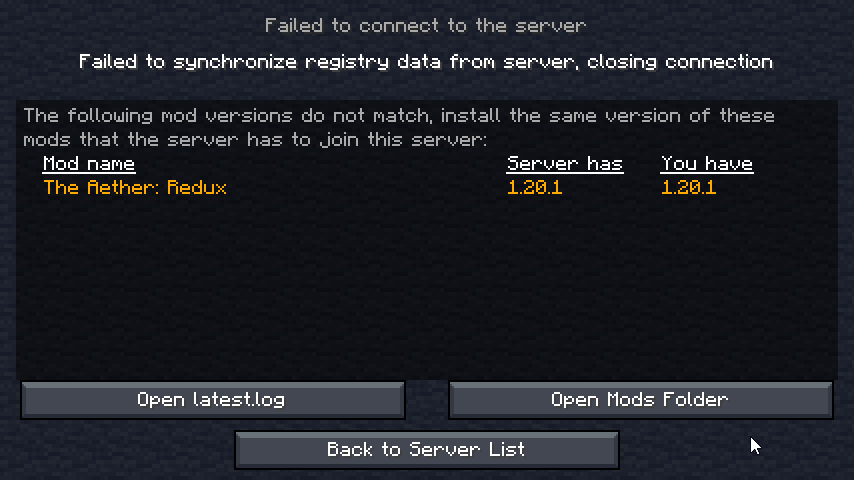 grave bluff
just a quick question how much ram should be allocated usually?
because i allocated 7g to it
so im confused why its just killing
agile cradle
single or multi?
grave bluff
grave bluff
because i allocated 7g to it
no crash report or anything
agile cradle
grave bluff
no crash report or anything
how many players you got playing on the server?
stiff stirrup
chilly gale
Hello, just updated my server and client to BMC4 v21
Server running fine, clien...
Reinstall the server files, so basically just delete it and install it again if you wanna keep your world, transfer it out before you delete it
agile cradle
There's been a bug with redux's update not being recognized
stiff stirrup
reinstall should fix
whole hull
how can I obtain more dragon eggs?
tiny mural
Anyone else experiencing the issue, that snow doesnt melt on claimed chunks? Any fix for that?
pearl forge
Did you give the sun permission on your claimed chunk? 
Im just joking, i have no idea how to fix this
tiny mural

agile cradle
grave bluff
5
base of 4 gigs, add 1 gig per player.
grave bluff
agile cradle
base of 4 gigs, add 1 gig per player.
so i should upgrade my server
i only have 8gb
and im allocating 7g
agile cradle
you can add another gig or two to give some leeway, but too much can cause issues.
stiff stirrup

pearl forge
tiny mural
Anyone else experiencing the issue, that snow doesnt melt on claimed chunks? Any...
Which BMC are you playing? 🤔
stiff stirrup
server should be 100% fine with 5 players on 8gb
agile cradle
though if you wanna have a bit extra if you add more players down the line it's fine
grave bluff
agile cradle
though if you wanna have a bit extra if you add more players down the line it's ...
nah thats the plan
just me and my friends
grave bluff
stiff stirrup
server should be 100% fine with 5 players on 8gb
do you think i should allocate all 8 gigs i have available?
im not using bisect im using this one called digitalocean bc i have free credit on there
stiff stirrup
grave bluff
do you think i should allocate all 8 gigs i have available?
hmm does it have more than 8gb? or 8gb max
tiny mural
pearl forge
Which BMC are you playing? 🤔
4
Ive also noticed that our server crashes upon entering the Aether
pearl forge
Are you on the newest version? (v21)
grave bluff
stiff stirrup
hmm does it have more than 8gb? or 8gb max
yea i have 8gb available for the droplet(actual server) but i want to allocate the 8gb in jvm arguments
tiny mural
How do I check?
stiff stirrup
tiny mural
Ive also noticed that our server crashes upon entering the Aether
update aether redux to 1.3.3
pearl forge
It should be 1.3.3 in v21
tiny mural
Just on the server or for every player aswell
pearl forge
thats why im asking 😄
stiff stirrup
grave bluff
yea i have 8gb available for the droplet(actual server) but i want to allocate t...
check variable.txt
pearl forge
tiny mural
How do I check?
Well.... if you see 1.3.3 in the mods folder like here, then you are in v21

v20 has 1.3.1 iirc
tiny mural
 stiff stirrup
tiny mural
stiff stirrup
tiny mural
you are v20
either update modpack and server
or mod only
!updateserver
still sentinelBOT
00:00 Update Server Locally
01:19 Update on Server Host/Bisect Hosting Premium
01:39 Update on Server Host/Bisect Hosting Premium
Discord ➔ https://discord.gg/8ZmhaPPbjE
Twitter ➔ https://twitter.com/SharkieTV
Use CODE: LunaPixel for 25% off ➔ https://www.bisecthosting.com/LunaPixel
stiff stirrup
!updatemodpack
still sentinelBOT
Discord ➔ https://discord.gg/8ZmhaPPbjE
Twitter ➔ https://twitter.com/SharkieTV
Use CODE: LunaPixel for 25% off ➔ https://www.bisecthosting.com/LunaPixel
stiff stirrup
make it 8
tiny mural
still sentinel
https://youtu.be/9dLMOiPp_Vk
if I update the server like that, Im guessing all the settings in the config files will have to be redone by me right?
Such as backpack size etc.
grave bluff
the modloader got updated in the new v21 update right?
but the variables.txt
is the same
idk if that could cause issues just speculating
stiff stirrup
no not same
pearl forge
tiny mural
if I update the server like that, Im guessing all the settings in the config fil...
you could just make a backup of your config folder, and after updating overwrite it
tiny mural
Alright, appreciate it
pearl forge
the only thing that could happen is that balance changes made for the modpack arent there (if they even exist :P)
grave bluff
stiff stirrup
no not same
i also set tick speed ton -1 instead of 120000 bc i heard that can help should i change it back
stiff stirrup
kinda helps kinda not
tiny mural

Do I need the modernfix aswell for the update of the server?
Based on the video only mods, defaultconfigs and config
But in the video he doesnt have that folder
pearl forge
iirc the video clearly tells you that "if you have other folders in the zip, delete them all"
maybe you paused too early 😄
tiny mural
Oh, my bad
grave bluff
also does this help to run this command /spark profiler --interval 100:
hoary bramble
grave bluff
also does this help to run this command /spark profiler --interval 100:
it will help to scope down the issue
tiny mural
Is there a limit of backpackinventorySize I can assign?
The 1 row backpack is quite small so I would like to make it big
stiff stirrup
upgrade the backpack
tiny mural
Wym
tiny mural
How do I do that then
 stiff stirrup
well than
tiny mural
as far as I know I can just change this
stiff stirrup
lucky that i have 0 fucking clue on that lmao


 grand pendant
!server
still sentinelBOT
We suggest renting a server from Bisect Hosting:
Approx. $10 - $25 a month depending on what plan you choose. You can also get 25% off with Code LunaPixel.
Go to https://www.bisecthosting.com/LunaPixel and order a plan which fits you. We suggest 1GB per player but nothing lower than 4GB as the server needs at least 3GB to run.
Go to #server-hosting for more Info!
Free Method: (This is hosting on your own PC, which is harder to do so we suggest getting a server via Bisect Hosting)
- Download the serverpack from Curseforge's website
- Right click the start.ps1 file and click Run with Powershell
To join your own server, typelocalhostinto Direct Connect.
This video explains the process https://www.youtube.com/watch?v=wuGUbVbLsDc
The server IP address is your Public IP Address, which can be found by googling my ip address
If other players are unable to join, find a portforwarding guide online.
 jade ravine
Does anybody know if i can copy a world from curseforge Delete Better mc reinstall it and paste the world back in with no problems?
atomic narwhal
jade ravine
Does anybody know if i can copy a world from curseforge Delete Better mc reinsta...
yes, you can, I would move saves folder to a different folder, reinstall bmc, and then put saves folder back in
still sentinelBOT
If this command was run in response to your question/issue, it is likely because switching away from the launcher you are currently using would fix your problem.
From our experience, the most stable launcher by far is ATLauncher, also known as ATL.
To install ATLauncher, do the following:
1. Go to https://atlauncher.com/download
2. Install and run the setup, then open the program.
3. Login to your Microsoft account that owns the Java Edition of Minecraft from the Accounts tab on the right. This process is 100% safe, as it goes directly through Microsoft. ATLauncher does not see your account credentials.
4. Go to the Packs tab on the right, then click "Curseforge" on the left.
5. Search the modpack you wish to download.
6. Click "New Instance". Click "Ok" on the opted out mods warning, then click "Open All" on the manual download screen.
7. Let the mods download, ATLauncher will grab them from your Downloads folder and automatically add them to the modpack.
8. Go to the Instances tab, and click "Play" on the modpack you downloaded. If you ever see an "Update" button on the instance, click it.
To transfer your Curseforge world to ATLauncher, simply right click the modpack on Curseforge, or click the 3 dots, then click "Open Folder". Copy the Saves folder, then click "Open Folder" on ATLauncher and paste the Saves folder there.
Because ATLauncher downloads the exact same files as Curseforge does, your world will be the exact same and you will be able to join the same servers. ATLauncher also works without an internet connection (after you've installed the modpack, of course), and does not have any bloat from Overwolf. You are free to uninstall both Overwolf and Curseforge with ATLauncher installed.
jade ravine
atomic narwhal
yes, you can, I would move saves folder to a different folder, reinstall bmc, an...
ok thanks a billion i was worried it wouldnt work
i was able to get my world back only problem is the waypoints on xeroes world map r gone anybody know how to fix that
stiff stirrup
jade ravine
i was able to get my world back only problem is the waypoints on xeroes world ma...
well
small issue if you deleted ur profile already
jade ravine
lol its not that big of a deal i can just redo it
stiff stirrup
jade ravine
lol its not that big of a deal i can just redo it
you couldve transfered ur xaeros folder
jade ravine
well i guess im too late
stiff stirrup
jade ravine
well i guess im too late
check ur trash folder
jade ravine
oh its there should i retore it?
stiff stirrup
ye
 cursive ruin
are vanilla seeds affected by bmc4 world generation?
jade ravine
should i transfer all xeros folders i have like 3
atomic narwhal
cursive ruin
are vanilla seeds affected by bmc4 world generation?
I think so
stiff stirrup
jade ravine
should i transfer all xeros folders i have like 3
here ill give tutorial
atomic narwhal
I don't play this modpack so I don't have any
jade ravine
oki thx @stiff stirrup
stiff stirrup
jade ravine
oki thx <@460610775887773737>

go inside folder
pick whatever ur world name was
than drag these files into the new world folder that itll make when you join it
jade ravine
do i transfer the whole dim%0 folder or just whats in it
stiff stirrup
jade ravine
do i transfer the whole dim%0 folder or just whats in it
whatever is inside
dim%0 is overworld
jade ravine
does anybody know why mobs start to glitch out after a certain distance i built a whole enderman farm and it doesnt work
 maiden frost
Thank u! I’ll try it when I have chance🙌
stiff stirrup
sure
 mellow spoke
Can I post a crash log here?
agile cradle
mellow spoke
Can I post a crash log here?
!moreinfo yup! and answer these questions so we can help ya
still sentinelBOT
Hello! For us to help you with your issue, you will need to answer all 8 questions below. Post the answers in this channel:
1. Have you modified the modpack in any way? If so, what did you do? (Updating/adding/removing mods, changing configs)
2. What launcher, or program, are you using to launch the game? (CurseForge, ATLauncher, etc)
3. What Minecraft version are you playing? (1.18.2, 1.16.5, 1.19.2)
4. What version of the modpack are you playing? (v11, v9, etc)
5. What steps are necessary to reproduce the crash? (Launching the game, exploring the world, etc)
6. Have you ever gotten past the point where the crash happens?
7. Send the crash report file into this channel. Right click the modpack, Open Folder, and navigate to the Crash Reports folder. Drag the newest one here. If there is no crash reports folder, do the same thing with the latest.log file in the logs folder.
8. Did you follow the Performance guide linked in #faq?
 broken river
Havent changed anything, CurseForge, 1.20.1, v21, It recently started doing this and usually it says " errors in currently selected data packs prevented the world from loading"
anything will help
broken river
I updated the modpack when it said it had one
agile cradle
ah I see it, you're running java 17, update to java 18 and you should be good
broken river
Okay thank you
mellow spoke
- Not modified
- Curseforge
- 1.20.1
- v20
- Loading in the Terrain in the Aether on the server.
- No
7:
- Yes
agile cradle
Have you updated aether redux yet?
agile cradle
mellow spoke
8. Yes
Been lots of issues with it, if you haven't go in and update Aether: Redux 🙂
mellow spoke
agile cradle
Been lots of issues with it, if you haven't go in and update Aether: Redux 🙂
not yet will do
broken river
agile cradle
ah I see it, you're running java 17, update to java 18 and you should be good
I did it and it still says "errors in currently selected data packs prevented the world from loading"
agile cradle
have you messed with the data packs any?