#better-mc-forge
1 messages · Page 82 of 1
 viral garden
 teal urchin
post logs
teal urchin
post them to https://mclo.gs/
Easily paste your Minecraft logs to share and analyse them.
the latest.log
 azure mural
how
 grand gate
- Download an adoptium release for Java (recommended but not required):
- Java 11 (https://adoptium.net/temurin/releases/?version=11) for versions 1.16.5 and below (can also use 8 if its not working)
- Java 18 (https://adoptium.net/temurin/releases/?version=18) for any versions newer (or 17 if 18 doesn't work)
- Consider installing the JRE instead of the JDK for a smaller file size
-
When installing through adoptium, make sure that Add to PATH and Set JAVA_HOME variable are both set to be installed (please see https://imgur.com/a/jPu1h7h for how that would look)
-
Check if java has been correctly installed by running java --version (or java -version on older versions), and seeing if the output is correct (see https://imgur.com/a/OWcoq4p for an example of the output)
- NOTE: 64 bit versions of java ALWAYS have '64-bit Server VM' in the version output. If that is not there, you have installed a 32-BIT version!! If you're getting Out of Memory errors or any other errors, PLEASE install 64-bit
- If the output isn't as intended, you have 2 options.
i) Delete ALL other java versions from your PC (ONLY recommended if you don't need them)
ii) Redirect your launcher/server to use your new installation of Java
Method i
- Uninstall any other java program listed in your programs list (differs by OS, please find a guide for your own OS if you don't know)
- Attempt to re-use the command mentioned above (if the output is now correct, which it should be, you are ready to go)
Method ii
- For a server, please modify the $Java/JAVA variable (found in your startup script depending on ps1/sh) to the path of your java installation. For windows, this path is usually found in "Program Files/Eclipse Adoptium/version_of_java/bin"
- For a client, depending on whether you use CurseForge, GD, or AT, the process is slightly different. Please see a guide for each respective launcher on how to change the java version.
grand gate
We suggest using one of these two launchers for several reasons. They are considered far better than any other launcher. When installing a modpack on either launcher, do it through the Curseforge tab within GDLauncher/ATLauncher. You can transfer your Curseforge save to GDL/ATL. Because you are downloading the exact same files, you'll still be able to join the same servers and worlds.
ATLauncher - Slightly harder to use, works offline, fast and efficient, has more features. Can be downloaded from https://atlauncher.com/downloads
GDLauncher - Easy to use, works offline, does all the work for you, very simplistic and sleek design but it feels bloated to make it look nice and people do have issues with it. Can be downloaded from https://gdlauncher.com/en/download/
azure mural
ok thank you
 odd atlas
Thanks
 thorny patrol
 clever mica
How do you make wine? JEI doesn't show any recipes
I've already got the grapejuice but idk how to age it
i got the barrel too
 untold copper
is better mc is on at launcher?
viral garden
yep
untold copper
oh what never found it therte which is why i switched lol
grand gate
so what mod does this pack use to enable shaders
untold copper
if i switch my world from forge to fabric bmc would it cause lots of issues
viral garden
grand gate
so what mod does this pack use to enable shaders
why
viral garden
untold copper
if i switch my world from forge to fabric bmc would it cause lots of issues
yes it would
grand gate
viral garden
why
just asking a question
viral garden
oculus
untold copper
is that one modpac that has like every forge mod and bmc the same?
since they should have all the bmc mods in there right
 wild rune
I got this error when I tried to launch the game
 viral garden
wild rune
I got this error when I tried to launch the game
viral garden
wild rune
I got this error when I tried to launch the game
how did you install the modpack
step by step
wild rune
I opened the curse forged app clicked on browse mod packs kept scrolling until I found the mod pack installed it when It was finished I clicked play then I was brought to the Minecraft launcher then clicked play on the launcher it download the files and the launcher dispersed then the error poped up
viral garden
!alternates
grand gate
We suggest using one of these two launchers for several reasons. They are considered far better than any other launcher. When installing a modpack on either launcher, do it through the Curseforge tab within GDLauncher/ATLauncher. You can transfer your Curseforge save to GDL/ATL. Because you are downloading the exact same files, you'll still be able to join the same servers and worlds.
ATLauncher - Slightly harder to use, works offline, fast and efficient, has more features. Can be downloaded from https://atlauncher.com/downloads
GDLauncher - Easy to use, works offline, does all the work for you, very simplistic and sleek design but it feels bloated to make it look nice and people do have issues with it. Can be downloaded from https://gdlauncher.com/en/download/
wild rune
ok thanks

 safe pewter
nvm
um but, it says the server doesnt have all the mods I have downloaded
I downloaded every mod for it, idk why its doing that
 stiff cipher
Is it better to install resource packs and shaders before I open the game or with the game already open?
 foggy schooner
hey guys, is there any resource pack that works with better mc forge? all ive been trying have been crashing the client
 cosmic whale
I mean if the game is open u can press the open resource pack folder buttom
And test straight after
foggy schooner
well they all crash so far
cosmic whale
I was responding to death
foggy schooner
mb lul
cosmic whale
Tho why would.. resource pack crash you? Are you trying to add like optfine stuff?
foggy schooner
well usuall BSL shader with resource pack
viral garden
stiff cipher
Is it better to install resource packs and shaders before I open the game or wit...
Doesnt matter
viral garden
foggy schooner
well usuall BSL shader with resource pack
!moreinfo
grand gate
Hello! For us to properly help you with your issue, you will need to answer all 8 questions below. Post the answers in this channel:
1. Have you modified the modpack in any way? If so, what did you do? (Updating/adding/removing mods, changing configs)
2. What launcher, or program, are you using to launch the game? (CurseForge, ATLauncher, etc)
3. What Minecraft version are you playing? (1.18.2, 1.16.5, 1.19.2)
4. What version of the modpack are you playing? (v11, v9, etc)
5. What steps are necessary to reproduce the crash? (Launching the game, exploring the world, etc)
6. Have you ever gotten past the point where the crash happens?
7. Does a crash report generate? If so, send the **file **here. (Right click the instance, Open Folder, and go to the crash reports folder. Alternatively, post the log's text on mclo.gs and send the link here.)
8. Did you follow the Performance guide linked in #faq?
viral garden
safe pewter
um but, it says the server doesnt have all the mods I have downloaded
You & the server need to be on the exact same modpack, same version
foggy schooner
- nothing modified at the mods, using the BMC3 (2) 1.19.2 v4
- cursforge launcher
- 1.19.2
- v4
- use any resource pack
- yes if i delete the resource pack out of the folder, else the game wont start anymore
- smth with texture entity missing..
- none about resource packs
viral garden
foggy schooner
1. nothing modified at the mods, using the BMC3 (2) 1.19.2 v4
2. cursforge launc...
Need crash report
"smth with texture entity missing.." could not be less helpful
I need the actual crash report file, just like the !moreinfo command says
and v4 is extremely old
please update the modpack
you are about 20 versions out of date
foggy schooner
then i choose a trash server host cause v4 was newest 
viral garden
v4 is very, very old
cosmic whale
Which host?
foggy schooner
minehoster
viral garden
wtf is that
 past nacelle
the servers are inside an abandoned coal mine
foggy schooner
dont ask me havnt been active on mc since 10years 
stiff cipher
viral garden
Doesnt matter
My question was already answered
foggy schooner
been trying a v11 server now and its still the same, as soon as i load a texture pack it gets stuck in the loading screen
viral garden
v11 is also old
Please update to v12, follow performance guide #faq, and do not click while the game loads, let it load
foggy schooner
are there even known packs that work with the mod lol
cosmic whale
!define
grand gate
Curseforge - Refers to both the Curseforge website and Curseforge Launcher. The Curseforge Launcher is a modded launcher used to play & install modpacks. ATLauncher is a better alternative. All modded launchers can be used to install & play both Fabric and Forge modpacks.
Modpack - A collection of mods. "Better MC 1.19.2 Forge", for example, is a modpack.
Modpack Version - The version of the modpack you are playing. v5, v6, v7, etc.
Minecraft Version - The version of Minecraft which the modpack you are playing runs on. 1.16.5, 1.18.2, 1.19.2, etc.
Mod - A .jar file which modifies the game in some way. "BetterEnd", for example, is a mod.
Forge - A mod loader which allows you to use Forge mods.
Fabric - A mod loader which allows you to use Fabric mods.
 river spindle
any recommendations for enchants?
teal urchin
vein mining
 cerulean forge
What is the Mod name that adds support for shaders? (Not speaking of optifine)
viral garden
cerulean forge
What is the Mod name that adds support for shaders? (Not speaking of optifine)
why
past nacelle
oop
teal urchin
😦
viral garden
past nacelle
oop

cerulean forge
Since we got rid of some mods we didn't use. We looked at the compatibility and everything works fine, except we don't see the option to use shaders anymore
teal urchin
you probably shouldn’t remove random mods
viral garden
yeah..
teal urchin
it doesnt do anything beside break compatibility here and there
cerulean forge
Not my choice, since some dont have OP PC's^^
teal urchin
if you dont use the content just dont change them
theres a performance guide you could follow instead
in #faq
well either way the shader mod is called oculus for forge
cerulean forge
I know, i got 32gb ram...... my game runs at 400 fps^^
teal urchin

cerulean forge
its just some friends on the server
 honest radish
whenever i try loading into my single player world it get stuck on 0% does anyone know how to fix it
 cosmic whale
honest radish
whenever i try loading into my single player world it get stuck on 0% does anyo...
cosmic whale
honest radish
whenever i try loading into my single player world it get stuck on 0% does anyo...
#faq performance guide follow everything and don't. Lick the game while it's loading
Click
honest radish
k ill try
cosmic whale
And if it's screenshot why is it so blurry?
honest radish
idk
honest radish
cosmic whale
<#815503531611783179> performance guide follow everything and don't. Lick the ga...
wait whats the performance guide
cosmic whale
The top
untold copper
i think realisitco doesnt work with bmc sadly ;/
i think thats hwy my game doesnt load
viral garden
 spare garnet
my game keeps crashing on startup
spare garnet
my game keeps crashing on startup
!moreinfo
grand gate
Hello! For us to properly help you with your issue, you will need to answer all 8 questions below. Post the answers in this channel:
1. Have you modified the modpack in any way? If so, what did you do? (Updating/adding/removing mods, changing configs)
2. What launcher, or program, are you using to launch the game? (CurseForge, ATLauncher, etc)
3. What Minecraft version are you playing? (1.18.2, 1.16.5, 1.19.2)
4. What version of the modpack are you playing? (v11, v9, etc)
5. What steps are necessary to reproduce the crash? (Launching the game, exploring the world, etc)
6. Have you ever gotten past the point where the crash happens?
7. Does a crash report generate? If so, send the **file **here. (Right click the instance, Open Folder, and go to the crash reports folder. Alternatively, post the log's text on mclo.gs and send the link here.)
8. Did you follow the Performance guide linked in #faq?
untold copper
do i have to move all of minecraft into a ssd or do i just need to move the modpack into it/
grand gate
how do you make dragons breath fire on better mc 1.16.5?
untold copper
for faster loading times
viral garden
untold copper
do i have to move all of minecraft into a ssd or do i just need to move the modp...
the curseforge modpacks folder
viral garden
grand gate
how do you make dragons breath fire on better mc 1.16.5?
press the keybind
 hardy panther
yo
can anyone explain how to open a reindeers inventory
please
its not like a horse
 astral lynx
hey guys i recently just found the Better MC modpack and wanted to host a server to play with my friends. Im a bit confused on the different modpacks (BMC 1 vs 2 & 3) as well as BMC Plus.
cosmic whale
astral lynx
hey guys i recently just found the Better MC modpack and wanted to host a server...
#faq the naming convention is explained there also difference between modpacks
 gusty cedar


 astral lynx
anyone know of a way to add minecolonies to the modpack
 coral hare
Is it safe to update version of mod pack? will it affect your existing world? i have v14 and i want to have latest v18, but i've never did it before
river spindle
any automatic resource collection tools in this modpack? like quarry etc (i know there isnt one, but similar to that mechanic)
 frigid palm
anyone know what mod is enchant reroll in BMC3 v12?
viral garden
astral lynx
anyone know of a way to add minecolonies to the modpack
drag into the mods folder
grand gate
what is this for and how can i use it?
 coral hare
cosmic whale
v15-18 doesn't say anything about needing new world
coral hare
cosmic whale
v15-18 doesn't say anything about needing new world
thank you
 hidden lagoon
grand gate
what is this for and how can i use it?
hidden lagoon
grand gate
what is this for and how can i use it?
Stalwart Dungeons bosses
 knotty marsh
im stuck on 0 percent loading anyone know if this is a hardware issue
im on a m2 mac and didnt think this would be to heavy for it
this happens when creating a world
for 1.19.2
viral garden
knotty marsh
im stuck on 0 percent loading anyone know if this is a hardware issue
#faq performance guide
and delete sound physics remastered mod if issue persists
knotty marsh
👍 thanks
 thorn mason
Hey quick question, the corrupterite fortune bonus seems to not be working
why is that?
fortune 3 on a corrupterite pickaxe with 8 bonus fortune levels only giving 1 diamond per ore is probably not intended is it?
Seems like both looting and fortune bonuses dont work
 brisk sleet
does the mammoth spawn in a specific biome in the snow?
 brittle steeple
hi, my minecraft doesnt open after i press play on the modpack, does anyone know what must i do to be able to play?
 dark ocean
how do i turn off vein mining on my pickaxe idk since when but its always active now
before i had to press a keybind to activate
cant even turn it off (bmc forge 1.16.5
viral garden
brittle steeple
hi, my minecraft doesnt open after i press play on the modpack, does anyone know...
!moreinfo
grand gate
Hello! For us to properly help you with your issue, you will need to answer all 8 questions below. Post the answers in this channel:
1. Have you modified the modpack in any way? If so, what did you do? (Updating/adding/removing mods, changing configs)
2. What launcher, or program, are you using to launch the game? (CurseForge, ATLauncher, etc)
3. What Minecraft version are you playing? (1.18.2, 1.16.5, 1.19.2)
4. What version of the modpack are you playing? (v11, v9, etc)
5. What steps are necessary to reproduce the crash? (Launching the game, exploring the world, etc)
6. Have you ever gotten past the point where the crash happens?
7. Does a crash report generate? If so, send the **file **here. (Right click the instance, Open Folder, and go to the crash reports folder. Alternatively, post the log's text on mclo.gs and send the link here.)
8. Did you follow the Performance guide linked in #faq?
viral garden
dark ocean
how do i turn off vein mining on my pickaxe idk since when but its always active...
your configs reset
dark ocean
what do you mean
viral garden
the configs in your modpack files reset for some reason
or you installed the modpack incorrectly
dark ocean
reinstall again it is
grand gate
Anyway i can keep server on indefinitely ? I left it on overnight without anyone joining it and it dc itself i guess, at work rn so cant change it yet
I assume its something in server properties
 swift cedar
My host is telling me to upgrade ram as its reaching limit? I have 6gb ram and the only modpack is better mc, nothing else.
viral garden
swift cedar
My host is telling me to upgrade ram as its reaching limit? I have 6gb ram and t...
how many players
swift cedar
Two only
viral garden
!tps
grand gate
Please click this link and follow the guide. If you are using a server host such as Bisect, you may be limited in your options and instead have a checkbox to use Aikar's Flags, which will also work:
https://github.com/etil2jz/etil-minecraft-flags
If you can not launch your server/game after using these flags, then remove the word java from the start. Also, make sure you are using Java 18 on 1.18.2 / 1.19.2 and Java 11 on 1.16.5. These should be downloaded from Adoptium's website.
If lag persists, do the following command ingame:
/spark profiler start --only-ticks-over 50
Then, send the link in this channel.
swift cedar
I did tell them that the modpack required java 18, the host says nothing uses java 18 yet
There is no lag in game whatsoever, its just a message i got on my cpanel about needed more memory. Game runs perfectly fine
viral garden
what host
teal urchin
elaborate
 austere stirrup
i go to shader packs in settings
put my shader pack in that folder
select it, and it like shutters for a min and freezes as if its applying the shaders
then nothing happens
 teal urchin
check to make sure those shaders are compatible with oculus/iris
it should say on the modpage
try different shaders as well
so we can check if its your minecraft
or the shaders
austere stirrup
ok
 north knot
For some reason i cant put mending on my tools
north knot
no
north knot
anvil
teal urchin
with a mending book?
north knot
yes
teal urchin
which tool
north knot
all of em
teal urchin
are they modded tools or vanilla tools
north knot
vanilla
north knot
in the resource pack theres multiple incompatible do i remove them?
viral garden
no
teal urchin
no dont remove those
thats just mc being weird
all the resource packs are compatible
north knot
oh ok thx
teal urchin
np
could always let the shader dev know
so they can add compatibility
or report to oculus
north knot
i selected some couple days ago but i dont remember which one
is there a way to reset it back?
north knot
yes
teal urchin
which version of bmc are you on
north knot
bmc3
north knot
will that delete my world?
teal urchin
you can transfer it over
north knot
how so
teal urchin
copy the saves/ folder to your desktop or somewhere safe
reinstall the modpack
and copy that same saves folder into the new profile
 thick mist
so my forge version wont load a world but my fabric one will any idea why
north knot
thx it worked but i still cant use enchant with mending
thick mist
yo frontear i need java 18 for forge 1.19.2?
teal urchin
yeah
java 18 is recommended
if for some reason you cant get 18
then 17 at the least
 peak locust
I have a question how do you add shaders to 1.16.5 better Minecraft
thick mist
cant find a place to download 18 anywhere tbh
redd go to the cruseforge app click on the 3 dots open the folder and find shaderpacks and drag and drop whatever shader u want in there
@peak locust
peak locust
thick mist
redd go to the cruseforge app click on the 3 dots open the folder and find shade...
Ok thanks
thick mist
np
peak locust
And another question is there a huge difference from 16.5 to 18 in this mod
Like does it have more stuff
thick mist
yea
aswell as shaders may not work on 16.5 ive come to find out but on 18 they have really nice ones built in already
peak locust
Alr
thick mist
18 or fabric 1.9.2 are good
peak locust
What the difference of frabic and forge
peak locust
In your opinion which is better
thick mist
18
peak locust
Ok thanks for the help
thick mist
i work here now gimmie my helper role lmao
teal urchin
thick mist
cant find a place to download 18 anywhere tbh
!openjdk
grand gate
- Download an adoptium release for Java (recommended but not required):
- Java 11 (https://adoptium.net/temurin/releases/?version=11) for versions 1.16.5 and below (can also use 8 if its not working)
- Java 18 (https://adoptium.net/temurin/releases/?version=18) for any versions newer (or 17 if 18 doesn't work)
- Consider installing the JRE instead of the JDK for a smaller file size
-
When installing through adoptium, make sure that Add to PATH and Set JAVA_HOME variable are both set to be installed (please see https://imgur.com/a/jPu1h7h for how that would look)
-
Check if java has been correctly installed by running java --version (or java -version on older versions), and seeing if the output is correct (see https://imgur.com/a/OWcoq4p for an example of the output)
- NOTE: 64 bit versions of java ALWAYS have '64-bit Server VM' in the version output. If that is not there, you have installed a 32-BIT version!! If you're getting Out of Memory errors or any other errors, PLEASE install 64-bit
- If the output isn't as intended, you have 2 options.
i) Delete ALL other java versions from your PC (ONLY recommended if you don't need them)
ii) Redirect your launcher/server to use your new installation of Java
Method i
- Uninstall any other java program listed in your programs list (differs by OS, please find a guide for your own OS if you don't know)
- Attempt to re-use the command mentioned above (if the output is now correct, which it should be, you are ready to go)
Method ii
- For a server, please modify the $Java/JAVA variable (found in your startup script depending on ps1/sh) to the path of your java installation. For windows, this path is usually found in "Program Files/Eclipse Adoptium/version_of_java/bin"
- For a client, depending on whether you use CurseForge, GD, or AT, the process is slightly different. Please see a guide for each respective launcher on how to change the java version.
teal urchin
peak locust
I have a question how do you add shaders to 1.16.5 better Minecraft
video settings -> top right shaders -> add your shaders there
north knot
i figured it out why the mending doesnt work
teal urchin
whys thay

 thick mist
@peak locust js for 1.18 i reccomend bsl shaders
peak locust
thick mist
<@688536144018800684> js for 1.18 i reccomend bsl shaders
Alr thanks
 haughty granite
anyone having issues where thunder strike and vein mining arent working at all?
for v12 1.19.2
viral garden
haughty granite
anyone having issues where thunder strike and vein mining arent working at all?
they both work
you just don't know how they work
thunder strike only works when you crouch
vein mining has a keybind, please read the tutorial quests ingame
haughty granite
viral garden
thunder strike only works when you crouch
I know exactly how these enchantments work. Thunder strike does not work at all currently.
Vein mining even with a key bind doesn’t seem to want to work.
haughty granite
Precisely. Which is what I’ve been doing. I’ll just report it as an issue and see if anyone will look into it.
All keybinds are set properly yes
viral garden
if you report it as an issue I'm the only one who's going to see it
haughty granite
Okay
haughty granite
That’s fine. But at least you’ll see that it’s an issue.
I went as far as uninstalling and reinstalling last night. Still nothing changed.
viral garden
haughty granite
That’s fine. But at least you’ll see that it’s an issue.
it's not an issue
 haughty granite
Rechecked keybinds. All are fine. Nothing. But since you’re so confident I’ll let you have it 👍🏻
viral garden
how did you install the modpack
haughty granite
Curseforge
 random bluff
Does anyone know if in the reindeer from the frozen up mod had its inventory disabled for some reason because I can't open its inventory on the server I play on but I can on the creative world I made
odd atlas
does villager breeders not work on this modpsck
 random bluff
odd atlas
does villager breeders not work on this modpsck
random bluff
odd atlas
does villager breeders not work on this modpsck
I made one with a similar design and it worked
odd atlas
random bluff
I made one with a similar design and it worked
1.16.5?
random bluff
oh im on 1.19 sorry
odd atlas
maybe that's why mine doesnt work huh
they gain hearts and then it turns to smoke particles
swift cedar
Is there any texture mod that works with this modpack? The ones i use dont cover all the additional mods this modpack has.
viral garden
swift cedar
Is there any texture mod that works with this modpack? The ones i use dont cover...
If there was a resourcepack which covered the tens of thousands of textures in this modpack then it'd be come with the modpack and be enabled by default lol
swift cedar
Lol yea, oh well. Game looks nice already with shaders anyways. Anything better than sildrus extreme shaders?
viral garden
!shader
grand gate
swift cedar
Ty
odd atlas
weird

 fleet dome
is there any way to increase health permanently in bmc 1.16.5?
 sturdy holly
anyone know the fix to the error
 viral garden
sturdy holly
anyone know the fix to the error
viral garden
sturdy holly
anyone know the fix to the error
full screenshot please
sturdy holly
I think I just fixed it
This is what usually happens and it gets stuck and doesn't even make sense
 viral garden
sturdy holly
This is what usually happens and it gets stuck and doesn't even make sense
viral garden
sturdy holly
This is what usually happens and it gets stuck and doesn't even make sense
so is it fixed or not
sturdy holly
no Im sending full thing
sturdy holly
viral garden
so is it fixed or not
 sturdy holly
still this
sturdy holly
viral garden
disable firewall
 viral garden
swift cedar
What mod produces the villages that have gear and weapons?
viral garden
swift cedar
What mod produces the villages that have gear and weapons?
do you mean guard villagers
from the guard villagers mod
swift cedar
Ty, idk what my daughter did overnight but they all went poof overnight 
 fathom ginkgo
can anyone tell me why when i try to load a world on the 1.19.2 version it just freezes
random bluff
sorry for repeating myself but does anyone know why I can't access a reindeer's inventory on a server but I can in a creative world
viral garden
fathom ginkgo
can anyone tell me why when i try to load a world on the 1.19.2 version it just ...
#faq performance guide
delete sound physics remastered mod if issue persists
river spindle
whats the mod called that shows mob hp etc in top left?
viral garden
river spindle
whats the mod called that shows mob hp etc in top left?
why
river spindle
viral garden
why
i disabled it by some keybind just no clue what mod it is, wanted to enable it again
river spindle
viral garden
its numpad 0 iirc
thanks worked 👍
do normal spawners have a cap here or are they infinite too?
viral garden
infinite
 eternal grove
Question. I have tried to keep inventory on death and can not figure out how to make it where i can turn on admin powers or set things like this? Help
viral garden
eternal grove
Question. I have tried to keep inventory on death and can not figure out how to ...
/gamerule keepinventory true
if you are on singleplayer you need to open to lan and allow cheats, or for a permanent solution, open your world file in NBTStudio and change allowCommands to 1
if you are on multiplayer you need to run /op insertusernamehere in console
fathom ginkgo
can someone help me my screen is messed up and i cant fix it

and when i mave around it just gets worse
viral garden
fathom ginkgo
can someone help me my screen is messed up and i cant fix it
how did you install the modpack
are your drivers updated
when was the last time you checked for driver updates
how sure are you that drivers are updated
fathom ginkgo
i just downloaded it on curse forge
viral garden
curseforge launcher?
viral garden
are your drivers updated
when was the last time you checked for driver updates
how sure are you that drivers are updated
fathom ginkgo
what is a driver
viral garden
...
fathom ginkgo
🤷♂️
fathom ginkgo
how do i do that lol
viral garden
To check your PC hardware specs, click on the Windows Start button, then click on Settings (the gear icon). In the Settings menu, click on System. Scroll down and click on About. On this screen, you should see specs for your processor, Memory (RAM), and other system info, including Windows version.
fathom ginkgo
64-bit operating system, x64-based processor
viral garden
nope
fathom ginkgo
AMD Ryzen 7 3750H with Radeon Vega Mobile Gfx 2.30 GHz
man i can hadle the craziest mod on ark but not minecraft thats just sad
viral garden
fathom ginkgo
what do i do in this
fathom ginkgo
how do i know which one it is
fathom ginkgo
do i download this
 viral garden
if thats the one for your graphics card then sure
 warped mesa
What mod changes the iron door and trapdoor texture
viral garden
warped mesa
What mod changes the iron door and trapdoor texture
Stay True resourcepack
not a mod
warped mesa
Can it be changed?
fathom ginkgo
well at least i got to this this before my screen started to flicker lol
 viral garden
warped mesa
Can it be changed?
viral garden
warped mesa
Can it be changed?
yes
viral garden
fathom ginkgo
well at least i got to this this before my screen started to flicker lol
your screen is going to flicker
the part of your computer responsible for putting things onto your screen is being updated
to put it very simply
fathom ginkgo
ok it finished what do i do now @viral garden
warped mesa
viral garden
yes
How?
viral garden
fathom ginkgo
ok it finished what do i do now <@726509826557083680>
re join world
warped mesa
I meant just change iron door texture
viral garden
or delete the texture file for that block
warped mesa
Ah
viral garden
fairly easy
fathom ginkgo
it works now thx
chorb one more thing could i add the iron chests mod to the 1.19 if so all i would have to do is open ups the folder and find mods and just add it there right?
viral garden
fathom ginkgo
chorb one more thing could i add the iron chests mod to the 1.19 if so all i wou...
correct
make sure its 1.19.2 forge
 chrome prairie
these like a huge crash issue me and my friends are experiencing
if theres too many entities when you spawn in you just instantly crash
help
The game crashed whilst loading entity nbt
Error: java.lang.NullPointerException: Loading entity NBT
It is making playing impossible
viral garden
chrome prairie
The game crashed whilst loading entity nbt
Error: java.lang.NullPointerException...
!moreinfo
grand gate
Hello! For us to properly help you with your issue, you will need to answer all 8 questions below. Post the answers in this channel:
1. Have you modified the modpack in any way? If so, what did you do? (Updating/adding/removing mods, changing configs)
2. What launcher, or program, are you using to launch the game? (CurseForge, ATLauncher, etc)
3. What Minecraft version are you playing? (1.18.2, 1.16.5, 1.19.2)
4. What version of the modpack are you playing? (v11, v9, etc)
5. What steps are necessary to reproduce the crash? (Launching the game, exploring the world, etc)
6. Have you ever gotten past the point where the crash happens?
7. Does a crash report generate? If so, send the **file **here. (Right click the instance, Open Folder, and go to the crash reports folder. Alternatively, post the log's text on mclo.gs and send the link here.)
8. Did you follow the Performance guide linked in #faq?
chrome prairie
viral garden
!moreinfo
- No
- Curseforge
- 1.19.2
- v12
- Joining the World, moving into a similar area of a person that has crashed
- Only if someone was able to kill entities before they also crashed
- I'm not sure, its not in the .minecraft folder
- No
oops
one sec
@viral garden there
chrome prairie
@viral garden
viral garden
you picked up a spectre from galosphere
via the carryon mod
theres a /carryon clear command
just put that in a repeating commandblock
/carryon clear *
something like that
chrome prairie
Thanks for your help, is there anyway to prevent this in the future?
 atomic narwhal
the repeating command block is the way to prevent it currently
chrome prairie
shame, hope its fixed in the future
we've also had crashes that didnt involve carryon
viral garden
chrome prairie
Thanks for your help, is there anyway to prevent this in the future?
do not pick up spectres from the galosphere mod
thats it
lol
chrome prairie
fixed! thanks for your help. hope the issue is solved
does anything else crash when picked up?
viral garden
nah
 brazen moon
Is it normal for it to load forever when launching for the first time?
viral garden
brazen moon
Is it normal for it to load forever when launching for the first time?
#faq performance guide
remove sound physics remastered mod if issue persists
 split swan
I am running into endemic crashes on the client even after following the performance guide to the letter. I haven't changed anything around besides disabling the discord RPC mod. The crashes are always GL_OUT_OF_MEMORY, malloc, or mmap crashes, but I have 8gb of 16gb allocated and 6gb of vram on a GPU that I am positive minecraft is running on and allocating more won't fix it. ATLauncher, 19.2, v12, happens when loading chunks, on world join, or just seemingly randomly.
any ideas?
(this is on a fresh win10 install with nothing running in the background)
 serene storm
Hey my friend is trying to join my server but he is unable to join but others are able to join any idea how to fix this?
[12:41:53] [Server thread/INFO] [minecraft/ServerLoginPacketListenerImpl]: com.mojang.authlib.GameProfile@6fb543e8[id=<null>,name=Prot0w0gen,properties={},legacy=false] (/---.---.---.--:-----) lost connection: Disconnected

 jade cedar
idk how to explain it, but when i try to play the modpack instead of sending me to modded minecraft it just sends me to normal minecraft and idk what to do, i play the installation that says "better MC 1.19 [FORGE]" but it sends me to normal minecraft. anyone know what i gotta do?
 mortal hull
Anyone know why i cant claim chunks for my team? the q says i should have the ftb chunk map clam button on "inventory" to the left, but i dont, can only claim chunks from the map and that is personal claims,not team?
 vapid lintel
https://www.youtube.com/watch?v=DKLQtx9F024&t=355s
Can you tell me what version this person is going through?
Welcome to Better Minecraft! Ever wanted Minecraft 2 or What Minecraft should have been! Featuring a completely customized world filled with various different mobs and structures. This pack is a Vanilla+++ pack with crazy features such as adding in the Caves & Cliffs before it's even out! There are several crazy structures to loot and explore al...
 rustic jetty
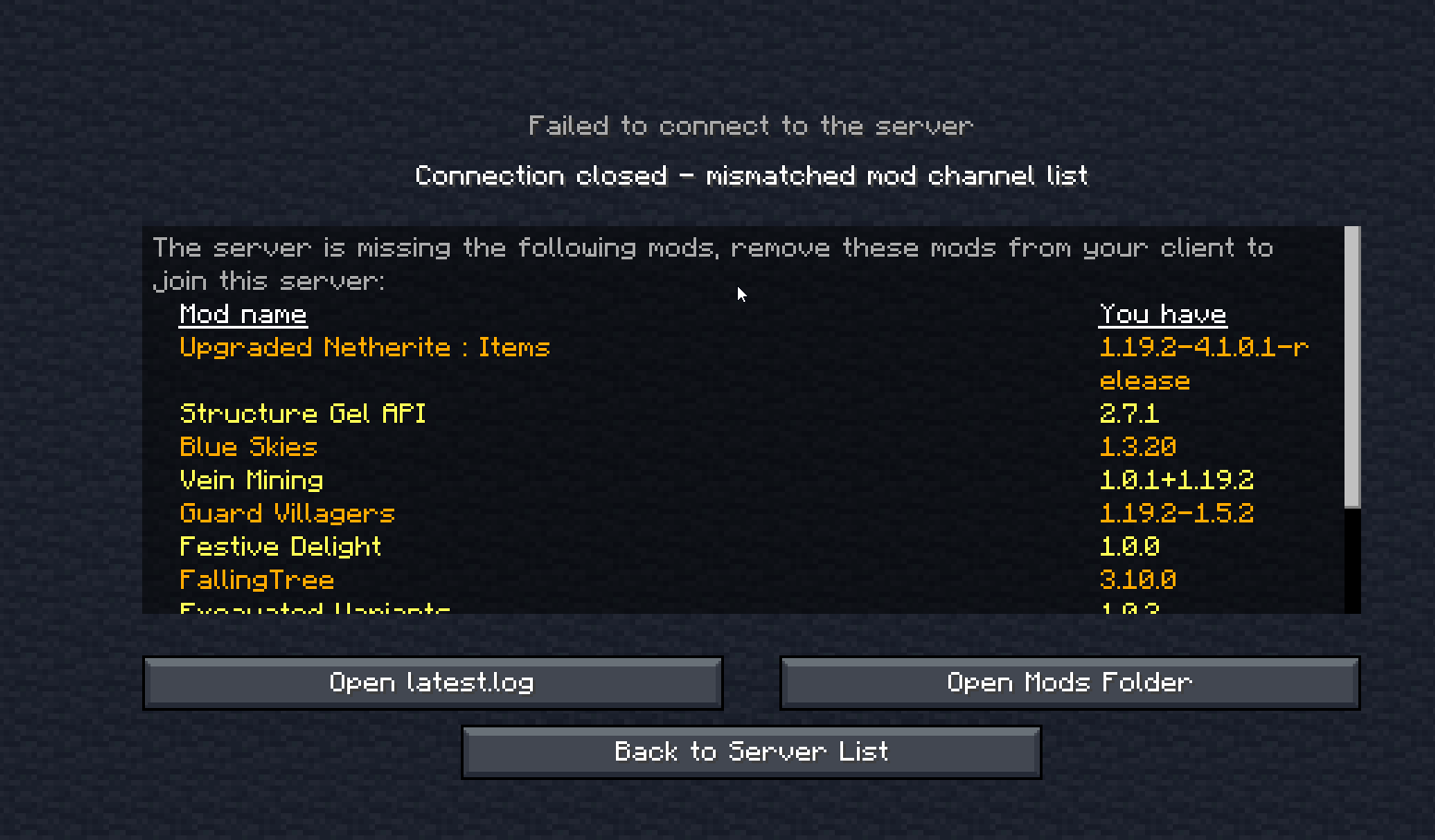
So me and a friend are trying to get Better MC 1.19.2 on a server but we get greeted with this message https://i.imgur.com/0YHoShZ.png
even though we have the same version on the server and our clients
 teal urchin
how did you install the modpack on your computers
which launcher did you use
and how did you setup the server
what did you download/do
rustic jetty

my small brain ok ok
so we used curseforge for our modpacks on our computer
and he uses shockbyte for the server
teal urchin
and im guessing you guys didn't add any mods
rustic jetty
Nope
Just as it is
It was the same on aternos aswell jsut before using his server 
we had like missing items of some sort
teal urchin
hm tis very strange
since youre sure the versions are the same
on both shockbyte and your clients
try using a different launcher
curseforge has historically bugged out and downloaded things wrong
teal urchin
ATLauncher
rustic jetty
Alright i'll try that !
teal urchin
and once again please double check that you installed BMC3 Forge version
on shockbyte
its very strange to get mismatched mod list
rustic jetty
I'll let him know
 teal urchin
im guessing you guys wanted to play BMC3 Forge 1.19.2
rustic jetty
teal urchin
np, the naming can be confusing initially
rustic jetty
BMC3 ?
 rustic jetty
Pretty much the latest one
teal urchin
gotcha
well we have two versions of better minecraft
for the latest version
this one is designed for the "forge" mod loader
rustic jetty
Yeah yeah the forge one
teal urchin
the other one is for the "fabric" mod loader
 lofty cosmos
i wish theyd find a way to add SWEM to BetterMC
teal urchin
yeah so BMC3 :)
teal urchin
lofty cosmos
i wish theyd find a way to add SWEM to BetterMC
whats swem?
lofty cosmos
best horse mod made so far
teal urchin
rustic jetty
Yeah yeah the forge one <a:nod_yes:984647706775539752>
just let your friend know to switch the host to use BMC3 for the modpack
one moment
teal urchin
lofty cosmos
best horse mod made so far
you could suggest the mod, have you played with it before?
 teal urchin
and just when i opened up AT
lofty cosmos
itd have to be added to the 1.16.5 vers i dont think they released their 1.18 or 1.19
teal urchin
btw AT will display a little error message for the mods
its not a problem, just make sure you read it, do what it tells you to do and press Okay
its a curseforge problem that AT tries to work around
teal urchin
lofty cosmos
itd have to be added to the 1.16.5 vers i dont think they released their 1.18 or...
ah, could still suggest it
1.16.5 is still a maintained version of the modpack
rustic jetty
We gon try rn i'll let you know frontear !
teal urchin

rustic jetty
Still getting the same error
teal urchin

can you send a screenshot of the ATLauncher screen
and also the shockbyte modpack version screen
rustic jetty
here's the ATLauncher one
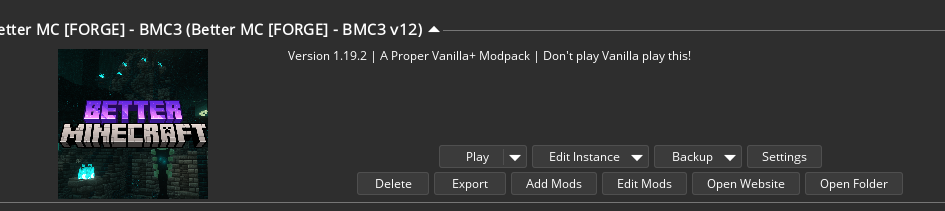
and i'm waiting on the shockbyte one


I can see the issue 
he told me it said bmc3
teal urchin
:p
yeah forge and fabric aren't the same thing
even if the actual minecraft version says 1.19.2
forge and fabric are separate and cannot work interchangeably
 teal urchin
yeppers
 teal urchin
its confusing i dont blame you
rustic jetty
I mean I guess ?
rustic jetty
jkust make mods that work everywhere 
teal urchin
just for future reference, forge fabric two different things
 rustic jetty
 teal urchin

third time is not the charm it seems
exact same screen or a different screen?
send another screenshot of what the client looks like
 teal urchin
triple check that the modpack on shockbyte is correctly applying
there's no other possible option it could be
rustic jetty
He tells me on the server it applies correctly
teal urchin
then make sure you're actually connecting to the right ip or the server was restarted after applying the modpack
teal urchin
did you figure out the issue
rustic jetty
No
teal urchin
i think you should try contacting shockbyte
let them know that somehow the service is not correctly changing the modpack
or maybe
try deleting the entire server thing
from shockbyte
and setting it up from the very beginning
completely new
carefully making sure BMC3 v12 1.19.2 is the selected modpack
rustic jetty
I told my friend
 pseudo trench
Hi guys, i tried to lance the game but this message appeared
 viral garden
pseudo trench
Hi guys, i tried to lance the game but this message appeared
viral garden
pseudo trench
Hi guys, i tried to lance the game but this message appeared
!alternates
grand gate
We suggest using one of these two launchers for several reasons. They are considered far better than any other launcher. When installing a modpack on either launcher, do it through the Curseforge tab within GDLauncher/ATLauncher. You can transfer your Curseforge save to GDL/ATL. Because you are downloading the exact same files, you'll still be able to join the same servers and worlds.
ATLauncher - Slightly harder to use, works offline, fast and efficient, has more features. Can be downloaded from https://atlauncher.com/downloads
GDLauncher - Easy to use, works offline, does all the work for you, very simplistic and sleek design but it feels bloated to make it look nice and people do have issues with it. Can be downloaded from https://gdlauncher.com/en/download/
 peak cloud
Hey guys, im having an issue with backpacked. I could only see 1 row of 9 items for the bag. I installed configured and the setup is 9 items 4 rows however, its still showing 1 row with 9 item.
Am I missing something or is it supposed to be changed with a different method?
viral garden
peak cloud
Hey guys, im having an issue with backpacked. I could only see 1 row of 9 items ...
update to the latest version of the modpack
jade cedar
idk how to explain it, but when i try to play the modpack instead of sending me to modded minecraft it just sends me to normal minecraft and idk what to do, i play the installation that says "better MC 1.19 [FORGE]" but it sends me to normal minecraft. anyone know what i gotta do?
viral garden
jade cedar
idk how to explain it, but when i try to play the modpack instead of sending me ...
!alternates
grand gate
We suggest using one of these two launchers for several reasons. They are considered far better than any other launcher. When installing a modpack on either launcher, do it through the Curseforge tab within GDLauncher/ATLauncher. You can transfer your Curseforge save to GDL/ATL. Because you are downloading the exact same files, you'll still be able to join the same servers and worlds.
ATLauncher - Slightly harder to use, works offline, fast and efficient, has more features. Can be downloaded from https://atlauncher.com/downloads
GDLauncher - Easy to use, works offline, does all the work for you, very simplistic and sleek design but it feels bloated to make it look nice and people do have issues with it. Can be downloaded from https://gdlauncher.com/en/download/
jade cedar
ty
peak cloud
viral garden
update to the latest version of the modpack
Im currently on 1.19.2 v12 which is the latest on curseforge app
viral garden
peak cloud
Im currently on 1.19.2 v12 which is the latest on curseforge app
then do a fresh reinstall
transfer your saves folder
 limber trail
wheres the end cities??? been searching for forever
jade cedar
grand gate
We suggest using one of these two launchers for several reasons. They are consid...
i literally did what this said, i made it to the "create world" tab pressed create and its been stuck for god knows how long! it also used my cpu at 100% nearly constantly yet they still had about 2773 threads going, why were there so many threads??? is it a problem in the modpack, or is my pc just too bad to work
viral garden
jade cedar
i literally did what this said, i made it to the "create world" tab pressed crea...
#faq performance guide
stay on the latest modpack version
remove sound physics remastered if you're on 1.19.2 forge and the issue persists
limber trail
do end cities have different spawning mechanics than vanilla?
viral garden
no
fathom ginkgo
my screen gets messed up if i dont use shaders but when i do use them my frames go down to 10
what do i do
viral garden
fathom ginkgo
my screen gets messed up if i dont use shaders but when i do use them my frames ...
"my screen gets messed up if i dont use shaders"
what
 reef walrus
 young sluice
grand gate
young sluice
grand gate
🚫 Smolbrainer, that command is disabled in this channel.
cosmic whale
Add them to ur ftb team and u can change who can do block interaction and stuff
jade cedar
viral garden
remove sound physics remastered if you're on 1.19.2 forge and the issue persists
I did all of these but it still just stops at the part where the box appears and the "0%" text appears, thats the furthest i managed to make.
jade cedar
Again, i tried all of them
grand gate
Can someone help me hot to add this on my multiplayer mc server? I used forge 1.16.5 and i have java 8
viral garden
grand gate
Can someone help me hot to add this on my multiplayer mc server? I used forge 1....
!server
grand gate
We suggest renting a server from Bisect Hosting:
Approx. $10 - $25 a month depending on what plan you choose. You can also get 25% off with Code LunaPixel.
Go to https://www.bisecthosting.com/LunaPixel and order a plan which fits you. We suggest 1GB per player but nothing lower than 4GB as the server needs at least 3GB to run.
Go to #server-hosting for more Info!
Free Method: (This is hosting on your own PC and it can come with issues that's why we suggest Bisect Hosting)
- Download the serverpack from Curseforge's website
- Right click the start.ps1 file and click Run with Powershell
To join your own server, typelocalhostinto Direct Connect.
This video explains the process https://www.youtube.com/watch?v=wuGUbVbLsDc
The server IP address is your Public IP Address, which can be found by googling my ip address
If other players are unable to join, find a portforwarding guide online.
teal urchin
 lusty oar
<@560832301739802624>
> linux?
running on a host
lusty oar
<@560832301739802624>
> linux?
running on a host
how are you running the server
it shouldnt need the X11 set
grand gate
viral garden
!server
I have the server with 8 gb ram but mods didnt work
grand gate
What information u need? @viral garden
grand gate
Okay so
I uploaded the mods to the server and it was not detected from forge it was not possible to enter but from regular minecraft yes
viral garden
that really does not help
"I uploaded the mods to the server"
what server host are you using?
how did you upload?
"it was not detected from forge"
what is "it"?
in what way was "it" not detected?
"it was not possible to enter"
why not?
did you have the same modpack installed clientside?
did you get an error when joining?
what was the error?
do not use essential
 midnight turtle
viral garden
do not use essential
midnight turtle
viral garden
do not use essential
WHYYY
midnight turtle
no its not
grand gate
We suggest renting a server from Bisect Hosting:
Approx. $10 - $25 a month depending on what plan you choose. You can also get 25% off with Code LunaPixel.
Go to https://www.bisecthosting.com/LunaPixel and order a plan which fits you. We suggest 1GB per player but nothing lower than 4GB as the server needs at least 3GB to run.
Go to #server-hosting for more Info!
Free Method: (This is hosting on your own PC and it can come with issues that's why we suggest Bisect Hosting)
- Download the serverpack from Curseforge's website
- Right click the start.ps1 file and click Run with Powershell
To join your own server, typelocalhostinto Direct Connect.
This video explains the process https://www.youtube.com/watch?v=wuGUbVbLsDc
The server IP address is your Public IP Address, which can be found by googling my ip address
If other players are unable to join, find a portforwarding guide online.
 earnest monolith
Hi everyone! I'm having an issue trying to create a server to play with my friends. When I launch the "start" with powershell, I'm having the "Could not find or load main class java" error. What should I do?
midnight turtle
viral garden
glitchy
Essentials isn't laggy it's amazing and I'm not paying money to play with friends when I can do it for free.
teal urchin
essentials isnt rated nor designed for modded minecraft
it might work sure
but it also might break randomly
unexpectedly
we dont recommend such unreliable software
though ultimately its up to you
 north storm
Does anyone know of a way to add new bait items to Ex Compressum? I want to add bait for villagers that work just like the baits for cows, wolves, etc.. If adding a new "villager bait" item isn't possible, I'd be ok with just reconfiguring one of the existing bait items to spawn villagers instead of llamas or something like that.
Is it possible to do something like that through datapacks?
viral garden
midnight turtle
Essentials isn't laggy it's amazing and I'm not paying money to play with friend...
!server
grand gate
We suggest renting a server from Bisect Hosting:
Approx. $10 - $25 a month depending on what plan you choose. You can also get 25% off with Code LunaPixel.
Go to https://www.bisecthosting.com/LunaPixel and order a plan which fits you. We suggest 1GB per player but nothing lower than 4GB as the server needs at least 3GB to run.
Go to #server-hosting for more Info!
Free Method: (This is hosting on your own PC and it can come with issues that's why we suggest Bisect Hosting)
- Download the serverpack from Curseforge's website
- Right click the start.ps1 file and click Run with Powershell
To join your own server, typelocalhostinto Direct Connect.
This video explains the process https://www.youtube.com/watch?v=wuGUbVbLsDc
The server IP address is your Public IP Address, which can be found by googling my ip address
If other players are unable to join, find a portforwarding guide online.
honest radish
for some reason my back pack just got really small
viral garden
honest radish
for some reason my back pack just got really small
update to the latest version of the modpack
then do a fresh reinstall
transfer your saves folder
earnest monolith
earnest monolith
Hi everyone! I'm having an issue trying to create a server to play with my frien...
Can someone help me? :/
teal urchin
you dont hava java installed it seems
wait no hang in
on
send a screenshot
of the console
viral garden
its definitely that
viral garden
earnest monolith
Can someone help me? :/
Next time you are running something & get an error or don't know what you're doing, please read the file named "README"
its called "README" for a reason
and, usually, the thing at the top of the text file is going to be important
earnest monolith
I did what the file says, like installing the right java version. But somehow I'm getting this error
teal urchin
im pretty sure i know exactly what the issue is
remove your java args
that you added
and re-run
earnest monolith
It worked now! Thanks 😅
teal urchin
yep knew it
viral garden
huh
teal urchin
so for your args
remove the java part from the beginning
and remove the -jar server.jar nogui
teal urchin
viral garden
huh
what happened was they used args that had “java” at the beginning. so when the script tried to run, it tried to basically do java -jar java -Xmx10G -XX:+Use…
viral garden
ah okay
teal urchin
hence the error, the extra java part broke it
earnest monolith
Ok, I'll do that. Thanks a lot guys
teal urchin
np
 cyan wolf
how can i change the menu panoramas i tried using a resource pack but it will not change, i don't know for sure but i assume their is a mod that forces it?
viral garden
cyan wolf
how can i change the menu panoramas i tried using a resource pack but it will no...
why
cyan wolf
i dunno i got tired of seeing the same panorama?
cosmic whale
How long are u on the main menu page lol
cyan wolf
i usually wait around till friends are on
viral garden
cyan wolf
i dunno i got tired of seeing the same panorama?
its the fancymenu mod
cyan wolf
alright thanks
 ocean ginkgo
do diamonds still spawn normally at y 11 ?
atomic narwhal
ocean ginkgo
do diamonds still spawn normally at y 11 ?
depends on version
but you can find plenty of diamonds just by exploring structures and such
ocean ginkgo
ight yea cause i been mining a lot and havnt found many
viral garden
ocean ginkgo
atomic narwhal
depends on version
what about newest version ?
atomic narwhal
ocean ginkgo
what about newest version ?
that doesn't tell me much, what minecraft version?
ocean ginkgo
1.19.2
atomic narwhal
ocean ginkgo
1.19.2
there was big update, caves and cliffs, in vanilla
y=-59 is best for strip-mining now for diamonds
however, dungeons is best period
ocean ginkgo
gotchu thank you!


 cosmic whale
viral garden
rustic jetty
https://i.imgur.com/HnOePnx.png
remove non-english characters from your windows username
rustic jetty
Nah i know the issue
The person that has the server didn't tell me he removed the modpack from the server 
Thanks though !
 chrome cargo
Hi! Does anyone else's game is being stuck at 0% at world generation?
atomic narwhal
chrome cargo
Hi! Does anyone else's game is being stuck at 0% at world generation?
#faq performance guide
 autumn chasm
Has anyone tried lootr with this modpack and encountered issues ? I recently just added it to my server but I want to know if anyone has had experience with it before I keep playing
 fossil root
Hi, we were playing in a server with Better MC3, during exploration the server crashed...
I am attaching the crash report.
can you help me with this problem? i tried restarting but as soon as i enter a chunk the server closes again.
RAM used by the server: 5.60gb / 10gb
fossil root
fossil root
Hi, we were playing in a server with Better MC3, during exploration the server c...
viral garden
fossil root
https://mclo.gs/ayRuqk0
issue with biomemakeover
report on their github
try updating the mod first - if an update is available
avoid those chunks until they fix it
fossil root
I will give it a try, thank you 😄
 sour oriole
BetterMC [plus] 1.16.5, Im taking damage when I swim deep into the water / if the water has current, and If i die from it, it says "suffocated in a wall" Is that a mod or a bug?
viral garden
sour oriole
BetterMC [plus] 1.16.5, Im taking damage when I swim deep into the water / if th...
its a mod
Depths mod
not a bug
sour oriole
viral garden
<#828720399101591613>
oh didnt even see that channel, looked at all of them and some how missed it. also tyvm
 cloud violet
Hi my server crashed an they told me deeperdarkers is incompatible with one mod
i also have the crash log
viral garden
cloud violet
Hi my server crashed an they told me deeperdarkers is incompatible with one mod
!moreinfo
grand gate
Hello! For us to properly help you with your issue, you will need to answer all 8 questions below. Post the answers in this channel:
1. Have you modified the modpack in any way? If so, what did you do? (Updating/adding/removing mods, changing configs)
2. What launcher, or program, are you using to launch the game? (CurseForge, ATLauncher, etc)
3. What Minecraft version are you playing? (1.18.2, 1.16.5, 1.19.2)
4. What version of the modpack are you playing? (v11, v9, etc)
5. What steps are necessary to reproduce the crash? (Launching the game, exploring the world, etc)
6. Have you ever gotten past the point where the crash happens?
7. Does a crash report generate? If so, send the **file **here. (Right click the instance, Open Folder, and go to the crash reports folder. Alternatively, post the log's text on mclo.gs and send the link here.)
8. Did you follow the Performance guide linked in #faq?
 limber turtle
Hey all, having a server crash that I can reproduce multiple times, not sure what's going on but I have a hunch it's something to do with one of the BlueSkies dimensions:
- No, haven't updated the modpack
- I'm using ATLauncher, but my friends are using either that or CurseForge
- Using 1.19.2
- v12 of the modpack, I believe
- Crash happens when a couple specific people join the server. We currently have one person in the Overworld thousands of blocks away, and one in the Everbright dimension.
- Technically yes. I had me and my friends join one at a time. I was able to join fine and break a block and confirm server didn't crash and we did this one-by-one until crash.
- Yes, I've attached it.
- Yes
viral garden
limber turtle
Hey all, having a server crash that I can reproduce multiple times, not sure wha...
!tps
grand gate
Please click this link and follow the guide. If you are using a server host such as Bisect, you may be limited in your options and instead have a checkbox to use Aikar's Flags, which will also work:
https://github.com/etil2jz/etil-minecraft-flags
If you can not launch your server/game after using these flags, then remove the word java from the start. Also, make sure you are using Java 18 on 1.18.2 / 1.19.2 and Java 11 on 1.16.5. These should be downloaded from Adoptium's website.
If lag persists, do the following command ingame:
/spark profiler start --only-ticks-over 50
Then, send the link in this channel.
viral garden
using adoptium java 18 is also important here
limber turtle
I personally am using adoptium but I don't think others are
viral garden

Eclipse Adoptium provides prebuilt OpenJDK binaries from a fully open source set of build scripts and infrastructure. Supported platforms include Linux, macOS, Windows, ARM, Solaris, and AIX.
on the server
i mean
viral garden
this could be an issue with OpenJDK Java 17
i don't think bisect will let you change it
limber turtle
Lame
I reproduced the issue again just now. I think the culprit is the player that is like many thousands of blocks away.
Going to try TPing them back home
Are there any server hosts that let you use specific JDK versions?
viral garden
no
its a security risk
theres other factors too
some java versions are unstable or have security issues so if they let players switch to them freely it opens them up to vulnerabilities
limber turtle
makes sense. I can look into setting up my own dedicated server then sometime
viral garden
its probably not an openjdk issue if you can reproduce it
limber turtle
ah
limber turtle
Hmmm
cosmic whale
elytra prob
 umbral pumice
before end excploration
cosmic whale
or nether travel
coral hare
Trading, xp farm, quartz mining
jade cedar
What does the performance guide mean when telling me to "remove Illuminations and/or effective" i dont know where they are or where i could remove them from
viral garden
they are mods
 pearl merlin
hi is there a way i can upgrade my backpack in forge?
dark ocean
Depends on from what mod it is
pearl merlin
are there different backpack mods ?
dark ocean
I play forge 1.16.5 and it has one upgradeable with pockets
But im pretty sure other versions have different backpacks
rustic jetty
Also isn't there JEI on better mc
just look in JEI
viral garden
dark ocean
I play forge 1.16.5 and it has one upgradeable with pockets
But im pretty sure ...
all of our modpacks only have 1 backpack mod
grand gate
Morning, I try to set up the autorestart script found last few months mentioned by user here and it doesn't seem to restart, I want to make the server and keep it on so my friend doesn't need me opening the server up.
the script in question is this one echo OFF :start powershell.exe -file "C:\Users\username\Desktop\Better+MC+FORGE+Server+Pack+1.19.2+v12\BTRMCServer\start.ps1" SET /p should_restart=<./auto_restart/restart if %should_restart% EQU 0 goto stop echo If you want to stop the server completely, press STRG-C, \before the countdown is at 1! echo Rebooting in: timeout /T 1 /nobreak echo 'Server restarts!' goto start :stop
there was the -noexit but that just stop it
is there another way I can set up the server to auto restart with no players online ?
grand gate
the server or the modpack ?
 fluid mica
the modpack
i mean i install it have the right forge so then when i enter mc its not there
grand gate
Did you use something like curseforge ?
fluid mica
wdym
grand gate
I use curseforge to install the modpack
did you download the modpack from the website ?
fluid mica
yea
grand gate
I think you can only use launcher to install the mod pack
otherwise, you would have to just add those mods manually
well
the modpack you downloaded just have stuff that launcher would use to install them
it doesnt work without one
fluid mica
without one what
fluid mica
you mean mc launcher
grand gate
no
fluid mica
then what launcher
grand gate
!alternates
We suggest using one of these two launchers for several reasons. They are considered far better than any other launcher. When installing a modpack on either launcher, do it through the Curseforge tab within GDLauncher/ATLauncher. You can transfer your Curseforge save to GDL/ATL. Because you are downloading the exact same files, you'll still be able to join the same servers and worlds.
ATLauncher - Slightly harder to use, works offline, fast and efficient, has more features. Can be downloaded from https://atlauncher.com/downloads
GDLauncher - Easy to use, works offline, does all the work for you, very simplistic and sleek design but it feels bloated to make it look nice and people do have issues with it. Can be downloaded from https://gdlauncher.com/en/download/
I use curseforge
fluid mica
i use cursefroge too
grand gate
did you browse the modpack ?
fluid mica
wdym
grand gate
 fluid mica
ok but like i dont have curseforge i did not get it yet but i can still muse modpacks from it and my curseforge dont look like that
fluid mica
ok
 ebon dome


 crystal pollen
would transferring a bmc 1.16.5 world to bmc plus break it or is it possible


 coral arch
I just downloaded better mc off of cursed forge and there are some resource packs that arent applied on the right, what do i do should i apply all of them
 past nacelle
there's some text at the bottom I'd read and follow what it says
coral arch
thats all it says and idk what it means,
i tried to start a single player world and it didnt go past 0% world creation so its probally just broken
grand gate
?

 trim sandal
i cant seem to be able to load up this modpack with the mizuno's resource pack. is anyone else having the same problem? its just stuck at like about 90% when loading
jade cedar
coral arch
thats all it says and idk what it means,
i tried to start a single player world ...
No i had the same problem but found that when i just allocated the max RAM to be higher it worked, allocate as much ram as the "#faq Performance manual" says. I hope this helped
🙂
 gilded oak
Hi, I have a friend who for some reason keeps crashing out of my server after I updated it to 1.19.2 v12 (their client is also updated)
They just fail to fully connect (no blocks/entities load and they're given a message stating that its a RAM allocation issue)
Anyone else getting this, and if so, is there a fix?
 regal oracle
anyone's better minecraft stuck at 0 percent when they try to make a world?
viral garden
fluid mica
how do i install better mc
you need to use a modded launcher to install & play modpacks
!alternates or curseforge launcher
grand gate
We suggest using one of these two launchers for several reasons. They are considered far better than any other launcher. When installing a modpack on either launcher, do it through the Curseforge tab within GDLauncher/ATLauncher. You can transfer your Curseforge save to GDL/ATL. Because you are downloading the exact same files, you'll still be able to join the same servers and worlds.
ATLauncher - Slightly harder to use, works offline, fast and efficient, has more features. Can be downloaded from https://atlauncher.com/downloads
GDLauncher - Easy to use, works offline, does all the work for you, very simplistic and sleek design but it feels bloated to make it look nice and people do have issues with it. Can be downloaded from https://gdlauncher.com/en/download/
viral garden
trim sandal
i cant seem to be able to load up this modpack with the mizuno's resource pack. ...
#faq performance guide
viral garden
gilded oak
Hi, I have a friend who for some reason keeps crashing out of my server after I ...
!moreinfo
grand gate
Hello! For us to properly help you with your issue, you will need to answer all 8 questions below. Post the answers in this channel:
1. Have you modified the modpack in any way? If so, what did you do? (Updating/adding/removing mods, changing configs)
2. What launcher, or program, are you using to launch the game? (CurseForge, ATLauncher, etc)
3. What Minecraft version are you playing? (1.18.2, 1.16.5, 1.19.2)
4. What version of the modpack are you playing? (v11, v9, etc)
5. What steps are necessary to reproduce the crash? (Launching the game, exploring the world, etc)
6. Have you ever gotten past the point where the crash happens?
7. Does a crash report generate? If so, send the **file **here. (Right click the instance, Open Folder, and go to the crash reports folder. Alternatively, post the log's text on mclo.gs and send the link here.)
8. Did you follow the Performance guide linked in #faq?
viral garden
regal oracle
anyone's better minecraft stuck at 0 percent when they try to make a world?
#faq performance guide
remove sound physics remastered mod if issue persists after following the FULL performance guide
viral garden
 tepid parcel
please dont ask the same question in several channels
its impossible to help you with this little info
we dont even know what modpack you're playing
viral garden
 lunar swan
user error
how did you install the modpack on the server
how did you install the modpack clientside
viral garden
peak locust
which is better normal forge or plus
viral garden
crystal pollen
would transferring a bmc 1.16.5 world to bmc plus break it or is it possible
read pins
viral garden
grand gate
Found Pupfish chunk at 367 ~ 896 after 34 tries
that means your server is started
viral garden
grand gate
Again
why do you think there's anything wrong with that lmao
viral garden
coral arch
I just downloaded better mc off of cursed forge and there are some resource pack...
there is literally text at the bottom of the screen
which says do not touch the resourcepacks
if you are having trouble starting a world then you should've asked for help with that instead of assuming you need to touch the resourcepacks
follow the #faq performance guide
if you still cant make a world after following the FULL performance guide, remove the sound physics remastered mod
coral hare
Hello, wanted to ask if it’s possible to use CIT with better? Never did it before
cosmic whale
What does cit stand for
coral hare
Custom item texture pack, the things that people make, so you can rename vanilla items on anvil so they look like something else
grand gate
do they still update better mc 1.18.2??
coral hare
Yeah, they are pretty cool. Just wanted to have some nice decor items for my shelf’s 🙈
cosmic whale
!optifine
grand gate
It is highly advised to not use Optifine, as it is very glitchy, will increase loading times to upwards of 10 minutes, and will decrease your FPS substantially. All Luna Pixel Studios modpacks come with shader support without Optifine via Oculus on Forge and Iris on Fabric. Optifine is also incompatible with all of our modpacks. The game will not launch with Optifine installed.
If you are interested in Optifine alternatives for your own gameplay, you can find a list here https://github.com/LambdAurora/optifine_alternatives
Note that a majority of these mods are already included in our modpacks.
https://cdn.discordapp.com/attachments/1046333354259259422/1046337216609271858/unknown.png
 coral hare
Ohhh, got it thank you
grand gate
huh?
cosmic whale
I was answering victorias question
viral garden
grand gate
is it getting updated
when its ready
grand gate
viral garden
when its ready
oh so its still getting updated??
nice
i thought it mightve been discontinued
 hot tulip
I hate this
I tried creating a mod pack around the mods featured in bettermc 1.19.2 and while all the mods work in single player worlds no problem they won’t work when I launch the server ;-;
umbral pumice
where to find soul stone in nether
 floral stream
What mod adds the underground villages?
thick mist
i killed the snow queen and it didnt get checked off in my quest book?
 surreal thistle
i have a huge question
it says
fatal error you need to run the installer. The libraries required for making a server are missing

@edgy mica
Oh shoot
sorry
didnt mean to ping
viral garden
surreal thistle
remove your java args
viral garden
surreal thistle
<@109612873361174528>
how do you even do this accidentally
his name is impossible to type
surreal thistle
viral garden
remove your java args
how do i do that?
grand gate
- Double click the start.ps1 instead of opening with Powershell
- On line 16, where it says $JavaArgs, you can add your args there.
-Xmx8G will set your maximum memory usage to 8 gigabytes.
viral garden
remove the word java
surreal thistle
ok
surreal thistle
viral garden
remove the word java
i deleted the word java
but it still doesnt work
viral garden
surreal thistle
i deleted the word java
send a screenshot please


 viral garden
surreal thistle
viral garden
surreal thistle
@teal urchin do you remember what your fix was for this
they dont have any args
surreal thistle
do i just add args?
viral garden
no
dont touch anything
keep everything as it was when you first downloaded
reinstall the serverpack if you have to
surreal thistle
this was a copy
viral garden
a copy..?
 vestal coral
i downloaded the server pack and am trying to allocate more ram to it but it just doesnt end up going through
viral garden
vestal coral
i downloaded the server pack and am trying to allocate more ram to it but it jus...
!ramargs
grand gate
- Double click the start.ps1 instead of opening with Powershell
- On line 16, where it says $JavaArgs, you can add your args there.
-Xmx8G will set your maximum memory usage to 8 gigabytes.
viral garden
then you probably dont have 64bit java
viral garden
what mc version
vestal coral
1.19.2
viral garden
Eclipse Adoptium provides prebuilt OpenJDK binaries from a fully open source set of build scripts and infrastructure. Supported platforms include Linux, macOS, Windows, ARM, Solaris, and AIX.
download the 64bit windows .msi
and run it
uninstall all other versions of java on your PC
 hidden wasp
Is Mekanism not compatiable with this modpack? Armor seems to be invisible when worn
viral garden
hidden wasp
Is Mekanism not compatiable with this modpack? Armor seems to be invisible when ...
you answered your own question
hidden wasp
oh i know im just trying to figure out what mod is causing this but i guess theres too many to sort
vestal coral
viral garden
https://adoptium.net/temurin/releases/?version=18
tysm im pretty sure it fixed it
viral garden
Forge 1.16.5 update coming soon 
 woven burrow
Hello, quick question is there a easier way of transporting villagers in the 1.19 version like a cage or something like that?
 unborn forge
Hello! would this be where i could send a server crash report?
 full bridge
Can someone help me with this?
 full bridge
why isnt it spawning?
full bridge
woven burrow
Hello, quick question is there a easier way of transporting villagers in the 1.1...
Get the villiger in a boat and use a waystone
 light hemlock
hello , how can i add modes to a forge1.19.2 server
full bridge
light hemlock
hello , how can i add modes to a forge1.19.2 server
FileZilla
thick mist
my world is stuck on loading terrain
hidden lagoon
woven burrow
Hello, quick question is there a easier way of transporting villagers in the 1.1...
enderite pearl