#versatile
1 messages · Page 2 of 1
 quick carbon
how
tf
it just
went back to around 5 gigs of ram
wat
umm
issue solved ig
thanks
 fossil patrol
Hello, what is the name of the mod that adds Coins?
 austere spruce
fossil patrol
Hello, what is the name of the mod that adds Coins?
austere spruce
fossil patrol
Hello, what is the name of the mod that adds Coins?
Numnic Overhall.
 arctic flame
How do i get the Arken Stone so i can craft an Orb of Origin?
 full panther
arctic flame
How do i get the Arken Stone so i can craft an Orb of Origin?
full panther
arctic flame
How do i get the Arken Stone so i can craft an Orb of Origin?
summon and kill the returning knight
austere spruce
Is Versatile planning to keep updating for 1.19.2 and then 1.20?
 golden zinc
guys how can i make my reder distance higher because it resets every time...
 halcyon yarrow
golden zinc
guys how can i make my reder distance higher because it resets every time...
halcyon yarrow
golden zinc
guys how can i make my reder distance higher because it resets every time...
don't seem to have that issue
do worlds get deleted?
golden zinc
no it resets my render distances all the time
halcyon yarrow
what launcher you using
 delicate girder
can i get a different link for the mod list
i cant find versatile on the modpack index
 vapid rock
delicate girder
can i get a different link for the mod list
vapid rock
delicate girder
can i get a different link for the mod list
Modrinth
Download Versatile v5 on Modrinth. Supports 1.19.2 Fabric. Published on Jul 15, 2023. 6305 downloads.
golden zinc
halcyon yarrow
what launcher you using
Modrinth
halcyon yarrow
wait modrinth has a launcher?
vapid rock
yes
halcyon yarrow
no idea it did lol
halcyon yarrow
golden zinc
guys how can i make my reder distance higher because it resets every time...
never had that issue using ATLauncher
 zealous acorn
is there a full modlist for this modpack?
it seems fun, but I want to see all the mods included
 half jasper
zealous acorn
it seems fun, but I want to see all the mods included
half jasper
zealous acorn
it seems fun, but I want to see all the mods included
#faq modpack index
vapid rock
zealous acorn
is there a full modlist for this modpack?
Modrinth
Download Versatile v5 on Modrinth. Supports 1.19.2 Fabric. Published on Jul 15, 2023. 7332 downloads.
 vapid rock
 ebon wagon
I don't have the singleplayer button and the options menu wtf
ebon wagon
I don't have the singleplayer button and the options menu wtf
did you add any mods
 nocturne gust
ebon wagon
Is it forbidden ?
nocturne gust
ebon wagon
Is it forbidden ?
what mod did you add
ebon wagon
Essential mod
full panther
LAN is untested and unreliable. Using it will cause longterm damage to your world. There is no reason to use LAN, as we support both paid and free methods of hosting a server the normal way. Here are your options:
- Create a server using the server pack or through a Bisect purchase. Type
!serverin #bots for more information. - Install the e4mc mod and then Open to LAN ingame.
ebon wagon
Hi ! Why is my render distance blocked to 10 chunks ?
 oblique hedge
check your video settings
and if youre on a server, change the view distance from 10 in the server.properties file to whatever you want
 wheat girder
where can i download the server files for this modpack
vapid rock
wheat girder
where can i download the server files for this modpack
use atlauncher
click "Create server"
full panther
LAN is untested and unreliable. Using it will cause longterm damage to your world. There is no reason to use LAN, as we support both paid and free methods of hosting a server the normal way. Here are your options:
- Create a server using the server pack or through a Bisect purchase. Type
!serverin #bots for more information. - Install the e4mc mod and then Open to LAN ingame.
 solid elbow
Can I play on original Launcher?
nocturne gust
solid elbow
Can I play on original Launcher?
no
nocturne gust
solid elbow
I can play only on ATLauncher
You need a modded launcher
 ornate steppe
yo is there a download for server package?
And no, I don't want to use Biscet. I have my own dedicated server
nocturne gust
ornate steppe
yo is there a download for server package?
it should be on the Modrinth page
ornate steppe
There is no link for it sadly. When I download the v5 .mrpack file and extract it, there are no mods in the mods folder for some reason
probably need to copy the mods from the installed instance on Modrinth Launcher onto my server
So here comes my suggestion: it would be really cool to have a download link in the modpack description for custom server hosting
btw. is it normal that the logs spit out so much errors? it's also on the client's side


Does the modpack have anything pre-configured which I am missing now on the server's side?
nocturne gust
ornate steppe
probably need to copy the mods from the installed instance on Modrinth Launcher ...
please do not do that
it wont work
ornate steppe
ornate steppe
<a:Deadass:1065267142871765142>
yeah I realized lol
nocturne gust
If your on ATLauncher you can make a server from there
ornate steppe
I don't use ATLauncher
nocturne gust
Im not sure where the serverfile is stored but it should be on Modrinth
nocturne gust
ornate steppe
btw. is it normal that the logs spit out so much errors? it's also on the client...
what errors
ornate steppe
I'm paying 50 bucks per month for my server, so I wanna use that yk
nocturne gust
let me on my pc ill check
ornate steppe
nocturne gust
what errors
Haven't figured out which mods yet but they actually do not interfere while playing
however it's kinda annoying to have the logs spammed with errors
ornate steppe
nocturne gust
it wont work
it did now

I copied the config folder from my client onto the server and now it works
vapid rock
ornate steppe
btw. is it normal that the logs spit out so much errors? it's also on the client...
ignore it
ornate steppe
alright
vapid rock
ornate steppe
So here comes my suggestion: it would be really cool to have a download link in ...
you need to use atlauncher to install the modpack
click "Create server"
ornate steppe
hm so I am using Modrinth Launcher right now and I copied the installed files to the server and I am able to play now
ornate steppe
vapid rock
click "Create server"
i now replaced it with the server instance ATLauncher downloads and my screen terminates immediately
vapid rock
!windows11
full panther
An update to windows introduced a new security feature that prevents powershell files from running on your PC. This is great for your security, but not so great for our server start scripts, which require powershell to run them. Fortunately there is a quick fix for this!
Run powershell as administrator, then run Set-ExecutionPolicy RemoteSigned. Read the prompt and press accept. This will allow us to run scripts.
Next, navigate to your server directory using cd path/to/directory (for example: cd C:\Users\Username\Documents\Minecraft\Server)
You can now run the server by double-clicking the start.ps1 file, or typing .\start.ps1 into the command line while in the directory.
IF THE ABOVE DOES NOT WORK, TRY THIS
Run the command Unblock-File -Path .\start.ps1 in the same powershell window. This will allow the start script to not be blocked by windows, and run freely.
If all else fails, a manual installation should work:
FORGE 1.16.5: https://www.youtube.com/watch?v=bIjisWyxU-8
FORGE 1.18.2: https://www.youtube.com/watch?v=R610M102X0U
FORGE 1.19.2: https://www.youtube.com/watch?v=3HD0ibIpO-A
FABRIC: https://www.youtube.com/watch?v=b2W1Xb7nLKo
Make sure to Install the Server in our ServerPacks so it can use the correct files.
ornate steppe
It's a Linux server
the dedicated server I pay for
#!/usr/bin/env bash
screen -S versatile java -Xmx8G -jar fabric-server-launch.jar nogui
This is the usual script I use on every server on my host
Ah I think that's the issue

@vapid rock yeah that is unfortunate

it works now. for some reason the Fabric server instance ATLauncher is downloading is faulty. I made a fresh Fabric server on my own and it works now
wheat girder
vapid rock
use atlauncher
Thamk
ebon wagon
oblique hedge
check your video settings
Yes when I try to change the render distance setting it automatically reset to 10 when I leave the video setting menu even after I click the apply button.
And I'm playing singleplayer so I don't think I'm on a server
 dreamy hill
is the evil eye possible to get in versatile?
trying to get it the way the mod said (which is getting a master cleric, then doing the trade for it)
i've gone through 5 villagers so far, and still no eye trade
im curious if im either unlucky or if im doing the wrong thing
half jasper
Unlucky if you have 5 clerics all at master level
austere spruce
Now we wait for another update.
dreamy hill
half jasper
Unlucky if you have 5 clerics all at master level
so it is the way?????????????????????
pain
 noble scarab
Hey so Im running into an issue where when i try to trade with villagers it wont work
vapid rock
does the villager have a job
noble scarab
When I try to trade it will take the items and money from my purse then when i exit the trade screen it gives them back and the progress bar resets
yeah
I was making a villager hall
i can record an example if needed
vapid rock
update numistic overhaul
 noble scarab
yes im on the latest and no i didnt add anything else
It started happening when the weather in my world turned to winter and it could also be because I have alot of villagers
idk if that helps
 granite shadow
ill update the modpack today
noble scarab
ok thx
granite shadow
noble scarab
It started happening when the weather in my world turned to winter and it could ...
is it just with that villager?
noble scarab
granite shadow
is it just with that villager?
No it’s all of them
granite shadow
noble scarab
No it’s all of them
did it just randomly started happening?
granite shadow
ah ok so no open lan or anything? just by yourself?
noble scarab
Yeah
granite shadow
yeah so i cant reproduce it, it seems. v6 is out so you can try updating and see if that helps?
noble scarab
Yeah I’ll have to do it tomorrow but I’ll reply to this msg when I do
granite shadow
kk
austere spruce
V6!!! Oh yeah
 swift inlet
how much ram should i expect to need to allocate to versatile?
nocturne gust
swift inlet
how much ram should i expect to need to allocate to versatile?
#faq performance guide
swift inlet
nocturne gust
<#815503531611783179> performance guide
i already looked and it doesnt really answer but thanks
nocturne gust
swift inlet
i already looked and it doesnt really answer but thanks
it does
swift inlet
sorry i wasnt soecific enough with my question
i mean server ram for hosting on my own pc
ill just run it i suppose
nocturne gust
swift inlet
sorry i wasnt soecific enough with my question
i mean server ram for hosting on ...
how many players
swift inlet
a handful i think
any more than that and ill pay for proper hosting anyway, but fhats unlikely
nocturne gust
swift inlet
a handful i think
around how many at a time online
swift inlet
idk 4
nocturne gust
swift inlet
idk 4
6gb
swift inlet
ty
 opaque moon
Is this a new modpack?
nocturne gust
opaque moon
Is this a new modpack?
no
swift inlet
version 6
guys is this new
nocturne gust
swift inlet
>version 6
>guys is this new
?
swift inlet
nvm
noble scarab
granite shadow
yeah so i cant reproduce it, it seems. v6 is out so you can try updating and see...
So I can trade again but it reset all my keybinds and when I change them it doesnt actually change
i tried deleting the options.txt and reloading the game
didnt do anything
 maiden falcon

umm where am I I clicked a weird looking hollowed out log and now I'm in some sort of Dimension filled with stick creatures and my screen is slowly being covered by roots
Also how do I get out
what is that thing it doesn't seem to be hostile but Jesus is it scary
 granite shadow
noble scarab
So I can trade again but it reset all my keybinds and when I change them it does...
granite shadow
noble scarab
So I can trade again but it reset all my keybinds and when I change them it does...
reuploaded v6 to fix it
granite shadow
maiden falcon
umm where am I I clicked a weird looking hollowed out log and now I'm in some so...

Modrinth
In the midst of the journey of our life, I found myself in a dark wood without paths. The Wood is known as Aylyth.
maiden falcon
well I managed to find a way out and I marked the entrance with a waypoint and this is what I called it
 vapid rock
lmao
maiden falcon
i had to turn off my shaders because they were making the yellow portal not appear this is how I ended up in the dimension in the first place because I thought it was just a weird looking hollowed out log and not a portal to another dimension full of demon sticks
maiden falcon
vapid rock
lmao
it accurate
 maiden falcon
how do I access the backpack for some reason when I press the b key it doesn't work and I remapped it to be in the seven key on the number pad and it also doesn't work so why can't I access my backpack
 solar yoke
ok so im not just going insane
maiden falcon
okay this has been bothering me since the beginning of this modpack half the modded blocks do not look right with the pre enabled texture pack but I do understand because if you were to try to make every block match the texture pack it would take a while but I also like the pre enabled texture pack because it looks really nice but I can't have many modded blocks in it because it doesn't look right
 nocturne gust
maiden falcon
nocturne gust
maiden falcon
 maiden falcon
ok
 solid gulch
in the new version, my management settings are not saved, what should I do?
maiden falcon
I like this modpack a lot as long as I'm not stuck in the spooky demon stick dimension that just really bothers me a lot though
maiden falcon
nocturne gust
https://tenor.com/view/oh-the-misery-oh-the-misery-everybody-wants-to-be-my-enem...
thank you for the wisdom
granite shadow
maiden falcon
you can enable the other resourcepack, rn there arent much on modrinth
maiden falcon
granite shadow
you can enable the other resourcepack, rn there arent much on modrinth
I tried the other texture pack and a completely destroys the look of my house

it helps the table blend in more but the Spruce planks that I'm using do not look nice unless they're in that other texture pack
there is really no way you can fix this without having to go into the files of the mod and apply all the textures yourself and I think that is a major time waste that no one needs to do but whoever made the modpack did a really good job and I don't mean to complain so much sorry
I might go back to playing steampunk for a bit because it's got me interested in it but this is a fun modpack too that adds a lot of content from other luna pixel Studios modpacks and more
maiden falcon
I have trouble completing modpacks for the longest time I would overwhelm myself with a lot of modpacks I'm trying to change that where I don't have so many modpacks im playing at once I need to get back in to RL Craft dawncraft insanecraft Medieval Minecraft better Minecraft prominence and a lot more that I need to get back into playing and beating but I'm just really bad at finishing modpacks if they're even is a finish to every modpack I'm playing.
and I'm going to make sure to not download anymore modpacks until I finish or get to some semblance of a final boss of sorts The Only Exception is if there's something really unique released between then and now
like the fear Nightfall thing you guys are making that's not released yet is it
nocturne gust
 red tundra
is this free
red tundra
is this free
you need to own Minecraft to install the modpack
If you own it. It is free
nocturne gust
red tundra
i searched it up on curseforge it looks like it isnt there
The modpack is only available on Modrinth
You can use ATLauncher
red tundra
how about better mc plus?
red tundra
nocturne gust
You can use ATLauncher
ik
nocturne gust
red tundra
how about better mc plus?
That has been replaced by Prominence
 inland hedge
Anyone else having this issue on V6?
adding healing stat did not add the value
 inland hedge
also an issue with Intelligence's healing amplification math not getting used
solar yoke
are you guys having issues with double doors and pressure plates?
like the coupling should work with the pressure plates but they bug out
half jasper
inland hedge
also an issue with Intelligence's healing amplification math not getting used
It's a percentage, you need flat healing power. In which the only way is Paladin Armor, Crusader Armor, Priest Robes, Holy Wand, Holy Staves
Same with others
vapid rock
solar yoke
like the coupling should work with the pressure plates but they bug out
be more specific
solar yoke
using pressure plates there is always one door that is left open. this doesnt happen with iron doors, just wooden doors. if you step on both pressure plates, both doors are open, but if you step off then one of the 2 doors will be left open.
if you only step on one pressure plate and then step off, the door that remains open is the door diagonal to you. So if you step on the left pressure plate, the right door stays open when you step off.
 quartz ocean
is there a server for this pack
swift inlet
maiden falcon
see if you just add gamma utils and enable full bright, then everything will look equally ugly :D
maiden falcon
swift inlet
see if you just add gamma utils and enable full bright, then everything will loo...
Haha
Lmao
inland hedge
@half jasperThat is what I had thought, but even with holding items that improve the base stat, it does not yield a higher percentage, even wearing armor such as the prior gear or holy idol. I tested with both of the tomes from palidin & priests. The healing percentage/amplification percentage yield no longer
basically even with the base healing power added on, the stats are left unchaged by the intelligence and percent healing
half jasper
inland hedge
<@337011332991811584>That is what I had thought, but even with holding items tha...
prior armor and holy idol are literally percentage
granite shadow
solar yoke
using pressure plates there is always one door that is left open. this doesnt ha...
Did you add couplings because the double doors mod we added should already do that
solid gulch
How do I change the control settings?!?!?!? They are saved, but in fact nothing changes
granite shadow
solid gulch
How do I change the control settings?!?!?!? They are saved, but in fact nothing ...
reisntall
 golden reef
is it possible to import the versatile modpack into curseforge?
 thorny heath
Who is this guy?
 ornate steppe
Description: Container click

java.lang.NullPointerException: Cannot invoke "net.backupcup.mcde.util.EnchantmentSlots.iterator()" because "slots" is null
    at net.minecraft.class_3803.modifyReturnValue$hia000$mcde$removeChoiceOnGrind(class_3803.java:1523)
    at net.minecraft.class_3803.method_16693(class_3803.java:235)
    at net.minecraft.class_3803.method_16695(class_3803.java:179)
    at net.minecraft.class_3803.method_7609(class_3803.java:127)
    at net.minecraft.class_3803$1.method_5431(class_3803.java:38)
    at net.minecraft.class_1277.redirect$fda000$fabric-transfer-api-v1$fabric_redirectMarkDirty(class_1277.java:543)
    at net.minecraft.class_1277.method_5447(class_1277.java:140)
    at net.minecraft.class_1735.method_7673(class_1735.java:61)
    at net.minecraft.class_1735.method_32755(class_1735.java:151)
    at net.minecraft.class_1703.method_30010(class_1703.java:414)
    at net.minecraft.class_1703.method_7593(class_1703.java:293)
    at net.minecraft.class_636.method_2906(class_636.java:450)
    at net.minecraft.class_465.method_2383(class_465.java:569)
    at net.minecraft.class_465.method_25406(class_465.java:533)
    at net.minecraft.class_312.method_1605(class_312.java:96)
    at net.minecraft.class_437.method_25412(class_437.java:489)
    at net.minecraft.class_312.method_1601(class_312.java:96)
    at net.minecraft.class_312.method_22686(class_312.java:165)
    at net.minecraft.class_1255.execute(class_1255.java:103)
    at net.minecraft.class_312.method_22684(class_312.java:165)
    at org.lwjgl.glfw.GLFWMouseButtonCallbackI.callback(GLFWMouseButtonCallbackI.java:43)
    at org.lwjgl.system.JNI.invokeV(Native Method)
    at org.lwjgl.glfw.GLFW.glfwPollEvents(GLFW.java:3403)
    at com.mojang.blaze3d.systems.RenderSystem.flipFrame(RenderSystem.java:197)
    at net.minecraft.class_1041.method_15998(class_1041.java:315)
    at net.minecraft.class_310.method_1523(class_310.java:1205)
    at net.minecraft.class_310.method_1514(class_310.java:768)
    at net.minecraft.client.main.Main.method_44604(Main.java:244)
    at net.minecraft.client.main.Main.main(Main.java:51)
    at net.fabricmc.loader.impl.game.minecraft.MinecraftGameProvider.launch(MinecraftGameProvider.java:468)
    at net.fabricmc.loader.impl.launch.knot.Knot.launch(Knot.java:74)
    at net.fabricmc.loader.impl.launch.knot.KnotClient.main(KnotClient.java:23)
Happens when using Grindstone and Diamond Grindstone
Also why can't I use the enchanting table in Survival
nocturne gust
ornate steppe
```
Description: Container click
java.lang.NullPointerException: Cannot invoke ...
!moreinfo
and english please
 low knotBOT
Hello! For us to properly help you with your issue, you will need to answer all 8 questions below. Post the answers in this channel:
1. Have you modified the modpack in any way? If so, what did you do? (Updating/adding/removing mods, changing configs)
2. What launcher, or program, are you using to launch the game? (CurseForge, ATLauncher, etc)
3. What Minecraft version are you playing? (1.18.2, 1.16.5, 1.19.2)
4. What version of the modpack are you playing? (v11, v9, etc)
5. What steps are necessary to reproduce the crash? (Launching the game, exploring the world, etc)
6. Have you ever gotten past the point where the crash happens?
7. Send the crash report file into this channel. Right click the modpack, Open Folder, and navigate to the Crash Reports folder. Drag the newest one here. If there is no crash reports folder, do the same thing with the latest.log file in the logs folder.
8. Did you follow the Performance guide linked in #faq?
Hello! For us to properly help you with your issue, you will need to answer all 8 questions below. Post the answers in this channel:
1. Have you modified the modpack in any way? If so, what did you do? (Updating/adding/removing mods, changing configs)
2. What launcher, or program, are you using to launch the game? (CurseForge, ATLauncher, etc)
3. What Minecraft version are you playing? (1.18.2, 1.16.5, 1.19.2)
4. What version of the modpack are you playing? (v11, v9, etc)
5. What steps are necessary to reproduce the crash? (Launching the game, exploring the world, etc)
6. Have you ever gotten past the point where the crash happens?
7. Send the crash report file into this channel. Right click the modpack, Open Folder, and navigate to the Crash Reports folder. Drag the newest one here. If there is no crash reports folder, do the same thing with the latest.log file in the logs folder.
8. Did you follow the Performance guide linked in #faq?
ornate steppe
I'm playing the newest v6 version through the Modrinth Launcher
nocturne gust
All 8 questions please
ornate steppe
Default configs, did not update any mods. I just added No Chat Report and Simple Voice Chat (I personally suggest to actually include them into the modpack). Latest Versatile v6 through Modrinth Launcher.
Just put an enchanted item into the grindstone and the game should crash with the NullPointer. Can't go past the point where it crashes.
My friends literally ask me to go back to v5 because there are apparently so many issues with v6
vapid rock
ornate steppe
Default configs, did not update any mods. I just added No Chat Report and Simple...
update the mc dungeons enchants mod
if issue persists or no update is available report it to their devs
ornate steppe
I see
I personally think it was a bad idea adding this mod because it straight disables the enchanting table and my friends on my server were using it before
they were complaining the v6 is outright broken
granite shadow
ornate steppe
they were complaining the v6 is outright broken
Outright broken because there is one issue or are there more you don't want to report?
ornate steppe
granite shadow
Outright broken because there is one issue or are there more you don't want to r...
I just found the MC Dungeons Enchanting mod to be broken and I don't like that it just disables the enchanting table because no one knows what's going on
We thought it's a bug until I eventually found out that it was because this mod
The thing is, there is absolutely no hint that it does disable the enchanting table. I had to look through the mod list and google up that particular mod to find that out and on GitHub the description says the mod is still heavy W.I.P
granite shadow
ornate steppe
The thing is, there is absolutely no hint that it does disable the enchanting ta...
it was working fine in my other modpack but it had updates so i didnt bother checking as it worked before so i will remove it with a hotifx
granite shadow

ornate steppe
yeah
ornate steppe
great
granite shadow
ornate steppe
great
Modrinth
Download Versatile v6.5 on Modrinth. Supports 1.19.2 Fabric. Published on Sep 1, 2023. 0 downloads.
ornate steppe

nocturne gust
speed
austere spruce
granite shadow
https://modrinth.com/modpack/versatile/version/v6.5
I am pretty sure MC Dungeons enchantment is supposed to replace the enchantment table, so that is why i
The normal enchantment table does not work. It is good on my server and clean update.
granite shadow
austere spruce
I am pretty sure MC Dungeons enchantment is supposed to replace the enchantment ...
wait so it wasnt crashing for you guys?
granite shadow
austere spruce
It works perfectly.
yeah it was working fine on my other modpack this is why i was confused and just assume he was right or maybe there is a rare crash
austere spruce
granite shadow
yeah it was working fine on my other modpack this is why i was confused and just...
It is doing good for us. Don't know how it was crashing for him. We have 11 people who play quite a bit on the server and we have been doing fine.
granite shadow
austere spruce
It is doing good for us. Don't know how it was crashing for him. We have 11 peop...
kk, well anyways it will be available for otherworld modpack when it releases
ornate steppe
granite shadow
wait so it wasnt crashing for you guys?
Using the Grindstone crashes the game when having the mod
not the enchanting table, that's just disabled in survival
@austere spruce
I personally would have been fine with the mod if it would clearly communicate with you that it disables the enchanting table
granite shadow
ornate steppe
Using the Grindstone crashes the game when having the mod
I dont seem to be crashing
ornate steppe
It only crashed for me when I put an enchanted item into it
a normal item did not crash
ornate steppe
The only thing we have changed in the modpack is adding Simple Voice Chat and No Chat Reports
I can't imagine that this is causing the crashes
granite shadow
how are you hosting it>
ornate steppe
I downloaded the server with ATLauncher and copied the files on my root
It's crashing on the server but also in singleplayer
ornate steppe
Both crashed for me
wait i'll boot up the game again just to make sure
yeah an enchanted book crashes, it doesn't matter in which slot I put it in
I'm just confused why this throws a NullPointer
the exact same thing happened with a sharpness 1 netheritesword
and according to chorb it crashes because of the mc dungeons enchanting mod
granite shadow
its either crashing because of a certain enchant or its because it got the enchants somehow else, will test once i do another update
ornate steppe
It both crashed with custom and vanilla enchants
for us
also vanilla enchants on vanilla items, custom enchants on vanilla items and so on
we tried it all
solid gulch
My server crashed after using the smart gutter from the Create mod. How can I save the server if it doesn't start now?
 runic condor
what is the mod that allows you to level up your character?
solar yoke
PlayerEx i believe
runic condor
ok thank you
 fervent zenith
Im not able to right click on the enchantment table
is it locked for progression?
austere spruce
fervent zenith
Im not able to right click on the enchantment table
You have to upgrade to the mc dungeons one.
fervent zenith
ohh okay thank u!!
 sharp escarp
When trying to start a world, while I'm in the origin page, it keeps freezing :/
I'm rocking an RTX 3070ti, and an AMD Ryzen 7 3700X if that context helps
It is like choking out my CPU. It peaks at 100% a couple of times it seems
Figured it out. For some reason my pack started off with a cap of 4gb
nocturne gust
sharp escarp
It is like choking out my CPU. It peaks at 100% a couple of times it seems
#faq performance guide
solid gulch
Is it possible to remove the enchantment from the item in the book?
granite shadow
solid gulch
Is it possible to remove the enchantment from the item in the book?

Modrinth
Infusion Table give player possibility to rip enchantment from item into book.
solid gulch
granite shadow
https://modrinth.com/mod/infusion-table
thx
solid gulch
Please help me. It crashes for me as soon as I put the book in the 2 slot, everything works with the items. Here is my crash report. Also crashes when interacting with a sharpener
oblique hedge
mc dungeon enchants
seems to be causing the crash
see if theres an update of that mod
granite shadow
solid gulch
Please help me. It crashes for me as soon as I put the book in the 2 slot, every...
update to v8.5
solid gulch
It helped, thanks
oblique hedge

 main rose
blud im lost, where do i find the server pack for this
nocturne gust
main rose
blud im lost, where do i find the server pack for this
You can create a server with ATLauncher
main rose
you telling me I have to create the server using atlauncher and manually plop it onto my dedicated server?
bruh
oblique hedge
nah u dont
at has an option
but the serverpack exists as part of each file
click the latest version
scroll down to extra dependents
and youll see a serverpaxk
main rose
black screen until modpack crashes
latest linux-zen kernel and mesa, jdk18 temurin (tested jdk17 and the bundled with minecraft one as well)
vapid rock
main rose
black screen until modpack crashes
latest linux-zen kernel and mesa, jdk18 temur...
!glfw
low knotBOT
For users who are experiencing issues with the built-in GLFW, there's a quick and easy solution for you to use the latest, bug-free GLFW that can remedy the solution.
- Download a pre-built GLFW library from my repository at https://github.com/Frontear/glfw/releases. Ensure you download the correct file from the desription of the release. You may also compile it yourself, details can be found here: https://www.glfw.org/docs/latest/compile.html
- Save the file in a location you can remember and will NOT delete (the file MUST stay there or else it will stop working)
- In your launcher, go to the java parameters (this is the place you put your GC arguments), and add
-Dorg.lwjgl.glfw.libname="path/to/the/file". If, for example, you downloaded the file in your Downloads (C:\Users\Me\Downloads\glfw3.dll, then your argument would be-Dorg.lwjgl.glfw.libname="C:\Users\Me\Downloads\glfw3.dll")
main rose
doesn't even get to the black screen with it
had to get rid of the quotes
-Dorg.lwjgl.glfw.libname=/mnt/nvme0n1/libglfw.so
main rose
good crunchy menu
 granite shadow
main rose
good crunchy menu
granite shadow
main rose
good crunchy menu
god i hate fancy menu breakingmenus
main rose
prominence has this, versatile has this, i bet more packs in here are crunched up with this huh?
im going to scream and poop
 tame cedar
main rose
prominence has this, versatile has this, i bet more packs in here are crunched u...
tame cedar
main rose
prominence has this, versatile has this, i bet more packs in here are crunched u...
fancy menu issue
tame cedar
granite shadow
god i hate fancy menu breakingmenus
have u reported this to fancy menu dev or nah
granite shadow
main rose
prominence has this, versatile has this, i bet more packs in here are crunched u...
its specifically started happening when Mojang added player reporting.
 marsh torrent
Hi, qq, plating Versatile, can someone tell me how to remove the death X that appear as overlay while playing? I can and did delete the points in the map and they don't show there. help U_U
I looked around the options and video options and mod options and mostly the map options, but its getting out of hand, this was the least I could put in one SS.
 tame cedar
marsh torrent
I looked around the options and video options and mod options and mostly the map...
tame cedar
marsh torrent
I looked around the options and video options and mod options and mostly the map...
open ur mini map
and delete them
marsh torrent
If you mean click M to open the full map they are not there, or at least not visible, (in case they are under a menu or something) U_U
tame cedar
huh
marsh torrent
 tame cedar
euhhhh
full panther
marsh torrent
I looked around the options and video options and mod options and mostly the map...
check keybinds for "open waypoint manager" or something to that effect
i thought it should be N by default but there may be a conflict
marsh torrent
full panther
check keybinds for "open waypoint manager" or something to that effect
Thank you! I was able to figure it out with your help. I decided to try every key before resetting keybinds and found out that there are two maps(2x mods?) one that is the minimap opens with M and the other with J, now I can delete those too. thank you!
nocturne gust
 shut seal
Can I ask something about Versatile modpack?
shut seal
Can I ask something about Versatile modpack?
yes
shut seal
cool! :))
shut seal
nocturne gust
yes
I am using Prismlauncher - Iam really "new" to minecraft again - last played it 10 years ago 😄 - the modrinth launcher doesn't work on my system - so I had choose Prismlauncher. There are hundreds - thousands of mods - awesome - but I only was looking for a texturepack to make minecraft "looking good!".
At the modrinth website I was reading something about "Versatile" and it looks really cool. I was even happier when I found the "Versatile modpack" in the prismlauncher. So I installed it. Man it was huge the amount of mods and "tweaks". I love it really and its soooo cool!
But then - i was dicovered "Create". Man - THIS was excatly the mod, I was looking for ten years ago in minecraft! A dream come true!
=> my question is: Can I use "Create" with the modpack Versatile together? I have try it since 2 days, but I think it doesnt work.
I have installed the newest and latest Create mod version - but Prismlauncher says: use the version 0.5.1.b-b-build-1079+mc.1.19.2
So I have deinstalled the lastes Create mod version and I installed the version Prismlauncher want.
( And by the way Prismlauncher is using and was installing Versatile with minecraft 1.19.2 - Not with the latest minecraft release.)
Can it works in Versatile? The only reason i couldn't test it, is Iam missing some materials to build this great structures of the Create mod and Iam farming it since 2 days.
Is the mod Create working with the modpack Versatile??? I hope soooo much because both mod (packs) I really love!! :))
vapid rock
should work yes
shut seal
that would be absolutly awesome! 😇
granite shadow
shut seal
I am using Prismlauncher - Iam really "new" to minecraft again - last played it ...
create is already in the modpack so why would you try and add it?
shut seal
Really?? I wasn't found it.... ? Hm wait - I will send a screenshot.
Oh you are right - there are some "Create mods" - there are so many different names so maybe i couldn't locate it at the first view. sorry my fault...
 granite shadow
shut seal
granite shadow
shut seal
the one you added was already in the modpack
so you just replaced it with the same one
shut seal
oh okay - thats really amazing Create is added in the Versatile modpack! 🥰
Hm -> Maybe I will start a new instance to check it again. First time I installed Versatile it was the first thing I did: looking for Create. 🙂
But I couldn't find. I will check it again. 🙂 As I downloaded and added Create to Versatile, the script told me the version of Create was not compatible with some parts of Versatile. So I added an "old" Create mod. The 0.5.1.b-b-build-1079+mc.1.19.2 .
shut seal
vapid rock
should work yes
@vapid rock @granite shadow OMG it works!! OMG how mindblowing is this! :D:D After 2 days i've found Andesite. 😄 Awesome! :)))
nocturne gust

vapid rock
 flat prism
what mod is changing vanilla mob textures? like chickens cows and pigs
dreamy hill
having a s l i g h t issue with the modpack
for some reason the resource pack disabled itself (aside from emissive ores it looks like, but im unsure on that)
wondering if there is some sort of way i can fix this without having to install a new version?
if it sheds any light
when i first got the modpack it was working fine
then overtime i started seeing some textures (mossy cobblestone and water mostly) start to turn into those purple and black textures
then it eventually reverted to normal mc in terms of resource packs
 coral marlin
guys is there any reason why this modpack has both journey map and xaero's world map?
I mean there's definitely a reason, so rather: what's the reason for having both xaero and journey?
vapid rock
coral marlin
guys is there any reason why this modpack has both journey map and xaero's world...
 oblique hedge
femboy.enterprises
vapid rock
yea
 harsh coral
hello, is there a guide on adding versalite to a minecraft fabric server?
vapid rock
install atlauncher & click create server under the modpack on the modpack browser
 swift cypress
how many GB ram do i need to play this?
swift cypress
I play with 12 and it is lagging
nocturne gust
swift cypress
I play with 12 and it is lagging
#faq performance guide
solid gulch
What is the mod for mob levels?
 versed stream
swift cypress
I play with 12 and it is lagging
versed stream
swift cypress
I play with 12 and it is lagging
You shouldnt allocate more than 8 gigs of ram to minecraft nor any of the modpacks in this server
It overloads java
A lot of the modpacks in this server can run fine with 2-3 gigs of ram allocated
Including the forge ones
half jasper
solid gulch
What is the mod for mob levels?
Rpgdifficulty
 modern siren
vapid rock
install atlauncher & click create server under the modpack on the modpack browse...
modern siren
vapid rock
install atlauncher & click create server under the modpack on the modpack browse...
thanks
 fervent furnace
Good morning, I didn't find where to ask about the Curiosities so I already apologize if I have the wrong channel for this. The case is that I found alungs visual bugs using version 1.19.2 and some texturem accuse that I should change to an old version others that I should go to a newer version. The point is that I'm confused and tb n know what order I should use the textures. mts blocks are invisible or buggy
I don't speak English I'm used Google Translate so I'm sorry if the English is really bad
half jasper
fervent furnace
Good morning, I didn't find where to ask about the Curiosities so I already apol...
#fresh-n-cozy has replaced curiosities
coral marlin
guys I'm having trouble hosting a dedicated server on version 7
version 6.5 still works fine
I "fixed" it by completely removing the impossible library
vapid rock
solid gulch
server crash :(
!moreinfo
low knotBOT
Hello! For us to properly help you with your issue, you will need to answer all 8 questions below. Post the answers in this channel:
1. Have you modified the modpack in any way? If so, what did you do? (Updating/adding/removing mods, changing configs)
2. What launcher, or program, are you using to launch the game? (CurseForge, ATLauncher, etc)
3. What Minecraft version are you playing? (1.18.2, 1.16.5, 1.19.2)
4. What version of the modpack are you playing? (v11, v9, etc)
5. What steps are necessary to reproduce the crash? (Launching the game, exploring the world, etc)
6. Have you ever gotten past the point where the crash happens?
7. Send the crash report file into this channel. Right click the modpack, Open Folder, and navigate to the Crash Reports folder. Drag the newest one here. If there is no crash reports folder, do the same thing with the latest.log file in the logs folder.
8. Did you follow the Performance guide linked in #faq?
vapid rock
coral marlin
guys I'm having trouble hosting a dedicated server on version 7
!moreinfo
low knotBOT
Hello! For us to properly help you with your issue, you will need to answer all 8 questions below. Post the answers in this channel:
1. Have you modified the modpack in any way? If so, what did you do? (Updating/adding/removing mods, changing configs)
2. What launcher, or program, are you using to launch the game? (CurseForge, ATLauncher, etc)
3. What Minecraft version are you playing? (1.18.2, 1.16.5, 1.19.2)
4. What version of the modpack are you playing? (v11, v9, etc)
5. What steps are necessary to reproduce the crash? (Launching the game, exploring the world, etc)
6. Have you ever gotten past the point where the crash happens?
7. Send the crash report file into this channel. Right click the modpack, Open Folder, and navigate to the Crash Reports folder. Drag the newest one here. If there is no crash reports folder, do the same thing with the latest.log file in the logs folder.
8. Did you follow the Performance guide linked in #faq?
coral marlin
- no
- ATLauncher
- 1.19.2
- v7
- Try to join a dedicated server hosting Versatile v7
- I did by removing "the impossible library" mod
- did already
- yes
vapid rock
@granite shadow
granite shadow
coral marlin
1. no
2. ATLauncher
3. 1.19.2
4. v7
5. Try to join a dedicated server hosting Ve...
removing the impossible library mdo doesnt fix it?
granite shadow
vapid rock
<@109612873361174528>
seems like an advancement crash?
granite shadow
@coral marlinv7.5 should fix it
 bright pawn
Good afternoon, I'm trying out the Versatile modpack, unmodified and on version 7.5, and I'm encountering a curious error in regards to fence textures not appearing. All of my texture/resource pack related settings are default. This issue happened in 6.5, 7.5, and persisted after a total deletion and reinstallation of the Versatile modpack.
 versed stream
bright pawn
versed stream
bright pawn
!moreinfo
low knotBOT
Hello! For us to properly help you with your issue, you will need to answer all 8 questions below. Post the answers in this channel:
1. Have you modified the modpack in any way? If so, what did you do? (Updating/adding/removing mods, changing configs)
2. What launcher, or program, are you using to launch the game? (CurseForge, ATLauncher, etc)
3. What Minecraft version are you playing? (1.18.2, 1.16.5, 1.19.2)
4. What version of the modpack are you playing? (v11, v9, etc)
5. What steps are necessary to reproduce the crash? (Launching the game, exploring the world, etc)
6. Have you ever gotten past the point where the crash happens?
7. Send the crash report file into this channel. Right click the modpack, Open Folder, and navigate to the Crash Reports folder. Drag the newest one here. If there is no crash reports folder, do the same thing with the latest.log file in the logs folder.
8. Did you follow the Performance guide linked in #faq?
versed stream
Also when sending the latest.log for number 7, i'd recommended sending it from the mclo.gs website as that makes logs easier to read, imo anyways
bright pawn
- No modifications
- Modrinth,
- I'm on the modpack's supported minecraft version of 1.19.2, naturally.
- The latest modpack version 7.5.
5-6. This is a texture bug (see above). - mclo.gs seems to be experiencing issues, bear with me a moment
Unfortunately it doesn't seem to want to cooperate, I'll have to share it the other way.
 bright pawn
On it
versed stream
!alternates
low knotBOT
If this command was run in response to your question/issue, it is likely because switching away from the launcher you are currently using would fix your problem.
From our experience, the most stable launcher by far is ATLauncher, also known as ATL.
To install ATLauncher, do the following:
1. Go to https://atlauncher.com/download
2. Install and run the setup, then open the program.
3. Login to your Microsoft account that owns the Java Edition of Minecraft from the Accounts tab on the right. This process is 100% safe, as it goes directly through Microsoft. ATLauncher does not see your account credentials.
4. Go to the Packs tab on the right, then click "Curseforge" on the left.
5. Search the modpack you wish to download.
6. Click "New Instance". Click "Ok" on the opted out mods warning, then click "Open All" on the manual download screen.
7. Let the mods download, ATLauncher will grab them from your Downloads folder and automatically add them to the modpack.
8. Go to the Instances tab, and click "Play" on the modpack you downloaded. If you ever see an "Update" button on the instance, click it.
To transfer your Curseforge world to ATLauncher, simply right click the modpack on Curseforge, or click the 3 dots, then click "Open Folder". Copy the Saves folder, then click "Open Folder" on ATLauncher and paste the Saves folder there.
Because ATLauncher downloads the exact same files as Curseforge does, your world will be the exact same and you will be able to join the same servers. ATLauncher also works without an internet connection (after you've installed the modpack, of course), and does not have any bloat from Overwolf. You are free to uninstall both Overwolf and Curseforge with ATLauncher installed.
versed stream
Dont copy and paste it, drag the latest.log over
versed stream
low knot
If this command was run in response to your question/issue, it is likely because...
try this first too
bright pawn
Noted, was already in the process of trying it out earlier. I'll try to find the versatile modpack on it. However, this isn't a stability issue but a texture problem.
versed stream
also mclo.gs might be down, so ill have to read this the hard way
using atlauncher could still potentially fix it afaik
bright pawn
Unfortunate, I appreciate your help.
versed stream
also ill try my best to help you, but im not nearly as knowledgeable in this stuff as, for example, chorb
so if i cant figure it out, you'll have to wait until chorb sees it, or someone else who's knowledgeable in this stuff
you could potentially try updating every compat if there's a new version available, maybe update moonlight lib if there isnt a new every compat version too
but im not almost half way through the log and there havent been many mentions of every compat so far afaict
so that may not be the issue
yeah i just finished going through the log, and it may or may not be every compat, but im not sure, especially since im fairly certain those fences aren't added by every compat
updating every compat could fix it
if that doesnt, you can try updating moonlight lib
if that doesnt fix it, then im not sure, you'll have to wait for chorb or someone else
wait a minute i missed this, and its mentioning the fences

isnt mentioning what mod is causing this error afaict tho
you could also potentially try turning off the main resource pack which i believe is stay true
but i dont think that's whats causing it
granite shadow
bright pawn
see if deleting the everycomp config fixes it?
bright pawn
I'll try that now.
bright pawn
granite shadow
see if deleting the everycomp config fixes it?
I've removed the everycomp config and the issue persists, unfortunately.
 bright pawn
versed stream
if that doesnt, you can try updating moonlight lib
bright pawn
versed stream
if that doesnt, you can try updating moonlight lib
Current Versatile modpack has both of those mods up to date, though I will emphasize I experienced the same bug on 6.5.
versed stream
Have you tried switching to ATLauncher yet?
bright pawn
Working my way through the listed suggestions on the modrinth launcher to further try to diagnose it before testing atlauncher.
granite shadow
bright pawn
I've removed the everycomp config and the issue persists, unfortunately.
are those modded fence?
bright pawn
Yes, every fence with the issue is a modded fence.
granite shadow
bright pawn
Yes, every fence with the issue is a modded fence.
kk ill check
bright pawn
Better Nether, Aylyth, Ad Astra, Better End, Oh the Biomes You'll Go, Charm, Deeper and Darker, Ecologics, Promenade, Paradise Lost, Immersive Weathering, and Mine Cells.
bright pawn
versed stream
Have you tried switching to ATLauncher yet?
ATLauncher pulls Versatile from Modrinth, same texture bug occurs.
 modern siren
Hello everyone
Atlauncher no longer able to make server for Versatile?
I made a server with the previous version that worked well
but after i put my old world into the new server file it start perfectly then when i join stops for some reason
in single player everything is fine
modern siren
Also if anyone want to play together pm me
granite shadow
bright pawn
ATLauncher pulls Versatile from Modrinth, same texture bug occurs.
it seems to jut be a visual glitch for emi but the actual fences are fine
bright pawn
granite shadow
it seems to jut be a visual glitch for emi but the actual fences are fine
Thank you for looking into this! Are there any steps I can take on my end to resolve this or will I need to wait for the next Versatile modpack update to correct it?
granite shadow
bright pawn
Thank you for looking into this! Are there any steps I can take on my end to res...
no idea how to fix it, will need to wait i guess
 vocal wadi
is there a way for me to change my orgin?
nocturne gust
vocal wadi
is there a way for me to change my orgin?
orb of origin
vocal wadi
how do i get it?
 rapid seal
I keep having this issue that makes the modpack unplayable, my game just freezes on the "Preparing for world creation..." screen and then crashes
My pc specs are good enough to run most modpacks and I've never seen this issue with any other pack
I have 6gb of ram allocated
I've reinstalled the modpack
I've updated the pack from V6.5 to V7.5 and still have this problem
Is there any fix for this?
using the modrinth app to run the modpack
granite shadow
rapid seal
I keep having this issue that makes the modpack unplayable, my game just freezes...
!moreinfo
low knotBOT
Hello! For us to properly help you with your issue, you will need to answer all 8 questions below. Post the answers in this channel:
1. Have you modified the modpack in any way? If so, what did you do? (Updating/adding/removing mods, changing configs)
2. What launcher, or program, are you using to launch the game? (CurseForge, ATLauncher, etc)
3. What Minecraft version are you playing? (1.18.2, 1.16.5, 1.19.2)
4. What version of the modpack are you playing? (v11, v9, etc)
5. What steps are necessary to reproduce the crash? (Launching the game, exploring the world, etc)
6. Have you ever gotten past the point where the crash happens?
7. Send the crash report file into this channel. Right click the modpack, Open Folder, and navigate to the Crash Reports folder. Drag the newest one here. If there is no crash reports folder, do the same thing with the latest.log file in the logs folder.
8. Did you follow the Performance guide linked in #faq?
granite shadow
didnt really answer them but
java.lang.OutOfMemoryError: Java heap space
allocate more ram
you only have 8gb of ram?
yeah I dont think you can play a modpack with this many mods
rapid seal
granite shadow
you only have 8gb of ram?
I allocated 8gb, I have 16gb of ram tho when running mc I don't like going over 6gb personally
This worked for me ty
 paper pike
What pack do I need to remove so I can have the vanilla textures back haha?
vapid rock
go to the resourcepacks tab ingame
paper pike
Yes that’s where… but which one? There’s about a dozen…
vapid rock
the one near the bottom
paper pike
Can you be more specific haha? This isn't a resource pack I've seen so not sure which one to remove!


 vapid rock
its probably Spectral
paper pike
That was it! Thanks so much! Cheers!
Is there a version of versatile being worked on for 1.20.X by chance?
coral marlin
hello fellas
this blue bastard keeps crashing players it comes across

[14:49:03] [Server thread/INFO]: Dan lost connection: Internal Exception: io.netty.handler.codec.EncoderException: java.lang.ClassCastException: class com.ninni.species.entity.BirtEntity$1 cannot be cast to class net.minecraft.class_5709 (com.ninni.species.entity.BirtEntity$1 and net.minecraft.class_5709 are in unnamed module of loader net.fabricmc.loader.impl.launch.knot.KnotClassLoader @9629756)
vapid rock
coral marlin
```[14:49:03] [Server thread/INFO]: Dan lost connection: Internal Exception: io....
!moreinfo
low knotBOT
Hello! For us to properly help you with your issue, you will need to answer all 8 questions below. Post the answers in this channel:
1. Have you modified the modpack in any way? If so, what did you do? (Updating/adding/removing mods, changing configs)
2. What launcher, or program, are you using to launch the game? (CurseForge, ATLauncher, etc)
3. What Minecraft version are you playing? (1.18.2, 1.16.5, 1.19.2)
4. What version of the modpack are you playing? (v11, v9, etc)
5. What steps are necessary to reproduce the crash? (Launching the game, exploring the world, etc)
6. Have you ever gotten past the point where the crash happens?
7. Send the crash report file into this channel. Right click the modpack, Open Folder, and navigate to the Crash Reports folder. Drag the newest one here. If there is no crash reports folder, do the same thing with the latest.log file in the logs folder.
8. Did you follow the Performance guide linked in #faq?
coral marlin
- No modifications
- Modrinth
- 1.19.2
- v7.5
- A "Birt" spawns near you
- Had to teleport the player away from the area
- Only have the crash from the server, will ask the player for the logs
- Yes
full panther
birt
vapid rock
coral marlin
1. No modifications
2. Modrinth
3. 1.19.2
4. v7.5
5. A "Birt" spawns near you
6....
I need numero seven
bright pawn
After a few days on 7.5, I miss having Xaero's. Journeymap's missing the little touches that makes Xaero's so pleasant to use.
paper pike
I am also having the Birt issue lol...
 paper pike
bright pawn
After a few days on 7.5, I miss having Xaero's. Journeymap's missing the little ...
paper pike
bright pawn
After a few days on 7.5, I miss having Xaero's. Journeymap's missing the little ...
Same... I'm highly considering replacing JM in my save with Xaero's in my instance.
Here is my crash log, that I'll use as an adendum to @coral marlin's issue, since it seems to be something similar.
Please note that I have lots of mod additions to the pac.
vapid rock
report it to the developers of the mod that adds the birt
paper pike
I just removed it. Doesn’t really add anything that is worth it for me…
vapid rock
then its not going to get fixed for anyone lol
bright pawn
Hi chorb, I'm going to re-add Xaeros into my instance as it was in 6.5, as Journeymap seems unable to replicate the features of Xaero's I used in a satisfactory manner. Were there any specific configurations or addons you had alongside it before its removal?
bright pawn
Wonderful, I'll check to see if the config is still there. Thank you!

 vapid rock
LMAO
coral marlin
the sinner
 swift nova
quick question:
Is this modpack currently present at the curseforge platform? Idk if i'm searching for it correctly
 west bronze
 swift nova
thanks!
bright pawn
Got an Unbreaking III Mending villager trade, crashed 3 seconds later. Ha ha :)
oblique hedge
sometimes minecraft does that to us
 mossy hound
Does it have offical server pack?
bright pawn
oblique hedge
sometimes minecraft does that to us
Wound up being able to get an Unbreaking III Efficiency II Mending trade a few tries later after reloading.
I'll take it.
bright pawn
Odd, crashed again shortly after setting up a second villager trade. These have been the only two times, and only after having finally gotten a trade I want. No crash report file generated, I'm a bit confused.
- Xaero's has been re-added as-is with the configuration file from 6.5.
- Modrinth
- 1.19.2
- Modpack version 7.5
- It occurs shortly after conducting a villager trade.
- Reloaded after the crash, no progress lost this time. (Some was lost the first time)
- No crash log, but here's the log file. https://mclo.gs/z8e3y5c
mclo.gs
10031 lines | 342 errors | 1 problem automatically detected
vapid rock
mossy hound
Does it have offical server pack?
yep
 wheat flax
hello, i have a question, in Versatile 7.5 i cannot set my simulation distance and render distance to above 10, itll reset back to the current value, why is that?
bright pawn
Now that you mention it, I've noticed that too.
 slate phoenix
I've been playing with this modpack for a few days now and finally decided to go to the Nether, but every mob there is level 75 or higher, has over 90 HP, and one shots me... Is this supposed to be the case?
vapid rock
bright pawn
Odd, crashed again shortly after setting up a second villager trade. These have ...
try removing cull less leaves
bright pawn
Will do. Why does the modpack have both it and moreculling, considering the incompatibility?
vapid rock
they aren't actually incompatible
not 100% at least
but it could still cause issues in theory
 open hemlock
I couldn't find anything in the FAQ so I apologize if this isn't the correct place to ask so if someone could point me to where I can find the info then I'd be pleased.
I'm test running a server for Versatile on v7.5 and I noticed that the Luna mod does what em4c does so my question is this; Do I need to use the Luna mod to make the server joinable or do I still need to use my IP and server port like normal? Thank you in advance for any help with this.
Oh wait, Luna mod is really just mainly for small world sharing between a few friends or so, right? So I think I just need to use my IP like normally
full panther
open hemlock
Oh wait, Luna mod is really just mainly for small world sharing between a few fr...
Yup, you can actually just remove the Luna mod if it's a server instance
open hemlock
Right on, thanks for the advice!
 spiral kettle
I built the blackstone golem alter in the nether but it dose not seem to work

 bright pawn
spiral kettle
Found why
bright pawn
spiral kettle
Found why
What was the cause and your solution?
spiral kettle
Gilded shards
spiral kettle
Is I possible to make the nethrite chest not so bright
 ripe sun
i need help w versatile pleasee its crashing when i try to load it
half jasper
ripe sun
i need help w versatile pleasee its crashing when i try to load it
!moreinfo
low knotBOT
Hello! For us to properly help you with your issue, you will need to answer all 8 questions below. Post the answers in this channel:
1. Have you modified the modpack in any way? If so, what did you do? (Updating/adding/removing mods, changing configs)
2. What launcher, or program, are you using to launch the game? (CurseForge, ATLauncher, etc)
3. What Minecraft version are you playing? (1.18.2, 1.16.5, 1.19.2)
4. What version of the modpack are you playing? (v11, v9, etc)
5. What steps are necessary to reproduce the crash? (Launching the game, exploring the world, etc)
6. Have you ever gotten past the point where the crash happens?
7. Send the crash report file into this channel. Right click the modpack, Open Folder, and navigate to the Crash Reports folder. Drag the newest one here. If there is no crash reports folder, do the same thing with the latest.log file in the logs folder.
8. Did you follow the Performance guide linked in #faq?
ripe sun
#1 no not modified, #2 i just launched it from modrinth, #3 mc version idk, #4 latest modpack version i think, #5 launching the game reproduces the crash though it did load once at first and was nearly able to load a world, #6 not since the first time when it nearly loaded a new world, #7 okay, #8 no i just installed modrinth then installed the modpack and then tried to load
crash report thingy: https://mclo.gs/pjM6mYx
mclo.gs
1543 lines | 25 errors | 1 problem automatically detected
i put in the chunk of crash report stuff on minecraft logs (Mclo.gs) and it said remove the "more culling" and "cull less leaves" mods
Also should i remove the "more culling" and "cull less leaves" mods or should i try something else?
ripe sun
okay tyy
full panther
Really curious about what the issue is :s

 ripe sun
full panther
Really curious about what the issue is :s
ripe sun
full panther
Really curious about what the issue is :s
You mean my issue or the issues with something else I’m Versatile mod? 😂
full panther
ripe sun
You mean my issue or the issues with something else I’m Versatile mod? 😂
I'm curious about your issue!
ripe sun
full panther
I'm curious about your issue!
Ah fair enough and sorry, I’m kinda dumb lol. Yeah I hope it can be resolved
vapid rock
ripe sun
crash report thingy: https://mclo.gs/pjM6mYx
follow the performance guide
full panther
Whats the actual issue though? I had a look and couldn't understand what it was.
Does it have to do with using the modrinth app?
ripe sun
i can't do the driver install thing
ive tried before
comes up saying geforce drivers need update - i try to update it - doesn't work
also i have 16gb of ram and like nearly 8gb free i think so.. idk?
also i don't actually know what launcher it used when i loaded up mc
yeah.. idk how to do most of it.. confusing
vapid rock
ripe sun
yeah.. idk how to do most of it.. confusing
please describe what parts you dont understand
vapid rock
ripe sun
also i have 16gb of ram and like nearly 8gb free i think so.. idk?
what?
wdym "8gb free"
vapid rock
ripe sun
also i don't actually know what launcher it used when i loaded up mc
please be more specific
 exotic mist
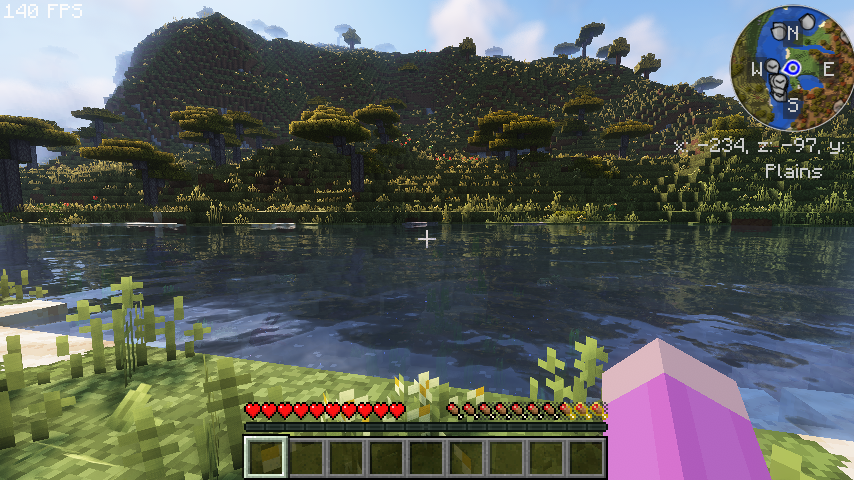
yo ive got a weird problem when using the built in complementary reimagined shaderpack, theres like some weird image sharpening error? if i move the camera or my player stuff in the distance gets a little blurry, but when i am stood still it sharpens the image a lot, too much for my liking even though i have image sharpening turned off in the shader settings?

and colors get more vibrant for some reason when the sharpening happens too
i just realised it doesnt even show in that screenshot hold on
 bright pawn
exotic mist
yo ive got a weird problem when using the built in complementary reimagined shad...
bright pawn
exotic mist
yo ive got a weird problem when using the built in complementary reimagined shad...
Depth of field could be a likely culprit
That's generally something I turn off whenever I see it as an option. It's okay for screenshots, not for actually playing a game.
That and motion blur.
 warm dust
Hi
I've been playing versatile this last month and I feel ready to swim the dragon but ender's eyes have this problem

How am I supposed to use the eyes of ender?
Please help me
bright pawn
You're using End Remastered which changes how the End and access to it functions. It spawns in a castle on the surface instead of vanilla strongholds.
bright pawn
warm dust
Thanks
I stand corrected; the version in versatile is a newer one that removes the end castle.
ripe sun
vapid rock
wdym "8gb free"
Nearly 8gb ram is free cuz it comes up saying like the other half (compressed) is being used for other stuff
But I have 16gb of ram in total
ripe sun
vapid rock
please be more specific
Idk what launcher was used when I tried to load up the mod pack to play it - I just installed modrinth - installed the mod pack and then tried to load it
ripe sun
vapid rock
please describe what parts you dont understand
Well.. as I said.. I can’t do the driver install part of the performance guide.. idk how to dedicate ram anyway, and I’m not sure I’d have enough that’s free to dedicate.. idk what launcher I used..
 uneven cradle
ripe sun
Idk what launcher was used when I tried to load up the mod pack to play it - I j...
uneven cradle
ripe sun
Idk what launcher was used when I tried to load up the mod pack to play it - I j...
you installed modrinth?
ripe sun
The modrinth app yes
uneven cradle
oh, didn't know it had an app. That's cool
ripe sun
Yeah if you look up modrinth and go on the official website (on computer) in top right hand corner of the screen I think, it says install the app
Or something to that effect
bright pawn
uneven cradle
oh, didn't know it had an app. That's cool
Mod packs of the current year are generally used in one of several launchers, the primary three being Curseforge, Technic and Modrinth, their websites also being repositories for mod uploads.
There's other launchers that pull their modpacks from these three websites, like the ATLauncher mentioned at the top in this channel's header.
Between the four mentioned, Modrinth and ATLauncher are the better options compared to the older Curseforge and Technic(Formerly FTB) launchers.
ripe sun
bright pawn
Mod packs of the current year are generally used in one of several launchers, th...
I guess I used modrinth launcher then
Yeah except for the extra tips section I think I’m gonna get too confused with what to do with the rest of the stuff in the performance guide even though I’ve read it
bright pawn
ripe sun
Yeah except for the extra tips section I think I’m gonna get too confused with w...
The performance guide is very minimalistic, what parts of it are confusing you in particular?
ripe sun
Nearly 8gb ram is free cuz it comes up saying like the other half (compressed) is being used for other stuff
But I have 16gb of ram in total
Well.. as I said.. I can’t do the driver install part of the performance guide.. idk how to dedicate ram anyway, and I’m not sure I’d have enough that’s free to dedicate.. idk what launcher I used..
ripe sun
bright pawn
The performance guide is very minimalistic, what parts of it are confusing you i...
These parts just above 👆🏻
I looked at the Java part of the performance guide and idk which one I need.. I tried to look it up but it’s confusing
I can’t do the gpu driver update
I’ve tried doing GeForce experience driver updates but it won’t let me
And I’m not sure I need to allocate ram cuz I’ve never done it before and never had issues considering the mod packs are probably big because Infernal Origins is another mod pack I use and it has a lot of stuff such as new weapons, mobs kinda like how Versatile does
Basically Infernal has a lotta stuff
bright pawn
ripe sun
And I’m not sure I need to allocate ram cuz I’ve never done it before and never ...
Yes you always should allocate ram, the default is too small for large modpacks like versatile.
ripe sun
And I never allocated ram for that
bright pawn
You should allocate ram for that.
ripe sun
Idk how
bright pawn
It's a slider in the options tab of the modpack on your modrinth launcher.
ripe sun
What does allocating ram actually do?

 ripe sun
Does it only let you use the allocated ram for the selected game only?
bright pawn
ripe sun
What does allocating ram actually do?
Think of RAM, otherwise known as memory, like how much room your brain has to think about the problem you're trying to solve.
The more room you give it the more space it has to think.
ripe sun
Yes but what does that mean as in..
Like does it sort of like section off the ram so you can only use the ram you allocated.. for the game at any time? Even if you’re not playing the game one day?
bright pawn
When your computer's processor has a lot it needs to handle, like in large minecraft modpacks, the more memory/RAM it has to use means it can load everything it needs to process all at once.
bright pawn
ripe sun
Like does it sort of like section off the ram so you can only use the ram you al...
No, it only has an effect when you're running minecraft through the launcher.
ripe sun
Ah okay
But you CAN use the amount of ram you allocated for other stuff when you’re not playing the mod pack etc?
Like you can use it for other stuff in general?
Or does it like section it off
Into a locked cage
bright pawn
ripe sun
Or does it like section it off
To put it simply, 'no'.
bright pawn
ripe sun
Like you can use it for other stuff in general?
To put it simply, 'yes'.
ripe sun
bright pawn
To put it simply, 'yes'.
When not using the mod pack though right?
bright pawn
Don't worry about anything that isn't minecraft.
It is not germane to the mod launcher's ram allocation. It doesn't think about it, it doesn't touch it.
ripe sun
Ok it’s just Im kind of cautious about stuff cuz idk a lot about computers tech etc
So idk what I’m doing with stuff like gpu driver updates etc
bright pawn
What allocating more ram in the launcher does is tell the program that when it's running that it's free to use up to the specified quantity to run the game if it needs to.
 tropic loom
Sorry, i was at work, and get lost about how to run that modpack, I got the same problem, just open, and when will generate the world, the just crash
Sorry about my English, I'm not fluent
Did you manage to run it?
ripe sun
Wait I have 16gb ram in total but my computer may use like half of it sometimes (I was doing other stuff though) so CAN I allocate 8gb like is that safe to do given my circumstances?
bright pawn
ripe sun
Thanks
You're very welcome. As to your driver update problem, if you have geforce experience installed it's usually always going to try to keep you on the latest driver.
ripe sun
bright pawn
You're very welcome. As to your driver update problem, if you have geforce exper...
Okay but a notification pops up about new driver being available to update to or something and then when I try to I can’t update it
bright pawn
ripe sun
Wait I have 16gb ram in total but my computer may use like half of it sometimes ...
The performance guide's advice for you is to allocate between 8GB to 10GB for your quantity of RAM. But if you're using half your ram already just doing other idle things, yes that will impact your minecraft performance. A good rule of thumb is to close your nonessential software when running minecraft. Internet browsers in particular are guilty of using tons of ram.
ripe sun
bright pawn
The performance guide's advice for you is to allocate between 8GB to 10GB for yo...
Okay cool I can do that and use task manager to end tasks I don’t need
bright pawn
ripe sun
Okay cool I can do that and use task manager to end tasks I don’t need
Don't close processes that you don't know what they are. I'm talking about closing your internet browser or steam, stuff like that.
ripe sun
bright pawn
Don't close processes that you don't know what they are. I'm talking about closi...
Oh yeah I’ll only close process that I know what they are

Now with the Java thing I don’t understand this
ripe sun
It said about Java 18 cuz I would assume I use 1.19 for mc probably
bright pawn
ripe sun
I use windows
Why are you looking at a website for Linux?
ripe sun
It gives you windows java ones too
I was just showing that to explain I don’t understand it
bright pawn
Well let's stay away from downloading java from websites that aren't official.
I don't care if the performance guide recommends it.
bright pawn
I see that now, I get why they'd link the site but I don't personally believe it's best practice to do that.
ripe sun
Chorb told me to look at the performance guide so that’s what I’ve been trying to do - not that I understand a lot of it anyway
bright pawn
ripe sun
Chorb told me to look at the performance guide so that’s what I’ve been trying t...
Well you caught me at a good time so I'm happy to help, at least. Oracle (the company that develops java) has their official page for Java 18 downloads here: https://www.oracle.com/java/technologies/javase/jdk18-archive-downloads.html
ripe sun
Ok thanks
bright pawn
As to what I'm assuming confuses you, you're looking at all the different variations and don't know which one's for you.
This is the version the performance guide is recommending, so we'll look at the available options listed under it.

Since you're running windows 11 we'll ignore everything that says macos or linux.
Either of these two will suffice, they're at the bottom of those options.
 ripe sun
Idk whether I need the regular or the msi installer one
bright pawn
ripe sun
Idk whether I need the regular or the msi installer one
Realistically it doesn't matter, It's just your flavor of preference when it comes to installers. The exe uses one made by oracle while the other uses windows' built in installer.
Flip a coin if you can't decide.
ripe sun
Okay ty
What about the extra settings, do I need to do them?
47% of my memory’s being used apparently according to the task manager
ripe sun
bright pawn
Either of these two will suffice, they're at the bottom of those options.
how do I tell my computer to use the Java 18 I installed?
ripe sun
So I’ve allocated the ram, installed the Java and then chose it - still not loading
bright pawn
ripe sun
how do I tell my computer to use the Java 18 I installed?
Got caught up in something. Getting it to use the java isn't too difficult; you just need to locate the folder you installed the new version of java to and navigate to the 'javaw.exe' in that folder.

 bright pawn
Having done those two steps, having a gander at your graphics drivers would be the next logical step.
ripe sun
Is that the gpu thing
bright pawn
Correct.
bright pawn
You'll need to be more specific in this instance.
ripe sun
It won’t let me install the newest driver
I’ve had this issue since before getting this mod pack
bright pawn
Yes, but that's not specific. Are you getting a certain error message? Are you trying only through geforce experience? Have you attempted a manual driver installation?
ripe sun
Idk how to do a manual driver installation
bright pawn
ripe sun
Idk how to do a manual driver installation

Drivers: https://www.nvidia.com/en-us/geforce/drivers/
Join this channel to get access to perks:
https://www.youtube.com/channel/UCZ0hznff92f_i1wpYyi7tPQ/join
Outro music by: Eme7 - "Eme7 x MikeTheTech"
http://eme7.com/
Discord: http://exfil.gg/
ripe sun
A notification just pops up from GeForce so I go into that
bright pawn
What version of graphics driver does geforce experience say you have?
bright pawn
What's your GPU?
bright pawn
That's a brand, not a specific product.
This is something you should find out and memorize, it's important information.
Windows
Get to know the purpose and value of your computer’s GPU. We’ll show you how to check your GPU on Windows 11 and why knowing about it can enhance your computing life.
ripe sun
Okay but idk what you mean by what’s my gpu
bright pawn
Your GPU is like your CPU but specifically for gaming and graphics.
It's an essential part of what makes a PC or Laptop a gaming PC or gaming laptop.
ripe sun
I have 2
bright pawn
Please elaborate.
ripe sun
 bright pawn
Okay, so don't worry about 'GPU 0', that's just your onboard integrated graphics.
ripe sun
 bright pawn
'NVIDIA Geforce RTX 3050ti laptop GPU' is your GPU.
ripe sun
Ok
bright pawn
Knowing this, you can follow the guide I linked you to.
ripe sun
The yt?
bright pawn
Yes, you should try a manual driver update.
This is what you're searching for on the webpage once you get to that step.

 ripe sun
Idk whether I need the standard or DCH driver type
bright pawn

Just click the search button without changing anything else and you'll get that option.
ripe sun
Okay got it up
Okay I’m trying to download it
Idk what I’m gonna do if this doesn’t work
bright pawn
You aren't out of options if it doesn't work.
ripe sun
Okay it says open file now
bright pawn
Once you've downloaded the file, follow the tutorial video.
Watch it all the way through first so you don't freak out when it does like it's supposed to.
(I.e. driver updates will cause your screen to flicker, that's entirely normal)
ripe sun
Okay got to the part where it says install the driver and GeForce experience but I already have GeForce experience
bright pawn
Do that option anyway since you're having issues updating it via geforce experience.
ripe sun
Okay
bright pawn
Doesn't hurt to have it update/reinstall geforce experience.
bright pawn
Because of your issues, I'm going to say do 'custom' for the express purpose of doing a 'clean installation' like the tutorial shows you.

Make sure all the boxes are ticked including 'Perform a clean installation'.
Then click next.
ripe sun
Oh god
bright pawn
It's just five tickboxes, nothing to be afraid of.
Those would already have been done behind the scenes if you clicked express, excluding the clean installation which we want.
Remember: don't freak out when the screen flickers. It's part of the update process.
ripe sun
wait idk if i remember the profile thingy for geforce
bright pawn
You mean your login information?
Because if so, you need to keep better track of those kinds of things.
ripe sun
yeah
well i'll have to reset the password for it then
if this doesn't work i may scream

Ty I managed to install it
mclo.gs
1547 lines | 25 errors | 1 problem automatically detected
tried loading up again but still not working
bright pawn
ripe sun
tried loading up again but still not working
Next item on the list is to switch from modrinth to ATLauncher to see if that resolves your issue.
ripe sun
How do I switch to it? Just look it up and download it?
bright pawn
Once you have it installed, you'll just repeat the ram allocation and java binary options you did earlier for the ATLauncher.
Launchers by default are going to use the version of java bundled in with minecraft instead of the java 18 binary.
The performance guide has the specific steps for changing it on the ATLauncher
 ripe sun
so i may as well just install it with java 17 or not?
bright pawn
I'm not sure what you mean by that question. You're going to install the ATLauncher for minecraft. Minecraft comes with a built in java version.
But you can choose to change the binary your minecraft instance uses through the settings to Java 18.
ripe sun
right on the installation page it says install the launcher and optionally you can install java 17 (for launcher only)
that's what it says
bright pawn
Oh, I see. You can skip it if you're planning on using java 18.
ripe sun
Ok
bright pawn
Just remember to do the step above so the launcher functions properly.
ripe sun
Ok
Uh I’m using the picture you sent with instructions for reference
Having difficulty

Is this right?
half jasper
here, both java settings and settings for specific instance (modpack)

 ripe sun
Um do I leave system glfw and openAL unchecked then?
half jasper
these are my settings in atlauncher, I suggest you copy it
ripe sun
Yes but I only have checkboxes and not dropdowns for those that I just mentioned about
half jasper
ripe sun
Yes but I only have checkboxes and not dropdowns for those that I just mentioned...
one of them is the atlauncher settings, the other is the instance settings
like I mentioned lol
ripe sun
 half jasper
you haven't
downloaded
a modpack
lol
a modpack is an instance
just look in my bio and follow the video in there
 bright pawn
ripe sun
It’s working now
bright pawn
ripe sun
It’s working now
Glad I could help.
ripe sun
Yeah ty
vapid rock
ripe sun
But I have 16gb of ram in total
then just allocate 5gb
vapid rock
ripe sun
Idk what launcher was used when I tried to load up the mod pack to play it - I j...
so you're using modrinth launcher
vapid rock
ripe sun
Well.. as I said.. I can’t do the driver install part of the performance guide.....
the performance guide tells you
tropic loom
bright pawn
Glad I could help.
Dude, I was following along and thank you very much for the step by step tutorial, seriously, incredible
ripe sun
vapid rock
then just allocate 5gb
Ah um thank you Chorb but I’ve managed to get it working now thanks to Rando but thank you anyway
bright pawn
👍
ripe sun
Huh I just found out something interesting
Finally got Versatile to work without the ATlauncher and only launcher being installed being Modrinth..
That’s not all
Idk why but I was creating a world just now, went into data packs and around 9 of them are made for older versions of mc
Except 4 out of the 9 that are incompatible are made for a newer version of mc it says? 🤨🤷♀️
vapid rock
ripe sun
Idk why but I was creating a world just now, went into data packs and around 9 o...
that doesn't mean anything
false flag
 spiral kettle
ripe sun
Omfg
spiral kettle
ripe sun
Omfg
It took me so long when it first happened now I avoid trees
ripe sun
I’m not gonna avoid trees I’ll still go to the forest sometimes but it is a lil scary for me going in there alone lol
spiral kettle
ripe sun
I’m not gonna avoid trees I’ll still go to the forest sometimes but it is a lil ...
I kept dieing because I had little gear
ripe sun
spiral kettle
I kept dieing because I had little gear
Ah fair
spiral kettle
I have been raiding the nether lately I get oneshot by everything
ripe sun
The role I currently play as is Feline in the world I created so I can just scratch the enemies in the level 1 forest
ripe sun
spiral kettle
I have been raiding the nether lately I get oneshot by everything
Yeah I’m not great at mc either
spiral kettle
Just a night to get extra damage and it dose not change gameplay much
bright pawn
Protip: Build an XP Storage, dump all your levels in there, and withdraw only enough xp to give yourself level ups through playerEX
spiral kettle
ripe sun
Yeah I’m not great at mc either
Well I need to level up
ripe sun
spiral kettle
Well I need to level up
Same probably
bright pawn
Second protip: Minecells is a great springboard for loot and xp.
spiral kettle
bright pawn
Second protip: Minecells is a great springboard for loot and xp.
I looted on of those bye my spawn
bright pawn
spiral kettle
I looted on of those bye my spawn
All floors including the subsequent dimension?
ripe sun
Just a suggestion - maybe pin the protips so people can find them more easily?
spiral kettle
bright pawn
All floors including the subsequent dimension?
Not the subsequent dimension you can only loot it for so long
bright pawn
ripe sun
Just a suggestion - maybe pin the protips so people can find them more easily?
This isn't my modpack, I'm just a guy. No pins.
ripe sun
Ah ok fair
ripe sun
spiral kettle
Well I need to level up
Yeah I’m like level 4
bright pawn
spiral kettle
Not the subsequent dimension you can only loot it for so long
You should get more than enough diamons and weapons from those chests to make the nether a cakewalk.
ripe sun
I dont think I’ve found any minecells at all in my world so far
spiral kettle
bright pawn
You should get more than enough diamons and weapons from those chests to make th...
Nether starts level 75 I think so you still get oneshot in full diamond
bright pawn
I can't emphasize the XP storage enough, it's a godsend for leveling up.
ripe sun
ripe sun
I dont think I’ve found any minecells at all in my world so far
I don’t even know what they are really or what they look like
bright pawn
ripe sun
I dont think I’ve found any minecells at all in my world so far
You haven't seen those greenish blue structures with the glowing green portals that says prisoner's quarters?
ripe sun
No i don’t think so yet
bright pawn
Between that and Promenade of the Damned, there's hundreds of chests to loot.
ripe sun
Bearing in mind I’m playing as Feline (whether the role you choose makes any difference idk)
bright pawn
My advice is origin agnostic.
At the moment I'm constructing an XP farm using mob spawners I obtained via Create shenanigans so I don't have to keep going back to the Promenade of the Damned for xp.
ripe sun
Origin agnostic? I have no clue what that is
spiral kettle
Could you post and advise doc and ask a mod or someone with pin perms to pin it
bright pawn
ripe sun
Origin agnostic? I have no clue what that is
Regardless of origin.
ripe sun
I’m still lost
spiral kettle
Could name it: Randos guide to versatile
bright pawn
spiral kettle
Could you post and advise doc and ask a mod or someone with pin perms to pin it
No, I don't have that sort of free time unfortunately.
spiral kettle
Ah
bright pawn
Versatile's a kitchen sink modpack compared to others hosted here in this discord that have better guidance in the modpacks themselves via quest systems.
Prominence, for example.
 ripe sun
bright pawn
Prominence, for example.
ripe sun
bright pawn
Prominence, for example.
I’m still lost


 spiral kettle
ripe sun
I’m still lost
spiral kettle
ripe sun
I’m still lost
Whatever origin is ok and it dose not have a quest system
spiral kettle
nocturne gust
https://tenor.com/view/miss-kobayashi-dragon-maid-kanna-gif-22101098
U
!
bright pawn
ripe sun
I’m still lost
Well, if you look to the left in the discord server under discussion and support you can see a list of names of other modpacks made by this community.
ripe sun
bright pawn
Well, if you look to the left in the discord server under discussion and support...
ik that, but yeah?
bright pawn
I don't see how you're lost in regards to the statement I made.
ripe sun
idk neither do I but im dumb
bright pawn
ripe sun
idk neither do I but im dumb
What I was saying is that there are modpacks that have a story focus and/or features inside them that helps guide you into the various pieces of content the modpacks contain. Prominence is one of them, if that is what's confusing you.
ripe sun
No im still confused cuz the conversation was on about prisoners quarters and levelling and then origin agnostic - thanks for trying to help me understand anyway
bright pawn
ripe sun
No im still confused cuz the conversation was on about prisoners quarters and le...
Prisoner quarters is the first dungeon dimension of the Minecells mod. Portals to it are found throughout the overworld. And don't worry about the word agnostic, it's just an adjective I used to say your choice of origin doesn't matter.

They look like this, and you shouldn't have to look long to find one.
Mobs are a bit more durable than vanilla mobs, but they're much weaker than the average mob in the nether.
Weapons you can find in the chests here are stronger than many vanilla weapons.
ripe sun
bright pawn
Weapons you can find in the chests here are stronger than many vanilla weapons.
Ooh okay ty 🙂😊
ripe sun
Okay idk what’s going on but after a few days of using Modrinth Launcher to launch the mod pack, I tried to load it today and it didn’t load (I tried to load it up multiple times).. anyway I got ATlauncher and reset it to the settings I had it on before I deleted it, just in case.. it loaded via ATlauncher…
Then I think I tried repairing the instance on Modrinth and that didn’t work. Then I just fully reinstalled the mod pack with the Reinstall button for the mod pack on Modrinth and now it’s working via Modrinth again..
vapid rock
no its not lol
spiral kettle
Rando how did you pick up spawnerw#s
spiral kettle
Or if anyone else wants to say
 random fjord
spiral kettle
Or if anyone else wants to say
random fjord
spiral kettle
Or if anyone else wants to say
silk touch
spiral kettle
Spawners?
random fjord
should be just silk touch
you can test it out in a creative world where you spawn in a silk touch pick and a spawner and go to survival and mine it
ripe sun
vapid rock
no its not lol
I wonder what the issue IS to do with, then
ripe sun
spiral kettle
Taking up memory
Yeah whatever the issue is - it’s a little annoying although I do understand the creators/developers probably look every so often to see if any changes need to be made/updates added
Oh yeah, there’s something that confuses me.. idk about in ATlauncher as well, but in the Modrinth app I looked at the game loader and mod launcher versions (I think) settings and there’s higher values that you can adjust the mod launcher versions to
 tame agate
I'm trying to see if I can add extra origins into the modpack- but when I open the game and start my world it's just lags a lot then crashes. Is it incompatibility or did I do something wrong?
Maybe I should turn it up to 8gigs of ram, but it's been running comfortably at 4 with 6 max
(till I added extra origins, ofc)
bright pawn
spiral kettle
Rando how did you pick up spawnerw#s

NEW VIDEO HERE! https://youtu.be/DcOBMdYBo6Q
EASY way to move a mob spawner in Create Above and Beyond!
Timestamps
0:00 Intro
00:22 Settings
00:45 Moving Spawner
01:16 - Placing Spawner
I'm in the process of collecting 27 mob spawners to make a very spicy XP farm.
ripe sun
How do you heal a griffon if anyone knows?
Mine accidentally got caught on something and got hurt
tame agate
np
vapid rock
tame agate
I'm trying to see if I can add extra origins into the modpack- but when I open t...
!moreinfo
low knotBOT
Hello! For us to properly help you with your issue, you will need to answer all 8 questions below. Post the answers in this channel:
1. Have you modified the modpack in any way? If so, what did you do? (Updating/adding/removing mods, changing configs)
2. What launcher, or program, are you using to launch the game? (CurseForge, ATLauncher, etc)
3. What Minecraft version are you playing? (1.18.2, 1.16.5, 1.19.2)
4. What version of the modpack are you playing? (v11, v9, etc)
5. What steps are necessary to reproduce the crash? (Launching the game, exploring the world, etc)
6. Have you ever gotten past the point where the crash happens?
7. Send the crash report file into this channel. Right click the modpack, Open Folder, and navigate to the Crash Reports folder. Drag the newest one here. If there is no crash reports folder, do the same thing with the latest.log file in the logs folder.
8. Did you follow the Performance guide linked in #faq?
tame agate
low knot
Hello! For us to properly help you with your issue, you will need to answer all ...
- yes, added the extra origins mod
- modrinth
- 1.19.2
- v7.5
- entering a world, crashes maybe 10 seconds later after a lot of lag
- no
- yes, i allocated 6 gigs of ram but might up it to 8, was at 6 cause i thought its be a good amount to leave ram avaliable (16 gig total)
vapid rock
update the serverbrowser mod
tame agate
vapid rock
update the serverbrowser mod
modrinth doesnt have any updates for it
vapid rock
update from CF
 rain socket
hey yall! this modpack hasnt finished downloading yet, so i might soon answer my own questions, but how do you play versatile with multiplayer?
vapid rock
!server
low knotBOT
We suggest renting a server from Bisect Hosting:
Approx. $10 - $25 a month depending on what plan you choose. You can also get 25% off with Code LunaPixel.
Go to https://www.bisecthosting.com/LunaPixel and order a plan which fits you. We suggest 1GB per player but nothing lower than 4GB as the server needs at least 3GB to run.
Go to #server-hosting for more Info!
Free Method: (This is hosting on your own PC, which is harder to do so we suggest getting a server via Bisect Hosting)
- Download the serverpack from Curseforge's website
- Right click the start.ps1 file and click Run with Powershell
To join your own server, typelocalhostinto Direct Connect.
This video explains the process https://www.youtube.com/watch?v=wuGUbVbLsDc
The server IP address is your Public IP Address, which can be found by googling my ip address
If other players are unable to join, find a portforwarding guide online.
rain socket
ohh, guessing essential isnt compatible in that case
nocturne gust
rain socket
ohh, guessing essential isnt compatible in that case
Essentials can cause world corruption and other issues
!Lan
low knotBOT
LAN is untested and unreliable. Using it will cause longterm damage to your world. There is no reason to use LAN, as we support both paid and free methods of hosting a server the normal way. Here are your options:
- Create a server using the server pack or through a Bisect purchase. Type
!serverin #bots for more information. - Install the e4mc mod and then Open to LAN ingame.
rain socket
ohhh alrighty, thank you
ripe sun
How do you tame a drake? I swear I read somewhere you can tame them.
half jasper
ripe sun
How do you tame a drake? I swear I read somewhere you can tame them.
chupacabra meat
ripe sun
Ah okay ty
ripe sun
Is it possible to tame fennec fox
 orchid scaffold
gah I keep getting disconnected from my externally hosted server
worked fine when i tested it locally, but when i copy the files and run it from the hosting service, I can't join because "root tag must be a named compound tag", whatever that's supposed to mean
vapid rock
orchid scaffold
worked fine when i tested it locally, but when i copy the files and run it from ...
you didnt install correctly then
or its an issue w/ your host
orchid scaffold
Probably a host problem seeing as I just copied my server 1:1 and only changed the arguments for more ram
I'll switch to bisect probably
random fjord
if its an external server you arent rlly "allowed" to change java args cuz that can just cause issues with users setting their xmx to like 200g
orchid scaffold
Yeah they're locked to 8 as opposed to my local server which only had 2 for testing purposes
random fjord
funky
random fjord
not heard of a server host that lets you touch java args
random fjord
orchid scaffold
Just that I can't join it
send ur client logs maybe there is an issue with you trying to connect to the server
orchid scaffold
Far as I'm aware "root tag must be a named compound tag" means I'm SOL and my only real choice is removing mods until it works
I don't have the logs on hand rn cause I just got off the PC but they weren't very helpful anyways
random fjord
if you swap to bisect sooner or later they have mega minds working for them that probs can tell you the issue in like 10 words to solve it
orchid scaffold
Well bisect apparently has native support for lunapixel packs so I hopefully won't have to worry about it
vapid rock
orchid scaffold
Far as I'm aware "root tag must be a named compound tag" means I'm SOL and my on...
do not remove mods
random fjord
orchid scaffold
Well bisect apparently has native support for lunapixel packs so I hopefully won...
ye they do cuz they partnered with bisect 
orchid scaffold
It's probably some packet or server performance mod if anything, otherwise I can't really guess why it specifically disconnects me when the host is different
random fjord
have you tried just reinstalling the pack?
orchid scaffold
I removed some mods just to see what would happen and one of them got a different error but similarly obscure
Reinstalled each time I messed with the mods
vapid rock
it sounds like you do not have the modpack installed client and server side
so an issue with the server host or you didnt install clientside
random fjord
from online like year ago on others modpacks it seems either some of their clientside or serverside are causing that issue so after removing them and reinstalling it, it fixed but thats not rlly trustworthy
orchid scaffold
I couldn't find a server version of Versatile so my server and client have 1:1 the exact same mods
vapid rock
thats the issue
you need to use the serverpack
on atlauncher click the "create server" button
orchid scaffold
I did that and I still recognized some client mods
Host problem anyways, server worked just fine locally
random fjord
vapid rock
on atlauncher click the "create server" button
wow... i love atlauncher more now
i so needed that button for so many damn situations
orchid scaffold
Oh I probably just noticed some harmless client mods then
I'll save myself the headache and move to bisect tomorrow
orchid scaffold
Headache has been saved
random fjord
nice
paper pike
What is the mod that allows me to see what a block is when my cursor is on it?
nocturne gust
paper pike
What is the mod that allows me to see what a block is when my cursor is on it?
jade maybe
orchid scaffold
Bro this mod pack is sick as hell
nocturne gust
orchid scaffold
The only thing it was missing IMO was Minecraft Comes Alive but I think I added that because I'm playing alone :(
spiral kettle
I am making a 9 wither skiliton spawner farm trying to get up to 25 tho
 sacred mirage
Hello! how can i selfhost a versatile server? is there any server pack?
vapid rock
sacred mirage
Hello! how can i selfhost a versatile server? is there any server pack?
click the create server button in ATLauncher
spiral kettle
I got myself in a void dimension how do I get out
random fjord
same way you got in (i think if im remebering the right place)
spiral kettle
Got out
orchid scaffold
holy shit it's morshu
 vapid rock
LOL
orchid scaffold
yes he does in fact sell rope and bombs
 warm dust
asdsd
 sharp cliff
orchid scaffold
yes he does in fact sell rope and bombs
sharp cliff
orchid scaffold
yes he does in fact sell rope and bombs
Vinde petarde
rain socket
nocturne gust
!Lan
would the free method work for only two players?
half jasper
rain socket
would the free method work for only two players?
absolutely
rain socket
nice, thank yall
 heady hatch
is there a way to find all the mods listed for this pack somewhere before downloading it? online it lists what the packs about, and mentions over 300 mods but not speciically all included, unless i missed it 🙂
nocturne gust
heady hatch
is there a way to find all the mods listed for this pack somewhere before downlo...
modpackindex
should b there
heady hatch
nocturne gust
modpackindex
https://modrinth.com/modpack/versatile on here? i can't seem to find it