
#Overseerr keeps reset in new setup
37 messages · Page 1 of 1 (latest)

 charred compass
 upper garnet
Hi,
So a week back ago I had many trouble with many containers, so I started ba...
upper garnet
Hi,
So a week back ago I had many trouble with many containers, so I started ba...
Does ‘/path/to/appdata/config’ actually exist on the machine docker is running on?
Because that is only used as an example file path! You must ensure that it’s a real directory that docker has read and write permissions to.
That will be the source of your problem as every time the container starts, it keeps the files within its virtual folder ‘/app/config’ but despite being told to mount it to an actual folder, it can’t, so when the container stops it deletes all temporary data which in this case is your database as well.
upper garnet
I guess... ? How can I check that and update that if that's not the case ?
 grizzled bough
charred compass
Does ‘/path/to/appdata/config’ actually exist on the machine docker is running o...
grizzled bough
charred compass
Does ‘/path/to/appdata/config’ actually exist on the machine docker is running o...
Probably not I guess there is no file path
grizzled bough
upper garnet
I guess... ? How can I check that and update that if that's not the case ?
Ull need to change /path/to.... To something on your machine like a path that exist in your setup to save the docker or app related stuff
upper garnet
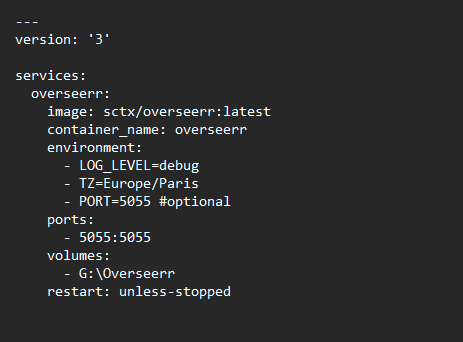
like this ?
Hey it's working now ! Just to be sure I rebooted the container like 3 times
and everything is staying, I do not have to setup Overseer again
Thx !
 paper star
upper garnet
https://i.imgur.com/PnKDeZs.png
paper star
upper garnet
https://i.imgur.com/PnKDeZs.png
No
paper star
upper garnet
and everything is staying, I do not have to setup Overseer again
It's not gonna stay when your container is recreated (when updating) because you're still not mounting your volume
G:\Overseerr:/app/config
Is how to mount if you're gonna use host path. But as stated in docs, you should be using a docker volume
upper garnet
Ok I've edited again the compose file, so if I update it should stay ?
paper star
How to create volume is also stated in docs.
docker volume create overseerr_config
Then you have to add it to compose
      volumes:
         - overseerr_config:/app/config


# at the bottom
volumes:
    overseerr_config:
          external: true
 paper star
upper garnet
https://i.imgur.com/hC660Zq.png
paper star
upper garnet
https://i.imgur.com/hC660Zq.png
No you didn't change the G\ part
You just added it below restart
Which is wrong
upper garnet
Aaaaaaah
ok wait
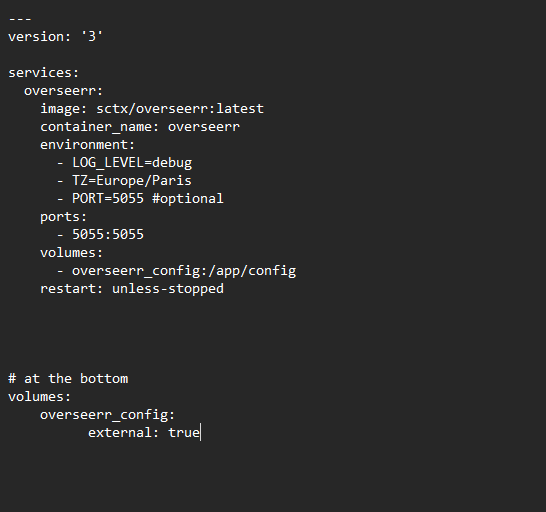
this ?
I also used the docker volume create overseerr_config command you put earlier
paper star
And indent the last two lines so it follows the same indentation as others like
Line 6 overseerr and last line -2 overseerr_config should be same indentation and Line 7 and last line should be same indentation
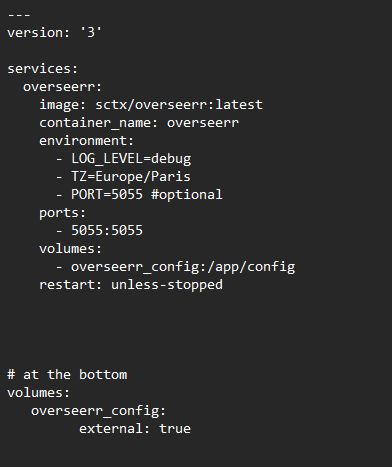 paper star
Fix the indentation of external: true to be same as restart line
upper garnet
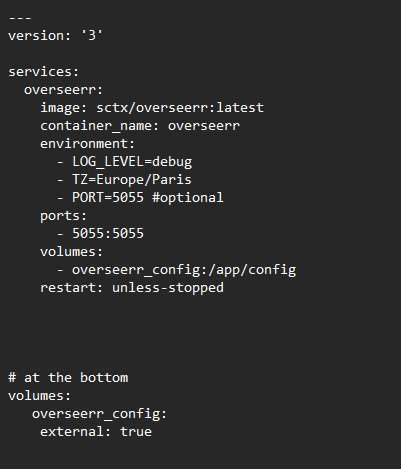 paper star
upper garnet
https://i.imgur.com/fak2Wf7.png
paper star
upper garnet
https://i.imgur.com/fak2Wf7.png

If they are same line then you should be good
Not sure if that's necessary in yaml when starting from new line like volumes has started but if it's not much of a bother to you could try deploying rn
And see if it throws any errors about indentation


