#File stuck on PC
336 messages · Page 1 of 1 (latest)
 latent depot
 wraith tinsel
latent depot
Do you care about what else is on the drive? If not just format the drive.
wraith tinsel
latent depot
Do you care about what else is on the drive? If not just format the drive.
No, I want to wipe it clean
wraith tinsel
I don't know how
I tried yt and stuff but everyone wants me to pay money for a crappy file shredder that probably won't work
wraith tinsel
alright hold on, there is one file that I kind of care about, its kinda important but not really but I may need it later so let me move it and ill tell you if it works
latent depot
Don't.. Don't do a real format it will take all day in the most literal sense of that statement.
I mean it's 2am by me I'm about to fall asleep so someone else wakes up and can help.. But my suggestion is just format it, it won't care what's left and just wipe it.
wraith tinsel
latent depot
I mean it's 2am by me I'm about to fall asleep so someone else wakes up and can ...
I'll try, i just moved the file and my pc is doing this where it slows down randomly and i have to restart it
wraith tinsel
latent depot
I mean it's 2am by me I'm about to fall asleep so someone else wakes up and can ...
this good?
 wraith tinsel
 latent depot
Yes.
 latent depot
Unless it's being used by your os.
wraith tinsel
Is it?
latent depot
Idk is it?
wraith tinsel
wraith tinsel
It say's it is here
latent depot
Nor do I.. If it's from your old pc and it has windows on it that's a whole other problem.
wraith tinsel
Yes it has windows on it
latent depot
Kay well that's why you are having all these issues.
You might have to format it from your bios if it even has that option.
latent depot
Also make sure it didn't boot into that drive on accident.
latent depot
Yes make sure you are still booting into your normal main drive, and not that drive from the old pc.
wraith tinsel
okay let me enter the bios
latent depot
Also I have no idea where your format from bios option would be I don't think they all even have it.
 ebon hull
are you certain you are on the right drive? windows is using the drive, which must mean it was already in use
wraith tinsel
ebon hull
are you certain you are on the right drive? windows is using the drive, which mu...
if it is then that might be bad
it takes a bit to load, my pc is pretty old but it’s still good i guess
okay i’m in the bios, where do i look
wraith tinsel
 latent depot
Could also just hotswap it tbh..
ebon hull
how would you not know if it booted into the old drive?
wraith tinsel
no idea where that is
latent depot
-rubs eyes-
ebon hull
34c is less than body temperature. not sure if you think that is hot
wraith tinsel
latent depot
Hit f8
okay so let me give you another problem with that
60% keyboard
wraith tinsel
what do i click
latent depot
....
wraith tinsel
ebon hull
34c is less than body temperature. not sure if you think that is hot
well i mean i guess so
wraith tinsel
latent depot
....
i don’t learn easy, like at all
ebon hull
the bios already has the m.2 set as boot priority
wraith tinsel
do i search it?
latent depot
Just unplug the old drive
ebon hull
@latent depotright side of the bios shows m.2 as boot priority
latent depot
Go into windows wait for that all too load.
wraith tinsel
do i unplug it rn?
latent depot
Windows isn't doing anything u are in the bios.
ebon hull
the bios would do that but it defaults to m.2 bootable drives first
wraith tinsel
wait the sata cable?
latent depot
I don't care what cable unplug it.
wraith tinsel
 latent depot
Either way the pc will stop seeing it.
ebon hull
that red cable is the sata data cable
wraith tinsel
so i unplug both?
wraith tinsel
ok i unplugged the data cable
ebon hull
the larger black one is for power, connected to the drive next tot he red cable
wraith tinsel
ebon hull
the larger black one is for power, connected to the drive next tot he red cable
like graphics cards?
ebon hull
wraith tinsel
like graphics cards?
no
wraith tinsel
latent depot
Now boot into your pc the normal way
do i turn it off and then back on?
or save and exit
ebon hull
on the hard drive whjere the red cable is, next to that is the power cable to power the drive
wraith tinsel
it’s so dusty i can’t tell what’s what
latent depot
Wait for windows to figure it's life out, replug the hdd Sata cable in, give windows like 5 minutes to find the drive, format it.
ebon hull
wraith tinsel
it’s so dusty i can’t tell what’s what
there is only 2 cables connected to the hard drive...
latent depot
If it tells you it can't again, you have a whole other issue.
wraith tinsel
hdd sata cable?
latent depot
...
wraith tinsel
ebon hull
there is only 2 cables connected to the hard drive...
ohh that black one
latent depot
The brick is called a hard drive..
wraith tinsel
latent depot
Wait for windows to figure it's life out, replug the hdd Sata cable in, give win...
how do i know when windows figures it out
latent depot
Idk give it a minute? When all your start up shit is done loading idk what you all have.
 ebon hull
windows gives a prompt on the bottom right that it's installing the drive to make it available for use
latent depot
Not like I'm asking you to decypher quantum physics here my guy..
ebon hull
wraith tinsel
you already have the drive connected
wraith tinsel
latent depot
Not like I'm asking you to decypher quantum physics here my guy..
i don’t know what that is
wraith tinsel
ebon hull
you already have the drive connected
but i disconnected it
ebon hull
ok so if you dont see the ST500 where it says sata6G, it is disconnected
wraith tinsel
ebon hull
ok so if you dont see the ST500 where it says sata6G, it is disconnected
where is ST500
latent depot
Stop
wraith tinsel
oh storage info
latent depot
Just boot into fucking windows.
ebon hull
in the middle of that screen shot you gave us
ebon hull
press f10, click save exit
latent depot
Idc if it is or isn't you haven't changed anything besides unplugging a drive.
wraith tinsel
it says i haven’t made any xhanges
do i unplug the black part that’s plugged into the drive to make sure?
wraith tinsel
oh
wraith tinsel
okay i am
hold on i gotta enter my pin
it takes like 30 seconds to load
idk why but it just takes a bit to boot up, my screens like barely visible and it stays like that for a minute
ebon hull
if it takes 30 seconds to load with an m.2 ssd, you have some issues your pc needs resolving, but worry about that later
latent depot
Now, when windows is doing starting all it's random startup stuff like steam discord whatever you all have going, then plug the hard drive back in, find it in mypc/this pc, and format it.
ebon hull
he just told you to plug it in
latent depot
BECAUSE IT'S NOT PLUGGED IN
latent depot
Use some common sense please.
wraith tinsel
sata*
wraith tinsel
latent depot
Use some common sense please.
IDK PCS
i code with c# im not used to this
latent depot
Just plug the damn red one back in.
latent depot
Windows will configure it in like 30 seconds, it will then let you format it.
Refresh the explorer
wraith tinsel
with my luck, it’s never gonna show up
wraith tinsel
latent depot
Refresh the explorer
u can do that?
oh i see
i refreshed and it’s not there
did i break the drive?
latent depot
Did you unplug the black one also?
wraith tinsel
no
latent depot
Is it spinning?
latent depot
The drive..
wraith tinsel
drives can spin?
latent depot
.....
wraith tinsel
what do you mean by spin😭
wraith tinsel
wtf where
ebon hull
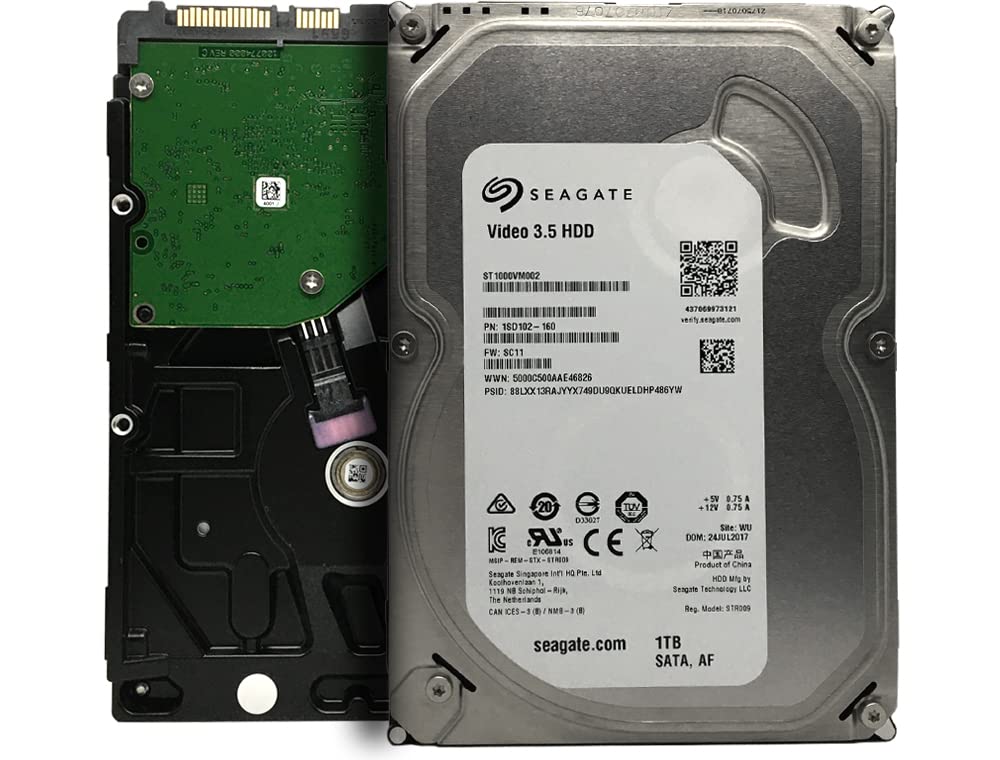
hdd have moving parts inside that spin real fast and data is written to it
latent depot
I'm not answering these questions..
ebon hull
forget about spinning... is the drive plugged in with both cables
wraith tinsel
ebon hull
hdd have moving parts inside that spin real fast and data is written to it
idk what a hdd is
wraith tinsel
ebon hull
forget about spinning... is the drive plugged in with both cables
yes
i’m refreshing and it’s not there
ebon hull
ok... unplug the black one, wait 15 seconds then plug it back in
latent depot
The big ass brick of a drive oyu are trying to format is called a hdd..
wraith tinsel
i broke it didn’t i
wraith tinsel
ebon hull
ok... unplug the black one, wait 15 seconds then plug it back in
ok hold on
wraith tinsel
latent depot
The big ass brick of a drive oyu are trying to format is called a hdd..
oh
i don’t understand
this is too much i can’t
latent depot
Clearly
wraith tinsel
ok i unplugged it
 wraith tinsel
ebon hull
https://m.media-amazon.com/images/I/615vgORG9XL.jpg
wraith tinsel
ebon hull
https://m.media-amazon.com/images/I/615vgORG9XL.jpg
where’s the fan
wraith tinsel
i thought there was fans inside of it
latent depot
Read
ebon hull
wraith tinsel
where’s the fan
nobody but you said anything aobut a fan
wraith tinsel
do i plug it back in?
latent depot
Yes
latent depot
Again clearly.
wraith tinsel

it may or may not have fell down there
and i can’t reach it
and i have no idea how to open this box
i damaged it trying to once
latent depot
Kay well you are sol till you figure it out, I'm going to bed.
ebon hull
what... did you unplug your gpu?
wraith tinsel
no it’s stuck
wraith tinsel
latent depot
No he didn't, his gpu just only needs one plug.
wraith tinsel
ebon hull
how did you lose cables that were literally right there?
well i used a screw driver to pull it up once and it fell back down immediately because it was being pulled
latent depot
So the other is just ziptied there.
wraith tinsel
latent depot
So the other is just ziptied there.
yeah i think
i’ve never gotten into that box before
latent depot
The side panels are normally held on by two thumb screws in the back.
Considering I have 0 clue what case you have idk if that's true or not.
ebon hull
that box is where the power supply is
wraith tinsel
latent depot
Considering I have 0 clue what case you have idk if that's true or not.
it’s a prebuilt
latent depot
I'm going to bed, hopefully optic can figure your life out.
wraith tinsel
ebon hull
that box is where the power supply is
i’m gonna try to get in it
wraith tinsel
latent depot
I'm going to bed, hopefully optic can figure your life out.
no one can figure out my problems
ebon hull
open the side panel on the other side
wraith tinsel
hold on i have a screwdriver
latent depot
Thumb screws.. Back of pc..
wraith tinsel
okay hold on
wraith tinsel
latent depot
Thumb screws.. Back of pc..
 wraith tinsel
hold on i need the right screw driver
ebon hull
you know how like you took off the current side you are fiddling around in
wraith tinsel
ebon hull
you know how like you took off the current side you are fiddling around in
yeah i took it off once and didnt put it back on
ebon hull
and im saying take off the other side to get the cable and push it through the top of the box
wraith tinsel
okay hold on
i had the screwdriver idk where it went
i think i stripped one of them trying to use a flathead screwdriver
found one
wraith tinsel
ebon hull
and im saying take off the other side to get the cable and push it through the t...
 ebon hull
wraith tinsel
ebon hull
wraith tinsel
you will need to find the cable. also.... turn the pc off before you mess with all those power cables
wraith tinsel
i’ll be fine, i’m just cutting zip ties not cables
 ebon hull
just feed it though the hole now and plug it into the drive
before you put the panel back on, make sure everything is working
wraith tinsel
alright hold on
may i install another hard drive while im at it?
i need a lot of room for pictures of toads
ebon hull
also turn the pc on after the drive is plugged in and then make sure everything is working
wraith tinsel
but if i plug it in before it turns on, what if it mains that drive?
ebon hull
honestly dont mess with other drives until you get this one sorted out
ebon hull
i gotta take off soon, ill try to find a decent tutorial on formatting a drive and also activating new drives once you are ready to install the new drives
wraith tinsel
i can’t get a break
i lost the screws
okay i plugged the hard drive in both cables
do i turn on the pc?
ebon hull
only way to find out of it's working
wraith tinsel
alright
wraith tinsel
ebon hull
only way to find out of it's working
wait but what if windows connects to the drive i connected it to
and then i can’t format it
okay it showed up
btw what is system reserved?
wraith tinsel
ebon hull
only way to find out of it's working
it’s still giving me the same issue

 wraith tinsel
LOL
ebon hull
you have only 7GB left on your os drive
wraith tinsel
yeah i know its bad
but you cant blame me
the pc i boughts reviews complained about the storage
458GB isnt a lot
ebon hull
press the windows key on your keyboard and then x
wraith tinsel
 ebon hull
you should get a menu that has management tools. the one you want is disk management
wraith tinsel
wraith tinsel
is it on there?
ebon hull
do you know how to read?
wraith tinsel
oh I didn't see it
LOL

ok it shows this
the more i look at it the more braindead it makes me
wraith tinsel
yeah, it was nothing really, just a bunch of windows stuff

these things wont budge
at all
shits so old it has internet explorer still
ebon hull
something on it is telling windows to activate files on it, preventing you from formatting the drive
wraith tinsel
im never finding it trust me. theres ATLEAST 50,000 files on it
when i tried deleting everything it went over 65 thousand or something, i aborted it because it wasn't working
ebon hull
you know what? why dont you set this drive aside and install your new drives instead
wraith tinsel
the other ones are the same thing
theyre coming from the same pc
so im pretty sure that wont be any help..
wraith tinsel
wraith tinsel
no one can figure out my problems
I really wasn't lying
ebon hull
if they were not the OS drive on the old pc, it wont have the same issue
or it shouldnt
you will need to format that old windows drive another way that is easy for you. i dont have the energy to help you. i need to get to bed after feeding my cats
wraith tinsel
oh no i meant like, i had 3 pcs that were all bought at the same time, same brand everything, me and my mom used them and we had a spare, and i just took them out
wraith tinsel
ebon hull
you will need to format that old windows drive another way that is easy for you....
that will literally be impossible with my luck(trust me), but sure I can try
hmm i'll let you know when i do it(never), but i'll try my best
ebon hull
it's easy to do if you know what you're doing
wraith tinsel
ebon hull
it's easy to do if you know what you're doing
that's right but when my lucks involved it doesn't matter what im good at, it'll get in the way and throw me off
ebon hull
there are tutorials, but i dont know if they will help with your particular situation in a way that you can understand because of likely needing to use the command prompt to input commands manually (copy paste)
wraith tinsel
what about chat gpt?
ebon hull
that has nothing to do with windows. that can only spit out the same info you would just find else where
wraith tinsel
ebon hull
that has nothing to do with windows. that can only spit out the same info you wo...
yeah ur right
i can try
ebon hull
i gotta take off. maybe someone else can help you later
wraith tinsel
not really likely but we can always hope
wraith tinsel
ebon hull
i gotta take off. maybe someone else can help you later
oh wait
 ebon hull
no
wraith tinsel
LOL alr, i found a tutorial and ill tell u if it works