
#UV wrapping for modular pieces
1 messages · Page 1 of 1 (latest)
 lucid cobalt
 lethal ledge
You'd want a fixed Texel density with a common alignment
Or use world space projection
You can project from view in blender which may help get you started then you can also pin verts to keep them from my moving once you get what you want
There are also tools that can help you straighten, rectify, or align stuff
 wise osprey
lethal ledge
You'd want a fixed Texel density with a common alignment
wise osprey
lethal ledge
You'd want a fixed Texel density with a common alignment
I agree, you must think of a texel ratio 1st, and you'll have to think of your textures before creating your modules if you want to use trim sheet textures. To create your modules, I suggest you use a grid ( by 10cm for ex, it's also the default parameter to move objects in Unreal) and work with snapping on grid points.
lethal ledge
Yeah, Ubisoft wrote about figuring out your module scale in their GDC talk on assassins creed syndicate
and I think Bethesda for Fallout 4 also did a talk on modular stuff
But yeah if you're doing trim sheets check out the ...
#871798036727201812 message
check out these links I posted here
Maybe this will help you
lucid cobalt
Thank you guys, but I ended up using triplanar nodes in UE material graph, it does the job
lethal ledge
lucid cobalt
Thank you guys, but I ended up using triplanar nodes in UE material graph, it do...
if performce becomes an issue check out single sampler triplanar method
lucid cobalt
lethal ledge
if performce becomes an issue check out single sampler triplanar method
Do you know by any change the stat command for it?
lethal ledge
Not sure, it's basically the number of texture samplers
default triplanar needs 3 texture samples per texture
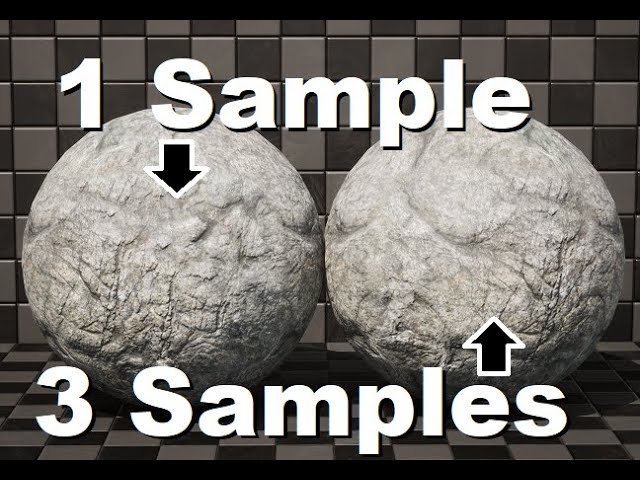
Here I demonstrate a method of using temporally blended stochastic sampling to achieve tri-planar mapping and texture switching using a single texture sampler. Traditional tri-planar mapping requires a sample for each of the 3 world planes in order to achieve a seamless blend. This can be costly, especially for landscape materials with many tex...
This can do it in with one sampler at the expense of smooth interpolation (instead it uses dithering which is probably fine for your use since you look like you got mostly right angles)