


1 messages · Page 1 of 1 (latest)
 peak crater
Thank you to anyone who responds.
Originally I was following this https://cyn-prod.com/stylized-paint-shader-breakdown to attempt to create rim erosion. So far I have it as view aligned but it's not achieving the same effect that I wanted, which is the rim offset no matter what angle you're viewing from, as shown with the cube image. Inside the blue outlines should be the rim offset.
Another person also told me that there's going to be issues with using vertices to calculate these types of things (specifically with complex geometry) so I was wondering if there's a different way. From my understanding, you'd still want the calculation for the fresnel, but I'm not sure if you should be using something to replace Camera Vector and/or VertexNormalWS to find the dot product.
I am also very sure that using vertex colors actually don't lower the calculation cost compared to just using the vertex normal world space. You'd have to convert the vertex colors to the vertex normal world space anyways. Probably making a normal map would give you more control then.
https://youtu.be/s8N00rjil_4?si=lRUHRI9JQ75s9skm&t=330
In this video, I'll go over a surprisingly simple way to make your 3D renders feel like a painting. I do it by painting over Object Space Normal Maps, which is not as scary as it sounds. This technique allows us to capture the feeling of a 2D painting while maintaining the flexibility of 3D.
I used Blender, Substance Painter, Substance Designe...
peak crater
Hopefully this shows the problem and what I'm trying to fix. I really just want the rim erosion to occur at the corners of the mesh. If there's a way to modify the fresnel so it does that, I'd appreciate it. I'm assuming I have to fix the calculation for the fresnel somehow.
peak crater
For the rim offset, the goal is to have solid model in the center, with a solid shader and an outer shell thats got the panning corroded material all over it. The problem is finding where the mesh ends. I've achieved this so far by using an inner fresnel and outer fresnel but I think I need to do this in post processing via stencils in order for it to actually look right.
- Inside the base material, plug in for the opacity mask.
MF_ShellCalculationMF_ColorRamp


Outline is a different overlay material and also needs to be fixed as well. Probably use post-processing by this point.
Or I can attempt to do this for rim erosion. Outline will still have to be post processed I think, using Sobel or Laplacian.
You can shift the inner object vertex in a material to inflate/deflate and create the same effect - at a higher cost ofc.
You can do this on a single object, and with a single material using different UVs for the inside and outside shells…
 peak crater
Will update in here. So far I made two instances, one for the 'inner shell', one for the 'outer shell'.

Made a PP outline based on the video above. Currently it looks like this. It’s detecting edges, not gonna be able to detect pixels if they’re invisible and the rim erosion is a fresnel currently. I think there’s two ways to go about it. A. de Laubier ended up using several static mesh instances with different custom data values to do the...
 robust sapphire
I think there is a view node that gives you a vector from camera to pixel rather than camera forward. Alternatively just delta the world position with the camera position. Either works
peak crater
robust sapphire
I think there is a view node that gives you a vector from camera to pixel rather...
I'll try doing that when I get on the computer, been a busy week and I'm actually on my phone right now. Thank you, Mal. Another person also talked about another method to get inner/outer shell with two different UVs and I've gotta test that soon.
peak crater
robust sapphire
I think there is a view node that gives you a vector from camera to pixel rather...
When you are talking about the view node that gives you a vector from camera to pixel, are we talking about CameraVector?
peak crater
robust sapphire
Sorry, mixed it up with CameraDirectionVector
No problem, I'm just curious, would that work with post processing? I've seen it used for overlay material outlines (which was what I used originally) and then using fresnel to determine where the outline shows up but that doesn't work with flat faces so that's the reason why I was trying to use post processing.
robust sapphire
Yeah I use it in post process for many things
But I would be careful to do it that way, it's a bit of a naive approach for outlining
Using laplace convolutions makes much more sense
peak crater
Laplacian or Sobel?
robust sapphire
You basically check if there's a difference in depth or normal between pixels, and if the difference of either is high enough (generally using relatively small values), you make that pixel black
peak crater
From my understanding Laplacian is considered better, uses one kernel and second derivatives? But therefore is more sensitive to noise?
robust sapphire
Both do essentially the exact same thing, laplacian just does it in one sweep
Well, it's the same thing in our context
Not in a broader sense
peak crater
Mhm. I remember following the toon outline tutorial and I'm pretty sure the person ended up using pixels.
Creating a kernel, then checking for difference in depth/normals.
robust sapphire
You'll only need to check one pixel in each direction, any more is needlessly expensive
If you want thicker outlines, check pixels further out
peak crater
That makes sense.
https://youtu.be/9KvUfnrHcqM?si=qKQvRiPNDYZN0ysA
Yea I remembered following this essentially.

Let's create the cleanest and most customizable Outline Shader possible in Unreal Engine 5 with this Definitive Guide to Outline Shading in UE5.
💙 If you like what I do, please consider supporting me on Patreon : https://www.patreon.com/evansbohl
✨ Buy the complete and fully commented UE5 project on my gumroad shop : https://evansbohl.gumroad....
(I know this is slightly off topic, but I posted #𝓖𝓔𝓣-𝓗𝓔𝓛𝓟 message, I don't know if you've used TGraphTask but do you know why it's giving me a nullptr when I'm trying to access the TSet? And it's fine if you don't.)
Discord is the easiest way to communicate over voice, video, and text. Chat, hang out, and stay close with your friends and communities.
And again, I really do appreciate your help so far.
peak crater
robust sapphire
If you want thicker outlines, check pixels further out
I'm curious, how would you offset the outline then this way? If it's possible. Like would you take the pixel you've determined that is an edge then multiply the location of it 'outward'? If that makes sense. I'm just trying to wrap my mind around this.
robust sapphire
You wouldn't generally
What you can do is use custom depth as some sort of filter for edge thickness
peak crater
robust sapphire
What you can do is use custom depth as some sort of filter for edge thickness
That makes sense.
I'm curious, in Blender there's a modifier for multiple strokes, in UE, is it possible to recreate that effect via post processing? I don't know if there's a specific algorithm for that. From my understanding, Grease Pencil is actually 3D though right, so it 'wraps' around an object? (Limited knowledge of Blender).
https://youtu.be/G1ZKUZS_DJI?si=QShUcZd9zJZds0QG&t=79
If not then that's understandable. I'm pretty newb at visuals.
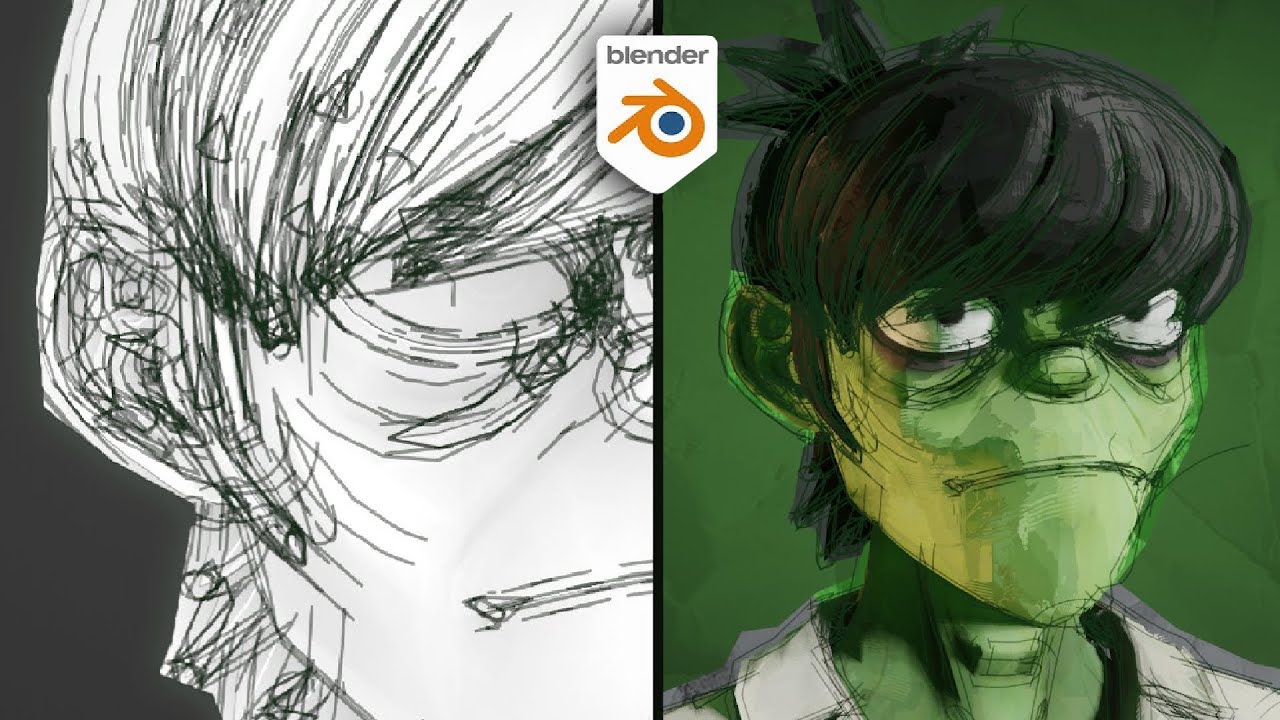
How to make stylized NPR sketchy outlines in Blender using grease pencil
https://www.artstation.com/ixproductions
https://www.instagram.com/ixdzns
#animation #blender
As seen in:
Spider-man Into the Spider-Verse
Spiderverse
Spider-man Across The Spider-Verse
Teenage Mutant Ninja Turtles Mutant Mayhem
Puss in boots The Last Wish
robust sapphire
Hmm yeah I guess it could be done with edge detection on a duplicate mesh, then inflate that duplicate with wpo along normal
not in post process though
peak crater
robust sapphire
Hmm yeah I guess it could be done with edge detection on a duplicate mesh, then ...
That makes sense, I think I saw that mentioned in the article, the problem is draw calls, and I think that's why the person used instances.
robust sapphire
then add some noice for the offset and mask off a bit of it with additional noice
noise*
peak crater
robust sapphire
noise*
Thanks, Mal. Shaders are pretty fun, hahhaahahah.
robust sapphire
I mean, drawcalls aren't great, but if you limit the effect to some things in the scene I wouldn't worry
I wouldn't worry about drawcalls this early in learning
Focus on functionality
peak crater
robust sapphire
I mean, drawcalls aren't great, but if you limit the effect to some things in th...
That makes sense.
Right.
I think what I'm wary of is I do have a lower end computer, so I'm afraid of lagging myself. I don't exactly have a budget to spend right now and the economy's in shambles so.
Again, thanks Mal, for the responses and help.
robust sapphire
Oh no, I sit on really bad hardware most of the time. It's not gonna be a problem.
Inefficiency is only really a problem when it adds up. Doing something really expensive when it's the only thing in the scene is absolutely nothing to worry about. But when you put everything together it's gonna suck
But for learning, you don't have to worry