#The verdict for Verdict
1 messages · Page 1 of 1 (latest)
 hollow swallow
hollow swallow
hollow swallow
this one? https://pcpartpicker.com/list/3vjdFg
 magic fossilBOT
 teal sun
https://pcpartpicker.com/list/
teal sun
https://pcpartpicker.com/list/
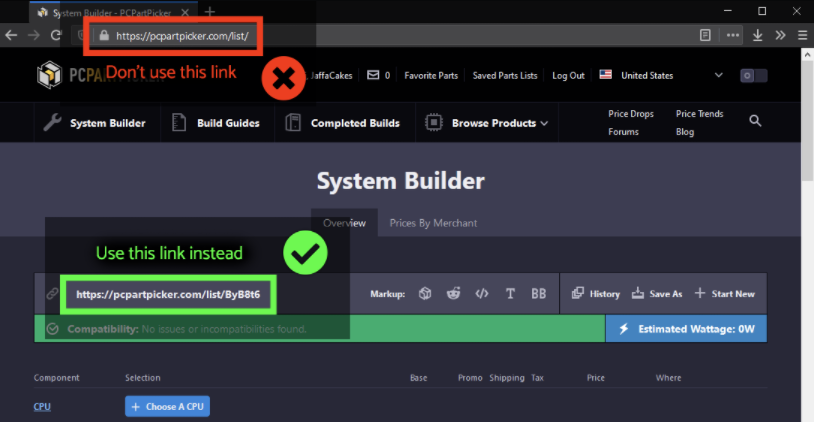
Your PCPartPicker link is invalid and won't show us your list. Please see this picture for instructions how to get the real link.
 hollow swallow

teal sun
PC Builder - Intel Core i5-10400F, Cooler Master MasterBox MB311L ARGB MicroATX Mid Tower
this one
sorry i got muted again
hollow swallow
ah the 10400F one
teal sun
wait i just realized that doesnt have cooling
hm
i can remove the ram from that list though right
is the ram a must buy upgrade
hollow swallow
stock 10400 cooler was intended for the list since the budget was tight
teal sun
is it good though?
hollow swallow
tbh i feel like even that thing is better than the HP cooler
hollow swallow
teal sun
is it good though?
and yeah it's fine
hollow swallow
i suppose you can keep the RAM you have now and buy better RAM later
teal sun
is the ram i have now terrible or just subpar
teal sun
or motherboard
like how do you know
like whats the difference between a cheaper and more expensive motherboard?
hollow swallow
connectivity and VRM quality
teal sun
and why does the case matter?
isn't that the least important part of a pc
like in terms of quality
hollow swallow
cheaper cases get damaged very easily and often have crappy acrylic side panels (it's preferable to not have a side panel at all in that case lol)
most of the cheaper cases also only come with one fan, which is bad for airflow
tbh i would rather have no case than have a shitty finger slicer case with one or no fans
put mobo on mobo box
getto test bench
teal sun
is there a way to filter only amazon products on pc part picker
if possible i'd prefer that
or newegg
like all one site
hollow swallow
you can but you need to make an account
teal sun
i made one
hollow swallow
actually no, you can just click the gear icons on the parts
 hollow swallow
all the parts on my list are amazon/newegg anyway
the mobo is priced the same on newegg
teal sun
yeah
but i wanted like all on one
like all amazon or all newegg just to make it easer
(if possible)
hollow swallow
the case and PSU make that situation tricky
 hollow swallow
i already have it in the list
teal sun
like here
teal sun
how does it know if its compatible then though
hollow swallow
it doesn't, you'd have to read HP's page for that
hollow swallow
very bottom of the list
teal sun
im on the specifications page for the pc
hollow swallow
oh the HP thing
this case doesn't look half bad: https://www.amazon.com/MOROVOL-Micro-ATX-Computer-Preinstalled-Case(TW7-S2-BL/dp/B08XLXPD73/

MOROVOL Mesh Matx (Micro-ATX) Case Tower Computer Case, 2PCS × ARGB Fans Preinstalled and 2×USB 3.0 Ports, Magnetic Design Opening Tempered Glass Panel & Mesh Front Panel Gaming PC Case(TW7-S2-BL)
 hollow swallow
teal sun
im on the specifications page for the pc
hollow swallow
teal sun
im on the specifications page for the pc
if you click the plus it expands the info for a given thing
ew the HP 1070 is a blower card
so converting to normal units its 11.176cm x 26.67cm?
at least in terms of length and width
thickness seems to just be two slots, that's a non issue
teal sun
but that's just size
hollow swallow
size determines case compatibility
hollow swallow
teal sun
isn't there a concern for actual compatibility?
no, because it's a modern PCI express GPU
literally all PCI express cards work in modern motherboards
teal sun
so it will work with any motherboard i buy
hollow swallow
basically yes, unless it was made in the 90s or earlier
teal sun
oh ok
hollow swallow
no that's socket and chipset dependent
intel is almost always two gens for each socket
AM4 had four gens, lord knows what they'll do with AM5
hollow swallow
hollow swallow
intel is almost always two gens for each socket
for example, the built list i've given you has an i5 10400. that uses LGA 1200, which is compatible with 10th and 11th gen. 10th gen mobo chipsets are H410/B460/H470/Z490 while 11th is H510/B560/H570/Z590
your i7 7700 uses the LGA 1151V1 socket, and that socket is compatible with 6th and 7th gen chips
officially, at least
teal sun
PC Builder - Intel Core i5-10400F
this is without ssd and ram
228
i have roughly $70 for a cooler
is that enough?
then i can get ram and ssd in the future?
ive gotten by without an ssd for quite some time now
i do definitely want one relatively soon
but im trying to prioritize what matters most to me
so is something like this viable
magic fossilBOT
Your PCPartPicker link is invalid and won't show us your list. Please see this picture for instructions how to get the real link.
teal sun
PC Builder - Intel Core i5-10400F
hollow swallow
teal sun
https://pcpartpicker.com/list/mPpCrD
you can get the SSD and cooler: https://pcpartpicker.com/list/kdL38r
PC Builder - Intel Core i5-10400F
hollow swallow
teal sun
that cooler is some random brand does that matter
id-cooling has been known for a while
but reguardless, no
the 10400 outputs basically no heat so it doesn't matter what cooler you put on it
teal sun
and does it matter if cooling is liquid or not i dont know a lot about cooling
teal sun
hollow swallow
the 10400 outputs basically no heat so it doesn't matter what cooler you put on ...
still good to have nonetheless?
hollow swallow
teal sun
and does it matter if cooling is liquid or not i dont know a lot about cooling
does not matter for a chip like this
hollow swallow
teal sun
still good to have nonetheless?
perhaps, the intel stock cooler is loud and ugly compared to aftermarket solutions
it would also suck ass when using an i7/i9
i5/i3 it's fine
teal sun
but an actual cooler is always significantly better than a stock one right
like that one on the list is a lot better than the one that comes with the cpu?
hollow swallow
yes
teal sun
ok so at that point with the new motherboard and all
i can pretty much upgrade anything there without worry
since i replaced all the oem things apart from the gpu
assuming i upgrade the ram too
hollow swallow
yeah
teal sun
and that cpu is a significant upgrade from my i7-7700 right?
like substantial enough to warrant upgrading
hollow swallow
hmm
the single threaded performance would be similar since both are skylake, cache performance would be better. if you play games or multitask while playing games, the 10400F wouldn't be as chocked like a 7700 would
frametimes would be better if you play games that scale past 4 cores
hollow swallow
having programs open
for you, probably a music player(?), video game, the game launcher, and maybe a web browser
teal sun
stupid question but, i cant use all 4 ram sticks? 2 old, 2 new?
cause speeds are different
right
hollow swallow
i don't even know how XMP would work in that scenario
teal sun
what's xmp
hollow swallow
one kit is DDR4-3200 CL16 XMP while the other is JEDEC DDR4-2133, seems like a recipe for disaster
hollow swallow
teal sun
what's xmp
?xmp
magic fossilBOT
teal sun
what's xmp
What is X.M.P.?
Extreme Memory Profile or XMP is a system developed by Intel to running memory at higher than stock speeds without the need to mess around with manual overclocking. Profiles are stored in a small chip on the DIMMs, and motherboards can read from the chip. From there, you can set your memory to higher than stock speeds.
To do this, boot into your BIOS and look for settings regarding XMP, AXMP, or DOCP. These are the settings where you will select the XMP profile you wish to use. Commonly they can be found on the main BIOS page, or maybe hidden under overclocking, advanced, or "AI Tweaker" tabs within the bios.
NOTE: While XMP is generally a stable platform, it is still considered an overclock and may not be 100% stable. XMP profiles are tuned for Intel-based systems and have a higher chance of instability on AMD Ryzen systems.
hollow swallow
TLDR: auto OC for your RAM
hollow swallow
it is the speed
teal sun
is there any risk for that
like
if i buy the new ram
and put it in and also put in the old ram
how would i test if it worked
task manager?
cause i know that shows it
hollow swallow
if you run with XMP off, the faster RAM would run at the speed of the lower RAM
hollow swallow
i would assume so
which will cause instability
because DDR4-2133 ain't gonna be quality silicon
teal sun
ok i guess i'll just ditch it then and use the new ones
wait i forgot did you say that processor can be overclocked?
hollow swallow
teal sun
wait i forgot did you say that processor can be overclocked?
if the CPU name doesn't have a K in it, then it cannot be overclocked
teal sun
oh ok
and for motherboard, im looking for atx, not micro atx right?
im trying to switch all of them to be on amazon instead of mixed with newegg
so i may have to change motherboards
is that ok
as long as its compatible right?
hollow swallow
the DS3H is the only good value board
teal sun
there's literally no other options?
like if theres a cheaper ones thats compatible why is that bad
hollow swallow
the more expensive boards end up costing as much as alder lake ones
hollow swallow
teal sun
like if theres a cheaper ones thats compatible why is that bad
the only cheaper B560 is the HDV, which sucks ass
teal sun
shit i guess you're right
i guess i can get all on amazon except one
idk i just wanted to make it more convenient
and for power supply how many watts
550 is fine?
hollow swallow
teal sun
550 is fine?
yes
teal sun
oh wait i fucked up big time
for some reason i dont have the case on this list
i think i accidentally took it out
hm
hollow swallow
hollow swallow
tbh i would rather have no case than have a shitty finger slicer case with one o...
well tbf
teal sun
lol
im back on the original link you gave me
PC Builder - Intel Core i5-10400F, Cooler Master MasterBox MB311L ARGB MicroATX Mid Tower
ok so
no cooler
but everything else
for $320
i mean you're the one that knows what their talking about
do i need a cooler?
or is that list good
oh shit wtf
another problem
teal sun
the price for the cpu wasnt included for some reason so
with it
its $440
wtf i thought it was good
what am i missing
wait i think i found it
i had it to amazon only
with newegg the mobo was $30 cheaper
so for 293 i can get all but ram and ssd
hollow swallow
private
teal sun
PC Builder - Intel Core i5-10400F, Cooler Master MasterBox MB311L ARGB MicroATX Mid Tower
whats the difference between micro atx and atx
is it literally just smaller
hollow swallow
micro atx is smaller yes
hollow swallow
yes
teal sun
gpu isnt too big for micro atx?
hollow swallow
correct
teal sun
are there any computer part sites that have major summer sales or anything that i should wait for?
teal sun
also i've been thinking about this all day
i'm really perplexed
i've been told this is a good idea and that it's a bad idea
current one is this
PC Builder - Intel Core i5-10400F, Cooler Master MasterBox MB311L ARGB MicroATX Mid Tower
would you personally say it's a justified upgrade?
in other words, if you were in my position, would you do this?
last question besides that is that since its matx, am i going to have any issues with less storage options and ports and what not? will it fit an ssd, and 2 other hard drives?
hollow swallow
teal sun
would you personally say it's a justified upgrade?
i might try to shoot for the 11400F if possible
hollow swallow
teal sun
last question besides that is that since its matx, am i going to have any issues...
you can fit all that in the MB311L
and frankly, most mATX cases can fit that much
it can start to be a problem if you go past 2 hard drives, 3/4 hard drives is the max for something like an NR400 but that also has 4 2.5" drive mounts
teal sun
oh ok thanks
yeah so my issue now is that i have people telling me this is a bad idea and people telling me it's good

but going off of what i've heard in this discord, the ram is slow as shit and a $100 cpu beats mine. i also don't have an ssd and i have a proprietary motherboard
idk what to do i'm lost
hollow swallow
teal sun
to be fair, the 10400F wouldn't be a huge upgrade from your current 7700 in terms of single threaded performance
you would just get two extra cores
so he's not entirely wrong
the i3 12100F would be an actual upgrade
teal sun
hollow swallow
to be fair, the 10400F wouldn't be a huge upgrade from your current 7700 in term...
But that’s just the cpu
What about everything else? Are they not enough of an improvement?
hollow swallow
teal sun
How is that possible if it’s better
the 12100F is an alder lake chip, the 10400F uses the same skylake cores as your 7700
teal sun
Alder is better than skylake?
If that’s the case then why is the 12100f better than the 10400f
hollow swallow
teal sun
If that’s the case then why is the 12100f better than the 10400f
single threaded performance
teal sun
By a lot?
hollow swallow
teal sun
By a lot?
yeah actually
teal sun
Like enough to warrant an upgrade from my 7700?
hollow swallow
so if you play games that don't need more than four cores, the 12100F is a great chip
hollow swallow
teal sun
Like enough to warrant an upgrade from my 7700?
imo yes
teal sun
hollow swallow
so if you play games that don't need more than four cores, the 12100F is a great...
How do you know if a game needs more than four cores or not
hollow swallow
teal sun
How do you know if a game needs more than four cores or not
googling
but generally from what i've seen, games that use DX11/openGL or older do not use more than four cores
since they were developed in a time when four cores was common
teal sun
Does that mean it will perform poorly on games that need more cores?
Or worse than my current cpu?
teal sun
but apart from that do you understand my dilemma
apart from the cpu like the whole build itself
is that not worth it
or is it
because i'm getting mixed answers
hollow swallow
teal sun
Does that mean it will perform poorly on games that need more cores?
if you play games that benefit from 6 cores, the game will be stuttery on a 4 core chip
hollow swallow
teal sun
because i'm getting mixed answers
i think it's worth it if you want more expandability without thermal throttling with your current system
teal sun
hollow swallow
i think it's worth it if you want more expandability without thermal throttling ...
wdym by thermal throttling
teal sun
hollow swallow
i think it's worth it if you want more expandability without thermal throttling ...
isn't it it worth it in general because it's an overall upgrade and it allows me to more easily customize my pc
teal sun
hollow swallow
if you play games that benefit from 6 cores, the game will be stuttery on a 4 co...
should i get a 6 core cpu then instead?
hollow swallow
teal sun
isn't it it worth it in general because it's an overall upgrade and it allows me...
yeah
teal sun
so should i not listen to people saying it's a waste of money
someone even said i'm better off selling my pc and buying a new one
but i didn't think that made sense because i'm fine with the 1070 i just want to upgrade the other parts
hollow swallow
teal sun
isn't it it worth it in general because it's an overall upgrade and it allows me...
yeah
and you don't have the shit cooling of the omen case/cpu cooler
teal sun
yeah definitely
hollow swallow
teal sun
should i get a 6 core cpu then instead?
depends on the games you play
obviously LoL would be cake walk on any chip
hollow swallow
11400F, 12400F/12400, ryzen 5 5600
teal sun
if i get an amd cpu, don't i have to change the motherboard/whole build?
im a bit confused in terms of cpus. so are more cores objectively better than less cores?
hollow swallow
teal sun
if i get an amd cpu, don't i have to change the motherboard/whole build?
you would need to change the mobo for the intel chips anyway
unless you're talking about the upgrade itself, yeah the board is changed
teal sun
yeah the upgrade
teal sun
thoughts on this build?
PC Builder - AMD Ryzen 5 5600, Gigabyte C200 Glass ATX Mid Tower
hollow swallow
teal sun
https://pcpartpicker.com/list/qdXx9r
hot box case, bomb PSU, horrendous motherboard that will probably throttle with even a 5600, no SSD
overall it's pretty icky
teal sun
PC Builder - Intel Core i5-10400F, Cooler Master MasterBox MB311L ARGB MicroATX Mid Tower
so this is still the best one so far
hollow swallow
yeah
this would be a version with a 5600: https://pcpartpicker.com/list/wdf38r
PC Builder - AMD Ryzen 5 5600, Cooler Master MasterBox MB311L ARGB MicroATX Mid Tower
teal sun
is there anything there to improve or is that the best i'm going to get for the ~$300 budget
oh ok thanks
out of those two, is either one objectively better?
they're both 6 core processors i thought the i5 one was 4 for some reason at first
teal sun
better by a long shot?
teal sun
are those better than the two we're comparing now?
hollow swallow
the 5500 and 11400F are worse than the 5600 and 12400F, but are still a meaningful jump from a 7700
teal sun
oh so you're saying go that route if i want to cut costs down a bit
is the 12400 not compatible with the first build because it doesn't come up in search
hollow swallow
the 12400 wouldn't be compatible since it would require an LGA 1700 motherboard
the ideal choice for a 12400 is a B660 board, and the ones you'd wanna buy are too far out your budget
$130 for an MSI B660M-A
teal sun
so 12400 isnt an option
hollow swallow
yeah, sadly
teal sun
so the amd build is better than the initial one you made?
hollow swallow
this is with a 5500: https://pcpartpicker.com/list/rYqcMb
this is with an 11400F: https://pcpartpicker.com/list/8hT64s
PC Builder - AMD Ryzen 5 5500, Cooler Master MasterBox MB311L ARGB MicroATX Mid Tower
PC Builder - Intel Core i5-11400F, Cooler Master MasterBox MB311L ARGB MicroATX Mid Tower
hollow swallow
teal sun
so the amd build is better than the initial one you made?
it actually is, the 5500 has better performance than the 10400F
teal sun
hollow swallow
this would be a version with a 5600: https://pcpartpicker.com/list/wdf38r
i was referring to this one
which the answer is yes because if the 5500 is better than obviously 5600 is
hollow swallow
yeah
teal sun
so should i forget about this one then
PC Builder - Intel Core i5-10400F, Cooler Master MasterBox MB311L ARGB MicroATX Mid Tower
or do i still have the option of that one or this one
PC Builder - AMD Ryzen 5 5600, Cooler Master MasterBox MB311L ARGB MicroATX Mid Tower
hollow swallow
teal sun
https://pcpartpicker.com/list/wdf38r
the 5600 build is an option if you can afford it
i would actually ignore the 10400F
hollow swallow
it can be disregarded, most B450 boards have updated BIOSes for zen3 chips
hollow swallow
teal sun
how does overclocking work with amd cpus
you use PBO, which is basically an auto overclock
precision boost overdrive
manually overclocking will actually degrade performance and silicon quality
hollow swallow
yeah
teal sun
what about gpu?
hollow swallow
don't know about HP cards, you can check that yourself
 teal sun
what does that mean and why
hollow swallow
teal sun
what does that mean and why

reddit
866 votes and 450 comments so far on Reddit
teal sun
thanks lol
ok um
that amd build
can you somehow bring the price closer to 300
idk how you would do that but
whether its take out the ram or idk
i think the cpu and ssd are most important parts
cause its $440
is that possible
also
on the hp site, the ram speed is in mbps not mhz, so how do i compare it to the one you put into the build?
hollow swallow
teal sun
on the hp site, the ram speed is in mbps not mhz, so how do i compare it to the ...
megabits is the proper term
it's just that most ram brands use "mhz" (although it's technically wrong) since that's what people got used to
the true mhz clock speed of DDR4 kits is half of the rated speed
example: DDR4-2133 true clock speed is 1067mhz
teal sun
shit
hollow swallow
tbh, i would just buy the case/PSU/SSD and then swap the HP parts into that if you can live with the crappy CPU cooler for a while
teal sun
just case psu and ssd? not a new cpu?
teal sun
wait
hollow swallow
the mobo doesn't seem to support RAM OC so you'd have to keep what you have
teal sun
can i get a new everything except gpu and cpu so get a new mobo and then get a cooler for my cpu?
ram overclocking?
my current one?
teal sun
teal sun
can i get a new everything except gpu and cpu so get a new mobo and then get a c...
can i do this?
hollow swallow
i don't think it's worth doing unless you somehow get a Z270 board <=50 bucks
teal sun
so what is my best option for like 300 bucks
cause for 300 i can get a 6600 xt
which is tempting
but then the rest of my pc is shit
or i can upgrade like everything but the gpu
if i upgrade everything but gpu now, i can upgrade my gpu down the line
basically, for around 300 bucks what is my best option overall
hollow swallow
teal sun
basically, for around 300 bucks what is my best option overall
i would say maybe something like this: https://pcpartpicker.com/list/6W2978
PC Builder - AMD Ryzen 5 5500, Thermaltake Versa H18 MicroATX Mini Tower
the MB311L sadly doesn't have the amazon rebate anymore
teal sun
no prices available for the case
doesnt that mean its not included
i like the other case better lol
the cooler master one
hollow swallow
teal sun
no prices available for the case
i change the case to the H18
since it fit the budget
teal sun
i know but it says no prices available so isnt it not included in that price then
hollow swallow

Thermaltake Versa H18 MicroATX Mini Tower Case (CA-1J4-00S1WN-01)
do you have newegg off lol
teal sun
maybe lol
hollow swallow
well that's funny, the versa is cheaper on amazon but will deliver in augest
hollow swallow
teal sun
cant i include the other case since im still under 300
4 bucks under
hollow swallow
teal sun
what about psu?
i decided to put in the HP PSU, since it uses standard connectors and a lot of PSUs in dell/HP PCs are actually okay quality
hollow swallow
yes
hollow swallow
i didn't wanna do it at first because i was unsure of the quality
hollow swallow
teal sun
like what made you sure of it
gamers nexus and mentions by @waxen salmon
teal sun
so is that like guaranteed
hollow swallow
well i pinged luke, i think he's busy atm
 waxen salmon
What did I miss?
hollow swallow
nvm
teal sun
lol
hollow swallow
waxen salmon
What did I miss?
guy wants to update his i7 7700/GTX 1070 omen PC, i think the PSU is ATX sized with standard connectors
so it could be re used
waxen salmon
I'm honestly not sure, but if reviews indicate it
hollow swallow
i could tell it uses standard connectors since the mobo does
teal sun
is that the only thing that matters? the connections?
what about the size? is there a possibility it won't fit in the case?
teal sun
ok so
can you also help me with the question i have
i want your input
i want to upgrade my prebuilt pc
for around $300
should i upgrade like everything but the gpu (and then upgrade the gpu in the near future), or upgrade only the gpu?
this is the pc i have now
Looking for upgrade information? Trying to find the names of hardware components or software programs? This document contains the technical details for this product.
so im torn between what i should upgrade
idk wtf to do lol
a new gpu would be nice
but then the rest of my pc is kinda poo poo
teal sun
hollow swallow
and the RAM
so is upgrading ram a must
hollow swallow
teal sun
so is upgrading ram a must
tbh the SSD is more important
teal sun
is it better to splurge more on the cpu?
so can't i cut out the ram and psu
and that money can go towards the cpu
hollow swallow
you could
teal sun
is that a good idea though
could you make me a ~$300 build for a cpu, mobo, ssd, and case then?
and maybe cooler if theres money left
or whatever
hollow swallow
hollow swallow
i would say *maybe* something like this: https://pcpartpicker.com/list/6W2978
@teal sun
i cannot think of a way to make it better for the price
teal sun
can i get the other case for that price though
i altered the previous one
PC Builder - AMD Ryzen 5 5600, Cooler Master MasterBox MB311L ARGB MicroATX Mid Tower
wait
how much better is 5600 than a 5500
hollow swallow
teal sun
https://pcpartpicker.com/list/CvK44s
this goes over your budget
hollow swallow
i would rather have the 5500 with faster RAM than a 5600 with shit RAM
teal sun
shit
PC Builder - AMD Ryzen 5 5500, Cooler Master MasterBox MB311L ARGB MicroATX Mid Tower
this
no ram
if i can fit the ram into that
would that be a good ugprade then
teal sun
wait so
is my ram right now like dogshit
like what does that actually affect if i get faster ram
hollow swallow
game performance
teal sun
even games that dont demand a lot of ram?
like warzone does
but if im playing like rocket league then no?
or is it always
hollow swallow
it is very rare to be in games that require more than 16 gigs of ram
teal sun
no i know
i worded that terribly sorry lol
i meant like
does ram speed always matter
hollow swallow
in a lot of games yes
teal sun
even if its league of legends or gta v
hollow swallow
KingFaris10's Site
teal sun
wait sorry lol
you said ram speed SHOULD be in mbps not mhz
so can you convert mhz to mbps then?
how can i compare the ram you wanted me to get to the one i have now
hollow swallow
teal sun
so can you convert mhz to mbps then?
they use the same number, so just change the word
DDR4-3200 kits are 3200 mbps
hollow swallow
teal sun
hp site says mine is 17000
PC4?
the PC4 number is also a proper measurement of speed
teal sun
yeah pc4
the impact of ram thing you sent me has 3200 as the second lowest one
and the ram you sent me is 3200
hollow swallow

Memory speed on Ryzen has always been a hot subject, with AMD’s 1000 and 2000 series CPUs responding favorably to fast memory while at the same time having difficulty getting past 3200MHz in Gen1. The new Ryzen 3000 chips officially support memory speeds up to 3200MHz and can reliably run kits up to 3600MHz, with extreme overclocks up to 5100MHz...
theres this too
GN tests ryzen 3000 instead of 5000 but it gets the point across
hollow swallow
DDR4-2133
hollow swallow
the minimum speed gamers nexus tests is 2400
teal sun
so mine is below average and shit?
hollow swallow
hollow swallow
https://kingfaris.co.uk/ram/7
@teal sun btw JEDEC in this benchmark is 2400
teal sun
what is jedec lol
hollow swallow
basically, stock RAM speed
hollow swallow
yes
teal sun
yeah so mine is dogshit then?
hollow swallow
teal sun
what is jedec for this one
he lists it in the first page
KingFaris10's Site
hollow swallow
teal sun
so that already is better than mine
it gets the point across that you will see a huge difference by going with a DDR4-3200 CL16 kit
you can see in the benchmark that the JEDEC profile is destroyed by 3200 CL16 in kingfaris' benchmark
teal sun
yeah some of them are like 2 fps off
but like fortnite and overwatch are significant
whats wrong with this one again
PC Builder - Intel Core i5-10400F, Cooler Master MasterBox MB311L ARGB MicroATX Mid Tower
original one you made me
i took out the psu
hollow swallow
teal sun
https://pcpartpicker.com/list/Fzf978
10400F isn't enough of an upgrade
you would be basically getting your 7700 but with two extra cores
teal sun
what about an 6600xt or rtx 3060 to replace my 1070. thoughts?
hollow swallow
both are nice upgrades
hollow swallow
yes
teal sun
would it be worth it to only buy that? or if i somehow could, buy that AND upgrade the rest of the pc?
obviously both is better
but you said to get the stuff besides the gpu right
so no
hollow swallow
teal sun
https://pcpartpicker.com/list/wPwgzf\
seems to not work
hollow swallow
teal sun
would it be worth it to only buy that? or if i somehow could, buy that AND upgra...
i'm sure the GPUs would work fine even in the crappy HP case, the 3060/3060 Ti/6600 XT don't output much heat especially stock
the fans would have to spin faster to compensate tho
teal sun
ok heres where i am right now
if i want purely better fps in games
should i just get the new gpu
INTEL ALTERNATE - Intel Core i5-12400F, Lian Li LANCOOL 205 Mesh ATX Mid Tower
can you see this
hollow swallow
you could consider this https://www.amazon.com/MOROVOL-Micro-ATX-Computer-Preinstalled-Case(TW7-S2-BL/dp/B08XLXPD73

MOROVOL Mesh Matx (Micro-ATX) Case Tower Computer Case, 2PCS × ARGB Fans Preinstalled and 2×USB 3.0 Ports, Magnetic Design Opening Tempered Glass Panel & Mesh Front Panel Gaming PC Case(TW7-S2-BL)
teal sun
i was told by someone else in this discord to find one with an exhaust fan in the back - does this matter?
and why do you recommend that one, purely because of price?
hollow swallow
you don't really need an exhaust fan tbh
teal sun
so can i stck with the original cooler master one then
hollow swallow
it's nice to have, but it's not a requirement
hollow swallow
teal sun
and why do you recommend that one, purely because of price?
ye
teal sun
so how is this then
INTEL ALTERNATE - Intel Core i5-12400F, Lian Li LANCOOL 205 Mesh ATX Mid Tower
hollow swallow
i generally don't go for micro atx in an atx case because of cable spaghetti on the bottom
teal sun
but arent non matx ones more expensive
hollow swallow
yes, that's why i am picking micro atx
hollow swallow
teal sun
https://pcpartpicker.com/user/WhatsTheVerdict/saved/H6JRVn
this looks fine, i would consider the EVGA 650 GT though (get more wattage for a similar price)
teal sun
hollow swallow
i generally don't go for micro atx in an atx case because of cable spaghetti on ...
but the cooler master one IS matx?
hollow swallow
teal sun
but the cooler master one IS matx?
yes
teal sun
hollow swallow
this looks fine, i would consider the EVGA 650 GT though (get more wattage for a...
lol exact same price
i need help desperately
i'm torn between getting a 6600 xt or this https://pcpartpicker.com/user/WhatsTheVerdict/saved/H6JRVn
INTEL ALTERNATE - Intel Core i5-12400F, Lian Li LANCOOL 205 Mesh ATX Mid Tower
is it stupid to get a 6600 xt and put it in my shit prebuilt
also do i NEED new ram?
hollow swallow
@rare pawn
 rare pawn
hollow swallow
<@332999339674959877>
rare pawn
hollow swallow
<@332999339674959877>
Que paso chico
hollow swallow
rare pawn
Que paso chico
help me out here
rare pawn
With what
hollow swallow
teal sun
https://support.hp.com/us-en/document/c05380412
he wants to upgrade this
since the case and CPU cooler are dogshit
rare pawn
Alright
Also btw thats not the prebuilt I said I worked with if thats why you summoned me
But he just wants a new case and cooler or... what
hollow swallow
he has around 300 bucks to work with
rare pawn
So 500?
rare pawn
Well $300 wont get you a decent upgrade
The power supply in there is definitely proprietary
teal sun
what about 500
teal sun
the main question is, do i put a new gpu in that prebuilt or do i upgrade everything else and then transfer the 1070 over
hollow swallow
what i did suggest for getting for $300 was putting in the mobo/CPU (it's micro atx) into a better case
teal sun
thats the main question
rare pawn
teal sun
the main question is, do i put a new gpu in that prebuilt or do i upgrade everyt...
Id upgrade everything and then the 1070
teal sun
then the 1070 in the near future you mean?
rare pawn
Yeah im saying upgrade everything else and transfer the 1070 to that system
rare pawn
Yep
teal sun
that's a better idea then only upgrading the gpu right now?
hollow swallow
yes
teal sun
so something like this?
INTEL ALTERNATE - Intel Core i5-12400F, Lian Li LANCOOL 205 Mesh ATX Mid Tower
rare pawn
Yeah because the power supply probably wont support it
rare pawn
teal sun
https://pcpartpicker.com/user/WhatsTheVerdict/saved/H6JRVn
Sure but also why does the imbed say lancool 205 mesh lmao
teal sun
i changed it
hollow swallow
tbf luke himself said that PSUs in PCs like this are fine quality (and i checked, it uses standard connectors)
problem is that it's only 500W
rare pawn
Oh they arent proprietary?
hollow swallow
the mobo was standard size and used standard power connectors
rare pawn
Hmm maybe its because its an older prebuilt
hollow swallow
rare pawn
Hmm maybe its because its an older prebuilt
omen systems in general use more standard size parts
rare pawn
I know coffee lake omens do use proprietary units but the motherboard sizes are standard
hollow swallow
modern omen systems also use standard size parts
rare pawn
At least the system I worked in was like that
rare pawn
teal sun
https://pcpartpicker.com/user/WhatsTheVerdict/saved/H6JRVn
Btw you could get the system cheaper by getting a 500gb SSD in there instead of the 1tb and maybe going cheaper on the case
To fit that $500 budget
hollow swallow
you do have a 1TB HDD anyway
hollow swallow
i'd say a 500 GB SSD is fine for OS + a few games and HDD for secondary storage
rare pawn
hollow swallow
i'd say a 500 GB SSD is fine for OS + a few games and HDD for secondary storage
Wait are you positively certain the power supply uses standard connectors
teal sun
hollow swallow
you do have a 1TB HDD anyway
and a 4tb one idk if mentioned that
rare pawn
Because we could re use the unit and then when he upgrades the GPU then he could get a new power supply, just in case he wants a next gen GPU
teal sun
but i want to upgrade the gpu in the near future so shouldnt i get the 650w psu anyways
rare pawn
Yeah thats what im thinking because of the ATX 3.0 standard
Our current power supplies wont be compatible with upcoming GPU's
And the 1070 is still a decent card today so there is no rush to upgrade
If the power supply in the prebuilt is certain to have standard connections which @hollow swallow said it does then I think it would be best to use it until you upgrade the GPU
teal sun
is the ram upgrade necessary?
hollow swallow
yes
DDR4-2133 is very slow compared to even a cheap XMP kit, as i've already showed
teal sun
so it would be stupid to not upgrade the ram?
rare pawn
Id say its dumb not to get the RAM upgrade
RAM speed can affect performance a lot
https://pcpartpicker.com/list/rKFsmr @teal sun @hollow swallow Here is what I would do, as for the PSU id re-use the one from the prebuilt until the GPU upgrade
PC Builder - Intel Core i5-12400F, Cooler Master MasterBox MB311L ARGB MicroATX Mid Tower
hollow swallow
all amazon, jeff bezeos would be happy
rare pawn
lmao I didnt even notice
rare pawn
You can although id personally rather spend the extra 27 dollars on double the storage
And it fits in the budget
teal sun
and i need the cooler?
rare pawn
No since it comes with a stock cooler, its a luxury since it makes the system much quieter, run at lower temperatures, and also looks a lot better
Again in my opinion is definitely worth the extra $20 and it still fits into the $500 budget
teal sun
and the oem psu will 100% work with all of that?
rare pawn
According to @hollow swallow it should since it uses the standard connections
But I personally do not know for myself
hollow swallow
since the mobo in the HP system has standard connections, i would assume so
rare pawn
You can be certain by examining it and making sure its standard
hollow swallow
 rare pawn
But if the board uses standard connections then it should

 rare pawn
Yeah but its a 4 pin
So if the power supply doesnt have the remaining 4 he will need a new one
teal sun
but if i want to get a new gpu like around christmas, am i better off getting the psu now?
teal sun
rare pawn
So if the power supply doesnt have the remaining 4 he will need a new one
is this something i can confirm by opening my case
hollow swallow
teal sun
is this something i can confirm by opening my case
yep
teal sun
what am i looking for exactly
rare pawn
Im fairly certain its only a 4 pin
hollow swallow
it probably is tbf
teal sun
id rather get the new one in case + to have higher wattage
hollow swallow
lol weird, i found the psu https://www.cpumedics.com/hp-ps-8501-2-500w-power-supply-80-bronze-plus-for-omen-870-envy/

CPU Medics
HP PS-8501-2 - 500W Power Supply 80 Bronze Plus for Omen 870 Envy
it actually says 2 4pin connectors, so yeah it should work
teal sun
but is 500w sufficient for a 6600xt
hollow swallow
teal sun
but is 500w sufficient for a 6600xt
it draws a similar amount of power to your current 1070, so yeah
teal sun
so its confirmed it works
hollow swallow
yup
teal sun
INTEL ALTERNATE - Intel Core i5-12400F, Cooler Master MasterBox MB311L ARGB MicroATX Mid Tower
so this is the final build
so what can i expect in terms of gaming performance increase
my friend was saying i was stupid for doing this because i should instead get the gpu
obviously a gpu would increase frames more significantly
but i can expect a frame boost from this too, no?
a noticeable one, at that?
teal sun
hollow swallow
lol weird, i found the psu https://www.cpumedics.com/hp-ps-8501-2-500w-power-sup...
how did you find this btw? is that the same one for sure?
cause my gpu is decent
but like in gta or even red dead
(i game at 1440p btw)
red dead all low settings i barely can maintain 60fps
goes into the 50s high 40s sometimes
so is my gpu the issue or the other shit im trying to fix
teal sun
teal sun
red dead all low settings i barely can maintain 60fps
but battlefield 1 max settings 1440p i easily maintain over 60fps
so idk if its bad optimization from the game's end or my cpu or what
hollow swallow
teal sun
how did you find this btw? is that the same one for sure?
omen 870 series, same across all of them
rare pawn
@teal sun Here is the problem
Your power supply will not work with the upgraded build
Since it doesnt have a 4+4 EPS connector
teal sun
he just said it did though
rare pawn
It only has a 4 pin EPS connector which is enough for your prebuilt board but not the new board
Oh

Huh
Guess so
Either way you should double check just to make sure
teal sun
yeah
do you have anything to say about what i asked earlier
like why can i run b1f 1440p max settings 60fps easily
but gta and rdr2 its in the 50s at all low settings
is that optimization or is that cause of my cpu or something
like is that a game issue or my pc
and would upgrading improve that
rare pawn
Well RDR2 is a lot more demanding than BF1 tbf
But it could be because of your CPU or GPU
Dont know until you benchmark it with afterburner or something
teal sun
msi afterburner?
rare pawn
Yeah they have the on screen display feature which I find very useful
If you want to see what is holding you back in a game its good to see
It might be your a single CPU thread holding you back, it may be all of your CPU holding you back, maybe your GPU is holding you back, maybe your temperatures are high or something
Good to see what your system is doing while gaming
rare pawn
I usually always run it while playing my games even if they run fine, I just like to see whats going on
teal sun
how do i know whats holding back
rare pawn
Btw MSI afterburner will not tell you whats holding you back, it will show you numbers and you need to figure it out on your own
teal sun
yeah i was gonna say that
rare pawn
If your temperatures are very high and your clock speeds are low, you can assume that your parts are thermal throttling
teal sun
well can i screenshot and you can help me with that
rare pawn
Sure
https://www.youtube.com/watch?v=piQa1mkzQSs Here is a guide on how to set it up
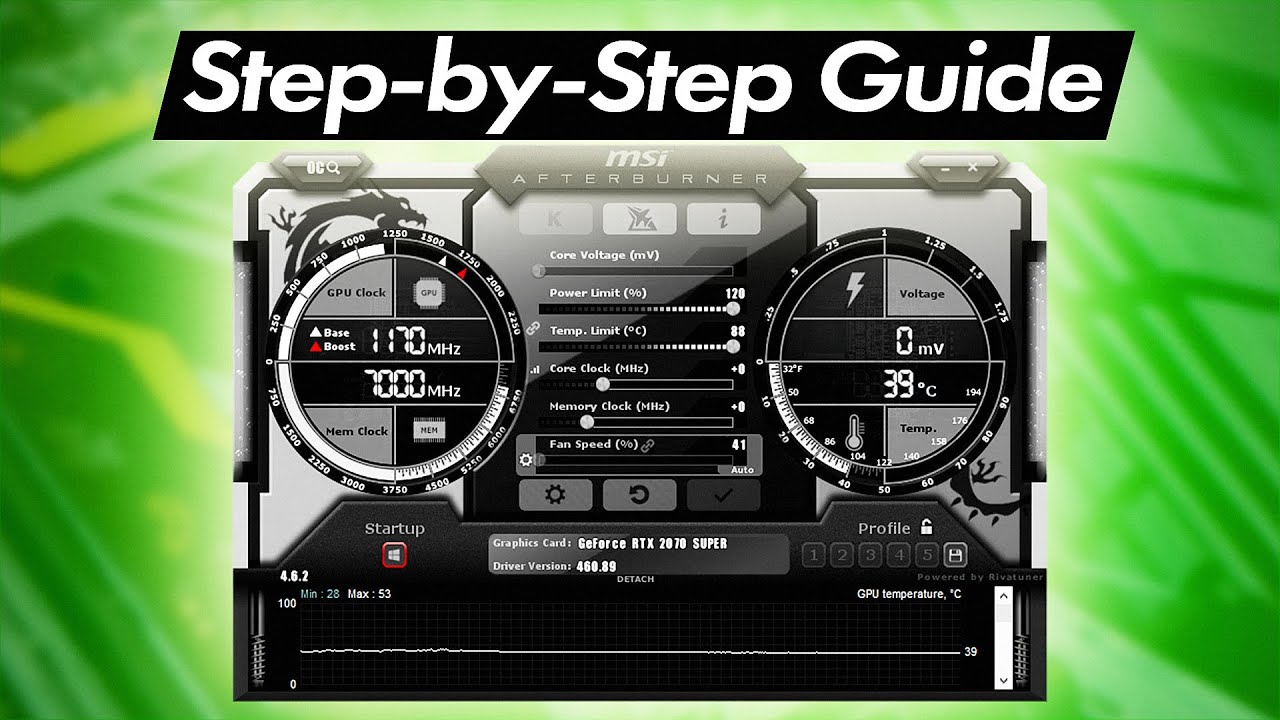
In this step-by-step video guide, I show you how to setup MSI Afterburner's on-screen display to monitor things like your CPU, graphics card and FPS while playing your games. I also go through setting a keyboard shortcut for quickly turning the on-screen display on and off while playing. Enjoy this video? Be sure to like this video and subscribe...
What I would have monitored is:
CPU: CPU Temperature, CPU Usage, CPU Power, CPU Clock
RAM: Ram Usage
GPU: GPU Temperature, GPU Usage, Power, Core Clock
Memory (VRAM): Memory Usage, Memory Clock
Extras: Framerate, Frametime
Make sure to mark them all in OSD
teal sun
rare pawn
What I would have monitored is:
CPU: CPU Temperature, CPU Usage, CPU Power, CPU ...
should i disable anything that you didn't list?
rare pawn
teal sun
should i disable anything that you didn't list?
Sure, everything I listed is what you need
There isnt anything else you really need on there
teal sun
you said enable cpu usage but theres like 16 of them
should i enable all of them
wait nvm
rare pawn
No just the one labeled CPU usage
rare pawn
There is one that is just overall cpu usage
And its just called cpu usage
The numbers are for specific threads
teal sun
i got it sorry
and what about any other options there

like that
or is it fine as is
rare pawn
Make sure to click show on screen display for everything you are monitoring
teal sun
yeah ok thats what i presumed
ok so now i can load up a game
and enable it
and then just screenshot it?
and send it here
should i take multiple screenshots? like once every 30 seconds or something
rare pawn
Sure
teal sun

 rare pawn
Yeah
teal sun

can you explain the numbers to me so i know what i'm looking at
like how do i interpret them
rare pawn
teal sun
But in this one this seems CPU bound since your GPU usage is so low
Maybe its just because you screenshot and your GPU usage spiked down?
And your CPU usage is very high, usually in the 90s
teal sun

so what does this mean exactly? would i benefit more from a cpu upgrade or a gpu upgrade?
teal sun
yeah
rare pawn

94c, thats close to thermal throttling
At 99% usage too
Probably the work of the shitty case and cooler they put on these chips
teal sun
so

if i were to upgrade my cpu
would i get a performance boost in red dead?
is that a direct correlation
and would it be a significant one?
rare pawn
teal sun
would i get a performance boost in red dead?
Most likely yeah, and the game should run a lot smoother too
rare pawn
teal sun
and would it be a significant one?
Depends on the area you are in, in read dead
teal sun
and what if i were to upgrade the gpu
would that bottleneck my cpu
or like
what would happen
rare pawn
You probably wouldnt notice much of a difference since you would be CPU bound in many scenarios
teal sun
by "bound" is that the same as bottlenecking?
rare pawn
Not really no
teal sun
what do you mean by that then
rare pawn
Bottleneck is an overused term
A bottleneck is a consistent limitation in performance by a specific part
Any PC will have a bottleneck somewhere, otherwise you would have infinite performance
By bound I mean that whatever you are doing is limited by one component, its not the same as a bottleneck
But its quite similar
You can be CPU bound in a city in RDR2 but GPU bound while you are in a forest
Doesnt mean there is a bottleneck or that there is a problem
teal sun
would a cpu upgrade or gpu upgrade aid with both of those or only one or the other
rare pawn
For you a CPU upgrade would be better
Since you have a decent GPU already, but your CPU is kinda shit
What other games do you play?
teal sun
gta v, rocket league, league of legends, battlefield 1,
i usually cycle through games
sea of thieves kinda, mortal kombat, rainbow six siege
cod bo3
rare pawn
Yeah you would definitely benefit from a CPU upgrade
Rocket league, LoL, BF1, and R6 are all quite CPU bound
Most of the time
rare pawn
Yeah because those are made to run on just about anything
rare pawn
Its just that in those games you are typically limited by CPU performance
rare pawn
teal sun
but bf1 is graphically intensive, no?
Yeah some games can be both CPU and GPU intensive
R6 is another example
teal sun
what about gta and red dead
rare pawn
GTA is kinda unoptimized, it depends on your components more than anything at that point
And read dead is very heavy on both, again it will depend on your components
It will always depend on your components whether you are CPU or GPU bound, when I mean a game is CPU or GPU bound I mean that it is typically limited by that part when put in a balanced system
Like if you are playing rocket league and have an i5 12400 but you are gaming on the IGPU, obviously you are going to be limited by your IGPU more than your CPU
Despite rocket league typically being a CPU bound game
teal sun
yeah
i have a question
how much does dust affect the heat
like
it's a bit dusty
but i don't know if it's enough to be causing the high temperatures
like if that's the sole reason
or it's because the shit case has no ventilation and has one fan
there isn't clumps of it
rare pawn
A bit of dust wont do anything
Unless you literally have piles of dust in your system covering your ventilation and coolers then its not a problem
rare pawn
Yep
teal sun
ok so
i feel like im so close to getting this
ok so
i KNOW i need a new case
so what are my options
is it possible to like
i need a new case, new cpu, new mobo
can i keep everything else? gpu, ram, psu
rare pawn
You dont have an SSD right
rare pawn
Yeah you need an SSD
rare pawn
I would recommend getting this https://pcpartpicker.com/list/rKFsmr
PC Builder - Intel Core i5-12400F, Cooler Master MasterBox MB311L ARGB MicroATX Mid Tower
Cheaping out now is going to make you regret it later
teal sun
you're right
rare pawn
Although I can cut down the cost if you really really want me to
But I dont recommend it
teal sun
yeah that's the one from before
rare pawn
https://pcpartpicker.com/list/yFwgzf Here is another option which saves some money, you get no aftermarket cooler which means you get the loud and subjectively ugly stock cooler, you get an ssd half as large, and a less nice case
PC Builder - Intel Core i5-12400F, Deepcool MATREXX 40 3FS MicroATX Mid Tower
Now if I was you id go for the other list which is nicer
teal sun
i would too
rare pawn
Its like a $60 difference for double the storage, a nicer case, and a decent cooler which is a lot quieter, better looking, and better performing than the stock cooler
Plus with the better cooler you could unlock the power limits of the CPU which could lead to slightly better performance
teal sun
yeah
off topic but if gpu usage is at 98% what does that mean exactly
is that normal
or does that mean a better gpu would benefit
rare pawn
teal sun
off topic but if gpu usage is at 98% what does that mean exactly
Just means its being fully utilized
rare pawn
teal sun
or does that mean a better gpu would benefit
Which yeah means that if you had a better GPU it could lead to better performance
teal sun
but cpu is more worth it?
rare pawn
Yeah, and as shown from your screenshots you are mostly CPU limited
teal sun
and i need the new ram?
rare pawn
I heavily, heavily, heavily ,heavily, stupidly a lot, very much, recommend getting it
Because slow ram could decrease performance by quite a large amount
Its pretty surprising how much alder lake (12th gen) actually cares about ram latency
Im going to go eat, ill be back in a bit
hollow swallow
teal sun
is it significant
quite a bit
the stock 12400F cooler would honestly still be an upgrade from the HP cooler, but it would still be somewhat noisy
teal sun
rare pawn
I would recommend getting this https://pcpartpicker.com/list/rKFsmr
are you in agreement that this is a good buy
rare pawn
teal sun
are you in agreement that this is a good buy
@hollow swallow ^
hollow swallow
teal sun
are you in agreement that this is a good buy

teal sun
ok so i think im just way overthinking this
so that upgrade
is
substantial from what i have now
and more substantial than if i were to only upgrade the gpu
?
rare pawn
Yes this upgrade will make a difference
Of course since you arent replacing your GPU not every single game will be a lot better, but you will be able to multitask way better, games will run way smoother, and windows in general will be snappier and quicker since you are getting an SSD
teal sun
obviously the ssd, but the faster ram and cpu will definitely improve game performance universally, right?
rare pawn
Yeah it should
I mean there may be some rare cases where the performance difference might not be noticeable
But those games would already run fine on your current system anyways
What refresh rate is your monitor?
rare pawn
Damn 1440p 144hz
1070 might be lacking sometimes then
That kind of changes things, although id still get the CPU and platform upgrade first
teal sun
isn't it a bad time to buy gpus now anyways?
rare pawn
No right now is actually a pretty good time to buy one, although the market seems to be getting better and better and next gen GPU's are coming
teal sun
ok i dont think im gonna get a gpu but what gpus would you recommend
rare pawn
Either wait for next gen or if you want a decent upgrade at the very least go for a 6700xt or 3060 ti
Which are like $400 and above
teal sun
yeah
also
ignoring the temperatures, how would you rate my cpu
like is my cpu already bad
with the temperature issues aside
rare pawn
Well to put it into some perspective your i7 7700 is equal to an i3 10100f, a two year old low end chip
So its quite out of date by now although its still capable of gaming
teal sun
ok so that
paired with fucking 97 degrees celsius
like going from that
to a 12400f with cooling
is a massive upgrade right
like that alone is worth it
teal sun
and the ram speed is significant too?
rare pawn
Not as big as the CPU upgrade but it matters
teal sun
what does the ram speed affect by itself
like does that affect gaming performance
or does it matter more when it's paired with another upgrade, in this case, the cpu
?
rare pawn
RAM speed will affect gaming performance
And as for the CPU it depends on the architecture, some care about ram speed more than others
iirc skylake didnt care all too much about ram speed although it could make a difference
But alder lake cares a lot
rare pawn
12th gen is alder lake yeah
teal sun
the one i have now is skylake?