#debilious' 'pooter build
1 messages · Page 1 of 1 (latest)
 worldly basin
Yo
 hexed yew
i have that exact same cooler
yes, vetroo v5
i ran it's RGB fan daisy chained with the case's ARGB header
 hexed yew
i can show a pic ig
worldly basin
Look lemme get on laptop I'll show u what to plug in
 wintry plume
Isnt the 3 pin thing an adapter
worldly basin
First you need to screw your fans into your case
worldly basin
Apparently gigabyte rgb
wintry plume
I don’t think so
worldly basin
@cerulean maple said so
wintry plume
The manual makes it look like an adapter
 worldly basin
Anyway
wintry plume
And if it was vdg it would be gigabyte specific
worldly basin
wintry plume
The manual makes it look like an adapter
OH MY GOD YES IM DUMB
I have that in my own case
It's this weird RGB connecter thing
You bought them to use them, did you not?
wintry plume
…
worldly basin
No you do install them one at a time lmaooooo
How did you expect to do all 3 at the same time
you got 6 arms my lad?
hexed yew
@cerulean maple this is how I have the ARGB setup (I left the motherboard ARGB unplugged)
the one with the sticker is from the case, the other one is from the vetroo vans
 worldly basin
So
Anyways
Install your fans first
Cause you're gonna need to cable manage anyways
Don't plug anything from your fans yet
i got the same ram
les go
what?
wintry plume
Stuff it behind the case
worldly basin
what is it
wintry plume
Argb daisy chain
worldly basin
dangling infront of the cooler
worldly basin
wintry plume
Argb daisy chain
on the mobo?
hexed yew
worldly basin
dangling infront of the cooler
daisy chain for the fan's RGB lights
it has a cap on it
hexed yew
it is the fan
wintry plume
Its part of the fan
hexed yew
bruh
worldly basin
im a complete dumbass
I apoplogize
Just looked weird so I didn't realise what it was lol
anyway screw ur fans in deb
Wait
Actualyl
Stop
worldly basin
baclk
So
Maybe do fans first
so you can plug in PSU cables quicker later
Unless there is a valid reason not to
wintry plume
Putting the cpu cable in after the fans on top are a pain
worldly basin
wintry plume
Putting the cpu cable in after the fans on top are a pain
fair
good point
hexed yew
put in the PSU
wintry plume
?fandirection
 green hareBOT
Fan Orientation
Which direction do the fans blow air? Refer to the following image:
 wintry plume
Back and top exhaust
worldly basin
So
this
Usually down
Fan side down, atleast in my experience
Not sure about your case tho
Anyways, for your case fans however
Since you have 3 fans, I recommend having an intake (grille side facing into the case) on the top towards the front of your case. Then have an outtake (logo side facing into the case) on the top towards the back of your case. For your third fan, have an outtake (logo facing into the case) on the back of your case (on the honeycomb grille behind your CPU cooler)
Like this

? why?
My lad
The 3 corners
only 3 screws, not 4
wintry plume
If you put it in the case itll line up
worldly basin
sure?
wintry plume
All of them lined up
wintry plume
 worldly basin
oh mb 4, the angle you sent earlier got me confused
but yeah
same thing
?
nope
Wait, for the top right screw
it's not in the hole of the case
its on the bottom of that hole
there is a second curve right below the top right screw hole on the case
Send a pic
alright
epic
Fans
Screw em in
You need to do one
CPU power
pretty sure it's 6 pin
or 8 pin
lemme chec
8 pin @cerulean maple
make sure to plug it in the right way
i mean it's hard to plug it in incorrectly
Done?
send a mobo pic
uh
send a pic on the other side of the CPU cooler
wait

this is where it is on most mobos
 hexed yew
yeah
worldly basin
but if nad is willing
sure
anyways get your fans screwed in

what? why not
send a pic
if you can
cpu usually splits into 2 parts
also what
why would they add a vent there
yeah.
Why would a case have a vent above the CPU header
if you couldn't even fit a cable
plug it in
see the 8 pin?
wait
actually
hexed yew
 worldly basin
hexed yew
worldly basin
hexed yew
nice job
my pc needs to be forcefully pushed on
we don't talk about that 🥶
anyways @cerulean maple send mobo manual picture
the picture of your motherboard manual
hexed yew
it would be better to get the online manual
worldly basin
hexed yew
it would be better to get the online manual
it should be alright tho
anyways
plug in the 8 pin
is it the right way?
There is a clip on the cpu cable to keep it in place
on the socket for the cable
there is a small piece of plastic which latches onto the cable
make sure both are on the same side
that should be fine
screw in fans
use this diagram

you only have room for 2 fans at the top
so have one intake and one outtae
outtake
what?
you just said it fit
TWIST?
WHAT
Oh wait
Yeah turning cables is hard somethimes
it really should be fine
if you need
pull more of the CPU cabe through the slot
cable*
and make sure both 4 pin cables are locked together
you cannot plug them in individually
you need to do it at the same time
there should be a smol plastic notch which aligns them together
Bruh
The other cannot go in now
Wait
Don't tell me
Mofo how many pins on the cable
On the CPU cable
And how many pins in the socket
Yeah
I think you are
Why
Why are you building at 4am
Wait
Is there anything written on the cable
Then yeah, you're trippin
Go to sleep
Building a PC when tired and tripping will end up with you wasting thousands of dollars
Good luck
hexed yew

hexed yew
that is not necessary
you should be able to just leave it in and connect the cables
unless it's a modular PSU and you forgor to plug the cables in the PSU end
debilious' 'pooter build
i see what you mean

plug in the motherboard and SATA first tho
still plug in the motherboard cable
it will be harder to reach since it's further away from the outside, so best to get it over with
the other end connects to the PSU
you don't have to
if you get SATA drives in the future then you would plug it in
plug in the PCIE cable of course
so you get GPU power
yeah
they are the same
in case you have a 3080 and need to use two seperate cables
the cable has a daisy chained connector on it, it's fine
the other end has two connectors
it's for motherboards that have extra power connectors
PSU side, no
it will go in one way
it is basically dummy proof
above where the fan connectors are
the CPU power connectors
they go in a similar place to where I'm pointing

oh
plug in the GPU
wait you have fans you wanted to use
put 2 on the top and one on the back
the fans connect to each other
?fanorientation
green hareBOT
Fan Orientation
Which direction do the fans blow air? Refer to the following image:
 hexed yew
ok having it sideways doesn't effect anything aside from where the cable is
you should be able to use your omega brain to figure out which way to rotate the fan to route the cables
well yeah, they are hidden that way
like every other cable in the PC
 toxic pebble
Oh you have the same fans I have
Arctic P12 PST aRGB
Dont they have a manual online for that
Now if the page would actually load

ARCTIC P12 PWM PST ARGB 0dB - User Manual
Get your ARCTIC P12 PWM PST ARGB 0dB user manual. Detailed explanation with coloured schematics, photos, animations and videos.
Follow the part I marked: https://i.imgur.com/3C7L3eS.png
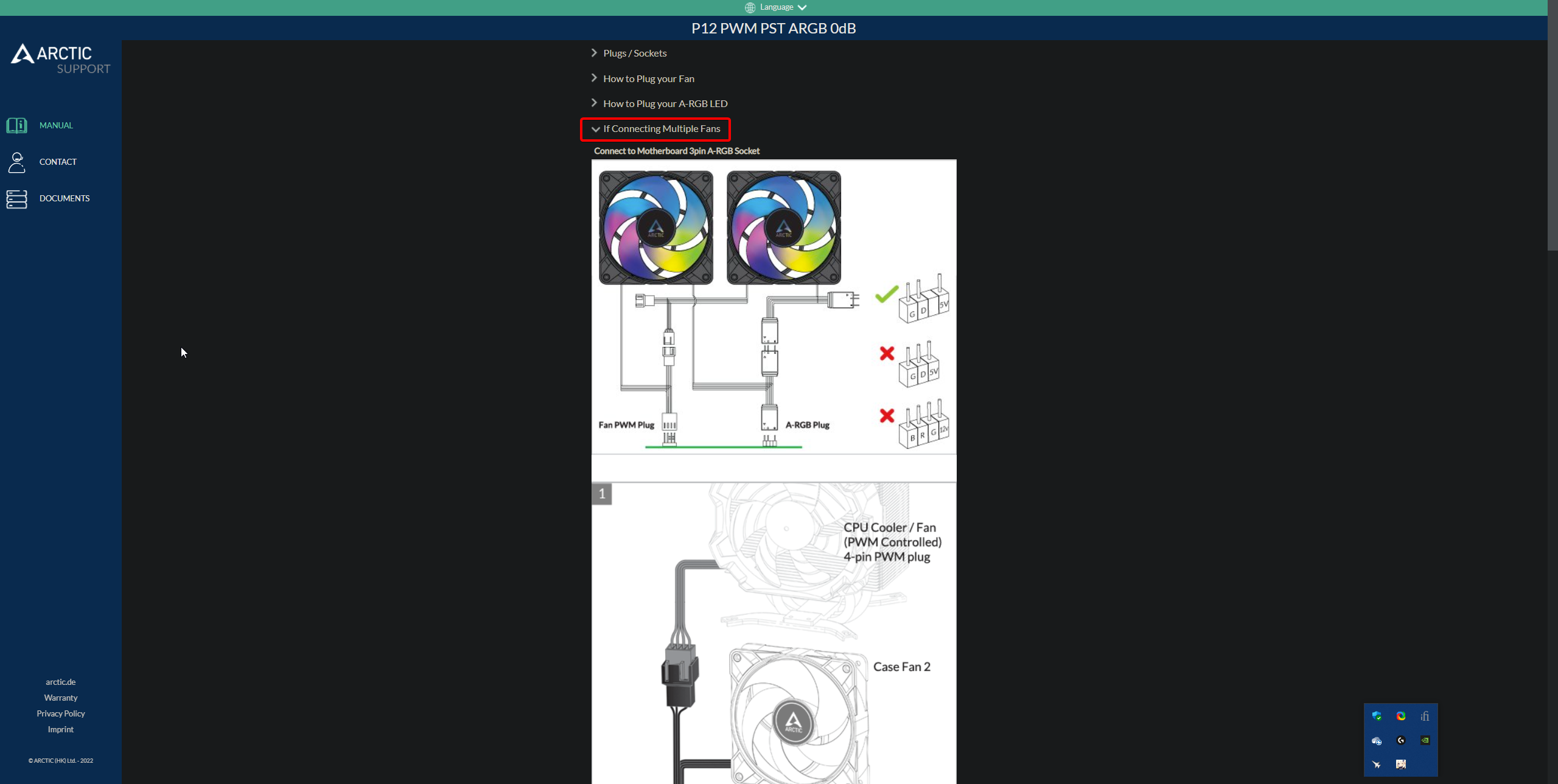

What case is this?
toxic pebble
Looks okay /shrug
 icy orchid
What seems to be the issue
What wires in particular are bringing you trouble?
This one is for daisy chaining the RGB for the fans
There should be something similar to this with a tag on it, you will connect the one with a tag to your motherboard
This is for the fan cable
Yes sir
That’s the one that goes to your board
Should be a fan cable and RGB cable that go to the board

Ein kleines HowTo zum Phanteks P400A Digital.
Wie verbinde ich die ARGB Lüfter oder anderes ARGB Zubehör mit dem im Gehäuse integrierten Controller?
How to connect argb devices to the integrated argb case controller?
Looks like the extension for the RGB cable unless it’s connected to the case specifically
You only need one RGB to the motherboard
Yes
Looks fine
Could you quickly show bottom right and top left of your boards cables
At the top left is that CPU cable connected correctly?
Like all the way in?
Okay good
What are these?
 hexed yew
this cable is for daisy chaining the case's ARGB fans to other ARGB products
you plug stuff onto it
you can plug the arctic fans on that daisy chain connector
yes
hexed yew
@cerulean maple hey i still have this thread lol
toxic pebble
Is that a question?
hexed yew
is that coming from one of the fans?
is the male connector daisy chained from the female connector
toxic pebble
hexed yew
is the male connector daisy chained from the female connector
I think that's already explained more than 5 times to him
hexed yew
toxic pebble
I think that's already explained more than 5 times to him
ikr
does the cable look like what i am showing here

the female connector has a male connector coming off of it
also, yes
then it's from one of the arctic fans like in my picture
connect it to one of the other fans
gn
 placid swan
how has this been going on for more than a day
hexed yew
placid swan
how has this been going on for more than a day
great question
 twin smelt
lol
toxic pebble
Yea
Doesn't matter which one you plug that cable into any of those connectors on the psu cable is fine
Into the PERIF or SATA port
twin smelt
aren't there like tutorials on yt
or guides
or a manual
could boost the building speed by atleast 50 times
worldly basin
my lad have you been building for 3 days straight?
twin smelt
is it done?