#linux blur support because this is aids
394 messages · Page 1 of 1 (latest)
 radiant coyote
bash: export: `/home/omnipathic/.spicetify': not a valid identifier
[omnipathic@fedora ~]$ go install github.com/smoothie-go/smgo-manager@latest
[omnipathic@fedora ~]$ sudo nano ~/.bashrc
[sudo] password for omnipathic:
[omnipathic@fedora ~]$ sudo nano ~/.bashrc
[omnipathic@fedora ~]$ smgo-manager set
(7) smoothie-go 0.0.1-pre-d5d1438
(6) smoothie-go 0.0.1
(5) smoothie-go 0.0.0-pre-c3a60740
(4) smoothie-go 0.0.1-pre-eaec1c75
(3) smoothie-go 0.0.1-pre-9f8af60c
(2) smoothie-go 0.0.1-pre-185e1a7c
(1) smoothie-go 0.0.1-pre-18590e35
Select a version:
ignore the first line
its fixed now
i think?
 lime shale
radiant coyote
bash: export: `/home/omnipathic/.spicetify': not a valid identifier
[omnipathic@...
lime shale
radiant coyote
bash: export: `/home/omnipathic/.spicetify': not a valid identifier
[omnipathic@...
Press 1 and enter
lime shale
radiant coyote
hexcode
Its just the partial commit hash
Since it's building every commit
lime shale
With [PRE] at the start of the commit
radiant coyote
much more to be done?
lime shale
Its the same command line args as smrs
radiant coyote
lime shale
With [PRE] at the start of the commit
is pre not previous or wtv
radiant coyote
lime shale
Its the same command line args as smrs
hell yeah
lime shale
radiant coyote
is pre not previous or wtv
PRE alpha
lime shale
radiant coyote
with no pre
What?
 balmy moon

radiant coyote
what am i saying
radiant coyote
(7) smoothie-go 0.0.1-pre-d5d1438
(6) smoothie-go 0.0.1
(5) smoothie-go 0.0.0-pre-c3a60740
(4) smoothie-go 0.0.1-pre-eaec1c75
(3) smoothie-go 0.0.1-pre-9f8af60c
(2) smoothie-go 0.0.1-pre-185e1a7c
(1) smoothie-go 0.0.1-pre-18590e35
these
lime shale
Its 1
radiant coyote
the one with no pre is the oldest?
radiant coyote
lime shale
Its 1
yeah i did that dw
lime shale
The latest is always 1
radiant coyote
why is 6 different
radiant coyote
lime shale
The latest is always 1
for everytthing or just smgo
lime shale
Smgo
radiant coyote
alr
lime shale
radiant coyote
why is 6 different
Older versions
You can actually switch between and update just using smgo-manager
radiant coyote
hooray
it seems to be working
2025/08/11 18:02:36 Error finding smoothie-rs: exec: "smoothie-rs": executable file not found in $PATH
2025/08/11 18:02:36 Error finding smoothie-rs: exec: "smoothie-rs": executable file not found in $PATH
2025/08/11 18:02:37 {"interpolation":{"enabled":true,"masking":false,"type":"svp","of_blocks":0,"fps":1920,"speed":"medium","tuning":"weak","algorithm":23,"use_gpu":false},"frame_blending":{"enabled":true,"fps":60,"intensity":1,"weighting":"equal","bright_blend":false},"flow_blur":{"enabled":false,"masking":false,"amount":125,"do_blending":"after"},"output":{"process":"ffmpeg","enc_args":"-c:v libx264 -preset slow -aq-mode 3 -crf 16","file_format":"%FILENAME% ~ %FRUIT%","container":".MP4"},"preview_window":{"enabled":false,"process":"ffplay","output_args":"-f yuv4mpegpipe -"},"artifact_masking":{"enabled":false,"feathering":true,"folder_path":"","file_name":""},"miscellaneous":{"play_ding":false,"always_verbose":false,"dedup_threshold":0,"global_output_folder":"","source_indexing":false,"ffmpeg_options":"-loglevel error -i - -hide_banner -stats -stats_period 0.15","ffplay_options":"-loglevel quiet -i - -autoexit -window_title smoothie.preview"},"timescale":{"in":1,"out":1},"color_grading":{"enabled":false,"brightness":1,"saturation":1,"contrast":1,"hue":0,"coring":0},"lut":{"enabled":false,"path":"","opacity":0.2},"pre_interp":{"enabled":false,"scene_change":false,"tta":false,"uhd":false,"masking":false,"factor":"3x","model":"/home/omnipathic/.local/share/smoothie-go/models/rife-v4.6"}}
2025/08/11 18:02:37 {"input_file":"/mnt/clips/cxlidped.mp4","input_fps":360,"output_file":"cxlidped ~ Grape","out_dir":"/mnt/clips","encode_args":"","recipe_path":"/home/omnipathic/.config/smoothie-go/recipe.ini","log_file":"/home/omnipathic/.local/state/smoothie-go.log","verbose":true,"weighting":[0.030303030303030304,0.030303030303030304,0.030303030303030304,0.030303030303030304,0.030303030303030304,0.030303030303030304,0.030303030303030304,0.030303030303030304,0.030303030303030304,0.030303030303030304,0.030303030303030304,0.030303030303030304,0.030303030303030304,0.030303030303030304,0.030303030303030304,0.030303030303030304,0.030303030303030304,0.030303030303030304,0.030303030303030304,0.030303030303030304,0.030303030303030304,0.030303030303030304,0.030303030303030304,0.030303030303030304,0.030303030303030304,0.030303030303030304,0.030303030303030304,0.030303030303030304,0.030303030303030304,0.030303030303030304,0.030303030303030304,0.030303030303030304,0.030303030303030304]}
[/home/omnipathic/.local/share/smgo-manager/Versions/0.0.1-pre-18590e35/ffmpeg -i /tmp/cxlidped.mp46855996034/audiotracks.mka -loglevel error -i - -hide_banner -stats -stats_period 0.15 -filter:v setpts=1.000000*PTS -c:v libx264 -preset slow -aq-mode 3 -crf 16]
[2025-08-11 18:02:37] [DEBUG   ] smoothie: Cache path: /mnt/clips/cxlidped.mp4-bsindex
[2025-08-11 18:02:39] [DEBUG   ] smoothie: Loaded input video: /mnt/clips/cxlidped.mp4
[2025-08-11 18:02:39] [DEBUG   ] smoothie: Interpolation: {'enabled': True, 'masking': False, 'type': 'svp', 'of_blocks': 0, 'fps': 1920, 'speed': 'medium', 'tuning': 'weak', 'algorithm': 23, 'use_gpu': False}
[2025-08-11 18:02:39] [DEBUG   ] smoothie: Interpolation: successful
[2025-08-11 18:02:39] [DEBUG   ] smoothie: Frame blending: {'enabled': True, 'fps': 60, 'intensity': 1, 'weighting': 'equal', 'bright_blend': False}
[2025-08-11 18:02:39] [DEBUG ] smoothie: Frame blending: successful```there is the frame= 140 stuff too
was updating too frequently for me to bother copying
the too errors at the beginnning are
an issue?
2025/08/11 18:03:51 Error while copying vspipe output: read |0: file already closed speed=0.103x
frame= 533 fps=7.3 q=-1.0 Lsize= 25686KiB time=00:00:08.83 bitrate=23820.7kbits/s speed=0.121x ```there was an issue
should i be using igmb when im using smoothie?
the file outputted normally and
works
why cant i drag files into discord
ugh
lime shale
radiant coyote
```Output 533 frames in 72.80 seconds (7.32 fps)ime=00:00:07.38 bitrate=24711.4k...
Not sure why this happened but if it did break the video then it's alg ig
lime shale
I just need to actually add masking, (I'm already done with the dynamic handling part)
radiant coyote
ive never used masking tbh
lime shale
I added a small feature that picks the mask based the videos name
radiant coyote
ohh lit
lime shale
radiant coyote
ohh lit
Yea I just didn't recommend smgo to iconic because I know he needs to use masks for his 90 fps input
radiant coyote
whats wrong with 60fps
lime shale
radiant coyote
whats wrong with 60fps
60 looks worse when interpolating and he really wants to interp
Its still a multiple of 30 so its fine
radiant coyote
can he not optimise the game hes playing to get 120 fps
lime shale
radiant coyote
can he not optimise the game hes playing to get 120 fps
Its the encoding that's the problem
radiant coyote
59.94hz as a refresh rate option
radiant coyote
lime shale
Its the encoding that's the problem
hows it different?
radiant coyote
lime shale
.
could be worse
lime shale
Shit hardware, can't encode video at anything more than 90
radiant coyote
on linux i have friends with ddr3 ram and i5 4th gen cpus gettign 300 fps
lime shale
radiant coyote
on linux i have friends with ddr3 ram and i5 4th gen cpus gettign 300 fps
But they can't encode videos at 120 fps
In real time
radiant coyote
lime shale
But they can't encode videos at 120 fps
I mean they were streaming
on discord
60 fps
lime shale
radiant coyote
60 fps
Do they have a proper GPU?
radiant coyote
but yeah I can see how it would be an issue
lime shale
Well there yougo
radiant coyote
true
I feel like
been people on low budgets can have PCs that perform well
like my friend with an r5 3600 and GTX 1650
16gb
can get a PC like that for 300 euro ish
and it could do 360 fps recording
lime shale
radiant coyote
like my friend with an r5 3600 and GTX 1650
That's perfectly fine
You can do 360 on that
radiant coyote
yeah I know that's what I'm saying
it's not too expensive either
and you can get a worse gpu as well
I feel like for half that you could get a decent pc
lime shale
radiant coyote
I feel like for half that you could get a decent pc
Not really no
150 is pushing it
lime shale
The amount of times I've just accidentally flung my coffee is insane (2 times)
lime shale
Side panel saved me
radiant coyote
50 psu
radiant coyote
lime shale
The amount of times I've just accidentally flung my coffee is insane (2 times)
how do you manage that bro 😭
PC under desk
radiant coyote
radiant coyote
50 psu
70 mobo
lime shale
radiant coyote
PC under desk
I used to have it on my desk
radiant coyote
like
lime shale
After watching a bunch of north west repair videos, I've just started laying all my PCs flat
radiant coyote
mobo perpendicular to ground or gpu perpendicular
lime shale
Ripped pads under memory, the core
lime shale
radiant coyote
mobo perpendicular to ground or gpu perpendicular
GPU Perpendicular to the ground
lime shale
radiant coyote
doesn't everyone have it like that 😭
No?
lime shale
radiant coyote
didn't realize that
I don't think a lot of people have it like this https://wccftech.com/antecs-blazer-gt-case-a-chassis-for-vertical-horizontal-pc-builds/amp/
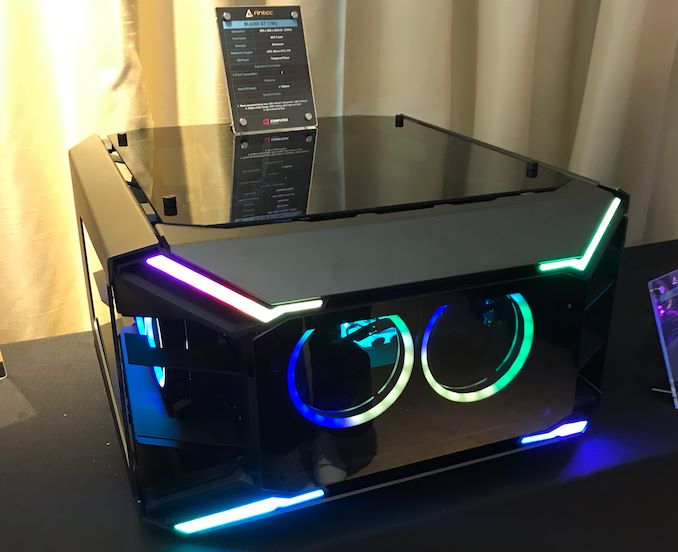
Wccftech
Antec's Blazer GT case can be positioned horizontally or vertically with no compromise on the PC's airflow.
It used to be common back in the day
radiant coyote
lime shale
I don't think a lot of people have it like this https://wccftech.com/antecs-blaz...
it's so inefficient for space
lime shale
radiant coyote
it's so inefficient for space
But it makes your GPU last longer
lime shale
Besides I wasn't using that space next to my desk
lime shale
Yea I was a bit confused when you said that's how everyone has it
radiant coyote
lime shale
I don't think a lot of people have it like this https://wccftech.com/antecs-blaz...
how would this be for cooling?
radiant coyote
radiant coyote
should i be using igmb when im using smoothie?
is this a good or bad idea?
lime shale
radiant coyote
is this a good or bad idea?
Good idea
lime shale
radiant coyote
how would this be for cooling?
No change in temps for me
radiant coyote
lime shale
No change in temps for me
oh lit
lime shale
radiant coyote
too much blur?
Just lower blur intensity if it's too high
I use igmb at 65% and use 0.7 30fps
radiant coyote
i use max igmb
because it scales with fps
on blc
and i get like
2k fps
question tho
whats the svp type
lime shale
radiant coyote
whats the svp type
Its for optical flow, you need 40 series nvidia GPU for of
Change it from svp to of
lime shale
Its faster
lime shale
radiant coyote
im on amd
Maybe they added fsr, idk try it
lime shale
radiant coyote
wait on amd should i use svp or of
I don't even know if of works
radiant coyote
isnane concept
[2025-08-11 18:49:06] [DEBUG ] smoothie: Cache path: /mnt/clips/cxlidped.mp4-bsindex
[2025-08-11 18:49:06] [DEBUG ] smoothie: Loaded input video: /mnt/clips/cxlidped.mp4
[2025-08-11 18:49:06] [DEBUG ] smoothie: Interpolation: {'enabled': True, 'masking': False, 'type': 'of', 'of_blocks': 0, 'fps': 1920, 'speed': 'medium', 'tuning': 'weak', 'algorithm': 23, 'use_gpu': False}
[2025-08-11 18:49:06] [ERROR ] smoothie: Failed to apply interpolation: SVSmoothFps: CUDA is not availabe
Critical: Failed to apply interpolation: SVSmoothFps: CUDA is not availabe
Script evaluation failed:
Python exit with code 1
of doesnt work
lime shale
Maybe when zluda is actually a thing
radiant coyote
hoenstly i dont like 30 fps generally
24 just looks so much better
30 fps looks
unintentional
and slow
lime shale

GitHub
CUDA on non-NVIDIA GPUs. Contribute to vosen/ZLUDA development by creating an account on GitHub.
radiant coyote
and just worse
lime shale
I'm pretty sure it's quite early right now
radiant coyote
looks optimized
lime shale
Originally they were almost done, but nvidia struck them down
lime shale
They were sponsored by amd at one point
radiant coyote
some of this stuff is from a week ago
radiant coyote
lime shale
They were sponsored by amd at one point
oh damnn
thats an accomplishment
radiant coyote
lime shale
They had to revert a massive chunk of their code
thats so sad
screw nvidia man
what was the issue anyway
IP stuff
lime shale
Yes
lime shale
I mean cuda is the only reason nvidia is still relevant
radiant coyote
[vost#0:0/libx264 @ 0x557eb83ce040] Error while opening encoder - maybe incorrect parameters such as bit_rate, rate, width or height.
[vf#0:0 @ 0x557eb83ce540] Error sending frames to consumers: Invalid argument
[vf#0:0 @ 0x557eb83ce540] Task finished with error code: -22 (Invalid argument)
[vf#0:0 @ 0x557eb83ce540] Terminating thread with return code -22 (Invalid argument)
[vost#0:0/libx264 @ 0x557eb83ce040] Could not open encoder before EOF
[vost#0:0/libx264 @ 0x557eb83ce040] Task finished with error code: -22 (Invalid argument)
[vost#0:0/libx264 @ 0x557eb83ce040] Terminating thread with return code -22 (Invalid argument)
[out#0/mp4 @ 0x557eb83cd7c0] Nothing was written into output file, because at least one of its streams received no packets.```they have good codecs
wait is CUDA a codec
lime shale
radiant coyote
wait is CUDA a codec
No GPU language/api
radiant coyote
lime shale
No GPU language/api
so it
translates stuff or something
in an op[timized manner
for the gpu to understand
lime shale
Nope it's just to do stuff on your gpu
radiant coyote
oh lmao
lime shale
And it's nvidia only
radiant coyote
oh its an API
lime shale
And everything supports cuda and almost nothing support ROCM
radiant coyote
radiant coyote
```[libx264 @ 0x557eb83850c0] Error setting preset/tune p7/(null).
[vost#0:0/lib...
waht did i do wrong 😭
could it be my enc args
enc args = H264 CPU -preset p7 -qp 17
radiant coyote
lime shale
And everything supports cuda and almost nothing support ROCM
is ROCM what amd uses?
lime shale
radiant coyote
```[libx264 @ 0x557eb83850c0] Error setting preset/tune p7/(null).
[vost#0:0/lib...
Can you send full output
lime shale
radiant coyote
is ROCM what amd uses?
Yed
radiant coyote
lime shale
radiant coyote
enc args = H264 CPU -preset p7 -qp 17
You can't mix
H264 CPU is a preset not a macro
lime shale
radiant coyote
qp and preset?
Yup
radiant coyote
i understand
lime shale
You can change those in the encoding presets file
lime shale
Yup
radiant coyote
lime shale
You can change those in the encoding presets file
got it
thank you
whats uh
crf and ar mode
lime shale
radiant coyote
so there are multiple and it bugs
I'll add a check for that later
radiant coyote
lime shale
I'll add a check for that later
favour the macro and tell the user the issue i suppose
lime shale
radiant coyote
crf and ar mode
Crf is just cqp, ar mode I have no idea what it is
radiant coyote
not even the creator understands 🙏
lime shale
Encoding presets are straight from SMRs so people don't have inconsistent migrated configs
radiant coyote
lime shale
Crf is just cqp, ar mode I have no idea what it is
0-51?
lime shale
Yes
radiant coyote
lime shale
Encoding presets are straight from SMRs so people don't have inconsistent migrat...
ah
except for type
lime shale
Because smgo asks if you want to migrate an existing smrs config
If it finds smrs jnstalled
radiant coyote
aura ngl
oph thats how 4k works
honestly when u said macros i overcomplicated it in my head
its quite literally just
a macro
just information shortened into one thing lmao
lime shale
Yup
radiant coyote
crf is just cq for amd?
or what
wait no
everything except cpu uses it
nvenc and amf use qp
radiant coyote
i see
AMF = -c:v h264_amf -quality quality -qp_i 16 -qp_p 18 -qp_b 22
different cqs?
what purpose
lime shale
radiant coyote
AMF = -c:v h264_amf -quality quality -qp_i 16 -qp_p 18 -qp_b 22
For I frames p frames and b frames
lime shale
Essentially compression bs, p frames take information from the previous frame and only keep what's changed, and b frames keep what changed in between 2 frames
radiant coyote
also random but, is it possible for me to make a bash file to run it and i make a set name for files i want to render so it runs
smoothie-go -v -i "mnt/clips/render.mp4"
lime shale
Essentially p frames matter less and b frames matter much less
lime shale
radiant coyote
also random but, is it possible for me to make a bash file to run it and i make ...
Yup
radiant coyote
lime shale
Essentially compression bs, p frames take information from the previous frame an...
is this what interpolation uses
or no
compression
lime shale
radiant coyote
is this what interpolation uses
Nope this is compression
lime shale
Interpolation is adding information, and I do not understand how it exactly does that.
radiant coyote
doesnt it use previous frames
or like
between frames
to build the next frame
estimated
interpolation is a term in maths too
lime shale
I know it takes information from the previous frame and the next frame and use that to spit out a new frame
But I didn't look into the algorithms behind video interpolation
radiant coyote
interpolation is a type of estimation, a method of constructing new data points based on the range of a discrete set of known data points
radiant coyote
lime shale
But I didn't look into the algorithms behind video interpolation
AI?
lowkey dont know
lime shale
radiant coyote
AI?
Rife is nn, but SVP is not
radiant coyote
if i disable frame blending and interpolate to 1920 fps
doesnt that just make the file
1920 fps
lime shale
It does
radiant coyote
and then use that file again
to interpolate again to
4096 fps
wait not 4096
uhhhh
lime shale
You're interpolating on already innacurate frames, your data will be even more innacurate.
radiant coyote
3840
radiant coyote
lime shale
You're interpolating on already innacurate frames, your data will be even more i...
im aware
the algorithm wont know that tho 🔥
what happens if u render the same thing twice
360-1920-60-600-60
😭
radiant coyote
radiant coyote
also random but, is it possible for me to make a bash file to run it and i make ...
also am i able to do this
lime shale
radiant coyote
also am i able to do this
Yes
radiant coyote
simplifies the process for me tbh
do i need to format the file specially
like
!BASH or soemthing at the beginning
lime shale
I might also add an argument to make it render everything in a directory with a specific prefix or suffix.
radiant coyote
lime shale
I might also add an argument to make it render everything in a directory with a ...
that would work (i have no idea)
my render.sh file doesnt seem to be working
smoothie-go -v -i "/mnt/clips/render.mp4"```it works if i run the command in terminal
manually
its executable
radiant coyote
hold on i can explain
THIS DOESNT MAKE SENSE
also display capture has terrible encoding
it make stuff lag so bad
radiant coyote
radiant coyote
THIS DOESNT MAKE SENSE
i genuinely dont get this
im assuming char is asleep
but
wtf 😭
am i overcomplicating this
lime shale
radiant coyote
```#! /bin/bash
smoothie-go -v -i "/mnt/clips/render.mp4"```
#!/bin/bash
Not
#! /bin/bash
radiant coyote
didn't work either
lime shale
What's the error though
radiant coyote
shebang formatting is just a for cosmetics
radiant coyote
lime shale
What's the error though
it just says smoothie isn't a command
lime shale
radiant coyote
it just says smoothie isn't a command
Move the PATH stuff from bashrc to bash_profile
lime shale
Yes
lime shale
Alg
radiant coyote
[omnipathic@fedora ~]$ cd ~/bash_profile
bash: cd: /home/omnipathic/bash_profile: No such file or directory
[omnipathic@fedora ~]$
sooooooooooo
ok i forgot the .
but its still not working
oh its because
i cant cd
because its not a dir
im dumb
putting it in .bash_source worked
hooray!
how tf do i intall picom
i need a new compositor because i dont like muffin
i dont think i can use picom on cinnamon
since muffin is deeply integrated inato cinnamon
radiant coyote
do i just use xfce
lime shale
radiant coyote
i dont know what DE to chose bruh
try kde?
wayland should be really nice with the 9060xt
radiant coyote
kde x11 only had issues for me
radiant coyote
lime shale
wayland should be really nice with the 9060xt
i just prefer x11
much less problems
lime shale
on nvidia on stablestale distros yea
lime shale
ive fixed smgo-manager on windows :D
radiant coyote
i might be able to try again but idk
lime shale
it properly sets up smgo now
radiant coyote
lime shale
ive fixed smgo-manager on windows :D
hooray!
lime shale
this is what happened with my previous install of windows (no "tweaks" done)
lime shale
radiant coyote
i sued kde x11 on fedora with my 9060 xt
x11 on kde and gnome is essentially unmainted software, its gets as much attention as half life source
radiant coyote
yeah annoyingly
lime shale
radiant coyote
yeah annoyingly
i mean it makes sense, X11 is unmaintained, and wayland works for most on up to date distros now