#Custom Commands

1 messages · Page 1 of 1 (latest)

vivid robinBOT
#
The list of custom commands of our server has been sent to you PlannerPete!
timid lotus
#

!cwcthemes

vivid robinBOT
#

To use the building themes CPP uses in Clearwater County, you have to do a few things.

First, you have to download CPP's building themes, linked here: <#clearwater-county message> and the building themes mod, https://steamcommunity.com/sharedfiles/filedetails/?id=466158459.

If you do not have any building themes (for example because you just downloaded the mod) or do not have any themes you want to keep than you can simply replace the BuildingThemes.xml file found at C:\Program Files (x86)\Steam\steamapps\common\Cities_Skylines on Windows or at ~/Library/Application Support/Steam/steamapps/common/Cities_Skylines for Mac. If it isn't there then just add it.

If you do have building themes you wish to keep, follow the directions from drezavelt below, which include downloading Notepad++ from https://notepad-plus-plus.org/downloads/v7.9.5/

1: https://i.imgur.com/kmYD5ub.png
2: https://i.imgur.com/ulCzldZ.png
3: https://i.imgur.com/sfprMtD.png

timid lotus
#

A few changes to the command:

Could the first paragraph be changed to a title instead?

Wanting to use CPP's building themes?

And then the second changed to this?

First, you have to *download CPP's building themes and assets*.
Building Themes Mod — [Themes](#clearwater-county message) — One-click collection *or* Buildings collection
The one-click collection has every asset in CWC, while the buildings collection only has the buildings.

#

.

!modlist

vivid robinBOT
timid lotus
#

And could the CWC mods be changed to

List of CWC modsassetsall

*Asset lists only contain assets for the beginning of the series. For assets from later episodes, check the video description or pinned comment for a collection or individual assets.* If there is an asset you are still wondering about, ask in #clearwater-county with a screenshot of the asset and preferably the tooltip when selected in the menu.

For building themes, see the `!cwcthemes` command.

#

.

sure hope I got the links right this time

trim osprey
#

!modlist

vivid robinBOT
#
The currently ongoing series' mod list

VB2 List of VB mods
CWC List of CWC modsassetsall

Asset lists only contain assets for the beginning of the series. For assets from later episodes, check the video description or pinned comment for a collection or individual assets. If there is an asset you are still wondering about, ask in clearwater-county with a screenshot of the asset and preferably the tooltip when selected in the menu.

For building themes, see the !cwcthemes command.

trim osprey
#

!cwcthemes

vivid robinBOT
#
Wanting to use CPP's building themes?

First, you have to download CPP's building themes and assets.
Building Themes Mod — [Themes](#clearwater-county message) — One-click collection or Buildings collection
The one-click collection has every asset in CWC, while the buildings collection only has the buildings.

If you do not have any building themes (for example because you just downloaded the mod) or do not have any themes you want to keep than you can simply replace the BuildingThemes.xml file found at C:\Program Files (x86)\Steam\steamapps\common\Cities_Skylines on Windows or at ~/Library/Application Support/Steam/steamapps/common/Cities_Skylines for Mac. If it isn't there then just add it.

If you do have building themes you wish to keep, follow the directions from drezavelt below, which include downloading Notepad++ from https://notepad-plus-plus.org/downloads/v7.9.5/

1: https://i.imgur.com/kmYD5ub.png
2: https://i.imgur.com/ulCzldZ.png
3: https://i.imgur.com/sfprMtD.png

trim osprey
#

Done, thank you! YouTheRealMVP

worn panther
#

I think there needs to be a # added in front of clearwater-county in !modlist so it becomes this link: #clearwater-county

#

!modlist

vivid robinBOT
#
The currently ongoing series' mod list

VB2 List of VB mods
CWC List of CWC modsassetsall

Asset lists only contain assets for the beginning of the series. For assets from later episodes, check the video description or pinned comment for a collection or individual assets. If there is an asset you are still wondering about, ask in clearwater-county with a screenshot of the asset and preferably the tooltip when selected in the menu.

For building themes, see the !cwcthemes command.

timid lotus
#

Ah yes, thanks for pointing it out.

trim osprey
#

thanks! fixed

timid lotus
#

In '!modlist', could we add

nicoletbay List of NB mods

timid lotus
#

!modissues

vivid robinBOT
#
__Errors... errors everywhere__

Step 1: Subscribe to the Compatibility Report mod and look at the report it generates when launching the game, found at C:\Program Files (x86)\Steam\steamapps\common\Cities_Skylines\Cities_Data by default.
Step 2: Unsubscribe from anything with "major issues" and check for up-to-date replacements of "mods you should or could unsubscribe."

Step 3: If you don't have Loading Screen Mod, close the game and sub to it.
Step 4: Enable "save reports in this directory" and "check assets for error" in the Loading Screen Mod settings under "reporting".
Step 5: Copy the path to the directory being displayed in the previous step and open it in file explorer.
Step 6: Launch the save that you have been having issues with.

This may fix your issues, but if not...
Step 7: Refresh the reports directory and open the newest asset report file.
Step 8: Open the links to the steam page of any failed assets.
Step 9: Subscribe to any dependencies of the assets (on the right sidebar) that you aren't subscribed to and haven't previously unsubscribed from in Step 2. If there are any dependencies you have previously unsubbed from, unsub from the asset.

Step 10: If you are still having issues, create a thread in #968273009339170836 and post your log files (see the !logs command) and someone will try to help you!

Help! I'm getting simulation errors.
Go back through Steps 1 and 2 and close the game.

If the errors persist, try the "recover from simulation errors" option in the Loading Screen Mod settings (Step 3 above). Otherwise, try Step 10.

timid lotus
#

!lsm

vivid robinBOT
#
Loading Screen Mod (LSM)

This is a very useful mod for optimizing load times and diagnosing asset issues. You can find the mod at https://steamcommunity.com/sharedfiles/filedetails/?id=2731207699.

LSM optimizes loading times by optimizing RAM usage, and with the share textures, share materials, and share meshes options enabled in the mod settings, LSM further decreases loading times by not loading duplicate items, which is especially helpful when using large asset packs that share textures, such as roads.

The other useful feature of LSM is its error reporting tool. When the save reports option is enabled in the mod settings, LSM will create an HTML report of all assets in the chosen folder. By default this folder is located at C:\Users\USERNAME\AppData\Local\Colossal Order\Cities_Skylines\Report\LoadingScreenMod. This HTML file will have a report of all assets with links to allow you to subscribe to the missing ones. The !frax command explains this in more detail, as well as the LSM home page.

Additional information from the new home page:

YES, THIS IS STILL ONLY TEMPORARY
A longer-term replacement for the original Loading Screen Mod will soon be released by algernon. Until then, continue to use this version.

timid lotus
vivid robinBOT
#
Loading Screen Mod (LSM)

This is a very useful mod for optimizing load times and diagnosing asset issues. You can find the mod on the following link.

LSM optimizes loading times by optimizing RAM usage, and with the share textures, share materials, and share meshes options enabled in the mod settings, LSM further decreases loading times by not loading duplicate items, which is especially helpful when using large asset packs that share textures, such as roads.

The other useful feature of LSM is its error reporting tool. When the save reports option is enabled in the mod settings, LSM will create an HTML report of all assets in the chosen folder. By default this folder is located at C:\Users\USERNAME\AppData\Local\Colossal Order\Cities_Skylines\Report\LoadingScreenMod. This HTML file will have a report of all assets with links to allow you to subscribe to the missing ones. The !frax command explains this in more detail.

trim osprey
#

Thank you for the all the work you put into this! YouTheRealMVP

timid lotus
#

!logs

vivid robinBOT
#
The 2 following files can help you sort out what's wrong with your game:
1)

The TMPE mod provides a txt file in which you can find the list of all the mods you have. The ouput log (or player log) will tell what's happening behind your screen. Path to reach both :

For __all platforms__

[steam folder]\steamapps\common\Cities_Skylines\Cities_Data\

Second possibility for __MacOs__ users

/Users/username/Library/Application Support/Steam/steamapps/common/Cities_Skylines
Then right-click Cities and choose Show Package Options (Yosemite users: Choose Open in new tab instead, then click on the new tab), then you can find the log file in : Contents/TMPE.log

2)

The logs produced by Loading Screen Mod (LSM) regarding missing assets are on

For __Windows__

%localappdata%\Colossal Order\Cities_Skylines\Report\LoadingScreenMod

For __MacOs__

/Users/<username>/Library/Application Support/Colossal Order/Cities_Skylines/ (assuming that you haven’t messed with your file structure)

For __Linux__

/home/<username>/.local/share/Colossal Order/Cities_Skylines/Report/LoadingScreenMod/

trim osprey
#

!logs

vivid robinBOT
#
The 2 following files can help you sort out what's wrong with your game:
1)

The TMPE mod provides a txt file in which you can find the list of all the mods you have. The ouput log (or player log) will tell what's happening behind your screen. Path to reach both :

For __all platforms__

[steam folder]\steamapps\common\Cities_Skylines\Cities_Data\

Second possibility for __MacOs__ users

/Users/username/Library/Application Support/Steam/steamapps/common/Cities_Skylines
Then right-click Cities and choose Show Package Options (Yosemite users: Choose Open in new tab instead, then click on the new tab), then you can find the log file in : Contents/TMPE.log

2)

The logs produced by Loading Screen Mod (LSM) regarding missing assets are on

For __Windows__

%localappdata%\Colossal Order\Cities_Skylines\Report\LoadingScreenMod

For __MacOs__

/Users/<username>/Library/Application Support/Colossal Order/Cities_Skylines/ (assuming that you haven’t messed with your file structure)

For __Linux__

/home/<username>/.local/share/Colossal Order/Cities_Skylines/Report/LoadingScreenMod/

glass nebula
# vivid robin

I think the logs command should get updated to something like this, in its current state it is a bit cluttered and wrong.

#

The following files are necessary to identify the cause of your issue(s):

Output / Player log
Windows (output_log.txt):
[steam folder]\steamapps\common\Cities_Skylines\Cities_Data\
macOS (Player.log):
~/Library/Logs/Unity/
Linux (Player.log):
~/.config/unity3d/Colossal Order/Cities: Skylines/

TM:PE logs
(TMPE.log)
Windows:
[steam folder]\steamapps\common\Cities_Skylines\Cities_Data\
macOS:
~Library/Application Support/Steam/steamapps/common/Cities_Skylines > right-click and select "Show Package Options" (Yosemite users: "Open in new tab"). The log can then be found in the new tab: Contents/TMPE.log
Linux:
~/.config/unity3d/Colossal Order/Cities: Skylines/

Loading Screen Mod (LSM)
Windows:
%localappdata%\Colossal Order\Cities_Skylines\Report\LoadingScreenMod
macOS:
~/Library/Application Support/Colossal Order/Cities_Skylines/
Linux:
~/.local/share/Colossal Order/Cities_Skylines/Report/LoadingScreenMod/

#
The following files are necessary to identify the cause of your issue(s):

**Output / Player log**
__Windows (output_log.txt):__
`[steam folder]\steamapps\common\Cities_Skylines\Cities_Data\`
__macOS (Player.log):__
`~/Library/Logs/Unity/`
__Linux (Player.log):__
`~/.config/unity3d/Colossal Order/Cities: Skylines/`

**[TM:PE](https://steamcommunity.com/sharedfiles/filedetails/?id=1637663252) logs**
(TMPE.log)
__Windows:__
`[steam folder]\steamapps\common\Cities_Skylines\Cities_Data\`
__macOS:__
`~Library/Application Support/Steam/steamapps/common/Cities_Skylines` *> right-click and select "Show Package Options" (Yosemite users: "Open in new tab"). The log can then be found in the new tab:* `Contents/TMPE.log`
__Linux:__
`~/.config/unity3d/Colossal Order/Cities: Skylines/`

**[Loading Screen Mod (LSM)](https://steamcommunity.com/sharedfiles/filedetails/?id=2858591409)**
__Windows:__
`%localappdata%\Colossal Order\Cities_Skylines\Report\LoadingScreenMod`
__macOS:__
`~/Library/Application Support/Colossal Order/Cities_Skylines/`
__Linux:__
`~/.local/share/Colossal Order/Cities_Skylines/Report/LoadingScreenMod/`
trim osprey
#

!logs

vivid robinBOT
#
The following files are necessary to identify the cause of your issue(s):

Output / Player log
Windows (output_log.txt):
[steam folder]\steamapps\common\Cities_Skylines\Cities_Data\
macOS (Player.log):
~/Library/Logs/Unity/
Linux (Player.log):
~/.config/unity3d/Colossal Order/Cities: Skylines/

TM:PE logs
(TMPE.log)
Windows:
[steam folder]\steamapps\common\Cities_Skylines\Cities_Data\
macOS:
~Library/Application Support/Steam/steamapps/common/Cities_Skylines > right-click and select "Show Package Options" (Yosemite users: "Open in new tab"). The log can then be found in the new tab: Contents/TMPE.log
Linux:
~/.config/unity3d/Colossal Order/Cities: Skylines/

Loading Screen Mod (LSM)
Windows:
%localappdata%\Colossal Order\Cities_Skylines\Report\LoadingScreenMod
macOS:
~/Library/Application Support/Colossal Order/Cities_Skylines/
Linux:
~/.local/share/Colossal Order/Cities_Skylines/Report/LoadingScreenMod/

trim osprey
#

Thank you for your work! YouTheRealMVP

glass nebula
trim osprey
#

fixed! thanks

worn panther
#

I recommend adding Compatibility Report (html format) as well

glass nebula
#

That’s part of the modissues command

worn panther
#

Ah ok

timid lotus
trim osprey
#

!pagefile

vivid robinBOT
#

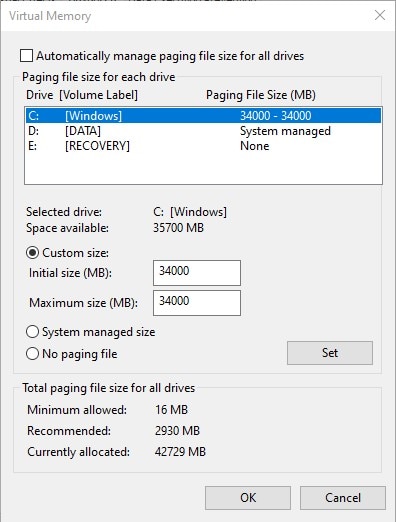
Your issue may be caused by a lack of RAM/page file. Check out this link to see how to fix this.

pine vine
#

!modlist

vivid robinBOT
#
The currently ongoing series' mod list

VB2 List of VB mods
CWC List of CWC modsassetsall — and Realistic MX
nicoletbay List of NB mods

Asset lists only contain assets for the beginning of the series. For assets from later episodes, check the video description or pinned comment for a collection or individual assets. If there is an asset you are still wondering about, ask in #clearwater-county with a screenshot of the asset and preferably the tooltip when selected in the menu.

For building themes, see the !cwcthemes command.

pine vine
#

Yay

cloud vault
#

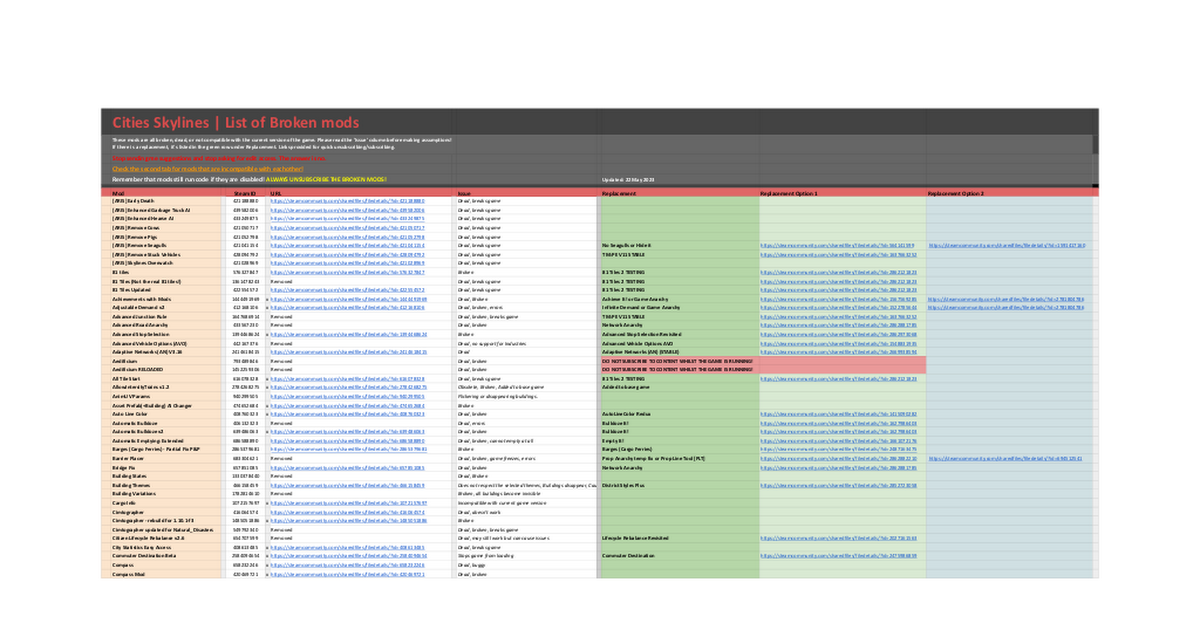
I know it's never ending, but the !topmods command will need to be updated to reflect the change in mods after the recent P&P update.
Even just a link to the Google spreadsheet to show if current mods are compatible would help.
https://docs.google.com/spreadsheets/d/1mVFkj_7ij4FLzKs2QJaONNmb9Z-SRqUeG6xFGqEX1ew/view#gid=141983953

vivid robinBOT
#
The list of custom commands of our server has been sent to you PlannerPete!
vivid robinBOT
#
The list of custom commands of our server has been sent to you AussieMan 📐🏠!
vivid robinBOT
#
The list of custom commands of our server has been sent to you PlannerPete!
vivid robinBOT
#
The list of custom commands of our server has been sent to you Croatian Corruption Complainer!
calm helm
#

With the new "Ultimate Beginner's Guide to Mods", it would be wise for the !topmods command to be updated with links to the two new videos, and the mod collection Phil assembled in the vid descriptions

trim osprey
#

I finally had time to rework the command, please let me know if anything should be changed!

Thank you for the suggestion! YouTheRealMVP

#

!topmods

vivid robinBOT
#

Do you want to find the best mods recommended by CPP?
Then you should check out The Ultimate Beginners Guide to Cities Skylines Mods videos (2 parter) that contains the top 30 mods and a tutorial on how to use them.

The first video's topics:

  1. 81 Tiles 2
  2. Move It
  3. City Vitals Watch
  4. Picker
  5. Toggle It
  6. Network Anarchy
  7. Extra Landscaping Tools
  8. Find It! 2
  9. Surface Painter
  10. Game Anarchy
  11. Ploppable RICO Revisited
  12. Hide It!
  13. BOB
  14. Tree Control
  15. Prop Control

The MOD collection for this video is here

The second video's topics:
16. Line Tool
17. Network Multitool
18. Node Controller Renewal
19. TMPE
20. IMT
21. Loading Screen Mod Revisited
22. UI Resolution
23. Yet Another Toolbar
24. Play It!
25. Dynamic Resolution
26. Ultimate Level of Detail
27. Theme Mixer 2.5
28. ACME - Another Camera Mode
29. FPS Booster
30. Undo it!

You can find the MOD collection for this video here

Older video in this topic:

CPP has created a list of 15 Basic Mods, the absolute best mods in the game. For a quick explanation on how to use each mod, check out this video in the Tutoria playlist.
For more advanced players, he recommends these 15 Advanced Mods,
which are described in in this video.

Older video in this topic:

CPP also made a Top 20 Mods video at the start of 2021 (Steam collection), but due to modders becoming inactive, game updates, and new mods, some mods on the list are broken and obsolete. An updated collection can be found here with descriptions of all the changes made.

cloud vault
#

You’re a superstar Mulli

calm helm
#

impressive

#

nice job

#

is it possible to have the two lists of 15 side by side (just like the stuff at the bottom with the two different older videos?)
might be a little cluttered, but doesn't stretch the command out too much

cloud vault
#

I don’t think Discord text formatting really allows for it. Especially on mobile

calm helm
#

prolly not

#

I also see that the first line (Looking for mod recommendations? Click here) directs you to the 2021 video
Maybe that should direct you to the Steam link to the collection instead

#

could also remove that "The MOD collection for this video is here" between the first and second videos (since it just leads to the same link as "You can find the MOD collection for this video here")
and reword that to "You can find the MOD collection for these videos here"
but these are pretty minor changes, and the command is very much ready to use without them 🤷

calm helm
trim osprey
trim osprey
#

how dos this look like now? I feel it's a little bit crowded, but I cannot do much better job if we want to keep the list:

#

!topmods

vivid robinBOT
#

Do you want to find the best mods recommended by CPP?
Then you should check out The Ultimate Beginners Guide to Cities Skylines Mods videos (2 parter) that contains the top 30 mods and a tutorial on how to use them.

The first videos's topics:
  1. 81 Tiles 2
  2. Move It
  3. City Vitals Watch
  4. Picker
  5. Toggle It
  6. Network Anarchy
  7. Extra Landscaping Tools
  8. Find It! 2
  9. Surface Painter
  10. Game Anarchy
  11. Ploppable RICO Revisited
  12. Hide It!
  13. BOB
  14. Tree Control
  15. Prop Control

Click here to check it out.

The second video's topics:
  1. Line Tool
  2. Network Multitool
  3. Node Controller Renewal
  4. TMPE
  5. IMT
  6. Loading Screen Mod Revisited
  7. UI Resolution
  8. Yet Another Toolbar
  9. Play It!
  10. Dynamic Resolution
  11. Ultimate Level of Detail
  12. Theme Mixer 2.5
  13. ACME - Another Camera Mode
  14. FPS Booster
  15. Undo it!

Click here to check it out.

The MOD collection for the videos can be reached if you click on the title.

Older videos about this topic:

From 2022:

CPP has created a list of 15 Basic Mods, the absolute best mods in the game. For a quick explanation on how to use each mod, check out this video in the Tutoria playlist.
For more advanced players, he recommends these 15 Advanced Mods,
which are described in in this video.

From 2021:

CPP also made a Top 20 Mods video at the start of 2021 (Steam collection), but due to modders becoming inactive, game updates, and new mods, some mods on the list are broken and obsolete. An updated collection can be found here with descriptions of all the changes made.

trim osprey
#

For mobile users:

calm helm
#

Nice YouTheRealMVP

timid lotus
#

Just a thread for me to put any commands

#

!topmods

vivid robinBOT
#
The One and Only SherryH (and the stuff below)

CPP has created a list of 15 Basic Mods, the absolute best mods in the game. For a quick explanation on how to use each mod, check out this video in the Tutoria playlist.
A list of more advanced mods for beefier computers and more advanced players is coming soon.

CPP also made a Top 20 Mods video at the start of 2021 (Steam collection), but due to modders becoming inactive, game updates, and new mods, some mods on the list are broken and obsolete. An updated collection can be found here with descriptions of all the changes made.

For more advanced players, he recommends these 15 Advanced Mods, which are described in in this video.

timid lotus
#

Can the last paragraph be moved in place of the second and the header un-hyperlinked?

End result (change italicized):

Looking for mod recommendations?
CPP has created a list of 15 Basic Mods, the absolute best mods in the game. For a quick explanation on how to use each mod, check out this video in the Tutoria playlist.
For more advanced players, he recommends these 15 Advanced Mods, which are described in in this video.

CPP also made a Top 20 Mods video at the start of 2021 (Steam collection), but due to modders becoming inactive, game updates, and new mods, some mods on the list are broken and obsolete. An updated collection can be found here with descriptions of all the changes made.

worn panther
# vivid robin

I love that this command gives a huge shout-out to @digital swift everytime someone uses it ♥️

digital swift
#

Awww, you guys!! Who made that?? That's so sweet!!!🥰

digital swift
#

You guys, honestly, you treat me better than I have any right to. Thank you!

timid lotus
#

Just making sure @trim osprey sees this

trim osprey
#

Sorry, I saw it, I'm just having a troubling month, that's why I didn't respond

worn panther
trim osprey
#

!topmods

vivid robinBOT
#
The One and Only SherryH (and the stuff below)

CPP has created a list of 15 Basic Mods, the absolute best mods in the game. For a quick explanation on how to use each mod, check out this video in the Tutoria playlist.
For more advanced players, he recommends these 15 Advanced Mods,
which are described in in this video.

CPP also made a Top 20 Mods video at the start of 2021 (Steam collection), but due to modders becoming inactive, game updates, and new mods, some mods on the list are broken and obsolete. An updated collection can be found here with descriptions of all the changes made.

timid lotus
#

!modlist

vivid robinBOT
timid lotus
#

It should just be series'
Also maybe add a space and capitalize List?

trim osprey
#

!modlist

vivid robinBOT
trim osprey
#

thanks! I already have 5 spaces between the emoji and the text... looks like in embed it can handle more than one space

timid lotus
trim osprey
#

!saves

vivid robinBOT
#

CPP posts Verde Beach saves every five episodes to the Steam Workshop.
Some other short series or tutorials will have saves posted there too.
For Clearwater County saves, every Verde Beach save, or any other saves subscribe to Patreon or become a YouTube Member.

trim osprey
#

btw the link format is text (Just sayin' because you work so much to get this as ready as possible YouTheRealMVP )

timid lotus
#

Oh I got it backwards

#

Oops

trim osprey
#

you're doing it for a while, but I never had the heart to tell it 😄

timid lotus